

10 Best Free Kanban Boards in 2026

Best Free Kanban Board Shortlist


A free kanban board is a digital tool for visualizing work on cards and columns, offered at no cost through a free plan or trial. If you’re searching for the best free kanban tools, you probably need a flexible way to manage tasks, track project progress, and help your team stay in sync—without breaking your budget.
In this guide, you’ll discover which free kanban board tools actually deliver reliable features to optimize your workflow, straightforward user experience, and collaboration designed for real project teams. You’ll also see how each pick fits different workflows so you can confidently match a tool to your project’s needs.
Why Trust Our Software Recommendations
Our team has been testing and reviewing software since 2012. As project managers ourselves, we know how difficult—and important—it is to choose the right software.
For this guide, we evaluated tools using hands-on testing and independent research, scoring tools using our selection criteria. We also draw on insights from industry thought leaders and practicing project management experts.
Our reviews reflect our human editorial judgment, not a sales pitch.
Expert reviewers:
Free Kanban Board Comparison Table
This comparison table summarizes pricing details for my top free Kanban board selections:
| Tool | Best For | Trial Info | Price | ||
|---|---|---|---|---|---|
| 1 | Best for real-time collaboration | Free plan available | From $6/user/month | Website | |
| 2 | Best for open-source customization | Free plan available | Free, open-source | Website | |
| 3 | Best for agile teams needing backlog support | Free plan available | From €5/month | Website | |
| 4 | Best for all-in-one CRM and task boards | 15-day free trial + free demo available | From $49/month (billed annually) | Website | |
| 5 | Best for self-hosted visual task management | Free plan available | Free forever plan | Website | |
| 6 | Best for customizable workflows and layouts | Free plan available | From $7/user/month (billed annually) | Website | |
| 7 | Best with built-in AI task recommendations | Free plan available; 14-day free trial | From $9/user/month (billed annually) | Website | |
| 8 | Best timeline view for task planning | Free plan available | From $10.99/user/month (billed annually) | Website | |
| 9 | Best for multi-view boards on a free plan | Free plan available; 14-day free trial | From $10/user/month (billed annually) | Website | |
| 10 | Best for advanced agile project tracking | Free plan available | From $7.91/user/month | Website |


Free Kanban Board Reviews
Below are my detailed summaries of the free kanban board that made it onto my shortlist. My reviews offer a detailed look at the features, best use cases, and integrations of each tool to help you find the best one for you.

Best for real-time collaboration
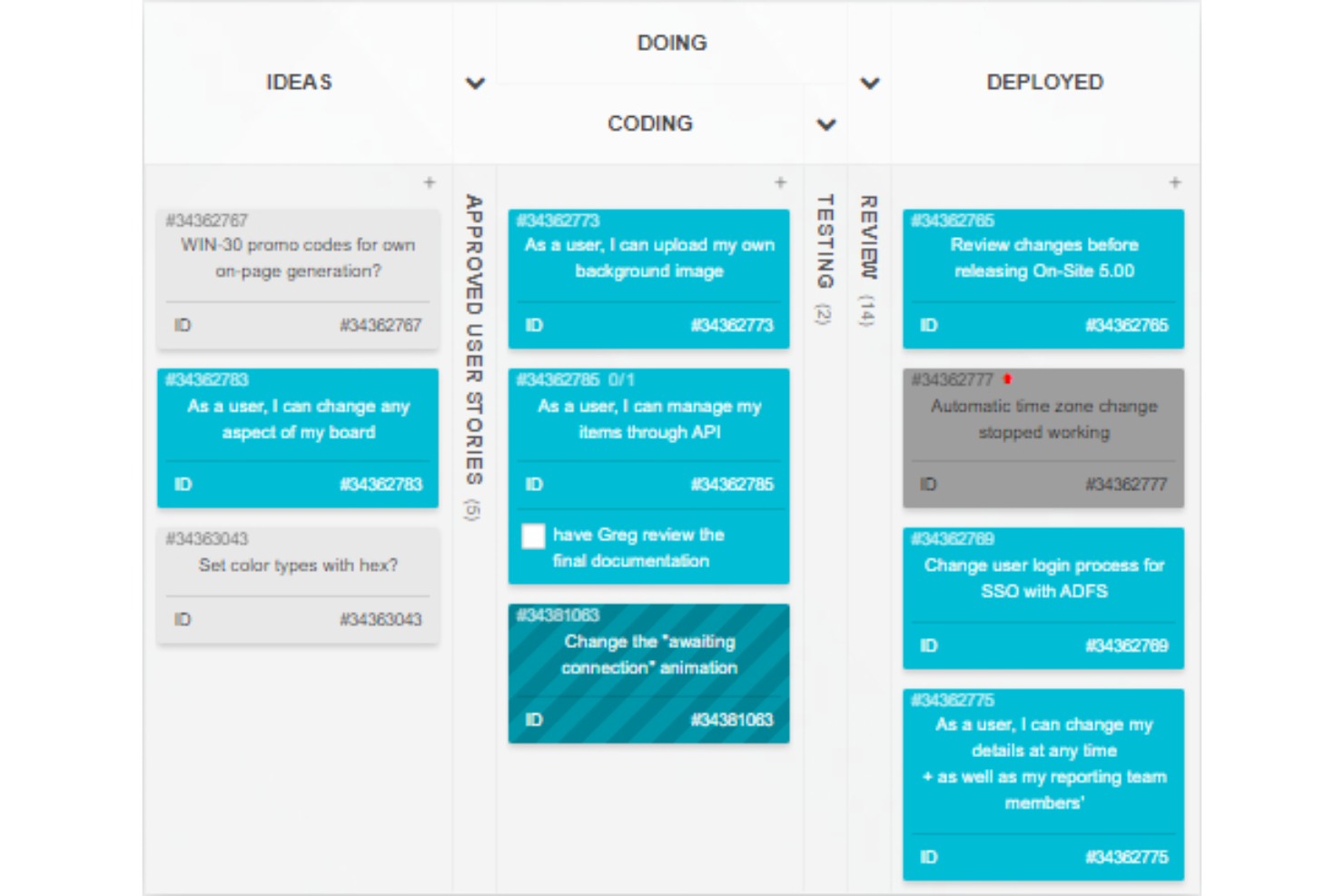
Kanban Tool is an online kanban board platform designed for task visualization, card-based workflows, time tracking, and team activity management in real time.
Who Is Kanban Tool Best For?
Kanban Tool suits distributed teams or small businesses needing visual project management and real-time task updates.
Why I Picked Kanban Tool
I picked Kanban Tool as one of the best because real-time card updates, collaborative commenting, and visual activity indicators keep everyone on the same page during fast-paced project work. I use the swimlanes and card color-coding for progress tracking.
Kanban Tool Key Features
- Time tracking: Track time spent on tasks with built-in timers.
- File attachments: Attach files and documents directly to cards.
- Checklists: Add multiple checklists to each card for detailed task steps.
- Analytics and reporting: View cumulative flow diagrams and other visual project metrics.
Kanban Tool Integrations
Kanban Tool offers native integrations with Zapier, Dropbox, Google Drive, and Box, and provides an API for custom integrations.
What's Free?
Kanban Tool offers a 14-day free trial of all features. There is no mention of a free-forever plan, and all users must select a paid plan after the trial period ends.
Pros and Cons
Pros:
- Swimlanes for managing parallel workflows
- Built-in time tracking per task
- Real-time board and card updates
Cons:
- No mobile app for iOS or Android
- Free plan limits to two boards

WeKan
Best for open-source customization
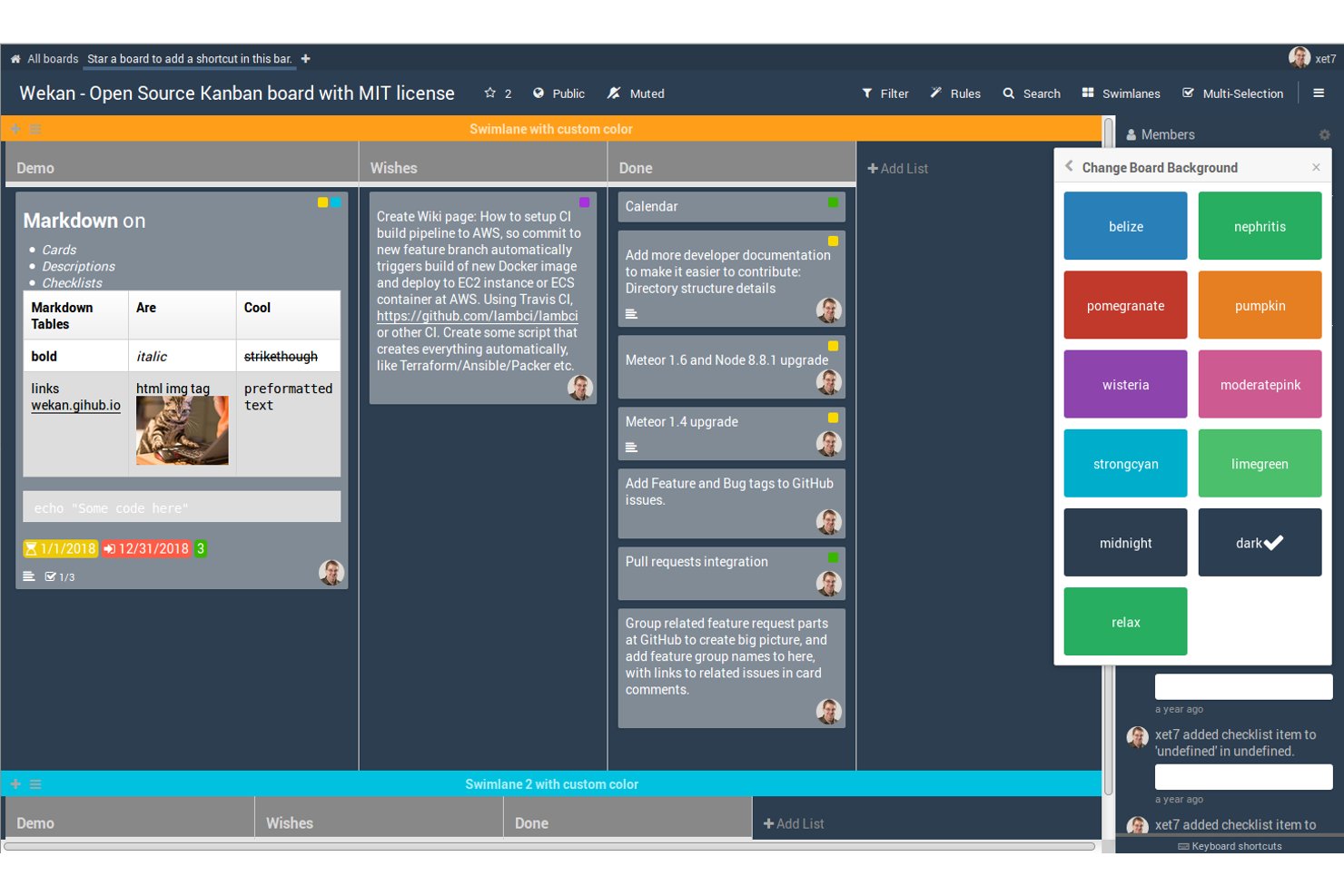
Wekan is an open-source kanban board platform that gives users tools to create, organize, and manage cards and lists for projects or workflows.
Who Is Wekan Best For?
Wekan is a fit for teams and developers seeking a self-hosted kanban solution with control over customization and deployment.
Why I Picked Wekan
I picked Wekan as one of the best because I can fully control and customize my kanban boards using its open-source codebase. I like that I can modify the UI, add custom features, and deploy it on my own infrastructure. This flexibility fits unique project needs.
Wekan Key Features
- Card checklists: Add detailed checklists to cards for subtasks.
- Swimlane support: Visually separate workflows using horizontal swimlanes.
- Card due dates: Assign and track deadlines for individual cards.
- Board member permissions: Set user roles with view, edit, or admin access.
Wekan Integrations
Native integrations are not clearly documented. The tool supports integrations via its REST API for custom workflows.
What's Free?
Wekan is completely free and open-source for unlimited users if you self-host. There are no feature, user, or time restrictions on the open-source version.
Pros and Cons
Pros:
- Custom fields and advanced swimlane options
- Active open-source community for development support
- Self-hosted deployment for full data control
Cons:
- Interface updates are less frequent than competitors
- Fewer features than leading SaaS kanban tools

Taiga
Best for agile teams needing backlog support
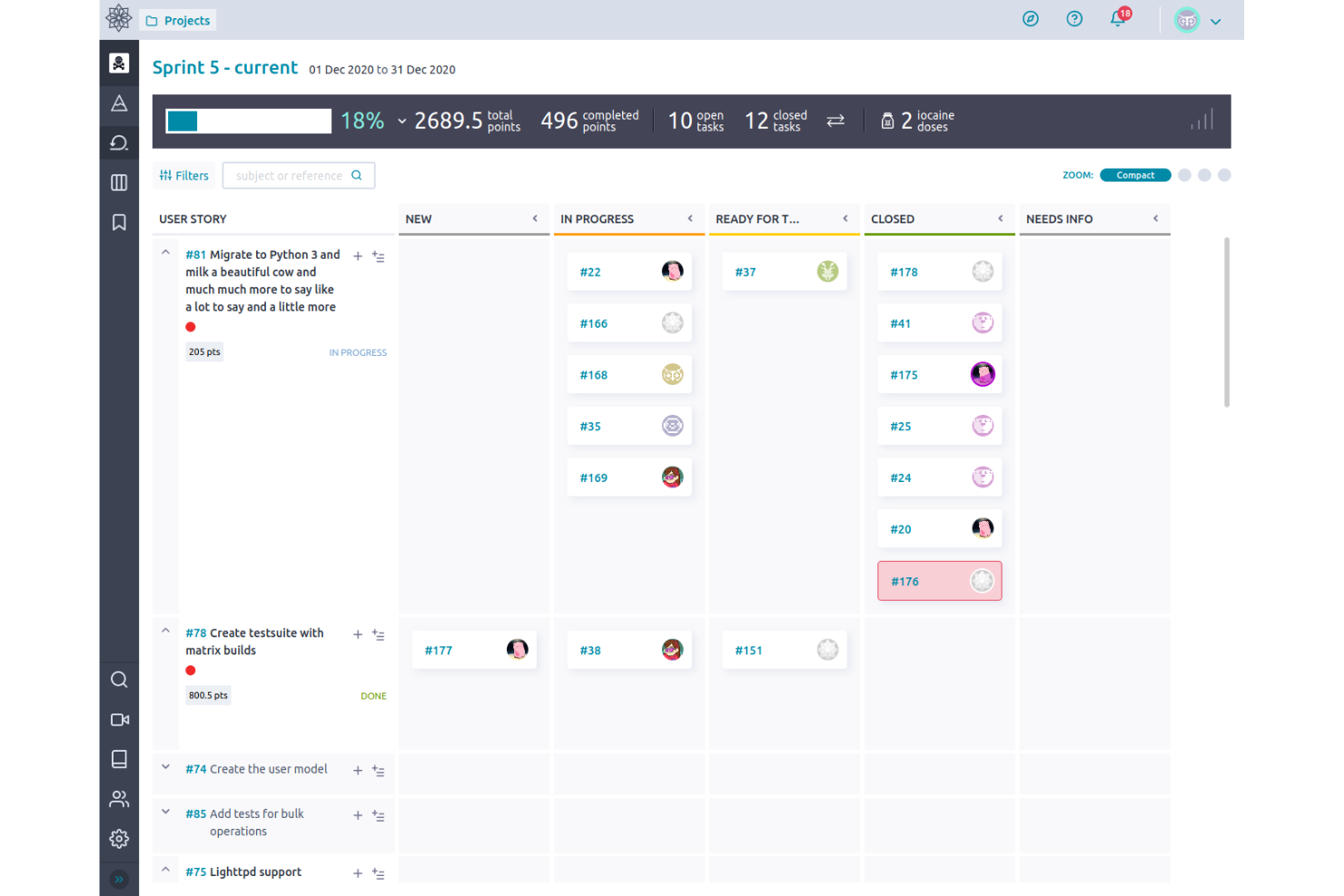
Taiga is an open-source project management tool for agile teams that combines kanban boards, powerful backlog management, sprint planning, and issue tracking in a single workspace.
Who Is Taiga Best For?
Agile product managers and scrum masters at startups or small technology teams looking for flexible kanban workflows and backlog organization.
Why I Picked Taiga
I picked Taiga because I need a kanban tool with strong backlog management. I use user stories, epics, and backlog refinement features to keep priorities clear for agile teams. Taiga’s boards and sprints make managing evolving product backlogs smooth.
Taiga Key Features
- Kanban swimlanes: Organize tasks into multiple horizontal lanes for added structure on your boards.
- Custom workflows: Define and automate unique status progressions for different task types.
- Markdown support: Add markdown formatting to task descriptions, comments, and wiki pages.
- Embedded wiki: Document project knowledge and share resources directly alongside your board.
Taiga Integrations
Taiga offers native integrations with GitHub, GitLab, Bitbucket, and Slack. An API is available for custom integrations.
What's Free?
Taiga offers a free-forever plan that includes unlimited public and private projects, but usage is limited to teams of up to 15 members. Some advanced features may require a paid upgrade.
Pros and Cons
Pros:
- Detailed permissions for project roles
- Built-in wiki and markdown support
- Open-source with kanban and scrum boards
Cons:
- No built-in calendar view
- Reporting options are limited

Bitrix24
Best for all-in-one CRM and task boards
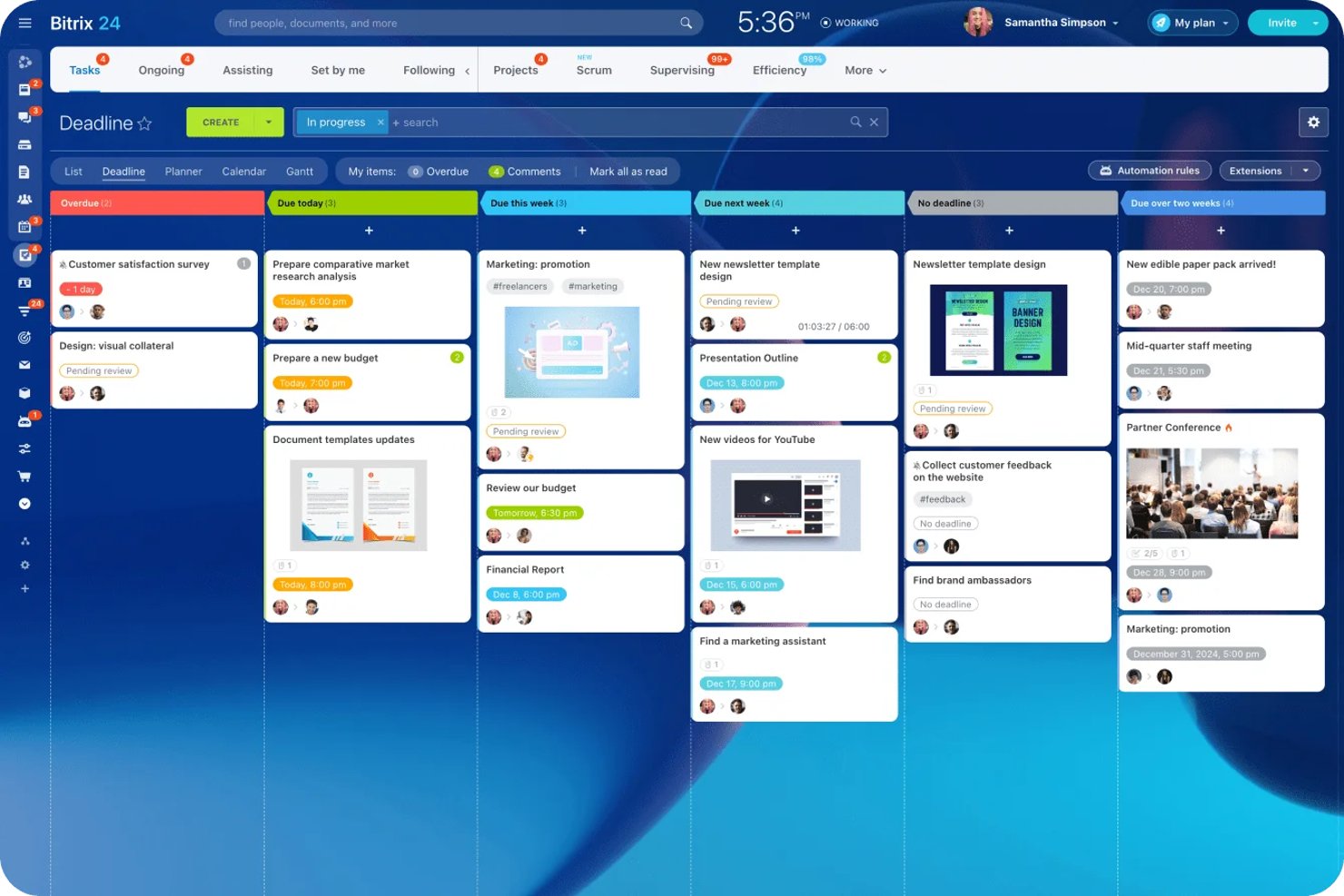
Bitrix24 is a free kanban board solution that unifies task and project management, CRM, chat, video calls, file sharing, automation, and multiple board views within one platform.
Who Is Bitrix24 Best For?
Bitrix24 is a strong choice for small businesses and teams that want to manage tasks, projects, and client relationships on a single, all-in-one platform.
Why I Picked Bitrix24
I picked Bitrix24 as one of the best because it lets my team manage projects, tasks, sales, and client interactions in one place. I like how we can switch between kanban, Gantt, and scrum boards depending on our workflow. Built-in chat, video, and file sharing make collaboration easy as we move tasks or deals through custom kanban stages.
Bitrix24 Key Features
- AI CoPilot integration: Use AI to generate task descriptions, create checklists, and summarize updates directly within cards.
- Project and task templates: Save and reuse templates for common task structures and workflows across boards.
- External collaborator access: Invite clients or freelancers to secure coworking spaces with custom permissions for specific projects.
- Multiple board views: Switch between kanban, Gantt, list, planner, scrum, and calendar views without leaving the platform.
Bitrix24 Integrations
Bitrix24 offers native integrations with WhatsApp, Instagram, Facebook, Telegram, Viber, Google Docs, Microsoft Office, Slack, Skype, QuickBooks, and Xero. It supports marketplace integrations via Bitrix24 Market, connects with Zapier, and provides an open API for custom integrations.
What's Free?
Bitrix24 offers a free-forever plan that supports unlimited users, but has limited storage space and feature access compared to paid plans. The free plan includes core task and project management features, kanban boards, and CRM, but advanced tools, automation, and some integrations are restricted.
Pros and Cons
Pros:
- Team chat and video calls built in
- Built-in AI generates task content and summaries
- Includes kanban, gantt, scrum, calendar views
Cons:
- User limit on free plan is unclear
- Interface is cluttered and overwhelming

Kanboard
Best for self-hosted visual task management
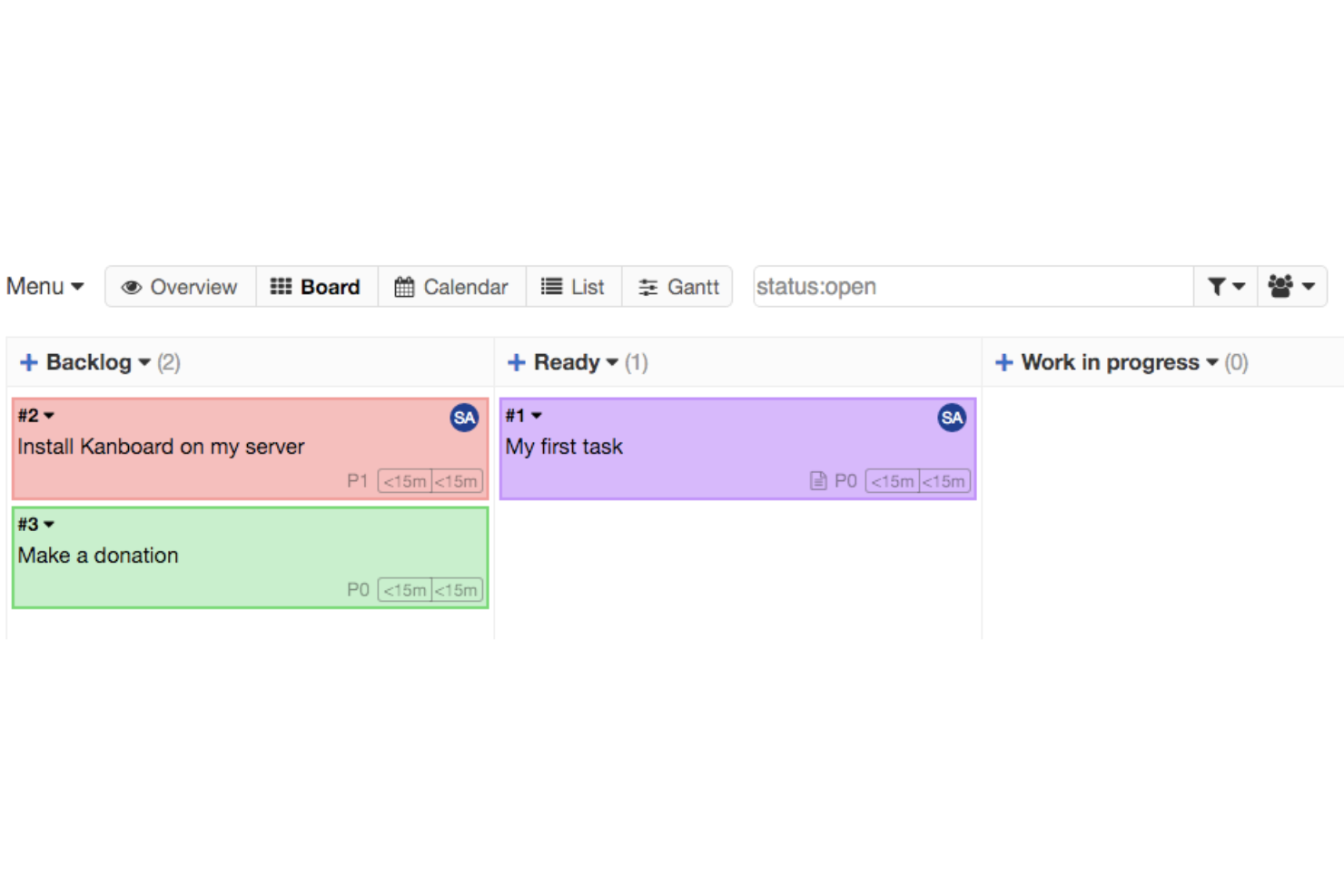
Kanboard is an open-source kanban board solution focused on visual task management, allowing you to create boards, customize workflows, automate processes with integrations, and manage projects entirely on your own infrastructure.
Who Is Kanboard Best For?
Kanboard is a strong fit for IT teams and technical project managers at organizations that want full control over self-hosted, open-source kanban boards.
Why I Picked Kanboard
I picked Kanboard as one of the best because I appreciate how it lets me fully deploy and manage kanban boards on our own infrastructure. I like the deep workflow customization, built-in automations, and ability to add open-source plugins for niche requirements.
Kanboard Key Features
- Subtask management: Break cards into smaller tasks for tracking.
- Swimlane organization: Separate boards into different workstreams or priorities.
- Gantt chart view: Visualize tasks and dependencies on a timeline.
- Markdown support: Format card descriptions and comments using markdown syntax.
Kanboard Integrations
Kanboard offers native integrations with LDAP, RSS feeds, and has an API for custom integrations.
What's Free?
Kanboard is completely free and open-source with no user limits. All core features are available without restrictions for self-hosted use.
Pros and Cons
Pros:
- Extensive workflow automation options
- Self-hosted with complete data control
- Fully open-source with no vendor lock-in
Cons:
- Interface feels dated compared to competitors
- Minimal native integrations with external tools

ClickUp
Best for customizable workflows and layouts
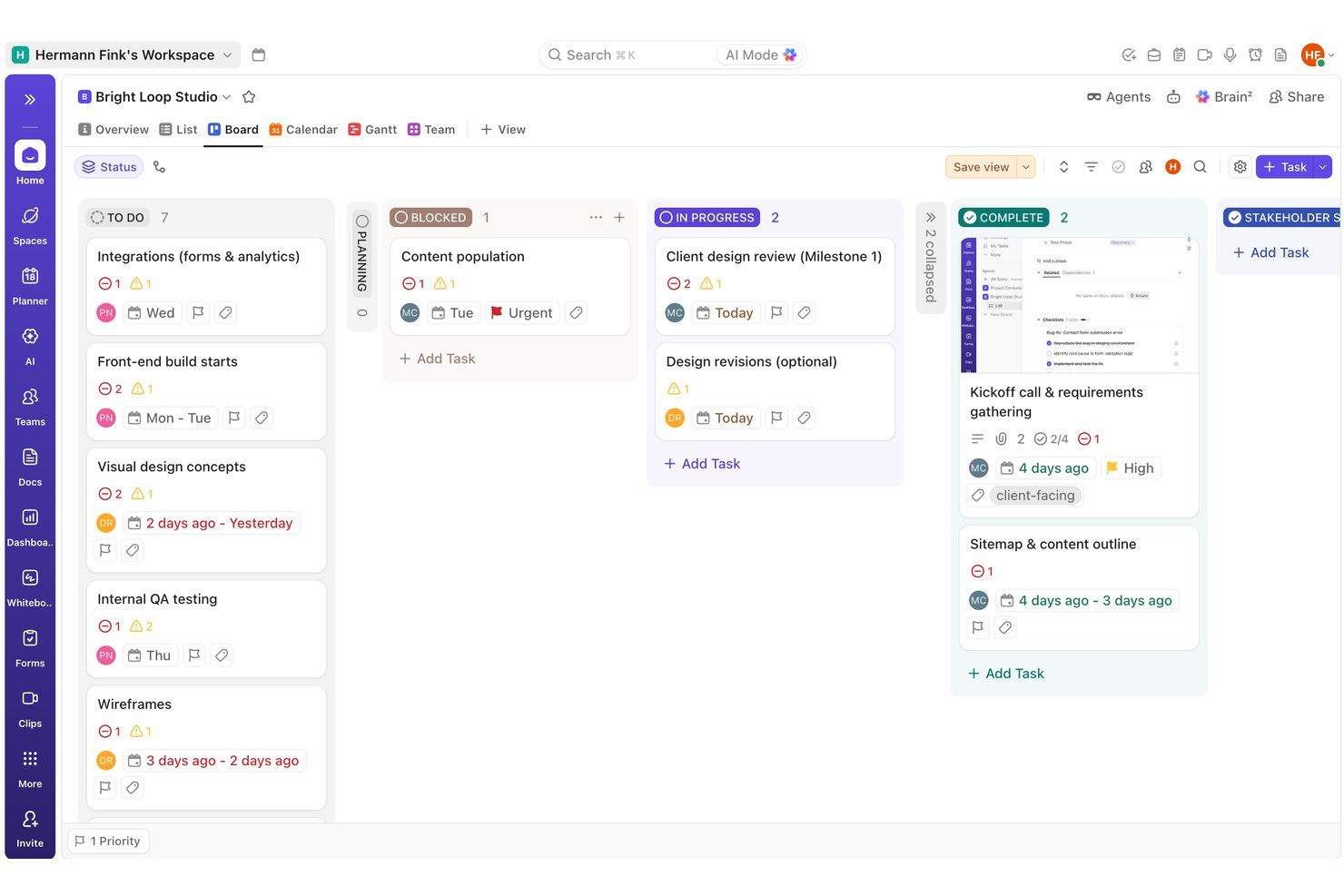
I'd point ClickUp toward teams juggling multiple workflows who want to reshape boards by status, assignee, or priority rather than sticking to one rigid layout. In testing, I built out a full task and dependency structure and found the automation builder fired correctly on the first try, something Trello's free tier can't match.
Why I Picked ClickUp
I picked ClickUp because it lets you rebuild a board around whatever structure your work actually needs. During testing, I set up a dependency chain with multiple blockers per task and watched the warning icons update correctly across both List and Board views without a refresh. I also built an automation rule that shifted priority to Urgent when a status changed to Blocked, and it fired correctly on the first real trigger. That combination of flexible column logic and reliable rule-based automation is hard to find on other free plans.
ClickUp Key Features
- Task dependencies: I linked multiple blockers to a single task and watched warning icons update correctly across List and Board views.
- Quick-add task creation: I built out a dozen tasks in seconds using the type-and-Enter quick-add row, with no extra clicks needed.
- Milestone task type: I flagged key dates using the native diamond-icon milestone type, which stayed visually distinct across every view.
- Comment reactions and mentions: I tested @mentions, file attachments, and emoji reactions on comments, and all worked correctly on the first try.
ClickUp Integrations
ClickUp has native integrations with Slack, Microsoft Teams, GitHub, GitLab, Bitbucket, Google Drive, Dropbox, Google Calendar, Figma, and HubSpot. It also provides a public API and Zapier.
What's Free?
ClickUp offers a free-forever plan with unlimited team members, guests, tasks, and boards—no credit card required. In my own testing, I built out a full board with dependencies, statuses, milestones, and automations, all without hitting user or project limits. The biggest constraints are low storage (just 60MB total for file attachments) and a 60-use cap on custom fields, which I found can restrict richer board setups over time. Most collaboration and workflow features, however, worked as expected with no paywall interruptions for basic use.
Pros and Cons
Pros:
- Automation rule fired correctly on first trigger
- Dependency chains show clear blocker warning icons
- Bulk task creation with type-and-enter quick add
Cons:
- Couldn't locate native WIP limit controls anywhere
- Custom field values didn't render visibly in list view
New Product Updates from ClickUp
ClickUp Adds Meetings Hub, Super Agent Templates, and ZoomInfo Integration
ClickUp adds a searchable Meetings Hub, new ways to clone and template Super Agents, and a ZoomInfo integration through the App Center. These updates improve meeting retrieval, agent reuse, and access to sales intelligence. For more information, visit ClickUp’s official site.

Best with built-in AI task recommendations
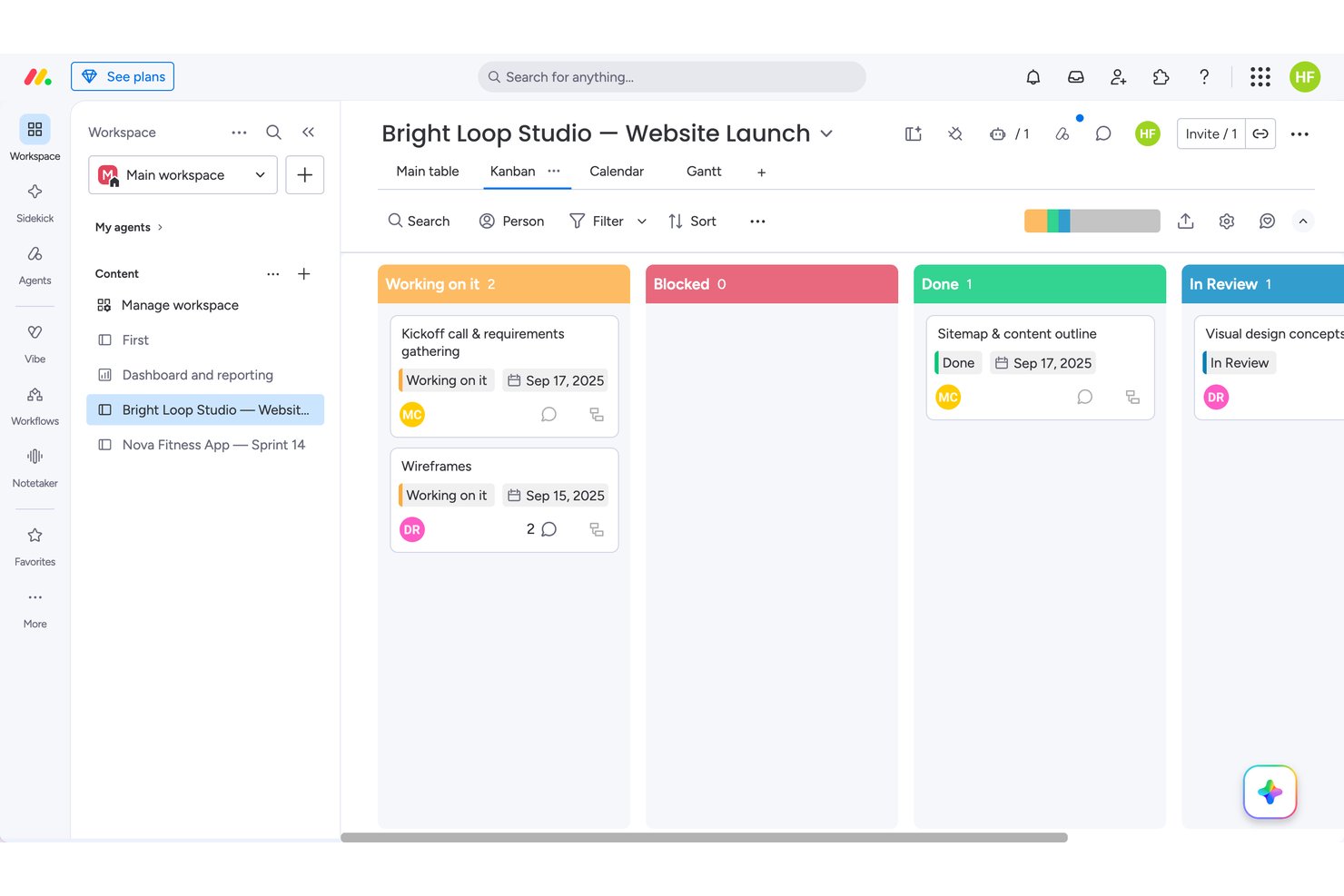
monday.com fits solo users or two-person teams who want visual flexibility over deep collaboration. In testing, I found dependency chains and drag-and-drop synced instantly across Kanban, Calendar, and Gantt views, though WIP limits didn't actually block overflow. That makes it stronger for individual planners than for larger teams, who'll hit the 2-seat cap that rivals like Trello handle more generously on their free tiers.
Why I Picked monday
I picked monday because its automation builder suggests next-step actions and notifications right inside the workflow, closer to true AI-assisted task guidance than most free kanban tools attempt. When I built out a dependency chain across four relationship types, the Gantt view auto-rendered arrows connecting every linked task, something I didn't see elsewhere. Drag-and-drop between Kanban, Calendar, and Table synced instantly with zero refresh lag. WIP limits are configurable, though I noticed they don't actually block overflow when exceeded.
monday Key Features
- Dependency mapping: I linked tasks with four relationship types, including finish-to-start and start-to-start, for real project logic.
- Item activity log: Every field change I made was tracked with a one-click undo option, making mistakes easy to reverse.
- Automation recipes: I built a status-based notification rule from a browsable catalog, though unfilled fields failed silently without an error.
- Custom column editor: I renamed, recolored, and reordered status labels without restructuring any underlying board data.
monday.com Integrations
monday.com offers 850+ marketplace integrations and apps, including Slack, Microsoft Teams, Google Calendar, Google Drive, GitHub, and GitLab. Its open API and SDK support custom integrations, while integration actions require a paid plan.
What's Free?
monday.com offers a free-forever plan with no credit card required, capped at 2 users and 3 boards. I tested real-time drag-and-drop, Kanban, and activity features—everything synced instantly and worked for basic planning, but team collaboration is limited and automation is not available until paid tiers.
Pros and Cons
Pros:
- Activity log offers one-click undo on changes
- Drag-and-drop synced across boards with zero lag
- Dependency chains rendered instantly across Gantt view
Cons:
- Card details spread across separate tabs
- WIP limits don't block or flag overflow
New Product Updates from monday AI Workspace
monday AI Workspace Adds Human Approval Routing
monday AI Workspace adds a human-in-the-loop approval block to AI Workflows, sending approval requests and routing workflow paths based on responses. For more information, visit monday AI Workspace's official site.

Asana
Best timeline view for task planning
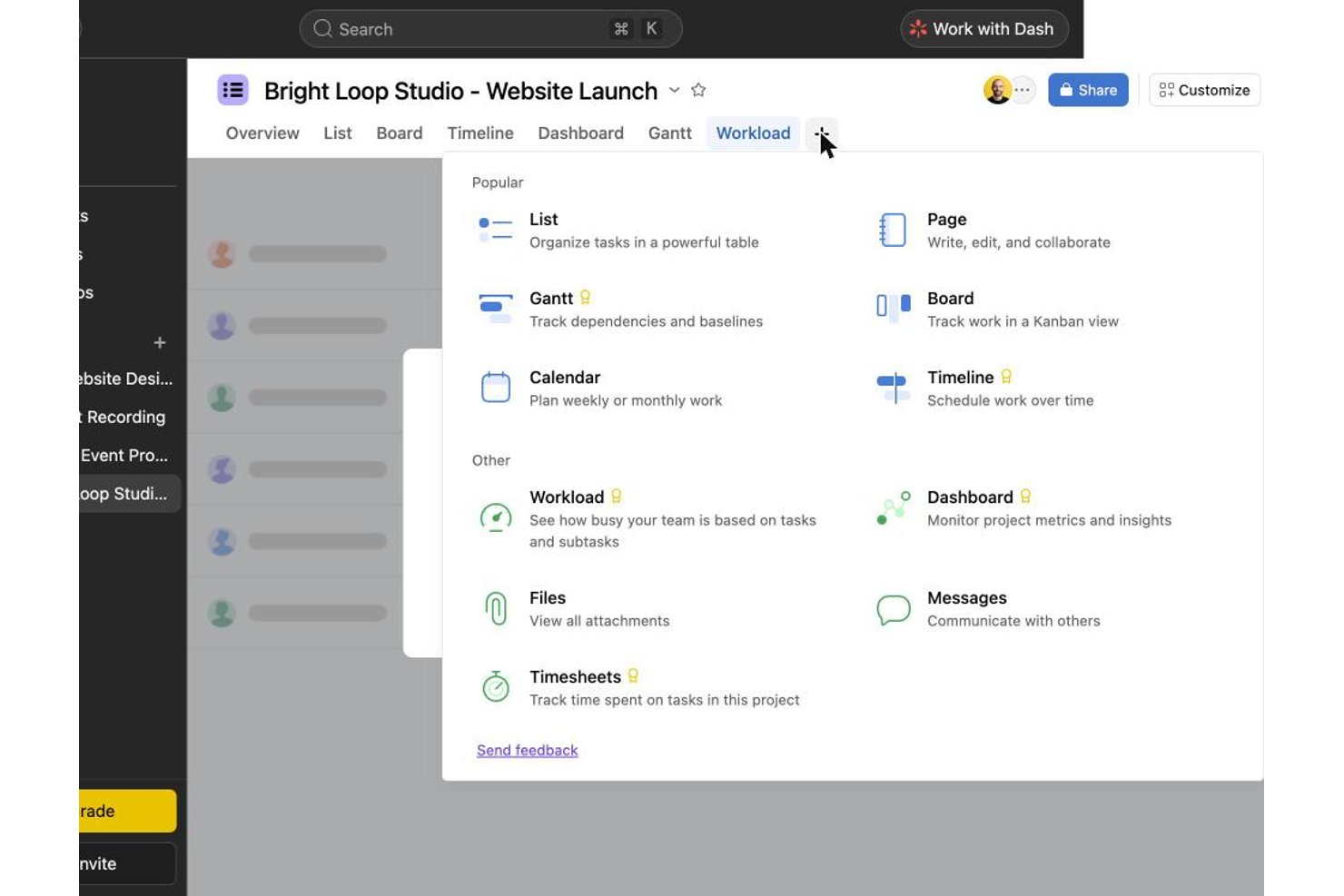
Asana works well for solo users or two-person teams who want a polished task-card experience without juggling multiple tools. In testing, bulk task creation, checklists, and tags felt smoother than in Trello or ClickUp, though drag-and-drop between columns failed on roughly a third of my attempts. It's a stronger fit for individuals than growing teams, since collaboration beyond two free seats requires upgrading.
Why I Picked Asana
I chose Asana because its Timeline view actually delivers on scheduling, even though native start dates and dependencies sit behind a paywall on the free plan. When I tried to map an 11-link dependency chain and two milestones, I had to write date ranges and dependency notes into task descriptions since those fields weren't unlockable. That workaround still produced a usable, readable project plan, which tells me the underlying structure for timeline planning is solid once you upgrade. Switching between Board and List while keeping that same data intact, instantly, is what earns Asana its spot here.
Asana Key Features
- Subtask checklists: Breaking tasks into subtasks gave me a progress counter and a small celebration animation when I checked off the last item.
- Activity log: Every field change I made was timestamped and attributed, making it easy to trace who edited what.
- Board column customization: I added, renamed, and reordered columns to match a workflow, though one reorder attempt didn't register on the first try.
- Comment reactions and @mentions: Tagging teammates and reacting to comments worked smoothly, though attaching files directly inside a comment never visibly completed.
Asana Integrations
Asana offers 200+ integrations, including Slack, Google Drive, Zoom, Microsoft Teams, Jira Cloud, Dropbox, Box, HubSpot, Salesforce, and Power BI. It also provides an open REST API for custom integrations.
What's Free?
Asana offers a free-forever Personal plan with unlimited boards, tasks, and storage, but you’re limited to two users and can’t access Timeline, custom fields, or automations. While I could set up boards, bulk-create tasks, switch between Board, List, and Calendar views, and manage details like checklists and tags without trouble, the paywall blocked start dates, dependencies, and most advanced features—so I relied on workarounds for anything beyond basic kanban.
Pros and Cons
Pros:
- List, board, and calendar views sync instantly
- Activity log timestamps every field change precisely
- Checklist subtasks show satisfying progress animations
Cons:
- Free plan caps collaboration at two users
- Drag-and-drop failed on roughly a third of attempts

Wrike
Best for multi-view boards on a free plan
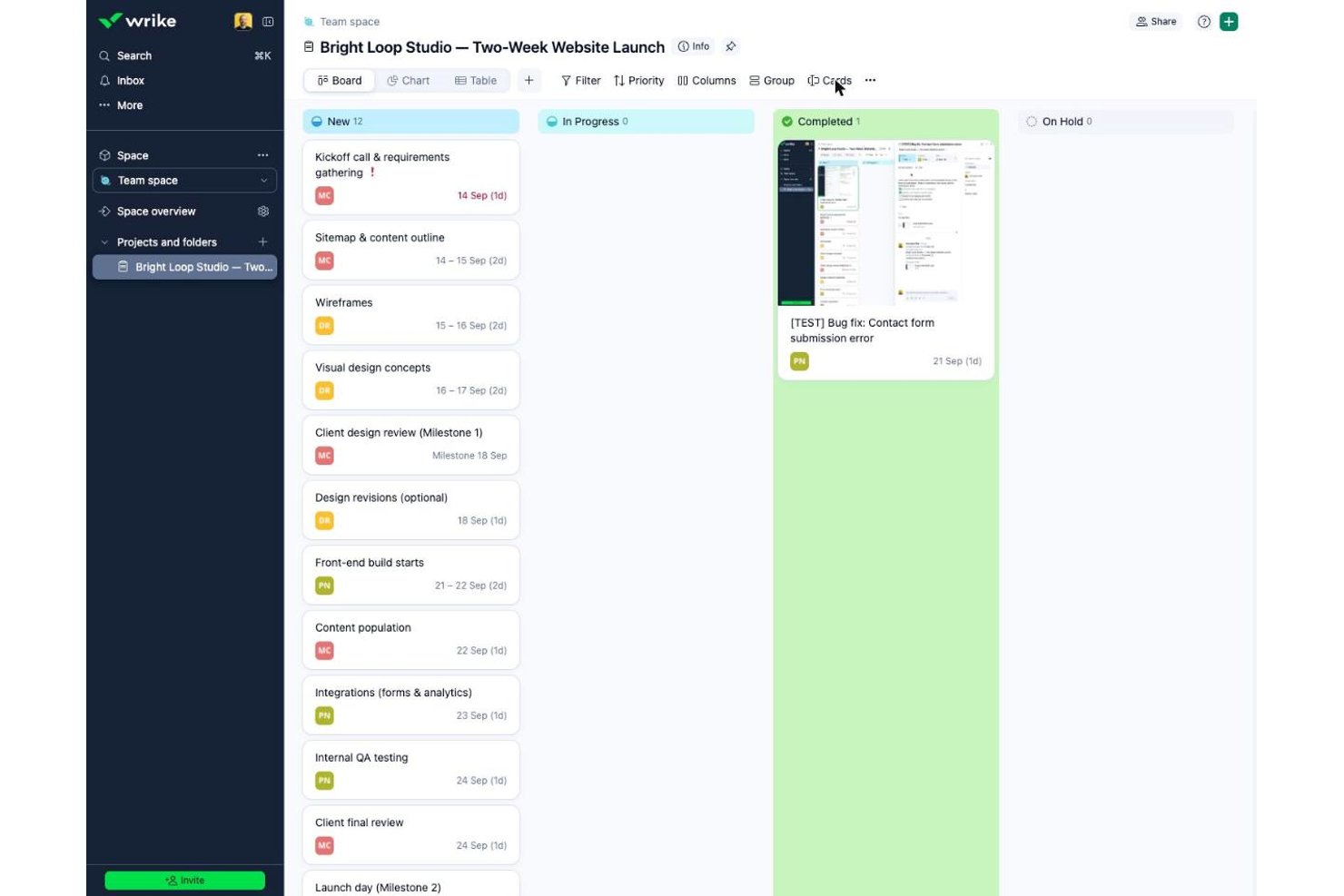
Wrike suits small teams needing unlimited free seats for task-heavy coordination, unlike Asana or monday.com, which cap free users. In testing, bulk task creation and card-level collaboration felt fast and polished, though I couldn't find WIP limits or column customization anywhere in the free interface.
Why I Picked Wrike
Wrike earns its spot for how it handles multiple views on one free plan, letting you flip between Board and Table without losing data. Toggling boards to show projects instead of tasks gave me a portfolio-level read that most free kanban tools reserve for paid tiers. Bulk task creation in Table view felt faster than typing into columns directly, and converting a task to a milestone took one click. I did hit walls trying to add or rename columns, and I never found a native dependency field despite float fields existing behind the scenes.
Wrike Key Features
- Bulk table entry: I created a dozen tasks in minutes by typing names directly into Table view and pressing Enter.
- One-click milestones: Converting a task to a milestone relabeled its date field instantly, with no extra setup.
- Checklist subitems: Adding checklist items to a card gave instant checkbox feedback for tracking small deliverables.
- Mention-aware comments: Commenting on cards prompted a nudge when I forgot to @mention a teammate, keeping updates visible.
Wrike Integrations
Wrike lists about 60 integrations, including Google Workspace, Microsoft 365, Slack, Jira, GitHub, Miro, and Google Sheets. The Free plan includes an Open RESTful API and selected productivity integrations for custom connectivity.
What's Free?
Wrike gives you a free-forever plan with unlimited seats, letting anyone join your workspace at no cost. You get Board and Table views, assignees, file attachments, subtasks, and folder hierarchy, but I couldn’t add or customize columns or set up workflow rules without hitting a paywall. The plan caps storage at 2 GB per account and doesn’t include automation, custom fields, or dashboards. I found task entry and basic collaboration smooth, but key Kanban features like WIP limits and workflow customization aren’t included.
Pros and Cons
Pros:
- Comment nudges keep teammate mentions from slipping through
- Converting tasks into milestones took one click
- Bulk task entry in Table view was very fast
Cons:
- Escape key silently discarded assignee selections
- No visible way to link task dependencies
New Product Updates from Wrike
Wrike Adds Klaxoon MCP Integration
Wrike’s Klaxoon MCP integration is now generally available, enabling AI agents to navigate between Wrike tasks and attached whiteboards, read task context, and manage whiteboard attachments via API. For more information, visit Wrike's official site.

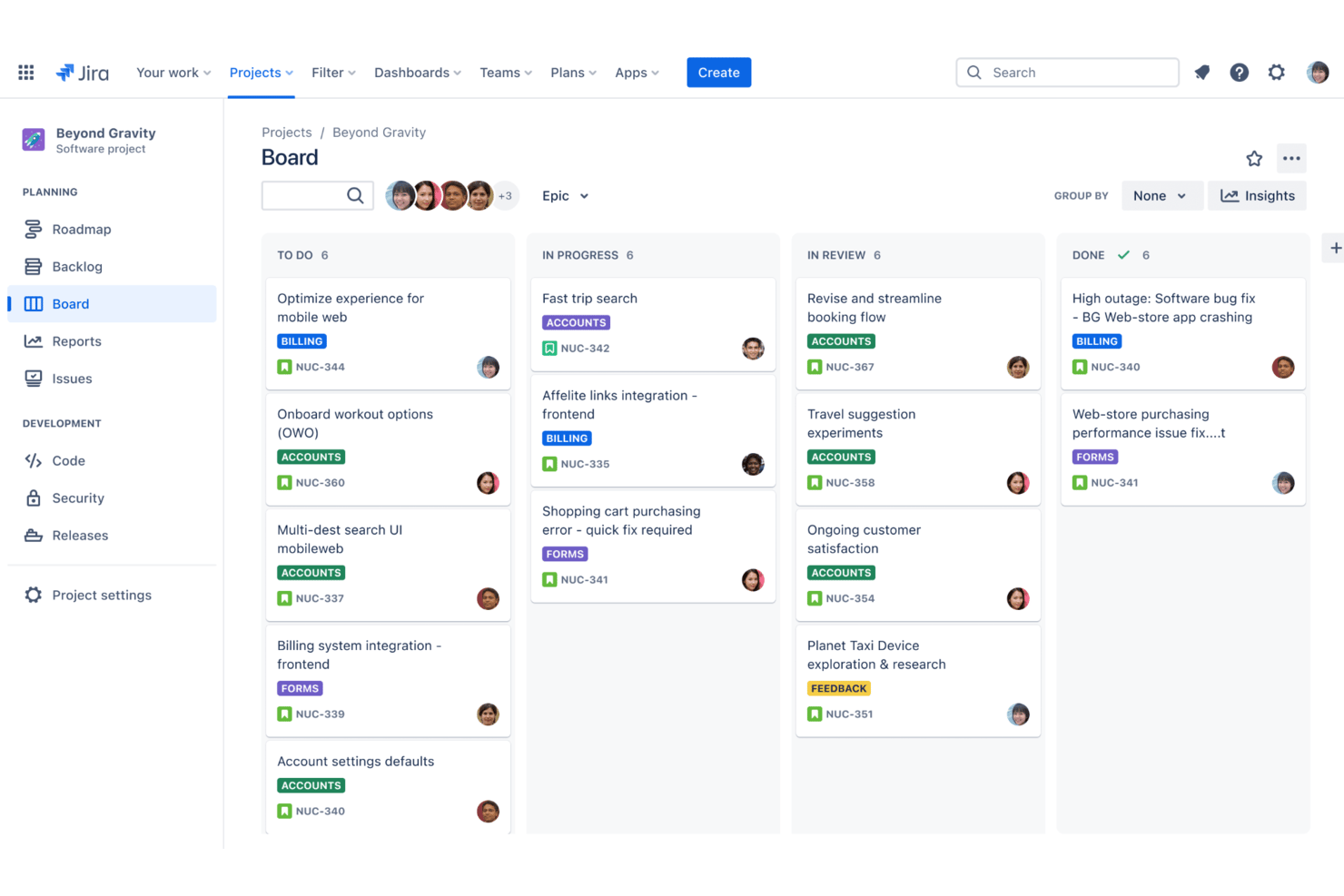
Jira is a project and issue tracking platform for teams that need detailed kanban boards, advanced agile workflows, custom fields, granular permissions, and sprint planning tools.
Who Is Jira Best For?
Jira is a strong fit for software development teams at startups and enterprises who need structured project tracking with agile methodologies.
Why I Picked Jira
I picked Jira as one of the best because I can create highly detailed kanban boards and combine them with advanced agile tools like custom workflows, epics, and sprint automation. Tracking stories and deliverables at multiple levels is seamless for my team.
Jira Key Features
- Backlog management: Prioritize, organize, and plan tasks in a dedicated backlog view.
- Swimlane support: Group cards by assignee, story, or other custom fields.
- Bulk issue editing: Update many tasks at once from the board or backlog.
- Advanced permission controls: Set detailed access and action rights by team, role, or project.
Jira Integrations
Jira offers native integrations with Confluence, Bitbucket, Trello, Slack, GitHub, GitLab, Microsoft Teams, Dropbox, Google Drive, and Salesforce. An API is available for custom integrations.
What's Free?
Jira offers a free-forever plan for up to 10 users. Some advanced features, permissions, and support options are only available on paid plans.
Pros and Cons
Pros:
- Detailed permission settings for boards
- Advanced issue automation and triggers
- Fully configurable kanban workflows
Cons:
- Limited reporting in free plan
- Must enable kanban templates manually
Other Free Kanban Boards
Here are some additional free kanban board options that didn’t make it onto my shortlist, but are still worth checking out:
- Miro
For Kanban on an infinite visual canvas
- Teamhood
For timeline and dependency views
- Freedcamp
For unlimited-user boards on a free plan
- MeisterTask
For intuitive drag-and-drop interface
- Trello
Workflow templates for faster setup
- Pipefy
For workflow process automation
- Nifty
For managing sprints across unlimited members
- Notion
For combining notes and task boards
- Plaky
For unlimited free users on a kanban board
- KanbanFlow
Built-in Pomodoro time tracking


How I Evaluate Free Kanban Boards
First, I define what counts as free. A kanban board must offer a free-forever plan—not a trial—since these tools support ongoing workflows, not one-off projects. From there, I evaluate each tool across two layers: the core functionality it must deliver to make this list, and the differentiators that separate a great option from a merely adequate one.
Core Functionality (Table Stakes For This List)
In addition to my free offer requirements, I also use a scoring system to select tools for my list. Here's how it works:
When I'm selecting tools for my list, I rank each one on a scale from 0 (does not offer the functionality) to 5 (excels in this area) for each core functionality listed below. I then calculate the tool's total score into a percentage, using 75% as a benchmark to help assess its overall fit for the list.
- Kanban Board View: I look at whether the board supports customizable columns and multiple boards, since a fixed To Do/In Progress/Done setup rarely reflects how real teams work.
- Task Cards: I check how much detail you can pack into a card on the free plan—due dates, assignees, and descriptions are the baseline I expect to see without paying.
- Drag-and-Drop: Reliable, real-time card movement matters more than it sounds. I evaluate whether dragging a card across columns actually reflects the update for every team member instantly.
- Team Collaboration: I look at how many users the free plan supports and whether teammates can assign tasks, leave comments, and get notified—core needs for any shared board.
- WIP Limits & Customization: I evaluate whether you can set work-in-progress limits per column, since that's a fundamental part of kanban methodology that many free plans quietly skip.
- Labels, Filters & Search: With boards that grow quickly, I look for multi-criteria filtering and search that helps you find the right card without scrolling through dozens of tasks.
Once I have a list of tools that meet the criteria, I consider what sets each platform apart.
Differentiating Factors (What Sets Vendors Apart)
Here's how I compare and contrast different vendors:
Standout Features
I pay close attention to native automation rules—specifically whether free plans include them at all, since auto-moving cards or auto-assigning on column changes saves real time for teams running recurring workflows. I also evaluate mobile app parity, checking whether the iOS and Android experience actually mirrors the desktop. For distributed teams updating boards between meetings, a stripped-down mobile app is a meaningful limitation. Finally, I look at the templates library to see if it covers practical use cases like sprint planning or bug tracking out of the box.
Beyond Features
Free plan transparency matters more than most people expect. I check whether limits on boards, cards, and storage are disclosed upfront—not buried in fine print after you've built out your workflow. I also look at the upgrade path. If the jump to a paid tier is steep or restructures how your free-plan workflows behave, that's a real risk for growing teams. Finally, data portability is worth evaluating early: knowing you can export your boards as CSV or JSON means you're never fully locked in if your needs change.
How to Choose Free Kanban Board
It’s easy to get bogged down in long feature lists and complex pricing structures. To help you stay focused as you work through your unique software selection process, here’s a checklist of factors to keep in mind:
| Factor | What to Consider |
|---|---|
| Scalability | Can your team add more users and boards as projects grow, or are there limits you’ll quickly hit on the free plan? |
| Integrations | Does the free kanban board connect with your essential tools like Slack, Google Workspace, or file storage, or will integrations be paywalled? |
| Customizability | Are you able to change columns, workflows, or labels to match your team’s processes without upgrading? |
| Ease of use | Will your team adopt the platform easily, or will you spend too much time explaining basic actions and settings? |
| Implementation and onboarding | Are onboarding guides, templates, or data import tools provided to help your team get up and running quickly? |
| Cost | Are there hidden paywalls that block key actions, or storage/user limits you’ll quickly outgrow without paying? |
| Security safeguards | Does the platform provide two-factor authentication, regular backups, and clear user permission controls, even on free plans? |
| Support availability | If you run into trouble, is any support included in the free plan, like chat, documentation, or community forums? |
What Is Free Kanban Board?
Free kanban board are digital tools that let you organize tasks on movable cards within columns, making it easy to track work and visualize progress without any cost. These platforms offer basic project management features like task assignment, drag-and-drop workflow, and simple collaboration so teams can stay organized, manage priorities, and support transparency—all with no licensing fee.
Features of Free Kanban Board
Let’s go over the features commonly found in kanban board, and which ones are usually included in free vs. paid plans.
Typically Free Kanban Board Features
- Drag-and-drop task cards: Move cards between columns to update task status, sequence, or owner, helping teams quickly visualize progress.
- Basic board creation: Set up boards for different projects, clients, or workflows, allowing you to organize and separate workspaces as needed.
- Custom columns: Define process stages like To Do, In Progress, and Done to match your team’s workflow and ensure shared understanding.
- Task details: Add descriptions, checklists, start/due dates, and basic comments to individual cards to keep key task info in one place.
- User assignment: Assign cards to specific people for accountability and visibility into who’s working on each task.
- Simple collaboration: Mention teammates in comments, tag tasks, and share boards, making it easier to work together and discuss work contextually.
- Activity tracking: See a timeline of changes, moves, and updates on each card to know what’s happened and when.
- Basic file attachments: Upload documents, images, or links to task cards for reference, so team members have what they need at hand.
- Board-level permissions: Grant view or edit access to boards, so teams can invite collaborators while restricting who can make changes.
Typically Paid Kanban Board Features
- Advanced automation rules: Use triggers and actions to automate repetitive workflows, like moving cards on due dates or assigning tasks as columns change.
- Gantt or timeline views: Visualize tasks on timelines for better scheduling, resource allocation, and dependency management beyond the standard kanban board.
- Time tracking and reporting: Log hours, generate timesheets or productivity reports, and analyze team performance for project insights and billing.
- Unlimited boards and storage: Remove limits on the number of boards, users, or file uploads, supporting larger and more complex projects.
- Custom fields and card templates: Add structured data fields or reusable task templates, tailoring boards to specific project or business needs.
- Role-based permissions: Set granular access and actions by user role, protecting sensitive project info and controlling who can edit or manage settings.
- Integration with third-party apps: Connect boards with tools like Slack, Google Drive, or CRM systems for better cross-platform workflow and notifications.
- Priority support: Access faster, more personalized help channels like phone, live chat, or dedicated account managers.
- Conditional formatting or filters: Highlight or filter cards based on specific criteria (e.g., overdue tasks, assigned users), improving prioritization and focus.
- Advanced analytics and dashboards: Get deeper insights and visualizations on workflow bottlenecks, lead times, and productivity trends.
Benefits of Free Kanban Board
Implementing free kanban board provides several benefits for your team and your business. Here are a few you can look forward to:
- No software cost: Eliminate license fees so teams of any size can organize and track work without budget concerns.
- Visual workflow clarity: Help everyone see task status and project progress thanks to customizable columns and drag-and-drop boards.
- Easy collaboration: Enable teams to assign tasks, comment, and share boards so everyone stays on the same page.
- Faster onboarding: Get new users started quickly with templates, product tours, and simple board setup at no cost.
- Accessible anywhere: Use cloud-based platforms to update boards and tasks from anywhere, making remote and hybrid team coordination easier.
- Flexible scaling: Add projects and new users within the free plan’s limits as your needs grow, without complex upgrades or contracts.
- Improved accountability: Assign tasks and track activity history so you always know who’s responsible and what’s changed.
Costs and Pricing of a Kanban Board
I realize you came to this article looking for the best kanban board options that are available for free. However, since free plans only offer limited features, there's a good chance you'll need to scale your plan up in the future.
The table below summarizes common plans, their average prices, and typical features included in kanban board:
Plan Comparison Table for Kanban Board
| Plan Type | Average Price | Common Features |
|---|---|---|
| Free Plan | $0 | Basic board creation, task cards, user assignment, basic file attachments, core collaboration tools, and limited storage. |
| Personal Plan | $5-$10/user/month | Unlimited boards, basic automation, more storage, priority support, and custom backgrounds. |
| Business Plan | $10-$25/user/month | Advanced automation, integration with third-party apps, team permissions, reporting, and extended support. |
| Enterprise Plan | $25-$40/user/month | SSO/SAML security, role-based permissions, audit logs, advanced analytics, and enterprise-level support. |
Free Kanban Board FAQs
Here are some answers to common questions about free kanban board:
Are free kanban board safe to use for business data?
Yes, most free kanban board use encryption and basic security protocols, but features like SSO or advanced permissions may be restricted to paid plans. Always review each tool’s policy before sharing sensitive information.
Can I upgrade from a free kanban board plan if my needs grow?
Yes, most vendors offer paid plans that unlock more users, integrations, and advanced features. Upgrading is usually straightforward and allows you to keep your existing boards and data.
Do free kanban board have user or storage limits?
Yes, free plans often include restrictions on the number of users, boards, file attachments, or storage space. If you run into these limits, you’ll typically need to upgrade to a paid plan.
What integrations are usually available in free kanban board?
Most free kanban board provide basic integrations with common tools like email, calendar, or chat apps. More advanced integrations with CRMs or automation tools are usually reserved for paid plans.
Can I invite external collaborators or clients to a free kanban board?
Yes, many free kanban board allow limited guest or external user invites, but access permissions may be basic. Review access controls before sharing sensitive or client information.