

10 Best Enterprise Knowledge Management Software in 2026

Best Enterprise Knowledge Management Software Shortlist


Enterprise knowledge management software helps your organization capture, organize, and share information across teams, making it easier to find answers and keep projects moving. If you’re evaluating these tools, you’re likely frustrated by growing silos, scattered documentation, or gaps in how your people access what they need.
The right solution lets your team collaborate efficiently, keep knowledge up to date, and support complex digital workflows. In this list, I’ll break down what sets each platform apart so you can compare features, integrations, and use cases to make the best choice for your business.
Why Trust Our Software Recommendations
Our team has been testing and reviewing software since 2012. As project managers ourselves, we know how difficult—and important—it is to choose the right software.
For this guide, we evaluated tools using hands-on testing and independent research, scoring tools using our selection criteria. We also draw on insights from industry thought leaders and practicing project management experts.
Our reviews reflect our human editorial judgment, not a sales pitch.
Expert reviewers:
Enterprise Knowledge Management Software Comparison Table
This comparison table summarizes pricing details for my top enterprise knowledge management software selections.
| Tool | Best For | Trial Info | Price | ||
|---|---|---|---|---|---|
| 1 | Best for documentation version control | Free trial available | Pricing upon request | Website | |
| 2 | Best for AI-guided customer support knowledge | Free demo + 14-day free trial available | Pricing upon request | Website | |
| 3 | Best for turning software workflows into SOPs | Free plan available | From $15/user/month (billed annually) | Website | |
| 4 | Best for onboarding with free implementation help | Free demo available | Pricing upon request | Website | |
| 5 | Best for unified docs and task management | Free plan + free trial + free demo available | From $12/user/month | Website | |
| 6 | Best for compliance-driven knowledge governance | Free demo available | Pricing upon request | Website | |
| 7 | Best for asynchronous team knowledge sharing | Free demo + 14-day free trial available | From $10/user/month (billed annually) | Website | |
| 8 | Best for customizable workspace architecture | Free plan + Free trial + Free demo available | From $10/user/month | Website | |
| 9 | Best for scaling team collaboration workflows | Free plan + 7-day trial available | From $5.78/user/month | Website | |
| 10 | Best for AI-powered knowledge suggestions | Free demo available | Pricing upon request | Website |

Best Enterprise Knowledge Management Software Reviews
Below are my detailed summaries of the best enterprise knowledge management software that made it onto my shortlist. My reviews offer a detailed look at the features, integrations, and best use cases of each platform to help you find the best one for you.

Best for documentation version control
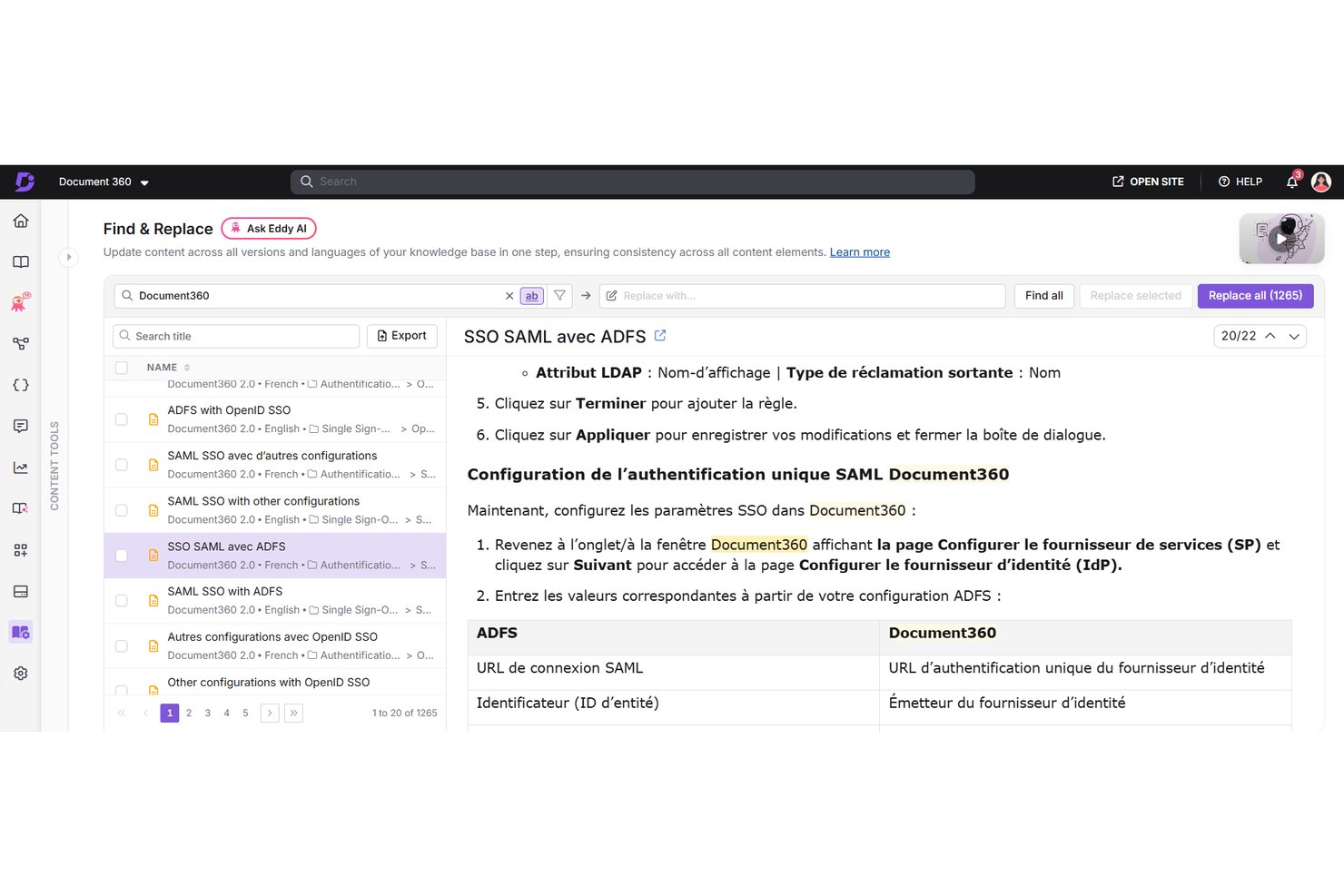
Document360 is an AI-powered knowledge base software built for enterprises to create, organize, and manage internal and external documentation across multiple workspaces.
Who Is Document360 Best For?
Document360 is a strong fit for IT and knowledge managers at mid-to-large SaaS and tech companies who own documentation infrastructure across multiple teams.
Why I Picked Document360
Document360 earns its spot on my shortlist because of how seriously it handles version control at the article level. Every edit is tracked, timestamped, and attributable to a specific author, and I can restore any previous version in a few clicks. The custom approval workflow builder means nothing goes live without passing through a defined review cycle first, which matters when multiple writers are updating the same documentation set simultaneously.
Document360 Key Features
- AI search and answer: Delivers instant, relevant results using semantic search and natural language queries.
- Six-level category hierarchy: Lets you organize documentation into deep, structured categories for easier navigation.
- Bulk article management tools: Allows mass updating, moving, reviewing, and archiving of multiple articles at once.
- Granular permissions and SSO integration: Supports enterprise security needs with fine-grained access control and SSO/SCIM support.
Document360 Integrations
Document360 offers native integrations with Slack, Microsoft Teams, Salesforce, GitHub, Freshdesk, Zendesk, Intercom, Drift, Google Analytics, and Crowdin. It also supports Zapier and provides an API for custom integrations.
Pros and Cons
Pros:
- Customizable internal and external knowledge portals
- Six-level category structure for organizing content
- Extensive article version history and restoration
Cons:
- No mobile app for on-the-go access
- No real-time collaboration options
New Product Updates from Document360

Document360 Adds Bulk Mirroring, Eddy AI Citations, and Unified SSO
Document360 adds bulk article mirroring, citations in Eddy AI chatbot responses, and a unified Enterprise SSO setup. These updates improve content reuse, answer verification, and access management. For more information, visit Document360’s official site.
 .
.
Stonly
Best for AI-guided customer support knowledge
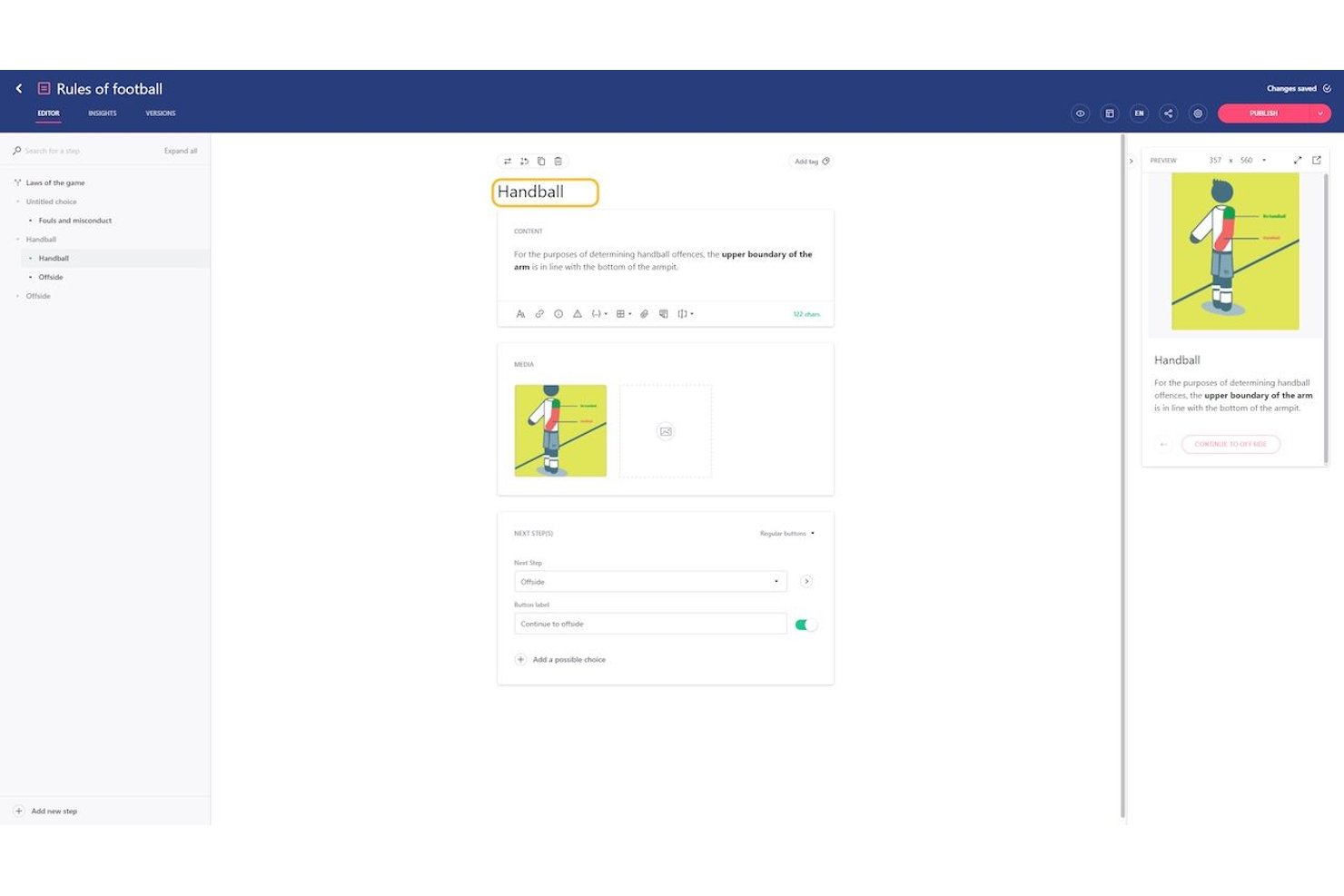
Stonly is a knowledge management platform built around interactive, branching guides that let you deliver AI-powered answers, agent-facing knowledge bases, and automated support workflows from a single content system.
Who Is Stonly Best For?
Stonly is a strong fit for customer support and CX teams that need to deliver AI-guided, self-serve knowledge to both customers and agents.
Why I Picked Stonly
I picked Stonly as one of the best because its AI-guided approach to customer support knowledge is unlike anything else on this list. Its interactive, branching guides adapt to each user's selections rather than serving static articles, which is how it achieves a reported 92% AI answer accuracy. I also love Knowledge Agents, which autonomously monitor your knowledge base around the clock, drafting fixes for outdated or missing content before gaps become support failures.
Stonly Key Features
- Business Process Agents: AI agents that handle multi-step, branching support processes end-to-end across channels like chat, email, and WhatsApp without human intervention.
- Omnichannel widget deployment: A no-code embeddable widget that surfaces knowledge base content across websites, web apps, mobile apps, and help desk tools with contextual targeting.
- Full-path analytics: Tracks user journeys through guides, including start points, navigation paths, drop-off points, and resolution outcomes, with satisfaction feedback built in.
- Content versioning and review workflows: Supports multi-user editing with approval flows, version history, and scheduled publishing to keep knowledge accurate before it goes live.
Stonly Integrations
Stonly integrates with SharePoint, Google Drive, Notion, Microsoft Teams, Slack, Jira, and Okta for enterprise knowledge workflows. It also supports connections with Zendesk, Salesforce, and Zapier.
Pros and Cons
Pros:
- Knowledge Agents automate content maintenance and improvement
- AI Answers surface precise, intent-based results
- Interactive guides personalize knowledge for each user
Cons:
- No cross-project lessons learned capture tools
- Not suited for project-centric documentation needs

Tango
Best for turning software workflows into SOPs
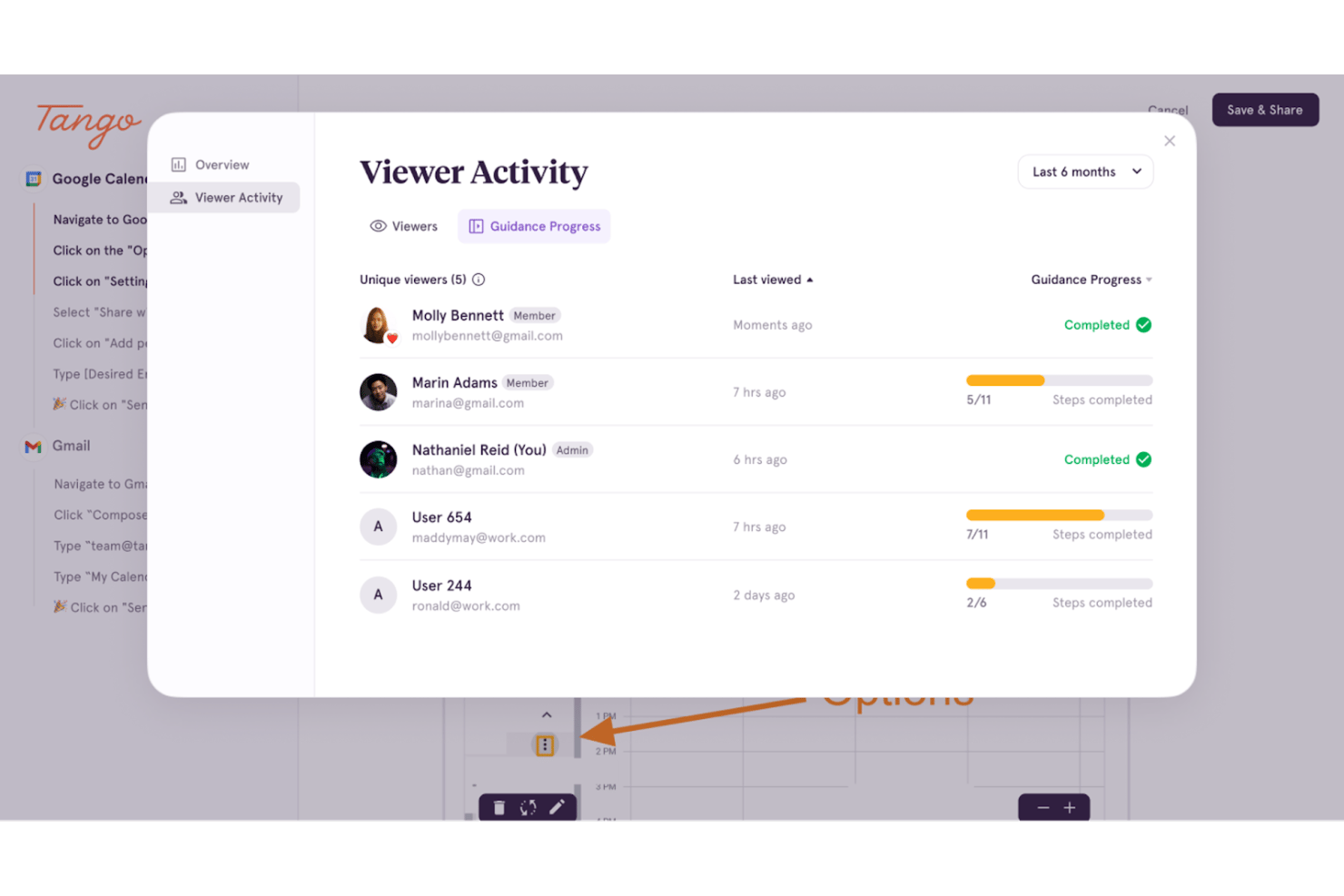
Tango is a workflow documentation and digital adoption platform that automatically captures on-screen processes into annotated, step-by-step visual guides and delivers in-app guidance through contextual overlays and interactive walkthroughs.
Who Is Tango Best For?
Tango is a strong fit for operations and enablement teams that need to turn software workflows into shareable, repeatable SOPs without spending hours writing documentation from scratch.
Why I Picked Tango
I picked Tango as one of the best because it does something no traditional KM platform does: it captures a software workflow automatically as you perform it, turning live screen actions into a fully annotated, step-by-step SOP in minutes. The "Guide Me" feature then delivers that SOP as an interactive on-screen walkthrough, overlaid directly on the live application, so employees aren't just reading instructions but being guided through each click in real time. For ops teams drowning in undocumented processes, that combination of automatic capture and contextual delivery is genuinely hard to replicate.
Tango Key Features
- Secure Blur PII redaction: Automatically detects and redacts personally identifiable information from screenshots during workflow capture.
- Version history with restore: Enterprise plan retains 365 days of version history, letting teams recover or review any previous state of a guide.
- Multi-path workflows: Branching documentation lets you build a single guide that adapts to different roles, regions, or process variations.
- SCIM provisioning and SSO: Automated user lifecycle management integrates with Okta, Google, and Azure AD to control access at scale.
Tango Integrations
Tango supports integrations with Confluence, Notion, Coda, Microsoft Teams, and Slack through embed links and shared guides. It has no documented native integrations with Jira, Asana, Microsoft Project, or Monday.com, and no public API or webhook documentation.
Pros and Cons
Pros:
- Secure Blur automatically redacts sensitive data
- In-app guides overlay directly on software
- Captures workflows into step-by-step SOPs
Cons:
- Lacks advanced project knowledge structuring features
- No support for wikis or document repositories

Hub
Best for onboarding with free implementation help
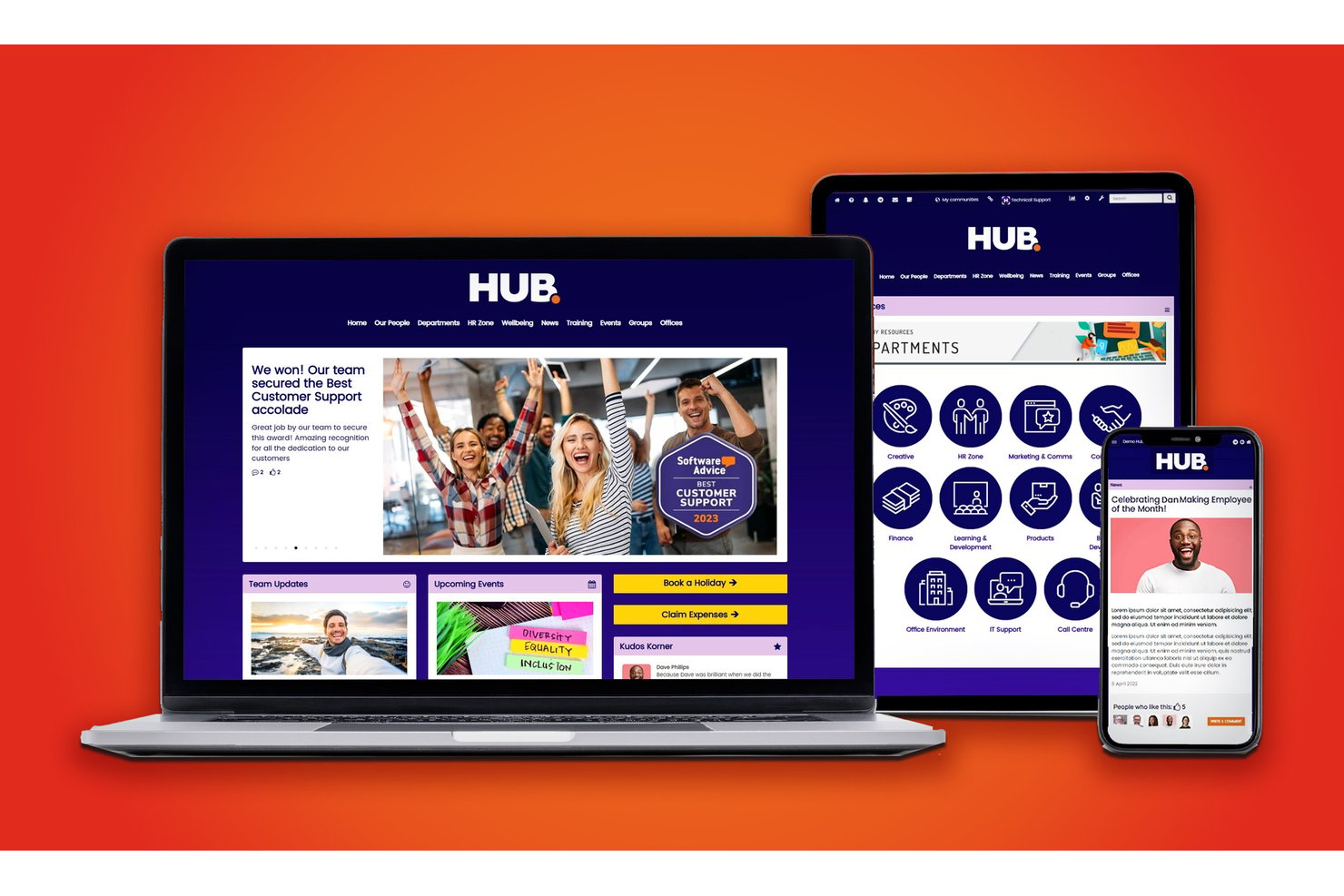
HUB is an all-in-one intranet and knowledge management platform that centralizes documentation, SOPs, and organizational knowledge with federated search, smart tagging, granular permissions, and integrations with leading cloud and project management tools.
Who Is HUB Best For?
HUB is a strong fit for mid-market organizations that need an accessible, centralized knowledge management solution without the complexity of large enterprise platforms.
Why I Picked HUB
I picked HUB as one of the best because the onboarding model is genuinely different. Every license includes around 15 hours of 1:1 expert-led setup sessions at no extra cost. The trial environment also converts directly into the live site, so there's no data migration when you launch. The AI Tag Assistant helps teams build a consistent content taxonomy from day one.
HUB Key Features
- Federated search: Search instantly across internal knowledge, SharePoint, Google Drive, Box, and Confluence from one interface.
- Granular permissions: Assign over 100 customizable access levels to control who can view, edit, and share content.
- Smart workflows and digital forms: Create approval chains and automate routine processes with built-in forms and workflow tools.
- 25+ built-in analytics reports: Access real-time insights into content engagement, search trends, and adoption metrics.
HUB Integrations
HUB offers native integrations with SharePoint, Google Workspace, Box, Microsoft Teams, Slack, BambooHR, Confluence, and more. An API is available for custom integrations.
Pros and Cons
Pros:
- Granular permissions with over 100 access levels
- AI Tag Assistant automates content taxonomy building
- Expert-led onboarding included with every license
Cons:
- Fewer generative AI features than top competitors
- Less proven at Fortune 1000 enterprise scale

ClickUp
Best for unified docs and task management
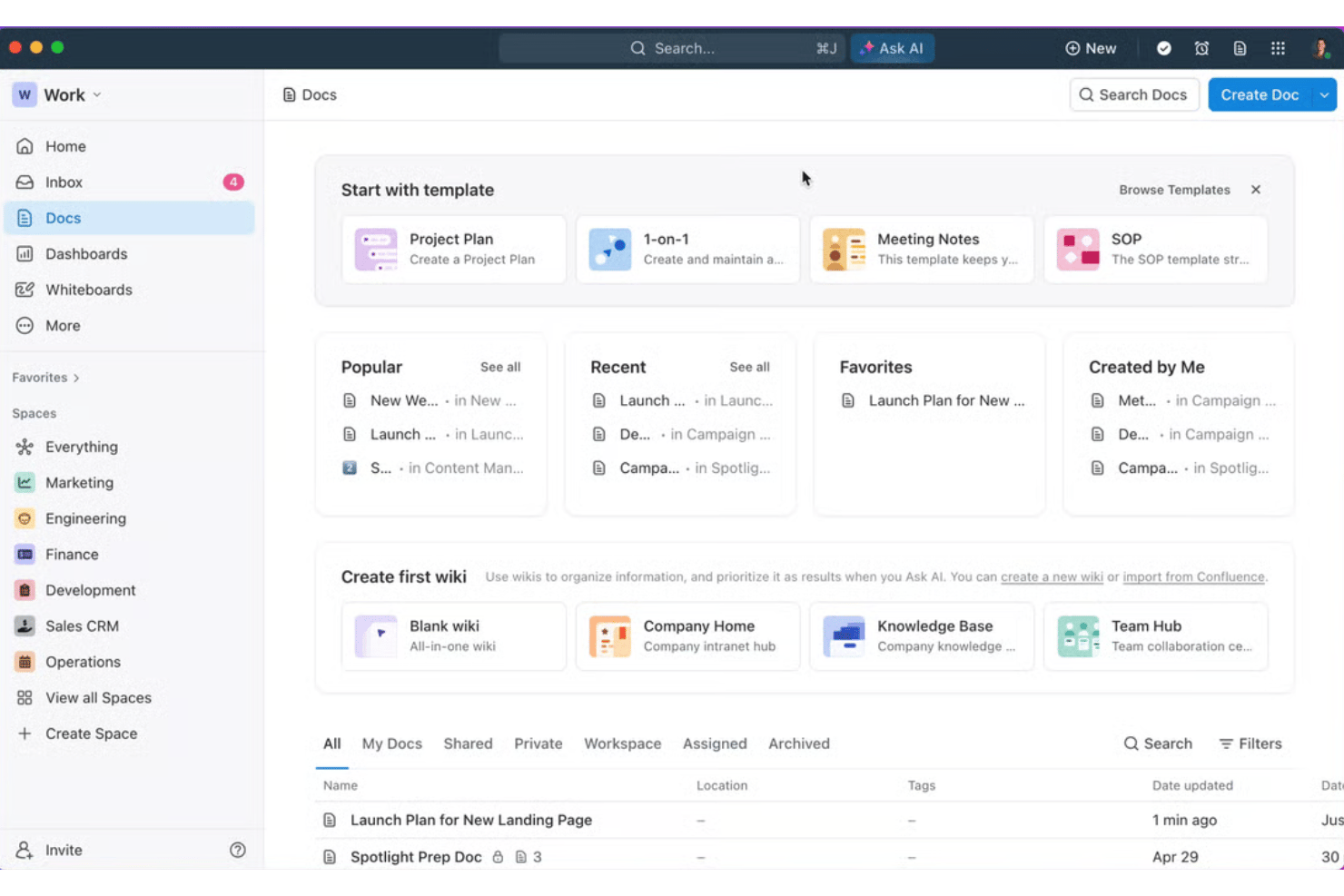
ClickUp is an all-in-one work platform that combines docs, wikis, AI-powered knowledge search, and task management in a single connected workspace.
Who Is ClickUp Best For?
ClickUp is a strong fit for PMOs and project operations teams that want project documentation and task execution managed in one place.
Why I Picked ClickUp
I picked ClickUp as one of the best because it's the only tool where a project spec, a sprint board, and a team wiki genuinely live in the same place, not just linked across tabs. I particularly like Connected Docs, which lets you attach a requirements doc or SOP directly to a task so context travels with the work. ClickUp Brain adds another layer, letting you query across all docs and comments in natural language and get sourced answers instantly.
ClickUp Key Features
- Docs hub: Centralizes access to all documents with search, filters, and ownership tracking.
- Nested pages: Allows creation of multi-level doc structures for detailed project wikis and knowledge bases.
- Granular permissions: Lets you set precise viewing, commenting, and editing rights for each doc or folder.
- Enterprise search: Supports AI-powered content discovery across docs, tasks, comments, and attachments.
ClickUp Integrations
ClickUp offers 90+ native integrations, including Jira, Slack, GitHub, Google Drive, Microsoft Outlook, HubSpot, and Microsoft Teams. It also supports Zapier and provides an API for custom integrations.
Pros and Cons
Pros:
- Combines docs, tasks, goals, and reporting
- Allows embedding of documents into active tasks
- Uses AI to answer doc and project queries
Cons:
- Custom data retention policies require enterprise tier
- Slowdowns reported with extensive nested pages
New Product Updates from ClickUp
ClickUp Adds Meetings Hub, Super Agent Templates, and ZoomInfo Integration
ClickUp adds a searchable Meetings Hub, new ways to clone and template Super Agents, and a ZoomInfo integration through the App Center. These updates improve meeting retrieval, agent reuse, and access to sales intelligence. For more information, visit ClickUp’s official site.

Shelf
Best for compliance-driven knowledge governance
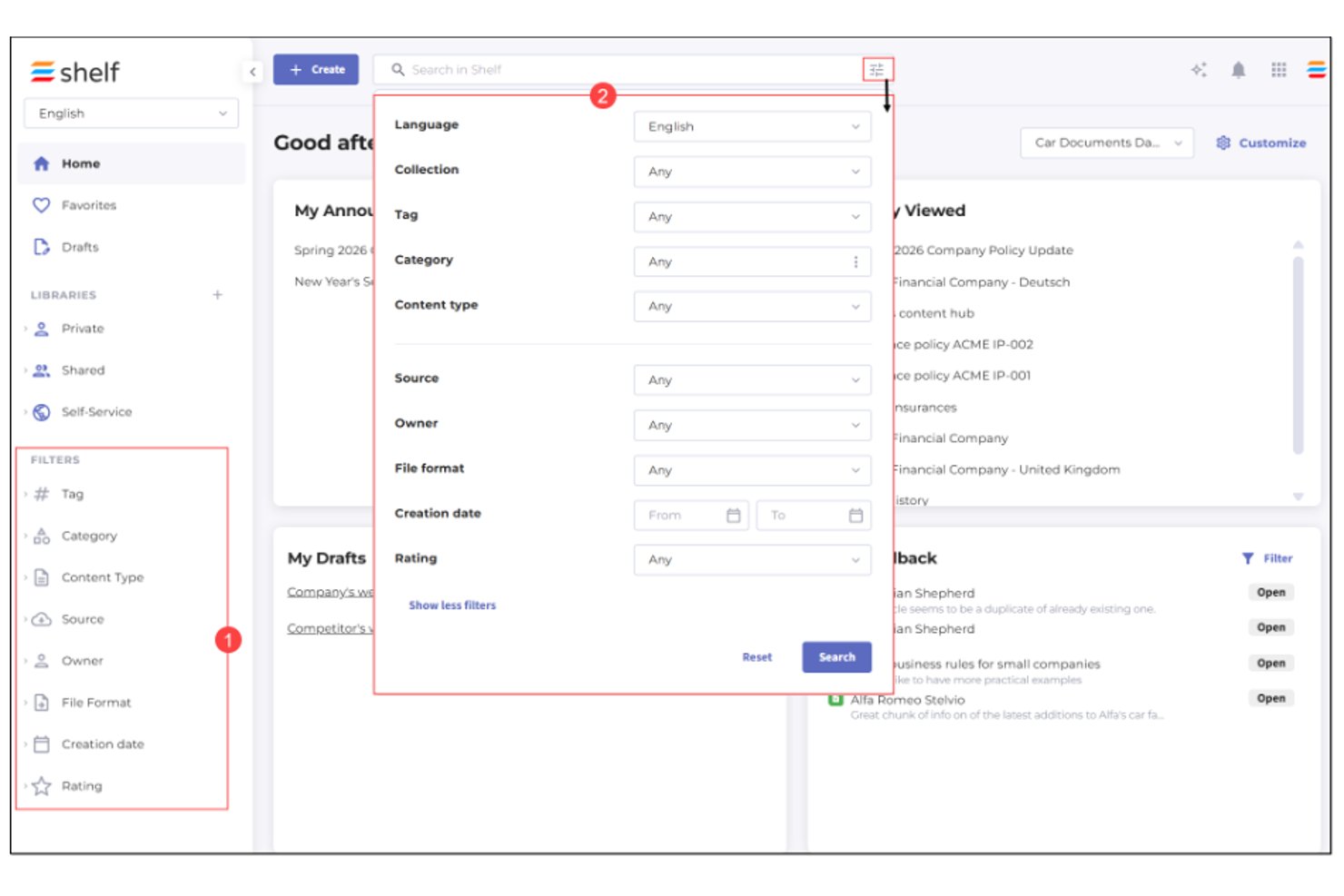
Shelf is an enterprise knowledge management platform centered on content governance, with AI-powered search, ROT (redundant, obsolete, and trivial) content detection, content quality assurance, and reusable content structures for large-scale knowledge operations.
Who Is Shelf Best For?
Shelf is a strong fit for knowledge managers at large enterprises in regulated industries like financial services and healthcare, where content accuracy and governance are non-negotiable.
Why I Picked Shelf
Shelf earns its spot on my shortlist because of how seriously it takes content governance at scale. I love that it continuously monitors your knowledge base for ROT content (redundant, obsolete, and trivial) and flags compliance-risk items before they surface in AI pipelines or agent responses. The always-on Content Quality Assurance layer gives me prescriptive guidance on exactly what needs fixing, not just a list of problems to sort through manually.
Shelf Key Features
- AI-powered search and discovery: Find relevant knowledge instantly using semantic search and metadata filters.
- Reusable content blocks: Build and update knowledge articles faster with pre-approved templates and modular content parts.
- Auto-translate engine: Convert knowledge content into over 100 languages automatically within the platform.
- Decision tree builder: Guide users through complex processes with customizable, step-by-step navigable workflows for decision-making.
Shelf Integrations
Shelf offers native integrations with Salesforce, ServiceNow, Zendesk, Confluence, Notion, SharePoint, Google Drive, Box, Genesys, and Intercom. An API is also available for custom integrations.
Pros and Cons
Pros:
- Bulk content updates with reusable blocks
- Real-time AI search suggestions
- Automated content governance monitoring
Cons:
- Limited analytics dashboard customization
- No in-platform document editing

Slite
Best for asynchronous team knowledge sharing
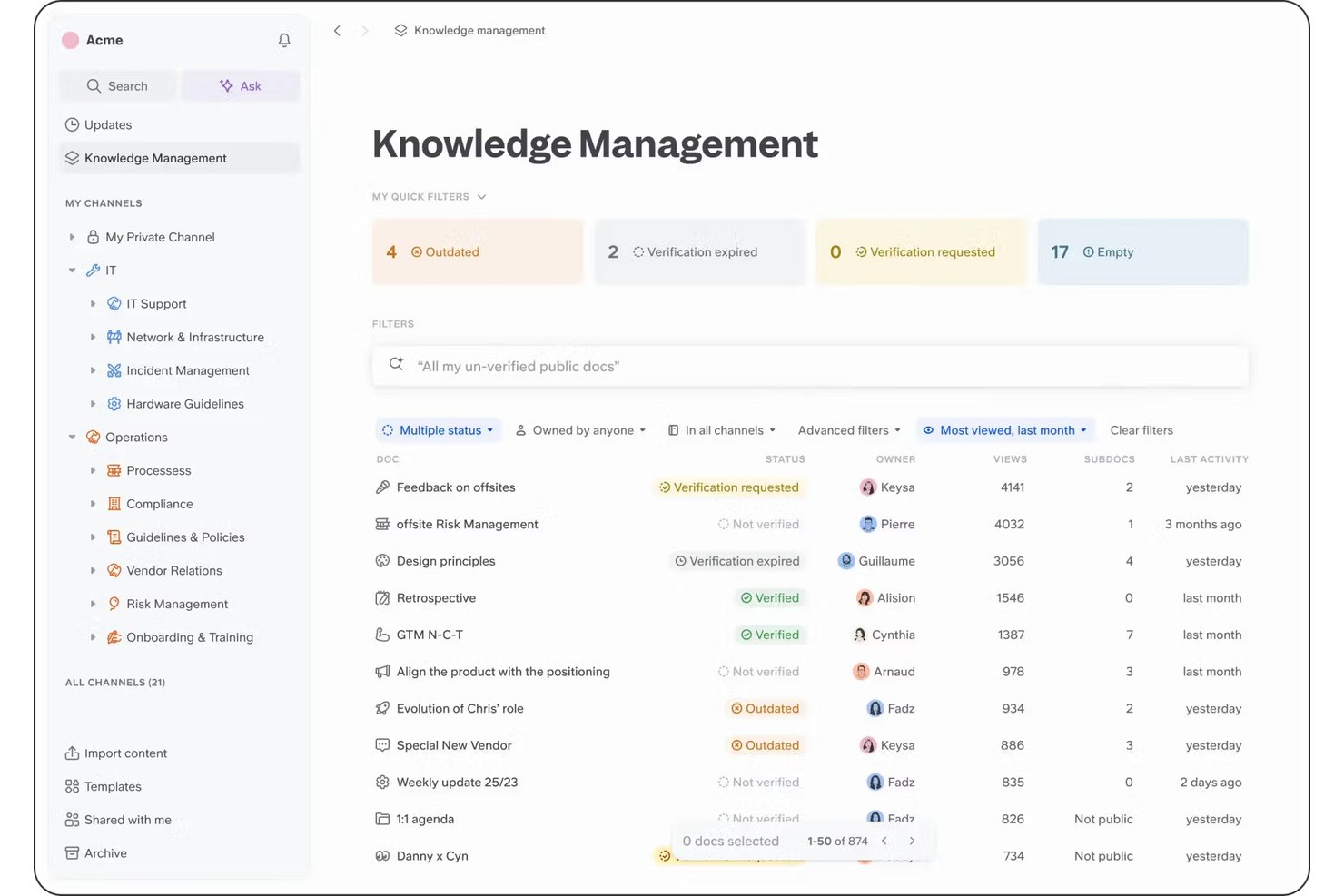
Slite is an AI-powered knowledge base built around collaborative document editing, semantic search, and an automated verification system that flags and proposes fixes for outdated content.
Who Is Slite Best For?
Slite is a strong fit for knowledge managers and operations leads at small-to-midsize tech teams who need a focused, low-overhead internal wiki.
Why I Picked Slite
I picked Slite as one of the best because its verification workflow directly solves the core async knowledge problem: stale docs. Slite auto-flags outdated content by comparing docs against activity in connected tools like GitHub and Slack, then proposes fixes for owners to approve. The Ask feature lets teammates query the knowledge base in plain language and get cited, sourced answers without pulling anyone into a meeting or Slack thread.
Slite Key Features
- AI-powered information retrieval: Lets users type questions in natural language and retrieves answers from all docs with source links.
- Granular access controls: Supports SSO, role-based permissions, and customizable viewer, commenter, and editor roles.
- Document importers: Imports content from Notion, Confluence, and Google Docs while maintaining structure.
- Custom templates: Offers reusable documentation templates for SOPs, onboarding, or recurring processes.
Slite Integrations
Slite offers over 100 native integrations, including Google Drive, Jira, Slack, GitHub, Linear, Asana, ClickUp, Confluence, Notion, and Figma.
Pros and Cons
Pros:
- AI-powered Ask retrieves answers from docs
- Asynchronous-first discussions and decision logs
- Real-time doc activity notifications for teams
Cons:
- Limited options for document formatting flexibility
- Channel hierarchy can be hard to maintain
Notion
Best for customizable workspace architecture
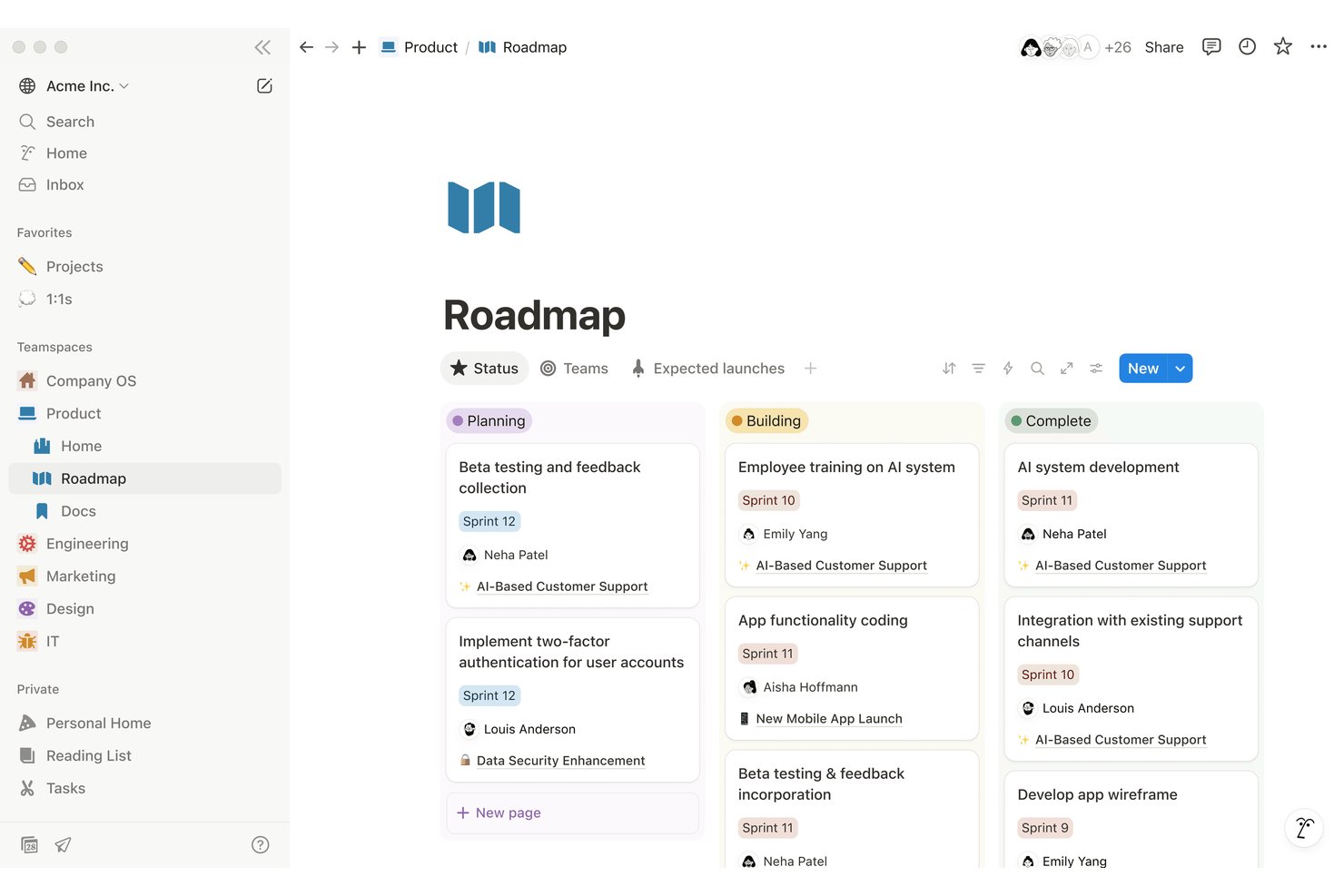
Notion is a connected workspace platform that combines wikis, databases, docs, project tracking, and AI-powered search into a single environment for enterprise teams to store, organize, and collaborate on knowledge.
Who Is Notion Best For?
Notion suits mid-market to enterprise tech teams that need cross-functional knowledge management without being locked into a rigid, predefined structure.
Why I Picked Notion
Notion is one of my top picks because its database architecture sets it apart from other knowledge management tools I've used. I can build relational databases with custom properties, link them across pages, and create multiple views (table, board, calendar) that surface the same data differently for each team. My team uses this to run interconnected SOPs, project trackers, and wikis from one workspace without duplicating content.
Notion Key Features
- Enterprise search: Use AI-powered search to find information across Notion and integrated apps like Slack, Jira, and Google Drive.
- Granular permissions: Assign role-based access and workspace-level rules to manage who can view, edit, or share pages.
- Page history: Track unlimited page revisions and restore previous versions as needed for knowledge governance.
- Automated meeting notes: Instantly generate transcripts and summaries from video calls using Notion’s built-in AI.
Notion Integrations
Notion offers native integrations with Slack, Google Drive, Jira, Figma, GitHub, Datadog, and Loom, and provides an API for custom integrations.
Pros and Cons
Pros:
- AI assistant for fast content drafting
- Advanced permissions for workspace governance
- Flexible database structure for enterprise wikis
Cons:
- Search performance decreases with workspace size
- Approval workflows lack built-in automation

Best for scaling team collaboration workflows
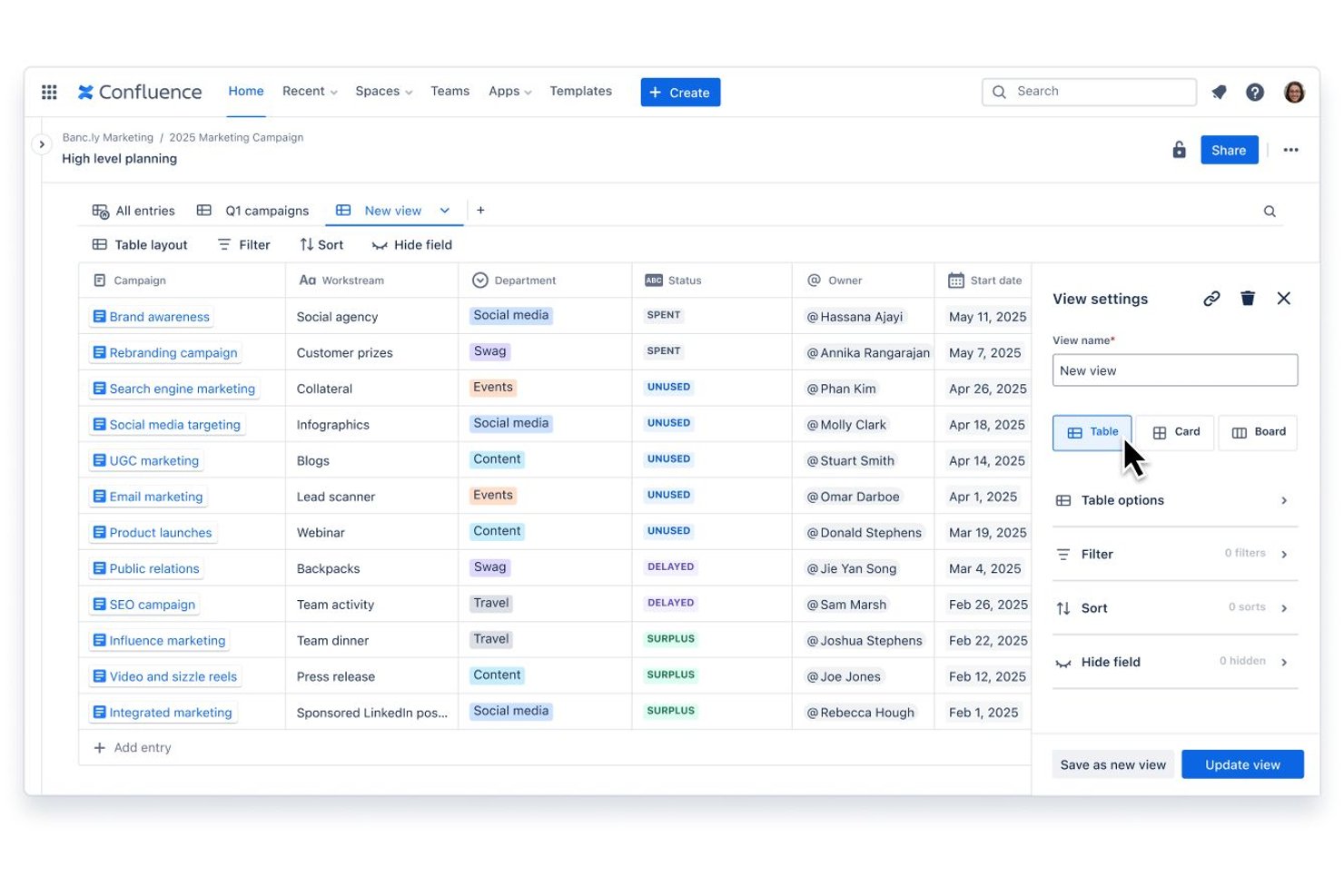
Confluence is an AI-powered knowledge management platform from Atlassian that combines structured document management, real-time collaboration, and enterprise search across pages, whiteboards, databases, and live docs.
Who Is Confluence Best For?
Confluence is a strong fit for mid-size to enterprise teams already using Jira, particularly those managing documentation and knowledge across multiple cross-functional workstreams.
Why I Picked Confluence
I picked Confluence as one of the best because its Spaces architecture scales in ways few knowledge management tools match at the enterprise level. On the Enterprise plan, multiple Confluence sites run under one organization, so separate business units maintain their own knowledge bases without losing cross-org visibility. I also rely on the Teamwork Graph, which connects documentation directly to teams, goals, and active project work, keeping knowledge tied to real delivery context rather than sitting in isolation.
Confluence Key Features
- Rovo AI search and agents: Lets you find, summarize, and transform knowledge across content types using Atlassian's AI-powered search engine.
- Databases for structured content: Organize project knowledge in tables with relationships, rollups, and metadata.
- Live Docs collaboration: Allow teams to co-edit documents in real time and track version history automatically.
- Audit logs and compliance controls: Capture detailed activity histories and support enterprise governance requirements.
Confluence Integrations
Confluence offers native integrations with Trello, Loom, Google Workspace, Microsoft 365, and Slack. It supports thousands of additional integrations through the Atlassian Marketplace and provides an API for custom integrations.
Pros and Cons
Pros:
- Built-in compliance and audit logging options
- Rovo AI finds information across all pages
- Structured spaces for project and team knowledge
Cons:
- Permissions setup can require frequent adjustments
- Bulk content management is not intuitive

Guru
Best for AI-powered knowledge suggestions
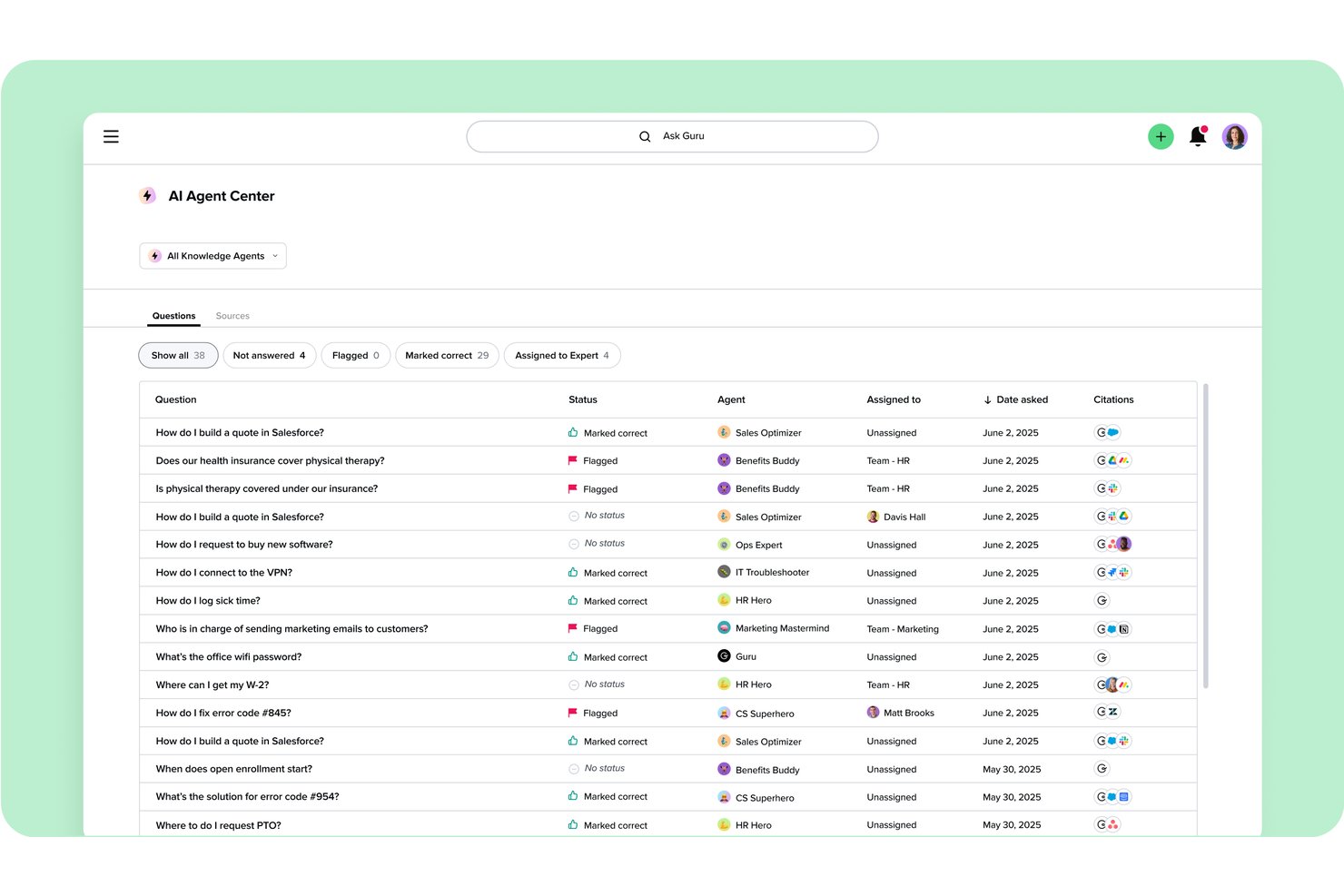
Guru is an AI-powered enterprise knowledge management platform that combines a verified knowledge base, semantic search, Knowledge Agents, and automated content governance across 100+ integrations.
Who Is Guru Best For?
Guru is a strong fit for IT and knowledge managers at mid-to-large enterprises that need to govern, maintain, and surface verified knowledge across distributed teams.
Why I Picked Guru
I picked Guru as one of the best because its Knowledge Agents proactively surface cited, permission-aware answers based on what a team member is actively working on, not just what they've typed into a search bar. I also like the automated verification system, which assigns subject matter experts to confirm card accuracy on a rolling schedule. Guru also runs duplicate detection and gap identification in the background, so the knowledge powering those AI suggestions stays accurate and complete.
Guru Key Features
- Browser extension: Surface and capture knowledge directly within Chrome and Edge while working in other web apps.
- Team Hubs and custom pages: Organize project and department knowledge into dedicated hubs and pages.
- 100+ integrations: Connect Guru to tools like Jira, Asana, Salesforce, Slack, and Microsoft Teams.
- Enterprise compliance controls: Manage access with SSO, SCIM, full audit trails, and SOC 2 Type II and HIPAA compliance.
Guru Integrations
Guru offers 100+ native integrations, including Slack, Microsoft Teams, Jira, Salesforce, Zendesk, Google Drive, Confluence, Notion, Asana, and GitHub. An API is available for custom integrations.
Pros and Cons
Pros:
- Strong compliance with enterprise security standards
- In-workflow browser extension for quick capture
- AI proactively delivers answers
Cons:
- Occasional duplicate or overlapping search results
- Limited document editing for long-form content
Other Enterprise Knowledge Management Software
Here are some additional enterprise knowledge management solutions that didn’t make it onto my shortlist, but are still worth checking out:
- Nuclino
For lightweight document collaboration
- Bloomfire
For intuitive content discovery experience
- Microsoft SharePoint
For Microsoft 365 environment integration
- Glean
For enterprise-wide search connectivity
- Slab
For connected knowledge and integrations
- Basecamp
For centralizing team communications
- Zendesk
For integrating with customer support systems
- KnowledgeOwl
For creating public or private help sites
- ProProfs Knowledge Base
For multilingual knowledge base creation
- Tettra
For internal Q&A management


How I Evaluate Enterprise Knowledge Management Software
I evaluate these platforms in two layers: baseline functionality PMOs need to centralize documentation at scale, and the differentiators that set one vendor apart from another.
Core Functionality (Table Stakes For This List)
When I'm selecting tools for my list, I rank each one on a scale from 0 (does not offer the functionality) to 5 (excels in this area) for each core functionality listed below. Then, I calculate the tool's total score into a percentage. Each tool needs to achieve a minimum total score of 75% to be considered for inclusion.
- Centralized Knowledge Repository: I look for a single hub where teams store project docs, SOPs, and lessons learned across departments and programs.
- Enterprise Search & Discovery: Good search goes beyond keywords—I evaluate whether filters, tags, and metadata help distributed teams find answers fast.
- Granular Access Controls: I check for role-based permissions at the space or folder level, plus SSO and audit logs that meet enterprise security standards.
- Content Collaboration & Versioning: Multi-user editing and version history matter when several PMs update the same runbook or project charter simultaneously.
- Knowledge Structuring & Taxonomy: I evaluate how well a platform supports hierarchical folders, tags, and templates to organize knowledge for reuse across projects.
- PM Tool Integrations: Native connections to tools like Jira, Asana, or Microsoft Project keep knowledge embedded in day-to-day project workflows.
Once I have a list of tools that meet the criteria, I consider what sets each platform apart.
Differentiating Factors (What Sets Vendors Apart)
Here's how I compare and contrast different vendors:
Standout Features
AI-powered search is a major differentiator. I look for platforms where teams ask natural language questions and get relevant answers instead of scrolling through pages of results. Federated search connectors matter just as much, especially when your knowledge lives across Confluence, Google Drive, and Slack. I also evaluate content lifecycle automation—expiration alerts and ownership assignments keep documentation trustworthy long after a project closes.
Beyond Features
Security and compliance certifications like SOC 2 Type II and ISO 27001 are a priority—I check whether platforms offer data residency options and audit trails that enterprise procurement teams expect. Integration depth also matters. I evaluate whether a tool supports open APIs and bi-directional syncs with your existing stack, not just surface-level connections. Total cost of ownership is worth scrutinizing too, since hidden fees for connectors or storage overages can inflate your budget well beyond the listed per-seat price.
How to Choose Enterprise Knowledge Management Software
It’s easy to get bogged down in long feature lists and complex pricing structures. To help you stay focused as you work through your unique software selection process, here’s a checklist of factors to keep in mind:
| Factor | What to Consider |
|---|---|
| Scalability | Will the tool handle growth in users and content as your organization expands—think thousands of users or millions of documents? |
| Integrations | Does it truly connect with your existing project management, communication, and content storage tools—beyond just file uploads or basic integrations? |
| Customizability | Can you adapt taxonomies, templates, and workflows to match how your teams capture and reuse knowledge across different projects or business units? |
| Ease of use | Will non-technical staff and project leads adopt it with minimal training, or will ongoing admin support be needed for routine knowledge updates? |
| Implementation and onboarding | What do deployment, data migration, and initial rollout look like—are there migration tools or expert services, and how much team effort will setup take? |
| Security safeguards | Do the security features align with your IT policies, including access controls, single sign-on, encryption, and auditing for sensitive project documents? |
| Cost | Consider both licensing and hidden costs like connector, API, AI usage, or data storage fees—does the pricing fit your long-term budget model? |
| Support availability | If you encounter issues, does the vendor provide responsive enterprise-level support and resources during both implementation and daily operations? |
What Is Enterprise Knowledge Management Software?
Enterprise knowledge management software is a platform that lets organizations centralize, organize, and share documentation, processes, and insights across teams. These tools enable your business to capture institutional knowledge, make information easy to search, apply access controls, and support collaboration. They’re essential for preserving best practices and enabling distributed project teams to quickly find and reuse relevant information.
Features of Enterprise Knowledge Management Software
When selecting enterprise knowledge management software, keep an eye out for the following key features:
- Centralized knowledge repository: A unified space where your organization stores, organizes, and manages all project documentation, SOPs, and knowledge assets.
- Enterprise search: Full-text, filtered, and metadata-driven search functions that help teams quickly find relevant documents in large, complex repositories.
- Granular access controls: Role-based permissions that secure sensitive information by controlling who can view, edit, or share specific content.
- Content collaboration: Real-time or asynchronous editing and commenting so multiple users can update documents, discuss changes, and work across departments.
- Version history: Detailed tracking of edits, allowing teams to see previous document versions, restore content, and audit all changes.
- Knowledge structuring: Tools like folders, tags, categories, and templates that create order, improve retrieval, and establish knowledge standards.
- Integration with project tools: Native and API-based connections with platforms like project management, communication, and storage tools to embed knowledge in daily workflows.
- Automated workflows: Rules for reviewing, approving, and archiving content to keep knowledge accurate, up to date, and trustworthy at scale.
- Analytics and reporting: Usage data and activity reports that give insight into knowledge gaps, content quality, and team engagement.
- Mobile and remote access: Secure, on-the-go access options so distributed teams and field staff can retrieve or update knowledge wherever they work.
Benefits of Enterprise Knowledge Management Software
Implementing enterprise knowledge management software provides several benefits for your team and your business. Here are a few you can look forward to:
- Faster information discovery: AI-powered search and structured repositories help teams surface relevant documents and answers in seconds.
- Improved project continuity: Centralized storage and version history protect institutional knowledge and ensure continuity as teams or personnel change.
- Consistent best practices: Custom templates and taxonomy tools standardize processes, making it easy to enforce organization-wide methodologies.
- Enhanced collaboration: Real-time editing and commenting features break down silos so teams can co-create, update, and reuse critical knowledge.
- Stronger security controls: Advanced permissions, encryption, and audit trails keep sensitive content safe and support compliance needs.
- Simplified onboarding: New team members ramp up faster by accessing organized SOPs, project docs, and lessons learned in one place.
- Reduced duplicate work: Integrations with project management tools and lifecycle automation help minimize redundant documentation efforts across initiatives.
Costs and Pricing of Enterprise Knowledge Management Software
Selecting enterprise knowledge management software requires an understanding of the various pricing models and plans available. Costs vary based on features, team size, add-ons, and more. The table below summarizes common plans, their average prices, and typical features included in enterprise knowledge management software solutions:
Plan Comparison Table for Enterprise Knowledge Management Software
| Plan Type | Average Price | Common Features |
|---|---|---|
| Free Plan | $0 | Basic document storage, limited search, essential collaboration tools, and single workspace. |
| Personal Plan | $5-$15/user/month | Individual repository, enhanced search, basic access controls, limited integrations, and simple version history. |
| Business Plan | $15-$35/user/month | Multi-user workspaces, advanced permissions, workflow automation, analytics, and integrations with PM tools. |
| Enterprise Plan | $35-$60/user/month | Unlimited repositories, SSO, audit logging, custom taxonomy, premium support, and compliance certifications. |
Enterprise Knowledge Management Software FAQs
Here are some answers to common questions about enterprise knowledge management software:
How do I know which knowledge management system fits my organization?
Start by mapping your team’s workflows, integration needs, and security requirements. Rank platforms based on how well they align—not just on features but also on your unique scalability, user adoption, and compliance benchmarks.
Can I migrate existing documentation to a new platform?
Yes, most enterprise solutions offer import tools or migration services. You’ll want to audit and organize content first, then use bulk upload, API connectors, or vendor-supported services to transition knowledge.
What role does AI play in knowledge management platforms?
AI powers smarter search, recommends related resources, and automates content tagging. Some tools also use AI assistants to answer natural language questions or synthesize content from across your repositories.
Can these platforms protect sensitive information?
Yes, enterprise-grade options usually support custom permissions, encryption, SSO, and detailed audit logs. It’s important to regularly review permissions and align the tool’s safeguards with your organization’s security policies.
How do integrations benefit project managers?
Integrations keep reference material, guides, and templates at your fingertips while you’re working in your main tools. For example, connecting project management and documentation platforms means you can easily attach or find key artifacts in daily workflows.
What is the typical implementation timeline?
Implementation can take anywhere from a few days for small teams to several months for large enterprises. Timeline depends on the need for migration, integrations, user training, and security reviews.
Is training required for end users?
Some training is helpful, especially for advanced features like workflow automation or taxonomy design. Many platforms offer onboarding guides, learning modules, or live support sessions to ease adoption.