
34 Best Capacity Planning Software Options For 2026

20 Best Capacity Planning Software Shortlist
Here's my pick of the 20 best software from the 34 tools reviewed.


The best capacity planning software gives clear insights into team availability, prevents overallocation, and predicts future resource needs to help you meet deadlines and avoid team burnout.
With over 20 years in project management, I understand how disconnected spreadsheets and unclear task assignments can lead to schedule conflicts, hidden bottlenecks, and uneven workloads. The right software helps you track resource availability, balance workloads across projects, and anticipate demand before reaching capacity limits.
After reviewing and testing over 20 capacity planning tools since 2012 as a software reviewer, I have identified the most effective solutions that help you plan confidently, allocate work accurately, and keep projects on track.
Why Trust Our Capacity Planning Software Reviews
We’ve been testing and reviewing resource management software since 2012. As project managers ourselves, we know how critical and difficult it is to make the right decision when selecting software.
We invest in deep research to help our audience make better software purchasing decisions. We’ve tested more than 2,000 tools for different project management use cases and written over 1,000 comprehensive software reviews. Learn how we stay transparent & our review methodology.
Table of Contents
- Best Software Shortlist
- Why Trust Us
- Compare Specs
- Reviews
- When to Use Capacity Planning Software
- Other Capacity Planning Software
- Related Project Management Software
- Selection Criteria
- How to Choose
- Trends in Capacity Planning Software
- What is Capacity Planning Software?
- Features
- Benefits
- Costs & Pricing
- FAQs
The Best Capacity Planning Software Comparison Chart
Here is a table where you can compare all the tools we just covered in the overviews.
| Tool | Best For | Trial Info | Price | ||
|---|---|---|---|---|---|
| 1 | Best for intuitive scheduling and live forecasting | 30-day free trial available | From $7/scheduled user/month | Website | |
| 2 | Best for customization | Free plan available | From $9/seat/month (billed annually) | Website | |
| 3 | Best for agile capacity planning | Free 14-day trial available + free demo available | From $19.90/user/month (billed annually) | Website | |
| 4 | Best for resource planning with financial insights | 14-day free trial available | From $10/user/month (billed annually) | Website | |
| 5 | Best for people-centric resourcing | Free demo available | Pricing upon request | Website | |
| 6 | Best for balancing team bandwidth | 15-day free trial + free plan + free demo available | From $4/user/month (billed annually) | Website | |
| 7 | Best for work-in-progress management | Free plan available | $14/user/month | Website | |
| 8 | Best for visual resource management | 14-day free trial + free demo available | From $7/user/month | Website | |
| 9 | Best for visual capacity planning & forecasting | Free 30-day trial available | From $4.16/user/month | Website | |
| 10 | Keep track of your project’s progress in real-time | Free plan + free demo + 14-day free trial available | From $10/user/month (billed annually) + add-on fee | Website | |
| 11 | Best for visual collaboration & innovation | Free trial + free plan available | From $8/member/month (billed annually) | Website | |
| 12 | Best for agency resourcing and forecasting | Free 7-day trial available | From $9/user/month (billed annually) | Website | |
| 13 | Best real-time capacity planning and forecasting | 60-day free trial | Pricing upon request | Website | |
| 14 | Best for financial planning | Free plan + 30-day free trial available | From $9/user/month (billed annually) | Website | |
| 15 | Best for its role-based resource allocation prior to staffing | 30-day free trial | From $600/month | Website | |
| 16 | Best for AI-powered task allocation | 14-day free trial + 30-day money back guarantee | From $8.50/user/month (billed annually) | Website | |
| 17 | Best for professional services companies | Free demo available | From $9/user/month (billed annually) | Website | |
| 18 | Assess project progression with ease | 30-day free trial + free demo available | From $15/user/month (billed annually) | Website | |
| 19 | Best for digital agencies and software development firms | Free demo available | Pricing upon request | Website | |
| 20 | Best for forecasting & planning | 14-day free trial + free plan available | From $10/user/month (billed annually) | Website |


-

Accelo
Visit WebsiteThis is an aggregated rating for this tool including ratings from Crozdesk users and ratings from other sites.4.4 -
Wrike
Visit WebsiteThis is an aggregated rating for this tool including ratings from Crozdesk users and ratings from other sites.4.2 -
Forecast
Visit WebsiteThis is an aggregated rating for this tool including ratings from Crozdesk users and ratings from other sites.4.6



Best Capacity Planning Software Reviews
Here’s a brief description of each capacity planning app to showcase each tool’s best use case, some noteworthy features, and screenshots to give a snapshot of the user interface.


Float.com caters to professional services firms and creative teams looking to optimize how they plan and allocate resources. By focusing on effective people management and offering features like finance and estimation for revenue forecasting, Float helps you improve project management and operational efficiency. Whether you're in a large global agency or a small consultancy, Float's capabilities in resource scheduling, time tracking, and reporting can support your growth and improve project delivery rates.
Why I Picked Float.com
I picked Float because it excels in intuitive scheduling and live forecasting, making it an excellent choice for capacity planning. With features like real-time capacity tracking and over-capacity alerts, you can ensure balanced workloads and avoid burnout. The platform also allows for customized availability settings and efficient leave management, which are crucial for maintaining team productivity. Additionally, Float's integration capabilities with other tools enhance workflow efficiency, making it a valuable asset for professional services firms and creative teams.
Float.com Key Features
In addition to its intuitive scheduling and live forecasting, Float offers several other features that enhance capacity planning for your team:
- Customizable Team Setups: You can standardize roles and filter employees based on skills and location, allowing for more precise resource allocation and management.
- Time Off Management: Float allows you to manage time off with customizable policies, ensuring that team availability is accurately reflected in your planning.
- Integrations with Popular Tools: By integrating with tools like Google Calendar, Slack, and Jira, Float enhances workflow efficiency and keeps your data accurate and up-to-date.
- Real-time Collaboration: This feature enables team members to work together seamlessly, ensuring everyone stays informed about project changes and updates.
Float.com Integrations
Integrations include Asana, Basecamp, ClickUp, Jira, Google Calendar, Aprimo, Hubspot, Karbon, Slack, and Trello.
Pros and Cons
Pros:
- Integration with popular tools enhances workflow efficiency.
- Real-time updates keep all team members informed.
- Visual timelines improve scheduling clarity for teams.
Cons:
- Integration challenges with certain niche tools exist.
- Limited customization options may not suit all needs.
New Product Updates from Float.com

Float Introduces Smart Assign for Faster Team Staffing
Float.com releases Smart Assign, powered by machine learning, to quickly suggest roles for team members. For more information, visit Float’s official site.


monday is an open platform that enables team leaders to create their own capacity planning solution. The tool’s visual interface allows you to pick and choose the modules and integrations you need to use to create the perfect management software for your business. For example, Jason Fiore, SEO Content Writer & Digital Marketing Strategist at Earth Ragz, shared how monday reshaped the way his team approaches time tracking: “What I appreciate the most about monday.com for tracking time is its ability to flip project management on its head. Rather than solely tracking hours, it prompts us to consider the quality of time spent on each task. Its ability to break tasks into smaller tasks also helps us identify not only where a bottleneck occurs but where time is wasted in unnecessary work. This is going to give us a path to focus on continuous improvement, not just completion, which makes time tracking more meaningful.”
With monday, you can project roadmaps, assign available resources, assess your team’s capacity, and automate workflows. The great thing about this solution is that it’s adaptable, so you can tailor it to your organization’s needs.
The tool’s time projection ability enables you to estimate how long it would take to complete a project with the resources at your disposal. You can also see how long it takes to deliver different projects, which can help with pricing your work.
Thanks to its project management and forecasting functionalities, monday enables you to determine your team’s current and future capacity with a high degree of accuracy.
monday integrates with dozens of apps, including Outlook, Microsoft Teams, Slack, Zoom, Google Calendar, Google Drive, Zapier, Jira, and more.
monday costs from $6/user/month. The platform offers a free-forever version for up to two users. You can also try out the pro version for free for 14 days.
New Product Updates from monday.com

monday.com's AI Blocks Now Available to All Users
monday.com AI Blocks are now available to all users, enabling teams to integrate AI directly into workflows. This rollout helps automate tasks and improve productivity across projects. For more information, visit monday.com's official site.


Scoro is an all-in-one work management platform that offers capacity planning solutions designed to help businesses manage their resources and workload effectively.
The tool includes an agile Gantt chart feature that provides real-time updates for capacity planning. You can view live overviews of your team's workload and schedule tasks accordingly. When dependencies are created between tasks, Scoro automatically updates timelines and workloads, helping you avoid manual entry and overbooking scenarios.
One standout feature is that Scoro goes beyond capacity planning and integrates multiple business functions within a single platform. These include project management, sales and pipeline management, CRM, quoting and billing, reporting, and customizable dashboards.
Scoro integrates with Dropbox, PayPal, Expensify, Stripe, Google Calendar, Jira, Slack, Xero, QuickBooks, Sage Intacct, Microsoft Exchange, Asana, and more.
Pricing starts from $19.9/user/month with a free trial available.
New Product Updates from Scoro

Scoro Introduces Subtasks for More Granular Work Planning
Scoro introduces subtasks and improved price list deletion warnings, enabling teams to break down work into smaller units for detailed planning while protecting pricing data from accidental changes. For more information, visit Scoro’s official site.


Productive is a complete workforce management software designed primarily for agencies and other service-based industries. The software's resource planning module helps make the most of every team member's time and keep workload capacities in check. Users can access visual representations of team members’ workload and availability, and use this information to assign tasks and distribute work. Employees can also be grouped by skill sets and departments to enable better resource allocation.
The software's time tracking tool is directly connected to its capacity planning functionality, because employees can log the time they're spending on various tasks and projects. This information feeds into the resource planning tools, supporting smarter scheduling through forecasting and predictive insights. Project managers can use previous project data to forecast future work requirements accurately, including estimated time ranges to complete a tasks and what-if scenarios.
Budgeting and financial planning are also included in the feature set. This can be tied to the capacity and workload planning tools, ensuring teams don't go over budget on projects. Other functionalities included in the software are project management, document management, billing, and reporting tools.
Teams can connect the software with their other SaaS tools like Dropbox, Jira, Outlook, Microsoft Calendar, Slack, QuickBooks, and Xero. A Zapier integration is also available for configuring additional integrations.
New Product Updates from Productive

Productive Introduces Resource Request Feature
Productive introduces a resource request feature that helps teams request and allocate resources more efficiently. For more information, visit Productive's official site.


Kantata is a work and resource management platform designed for professional services teams. It helps you match people’s skills and availability to project demand with clarity and precision.
With Kantata, you can forecast resourcing needs across your portfolio. Real-time visibility shows where workloads are unbalanced. Automated alerts flag overbooked or underutilized staff. Scenario planning lets you test different staffing models before making changes.
The platform also maintains a detailed skills inventory for your team. You can align talent to projects based on expertise, role requirements, and custom criteria. This ensures every consultant, designer, or specialist is placed where they add the most value. It also highlights skill gaps so you can plan training and development.
Kantata goes beyond scheduling to focus on the people behind the work. By balancing workloads and surfacing growth opportunities, it helps prevent burnout while improving retention. For professional services firms, this people-first approach ensures both your team and your clients see stronger outcomes.
Integrations are available with several other workplace tools, including Slack, Sage, QuickBooks, Expensify, BambooHR, NetSuite, Jira, Salesforce, Xero, and Google Workspace.
New Product Updates from Kantata
Kantata Integrates E-Invoicing With Avalara
Kantata introduces integrated e-invoicing through its partnership with Avalara, enabling compliant, automated invoicing across regions. For more information, visit Kantata's official site.
 .
.
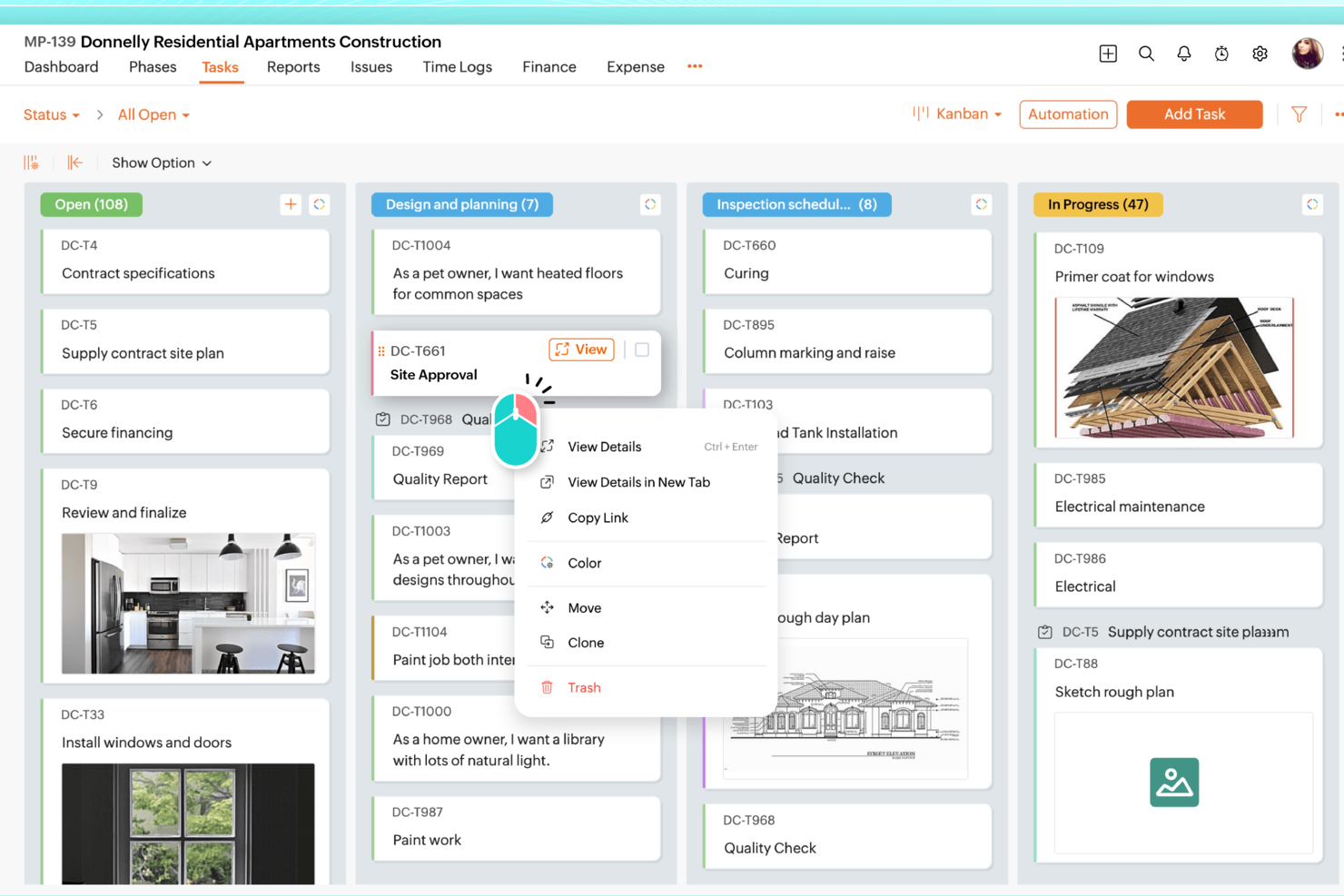
Zoho Projects is a project management tool that can support capacity planning by helping teams track workloads, assign resources, and stay on top of delivery timelines. It’s a strong fit for teams that need visibility into who’s working on what, how much effort tasks are taking, and where schedules may start to slip.
Why I Picked Zoho Projects
I picked Zoho Projects because it gives teams the structure they need for capacity planning, especially through resource allocation, workload visibility, and timeline tracking. Its Gantt charts make it easier to map work across a schedule and spot bottlenecks early. You can also use time tracking to compare estimated vs. actual effort, which helps when planning future projects and balancing workloads more realistically.
Zoho Projects Key Features
In addition to its capacity planning strengths, Zoho Projects offers several other features that enhance its utility:
- Task Management: Allows you to break down projects into smaller, manageable tasks with dependencies and priorities.
- Issue Tracking: Enables tracking and resolution of project issues, ensuring that nothing falls through the cracks.
- Document Management: Facilitates sharing and collaboration on project-related documents within teams.
- Automation: Includes workflow automation to reduce manual effort and streamline project processes.
Zoho Projects Integrations
Integrations include Google Calendar, Google Tasks, Google Drive, Microsoft Office 365, Microsoft Teams, Slack, Dropbox, Box, GitHub, GitLab, and Bitbucket.
Pros and Cons
Pros:
- Affordable pricing for growing teams
- Built-in time tracking and billing
- Strong automation and workflow customization
Cons:
- Mobile experience less fully featured
- Interface has steeper learning curve


VOGSY is an all-in-one CRM and ERP solution designed for global project teams. It helps businesses manage their people, projects, and finances across multiple countries and currencies from a single platform.
I picked VOGSY for its resource management capabilities that help you anticipate future resource needs and track team utilization. This feature ensures that you can make informed staffing decisions and allocate resources optimally. Additionally, VOGSY's work-in-progress management helps you keep unbilled hours in check, providing a clear picture of project accounting.
Another reason VOGSY stands out is its ability to forecast revenue and margins based on resource planning. This feature allows you to align your financial goals with strategic objectives, providing a more accurate understanding of your business performance. Plus, the platform offers detailed project setup and budgeting, giving you the tools you need to manage projects from start to finish.
Features include the ability to track billability across departments and employees, which ensures that your team is working efficiently toward your business goals. The platform also supports global and multinational operations, allowing you to manage multiple companies and multi-currency transactions. Additionally, VOGSY offers flexible revenue recognition and accounts receivable monitoring, which helps you maintain a steady cash flow.
Integrations include QuickBooks, Deltek, Xero, Sage, Certinia, Oracle Netsuite, Exact, PHC-GO, Tally, Wave, ABSS, and Omie.
New Product Updates from VOGSY
VOGSY Enhances Cost Tracking and Reporting
VOGSY introduces enhanced cost tracking for external resources and reporting improvements. These updates provide more accurate financial visibility and improved project performance insights. For more information, visit VOGSY’s official site.
 .
.
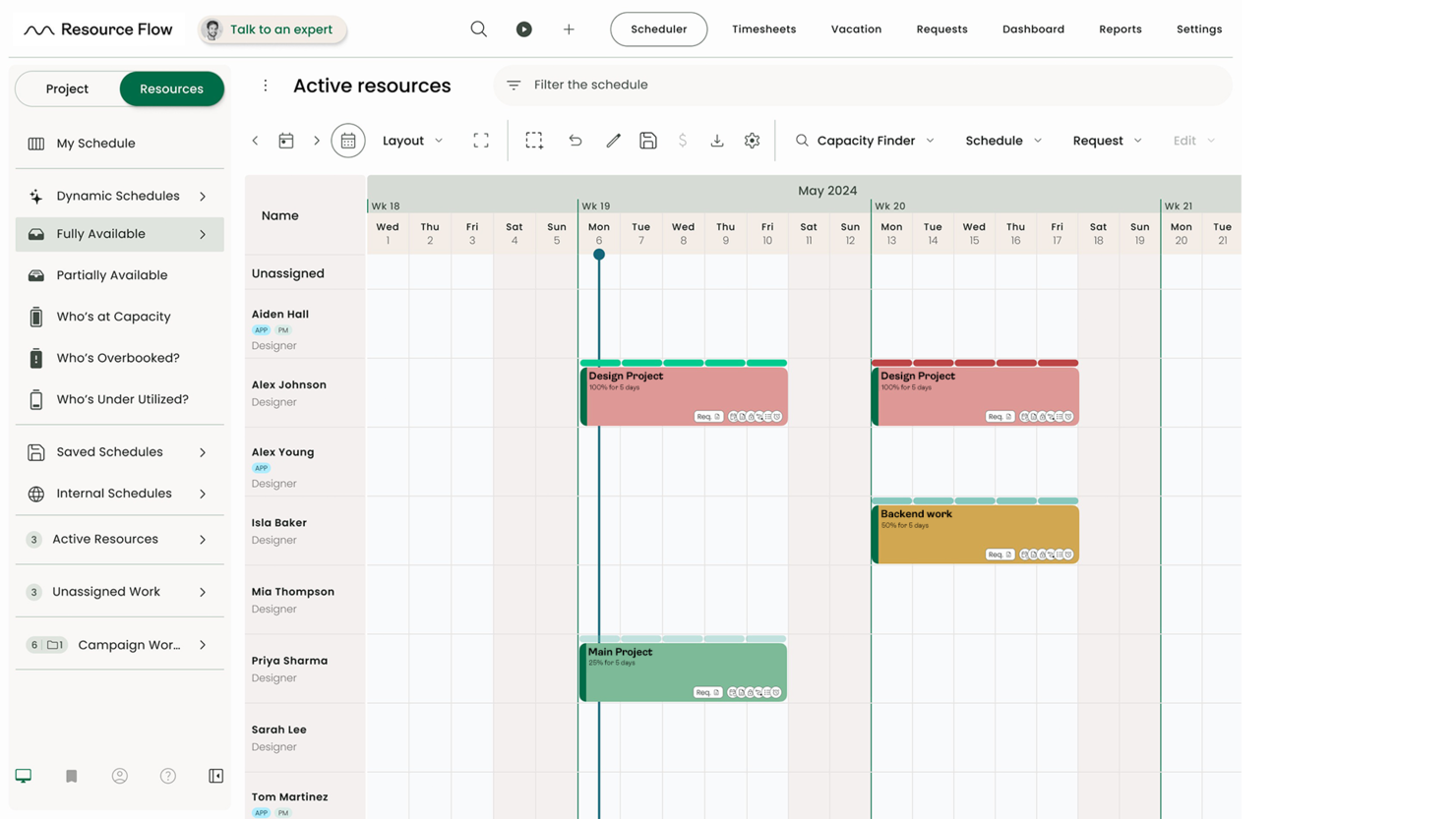
Hub Planner is a modern, cloud-based resource management and scheduling platform that serves team-based businesses of any size or industry. It offers a wide variety of products besides resource management, including vacation and leave management, timesheets and approval, reporting and analytics, and skills matching. The platform’s main function is to aid project managers when it comes to the management, capacity planning, and monitoring of projects and resources within a central location.
Hub Planner provides a modern resource scheduling and management module that enables project managers to effectively conduct resource capacity planning and scheduling using a simple drag-and-drop mechanism. This makes the process of scheduling teams and allocating resources easier and more efficient Their project and resource planning feature allows managers to set their budgets so they don’t overspend or overextend valuable resources. They can plan their budget in hours and budget in cash. A currency feature is also available, allowing teams to set the proper currency for international projects.
Hub Planner includes a natively optimized mobile application and doesn’t require users to download any additional apps. They log in through any browser or device to access multiple dashboard views that contain all the information they might need, including project and task progress, schedules, as well as resource availability and utilization data.
Hub Planner costs from $7/resource/month and offers a 14-day free trial with unlimited projects and resources; all modules are available for users to pick and install. Businesses can customize their Hub Planner deployment and pay only for the products that they’ve implemented from the main platform. Premium Hub Planner extensions are also available, ranging from smart groups, custom fields, and approval workflows to task checklist creation and task management.


Resource Guru is a capacity planning tool that lets you manage people, equipment, and meeting rooms in one place. Its unified resource pool helps you see availability at a glance, assign tasks efficiently, and keep workloads balanced across your team.
I picked Resource Guru because its project forecasting reports help you anticipate resource needs before scheduling conflicts happen. You can view upcoming workloads, spot potential overbooking, and make adjustments early—helping projects stay on track and teams work at a sustainable pace. Its heatmap view also gives you an instant, color-coded snapshot of team capacity, making it easy to spot bottlenecks and redistribute tasks before issues arise. I also like that it includes built-in time tracking, so you can compare planned hours against actual time spent and identify where resources are being over- or under-utilized.
Leave management to track absences and prevent scheduling surprises, resource utilization metrics to compare billable vs. non-billable time, team engagement tools that help reduce stress and improve productivity, management of both people and equipment in a single platform, and interactive heatmaps to visualize workloads and avoid overload.
Google Calendar, Microsoft Outlook Calendar, Apple Calendar, Calendly, Fantastical, Zapier, Slack, Salesforce, Microsoft Teams, Jira Software Cloud, Google Sheets, and Smartsheet.
New Product Updates from Resource Guru

Resource Guru Launches Asana Integration
Resource Guru now integrates with Asana to enhance task scheduling by providing insights into availability and skills. For more information, visit Resource Guru's official site.
 .
.

Wrike is a work management platform that lets you plug into 400+ integrations and customize your workflows, dashboards, and request forms. This tool offers all-in-one capacity planning software where users can monitor projects, fill required gaps in workloads, capitalize on resources, and lean on a variety of templates to accelerate common projects and tasks.
Chris Sorensen, CEO of PhoneBurner, shared how Wrike supported his team’s efforts: “I have used Wrike to manage cross-functional marketing as well as product projects. I would say the thing that stood out most was its timeline visibility and task ownership clarity. It really helped us balance team workloads more effectively by making resource conflicts easier to spot early on.”
Wrike has a user-friendly interface with advanced customization capabilities. For example, you can organize, see, and manage project timelines using Kanban boards, drag-and-drop Gantt charts, and detailed dashboards. Additionally, you have access to advanced insights with a suite of analytics, resource management, and performance-reporting features.
Wrike offers native pre-built integrations with more than 400 popular platforms, including Microsoft, Google, and Dropbox, along with sales and marketing software from Salesforce and Marketo.
New Product Updates from Wrike

Streamlining Workspaces with New Updates
Wrike announces custom space templates, AI Agents in Wrike Labs, and a new Guage widget to improve project management. For more information, visit Wrike's official site.


Miro is a visual workspace tool that facilitates collaboration and innovation, offering features such as visual project management, diagramming, process mapping, and content visualization. Its unique selling point lies in its ability to facilitate visual collaboration and innovation, making it the best choice for large-scale collaboration and innovation.
I chose Miro because it offers a comprehensive set of tools and templates that facilitate efficient project management and strategic planning. Its capacity to visually communicate complex projects and enable collaborative work makes it a standout choice for teams looking to manage their capacity planning effectively.
What makes Miro different is its intuitive color-coding functionality, flexibility, and the ability to streamline the planning process. The platform's integration with tools like Jira and Azure DevOps, along with features for reducing friction and increasing visibility during planning exercises, positions Miro as a unique solution for visual collaboration and innovation.
I believe Miro is best for visual collaboration and innovation because it not only provides a centralized space for planning and tracking but also enhances team alignment and communication. The ability to create engaging presentations with live dashboards and diagrams, as well as the option to facilitate strategic sessions inclusively, makes Miro an exceptional tool for teams aiming to innovate and collaborate visually.
Features include real-time collaboration tools, such as sticky notes and comments, an infinite canvas, custom frames and shapes, presentation mode, TalkTrack to record process explanation videos, Miro Assist AI, document and image embedding, voting and polling features, mind mapping tools, screen sharing, timeline and roadmap planning, access control and permissions management.
Integrations include Zoom, Figma, Asana, Microsoft Teams, Jira, Slack, Monday.com, Confluence, Google Drive, Box, Airtable, Notion, Azure, and Webex.
Pricing starts at $10/user/month, and a free plan is available.


Bonsai is a comprehensive business management software that integrates various aspects of running a business, such as project management, invoicing, and client communication. This ability to centralize all business operations makes it an ideal tool for agencies, consultancies, and professional services firms.
The platform offers a real-time workload chart view that allows you to see your team's capacity, schedule tasks across projects based on availability, set daily capacity limits, and block time off for individuals. This comprehensive capacity planning tool helps avoid overbooking or under-utilizing your talent.
For me, the standout feature of Bonsai is its utilization reporting capabilities. This feature tracks time spent on projects and factors in capacity limits so you can understand how planned capacity compares with actual utilization. This feature can then help you optimize your team's schedule and plan for future projects.
Bonsai integrates with Gmail, Google Calendar, Zapier, Google Sheets, Xero, HubSpot, Slack, QuickBooks Online, Calendly, ClickUp, Trello, Google Drive, and more.
A free trial is available for seven days with full access to Bonsai's features.

Saviom is a highly configurable and scalable resource capacity planning software built to address resourcing challenges across all industries. It helps align resource capacity to changing demands for current and future projects in the pipeline. You can allocate the right resources to every project at the right time and cost to boost operational efficiency and improve project delivery.
Some of the advanced features of Saviom include demand management, real-time optimization, pipeline management, bench management, real-time project financial forecasting, and BI-powered reports/dashboards.
What really stands out is the tool's new and improved all-in-one resource planner, which offers a comprehensive suite of advanced functionalities such as multi-dimensional analysis, embedded capacity planning, heat mapping, intelligent matchmaking, early warning, and KPI forecaster. All these features collectively help boost billable utilization of every resource, bridge skills gaps proactively, eliminate burnout, and minimize hiring/firing costs.
Saviom integrates with your everyday business applications such as Salesforce, MS Excel, SAP, and more.


Toggl is a time tracking, project planning, and hiring software with features that let you track your teams capacity and quickly make decisions.
Why I picked Toggl Plan: It’s a very complete tool that has features that let you track work and turn that information into budgets, billing, and invoicing. Toggl’s simple drag-and-drop timelines let you create effective work schedules, get visibility into your team's availability and workload, and easily follow up on tasks.
Additionally, you can use the tool on any platform you want, as they have a mobile app, desktop app, browser plugins, and online tool.
Toggl Plan Standout Features & Integrations
Features include time tracking, reporting, project tracking, revenue tracking, and team scheduling.
Integrations are already at 100+ and include Asana, Jira, Notion, Salesforce, Slack, Trello, Airtable, Adobe Creative Suite, and Zapier.
Toggl Plan Plans & Pricing
The free version is available for up to 5 users. There are three plans and pricing starts at $10/user/month.

Meisterplan
Best for its role-based resource allocation prior to staffing

Meisterplan is a cloud-based portfolio-level resource management software designed to help businesses create outcome-oriented portfolios. It features a highly visualized platform that enables project portfolio and resource managers to make data-driven, portfolio-level decisions on resource allocations, timing, priorities, and capacities.
Meisterplan’s resource management solution provides the tools and capabilities necessary for realistic resource and capacity planning. Among its main features is the team planner, designed to ensure the appropriate employees are assigned to a task or work that matches their skill sets, without being overbooked or overworked.
You can view resource availability and utilization through the Meisterplan team planner and heatmap. Knowing which resources are overallocated can help you realistically assign tasks to people who can take on them and create a balanced workload across the team.
Meisterplan also offers more flexible resource allocations, allowing you to efficiently allocate resources to the required level, whenever necessary. The process begins with role-based allocations, and then you can add and classify team members by their roles, skill sets, and availability. The tool allows you to allocate any person by the hour or their full-time equivalent (FTE) according to requirements and suitability.
The browser-based solution offers customizable allocation view options, including weekly, monthly, and quarterly views in both grid and flexible modes. You can also use the software to estimate and adjust the work required for new demands for more efficient role-based planning. Also, you can allocate resource capacity to specific roles for planning purposes.
Meisterplan’s basic plan has a starting price of $713 per month and includes 50 resources. This package includes features tailored for multi-team resource management.


awork is a project and capacity planning platform designed for agencies and project-based teams. It provides real-time visibility into workloads, helping managers balance resources while improving collaboration and planning accuracy.
I picked awork because of its AI-driven project assistant and real-time resource management features, which make it especially effective for capacity planning. The platform analyzes project data to suggest task distribution and automatically reschedules work based on priorities, deadlines, and team availability. This helps managers avoid overloading individuals while ensuring that projects move forward smoothly.
Additionally, awork integrates automated time tracking, giving you insights into team utilization and project efficiency. With the ability to view capacity across multiple projects, you can plan ahead with confidence and make informed resourcing decisions.
awork offers project templates for consistent workflows, an AI scheduler that adjusts tasks dynamically, and real-time tracking of budgets and hours to keep projects on scope. It also supports seamless collaboration by allowing agencies to work with both internal teams and external freelancers.
Integrations include n8n, Zapier, Xero, sevdesk, Personio, Slack, Microsoft Teams, MOCO, and helloHQ.


Birdview PSA is a resource management, planning, and scheduling software with resource management features that will help you with your capacity planning.
Why I picked BirdviewPSA. This tool has everything you need to support your projects through its resource planning center. It allows you to access 3 main views. The first one is planning. This view gives you the option to book resources in advance and ensure your capacity meets the demands. Birdview PSA displays your team's skills and other useful information that will help you make informed decisions.
Then, you have the workflow view. This view shows current projects and resource allocations in real time. The system will automatically color-code for you those resources that are over or under-allocated and allow you to address conflicts with a simple drag-and-drop.
The last view is simulation. In this view you can assess the viability of working on a new project, run scenarios to inform your resource hiring, and see allocation projections per resource.
Integrations include 2000+ pre-built connectors, including MS Teams, Jira, Adobe, Hubspot, Salesforce, Slack, Zoom, Olark, TimeCamp, Xero, and Invision. Additionally, you can connect to 5000+ apps using Zapier and Workato. Both of these need you to have a paid plan with them.


ProjectManager is a project management solution with good resource management and project planning features. The tool has a clean interface that’s easy to learn and its collaboration features help your team members coordinate their efforts.
This software makes it easy to check what your employees are doing. Its dashboards organize the data in neat reports, so you can see how a project is going and assess your employees’ workload with ease.
One of the good things about using this tool is that it enables you to measure how much your organization can achieve in any timeframe. This helps with capacity management, project planning, and forecasting.
Projectmanager integrates with a variety of tools, including JIRA, Slack, Trello, Microsoft Excel, Zapier, and more.
Projectmanager costs from $11.50/user/month. You can access a free 30-day trial. The platform also offers a free-forever plan for up to three users.

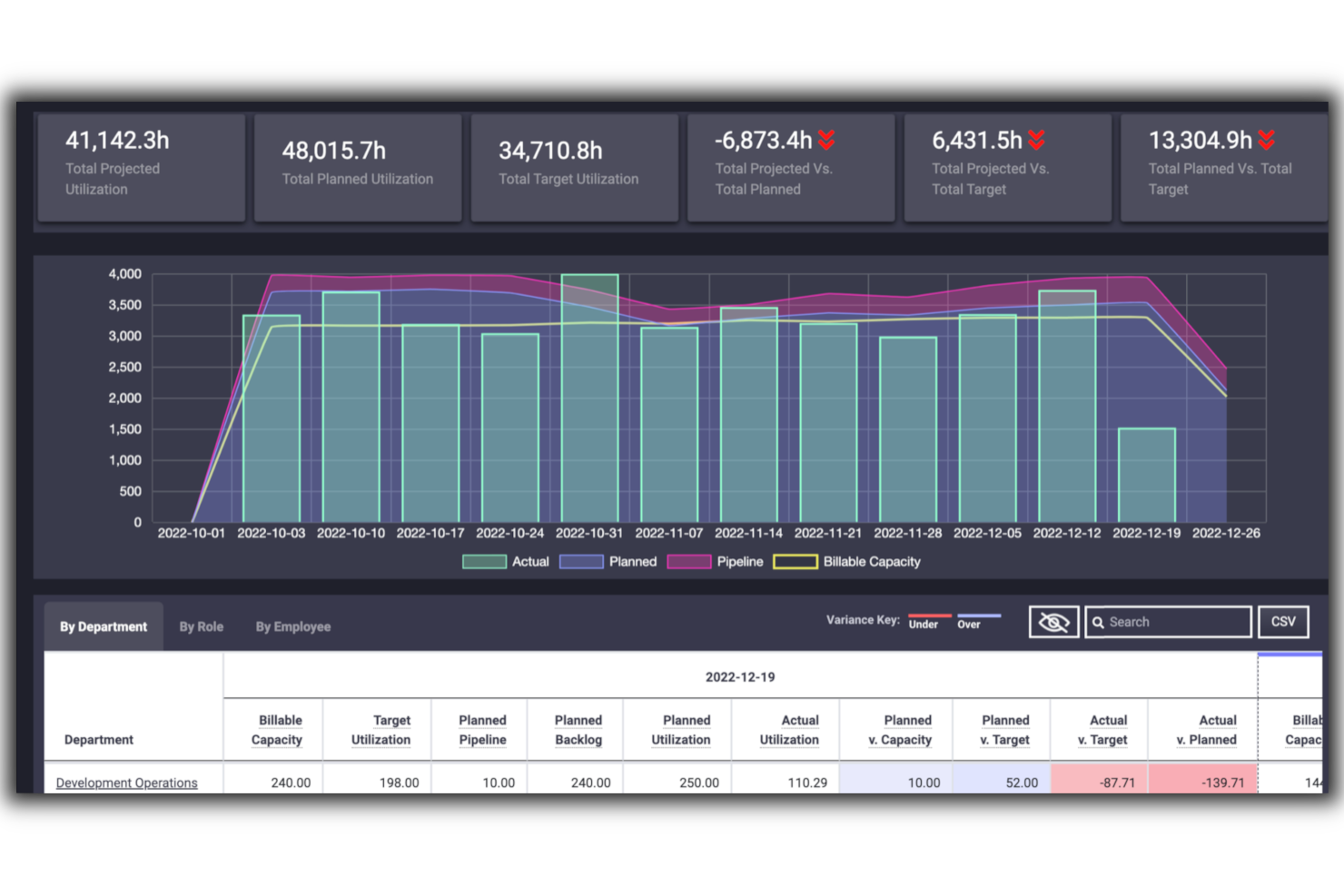
Parallax is a service operations software with resource management, sales and pricing, project financials, and business intelligence functions. The software helps project managers better understand their current and future resource needs, track business financials, and monitor business performance and efficiency. All of this supports informed capacity planning and management.
This software solution is particularly suited to professional service providers, digital agencies, and software development firms. It tracks the availability of resources across different teams over time and provides an overview of upcoming tasks and projects, helping project managers plan ahead rather than react to immediate needs. Users can assign tasks with confidence as they can see which team members have the most available time at any given moment. For organizations juggling multiple projects, deadlines, stakeholders, and clients, this software can be a great solution for keeping everything on track.
The financial features of the product help users manage budgets across projects and resources. Features like service offer templates and project financial tracking and forecasting support more consistency in costs, profit, and budgets. Users can also track performance and finances using the business intelligence features.
The platform has native integrations for Asana, Harvest, Hubspot, Jira, Microsoft Teams, Oracle NetSuite, Salesforce, and Tempo. Book a free demo through the site and receive a quote for your use case.

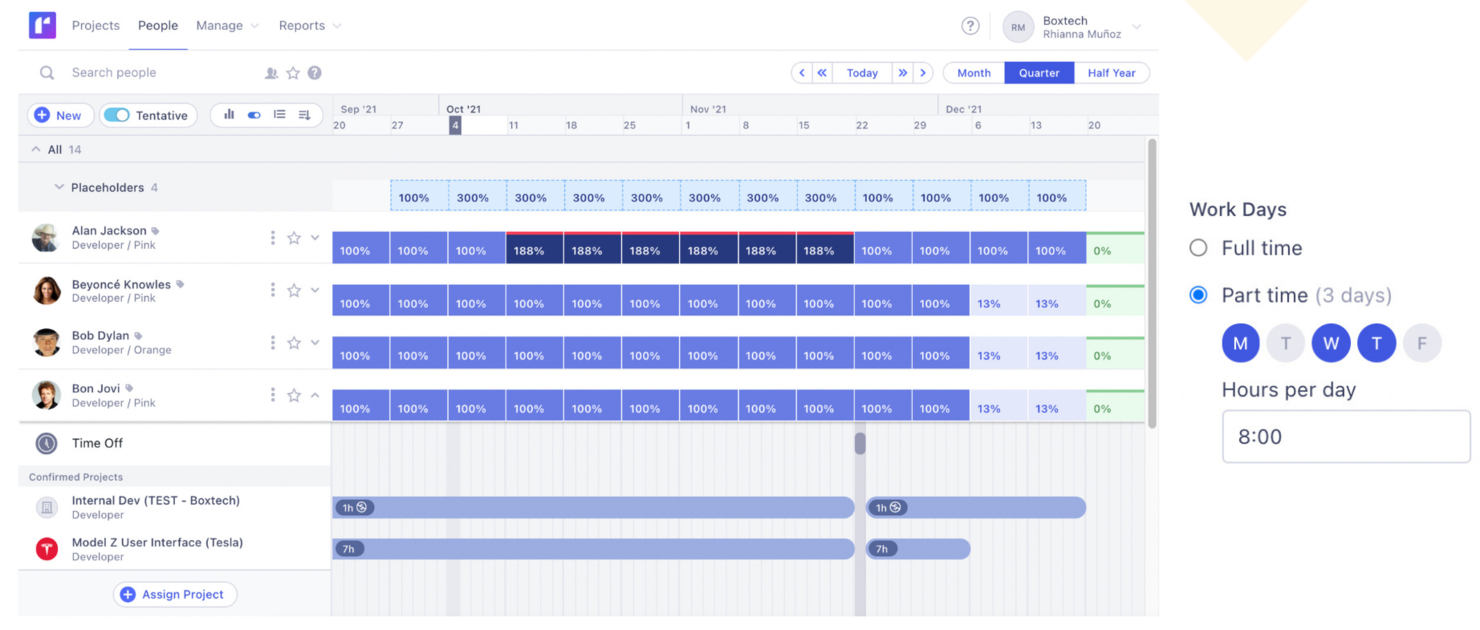
Runn is a resource and capacity management platform that helps project managers optimize their team’s workload according to their business needs.
With Runn, you can plan and forecast capacity so you can schedule your projects accordingly. The tool’s calendar enables you to access your resources in real-time and see the involvement of every team member. The software also helps you differentiate between billable and non-billable work, making it easier to price your services and raise invoices.
Runn’s highlight is its capacity forecasting feature. This feature helps you determine whether your team has the skills and resources to take on certain projects, and how new work would impact your team’s workload.
Runn integrates with multiple tools, including WorkflowMax, Harvest, Clockify, and more.
Runn costs from $10/user/month. You can access a free trial for 14 days. The solution also offers a free-forever plan for up to five users.
When to Use Capacity Planning Software
Capacity planning software gives you a real-time view of who's available, what they're working on, and whether your team can actually take on what's coming next. If any of the scenarios below sound familiar, it's probably time to add one to your stack:
- Your team keeps missing deadlines despite "enough" people: You've got 10 people on the project, but three are buried on other work and no one flagged it. Capacity planning software surfaces overallocation before it derails delivery, so you can reassign work while there's still time to course-correct.
- You're building the resource plan in spreadsheets: You're tracking availability across a 15-person team in a shared Excel file that's out of date by Thursday. A dedicated tool keeps availability, time off, and project assignments in one live view, cutting planning time and eliminating version chaos.
- Managing hiring decisions based on gut feel: You're not sure whether to bring on a contractor or wait until Q3, because you can't see demand beyond next month. Capacity planning software models your pipeline so you can make resourcing calls with actual data behind them.
- It's taking too long to staff up new projects: Every time a project kicks off, you spend a week figuring out who's free and at what percentage. With capacity planning software, you can see availability at a glance and assign the right people in hours, not days.
- You're running multiple projects with shared resources: Your designers and developers are split across four active projects, and no one has a clear picture of the total load. Capacity planning tools give everyone visibility into shared team bandwidth, so conflicts get caught before they cause burnout.
Other Capacity Planning Software
Here are a few more that didn’t make the top list but are worth your consideration.
- Smartsheet
Save time when planning a new project
- Celoxis
For cost and performance analysis
- Screendragon
For AI-powered resource allocation
- Epicflow
For AI resource capacity planning
- ClickTime
For balancing workloads and allocating staff in real time
- GoodDay
For flexibility in data display
- Revcast
For AI-driven revenue forecasting
- Skedulo
Productivity software designed to help companies that collaborate with international freelancers to keep their projects on track.
- Planful
Financial planning and analysis platform that helps with capacity planning and delivers actionable insights based on your company’s data.
- Connecteam
Workforce management tool that enables project managers to automate recurring tasks and create shifts for their employees.


Related Project Management Software Reviews
If you still haven't found what you're looking for here, check out these other related tools that we've tested and evaluated:
- Project Management Software
- Resource Management Software
- Workflow Automation Software
- Time Tracking Software
- Task Management Software
- Project Scheduling Software
Selection Criteria for Capacity Planning Software
When selecting the best capacity planning software to include on this list, I considered common buyer needs and pain points like accurately forecasting resource demands and preventing overallocation. I also used the following framework to keep my evaluation structured and fair:
Core Functionality (25% of total score)
To be considered for inclusion on this list, each solution had to fulfill these common use cases:
- Tracking resource availability and allocation
- Forecasting capacity based on project demand
- Managing workload distribution across teams
- Generating capacity and utilization reports
- Integrating with project management and scheduling tools
Additional Standout Features (25% of total score)
To help further narrow down the competition, I also looked for unique features, such as:
- AI-driven demand forecasting
- Scenario planning for resource allocation
- Customizable dashboards and KPIs
- Real-time integration with financial data
- Automated alerts for capacity thresholds
Usability (10% of total score)
To get a sense of the usability of each system, I considered the following:
- Ease of navigation through dashboards and menus
- Simplicity of creating and updating capacity plans
- Availability of drag and drop scheduling tools
- An intuitive interface for both managers and team members
- Mobile accessibility for on-the-go resource management
Onboarding (10% of total score)
To evaluate the onboarding experience for each platform, I considered the following:
- Availability of step-by-step product tours
- Access to video tutorials and knowledge bases
- Presence of pre-built templates for quick setup
- Interactive webinars or live training sessions
- Chatbot or live support during the initial setup phase
Customer Support (10% of total score)
To assess each software provider’s customer support services, I considered the following:
- Availability of 24/7 support channels
- Response times for resolving issues
- Access to dedicated account managers
- Quality of self-service resources
- Active community forums or user groups
Value For Money (10% of total score)
To evaluate the value for money of each platform, I considered the following:
- Transparent pricing with no hidden fees
- Availability of tiered pricing plans
- Inclusion of core features in entry-level plans
- Flexibility to scale pricing as usage grows
- Comparison of cost to similar tools in the market
Customer Reviews (10% of total score)
To get a sense of overall customer satisfaction, I considered the following when reading customer reviews:
- User satisfaction with feature updates and improvements
- Reports of ease of use and intuitive design
- Feedback on reliability and performance
- Opinions on the quality of customer support
- Insights on return on investment and cost-effectiveness
How to Choose Capacity Planning Software
It’s easy to get bogged down in long feature lists and complex pricing structures. To help you stay focused as you work through your unique software selection process, here’s a checklist of factors to keep in mind:
| Factor | What to Consider |
| Scalability | Can the software handle more projects and resources as your team grows? Look for tools that support higher user counts or data volumes without needing a big upgrade. |
| Integrations | Does the tool connect smoothly with your project management, HR, or finance tools? Avoid tools that require lots of manual workarounds or duplicate data entry. |
| Customizability | Can you adjust fields, workflows, and reports to match how your team works? Overly rigid tools often force you to change your process to fit the software. |
| Ease of use | Will your team pick the software up quickly? Look for simple interfaces, drag-and-drop scheduling, and clear dashboards that don’t require hours of training. |
| Implementation and onboarding | How long will the software take to get up and running? Check if they offer templates, training sessions, or migration support so you’re not figuring it out alone. |
| Cost | Does pricing fit your budget over time? Factor in hidden costs like premium support, add-on features, or per-user pricing that can balloon as you grow. |
| Security safeguards | Does the tool have safeguards like role-based access, encryption, and audit logs? You need to keep sensitive resource data safe, especially if you’re managing contractors or external partners. |
| Support availability | When will you get help if something breaks? Look for fast response times, live chat, or dedicated account managers. |
Trends in Capacity Planning Software for 2025
In my research, I sourced countless product updates, press releases, and release logs from different capacity planning software vendors. Here are some of the emerging trends I’m keeping an eye on:
- Predictive Analytics for Demand Forecasting: Tools are incorporating machine learning algorithms to predict future resource requirements and enhance the accuracy of capacity planning.
- AI-driven Resource Allocation: Some platforms now leverage AI resource management to automate the allocation of resources, significantly reducing manual effort.
- Seamless ERP and Project Management Integration: The ability to integrate with ERP systems and project management tools is growing, enabling real-time data exchange and better visibility across all resources.
- Real-time Collaboration Tools: Some capacity planning software is introducing real-time collaboration features that enable teams to plan and adjust resource allocations dynamically.
- Environmental Impact Analysis: Many platforms now allow users to assess the environmental impact of project resource utilization.
What is Capacity Planning Software?
Capacity planning software is a tool that helps teams forecast resources, allocate workloads, and track availability.
It provides visibility into capacity across projects, which enables better scheduling, balanced workloads, and on-time delivery. Project managers, resource managers, and team leads use it to optimize resource utilization, prevent overbooking, and align staffing with project demand.
Features of Capacity Planning Software
When selecting capacity planning software, keep an eye out for the following key features:
- Resource forecasting: Predict upcoming needs for personnel, equipment, or space by analyzing historical trends and future project requirements. This gives you the upper hand in planning ahead and avoiding last-minute scrambles.
- Demand management: Track and manage incoming projects or workloads, so you can match supply to demand more accurately and prevent overloading your teams or systems.
- Scenario modeling: Run “what-if” simulations to test out different capacity strategies before making real changes. This lets you play out potential outcomes safely—think of it as your risk-free rehearsal for the real thing.
- Real-time data integration: Tap into current business data—like sales, production, or inventory—for live updates on your capacity situation. Real-time visibility means you get instantly actionable insights and fewer surprise bottlenecks.
- Automated alerts and notifications: Set up automatic reminders or warnings when you’re running low on resources or approaching capacity limits. These prompts help you stay on track without constant manual checking.
- Dashboards and reporting: Access visual, easy-to-read summaries and detailed analytics about your resource usage, demand, and capacity. Dashboards let you spot trends, track performance, and share clear updates with the rest of your team.
- Collaboration tools: Let multiple users work together on resource planning, whether they’re on your team or from another department. Built-in communication and sharing features streamline teamwork and decision-making.
- Capacity optimization: Get actionable suggestions for reallocating resources or adjusting workloads to maximize efficiency, minimize downtime, and keep things running smoothly.
Common Capacity Planning Software AI Features
Beyond the standard capacity planning software features listed above, many of these solutions are incorporating AI with features like:
- Predictive analytics: Use AI-driven models to forecast future demand, resource needs, or risks based on patterns in your data. This supercharges your ability to make smart, proactive decisions.
- Automated scheduling: Let AI handle the tricky task of assigning resources and creating schedules, balancing priorities while accommodating last-minute changes with minimal hassle for you.
- Anomaly detection: Have AI scan your capacity and usage data for unusual patterns—think of it as an always-on assistant spotting problems before they turn into major headaches.
- Intelligent recommendations: Receive AI-powered suggestions for resource allocations, inventory levels, or timeline adjustments, helping you continuously refine and improve your planning process.
- Natural language processing (NLP) interfaces: Interact with your software using simple, conversational language—ask questions about capacity, get quick insights, and make adjustments without digging through dashboards.
Benefits of Capacity Planning Software
Implementing capacity planning software can provide several benefits for your team and your business, including:
- Better resource allocation: See who’s available and assign work based on real-time capacity data to prevent overloading your team.
- Improved project forecasting: Use resource forecasting tools to predict future needs and plan for upcoming projects with confidence.
- Reduced bottlenecks: Spot overbooked resources early with automated alerts and adjust workloads before they slow down progress.
- Increased visibility: Get a clear view of capacity across all projects with dashboards that show utilization and availability at a glance.
- Faster decision-making: Use real-time reports to quickly adjust staffing or schedules without waiting for manual updates.
- Cost savings: Avoid last-minute hiring or overtime expenses by planning capacity accurately with forecasting and tracking features.
- Higher team satisfaction: Balance workloads fairly with workload management tools that prevent burnout and improve overall morale.
Costs & Pricing for Capacity Planning Software
Selecting capacity planning software requires an understanding of the various pricing models and plans available. Costs vary based on features, team size, add-ons, and more. The table below summarizes common plans, their average prices, and typical features included in {keyword} solutions:
Plan Comparison Table for Capacity Planning Software
| Plan Type | Average Price | Common Features |
|---|---|---|
| Free | $0 | Basic resource planning, limited projects, standard reporting, community support |
| Basic | $10-20/user/month | Enhanced resource planning, unlimited projects, advanced reporting, email support |
| Professional | $20-40/user/month | All Basic features, plus resource forecasting, integration capabilities, priority support |
| Enterprise | Custom | All Professional features, plus custom integrations, dedicated account manager, 24/7 support, advanced security |
Capacity Planning Software Frequently Asked Questions
Here are some answers to commonly asked questions about capacity planning software.
What are some best practices for capacity planning?
How do I implement capacity planning software in my existing project workflows?
What common mistakes should I avoid when using capacity planning software?
Can Jira do capacity planning?
Does capacity planning software integrate with tools like Slack, Jira, or MS Project?
How accurate are the forecasts in capacity planning software?
How can capacity planning tools help prevent burnout?
Can I use capacity planning software for remote or distributed teams?
What are the three types of capacity planning?
What are the three major strategies for capacity planning?
What's Next?
If you want to receive tips on capacity planning from top thinkers in the industry directly in your inbox, subscribe to the Digital Project Manager newsletter.