

10 Best AI Capacity Planning Software Reviewed in 2026

10 Best AI Capacity Planning Software Shortlist


Managing resources and forecasting needs can be a headache for any project manager. You’re juggling deadlines, budgets, and team workloads, and it’s easy to feel overwhelmed. That’s where AI capacity planning software steps in, offering a way to ease these burdens by optimizing resource allocation and predicting future demands.
In my experience, these tools help you make informed decisions, so your team can focus on what they do best. I’ve independently tested and reviewed various options, aiming to give you an unbiased look at the top solutions available.
In this article, you’ll find a detailed review of the best AI capacity planning software. I’ll cover their features, pros, cons, and more, helping you choose the right fit for your team.
Why Trust Our Software Recommendations
Our team has been testing and reviewing software since 2012. As project managers ourselves, we know how difficult—and important—it is to choose the right software.
For this guide, we evaluated tools using hands-on testing and independent research, scoring tools using our selection criteria. We also draw on insights from industry thought leaders and practicing project management experts.
Our reviews reflect our human editorial judgment, not a sales pitch.
Expert reviewers:
AI Capacity Planning Software Comparison Table
This comparison table summarizes pricing details for my top AI capacity planning software selections:
| Tool | Best For | Trial Info | Price | ||
|---|---|---|---|---|---|
| 1 | Best for AI-powered workload balancing | Free plan available | From $9/user/month (billed annually) | Website | |
| 2 | Best with real-time team utilization analysis | Free demo available | Pricing upon request | Website | |
| 3 | Best for enterprise agency workloads | Free demo available | Pricing upon request | Website | |
| 4 | Best for AI-driven capacity planning | 30-day free trial + free demo available | From €22.5/month (billed annually) | Website | |
| 5 | Best for auto-assigning resources | 14-day free trial + free demo available | From $19/user/month (billed annually) | Website | |
| 6 | Best for AI-driven insights | Free demo available | Pricing upon request | Website | |
| 7 | AI-supported client collaboration | 14-day free trial | From $9.99/user/month (billed annually) | Website | |
| 8 | Best for creative teams | 14-day free trial + 30-day money back guarantee | From $8.50/user/month (billed annually) | Website | |
| 9 | Best for project visibility | 14-day free trial available | From $9/user/month (billed annually) | Website | |
| 10 | Best for small teams | Free trial available | From $19/seat/month (billed annually) | Website |


Best AI Capacity Planning Software Review
Below are my detailed summaries of the best AI capacity planning software that made it onto my shortlist. My reviews offer a detailed look at the key features, pros & cons, integrations, and ideal use cases of each tool to help you find the best one for you.

Best for AI-powered workload balancing
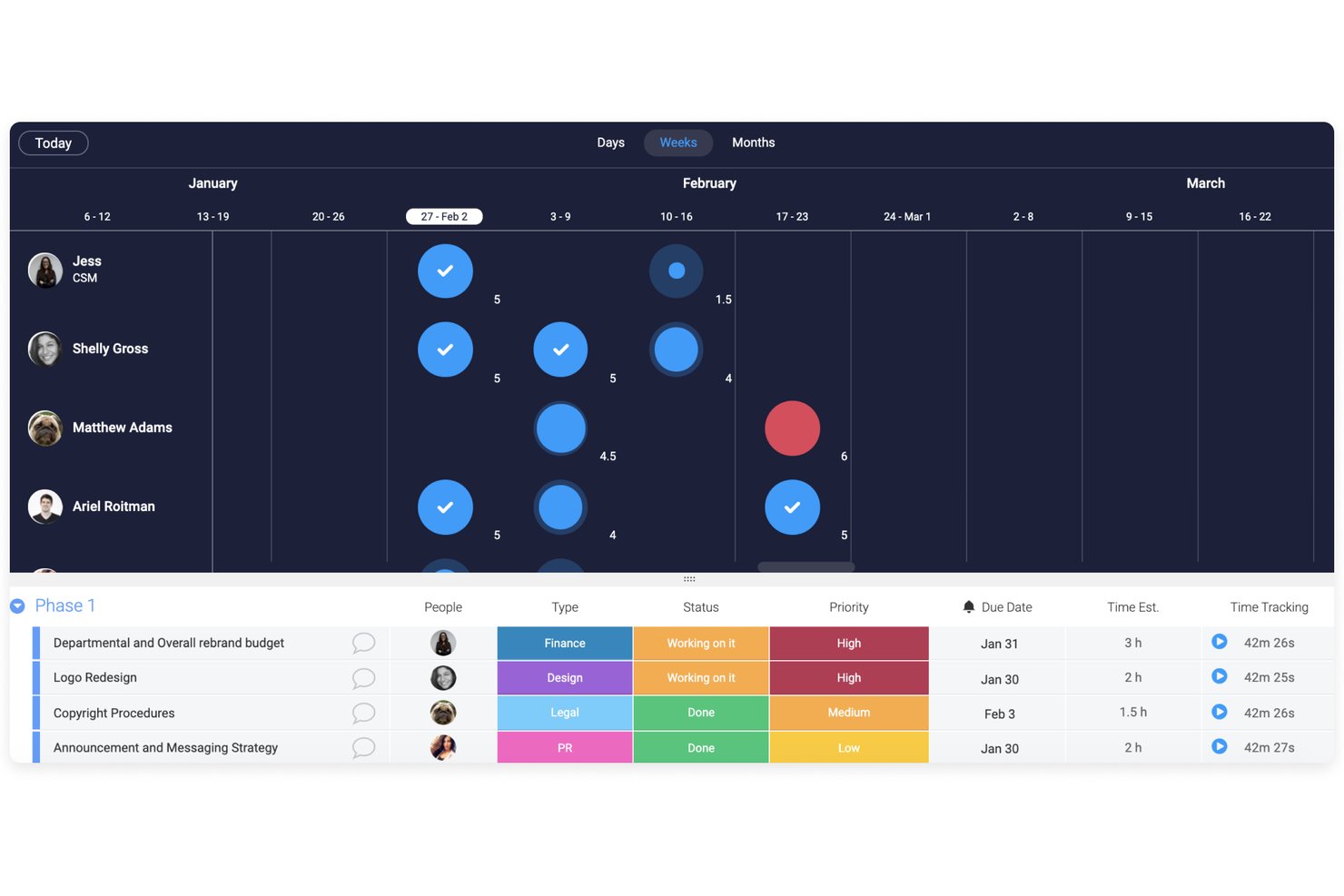
monday AI Workspace is a work management platform with AI-driven capacity planning features, including a Workload View, Workload Balancer AI agent, and pipeline-based demand forecasting across teams and projects.
Who Is monday AI Workspace Best For?
It's a strong fit for resource managers and team leads at mid-size to enterprise organizations that want workload balancing built into their existing work management setup.
Why I Picked monday AI Workspace
monday AI Workspace earns its spot on my shortlist because the AI agent can monitor team capacity continuously and redistribute assignments automatically when someone tips into overload. I also like the Workload View, which color-codes each member's allocation in real time so I can drag-and-drop tasks to rebalance without leaving the board. The AI forecasting layer surfaces resource gaps from pipeline data weeks before they affect delivery.
monday AI Workspace Key Features
- AI-powered capacity forecasting: Machine learning algorithms analyze historical work data and project pipeline inputs to project future resource needs.
- Real-time workload dashboards: Dynamic dashboards compare team capacity against project demand by skill, role, or time period.
- Time tracking integration: Tracks work hours alongside assignments, allowing granular utilization and availability analysis.
- 200+ project management integrations: Connects with Jira, Microsoft Teams, Salesforce, Slack, and other leading project or PMO platforms.
monday AI Workspace Integrations
monday AI Workspace offers hundreds of native integrations, including Jira, Salesforce, HubSpot, Slack, Google Workspace, Microsoft Teams, GitHub, Zendesk, Zoom, and Excel. An API is available for custom integrations.
Pros and Cons
Pros:
- Handles both project management and capacity planning
- Real-time color-coded workload view across teams
- AI Workload Balancer redistributes tasks automatically
Cons:
- Forecasting depth limited vs. dedicated capacity tools
- AI capacity features require higher-tier plans
New Product Updates from monday AI Workspace
monday AI Workspace Adds Human Approval Routing
monday AI Workspace adds a human-in-the-loop approval block to AI Workflows, sending approval requests and routing workflow paths based on responses. For more information, visit monday AI Workspace's official site.

Accelo
Best with real-time team utilization analysis

Accelo is a professional services automation platform that supports capacity planning through real-time utilization tracking, project scheduling, and unified operational reporting. It helps service-based teams manage resources, projects, and client work within a single system.
Who Is Accelo Best For?
Accelo is best suited for professional services teams and agencies that need visibility into team workloads, project timelines, and resource availability across multiple client engagements.
Why I Picked Accelo
I picked Accelo for its real-time team utilization tracking. The dashboard shows current workloads and availability, making it easier to spot overbooked or underused team members. Built-in forecasting tools highlight potential scheduling conflicts so teams can adjust assignments before deadlines are affected.
Accelo Key Features
- Automated project scheduling: Build timelines based on task dependencies and resource availability.
- Time tracking tools: Log hours directly against projects and tasks for accurate utilization reporting.
- Real-time utilization dashboards: Monitor team capacity and workload distribution.
- Client portal: Provide clients with visibility into project progress and communication.
- Integrated billing: Generate invoices from tracked time and project milestones.
Accelo Integrations
Accelo integrates with Google Workspace, Microsoft 365, Xero, QuickBooks Online, HubSpot, Salesforce, Mailchimp, Slack, Jira, and Zapier. An API is available for custom integrations.
Pros and Cons
Pros:
- Custom workflow automation for complex processes
- Unified view combines sales, projects, and billing
- Real-time dashboards show team utilization instantly
Cons:
- Gantt chart lacks deep scenario planning tools
- Minimum three-user subscription required
New Product Updates from Accelo
Accelo Adds Quote Designer and Pipeline Management
Accelo adds Quote Designer, enhanced pipeline views, and quote tracking with version history. This helps teams create proposals and manage opportunities from scoped work. For more information, visit Accelo’s official site.

Best for enterprise agency workloads
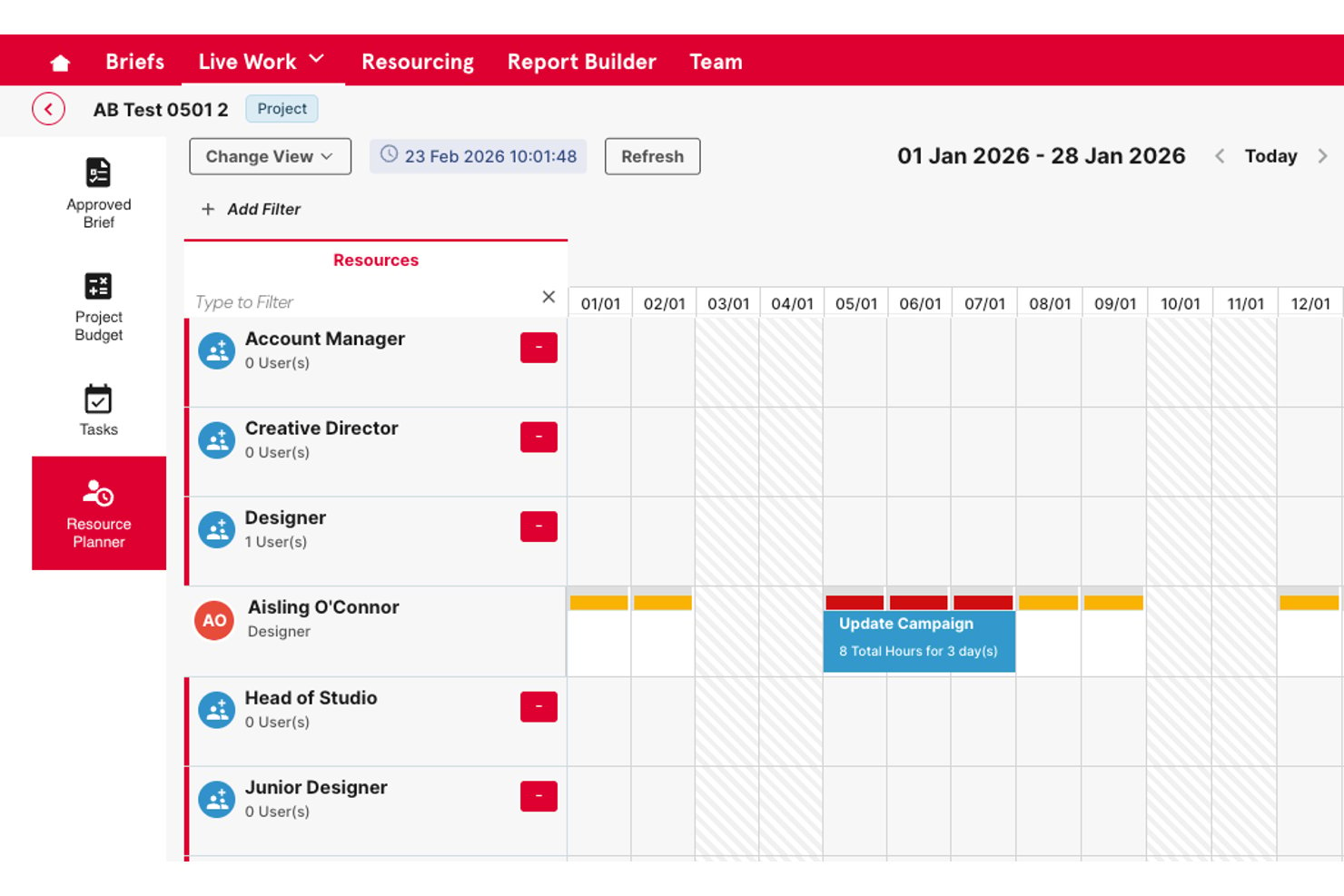
Screendragon is an enterprise work management platform that combines AI-powered resource scheduling, skills-based capacity planning, demand forecasting, and workflow orchestration for marketing and agency teams.
Who Is Screendragon Best For?
Screendragon is a strong fit for enterprise marketing teams and in-house agencies managing high volumes of work across large, distributed teams (50+ users).
Why I Picked Screendragon
I picked Screendragon as one of the best because its AI-powered resource scheduling goes beyond availability to match people by skill set, which matters when you're running parallel campaign workloads across multiple client accounts. I also like its predictive demand forecasting, which uses historical project data to flag capacity gaps 3-6 months out. In practice, that means I can see a resourcing crunch coming before it derails delivery.
Screendragon Key Features
- No-code workflow builder: Design, automate, and update complex project workflows without coding knowledge.
- Advanced approval routing: Tailor multi-step reviews and approvals with role-based controls and audit trails.
- AI-powered forecasting dashboard: Visualize upcoming resource needs and project demand using real-time and predictive analytics.
- Multi-system integrations: Connect with tools like Jira, Adobe, Salesforce, and Office 365 for live project and asset data sync.
Screendragon Integrations
Screendragon offers native integrations with HubSpot, Microsoft Power BI, Ziflow, Brandfolder, Workato, and Smartsheet. An API is available for custom integrations.
Pros and Cons
Pros:
- Handles high-volume enterprise workloads well
- Real-time capacity dashboards across teams
- Strong skills-based resource scheduling for agencies
Cons:
- AI features less mature than dedicated platforms
- Setup requires significant configuration time
New Product Updates from Screendragon
Screendragon Unveils New AI Hub
Screendragon introduced AI Hub, a new capability that lets teams build and manage AI agents directly within workflows. The update helps marketing teams automate tasks, maintain governance controls, and scale AI-driven operations more efficiently. For more information, visit Screendragon's official site.

Epicflow
Best for AI-driven capacity planning
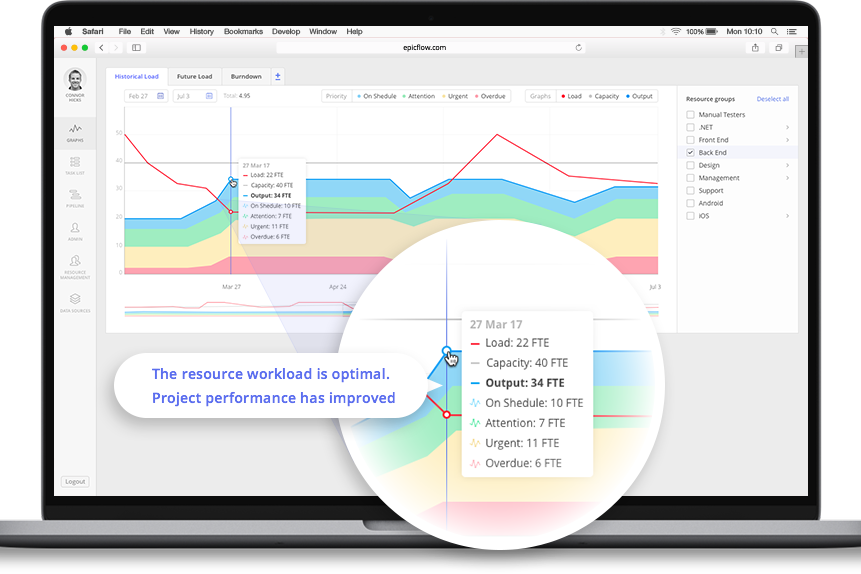
For businesses in need of an AI-powered solution to streamline capacity planning, Epicflow offers a sophisticated tool tailored for project managers and executives across industries like aerospace, telecommunications, and healthcare. This software addresses the challenge of optimizing resource allocation and ensures projects are delivered on time and within budget. By leveraging real-time data-driven decision-making, organizations can enhance project efficiency and profitability.
Why I Picked Epicflow
I picked Epicflow because of its unique AI-driven capabilities that directly cater to the needs of capacity planning. Its predictive analytics feature allows you to foresee potential project bottlenecks, ensuring that resources are allocated optimally. The real-time task prioritization ensures your team focuses on tasks that drive project success, while the semi-automated resource allocation feature balances workloads across your team. These functionalities collectively address the common challenge of bridging the gap between resource demand and supply.
Epicflow Key Features
In addition to its standout features, some other capabilities of Epicflow include:
- Virtual Assistant (Epica): This feature provides real-time project updates, assisting you in staying informed about project progress.
- What-if Analysis: Enables you to simulate different scenarios to predict project outcomes and make informed decisions.
- Historical Load Graphs: Offers insights into past project performance to help you understand trends and improve future planning.
- Competence and Attribute Management: Ensures that the right resources are matched to tasks according to their skills and attributes.
Epicflow Integrations
Integrations include Jira, MS Project, Oracle Primavera, and an API for custom integrations.
Pros and Cons
Pros:
- Portfolio-level resource visibility
- Advanced workload balancing tools
- AI-powered predictive analytics
Cons:
- Advanced features may require training
- Minimum 20-seat requirement

Best for auto-assigning resources

Rocketlane is a customer onboarding and project management tool designed for teams that require efficient onboarding processes. It serves SaaS companies and professional services firms, providing AI-driven tools to streamline customer onboarding and project execution.
Why I picked Rocketlane: Rocketlane excels in AI-powered capacity planning and resource management, automatically matching team members to tasks based on skills, workload, and availability. Its AI capabilities include automated task assignment, real-time project tracking, and predictive insights that help managers plan capacity more accurately. These features ensure your team can focus on delivering exceptional customer experiences while maintaining efficiency and balance. With Rocketlane, you can improve productivity and keep projects on schedule without manual oversight.
Standout features & integrations:
Features include a collaborative workspace that enhances team communication, standardized project templates that save time and ensure consistency, and milestone tracking that gives a clear view of progress and deadlines.
Integrations include Salesforce, Slack, HubSpot, Microsoft Teams, Trello, Jira, Google Workspace, Asana, monday.com, and Zoom.
Pros and Cons
Pros:
- Collaborative workspace
- Real-time project tracking
- Automated task assignment
Cons:
- Learning curve for new users
- May require initial setup time
New Product Updates from Rocketlane

Rocketlane Introduces Governance and Workforce Agents
Rocketlane introduces Governance Agents and Workforce Agents to automate delivery processes and recurring tasks. These updates help teams enforce rules and streamline project execution. For more information, visit Rocketlane’s official site.
 .
.
Forecast
Best for AI-driven insights

Forecast is a project management and resource planning tool designed for businesses looking to optimize their operations with AI-driven insights. It caters to teams across various industries, providing tools for project scheduling, resource allocation, and financial management.
Why I picked Forecast.app: Forecast leverages AI to deliver insights that help your team make data-driven decisions. Its resource allocation features ensure optimal use of team members' time and skills. The tool's project scheduling capabilities allow you to plan effectively, reducing the risk of delays. Additionally, its financial management tools provide visibility into project costs and profitability, essential for strategic planning.
Standout features & integrations:
Features include automatic timesheets, project timeline visualization, and capacity management. These features help your team track progress and manage workloads efficiently. You can also benefit from its scenario planning tools, which allow you to anticipate project outcomes.
Integrations include Jira, QuickBooks, Xero, Slack, Microsoft Teams, Google Calendar, HubSpot, Trello, Asana, and Salesforce.
Pros and Cons
Pros:
- Provides financial visibility
- Offers automatic timesheets
- Supports scenario planning
Cons:
- Advanced configuration can require data modeling knowledge
- AI forecasts may fluctuate in accuracy with limited historical data

AI-supported client collaboration

Teamwork.com is a project management and light capacity planning platform built for client-focused teams and agencies. It helps you balance workloads, track progress, and maintain clear communication with clients using built-in automation and AI-assisted task management.
Why I picked Teamwork.com: Teamwork.com bridges project management and basic capacity planning by giving teams real-time visibility into workloads and availability. Its AI capabilities assist with task prioritization, deadline reminders, and progress tracking — helping managers prevent burnout and optimize resource use. The platform’s client collaboration tools stand out, allowing you to share timelines, deliverables, and reports directly with clients for greater transparency and trust.
Standout features & integrations:
Features include AI-assisted workload management, automated reporting, and predictive task scheduling that help identify potential resource bottlenecks early. You can also benefit from its customizable task boards, which allow for tailored project views.
Integrations include Slack, HubSpot, Google Drive, Dropbox, Microsoft Teams, QuickBooks, Xero, Zapier, Trello, and Asana.
Pros and Cons
Pros:
- Predictive reporting identifies potential timeline or budget risks early
- Client-facing dashboards enhance transparency and communication
- AI-assisted task prioritization improves project pacing and workload balance
Cons:
- Limited capacity forecasting for complex, multi-team operations
- AI insights are still developing compared to larger competitors

awork
Best for creative teams

awork is an AI-enhanced project management platform built for creative teams and agencies. It combines intelligent task planning, collaboration, and time tracking to help teams organize projects, manage workloads, and boost productivity without sacrificing creativity.
Why I picked awork: awork stands out for how it brings AI-assisted organization to creative workflows. It automatically prioritizes tasks, balances workloads, and identifies scheduling conflicts, allowing teams to focus more on execution than admin. The platform also makes it easy to include clients and freelancers in shared workspaces, improving communication and transparency. With its intuitive design and smart automation, awork helps creative professionals stay on top of projects while keeping collaboration fluid and flexible.
Standout features & integrations:
Features include AI-powered task prioritization, predictive workload planning, and intelligent time tracking that learns from user habits. You’ll also find project templates, task dependencies, and a workload overview. These features help your team plan and execute projects efficiently.
Integrations include Slack, Google Calendar, Microsoft Teams, Trello, Asana, Jira, Outlook, Zoom, Dropbox, and Zapier.
Pros and Cons
Pros:
- Smart workload planning helps balance team capacity
- Simplifies task and time management with automation
- Easy client and freelancer collaboration
Cons:
- AI recommendations may require tuning for complex projects
- Limited advanced AI analytics compared to larger platforms

Birdview
Best for project visibility

Birdview is a Project Management and Professional Services Automation platform aimed at industries like engineering, IT services, and healthcare. It focuses on resource planning, project portfolio management, and collaboration, providing clear visibility into projects.
Why I picked Birdview: Birdview excels in offering project visibility through its intuitive dashboards and reporting features. Its project portfolio management allows you to group projects for better oversight and prioritization. The platform's resource planning tools help optimize utilization, ensuring your team is efficiently allocated. Additionally, Birdview's AI capabilities provide insights into project forecasting and financial tracking.
Standout features & integrations:
Features include time tracking, billing and invoicing, and collaboration tools. These features help facilitate project management by centralizing communication and financial processes. You can also benefit from its customizable workflows, enhancing project efficiency.
Integrations include QuickBooks, Salesforce, Jira, Microsoft Office 365, Slack, Trello, Asana, HubSpot, Google Workspace, and Zapier.
Pros and Cons
Pros:
- AI-driven insights
- Customizable reporting
- Great project visibility
Cons:
- Requires training for new users
- Can be complex to set up

Motion
Best for small teams

Motion is a productivity platform aimed at small teams, helping them manage tasks and projects efficiently. It offers tools for scheduling, project planning, and team collaboration to enhance productivity.
Why I picked Motion: Motion provides AI-driven tools that cater specifically to the needs of small teams. Features like AI project management and automated scheduling help you manage tasks without overwhelming resources. Motion's intuitive interface makes it easy for smaller teams to adopt and benefit from its functionalities. It allows you to focus on essential tasks while the AI handles routine management.
Standout features & integrations:
Features include task automation, an AI meeting assistant, and project scope creation. These features help your team stay organized and on track with minimal manual input.
Integrations include Google Calendar, Microsoft Outlook, Slack, Zoom, Salesforce, Trello, Asana, monday.com, Jira, and HubSpot.
Pros and Cons
Pros:
- Automated scheduling
- AI-driven task management
- Easy to use for small teams
Cons:
- Limited customization options
- AI features require learning
Other AI Capacity Planning Software
Here are some additional AI capacity planning software options that didn’t make it onto my shortlist, but are still worth checking out:
- Certinia
For financial services
- Productive
For agency management
- Celoxis
For integrated portfolio management
- Scoro
For all-in-one business management and resource visibility
- BigTime
For professional services
- VOGSY
For Google Workspace users
- Kantata
For industry-specific solutions
- Asana
For task prioritization
- Wrike
For enterprise project management
- ClickUp
For task customization
- Hive
For team collaboration


How I Evaluate AI Capacity Planning Software
I look for tools where AI does more than label a dashboard—it should surface staffing gaps, predict demand shifts, or recommend reassignments that a spreadsheet never could. From there, I split my evaluation into core functionality every tool must have to qualify and differentiating factors that separate one option from the next.
Core Functionality (Table Stakes For This List)
When I'm selecting tools for my list, I rank each one on a scale from 0 (does not offer the functionality) to 5 (excels in this area) for each core functionality listed below. Then, I calculate the tool's total score into a percentage. Each tool needs to achieve a minimum total score of 65% to be considered for inclusion.
- AI-Driven Demand Forecasting: I look for tools that predict future resource needs using historical project data and pipeline inputs, not just static trendlines or manual estimates.
- Intelligent Resource Matching: The tool should recommend people for projects based on skills, availability, and workload rather than forcing managers to search and filter manually.
- Capacity vs. Demand Visualization: Real-time dashboards that compare available headcount against incoming demand by role, team, or skill help me gauge how useful the tool is day-to-day.
- AI-Assisted Scenario Planning: I evaluate whether the tool lets you model staffing changes, new project wins, or hiring plans side-by-side before committing to a decision.
- Utilization & Workload Analytics: Good tools flag overallocation and bench time proactively. I check whether the AI surfaces burnout risks or underutilized team members automatically.
- Project Management Integration: Native connectors to tools like Jira, Asana, or Smartsheet matter because capacity plans break down fast when they're disconnected from live project data.
Once I have a list of tools that meet the criteria, I consider what sets each platform apart.
Differentiating Factors (What Sets Vendors Apart)
Here's how I compare and contrast different vendors:
Standout Features
I pay close attention to auto-rebalancing recommendations—tools that suggest specific reassignments to resolve overallocation save hours of manual reshuffling. Financial impact modeling is another big differentiator because it ties staffing decisions directly to revenue and margin forecasts. I also look for a skills intelligence engine that builds and updates skill profiles from project history automatically, since stale or incomplete skills data undermines every capacity plan downstream.
Beyond Features
AI transparency matters a lot to me—I check whether a tool explains why it recommends a specific person or flags a risk, since teams won't trust black-box suggestions. Integration depth is equally important because a capacity plan built on stale data from disconnected systems falls apart fast. I also evaluate time-to-value: how quickly the AI produces reliable forecasts after ingesting your historical data. Some tools need months of input before predictions become useful, and that delay can stall adoption across a PMO.
How to Choose AI Capacity Planning Software
It’s easy to get bogged down in long feature lists and complex pricing structures. To help you stay focused as you work through your unique software selection process, here’s a checklist of factors to keep in mind:
| Factor | What to Consider |
|---|---|
| Scalability | Will the software grow with your team's needs? Consider if it can handle increased data volume and user count without performance issues. |
| Integrations | Does the tool connect with your existing systems? Look for compatibility with your CRM, ERP, or other critical tools to ensure seamless data flow. |
| Customizability | Can you tailor the software to fit your workflows? Check if it allows changes to dashboards, reports, and user permissions to suit your team's specific processes. |
| Ease of use | Is the interface intuitive for your team? Avoid tools with steep learning curves that could slow down adoption and affect productivity. |
| Implementation and onboarding | How long will it take to get started? Consider the setup time and resources needed, including training materials and support, to get your team up and running. |
| Cost | Does the pricing fit your budget? Evaluate both upfront and ongoing costs, including hidden fees or charges for additional features, to avoid surprises. |
| Security safeguards | Are your data protection needs met? Ensure the software complies with industry standards like GDPR or HIPAA and offers encryption and access controls. |
| Support availability | Will you get help when needed? Check for 24/7 support options, response times, and available channels like chat, email, or phone to ensure reliable assistance. |
What Is AI Capacity Planning Software?
AI capacity planning software is a tool that uses artificial intelligence to optimize resource allocation and project management. It’s generally used by project managers, IT professionals, and operations teams to enhance decision-making and improve efficiency. Predictive analytics, automated resource suggestions, and real-time data analysis help with anticipating project needs and adjusting plans accordingly.
These tools provide significant value by ensuring resources are used efficiently, reducing costs, and improving project outcomes.
Features of AI Capacity Planning Software
When selecting AI capacity planning software, keep an eye out for the following key features:
- Predictive analytics: Uses historical data to forecast future capacity and resource needs, known as demand forecasting, helping teams allocate resources efficiently.
- Automated resource suggestions: Recommends optimal resource allocations based on project requirements and team capabilities.
- Real-time data analysis: Provides up-to-date insights into project performance, enabling quick adjustments and informed decision-making.
- Scenario planning: Allows users to simulate different “what-if” project scenarios to understand potential outcomes and risks.
- AI-driven task scheduling: Automatically adjusts project timelines based on changes in resource availability and task priorities.
- Customizable dashboards: Lets users tailor data views to highlight key metrics and insights relevant to their specific needs.
- Integration with third-party tools: Ensures consistent data flow and communication across multiple platforms, enhancing overall efficiency.
- AI-powered reporting: Generates detailed reports that offer insights into resource utilization and project progress.
- Compliance monitoring: Ensures adherence to industry regulations by automating compliance checks and reporting.
- Machine learning capabilities: Continuously improves resource planning accuracy by learning from past project data and outcomes.
Benefits of AI Capacity Planning Software
Implementing AI capacity planning software provides several benefits for your team and your business. Here are a few you can look forward to:
- Improved resource allocation: AI-driven resource suggestions ensure that team members are assigned to tasks that match their skills and availability, optimizing productivity and resource capacity.
- Enhanced decision-making: Predictive analytics provide insights into future resource needs, allowing for informed, data-driven decisions.
- Increased efficiency: Automated task scheduling and real-time data analysis help teams quickly adapt to last-minute changes, keeping projects on track and maintaining operational efficiency.
- Cost savings: Accurate forecasting and resource utilization reduce waste and prevent over-allocation where resources may be underutilized, saving your business money.
- Better project outcomes: Scenario planning tools allow teams to anticipate potential challenges and adjust strategies accordingly, leading to successful project completions.
- Compliance assurance: Automated compliance monitoring keeps projects in line with industry regulations, minimizing the risk of penalties.
- Continuous improvement: Machine learning capabilities refine planning processes over time, enhancing accuracy and effectiveness based on past experiences.
Costs and Pricing of AI Capacity Planning Software
Selecting AI capacity planning software requires an understanding of the various pricing models and plans available. Costs vary based on features, team size, add-ons, and more. The table below summarizes common plans, their average prices, and typical features included in AI capacity planning software solutions:
Plan Comparison Table for AI Capacity Planning Software
| Plan Type | Average Price | Common Features |
|---|---|---|
| Free Plan | $0 | Basic resource allocation, limited project management, and basic reporting. |
| Personal Plan | $10-$30/user/month | Enhanced task management, AI-driven insights, and basic integrations. |
| Business Plan | $30-$75/user/month | Advanced analytics, scenario planning, and customizable dashboards. |
| Enterprise Plan | $80-$150/user/month | Full integration suite, compliance monitoring, and dedicated support. |
AI Capacity Planning Software FAQs
Here are some answers to common questions about AI capacity planning tools:
How do I integrate AI capacity planning software with my existing tools?
To integrate AI capacity planning software with your existing tools, first, check the software’s compatibility with your current systems, such as CRM or ERP platforms. Use the provided API or native integrations to connect them. If necessary, consult the software’s support or documentation for guidance. In my experience, ensuring your data flows between systems can significantly enhance efficiency. Test the integration thoroughly to ensure data accuracy and address any issues promptly.
Can AI capacity planning software handle remote teams?
Yes, AI capacity planning software can effectively manage remote teams. These tools offer real-time data access and collaboration features, allowing team members to work together from different locations. Use project dashboards and communication tools within the software to keep everyone aligned. AI-driven insights help distribute workloads efficiently, ensuring remote teams stay productive. Regularly review performance metrics and adjust plans as needed to accommodate the unique challenges of remote work.
How secure is AI capacity planning software?
AI capacity planning software is generally secure, but it’s essential to verify that it meets your security requirements. Look for features like encryption, access controls, and compliance with industry standards like GDPR or HIPAA. Evaluate the provider’s security certifications and policies. In my experience, discussing security measures with the vendor can provide additional assurance. As good practice, regularly update and monitor your system to protect sensitive data from potential threats.