
40 Best Time Tracking Software for Productivity In 2026

20 Best Time Tracking Software Shortlist
Here's my pick of the 20 best software from the 40 tools reviewed.


The best time tracking software helps you monitor project hours, bill clients accurately, and manage team productivity without relying on spreadsheets or chasing down manual timesheets. If you're struggling with inconsistent data from freelancers, over-budget projects, or inaccurate invoices due to poor tracking tools, it's time to upgrade.
With 20 years of experience delivering digital projects for brands like Sony, Land Rover, and Unilever—and over a decade spent testing time tracking platforms—I know what sets a reliable tool apart. The right solution should integrate with your project management stack, support real-time entry, and accommodate both manual and automated tracking.
In this guide, I’ve tested numerous tools and handpicked 20 top platforms to help you find the time tracking software that best fits your workflow and enhances your bottom line. I've analyzed each tool's features, integrations, and pricing to determine what sets it apart. This way, you can confidently select the tool that aligns perfectly with your team’s needs.
Why Trust Our Time Tracking Software Reviews
We’ve been testing and reviewing time tracking software since 2011. As project managers ourselves, we know how critical, and difficult, it is to make the right decision when selecting software.
We invest in deep research to help our audience make better software purchasing decisions. We’ve tested more than 2,000 tools for different project management use cases and written over 1,000 comprehensive software reviews. Learn how we stay transparent & our time tracking software review methodology.
Compare Specs Side-By-Side
This comparison chart summarizes pricing details for my top time tracking software selections to help you find the best one for your budget and business needs.
| Tool | Best For | Trial Info | Price | ||
|---|---|---|---|---|---|
| 1 | Best for intelligent time tracking | Free trial + demo available | From $6/user/month | Website | |
| 2 | Best for remote team monitoring | Free 7-day trial | From $6.40/seat/month (billed annually) | Website | |
| 3 | Best for detailed time tracking | Free 14-day trial available + free demo available | From $19.90/user/month (billed annually) | Website | |
| 4 | Best GPS time tracking for mobile teams | Free plan available | From $29/month (billed annually) | Website | |
| 5 | Best for time-based profitability insights | 14-day free trial available | From $10/user/month (billed annually) | Website | |
| 6 | Best for project time tracking | Free plan available | From $9/seat/month (billed annually) | Website | |
| 7 | Best for customizable timesheets | Free demo available | From $12/user/month (billed annually) | Website | |
| 8 | Best for customizable dashboards | Free 30-day trial | From $9.99/user/month | Website | |
| 9 | Best for full lifecycle time tracking | Free demo available | Pricing upon request | Website | |
| 10 | Best for tracking time with resource scheduling | Free 30-day trial available | From $4.16/user/month | Website | |
| 11 | Best time clock for GPS and image tracking | Free demo + free 14-day trial available | From $4.49/user/month | Website | |
| 12 | Best integrated time and resource management | Free 7-day trial available | From $9/user/month (billed annually) | Website | |
| 13 | Best for small teams and businesses | Free plan + free trial available | From $6/user/month (billed annually) | Website | |
| 14 | Best for reducing time theft | 14-day free trial + free plan + free demo available | From $30/location/month (billed annually) | Website | |
| 15 | Best for versatile clock-in methods | Free 21-day trial + free demo available | From $2.93/user/month (billed annually) | Website | |
| 16 | Best for a feature-rich free version | Free 21-day trial + free plan for up to 3 users | From $7/seat/month | Website | |
| 17 | Best for automatic time tracking | 14-day free trial + free plan + free demo available | From $2.49/user/month (billed annually) | Website | |
| 18 | Best for its workload balancing | Free plan + 30-day free trial available | From $9/user/month (billed annually) | Website | |
| 19 | Best for 7-day activity tracking storage | Free 14-day trial + free plan + free demo available | From $5/user/month (billed annually) | Website | |
| 20 | Best for small teams and freelancers | Free 14-day trial + free plan + free demo available | From $4/user/month (billed annually) | Website |


-

Insightful
Visit WebsiteThis is an aggregated rating for this tool including ratings from Crozdesk users and ratings from other sites.4.8 -
Accelo
Visit WebsiteThis is an aggregated rating for this tool including ratings from Crozdesk users and ratings from other sites.4.4 -
Wrike
Visit WebsiteThis is an aggregated rating for this tool including ratings from Crozdesk users and ratings from other sites.4.2




Best Time Tracking Software Reviews
Here’s a brief overview of the best time tracking apps, including screenshots, standout features, available integrations, and more.The best time tracking software helps you log billable hours, monitor employee time across projects, and streamline invoicing—so you can eliminate manual timesheets and inconsistent reporting. When you’re managing multiple team members, tracking client hours, or billing based on time, it’s easy to lose visibility into where time is actually spent. Without the right tool, you face inaccurate time entries, delayed approvals, and missed revenue. As a digital project management expert with over 10 years of experience reviewing and testing time tracking platforms, I’ve curated this list to help you find reliable, easy-to-use tools that fit your workflow.

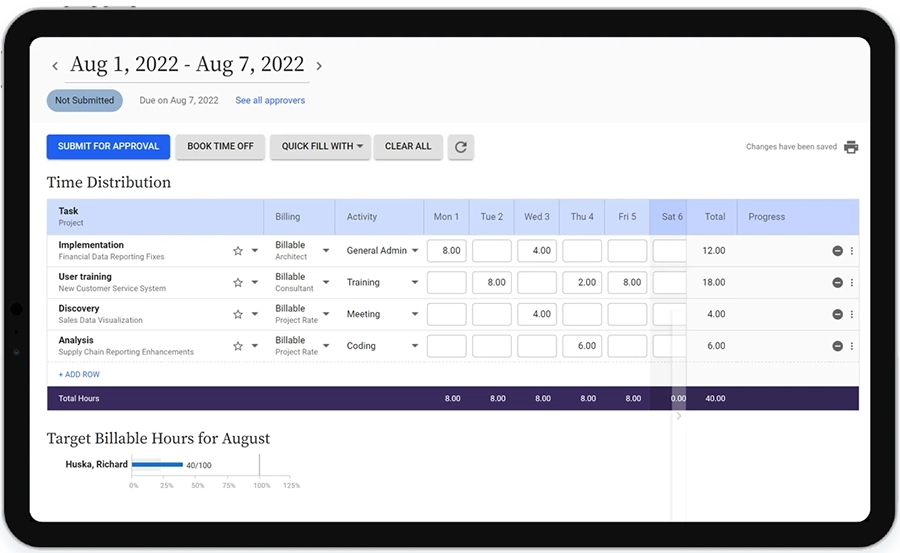
Replicon Time Tracking by Deltek is a cloud-based time tracking platform built for companies that need accurate project time capture, automated timesheets, and real-time insights to manage workforce productivity and billing across multiple teams and locations.
Who Is Replicon Time Tracking Best For?
Replicon Time Tracking is a strong fit for mid-size to enterprise companies in project-driven industries like professional services, consulting, and IT that need precise time tracking across distributed teams.
Why I Picked Replicon Time Tracking
Replicon Time Tracking earns its spot on my shortlist because of ZeroTime™, its AI-powered time capture feature that automatically pulls time data from 100+ work apps—think Jira, Outlook, and Salesforce—and pre-populates timesheets without anyone having to log hours manually. I like that this directly addresses one of the most common gaps in project time tracking: the hours that simply never get recorded. I also use the estimated vs. actual cost comparison to monitor project budgets in real time instead of discovering overruns later.
Replicon Time Tracking Key Features
- Global labor compliance tracking: Monitor compliance with labor laws across 145+ jurisdictions in 75+ countries, including DCAA, FAR, and NIST controls.
- CloudClock time capture: Record time and attendance via a dedicated hardware clock device and via web and mobile for distributed or shift-based teams.
- Global leave management: Track PTO, time-off requests, and approvals in a single module that accounts for jurisdiction-specific leave rules.
- Custom reports and dashboards: Build tailored reports and connect directly to Tableau and Power BI for deeper project and workforce data analysis.
Replicon Time Tracking Integrations
Integrations include Jira, Salesforce, QuickBooks, SAP, Oracle, ADP, Microsoft Dynamics 365, and Slack.
Pros and Cons
Pros:
- Real-time compliance updates
- The mobile app allows employees to clock in/out on the go
- Ability to tailor the system to various country-specific labor laws
Cons:
- Interface is outdated compared to other solutions
- Creating custom reports can be complex

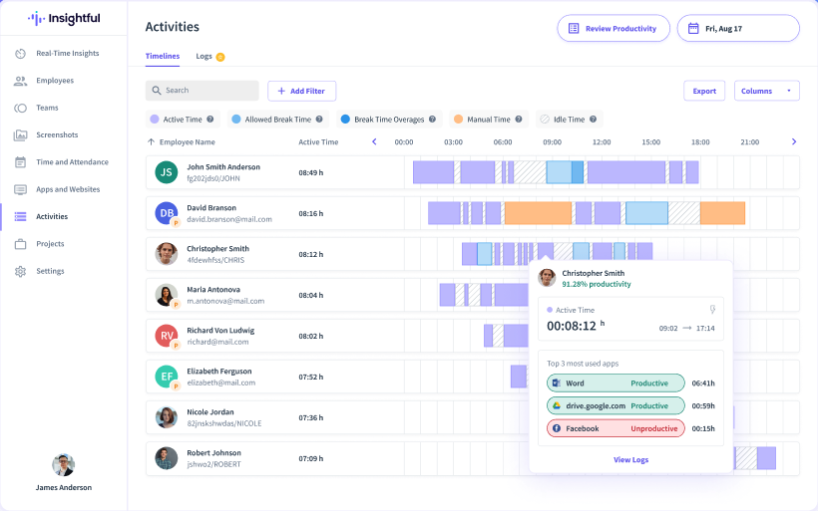
Insightful is a time tracking and productivity analytics platform built for companies managing distributed teams, helping businesses monitor work hours, analyze app usage, and optimize workflows across remote and hybrid environments.
Who Is Insightful Best For?
Insightful is a strong fit for mid-sized to enterprise companies with remote or hybrid workforces that need visibility into how distributed teams spend their time.
Why I Picked Insightful
I picked Insightful as one of the best because of how well it handles the specific visibility gap that comes with managing remote teams. When my team is distributed across locations, I rely on the real-time activity dashboard to see who's focused, who's idle, and where work is actually moving—without sending a single status-check message. That kind of passive, always-on visibility is what makes it genuinely useful for remote monitoring. I also like the location insights feature, which segments productivity data by where employees are working, so I can see whether output differs between home and office and adjust work policies accordingly. The automatic time mapping captures time against tasks and apps in the background, so I'm not chasing down timesheets or relying on self-reported hours to understand how the day was spent.
Insightful Key Features
- Attendance tracking: Monitor clock-in and clock-out times across your entire team from a single dashboard.
- Project time tracking: Assign tracked time directly to specific projects and tasks to see where hours are being allocated.
- Screenshots: Capture periodic screenshots of employee screens to provide visual context alongside activity data.
- Productivity benchmarking: Set productivity thresholds for individual roles and compare actual performance against those baselines over time.
Insightful Integrations
Integrations include Jira, Trello, Asana, Aha, ClickUp, Zoho BugTracker, Azure DevOps, Basecamp, Bitbucket, and GitHub.
Pros and Cons
Pros:
- Tracks time spent on tasks and projects without manual input
- Enables continuous oversight of employee activities
- Provides in-depth workforce data analysis
Cons:
- Detailed productivity tracking may raise concerns about privacy
- No mobile app for on-the-go or field-based employees


Scoro is a work management platform designed for professional services teams and agencies who need to track time, manage projects, and connect time data directly to billing and reporting.
Who Is Scoro Best For?
Scoro is a strong fit for professional services firms—like consultancies, agencies, and IT service providers—that need to connect time tracking to project budgets and client billing.
Why Scoro Stands Out
Scoro captures detailed time data and puts it to use in reporting. Teams can log hours in three ways: using a real-time timer, logging retrospectively in a timesheet, or letting the calendar auto-populate work reports from scheduled events. The timesheet prefill feature pulls from each person's to-do list so there's no guesswork about what to log. That time data then feeds into billable vs. non-billable reporting, so you can see exactly where hours are going across clients, projects, and activities—and use that insight to improve billing accuracy.
Scoro Key Features
- Project budget tracking: Monitor budgets in real time against logged hours and expenses to keep projects financially on track.
- Invoicing from time entries: Convert tracked time directly into client invoices without manual data re-entry.
- Utilization reporting: View team-wide utilization rates to identify over- and under-allocated resources across active projects.
- Task and milestone management: Organize work into tasks and milestones with assignees, deadlines, and dependencies.
Scoro Integrations
Integrations include Google Calendar, Microsoft 365, Xero, QuickBooks, Zapier, Dropbox, Slack, HubSpot, and Exact.
Pros and Cons
Pros:
- Robust reporting and analytics
- Effective time tracking capabilities
- Comprehensive project management features
Cons:
- Mobile app has limited features
- Certain time tracking features limited to higher-tier plans
New Product Updates from Scoro

Scoro Introduces Subtasks for More Granular Work Planning
Scoro introduces subtasks and improved price list deletion warnings, enabling teams to break down work into smaller units for detailed planning while protecting pricing data from accidental changes. For more information, visit Scoro’s official site.
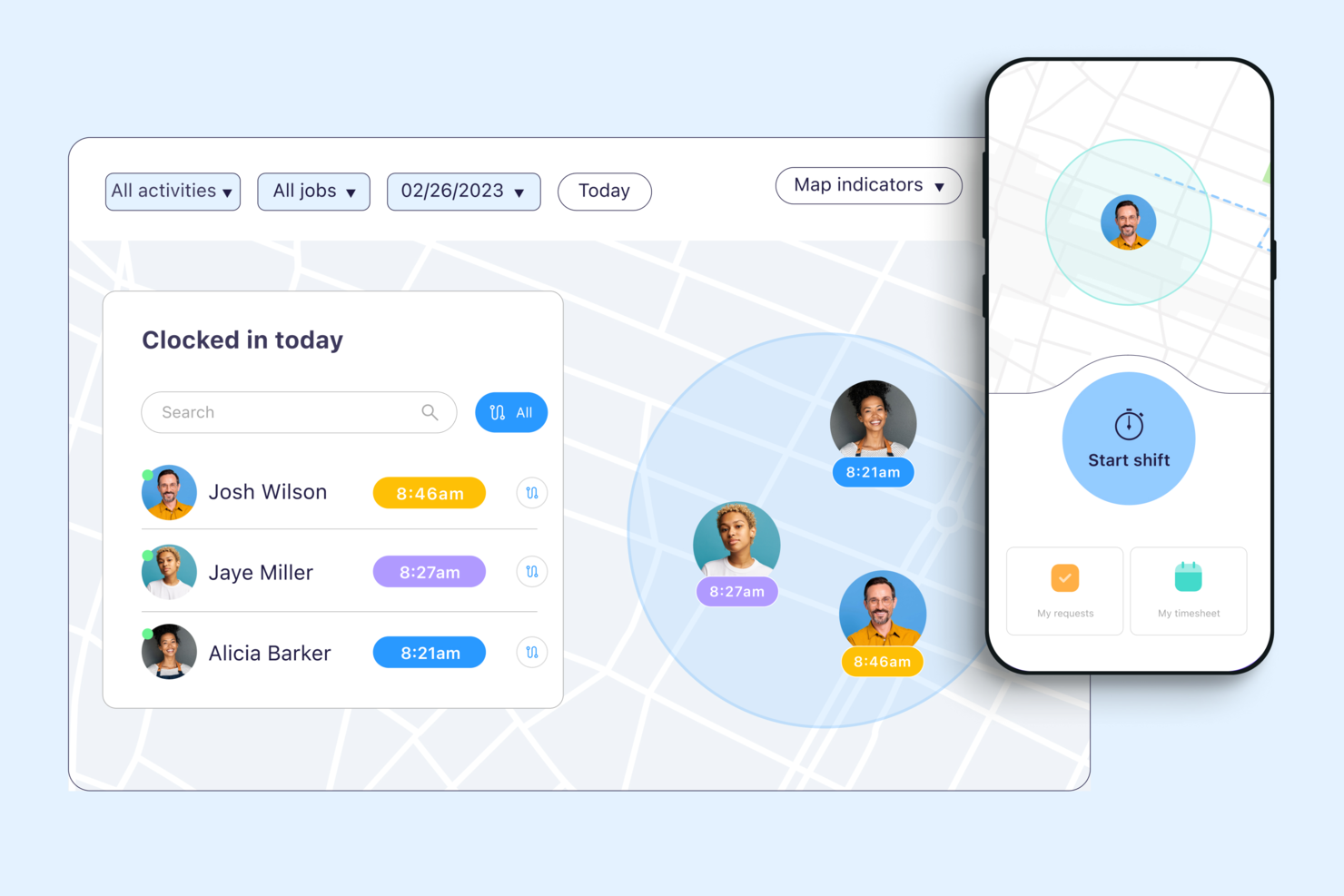
Connecteam is a workforce management platform for companies with deskless or mobile employees who need reliable time tracking, scheduling, and team communication in one place.
Who Is Connecteam Best For?
Connecteam is a great fit for small to mid-sized businesses in field-based industries like construction, retail, and hospitality that manage hourly or shift-based workers.
Why I Picked Connecteam
I picked Connecteam as one of the best because of how well its GPS time tracking features hold up in real field conditions. I particularly like the breadcrumbs feature, which logs an employee's location trail throughout their entire shift—not just at clock-in. That means if you're managing a crew spread across multiple job sites, you can see exactly where each person was and when, without relying on self-reporting. The geofencing feature takes it further by automatically clocking employees out when they leave a designated job site radius, which cuts down on time theft without requiring any manual intervention from managers.
Connecteam Key Features
- Timesheet management: Review, edit, and approve employee timesheets directly in the app before exporting to payroll.
- Job scheduling: Build and assign shifts to specific employees or teams, with visibility into availability and conflicts.
- Overtime tracking: Set custom overtime rules so the system automatically flags hours that exceed defined thresholds.
- Kiosk mode: Let employees clock in and out from a shared device using a PIN, useful for fixed job sites without individual smartphones.
Connecteam Integrations
Integrations include QuickBooks, Gusto, Xero, ADP, Wix, Lightspeed, PrismHR, Square, and BambooHR.
Pros and Cons
Pros:
- Can set specific rules for breaks, overtime, and pay rates
- Ability to track employee locations and set geofenced areas
- Variety of clock-in methods, including mobile app, kiosk, and NFC badges
Cons:
- Setting user roles and permissions can be unintuitive
- Push notifications are sometimes delayed

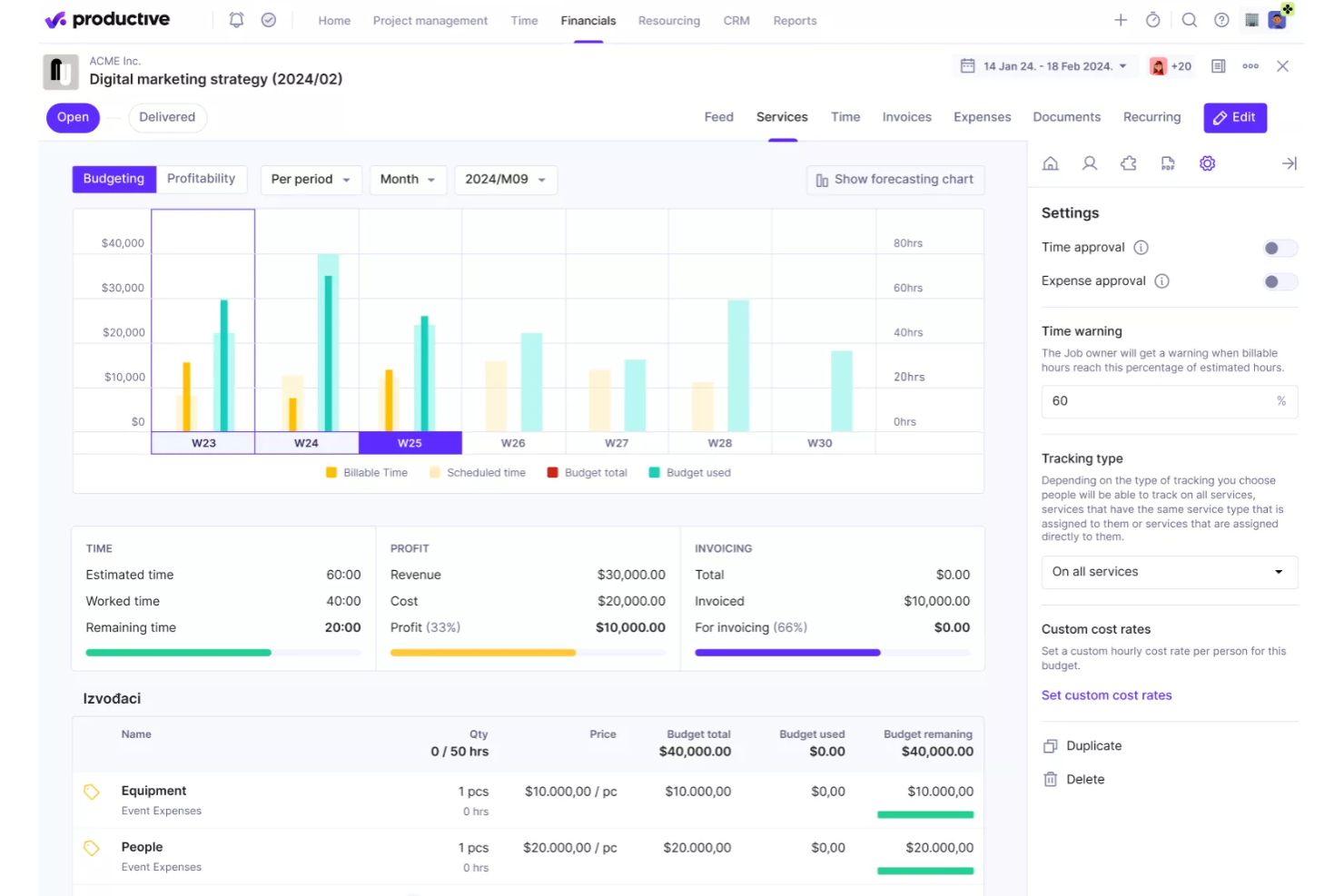
Productive is a project management and time tracking platform built for agencies and service companies that need to connect tracked hours to project budgets, resource planning, and profitability.
Who Is Productive Best For?
Productive is a strong fit for agencies and professional services firms that bill clients by the hour and need visibility into project margins.
Why I Picked Productive
I picked Productive as one of the best because of how directly it connects time tracking to profitability data. Every hour your team logs against a service—billable or non-billable—feeds straight into budget tracking and margin reporting, so you're not waiting on a finance report to know where a project stands. I particularly like the cost of work report, which compares worked time against billable time per resource, giving you a clear picture of where hours are being lost. The AI-powered reporting layer is also genuinely useful—you can ask it to surface profitability per project or utilization by team without building a single custom report from scratch.
Productive Key Features
- Time tracking with timesheets: Log hours manually or with a timer directly against tasks, projects, or services from a centralized timesheet view.
- Resource planning: Schedule team members across projects using a visual capacity planner that shows availability and workload in real time.
- Project budgeting: Set budget limits per project and track spend against them as time and expenses are logged.
- Invoicing: Generate invoices directly from tracked billable hours and send them to clients without leaving the platform.
Productive Integrations
Integrations include Jira, HubSpot, Xero, Google Calendar, Sage, Gmail, Microsoft Outlook, Slack, BugHerd, and QuickBooks.
Pros and Cons
Pros:
- Comprehensive features for financial management and reporting
- Robust resource planning features
- Customizable dashboard and reporting
Cons:
- Limited number of integrations
- Initial setup and onboarding can be time-consuming
New Product Updates from Productive

Productive Introduces Resource Request Feature
Productive introduces a resource request feature that helps teams request and allocate resources more efficiently. For more information, visit Productive's official site.

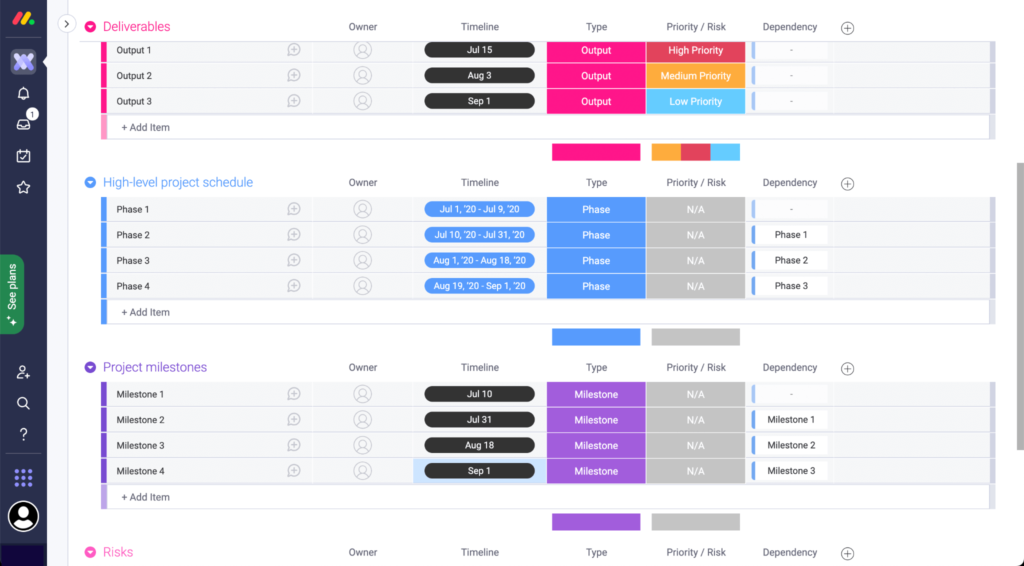
monday.com gives project-driven teams a flexible platform to track time spent on tasks, manage workloads, and visualize project progress, making it a strong choice for companies that need to monitor hours across multiple projects and departments.
Who Is monday.com Best For?
monday.com is a good fit for mid-sized to large teams in tech, marketing, and professional services that need to track time across multiple projects and workstreams in one place.
Why I Picked monday.com
I picked monday.com as one of the best for project time tracking because of how tightly its time tracking is woven into the actual project board. There's no separate app to open—time tracking columns sit right alongside status, assignee, and date columns, so every logged hour is instantly tied to a task, owner, and deadline. I also like the Workload View, which uses live time data to show who's over capacity across projects, so I can rebalance assignments before someone's timeline slips. On top of that, AI Blocks can automatically categorize time entries by project type or urgency, which cuts down on the manual cleanup that usually bogs down end-of-sprint reporting.
monday.com Key Features
- Gantt chart view: Visualize task timelines, dependencies, and project milestones on an interactive drag-and-drop chart.
- Custom dashboards: Build real-time dashboards that pull time, budget, and progress data from multiple boards into one view.
- Automations: Set rule-based triggers to notify team members, update statuses, or reassign tasks when conditions are met.
- Time estimate columns: Assign estimated hours to individual tasks so teams can compare planned vs. actual time spent.
monday.com Integrations
Integrations include Salesforce, QuickBooks, HubSpot, Zendesk, Active Directory, GitHub, GitLab, Slack, Gmail, and Microsoft Teams.
Pros and Cons
Pros:
- Gives you the option to export time tracking data
- Integrates time tracking with workload visibility
- Customizable dashboards for better project visibility
Cons:
- Platform may be too simple for more complex time management needs
- Lacks advanced time tracking, like automated timesheets
New Product Updates from monday.com

monday.com's AI Blocks Now Available to All Users
monday.com AI Blocks are now available to all users, enabling teams to integrate AI directly into workflows. This rollout helps automate tasks and improve productivity across projects. For more information, visit monday.com's official site.

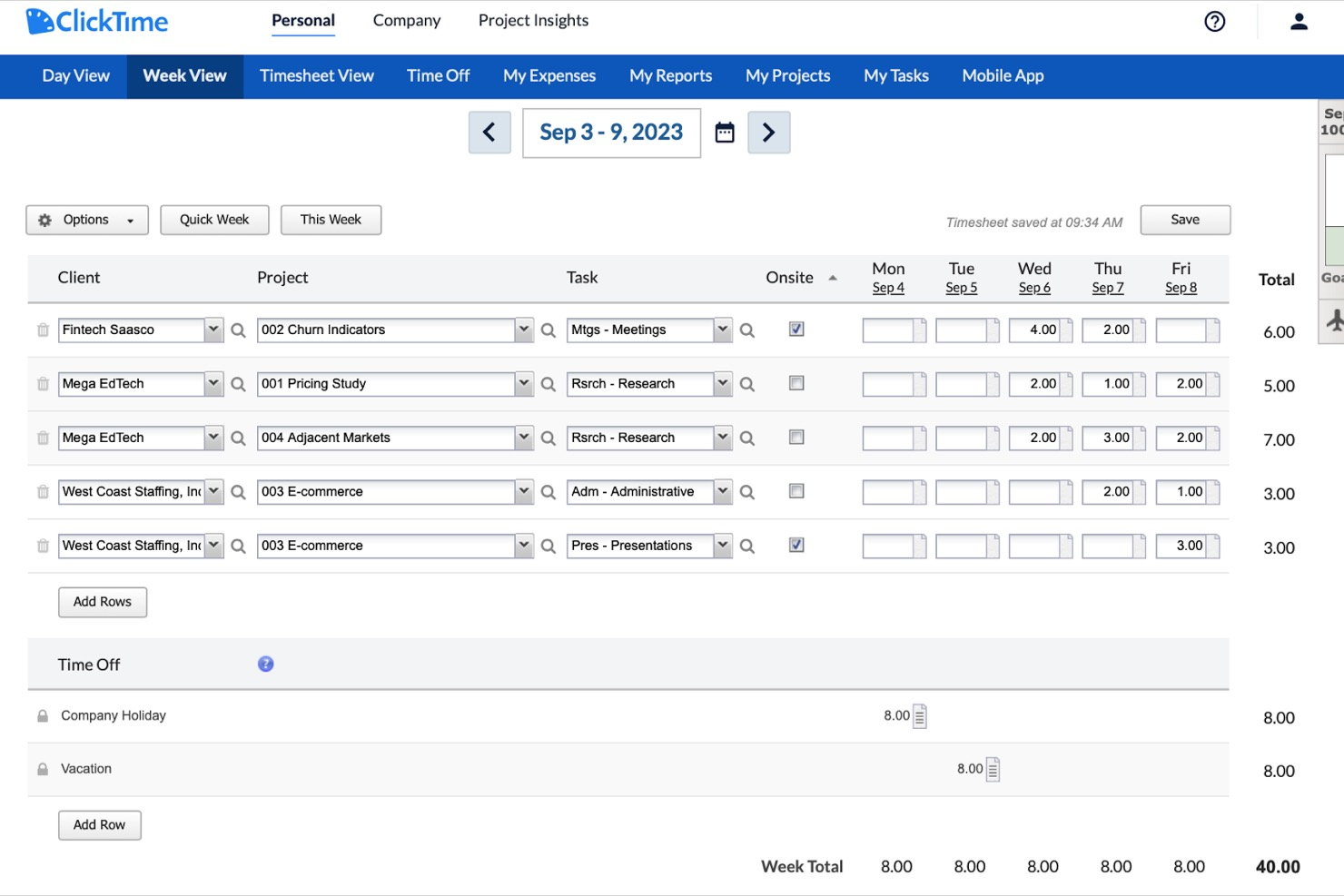
ClickTime lets project managers and operations teams track employee hours, manage project budgets, and analyze workforce data with flexible reporting and approval workflows tailored for companies that need detailed oversight of time and costs.
Who Is ClickTime Best For?
ClickTime suits mid-sized professional services firms like consulting, marketing, and nonprofit organizations that require structured time tracking with manager-level oversight and approval controls.
Why I Picked ClickTime
ClickTime is on my shortlist because it gives you extensive control over timesheet structure. I like that you can build custom fields, set up task-level tracking, and configure approval workflows to match how your team actually works—not just a generic template. My team uses ClickTime's timesheet templates to standardize how hours get logged across different projects and departments, which cuts down on inconsistent entries. The built-in budget tracking also ties logged hours directly to project costs, so I can see in real time whether a project is on track financially.
ClickTime Key Features
- Resource planning: View team capacity and availability to allocate hours across projects before work begins.
- Expense tracking: Log and categorize project-related expenses alongside time entries for a full cost picture.
- Real-time dashboards: Monitor hours logged, project progress, and utilization rates across your entire team at a glance.
- PTO and leave management: Track employee time off requests and balances directly within the platform.
ClickTime Integrations
Integrations include ADP WorkforceNow, Azure Entra, Bamboo HR, Github, Google Calendar, Google SSO, Hibob, Jira, and Microsoft Outlook Calendar.
Pros and Cons
Pros:
- Mobile app for on-the-go time entry
- Built-in project budget tracking and alerts
- Customizable timesheet fields for unique workflows
Cons:
- Approval workflows can be slow to update
- No built-in GPS or location tracking

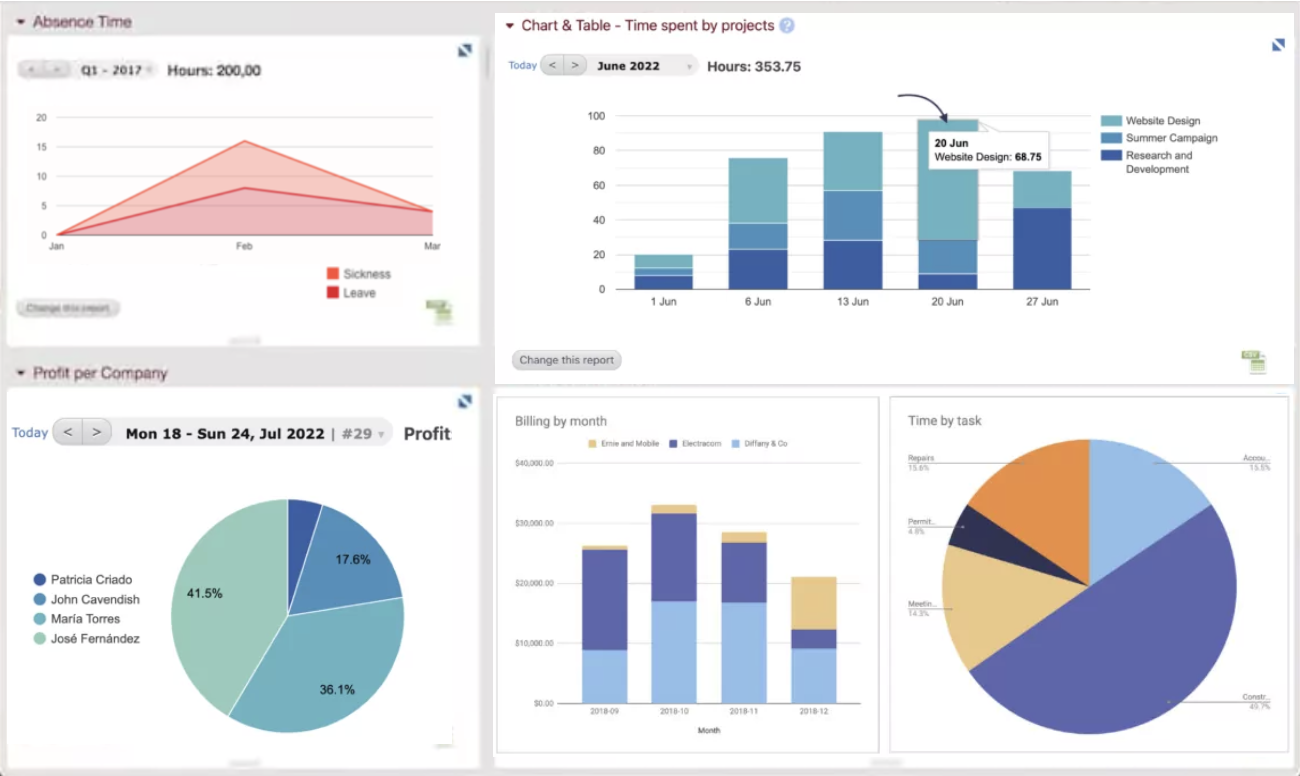
Beebole is a time tracking platform designed for companies that need to monitor project hours, manage team productivity, and generate detailed reports to support billing and resource planning.
Who Is Beebole Best For?
Beebole is a strong fit for mid-sized companies and professional services teams that need flexible time tracking with detailed reporting across projects and departments.
Why I Picked Beebole
Beebole earns its spot on my shortlist because of how much control it gives you over your reporting dashboards. I like that you can save custom reports directly to your dashboard, so when I need a real-time view of project hours, billing status, or budget variance, it's already on the dashboard. The KPI dashboard builder lets you surface exactly the metrics that matter to your team, whether that's tracking profitability across 50 client projects or monitoring overtime by department. Exporting those same reports to Excel or Google Sheets keeps the data available outside the tool.
Beebole Key Features
- Timesheet approval workflow: Managers can review, approve, or reject submitted timesheets directly within the platform before they're locked for payroll or billing.
- Project budget tracking: Set hour or cost budgets per project and monitor spending in real time as your team logs time.
- Absence and leave management: Track vacation, sick days, and other leave types alongside work hours in a single view.
- Mobile time tracking: Log hours from any device using Beebole's mobile app, with offline support for teams working in the field.
Beebole Integrations
Integrations include ADP, Airtable, Asana, BambooHR, FreshBooks, Google Calendar, and QuickBooks Online.
Pros and Cons
Pros:
- Integrated PTO tracking feature
- You can set different billing rates for clients, projects, and team members
- Ability to track time across various projects and tasks
Cons:
- Approval reminders can’t be customized by time zone
- Custom reports require formula knowledge

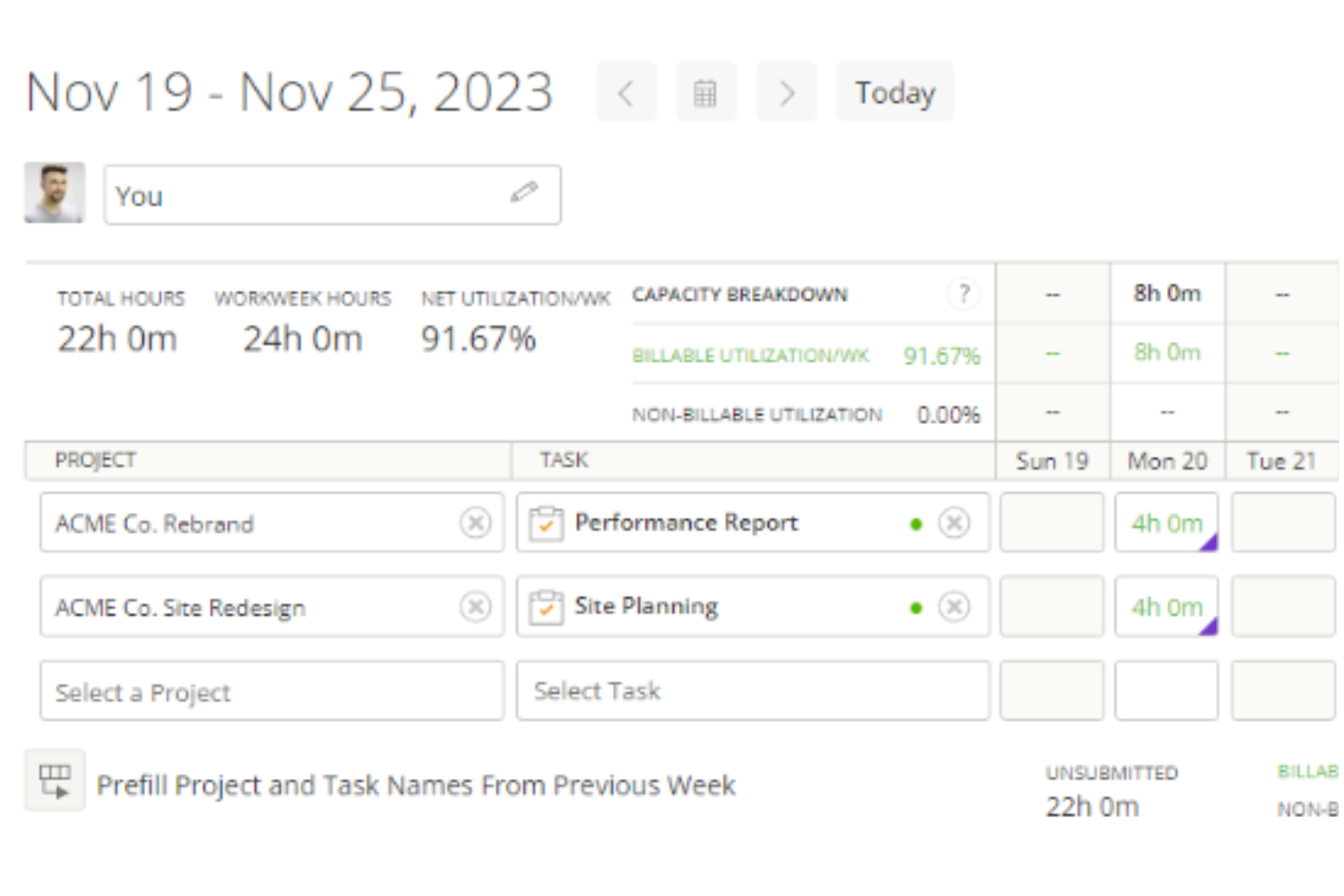
Kantata is a project and resource management platform for professional services teams who need to track time, manage projects, and optimize resources across complex client engagements.
Who Is Kantata Best For?
Kantata is a strong fit for mid-to-large professional services firms—such as consulting, marketing, and IT services companies—that need to manage time and resources across multiple client projects simultaneously.
Why I Picked Kantata
I picked Kantata as one of the best because it's one of the few time tracking tools that connects time data to every other stage of project delivery—from initial scoping through to invoicing. What I love about it is that time and expense tracking isn't a standalone module; it feeds directly into financial management, so my team can see in real time how logged hours are affecting project margins and budget burn. Kantata also has built-in timesheet workflows with automation that takes the friction out of period close—something finance teams on multi-project engagements will really appreciate. On top of that, the business intelligence layer surfaces utilization and fee data across the portfolio, so time tracking becomes an input to actual strategic decisions, not just a compliance exercise.
Kantata Key Features
- Resource management: Assign and adjust team capacity across projects using visual resource planning tools that reflect real-time availability.
- Project forecasting: Model projected costs and timelines against actuals to keep client engagements on track before issues arise.
- Role-based permissions: Control who can view, enter, or approve project data with configurable access settings across teams.
- Client and project dashboards: Monitor project health, milestones, and delivery status from a centralized view across your entire portfolio.
Kantata Integrations
Integrations include Salesforce, NetSuite, Jira, Slack, HubSpot, QuickBooks, Xero, BambooHR, Google Drive, and Microsoft Teams.
Pros and Cons
Pros:
- Admins can enforce rules like required notes or task associations
- Time entries can be reviewed and approved before invoicing
- Users can log time via timers, timesheets, or directly on tasks
Cons:
- Certain time tracking fields may not be fully customizable
- Configuring who can track and approve time may be intricate
New Product Updates from Kantata
Kantata Integrates E-Invoicing With Avalara
Kantata introduces integrated e-invoicing through its partnership with Avalara, enabling compliant, automated invoicing across regions. For more information, visit Kantata's official site.
 .
.

Resource Guru gives project managers and teams a way to track time while managing resource allocation, helping businesses coordinate schedules, monitor workloads, and optimize team availability in one platform.
Who Is Resource Guru Best For?
Resource Guru is a strong fit for agencies, consultancies, and professional services teams that need to track time alongside staff scheduling and capacity planning.
Why I Picked Resource Guru
Resource Guru earns its spot on my shortlist because it's one of the few time tracking tools that connects scheduled hours directly to timesheet entries. When my team books work on the schedule, those entries auto-populate in each person's timesheet—so logging time takes one click instead of starting from scratch every week. I also like the forecast vs. actuals comparison, which lets me see where estimated hours diverged from real time spent across projects and clients. That kind of visibility is genuinely useful when I'm trying to improve future planning, not just report on what already happened.
Resource Guru Key Features
- Leave and vacation management: Track team leave, public holidays, and absences directly on the resource schedule to keep availability accurate.
- Utilization reporting: View billable vs. non-billable time and team utilization rates across projects, clients, or departments.
- Clash management: Get automatic alerts when a resource is double-booked or over-allocated during scheduling.
- Project time budgets: Set hour budgets per project and monitor logged time against those limits in real time.
Resource Guru Integrations
Integrations include Outlook Calendar, Google Calendar, Jira, and Asana.
Pros and Cons
Pros:
- Straightforward timesheet approval process
- Ability to log an entire week's work with a single click
- Timesheets are automatically populated from schedules
Cons:
- Time entries are not dynamically linked to schedule changes
- Lacks a real-time time tracker
New Product Updates from Resource Guru

Resource Guru Launches Asana Integration
Resource Guru now integrates with Asana to enhance task scheduling by providing insights into availability and skills. For more information, visit Resource Guru's official site.
 .
.

Buddy Punch is a time tracking platform designed for companies that need to monitor employee hours, manage attendance, and simplify payroll, especially for teams working across multiple locations or in the field.
Who Is Buddy Punch Best For?
Buddy Punch is a good fit for small to mid-sized businesses in industries like construction, retail, and healthcare, where managing hourly workers across multiple job sites is a daily reality.
Why I Picked Buddy Punch
I picked Buddy Punch as one of the best because it layers GPS and image verification directly into the clock-in process. When an employee punches in, Buddy Punch captures their GPS coordinates and can require a selfie photo at the same moment. That lets my team cross-reference location data and a timestamped photo on the same timecard, which is useful when managing field workers across multiple job sites. Additionally, geofencing lets me block punches entirely if someone isn't physically within a defined boundary around a worksite, eliminating reliance on the honor system.
Buddy Punch Key Features
- Drag-and-drop scheduling: Build and publish employee schedules using a visual calendar interface with shift assignment and availability management.
- PTO tracking: Employees can submit time-off requests directly in the platform, and managers can approve or deny them from the same dashboard.
- Automatic overtime alerts: Buddy Punch flags employees who are approaching or have exceeded overtime thresholds before payroll is processed.
- Payroll reporting: Export detailed timesheets in formats compatible with major payroll providers to simplify pay period processing.
Buddy Punch Integrations
Integrations include QuickBooks Online, QuickBooks Desktop, ADP Workforce Now, Gusto, Paychex, Paylocity, Paycor, Rippling, Workday, and Justworks.
Pros and Cons
Pros:
- Offers various exportable reports
- Managers receive notifications for late arrivals or missed shifts
- Versatile clock-in options
Cons:
- Limited language support other than English
- Advanced GPS tracking features are paid add-ons


Bonsai gives agencies and consultancies a unified platform to track time, manage resources, and handle projects, helping teams stay organized and bill clients accurately.
Who Is Bonsai Best For?
Bonsai is a strong fit for small to mid-sized agencies and creative consultancies that need to manage client projects, track billable hours, and oversee team workloads in one place.
Why I Picked Bonsai
Bonsai earns its spot on my shortlist because of how tightly its time tracking and resource management features work together. I like that you can start a timer directly from a task and have those hours automatically logged to the right project—no manual entry, no reconciling timesheets after the fact. The live capacity tracking factors in part-timers and time off automatically, so when I'm placing a booking I can see utilization in real time. Costs, rates, and margins update the moment a booking is placed, which means budget overruns surface before they become a problem.
Bonsai Key Features
- Task estimates: Add time estimates to tasks and pull real-time reports comparing estimated vs. actual hours to spot overruns and improve future planning.
- Tentative allocations: Plan potential resource assignments before projects are confirmed, then adjust and finalize bookings as project scope becomes clearer.
- Automatic timesheet generation: Generate timesheets automatically based on scheduled tasks and project allocations, removing the need for manual timesheet creation.
- Task views: Switch between Kanban, Gantt, and calendar views to track task progress and visualize project timelines across your team.
Bonsai Integrations
Integrations include QuickBooks Online, Calendly, HiBob, Zoom, and Xero .
Pros and Cons
Pros:
- Automation for tasks like recurring invoices
- Client portal helps manage multiple clients
- Includes real-time tracking and manual entry
Cons:
- Lack of advanced features
- May not be best for scaling operations


If you’re looking for a time tracking tool built with small teams and businesses in mind, actiTIME is worth a look. It’s designed for teams that need to track hours, manage tasks, and monitor project costs without extra complexity. The platform stands out for its simple setup, flexible reporting, and built-in leave management features.
Who is actiTIME Best For?
Team supervisors and administrators at small businesses that need straightforward time tracking and reporting without complex implementation or dedicated system support.
Why I Picked actiTIME
For small teams and businesses, actiTIME offers a focused set of time tracking features without unnecessary extras. I picked actiTIME because it lets you track time by client, project, or task, making it easy to see where hours are going. The tool also includes built-in leave management, so you can handle absences and vacations alongside regular time tracking. Its reporting tools help small teams monitor project costs and productivity without getting bogged down in complexity.
actiTIME Key Features
Some other features that make actiTIME useful for small teams include:
- Automated Reminders: Sends notifications to remind users to submit timesheets on schedule.
- Customizable Billing Rates: Allows you to set different hourly rates for various clients or projects.
- Mobile App: Lets users track time and manage tasks from their smartphones.
- Integration With QuickBooks: Syncs time tracking data directly with QuickBooks for streamlined accounting.
actiTIME Integrations
Integrations include actiPLANS, Chrome Plugin, QuickBooks, and Time Management Assistant. An API is also available for custom integrations.
Pros and Cons
Pros:
- Provides detailed reporting and data analysis
- Supports fixed and accrual leave policies
- Allows setting hourly budgets and tracking them
Cons:
- Lacks features like geofencing and facial recognition
- Lacks extensive native integrations


Homebase is a time tracking and team management platform built for hourly workforces, helping retail, restaurant, and service businesses track hours, manage schedules, and simplify payroll.
Who Is Homebase Best For?
Homebase is a strong fit for small to mid-sized businesses in hourly-driven industries like food service, retail, and hospitality.
Why I Picked Homebase
Homebase earns its spot on my shortlist because of how directly it targets time theft in hourly work environments. I like that the time clock takes a photo of the employee at clock-in, so you can immediately verify that the right person is punching in—not a coworker doing it on their behalf. That buddy-punching prevention is built into the free tier, which is rare. On top of that, GPS tracking lets you confirm that remote or field-based employees are actually on-site when they clock in, not logging hours from somewhere else entirely.
Homebase Key Features
- Automated timesheets: Homebase converts clock-in and clock-out data into timesheets automatically, flagging discrepancies for manager review.
- Overtime and break alerts: Set rules for overtime thresholds and required breaks, and Homebase notifies managers when employees are approaching or violating them.
- Payroll integration: Export timesheet data directly to payroll providers to reduce manual entry and calculation errors.
- Team messaging: Built-in messaging lets managers communicate shift changes, updates, and reminders directly within the platform.
Homebase Integrations
Integrations include Square, Toast, Clover, Shopify, QuickBooks, Gusto, ADP, Paychex, Heartland, and Revel.
Pros and Cons
Pros:
- Built-in team messaging for shift coordination
- GPS tracking verifies remote or mobile attendance
- Photo clock-ins help prevent buddy punching
Cons:
- No project-based time tracking features
- Limited reporting customization options


Agendrix offers an intuitive scheduling solution tailored for small businesses and shift work, providing a reliable platform to tackle scheduling challenges, streamline payroll processes, and enhance operational efficiency. Managers and business owners striving to optimize workforce management will find it particularly beneficial.
Who is Agendrix Best For?
Operations managers at service-based small and mid-size organizations that run shift teams and require multiple clock-in options across devices or worksites.
Why I Picked Agendrix
I picked Agendrix as a standout time-tracking software due to its versatile clock-in methods, including punch-clock kiosks and geolocation tracking, which cater to diverse business needs. This flexibility ensures you can accurately manage employee attendance, regardless of your team's location or work environment. Additionally, Agendrix's automated timesheets feature minimizes manual entry errors, allowing you to focus more on strategic tasks rather than administrative ones.
Agendrix Key Features
Aside from its clock-in versatility and automated timesheets, Agendrix offers:
- Payroll Exports: Seamlessly integrates with payroll systems like QuickBooks and ADP Workforce Now to streamline your payroll process.
- Mobile Apps: Provides iOS and Android apps, ensuring your team can access schedules and clock in from anywhere.
- Overtime and PTO Tracking: Allows you to monitor overtime, paid time off, and holidays, helping maintain accurate records.
- Employee Management Tools: Facilitates easy management of employee availability and time-off requests, enhancing scheduling efficiency.
Agendrix Integrations
Integrations include QuickBooks, ADP Workforce Now, Payworks, Lightspeed, and Sage 50.
Pros and Cons
Pros:
- Scheduling tools simplify shift management
- Has automation features that reduce manual timesheet work
- Mobile access for clock-ins, schedule viewing, and time tracking
Cons:
- Reporting customization options remain limited
- Some payroll integrations require manual adjustments


If you’re looking for a time tracking tool with a generous free plan, Traqq is worth a close look. It’s designed for small businesses, freelancers, and distributed teams that need advanced monitoring features without upfront costs. Traqq’s free version includes screenshot capture, activity levels, and detailed reporting—features that many competitors reserve for paid tiers.
Who is Traqq Best For?
Founders and team managers at startups or small companies that need cost-conscious time tracking with broad core features for distributed or hybrid teams.
Why I Picked Traqq
What stands out about Traqq is how much functionality it offers in its free version compared to other time tracking tools. The free plan includes features like automated screenshots, activity level monitoring, and detailed productivity reports—capabilities that are often locked behind paywalls elsewhere. I picked Traqq because it gives small teams and freelancers access to advanced monitoring without requiring a paid upgrade. This makes it a strong option for anyone who needs robust oversight and reporting without a budget commitment.
Traqq Key Features
Some other features that make Traqq useful for time tracking include:
- Manual Time Adjustments: Add or edit time entries to account for missed tracking or corrections.
- Offline Time Tracking: Track work hours even without an internet connection, with data syncing once online.
- Detailed Timesheets: Generate and export timesheets for payroll or client billing.
- Blurred Screenshots: Capture screenshots with sensitive information automatically blurred for privacy.
Traqq Integrations
Native integrations are not publicly listed.
Pros and Cons
Pros:
- Detailed activity levels shown for each user
- Blur feature protects sensitive on-screen information
- Automated screenshots support remote team monitoring
Cons:
- Mac version updates less frequently than Windows
- No invoicing or billing features included


TimeCamp stands out for its automatic time tracking that runs in the background without manual input. It’s a strong fit for digital agencies, consultancies, and tech teams that need to capture billable hours with minimal disruption. The tool helps reduce missed time entries and supports accurate reporting for client work and payroll.
Who is TimeCamp Best For?
Consultants, agencies, and project teams at growing organizations that track billable work and want automated capture of time tied to tasks or applications.
Why I Picked TimeCamp
Automatic time tracking is what sets TimeCamp apart from other options. I picked TimeCamp because it detects activity and assigns time entries to projects without requiring users to start or stop timers manually. The tool also uses keyword-based tracking, which helps capture work across different apps and websites for more accurate reporting. This approach is especially useful for teams that want to minimize manual data entry and ensure every billable minute is accounted for.
TimeCamp Key Features
Some other features that make TimeCamp useful for time tracking include:
- Attendance Tracking: Records start and end times for each user’s workday.
- Billing and Invoicing: Generates invoices based on tracked hours and project rates.
- Project Budgeting: Lets you set and monitor budgets for individual projects.
- Productivity Analysis: Provides reports on time allocation and activity levels across teams.
TimeCamp Integrations
Integrations include Asana, Trello, monday.com, ClickUp, Jira, Notion, Smartsheet, QuickBooks, Xero, and Google Calendar.
Pros and Cons
Pros:
- Time clock kiosk is convenient for on-site teams
- Idle time detection ensures only active work hours are recorded
- Productivity categorization helps identify and eliminate time-wasting activities
Cons:
- GPS tracking can raise privacy concerns among employees
- Some users report occasional glitches in the automatic tracking feature


Toggl Track offers a visual approach to time tracking that helps teams balance workloads and avoid burnout. It’s especially useful for project managers and agencies who need to see team capacity at a glance and reassign tasks quickly. The platform’s workload management features help prevent overbooking and support more predictable project delivery.
Who is Toggl Track Best For?
Project managers and team leads at small to mid-size knowledge-work organizations that balance workloads across staff and monitor time distribution across assignments.
Why I Picked Toggl Track
What drew me to Toggl Track is its focus on workload balancing, which goes beyond basic time tracking. The tool’s Team Dashboard lets you visualize each team member’s capacity and current assignments, making it easier to spot overloads or gaps. I appreciate how the Workload view allows you to reallocate tasks and adjust schedules directly from the dashboard. This makes Toggl Track a strong choice for project managers who need to keep workloads realistic and projects on track.
Toggl Track Key Features
Some other features that make Toggl Track useful for time tracking include:
- Billable Rates: Assign different hourly rates to projects or team members for accurate client billing.
- Project and Task Tracking: Organize tracked time by project, client, or specific task for detailed reporting.
- Calendar Integration: Sync tracked time with Google Calendar or Outlook to compare planned versus actual work.
- Automated Reminders: Send notifications to prompt users to start or stop tracking time.
Toggl Track Integrations
Integrations include Asana, Jira, Google Calendar, Outlook, QuickBooks Online, Salesforce, Slack, Toggl Plan, iCal, and the Toggl Track API.
Pros and Cons
Pros:
- Workload view visualizes team capacity instantly
- Bulk edit lets you adjust multiple entries
- Browser extension tracks time across web apps
Cons:
- Mobile app lacks full reporting feature
- Limited offline functionality for time entries


TMetric is a time tracking platform designed for teams that need detailed activity monitoring and project management. It’s especially useful for businesses that want to review user activity with up to 7 days of storage, making it easier to audit work patterns and productivity. TMetric helps you capture billable hours, manage tasks, and keep a close eye on team performance.
Who is TMetric Best For?
Operations or project leads at small and mid-size firms that review short-term activity history and want recent work data available for quick performance checks.
Why I Picked TMetric
What sets TMetric apart is its ability to store detailed user activity data for up to 7 days, which is valuable for teams that need to review work patterns or audit productivity. I picked TMetric because it captures screenshots and tracks app and website usage, giving managers a clear view of how time is spent. The activity timeline feature also helps identify gaps or distractions during the workday. This level of visibility is especially useful for businesses that want to ensure accountability and optimize team workflows.
TMetric Key Features
Some other features in TMetric that are useful for time tracking include:
- Billable Rates Management: Set different hourly rates for projects, clients, or team members.
- Time Off Management: Track and approve employee leave and absences within the platform.
- Project Budgeting: Monitor project budgets and receive notifications when limits are reached.
- Detailed Reporting: Generate and export reports on time usage, billable hours, and project progress.
TMetric Integrations
Integrations include Asana, Jira, Trello, QuickBooks Online, Notion, Google Calendar, GitHub, Slack, Monday, and HubSpot.
Pros and Cons
Pros:
- Time off management and approval workflows
- Built-in screenshot capture for monitoring
- Activity timeline with 7-day storage
Cons:
- Activity data stored for only 7 days
- No payroll processing features


My Hours is designed for freelancers and small teams who need flexible project-based time tracking. It offers detailed task breakdowns and client-ready reporting, making it easy to manage multiple projects at once. This tool is a good fit if you want to track billable hours and organize work without extra complexity.
Who is My Hours Best For?
Freelancers, consultants, and small team managers who handle client work and require simple tracking and reporting suited to lightweight operational environments.
Why I Picked My Hours
For small teams and freelancers, My Hours offers project and task tracking that doesn’t require a steep learning curve or complex setup. I picked it because you can assign billable rates per project and generate client-ready reports directly from the platform. The tool also lets you add detailed notes to each time entry, which is helpful for tracking work context and justifying invoices. These features make My Hours a practical choice for managing multiple clients and projects without unnecessary overhead.
My Hours Key Features
Some other features in My Hours that support small teams and freelancers include:
- Task Templates: Create reusable templates for common project tasks to speed up setup.
- Approval Workflows: Submit timesheets for manager approval before finalizing tracked hours.
- Expense Tracking: Log project-related expenses alongside time entries for complete project accounting.
- Customizable Dashboard: Personalize your dashboard to highlight the metrics and projects that matter most.
My Hours Integrations
Native integrations are not publicly listed.
Pros and Cons
Pros:
- Notes field for each time entry
- Unlimited projects and tasks on all plans
- Project-based tracking supports multiple clients easily
Cons:
- No built-in invoicing functionality
- Approval workflows only in paid plans
- Clockify
For efficient time tracking
- Harvest
For actionable insights
- FunctionFox
For creative teams and agencies
- Factorial
For integrating timesheets with payroll
- ProjectManager
For real-time time monitoring
- Timesheets.com
For accountants and bookkeepers
- Ravetree
For tracking expenses alongside time
- eResource Scheduler
For scheduling with time tracking
- ExakTime
For teams of field employees
- Bill4time
For reporting features
- Actually
Simple time tracking for companies working with projects
- Deel HR
For keeping payroll in sync
- ClickUp
For its billable time tag
- Monitask
For distributed teams
- Apploye
For hybrid teams
- Smartsheet
For mobile time tracking
- BigTime
For invoicing and billing
- Accelo
For time tracking and projects in one
- TimeTrex
For biometric facial recognition time clocks
- ProWorkflow
For real-time time logging


Selection Criteria for Time Tracking Software
When selecting the best time tracking software to include on this list, I considered common buyer needs and pain points, like ensuring accurate billable hours and improving productivity insights. I also used the following framework to keep my evaluation structured and fair:
Core Functionality (25% of total score)
To be considered for inclusion on this list, each solution had to fulfill these common use cases:
- Tracking employee work hours
- Logging billable and non-billable time
- Generating timesheets
- Providing real-time tracking
- Supporting manual time entry
Additional Standout Features (25% of total score)
To help further narrow down the competition, I also looked for unique features, such as:
- AI-powered time tracking suggestions
- GPS and geofencing capabilities
- Automatic time classification for projects
- Integration with payroll and invoicing software
- Idle time detection and reminders
Usability (10% of total score)
To get a sense of the usability of each system, I considered the following:
- An intuitive and clean interface
- A minimal number of clicks needed to start tracking
- A well-designed mobile app
- Quick access to frequently used features
- Easy switching between manual and automatic tracking
Onboarding (10% of total score)
To evaluate the onboarding experience for each platform, I considered the following:
- Interactive product tours
- Pre-built templates for common use cases
- On-demand training videos and webinars
- Live chat or chatbot assistance during setup
- Quick import of user and project data
When it comes to team adoption, I’ve found that success depends on how easy the tool is to onboard new users. Some tools are much trickier for people to pick up than others.

Customer Support (10% of total score)
To assess each software provider’s customer support services, I considered the following:
- Multiple support channels including chat, email, and phone
- 24/7 customer support availability
- A detailed knowledge base and FAQs
- Quick response times for critical issues
- A user community or forum for peer assistance
Value For Money (10% of total score)
To evaluate the value for money of each platform, I considered the following:
- A transparent and flexible pricing structure
- A free plan or trial option
- All essential features included in lower-tier plans
- No hidden fees or extra costs for integrations
- Pricing scaled based on team size and usage
Customer Reviews (10% of total score)
To get a sense of overall customer satisfaction, I considered the following when reading customer reviews:
- Highlighted ease of use and adoption rates
- Mentions of reliability and system uptime
- Notes on the responsiveness and helpfulness of support
- Assessments of accuracy and efficiency of time tracking
- Pricing satisfaction compared to competitors
How to Choose Time Tracking Software
It’s easy to get bogged down in long feature lists and complex pricing structures. To help you stay focused as you work through your software selection process, here’s a checklist of factors to keep in mind:
| Factor | What to Consider |
| Scalability | Ensure the software can handle your team’s growth. Look for flexible pricing, unlimited users, and features that support large teams, like role-based permissions and enterprise reporting. |
| Integrations | Choose a solution that connects with your existing tools, like payroll, invoicing, project management, and HR software. This reduces manual data entry and keeps workflows seamless. |
| Customizability | Your team’s needs are unique. Look for customizable reports, adjustable tracking rules, and configurable permissions to align the tool with your business processes. |
| Ease of Use | A complex system slows adoption. Opt for an intuitive interface with minimal setup, simple time entry options, and a user-friendly mobile app for on-the-go tracking. |
| Budget | Compare pricing tiers, hidden fees, and free trial options. Consider whether the tool charges per user, per feature, or has a flat-rate model that fits your budget. |
| Security Safeguards | Protect sensitive time logs and payroll data with features like two-factor authentication, role-based access controls, and encrypted data storage. |
| Mobile Accessibility | If your team works remotely or on-site, ensure the software has a strong mobile app with offline tracking, GPS features, and seamless syncing. |
| Reporting & Analytics | Look for detailed insights into work hours, project costs, and team productivity. Customizable dashboards and automated reports help you make data-driven decisions. |
Trends in Time Tracking Software 2026
In my research, I sourced countless product updates, press releases, and release logs from different time tracking software vendors. Here are some of the emerging trends I’m keeping an eye on:
- Mobile Apps and Geofencing: Mobile apps for project management time tracking are increasingly popular, especially with geofencing technology. This allows for automated check-ins and location-based tracking for more accurate time recording across different work settings.
- Biometric Identification: Technologies like facial recognition and biometric iris technology are being adopted in modern time tracking solutions for better ease-of-use and more accurate time-punching.
- Energy Expenditure Tracking: This emerging concept measures the mental and physical effort expended during work, which offers insights into employee engagement and well-being beyond simple time tracking.
- Integration with Wearable Technology: Wearable devices like smartwatches can now track work hours while also offering activity and health monitoring to support employee well-being.
- Advanced AI and Automation: AI is now a common, fast-evolving feature in timesheet software, often used to automate time capture, improve accuracy, and analyze time-usage patterns.
What is Time Tracking Software?
Time tracking software is a digital tool that monitors and records the amount of time individuals or teams spend on tasks, projects, clients, or activities.
It typically includes features like timers, manual time entry, timesheets, reporting, and invoicing. These tools help boost productivity, ensure accurate billing, and provide insights for better planning and resource use. Many time tracking tools also integrate with project management, payroll, and collaboration tools to streamline workflows and reduce administrative work.
Features of Time Tracking Software
When selecting time tracking software, keep an eye out for the following key features:
- Automatic time capture: Let the software track your activity in the background, so you don’t have to manually clock in and out. This ensures your work hours are recorded accurately, even when you forget.
- Manual entry options: Easily add or adjust time entries for work done offline or to correct any missed logs, so your records always reflect reality.
- Project and task categorization: Organize your time by client, project, or task to see exactly where your hours go and simplify reporting.
- Billable vs. non-billable tracking: Distinguish between billable and non-billable hours for more accurate invoicing and better insight into how your time is spent.
- Reporting and analytics: Generate detailed reports to analyze productivity, identify trends, and make informed decisions about your workflow.
- Integrations with other tools: Sync your time tracking software with project management, accounting, or calendar apps to streamline your processes and avoid double entry.
- Reminders and notifications: Set up alerts to remind you to track your time or log entries, so nothing slips through the cracks.
- Mobile access: Track your hours from anywhere using your smartphone or tablet—perfect for remote teams or anyone on the move.
Common AI Features in Time Tracking Software
Modern time tracking software often includes AI-powered features designed to make your workflow even smoother:
- Automated activity classification: AI can analyze your activity and automatically categorize tasks, reducing manual sorting and saving you time.
- Smart timesheet suggestions: Based on your work patterns, AI can suggest time entries or fill in gaps, helping you complete timesheets faster and more accurately.
- Productivity insights: AI-driven analytics highlight trends, flag potential distractions, and offer personalized recommendations to boost your efficiency.
- Anomaly detection: The software can spot unusual patterns—like missed entries or inconsistent hours—and alert you to review them before they become an issue.
- Natural language input: Some tools let you log time or tasks using simple text commands, making the process even more intuitive.
Benefits of Time Tracking Software
Implementing time tracking software can provide several benefits for your team and your business. Here are a few you can look forward to:
- Better accuracy: Tracks work hours down to the minute to reduce mistakes in payroll and invoicing.
- Easier project billing: Logs billable time per client or project, so you can charge correctly without guesswork.
- Fewer time leaks: Helps spot untracked or idle time, so you don’t lose billable hours.
- More productive teams: Shows where time is spent, helping teams cut distractions and focus on real work.
- Less admin work: Automates timesheets, approvals, and reports, so managers spend less time chasing data.
- Stronger accountability: Keeps a record of work hours, helping remote and field teams stay on track. Check out our picks for best remote time tracking software.
- Better cost control: Tracks labor costs in real time, so you can adjust budgets before they go off track.
Costs & Pricing for Time Tracking Software
Choosing time tracking software requires that you understand the different pricing models and plans available. Costs typically vary by features, team size, add-ons, and more. The table below outlines common plans, average prices, and common features included in time tracking tools:
Plan Comparison Table for Time Tracking Software
| Plan Type | Average Price | Common Features |
|---|---|---|
| Basic/Free Plan | Free | - Basic time tracking - Simple reporting capabilities - Limited number of users or projects |
| Standard Plan | $5 - $10 per user/month | - Enhanced time tracking features - Basic reporting and analytics - Integration with other software - Limited support |
| Professional Plan | $10 - $20 per user/month | - Advanced reporting and analytics - Full project management integration - Enhanced support options - Additional features like invoicing, scheduling |
| Premium/Enterprise Plan | $20+ per user/month | - Customizable features - Advanced security options - Priority support - Comprehensive integrations with business systems |
Once you've chosen software, it's a good idea to start with a free trial or a basic plan to see how well it suits your needs before upgrading to a more advanced plan.
Stages where your company may want to upgrade its pricing plan include:
- Growing Team Size: When the number of employees or team members increases, additional user licenses or more comprehensive management features may be required.
- Increased Project Volume: When the company starts handling more projects simultaneously, you many need advanced tracking and reporting.
- Enhanced Reporting Needs: As the company grows, more detailed and customizable reports may be needed for better insights into time usage and resource allocation.
- Integration Requirements: With business growth, there may be more need to integrate time tracking software with other systems, such as payroll, invoicing, or project management platforms.
- Advanced Features and Automation: Eventually, the company may require more sophisticated features like automated time tracking, advanced analytics, and workflow automation to improve efficiency and accuracy.
Time Tracking Software Frequently Asked Questions
Find answers to common questions people ask about this topic.
Can time tracking tools integrate with other project management software?
Yes, nearly all modern time tracking tools integrate with popular platforms like Asana, Trello, Jira, and Slack. Integrations let you sync tasks, automate time entry, and centralize reporting. Before choosing a tool, confirm it supports direct integration or provides an API for your project management workflow.
What’s the difference between automatic and manual time tracking?
Automatic time tracking software records your activity in the background, while manual tools require you to start and stop timers or enter hours. Many project managers use automatic methods for accuracy, but manual tracking can be helpful for logging offline or non-digital work. Often, the best approach combines both so your team can track their time smoothly no matter how they work.
Does time tracking software offer mobile apps?
Yes, most leading time tracking software includes mobile apps for iOS and Android. These let your team track hours from any location, even offline, and are essential for field work or remote teams. Make sure the app offers notifications, GPS tracking, and timer features to support employees on the go.
Is it easy to track time for contractors and freelancers with these tools?
Yes, most time tracking tools make it easy to manage contractors and freelancers. You can invite them as users, set their project access, and track their billable hours separately from full-time employees. This way, you get clear reporting for invoices and project budgets, no matter who’s on your team.
How scalable are time tracking solutions for growing teams?
Most leading time tracking tools can easily scale with your team. Look for flexible user management, affordable pricing tiers, and support for bulk onboarding. Enterprise plans often include enhanced admin controls, API access, and custom support if your team outgrows the basics.
How can time tracking help with risk management?
Tracking time helps you spot project delays, overworked team members, and unexpected costs early. By reviewing real data, you can address bottlenecks, rebalance workloads, and avoid missing deadlines. Time tracking makes it easier to keep your project on schedule and under budget.
What reporting tools should I look for in a time tracking tool?
Project managers typically use reports that show total hours by project, individual timesheets, billable vs. non-billable time, and how much time was spent on each task or for each client. These reports help you spot overages, keep work on track, and make better decisions about project planning or billing. Most tools let you export or schedule these reports for payroll and invoicing.
How do time tracking tools handle data privacy?
Most reputable time tracking tools use encryption and secure cloud storage to keep your data safe. Check for options to limit user access and review the provider’s privacy policy. For sensitive projects, choose platforms with compliance certifications and clear data handling standards.
What's Next?
If you want to keep track of our workshops, tips, tricks, and all things DPM, subscribe to The Insider Membership newsletter. We will drop interesting information in your inbox every week.