

10 Best Automated Time Tracking Software Reviewed in 2026

Best Automated Time Tracking Software Shortlist


Managing a team and keeping track of every task can be overwhelming. You might feel like you're always chasing time, struggling to maintain productivity and accountability. That's where automated time tracking software comes in.
In my experience, these tools can help you and your team focus on what truly matters. They automatically log hours, provide insights into productivity, and help you manage resources more effectively.
I've independently tested and reviewed various software solutions, and I'm here to share my top picks. You'll find unbiased reviews, focusing on features that can make your project management tasks easier. Whether you're a small business or a large enterprise, there's something here for you. Let's dive into how you can make the most of your time.
Why Trust Our Software Recommendations
Our team has been testing and reviewing software since 2012. As project managers ourselves, we know how difficult—and important—it is to choose the right software.
For this guide, we evaluated tools using hands-on testing and independent research, scoring tools using our selection criteria. We also draw on insights from industry thought leaders and practicing project management experts.
Our reviews reflect our human editorial judgment, not a sales pitch.
Expert reviewers:
Automated Time Tracking Software Comparison Table
This comparison table summarizes pricing details for my top automated time tracking software selections:
| Tool | Best For | Trial Info | Price | ||
|---|---|---|---|---|---|
| 1 | Best for employee self-service portals | Not available | Pricing upon request | Website | |
| 2 | Best for deskless teams | 14-day free trial | From $29/month (billed annually) | Website | |
| 3 | Best as AI for business | Free demo available | From $8/user/month | Website | |
| 4 | Best for tracking offline activity | 14-day free trial + free demo available | From $6.42/user/month (billed annually) | Website | |
| 5 | Best for flexible reporting | Free plan + 30-day free trial + free demo available | From $9/user/month (billed annually) | Website | |
| 6 | Best for automatic time mapping | Free demo + 7-day free trial available | From $8/user/month (billed annually) | Website | |
| 7 | Best for a free plan for small teams | Free plan + 7-day free trial available | From $4.99/user/month | Website | |
| 8 | Best for payroll integration | 30-day free trial | From $20/month + $10/user/month | Website | |
| 9 | Best for AI-powered time capture | Free 14-day trial + free demo available | From $9/user/month (billed annually) | Website | |
| 10 | Best for biometric time tracking | Free plan + free demo available | Pricing upon request | Website |


Best Automated Time Tracking Software Review
Below are my detailed summaries of the best automated time tracking software that made it onto my shortlist. My reviews offer a detailed look at the key features, pros & cons, integrations, and ideal use cases of each tool to help you find the best one for you.

Paycom
Best for employee self-service portals
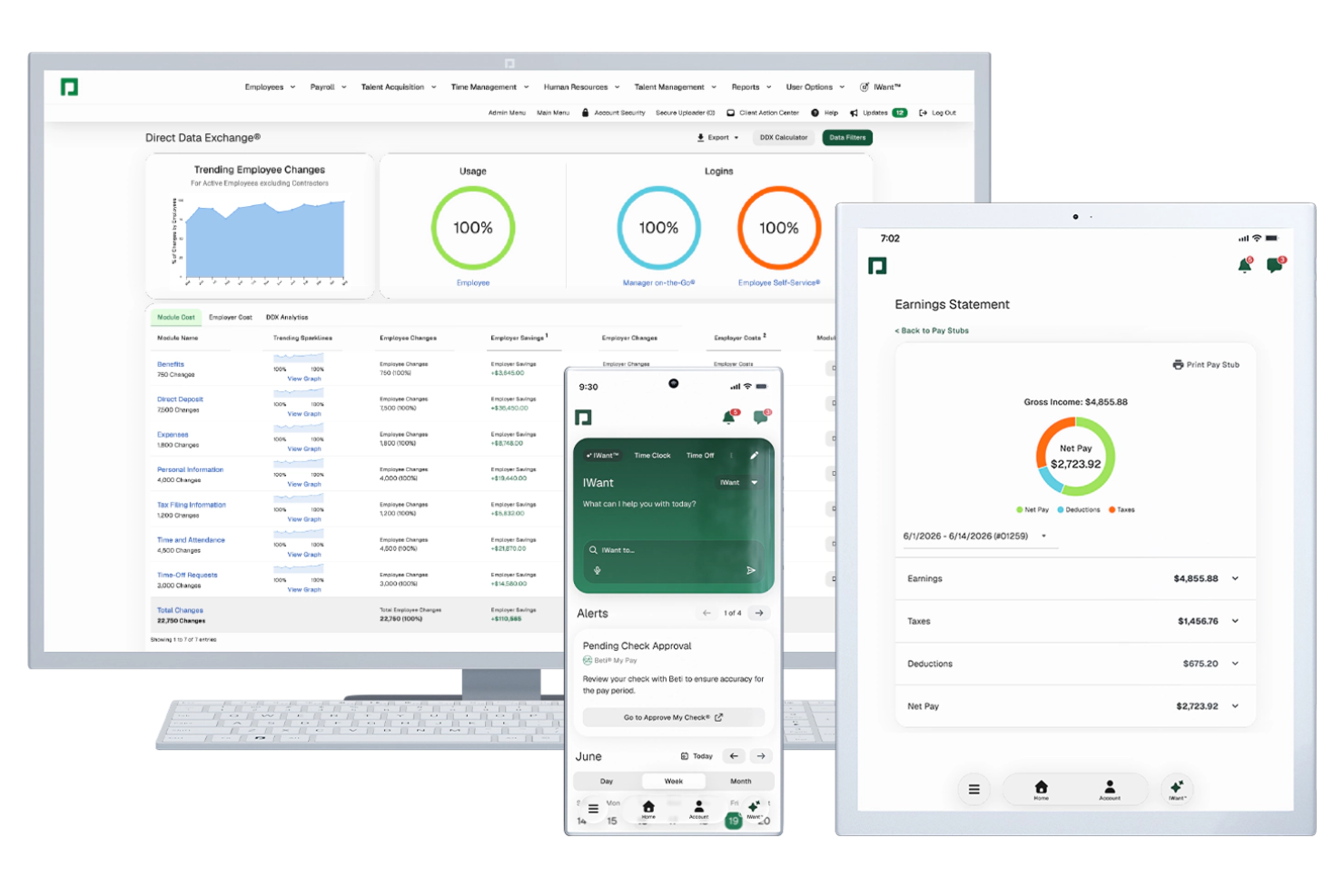
Paycom is a single-database HR and payroll platform with automated time tracking built in, including automated timecard building, clock-in and clock-out via geofencing, biometrics, or mobile, and automated time-off request decisions through its GONE module.
Who Is Paycom Best For?
Paycom is a strong fit for mid-to-large organizations that need time tracking, payroll, and HR management in one unified system.
Why I Picked Paycom
Paycom is one of my top picks because I love how its Employee Self-Service portal connects directly to time tracking in a single database. Employees clock in and out, request time off, pick up or swap shifts, and approve their own payroll before submission. GONE automates time-off decisions instantly based on rules you set, so there's no back-and-forth with managers. IWant, Paycom's AI engine, lets employees pull their own schedule and time data on command without contacting HR.
Paycom Key Features
- Geofencing and Microfence clock-in: Set broad or precise location boundaries that employees must be within to clock in or out via the Paycom mobile app.
- Automated salaried timecard building: Paycom automatically builds and approves timecards for salaried employees, removing manual entry entirely.
- Labor allocation tracking: Assign employee hours to specific cost centers, departments, or positions directly within each timecard.
- Manager on-the-Go app: Managers can review, edit, and approve timecards and schedules from a mobile device in real time.
Paycom Integrations
Integrations are primarily delivered through Paycom's native HR and payroll suite, which includes built-in tools for talent management, time tracking, benefits administration, and employee self-service within a single database.
Pros and Cons
Pros:
- Single database eliminates duplicate data entry
- Geofencing enforces clock-in location accuracy
- Beti® lets employees verify their paychecks
Cons:
- Very limited third-party integration options
- Reporting builder feels less flexible than competitors
Best for deskless teams

Connecteam is a workforce management tool designed for deskless teams across various industries. It allows businesses to improve communication, scheduling, and task management, enhancing productivity and team coordination.
Why I picked Connecteam: It's particularly beneficial for businesses with remote or field-based employees. The app provides an all-in-one platform for managing schedules, tasks, and communication. You can easily create and distribute schedules, ensuring everyone is on the same page. With its focus on deskless teams, Connecteam helps improve communication and efficiency in environments where traditional office setups aren't feasible.
Standout features & integrations:
Features include a time clock feature that allows employees to clock in and out from their mobile devices. The task management tool lets you assign and track tasks in real time. Connecteam also offers a training module to help onboard new employees effectively.
Integrations include QuickBooks, Microsoft Teams, Zoom, Slack, Dropbox, Trello, Asana, and Mailchimp.
Pros and Cons
Pros:
- Real-time task tracking
- Effective for remote employees
- All-in-one management platform
Cons:
- Advanced reporting requires paid plans
- Requires training for new users
New Product Updates from Connecteam

Connecteam Expands Break and Timesheet Controls
Connecteam adds flexible break thresholds, personalized policies, auto-end options, a centralized exceptions report, and improved timesheet issue visibility to help teams manage breaks and timesheets more effectively. For more information, visit Connecteam’s official site.
 .
.
Best as AI for business
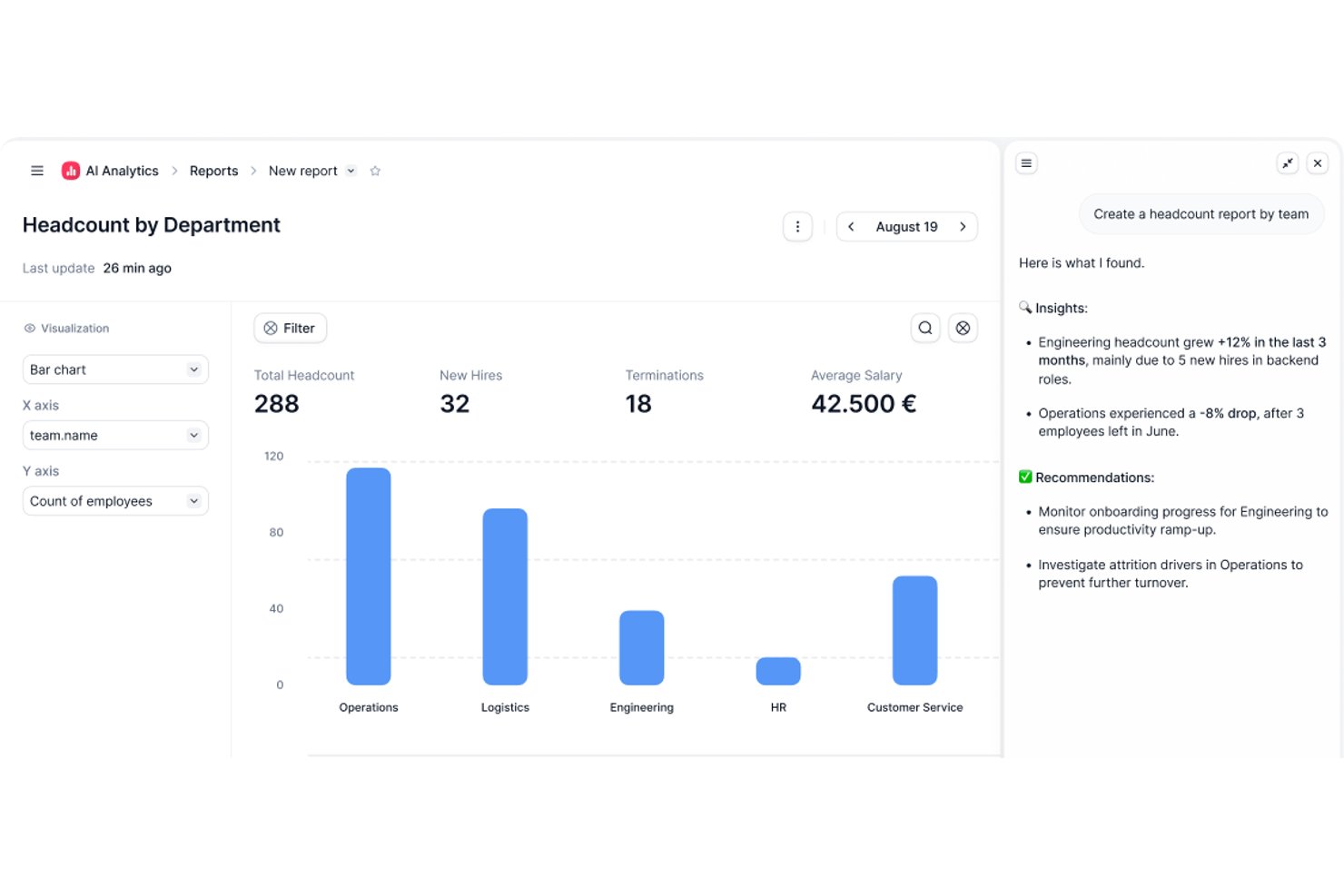
Factorial is an AI-powered HR platform that covers time tracking, shift scheduling, timesheet approvals, and attendance reporting across your team.
Who Is Factorial Best For?
Factorial suits HR and operations teams that want AI-assisted tools for scheduling, reporting, and employee policy questions alongside attendance tracking.
Why I Picked Factorial
I've included Factorial in my top picks because its AI for business positioning means it goes beyond simple clock-in tracking. The AI can answer employee questions about time-off policies, auto-generate attendance reports, and help managers build timetables without manual back-and-forth. I especially like that employees can clock in directly to assigned projects from the mobile app, giving HR teams cleaner data for timesheet approvals without chasing people down.
Factorial Key Features
- Shift scheduling with drag-and-drop: Managers can build and adjust team schedules using a drag-and-drop interface with rotating and bulk shift options.
- Geolocation-based clock-in: Employees clock in from designated locations via mobile, with geofencing controls to restrict check-ins by geography.
- Timesheet review and approval: Managers can filter timesheets by pending status, review hours by day, week, or month, and lock records once approved.
- Offline time tracking with auto-sync: Employees can log hours, breaks, and project time while offline, with data syncing automatically when reconnected.
Factorial Integrations
Factorial has marketplace integrations with Google Workspace, Slack, Microsoft Azure, Microsoft Power BI, Okta, Sage, and DATEV. It also offers a public API, webhooks, OAuth 2.0, and access to hundreds of tools through Zapier.
Pros and Cons
Pros:
- Shift and leave visibility helps plan coverage
- Timesheet submissions are quick for employees
- Attendance records give managers clear clock-in visibility
Cons:
- Overtime rules can require manual validation
- Manual clock-ins replace passive time capture

DeskTime
Best for tracking offline activity
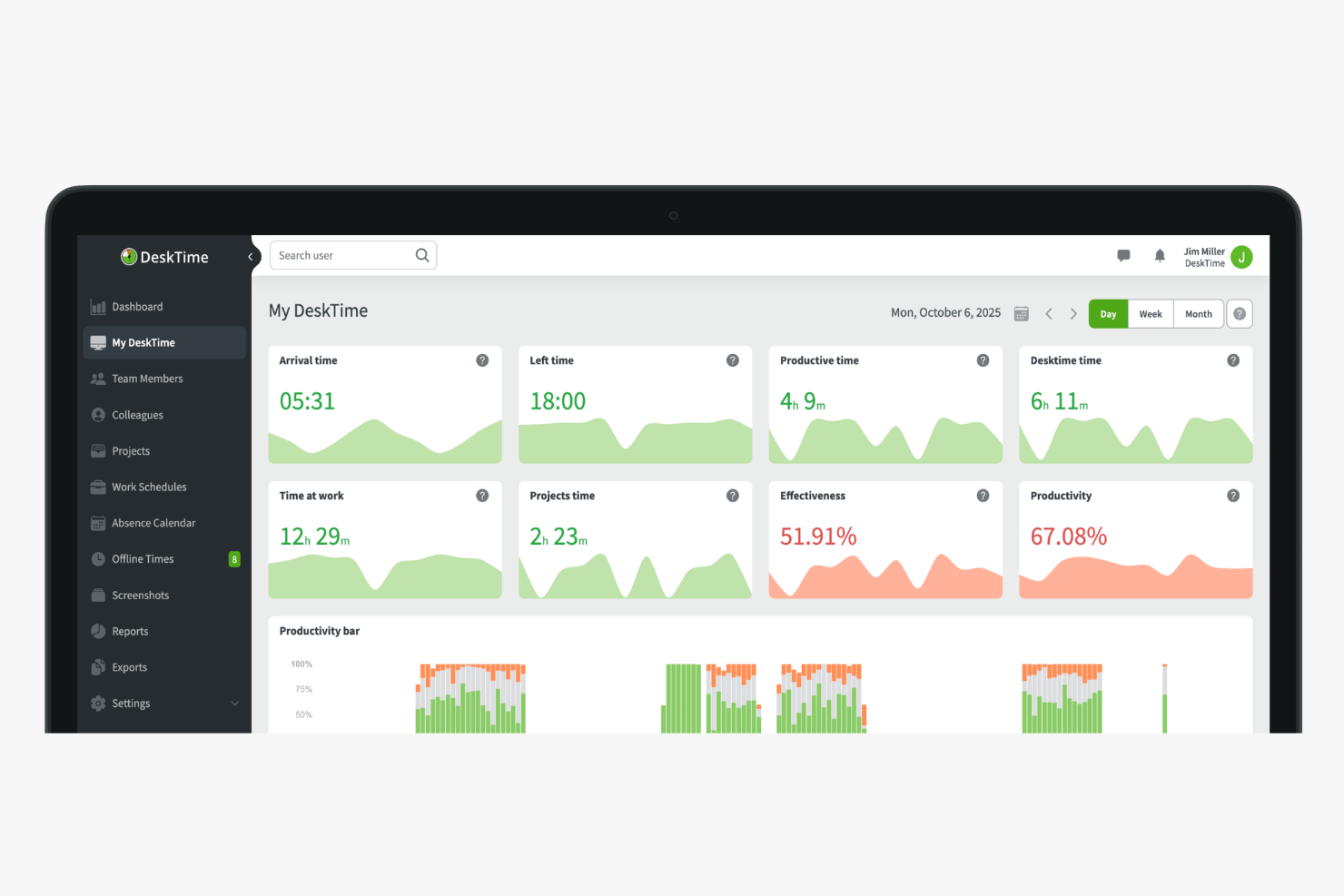
DeskTime is an automatic time tracking tool that logs app and URL usage, offline activity, and project hours in the background—without requiring your team to start or stop a single timer.
Who Is DeskTime Best For?
DeskTime is a good fit for small to mid-sized teams that need visibility into how work hours are spent across both digital and non-digital tasks.
Why I Picked DeskTime
I've included DeskTime in my top picks because of how well it handles the parts of the workday that happen away from the computer. Most automatic trackers stop cold the moment someone steps away from their desk, leaving gaps in the data. DeskTime fills those gaps with offline time logging, where team members can click an idle slot in their timeline and label it as a meeting, phone call, or on-site task. You can also sync Google Calendar or Outlook to fill idle time slots automatically. Admins can require approval before any offline entry counts toward a team member's daily total, which keeps the data honest.
DeskTime Key Features
- Automatic app and URL tracking: DeskTime runs in the background and logs every app and website a team member opens, without any manual input.
- Productivity categorization: Admins can label apps and URLs as productive, unproductive, or neutral to generate a daily productivity score for each team member.
- Screenshot capture: DeskTime takes optional periodic screenshots of each user's screen, with adjustable frequency and privacy settings.
- Absence calendar: Teams can log and track vacation, sick days, and other time-off types directly within DeskTime alongside tracked work hours.
DeskTime Integrations
Integrations include Google Calendar, Outlook Calendar, Trello, Gitlab, Asana, Jira, and Zapier.
Pros and Cons
Pros:
- Runs quietly in the background without input
- Precise tracking of apps and URLs visited
- Logs document and window titles automatically
Cons:
- No real-time screen monitoring
- Lacks predictive web category filtering

Toggl
Best for flexible reporting
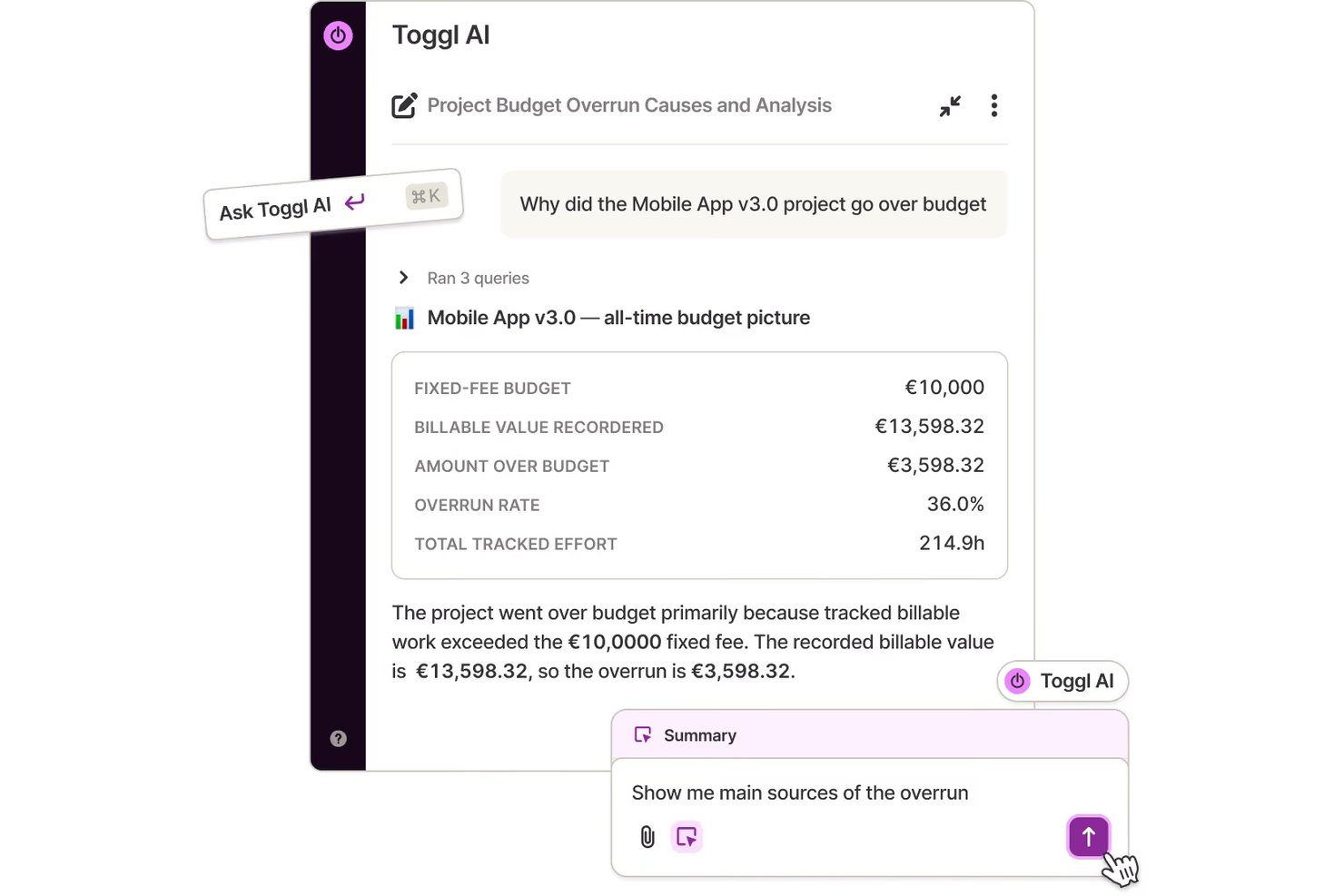
Toggl is a time tracking platform that combines automated activity recording, one-click timers, idle detection, project dashboards, and flexible reporting across web, desktop, and mobile.
Who Is Toggl Best For?
Toggl is a strong fit for operations managers, freelancers, and consultants who need detailed reporting on how time is spent across projects and clients.
Why I Picked Toggl
I've included Toggl in my top picks because its reporting layer genuinely sets it apart from other time tracking tools. I can filter and group time by project, client, member, tag, and date range, then export clean summaries as PDF, CSV, or XLSX for client billing or internal reviews. What I also find useful in practice is the automated timeline: the desktop app records every app and website you're active in throughout the day, and idle detection flags gaps so your logged hours stay accurate without manual cleanup.
Toggl Key Features
- Automated activity timeline: The desktop app records a calendar timeline of your work activities throughout the day, so you can review what you worked on and copy sessions into time entries.
- One-click timer: Start and stop tracking tasks with a single click across web, desktop, and mobile apps.
- Project dashboard: View active project progress, time actuals versus estimates, and task- and member-level breakdowns in one place.
- Idle detection: Toggl flags inactive periods during a running timer, so you can decide whether to keep or discard that time before it affects your logged hours.
Toggl Integrations
Toggl offers native integrations with Jira, Asana, Google Calendar, Slack, Outlook Email & Calendar, and QuickBooks Online. It also provides a REST API, webhooks, MCP server, and CLI for custom integrations.
Pros and Cons
Pros:
- Idle prompts help review inactive time
- Private activity timeline helps reconstruct work
- Detailed project and client time reports
Cons:
- Mobile syncing can lag or misfire
- Desktop capture requires opt-in setup

Best for automatic time mapping
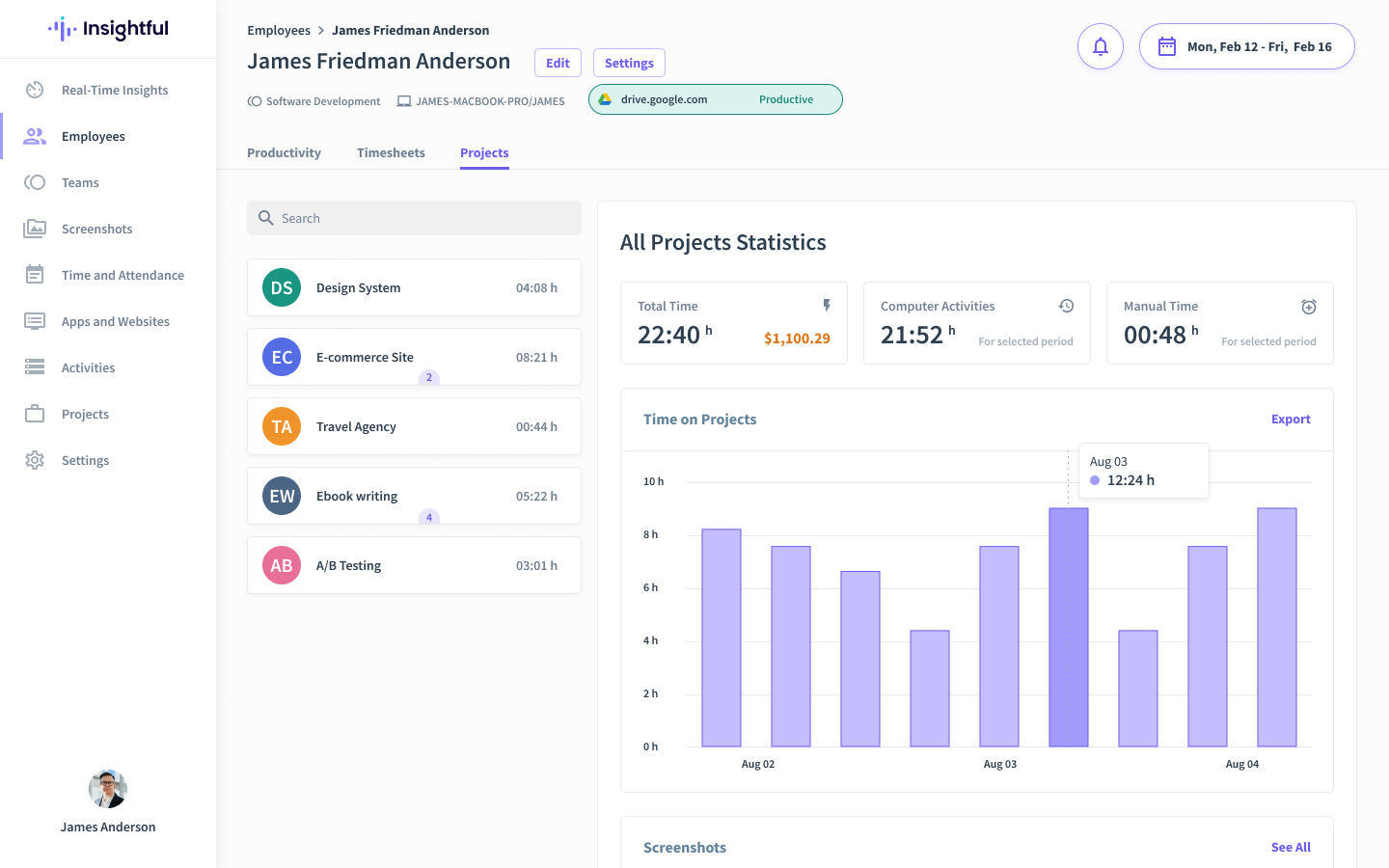
Insightful is an automated time tracking and workforce analytics platform designed for businesses seeking to optimize productivity and gain deeper insights into team dynamics. It caters specifically to industries like IT, finance, and remote-first companies by addressing workload management and process inefficiencies to drive organizational growth.
Why I Picked Insightful
I picked Insightful for its ability to provide valuable insights into productivity trends. The automatic time mapping feature reduces human error and ensures accurate time management. Additionally, the platform's real-time employee and screen monitoring tools offer you a comprehensive view of team activities, helping you optimize staffing and mitigate risks. These features directly address the needs of businesses looking to enhance productivity and operational efficiency.
Insightful Key Features
In addition to its time tracking features, I also found other valuable tools that Insightful offers:
- Attendance Management: This feature allows you to track attendance in real-time, ensuring accurate record-keeping and compliance.
- Workflow Optimization Tools: Identifies and rectifies broken processes, enabling you to improve operational efficiency.
- Insider Threat Detection: Monitors activities to protect your organization from potential security threats.
Insightful Integrations
Integrations include Asana, Jira, Trello, Slack, Microsoft Teams, Google Workspace, Zoom, Monday.com, and Basecamp.
Pros and Cons
Pros:
- Supports remote work monitoring
- Responsive customer service
- Customizable dashboards cater to diverse business needs
Cons:
- No dedicated mobile app
- May not suit smaller or less technical businesses
New Product Updates from Insightful
Insightful Expands MCP and HRIS Integrations
Insightful adds OAuth connections for ChatGPT and Microsoft Copilot Studio through its MCP Server, while HRIS integrations gain manager scope syncing in Beta. These updates expand AI access and automate permission management. For more information, visit Insightful’s official site.
 .
.
Clockify
Best for a free plan for small teams

Clockify is a time-tracking software ideal for small teams that need to manage time effectively. It offers unlimited free access for up to five users, making it a great choice for small businesses.
Why I picked Clockify: It allows up to five users on free plans, which is perfect for growing teams. The tool provides a simple time tracker that you can start and stop with one click. It also features a project tracking system that helps you monitor progress and allocate resources efficiently. With its generous user policy, Clockify is a practical choice for teams needing flexibility in user management.
Standout features & integrations:
Features include a visual time tracker that lets you log time with ease. The reporting feature generates detailed insights into how time is spent across projects. Clockify also offers a timesheet feature to help you manage and approve team hours efficiently.
Integrations include Asana, Trello, Slack, Jira, QuickBooks, monday.com, GitHub, Google Calendar, Notion, and Zapier.
Pros and Cons
Pros:
- Detailed reporting options
- Easy time logging
- Up to five user access on the free plan
Cons:
- Many features locked behind paid plans
- Basic interface design

Best for payroll integration

QuickBooks Time is a time tracking tool designed for businesses that need accurate time data integrated with payroll. It simplifies time management and payroll processing for companies of all sizes.
Why I picked QuickBooks Time: The integration with QuickBooks payroll systems is a significant advantage, ensuring accurate and efficient payroll management. You can track employee hours with precision, reducing errors in payroll processing. QuickBooks Time offers mobile time tracking, allowing your team to clock in from anywhere. This simple integration with payroll systems makes it a practical choice for businesses looking to incorporate their financial operations.
Standout features & integrations:
Features include GPS tracking that lets you monitor where employees clock in and out. The scheduling feature helps you manage shifts and assign tasks efficiently. QuickBooks Time also offers alerts and notifications to keep you informed about important time tracking events.
Integrations include QuickBooks, Xero, Gusto, BambooHR, ADP, Paychex, Sage, Expensify and Square.
Pros and Cons
Pros:
- GPS location tracking
- Mobile time tracking
- Payroll integration
Cons:
- May have occasional sync issues
- Setup can be complex

Timely
Best for AI-powered time capture

Timely is an automatic time tracking tool designed for businesses like consultancies, agencies, and SaaS companies. It helps users to automate the capture of online work hours without manual input, focusing on enhancing productivity and efficiency.
Why I picked Timely: Its standout feature is AI-powered automatic time tracking, eliminating the need for manual entries. Timely can be used to generate accurate timesheets, ensuring you have reliable data for billing and analysis. The memory tracker helps remember tasks, making time tracking precise. With its project dashboard, you can easily monitor project progress and resource allocation, aligning with its USP of automatic time tracking.
Standout features & integrations:
Features include automatic time tracking that captures work activity without manual input. AI timesheets quickly generate timesheets based on your work patterns. The memory tracker remembers tasks for accurate tracking, ensuring no detail is missed.
Integrations include Asana, Trello, ClickUp, monday.com, Google Calendar, Office 365 Calendar, QuickBooks, and Jira. Third-party software is required for Gmail, Zoom, and Microsoft Teams.
Pros and Cons
Pros:
- Memory tracking feature
- AI-generated timesheets
- Automatic time capture
Cons:
- Learning curve for new users
- Limited offline functionality

Jibble
Best for biometric time tracking

Jibble is a time tracking and attendance management tool designed for businesses that require precise time logging. It's particularly popular among businesses needing reliable attendance data and offers facial recognition to ensure accurate clock-ins.
Why I picked Jibble: It provides facial recognition, which adds a layer of security and accuracy to time tracking. Your team can clock in and out using their mobile devices, making it suitable for remote or on-the-go employees. Jibble also offers detailed timesheets that help you analyze work patterns. This focus on accuracy and security aligns with its USP of biometric time tracking.
Standout features & integrations:
Features include detailed timesheets that provide insights into employee work hours. The mobile app allows employees to clock in and out from anywhere. Jibble also offers GPS tracking to monitor where clock-ins occur, ensuring location compliance.
Integrations include Slack, Microsoft Teams, Zapier, QuickBooks, Trello, Asana, Jira, monday.com, Google Calendar, and Xero.
Pros and Cons
Pros:
- GPS location tracking
- Mobile app accessibility
- Facial recognition for clock-ins
Cons:
- Limited offline features
- Setup can be time-consuming
Other Automated Time Tracking Software
Here are some additional automated time tracking software options that didn’t make it onto my shortlist, but are still worth checking out:
- TimeCamp
For budget management
- RescueTime
For productivity analysis
- Deltek Replicon Time
For enterprise scalability
- Harvest
For invoicing features
- Monitask
For online timesheets
- ClickTime
For real-time labor cost reporting
- Homebase
For hourly workforce management
- My Hours
For approval workflows
- Memtime
For recovering billable hours
- BusyBusy
For construction industry teams


How I Evaluate Automated Time Tracking Software
I evaluate in two layers: the baseline a tool must meet—passive capture, PM integrations, timesheet approvals—and the differentiators that set the best options apart for project teams.
Core Functionality (Table Stakes For This List)
When I'm selecting tools for my list, I rank each one on a scale from 0 (does not offer the functionality) to 5 (excels in this area) for each core functionality listed below. Then, I calculate the tool's total score into a percentage. Each tool needs to achieve a minimum total score of 65% to be considered for inclusion.
- Automatic Time Capture: I check whether the tool passively tracks app, browser, and document activity without requiring anyone to start a timer or fill out a form.
- Project & Task Assignment: Tracked time should map to specific projects, tasks, clients, or activities so hours don't end up in an unassigned bucket.
- Timesheet Generation & Approvals: I look for auto-populated timesheets with approval workflows, since manual timesheet chasing is exactly what these tools should eliminate.
- PM Tool Integrations: The tool needs native connections to platforms like Jira, Asana, or Monday so tracked time syncs directly to the tasks your team works in.
- Time Reporting & Analytics: I evaluate the depth of reporting available, from utilization breakdowns and budget burn rates to project-level profitability dashboards.
- Billable Time & Rate Management: Tools should let you tag hours as billable or non-billable and configure rates by project, client, or team member for accurate invoicing.
Once I have a list of tools that meet this criteria, I consider what sets each platform apart.
Differentiating Factors (What Sets Vendors Apart)
Here's how I compare and contrast different vendors:
Standout Features
AI-powered categorization is a big one—I look for tools that automatically assign tracked hours to the right project or task without manual sorting. Calendar and meeting sync matters just as much, since client calls and sprint ceremonies often go unlogged. I also evaluate whether a tool offers resource capacity planning, which helps you spot overloaded team members before deadlines slip.
Beyond Features
Privacy controls matter a lot here—automatic tracking can feel invasive if the tool doesn't let team members review, edit, or approve their own logs before submission. I also evaluate how deeply a tool connects to the broader PM and finance stack, since a two-way sync with Jira or Asana is far more useful than a basic one-directional import. Pricing structure is worth examining too, especially whether plans scale reasonably as your team grows without locking core features behind enterprise tiers.
How to Choose Automated Time Tracking Software
It’s easy to get bogged down in long feature lists and complex pricing structures. To help you stay focused as you work through your unique software selection process, here’s a checklist of factors to keep in mind:
| Factor | What to Consider |
|---|---|
| Scalability | Will the tool grow with your business? Look for solutions that accommodate more users or projects without a significant cost increase or performance drop. |
| Integrations | Does it work with the tools you already use, like project management or payroll systems? Check for easy setup and maintenance of integrations. |
| Customizability | Can you tailor the software to fit your workflows and reporting needs? Avoid tools that limit your ability to adjust settings or dashboards. |
| Ease of use | Is the interface intuitive and easy to navigate? A steep learning curve might slow down adoption among your team. |
| Implementation and onboarding | How quickly can you get started? Look for detailed onboarding support, such as tutorials, training sessions, and responsive customer service. |
| Cost | Is the pricing transparent and within your budget? Consider total costs, including potential add-ons or fees for extra features. |
| Security safeguards | Does the software meet your data protection needs? Ensure it complies with regulations and offers features like encryption and access controls. |
| Support availability | What kind of support can you expect? Look for 24/7 availability and multiple contact methods to resolve issues promptly. |
What Is Automated Time Tracking Software?
Automated time tracking software is a tool that automatically records the time spent on tasks and projects, without manual input. It's commonly used by freelancers, project managers, and teams to improve productivity and billing accuracy. Features like automatic time capture, reporting, and integration with other tools help with efficient time management and project tracking. Overall, these tools save time, improve team productivity, and reduce errors in time tracking and project management.
Features
When selecting automated time tracking software, keep an eye out for the following key features:
- Automatic time capture: Records time spent on tasks without manual input, helping ensure accuracy and save time.
- GPS location tracking: Monitors where employees clock in and out, ensuring compliance with location-based requirements.
- Facial recognition: Adds a layer of security by verifying user identity during clock-ins, useful for remote teams.
- Invoicing integration: Generates invoices directly from tracked time, simplifying the billing process for projects.
- Budget management: Tracks project costs and helps manage budgets effectively, ensuring financial goals are met.
- Customizable reporting: Allows users to tailor reports to fit specific needs, offering insights into time and project data.
- Mobile access: Enables users to track time on the go, providing flexibility for remote or field-based employees.
- Timesheet approval: Manages and approves team hours efficiently, ensuring accurate payroll processing.
- Expense tracking: Monitors project-related expenses, helping manage costs and improve financial oversight.
- Integration capabilities: Works with existing tools like project management and payroll systems, streamlining workflows.
Benefits
Implementing automated time tracking software provides several benefits for your team and your business. Here are a few you can look forward to:
- Improved accuracy: Automatic time capture reduces errors in tracking hours, ensuring precise billing and payroll for team members.
- Enhanced productivity: Features like reporting and analysis help identify inefficiencies, allowing teams to optimize their workflows.
- Time savings: Automating time tracking eliminates the need for manual entries, freeing up time for more important tasks.
- Better budget management: Tracking project costs and expenses helps you stay within budget and make informed financial decisions.
- Increased accountability: GPS tracking and facial recognition ensure that employees are where they need to be, promoting responsibility.
- Simplified invoicing: Integration with billing systems allows for easy invoice generation, speeding up the payment process.
- Flexibility for remote work: Mobile access enables time tracking from anywhere, supporting remote and field-based employee time tracking.
Costs & Pricing
Selecting automated time tracking software requires an understanding of the various pricing models and plans available. Costs vary based on features, team size, add-ons, and more. The table below summarises common plans, their average prices, and typical features included in automated time tracking software solutions:
Plan Comparison Table for Automated Time Tracking Software
| Plan Type | Average Price | Common Features |
|---|---|---|
| Free Plan | $0 | Basic time tracking data, limited time reports, and mobile access. |
| Personal Plan | $3-$10/user /month | Time tracking, manual timers or basic auto‑tracking, basic reports, single project/client tracking, basic mobile access. |
| Business Plan | $11-$20/user/month | Time tracking, project/task tracking, standard reporting, basic integration support, team timesheets, possibly invoicing or expense logging. |
| Enterprise Plan | $20-$40+/ user/month | Advanced reporting/analytics, multiple integrations, team/time & attendance, expense & budget tracking, payroll export / integration, admin controls / access management, enterprise‑level support. |
Automated Time Tracking Software FAQs
Here are some answers to common questions about automated time tracking software:
How does automated time tracking software work?
Automated time tracking software works by automatically recording the time you spend on tasks or projects. It uses various methods like tracking your computer activity, apps, and websites you use. This way, you don’t have to manually log your hours, saving you time and reducing errors. Many tools also offer mobile apps, allowing you to track time on the go.
Can automated time tracking software integrate with my existing tools?
Yes, most automated timekeeping software can integrate with existing tools like project management, invoicing, and payroll systems. Check the specific integrations offered by each software to ensure it fits with your current workflow. Integration can improve productivity by streamlining data flow between different systems.
Is my data safe with automated time tracking software?
Yes, reputable automated time tracking software providers prioritize data security. They use encryption, secure servers, and regular updates to protect your data. Always review the software’s security features and compliance with data protection regulations. It’s important to choose a provider that values your privacy and data integrity.
Do I need technical skills to use automated time tracking software?
No, you don’t need advanced technical skills to use most automated time tracking software. These tools are designed to be user-friendly with intuitive interfaces. Many providers offer tutorials, customer support, and onboarding assistance to help you get started. If you or your team have concerns, look for software with strong support and training resources.