

10 Best Time Clock Software Reviewed in 2026

Best Time Clock Software Shortlist


The best time clock software helps you track work hours and manage your team’s time more effectively. Without a way to keep track of how much time your team is spending on specific projects and tasks, you won’t be able to bill clients accurately for your time, and overall profitability could suffer.
Using my experience running an agency and 3+ years of software testing, I’ve reviewed a variety of time clock tools to give you independent insights into the best options available. Read my analysis of each tool and how it addresses common challenges like scheduling and labor tracking. Whether you're trying to stay on top of timesheets or team coordination, I can help you find the right fit for your project and team needs.
Why Trust Our Software Recommendations
Our team has been testing and reviewing software since 2012. As project managers ourselves, we know how difficult—and important—it is to choose the right software.
For this guide, we evaluated tools using hands-on testing and independent research, scoring tools using our selection criteria. We also draw on insights from industry thought leaders and practicing project management experts.
Our reviews reflect our human editorial judgment, not a sales pitch.
Expert reviewers:
Time Clock Software Comparison Table
The table below compares pricing details for my top time clock software selections.
| Tool | Best For | Trial Info | Price | ||
|---|---|---|---|---|---|
| 1 | Best as AI for business | Free demo available | From $8/user/month | Website | |
| 2 | Best for deskless teams | 14-day free trial | From $29/month (billed annually) | Website | |
| 3 | Best for facial recognition sign-in | 14-day free trial + free demo available | From $4.99/user/month + $19/month base fee (billed annually) | Website | |
| 4 | Best for service delivery teams | 14-day free trial + free demo available | From $19/user/month (billed annually) | Website | |
| 5 | Best for team time tracking | Free plan available | From $8.50/user/month (billed annually) | Website | |
| 6 | Best for shift scheduling | Free trial available | From $2.50/user/month | Website | |
| 7 | Best for project tracking | Free plan available; 14-day free trial; free demo available | From $9.99/user/month (billed annually) | Website | |
| 8 | Best for employee scheduling | Free trial + free demo available | Pricing upon request | Website | |
| 9 | Best for project time tracking | Free plan + 30-day free trial available | From $9/seat/month (billed annually) | Website | |
| 10 | Best for business management | 14-day free trial + free demo available | From $19.90/user/month (billed annually) | Website |

Best Time Clock Software Reviews
Below are my detailed summaries of the best time clock software. I cover key features, pros & cons, integrations, and ideal use cases for each tool to help you find the best one for you.

Best as AI for business
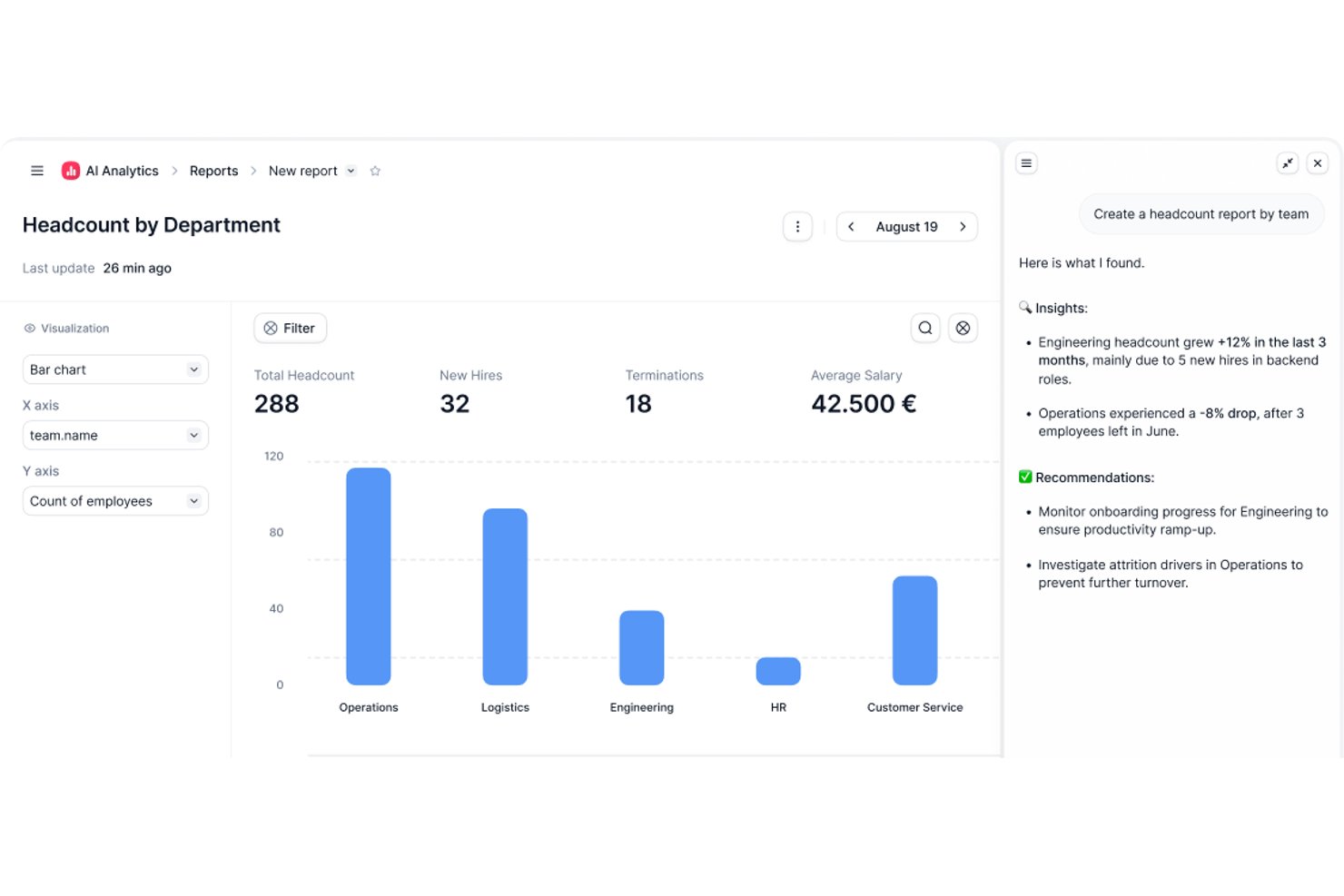
Factorial is an AI-powered HR and time management platform that covers employee time tracking, shift scheduling, time-off management, and attendance reporting across computer, mobile, QR code, and geolocation clock-in methods.
Who Is Factorial Best For?
Factorial suits HR and payroll managers at small and midsize businesses who want a single AI-powered platform to handle time tracking, scheduling, and attendance alongside broader HR operations.
Why I Picked Factorial
I've included Factorial in my top picks because its AI-powered approach means it's doing more than just logging hours—it actively assists with scheduling, reporting, and answering employee policy questions. I like how the AI handles timetable planning across multiple clock-in methods (computer, QR code, geolocation, and mobile app), so distributed teams aren't left guessing about their schedules. The AI-generated reporting also means managers spend less time pulling attendance data manually.
Factorial Key Features
- Multi-method clock-in support: Employees can clock in via computer, mobile app, QR code, facial recognition, or geolocation, depending on your team's setup.
- Timesheet approval and locking: Managers can review and approve timesheets, which locks the records to confirm they've been validated before payroll.
- Time-off request and approval workflow: Employees submit time-off requests directly in the platform, and managers can approve, reject, and view upcoming absences in a shared view.
- Payroll data export: Approved worked hours can be transferred to Factorial's Compensation module and exported in Excel or CSV format for payroll processing.
Factorial Integrations
Factorial offers marketplace integrations with DATEV LODAS, Sage 200, Google Workspace, Slack, Microsoft Power BI, and Okta, plus Zapier. Its public API supports OAuth 2.0, webhooks, API keys, and SDKs for custom integrations.
Pros and Cons
Pros:
- Employees and managers share leave visibility
- Approved timesheets lock validated clock records
- Clock-ins work across mobile, QR, and desktop
Cons:
- Geolocation cannot enforce clock-in boundaries
- Payroll hours require approved hourly timesheets
Best for deskless teams

Connecteam is a time clock app and workforce management tool for deskless workers and mobile teams. It’s used in industries like retail, hospitality, and construction to manage communication, schedules, and tasks.
Why I picked Connecteam: Connecteam lets your team access schedules, tasks, and time tracking remotely so you can all stay on the same page. You can chat, send updates, and manage shifts from one place. It also lets you create training modules to help new employees get started quickly.
Standout Features & Integrations:
Features include GPS tracking to monitor employee location and automated workflows to improve efficiency. The tool also offers employee recognition programs to boost morale.
Integrations include QuickBooks, Gusto, Xero, and Zapier.
Pros and Cons
Pros:
- GPS tracking capabilities
- Easy scheduling features
- Effective for mobile teams
Cons:
- Occasional app performance issues
- Limited advanced features
New Product Updates from Connecteam

Connecteam Expands Break and Timesheet Controls
Connecteam adds flexible break thresholds, personalized policies, auto-end options, a centralized exceptions report, and improved timesheet issue visibility to help teams manage breaks and timesheets more effectively. For more information, visit Connecteam’s official site.
 .
.
Best for facial recognition sign-in
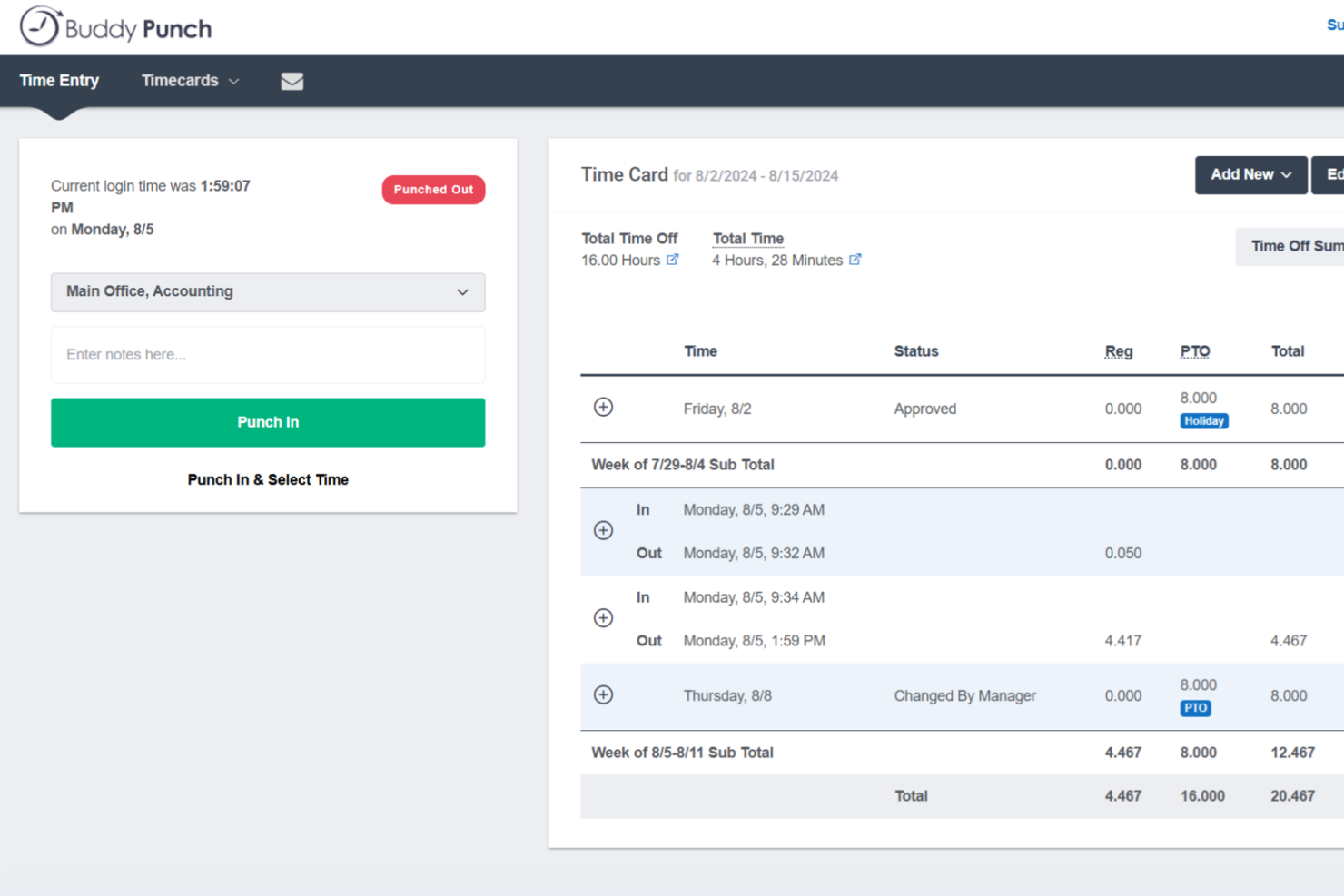
Buddy Punch is a time clock and attendance platform with flexible clock-in methods, overtime rule configuration, employee scheduling, PTO tracking, and direct payroll integrations.
Who Is Buddy Punch Best For?
Buddy Punch is a strong fit for small to mid-sized businesses with hourly or field-based workforces, particularly in industries like construction, retail, healthcare, and hospitality.
Why I Picked Buddy Punch
I've included Buddy Punch in my top picks because of how well it handles identity verification at clock-in, particularly through facial recognition. When an employee punches in via the Buddy Punch kiosk, the system captures and compares their face against a stored reference photo, which directly addresses buddy punching on shared devices. I also like that facial recognition isn't the only verification layer available: you can combine it with photos on punch, where a snapshot is automatically taken at each clock-in and stored on the timesheet for admin review. That combination gives you a clear, auditable record of who actually punched in and when.
Buddy Punch Key Features
- GPS tracking: Logs the location of each punch so you can see exactly where employees clocked in and out.
- IP address locking: Restricts clock-ins to approved networks, preventing remote punches from unauthorized locations.
- Timesheet approvals: Lets managers review, edit, and approve employee timesheets before they're sent to payroll.
- PTO tracking: Manages time-off requests, accrual balances, and approvals directly within the platform.
Buddy Punch Integrations
Buddy Punch offers native integrations focused on payroll providers, including QuickBooks Online, QuickBooks Desktop, ADP Workforce Now, Gusto, Paychex, Paycor, Paylocity, Rippling, Workday, and SurePayroll. It also connects with Zapier and provides an API for custom integrations.
Pros and Cons
Pros:
- Automatic overtime and hours calculation
- Geofence radius is adjustable per location
- Multiple punch-in methods including facial recognition
Cons:
- National holidays must be entered manually
- Requires internet connection to clock in

Best for service delivery teams

Rocketlane is a project delivery platform that helps teams manage timelines, tasks, and collaboration across client-facing projects. It’s for service delivery teams that need better visibility into project progress and time spent.
Why I picked Rocketlane: It’s made for tracking time alongside service delivery work like onboarding, implementation, and support. Team members can log time by task or project and you can compare it against planned hours. Timesheets are auto-filled based on work logs, and you can also set up billable vs non-billable hours to track margins.
Standout Features & Integrations:
Features include time approval workflows that let you review submissions before they’re final. There's also a reporting dashboard to view time spent across clients, projects, and teams.
Integrations include Salesforce, Slack, Google Calendar, HubSpot, and Zapier.
Pros and Cons
Pros:
- Automated workflows
- Visual project timelines
- Real-time status tracking
Cons:
- Initial setup complexity
- New users may require training
New Product Updates from Rocketlane

Rocketlane Introduces Governance and Workforce Agents
Rocketlane introduces Governance Agents and Workforce Agents to automate delivery processes and recurring tasks. These updates help teams enforce rules and streamline project execution. For more information, visit Rocketlane’s official site.
 .
.
Everhour
Best for team time tracking

Everhour is a time tracking and project management tool that helps teams better manage their time. It's used by project managers and team leads to zero in on budget and project progress.
Why I picked Everhour: Everhour lets you track time and create reports that update in real-time. It integrates with tools like Asana and Trello, so you don’t have to keep switching tabs. The layout is simple and helps you stay on top of budgets and project work without distraction. You can also use the browser extension or iPhone app to track time when you’re away from your desk.
Standout Features & Integrations:
Features include progress tracking, detailed reporting, and employee record management. Built-in budgeting and invoicing features help you manage finances in the same tool.
Integrations include Asana, ClickUp, Jira, Trello, Basecamp, GitHub, Slack, QuickBooks, Xero, and monday.com.
Pros and Cons
Pros:
- Simple timesheet management
- Easy integration with project management tools
- Customizable reporting options
Cons:
- Occasional syncing issues
- Limited offline capabilities

Best for shift scheduling

When I Work is a scheduling and time tracking tool that helps manage employee shifts. It’s mainly used to handle schedules, track hours, and stay in touch with hourly staff.
Why I picked When I Work: When I Work helps you manage shift schedules by letting your team set availability and swap shifts easily. It’s simple to use, and your team can see updates right away. Built-in messaging keeps everyone in the loop, and the mobile access lets your team check schedules from anywhere.
Standout Features & Integrations:
Features include automated scheduling to reduce manual input and clock-in/out reminders to maintain accurate time tracking. Leave management features let you track employee time off.
Integrations include ADP, QuickBooks, Square, Gusto, and Paychex.
Pros and Cons
Pros:
- Clock-in/out reminders
- Automated scheduling features
- Effective shift scheduling
Cons:
- Limited customization options
- Limited advanced features

Best for project tracking

Teamwork.com is a project management tool that helps teams track work and meet deadlines. It’s built for project managers and teams that want an organized way to collaborate and manage tasks.
Why I picked Teamwork.com: Teamwork.com gives you the ability to track time from tasks, projects, or the timer tool so you can see where time is spent as work happens. Your team can log billable and non-billable hours and tie them to specific clients or projects. The platform also shows you time reports that highlight what’s been worked on and how it compares to estimates. Time entries work alongside budgeting and invoicing tools to help you track cost and profit.
Standout Features & Integrations:
Features include bulk time entry so you can log hours for multiple tasks at once. There's also a built-in timer that helps your team track hours in real time.
Integrations include Slack, HubSpot, QuickBooks, Zapier, Microsoft Teams, Dropbox, Google Drive, Xero, Trello, and OneDrive.
Pros and Cons
Pros:
- Detailed reporting capabilities
- Customizable workflows
- Comprehensive project tracking tools
Cons:
- May require additional customization
- Learning curve for new users

Best for employee scheduling

Humanity Schedule is a workforce management tool for employee scheduling and time tracking. Managers and HR teams can use it to manage shifts and handle staffing efficiently.
Why I picked Humanity Schedule: Humanity Schedule helps you build shift plans and offers schedules that update in real time. You can set availability to help avoid conflicts, and use the mobile app to share changes fast. Reporting features let you see labor costs and how well you're managing shifts, so you can adjust as needed.
Standout Features & Integrations:
Features include shift swapping to provide flexibility for employees and forecasting tools for anticipating staffing needs. Humanity Schedule also offers employee self-service so staff can manage their own schedules.
Integrations include ADP, Oracle, QuickBooks, Workday, BambooHR, and Paychex.
Pros and Cons
Pros:
- Comprehensive reporting capabilities
- Employee availability management
- Automated shift planning
Cons:
- May need frequent updates
- Limited customization options

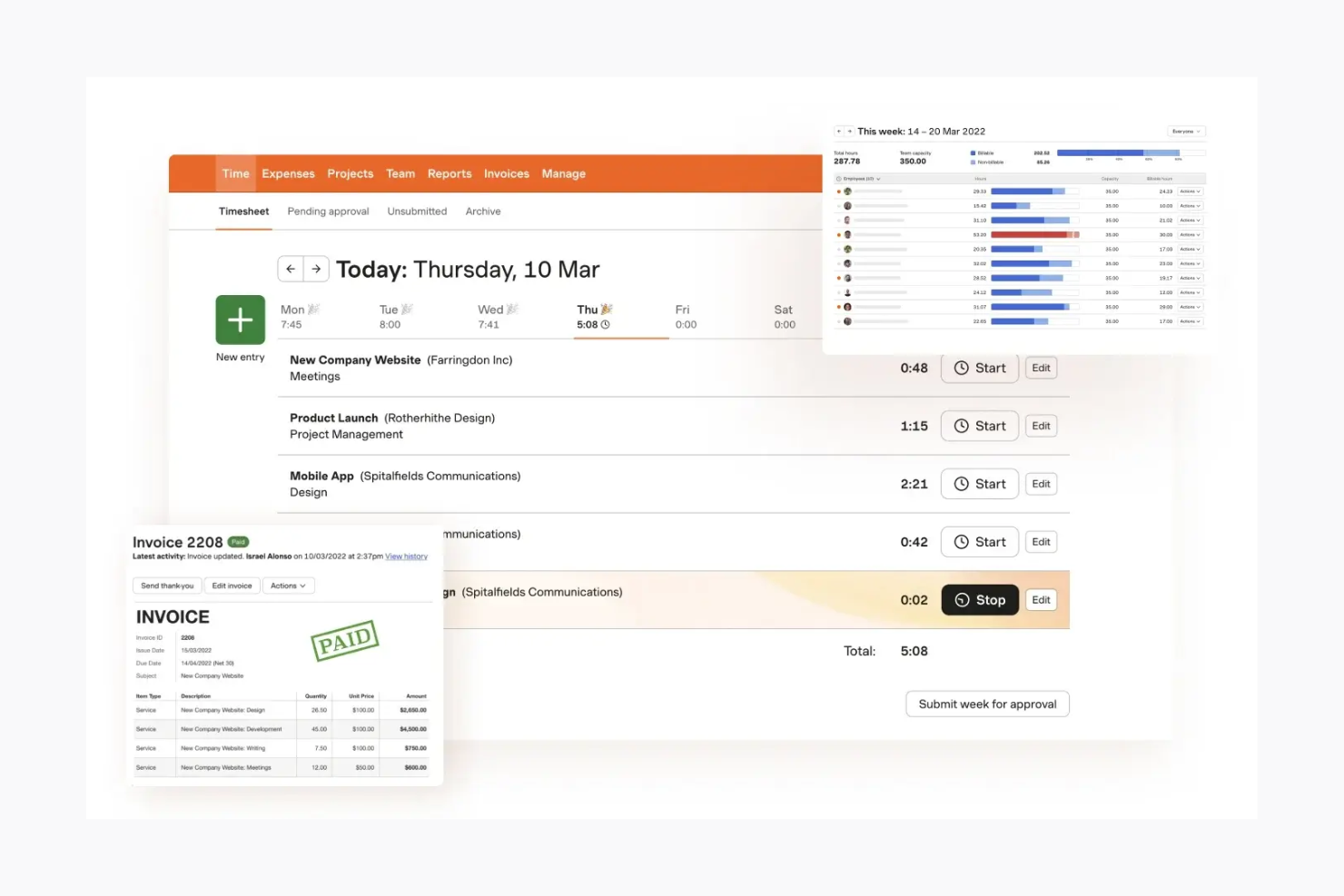
Harvest is a time tracking and invoicing tool for teams and freelancers who need to track hours and manage billing. It helps small to mid-sized teams stay on top of time and expenses.
Why I picked Harvest: Harvest makes it easy for you and your team to track time with simple timesheets and budget tools. You can turn tracked hours into invoices and send them straight to clients. The reports help you see where your team’s time goes. Its clean layout helps you get started without a lot of training.
Standout Features & Integrations:
Features include automatic reminders when timesheets haven’t been submitted and expense tracking to help manage project costs. Harvest also supports time tracking through a browser extension, which makes it easy to log hours as you work.
Integrations include Asana, Trello, Basecamp, QuickBooks, Xero, Slack, Stripe, PayPal, GitHub, and Google Calendar.
Pros and Cons
Pros:
- Supports expense tracking
- Automatic timesheet reminders
- Easy invoicing from tracked hours
Cons:
- Limited customization options
- May not fit large enterprises


Scoro is a comprehensive professional services automation solution for small to medium-sized businesses that want to streamline their operations. It’s useful for managers and team leaders who need to oversee projects, finances, and time tracking.
Why I picked Scoro: Scoro lets you manage projects and finances in one place. You can track time, send invoices, and keep an eye on budgets without switching tools. Your team can use dashboards to stay on top of key numbers, and the reports help you see what’s working and what needs fixing.
Standout Features & Integrations:
Features include customizable dashboards that let you track everything from sales to time, budget, and project timelines. The tool also offers billing and invoicing features.
Integrations include Xero, QuickBooks, Zapier, Mailchimp, Dropbox, Google Calendar, Slack, Asana, and Stripe.
Pros and Cons
Pros:
- Detailed reporting features
- Integrated financial tools
- Customizable dashboards
Cons:
- High customization demands
- Requires initial setup time
Other Time Clock Software
Here are some additional time tracking software options that didn’t make it onto my shortlist, but which are still worth checking out if you didn’t find what you’re looking for yet:
- Beesbusy
For small businesses
- Monitask
For automated time tracking
- Resource Guru
For resource scheduling
- BigTime
For professional services
- Homebase
For monitoring employee hours
- GoodDay
For integrated project-based time tracking
- Wrike
For customizable workflows
- BambooHR®
For tracking PTO and holidays
- Kantata
For tracking billable hours on client work
- Workday
For enterprise HR solutions
- BrightHR
For HR document management
- ADP
For payroll and HR integration
- Paychex
For payroll processing
- monday.com
For visual project planning


How I Evaluate Time Clock Software
I evaluate time clock tools across two layers: core functionality like real-time clock-in and project time allocation, then differentiators that separate good tools from great ones.
Core Functionality (Table Stakes For This List)
When I'm selecting tools for my list, I rank each one on a scale from 0 (does not offer the functionality) to 5 (excels in this area) for each core functionality listed below. Then, I calculate the tool's total score into a percentage. Each tool needs to achieve a minimum total score of 65% to be considered for inclusion.
- Real-Time Clock In/Out: I check whether team members can punch in across web, mobile, and kiosk—especially for distributed teams splitting time between on-site and remote work.
- Project & Task Time Allocation: Logged hours should map to specific projects, tasks, or clients so PMs can see where time actually goes rather than just total hours worked.
- Timesheet Management & Approvals: I evaluate the approval workflow depth, looking for multi-level reviews, auto-reminders, and timesheet locking that prevent edits after sign-off.
- Reporting & Analytics: Reports need to go beyond raw hour totals. I look for billable vs. non-billable breakdowns, utilization rates, and budget-to-actual comparisons.
- Payroll & Billing Integrations: Whether you're pushing approved hours to QuickBooks, Xero, or a payroll provider, I evaluate the breadth and depth of native integrations available.
- Overtime & Compliance Rules: Configurable pay rules matter—especially for teams managing contractors and employees across multiple regions with different overtime and break requirements.
Once I have a list of tools that meet this criteria, I consider what sets each platform apart.
Differentiating Factors (What Sets Vendors Apart)
Here's how I compare and contrast different vendors:
Standout Features
Budget and burn alerts are a big one for me. When tracked hours start creeping toward the estimate, I want the PM notified before it becomes a surprise in the next status meeting. Capacity and workload heatmaps give resource planners a visual read on who's overloaded and who has room, which directly shapes sprint planning and staffing decisions. I also look for client portal access, since agency teams often need to share logged hours with clients for billing transparency without granting full system access.
Beyond Features
Integration depth with your existing project management stack matters. If your team runs sprints in Jira or manages deliverables in Asana, the time clock tool needs to sync tasks and hours without manual re-entry. I also evaluate pricing models closely—per-user pricing can balloon fast for a 50-person PMO compared to flat-rate plans. Finally, I consider team size and industry fit, since an agency billing hourly has very different needs than an enterprise IT department tracking internal project costs.
How to Choose Time Clock Software
It’s easy to get bogged down in long feature lists and complex pricing structures. To help you stay focused as you work through your unique software selection process, here’s a checklist of factors to keep in mind:
| Factor | What to Consider |
|---|---|
| Scalability | Will the software be able to grow with your team? Consider whether it can handle more users or locations as your business expands. Avoid tools that might limit your future growth. |
| Integrations | Does it connect with your existing tools like payroll or HR systems? Make sure the software can integrate seamlessly with the tools you already use to avoid data silos. |
| Customizability | Can you tailor it to fit your specific workflows? Look for options that let you customize reports and dashboards to match your team’s unique needs. |
| Ease of Use | Is it intuitive for your team? A user-friendly interface reduces training time and helps your team adopt the software quickly. |
| Implementation and Onboarding | How long will it take to get started? Consider the resources needed for setup and whether the vendor offers support or training to ease the transition. |
| Cost | Does it fit your budget? Evaluate total costs, including hidden fees or charges for additional features, to make sure it aligns with your financial constraints. |
| Security Safeguards | Does the tool protect your data and privacy? Check for features like two-factor authentication and data encryption to make sure your team's information is safe. |
What Is Time Clock Software?
Time clock software is a tool that helps you track employee work hours and attendance. Managers, HR teams, and team leads use it to make sure billing and payroll are accurate and that labor laws are followed.
With features for time tracking, attendance monitoring, and reporting, it helps you manage your team’s time, cut down on errors, and improve efficiency.
Features of Time Clock Software
When selecting time clock software, keep an eye out for the following key features:
- Time tracking: Automatically records employee hours to maintain accurate payroll and minimize manual errors.
- Attendance tracking: Keeps track of employee attendance patterns to help managers address punctuality and absenteeism issues.
- Shift scheduling: Lets managers create and manage employee work schedules to maintain optimal coverage.
- Mobile access: Lets employees clock in and clock out from their mobile devices, which provides flexibility for remote or field workers.
- GPS tracking: Verifies employee locations during work hours, which is useful for businesses with mobile or remote teams.
- Reporting capabilities: Generates detailed reports on hours worked and attendance, which helps with compliance and decision-making.
- Integration support: Connects with existing payroll and HR systems to reduce data entry and maintain consistent information.
- Customizable alerts: Sends notifications for missed punches or overtime to help managers stay informed and take timely action.
Benefits of Time Clock Software
Implementing time clock software provides several benefits for your team and your business. Here are a few you can look forward to:
- Accurate payroll processing: Automated employee time tracking reduces errors in payroll and saves time and money.
- Improved compliance: Attendance monitoring and reporting features help you adhere to labor laws and regulations.
- Increased productivity: Shift scheduling and mobile access allow for efficient workforce management and flexibility.
- Better decision-making: Detailed reports provide insights into workforce patterns and help with strategic planning.
- Cost savings: By minimizing manual data entry and errors, you can reduce administrative costs.
- Better employee accountability: GPS tracking and customizable alerts make sure employees are where they need to be and foster responsibility.
Costs and Pricing of Time Clock Software
Costs for time clock software vary based on features, team size, add-ons, and more. The table below summarizes common plans, their average prices, and typical features included in employee time clock software solutions:
Plan Comparison Table for Time Clock Software
| Plan Type | Average Price | Common Features |
|---|---|---|
| Free Plan | $0 | Basic time tracking, limited reporting, and mobile access. |
| Personal Plan | $5 - $15/user/month | Time tracking, attendance monitoring, and basic reporting. |
| Business Plan | $15 - $25/user/month | Advanced scheduling, GPS tracking, customizable alerts, and integration support. |
| Enterprise Plan | $25 - $50/user/month | Comprehensive reporting, custom workflows, dedicated support, and more security features. |
Time Clock Software FAQs
Here are some answers to common questions about time clock software.
How does time clock software handle data security?
Time clock software stores your data either locally or in the cloud and typically uses encryption to protect sensitive information. Make sure the tool you choose follows data protection rules and has any necessary certifications that apply to your industry. It should also offer secure access controls and regular backups to keep your data safe.
Can employees clock in and out using mobile devices?
Yes, many online time clock tools come with mobile apps for iOS and Android. These let your team clock in and out from anywhere on their mobile device, which is helpful if they work in the field or at specific job sites. If you need to verify locations, look for apps that include GPS tracking.
What kind of reports can I generate with time clock software?
Time clock software typically offers detailed reports on hours worked, overtime, paid time off, and attendance trends. You can filter reports by project, employee, or date range to monitor billable hours, track project budgets, and share data with clients or payroll.
How flexible is time clock software when it comes to managing employee schedules?
Most time clock tools let you quickly update schedules, manage last-minute changes, and automate shift swaps or approvals. Look for solutions that can alert you to overlapping shifts or compliance issues. This will help you keep your projects on track and avoid manual micromanagement.
Is it possible to integrate time clock software with payroll systems?
Yes, most time clock software tools include payroll integrations to automate wage calculations and reduce manual entry errors. Check for native integrations or API connectors that can sync the tool with your payroll, HR, or accounting tools and improve the pay cycle process for your project team.
What are the most common mistakes to avoid when rolling out time clock software to a project team?
Common mistakes include skipping employee training, not customizing settings for your workflows, and under-communicating the “why” behind the switch. Avoid these issues by piloting the tool with a small group first, gathering feedback, and rolling out changes in stages to get buy-in.
How do I make sure employees actually use the time clock system correctly?
Start with hands-on onboarding and address any team concerns about tracking. Use reminders and mobile notifications to help the team build a habit, and make sure the tool you choose has an easy-to-use interface. Set clear policies, explain how accurate tracking benefits everyone, and spot-check data to make sure the team is following your guidelines.
Does time clock software support remote and hybrid teams effectively?
Yes, time clock software supports remote and hybrid teams with features like online access, mobile apps, GPS and location tools, and integrations with remote project management platforms. Choose a solution with real-time tracking and alerts to make sure you can maintain accountability across all worksites.