

10 Best Professional Services Time Tracking Software Reviewed in 2026

Best Professional Services Time Tracking Software Shortlist


Time is a precious resource, and as a project manager, you know how it can slip away. Managing your team’s time is key to delivering projects on schedule and within budget. That's where professional services time tracking software can make a difference.
These tools help you keep tabs on every hour spent, providing insights to improve productivity and reduce waste. I’ve tested and reviewed several options to give you an unbiased look at the best solutions available.
In this article, you’ll discover my top picks, each offering unique features to suit different needs. Whether you’re dealing with tight deadlines or complex projects, there’s a tool here that can help you and your team succeed.
Why Trust Our Software Recommendations
Our team has been testing and reviewing software since 2012. As project managers ourselves, we know how difficult—and important—it is to choose the right software.
For this guide, we evaluated tools using hands-on testing and independent research, scoring tools using our selection criteria. We also draw on insights from industry thought leaders and practicing project management experts.
Our reviews reflect our human editorial judgment, not a sales pitch.
Expert reviewers:
Best Professional Services Time Tracking Software Summary
This comparison chart summarizes pricing details for my top professional services time tracking software selections to help you find the best one for your budget and business needs.
| Tool | Best For | Trial Info | Price | ||
|---|---|---|---|---|---|
| 1 | Best for AI-powered reporting insights | 14-day free trial + free demo available | From $10/month (billed annually) | Website | |
| 2 | Best for simple interface | Free plan + 30-day free trial + free demo available | From $9/user/month (billed annually) | Website | |
| 3 | Best for automatic work time calculation | 14-day free trial + free demo available | From $6.42/user/month (billed annually) | Website | |
| 4 | Best for real time project budgeting | Free plan + 30-day free trial + free demo available | From $6/user/month (billed annually) | Website | |
| 5 | Best for GPS-based time tracking | 30-day free trial | From $50/month | Website | |
| 6 | Best for browser extensions | Free plan available | From $4.99/user/month | Website | |
| 7 | Best for automatic time tracking | Free 14-day trial + free demo available | From $9/user/month (billed annually) | Website | |
| 8 | Best for small teams | Free plan + 14-day free trial + free demo available | From $4/user/month (billed annually) | Website | |
| 9 | Best for budget management | 14-day free trial + free plan + free demo available | From $3.99/user/month (billed annually) | Website | |
| 10 | Best for productivity tracking | Free demo + 14-day free trial available | From $6.67/user/month (billed annually) | Website |


Best Professional Services Time Tracking Software Review
Below are my detailed summaries of the best professional services time tracking software that made it onto my shortlist. My reviews offer a thorough look at the key features, pros & cons, integrations, and ideal use cases of each tool, helping you find the best one for you.

Best for AI-powered reporting insights
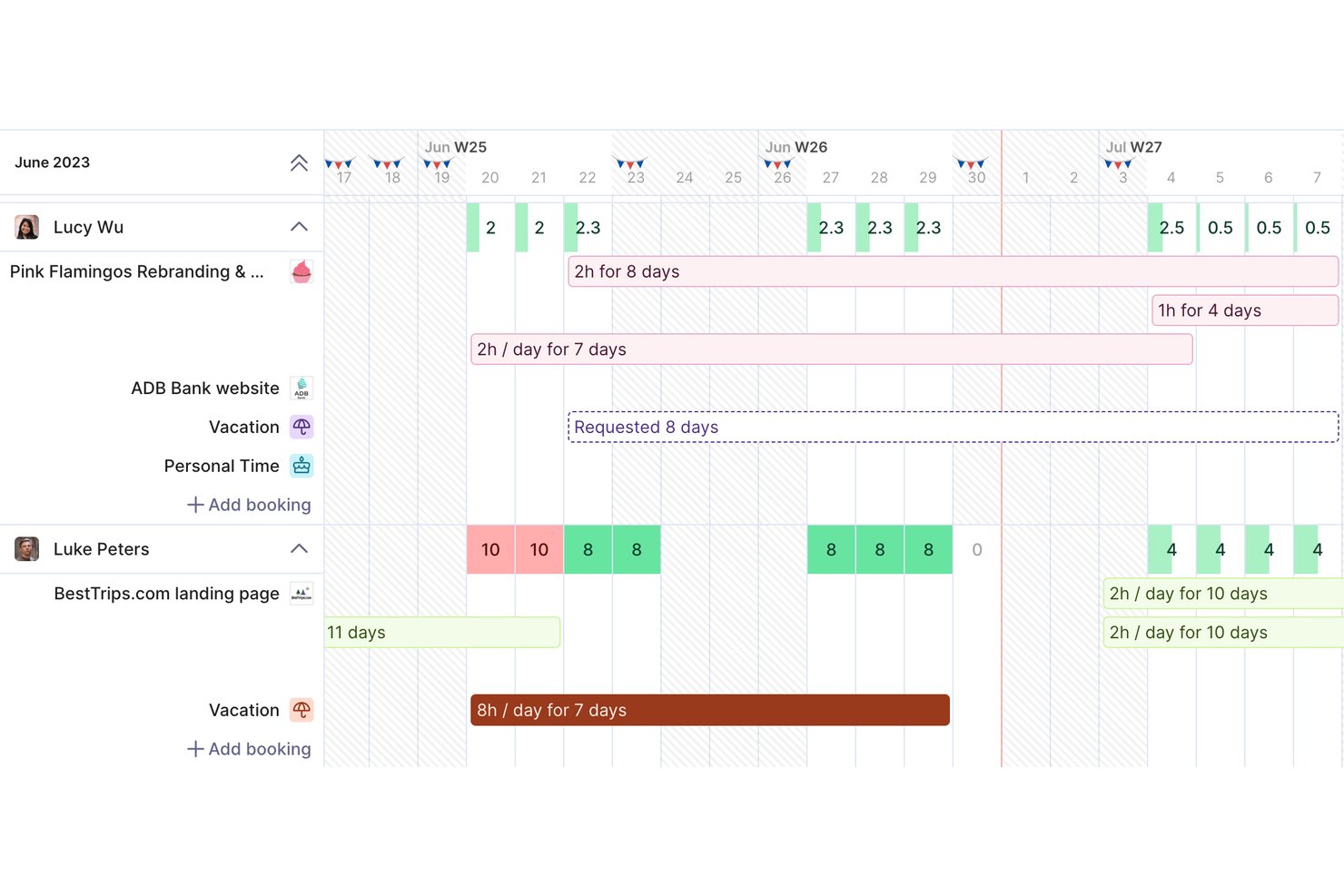
Productive is a professional services management platform that combines time tracking, project budgeting, resource planning, invoicing, and profitability reporting in a single tool built for agencies and consultancies.
Who Is Productive Best For?
Productive is a strong fit for small-to-mid-sized agencies, consultancies, and IT services firms that need to tie billable time directly to project finances.
Why I Picked Productive
Productive earns its spot on my shortlist because of how its AI reporting tools surface financial insights without requiring manual analysis. I love that Report Intelligence reads across multiple datasets and delivers plain-language summaries, so I can immediately see which projects are margin risks. AI Time Tracking also auto-fills timesheets using calendar events and past entries, which keeps utilization data accurate enough to actually trust.
Productive Key Features
- Resource planner: Plan and assign consultant capacity using tentative, repeating, and split bookings.
- Retainer and fixed-fee management: Track recurring retainers and fixed-fee project drawdowns alongside T&M work.
- Multi-currency invoicing: Generate invoices in different currencies to support global client engagements.
- Role-based permissions: Set detailed access controls for user roles, clients, and sensitive financial data.
Productive Integrations
Productive offers native integrations with Xero, HubSpot, Jira, Slack, Sage, Outlook, Google Calendar, and Microsoft 365. It connects with Zapier and provides an API for custom integrations.
Pros and Cons
Pros:
- Real-time budget and profitability views per project
- AI auto-fills timesheets from calendar data
- Tracks billable time and project margins together
Cons:
- Mobile app has limited reporting functionality
- Initial project setup takes considerable time
New Product Updates from Productive

Productive Adds Agent Triggers, Teams Integration, and Time Controls
Productive adds automated agent triggers, broader AI file support, Microsoft Teams integration, Resource Planner improvements, and new time entry controls. These updates expand automation while improving scheduling, collaboration, and time tracking. For more information, visit Productive’s official site.

Toggl
Best for simple interface
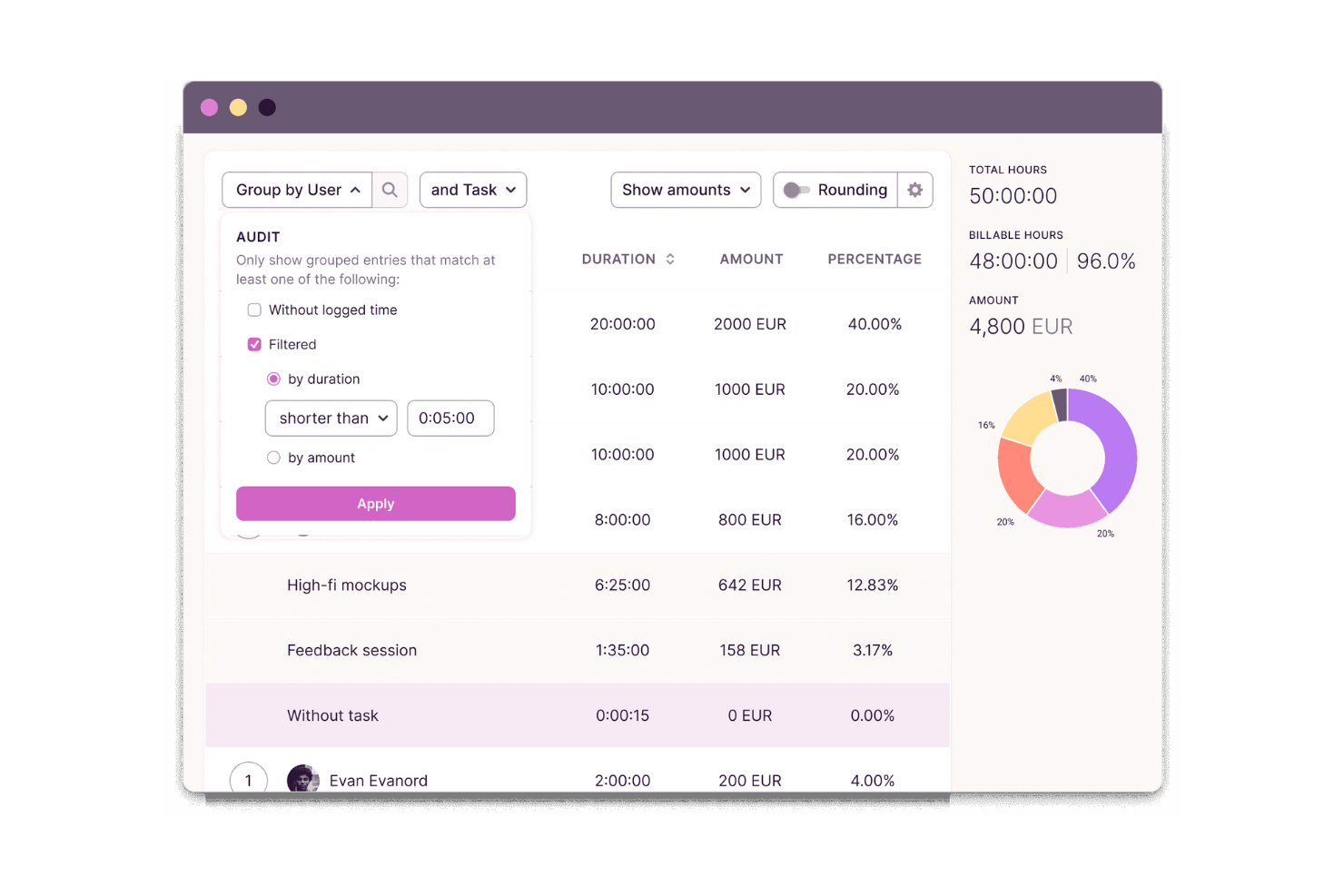
Toggl is a time tracking and capacity planning tool designed for agencies, consultancies, and other professional services teams. It helps users track billable and non-billable hours, build productivity and profitability reports, and plan team capacity so they can deliver client work on time and within budget.
Why I picked Toggl: I picked Toggl for its focus on speed and clarity. Its interface removes friction, timers are easy to start, switch, and categorize, making it ideal for individuals or small teams that want minimal setup. Idle detection and visual reporting help understand how to distribute time without overwhelming users with configuration options.
Standout Features & Integrations:
Features include project tracking, task management, capacity planning, billable rates, and idle detection. You can differentiate between billable and non-billable hours, which helps with accurate billing. The idle detection feature ensures you’re only tracking active work time, while reports help you analyze how time is spent, assess team capacity, and identify project profitability.
Integrations include Asana, Jira, Outlook, Google Calendar, GitHub, Todoist, and more. An API is available for custom integrations, along with MCP support for connecting to Claude, Cursor, and Codex.
Pros and Cons
Pros:
- Idle detection with time adjustment prompts
- Flexible tracking with multiple project views
- Simple to use for teams and freelancers
Cons:
- Lacks advanced billing features
- Periodic sync inconsistencies

DeskTime
Best for automatic work time calculation
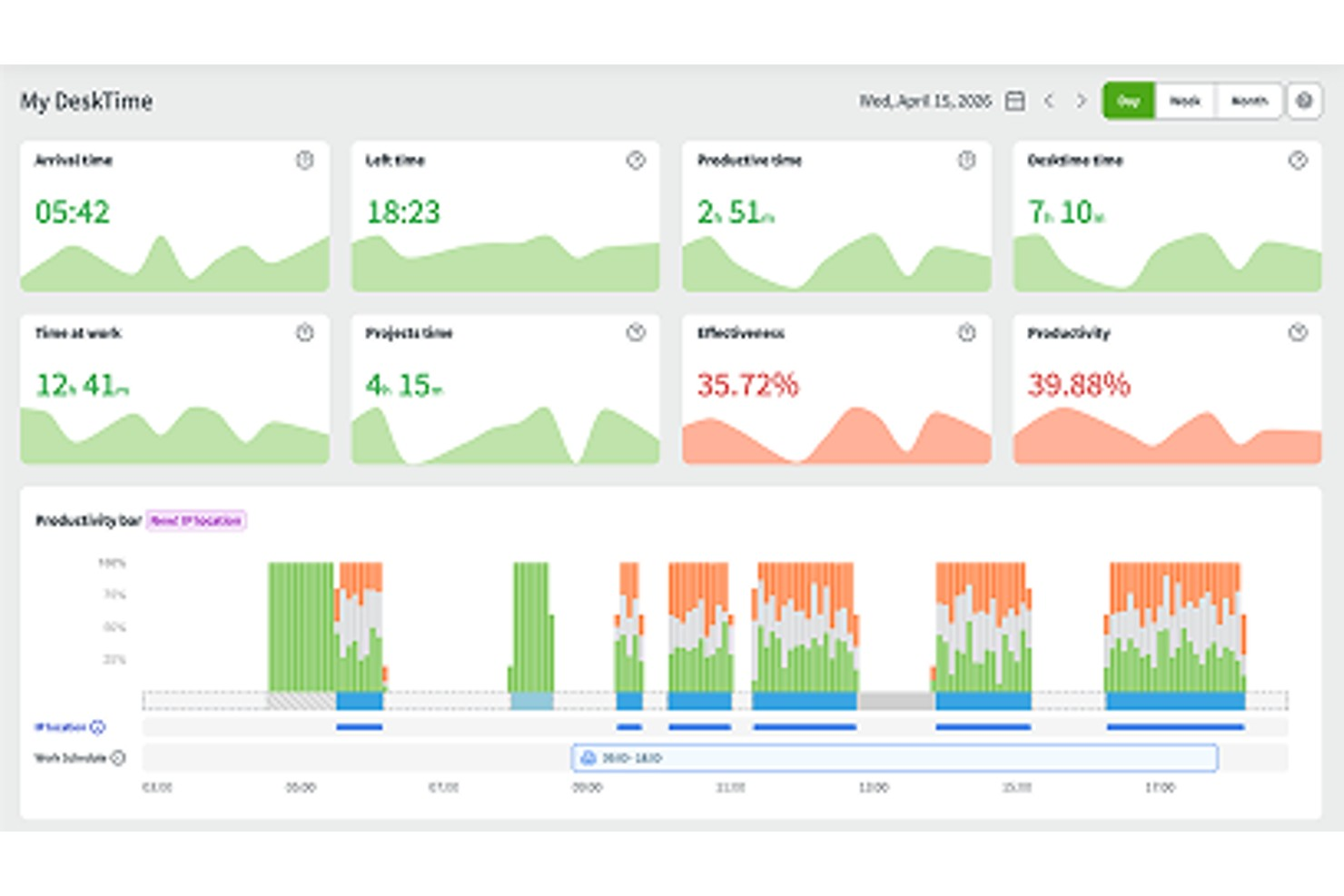
DeskTime is an automatic time tracking tool for in-office, hybrid, and remote teams that covers project tracking, productivity monitoring, absence management, shift scheduling, and offline time logging.
Who Is DeskTime Best For?
DeskTime is a good fit for small to mid-sized teams that need a straightforward way to track work hours across in-office, remote, and hybrid setups.
Why I Picked DeskTime
DeskTime is one of my top picks because I love how it handles time calculation without any manual input from your team. The desktop app starts tracking the moment someone turns on their computer and stops when they shut it down, logging productive time, idle time, and breaks automatically. I also like the productivity calculation feature, which maps every app and URL to a productivity status, so you get a real breakdown of how billable hours are actually being spent, not just how long someone was logged in.
DeskTime Key Features
- Project and task time tracking: Assign tracked time directly to specific projects and tasks to see how hours are distributed across client work.
- Absence calendar: Log and manage team time off, including vacation, sick days, and custom leave types, with built-in approval workflows.
- Offline time tracking: Manually log time spent on work done away from the computer, such as client meetings or calls.
- Scheduled reports: Set up automatic report delivery to keep stakeholders updated on team time data without manual exports.
DeskTime Integrations
DeskTime offers a small set of native integrations, including Google Calendar, Outlook Calendar, Trello, GitLab, Asana, and Jira, and it connects with Zapier. An API is also available for custom integrations.
Pros and Cons
Pros:
- Runs silently in the background
- Categorizes time as productive or unproductive
- Tracks app and website usage automatically
Cons:
- Lack of invoicing and advanced billing
- Limited project management and collaboration tools

actiTIME
Best for real time project budgeting
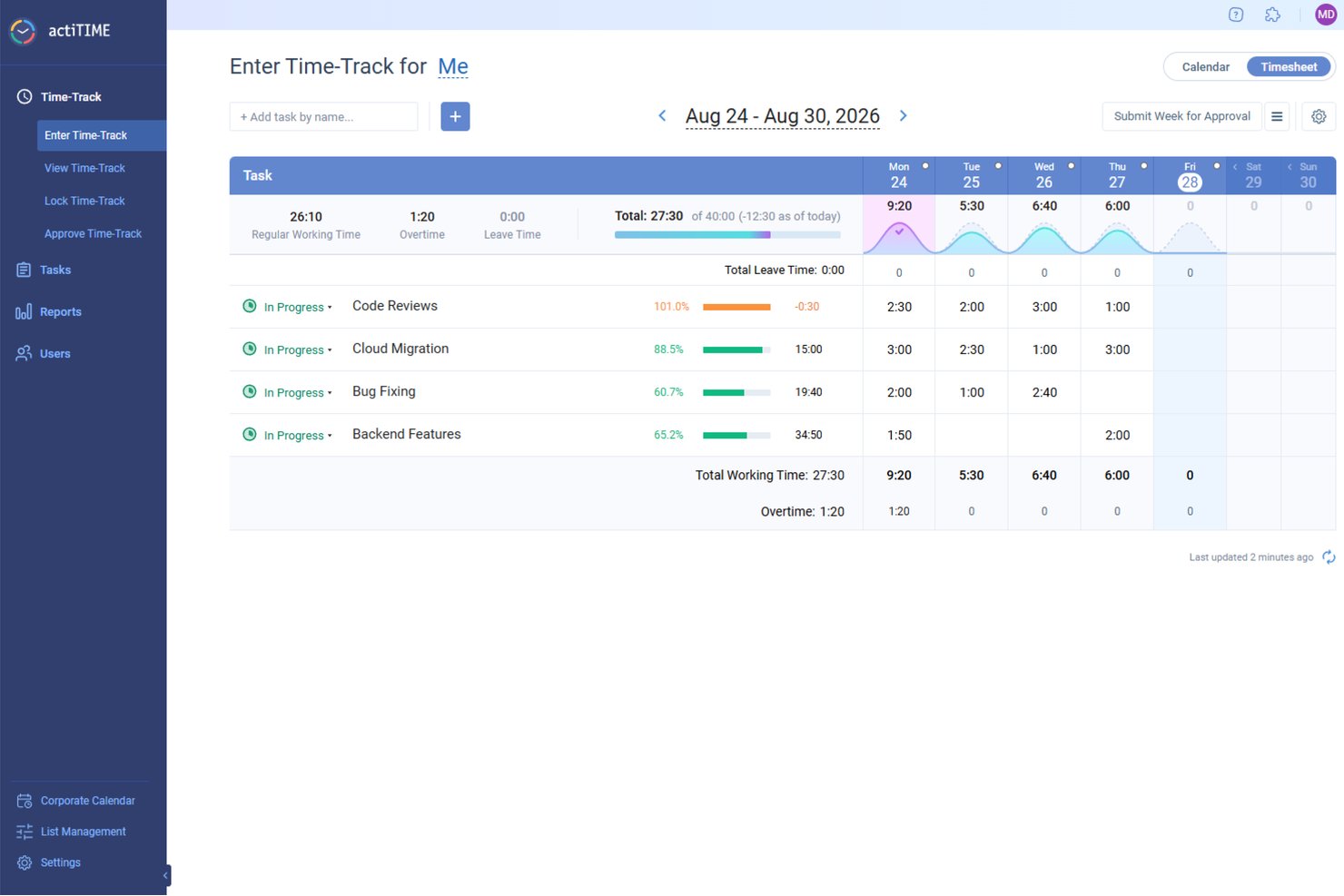
actiTIME offers a comprehensive solution for professionals in need of meticulous time management and project tracking. Ideal for industries such as architecture, consulting, and IT, actiTIME addresses the need for accurate billing and efficient resource allocation. It provides tools to manage projects, budgets, and team activities, ensuring that your business runs smoothly and profitably.
Why I Picked actiTIME
I picked actiTIME because it excels in addressing the specific needs of professional services with its detailed time tracking and project management features. You can easily track billable hours and manage project budgets, which are critical for maintaining profitability and accountability in client services. The tool also offers comprehensive reporting capabilities, allowing you to analyze project performance and make informed decisions.
actiTIME Key Features
In addition to its core functionalities, actiTIME provides several other features that enhance its utility for professional services:
- Budget Tracking: Monitor project budgets in real-time to prevent overspending.
- Leave Management: Manage team availability by tracking time off and absences.
- Billing and Invoicing: Generate invoices based on tracked time and project work.
- Custom Workflows: Tailor workflows to fit specific business processes and requirements.
actiTIME Integrations
Integrations include actiPLANS, QuickBooks, and Zapier.
Pros and Cons
Pros:
- Custom workflows support business processes
- Real-time project budget monitoring tools
- Accurate tracking of billable hours
Cons:
- Integrations limited compared to competitors
- Interface may be confusing for first-time users
New Product Updates from actiTIME

actiTIME Visual Hour Indicator and Time-Track Report Redesign
actiTIME adds a wave-style hour indicator to the Timesheet and Calendar views and refreshes the Time-Track report for smoother navigation and clearer visuals. For more information, visit actiTIME's official site.

TimeTrex
Best for GPS-based time tracking
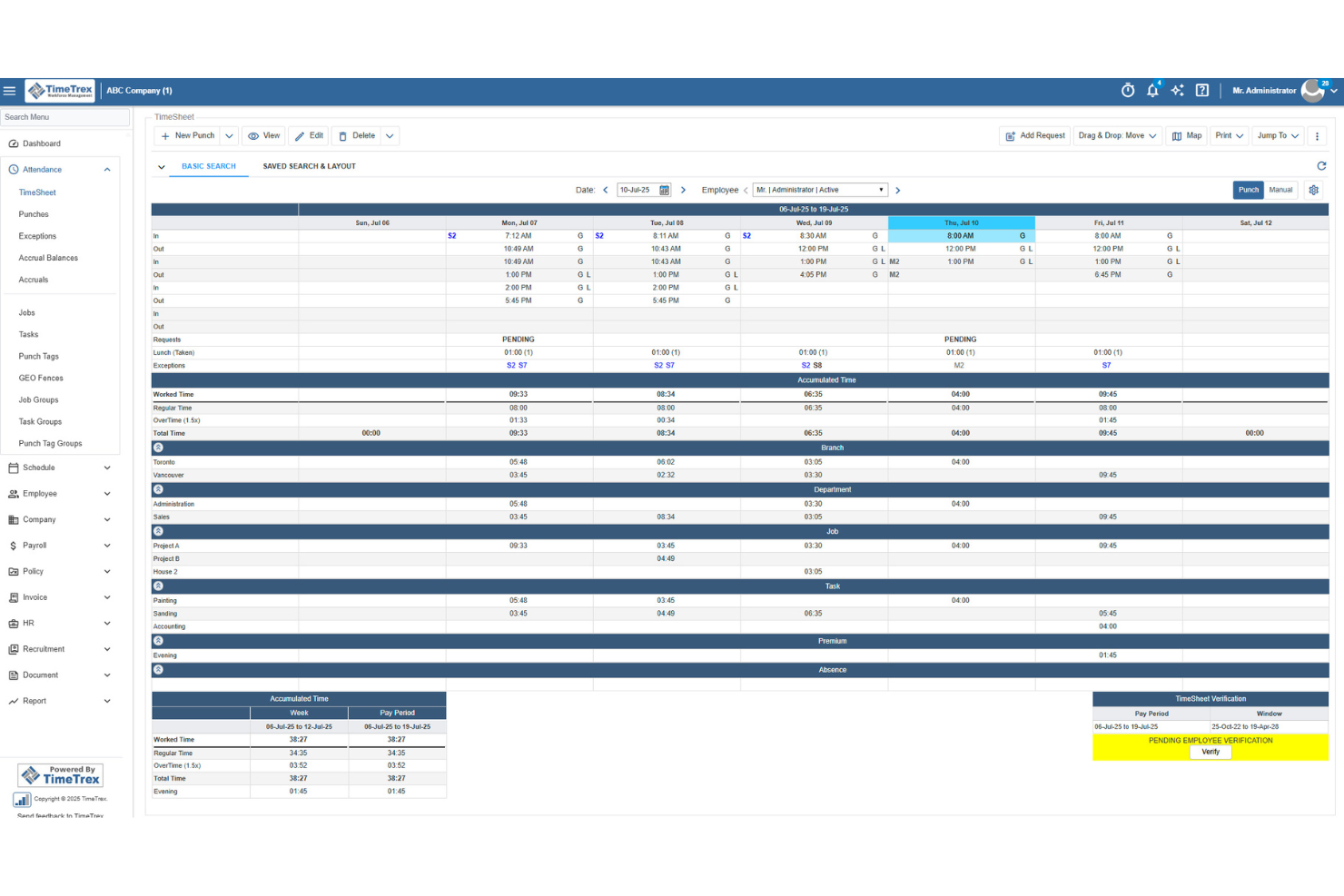
TimeTrex helps professional services teams track billable hours, manage expenses, and turn timesheet data into invoices with less manual work. Its mobile clock-in tools, GPS tracking, and job costing features make it a strong fit for firms managing consultants, field staff, or project-based teams.
Who Is TimeTrex Best For?
TimeTrex Now is a strong fit for mid-sized to large professional services firms that need to manage time tracking, payroll, and compliance in one platform.
Why I Picked TimeTrex
I picked TimeTrex because it helps professional services teams track billable hours from mobile devices while verifying where work happens through GPS tracking and geofencing. I like that employees can clock in from the field, client sites, or remote locations, and managers can review location-based punch data before approving timesheets. TimeTrex also supports job costing, expense tracking, and invoicing, so your team can connect tracked time to project costs and client billing. Its payroll and attendance rules are useful for teams with different schedules, overtime policies, or pay requirements.
TimeTrex Key Features
Some other TimeTrex features help professional services teams manage schedules, payroll, and workforce records alongside tracked time:
- Payroll management: Process payroll using approved time and attendance data, including overtime rules, deductions, paystubs, and tax reports.
- Employee scheduling: Build employee schedules, manage availability, and handle time-off requests from one system.
- Expense tracking: Record project-related expenses, upload receipts, manage approvals, and connect costs to departments or tasks.
- Employee self-service: Let employees view schedules, request leave, access paystubs, and manage personal information.
TimeTrex Integrations
Integrations include ADP, Intuit QuickBooks, Sage, Paychex, Surepay, Ceridian, Meditech, Insync, Millennium, and CompuPay.
Pros and Cons
Pros:
- Expense tools support receipts, approvals, and real-time reporting
- Job costing allocates tracked time across multiple cost centers
- Mobile GPS and geofencing verify off-site employee clock-ins
Cons:
- Interface may feel less intuitive for admin users
- Project management features appear limited beyond job costing
New Product Updates from TimeTrex
TimeTrex Adds Quick Punch App With Offline and QR Support
TimeTrex adds a new Quick Punch app, offline punching, QR code scanning, punch images, configurable messages, and punch warnings or lockouts to improve employee clock-ins across browsers and local computers. For more information, visit TimeTrex’s official site.
 .
.
Clockify
Best for browser extensions

Clockify is time-tracking software designed for individuals and teams to track work hours. Freelancers and small businesses use it to monitor productivity and manage billing.
Why I picked Clockify: Its browser extensions make timer-based tracking accessible. This is ideal for teams that work across multiple tabs, tools, or cloud platforms. Its simple reporting and offline mode add reliability, giving users a flexible way to capture time even when moving between devices or working with an unstable internet connection.
Standout Features & Integrations:
Features include time audits, project templates, and offline mode. These features help you ensure accuracy in time tracking and simplify project setup. The offline mode lets you continue tracking time even without an internet connection.
Integrations include Asana, Trello, Jira, QuickBooks, Slack, monday.com, Basecamp, Freshdesk, Todoist, and GitHub.
Pros and Cons
Pros:
- Offline time tracking
- Helpful time-use insights
- Easy browser extension setup
Cons:
- Basic user access controls
- No advanced invoicing tools

Timely
Best for automatic time tracking

Timely is time-tracking software designed for teams and individuals who want to automate time tracking. It's popular among creative professionals and consultants looking to manage their time without manual input.
Why I picked Timely: It offers automatic time tracking that captures activity in the background, eliminating the need for manual timers. You can focus on your work while Timely records your time spent on different tasks. The memory feature allows you to review and approve logged time, ensuring accuracy. These aspects make Timely a great choice for those who prefer a hands-off approach to time tracking.
Standout Features & Integrations:
Features include project timelines, budgeting tools, and visual reports. You can set budgets for projects and visually track progress, helping you stay on track. The visual reports provide insights into how time and resources are allocated.
Integrations include Asana, Trello, Slack, QuickBooks, Xero, Salesforce, Zapier, Google Calendar, Outlook, and Microsoft Teams.
Pros and Cons
Pros:
- Simple budgeting tools
- Accurate memory feature
- Automatic time capture
Cons:
- Basic invoicing capabilities
- Limited manual tracking options

My Hours
Best for small teams

My Hours is time-tracking software tailored for small teams to manage their projects and billing. It's designed to help businesses track time, manage tasks, and control project budgets.
Why I picked My Hours: My Hours is a strong fit for small teams because it focuses on clarity and control rather than complexity. Its customizable billing rates, approval workflow, and straightforward reporting help smaller groups maintain oversight of project budgets and client work without needing a featured project management suite. It’s great for teams that want structure without heavy configuration.
Standout Features & Integrations:
Features include customizable billing rates, detailed reporting tools, and attendance tracking. You can set different rates for various projects or clients, which helps in precise billing. The reporting tools provide insights into how time is spent across projects.
Integrations include QuickBooks, Trello, Basecamp, Asana, Google Calendar, Slack, Zapier, Xero, Microsoft Teams, and Dropbox.
Pros and Cons
Pros:
- Suitable for remote teams
- Customizable billing rates
- Simple to navigate
Cons:
- Occasional lag in reporting
- Limited offline capabilities

TimeCamp
Best for budget management

TimeCamp is time-tracking software designed to help businesses manage time and expenses effectively. Project managers and finance teams commonly use it to oversee budgets and improve productivity.
Why I picked TimeCamp: I selected TimeCamp because it links time tracking to budgets and project expenses. Its budget alerts, financial reporting, and automated tracking give project managers real-time visibility into how work affects costs. This emphasis on budget control sets it apart from tools that focus on timesheets.
Standout Features & Integrations:
Features include automatic time tracking, invoicing, and attendance management. You can track time without manual entry, saving you effort and reducing errors. The invoicing feature allows you to bill clients from tracked time.
Integrations include Trello, Asana, Slack, Jira, monday.com, QuickBooks, Xero, Salesforce, Microsoft Teams, and Google Calendar.
Pros and Cons
Pros:
- Simple attendance management
- Detailed financial reports
- Automatic time capture
Cons:
- Occasional data syncing issues
- No advanced customization

Time Doctor
Best for productivity tracking

Time Doctor is time-tracking software tailored for teams and individuals who need to boost productivity and manage time more efficiently. Remote teams and freelancers use it to monitor work habits and improve time management.
Why I picked Time Doctor: It provides detailed productivity insights by tracking time spent on various tasks and websites. You can set alerts for excessive time spent on non-work-related activities, which helps you stay focused. The software also offers screenshots and activity levels to ensure accountability. These features make it useful for boosting productivity and monitoring remote teams.
Standout Features & Integrations:
Features include distraction alerts, time use reports, and offline tracking. The distraction alerts keep you focused by notifying you of time spent off-task. Time use reports provide a breakdown of how time is divided across projects.
Integrations include Asana, Trello, Slack, Jira, Basecamp, monday.com, Salesforce, QuickBooks, GitHub, and Freshdesk.
Pros and Cons
Pros:
- Simple offline tracking
- Effective distraction alerts
- Detailed productivity insights
Cons:
- Learning curve for new users
- No advanced invoicing tools
Other Professional Services Time Tracking Software
Here are some additional professional services time tracking software options that didn’t make it onto my shortlist, but are still worth checking out:
- QuickBooks
For accounting integration
- Memtime
For freelancers
- Teamwork
For integrated timesheets
- Time Champ
For large teams
- Deltek Replicon Time
For compliance tracking
- Knack
For custom databases
- Harvest
For integration options
- Big Time
For billing features
- TimeRewards
For expense tracking
- ClickTime
For DCAA-compliant records
- Paymo
For task management
- Wrike
For project visualization
- Scoro
For end-to-end profitability tracking
- Connecteam
For mobile workforce
- monday.com
For team collaboration
- BuddyPunch
For employee scheduling
- Click Time
For compliance monitoring


How I Evaluate Professional Services Time Tracking Software
I look at two layers: the core requirements a tool must meet—billable hour tracking, timesheet approvals, client invoicing—and the differentiators that separate the best options from the rest.
Core Functionality (Table Stakes For This List)
When I'm selecting tools for my list, I rank each one on a scale from 0 (does not offer the functionality) to 5 (excels in this area) for each core functionality listed below. Then, I calculate the tool's total score into a percentage. Each tool needs to achieve a minimum total score of 65% to be considered for inclusion.
- Billable Hours Tracking: I check whether each tool lets you log time against specific clients, projects, and tasks with a clear billable vs. non-billable split—like tagging discovery hours as non-billable while tracking implementation work at a client rate.
- Timesheet Approval Workflows: Multi-tier review and approval flows matter here, especially for firms where a project manager approves hours before a finance lead signs off on client-facing entries.
- Client Billing & Invoicing: I evaluate how each tool converts logged hours into invoices, looking for flexible rate structures—per consultant, per role, or per engagement—so you can handle T&M and blended billing models.
- Project Budgeting & Profitability: Each tool should let you set a project budget, track labor costs against it, and surface margin data so you can spot overruns before a fixed-fee engagement goes sideways.
- Resource Utilization Reporting: I look for reports that show actual vs. forecasted utilization by person and project, giving resource managers visibility into who's overbooked and where capacity exists.
- Accounting & PM Integrations: Connections to accounting platforms like QuickBooks, Xero, or Sage Intacct and PM tools like Jira or Asana are key—I evaluate whether sync is native and bidirectional or limited to one-way exports.
Once I have a list of tools that meet this criteria, I consider what sets each platform apart.
Differentiating Factors (What Sets Vendors Apart)
Here's how I compare and contrast different vendors:
Standout Features
Automated time capture is a big differentiator—tools that pull hours from calendars, emails, and apps save consultants from reconstructing their week every Friday. I also evaluate how well a platform handles retainer and fixed-fee engagements alongside T&M work, since most firms juggle all three. Client-facing portals add another layer of value, letting clients review logged hours and approve invoices directly without back-and-forth emails.
Beyond Features
Firm size and service model fit matters—a solo consultant needs a different tool than a 200-person agency with multiple practices and blended billing. I consider how quickly a platform gets teams productive, since configuring rate cards, approval chains, and project templates can stall rollout if onboarding support is thin. Pricing transparency is another factor I weigh, especially whether core capabilities like budgeting and client invoicing are included at entry-level tiers or locked behind expensive upgrades.
How to Choose Professional Services Time Tracking Software
It’s easy to get bogged down in long feature lists and complex pricing structures. To help you stay focused as you work through your unique software selection process, here’s a checklist of factors to keep in mind:
| Factor | What to Consider |
|---|---|
| Scalability | Can the software grow with your business? Consider if it can handle increased users or projects without extra costs or complications. |
| Integrations | Does it integrate with your existing tools? Check for compatibility with your project management, accounting, and communication systems. |
| Customizability | Can you tailor the software to your workflows? Look for options to adjust dashboards, reports, and billing rates to suit your needs. |
| Ease of Use | Is the interface user-friendly? Ensure your team can navigate it easily without extensive training. |
| Implementation and Onboarding | How quickly can you get started? Look for software with simple setup processes and available training resources like tutorials or webinars. |
| Cost | Does the pricing fit your budget? Consider both upfront costs and ongoing fees, and check for hidden charges or tiered pricing traps. |
| Security Safeguards | How does the software protect your data? Look for features like encryption, regular updates, and compliance with data protection standards. |
| Support Availability | Is help available when you need it? Consider the vendor's support hours, response time, and available contact methods like chat or phone. |
What Is Professional Services Time Tracking Software?
Professional services time-tracking software is a tool that helps businesses monitor and record time spent on client projects. Professionals like consultants, accountants, and lawyers use these tools to manage billing and improve productivity. Time-tracking, invoicing, and reporting features help ensure accurate billing and efficient project management. Overall, these tools provide transparency and help maximize resource utilization.
Features
When selecting professional services time tracking software, keep an eye out for the following time-tracking features:
- Time tracking: Allows users to monitor and log hours worked on specific projects, ensuring accurate billing and productivity insights.
- Invoicing: Generates invoices from tracked time-clock and expenses, streamlining billing for clients.
- Expense tracking: Helps manage and categorize project-related expenses, aiding in financial oversight and budget management.
- Reporting: Provides detailed reports on time usage and project progress, helping users make informed decisions.
- Project management: Assists in organizing tasks and timelines, enhancing team collaboration and project delivery.
- Customizable billing rates: Enable setting different rates for various clients or projects, ensuring flexible and accurate billing.
- Integration capabilities: Connects with existing tools like accounting and project management software, enhancing workflow efficiency.
- Mobile access: Enables time tracking and task management on the go, providing flexibility for remote work.
- Security safeguards: Ensures data protection through encryption and compliance with data standards, safeguarding sensitive information.
Benefits
Implementing professional services time-tracking software offers several benefits for your team and your business. Here are a few you can look forward to:
- More reliable client billing: Clear records of work help reduce disputes and shorten billing cycles without reconstructing hours.
- Improved productivity: Detailed time insights highlight bottlenecks and help teams focus on high-value work.
- Stronger project oversight: Real-time visibility into progress and workloads helps managers make adjustments to keep projects on schedule.
- Greater financial awareness: Teams can spot patterns in spending and resource use, supporting better budgeting decisions.
- Enhanced transparency: Clear visibility into contributions and workloads supports alignment across teams and stakeholders.
- Better support for distributed teams: Centralized tracking helps remote or hybrid teams stay coordinated across time zones.
- Consistent protection of sensitive data: Built-in safeguards help businesses maintain trust and meet internal compliance requirements.
Costs and Pricing
Selecting professional services time tracking software requires an understanding of the various pricing models and plans available. Costs vary based on features, team size, add-ons, and more. The table below summarizes common plans, their average prices, and typical features included in professional services time tracking software solutions:
Plan Comparison Table for Professional Services Time Tracking Software
| Plan Type | Average Price | Common Features |
|---|---|---|
| SMB/Small Teams | Free-$5/user/month | Basic time tracking, limited projects, simple reporting; often manual timers or limited features. |
| Mid-Market/Growing Teams | $5-$25/user/month | Time tracking + invoicing, basic project & expense tracking, integrations, standard reports, mobile access. |
| Business/Established Firms | $25-$50/user/month | Advanced reporting, customizable billing rates, full integrations, expense tracking, mobile + desktop support. |
| Enterprise/Large Organizations | $50+/user/month (or custom enterprise pricing) | Full feature set: security & compliance, custom integrations, advanced analytics, dedicated support, large-team/admin tools. |
Professional Services Time Tracking Software FAQs
Here are some answers to common questions about professional services time tracking software:
How does professional services time tracking software handle data privacy?
Yes, most time-tracking software prioritizes data privacy through encryption and compliance with data protection regulations such as GDPR. When choosing a tool, verify its security certifications and privacy policies if the platform includes features such as AI-powered reporting or integrated time logs. Consider asking vendors about their data storage practices, how they handle breaches, and whether their desktop apps support secure access. Always ensure your team is trained on data privacy best practices to protect sensitive information.
Can professional services time tracking software integrate with payroll systems?
Yes, many best time tracking solutions offer integrations with popular payroll systems like QuickBooks and ADP. This integration can automate payroll calculations and reduce manual data entry errors, even if your team exports data from Excel or uses a time tracking app for clock-in records. When evaluating software, check for compatible integrations with your existing payroll system to help optimize workflows and maintain accurate payroll records for all team members.
Is it difficult to switch from manual time tracking to software?
No, switching from manual to software-based time tracking can be straightforward with proper planning. Start by selecting a user-friendly tool that aligns with your team’s needs, whether that’s an all-in-one platform, an automated time tracking system, or something lightweight like ClickUp. Provide training sessions and resources to help your team adapt to billable time, allocation, and project time tracking. Implement the software gradually, allowing time for adjustments. This approach minimizes disruptions and helps your team embrace the new system.
Can professional services time tracking software be used for remote teams?
Yes, time tracking software is useful for remote teams. It helps monitor productivity and manage tasks without needing physical supervision for employee time tracking across different locations. Look for software with mobile access, GPS tracking, or Chrome extensions to accommodate remote work. These tools can also support project planning, project profitability tracking, and timesheet approvals, so your team can track time regardless of location, making it easier to oversee ongoing work and maintain best time-tracking practices.
What’s Next:
If you're researching professional services time-tracking software, connect with a SoftwareSelect advisor for free recommendations.
You fill out a form and have a quick chat where they get into the specifics of your needs. Then you'll get a shortlist of software to review. They'll even support you through the entire buying process, including price negotiations.