

10 beste programvarer for ressursstyring i ingeniørvirksomheter for 2026

Beste programvare for ressursstyring innen ingeniørfag – utvalgt liste


Det kan være utfordrende å velge riktig programvare for ressursstyring innen ingeniørfag, siden det finnes mange alternativer. Målet er å effektivisere ingeniørprosjekter, fordele ressurser effektivt og øke produktiviteten, men det kan være vanskelig å finne det beste verktøyet.
Det er imidlertid ingen grunn til bekymring. Med utgangspunkt i min omfattende erfaring med ulike digitale verktøy for prosjektstyring kan jeg hjelpe deg med å velge det beste verktøyet for dine behov. Her er mine anbefalinger av den beste programvaren for ressursstyring innen ingeniørfag.
Hvorfor du kan stole på våre programvareanbefalinger
Teamet vårt har testet og anmeldt programvare siden 2012. Vi er selv prosjektledere, så vi vet hvor vanskelig og hvor viktig det er å velge riktig programvare.
I denne guiden har vi vurdert verktøyene gjennom praktisk testing og uavhengig research og gitt dem poeng ut fra våre utvelgelseskriterier. Vi bygger også på innsikt fra ledende eksperter i bransjen og erfarne prosjektledere.
Anmeldelsene våre bygger på vår egen redaksjonelle vurdering. De er ikke et salgsargument.
Ekspertanmeldere:
Sammenligningstabell: Programvare for ressursstyring innen ingeniørfag
Vi har undersøkt priser og tilgjengeligheten av gratis prøveperioder og demoversjoner, slik at du enkelt kan sammenligne alternativene side om side.
| Tool | Best For | Trial Info | Price | ||
|---|---|---|---|---|---|
| 1 | Best for advanced resource booking | 14-day free trial | From $17/user/month | Website | |
| 2 | Best for staffing unassigned work by role | 30-day free trial available | From $7/resource/month | Website | |
| 3 | Best for configurable skill-based resourcing | Free demo available | Pricing upon request | Website | |
| 4 | Best for client-focused project workflows | Free demo available | Pricing upon request | Website | |
| 5 | Best for multi-project capacity planning | Free plan available | From $9.50/user/month (billed annually) | Website | |
| 6 | Best for AI-driven project planning | 14-day free trial | Pricing upon request | Website | |
| 7 | Best for portfolio financial scenario planning | 30-day free trial | From €25/user/month | Website | |
| 8 | Best for phase-based engineering staffing | Free demo available | Pricing upon request | Website | |
| 9 | Best for project-driven firm resourcing | 30-day free trial | From $9.50/user/month (billed annually) | Website | |
| 10 | Best for staffing tied to deal economics | 14-day free trial | From $10/user/month (billed annually) | Website |


Anmeldelser av den beste programvaren for ressursstyring innen ingeniørfag
Se detaljerte vurderinger og sammendrag av den beste tilgjengelige programvaren for ressursstyring innen ingeniørfag.

Scoro
Best for advanced resource booking
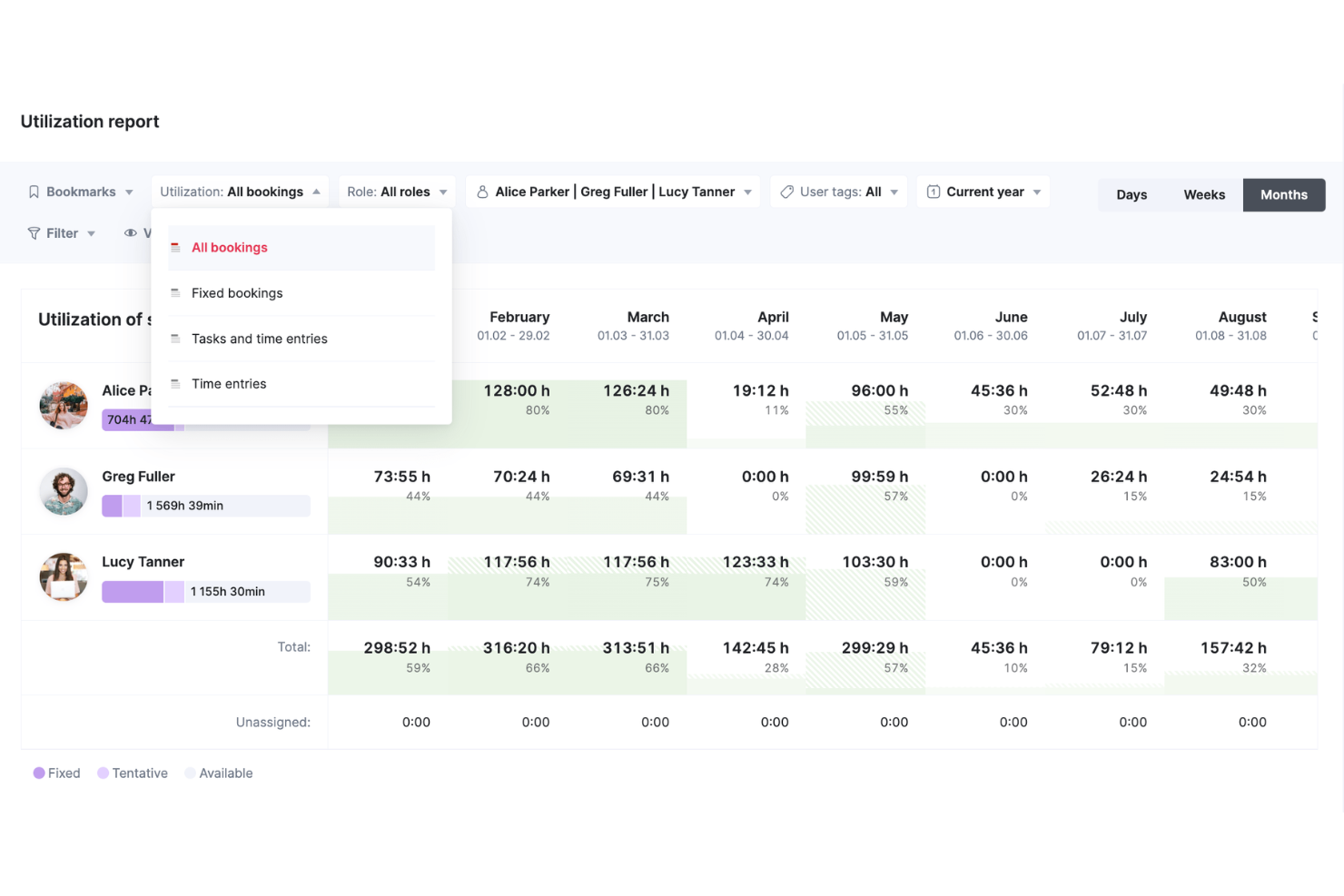
Scoro is a work management platform built for professional services teams that combines resource planning, capacity forecasting, project scheduling, time tracking, and financial management in a single system.
Who Is Scoro Best For?
Scoro is a strong fit for mid-sized professional services firms—consultancies, engineering agencies, and IT service providers—that need to manage people, projects, and budgets in one place.
Why I Picked Scoro
I've included Scoro in my top picks because its resource booking system goes well beyond a simple scheduling calendar. I particularly like the tentative booking feature, which lets me reserve engineering capacity for potential projects before they're confirmed—and when work is greenlit, I can convert those tentative bookings to fixed ones without rebuilding the plan. Every booking ties directly to Scoro's financial layer, so I can see in real time how a staffing decision affects project margins and budget burn—not just calendar availability.
Scoro Key Features
- Utilization heatmap: View color-coded capacity data across your entire team to spot overloaded or underbooked engineers at a glance.
- Skills-based assignment: Filter and assign resources to tasks based on specific skills or roles, so the right people land on the right work.
- Time log vs. estimate tracking: Compare logged hours against planned estimates at the task and project level to catch scope creep early.
- Drag-and-drop timeline scheduling: Adjust project tasks and deadlines directly on a visual timeline without rebuilding the plan from scratch.
Pros and Cons
Pros:
- Features a customizable real-time dashboard
- Offers extensive project and financial management tools
- Integrates multiple business processes into one platform
Cons:
- Mobile app offers less functionality than web version
- Complexity of customization options
New Product Updates from Scoro

Scoro Adds Time Mobile App and ELI Improvements
Scoro adds the Scoro Time mobile app for iOS/Android to track time anywhere and expands ELI with attachments, smarter filtering, and trigger-based actions. For more information, visit Scoro's official site.

Runn
Best for staffing unassigned work by role
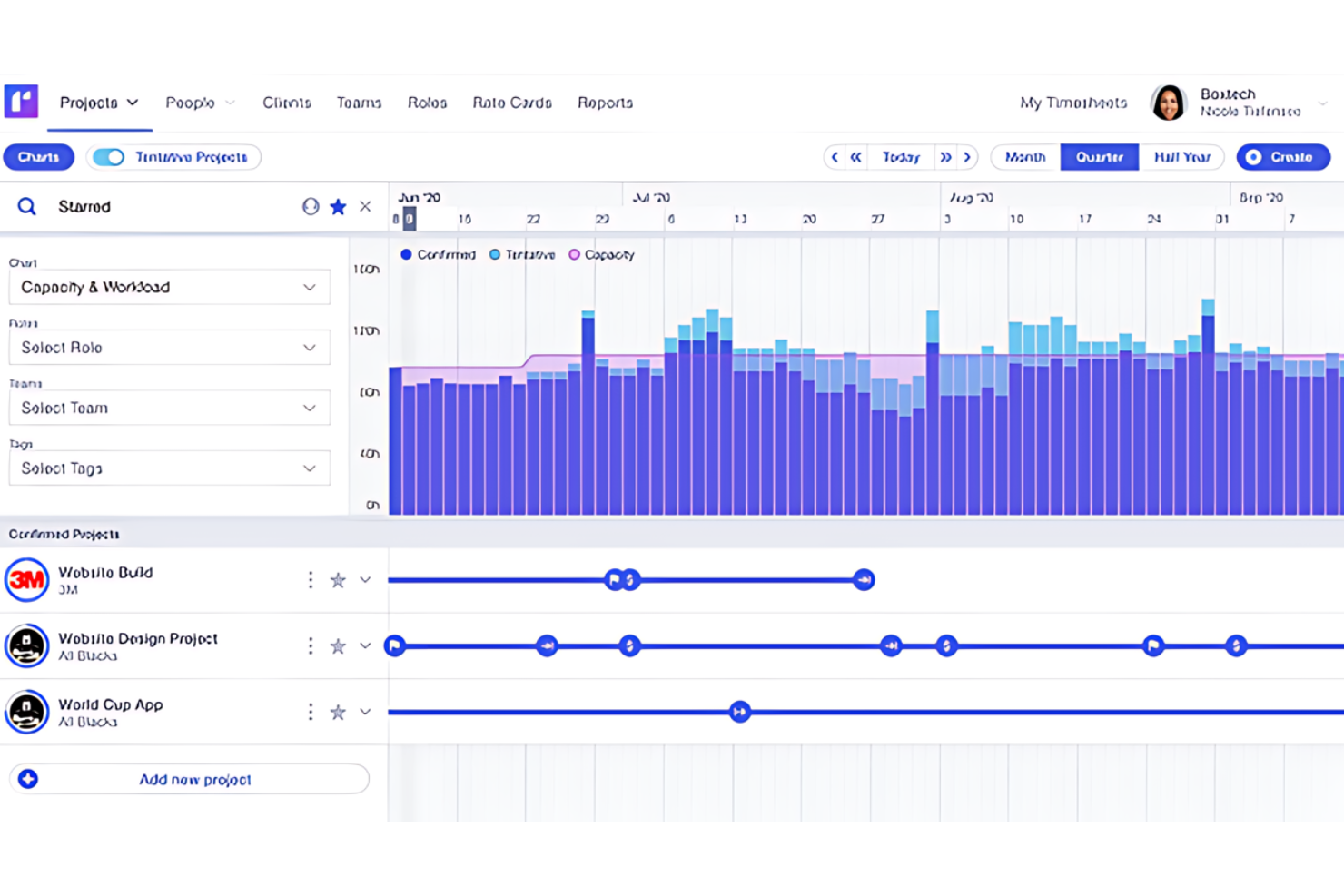
Runn is a resource management and project forecasting platform that combines capacity planning, workload scheduling, skills-based allocation, and financial tracking for project-based teams.
Who Is Runn Best For?
Runn is a strong fit for project managers and resource leads at professional services firms, software agencies, and engineering consultancies managing multiple concurrent projects.
Why I Picked Runn
Runn's real-time charts and graphs update as you edit schedules, so my team is always working from current capacity data rather than a snapshot from last week. I especially like the heatmap view, which shows everyone's availability and utilization at a glance so I can spot gaps or overbooked engineers without digging through individual schedules. Runn also lets me filter people by role, skill, and team when making allocations, which makes it fast to find the right engineer for a project as requirements shift.
Runn Key Features
- Timesheets: Log actual hours worked and compare them against planned allocations across projects.
- Project financials: Track budgets, costs, and revenue against project plans as allocations change.
- Placeholder allocations: Assign unnamed roles to upcoming projects to model capacity before hiring is confirmed.
- Time-off management: Record leave and public holidays so that schedules reflect your team's true availability.
Pros and Cons
Pros:
- User-friendly interface for scheduling and adjustments
- Forecasting capabilities
- Real-time updates on resource and project tracking
Cons:
- Limited customization options for reports and dashboards
- Might be complex for small teams or simpler projects
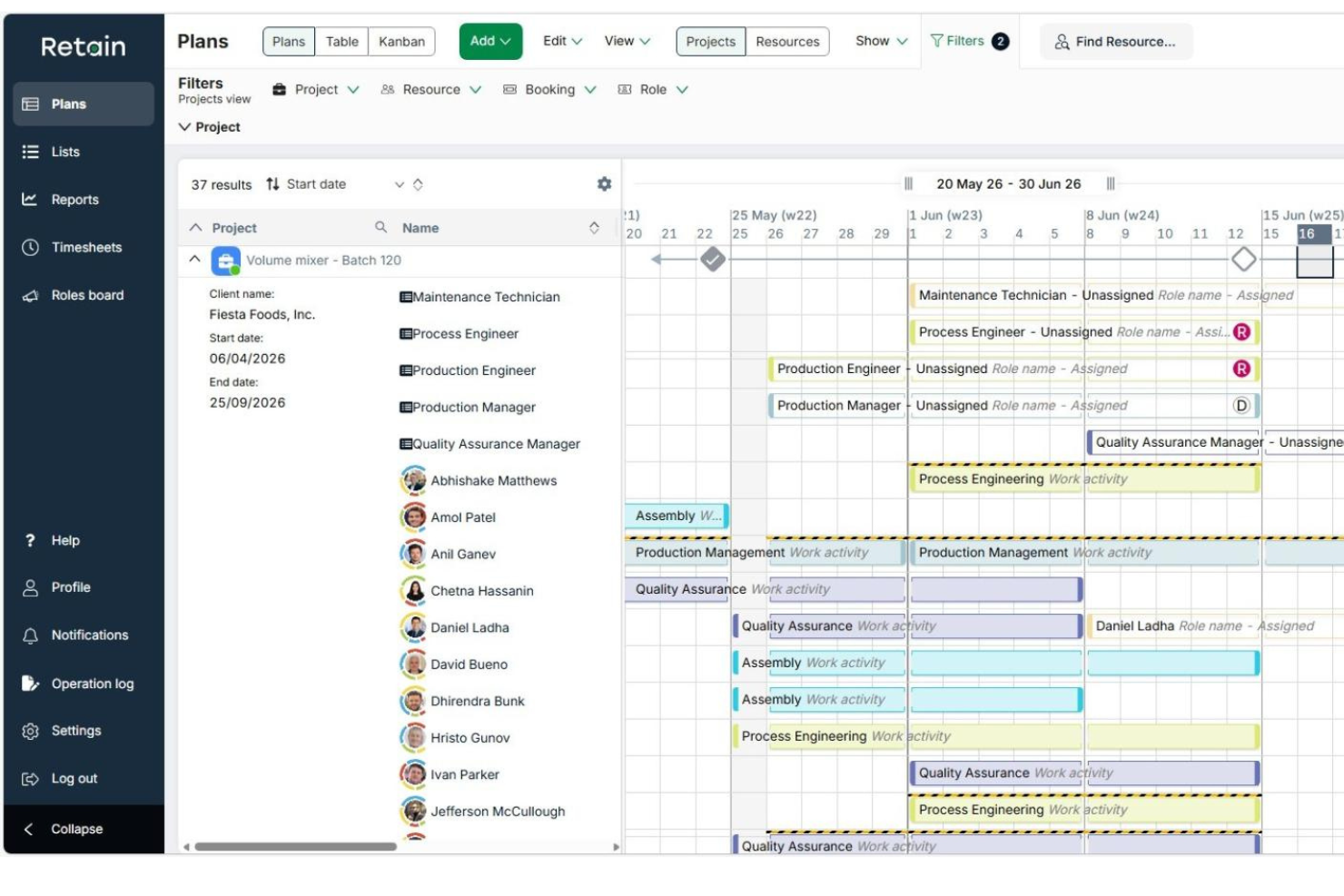
Retain is a resource scheduling and capacity planning platform that lets organizations track skills, manage availability, forecast utilization, and allocate people across projects and departments.
Who Is Retain Best For?
Retain is well-suited to mid-size and enterprise professional services firms that need to manage large, skilled workforces across multiple concurrent projects.
Why I Picked Retain
I've included Retain in my top picks because its skill-based resourcing is genuinely configurable in ways most tools aren't. It uses the Skills+ taxonomy, powered by Lightcast, giving you access to over 30,000 industry skills you can map directly to your team members. From there, the AI suitability matching surfaces the best-fit engineers for a booking based on those skill profiles, and it learns over time.
Retain Key Features
- Scenario planning: Model multiple future resource allocations side by side against your live schedule before committing to a plan.
- Auto-fill timesheets: Timesheets populate based on booked work, so engineers log time without starting from scratch each week.
- Utilization dashboards: View real-time utilization rates across your team, broken down by individual, role, or department.
- Overtime tracking: Monitor overtime hours and flag capacity issues before they affect a project.
Retain Integrations
Retain delivers technology-agnostic integrations that connect resource planning data across HR, CRM, and finance systems. Integrations include BambooHR, Microsoft Dynamics 365, Oracle, Oracle NetSuite OpenAir, Salesforce, SAP, SugarCRM, Workday, and Aderant.
Pros and Cons
Pros:
- Configurable skill tags for matching engineers
- Strong demand forecasting and capacity views
- Handles multi-project scheduling across large teams
Cons:
- No built-in time tracking for tasks
- Reporting features require workarounds sometimes

Accelo
Best for client-focused project workflows
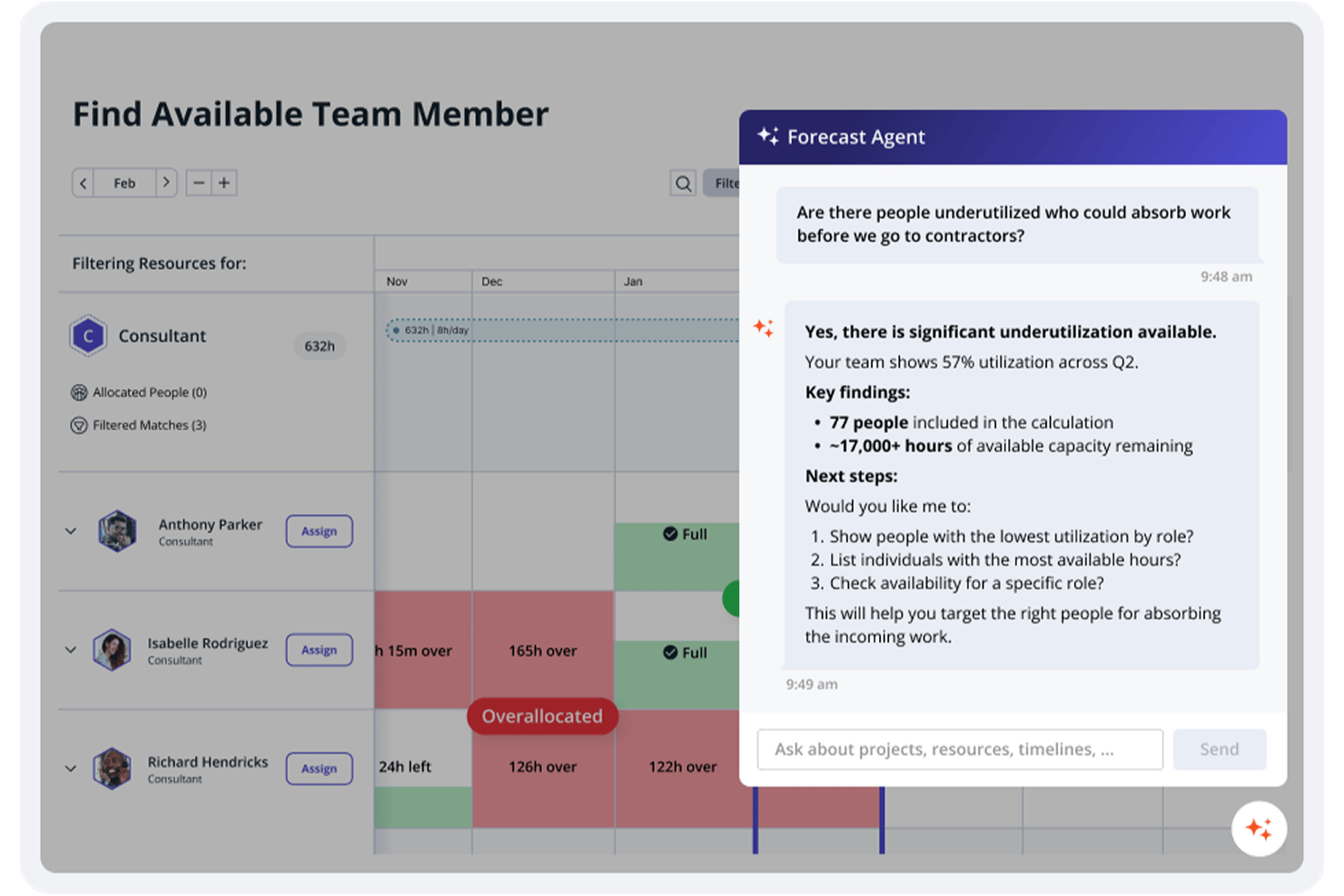
Accelo is an AI-powered PSA platform that unifies resource management, project tracking, CRM, time tracking, and invoicing for professional services teams.
Who Is Accelo Best For?
Accelo is a strong fit for mid-sized engineering and professional services firms that need to manage resources, projects, and client billing in one place.
Why I Picked Accelo
Accelo is one of my top picks because I love how it connects every stage of client work in a single flow, from initial quote through project delivery to final invoice. My team uses Accelo to track scope against budget in real time, which means we catch billing gaps before they become write-offs. The client portal is especially useful: clients can check project status and approve work directly, cutting down on back-and-forth and keeping delivery on track.
Accelo Key Features
- AI-assisted resource scheduling: Matches engineers to projects based on skill, availability, and current workload.
- Automated timesheets: Captures billable and non-billable hours automatically as work happens, reducing manual time logging.
- Milestone and dependency tracking: Lets you map project phases, set task dependencies, and monitor progress against deadlines.
- Utilization reporting: Shows individual and team utilization rates so you can identify capacity gaps before they affect delivery.
Accelo Integrations
Accelo offers 30+ native integrations, including Jira, GitHub, GitLab, Azure DevOps, Slack, Google Workspace, Microsoft 365, Salesforce, QuickBooks, and Xero. It also connects with Zapier and provides a RESTful API for custom integrations.
Pros and Cons
Pros:
- Automated time capture reduces missed billable hours
- AI flags scope creep before overruns
- Sales-to-project handoff preserves scope and budget
Cons:
- Mobile app lacks key desktop features
- Reporting filters feel rigid for custom needs
New Product Updates from Accelo

Accelo Rebuilds Mobile App for Project and Time Management
Accelo rebuilds its mobile app with task management, new work creation, and mobile timesheets for Forecast customers. This helps teams keep project and time data current while working away from a desktop. For more information, visit Accelo’s official site.

Teamhood
Best for multi-project capacity planning
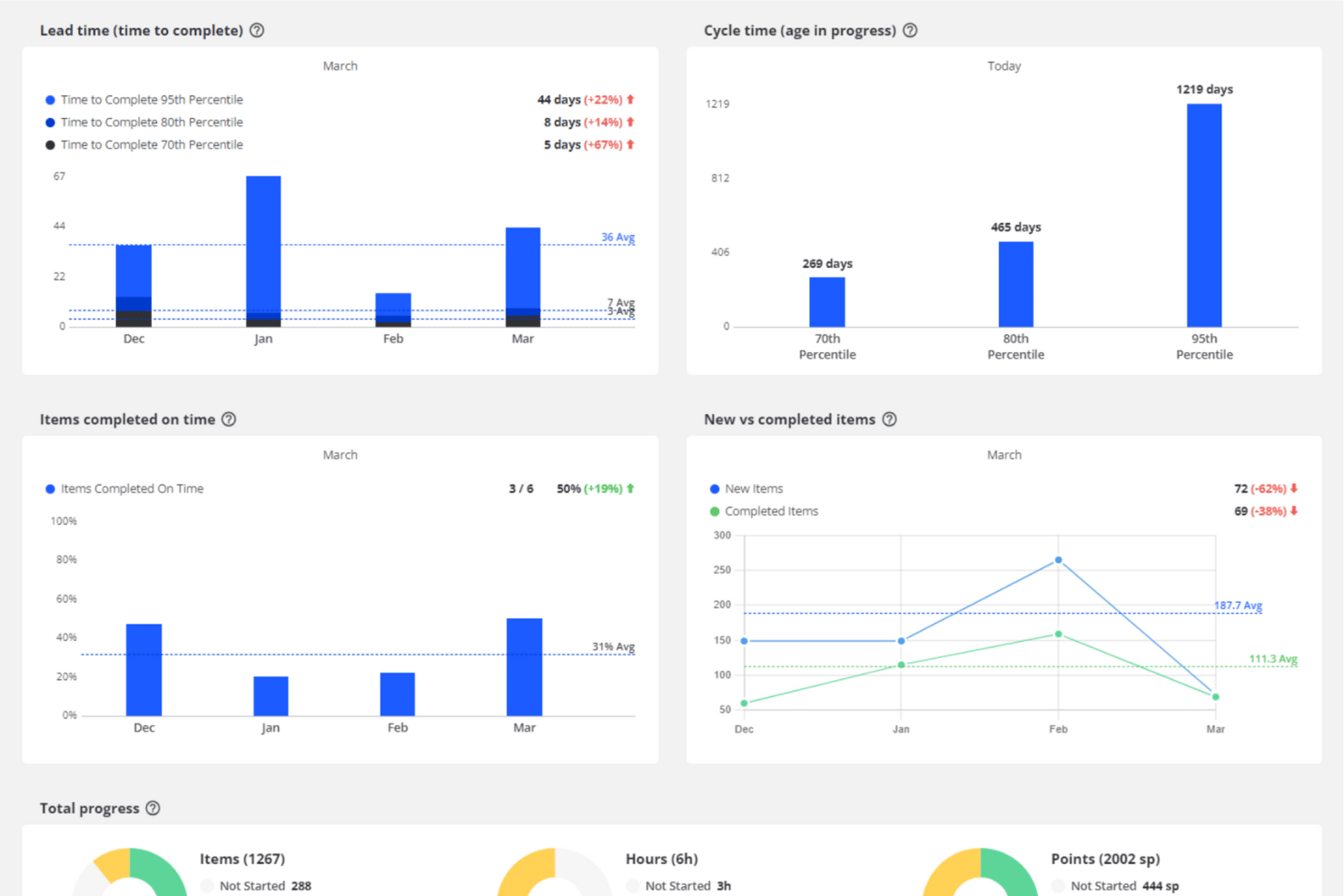
Teamhood is a project management platform built around multi-project capacity and workload planning, combining Kanban, Gantt, and schedule views with allocation tracking, timesheets, and cross-project visibility.
Who Is Teamhood Best For?
Teamhood suits project managers and team leads who need to balance shared people across multiple projects simultaneously.
Why I Picked Teamhood
I picked Teamhood as one of the best because it's purpose-built for the exact scenario that breaks most project tools: shared people across multiple simultaneous projects. Its Workload report shows each person's assigned hours against available capacity, so you can see at a glance who's overloaded and when new projects can realistically start. Capacity lanes then roll that up to a team-level view, making cross-project balancing a visible, manageable task rather than a spreadsheet exercise.
Teamhood Key Features
- Gantt with auto-rescheduling dependencies: Set task dependencies that automatically shift downstream work when upstream dates change.
- Azure DevOps two-way sync: Connect Teamhood to Azure DevOps for bidirectional task synchronization, with Teamhood updates sending immediately and Azure DevOps changes syncing hourly.
- Baseline and formula comparisons: Save a plan baseline and use formula fields to calculate deviations between planned and actual values across a project's life.
- Time and Cost report: View tracked time across a whole project, specific team members, or the entire company, with grouping, filtering, and raw timelog export.
Teamhood Integrations
Teamhood offers native integrations with Azure DevOps, Outlook Calendar, SharePoint/OneDrive, Google Calendar, Microsoft Teams, and Slack. It also provides a REST API, webhooks, and Zapier for custom connectivity.
Pros and Cons
Pros:
- Reviewers praise estimates and timesheet reports
- Shows remaining capacity by team member
- Tracks workload across simultaneous projects
Cons:
- No side-by-side staffing scenarios or alerts
- No searchable engineering skills taxonomy

Wrike
Best for AI-driven project planning
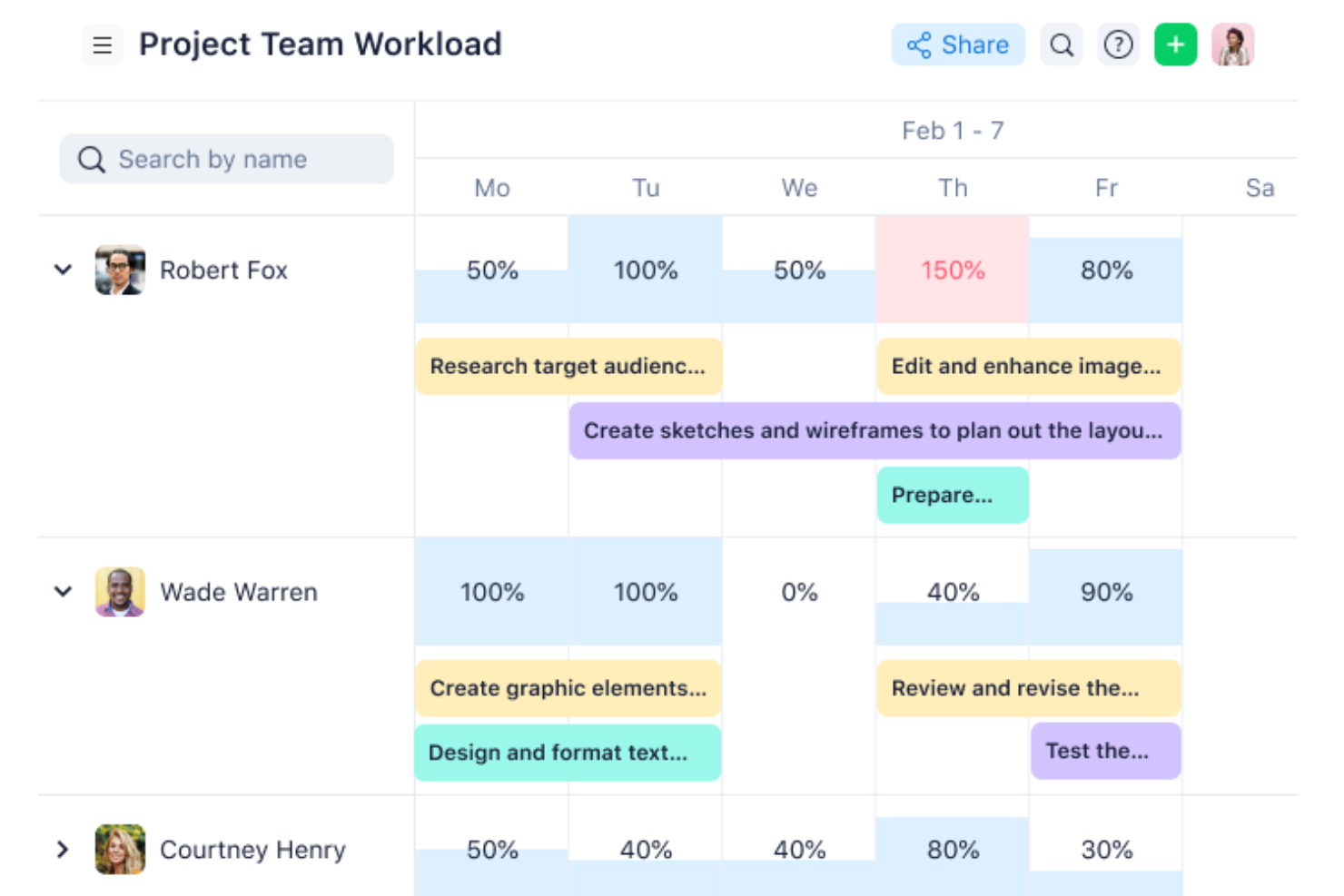
Wrike is a project and resource management platform that combines workload planning, capacity tracking, Gantt charts, Kanban boards, and AI-powered tools to help engineering teams manage resources and delivery across complex, cross-functional projects.
Who Is Wrike Best For?
Wrike is a strong fit for mid-size to enterprise engineering teams that need centralized visibility into resource allocation across multiple concurrent projects.
Why I Picked Wrike
I've included Wrike in my top picks because of how well Wrike Copilot handles the parts of project planning that usually eat up an engineering lead's time. I can ask Copilot to scan active projects for risks, surface prioritized action items, and identify what's at risk of slipping—all without digging through task lists manually. I also like the AI insights feature, which generates dashboard widgets using natural language and surfaces trends and risks from your project data. For engineering teams juggling multiple workstreams, that kind of automated signal highlights the most relevant issues.
Wrike Key Features
- Workload charts: Visualize each team member's scheduled tasks and effort on a timeline, with drag-and-drop reassignment built in.
- Job roles: Assign tasks to specific role types and plan future capacity based on role demand across upcoming projects.
- Timesheets: Log billable and non-billable hours directly against tasks, with the ability to lock submitted time entries.
- Team utilization reports: Track how much of your team's capacity is being used and what percentage of logged time is billable.
Pros and Cons
Pros:
- Robust task management capabilities
- Highly customizable dashboards
- Many integrations available
Cons:
- Can be tricky to learn how to customize the platform
- Advanced resource planning features limited to higher tier plans
New Product Updates from Wrike

Wrike Redesigns AI Agent Builder
Wrike redesigns its AI Agent Builder with a side-by-side setup, Scopes, sentence-style triggers and actions, and clearer filters. These changes make it easier to configure, test, and manage agent behavior. For more information, visit Wrike’s official site.

Epicflow
Best for portfolio financial scenario planning
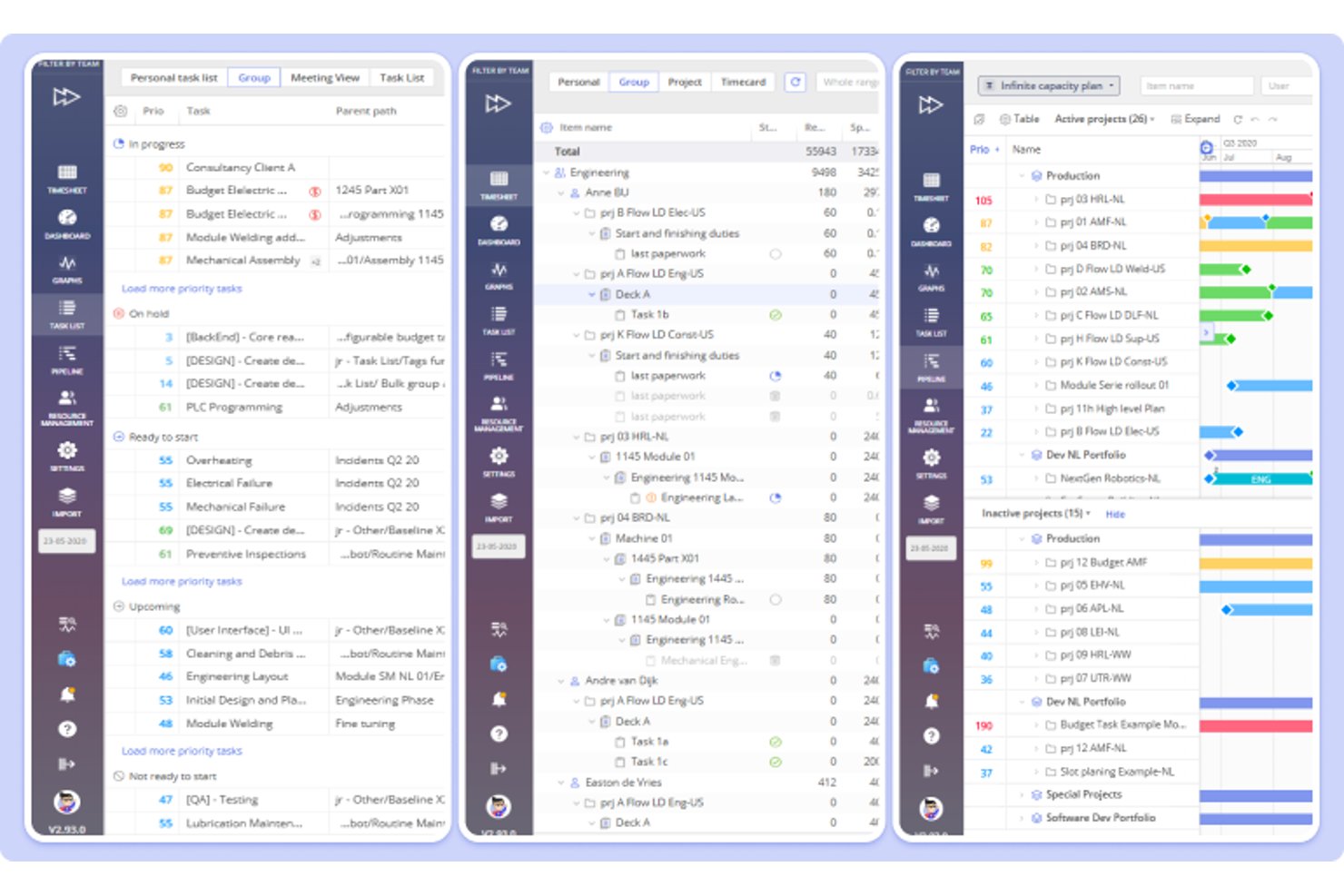
Epicflow is a project portfolio and resource management platform that covers capacity planning, resource allocation, workload analysis, and financial scenario modeling across multi-project environments.
Who Is Epicflow Best For?
Epicflow fits PMO directors and resource managers in mid-to-large organizations running complex, multi-project portfolios where capacity forecasting and financial scenario modeling drive planning decisions.
Why I Picked Epicflow
I picked Epicflow as one of the best because its What-If Analysis lets you model financial outcomes across an entire portfolio before committing to anything. You can test changes to contract values, bonus and penalty terms, and payment milestones against real capacity data, then compare saved scenarios side by side. That combination of resource load modeling and financial scenario output is what makes it genuinely useful for PMO directors who need to defend portfolio decisions with projected profit and cash timing, not just Gantt charts.
Epicflow Key Features
- Future Load graph: Forecasts resource demand and workload across active and pipeline projects, with sorting by average overload, underload, or peak load.
- Historical Load graph: Displays resource-group capacity, output, and ready-to-start work over time to inform future planning estimates.
- Jira integration: Syncs Jira issues, projects, and updates into Epicflow's portfolio view in real time.
- Task Card and User Card matching: Stores competencies, attributes, and task requirements on paired cards to surface availability and skill-fit indicators during assignment.
Epicflow Integrations
Epicflow has native integrations with Jira, Microsoft Project, and Oracle Primavera. It also supports API-based custom integrations with project, resource, and scheduling systems, plus connections to SAP and HR systems.
Pros and Cons
Pros:
- Compares portfolio scenarios with projected profit and cash timing
- Supports resource allocation across multiple projects
- Forecasts capacity constraints across active and pipeline projects
Cons:
- Utilization tracking relies on daily manual time entries
- Forecast accuracy depends on timely project data

Forecast
Best for phase-based engineering staffing
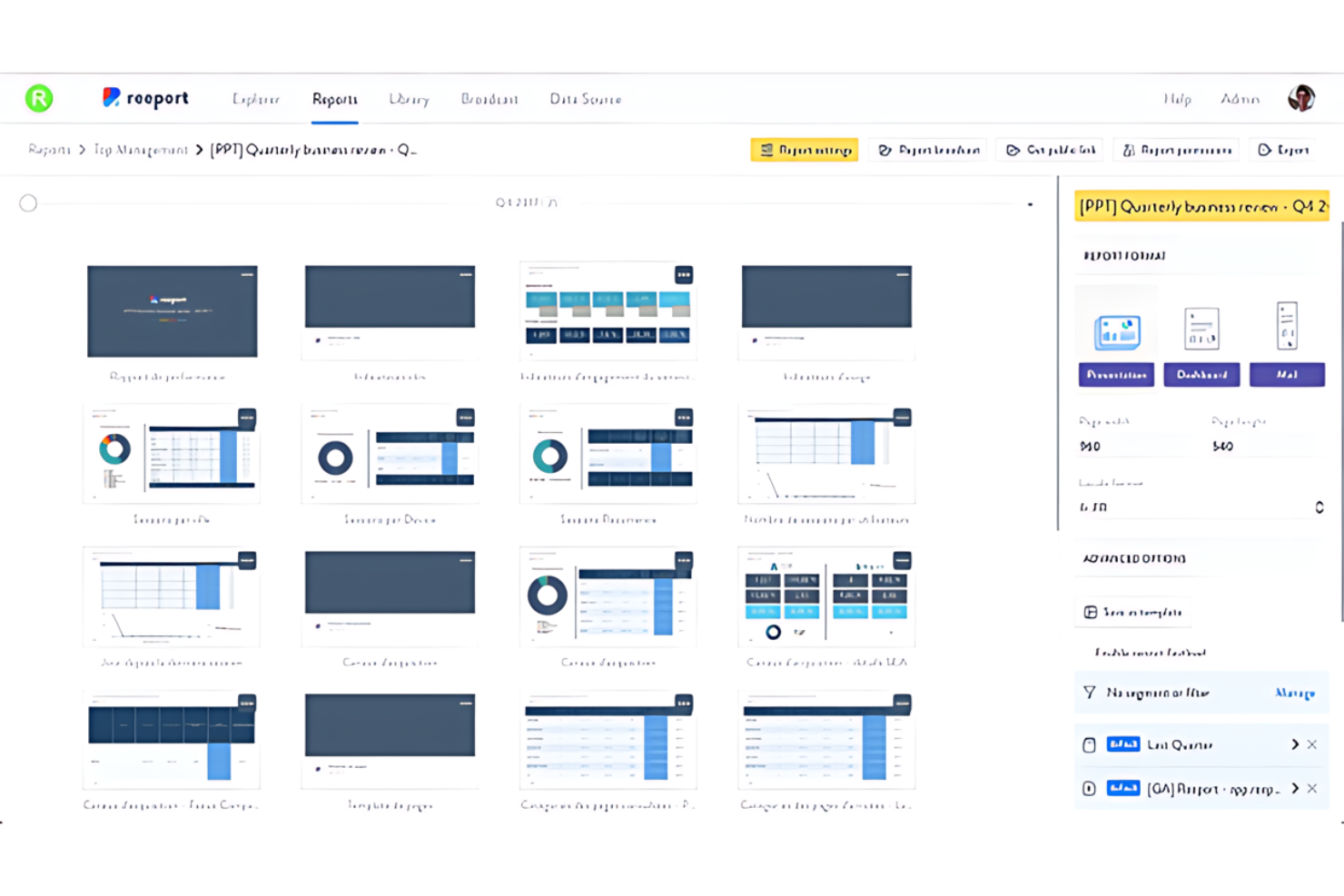
Forecast is an engineering resource management software that uses AI to automate and optimize project planning, execution, and resource allocation.
Why I Picked Forecast:
I selected Forecast because its AI technology makes it more accurate to predict project timelines, budget consumption, and human resource needs than traditional methods. This resource planning software stands out from other project management solutions due to its proactive approach to identifying potential risks and suggesting solutions. Forecast is best for AI-driven project insights as it transforms raw data into strategic insights, enabling professional services teams to make decisions faster.
Standout features & integrations:
Features include project planning, integration with financial management, real-time budget tracking, and cost forecasting. Additionally, its resource management feature provides an overview of team capacity and skill sets.
Integrations include Google Workspace, Microsoft 365, Slack, Trello, Asana, Jira, GitHub, GitLab, Salesforce, and Zendesk.
Pros and Cons
Pros:
- Advanced AI-driven analytics for project planning and execution
- Integration of project, resource, and financial management
- Extensive native integrations with popular tools
Cons:
- Higher costs may not be suitable for smaller businesses
- The AI features require a learning curve to leverage fully

Best for project-driven firm resourcing
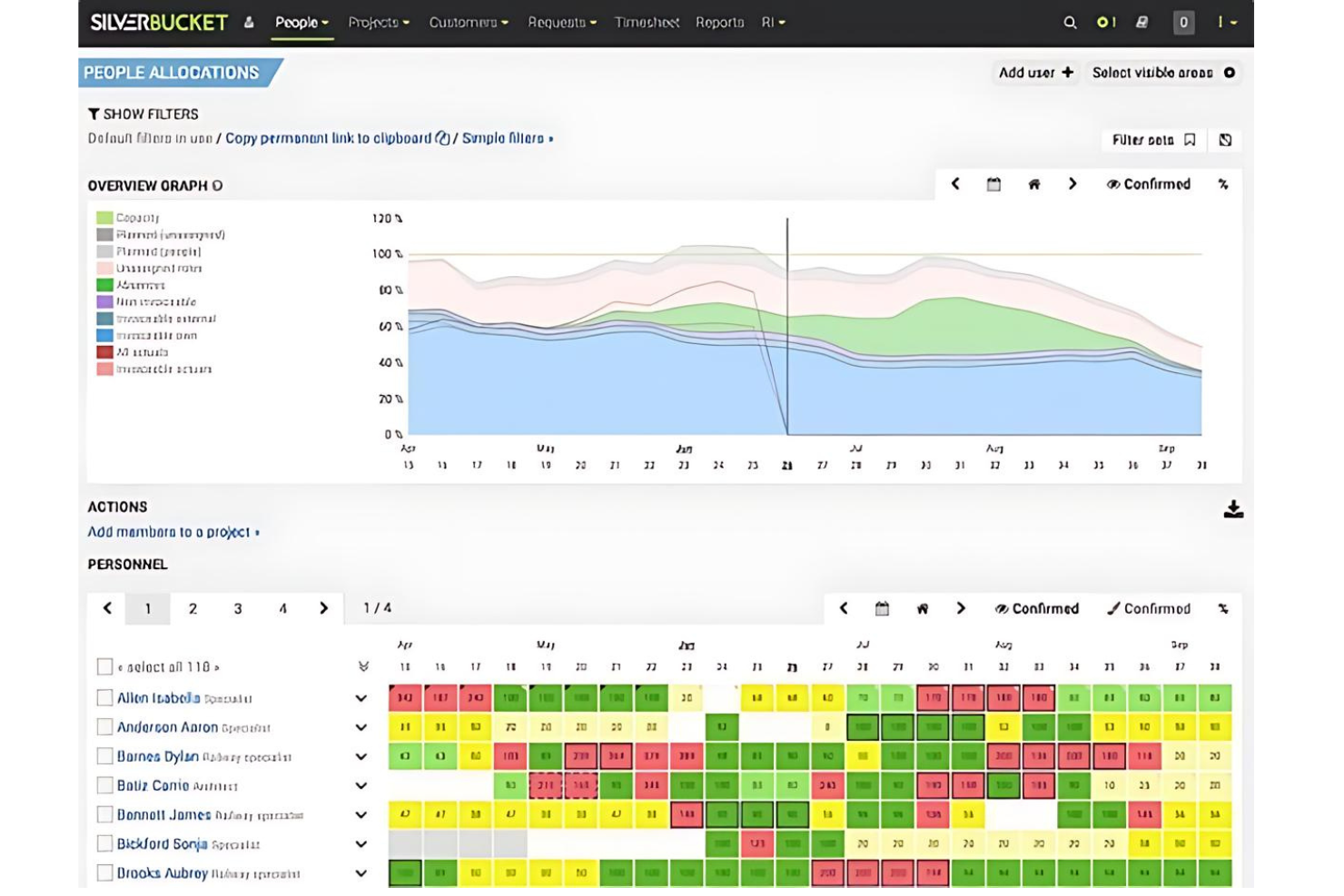
EG Silverbucket is a resource planning tool for project-driven organizations that covers capacity forecasting, skill-based allocation, scenario planning, utilization tracking, and timesheet management across teams and portfolios.
Who Is EG Silverbucket Best For?
EG Silverbucket suits resource managers and project leads at engineering and architecture consultancies who need clear capacity forecasting and skill-based allocation across multiple projects.
Why I Picked EG Silverbucket
EG Silverbucket earns its spot on my shortlist because it's purpose-built for project-driven firms that need to see capacity across a full portfolio, not just a single team. I particularly like the scenario planning workflow: you can model unconfirmed projects with tentative allocations months in advance, then convert them to confirmed assignments the moment a project is approved. Pair that with candidate match scoring (0–100, factoring in skills, availability, and existing allocations), and your resource owners are making faster, better-grounded staffing calls.
EG Silverbucket Key Features
- Competency-based filtering: Search and filter people by configurable skill categories and proficiency levels when filling project roles.
- Timesheet integration: Log hours directly against projects and tasks, with entries automatically updating allocation actuals in the resource plan.
- Plan-versus-actual reporting: Compare budgeted hours, costs, and income against actuals, with drill-down by team, project phase, or client.
- Portfolio milestone tracking: Set and monitor milestones across projects and programs so stakeholders can spot upcoming or at-risk deadlines.
EG Silverbucket Integrations
Documented integrations include Power BI and Excel for reporting and dashboards. EG Silverbucket also provides a REST API and CSV/XLSX imports for connecting ERP, PSA, HR, and time-tracking data.
Pros and Cons
Pros:
- Reviewers praise straightforward resource scheduling
- Matches candidates by skills and availability
- Forecasts staffing gaps across project portfolios
Cons:
- Utilization reports offer limited filtering
- Request workflows strain under high volumes

Productive
Best for staffing tied to deal economics
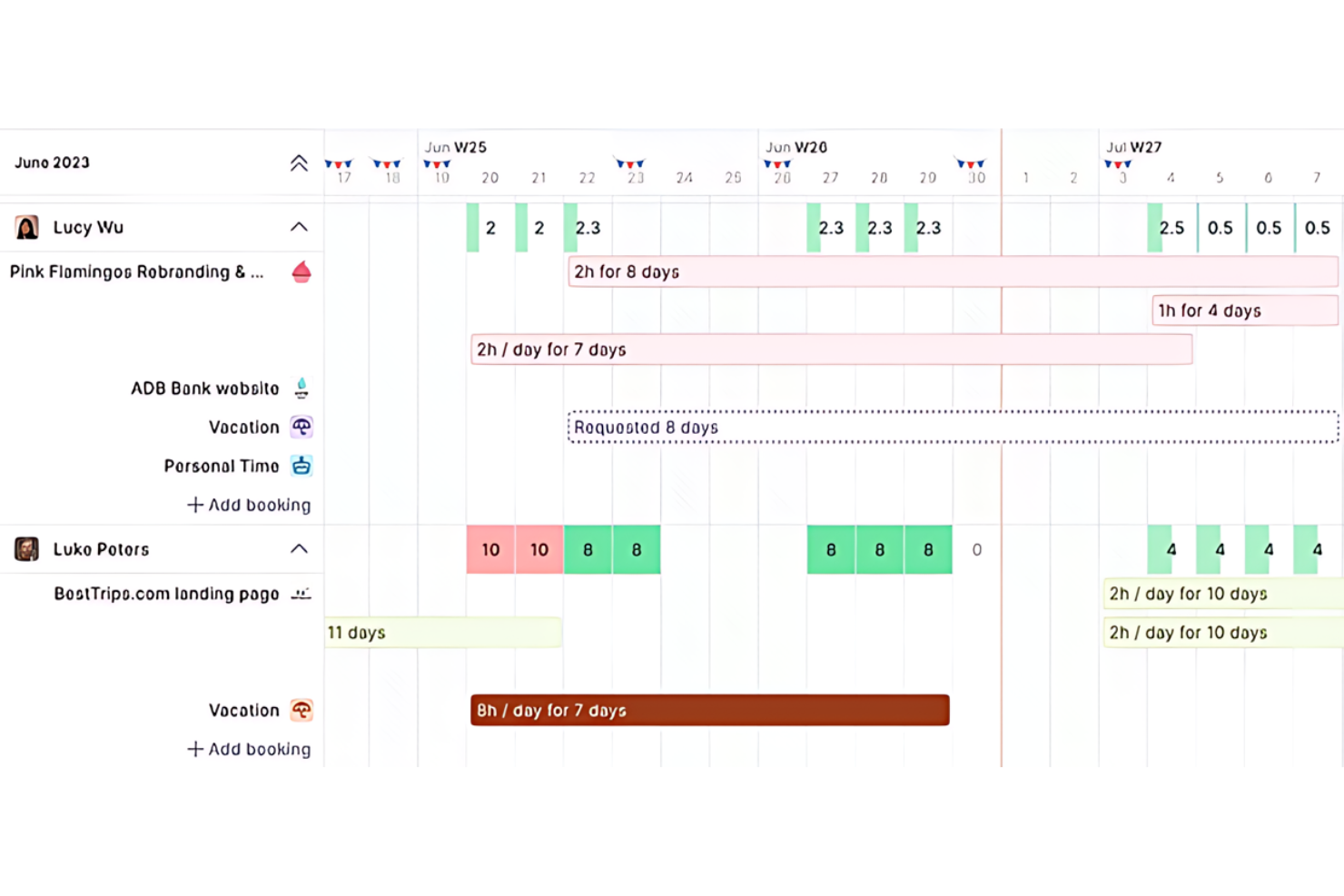
Productive is a professional services automation platform that connects resource planning, capacity tracking, project budgeting, time tracking, and deal management in one place.
Who Is Productive Best For?
Productive is a strong fit for professional services teams—agencies, consultancies, and managed service providers—that need resourcing decisions tied directly to deal pipelines and project budgets.
Why I Picked Productive
I picked Productive as one of the best because it's the only tool I've seen that ties resource bookings directly to deal pipelines and project budgets, so staffing decisions are grounded in what a project can actually afford. When a deal moves through the pipeline, tentative bookings can be created immediately, then confirmed once the work lands. The Scenario Builder adds another layer by letting you model different staffing configurations against cost and profitability before you commit.
Productive Key Features
- Resource Planner: View and manage bookings across people, projects, budgets, and deals in a single planning interface with multiple layout options.
- Capacity & Availability report: Compare capacity, available time, scheduled bookings, and task workload using documented formulas to surface resourcing gaps.
- Utilization target tracking: Set individual utilization targets as employee fields and compare them against actual billable hours in a dedicated report.
- Time entry approvals: Submit time entries and timesheets for review and approval before they feed into billing or financial reporting.
Productive Integrations
Productive offers native integrations with Jira, Google Calendar, and Slack, plus an Open API and webhooks for custom connections. It also supports Zapier.
Pros and Cons
Pros:
- Tentative deal bookings support demand planning
- Utilization reports tie hours to profitability
- Cross-project bookings connect capacity with budgets
Cons:
- Future recurring tasks may not appear in workload planning
- No predictive overbooking or burnout alerts
New Product Updates from Productive
Productive Adds Voice Dictation, Slack Connector, Proposals, and Overtime
Productive adds voice dictation, a Slack Connector, proposal controls, and overtime tracking. These updates support faster AI interactions, client proposals, and time management. For more information, visit Productive’s official site.
Anmeldelser av annen programvare for ressursstyring innen ingeniørfag
Nedenfor finner du en liste over ytterligere programmer for ressursstyring innen ingeniørfag som vi valgte ut, men som ikke kom med på topplisten.
- Celoxis
For capacity and project margin tradeoffs
- Saviom
For engineering staffing and margin planning
- Smartsheet
For compliance-focused resource planning
- Kantata
For staffing tied to project economics
- Resource Guru
For coordinating engineers and equipment
- Microsoft Project
For hiring plans from project schedules
- Float
For costing projects before staffing
- Monograph
For planning hires around open leads
- Planview
For investment and capacity trade-offs
- Capacity Planner
For Jira-linked capacity-to-actuals


Relaterte anmeldelser av programvare for prosjektstyring
Hvis du fortsatt ikke har funnet det du leter etter, kan du ta en titt på disse relaterte verktøyene for prosjektstyring som vi har testet og vurdert.
- Programvare for prosjektstyring
- Programvare for ressursstyring
- Programvare for arbeidsflytautomatisering
- Programvare for oppgavestyring
- Programvare for lager- og ressursstyring
- Samarbeidsverktøy
- Verktøy for å lage Gantt-diagrammer
How I Evaluate Engineering Resource Management Software
I split my evaluation into three parts, weighted most toward core tasks: forecast capacity against demand and assign engineers by skills and availability across projects. Then I consider differentiators such as AI staffing recommendations or bench-time alerts. Finally, I weigh factors beyond features, including onboarding, support, and pricing fit.
Core Functionality (Table Stakes For This List)
When I'm selecting tools for my list, I score each one on a scale from 0 (does not offer the functionality) to 5 (excels in this area) for each core functionality listed below. I then convert the total into a percentage to help assess each tool's overall fit, with extra weight on any functionalities I’ve deemed essential.
- Capacity Planning (Essential): I look for forecasts that compare engineering capacity with project demand, so a launch shift reveals a staffing gap early.
- Resource Allocation (Essential): I check whether assignments reflect skills, availability, and workload, such as flagging a specialist booked on overlapping projects.
- Utilization Tracking: Planned-versus-actual time views help me assess whether teams can spot sustained overload or unused capacity before the next planning cycle.
- Skills & Role Mapping: I look for searchable role and skill profiles that support staffing work requiring specific expertise, such as cloud engineering.
- Scenario Planning: I assess whether managers can model a delayed project or added initiative and compare the effect on staffing across teams.
- Cross-Project Visibility: A consolidated, filterable view should show assignments across active projects, making conflicts and competing priorities easier to assess.
Once I have a list of tools that meet the criteria, I consider what sets each platform apart.
Differentiating Factors (What Sets Vendors Apart)
Here's how I compare and contrast different vendors:
Standout Features
I look for AI staffing recommendations that match engineers to roles based on skills, availability, and past project performance—helpful when you're staffing a new initiative and need to find the right cloud engineer across dozens of active projects. Bench time alerts matter just as much; I check whether the tool flags underutilized engineers early enough to redeploy them before the next sprint planning cycle. I also evaluate pipeline and demand signals that pull in sales or project pipeline data, letting you forecast hiring needs before contracts close.
Beyond Features
I check whether a tool integrates bidirectionally with Jira, GitHub, or Azure DevOps, because utilization data that relies on manual time entry drifts fast. I also evaluate onboarding support—migration help from spreadsheets or legacy tools cuts weeks off adoption for resource managers and engineers alike. Security matters too; SOC 2 or ISO 27001 compliance and role-based access controls protect sensitive project and personnel data.
Slik velger du programvare for ressursstyring innen ingeniørfag
Ha følgende punkter i mente når du går gjennom din unike prosess for valg av programvare.
- Skalerbarhet: Ingeniørprosjekter kan variere stort i størrelse og kompleksitet, og det bør også programvaren for ressursstyring gjøre. Velg en løsning som kan vokse med virksomheten din og håndtere et økende antall prosjekter og ressurser.
- Integrasjonsmuligheter: Programvaren bør fungere godt sammen med de eksisterende verktøyene dine. Integrasjon med eksisterende systemer som ERP-, CRM- eller CAD-verktøy sikrer at data flyter sømløst mellom ulike deler av virksomheten.
- Sanntidsdata: Tilgang til oppdatert informasjon er viktig for å kunne ta informerte beslutninger. Den riktige programvaren gir sanntidsinnsikt i ressursfordeling, tilgjengelighet og utnyttelse. Dette er spesielt viktig innen ingeniørarbeid, der prosjektplaner og ressursbehov kan endre seg raskt.
- Tilpasning: Alle ingeniørvirksomheter har unike prosesser og behov. Programvaren du velger, bør kunne tilpasses de spesifikke arbeidsflytene og rapporteringskravene dine.
- Brukervennlig grensesnitt: Programvaren bør være enkel å bruke for alle teammedlemmer, uavhengig av deres tekniske kompetanse. Et brukervennlig grensesnitt sikrer at teammedlemmene raskt kan lære seg og ta i bruk programvaren, noe som er avgjørende for å opprettholde produktiviteten.
Trender innen programvare for ressursstyring i ingeniørarbeid
Her er noen trender jeg har lagt merke til innen programvareteknologi for ressursstyring i ingeniørarbeid. Jeg har hentet produktoppdateringer, pressemeldinger og lanseringslogger for å trekke ut den viktigste innsikten.
- Integrasjon av kunstig intelligens og maskinlæring: Kunstig intelligens og maskinlæring integreres stadig oftere i programvare for ressursstyring i ingeniørarbeid. Denne programvaren for ressursstyring med kunstig intelligens-trenden endrer prosjektprognoser, optimaliserer ressursfordelingen og forutsier til og med prosjektrisiko før den blir synlig, slik at team kan håndtere komplekse arbeidsmengder mer effektivt.
- Forbedrede funksjoner for sanntidssamarbeid: Etter hvert som fjernarbeid blir stadig vanligere, øker etterspørselen etter funksjoner som støtter sanntidssamarbeid på tvers av geografiske områder. Programvare for ressursstyring innen ingeniørarbeid og IT-ressursstyring fokuserer i økende grad på å forbedre chattefunksjoner, dokumentdeling og sanntidsoppdateringer i prosjektplaner.
- Fokus på mobiloptimalisering: Ettersom arbeidsstyrken blir mer mobil, øker utviklingen av mobiloptimaliserte løsninger som håndterer ressurser på farten. Denne trenden imøtekommer behovet for konstant tilgjengelighet, for eksempel ved arbeid med ressursstyring for et byggeprosjekt, uten at det går på bekostning av funksjonaliteten som er tilgjengelig i skrivebordsversjonene.
- Funksjoner for bærekraft og kostnadsreduksjon: Det legges stadig større vekt på funksjoner som fremmer bærekraft og kostnadsstyring, noe som er et direkte svar på det globale ønsket om mer miljøvennlig forretningsdrift. Dette omfatter funksjonalitet for bedre sporing av ressursutnyttelse, reduksjon av avfall i prosjektprosesser og verktøy for mer effektiv budsjettstyring.
- Nedgang i løsninger med én enkelt funksjon: Trenden beveger seg bort fra verktøy med én enkelt funksjon og mot mer integrerte løsninger. Etter hvert som digital prosjektstyring blir mer kompleks, synker etterspørselen etter verktøy som bare tilbyr én funksjonalitet.
Fremskritt innen programvare for ressursstyring i ingeniørarbeid fører til forbedringer i prosjekteffektivitet, samarbeid, bærekraft og verktøyintegrasjon.
Hva er programvare for ressursstyring i ingeniørarbeid?
Programvare for ressursstyring i ingeniørarbeid er utviklet for å hjelpe ingeniørteam og prosjektledere med å fordele personell, utstyr og materialer effektivt.
Dette sikrer at prosjekter fullføres i tide og innenfor budsjettet, og bidrar dermed til økt produktivitet og kostnadseffektivitet totalt sett. Programvaren for ressursstyring omfatter funksjoner som planlegging, ressursfordeling og sporing av utnyttelse. Den gir oversikt over tilgjengelige ressurser og prosjektbehov, og støtter informerte beslutninger og effektiv prosjektgjennomføring.
I tillegg integreres programvaren ofte med andre verktøy for prosjektstyring innen ingeniørarbeid, noe som gir bedre prosjektoversikt. Innen olje og gass, der team arbeider på avsidesliggende anlegg og håndterer stor infrastruktur med høy risiko, er programvare for ressursstyring avgjørende for å koordinere arbeidskraft, utstyr og samsvar med regelverk. Med sanntidsoppdateringer og analyser hjelper programvaren team med å forutse flaskehalser og justere planene, slik at arbeidsflyten blir jevnere og ressursene utnyttes bedre.
Funksjoner i programvare for ressursstyring i ingeniørarbeid
Når du velger programvare for ressursstyring i ingeniørarbeid, bør du vurdere funksjonene som støtter vellykkede prosjekter og effektiv ressursfordeling. Den riktige programvaren kan ha stor betydning for prosjektresultatene, så se etter følgende funksjoner.
- Ressursplanlegging: Denne funksjonen gjør det mulig å planlegge og fordele ressurser til ulike prosjekter.
- Tidsregistrering: Nøyaktig registrering er avgjørende for fakturering og for å forstå tiden som brukes på spesifikke oppgaver.
- Ferdighetssporing: Ved å følge med på arbeidsstyrkens ferdigheter og kompetanse blir det enklere å tilpasse dem til prosjektbehovene.
- Kapasitetsplanlegging: Denne funksjonen bidrar til å forutsi ressursbehov basert på nåværende og fremtidige prosjekter.
- Integrasjon med prosjektstyring: Integrasjon med prosjektstyringsverktøy er nødvendig for å få et helhetlig bilde av prosjekter og ressurser.
- Sanntidsanalyse: Tilgang til sanntidsdata om ressursutnyttelse og datatilgjengelighet forbedrer beslutningstakingen.
- Økonomistyring: Denne funksjonen gir innsikt i de økonomiske aspektene ved ressursstyring, for eksempel kostnadsoppfølging og budsjettering.
- Samarbeidsverktøy: Effektiv kommunikasjon er avgjørende i ingeniørprosjekter, og samarbeidsverktøy legger til rette for dette.
- Tilpassbare rapporter: Muligheten til å generere skreddersydde rapporter gjør det enklere å presentere data som er relevante for interessentene.
- Brukervennlig grensesnitt: Et enkelt grensesnitt reduserer læringskurven og øker bruksgraden.
- Prognoser: Forutsigelse av fremtidige trender eller behov basert på nåværende og historiske data.
- Dashbord: Grensesnitt som viser nøkkelindikatorer og måltall i en samlet oversikt, forenkler prosessene.
- Automatisering: Bruk av teknologi til å utføre oppgaver uten menneskelig inngripen gjør arbeidsflytene raskere.
- Ressursplanlegging: Planlegging av når og hvordan ressurser skal brukes over tid, gjør prosessene effektive.
- Gantt-diagrammer: Visuelle fremstillinger av prosjektplaner som viser elementenes start- og sluttdatoer, bidrar til planleggingen.
- Timelister: Registreringer av hvor mye tid hvert teammedlem bruker på ulike oppgaver, bidrar til bedre tidsstyring for de ansatte.
- Varsler: Meldinger som informerer brukerne om viktige hendelser eller oppdateringer, holder interessentene oppdatert.
- Porteføljestyring: Styring av prosjekter eller investeringer for å nå strategiske mål bidrar til bedre organisering.
- Prosjektplanlegging: Planlegging av rekkefølgen på oppgaver og tidsrammene deres i et prosjekt bidrar til å holde oppgavene på rett spor.
- Maler: Forhåndsdesignede strukturer eller formater som kan brukes som utgangspunkt for nye dokumenter eller prosjekter, kan spare tid.
- Fakturering: Oppretting og utsending av regninger til kunder for leverte tjenester bidrar til bedre kontantstrøm.
- Mobilapper: Programvare utviklet for mobile enheter som smarttelefoner og nettbrett, gjør det mulig å gjennomføre forretningstransaksjoner mens du er på farten.
- Teamsamarbeid: Funksjoner som gjør det mulig for teammedlemmer å samarbeide mer effektivt, gjør de ansatte mer produktive.
Fordeler med programvare for ressursstyring i ingeniørprosjekter
Programvare for ressursstyring i ingeniørprosjekter bidrar til bedre ressursfordeling, prosjektoppfølging og produktivitet. Her er fem viktige fordeler disse programvareløsningene gir brukere og organisasjoner.
- Bedre ressursfordeling: Programvare for ressursstyring i ingeniørprosjekter muliggjør nøyaktig sporing og fordeling av ressurser. Dette fører til mer effektiv ressursbruk og redusert nedetid.
- Bedre oversikt og kontroll: Brukerne får en oversikt over alle ressurser og prosjekter, noe som gir bedre beslutningstaking og kontroll over ingeniørprosessen. Denne oversikten bidrar til å identifisere potensielle flaskehalser og håndtere dem proaktivt.
- Bedre samarbeid og kommunikasjon: Prosjektstyringsprogramvaren forbedrer kommunikasjonen mellom teammedlemmene ved å tilby en sentralisert plattform for informasjonsdeling. Dette sikrer at alle har samme forståelse.
- Nøyaktige prognoser og planlegging: Programvaren gir detaljerte data om ressursbruk og prosjektplaner. Dette hjelper organisasjoner med å forutse behov og forberede seg deretter, slik at siste-liten-kappløp etter ressurser unngås.
- Økt produktivitet og effektivitet: Ved å automatisere mange av de rutinemessige oppgavene knyttet til ressursstyring, gjør programvaren det mulig for teamene å fokusere på de viktigste delene av prosjektene sine. Dette kan føre til økt produktivitet og effektivitet i organisasjonen.
Innføring av programvare for ressursstyring i ingeniørprosjekter kan øke produktiviteten og lønnsomheten, noe som gjør det til en potensielt god investering.
Kostnader og priser for programvare for ressursstyring i ingeniørprosjekter
Ved valg av programvare for ressursstyring innen ingeniørfag bør du vurdere de tilgjengelige abonnementene og kostnadene forbundet med dem. Nedenfor finner du en detaljert oversikt over vanlige abonnementsalternativer, gjennomsnittlige priser og viktige funksjoner som hjelper deg med å finne en løsning som passer til behovene og budsjettet ditt.
Sammenligningstabell for programvare for ressursstyring innen ingeniørfag
| Abonnementstype | Gjennomsnittlig pris | Vanlige funksjoner |
| Gratis | $0 | Tilgang til grunnleggende funksjoner, begrenset antall brukere, brukerstøtte fra fellesskapet, grunnleggende ressursplanlegging |
| Grunnleggende | $5 - $15/ bruker/måned | Grunnleggende ressursstyring, enkelte rapporteringsfunksjoner, brukerstøtte via e-post, begrensninger på antall brukere |
| Profesjonell | $20 - $50/ bruker/måned | Avansert ressursplanlegging, samarbeid i sanntid, fullstendig rapportering, prioritert brukerstøtte |
| Bedrift | Tilpasset pris | Tilpassbare funksjoner, ubegrenset antall brukere, dedikert brukerstøtte, avansert sikkerhet, dyptgående analyse |
Hvert abonnement er tilpasset ulike teamstørrelser og prosjektkompleksitet. Velg et abonnement som gir deg de nødvendige funksjonene uten ekstra kostnader.
Vanlige spørsmål om programvare for ressursstyring innen ingeniørfag
Her er noen av de vanligste spørsmålene jeg får om programvare for ressursstyring innen ingeniørfag.
Hvordan forbedrer programvare for ressursstyring innen ingeniørfag prosjektleveransen?
Programvare for ressursstyring innen ingeniørfag forenkler prosjektplanlegging og -gjennomføring ved å tilby verktøy for ressursfordeling, planlegging og kapasitetsplanlegging. Den sørger for at de riktige ressursene er tilgjengelige til riktig tid, noe som reduserer forsinkelser og øker effektiviteten i prosjektleveransen.
Kan programvare for ressursstyring innen ingeniørfag integreres med andre forretningssystemer?
Ja, det meste av moderne programvare for ressursstyring innen ingeniørfag kan integreres med ulike forretningssystemer, for eksempel ERP-, CRM- og regnskapsprogramvare samt andre prosjektstyringsverktøy. Integrasjon muliggjør dataflyt og gir bedre oversikt på tvers av all forretningsdrift.
Passer programvare for ressursstyring innen ingeniørfag for små bedrifter?
Absolutt. Selv om det er nyttig for store organisasjoner som håndterer flere omfattende prosjekter, kan små bedrifter og uavhengige konsulenter også bruke det til å optimalisere ressursbruken, forbedre prosjektoppfølgingen og styrke kunderapporteringen, slik at de blir mer konkurransedyktige.
Hvordan håndterer programvare for ressursstyring innen ingeniørfag ressurskonflikter?
Det meste av programvaren inneholder algoritmer for konfliktdeteksjon som varsler ledere når ressurser er dobbeltbooket, eller når det oppstår planleggingskonflikter. Dette gjør det mulig å justere ressursfordelingen i tide og sikrer en smidig prosjektgjennomføring.
Hvilke rapporteringsfunksjoner tilbyr programvare for ressursstyring innen ingeniørfag?
Den tilbyr vanligvis en rekke rapporteringsfunksjoner, fra grunnleggende rapporter om ressursutnyttelse og prosjektstatus til avansert økonomisk analyse og resultatfremstilling. Tilpassbare oversikter gjør det mulig for ledere å fokusere på de viktigste måleverdiene for deres spesifikke prosjekter og forretningsmål.
Hvordan beregnes avkastning på investering (ROI) ved innføring av programvare for ressursstyring innen ingeniørfag?
ROI kan beregnes ved å sammenligne kostnadene som spares gjennom mer effektiv ressursstyring, redusert nedetid og strømlinjeformet drift med programvarekostnaden. Forbedringer i prosjektleveransetider og reduksjon i kostnadsoverskridelser bidrar også til ROI-en.