

10 beste programvareløsninger for arbeidsstyring i virksomheter for 2026

10 Kortliste over programvare for arbeidsstyring i større virksomheter


Å lede prosjekter på virksomhetsnivå innebærer å holde styr på utallige oppgaver, interessenter og prioriteringer – ofte på bekostning av effektivitet og oversikt. Programvare for arbeidsstyring i større virksomheter tilbyr en løsning som lar deg effektivisere arbeidsflyter, forbedre samarbeidet og opprettholde oversikten over komplekse prosjekter. Med så mange alternativer på markedet kan det imidlertid være overveldende å velge riktig verktøy.
I dette innlegget skal jeg gjøre valget enklere ved å dele mine personlige erfaringer med bruk av dusinvis av ulike verktøy for arbeidsstyring i store team og prosjekter, samt mine anbefalinger av den beste programvaren for arbeidsstyring i større virksomheter.
Why Trust Our Software Recommendations
Our team has been testing and reviewing software since 2012. As project managers ourselves, we know how difficult—and important—it is to choose the right software.
For this guide, we evaluated tools using hands-on testing and independent research, scoring tools using our selection criteria. We also draw on insights from industry thought leaders and practicing project management experts.
Our reviews reflect our human editorial judgment, not a sales pitch.
Expert reviewers:
Sammenligningstabell for programvare for arbeidsstyring i større virksomheter
Her er en tabell du kan bruke til å sammenligne verktøyene vi nettopp har gjennomgått i oversiktene.
| Tool | Best For | Trial Info | Price | ||
|---|---|---|---|---|---|
| 1 | Best enterprise work management software for its reliable security features to protect your data | 14-day free trial | Pricing upon request | Website | |
| 2 | Best for publicly listed companies | Free plan available | From $9/user/month (billed annually) | Website | |
| 3 | Best for its user-friendly interface with on-premise licensing | 14-day free trial + free demo available | From $10/user/month (billed annually) | Website | |
| 4 | Best for nested task hierarchies across teams | Free plan + 30-day free trial available | From $7.65/user/month (billed annually) | Website | |
| 5 | Best for AI-powered enterprise work management | Free demo available | Pricing upon request | Website | |
| 6 | Best for full lifecycle service delivery | Free demo available | Pricing upon request | Website | |
| 7 | Best for scaling businesses that can’t afford an enterprise-tier plan | Free plan available | From $9/user/month | Website | |
| 8 | Best for ensuring data protection through automated penetration tests | Free plan available | From $9/user/month (billed annually) | Website | |
| 9 | Best enterprise work management software with 99.99% uptime | 14-day free trial | From $5/user/month (billed annually) | Website | |
| 10 | Best for pre-built reports | 2-week free trial; free demo available | From $8/user/month (billed annually) | Website |


Oversikt over de 10 programvareløsningene for arbeidsstyring i større virksomheter
Her er en kort beskrivelse av hvert verktøy basert på vurderingskriteriene jeg beskrev ovenfor.

Wrike
Best enterprise work management software for its reliable security features to protect your data

User interface: Wrike has a minimalistic multi-pane UI with a simple navigation menu on the tool's left side. Their hierarchy is similar to other tools on this list, starting with a workspace, spaces, folders, projects, tasks, and subtasks. Although the number of available views is limited compared to other enterprise project management software, it is functional and easy to learn.
Time in the market: The company was founded in 2006. They released their enterprise platform in 2013 after a $10 million investment by Bain Company. After a couple more successful investment rounds, Citrix Systems declared its interest in the company. Wrike was acquired in March 2021 for $2.25 billion.
Security features: Wrike complies with SOC 2 Type II, ISO 27001, 27018, GDPR, and CCPA. Additionally, they guarantee an uptime of 99.9%, allow you to create role-based access, use SSO, and keep your keys to their AES-256 bit encryption using Wrike Lock.
Integrations: Wrike offers 400+ pre-built native integrations, including Microsoft Office, integrations with the most popular file management software from Microsoft, Google, and Dropbox, along with sales and marketing software from Salesforce and Marketo.
New Product Updates from Wrike
Wrike Adds Klaxoon MCP Integration
Wrike’s Klaxoon MCP integration is now generally available, enabling AI agents to navigate between Wrike tasks and attached whiteboards, read task context, and manage whiteboard attachments via API. For more information, visit Wrike's official site.

Best for publicly listed companies
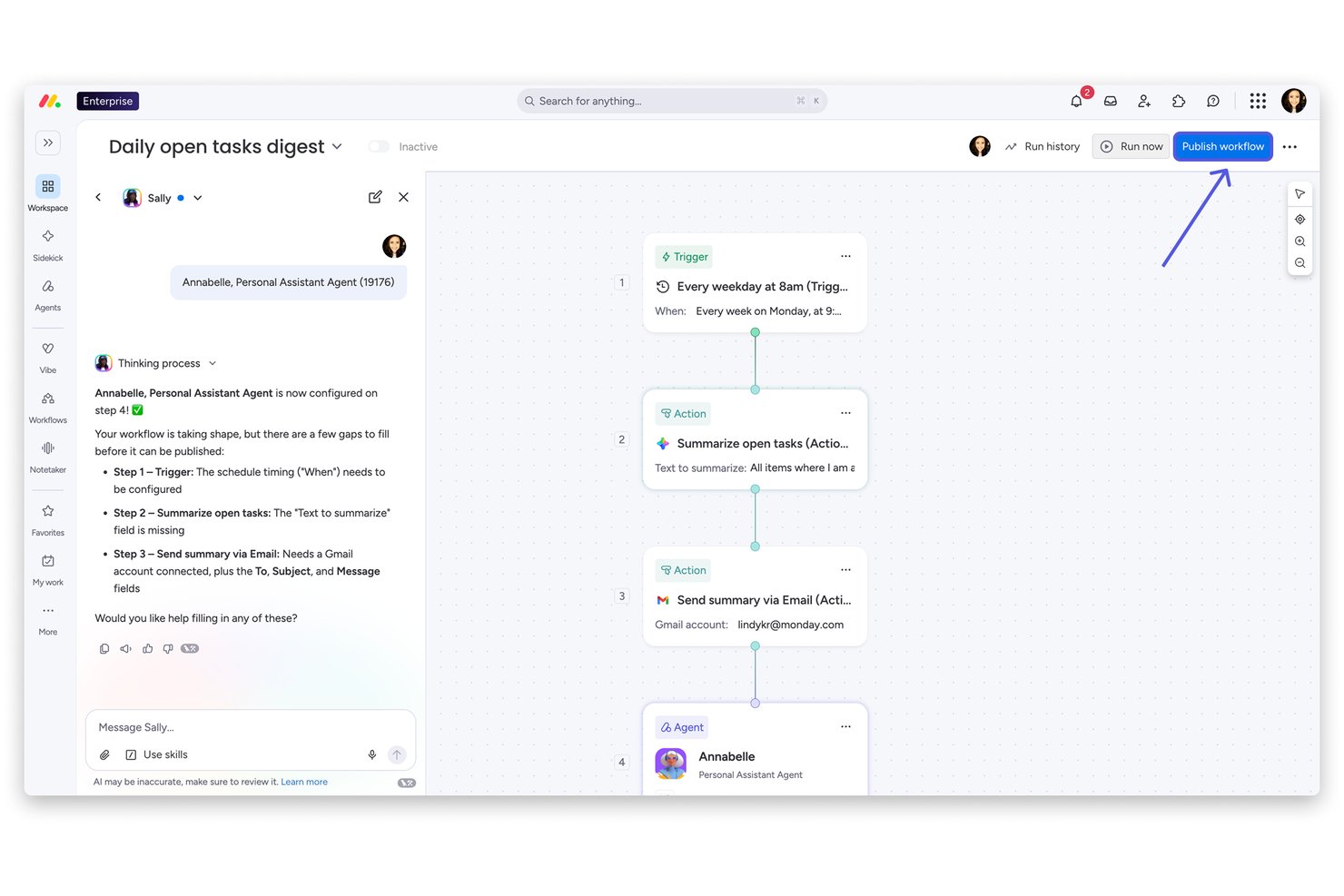
monday AI Workspace is a Work OS platform that unifies portfolio management, cross-functional project tracking, resource planning, and AI-powered workflow automation across enterprise teams and business units.
Who Is monday AI Workspace Best For?
It's a strong fit for enterprise PMO teams and operations leaders at large, compliance-conscious organizations managing work across multiple departments and business units.
Why I Picked monday AI Workspace
I've included monday AI Workspace in my top picks because its Enterprise governance stack is built for the scrutiny public companies face. I particularly like the AI-powered risk insights, which automatically scan every project board daily and surface portfolio-level risks before they escalate. Add BYOK encryption, SOC 2 Type II, ISO 27001, and HIPAA compliance to that, and it's a platform I trust to hold up under a formal audit.
monday AI Workspace Key Features
- Portfolio hierarchy and dashboards: Organize projects in nested portfolios and build executive dashboards pulling live data across teams.
- Resource management module: Allocate and balance workloads, track utilization, and view real-time capacity across distributed teams.
- Configurable workflow automations: Create no-code automation rules to connect work across departments and enforce process discipline.
- Enterprise compliance controls: Set granular permissions, leverage SSO/SAML, and maintain audit trails for SOC 2, ISO 27001, and GDPR compliance.
monday AI Workspace Integrations
monday AI Workspace offers hundreds of native integrations and marketplace apps, including Slack, Salesforce, HubSpot, Google Workspace, Microsoft 365, Jira, GitHub, Zendesk, Adobe Creative Cloud, and Zoom. It supports Zapier and provides an API for custom integrations.
Pros and Cons
Pros:
- Granular permissions meet enterprise audit requirements
- Native OKR tracking links projects to strategy
- AI-powered risk insights surface portfolio issues early
Cons:
- Portfolio hierarchy can feel rigid at scale
- Reporting customization requires significant setup time
New Product Updates from monday AI Workspace
monday AI Workspace Adds Human Approval Routing
monday AI Workspace adds a human-in-the-loop approval block to AI Workflows, sending approval requests and routing workflow paths based on responses. For more information, visit monday AI Workspace's official site.

Celoxis
Best for its user-friendly interface with on-premise licensing
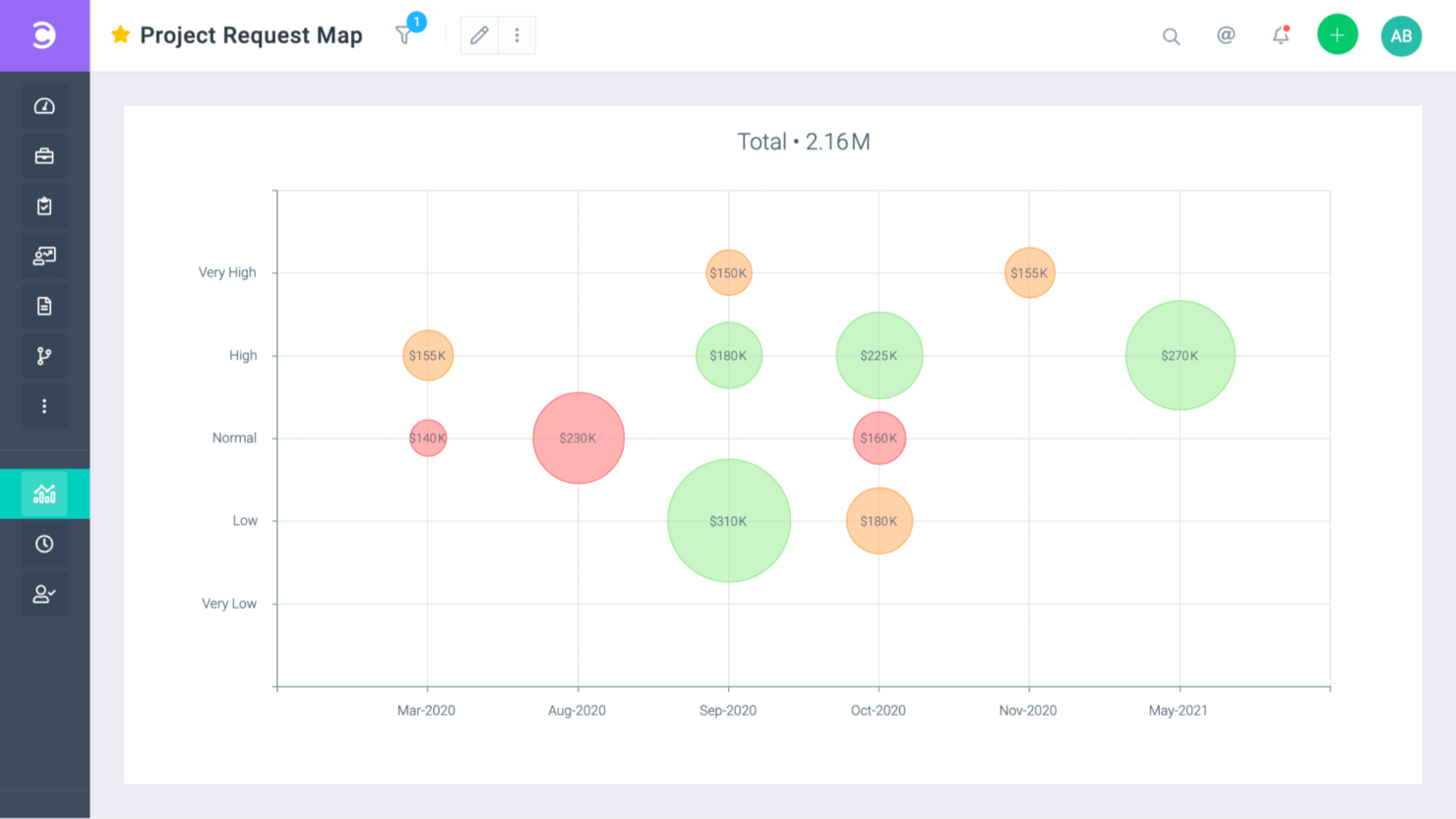
User interface: Full of color and RAG indicators to help you identify what needs to be prioritized, Celoxis is a user-friendly tool. They have comprehensive documentation that will enhance the experience of an already easy-to-learn tool.
Time in the market: Celoxis started in 2001. Headquarters: Pune, India.
Security features: SSL 256-bit encryption, SAML v2 for SSO, and 99.9% uptime.
Integrations: Celoxis has out-of-the-box integrations with Excel, Microsoft Project, Google Drive, Salesforce, Outlook, and hundreds of other tools like Slack and Trello.
Celoxis is available for $25/user/month

Quire
Best for nested task hierarchies across teams
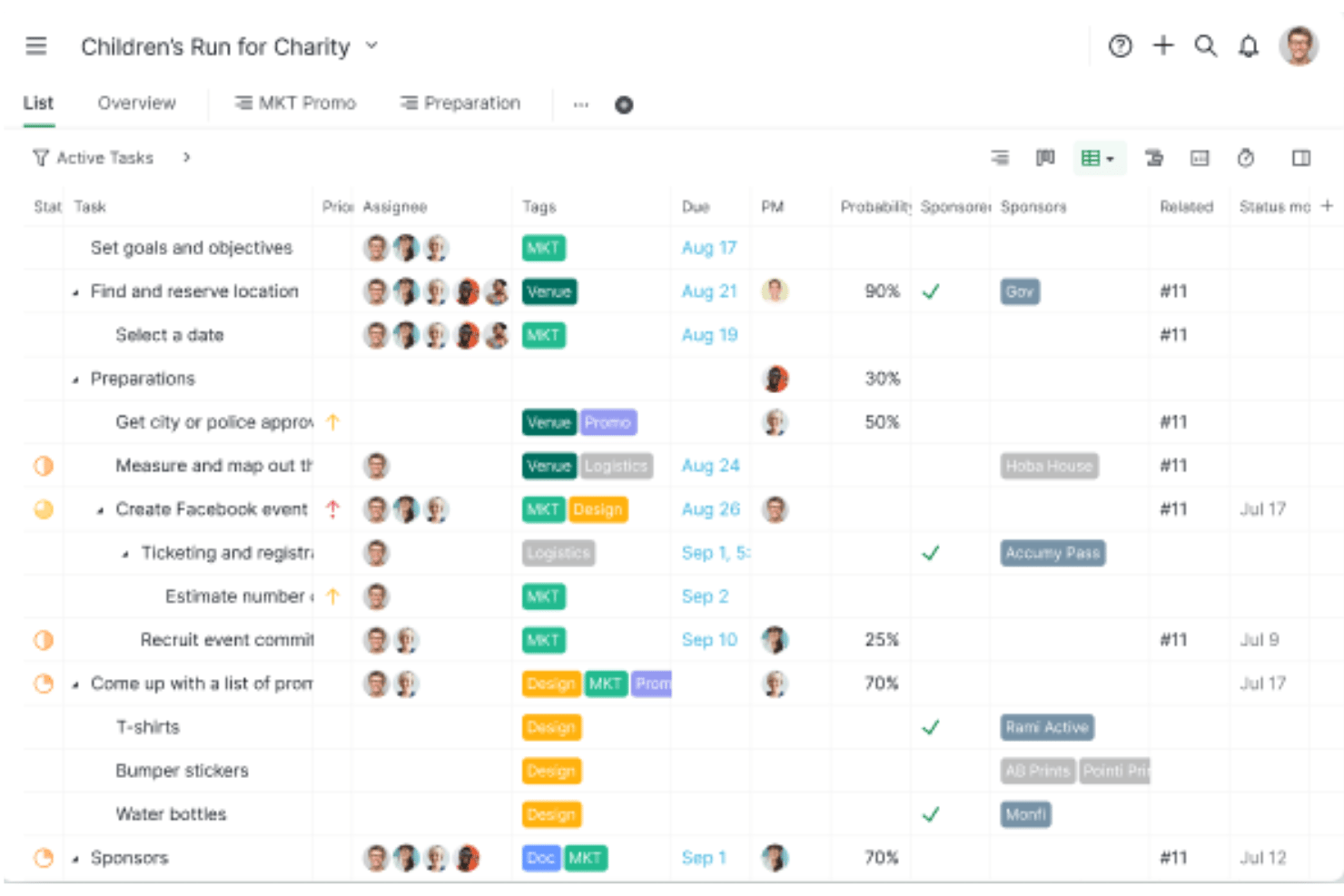
Quire is a project and work management platform built around unlimited nested task hierarchies, multiple synchronized work views, and cross-project visibility through Smart Folders.
Who Is Quire Best For?
Quire suits small to mid-sized teams that need to break down complex projects into deeply nested task structures across multiple workstreams.
Why I Picked Quire
I've included Quire in my top picks because its unlimited nested task hierarchy is genuinely unlike most work management tools I've tested. When a project spans multiple teams and workstreams, I can break work down across as many levels as needed, then use Smart Folders to pull tasks from separate projects into one aggregated view without duplicating data. I also like that all five work views, including Timeline with task dependencies and the Kanban board, stay in sync on the same underlying data.
Quire Key Features
- Approval workflows: Set named approvers on tasks with timestamps and audit trails to keep sign-off processes traceable across teams.
- SAML 2.0 single sign-on: Connect Quire to identity providers like Okta, Azure AD, and JumpCloud for centralized access control on the Enterprise plan.
- Power BI integration: Pull Quire project and task data directly into Microsoft Power BI to build custom executive dashboards and visual reports.
- Custom fields: Add configurable data fields to projects—up to unlimited on Enterprise—to capture the metadata your team actually tracks.
Quire Integrations
Quire offers native integrations with Google Drive, Microsoft Teams, Slack, GitHub, Google Calendar, and Power BI. It also provides REST API access, webhooks, MCP Server, and Zapier connectivity.
Pros and Cons
Pros:
- Smart Folders enable cross-project task aggregation
- Synchronized views reduce duplicate data management
- Unlimited nested task hierarchy for complex projects
Cons:
- Lacks dedicated portfolio financial management features
- No resource capacity planning or workload balancing
New Product Updates from Quire
Quire Adds Custom Field Locking and Comment Reaction API Support
Quire adds custom field locking and API support for reading and setting emoji reactions on comments. These updates give teams more control over field data and expand comment interaction options for developers. For more information, visit Quire’s official site.
 .
.
Best for AI-powered enterprise work management

Screendragon is built for marketing teams, creative agencies, and global brands that need better control over complex projects. With AI resource forecasting, the platform helps teams plan workloads and staffing needs more accurately, while its no-code interface makes it easier to manage workflows without extra technical setup. Screendragon also connects with your existing tools, so your team can coordinate work more smoothly and stay aligned across projects.
Why I Picked Screendragon
I picked Screendragon for its AI resource forecasting, which helps teams plan workloads and staffing needs more accurately across large projects. This makes it easier to avoid overloading teams and spot capacity gaps early. On top of that, its no-code setup supports custom workflows and approval tracking, so teams can adapt processes without heavy technical work. Together, these features help enterprises manage resources and coordination more effectively.
Screendragon Key Features
In addition to AI resource forecasting, Screendragon offers:
- Customizable Dashboards: Tailor the interface to display the most relevant project information, making it easier to track progress and performance.
- Role-Based Access: Ensure that each team member has appropriate access to project data, improving security and focus.
- Custom Routing: Direct tasks and approvals through personalized paths to optimize workflow efficiency and reduce bottlenecks.
Screendragon Integrations
Integrations include Microsoft Power BI, Slack, Microsoft Teams, HubSpot, Okta, Aprimo, SugarCRM, Adobe, Jira, and Google Drive.
Pros and Cons
Pros:
- Flexible customization lets teams tailor workflows and project structures
- Automation features streamline processes and improve efficiency
- Project and resource management features help centralize work details
Cons:
- Reporting and manual report creation can feel limited or complex
- The admin console and settings may be confusing for new users
New Product Updates from Screendragon
Screendragon Unveils New AI Hub
Screendragon introduced AI Hub, a new capability that lets teams build and manage AI agents directly within workflows. The update helps marketing teams automate tasks, maintain governance controls, and scale AI-driven operations more efficiently. For more information, visit Screendragon's official site.

Kantata
Best for full lifecycle service delivery

User interface: Kantata delivers a modern, intuitive experience built for enterprise-scale service delivery. From centralized dashboards to customizable views like task lists and Gantt charts, you can track work across the entire lifecycle of projects in one place. The platform supports collaboration with commenting, document sharing, and activity feeds, helping your teams stay aligned and productive even across complex portfolios.
Time in the market: Originally launched as Mavenlink in 2008, Kantata has over a decade of experience serving professional services organizations. Its merger with Kimble Applications in 2021 strengthened its ability to deliver full lifecycle service management, combining project delivery, resource planning, and financial oversight in one enterprise platform.
Security features: Kantata is enterprise-ready with compliance standards including SSAE 18 (SOC1 Type II), AICPA SOC2 Type II, and GDPR. It employs data encryption (TLS and AES), intrusion detection systems, secure VPN connections with two-factor authentication, and regular patching to safeguard sensitive client and project data—critical for large organizations handling high-value engagements.
Integrations: Kantata offers many integrations, including Slack, Expensify, Sage Intacct, Xero, NetSuite ERP, Google Workspace, Microsoft Dynamics 365, Jira Software, Salesforce Sales Cloud, SAP Concur, QuickBooks Online, and HubSpot CRM.
New Product Updates from Kantata

Kantata Adds Access Group Change History
Kantata adds Access Groups History, letting account administrators track changes to group details, membership, and permissions in Recent History. The update also makes these events available through the Subscribed Events API for broader monitoring. For more information, visit Kantata’s official site.
 .
.
Best for scaling businesses that can’t afford an enterprise-tier plan

User interface: Toggl Plan is a friendly-looking tool with lots of colors that is perfect for timelines and roadmaps. Online reviews give this tool a top rating for its visual attractiveness and how easy that makes it to find your way around your work.
Time in the market: The company was founded in 2006. With 3 distinctive products, they decided to split them into different companies only to bring them back together years later when they realized they were stronger that way. Pretty much like the Backstreet Boys. Headquarters: Tallinn, Estonia.
Security features: The business tier, their top tier, offers SSO, AES256 encryption and SHA2 signatures and is GDPR compliant. No uptime guarantee.
Integrations: Toggl Plan makes its API available to developers for specific integrations. The app currently integrates with Slack, a couple of calendar apps, and has a browser extension that can connect with Asana, JIRA, Podio, Gitlab and Github.

ClickUp
Best for ensuring data protection through automated penetration tests
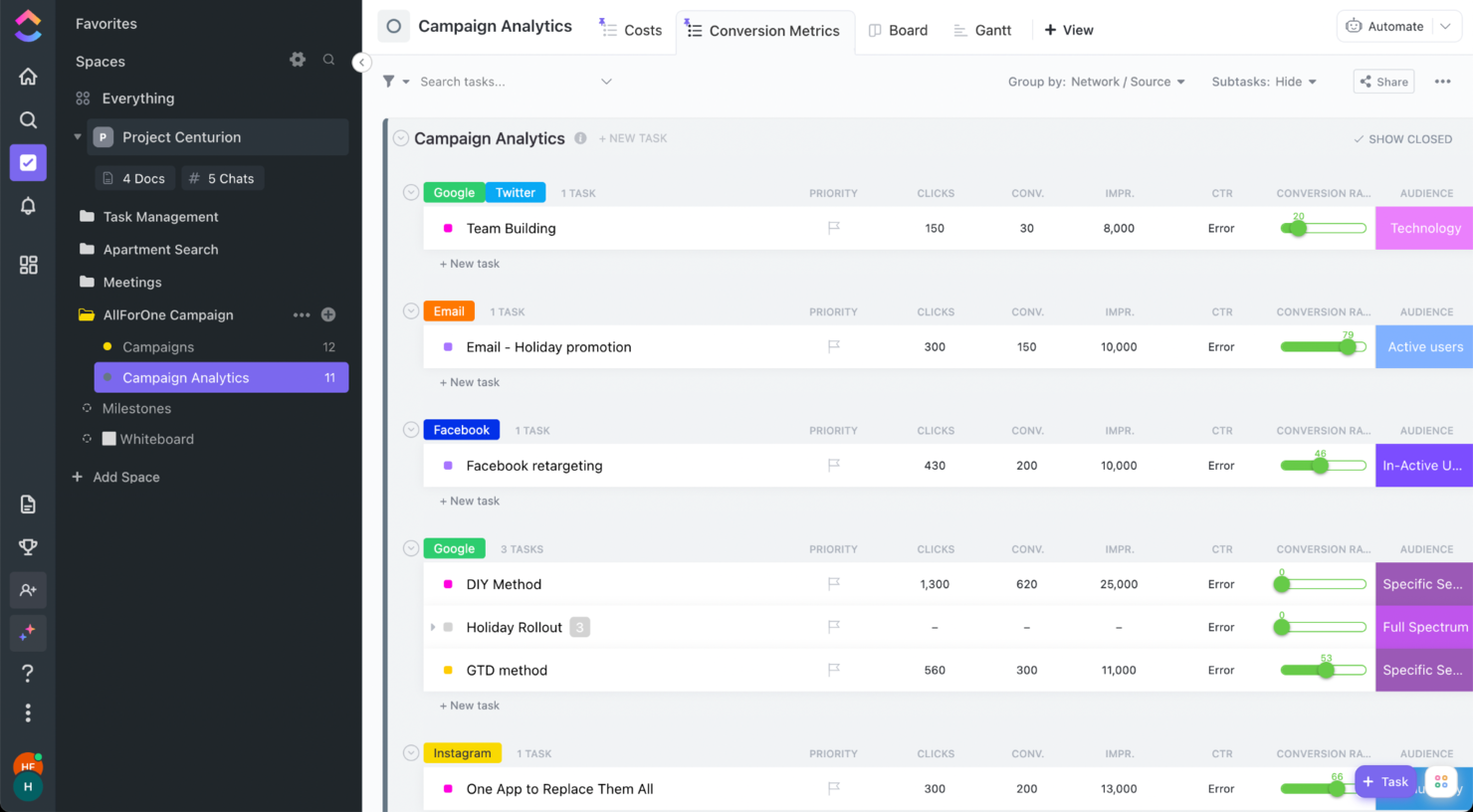
User interface: ClickUp is one of my favorite tools in this regard. Their interface is easy to learn to navigate, works similarly to other big pm tools, and can be customized in every way. Even the way the navigation menu is displayed. The only thing you need to learn well is the hierarchy. Workspace > Spaces > Folders > Lists > Tasks > Subtasks.
Time in the market: The company was founded in 2017. Since then, it has released three versions of its platform and gone through three investment rounds, series C being the last one. Headquarters: San Diego, California.
Security features: The enterprise plan offers workspace permissions for guests, members, and admins, plus a custom role creation option. Further, it has SSO for centralized access control, SOC2, HIPAA, GDPR and Privacy Shield compliance, and an AES-256 bit encryption with periodic automated penetration tests and yearly through a third-party provider. They say they have the highest levels of uptime but no guarantee on a percentage.
Integrations: ClickUp has 1000+ native and third-party integrations. These include Dropbox, Slack, Google Suite, Loom, Clockify, TimeCamp, and much more.
Price is available upon request.
New Product Updates from ClickUp
ClickUp Adds Meetings Hub, Super Agent Templates, and ZoomInfo Integration
ClickUp adds a searchable Meetings Hub, new ways to clone and template Super Agents, and a ZoomInfo integration through the App Center. These updates improve meeting retrieval, agent reuse, and access to sales intelligence. For more information, visit ClickUp’s official site.
Trello
Best enterprise work management software with 99.99% uptime

User interface: As one of the main players in the space, Trello offers a beautiful visual experience through its customizable boards. It is very easy to get started with the tool, set up and start sharing projects to collaborate with your team. User reviews on this product mention there’s no need for onboarding because of how intuitive it is.
Time in the market: Trello was first introduced to the market under the codename Trellis in 2011. Following a spin-off from Fog Creek, Trello Inc was born in 2014. Later that year, it raised over $10 million from investors. Finally, Atlassian acquired Trello in January 2017 for $425 million. Headquarters: New York City, NY.
Security features: The enterprise tier lets you set granular permissions and access to power-ups. Also, SAML SSO for your logins, 99.99% uptime, SOC 2, 3 and ISO 27000 certifications, and GDPR compliance.
Integrations: Trello offers you unlimited integrations in their enterprise plan. These integrations include popular apps like Slack, Weebly, Evernote, Miro, and over 200 others. Additionally, there’s a power-up store where you can shop for extensions that will make your product even easier to use.
Pricing is available upon request.

Workzone
Best for pre-built reports
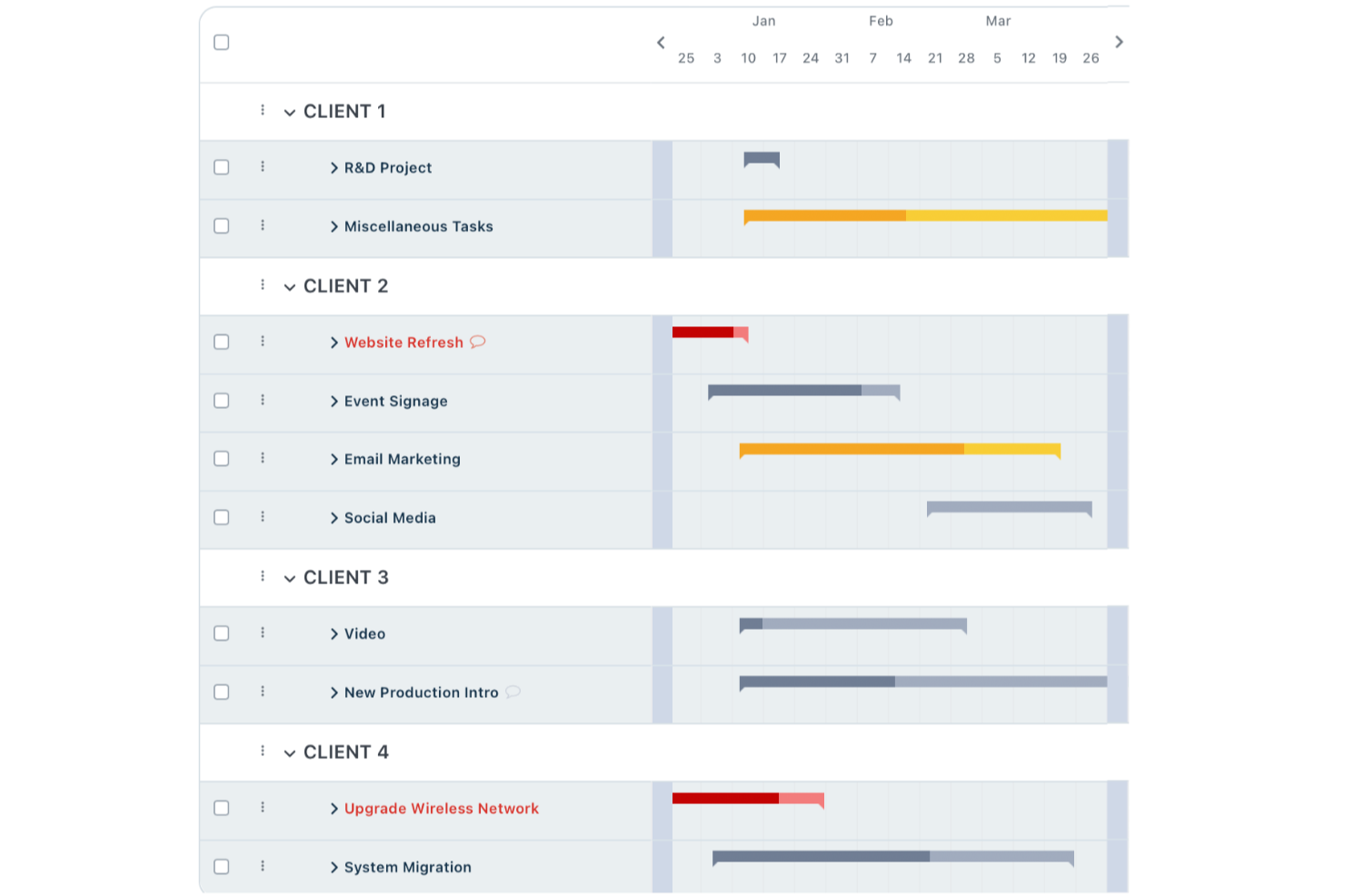
For enterprise teams seeking a reliable work management solution, Workzone offers a blend of intuitive project oversight and collaboration tools tailored to industries like marketing, operations, and IT. Its streamlined features cater to organizations managing time-sensitive projects, providing a centralized platform for project visibility and stakeholder communication. By addressing the complexities of project management with simplicity, Workzone helps your team maintain control and efficiency without the burden of tool overload.
Why I Picked Workzone
I picked Workzone for its unique ability to balance simplicity with powerful features that are crucial for enterprise work management. Its real-time project visibility ensures that your team always knows the status of tasks and deadlines, reducing the risk of project delays. Additionally, Workzone’s collaboration tools enable feedback and communication among team members, making it easier to manage projects with multiple stakeholders. These features align well with the needs of enterprises that require a reliable yet straightforward project management solution.
Workzone Key Features
In addition to its real-time visibility and collaboration tools, I also found other valuable features:
- Customizable Templates: Workzone offers over 1,000 templates to help your team quickly launch and manage projects tailored to your specific workflow.
- Pre-Built Reports: These reports provide insights into workload management, budget tracking, and resource allocation, helping your team make informed decisions.
- Centralized Communication: This feature ensures that all project-related communications are organized in one place, reducing the need for multiple tools.
- Strong Customer Support: Workzone provides unlimited training and support to ensure your team can effectively use the platform and address any issues promptly.
Workzone Integrations
Integrations include Slack, Microsoft Teams, Google Drive, Salesforce, Dropbox, Box, OneDrive, Outlook, SharePoint, and JIRA.
Pros and Cons
Pros:
- Structured request and workload management
- Built-in document proofing and approvals
- Strong project visibility and tracking
Cons:
- Mobile experience weaker than desktop
- Smaller integration ecosystem than competitors
New Product Updates from Workzone

Workzone Enterprise Adds Multi-Stage Approval Workflows
Workzone Enterprise now includes Approval Workflows, enabling multi-stage document approvals to standardize complex processes and reduce manual effort. For more information, visit Workzone's official site.
 .
.Andre alternativer for programvare for arbeidsstyring i større virksomheter
Her er noen flere alternativer som ikke kom med på topplisten, men som er verdt å vurdere.
- Adobe Workfront
For its seamless integration with Adobe products
- Kissflow Workflow
For boosting efficiency and streamlining workflows
- Planview AdaptiveWork
Roadmap views and dashboards to support your enterprise strategy
- ProjectManager
Alternative to Microsoft Project with 99.999% uptime
- Ravetree
For project, resource, and client management in one
- Pneumatic Workflow
For streamlining workflows
- Stackfield
For EU data sovereignty
- Miro
For visual collaboration in real-time and GDPR compliance
- Smartsheet
Project management software you can use as an upgrade to Excel.
- Hive
Enterprise work management software for its ease of use


How I Evaluate Enterprise Work Management Software
When a PMO needs to manage dozens of programs across business units, I look for two things: baseline capabilities that qualify a tool and differentiators that separate the best from the rest.
Core Functionality (Table Stakes For This List)
When I'm selecting tools for my list, I rank each one on a scale from 0 (does not offer the functionality) to 5 (excels in this area) for each core functionality listed below. Then, I calculate the tool's total score into a percentage. Each tool needs to achieve a minimum total score of 65% to be considered for inclusion.
- Portfolio & Program Management: I look for a true hierarchy—portfolios containing programs containing projects—with roll-up views that let a PMO director see status, spend, and risk across dozens of initiatives at once.
- Enterprise Resource Management: Capacity planning and workload balancing matter here, especially when you're allocating the same engineers across five concurrent programs and need to spot overallocation early.
- Cross-Functional Work Orchestration: I evaluate the range of work views (Gantt, Kanban, timeline, table) and whether workflows support cross-project dependencies that reflect how product, engineering, and design actually collaborate.
- Governance & Security Controls: SSO, SAML, role-based permissions, and audit logs are what I check first, along with certifications like SOC 2, ISO 27001, and GDPR compliance.
- Reporting & Analytics: The platform should offer customizable dashboards and executive-ready reports—things like portfolio health scorecards or budget burn-down charts that leadership can consume without a walkthrough.
- Integrations & Extensibility: I evaluate API depth and prebuilt connectors to the systems enterprise teams already rely on, such as Salesforce, SAP, ServiceNow, Jira, and Microsoft 365.
Once I have a list of tools that meet the criteria, I consider what sets each platform apart.
Differentiating Factors (What Sets Vendors Apart)
Here's how I compare and contrast different vendors:
Standout Features
I look for AI-driven automation that handles recurring PMO tasks like status rollups and risk flagging without manual effort. Strategic goal alignment is another differentiator—I want to see OKR or objective-tracking modules that connect individual workstreams to enterprise priorities. Scenario planning tools also stand out, especially when a portfolio manager needs to model what happens if a key initiative gets delayed or a team is reassigned mid-quarter.
Beyond Features
Licensing flexibility matters when your org has thousands of stakeholders but only hundreds of active project managers. I check whether vendors offer tiered user types so you're not paying full-seat prices for executives who only view dashboards. Implementation support is equally important—rolling out a platform across a 5,000-person org requires dedicated success managers and certified partners, not just a help center. I also evaluate vendor viability through analyst recognition, product roadmap transparency, and community strength.
Slik velger du en løsning for arbeidsstyring i større virksomheter
Det er lett å gå seg vill i lange funksjonslister og komplekse prismodeller. For å hjelpe deg med å holde fokus mens du går gjennom den unike prosessen med å velge programvare, får du her en sjekkliste over faktorer du bør ha i tankene:
| Faktor | Hva du bør vurdere |
|---|---|
| Skalerbarhet | Kontroller at løsningen kan vokse sammen med teamet ditt og håndtere flere brukere og større datamengder uten ytelsesproblemer. |
| Integrasjoner | Undersøk om den kan integreres med eksisterende verktøy som CRM, ERP og kommunikasjonsplattformer for å effektivisere arbeidsflytene. |
| Tilpasningsmuligheter | Se etter alternativer som lar teamet ditt tilpasse arbeidsflyter og instrumentpaneler etter spesifikke forretningsbehov. |
| Brukervennlighet | Velg et brukervennlig grensesnitt som reduserer læringskurven og øker produktiviteten. |
| Budsjett | Vurder de totale eierkostnadene, inkludert innledende kostnader, abonnementsavgifter og eventuelle skjulte kostnader. |
| Sikkerhetstiltak | Prioriter løsninger med solide sikkerhetstiltak som kryptering og flerfaktorautentisering for å beskytte dataene dine. |
Ærlig talt er det mye å sette seg inn i – og det er stort press for å få det riktig. Derfor foreslår jeg at du bruker vår rådgivningstjeneste for prosjektstyringsprogramvare for å få hjelp med å lage en kortliste over prosjektstyringsverktøy som passer godt for deg og organisasjonens spesifikke behov.
Hva er programvare for arbeidsstyring i større virksomheter?
Programvare for arbeidsstyring i større virksomheter er et verktøy som store organisasjoner bruker til å administrere og koordinere arbeidsprosesser og prosjekter. Den samler ulike funksjoner som prosjektstyring, ressursallokering, samarbeid og rapportering i én plattform. Denne programvaren er utviklet for å håndtere kompleksiteten og omfanget av oppgaver, ressurser og kommunikasjonsbehov i storskaladrift.
Fordelene med verktøy for arbeidsstyring i virksomheter (og annen programvare for prosjektstyring i virksomheter) omfatter forbedret effektivitet i arbeidsflyter, bedre samarbeid på tvers av avdelinger og bedre ressursstyring.
De gir sentralisert kontroll over ulike arbeidsaktiviteter og tilbyr en samlet oversikt for overvåking og analyse. Programvaren legger til rette for datadrevne beslutninger, tilpasser seg endrede behov i virksomheten og øker åpenheten rundt prosjektstatus og -resultater. Dette fører til bedre informerte strategier og mer effektiv håndtering av prosjekter og operasjoner i virksomhetsskala.
Avhengig av det spesifikke bruksområdet ditt kan du også vurdere programvare for ressursstyring i virksomheter eller programvare for arbeidsflyt i virksomheter.
Viktige funksjoner i sammenligningen av arbeidsstyring for virksomheter
I denne delen vil jeg snakke om de generelle funksjonene programvaren bør ha.
- Oppgavehåndtering: En grunnleggende funksjon som lar deg håndtere oppgavene dine, følge fremdriften i oppgavene, tildele oppgaver og mer. Visninger som viser oppgaver, kan omfatte oppgavelister, Gantt-diagrammer, Kanban-tavler og tabellvisninger.
- Forvaltning av digitale ressurser: Et sted i programvaren der du kan lagre prosjektrelaterte filer. Dette arkivet kan ligge i appen som en egen modul eller som en visning i prosjektmappen. Forvaltning av digitale ressurser er særlig nyttig for digitale byråer som arbeider med markedsføringskampanjer eller prosjekter innen nettstedutvikling.
- Dokumenthåndtering: Denne funksjonen lar deg se en liste eller et rutenett med dokumenter i prosjektet. Dokumenter er vanligvis knyttet til bestemte oppgaver og kan forsvinne i kaoset når du har for mange prosjekter. Dokumenthåndtering løser dette problemet ved å sentralisere dokumentasjonen.
- Porteføljestyring: En funksjon i programvaren der du kan følge prosjektfremdrift og prosjektteam på tvers av organisasjonen. Det er en oversikt fra fugleperspektiv over prosjektene dine, hvordan de forholder seg til organisasjonens mål og avhengighetene mellom prosjektene.
- Ressursstyring: Ressursstyring kan gi deg et øyeblikksbilde av prosjektteamene dine på tvers av flere prosjekter, de tilhørende oppgavelistene og arbeidsbelastningen. Denne funksjonen lar deg planlegge for nyansettelser, tildele eksisterende medarbeidere til prosjekter og ta andre HR-relaterte beslutninger.
- Automatisering av arbeidsflyt: Sist, men ikke minst. Automatisering av arbeidsflyt lar deg automatisere gjentakende oppgaver. Det er en del av programvaren der du kan definere atferdsregler basert på utløsere i oppgavene dine.
Vanlige spørsmål om arbeidsstyring i virksomheter
Her er noen svar på vanlige spørsmål om programvare for arbeidsstyring i virksomheter:
Hvordan avgjør du hvilket verktøy for arbeidsstyring i virksomheter som er best for teamet ditt?
For å velge riktig verktøy for arbeidsstyring i virksomheter bør du vurdere teamets spesifikke behov, for eksempel prosjektkompleksitet, teamstørrelse og krav til samarbeid. Evaluer integrasjonsmulighetene med eksisterende verktøy og systemer som teamet bruker. Vurder også læringskurven og støtten som leverandøren tilbyr. Du bør prøve ut noen alternativer for å se hvilket som passer best med arbeidsflyten din.
Kan programvare for arbeidsstyring i virksomheter integreres med eksisterende systemer?
Ja, det meste av programvaren for arbeidsstyring i virksomheter kan integreres med eksisterende systemer som CRM, ERP eller kommunikasjonsverktøy. Dette gjelder særlig programvare for oppgavehåndtering i virksomheter, som er avhengig av integrasjoner for å utløse oppdateringer av oppgaver, dele data mellom systemer og automatisere arbeidsflyter på tvers av plattformer (slik man ser i plattformer som Scoro, som legger vekt på sømløs tilkobling).
Hvilke måltall bør du følge når du bruker verktøy for arbeidsstyring i virksomheter?
Viktige måltall å følge med på omfatter fullføringsgrad for prosjekter, ressursallokering, tidsregistrering og overholdelse av budsjettet. Disse måltallene hjelper deg med å forstå hvor effektivt prosjekter styres, og hvor det er behov for forbedringer. Regelmessig gjennomgang av disse måltallene kan bidra til bedre informerte beslutninger og forbedre teamets samlede ytelse.
Hvordan håndterer verktøy for arbeidsstyring i virksomheter datasikkerhet?
Verktøy for arbeidsstyring i virksomheter ivaretar datasikkerheten gjennom kryptering, regelmessige oppdateringer og samsvar med bransjestandarder som GDPR eller HIPAA. Det er avgjørende å sikre at verktøyet du velger, har robuste sikkerhetstiltak på plass, særlig hvis du håndterer sensitiv informasjon. Gå alltid gjennom leverandørens sikkerhetspolicyer og praksis.
Er det mulig å tilpasse løsninger for arbeidsstyring i virksomheter etter spesifikke behov?
Mange løsninger for arbeidsstyring i virksomheter tilbyr tilpasningsmuligheter for å dekke spesifikke organisatoriske behov. Dette kan omfatte tilpassede arbeidsflyter, dashbord og rapporteringsfunksjoner. Tilpasning gjør det mulig å skreddersy verktøyet slik at det passer bedre til prosessene dine og forbedrer effektiviteten.
Hvordan måler du ROI-en til et verktøy for arbeidsstyring i virksomheter?
For å måle ROI sammenligner du kostnadene ved å implementere og vedlikeholde verktøyet med fordelene, for eksempel økt produktivitet, færre prosjektforsinkelser og bedre ressursstyring. Ta hensyn til både kvantitative måltall og kvalitative tilbakemeldinger fra teammedlemmene. Regelmessige vurderinger kan bidra til å sikre at verktøyet fortsetter å gi verdi til organisasjonen din.