

10 beste gratis programvareløsninger for prosjektplanlegging i 2026

10 Beste gratis programvare for prosjektplanlegging


Det finnes utallige planleggingsverktøy som tilbyr gratis prøveperioder og gratisversjoner av programvaren sin. Det kan imidlertid være vanskelig å finne ut hvilket som passer for deg. Du vet at du vil opprette, administrere og optimalisere prosjektplaner, slik at oppgavene blir fullført på en rettidig og effektiv måte, men må finne ut hvilket verktøy som lar deg gjøre dette gratis. Jeg hjelper deg! I dette innlegget skal jeg gjøre valget enklere ved å dele mine personlige erfaringer med bruk av dusinvis av ulike verktøy for oppstartsbedrifter og små team, samt mine anbefalinger av den beste gratis programvaren for prosjektplanlegging.
Hvorfor du kan stole på våre programvareanbefalinger
Teamet vårt har testet og anmeldt programvare siden 2012. Vi er selv prosjektledere, så vi vet hvor vanskelig og hvor viktig det er å velge riktig programvare.
I denne guiden har vi vurdert verktøyene gjennom praktisk testing og uavhengig research og gitt dem poeng ut fra våre utvelgelseskriterier. Vi bygger også på innsikt fra ledende eksperter i bransjen og erfarne prosjektledere.
Anmeldelsene våre bygger på vår egen redaksjonelle vurdering. De er ikke et salgsargument.
Ekspertanmeldere:
Sammenligningstabell for gratis programvare for prosjektplanlegging
Denne sammenligningstabellen oppsummerer prisdetaljene for mine beste utvalgte løsninger for gratis programvare for prosjektplanlegging:
| Tool | Best For | Trial Info | Price | ||
|---|---|---|---|---|---|
| 1 | Best free scheduling for startups and freelancers | Free plan + 14-day trial available | From $9/user/month (billed annually) | Website | |
| 2 | Best for customized solutions | 14-day free trial | Pricing upon request | Website | |
| 3 | Best for scalability & flexibility | Free plan + 15-day free trial + free demo available | From $4/user/month (billed annually) | Website | |
| 4 | Best for its wide selection of pre-made templates | Free plan + 14-day free trial available | From $8/user/month (billed annually) | Website | |
| 5 | Best for extensive visualization options | Free plan available | From $4/user/month (billed annually) | Website | |
| 6 | Best no-code document builder | Free plan available | From $15/user/month | Website | |
| 7 | Best for simple Kanban boards | Free plan + free trial available | From $5/user/month (billed annually) | Website | |
| 8 | Best for creating beautiful PowerPoint Gantt charts | Free plan available | Pricing upon request | Website | |
| 9 | Best for time tracking | Free plan available; 14-day free trial | From $9.99/user/month (billed annually) | Website | |
| 10 | Best productivity platform | Free plan + free trial + free demo available | From $12/user/month | Website |


Anmeldelser av den beste gratis programvaren for prosjektplanlegging
Her er en beskrivelse av hvert gratis prosjektstyringsverktøy som hjelper deg med å følge prosjektfremdriften basert på tidsplaner.
Best free scheduling for startups and freelancers

monday AI Workspace is a visual project management platform with timeline, Gantt, calendar, and Kanban views, built-in AI tools, task dependencies, and automation to help teams plan and track work across projects.
Who Is monday AI Workspace Best For?
It's a natural fit for startup founders and freelance project managers who need a structured but flexible way to manage multiple workstreams without a complex setup.
Why I Picked monday AI Workspace
monday AI Workspace earns its spot on my shortlist because the free plan gives solo founders and freelancers a genuine starting point, with 200+ project templates and flexible board structures that fit around how you already work. I particularly like the AI Sidekick assistant, which surfaces task context across boards so you're not chasing down updates manually. I also find the Vibe app builder useful because it lets you build lightweight custom scheduling tools around your workflow without any development work.
monday AI Workspace Key Features
- Multiple schedule views: Switch between Kanban, calendar, list, and Gantt views to match your project planning style.
- Task dependencies and milestones: Link tasks together and define key milestones to organize project execution.
- Resource assignment: Assign tasks to team members, set due dates, and manage workload across your board.
- Progress tracking columns: Add status and percentage complete columns to monitor how work moves through every stage.
monday AI Workspace Integrations
monday AI Workspace offers hundreds of native integrations through its built-in integrations and marketplace, including Slack, Google Workspace, Microsoft 365, Jira, Dropbox, Zoom, HubSpot, Salesforce, GitHub, and Outlook. It also supports Zapier and provides an API for custom integrations.
What's Free?
monday AI Workspace offers a free-forever plan for up to 2 users, with up to 3 boards and 200 items per board. The free plan doesn't include automations or integrations, so those features only become available when you upgrade to a paid tier.
Pros and Cons
Pros:
- Flexible board structure fits varied project types
- AI Sidekick surfaces task context across boards
- 200+ templates accelerate project scheduling setup
Cons:
- Gantt timeline view locked behind paid plans
- Free plan restricted to only two users
New Product Updates from monday AI Workspace
monday AI Workspace Adds Human Approval Routing
monday AI Workspace adds a human-in-the-loop approval block to AI Workflows, sending approval requests and routing workflow paths based on responses. For more information, visit monday AI Workspace's official site.
Wrike
Best for customized solutions
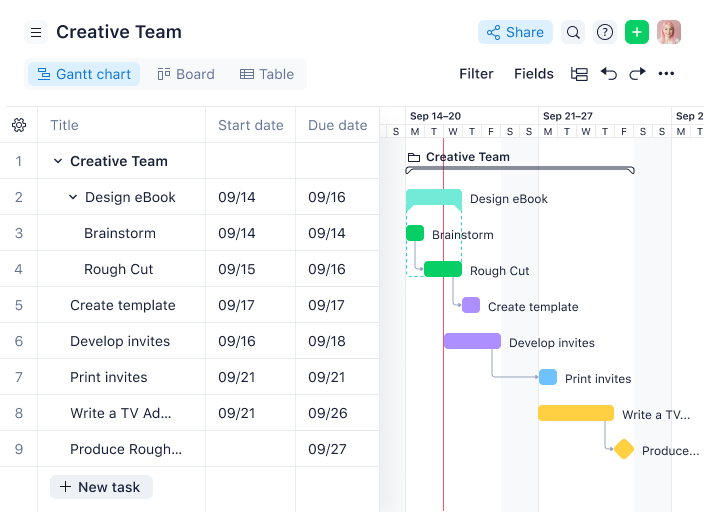
Wrike is a project scheduling and work management platform that lets teams organize tasks, build interactive Gantt charts, manage dependencies, and customize workflows for different project needs.
Who Is Wrike Best For?
Wrike is a good fit for mid-size to enterprise teams in tech, marketing, and professional services that need highly configurable project workflows.
Why I Picked Wrike
Wrike earns its spot on my shortlist because of how far it lets you push customization without touching a single line of code. I particularly like the custom item types feature, which lets my team rename and reshape work items to match how we actually talk about our projects—so instead of generic "tasks," we're working with terminology that maps directly to our process. Pair that with team-specific workflows where you can define custom statuses for every phase of a project, and you get a scheduling setup that reflects your actual delivery model. I've also found the dynamic request forms genuinely useful—they auto-generate tasks and workflows from incoming requests, which cuts down on the manual setup that usually eats up time at the start of a project.
Wrike Key Features
- Interactive Gantt charts: Visualize project timelines, adjust task durations by dragging and dropping, and map dependencies directly on the chart.
- Resource management: View team workloads across projects and reassign tasks based on capacity from a single dashboard.
- Real-time collaboration: Leave comments, tag teammates, and attach files directly on tasks to keep project communication in context.
- Cross-tagging: Add tasks to multiple project folders simultaneously so work stays visible across different team views without duplication.
Wrike Integrations
Wrike offers hundreds of integrations through its built-in integrations and marketplace, including tools like Google Workspace, Microsoft 365, Salesforce, and Slack. It also provides an API for custom integrations.
What's Free?
Wrike offers a free-forever plan for small teams with up to 5 users. The free plan includes basic task and project management features but limits access to advanced integrations and customization options.
New Product Updates from Wrike

Wrike Redesigns AI Agent Builder
Wrike redesigns its AI Agent Builder with a side-by-side setup, Scopes, sentence-style triggers and actions, and clearer filters. These changes make it easier to configure, test, and manage agent behavior. For more information, visit Wrike’s official site.

Best for scalability & flexibility
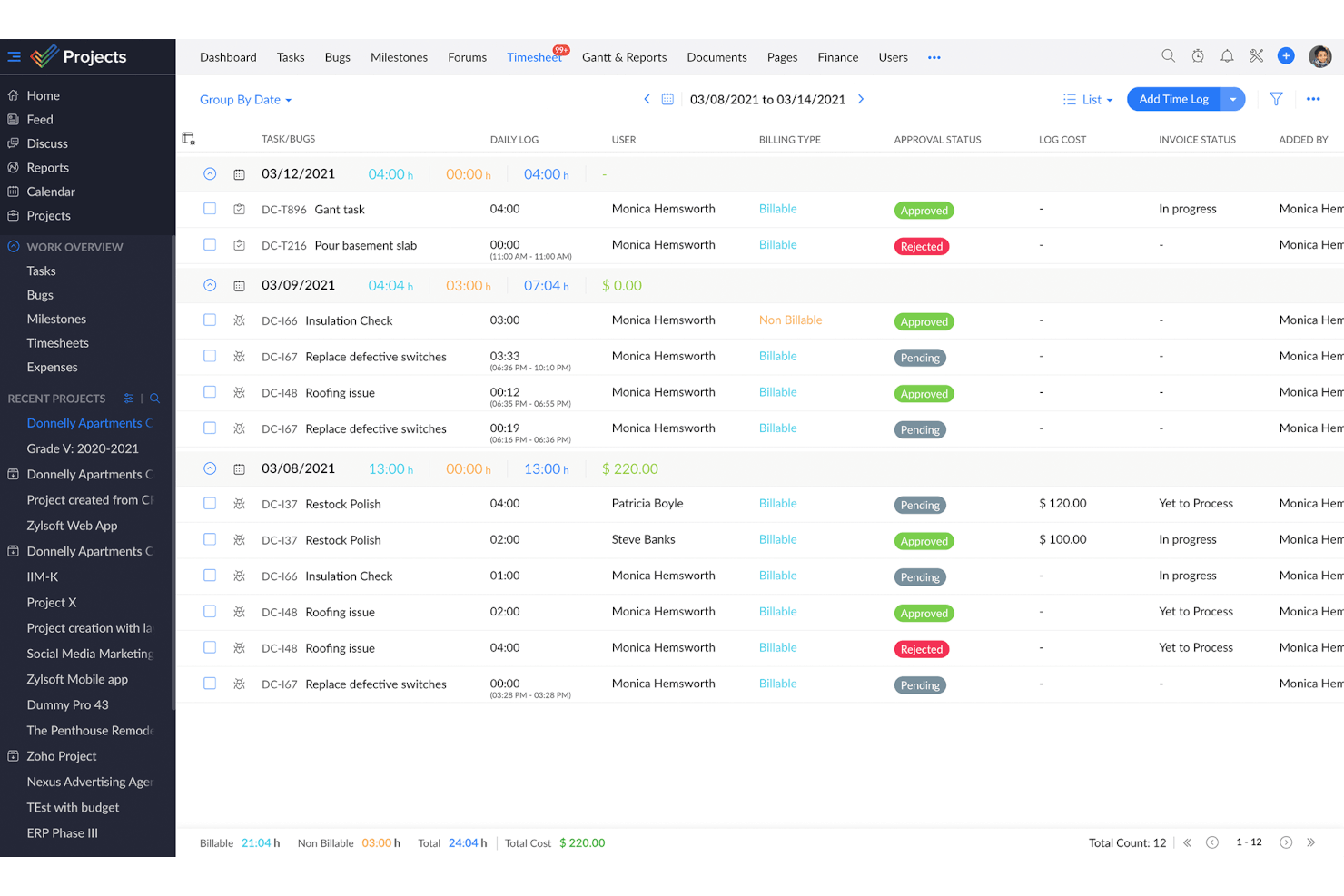
Zoho Projects is a project scheduling and management platform that gives teams tools for task planning, Gantt charts, time tracking, and team collaboration.
Who Is Zoho Projects Best For?
Zoho Projects is a good fit for growing teams that need a free project scheduling tool they won't outgrow as their headcount and project complexity increase.
Why I Picked Zoho Projects
Zoho Projects earns its spot on my shortlist because it's one of the few free project scheduling tools that genuinely scales with your team. I like that the free plan includes Gantt charts with finish-to-start task dependencies, which gives small teams real scheduling structure from day one. When your team grows and needs more, upgrading to Premium unlocks cross-project dependencies with all four dependency types, custom views, and task blueprints for repeatable workflows. The ability to add custom fields, modules, and statuses at higher tiers means you're not locked into a rigid structure as your projects get more complex.
Zoho Projects Key Features
- Milestone tracking: Set milestones within projects to mark key delivery points and monitor progress against your schedule.
- Resource management: View each team member's workload and reassign tasks when someone is over- or under-allocated.
- Project baseline: Capture a snapshot of your planned schedule at any point so you can compare actual progress against your original plan.
- Timesheet logging: Track time spent on tasks manually or with built-in timers, with admin controls to approve or reject entries.
Zoho Projects Integrations
Zoho Projects offers native integrations with Slack, Google Drive, Microsoft 365, Dropbox, GitHub, Bitbucket, Zoho CRM, Zoho Desk, and Zapier. An API is available for custom integrations.
What's Free?
Zoho Projects offers a free-forever plan for up to 3 users and 2 projects. The free plan has limited storage and does not include features like task automation, resource management, or advanced integrations.
New Product Updates from Zoho Projects
Zoho Projects Adds CodeX Scripts for Custom Modules
Zoho Projects now supports CodeX Scripts for custom modules, enabling conditional logic and rules for creating, updating, and deleting records. For more information, visit Zoho Projects' official site.
 .
Miro
Best for its wide selection of pre-made templates

Miro is a visual collaboration platform for project managers that offers interactive boards, project scheduling templates, and real-time team planning tools.
Who Is Miro Best For?
Miro is a good fit for cross-functional teams in tech and digital industries who need a flexible, visual space for collaborative project planning.
Why I Picked Miro
I've included Miro in my top picks because of the breadth of its template library—with over 7,000 templates, it's one of the most extensive collections I've seen in any visual collaboration tool. For project scheduling, you can pull up a ready-made Gantt chart, a project timeline, or an AI-powered roadmap planning template without building your structure from scratch. The Roadmap Planning AI template is particularly useful—it lets my team assign tasks, set deadlines, and track milestones directly on the board in real time. I also use the sprint planning and work breakdown structure templates regularly when kicking off new delivery cycles with cross-functional teams.
Miro Key Features
- Kanban boards: Build and manage Kanban boards directly on the canvas to track task status and visualize workflow stages across your project.
- Timeline maker: Create visual project timelines that map out deadlines, priorities, and task sequences for your team.
- Talktrack: Record async video walkthroughs of your Miro board so stakeholders can review project plans and leave comments on their own schedule.
- Infinite canvas: Expand your workspace without limits to map out complex project structures, dependencies, and workstreams in a single view.
Miro Integrations
Miro offers 100+ native integrations, including Asana, Jira, Trello, Microsoft Teams, Slack, Google Drive, Zoom, Notion, Airtable, and Dropbox. An API is available for custom integrations.
What's Free?
Miro offers a free-forever plan with unlimited team members and access to 3 editable boards per workspace. The free plan includes 5,000+ templates and core integrations, but advanced features and unlimited boards require a paid plan.
New Product Updates from Miro
Miro Adds Japan Data Residency for Enterprise Customers
Miro has introduced Japan data residency for enterprise customers, offering in-region storage for production data, backups, and metadata, plus in-region compute infrastructure. For more information, visit Miro's official site.

GoodDay
Best for extensive visualization options

GoodDay is a project scheduling and management platform that gives teams multiple ways to plan, organize, and visualize tasks, timelines, and workloads.
Who Is GoodDay Best For?
GoodDay is a good fit for small to mid-sized teams that need a flexible project management tool with a wide range of views to match different working styles.
Why I Picked GoodDay
GoodDay earns its spot on my shortlist because of how many ways it lets you look at the same project data. With 20+ views available, I can switch between a Gantt chart for timeline planning, a workload view to see how tasks are distributed across the team, a Kanban board for sprint-style execution, and a portfolio view to track status across multiple projects simultaneously. I particularly like the Project Portfolio view, which gives me a single screen showing schedule, status, and progress across all active projects without any extra setup. The workload view is also genuinely useful—it maps task assignments against planned start and end dates on a timeline, so I can spot overallocation before it becomes a delivery problem.
GoodDay Key Features
- Task dependencies: Define relationships between tasks and auto-schedule groups of related tasks to keep your project plan accurate as work shifts.
- Project milestones and deadlines: Set and track key project dates, deliverables, and deadlines directly within your project timeline.
- Custom workflows: Build task and project workflows that reflect your team's actual process, using custom statuses and configurable workflow stages.
- Time tracking and estimates: Log time against individual tasks using a built-in timer, and use the Guesstimates feature to auto-generate time estimates based on historical work data.
GoodDay Integrations
GoodDay offers native integrations with Google Drive, Slack, Jira, GitHub, Trello, and Dropbox, and provides an API for custom integrations.
What's Free?
GoodDay offers a free-forever plan for up to 15 users. The free plan includes unlimited tasks and projects but limits access to some advanced features and integrations.
Coda
Best no-code document builder

Coda is a no-code project scheduling platform that lets teams build custom schedules, interactive timelines, and collaborative documents using flexible tables, templates, and automation tools.
Who Is Coda Best For?
Coda is a good fit for project managers at small to mid-sized tech companies who need a flexible, no-code workspace to build custom project schedules without relying on engineering support.
Why I Picked Coda
I picked Coda as one of the best because I love how it lets you build a fully custom project scheduling doc without writing a single line of code. When my team needs a new project tracker, I can pull together a timeline view, a task table, and a status rollup all in one doc using Coda's building blocks—formulas, buttons, and linked tables. I especially like the cross-table referencing, where edits in one table sync automatically across the whole doc, so my schedule stays accurate without manual updates. The template gallery also gives me a solid starting point for things like sprint planning or roadmap tracking, which I can then reshape to fit exactly how my team works.
Coda Key Features
- Multiple table views: Switch between grid, calendar, kanban, and Gantt-style timeline views to visualize your project schedule in different formats.
- Workflow automation: Set up button-triggered or time-based automations to move tasks, send notifications, or update statuses without manual input.
- Coda AI: Use AI to generate tables, summarize project updates, or draft content directly inside your scheduling doc.
- Publishing: Share a polished, interactive version of your project schedule as a standalone webpage with stakeholders outside your workspace.
Coda Integrations
Coda offers native integrations with Google Calendar, Slack, Jira, GitHub, and Zoom. An API is available for custom integrations.
What's Free?
Coda offers a free-forever plan with unlimited users and docs, but limits doc size, version history, and some advanced features. Integrations and automation are available with usage caps on the free plan.
Trello
Best for simple Kanban boards

Trello is a project scheduling and task management platform that uses visual boards, lists, and cards to help teams organize projects and track progress.
Who Is Trello Best For?
Trello is a good fit for small teams and individual project managers who need a lightweight, visual way to manage tasks without a steep learning curve.
Why I Picked Trello
Trello is on my shortlist because its Kanban board is among the cleanest I've used. Cards move across lists with a simple drag-and-drop, and I can set up a full project board in minutes—no configuration overhead. I also like how checklists inside cards let me break down tasks into subtasks, with a visual progress bar that fills as items get checked off. Trello's built-in no-code automation (Butler) lets me set rules, such as moving a card to "Done" when all checklist items are complete, keeping boards accurate without manual updates.
Trello Key Features
- Calendar view: See all cards with due dates plotted on a monthly calendar to get a clear picture of your project timeline.
- Board templates: Start projects faster using pre-built templates for sprint planning, product roadmaps, and more.
- Power-Ups: Connect third-party tools and add extra functionality to your boards, like voting, time tracking, or custom fields.
- Card mirroring: Mirror cards across multiple boards so the same task stays visible in different team workspaces simultaneously.
Trello Integrations
Trello offers native integrations called Power-Ups, including Slack, Jira Cloud, and Miro. Additional integrations are available through its Power-Ups directory, and an API is available for custom integrations.
What's Free?
Trello offers a free-forever plan for up to 10 boards per workspace with unlimited cards and members. The free plan limits you to one Power-Up (integration) per board and 250 workspace command runs per month.

Best for creating beautiful PowerPoint Gantt charts

Office Timeline is a project scheduling add-in for PowerPoint that lets you create, customize, and present Gantt charts and timelines directly within your slides.
Who Is Office Timeline Best For?
Office Timeline is a good fit for project managers and business professionals who regularly present project schedules to stakeholders using PowerPoint.
Why I Picked Office Timeline
Office Timeline earns its spot on my shortlist because it's the only scheduling tool I've found that lives entirely inside PowerPoint. When I need to walk executives through a project schedule, I'm not exporting to a separate file or rebuilding a slide from scratch—I'm generating a polished Gantt chart directly on the slide using the built-in timeline wizard. I also like the drag-and-drop visual editor, which lets me shift tasks and milestones when dates change without manually redrawing anything. The designer-grade themes mean the output looks intentional and presentation-ready, not like something cobbled together in a spreadsheet.
Office Timeline Key Features
- Swimlane grouping: Organize tasks into swimlanes to separate workstreams or project phases on a single slide.
- Planned vs. actual tracking: Display baseline schedules alongside current progress to visualize schedule variance directly in your timeline.
- Data import from Excel and MS Project: Pull existing project data directly into Office Timeline to generate a visual without re-entering dates manually.
- Timeline scale options: Switch between multiple time scales to adjust the level of detail shown in your Gantt chart.
Office Timeline Integrations
Office Timeline offers native integrations with Microsoft PowerPoint, Microsoft Project, and Excel.
What's Free?
Office Timeline offers a free-forever plan with basic timeline and Gantt chart creation directly in PowerPoint. The free version limits the number of items per timeline and restricts access to premium templates and advanced features.
Best for time tracking

Teamwork.com is a project management platform for PMs that combines project scheduling, task management, Gantt charts, and built-in time tracking.
Who Is Teamwork.com Best For?
Teamwork.com is a good fit for client-facing teams and agencies that need to manage multiple projects, track billable hours, and report on delivery.
Why I Picked Teamwork.com
Teamwork.com earns its spot on my shortlist because its time tracking is built directly into every plan—including the free one—rather than locked behind a paywall like it is with most competitors. I use the native timers to log time against specific tasks in real time, and my team can bulk-log hours through timesheets when they need to catch up at the end of the day. The timesheet approval workflow provides a layer of financial control before hours are marked as billable. Coupled with Gantt chart views for scheduling, it creates a solid setup for managing project timelines alongside recorded time.
Teamwork.com Key Features
- Gantt chart view: Visualize your full project timeline, see task dependencies, and track what's due and when across multiple projects.
- Milestone tracking: Set checkpoints within a project so your team and clients always know what's expected and by when.
- Workload and capacity management: View your team's day-to-day capacity, spot scheduling conflicts in real-time, and reassign tasks to avoid bottlenecks.
- Project health reporting: Get a snapshot view across all active projects and monitor progress based on individual health status.
Teamwork.com Integrations
Teamwork.com offers native integrations with Slack, Google Drive, Dropbox, Microsoft Teams, HubSpot, Xero, QuickBooks, and Zapier. An API is available for custom integrations.
What's Free?
Teamwork.com offers a free-forever plan for up to 5 users and 2 projects. Some advanced features and integrations are only available on paid plans.
ClickUp
Best productivity platform

ClickUp is a project management platform for PMs that brings together project scheduling, task management, Gantt charts, and collaboration tools in one workspace.
Who Is ClickUp Best For?
ClickUp is a good fit for project managers and cross-functional teams at small to mid-sized companies who need a free, all-in-one workspace for scheduling and task management.
Why I Picked ClickUp
ClickUp earns its spot as one of the best on my shortlist because it genuinely functions as a full productivity platform, not just a task list. I like how my team can switch between Gantt chart views, sprint boards, and calendar views without leaving the workspace. ClickUp's task dependency mapping is something I use constantly—it lets me chain tasks across workstreams so nothing moves forward until its predecessor is done. The free plan includes all of this, which is rare at this level of scheduling depth.
ClickUp Key Features
- Workload view: See each team member's assigned tasks and capacity across a date range to spot over-allocation before it becomes a problem.
- Milestones: Mark specific tasks as milestones within a project timeline to track progress against key delivery dates.
- Custom fields: Add fields like priority, estimated effort, or status to tasks so your project data stays structured and reportable.
- Time tracking: Log time directly on tasks without a third-party tool, keeping effort data tied to the work itself.
ClickUp Integrations
ClickUp offers 50+ native integrations, including Slack, GitHub, GitLab, HubSpot, Everhour, Toggl, Harvest, Google Drive, OneDrive, Dropbox, Outlook, Google Calendar, Figma, Zoom, Bitbucket, Microsoft Teams, Intercom, Box, Zendesk, and Front. It also provides an API for custom integrations.
What's Free?
ClickUp offers a free-forever plan with unlimited tasks and members. The free plan has some feature limitations, such as restricted use of Gantt charts, limited automation, and fewer integrations compared to paid plans.
New Product Updates from ClickUp
ClickUp Adds Meetings Hub, Super Agent Templates, and ZoomInfo Integration
ClickUp adds a searchable Meetings Hub, new ways to clone and template Super Agents, and a ZoomInfo integration through the App Center. These updates improve meeting retrieval, agent reuse, and access to sales intelligence. For more information, visit ClickUp’s official site.
Andre anmeldelser av gratis programvare for prosjektplanlegging
Her er noen flere gratis verktøy for prosjektplanlegging som du kan sjekke ut.
- Productive
Work management software for agencies
- Zoho Sprints
For agile development teams
- Float.com
For prroject scoping
- Runn
Project scheduling for small teams
- Hub Planner by Milient
For businesses or teams that need to manage complex schedules and resources
- Asana
For integrations
- Basecamp
For businesses that also need communication features
- Freedcamp
Free plan with unlimited users, storage, projects, and task management.
- Airtable
For project scheduling via spreadsheets.
- Google Workspace
For those in the Google app ecosystem.
- TeamGantt
For Gantt charts
- Microsoft Online
Free project scheduling on the web using Excel, PowerPoint and the MS Office 365 suite.


How I Evaluate Free Project Scheduling Software
First, I define what counts as free. For project scheduling software, I look for a free-forever plan that keeps Gantt charts and task dependencies unlocked—not a trial that expires mid-sprint. From there, I split evaluation into core functionality a tool must have to qualify and differentiating factors that separate one vendor from another.
Core Functionality (Table Stakes For This List)
In addition to my free offer requirements, I also use a scoring system to select tools for my list. Here's how it works:
I rank each one on a scale from 0 (does not offer the functionality) to 5 (excels in this area) for each core functionality listed below. Then, I calculate the tool's total score into a percentage. Each tool needs to achieve a minimum total score of 65% to be considered for inclusion.
- Gantt Chart Scheduling: I look for interactive Gantt charts where you can drag tasks to reschedule them, not just static timeline images you can't edit.
- Task Dependencies & Milestones: A tool should let you link tasks so moving a design review deadline automatically shifts the dev sprint that follows it.
- Free Plan Availability: I check that the free tier includes real scheduling features for ongoing use, not a 14-day trial or a locked-down demo.
- Resource & Workload Assignment: Assigning tasks is table stakes, but I evaluate whether you can also see who's overloaded across the schedule at a glance.
- Calendar & Deadline Management: Due dates paired with calendar views and reminders matter, especially for coordinators juggling deliverables across client accounts.
- Schedule Collaboration & Sharing: I look at how many collaborators can edit the schedule on the free plan and whether you can share live timelines externally.
Once I have a list of tools that meet this criteria, I consider what sets each platform apart.
Differentiating Factors (What Sets Vendors Apart)
Here's how I compare and contrast different vendors:
Standout Features
I evaluate how many views a tool offers beyond the Gantt chart. Kanban and workload views, for instance, help agency coordinators spot over-allocated team members without switching tools. Built-in time tracking is another differentiator—freelancers can compare estimated vs. actual hours on scheduled tasks without a separate app. A templates library also carries weight, because a construction planner shouldn't have to build a phased timeline from scratch for every new project.
Beyond Features
Free plan generosity matters a lot here. I check whether core scheduling features like Gantt views and dependencies are available on the free tier or gated behind paid plans. Integrations are equally important—a consultant who can't sync their schedule with Google Calendar or Slack ends up duplicating work. I also look at scalability, specifically whether a tool handles 50+ tasks and multiple projects without slowing down, and whether it offers guest access so clients can view timelines without eating into your user cap.
Slik velger du gratis programvare for prosjektplanlegging
Komplekse funksjonslister og prisstrukturer kan gjøre det vanskelig å finne ut hva du egentlig får fra gratis programvare for prosjektplanlegging. For å hjelpe deg med å holde fokus mens du går gjennom prosessen med å velge programvare, er det noen faktorer du bør ha i tankene:
| Faktor | Hva du bør vurdere |
| Omfanget av gratistilbudet | Se på funksjonene som er inkludert i gratisabonnementet – er begrensningene for oppgaveavhengigheter, kalender eller brukertilgang tilstrekkelige for dine behov? |
| Skalerbarhet | Kontroller at verktøyet kan vokse sammen med prosjektene eller teamet ditt, med betalte alternativer eller avanserte funksjoner etter hvert som du utvider. |
| Integrasjoner | Bekreft kompatibilitet med apper som Google Kalender, Trello eller Slack for å effektivisere arbeidsflytene for teamet ditt. |
| Brukervennlighet | Kontroller at grensesnittet er enkelt og krever lite eller ingen opplæring, slik at teamet ditt raskt kan komme i gang. |
| Samarbeidsverktøy | Se etter funksjoner som oppgavekommentarer, fildeling og varsler for å holde teamet ditt oppdatert. |
| Tilpasningsmuligheter | Se etter alternativer for å justere visninger, maler eller arbeidsflyter slik at de passer teamets spesifikke behov. |
| Mobiltilgang | Kontroller at det finnes en mobilvennlig app for håndtering av oppgaver og tidsplaner mens du er på farten. |
| Rapporteringsfunksjoner | Vurder om programvaren inneholder grunnleggende rapportering eller fremdriftssporing for å følge med på tidsfrister og resultater. |
Hva er gratis programvare for prosjektplanlegging?
Gratis programvare for prosjektplanlegging er et verktøy som hjelper brukere med å planlegge, organisere og administrere prosjekttidslinjer, oppgaver og ressurser uten kostnad eller med begrensede gratisversjoner. Fagfolk som prosjektledere, frilansere og småbedriftseiere bruker disse verktøyene for å holde prosjekter på rett spor og overholde tidsfrister uten å bruke for mye penger. Funksjoner som planleggingsapper med dra-og-slipp, oppgaveavhengigheter og kalenderintegrasjoner er vanlige i mange gratis planleggingsverktøy, noe som gjør dem ideelle for å opprette tidslinjer og administrere arbeidsmengder effektivt.
Funksjoner i gratis programvare for prosjektplanlegging
La oss gå gjennom funksjonene som vanligvis finnes i programvare for prosjektplanlegging, og hvilke som vanligvis er inkludert i gratis programvare for prosjektplanlegging sammenlignet med betalte abonnementer.
Funksjoner som vanligvis finnes i gratis programvare for prosjektplanlegging
- Oppgavetildeling: Gjør det mulig å tildele oppgaver til teammedlemmer og angi forfallsdatoer, slik at ansvarlighet og fremdrift kan følges opp.
- Grunnleggende planleggingsverktøy: Tilbyr et enkelt grensesnitt for å opprette prosjekttidslinjer eller Gantt-diagrammer for organisering av prosjektfaser.
- Samarbeidsverktøy: Inkluderer alternativer for teamkommunikasjon og fildeling.
- Fremdriftssporing: Tilbyr funksjoner som sjekklister eller statusoppdateringer for å overvåke ferdigstillelsen av oppgaver i sanntid.
- Prosjektmaler: Tilbyr forhåndsutformede maler som hjelper deg med å sette opp prosjekter raskt uten å måtte begynne fra grunnen av.
- Begrenset rapportering: Inkluderer grunnleggende rapporteringsalternativer for å analysere prosjektfremdrift eller måltall for oppgavefullføring.
Funksjoner som vanligvis finnes i betalt programvare for prosjektplanlegging
- Avanserte integrasjoner: Muliggjør sømløs tilkobling til tredjepartsapper som CRM-systemer, verktøy for tidsregistrering eller økonomiprogramvare for utvidet funksjonalitet, noe som er ideelt for virksomheter som oppgraderer fra et gratis planleggingsprogram.
- Tilpassbare arbeidsflyter: Gir mulighet til å tilpasse prosjektfaser og oppgaveavhengigheter etter teamets unike behov.
- Ressursstyring: Tilbyr verktøy for å tildele og balansere arbeidsmengder mellom teammedlemmer eller prosjekter, noe som er et must for en app for byggeplanlegging eller organisasjoner i vekst generelt.
- Avansert analyse: Inkluderer detaljert rapportering og alternativer for datavisualisering for å gi dypere innsikt i prosjektresultater.
- Automatiseringsfunksjoner: Gjør det mulig å automatisere gjentakende oppgaver som varsler eller påminnelser, og gir betydelig merverdi sammenlignet med gratis planleggingsapper.
- Ubegrenset antall brukere eller prosjekter: Fjerner begrensninger på antall brukere eller aktive prosjekter, noe som gjør verktøy som de beste gratis planleggingsappene mer skalerbare for større team.
- Prioritert kundestøtte: Tilbyr raskere responstider eller dedikerte kundestøtteteam for å håndtere brukerproblemer effektivt.
- Forbedringer i mobilappen: Inkluderer tilgang uten nett eller avanserte mobilfunksjoner for prosjektstyring på farten.
Fordeler med gratis programvare for prosjektplanlegging
Implementering av gratis programvare for prosjektplanlegging kan gi flere fordeler for teamet og virksomheten din. Her er noen av fordelene du kan se frem til:
- Kostnadsbesparelser: Gir tilgang til grunnleggende prosjektstyringsfunksjoner uten kostnad, noe som er perfekt for små bedrifter eller oppstartsbedrifter.
- Organisering av oppgaver: Hjelper deg med å tildele og følge opp oppgaver enkelt, slik at ingenting blir glemt.
- Forbedret teamsamarbeid: Lar teamet dele filer og oppdateringer på ett sted, slik at behovet for mange e-poster frem og tilbake reduseres.
- Grunnleggende planleggingsverktøy: Gir deg tilgang til enkle verktøy som Gantt-diagrammer eller kalendere for effektiv planlegging av prosjekttidslinjer.
- Tilgjengelighet: Mange gratis verktøy tilbyr mobilapper eller skybasert tilgang, slik at du kan administrere prosjektene dine hvor som helst.
- Maler for rask oppstart: Forhåndsutformede maler lar deg starte prosjekter raskt uten å måtte bygge alt fra grunnen av.
- Begrenset rapportering: Selv gratis abonnementer inkluderer ofte grunnleggende rapportering som hjelper deg med å følge med på fremdriften og identifisere forsinkelser.
Kostnader og priser for gratis programvare for prosjektplanlegging
Jeg forstår at du kom til denne artikkelen på jakt etter de beste alternativene for prosjektplanleggingsprogramvare som er tilgjengelige gratis. Ettersom gratis abonnementer bare tilbyr begrensede funksjoner, er det imidlertid en god sjanse for at du må oppgradere abonnementet ditt i fremtiden.
Tabellen nedenfor oppsummerer vanlige abonnementer, gjennomsnittsprisene deres og typiske funksjoner som er inkludert i løsninger for prosjektplanleggingsprogramvare:
| Plantype | Gjennomsnittspris | Vanlige funksjoner |
| Gratisplan | $0 | Grunnleggende oppgavehåndtering, prosjektmaler, fildeling og begrenset rapportering. |
| Personlig plan | $5-$15/per bruker/måned | Ubegrenset antall prosjekter, grunnleggende integrasjoner, prioritert brukerstøtte og forbedret rapportering. |
| Bedriftsplan | $20-$50/per bruker/måned | Tilpassede arbeidsflyter, verktøy for teamsamarbeid, avansert rapportering og integrasjoner. |
| Foretaksplan | $50-$100/per bruker/måned | Tilpasset innføring, dedikert brukerstøtte, avansert analyse og forbedret sikkerhet. |
Vanlige spørsmål om gratis prosjektplanleggingsverktøy
Finn svar på vanlige spørsmål andre stiller om dette emnet.
Hva er programvare for prosjektplanlegging?
Programvare for prosjektplanlegging er et verktøy som hjelper deg med å holde prosjektene dine på rett spor. Det gir en oversikt over alt du må gjøre for å fullføre arbeidet, og gjør det mulig å delegere disse oppgavene til teammedlemmer.
Programvare for prosjektplanlegging har mye til felles med både programvare for prosjektstyring og programvare for ressursplanlegging.
Hvilke viktige funksjoner bør jeg se etter når jeg velger gratis programvare for prosjektplanlegging?
Verktøyene på denne listen hjelper deg alle med å planlegge prosjekter på sin egen måte. Men de har ofte en kombinasjon av følgende funksjoner:
- Prosjekter: Opprett egne områder for hvert av prosjektene dine, slik at oppgavene holdes adskilt. Dette gir viktig innsikt i hvordan hvert prosjekt utvikler seg. Gratisverktøy begrenser vanligvis antallet prosjekter du kan opprette, så kontroller at verktøyet du ønsker, dekker behovene dine før du registrerer deg.
- Oppgaver: Oppgaver er de enkelte tingene du må gjøre for å fullføre et prosjekt. De beste gratis verktøyene for prosjektplanlegging lar deg opprette oppgaver, angi forfallsdatoer og tildele teammedlemmer til hver oppgave.
- Deloppgaver og avhengigheter: Deloppgaver lar deg dele hver oppgave inn i trinn. Du kan også opprette avhengigheter, slik at arbeidet alltid fullføres i riktig rekkefølge.
- Flere visninger: Visninger gir ulik innsikt i prosjektene dine. Verktøyene på denne listen tilbyr ulike kombinasjoner av Gantt-, Kanban-, kalender- og oppgavevisninger.
- Automatisering: Noen verktøy inkluderer automatisering for å effektivisere arbeidsflyten. Trello lar deg for eksempel sette opp en automatisering som automatisk flytter en oppgave til «Ferdig»-tavlen når du krysser av alle boksene i oppgavens sjekkliste.
Hva er den beste måten å planlegge et prosjekt på?
Effektiv prosjektplanlegging er avgjørende for prosjektets suksess. Her er noen viktige fremgangsmåter du bør vurdere:
- Definer mål og omfang: Beskriv tydelig mål, leveranser og tidslinje. Identifiser viktige faser eller oppgaver.
- Del opp oppgavene: Del prosjektet inn i mindre oppgaver med tydelige start- og sluttpunkter, inkludert avhengigheter.
- Estimer varighet: Samarbeid med teamet for å anslå tiden oppgavene tar, og ta hensyn til kompleksitet, ressurser og risikoer.
- Fordel ressurser: Tildel personell, utstyr og materialer til oppgavene, og sørg for at tilgjengeligheten samsvarer med tidsplanen.
- Opprett en tidslinje: Bruk verktøy som Gantt-diagrammer for å visualisere oppgaver, avhengigheter og milepæler.
- Følg med på fremdriften: Gå regelmessig gjennom og oppdater tidsplanen for å gjenspeile endringer, og kommuniser fremdriften til interessentene.
- Håndter endringer: Forutse forsinkelser eller risikoer, vurder konsekvensene og prioriter nødvendige endringer.
Gratis verktøy for prosjektplanlegging kan hjelpe team med å samarbeide ved å holde alle samkjørte når det gjelder oppgaver, tidslinjer, roller og ansvarsområder.
Hvordan kan gratis programvare for prosjektplanlegging bidra til å implementere smidige og Scrum-baserte metodikker?
Gratis verktøy for prosjektplanlegging kan støtte smidige og Scrum-baserte metodikker ved å tilby funksjoner som sprintplanlegging, oppgavetildeling og fremdriftssporing uten kostnad. Med gratis programvare for prosjektstyring kan team opprette fleksible tidsplaner, administrere oppgavekøer og tilpasse seg endrede prioriteringer. Disse gratis planleggingsappene (som Coda sitt gratisabonnement) inkluderer også ofte integrasjoner med gratis verktøy for kalenderplanlegging og Kanban-tavler, noe som muliggjør samarbeid og effektiviserte arbeidsflyter.
Tilbyr gratis verktøy for prosjektplanlegging funksjoner for AI eller automatisering?
Noen gratis planleggingsapplikasjoner tilbyr grunnleggende funksjoner for AI eller automatisering, som prioritering av oppgaver, justering av tidsplaner og påminnelser. Selv om gratis nettbaserte planleggingsverktøy kanskje ikke har avanserte AI-funksjoner, inkluderer de ofte automatiske varsler og tidsbesparende integrasjoner. For team som trenger utvidet funksjonalitet, kan en enkel planleggingsapp også inkludere begrenset automatisering for oppgavehåndtering og kalendersynkronisering.
Tilbyr gratis verktøy for prosjektplanlegging funksjoner for tidsregistrering eller fakturering?
Mange gratis programvarer for prosjektstyring og -planlegging tilbyr grunnleggende funksjoner for tidsregistrering, slik at du kan følge med på oppgavenes varighet og prosjektets fremdrift. Noen gratis planleggingsapper inkluderer også faktureringsalternativer, men disse funksjonene kan være begrenset sammenlignet med betalingsversjonene. For små team kan en gratis planleggingsapp for små bedrifter tilby enkel tidsregistrering og fakturering.
Finnes det gratis verktøy for prosjektplanlegging med åpen kildekode?
Ja, det finnes flere gratis verktøy for prosjektplanlegging med åpen kildekode, som tilbyr tilpasningsbare løsninger for oppgavehåndtering og tidslinjer. Disse verktøyene, som ofte kategoriseres som gratis prosjektprogramvare, tilbyr funksjoner som Gantt-diagrammer, ressursfordeling og sporing av tidslinjer. For team som ønsker fleksibilitet, kan alternativer med åpen kildekode fungere som gratis planleggingsprogramvare, tilpasset spesifikke prosjektbehov.
Hvilke funksjoner for datasikkerhet og personvern tilbyr gratis verktøy for prosjektplanlegging?
Gratis verktøy for prosjektplanlegging, som de beste gratis appene for kalenderplanlegging, tilbyr ofte grunnleggende datasikkerhetsfunksjoner som kryptert lagring og passordbeskyttede kontoer. Noen gratis planleggingsnettsteder kan også inkludere begrensede tilgangskontroller for å beskytte sensitive prosjektdata. Selv om disse gratis programvareverktøyene for planlegging tilbyr grunnleggende personvern, er avansert samsvar med regelverk eller sikkerhet på bedriftsnivå vanligvis forbeholdt betalingsversjoner.