

10 beste Gantt-diagramprogrammer for Mac vurdert i 2026

10 Beste Gantt-diagramprogramvare for Mac – kortliste


Gantt-diagramprogramvare for Mac er en verdifull ressurs for alle selskaper som består av Mac-brukere. Med riktig programvare kan team forbedre visualiseringen av prosjekttidslinjer og effektiviteten i oppgavehåndteringen. Men det kan være utfordrende å finne riktig Gantt-diagramprogramvare for Mac, spesielt med så mange tilgjengelige alternativer.
Med utgangspunkt i min erfaring med prosjektstyringsprogramvare testet og sammenlignet jeg flere av de beste Gantt-diagramprogrammene som er tilgjengelige for Mac. Deretter samlet jeg resultatene mine i grundige omtaler for å hjelpe deg med å finne den beste programvaren for dine unike behov. Jeg er sikker på at du vil finne ditt neste Mac-kompatible Gantt-diagramprogram i listen nedenfor.
Hvorfor du kan stole på våre programvareanbefalinger
Teamet vårt har testet og anmeldt programvare siden 2012. Vi er selv prosjektledere, så vi vet hvor vanskelig og hvor viktig det er å velge riktig programvare.
I denne guiden har vi vurdert verktøyene gjennom praktisk testing og uavhengig research og gitt dem poeng ut fra våre utvelgelseskriterier. Vi bygger også på innsikt fra ledende eksperter i bransjen og erfarne prosjektledere.
Anmeldelsene våre bygger på vår egen redaksjonelle vurdering. De er ikke et salgsargument.
Ekspertanmeldere:
Sammenligningstabell: Gantt-diagramprogramvare for Mac
| Tool | Best For | Trial Info | Price | ||
|---|---|---|---|---|---|
| 1 | Best for custom dashboards | Free plan + 14-day trial available | From $9/user/month (billed annually) | Website | |
| 2 | Best for visual timeline planning | Free plan + 15-day trial + demo available | From $4/user/month (billed annually) | Website | |
| 3 | Best for real-time team collaboration | Free plan available | From $12/user/month | Website | |
| 4 | Best for visual project timelines | Free plan available | From $10.99/user/month (billed annually) | Website | |
| 5 | Best for client services businesses | Free plan + 14-day free trial available | From $9.99/user/month (billed annually) | Website | |
| 6 | Best for cloud-based task management | 30-day free trial + demo available | From $15/user/month (billed annually) | Website | |
| 7 | Best for managing task dependencies | Free plan + 14-day free trial available | From $8/user/month (billed annually) | Website | |
| 8 | Best for comprehensive project views | Free plan + 14-day free trial available | From $10/user/month (billed annually) | Website | |
| 9 | Best for efficient Asana integration | 7-day free trial available | From $120/year | Website | |
| 10 | Best for integrated resource planning and scheduling | Free plan available | From $4/user/month (billed annually) | Website |


Omtaler av den beste Gantt-diagramprogramvaren for Mac
Nedenfor finner du mine detaljerte sammendrag av den beste Gantt-diagramprogramvaren for Mac iOS som kom med på kortlisten min. Omtalene mine gir et detaljert innblikk i de viktigste funksjonene, fordelene & ulempene, integrasjonene og ideelle bruksområdene for hvert verktøy, slik at du kan finne det beste alternativet for deg.

Best for custom dashboards
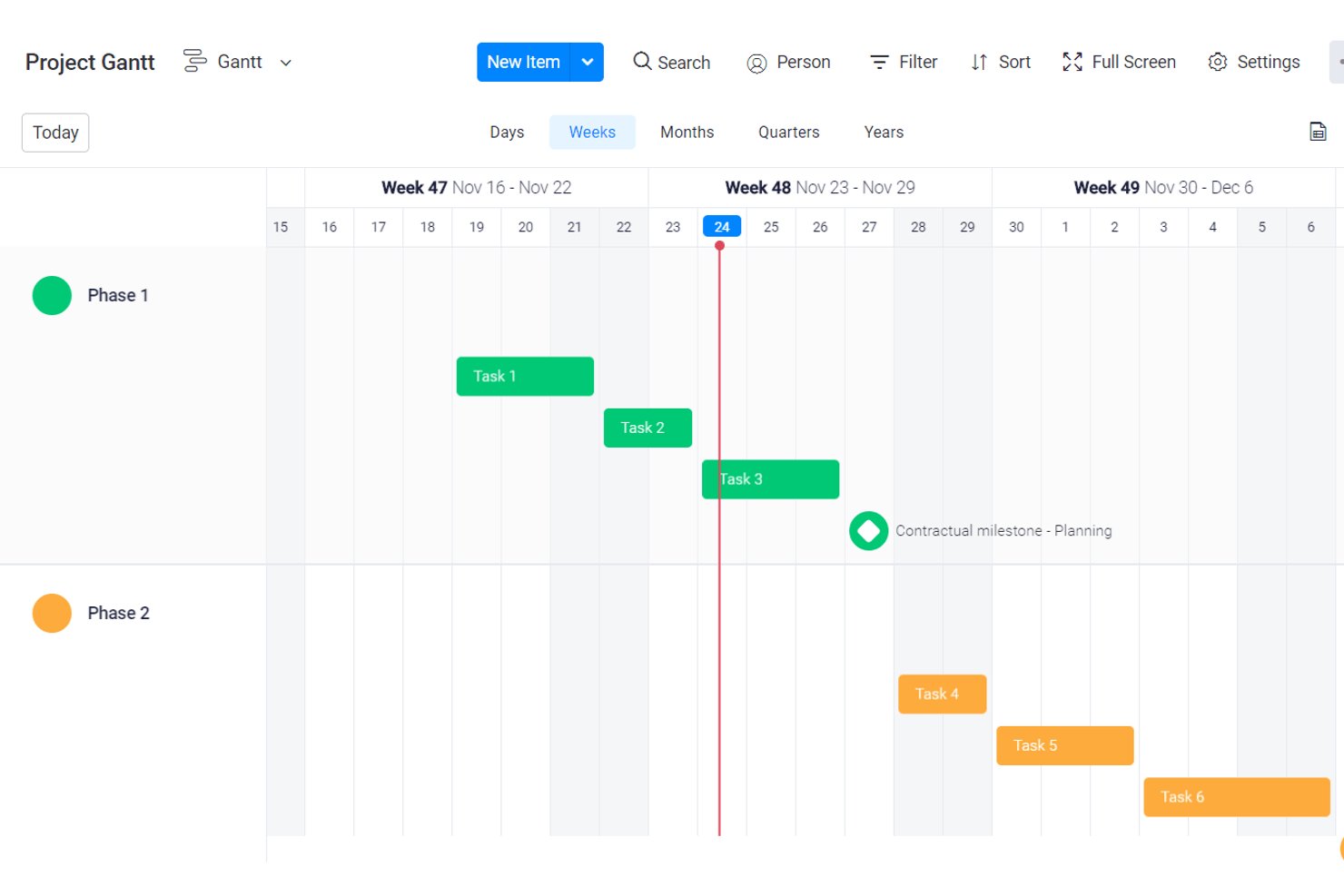
monday AI Workspace is a browser-based project management platform that brings together Gantt chart timelines, task dependencies, milestone tracking, workload management, and AI-powered workflow automation in a single, highly configurable workspace.
Who Is monday AI Workspace Best For?
It's a strong fit for cross-functional teams and project managers who need flexible, visual project tracking across multiple workstreams without rigid, traditional scheduling tools.
Why I Picked monday AI Workspace
I picked monday AI Workspace because its dashboard customization goes well beyond color schemes and layout. I can pull Gantt timelines, workload data, and task-level dependencies into a single live dashboard, then filter by team, project phase, or status without ever leaving the view. That kind of cross-board reporting, with AI-generated summaries layered in, is what I reach for when I need to keep stakeholders across a multi-phase release informed without building manual slide decks every week.
monday AI Workspace Key Features
- Interactive Gantt chart view: Drag and drop tasks along a timeline, adjust scales, and create dependencies within a web browser on Mac.
- Milestone and baseline tracking: Mark project milestones and compare planned versus actual progress to maintain schedule accuracy.
- Workload and capacity dashboard: Visualize team member assignments, workload, and capacity to identify bottlenecks or resource conflicts.
- Critical path calculation: Automatically identify and highlight the critical path so project managers can track progress and schedule health.
monday AI Workspace Integrations
monday AI Workspace offers hundreds of native integrations, including Slack, Google Workspace, Microsoft 365, Salesforce, Jira, GitHub, Zoom, Dropbox, HubSpot, and Zendesk. It also supports Zapier and provides an API for custom integrations.
Pros and Cons
Pros:
- Gantt timelines update automatically when dependencies shift
- AI-generated project summaries save reporting time
- Highly customizable dashboards across multiple projects
Cons:
- Gantt features locked behind higher-tier plans
- No native macOS desktop app available
New Product Updates from monday AI Workspace
monday AI Workspace Adds Human Approval Routing
monday AI Workspace adds a human-in-the-loop approval block to AI Workflows, sending approval requests and routing workflow paths based on responses. For more information, visit monday AI Workspace's official site.

Best for visual timeline planning
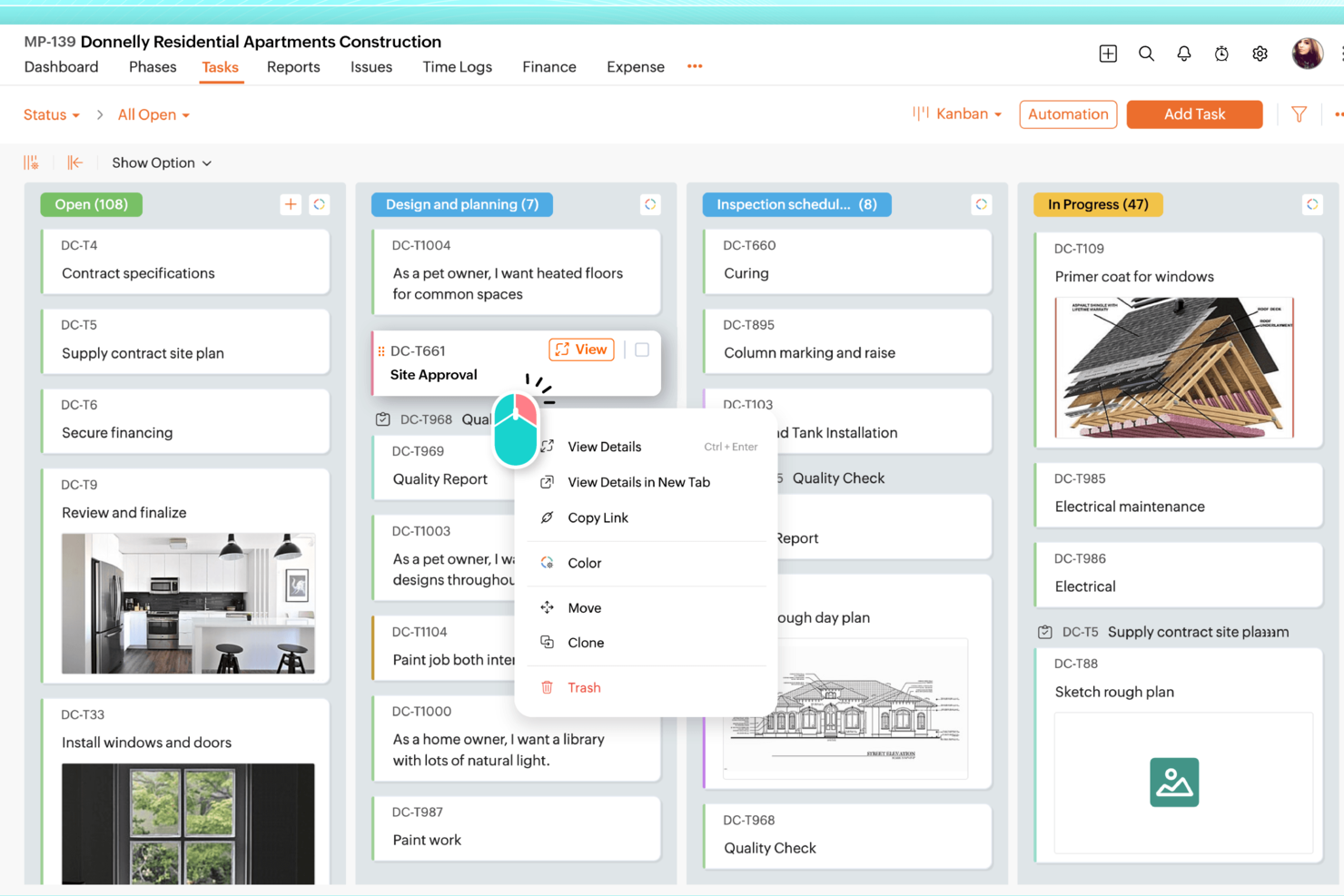
For professionals seeking a Gantt chart software tailored for Mac, Zoho Projects stands out by offering a comprehensive suite of project management tools. Whether you're a project manager in the IT sector or a freelancer juggling multiple deadlines, Zoho Projects helps you manage timelines and dependencies with precision. It addresses the need for clear visualizations of project progress, ensuring that your team stays aligned and on track.
Why I Picked Zoho Projects
I picked Zoho Projects because it excels in providing detailed Gantt chart capabilities, which are crucial for Mac users who need to visualize project timelines. The drag-and-drop interface simplifies the process of adjusting task dependencies, allowing you to manage changes seamlessly. Additionally, its real-time tracking feature ensures you stay updated on project progress, which is vital for maintaining accountability and meeting deadlines.
Zoho Projects Key Features
In addition to its excellent Gantt chart capabilities, Zoho Projects offers several other features that enhance project management:
- Task Management: Allows you to create, assign, and track tasks efficiently, ensuring everyone knows their responsibilities.
- Time Tracking: Helps you monitor how much time is spent on each task, aiding in productivity analysis and billing.
- Team Collaboration: Facilitates communication and collaboration within your team through forums, chats, and document sharing.
- Customizable Dashboards: Provides the ability to create personalized dashboards to track the most relevant project metrics for your team.
Zoho Projects Integrations
Integrations include Zoho CRM, Zoho Analytics, Zoho Books, Google Calendar, Google Drive, Microsoft Teams, Microsoft Outlook, Dropbox, Slack, and GitHub. These integrations expand the functionality of Zoho Projects, allowing seamless data flow and enhanced collaboration across various platforms.
Pros and Cons
Pros:
- Affordable pricing for growing teams
- Built-in time tracking and billing
- Strong automation and workflow customization
Cons:
- Mobile experience less fully featured
- Interface has steeper learning curve
New Product Updates from Zoho Projects
Zoho Projects Adds CodeX Scripts for Custom Modules
Zoho Projects now supports CodeX Scripts for custom modules, enabling conditional logic and rules for creating, updating, and deleting records. For more information, visit Zoho Projects' official site.
 .
.
ClickUp
Best for real-time team collaboration

ClickUp is a versatile project management platform designed to support a wide range of business functions including task management, resource allocation, and workflow automation. It caters primarily to project managers, teams, and organizations looking to enhance productivity and collaboration.
Why I picked ClickUp: ClickUp offers extensive customization options, allowing you to tailor every aspect of your workspace to fit your specific needs. Features like whiteboards, shared docs, and multiple task views provide flexibility in managing your projects and facilitating real-time team collaboration. The Gantt chart allows you to visually map out project timelines, dependencies, and milestones, with real-time updates that can be easily shared with clients or team members for better collaboration and tracking.
Standout features & integrations:
Features include task management with multiple viewing options, customizable ClickApps, and resource management tools that allow you to track time, set dependencies, and bulk edit tasks. Your team can also benefit from whiteboards for brainstorming sessions and shared docs for collaborative document creation.
Integrations include Slack, Google Drive, Dropbox, Zoom, Microsoft Teams, Outlook, GitHub, Evernote, Jira, and OneDrive.
Pros and Cons
Pros:
- Easy bulk editing
- Multiple task views
- Customizable ClickApps
Cons:
- Steep learning curve
- Complex interface

Asana
Best for visual project timelines

Asana is a project management tool that helps teams organize, track, and manage their work and projects efficiently. It is primarily used by teams aiming to improve collaboration, ensure accountability, and enhance project visibility.
Why I picked Asana: Asana offers task assignments and timeline views, project visualization through boards and calendars, and real-time updates. Your team can use its Gantt view to build projects, create subtasks, and set dependencies. The drag-and-drop interface also makes adjusting dates and task durations simple. Additionally, Asana facilitates communication with message boards and mentions.
Standout features & integrations:
Features include task assignments, project visualization through boards and calendars, and real-time updates. You can assign tasks to team members directly from the Gantt view, ensuring clarity on responsibilities. Additionally, task dependencies and critical paths make it easy to anticipate bottlenecks and adjust resources efficiently.
Integrations include Slack, Microsoft Teams, Google Drive, Dropbox, Salesforce, Okta, Evernote, Tableau, Power BI, and GitHub.
Pros and Cons
Pros:
- Real-time updates
- Drag-and-drop interface
- Subtasks in Gantt view
Cons:
- Complicated workflow automations
- Limited mid-tier plan

Best for client services businesses
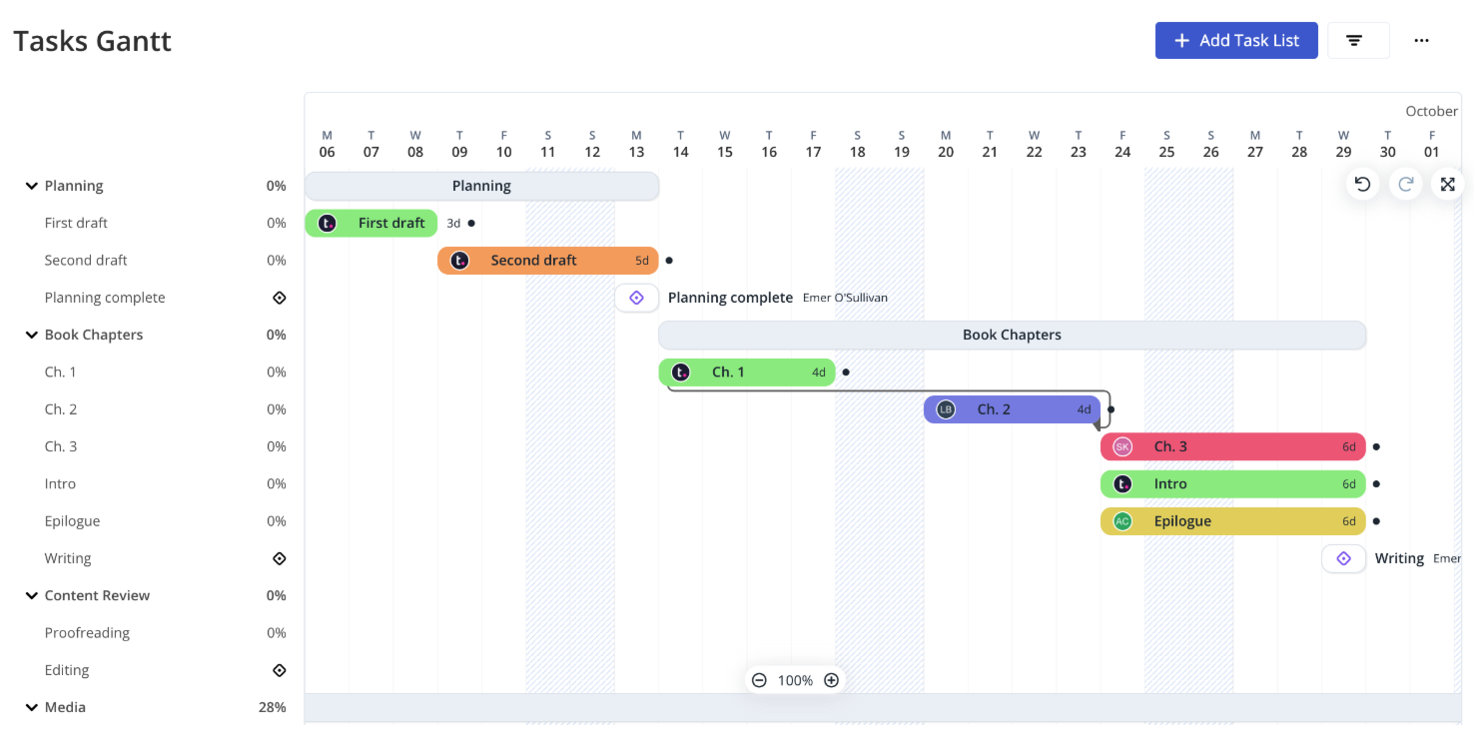
Teamwork.com is a project management software geared towards helping teams collaborate more effectively and manage projects from inception to completion. It provides features such as task assignments, milestone tracking, and Gantt chart views that aid in detailed project scheduling and progress monitoring.
Why I picked Teamwork.com: Teamwork.com’s Gantt chart feature allows you to shift project timelines easily by dragging and dropping phases, which automatically adjusts dependent tasks. Milestones can be configured from the top menu, although they can't be created directly within the Gantt view. Additionally, built-in time tracking and client-specific reporting make it easy to monitor project health and keep clients informed, making this a great option for businesses focused on client services.
Standout features & integrations:
Features include task creation in list, table, and Gantt views, drag-and-drop timeline adjustments, and bulk editing of tasks, progress updates, and user reassignments. Your team can also use built-in chat for communication and set up approvals for assets in the proofs section.
Integrations include Slack, HubSpot, Skyvia, Xero, Stripe, Microsoft Office, Atarim, TimeJam, Asinaria, and Harvest.
Pros and Cons
Pros:
- Free collaborator access
- Bulk task editing
- Easy task shifting
Cons:
- Limited date field editing
- Requires 3 user licenses for Pro

Best for cloud-based task management

ProjectManager provides an online Gantt chart maker designed for efficient project planning and scheduling. Its main users include project managers and teams across various industries who need to organize tasks, manage resources, and meet deadlines effectively.
Why I picked ProjectManager: ProjectManager offers cloud-based Gantt chart scheduling with an intuitive drag-and-drop interface, allowing you to easily adjust tasks and timelines. The software also includes real-time collaboration features, enabling team members to add comments and share files directly within tasks. Furthermore, ProjectManager supports importing and exporting a variety of file formats, ensuring seamless integration with other tools your team may be using.
Standout features & integrations:
Features include drag-and-drop scheduling, real-time project tracking, and resource management. Resource management tools are integrated, helping you allocate team members and resources efficiently. You can also set task dependencies with automatic updates to ensure the project flows smoothly.
Integrations include Slack, Microsoft Project, Trello, Jira, Microsoft Teams, Power BI, Acumatica, Microsoft Office 365, Microsoft Exchange, and Microsoft Excel.
Pros and Cons
Pros:
- Supports various file formats
- Real-time updates
- Drag-and-drop scheduling
Cons:
- Limited customization
- Learning curve

Miro
Best for managing task dependencies

Miro is an online collaboration platform that offers a range of tools to help teams work together effectively. Among its features is a Gantt chart tool, which allows you to plan and visualize project timelines.
Why I picked Miro: Miro's Gantt chart tool enables you to set timeframes for your projects by mapping out steps and deliverables, assigning start and end dates, and adding deadlines. This helps your team stay organized and ensures that everyone is aware of the project schedule. Additionally, Miro allows you to add dependencies between tasks, helping you identify and manage relationships between different project activities.
Standout features & integrations:
Features include collaborative editing, real-time updates, customizable templates, drag-and-drop functionality, task assignment, progress tracking, commenting, file attachments, version history, presentation mode, export options, and mobile accessibility.
Integrations include Microsoft 365, Google Workspace, Atlassian Jira, Atlassian Confluence, Microsoft Teams, Slack, AWS, GitHub, Azure DevOps, Asana, Trello, and Zoom.
Pros and Cons
Pros:
- Transforms complex ideas into visual formats
- Real-time updates
- Collaborative editing features
Cons:
- Not ideal for teams that prefer detailed, text-heavy documentation
- Customizing for specific projects can be time-consuming
New Product Updates from Miro
Miro Adds Japan Data Residency for Enterprise Customers
Miro has introduced Japan data residency for enterprise customers, offering in-region storage for production data, backups, and metadata, plus in-region compute infrastructure. For more information, visit Miro's official site.

Wrike
Best for comprehensive project views

Wrike is a versatile project management software that supports team collaboration and project tracking. It caters primarily to project managers looking to optimize resource allocation and project timelines.
Why I picked Wrike: Wrike offers customizable dashboards, proofing, and detailed reports, all aimed at improving project transparency and decision-making. Its time-tracking capabilities and workload management features are designed to help your team stay on top of deadlines and tasks. Wrike's Gantt chart feature additionally provides a visual timeline of your project, making it easy to track progress, manage dependencies, and adjust schedules in real time.
Standout features & integrations:
Features include customizable dashboards, proofing, and detailed reports. The software also supports various methodologies like agile and waterfall and provides real-time visibility into project progress with automatic updates as tasks are completed.
Integrations include Slack, Google Drive, Microsoft Teams, Dropbox, Salesforce, Zendesk, Box, HubSpot, Okta, and GitHub.
Pros and Cons
Pros:
- Scalable structures
- Supports agile and waterfall
- Customizable dashboards
Cons:
- Steep learning curve
- Complex Gantt chart setup
New Product Updates from Wrike

Wrike Redesigns AI Agent Builder
Wrike redesigns its AI Agent Builder with a side-by-side setup, Scopes, sentence-style triggers and actions, and clearer filters. These changes make it easier to configure, test, and manage agent behavior. For more information, visit Wrike’s official site.

Best for efficient Asana integration

Instagantt is an online Gantt chart software designed for project management. Its main user base includes project managers and teams across various industries, offering key business functions like task management, project organization, and collaboration tools.
Why I picked Instagantt: Instagantt allows you to create detailed Gantt charts with drag-and-drop scheduling and custom colors. Its project views include Gantt charts, as well as table views and Kanban boards, making it easy to visualize tasks and workloads in a way that works for you. Moreover, Instagantt's Asana integration allows seamless syncing of tasks and project data, enabling you to manage and update your Gantt charts directly within Asana for improved collaboration and real-time updates.
Standout features & integrations:
Features include multiple project views (Gantt charts, table views, Kanban boards), drag-and-drop scheduling, and custom fields and priority settings. You can manage tasks, set priorities, and utilize collaboration tools like task assignments and a team inbox. Time-saving options include Gantt chart templates and automated task scheduling.
Integrations include Asana.
Pros and Cons
Pros:
- Templates available
- Easy Asana integration
- Customizable task management
Cons:
- No desktop app
- Complex projects need setup in Asana

GoodDay
Best for integrated resource planning and scheduling

GoodDay is a versatile work management platform that can transform how your team handles project planning and collaboration, offering helpful support for integrated resource planning and scheduling. Designed for diverse industries, from marketing to human resources, it offers customizable workspaces and over 20 visualization options, including Gantt charts, to fit your unique workflows. By enhancing team collaboration and accountability, GoodDay aims to streamline your processes and boost productivity, making it an ideal Gantt chart solution on Mac.
Why I Picked GoodDay
I picked GoodDay for its strength in integrated resource planning and scheduling, which pairs seamlessly with its adaptable Gantt chart capabilities. This tool allows you to visualize tasks and dependencies with ease, offering customizable columns and advanced management options that align perfectly with your team’s workflows. Additionally, the platform supports various project management methodologies, such as Waterfall and Agile, providing flexibility in how you approach your projects.
GoodDay Key Features
In addition to integrated resource planning and scheduling, GoodDay offers:
- Customizable Workspaces: Tailor your workspace to align with your team’s specific needs, ensuring a personalized project management experience.
- Time Tracking: Monitor time spent on tasks and projects to provide insights into team efficiency and areas for improvement.
- Goal Management: Set and track goals to ensure your team stays focused and aligned with overall project objectives.
GoodDay Integrations
Integrations include Google Workspace, Slack, Microsoft Teams, Microsoft Outlook, GitHub, GitLab, Trello, Jira, Asana, and Zapier. An API is also available for custom integrations.
Pros and Cons
Pros:
- Facilitates team collaboration with built-in communication tools
- Visual task dependencies help clarify project flow
- Drag-and-drop scheduling makes timeline updates easy
Cons:
- Lacks some advanced enterprise scheduling features
- Occasional slow response times reported by users
Annen Gantt-diagramprogramvare for Mac
Her er noen flere alternativer for Gantt-diagramprogramvare for Mac som ikke kom med på kortlisten min, men som likevel er verdt å sjekke ut:
- Lucidchart
For real-time project visualization
- Paymo
For automatic task scheduling
- Freedcamp
For free project management features
- Celoxis
For advanced reporting and integration
- MeisterTask
For centralized task management
- TeamGantt
For quick setup and affordability
- GanttProject
For open-source project management


How I Evaluate Gantt Chart Software for Mac
I look at two things: whether a tool genuinely works on Mac with real Gantt controls, then the differentiators—like MS Project import or client sharing—that matter most for your workflow.
Core Functionality (Table Stakes For This List)
When I'm selecting tools for my list, I rank each one on a scale from 0 (does not offer the functionality) to 5 (excels in this area) for each core functionality listed below. Then, I calculate the tool's total score into a percentage. Each tool needs to achieve a minimum total score of 65% to be considered for inclusion.
- macOS Compatibility: I check whether the tool runs as a native Mac app or a fully functional web app—some platforms still have Safari rendering quirks that break Gantt views.
- Gantt Chart Visualization: The Gantt view should let you drag bars, zoom between day and quarter scales, and group tasks by phase or team without losing readability.
- Task Dependency Support: I evaluate whether the tool handles all four dependency types and auto-reschedules downstream tasks when a predecessor slips mid-sprint.
- Milestones & Baseline Tracking: Baseline snapshots matter when stakeholders ask why a launch date moved—I look for visual variance overlays directly on the Gantt.
- Resource & Workload Management: Teams juggling multiple projects need to spot overallocation fast, so I check for workload heatmaps or capacity views tied to task assignments.
- Critical Path & Progress Tracking: I look for automatic critical path highlighting paired with percent-complete indicators so you can see schedule risk at a glance.
Once I have a list of tools that meet the criteria, I consider what sets each platform apart.
Differentiating Factors (What Sets Vendors Apart)
Here's how I compare and contrast different vendors:
Standout Features
MS Project import/export is a big one—if your team or clients still rely on .mpp files, a tool that handles those natively saves hours of manual re-entry. I also look for client-facing sharing options like read-only links or PDF exports, since agency producers and consultants regularly need to send timeline updates without adding stakeholders as paid users. Portfolio views that consolidate multiple project Gantt charts into a single timeline help program managers spot cross-project conflicts before they cascade.
Beyond Features
Licensing model matters more than most buyers expect. A freelance consultant managing two client projects has very different needs than a 50-person agency, so I evaluate whether pricing is per-user, flat-rate, or a one-time purchase. Integration fit is equally important—I check for native connections to Jira, Slack, and Google Workspace since most Mac-based teams already live in those tools. I also consider whether the platform scales from solo use to team collaboration with role-based permissions, so you're not switching tools as your team grows.
Slik velger du Gantt-diagramprogramvare for Mac
Det er lett å gå seg vill i lange funksjonslister og komplekse prisstrukturer. For å hjelpe deg med å holde fokus mens du går gjennom din unike prosess for valg av programvare, får du her en sjekkliste over faktorer du bør ha i tankene:
| Faktor | Hva bør du vurdere? |
| Skalerbarhet | Vil denne programvaren vokse sammen med teamet ditt? |
| Integrasjoner | Integreres den godt med de eksisterende systemene og verktøyene dine? |
| Tilpasningsmuligheter | Kan du tilpasse programvaren til dine spesifikke behov? |
| Brukervennlighet | Er programvaren brukervennlig for alle teammedlemmer? |
| Budsjett | Holder den seg innenfor dine økonomiske rammer? |
| Sikkerhetstiltak | Er dataene og prosjektene dine sikre? |
| Støtte | Er pålitelig kundestøtte tilgjengelig? |
| Funksjoner | Har den de viktigste funksjonene du trenger? |
Trender innen Gantt-diagramprogramvare for Mac
I undersøkelsen min fant jeg utallige produktoppdateringer, pressemeldinger og lanseringslogger fra ulike leverandører av Mac-kompatibel Gantt-diagramprogramvare. Her er noen av de fremvoksende trendene jeg følger med på:
- Interaktiv visualisering: Moderne Gantt-diagramverktøy integrerer stadig flere interaktive elementer, som dra-og-slipp-grensesnitt og oppdateringer i sanntid. Disse funksjonene gjør det enkelt for brukere å endre tidslinjer og avhengigheter direkte i diagrammet. Brukere kan for eksempel justere prosjektfaser og avhengigheter ved å dra dem til nye datoer, noe som effektiviserer prosjektjusteringer.
- Tilpassbare dashbord: Brukere ønsker i stadig større grad personlige visninger. Mange plattformer tilbyr nå tilpassbare dashbord der brukere kan integrere diagrammer, samarbeidsdokumenter og widgeter for oppgavesporing, tilpasset deres spesifikke behov. Denne fleksibiliteten gir et mer fokusert og relevant arbeidsområde.
- Forbedrede samarbeidsfunksjoner: Samarbeid har blitt et sentralt element i prosjektstyringsprogramvare. Verktøy inkluderer ofte funksjoner som kommentarer i sanntid, fildeling og integrerte kommunikasjonskanaler, noe som gjør teamarbeidet smidigere og mer effektivt. Noen verktøy tilbyr også unike måter å spore prosjektfremdrift visuelt på, med samarbeidsområder for teamoppdateringer.
- Avansert oppgavehåndtering: Funksjonene for oppgavehåndtering blir stadig bedre, og funksjoner som underoppgaver på flere nivåer, masseendring og detaljerte oppgavekort blir vanlige. Disse forbedringene gjør det mulig for brukere å oppdatere oppgaver, justere fremdrift og omfordele ansvar effektivt, slik at de sparer tid på håndtering av arbeidsmengder.
- Fremdriftssporing og rapportering: Det legges stadig større vekt på avanserte funksjoner for fremdriftssporing og rapportering. Mange verktøy tilbyr nå mer detaljerte måledata og visualiseringsalternativer, slik at brukere kan følge milepæler, fullføringsprosenter og prosjektets overordnede status med et øyekast, noe som hjelper team med å holde seg samkjørte med prosjektmålene.
Hva er Gantt-diagramprogramvare for Mac?
Gantt-diagramprogramvare for Mac er en type prosjektstyringsverktøy som er utviklet for å hjelpe brukere med å opprette og administrere prosjekttidslinjer spesielt på Mac-enheter produsert av Apple. Prosjektledere, teamledere og fagfolk innen områder som byggebransjen, programvareutvikling og arrangementsplanlegging bruker vanligvis disse verktøyene for å holde prosjektene på rett spor og overholde tidsfrister.
Disse verktøyene gir verdi ved å organisere oppgaver visuelt, angi avhengigheter og spore fremdrift. Funksjoner som justering av oppgaver med dra-og-slipp, ressursallokering og milepælsporing gjør det enklere å håndtere komplekse prosjekter effektivt. Alt i alt forbedrer disse verktøyene prosjektinnsikten og koordineringen på tvers av team.
Funksjoner i Gantt-diagramprogramvare for Mac
Når du velger Gantt-diagramprogramvare for Mac, bør du se etter følgende viktige funksjoner:
- Oppgavehåndtering: Gjør det mulig for brukere å opprette, tildele og administrere oppgaver og underoppgaver direkte i Gantt-visningen.
- Ressursstyring: Gjør det enklere å overvåke og fordele ressurser på tvers av prosjekter, slik at arbeidsbelastningen blir balansert.
- Milepælsporing: Gjør det mulig å opprette og administrere prosjektmilepæler for å sikre at viktige tidsfrister overholdes.
- Dra-og-slipp-funksjonalitet: Gir en intuitiv måte å justere oppgavedatoer og avhengigheter på ved ganske enkelt å dra oppgaver til nye posisjoner på tidslinjen.
- Tilpassede dashbord: Gjør det mulig for brukere å bygge personlige dashbord med diagrammer, samarbeidsdokumenter og annen prosjektrelatert informasjon.
- Fremdriftssporing: Tilbyr verktøy for å følge statusen til oppgaver, inkludert fremdriftsprosenter og visuelle indikatorer i Gantt-diagrammet.
- Masseendring: Gjør det mulig å oppdatere flere oppgaver samtidig, noe som sparer tid og sikrer konsistens på tvers av prosjekter.
- Porteføljestyring: Inkluderer funksjoner for å gruppere og administrere flere prosjekter, slik at det blir enklere å holde oversikt over en portefølje og følge den samlede fremdriften.
- Interaktive rapporter: Tilbyr visuelle rapporter som gir en overordnet oversikt over prosjektstatusen og fremhever områder som trenger oppmerksomhet.
- Samarbeidsverktøy: Integrerer funksjoner som støtter teamsamarbeid, for eksempel delte dokumenter og kommunikasjonskanaler.
Fordeler med Gantt-diagramprogramvare for Mac
Implementering av Gantt-diagramprogramvare for Mac gir flere fordeler for teamet og virksomheten din. Her er noen av fordelene du kan se frem til:
- Forbedret oppgavehåndtering: Organiserer og tildeler oppgaver med start- og sluttdatoer, noe som gjør det enklere å følge prosjektets fremdrift og tidsfrister.
- Forbedret ressursallokering: Visualiserer ressursfordelingen og overvåker teamets arbeidsbelastning for å sikre balanserte tildelinger.
- Tydelige prosjektforløp: Gir en visuell oversikt over prosjektfaser, milepæler og avhengigheter for bedre planlegging og gjennomføring.
- Effektive oppgavejusteringer: Flytter enkelt prosjektets tidslinjer ved å dra og slippe oppgaver, samtidig som avhengigheter oppdateres automatisk.
- Sentralisert prosjektinformasjon: Lagrer alle prosjektrelaterte data, inkludert filer og kommentarer, på ett sted for enkel tilgang og samarbeid.
- Fremdriftssporing i sanntid: Overvåker statusen til oppgaver og prosjektets fullføringsprosent for å holde oversikt over prosjektutviklingen.
- Tilpassbare visninger: Bruker ulike visninger, som Gantt-, liste- eller kalendervisning, for å passe til den foretrukne prosjektstyringsstilen og gi bedre oversikt over arbeidsflyten.
Kostnader og priser for Gantt-diagramprogramvare for Mac
Når du velger Gantt-diagramprogramvare for Mac, må du forstå de ulike prismodellene og abonnementene som er tilgjengelige. Kostnadene varierer basert på funksjoner, teamstørrelse, tillegg og mer. Tabellen nedenfor oppsummerer vanlige abonnementer, gjennomsnittsprisene deres og typiske funksjoner som er inkludert i Gantt-diagramprogramvareløsninger som er kompatible med Mac:
Sammenligningstabell for abonnementer for Gantt-diagramprogramvare for Mac
| Abonnementstype | Gjennomsnittspris | Vanlige funksjoner |
| Gratisabonnement | $0 | Grunnleggende oppgavehåndtering, begrenset antall prosjekter, begrenset antall brukere og kundestøtte via e-post. |
| Personlig abonnement | $5-$10/bruker/måned | Ubegrenset antall prosjekter, grunnleggende Gantt-diagramfunksjoner, oppgaveavhengigheter og begrensede integrasjoner. |
| Bedriftsabonnement | $15-$25/bruker/måned | Avanserte Gantt-diagramfunksjoner, teamsamarbeid, tidsregistrering, ressursstyring og rapporter. |
| Virksomhetsabonnement | $30-$50/bruker/måned | Tilpassbare funksjoner, dedikert kundestøtte, avansert sikkerhet, fullstendige integrasjoner og administratorkontroller. |
Vanlige spørsmål om Gantt-diagramprogramvare for Mac
Her er noen svar på vanlige spørsmål om Gantt-diagramprogramvare for Mac:
Hva er ulempene med et Gantt-diagram?
Gantt-diagrammer kan bli svært komplekse, spesielt for store prosjekter. De må oppdateres kontinuerlig for å forbli nøyaktige. Lengden på en stolpe i diagrammet gjenspeiler ikke nødvendigvis arbeidsmengden. I tillegg kan det være utfordrende å få plass til alt på ett papirark.
Hva er fordelene og ulempene med et Excel-Gantt-diagram?
Excel-Gantt-diagrammer gir en realistisk oversikt over prosjektets kompleksitet og bidrar til effektiv styring av team og ressurser. De kan imidlertid bli vanskelige å tolke etter hvert som de blir mer komplekse. De gir ikke alltid en tydelig visualisering av arbeidsbelastningen.
Hva er den største feilen når man utformer et Gantt-diagram?
En av de største feilene du kan gjøre når du utformer et Gantt-diagram, er å ikke definere oppgavene tydelig. Dette kan føre til forvirring og feiltolkning av prosjektplanen. Hver oppgave bør ha en tydelig beskrivelse og et målbart resultat for å sikre vellykket gjennomføring.
Hva er alternativene til Gantt-diagrammer for prosjektstyring?
Alternativer til Gantt-diagrammer inkluderer Kanban-tavler, PERT-diagrammer og oppgavelister. Disse verktøyene kan tilby ulike måter å visualisere og håndtere prosjektoppgaver og tidslinjer på, og kan være bedre egnet avhengig av prosjektets behov.
Kan Gantt-diagrammer håndtere ressursallokering og arbeidsbelastning?
Ja, mange alternativer for Gantt-diagramprogramvare har funksjoner for ressursallokering og håndtering av arbeidsbelastning. Du kan tilordne ressurser til oppgaver og se hvordan de fordeles over tid, noe som bidrar til å balansere arbeidsbelastningen og unngå overbelastning av ressurser.