

De 10 beste programmene for Gantt-diagrammer, vurdert for 2026

10 Liste over den beste Gantt-diagramprogramvaren


Den beste Gantt-diagramprogramvaren hjelper deg med å opprette og administrere Gantt-diagrammer, gjør det enklere å planlegge og følge opp prosjekter, og lar deg holde oversikt over tidsfrister, ressurser og fremdrift uten problemer. Uten det rette Gantt-diagramverktøyet vil du ha problemer med å identifisere flaskehalser, nå prosjektmilepæler og rapportere om prosjektfremdriften til kunder.
Jeg har gjennomgått mer enn 20 verktøy for Gantt-diagramprogramvare ved hjelp av mine over 15 års erfaring med prosjektledelse og planlegging. Jeg kan hjelpe deg med å finne det rette verktøyet for å lage en vanntett prosjektplan, opprettholde oversikten over fremdriften, ta hensyn til avhengigheter og holde arbeidet på sporet slik at tidsfristene overholdes. Les analysen min av hver Gantt-diagramprogramvare, de viktigste funksjonene og bruksområdene nedenfor.
Why Trust Our Software Recommendations
Our team has been testing and reviewing software since 2012. As project managers ourselves, we know how difficult—and important—it is to choose the right software.
For this guide, we evaluated tools using hands-on testing and independent research, scoring tools using our selection criteria. We also draw on insights from industry thought leaders and practicing project management experts.
Our reviews reflect our human editorial judgment, not a sales pitch.
Expert reviewers:
Sammenligningstabell for Gantt-diagramprogramvare
Sammenlign priser og viktige spesifikasjoner for mine beste utvalg av Gantt-diagramprogramvare i tabellen nedenfor.
| Tool | Best For | Trial Info | Price | ||
|---|---|---|---|---|---|
| 1 | Best for task management & collaboration | Free plan available | From $9/user/month (billed annually) | Website | |
| 2 | Best for dynamic timeline planning | Free plan + 30-day free trial available | From $7.65/user/month (billed annually) | Website | |
| 3 | Best for task dependencies and critical path | Free plan + 15-day free trial + free demo available | From $4/user/month (billed annually) | Website | |
| 4 | Best Gantt chart software with built-in communication tools | Free plan + 14-day free trial available | From $8/user/month (billed annually) | Website | |
| 5 | Best for Microsoft users | 30-day free trial | From $10/user/month (billed annually) | Website | |
| 6 | Best for small teams and businesses | Free trial + free plan available | From $144/user/year (billed annually) | Website | |
| 7 | Best for its easy and intuitive timeline with drag-and-drop functionality | Free plan available | From $10/user/month | Website | |
| 8 | Best for software development teams | 30-day free trial and free plan available | From $35/month | Website | |
| 9 | Best for creating Gantt charts and timelines directly in PowerPoint | Free plan available | Pricing upon request | Website | |
| 10 | Best for agency project management | Free 7-day trial available | From $9/user/month (billed annually) | Website |


Anmeldelser av den beste Gantt-diagramprogramvaren
Her er en kort beskrivelse av hvert Gantt-diagramverktøy på listen min, inkludert hva verktøyet er best til, samt noen av funksjonene og integrasjonene.

Best for task management & collaboration
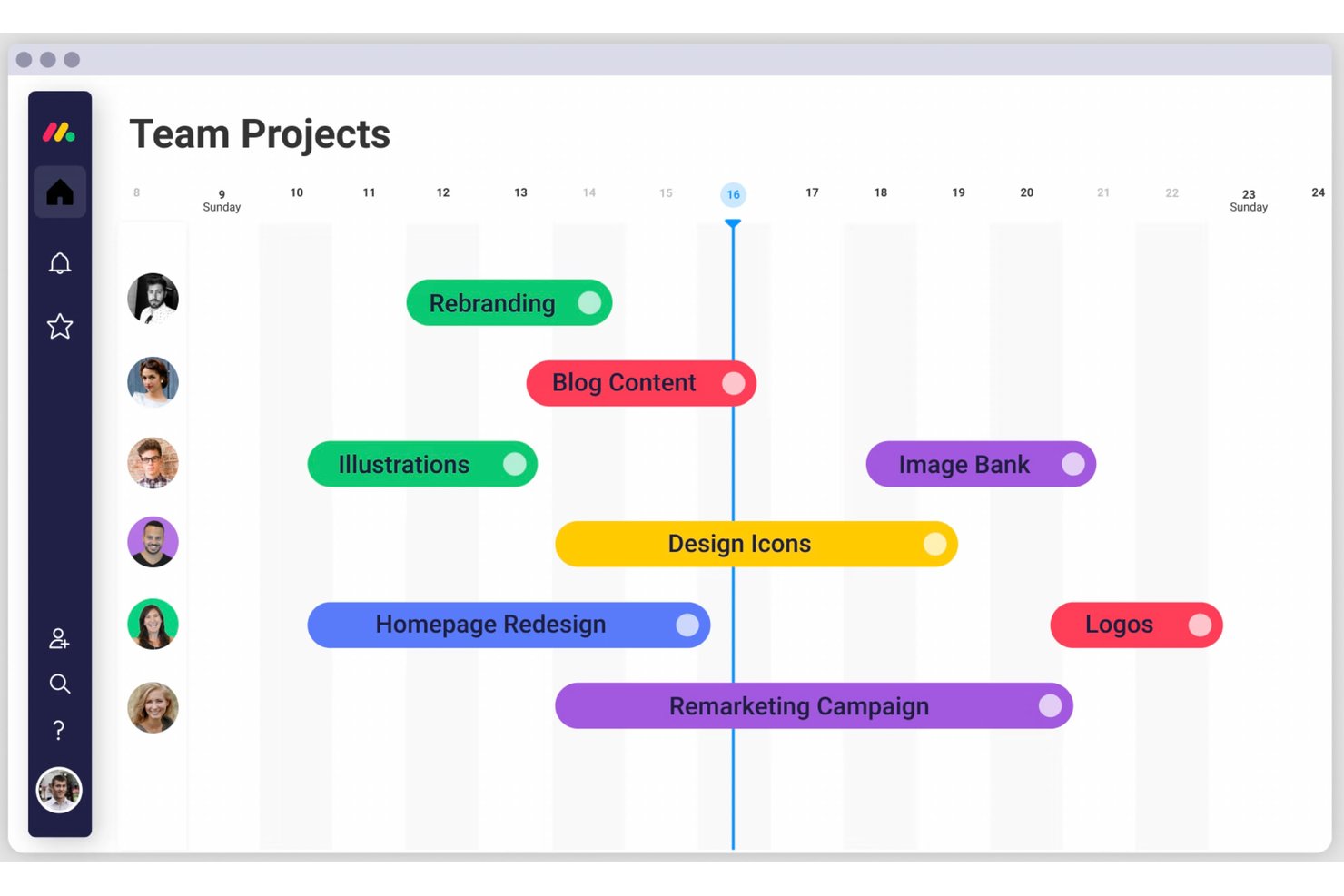
monday AI Workspace is an AI-powered work management platform that combines Gantt chart timelines, task dependencies, milestone tracking, and automated workflows within a customizable, multi-view project environment.
Who Is monday AI Workspace Best For?
It's a strong fit for cross-functional teams at mid-size to large organizations that need Gantt-based planning built into a broader collaboration and automation platform.
Why I Picked monday AI Workspace
monday AI Workspace earns its spot on my shortlist because it folds Gantt planning directly into a task management layer that most dedicated Gantt tools don't offer. I like that you can manage task-level detail, comments, file attachments, and status updates right on the board, without switching context. The collaboration angle is real: guest access, shareable dashboards, and real-time board updates mean stakeholders stay informed without needing a full seat.
monday AI Workspace Key Features
- Multiple view modes: Switch between Gantt, Kanban, calendar, and table views to match your team’s workflow needs.
- Portfolio roll-ups: Aggregate multiple project timelines into a single master Gantt view for cross-project visibility.
- Auto-scheduling engine: Automatically updates dependent tasks and timelines when upstream dates or dependencies change.
- In-app proofing: Attach files directly to tasks and add feedback with visual markup for streamlined asset review.
monday AI Workspace Integrations
monday AI Workspace offers hundreds of native integrations through its built-in integrations and marketplace, including Slack, Google Workspace, Microsoft 365, Jira, Dropbox, Zoom, HubSpot, Salesforce, GitHub, and Outlook. It also supports Zapier and provides an API for custom integrations.
Pros and Cons
Pros:
- Real-time collaboration lives inside the timeline
- Auto-scheduling adjusts tasks when dates shift
- Portfolio view spans multiple project timelines
Cons:
- Timeline view less detailed than dedicated tools
- Gantt features locked behind higher-tier plans
New Product Updates from monday AI Workspace
monday AI Workspace Adds Human Approval Routing
monday AI Workspace adds a human-in-the-loop approval block to AI Workflows, sending approval requests and routing workflow paths based on responses. For more information, visit monday AI Workspace's official site.

Quire
Best for dynamic timeline planning

Quire is a project management tool built around the idea of breaking down big goals into smaller, manageable tasks. It’s designed for teams that need a flexible way to visualize, track, and execute their work across different stages.
Why I Picked Quire: Quire's dynamic timeline feature provides a Gantt chart-like visualization that enables teams to schedule and monitor project milestones. This view allows users to map out tasks over time, adjust timelines, and identify potential bottlenecks, facilitating better planning and resource allocation.
Additionally, Quire supports task dependencies, allowing users to define relationships between tasks and understand how delays in one area can impact the overall project timeline. This feature is crucial for complex projects where tasks are interrelated, as it helps in identifying the critical path and ensuring timely completion.
Quire Standout Features & Integrations
Features include a calendar view that enables teams to schedule tasks and deadlines visually, enhancing time management and coordination. The collaborative document feature also provides a centralized space for storing project-related information, notes, and updates, ensuring that all team members have access to the latest data.
Integrations include Google Calendar, Gmail, Slack, Outlook, Zoho Flow, GitHub, Apple Calendar Sync, Box, Dropbox, Google Drive, and Microsoft Teams.
Pros and Cons
Pros:
- Ability to create nested tasks and subtasks, allowing for detailed project breakdowns
- Multiple project views, including lists, boards, and timelines
- Easy to collaborate with team members
Cons:
- Potential for notification overload, especially when working with large teams
- The mobile version lacks some features available on the desktop
New Product Updates from Quire
Quire Adds Custom Field Locking and Comment Reaction API Support
Quire adds custom field locking and API support for reading and setting emoji reactions on comments. These updates give teams more control over field data and expand comment interaction options for developers. For more information, visit Quire’s official site.
 .
.
Best for task dependencies and critical path

When you seek a solution that marries visual project management with robust functionality, Zoho Projects stands out. It caters to project managers, team leaders, and freelancers who need a dynamic tool to organize tasks, track progress, and manage timelines effectively. With its intuitive Gantt chart capabilities, Zoho Projects helps you address challenges like project scheduling and resource allocation, allowing you to focus on delivering successful outcomes.
Why I Picked Zoho Projects
I picked Zoho Projects for its strong emphasis on Gantt chart functionalities that cater to the needs of project managers seeking visual clarity. The platform features task dependencies that allow you to map out how tasks relate and influence each other, ensuring seamless project flow. Additionally, its critical path analysis helps you identify the most important tasks that could impact your project timeline. These features make Zoho Projects a compelling choice for those who prioritize meticulous planning and scheduling.
Zoho Projects Key Features
In addition to its Gantt chart functionalities, Zoho Projects offers other valuable features that enhance project management.
- Task Management: This feature allows you to create, assign, and manage tasks within your projects, ensuring everyone knows their responsibilities.
- Time Tracking: You can log hours spent on tasks, which helps in billing and understanding where your team’s time is allocated.
- Issue Tracking: This feature lets you identify and resolve issues quickly, maintaining the quality and progress of your projects.
- Team Collaboration: With tools for communication and document sharing, your team can collaborate effectively, regardless of location.
Zoho Projects Integrations
Integrations include Zoho CRM, Slack, GitHub, Microsoft Teams, Google Drive, Dropbox, Zapier, Zoho Books, Zoho Desk, and Zoho People.
Pros and Cons
Pros:
- Integrated time and issue tracking
- Strong task dependency management
- Advanced Gantt chart planning tools
Cons:
- Mobile Gantt features limited
- Learning curve for new users
New Product Updates from Zoho Projects
Zoho Projects Adds CodeX Scripts for Custom Modules
Zoho Projects now supports CodeX Scripts for custom modules, enabling conditional logic and rules for creating, updating, and deleting records. For more information, visit Zoho Projects' official site.
 .
.
Miro
Best Gantt chart software with built-in communication tools

Miro is a collaborative online whiteboard tailored for creating Gantt charts, among other visual planning tools. Its infinite canvas supports a broad expression of ideas, whether through text, images, or videos, facilitating detailed and accessible project visualizations.
Why I Picked Miro: Miro is designed for real-time collaboration and comes equipped with tools such as voting, sticky notes, and comments. This approach enables teams to adjust and discuss plans directly within the workspace and encourages active participation and immediate feedback among team members.
Moreover, Miro stands out by allowing users to upload and build upon existing charts from various platforms, ensuring no previous work is lost during the transition. This ensures seamless integration into Miro’s interactive space, allowing further development and fostering continuous workflow and collaboration without the need to start over.
Miro Standout Features & Integrations
Features include over 1,000 pre-made templates or various uses such as Gantt charts, Kanban boards, and mind maps, built-in communication tools, including video conferencing and TalkTrack to record process videos to be viewed asynchronously, as well as quick diagram tools, a planner tool, and a dependencies app.
Integrations include Zoom, Figma, Asana, Microsoft Teams, Monday.com, Confluence, Jira, Slack, Google Drive, Box, Airtable, Notion, Azure, and Webex. Some integrations are limited to paid plans only.
Miro is free to use for unlimited members with up to 3 editable boards. Paid plans start at $8/user/month (billed annually).
Pros and Cons
Pros:
- Built-in communication features for streamlined collaboration
- Intuitive and easy setup
- Free forever plan available
Cons:
- Free version does not allow high-quality export to pdf
- Zooming can be jumpy on larger projects
- Visitor/guest accounts locked to paid plans only
New Product Updates from Miro
Miro Adds Japan Data Residency for Enterprise Customers
Miro has introduced Japan data residency for enterprise customers, offering in-region storage for production data, backups, and metadata, plus in-region compute infrastructure. For more information, visit Miro's official site.
Best for Microsoft users

Microsoft Project Online uses a familiar software UI to give you an intuitive way to visualize various project angles. MS Project Online is a great example of Gantt chart template software, offering loads of built-in templates and familiar scheduling tools that make it easy to launch and navigate each assignment. The Gantt chart builder lets you select items for phase indicators, start and end dates, and RAG risk status.
Why I Picked Microsoft Project Online: Unlike some of the other software on this list, MS Projects doesn't have the same number of features and functions despite the higher licensing cost for the full suite of tools. Therefore, they fall short in our value for money spend evaluation criteria, meaning they aren’t the best for small business or startups.
Collaboration is limited by the fact that a project file cannot be opened by multiple team members at the same time. Changing schedule dates is not as seamless as it should be and often ends up causing chaos across the timeline. MS Projects is definitely geared towards large-scale projects and might not work for smaller workflows.
Microsoft Project Online Standout Features & Integrations
Features include project management, resource management, task management, scheduling, portfolio management, dynamic scheduling, business intelligence, Gantt charts, kanban boards, collaboration, reporting, roadmaps, timesheets, and demand management.
Integrations include MS Office suite, OneDrive, Outlook, Skype, and OneNote.
Canva
Best for small teams and businesses

Canva is a Gantt chart maker and design program with over 1 million free shapes and photos in their asset library and hundreds of thousands of product templates. Canva does more than just Gantt charts: You’ll find templates for slideshows, presentations, infographics, graphs, emails, and more. They have a simple drag-and-drop interface that makes it easy for non-designers to create aesthetically pleasing designs with minimal effort.
Why I Picked Canva: They offer quite a bit for their price, per our evaluation criteria, but free users won’t have access to everything. While Canva is free to tinker with, it will cost you to use certain designs, shapes, patterns, and templates. It will also cost you to download your work in any functional format (besides a mere screenshot). Still, the price is ideal for smaller businesses that are looking for Gantt charts along with other marketing graphics but don’t have a budget for an in-house designer.
Furthermore, if the only thing you need is Gantt charts then Canva doesn’t offer the range of robust data detailing that other programs do. Rather, it’s strength comes from the clean simplicity of its designs. If your project requires an in-depth, multifaceted timetable, Canva probably won’t be for you.
Canva Standout Features & Integrations
Features include Gantt chart templates, whiteboards, presentations, social media integration, video, print products, marketing, drag-and-drop editor, photos & graphics library, collaboration, and third-party integrations/plugins.
Integrations include WordPress, eClincher, Rippling, Sendible, Post Planner, and Viraltag. As you can probably tell, their focus with integration is on social media and/or content creation – if you need to access PM or workflow apps, you’re out of luck.

ClickUp
Best for its easy and intuitive timeline with drag-and-drop functionality
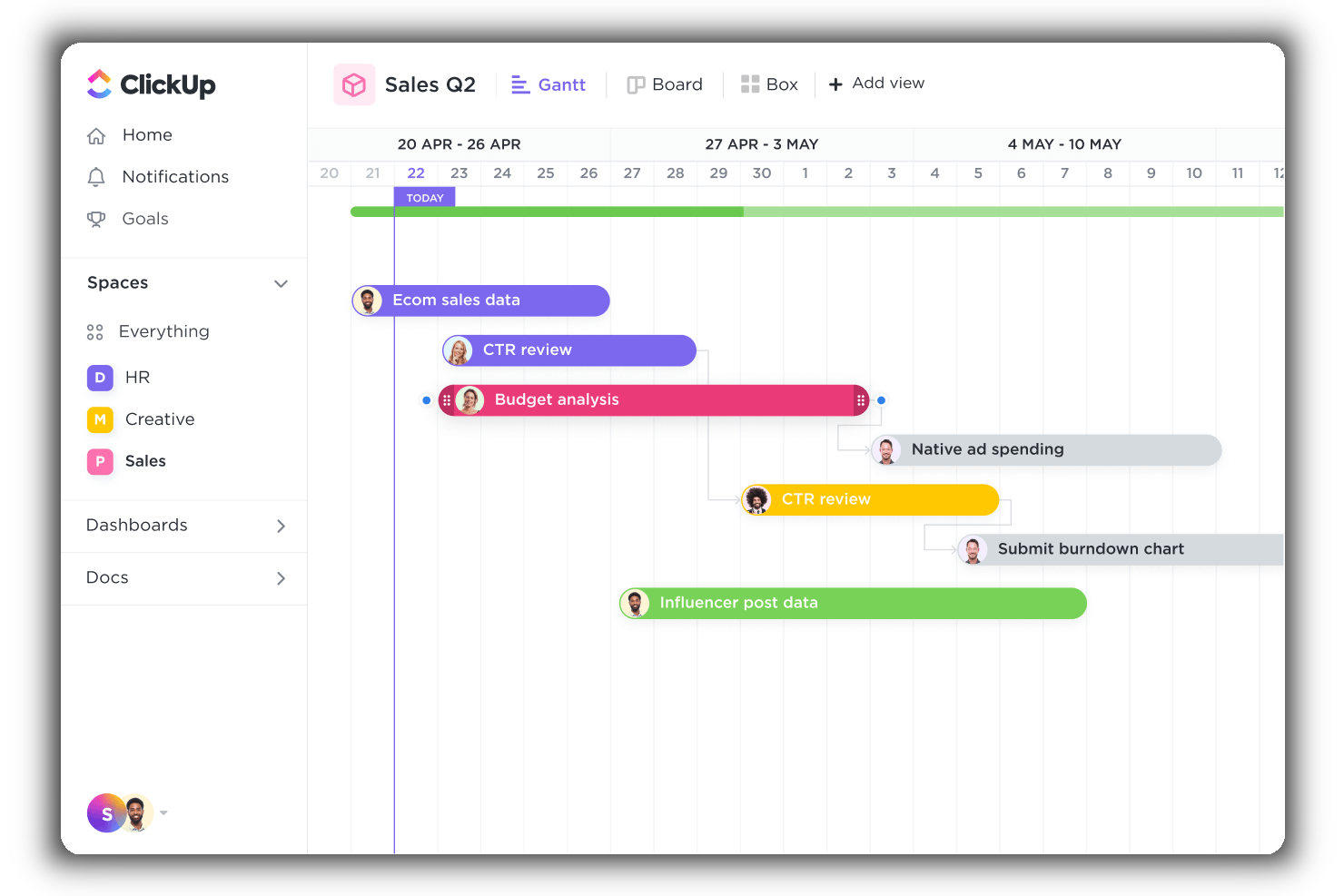
ClickUp is a cloud-based project management and collaboration app that is highly customizable and enables you and your teams to manage everything from within a central platform, including project-related tasks, team communications, documents, and goals.
Why I Picked ClickUp
ClickUp has an intuitive Gantt view that enables you to manage dependencies, schedule, and prioritize elements into a clear project timeline. This view offers a dynamic drag-and-drop timeline to easily schedule multiple tasks, keep track of project progress, manage deadlines, and handle potential bottlenecks.
Additionally, it provides users with a bird’s eye view of all active projects, spaces, lists, and tasks. It uses a color-coding system, so you and your stakeholders can instantly know what’s happening when and where. Finally, you can use timeline filters to arrange the information by assignee, due date, status, and more.
ClickUp Standout Features & Integrations
Features include task scheduling/tracking, project management, resource management, budgeting, contact management, data visualizations, employee database, expense tracking, file sharing, third-party plugins, collaboration support, timesheets, roadmapping, chat, customer management, email integration, feedback management, and process reporting.
Integrations include native integrations with Slack, Google Workspace, Dropbox, and many more tools, as well as over 1,000+ integrations through Zapier (may incur additional costs).
New Product Updates from ClickUp
ClickUp Adds Meetings Hub, Super Agent Templates, and ZoomInfo Integration
ClickUp adds a searchable Meetings Hub, new ways to clone and template Super Agents, and a ZoomInfo integration through the App Center. These updates improve meeting retrieval, agent reuse, and access to sales intelligence. For more information, visit ClickUp’s official site.
Backlog
Best for software development teams

Backlog is a cloud-based project management tool perfect for developers and the teams they collaborate with. Backlog provides a mobile app on both iOS and Android for collaborating on-the-go.
Why I Picked Backlog: Backlog provides a range of useful team collaboration features including task management (including subtasks, checklists, and custom fields), milestones, burndown charts, file management, wikis, and most importantly, a Gantt chart maker. But Backlog is more than a collaboration and Gantt chart tool. It’s also a bug tracker and version control system in one.
For collaborating on code, Backlog provides SVN and Git repositories, a differences viewer and inline comments, plus pull requests, merge requests, and branches. Visually, the app provides burndown charts, Git graphs, and Gantt charts, so project managers and users alike can quickly assess projects at a glance.
Backlog allows you to assign, track, and release work, right in one app while ensuring transparency and accountability across teams. If you’re looking for a tool to help manage development projects or working closely with a team of developers, this is the app for you.
Backlog Standout Features & Integrations
Features include Gantt charts, boards, burndown charts, issue tracking, custom fields, milestones, versioning, notifications & alerts, code management, documentation management, file sharing, and third-party integrations/plugins.
Integrations include Typetalk, Cacoo, Nulab Pass, Slack, Redmine, Jira Importer, Jenkins, iCal Sync, email platforms, Google Sheets, and LambdaTest. You can also build your own integrations and add-ons with Backlog's API.

Lucen
Best for creating Gantt charts and timelines directly in PowerPoint

Office timeline is a project planning tool that enables users to create visually appealing timelines and Gantt charts directly within Microsoft PowerPoint or through its web-based tool. It also allows you import data directly from Excel and access a wide variety of customizable templates.
Why I picked Office Timeline: Office Timeline integrates smoothly with essential tools like MS Project, Excel, and PowerPoint, making your data visualizations not just easy but efficient. It also stands out for its dual offering of a PowerPoint add-in and a web-based tool, catering to different user preferences and project needs.
You'll love the intuitive design and customizable templates that let you create professional-looking project visuals without needing to be a design whiz. This tool makes your project management tasks as straightforward as possible, allowing you to focus more on the project and less on the process of reporting it.
Office Timeline Standout Features & Integrations
Features include the desktop add-in which offers a variety of customizable templates for timelines, Gantt charts, and roadmaps, while the online version facilitates quick creation and sharing of project visuals from any web-enabled device. The software's vast array of design options and templates allows users to tailor their project timelines to the audience's needs, whether for high-level executive briefings or detailed team updates.
Integrations include tools like Jira, Project, Excel, and Smartsheet. These let you import data and manipulate it so you can get the PowerPoint visuals you need for your stakeholder presentations
Pros and Cons
Pros:
- Free, customizable templates
- Intuitive and easy to use
- Directly integrates Microsoft PowerPoint
Cons:
- Dependency on Microsoft ecosystem can be limiting
- Inflexible pricing options
Best for agency project management

Bonsai is a business management software designed to assist agencies and consulting firms with project and client management. It includes features for managing proposals, contracts, scheduling, and invoicing, helping ensure projects are delivered on time and within budget.
Why I Picked Bonsai: Bonsai helps you manage multiple projects across your portfolio with its Gantt charts, which visually display project timelines and progress. You can break down tasks into specific phases and set clear deadlines, making it easy to track your team’s progress at a glance. Plus, Bonsai’s task assignment tools simplify delegating work to your team, ensuring workloads stay balanced and manageable.
Bonsai also has advanced features like time tracking and invoicing, which can be especially useful for agency project management. You can track billable hours directly within each project and generate invoices, helping you stay on top of both progress and payments.
Bonsai Standout Features & Integrations
Features include client management tools, like a client portal, billing, contracts, and documentation management. It also offers budget tools to track project expenses and time tracking for logging the hours spent on different projects or tasks.
Integrations include QuickBooks Online, Zapier, Calendly, Xero, Google Sheets, Slack, and HubSpot.
Pros and Cons
Pros:
- Integrated project financial management
- Visibility across all your projects
- Good client management features
Cons:
- Scalability limitations
- Mobile app is limited compared to the desktop version
Annen Gantt-diagramprogramvare
Her er noen flere apper som ikke kom med på kortlisten min, men som er verdt å vurdere hvis du vil utvide undersøkelsen.
- GoodDay
Gantt Chart tool for customizability
- Visor
For creating Gantt charts collaboratively
- Vault ERP
Gantt chart software for enterprise scalability
- GanttPRO
Gantt chart software for workload visualization
- Smartsheet
For Gantt chart templates
- Productive
For all-in-one agency management & planning
- Wrike
Collaborative Gantt chart software
- airfocus
For project prioritization
- Instagantt
Add-on for Asana users
- GoodDay
For customizable auto-scheduling
- Hub Planner by Milient
Gantt chart software with integrated time tracking & approval
- Paymo
Free Gantt chart software
- MindView
For built-in mind mapping capabilities
- TeamGantt
Online Gantt chart software


How I Evaluate Gantt Chart Software
I split my evaluation into baseline criteria—like interactive timelines, task dependencies, and critical path—and differentiators that separate good tools from great ones for PMOs and project teams.
Core Functionality (Table Stakes For This List)
When I'm selecting tools for my list, I rank each one on a scale from 0 (does not offer the functionality) to 5 (excels in this area) for each core functionality listed below. Then, I calculate the tool's total score into a percentage. Each tool needs to achieve a minimum total score of 75% to be considered for inclusion.
- Interactive Gantt Timeline: I check whether task bars support drag-and-drop rescheduling across multiple time scales, since a static, view-only timeline adds friction when plans change mid-sprint.
- Task Dependencies: Each tool should let you link tasks with all four relationship types and automatically reflow downstream dates when a predecessor slips.
- Milestones & Phases: I look for the ability to mark key delivery dates and nest tasks under summary groups, like separating a product launch into design, development, and QA phases.
- Critical Path & Baselines: Tools that calculate the critical path and let you save baselines make it easy to spot schedule drift before it impacts a deadline.
- Resource Assignment: I evaluate how each tool handles assigning people to tasks and surfacing workload, especially when team members are shared across multiple projects.
- Progress Tracking: Percent-complete indicators on task bars and planned-versus-actual overlays help me assess whether a tool gives real visibility into schedule health.
Once I have a list of tools that meet this criteria, I consider what sets each platform apart.
Differentiating Factors (What Sets Vendors Apart)
Here's how I compare and contrast different vendors:
Standout Features
Portfolio roll-ups matter when you're managing multiple projects. I look for tools that aggregate timelines into a single master view so PMO leads can spot conflicts across teams. Auto-scheduling is another differentiator; when a task slips, the best tools reflow every downstream date without manual edits. I also evaluate how each tool handles stakeholder sharing, since many project managers need to send clean, view-only timelines to clients or executives who don't need a full login.
Beyond Features
Integrations weigh heavily in my evaluation. A Gantt tool that syncs with Jira, Slack, or MS Project fits into existing workflows instead of replacing them. I also consider how each vendor handles onboarding—specifically whether they offer .mpp and CSV imports, since migrating active schedules into a new tool can stall adoption. Pricing structure matters too. I check whether vendors offer free viewer seats for stakeholders who only need to review timelines, which keeps costs reasonable as project visibility scales across the organization.
Slik velger du Gantt-diagramprogramvare
Det er lett å gå seg vill i lange funksjonslister og kompliserte prisstrukturer. For å hjelpe deg med å holde fokus mens du går gjennom den unike prosessen din for valg av programvare, har jeg laget en sjekkliste over faktorer du bør ha i bakhodet:
| Faktor | Hva du bør vurdere |
|---|---|
| Skalerbarhet | Se etter programvare som kan vokse i takt med prosjektene dine. Sørg for at verktøyet enkelt kan håndtere flere brukere, oppgaver og mer komplekse prosjekter. |
| Integrasjoner | Kontroller om programvaren kan kobles til verktøy teamet ditt allerede bruker, som Asana, Slack eller Microsoft Teams, for å effektivisere arbeidsflytene. |
| Tilpasningsmuligheter | Teamets behov er unike. Prioriter programvare som lar deg tilpasse Gantt-diagrammer til bestemte prosjektarbeidsflyter eller merkevareprofiler. |
| Brukervennlighet | Unngå bratt læringskurve. Sørg for at programvaren har et intuitivt grensesnitt og funksjoner som redigering med dra-og-slipp. |
| Budsjett | Bekreft at programvaren passer inn i budsjettet ditt, ikke bare i dag, men også på lang sikt, inkludert skjulte kostnader som brukerlisenser eller tillegg for ekstra funksjoner. |
| Sikkerhetstiltak | Dataene dine er viktige. Se etter funksjoner som kryptering, rollebasert tilgang og samsvar med standarder som GDPR eller SOC 2. |
| Samarbeidsverktøy | Sørg for at programvaren legger til rette for samarbeid i sanntid, for eksempel ved å dele diagrammer med kunder eller tildele oppgaver direkte i programvaren. |
| Tilgang via mobil | Velg programvare med mobilkompatibilitet, slik at teamet ditt kan følge med på fremdriften og gjøre oppdateringer mens de er på farten. |
Trender innen Gantt-diagramprogramvare
I researcharbeidet mitt hentet jeg inn utallige produktoppdateringer, pressemeldinger og lanseringslogger fra ulike leverandører av Gantt-diagramprogramvare. Her er noen av trendene som vokser frem, og som jeg følger med på:
- AI-drevet planlegging: Verktøy bruker nå AI til å forutsi forsinkelser og foreslå justeringer av tidsplaner. Noen plattformer tilbyr for eksempel automatisk prioritering av oppgaver basert på tilgjengelige ressurser og tidsfrister.
- Dynamiske arbeidsflyter: Gantt-diagrammer blir mer interaktive, slik at team kan koble tidsplaner direkte til oppgavetavler eller Kanban-visninger. Dette gjør det enklere å gå mellom planlegging på høyt nivå og detaljert oppgavestyring.
- Visuell tilpasning: Flere verktøy lar brukere justere diagrammets utseende, for eksempel farger, etiketter og oppsett, slik at det passer bedre til merkevaren eller prosjektkravene. Noen leverandører inkluderer til og med designmaler for bestemte bransjer.
- Innsikt i samarbeid i sanntid: Nye funksjoner fokuserer på å vise løpende oppdateringer om hvem som jobber med hva, og på å følge teamets arbeidsbelastning i sanntid. Dette hjelper distribuerte team med å holde seg synkronisert uten ekstra møter.
- Scenarioplanlegging: Leverandører legger nå til verktøy for å teste «hva hvis»-scenarioer, slik at brukere kan modellere potensielle risikoer eller endringer før de bestemmer seg for en tidsplan. Dette er spesielt nyttig for komplekse, langsiktige prosjekter.
Hva er Gantt-diagramprogramvare?
Gantt-diagramprogramvare er et verktøy som lar deg legge prosjekter inn på en tidslinje, slik at du kan se hvordan hver oppgave henger sammen. Prosjektledere, teamledere og fagfolk innen områder som bygg og anlegg, markedsføring, programvareutvikling og arrangementsplanlegging bruker det til å få oversikt over tidsfrister, tildele oppgaver og følge med på fremdriften.
Hvis du har et komplekst prosjekt med mange deler i bevegelse, hjelper Gantt-diagramprogramvare deg med å holde alt synlig og organisert på ett sted. Det er spesielt nyttig når du håndterer tidsplaner som stadig endres, eller koordinerer på tvers av ulike team. Du kan også se etter spesialiserte verktøy for din bransje, for eksempel Gantt-diagramprogramvare for bygg og anlegg.
Funksjoner i Gantt-diagramprogramvare
Når du velger Gantt-diagramprogramvare, bør du se etter følgende nøkkelfunksjoner:
- Interaktive tidslinjer: Lar deg dra og slippe oppgaver for å justere tidsplaner raskt, slik at det blir enkelt å tilpasse seg endringer i sanntid.
- Avhengighetsstyring: Gjør det mulig å koble sammen oppgaver for å vise avhengigheter, slik at team kan visualisere hvordan forsinkelser i én oppgave påvirker andre.
- Oppfølging av milepæler: Fremhever viktige milepæler i prosjektet for å sikre at kritiske tidsfrister og mål er synlige og blir nådd.
- Fremdriftsoppfølging: Oppdaterer oppgaver med fullføringsprosent, slik at team får en tydelig oversikt over prosjektets fremdrift med et blikk.
- Ressursallokering: Lar deg tildele teammedlemmer til oppgaver og følge med på arbeidsbelastningen for å unngå overbooking eller uutnyttet kapasitet.
- Sammenligning med utgangsplan: Lagrer de opprinnelige planene, slik at team kan sammenligne faktisk fremdrift med den opprinnelige tidsplanen.
- Flere prosjektvisninger: Tilbyr alternative visninger, som Kanban-tavler eller oppgavelister, ved siden av Gantt-diagrammet for ulike planleggingsbehov.
- Samarbeidsverktøy: Inkluderer funksjoner som kommentarer og fildeling direkte i oppgavene, slik at kommunikasjonen holdes samlet.
- Alternativer for eksport og import: Lar deg lagre eller dele Gantt-diagrammer som PDF- eller Excel-filer for enkel rapportering og presentasjoner, samt importere filer fra andre verktøy som Microsoft Project (du kan også bruke en fremviser for Microsoft Project til dette).
- Scenariomodellering: Lar team teste ulike planleggingsscenarioer for å se potensielle konsekvenser før planene ferdigstilles.
Fordeler med Gantt-diagramprogramvare
Implementering av Gantt-diagramprogramvare kan gi flere fordeler for teamet og virksomheten din. Her er noen av fordelene du kan se frem til:
- Tydelige tidslinjer for prosjekter: Hjelper teamet ditt med å forstå tidsfrister og prioriteringer ved å visualisere oppgaver i et enkelt tidslinjeformat.
- Bedre teamsamarbeid: Ved å tildele oppgaver og følge fremdriften på ett sted holder alle seg oppdatert og reduserer misforståelser.
- Forbedret ressursstyring: Lar deg se arbeidsbelastningen i teamet og justere tildelinger for å forhindre utbrenthet eller underutnyttelse.
- Enklere fremdriftssporing: Gir deg et tydelig bilde av hvor prosjektet står, og hjelper deg med å oppdage forsinkelser tidlig.
- Velinformerte beslutninger: Funksjoner som scenariomodellering lar deg teste endringer i tidslinjer eller ressurser før du forplikter deg til dem.
- Økt ansvarlighet: Oppgavetildelinger og statusoppdateringer tydeliggjør hvem som er ansvarlig for hver del av prosjektet.
- Forbedret kundekommunikasjon: Diagrammer som kan eksporteres, lar deg enkelt dele prosjektplaner og oppdateringer med interessenter eller kunder.
Kostnader og priser for Gantt-diagramprogramvare
Å velge prosjektstyringsprogramvare med Gantt-diagrammer krever en forståelse av de ulike prismodellene og planene som er tilgjengelige. Kostnadene varierer basert på funksjoner, teamstørrelse, tillegg og mer. Tabellen nedenfor oppsummerer vanlige planer, gjennomsnittsprisene deres og typiske funksjoner som er inkludert i Gantt-diagramløsninger:
| Plantype | Gjennomsnittspris | Vanlige funksjoner |
|---|---|---|
| Gratisplan | $0 | Grunnleggende oppretting av Gantt-diagrammer, begrenset antall prosjekter, begrenset antall brukerplasser og ingen avansert rapportering eller integrasjoner |
| Personlig plan | $5-$25/bruker/måned | Ubegrenset antall oppgaver, fargekodede tidslinjer, eksportalternativer og enkle integrasjoner som Google Kalender |
| Forretningsplan | $25-$50/bruker/måned | Avansert prosjektsporing, verktøy for ressursstyring, samarbeid i sanntid og tilpasset rapportering |
| Virksomhetsplan | $50-$100/bruker/måned | Tilpassbare arbeidsflyter, dedikert kundestøtte, forbedrede sikkerhetsfunksjoner og avansert analyse |
Vanlige spørsmål om Gantt-diagramprogramvare
Her er svarene på noen vanlige spørsmål om Gantt-diagramprogramvare.
Hva bør et Gantt-diagram inneholde?
Den beste Gantt-diagramprogramvaren inkluderer muligheten til å opprette horisontale stolpediagrammer som viser tidslinjen for et prosjekts tidsplan, overlappende avhengige oppgaver (dvs. at oppgave B ikke kan starte før oppgave A er ferdig), tidsestimater, fremdriftsstatus og teamtildelinger. De fleste moderne Gantt-diagramprogrammer har også funksjoner for oppgavestyring og samarbeid.
Hva brukes et Gantt-diagram til?
Henry Gantt utviklet det første Gantt-diagrammet som en måte å planlegge produksjon og belastning av fabrikkressurser på rundt begynnelsen av 1900-tallet. Og vi bruker fortsatt Gantt-diagrammer den dag i dag til ressursoppfølging, fastsettelse av tidsfrister og prosjektkommunikasjon. Et godt Gantt-diagram bør visualisere forholdet mellom arbeidet som skal utføres, og hvordan det fordeler seg over en bestemt tidsperiode. Det viser planlagt startdato og forfallsdato for oppgaver og deloppgaver, avhengigheter mellom ulike arbeidsoppgaver og hvem som er ansvarlig for hvert element.
Finnes det et Gantt-diagram i Excel?
Egentlig ikke, men du kan lage ditt eget eller finne en Gantt-diagrammal for Microsoft Excel på nettet. Jeg vil imidlertid ikke anbefale denne fremgangsmåten, siden det innebærer svært mye manuell registrering for svært liten gevinst. Hvis ett prosjektelement endres, må du endre hvert påfølgende trinn manuelt eller lage en formel som gjør det for deg.
Hvis du bruker Microsoft-økosystemet og er fornøyd med det, kan du sjekke ut MS Projects. Du får det velkjente utseendet og brukeropplevelsen fra Excel og andre Microsoft-plattformer, i tillegg til en Gantt-diagrambygger, prosjektstyringsverktøy og mer.
Bruker du Mac? Se på Gantt-diagramverktøy utviklet spesielt for macOS—mange tilbyr dra-og-slipp-byggere, synkronisering i sanntid og bedre integrasjon med produktivitetsverktøy utviklet for Mac.
Hva er den beste gratis Gantt-diagramprogramvaren?
Den vanligste gratis Gantt-diagramprogramvaren er sannsynligvis Excel eller Google Sheets. Du finner maler for å lage Gantt-diagrammer i disse programmene hvis du søker på nettet, selv om malene kan koste noen kroner. Det fungerer når du har det travelt, men det er ikke en god løsning.
Du kan også prøve et gratis verktøy som ClickUp, som tilbyr 100 gratis Gantt-diagrammer i grunnabonnementet sitt. Det finnes mange andre gratis Gantt-diagramprogrammer og programmer med åpen kildekode tilgjengelig på nettet, blant annet RedBooth, GanttProject, Bitrix24, Agantty og Instagantt for Asana, samt gratisversjoner av betalingsverktøy som Wrike, Paymo og andre.
Hvordan kan Gantt-diagrammer støtte ressursstyring?
Gantt-diagrammer støtter ressursstyring ved å samordne oppgaver visuelt med de tildelte ressursene, slik at ressursene fordeles effektivt og overbelastning unngås. De gir oversikt over ressurstilgjengelighet, tidslinjer og avhengigheter, og hjelper team med å håndtere arbeidsmengden effektivt. I tillegg gjør sanntidsoppdateringer i Gantt-diagrammer det mulig for team å justere ressursene proaktivt etter hvert som prosjektbehovene utvikler seg.
Hva er fordelene med flere visningsalternativer i Gantt-diagramprogramvare?
Flere visningsalternativer i Gantt-diagramprogramvare gjør det mulig å bytte mellom perspektiver som tidslinjer, kalendere eller oppgavelister, slik at ulike teambehov og preferanser ivaretas. Denne fleksibiliteten forbedrer samarbeidet ved å gi interessenter, prosjektledere og teammedlemmer tilpasset innsikt. Den øker også produktiviteten ved å forenkle komplekse data og sørge for at alle holder seg samkjørte med prosjektmålene.