

I 10 migliori software di gestione dei progetti per Mac nel 2026

Elenco dei migliori software di gestione dei progetti per Mac
- 7. Asana
- 10. Project Plan 365


I migliori software di gestione dei progetti per Mac ti aiutano a organizzare le attività, monitorare i progressi e collaborare con il tuo team, oltre a evitare problemi di compatibilità o soluzioni alternative complicate. Senza lo strumento giusto, avrai difficoltà a gestire i progetti dal tuo Mac, misurare le prestazioni dei progetti e configurare e utilizzare flussi di lavoro intuitivi.
Ho utilizzato i miei oltre 20 anni di esperienza nella gestione dei progetti per testare diversi software di gestione dei progetti per Mac. Ti aiuterò a trovare la soluzione più adatta per organizzare il lavoro tra i team, comunicare con i clienti e portare a termine progetti di successo senza essere ostacolato da strumenti macchinosi.
Perché fidarsi dei nostri consigli sui software
Il nostro team testa e recensisce software dal 2012. In quanto project manager noi stessi, sappiamo quanto sia difficile — e importante — scegliere il software giusto.
Per questa guida, abbiamo valutato gli strumenti attraverso test pratici e ricerche indipendenti, assegnando un punteggio agli strumenti in base ai nostri criteri di selezione. Ci basiamo inoltre sulle competenze di leader di pensiero del settore e di professionisti attivi nella gestione dei progetti.
Le nostre recensioni riflettono il nostro giudizio editoriale umano, non un discorso di vendita.
Revisori esperti:
Tabella comparativa dei software di gestione dei progetti per Mac
Confronta prezzi e specifiche di ciascuna delle mie scelte tra i migliori software di gestione dei progetti per Mac:
| Tool | Best For | Trial Info | Price | ||
|---|---|---|---|---|---|
| 1 | Ideale per le funzionalità di comunicazione e collaborazione | 14 giorni di prova gratuita | A partire da $6/utente/mese | Website | |
| 2 | Il miglior software di gestione dei progetti per squadre di qualsiasi dimensione | 14 giorni di prova gratuita | A partire da $9.80/utente/mese | Website | |
| 3 | Ideale per la gestione dinamica dei progetti | Prova gratuita di 30 giorni | Prezzi su richiesta | Website | |
| 4 | Ideale per l'integrazione con l'ecosistema di app Zoho | Prova gratuita di 10 giorni | A partire da $4/utente/mese con fatturazione annuale. Disponibile anche una versione gratuita fino a 3 utenti per 2 progetti | Website | |
| 5 | Ideale come piattaforma completa per la gestione dei progetti | Prova gratuita di 30 giorni | A partire da $22.50/utente/mese | Website | |
| 6 | Migliore gestione gratuita dei progetti compatibile con Mac | Piano gratuito + demo gratuita disponibile | Gratuito per sempre, con piani a pagamento a partire da 5 $/mese | Website | |
| 7 | Piano gratuito disponibile | A partire da $10.99/utente/mese (fatturato annualmente) | Website | ||
| 8 | Ideale per il lavoro con i clienti e il bilanciamento del carico di lavoro | Prova gratuita di 30 giorni. Non è richiesta alcuna carta di credito. | A partire da $10/utente/mese | Website | |
| 9 | Ideale per report personalizzati e report per le parti interessate | Prova gratuita di 30 giorni | A partire da $15/utente/mese | Website | |
| 10 | Prova gratuita di 14 giorni | A partire da $10.99/utente/mese (con fatturazione annuale) | Website |


Recensioni dei migliori software di gestione dei progetti per Mac
Ecco una breve descrizione di ciascuna delle mie migliori scelte tra le app di gestione dei progetti per Mac. Scopri cosa distingue ciascuna app, perché è stata selezionata e le informazioni su prezzi e periodi di prova.

Ideale per le funzionalità di comunicazione e collaborazione
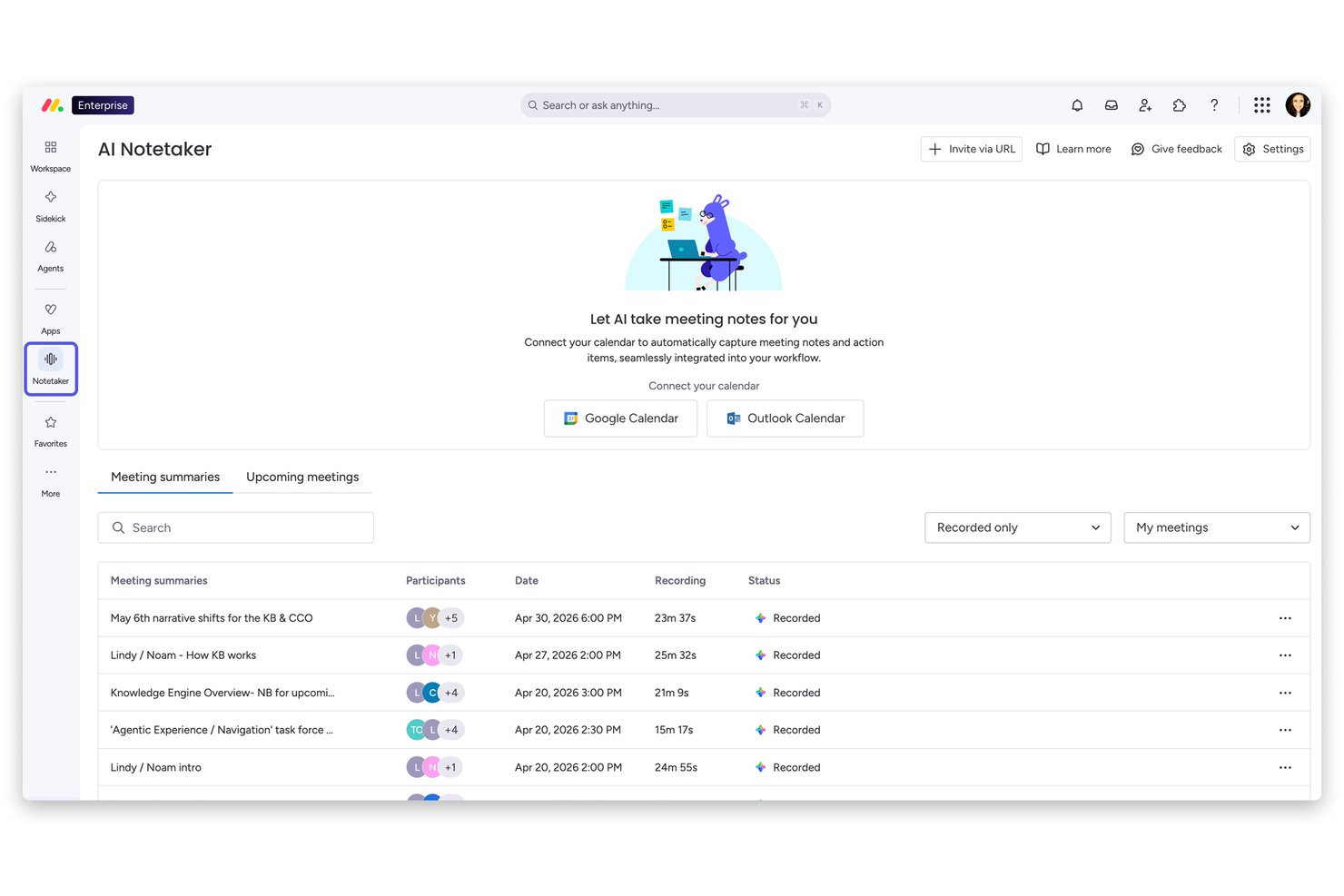
monday AI Workspace è una piattaforma di gestione dei progetti con bacheche, visualizzazioni Gantt e della cronologia, monitoraggio del carico di lavoro e strumenti di intelligenza artificiale integrati per l'assegnazione delle attività, il monitoraggio delle dipendenze e l'automazione dei flussi di lavoro.
Per chi è più adatto monday AI Workspace?
monday AI Workspace è una soluzione ideale per i team interfunzionali che hanno bisogno di un hub centrale per gestire comunicazione, assegnazione delle attività e visibilità sui progetti in un unico luogo.
Perché ho scelto monday AI Workspace
Ho incluso monday AI Workspace tra le mie scelte principali perché eccelle davvero nel mantenere allineati i team interfunzionali grazie agli strumenti integrati di comunicazione e collaborazione. Ogni attività ha il proprio thread di commenti con @menzioni e allegati, così le conversazioni rimangono collegate al lavoro invece di essere disperse nelle e-mail. Mi piace anche il fatto che le bacheche condivisibili consentano di coinvolgere collaboratori esterni, come freelance o clienti, senza esporre l'intero account.
Funzionalità principali di monday AI Workspace
- Diagramma di Gantt con percorso critico: Visualizza le dipendenze tra le attività ed evidenzia automaticamente in rosso il percorso critico, per vedere quali attività ritarderanno il progetto in caso di slittamento.
- Visualizzazione del carico di lavoro: Visualizza la capacità di ogni membro del team nei vari progetti, con indicatori colorati che mostrano chi è al di sotto, al livello o al di sopra della propria capacità.
- Assegnazione delle attività e segnalazione dei rischi tramite IA: L'IA integrata consiglia i responsabili delle attività, imposta le tappe fondamentali, monitora le dipendenze e segnala i rischi prima che diventino ostacoli.
- Bacheche condivisibili per collaboratori esterni: Invita clienti o freelance a bacheche specifiche senza concedere loro l'accesso all'intero account.
Integrazioni di monday AI Workspace
monday AI Workspace offre oltre 850 integrazioni e app, tra cui Slack, Microsoft Teams, Google Calendar, Google Drive, Zoom, Dropbox, Jira, GitHub e GitLab. Supporta inoltre l'accesso API per integrazioni personalizzate.
Pros and Cons
Pros:
- I commenti sulle attività mantengono le discussioni del team collegate al lavoro
- Le dipendenze Gantt e il percorso critico chiariscono i rischi relativi alla pianificazione
- L'app per Mac aggiornata regolarmente supporta Apple silicon
Cons:
- L'app desktop non dispone di funzionalità specifiche per Mac come Spotlight
- Gli utenti segnalano blocchi e rallentamenti durante l'utilizzo intensivo
New Product Updates from monday AI Workspace
monday AI Workspace Adds Human Approval Routing
monday AI Workspace adds a human-in-the-loop approval block to AI Workflows, sending approval requests and routing workflow paths based on responses. For more information, visit monday AI Workspace's official site.

Wrike
Il miglior software di gestione dei progetti per squadre di qualsiasi dimensione
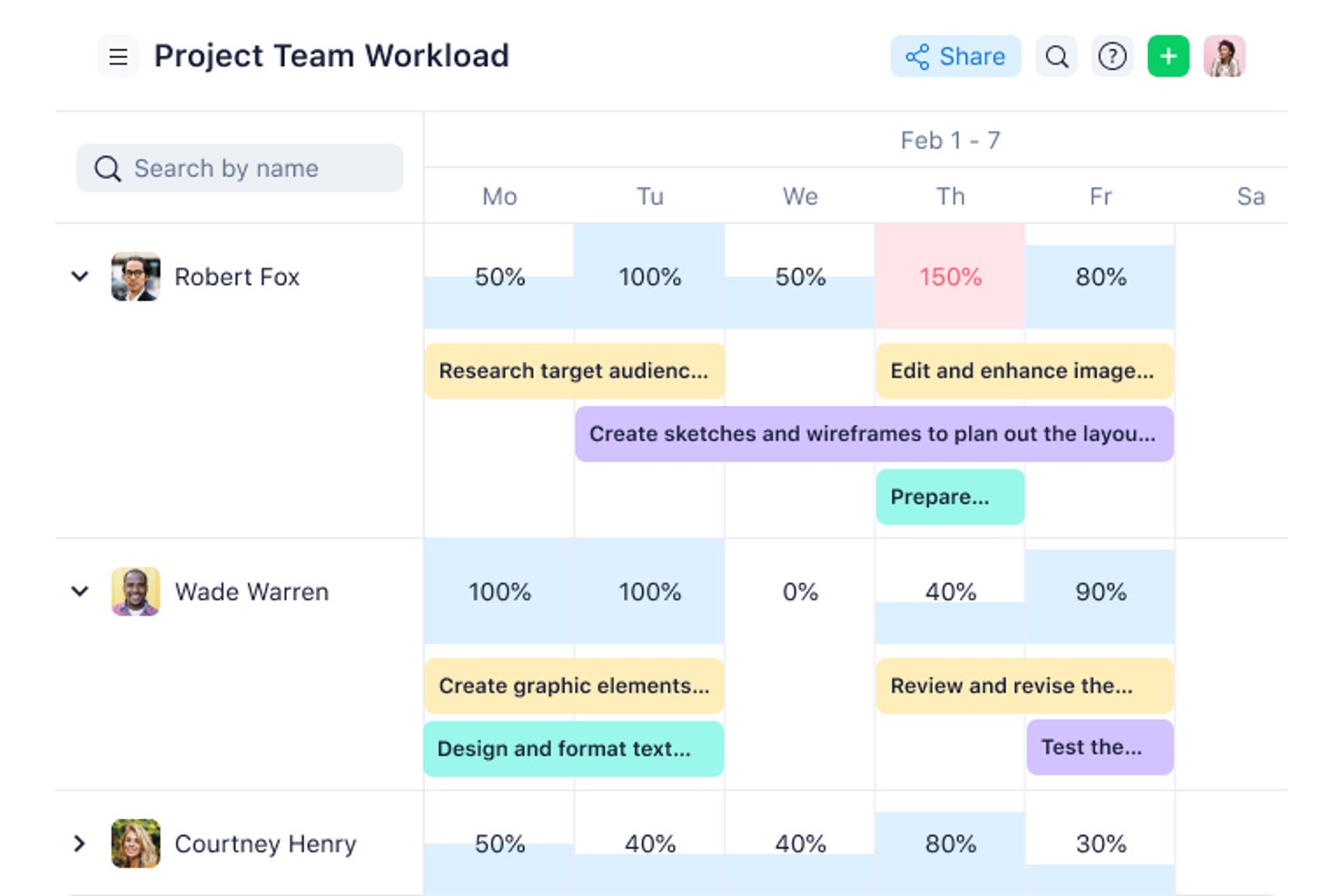
Wrike è una piattaforma di gestione dei progetti con oltre 15 tipi di visualizzazione, tra cui diagrammi di Gantt, bacheche Kanban e grafici del carico di lavoro, oltre a monitoraggio delle attività, revisione online, automazione senza codice e flussi di lavoro assistiti dall'intelligenza artificiale su Mac, Windows e dispositivi mobili.
Per chi è più indicato Wrike?
Wrike è adatto alle squadre interfunzionali che hanno bisogno di un'unica piattaforma per gestire attività, scadenze e revisioni creative sia su Mac sia su Windows.
Perché ho scelto Wrike
Wrike merita un posto tra le migliori soluzioni della mia lista perché cresce davvero insieme alla tua squadra, sia che tu stia coordinando un ciclo di prodotto composto da cinque persone, sia che tu stia gestendo attività interfunzionali con decine di collaboratori. Adoro i diagrammi di Gantt interattivi con il monitoraggio delle dipendenze, che mi consentono di trascinare e riprogrammare le attività senza dover ricostruire l'intera sequenza temporale. Gli strumenti di revisione online sono un punto di forza per le revisioni creative: i revisori ospiti possono approvare i file senza dover disporre di un accesso a Wrike, riducendo notevolmente gli scambi.
Funzionalità principali di Wrike
- Automazione senza codice: Crea regole di automazione usando il linguaggio naturale per attivare azioni, segnalare le attività a rischio e instradare le approvazioni senza scrivere una sola riga di codice.
- Revisione online e confronto delle versioni: Rivedi e annota i file creativi direttamente in Wrike, consentendo ai revisori ospiti di approvarli senza dover acquistare un accesso.
- Grafici del carico di lavoro interfunzionale: Visualizza la capacità della squadra nei diversi progetti per individuare i sovraccarichi e ridistribuire il lavoro prima che le scadenze slittino.
- Moduli di richiesta: Crea moduli personalizzati per la raccolta delle richieste che generano automaticamente attività o progetti al momento dell'invio, instradando immediatamente il lavoro alla squadra giusta.
Integrazioni di Wrike
Wrike offre oltre 400 integrazioni, tra cui Jira, GitHub, GitLab, Salesforce, HubSpot, Microsoft Teams, Google Workspace, Slack e Adobe Creative Cloud. Fornisce inoltre un'API aperta per integrazioni personalizzate.
Pros and Cons
Pros:
- L'applicazione per Mac offre un ambiente di lavoro concentrato
- Le dipendenze di Gantt supportano le modifiche alla pianificazione
- La revisione mantiene le revisioni creative nel progetto
Cons:
- L'applicazione Electron non è veramente nativa per macOS
- Per lavorare dal computer è necessaria una connessione Internet
New Product Updates from Wrike
Wrike Adds Klaxoon MCP Integration
Wrike’s Klaxoon MCP integration is now generally available, enabling AI agents to navigate between Wrike tasks and attached whiteboards, read task context, and manage whiteboard attachments via API. For more information, visit Wrike's official site.

Ideale per la gestione dinamica dei progetti
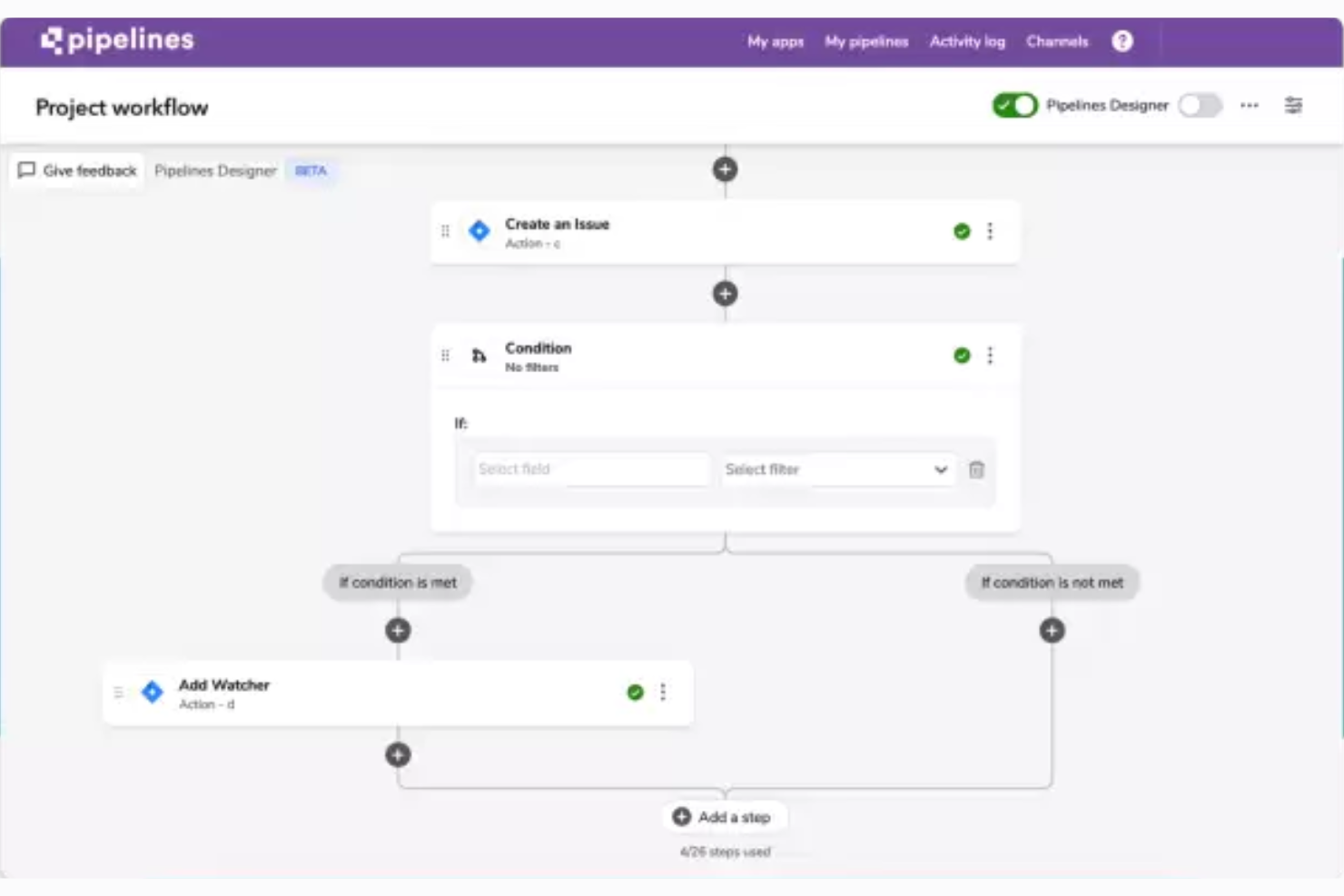
Quickbase è una piattaforma senza codice/a basso codice che consente ai team di creare app personalizzate per la gestione dei progetti con diagrammi di Gantt, dashboard del portafoglio, flussi di lavoro automatizzati e report multi-progetto.
Per chi è più adatto Quickbase?
Quickbase è adatto ai responsabili di progetto di organizzazioni di medie e grandi dimensioni che devono creare flussi di lavoro personalizzati per programmi complessi e gestiti da più team, invece di affidarsi a uno strumento predefinito per la gestione dei progetti.
Perché ho scelto Quickbase
Ho incluso Quickbase tra le mie scelte principali perché è progettato per progetti che non si adattano a un modello predefinito. Quando gestisco un programma che coinvolge più team e ambiti soggetti a variazioni, il diagramma di Gantt di Quickbase gestisce tutti e quattro i tipi di dipendenze, oltre al percorso critico e all'analisi degli scenari, così posso modellare le modifiche alla tempistica prima che diventino problemi. Le sue dashboard del portafoglio mi offrono lo stato in tempo reale di ogni progetto attivo contemporaneamente, esattamente il tipo di visibilità richiesto dal lavoro dinamico.
Caratteristiche principali di Quickbase
- Creazione di app senza codice: Un editor visivo consente di creare app personalizzate per la gestione dei progetti partendo da modelli o da zero, senza scrivere codice.
- Dashboard del portafoglio: Dashboard in tempo reale mostrano lo stato, il monitoraggio del budget e i progressi di tutti i progetti attivi in un'unica schermata.
- Autorizzazioni basate sui ruoli: Controlli granulari degli accessi consentono di assegnare a ogni membro del team o stakeholder diversi livelli di visibilità e diritti di modifica dei dati.
- Flussi di lavoro automatizzati: L'automazione integrata gestisce l'assegnazione delle attività, le approvazioni e le notifiche relative ai passaggi di fase in base alle regole configurate.
Integrazioni di Quickbase
Quickbase offre oltre 40 integrazioni già pronte, tra cui Jira, Slack, Microsoft Teams, Google Drive, SharePoint, Salesforce, SAP, Oracle, ServiceNow e Procore. La sua API RESTful supporta integrazioni personalizzate.
Pros and Cons
Pros:
- Il diagramma di Gantt supporta le dipendenze e l'analisi del percorso critico
- Le dashboard monitorano i progressi di più progetti
- Le app personalizzate si adattano ai flussi di lavoro dei progetti in continua evoluzione
Cons:
- L'accesso da Mac avviene tramite browser, non tramite un'app nativa
- Gli strumenti di collaborazione richiedono una configurazione specifica per l'app

Ideale per l'integrazione con l'ecosistema di app Zoho

Zoho Projects è uno strumento di gestione dei progetti basato su browser che offre il monitoraggio delle attività, la pianificazione con diagrammi di Gantt, la collaborazione del team, il monitoraggio del tempo e la reportistica su web, iOS e Android.
Per chi è più adatto Zoho Projects?
Zoho Projects è particolarmente adatto a piccole aziende e consulenti che gestiscono già le proprie attività con strumenti Zoho come CRM, Books o Desk.
Perché ho scelto Zoho Projects
Ho incluso Zoho Projects tra le mie migliori scelte perché è l'opzione più completa di questo elenco se il tuo team utilizza già strumenti Zoho come CRM, Books o Desk. Il suo strumento di progettazione dei flussi di lavoro Blueprint ti consente di definire esattamente come le attività passano da una fase all'altra, imponendo approvazioni e transizioni senza necessità di controlli manuali. Apprezzo anche il fatto che i diagrammi di Gantt con linee di riferimento e dipendenze tra progetti siano disponibili persino nei piani inferiori, offrendoti un controllo effettivo sulla pianificazione senza dover effettuare un upgrade solo per visualizzare il percorso critico.
Funzionalità principali di Zoho Projects
- Strumento di progettazione dei flussi di lavoro Blueprint: Ti consente di definire esattamente come le attività passano da una fase all'altra, con transizioni e approvazioni obbligatorie a ogni passaggio.
- Monitoraggio del tempo e fatturazione: I timer delle attività e le approvazioni multilivello dei fogli presenze si collegano direttamente a Zoho Books o Invoice per la fatturazione ai clienti.
- Pannello di controllo del portafoglio: Offre una visione unica dello stato, dei responsabili e della situazione del budget di tutti i progetti attivi.
- Report del carico di lavoro tra progetti: Mostra la capacità e il carico di attività dell'intero team, con la possibilità di riassegnare il lavoro direttamente dal report.
Integrazioni di Zoho Projects
Zoho Projects offre integrazioni native con Zoho CRM, Books, Invoice, Desk, Sprints, Analytics, WorkDrive, Google Calendar, Microsoft Teams, Outlook, Slack, GitHub e GitLab. Supporta inoltre Zapier e un server MCP per connessioni AI personalizzate.
Pros and Cons
Pros:
- I diagrammi di Gantt includono le linee di riferimento nei piani inferiori
- I registri delle ore supportano i flussi di lavoro per la fatturazione dei consulenti
- Feed, chat e lavagne favoriscono la collaborazione
Cons:
- Nessuna app dedicata per macOS o modalità offline
- I progetti di grandi dimensioni possono risultare lenti
New Product Updates from Zoho Projects
Zoho Projects Adds CodeX Scripts for Custom Modules
Zoho Projects now supports CodeX Scripts for custom modules, enabling conditional logic and rules for creating, updating, and deleting records. For more information, visit Zoho Projects' official site.
 .
.
Celoxis
Ideale come piattaforma completa per la gestione dei progetti
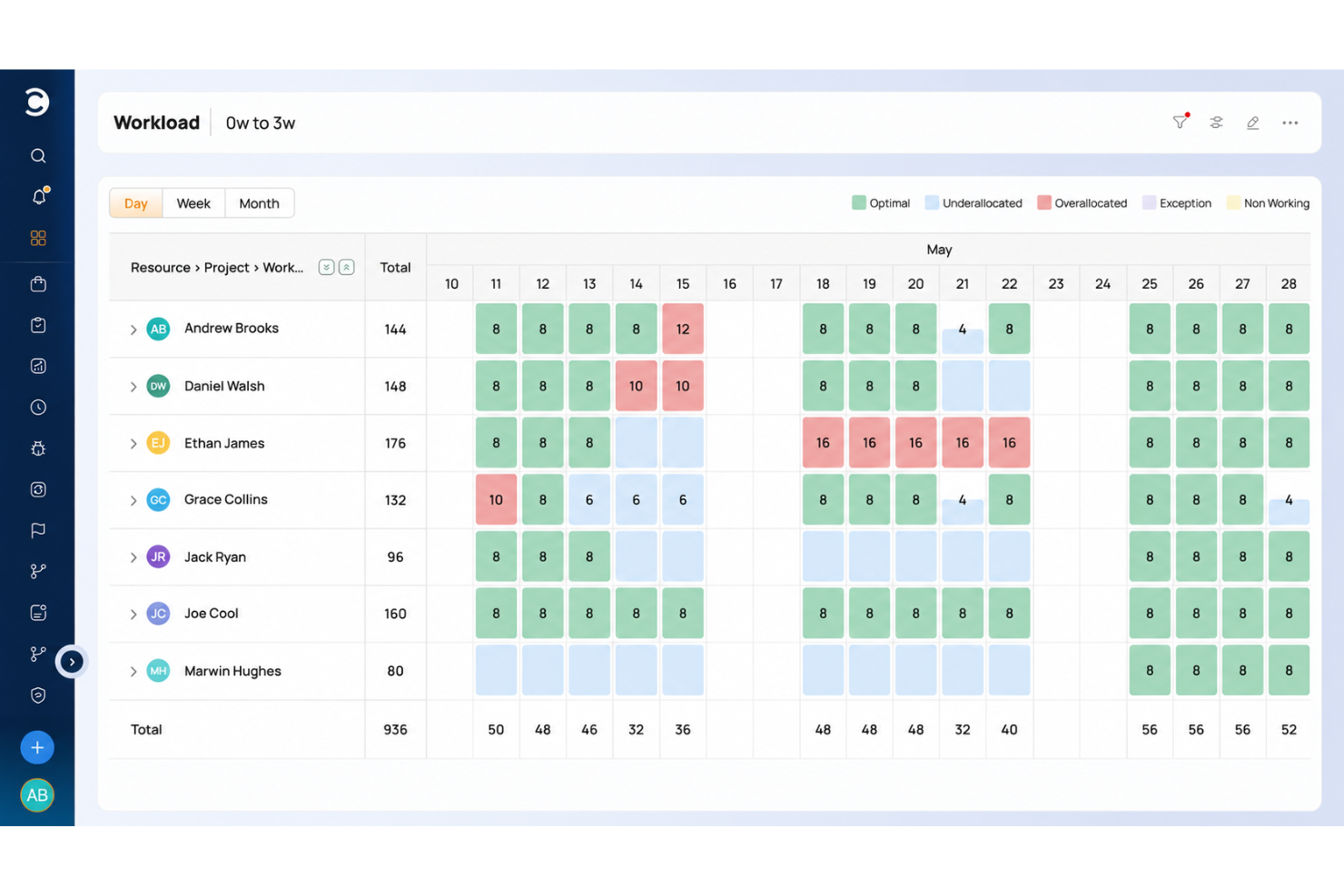
Celoxis è una piattaforma per la gestione del portafoglio progetti basata su browser, che riunisce in un unico posto la pianificazione dei progetti, la programmazione interattiva con diagrammi di Gantt, la gestione delle risorse e della capacità, il monitoraggio del tempo, il controllo del budget e la reportistica trasversale sui portafogli.
Per chi è più indicato Celoxis?
Celoxis è progettato per gli uffici di gestione dei progetti (PMO) e i responsabili di progetto aziendali che devono gestire più progetti distribuiti su diversi portafogli, con pieno controllo di budget, risorse e programmazione in un unico posto.
Perché ho scelto Celoxis
Ho incluso Celoxis tra le mie scelte principali perché è la soluzione più vicina a una piattaforma unica che abbia trovato per gestire l'intero ciclo di vita del progetto, dalla raccolta e definizione delle priorità fino alla programmazione, al budget e alla reportistica del portafoglio. Adoro il suo diagramma di Gantt interattivo, che supporta tutti e quattro i tipi di dipendenza, i collegamenti tra progetti, l'analisi del percorso critico e il ricalcolo automatico ogni volta che cambia qualcosa a monte. Se a questo si aggiungono l'analisi del valore acquisito integrata e i cruscotti del portafoglio con stati RAG, si ottiene un livello di profondità nella programmazione e nella reportistica che la maggior parte degli strumenti di gestione dei progetti compatibili con Mac semplicemente non riesce a eguagliare.
Caratteristiche principali di Celoxis
- Raccolta e definizione delle priorità dei progetti: Un flusso di lavoro integrato per la gestione delle richieste consente di acquisire, valutare e approvare i progetti in arrivo prima che entrino nella programmazione.
- Analisi del valore acquisito: Tiene traccia delle prestazioni dei costi rispetto al valore pianificato, consentendo di individuare gli scostamenti dal budget prima che si aggravino.
- Portale clienti: Uno spazio di lavoro personalizzato e in sola lettura in cui i clienti possono accedere ai propri progetti e attività senza dover acquistare una licenza.
- Assistente IA (Lex): Risponde in linguaggio naturale alle domande sui dati aggiornati del portafoglio e propone azioni consigliate.
Integrazioni di Celoxis
Celoxis offre 21 integrazioni native, tra cui Microsoft 365, Google Sheets, Google Calendar, Jira, Azure DevOps, GitHub, Slack e Trello. Supporta inoltre oltre 400 connessioni tramite Zapier e un'API REST per integrazioni personalizzate.
Pros and Cons
Pros:
- Programmazione dettagliata con diagrammi di Gantt tra le dipendenze dei progetti
- I cruscotti del portafoglio riducono la reportistica manuale sullo stato
- Budget, carico di lavoro e monitoraggio del tempo in un'unica soluzione
Cons:
- Nessuna applicazione nativa dedicata per macOS
- Le app mobili sono inferiori all'esperienza desktop

ClickUp
Migliore gestione gratuita dei progetti compatibile con Mac
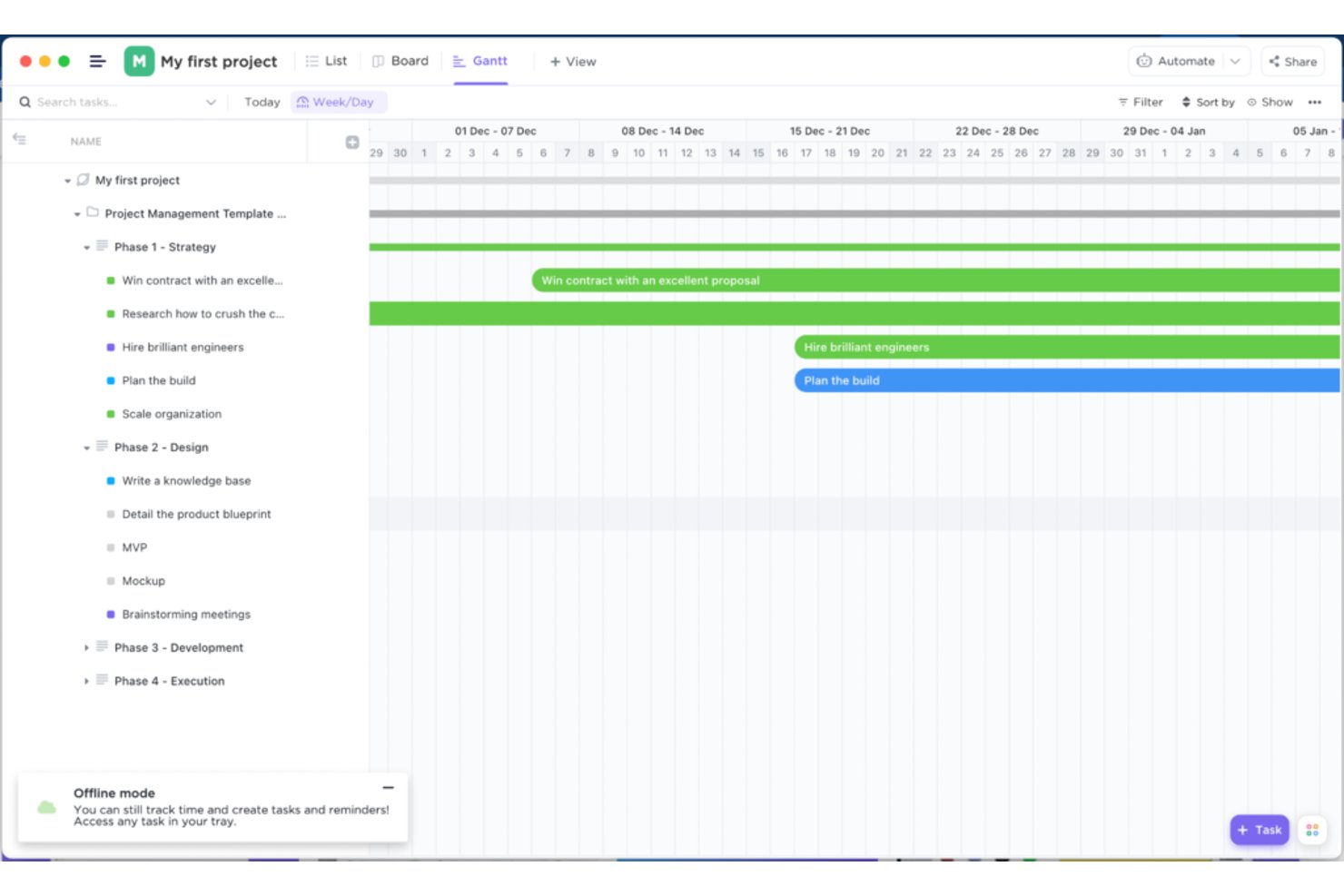
ClickUp è una piattaforma di gestione dei progetti per Mac, Windows e dispositivi mobili che combina monitoraggio delle attività, pianificazione, collaborazione del team, reportistica e analisi dei progetti assistita dall'intelligenza artificiale in un unico spazio di lavoro.
Per chi è più adatto ClickUp?
ClickUp è adatto ai piccoli team e ai responsabili di progetto che desiderano uno spazio di lavoro completo senza dover pagare in anticipo.
Perché ho scelto ClickUp
ClickUp merita un posto tra le migliori soluzioni della mia selezione perché il suo piano gratuito è realmente utilizzabile, non una versione dimostrativa fortemente limitata. Mi affido alla sua visualizzazione Gantt per mappare le dipendenze tra i diversi flussi di lavoro, con percorso critico e riprogrammazione automatica integrati senza costi. L'applicazione per computer funziona su Mac, Windows e dispositivi mobili, quindi i team che utilizzano dispositivi diversi rimangono sincronizzati senza configurazioni aggiuntive.
Funzionalità principali di ClickUp
- Applicazione multipiattaforma per computer: Un'applicazione dedicata funziona su Mac, Windows e Linux, così i team che utilizzano dispositivi diversi condividono un unico spazio di lavoro senza problemi di compatibilità.
- Sincronizzazione bidirezionale con Google Calendar: Le attività e le scadenze di ClickUp si sincronizzano in entrambe le direzioni con Google Calendar, mantenendo coerente la pianificazione tra gli strumenti.
- Campi personalizzati e gerarchia delle attività: Organizza il lavoro tra Spazi, Cartelle, Elenchi e Attività, con campi e stati personalizzati in base al tuo flusso di lavoro.
- Visualizzazione del carico di lavoro e della capacità: Visualizza il lavoro assegnato a ciascun membro del team su una sequenza temporale visiva per individuare i sovraccarichi prima che diventino un problema.
Integrazioni di ClickUp
ClickUp offre integrazioni native con Google Calendar, Slack, Microsoft Teams, GitHub, GitLab, Bitbucket, Figma, Google Drive e Outlook. Supporta inoltre la sincronizzazione con Apple Calendar, Zapier, i webhook e un'API pubblica per le integrazioni personalizzate.
Pros and Cons
Pros:
- Le dipendenze Gantt avanzate riprogrammano le attività successive
- Il piano gratuito include attività e membri illimitati
- I recensori apprezzano i flussi di lavoro configurabili in un unico spazio di lavoro
Cons:
- L'app per Mac non supporta i comportamenti nativi di macOS
- I recensori segnalano ritardi e rallentamenti
New Product Updates from ClickUp
ClickUp Adds Meetings Hub, Super Agent Templates, and ZoomInfo Integration
ClickUp adds a searchable Meetings Hub, new ways to clone and template Super Agents, and a ZoomInfo integration through the App Center. These updates improve meeting retrieval, agent reuse, and access to sales intelligence. For more information, visit ClickUp’s official site.

Asana
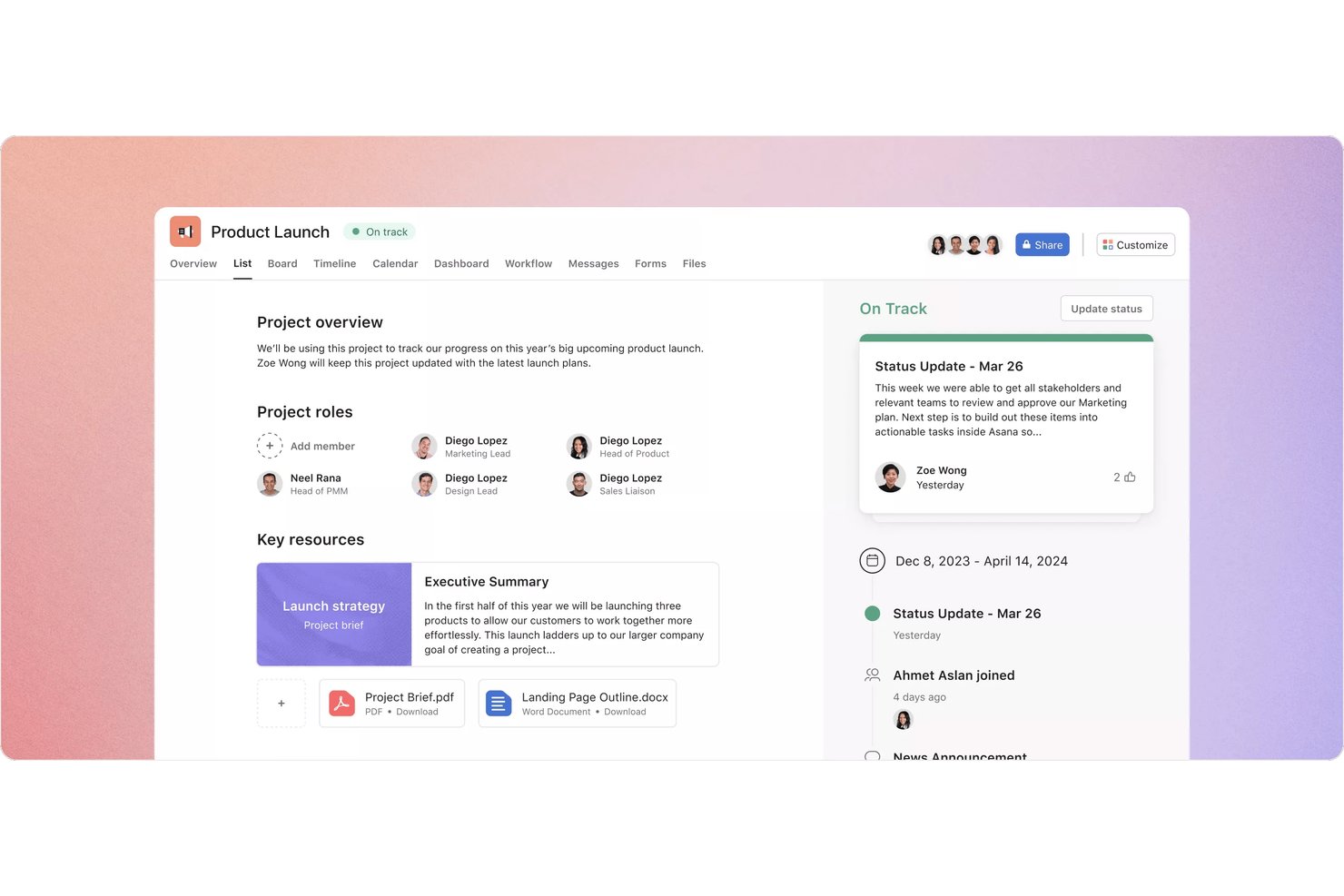
Asana è una piattaforma di gestione dei progetti basata sul cloud, con app desktop e mobili, che offre il monitoraggio delle attività, la pianificazione tramite timeline e diagrammi di Gantt, la gestione del carico di lavoro e la reportistica su più progetti per i vari team.
A chi è più adatta Asana?
Asana è adatta ai project manager e ai team interfunzionali che devono monitorare più progetti, scadenze e carichi di lavoro in un unico luogo.
Perché ho scelto Asana
Ho incluso Asana tra le mie scelte principali perché è l'opzione più efficace di questo elenco per monitorare simultaneamente più progetti tra diversi team. Mi piace molto il modo in cui la visualizzazione del portfolio riunisce ogni progetto attivo in un unico cruscotto di stato, consentendomi di individuare i colli di bottiglia tra i flussi di lavoro senza dover passare da un progetto all'altro. La visualizzazione della timeline aggiunge la gestione delle dipendenze tramite trascinamento e l'evidenziazione del percorso critico, rendendo facile capire esattamente quali attività stanno ostacolando la consegna.
Funzionalità principali di Asana
- Assegnazione a più progetti: Aggiungi la stessa attività a più progetti, così rimane visibile in ogni flusso di lavoro senza duplicazioni.
- Scorciatoia globale per l'aggiunta rapida: Usa Shift + Cmd + + per creare attività istantaneamente da qualsiasi punto del tuo Mac senza cambiare finestra.
- Visualizzazione del carico di lavoro: Visualizza il lavoro assegnato a ciascun membro del team sotto forma di barra della capacità, imposta limiti settimanali e trascina le attività per riequilibrare le assegnazioni.
- Ospiti gratuiti illimitati: Invita clienti o collaboratori nei piani Starter e superiori senza aggiungere postazioni a pagamento.
Integrazioni di Asana
Asana elenca oltre 100 integrazioni, tra cui Slack, Microsoft Teams, Google Drive, Figma, Jira, GitHub e Microsoft Azure DevOps. Offre inoltre un'API e la connettività con Zapier per flussi di lavoro personalizzati.
Pros and Cons
Pros:
- Dipendenze nella timeline e pianificazione del percorso critico
- I portfolio mostrano lo stato di più progetti
- La scorciatoia per l'aggiunta rapida dalla barra dei menu supporta i flussi di lavoro su Mac
Cons:
- L'app desktop è basata sul web, non nativa
- Gli utenti Mac segnalano un caricamento lento delle attività

Ideale per il lavoro con i clienti e il bilanciamento del carico di lavoro
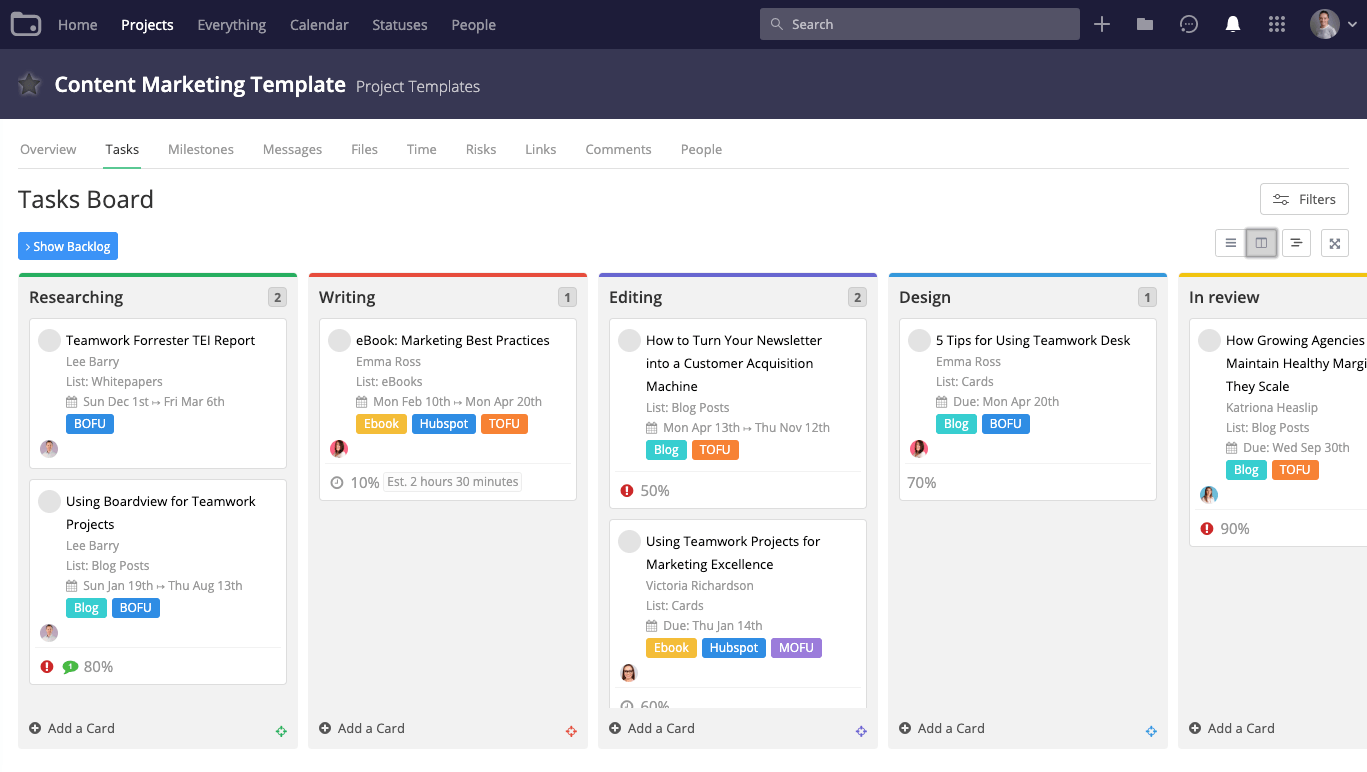
Teamwork.com è una piattaforma di gestione dei progetti pensata per i team che lavorano con i clienti, che combina monitoraggio delle attività, pianificazione con diagrammi di Gantt, monitoraggio del tempo e del budget, pianificazione del carico di lavoro e strumenti di collaborazione con i clienti su Mac, Windows e dispositivi mobili.
Per chi è più adatto Teamwork.com?
Teamwork.com è particolarmente adatto ai responsabili di progetto e ai responsabili degli account di agenzie o aziende di servizi professionali che gestiscono contemporaneamente più incarichi per i clienti.
Perché ho scelto Teamwork.com
Ho incluso Teamwork.com tra le mie scelte principali perché è progettato specificamente per il lavoro con i clienti, a differenza della maggior parte degli strumenti di gestione dei progetti. Il pianificatore del carico di lavoro mi offre una panoramica aggiornata di chi ha troppi incarichi e chi invece ha disponibilità, permettendomi di riassegnare le attività prima che una scadenza venga mancata. Mi affido anche al monitoraggio delle dipendenze e all'evidenziazione del percorso critico nel diagramma di Gantt per evitare sovrapposizioni nelle tempistiche dei progetti con più clienti.
Funzionalità principali di Teamwork.com
- Diagramma di Gantt interattivo: Trascina e rilascia le attività per modificare le date, imposta le dipendenze tra le attività ed esporta le tempistiche in formato PDF o come file di Microsoft Project.
- Monitoraggio del tempo integrato: Registra le ore fatturabili e non fatturabili direttamente sulle attività, gestisci i flussi di approvazione dei rapportini e genera report sul tempo dedicato ai vari progetti.
- Accesso degli utenti clienti: Invita un numero illimitato di clienti nei tuoi progetti senza costi aggiuntivi, permettendo loro di commentare, aggiungere attività e visualizzare i progressi senza dover acquistare una licenza.
- Revisioni e approvazioni: Carica i file per raccogliere riscontri strutturati dai clienti, raccogli le annotazioni in un'unica conversazione e monitora la cronologia delle approvazioni tra i diversi cicli.
Integrazioni di Teamwork.com
Teamwork.com elenca oltre 150 integrazioni, tra cui Slack, Microsoft Teams, Google Calendar, Outlook Calendar, Google Drive, HubSpot e QuickBooks. Offre inoltre l'accesso API su tutti i piani e Zapier.
Pros and Cons
Pros:
- Il diagramma di Gantt interattivo monitora le dipendenze tra le attività
- Le revisioni per i clienti organizzano i riscontri relativi alle approvazioni
- Le visualizzazioni del carico di lavoro segnalano i membri del team sovraccarichi
Cons:
- L'applicazione desktop per Mac richiede l'accesso a Internet
- La navigazione ricca di elementi può rallentare le revisioni dei progetti

Ideale per report personalizzati e report per le parti interessate
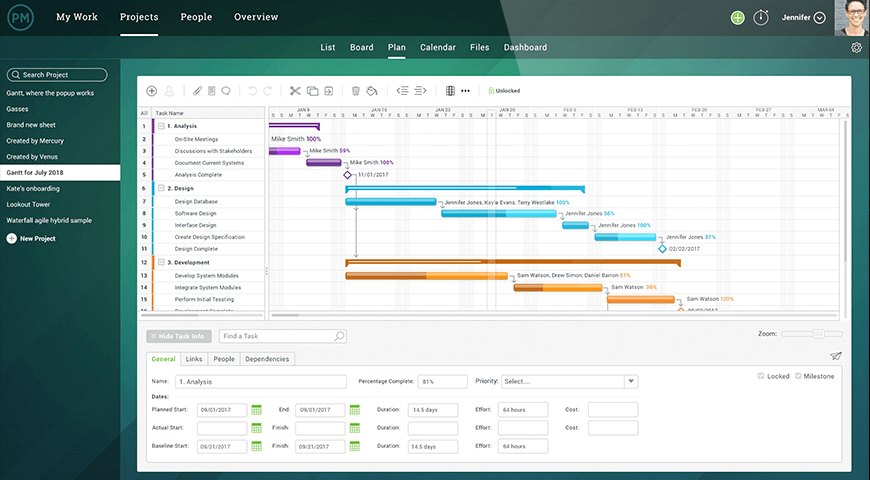
ProjectManager è una piattaforma di gestione dei progetti basata su browser che offre pianificazione con diagrammi di Gantt, monitoraggio delle attività in più viste, collaborazione tra team e report personalizzabili per progetti e portafogli.
Per chi è più adatto ProjectManager?
ProjectManager è adatto ai project manager che hanno bisogno di produrre report curati e pronti per le parti interessate e di monitorare pianificazioni complesse su più progetti, tutto da un browser su qualsiasi Mac.
Perché ho scelto ProjectManager
Ho incluso ProjectManager tra le mie scelte principali perché la sua suite di report è davvero difficile da battere quando la comunicazione con le parti interessate è una priorità. Posso filtrare qualsiasi report per progetto, membro del team o dati sui costi, quindi esportare in pochi minuti un file PDF o Excel curato e pronto per una revisione da parte dell'alta dirigenza. La funzionalità di analisi approfondita dei progetti basata sull'IA del piano Business fa un ulteriore passo avanti, generando automaticamente riepiloghi per i dirigenti e analisi dei rischi, cosa che consente di risparmiare tempo reale quando si gestiscono più progetti contemporaneamente.
Caratteristiche principali di ProjectManager
- Diagramma di Gantt interattivo: Una vista Gantt con funzionalità di trascinamento, quattro tipi di dipendenze, filtraggio del percorso critico, linee di base e pietre miliari che si aggiornano automaticamente quando cambiano le date.
- Automazione dei flussi di lavoro: Automazione basata su regole attivata da stato, priorità, assegnatario, costo o durata per spostare le attività attraverso fasi definite senza aggiornamenti manuali.
- Registro RAID: Un registro integrato per monitorare rischi, ipotesi, problemi e dipendenze, completo di matrice dei rischi per una gestione strutturata dei progetti.
- Accesso ospite gratuito in sola lettura: Un numero illimitato di ospiti può visualizzare piani, pietre miliari, cruscotti e aggiornamenti sullo stato senza consumare una licenza a pagamento.
Integrazioni di ProjectManager
ProjectManager offre integrazioni native con Slack, Microsoft Teams, Jira, Azure DevOps, QuickBooks Online, Microsoft Power BI, Microsoft Excel e Trello. Supporta inoltre l'accesso API su tutti i piani e Zapier.
Pros and Cons
Pros:
- I report pronti per le parti interessate ricevono apprezzamenti dagli utenti
- Le dipendenze del diagramma di Gantt supportano pianificazioni complesse
- L'accesso dal browser mantiene i team sincronizzati
Cons:
- Non è disponibile un'applicazione desktop dedicata per macOS
- L'app mobile non include il diagramma di Gantt né l'accesso offline

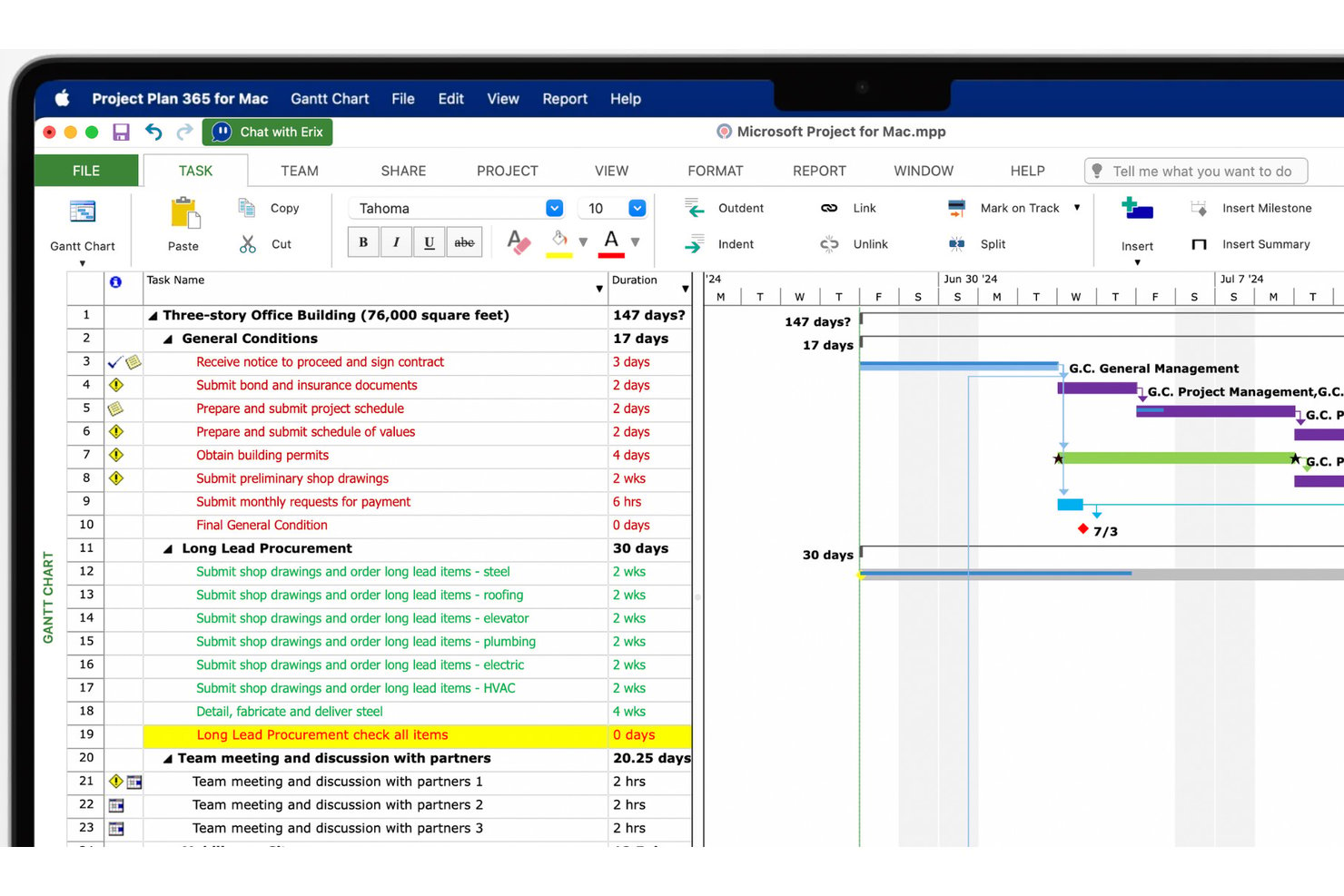
Project Plan 365 è un'app nativa per Mac per la gestione dei progetti, basata sulla pianificazione in stile MS Project, che offre diagrammi di Gantt, analisi del percorso critico, gestione delle risorse e modifica diretta dei file
.mpp
su Mac, Windows, iOS, Android e web.
A chi è più adatto Project Plan 365?
Project Plan 365 è particolarmente adatto ai project manager che lavorano in ambienti misti Mac e Windows e hanno bisogno di aprire, modificare e condividere file
.mpp
senza convertirli.
Perché ho scelto Project Plan 365
Project Plan 365 è entrato nella mia selezione perché è l'unica app per Mac che ho trovato in grado di aprire, modificare e salvare direttamente i file
.mpp
, senza bisogno di conversione. Se usi un Mac ma scambi regolarmente file di progetto con colleghi che utilizzano MS Project su Windows, questa compatibilità rappresenta un autentico elemento distintivo. Apprezzo inoltre il supporto per l'analisi del percorso critico e per più linee di base, che offre una pianificazione avanzata senza dover passare a un computer Windows.
Funzionalità principali di Project Plan 365
- Pianificazione con diagrammi di Gantt: Crea e modifica le pianificazioni delle attività con barre di Gantt trascinabili, scale temporali personalizzate e formattazione delle forme delle barre in più visualizzazioni.
- Collaborazione in tempo reale: Fino a 20 utenti possono modificare contemporaneamente un piano condiviso con il piano Business, con modifiche contrassegnate da colori e un indicatore in tempo reale 'Chi è online'.
- Visualizzazioni a scheda Agile: Passa dalle schede Scrum alle schede Kanban, inclusi una scheda del lavoro arretrato e gli stati delle schede, affiancandole alla pianificazione tradizionale con diagrammi di Gantt.
- Rilevamento della sovrallocazione delle risorse: Il motore di pianificazione segnala automaticamente il sovraccarico e supporta il livellamento delle risorse per aiutarti a bilanciare i carichi di lavoro del team.
Integrazioni di Project Plan 365
Le integrazioni documentate includono Google Drive, iCloud, Dropbox, OneDrive, Box, SharePoint Online, Basecamp e l'ecosistema Microsoft Project. Supporta inoltre i file MPP archiviati tramite servizi cloud per la collaborazione multipiattaforma.
Pros and Cons
Pros:
- I recensori apprezzano la compatibilità con i file MPP su Mac
- Il supporto per linee di base e dipendenze consente una pianificazione dettagliata
- App nativa per Mac compatibile con Apple Silicon
Cons:
- Un recensore di G2 ha definito l'interfaccia obsoleta
- Nessuna chat, commenti o menzioni integrati nell'app
Altri software di gestione dei progetti per Mac
Ecco alcuni altri strumenti che non sono entrati nel mio elenco ristretto, ma che meritano comunque la tua attenzione.
- Smartsheet
Ideale per il lavoro sui progetti abbinato al controllo delle risorse del marchio
- GoodDay
Ideale per spazi di lavoro personalizzabili con più visualizzazioni
- Jira
Ideale per il monitoraggio agile nei team di ingegneria
- MeisterTask
Ideale per dashboard personalizzati
- GanttPRO
Ideale per la pianificazione delle tempistiche basata sul diagramma di Gantt
- Merlin Project
Ideale per la pianificazione di progetti da mappe mentali a diagrammi di Gantt
- Hive
Ideale per automatizzare i flussi di lavoro dei progetti
- OmniPlan
Ideale per la pianificazione Gantt nativa di Apple
- TaskRay
Ideale per i team che gestiscono progetti nativi di Salesforce


Come Valuto il Software di Project Management per Mac
Divido la mia valutazione in requisiti di base—come una vera app nativa macOS e la sincronizzazione tra dispositivi Apple—e i fattori differenzianti che contano di più per i responsabili di progetto di agenzie e i direttori di studio.
Funzionalità Core (Requisiti Minimi per Questa Lista)
Quando seleziono gli strumenti per la mia lista, valuto ciascuno su una scala da 0 (non offre la funzionalità) a 5 (eccelle in quest'area) per ogni funzionalità principale elencata di seguito. Calcolo poi il punteggio totale dello strumento come percentuale. Ogni strumento deve raggiungere un punteggio totale minimo del 65% per essere preso in considerazione.
- App Desktop Nativa macOS: Verifico se ogni strumento offre una vera app Mac nativa—non solo una scheda Chrome in un contenitore—con supporto per funzioni macOS come notifiche, accesso alla barra dei menu e ricerca Spotlight.
- Gestione di Attività e Progetti: Ogni strumento deve consentire la creazione di attività con assegnatari, scadenze, dipendenze e sottoattività, così un backlog di sprint o un tracker di consegne per il cliente funzionano davvero.
- Più Visualizzazioni di Progetto: Cerco almeno due layout visivi come bacheche Kanban, diagrammi di Gantt o calendari, poiché un board di lavoro creativo appare molto diverso da una timeline ingegneristica.
- Sincronizzazione nell'Ecosistema Apple: Lo strumento deve sincronizzarsi tra Mac, iPhone e iPad, con integrazioni nelle app native Apple come Calendario o Promemoria per i team che lavorano totalmente nell’ecosistema Apple.
- Funzionalità di Collaborazione di Team: Valuto aree di lavoro condivise, commenti inline, allegati e menzioni @—tutte funzioni che mantengono allineato un team di designer e sviluppatori distribuito senza passare alle email.
- Integrazioni di Terze Parti: Gli strumenti dovrebbero connettersi con le app su cui i team basati su Mac già fanno affidamento, come Slack, Zoom, Google Workspace, Figma o GitHub, tramite integrazioni native o un’API aperta.
Una volta che ho una lista di strumenti che soddisfano i criteri, considero ciò che distingue ciascuna piattaforma.
Fattori Differenzianti (Cosa Distingue i Fornitori)
Ecco come confronto e metto a confronto diversi fornitori:
Funzionalità Distintive
Il monitoraggio del tempo integrato è importante per i responsabili di progetto di agenzie e per i freelance che fatturano a ore—cerco fogli presenza collegati direttamente alle attività che generano report fatturabili. La gestione delle risorse e del carico di lavoro è un altro fattore distintivo, soprattutto per i direttori di studio che gestiscono più progetti e hanno bisogno di un modo visivo per individuare il sovraccarico prima che diventi causa di stress. Valuto anche le automazioni no-code, come l’assegnazione automatica di compiti quando un progetto passa a una nuova fase, che fanno risparmiare ore ogni settimana e riducono l’aggiornamento manuale dello stato.
Oltre le Funzionalità
Le prestazioni su Apple Silicon sono fondamentali—controllo se le app funzionano nativamente su chip della serie M o se si basano su Electron, fattore che incide direttamente sulla durata della batteria e sulla reattività durante lunghe sessioni di pianificazione su un MacBook. Presto molta attenzione anche alla struttura dei prezzi, dato che freelance e solopreneurs hanno bisogno di piani gratuiti reali, mentre le agenzie in crescita devono poter scalare senza costi per utente fuori controllo. Valuto inoltre le risorse di onboarding, cercando guide e template specifici per macOS che consentano ai team di diventare produttivi già nella prima settimana senza dover spendere un mese per configurare le visualizzazioni.
Come scegliere un software di gestione dei progetti per Mac
È facile perdersi in lunghi elenchi di funzionalità e strutture tariffarie complesse. Per aiutarti a rimanere concentrato mentre affronti il tuo processo di selezione del software, unico nel suo genere, ecco una checklist dei fattori da tenere a mente:
| Fattore | Elementi da considerare |
|---|---|
| Scalabilità | Assicurati che il software possa crescere insieme al tuo team. Cerca limiti utente flessibili, funzionalità avanzate per progetti più grandi e prestazioni affidabili man mano che le tue esigenze aumentano. |
| Integrazioni | Verifica se il software si connette agli strumenti che il tuo team utilizza già, come Slack, Google Drive o i software di contabilità. Le integrazioni senza interruzioni possono semplificare i flussi di lavoro e far risparmiare tempo. |
| Personalizzazione | Assicurati che il software consenta di adattare dashboard, visualizzazioni delle attività e flussi di lavoro alle esigenze e alle preferenze specifiche del tuo team per i progetti. |
| Semplicità d’uso | Dai priorità alla navigazione intuitiva, alla configurazione semplice e a una curva di apprendimento minima. Un’interfaccia chiara garantisce che il tuo team possa adottare e utilizzare rapidamente il software in modo efficace. |
| Budget | Valuta le strutture dei prezzi per assicurarti che siano in linea con il tuo budget. Cerca prezzi trasparenti, prove gratuite e funzionalità che corrispondano al valore che ti aspetti. |
| Misure di sicurezza | Verifica che la protezione dei dati sia solida, con funzionalità come crittografia, backup regolari e controlli di accesso sicuri per proteggere le informazioni del tuo team. |
| Compatibilità tra dispositivi | Verifica che il software funzioni senza problemi sul tuo Mac e offra esperienze uniformi anche su altri dispositivi, come iPhone e iPad, per una maggiore flessibilità. |
| Assistenza clienti | Cerca canali di assistenza facilmente accessibili, come chat o e-mail, e considera le recensioni degli utenti che evidenziano la rapidità di risposta e la competenza nella risoluzione dei problemi tecnici. |
Tendenze nei software di gestione dei progetti per Mac
Durante la mia ricerca, ho raccolto innumerevoli aggiornamenti dei prodotti, comunicati stampa e registri delle versioni da diversi fornitori di programmi per Mac. Ecco alcune delle tendenze emergenti che sto tenendo d’occhio:
- Analisi basate sull’AI: molte piattaforme ora includono analisi basate sull’intelligenza artificiale che aiutano i team a prendere decisioni migliori individuando le tendenze e suggerendo i passaggi successivi. Ad esempio, l’AI potrebbe analizzare i dati del progetto per assegnare automaticamente la priorità alle attività, rendendo lo strumento un prezioso gestore delle attività per macOS.
- Visualizzazione dei dati: i nuovi strumenti di visualizzazione possono trasformare i dati dei progetti in grafici e dashboard facili da comprendere, aiutando i team a individuare modelli e progressi a colpo d’occhio. Questi strumenti spesso offrono visualizzazioni personalizzabili e stanno diventando alcune delle migliori app di utilità per Mac per i professionisti che hanno bisogno di riepiloghi e report rapidi dei dati su macOS.
- Funzionalità di comando vocale: alcuni fornitori stanno sperimentando i comandi vocali per velocizzare la creazione e l’aggiornamento delle attività. Questa funzionalità consente agli utenti di aggiungere rapidamente elementi o verificare gli stati tramite input vocale, rendendola ideale per lavorare a mani libere sui dispositivi MacBook, creando di fatto un equivalente di un gestore delle attività a mani libere per MacBook Air.
- Strumenti di collaborazione ibrida: i software si stanno adattando per supportare sia il lavoro in ufficio sia quello da remoto, offrendo strumenti flessibili come lavagne virtuali e stanze separate per i team ibridi. Queste piattaforme consentono ai team di collaborare visivamente e comunicare in tempo reale, indipendentemente dalla loro posizione.
- Monitoraggio della sostenibilità: alcune piattaforme offrono ora funzionalità che aiutano i team a monitorare l’impatto ambientale dei progetti, come strumenti per l’analisi dell’impronta di carbonio o metriche sul consumo delle risorse. Questa funzionalità interessa gli utenti alla ricerca di software per piani aziendali per Mac che i professionisti possano utilizzare per monitorare gli obiettivi di sostenibilità, aggiungendo nuovo valore a software un tempo incentrati esclusivamente sulla gestione delle attività e dei documenti.
Che cos’è un software di gestione dei progetti per Mac?
Il software di gestione dei progetti per Mac è uno strumento progettato per funzionare senza problemi sui tuoi dispositivi Mac, utilizzando macOS o iOS, come app oppure nel browser.
I responsabili di progetto che utilizzano i Mac, così come designer, esperti di marketing o chiunque sia fedele ad Apple, usano questi strumenti per pianificare i progetti, monitorare il lavoro, gestire le pianificazioni e i calendari per la gestione dei progetti e collaborare con i propri team. Puoi utilizzare le funzionalità essenziali per la gestione dei progetti senza aver bisogno di un computer Windows, continuando così a usare l’interfaccia Apple che conosci.
Funzionalità dei software di gestione dei progetti per Mac
Quando scegli un software di gestione dei progetti per Mac, presta attenzione alle seguenti funzionalità fondamentali:
- Gestione delle attività: Un intuitivo gestore delle attività per macOS consente agli utenti di creare, assegnare e stabilire la priorità delle attività, rendendolo una delle migliori app per gli utenti di MacBook che cercano flussi di lavoro organizzati.
- Diagrammi di Gantt: Visualizza le tempistiche e le dipendenze nei progetti, offrendo un'alternativa utile e compatibile con Mac a Microsoft Project, con funzionalità di pianificazione visiva.
- Monitoraggio del tempo: Tiene traccia del tempo dedicato alle attività o ai progetti, offrendo una visione chiara dell'allocazione del tempo e contribuendo a ottimizzare la produttività. È ideale per gli utenti che cercano app di monitoraggio del tempo per Mac integrate con la gestione dei progetti.
- Gestione dei documenti: Offre un gestore sicuro dei documenti su cui gli utenti Mac possono fare affidamento per archiviare e condividere file direttamente all'interno della piattaforma, mantenendo accessibili tutti i documenti essenziali.
- Strumenti di collaborazione: Consentono la comunicazione in tempo reale tramite chat integrata, commenti e condivisione di file, così i team possono rimanere connessi senza ricorrere a ulteriori strumenti software di monitoraggio per Mac.
- Monitoraggio del budget: Consente ai team di confrontare le spese dei progetti con il budget, offrendo visibilità sui costi agli utenti che hanno bisogno di un gestore delle attività per MacBook con funzionalità di controllo finanziario.
- Dashboard personalizzabili: Gli utenti possono creare dashboard adattate alle proprie metriche, ottenendo un'esperienza da organizzatore per Mac per monitorare in un unico luogo lo stato dei progetti, le tempistiche e i progressi.
- Report e analisi: Genera report dettagliati e analisi sulle prestazioni dei progetti, diventando una funzionalità comune nelle migliori app per gli utenti di iMac che necessitano di informazioni approfondite sui progetti. È inoltre possibile optare per specifici strumenti di reportistica.
- Gestione delle risorse: Gestisce la disponibilità e le assegnazioni del team, garantendo una distribuzione equilibrata del lavoro ed evitando di sovraccaricare le persone, in linea con l'approccio di un'app per la pianificazione su Mac. È inoltre possibile scegliere specifici software per la pianificazione delle risorse.
- Accesso da dispositivi mobili: Offre un'interfaccia ottimizzata per dispositivi mobili che consente agli utenti di accedere ai dettagli dei progetti ovunque si trovino, soddisfacendo le esigenze di pianificazione su MacBook dei membri del team che lavorano da remoto o necessitano di flessibilità.
Vantaggi del software di gestione dei progetti per Mac
L'implementazione di un software di gestione dei progetti per Mac può offrire numerosi vantaggi al team e all'azienda. Ecco alcuni dei vantaggi che è possibile aspettarsi:
- Maggiore organizzazione: Mantiene attività, file e pianificazioni in un unico luogo, facilitando l'organizzazione del team e consentendo di sapere dove trovare ciò di cui si ha bisogno. Questa funzionalità può svolgere il ruolo di un organizzatore di file su cui gli utenti Mac farebbero affidamento ogni giorno.
- Collaborazione migliorata: Grazie agli strumenti integrati di messaggistica e condivisione dei file, i membri del team possono comunicare e lavorare insieme in modo efficace, anche da luoghi diversi.
- Migliore gestione del tempo: Le funzionalità di monitoraggio del tempo e assegnazione delle attività garantiscono il rispetto delle scadenze, aspetto ideale per i team che necessitano della migliore app di monitoraggio del tempo per gestire i carichi di lavoro in modo efficiente.
- Accesso semplice ovunque: Le opzioni ottimizzate per dispositivi mobili consentono agli utenti di controllare gli aggiornamenti e gestire le attività da qualsiasi luogo, una soluzione ottima per i lavoratori da remoto che devono tenere sotto controllo le attività.
- Decisioni basate sui dati: Gli strumenti di reportistica e analisi forniscono informazioni sulle prestazioni dei progetti, aiutando i team a prendere decisioni consapevoli basate su dati reali.
- Allocazione delle risorse: Monitora la disponibilità e il carico di lavoro del team, consentendo ai responsabili di distribuire le attività in modo uniforme ed evitare il burnout. Questa funzionalità è un'aggiunta utile se è necessario gestire più progetti contemporaneamente.
- Controllo dei costi: Le funzionalità di monitoraggio del budget aiutano i team a controllare le spese rispetto ai budget dei progetti, consentendo agli utenti di tenere sotto controllo le proprie finanze.
Costi e prezzi del software di gestione dei progetti per Mac
La scelta di un software di gestione dei progetti per Mac richiede la comprensione dei vari modelli e piani tariffari disponibili. I costi variano in base alle funzionalità, alle dimensioni del team, ai componenti aggiuntivi e ad altri fattori. La tabella seguente riassume i piani più comuni, i relativi prezzi medi e le funzionalità generalmente incluse nelle soluzioni software di gestione dei progetti per Mac:
Tabella comparativa dei piani per il software di gestione dei progetti per Mac
| Tipo di piano | Prezzo medio | Funzionalità comuni |
|---|---|---|
| Piano gratuito | $0 | Gestione di base delle attività, spazio di archiviazione limitato e supporto della comunità |
| Piano personale | $5-$15/utente/mese | Gestione delle attività, integrazione del calendario e supporto via e-mail |
| Piano aziendale | $20-$50/utente/mese | Reportistica avanzata, collaborazione del team, integrazioni e supporto prioritario |
| Piano per grandi aziende | Prezzi personalizzati | Integrazioni personalizzate, responsabile dell'account dedicato, sicurezza avanzata e formazione |
Software di gestione dei progetti per Mac: domande frequenti
Trova le risposte alle domande comuni che altre persone pongono su questo argomento.
Qual è l'equivalente di MS Project per Apple?
Sebbene molti dei software di gestione dei progetti più diffusi in questo elenco dispongano ormai di app native per Mac, vorrei evidenziare Merlin Project. L’azienda che ha sviluppato questo strumento è stata fondata nel 2002 e da oltre due decenni si concentra sull’offerta di soluzioni di gestione dei progetti agli utenti Mac.
Tra le principali funzionalità offerte da Merlin Project ci sono:
\u003cul\u003e
\t\u003cli\u003eLivellamento automatico delle risorse\u003c/li\u003e
\t\u003cli\u003eCosti e budget con strategie dall’alto verso il basso e dal basso verso l’alto\u003c/li\u003e
\t\u003cli\u003eBacheche Kanban e diagrammi di Gantt\u003c/li\u003e
\t\u003cli\u003eMappe mentali\u003c/li\u003e
\u003c/ul\u003e
Inoltre, per rendere più semplice la transizione a questo strumento, offre funzionalità di importazione per Excel, Numbers e MS Project, tra gli altri.
Quali tipi di strumenti di visualizzazione dei progetti sono disponibili nei software di gestione dei progetti?
I software di gestione dei progetti per utenti Mac offrono una vasta gamma di potenti strumenti di visualizzazione per aiutare i team a rimanere organizzati, monitorare i progressi e gestire i flussi di lavoro in modo efficiente. Ecco alcune opzioni diffuse:
\u003cul\u003e
\t\u003cli\u003e\u003cstrong\u003eDiagrammi di Gantt\u003c/strong\u003e: essenziali per visualizzare tempistiche, dipendenze e avanzamento delle attività, i \u003ca href=\u0022https://thedigitalprojectmanager.com/tools/free-gantt-chart-software/\u0022\u003ediagrammi di Gantt\u003c/a\u003e offrono una visione chiara dell’intero ciclo di vita del progetto. App come Wrike, monday.com e OmniPlan 3, considerate tra i migliori software per Mac, offrono funzionalità avanzate per i diagrammi di Gantt con funzionalità di trascinamento e rilascio e aggiornamenti in tempo reale.\u003c/li\u003e
\t\u003cli\u003e\u003cstrong\u003eBacheche Kanban\u003c/strong\u003e: le bacheche Kanban sono ideali per la gestione delle attività e dei flussi di lavoro, poiché mostrano le attività in colonne per indicarne lo stato corrente. Strumenti come monday.com e Wrike, spesso inclusi tra le migliori app per Mac, offrono bacheche Kanban che consentono ai team di monitorare i progressi e collaborare in modo efficace.\u003c/li\u003e
\t\u003cli\u003e\u003cstrong\u003eDashboard\u003c/strong\u003e: le dashboard offrono una rapida panoramica delle metriche essenziali del progetto, come il completamento delle attività, l’allocazione delle risorse e lo stato del budget, diventando così una funzionalità chiave di alcuni dei migliori software di utilità per Mac. Queste visualizzazioni dei dati in tempo reale aiutano i project manager a prendere decisioni informate.\u003c/li\u003e
\t\u003cli\u003e\u003cstrong\u003eVisualizzazioni calendario e sequenza temporale\u003c/strong\u003e: le visualizzazioni calendario e sequenza temporale sono utili per visualizzare le pianificazioni e gestire le attività sovrapposte. Queste visualizzazioni aiutano i team a mantenere l’allineamento sulle scadenze e sulle tempistiche.\u003c/li\u003e
\t\u003cli\u003e\u003cstrong\u003eIntegrazione con la gestione delle risorse digitali\u003c/strong\u003e: per i team che gestiscono grandi quantità di file visivi o multimediali, l’integrazione con i \u003ca href=\u0022https://thedigitalprojectmanager.com/tools/best-digital-asset-management-software-for-mac/\u0022\u003esoftware di gestione delle risorse digitali (DAM) compatibile con Mac\u003c/a\u003e aggiunge un ulteriore livello di efficienza.\u003c/li\u003e
\u003c/ul\u003e
Esiste una versione di Microsoft Project per Mac?
Sebbene MS Project non sia compatibile con macOS, esistono comunque opzioni per usare \u003ca href=\u0022https://thedigitalprojectmanager.com/tools/microsoft-project-mac/\u0022\u003eMicrosoft Project sul tuo Mac\u003c/a\u003e. Come la maggior parte dei software progettati da Microsoft, questo strumento è stato sviluppato specificamente per i dispositivi Windows. Tuttavia, l’app web Project Online è inclusa in Microsoft 365 per Mac ed è un software di gestione dei progetti completamente funzionante.
Tuttavia, se devi solo aprire file .mpp, puoi utilizzare un \u003ca href=\u0022https://thedigitalprojectmanager.com/tools/microsoft-project-viewer/\u0022\u003evisualizzatore di Microsoft Project\u003c/a\u003e dal tuo dispositivo Mac.
Quali sono le principali differenze tra le versioni desktop e mobile dei software di gestione dei progetti?
La differenza principale tra le versioni desktop e mobile dei software di gestione dei progetti riguarda le funzionalità e l’esperienza utente. Mentre le versioni desktop offrono spesso funzionalità più estese, le versioni mobile si concentrano sull’accessibilità e sugli aggiornamenti rapidi per l’utilizzo in mobilità. Ecco una panoramica delle differenze principali:
\u003col\u003e
\t\u003cli\u003e\u003cstrong\u003eFunzionalità\u003c/strong\u003e: le versioni desktop offrono generalmente funzionalità più avanzate, come software di gestione dei documenti per Mac, diagrammi di Gantt dettagliati e strumenti di reportistica. Le versioni mobile, progettate per un accesso rapido, danno priorità alle funzionalità essenziali, come gli aggiornamenti delle attività e le notifiche, ideali per gli utenti che cercano un gestore delle attività leggero per il proprio dispositivo mobile Apple.\u003c/li\u003e
\t\u003cli\u003e\u003cstrong\u003eInterfaccia utente\u003c/strong\u003e: le interfacce desktop sono ottimizzate per gli schermi più grandi e spesso supportano layout complessi e numerose opzioni di navigazione. Le versioni mobile semplificano l’interfaccia, facilitando la visualizzazione delle attività, degli aggiornamenti e dei file sugli schermi più piccoli. Molte app offrono una versione per Mac del gestore delle attività con un’interfaccia ottimizzata per l’uso desktop.\u003c/li\u003e
\t\u003cli\u003e\u003cstrong\u003eAccesso offline\u003c/strong\u003e: le versioni desktop supportano spesso l’accesso offline con sincronizzazione automatica, consentendo agli utenti di lavorare senza connessione Internet e sincronizzare i dati in un secondo momento. Le app mobile possono avere funzionalità offline limitate e concentrarsi sugli elementi essenziali per rimanere leggere e accessibili.\u003c/li\u003e
\t\u003cli\u003e\u003cstrong\u003eCollaborazione e comunicazione\u003c/strong\u003e: le versioni desktop includono spesso strumenti di collaborazione più avanzati, come dashboard condivise e commenti dettagliati. Le app mobile, invece, danno risalto alla messaggistica rapida, alle notifiche push e agli aggiornamenti, consentendo ai membri del team di rimanere connessi anche in mobilità.\u003c/li\u003e
\u003c/ol\u003e
Il software di gestione dei progetti può essere adattato a diversi settori?
Sì, i software di gestione dei progetti possono essere adattati a diversi settori, offrendo strumenti e integrazioni specifici per flussi di lavoro ed esigenze di conformità particolari. Ecco alcuni esempi:
\u003cul\u003e
\t\u003cli\u003e\u003ca href=\u0022https://thedigitalprojectmanager.com/tools/best-free-construction-project-management-software/\u0022\u003e\u003cstrong\u003eEdilizia\u003c/strong\u003e\u003c/a\u003e: include funzionalità per la gestione dei cantieri, la definizione del budget e l’allocazione delle risorse. Alcuni si integrano anche con organizzatori automatici di file per Mac, per mantenere ordinati piani e documenti di progetto.\u003c/li\u003e
\t\u003cli\u003e\u003ca href=\u0022https://thedigitalprojectmanager.com/tools/marketing-project-management-software/\u0022\u003e\u003cstrong\u003eMarketing e pubblicità\u003c/strong\u003e\u003c/a\u003e: offre strumenti per il monitoraggio delle campagne e la collaborazione con i clienti, inclusa la gestione delle risorse e delle approvazioni. I team spesso traggono vantaggio dall’uso dei migliori gestori di file per Mac per organizzare in modo efficiente file multimediali e risorse creative.\u003c/li\u003e
\t\u003cli\u003e\u003ca href=\u0022https://thedigitalprojectmanager.com/tools/best-healthcare-project-management-software/\u0022\u003e\u003cstrong\u003eSanità\u003c/strong\u003e\u003c/a\u003e: il monitoraggio della conformità, la sicurezza dei dati dei pazienti e gli strumenti di pianificazione aiutano a mantenere il rispetto delle normative. I team sanitari traggono vantaggio dall’uso di strumenti specializzati che garantiscono la sicurezza dei dati dei pazienti e semplificano al contempo la pianificazione degli appuntamenti e l’allocazione delle risorse.\u003c/li\u003e
\t\u003cli\u003e\u003cstrong\u003eConsulenza\u003c/strong\u003e: gli strumenti di gestione delle risorse e di monitoraggio del tempo semplificano la fatturazione e la contabilità dei progetti. I consulenti possono inoltre utilizzare un’app di gestione dei contatti per Mac per mantenere organizzate e accessibili le interazioni con i clienti tra i vari progetti.\u003c/li\u003e
\u003c/ul\u003e
Quali sono alcune opzioni di software PM gratuito per Mac?
Ecco alcune opzioni di software gratuito per la gestione dei progetti per Mac, ciascuna adatta a esigenze diverse degli utenti:
\u003col\u003e
\t\u003cli\u003e\u003cstrong\u003eTrello:\u003c/strong\u003e include bacheche Kanban, schede delle attività, elenchi di controllo, scadenze e automazione di base. È ideale per singoli utenti o piccoli team che gestiscono flussi di lavoro semplici e un’organizzazione visiva delle attività.\u003c/li\u003e
\t\u003cli\u003e\u003cstrong\u003eAsana:\u003c/strong\u003e include assegnazione delle attività, scadenze, tempistiche dei progetti e integrazioni con altri strumenti. È ideale per i team che necessitano di un approccio strutturato alla gestione delle attività senza funzionalità avanzate.\u003c/li\u003e
\t\u003cli\u003e\u003cstrong\u003eClickUp:\u003c/strong\u003e include gestione delle attività, visualizzazioni personalizzabili (elenco, Kanban, calendario), monitoraggio del tempo e automazione limitata. È adatto agli utenti che cercano una piattaforma versatile con numerose funzionalità incluse in un piano gratuito.\u003c/li\u003e
\t\u003cli\u003e\u003cstrong\u003eWrike:\u003c/strong\u003e include elenchi di attività, condivisione di file, dashboard di base e strumenti di collaborazione del team. È ideale per i team che necessitano di uno strumento semplice per gestire attività e priorità condivise.\u003c/li\u003e
\t\u003cli\u003e\u003cstrong\u003eTodoist:\u003c/strong\u003e include elenchi di attività, assegnazione delle priorità, promemoria e monitoraggio della produttività. È ottimo per singoli utenti e liberi professionisti che gestiscono attività personali o progetti semplici.\u003c/li\u003e
\t\u003cli\u003e\u003cstrong\u003eNotion:\u003c/strong\u003e include aree di lavoro personalizzabili, monitoraggio delle attività, database e presa di note. È perfetto per chi ha bisogno di un’area di lavoro completa per la pianificazione e la documentazione dei progetti.\u003c/li\u003e
\u003c/ol\u003e
Ogni strumento offre piani gratuiti con limitazioni, come un numero ridotto di progetti, meno integrazioni o spazio di archiviazione limitato. Gli utenti dovrebbero valutare le proprie esigenze specifiche di progetto prima di scegliere uno strumento.