I 10 migliori calendari per la gestione dei progetti che ho provato nel 2026

10 Selezione dei migliori strumenti di calendario per la gestione dei progetti


I migliori strumenti di calendario per la gestione dei progetti ti aiutano a gestire e programmare progetti e risorse tramite un'interfaccia di calendario visiva. Pianificare i progetti in questo modo ti aiuta a identificare e rimuovere i colli di bottiglia nei processi, gestire il carico di lavoro del team e visualizzare la tua sequenza temporale, così puoi rimanere sulla buona strada e portare a termine con successo il progetto.
Ho utilizzato i miei 15 anni di esperienza nella gestione dei progetti per valutare più di 20 strumenti di calendario per progetti: leggi qui sotto la mia analisi di ogni strumento, delle funzionalità principali e dei casi d'uso. Ti aiuterò a trovare lo strumento giusto per migliorare la pianificazione, le previsioni e il coordinamento delle attività nei tuoi progetti, oltre a ottenere una visione centralizzata di traguardi, attività, dipendenze e scadenze, così nulla passerà inosservato.
Perché fidarsi dei nostri consigli sui software
Il nostro team testa e recensisce software dal 2012. In quanto project manager noi stessi, sappiamo quanto sia difficile — e importante — scegliere il software giusto.
Per questa guida, abbiamo valutato gli strumenti attraverso test pratici e ricerche indipendenti, assegnando un punteggio agli strumenti in base ai nostri criteri di selezione. Ci basiamo inoltre sulle competenze di leader di pensiero del settore e di professionisti attivi nella gestione dei progetti.
Le nostre recensioni riflettono il nostro giudizio editoriale umano, non un discorso di vendita.
Revisori esperti:
Tabella comparativa dei calendari per la gestione dei progetti
Questa tabella comparativa riassume i dettagli sui prezzi delle mie migliori selezioni di calendari per la gestione dei progetti:
| Tool | Best For | Trial Info | Price | ||
|---|---|---|---|---|---|
| 1 | Ideale per l’automazione dei flussi di lavoro | 14 giorni di prova gratuita | A partire da $6/utente/mese | Website | |
| 2 | Ideale per la gestione agile dei progetti | Prova gratuita di 14 giorni | A partire da $9.80/utente/mese | Website | |
| 3 | Ideale per la pianificazione delle risorse | Prova gratuita di 15 giorni + piano gratuito + demo gratuita disponibile | Da $4/utente/mese (fatturazione annuale) | Website | |
| 4 | Migliore versione per dispositivi mobili | Prova gratuita | Da $5/utente/mese | Website | |
| 5 | Ideale per la pianificazione delle tempistiche basata sulle tappe fondamentali | Prova gratuita di 14 giorni + demo gratuita + piano gratuito disponibile | A partire da $10/utente/mese (fatturato annualmente) | Website | |
| 6 | Ideale per gestire documenti, attività e calendario in un'unica app | Piano gratuito + demo gratuita disponibile | A partire da $10/utente/mese (con fatturazione annuale) | Website | |
| 7 | Ideale per il monitoraggio dei flussi di lavoro tra squadre | Piano gratuito disponibile | Da $10.99/utente/mese (fatturato annualmente) | Website | |
| 8 | Ideale per la gestione visiva delle attività | Prova gratuita di 14 giorni | A partire da $5/user/month (fatturato annualmente) | Website | |
| 9 | Ideal para agendamento de calendários com dependências obrigatórias | Teste gratuito de 30 dias | A partir de $15/utilizador/mês | Website | |
| 10 | Ideale per prevenire il sovraccarico delle risorse | Prova gratuita di 30 giorni | Da $5/utente/mese (fatturazione annuale) | Website |


Recensioni dei migliori strumenti di calendario per la gestione dei progetti
Ecco una breve descrizione di ogni app di calendario per la gestione dei progetti, del relativo caso d’uso principale e delle funzionalità più interessanti.

Ideale per l’automazione dei flussi di lavoro
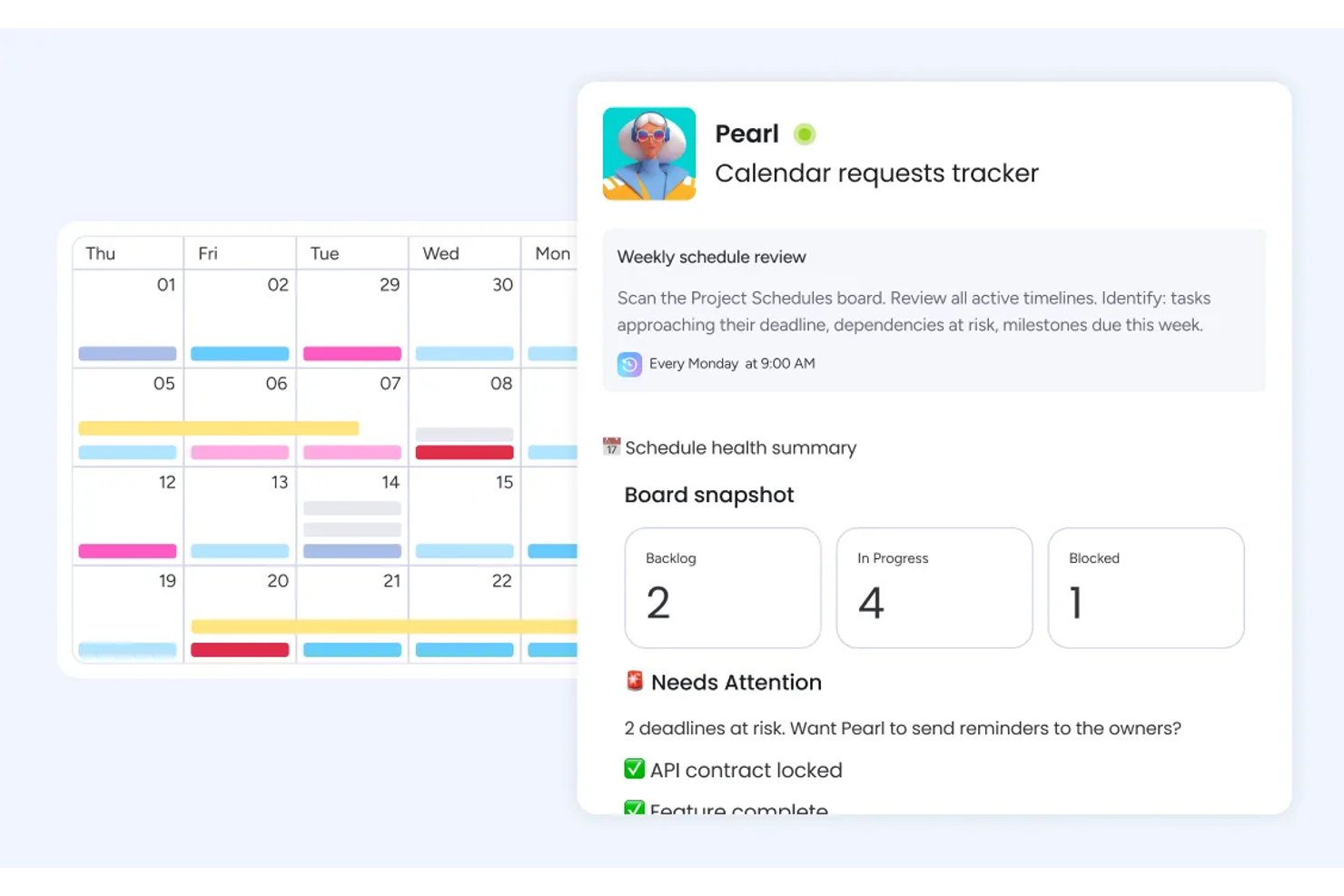
monday AI Workspace è una piattaforma di gestione del lavoro alimentata dall’intelligenza artificiale che combina viste calendario, Gantt, cronologia e carico di lavoro con pianificazione automatizzata, tracciamento delle dipendenze e visibilità trasversale tra team su più progetti.
Per chi è ideale monday AI Workspace?
È particolarmente adatto a team interfunzionali e responsabili PMO in aziende di medie e grandi dimensioni che gestiscono più progetti simultanei tra reparti diversi.
Perché ho scelto monday AI Workspace
monday AI Workspace si è guadagnato un posto nella mia shortlist perché il suo motore di automazione supporta direttamente i flussi di lavoro di pianificazione. Mi piace che si possano impostare trigger come 'quando una data cambia, sposta automaticamente tutte le attività dipendenti in avanti', eliminando così la ripianificazione manuale che solitamente rallenta i team. L’AI Workflow Builder segnala anche i conflitti di date e suggerisce tempistiche corrette prima che diventino ostacoli.
Funzionalità principali di monday AI Workspace
- Widget calendario con supporto di intervallo di tempo: Visualizza progetti ed eventi su più giorni, rendendo più facile vedere attività sovrapposte in base alla durata.
- Vista del carico di lavoro: Mostra i compiti assegnati e la capacità di ogni membro del team per giorno, settimana o mese per un rapido controllo dell’equilibrio.
- Condivisione basata su permessi: Permette ai team di condividere bacheche o calendari con utenti interni ed ospiti esterni usando livelli di accesso personalizzati.
- Integrazione nativa con Google Calendar e Outlook: Mantiene scadenze e deliverable sincronizzati in entrambe le direzioni tra monday e i tuoi calendari esterni.
Integrazioni di monday AI Workspace
monday AI Workspace offre centinaia di integrazioni native, tra cui Slack, Google Workspace, Microsoft 365, Salesforce, Jira, GitHub, Zoom, Dropbox, HubSpot e Zendesk. Supporta anche Zapier e mette a disposizione un'API per integrazioni personalizzate.
Pros and Cons
Pros:
- L’automazione aggiorna automaticamente le date delle attività dipendenti
- La vista carico di lavoro segnala visivamente la sovra-allocazione del team
- Viste calendario multiple, tra cui Gantt e timeline
Cons:
- La vista calendario non ha la stessa profondità di strumenti dedicati
- L’app mobile limita la funzionalità completa di pianificazione del calendario
New Product Updates from monday AI Workspace
monday AI Workspace Adds Human Approval Routing
monday AI Workspace adds a human-in-the-loop approval block to AI Workflows, sending approval requests and routing workflow paths based on responses. For more information, visit monday AI Workspace's official site.

Wrike
Ideale per la gestione agile dei progetti
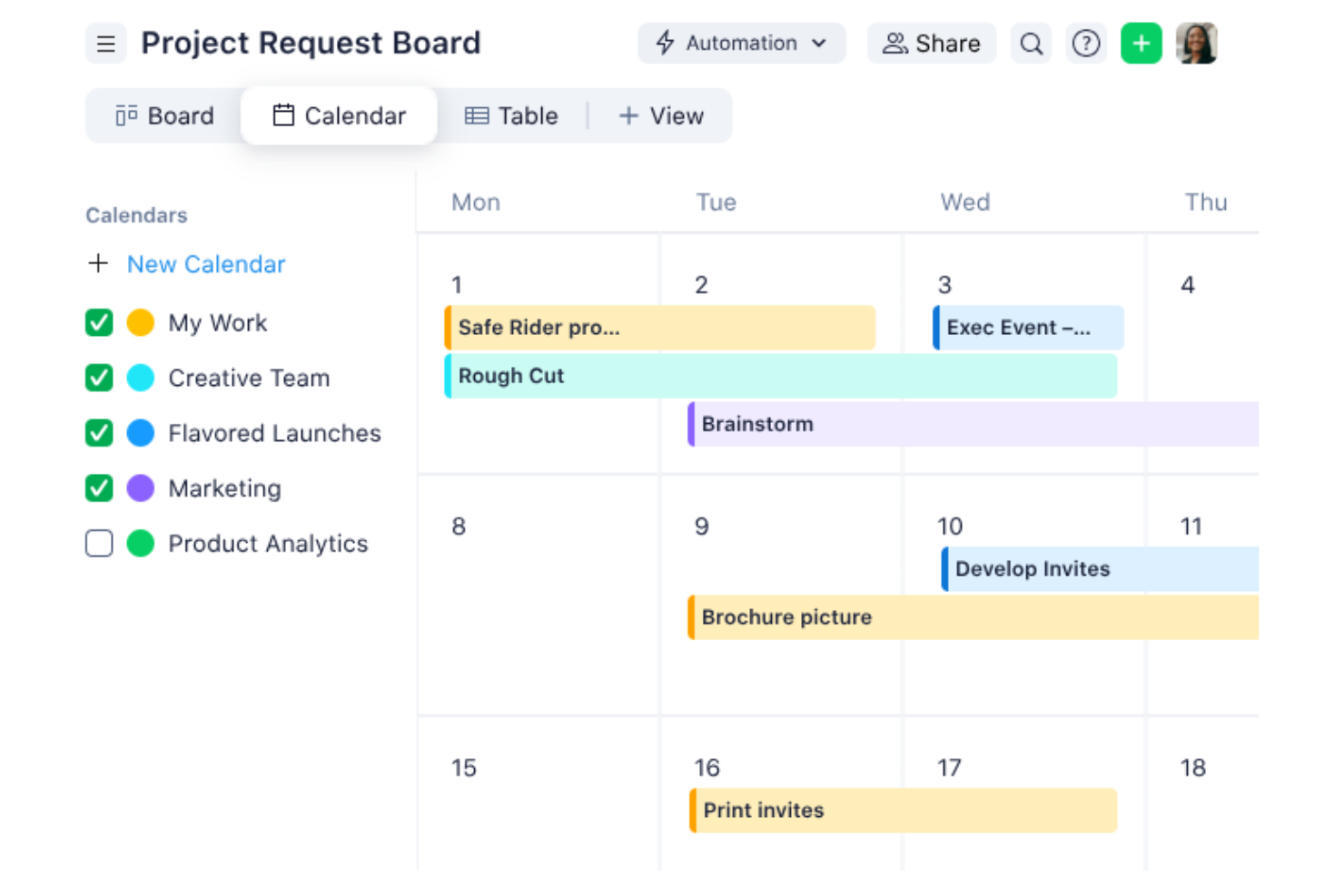
Wrike è uno strumento versatile per la gestione dei progetti, progettato per aiutare i team a collaborare meglio e a gestire le attività in modo più efficiente. Offre una serie di funzionalità adatte a diverse esigenze progettuali, il che lo rende una risorsa preziosa per qualsiasi team.
Di recente ho parlato con Caleb Johnstone, direttore SEO di Paperstack, della sua esperienza con Wrike e della sua capacità di pianificare progetti e tempistiche. 'L'interfaccia semplificata e le semplici tempistiche \\[mantengono] tutto in ordine, così restiamo organizzati e rispettiamo le scadenze senza stress', afferma.
Perché ho scelto Wrike
Ho scelto Wrike per la sua capacità di supportare la gestione agile dei progetti. Il calendario online del team di Wrike offre visibilità sulle tempistiche e sulle scadenze, aiutando il team a rimanere in linea senza continui aggiornamenti manuali. Le sue funzionalità di gestione agile dei progetti, come i flussi di lavoro personalizzabili e i suggerimenti sulle attività basati sull'intelligenza artificiale, consentono al team di adattarsi rapidamente ai requisiti progettuali in continua evoluzione e aiutano a mantenere una collaborazione costante e una gestione efficiente delle attività.
Le funzionalità di automazione di Wrike aiutano a ridurre le attività manuali. In questo modo il team può concentrarsi sul lavoro che conta davvero. La piattaforma offre anche diverse opzioni di visualizzazione, tra cui diagrammi di Gantt e bacheche Kanban, per darti la flessibilità di scegliere ciò che funziona meglio per il tuo team.
Funzionalità principali di Wrike
Wrike offre diverse altre funzionalità che lo rendono una scelta eccellente per le esigenze del tuo calendario di gestione dei progetti.
- Visualizzazione calendario: questa funzionalità consente di visualizzare attività e iniziative in formato calendario di progetto e offre una panoramica chiara delle tempistiche e delle scadenze.
- Visualizzazione bacheca: le bacheche in stile Kanban consentono di aggiornare in modo efficiente lo stato delle attività e di monitorare quelle in ritardo, così il team può tenere sotto controllo le proprie responsabilità.
- Visualizzazione tabella: un formato di foglio di calcolo personalizzabile consente di gestire il lavoro senza dover ricorrere a strumenti esterni, offrendo maggiore flessibilità nel monitoraggio e nell'organizzazione delle attività.
- Prenotazione delle risorse: questa funzionalità consente di riservare il tempo dei membri del team e stimare le ore di progetto, assicurando un'allocazione efficace delle risorse.
Integrazioni di Wrike
Le integrazioni includono Salesforce, QuickBooks, Jira, Tableau, Power BI, Microsoft Teams, Google Drive, Slack e Microsoft Outlook.
Pros and Cons
Pros:
- Centralizza i dati provenienti da più fonti
- Strumenti basati sull'intelligenza artificiale per la valutazione dei rischi
- Varietà di visualizzazioni, come diagrammi di Gantt e bacheche Kanban
Cons:
- Funzionalità offline limitate
- La configurazione della personalizzazione richiede molto tempo
New Product Updates from Wrike
Wrike Adds Klaxoon MCP Integration
Wrike’s Klaxoon MCP integration is now generally available, enabling AI agents to navigate between Wrike tasks and attached whiteboards, read task context, and manage whiteboard attachments via API. For more information, visit Wrike's official site.

Ideale per la pianificazione delle risorse
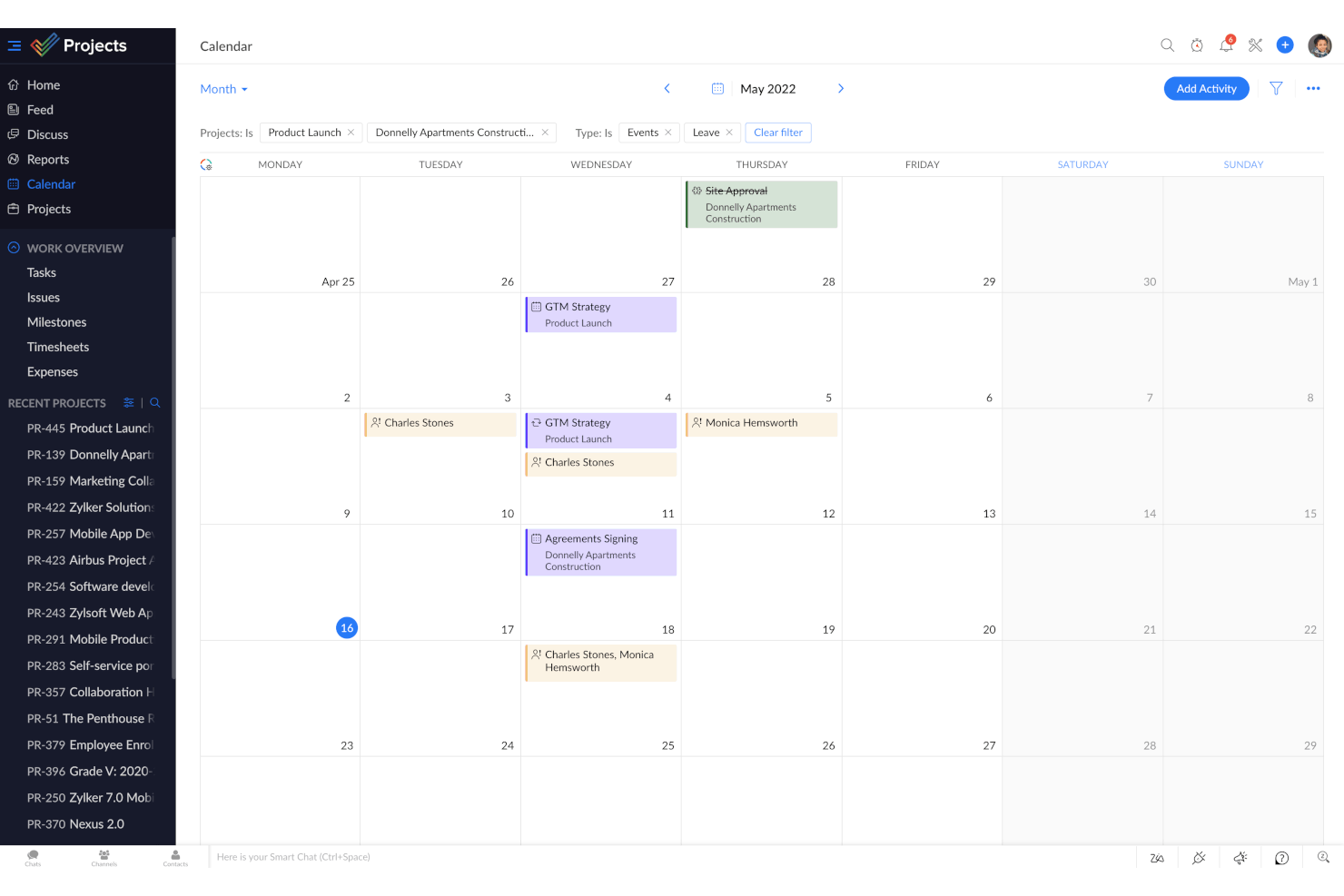
Zoho Projects è un software di gestione progetti che può aiutarti a migliorare la produttività e la collaborazione nei tuoi team. Offre una suite di funzionalità come la gestione delle attività, l'automazione e la reportistica che aiutano te e il tuo team a gestire i progetti in modo più efficace.
Perché ho scelto Zoho Projects
Ho scelto Zoho Projects perché fornisce una piattaforma unificata in cui puoi pianificare le risorse, gestire le attività, monitorare il tempo e generare report. Il grafico di utilizzo delle risorse è una funzionalità chiave che ti permette di visualizzare la disponibilità del tuo team, così puoi assicurarti che le attività siano distribuite in modo ottimale senza sovraccaricare nessuno. Hai anche il monitoraggio del tempo, essenziale per mantenere i progetti nei tempi previsti e assicurarti che le risorse vengano utilizzate con saggezza.
Zoho Projects si distingue anche per le sue capacità di automazione, che possono aiutare a ridurre le attività ripetitive e mantenere il team concentrato su lavori più critici. Gli strumenti di reportistica offrono approfondimenti sulle prestazioni dei progetti, così puoi prendere decisioni informate basate su dati in tempo reale, restare aggiornato sui tuoi progetti e assicurarti che il lavoro prosegua come previsto.
Funzionalità principali di Zoho Projects
Oltre alla pianificazione delle risorse, Zoho Projects offre una varietà di altre funzionalità per la gestione di progetti e calendari.
- Gestione delle attività: Puoi suddividere i progetti in attività e sotto-attività gestibili e utilizzare diverse visualizzazioni come i diagrammi di Gantt e le bacheche Kanban per una migliore organizzazione.
- Strumenti di collaborazione: Ottieni funzionalità come feed, chat e gestione dei documenti, che facilitano una comunicazione e collaborazione fluida all'interno del team.
- Reportistica e analisi: Ti consente di generare report dettagliati sulle prestazioni per valutare la salute dei progetti e prendere decisioni basate sui dati.
- Roll-Up: Questa funzione riassume le ore di lavoro pianificate, le ore effettivamente registrate e le percentuali di completamento delle attività, offrendo una visione chiara della produttività del team e delle tempistiche progettuali.
Integrazioni di Zoho Projects
Le integrazioni includono Zoho Assist, Zoho Voice, Zoho SalesIQ, Zoho Bookings, Zoho FSM, Zoho Books, Zoho Expense, Zoho Payroll, Zoho Mail, Zoho WorkDrive, Zoho Cliq e Zoho Recruit.
Pros and Cons
Pros:
- Diagrammi di Gantt visivamente accattivanti e personalizzabili
- Monitoraggio del tempo integrato
- Dettagliata suddivisione dei progetti in attività e sotto-attività
Cons:
- Meno opzioni di integrazione rispetto ad altri strumenti
- Personalizzazione limitata rispetto ad altri strumenti
New Product Updates from Zoho Projects
Zoho Projects Adds CodeX Scripts for Custom Modules
Zoho Projects now supports CodeX Scripts for custom modules, enabling conditional logic and rules for creating, updating, and deleting records. For more information, visit Zoho Projects' official site.
 .
.
ClickUp
Migliore versione per dispositivi mobili
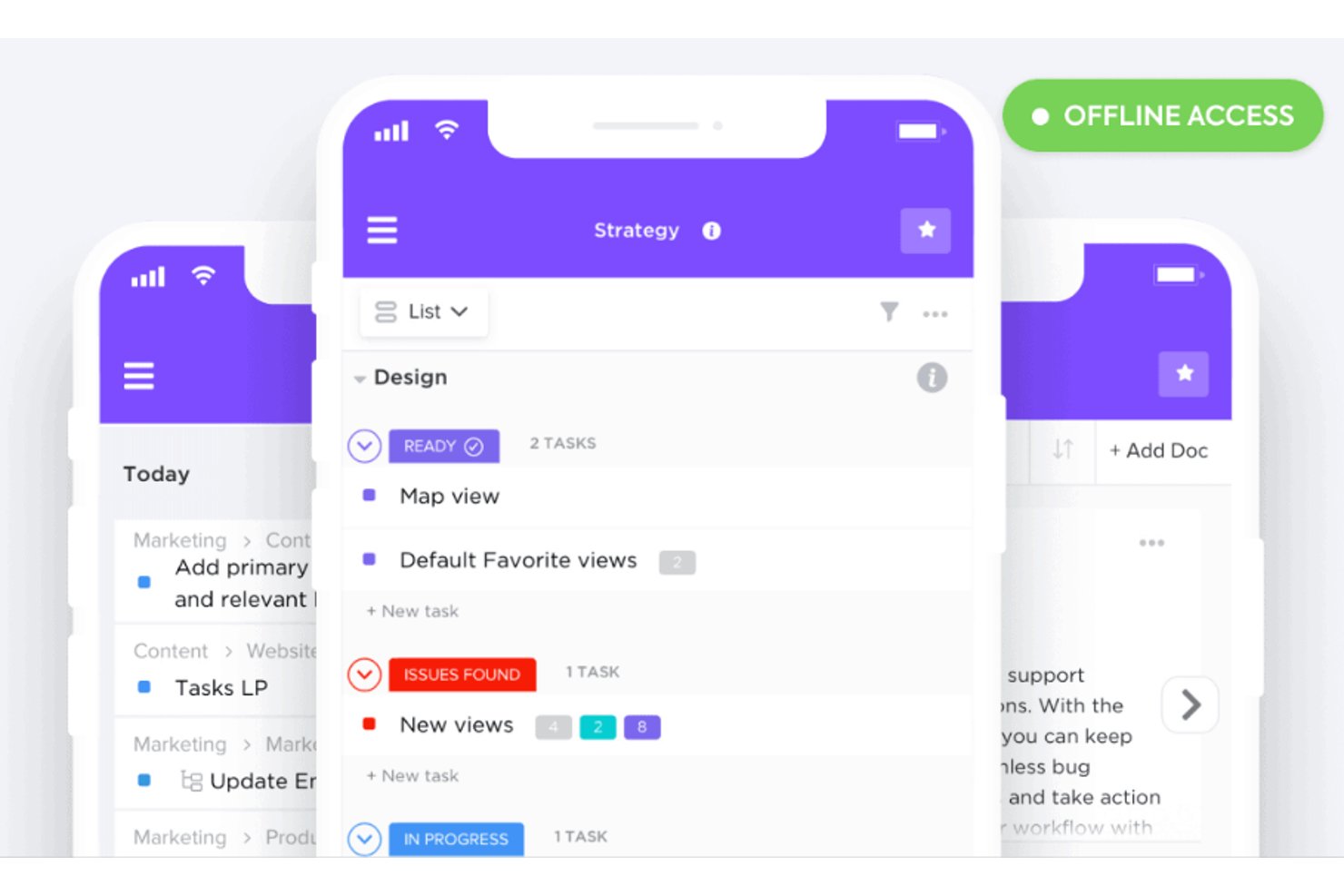
ClickUp è uno strumento di gestione progetti versatile che integra diverse funzionalità di produttività all'interno di un'unica piattaforma. Grazie alla sua vasta gamma di funzionalità, ClickUp ti aiuta a gestire le attività, monitorare il tempo e organizzare i progetti in modo efficace.
Lo strumento ti consente anche di riprogrammare facilmente le scadenze quando le cose cambiano. Recentemente ho parlato con Jeff Cypher, che era un esperto e consulente di ClickUp prima di accettare un ruolo all'interno dell'azienda. Ecco cosa ha detto riguardo alla flessibilità di ClickUp. 'Il sistema ClickUp ti permette di rimappare le scadenze in tempo reale, il che è prezioso per i project manager che devono gestire cambiamenti nelle tempistiche,' afferma.
Perché ho scelto ClickUp
Ho scelto ClickUp per la sua eccezionale app mobile. L'app offre viste personalizzabili, come opzioni giornaliere, settimanali e mensili, così puoi adattare il tuo calendario alle tue esigenze specifiche. Grazie alla funzionalità drag-and-drop, puoi facilmente riprogrammare le attività ovunque tu sia, mantenendo il tuo team agile e reattivo.
Un altro motivo per cui ClickUp si distingue sono le sue capacità di intelligenza artificiale, che consentono di automatizzare le attività e fornire aggiornamenti in tempo reale. Questa funzione aiuta a mantenere il team allineato e garantire la consegna puntuale dei progetti. Automatizzando le attività di routine, ClickUp libera tempo prezioso da dedicare agli aspetti più strategici del progetto, migliorando così la produttività complessiva.
Funzionalità principali di ClickUp
ClickUp offre una serie di altre funzionalità che ti permetteranno di gestire meglio i tuoi progetti con il tuo team.
- Dipendenze tra attività: Puoi mantenere il tuo team sulla buona strada impostando dipendenze tra le attività che indicano visivamente quali compiti devono essere completati prima che ne inizino altri.
- Monitoraggio del tempo: Ti permette di registrare facilmente il tempo impiegato per ogni attività, in modo da gestire meglio le tempistiche e l'allocazione delle risorse del progetto.
- Monitoraggio degli obiettivi: Puoi allineare gli sforzi del tuo team impostando e monitorando obiettivi per assicurarti che tutti lavorino verso gli stessi risultati.
- Stati personalizzati: Puoi creare stati delle attività personalizzati che si adattano al tuo flusso di lavoro, fornendo chiarezza e trasparenza sull'avanzamento di ogni fase del progetto.
Integrazioni di ClickUp
Le integrazioni includono Google Drive, Slack, Zoom, Microsoft Teams, Trello, Asana, GitHub, Outlook, Google Calendar, Salesforce, Zapier e Dropbox.
Pros and Cons
Pros:
- Collaborazione in tempo reale che migliora la comunicazione del team
- Automazioni integrate che riducono le attività manuali
- Interfaccia altamente personalizzabile che permette di adattare l'ambiente di lavoro
Cons:
- Saltuari rallentamenti delle prestazioni nella gestione di progetti di grandi dimensioni
- Curva di apprendimento ripida a causa della ricca gamma di funzionalità
New Product Updates from ClickUp
ClickUp Adds Meetings Hub, Super Agent Templates, and ZoomInfo Integration
ClickUp adds a searchable Meetings Hub, new ways to clone and template Super Agents, and a ZoomInfo integration through the App Center. These updates improve meeting retrieval, agent reuse, and access to sales intelligence. For more information, visit ClickUp’s official site.

Nifty
Ideale per la pianificazione delle tempistiche basata sulle tappe fondamentali
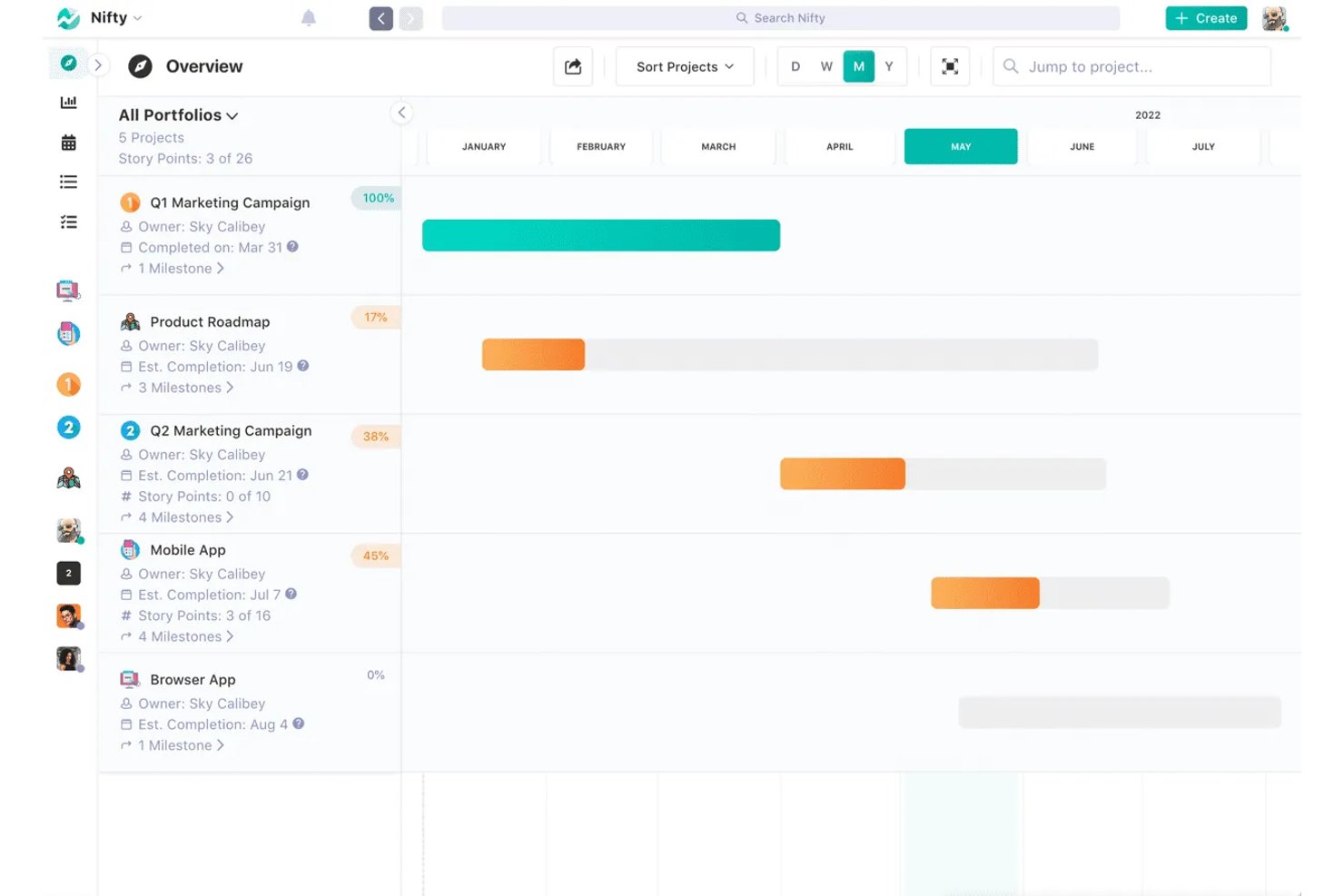
Nifty è uno strumento versatile per la gestione dei progetti che offre una vasta gamma di funzionalità per migliorare la produttività del tuo team. Fornisce una piattaforma centralizzata in cui puoi gestire le attività, collaborare con il tuo team e monitorare le tempistiche dei progetti con strumenti come i diagrammi di Gantt e le viste calendario.
Perché ho scelto Nifty
Ho scelto Nifty per la sua funzionalità delle roadmap, che utilizza i diagrammi di Gantt per aiutarti a visualizzare le tempistiche e allineare gli obiettivi del tuo team. Questa funzionalità è perfetta per mantenere tutti aggiornati e raggiungere le tappe fondamentali del progetto. Le funzionalità di gestione delle attività di Nifty ti consentono di organizzare e monitorare il lavoro attraverso diverse viste, tra cui Kanban e Calendario, offrendo la flessibilità necessaria per gestire le attività nel modo più adatto al tuo team.
Un altro motivo per cui Nifty si distingue sono i suoi strumenti di collaborazione in tempo reale, che facilitano le discussioni e il feedback tra i membri del team. Ciò significa che puoi avere conversazioni significative e prendere decisioni rapidamente senza lasciare la piattaforma. La funzionalità di documentazione ti consente di creare e collegare i file del progetto, così le informazioni sul progetto rimangono centralizzate e facilmente accessibili.
Funzionalità principali di Nifty
Nifty offre numerose altre funzionalità per la gestione dei progetti e dei calendari.
- Chat nell'app: Puoi facilitare la comunicazione all'interno del tuo team direttamente tramite Nifty, mantenendo centralizzate e accessibili tutte le discussioni sul progetto.
- Documenti e file: Puoi creare, condividere e collaborare sui documenti e sui file all'interno della piattaforma, consentendo al tuo team di mantenere un'unica fonte di verità per tutte le informazioni relative al progetto.
- Monitoraggio del tempo: Puoi monitorare il tempo dedicato alle attività per comprendere meglio l'allocazione delle risorse e la produttività, consentendo una pianificazione e degli adeguamenti del progetto più informati.
- Portafogli di progetti: Questa funzionalità ti consente di organizzare e gestire più progetti in un'unica vista, così puoi supervisionare e stabilire le priorità delle attività tra diversi team e iniziative.
Integrazioni di Nifty
Le integrazioni includono Harvest, Webex, Zoom, Slack, GitHub, Google Drive, Google Calendar, Miro e Typeform.
Pros and Cons
Pros:
- Assegnare le attività alle fasi che confluiscono nel calendario
- La vista calendario mostra le attività e le scadenze
- Riutilizzare i modelli di progetto in più calendari
Cons:
- Le dipendenze devono essere collegate manualmente
- Rallentamenti occasionali durante il passaggio da una vista calendario all'altra

Notion
Ideale per gestire documenti, attività e calendario in un'unica app
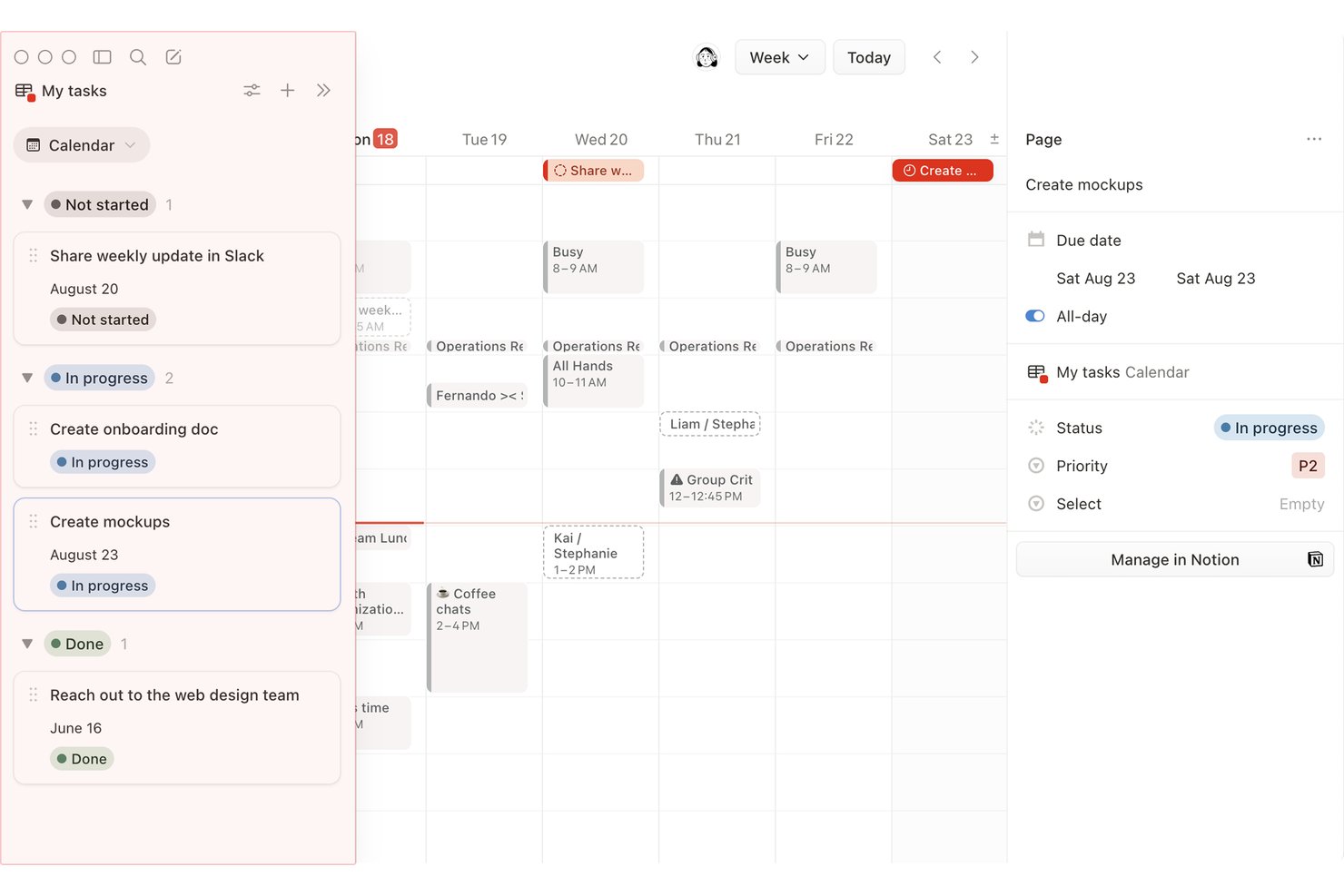
Notion è uno spazio di lavoro tutto-in-uno che combina documenti, database e monitoraggio dei progetti con visualizzazioni calendario, sequenza temporale e bacheca per gestire attività e scadenze.
Per chi è più adatto Notion?
Notion è particolarmente adatto ai project manager e ai responsabili di team che vogliono gestire documenti, attività e calendari dei progetti nello stesso spazio di lavoro anziché utilizzare strumenti separati.
Perché ho scelto Notion
Notion è entrato nella mia lista ristretta perché mantiene documenti, attività e calendari dei progetti in un unico spazio di lavoro invece di distribuirli su strumenti separati. Mi piace molto poter aggiungere una visualizzazione calendario a qualsiasi database e scegliere quali proprietà, come assegnatario o stato, mostrare su ogni scheda. Notion Calendar collega fino a 20 database con la codifica a colori, così posso vedere più progetti su un'unica griglia senza duplicare alcun dato.
Funzionalità principali di Notion
- Spostamento delle date in base alle dipendenze: la visualizzazione sequenza temporale di Notion sposta automaticamente le date delle attività dipendenti quando modifichi un'attività precedente, con modalità per mantenere gli intervalli o spostare le date solo in caso di sovrapposizione.
- Regole condizionali per i colori: imposta regole di colore basate sulle proprietà sulle schede del calendario per evidenziare visivamente gli elementi in base a stato, priorità o assegnatario in tutto il database.
- Automazioni dei database: attiva messaggi Slack, avvisi email o notifiche nell'app per un massimo di 20 utenti in base alle modifiche delle proprietà o a pianificazioni ricorrenti.
- Riprogrammazione tramite trascinamento: trascina le schede su nuove date o estendine i bordi su più giorni direttamente nella visualizzazione calendario o sequenza temporale.
Integrazioni di Notion
Notion Calendar si collega a Google Calendar, Microsoft Outlook e Apple iCloud, mentre Notion elenca connessioni per Jira, Asana, GitHub, Slack, Figma e Google Drive. Notion offre inoltre un'API pubblica e il supporto per Zapier.
Pros and Cons
Pros:
- Le schede del calendario mostrano assegnatari e stato
- Le dipendenze spostano le date quando cambiano le attività precedenti
- Le regole di colore evidenziano visivamente il lavoro in ritardo
Cons:
- I progetti separati richiedono un database condiviso
- Nessuna visualizzazione nativa del carico di lavoro o della capacità
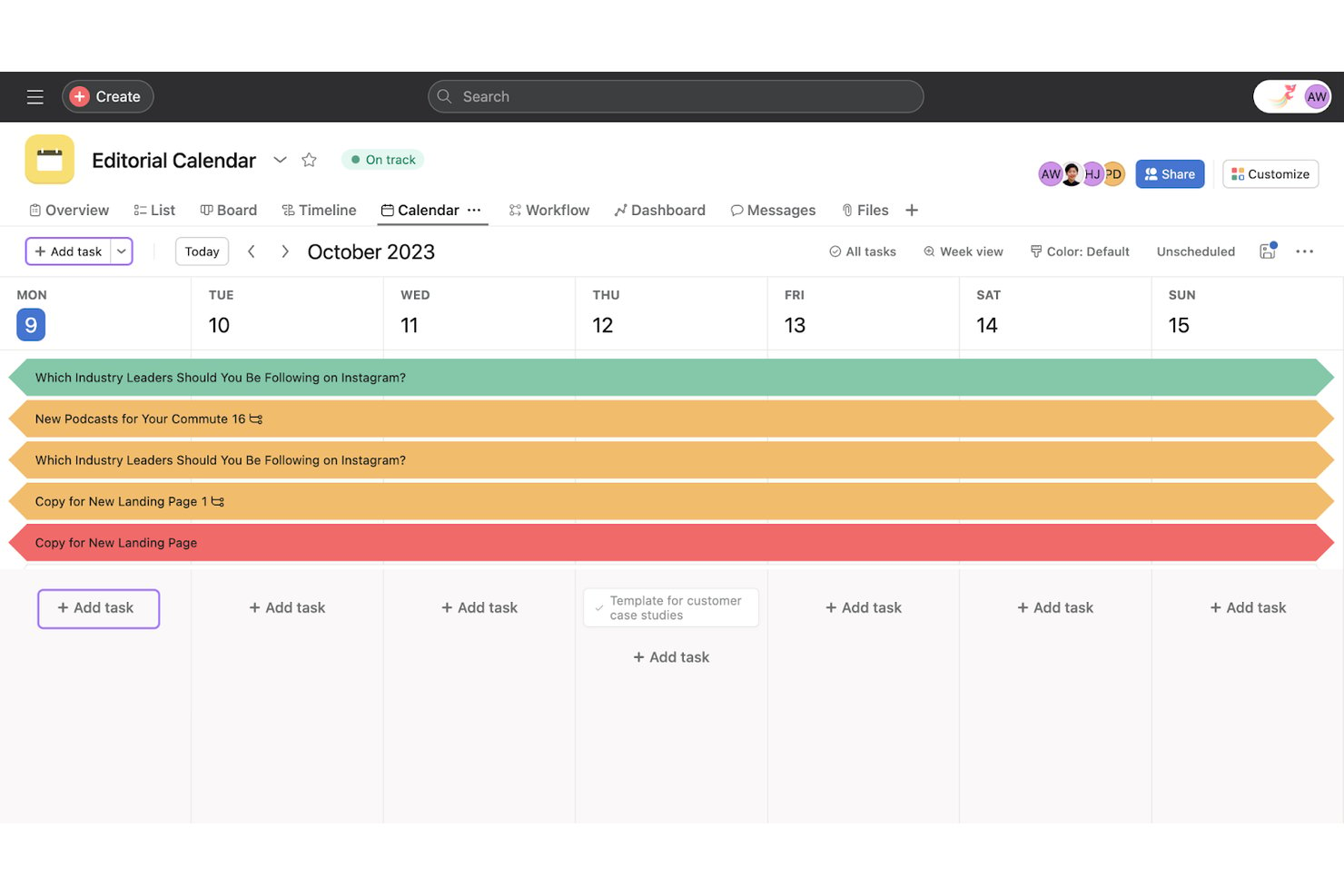
Asana è una piattaforma per la gestione dei progetti con viste calendario, sequenza temporale, bacheca ed elenco che consente alle squadre di pianificare le attività, impostare dipendenze, monitorare il carico di lavoro e gestire progetti tra più squadre da un unico spazio di lavoro.
Per chi è più adatto Asana?
Asana è adatto ai responsabili di progetto e ai responsabili di squadra che supervisionano attività interfunzionali tra le squadre di prodotto, ingegneria e progettazione.
Perché ho scelto Asana
Ho incluso Asana tra le mie scelte migliori perché è uno dei pochi strumenti di gestione dei progetti in cui la visibilità sulla pianificazione tra squadre è realmente integrata nel flusso di lavoro principale. Quando un'attività cambia, lo spostamento automatico delle dipendenze di Asana apre una finestra di anteprima che mostra esattamente come verranno spostate le attività dipendenti prima della conferma, evitando così che le tempistiche tra squadre si disgregino senza preavviso. Apprezzo anche la mappa di calore del carico di lavoro, che evidenzia i membri della squadra sovraccarichi nei vari progetti, consentendo di riprogrammare o riassegnare le attività prima che una scadenza diventi un problema.
Funzionalità principali di Asana
- Viste calendario con codifica a colori: Assegna colori alle attività in base ai valori dei campi personalizzati, come la priorità o il tipo di attività, e salva quella vista a colori per l'intera squadra.
- Evidenziazione del percorso critico: Nella vista Sequenza temporale, Asana segnala le attività critiche, così puoi vedere quali ritarderanno il progetto in caso di slittamento.
- Sincronizzazione unidirezionale del calendario: Invia le attività del progetto a Google Calendar, Outlook o iCal tramite un URL di sottoscrizione, in modo che le scadenze vengano visualizzate nel calendario esterno.
- Pianificazione del calendario con l'AI: L'AI di Asana pianifica blocchi di tempo in base a scadenze, priorità e capacità, quindi li sincronizza con Google o Outlook.
Integrazioni di Asana
Asana offre oltre 100 integrazioni gratuite, tra cui Google Workspace, Microsoft 365, Slack e Jira Cloud con sincronizzazione bidirezionale. Fornisce inoltre un'API pubblica per le integrazioni personalizzate.
Pros and Cons
Pros:
- Anteprima degli spostamenti delle dipendenze prima della conferma
- I colori del calendario riflettono i campi personalizzati delle attività
- Le mappe di calore del carico di lavoro rivelano il sovraccarico tra i progetti
Cons:
- Nessun calendario unificato tra i progetti selezionati
- Nessun promemoria integrato per le attività scadute

Trello
Ideale per la gestione visiva delle attività
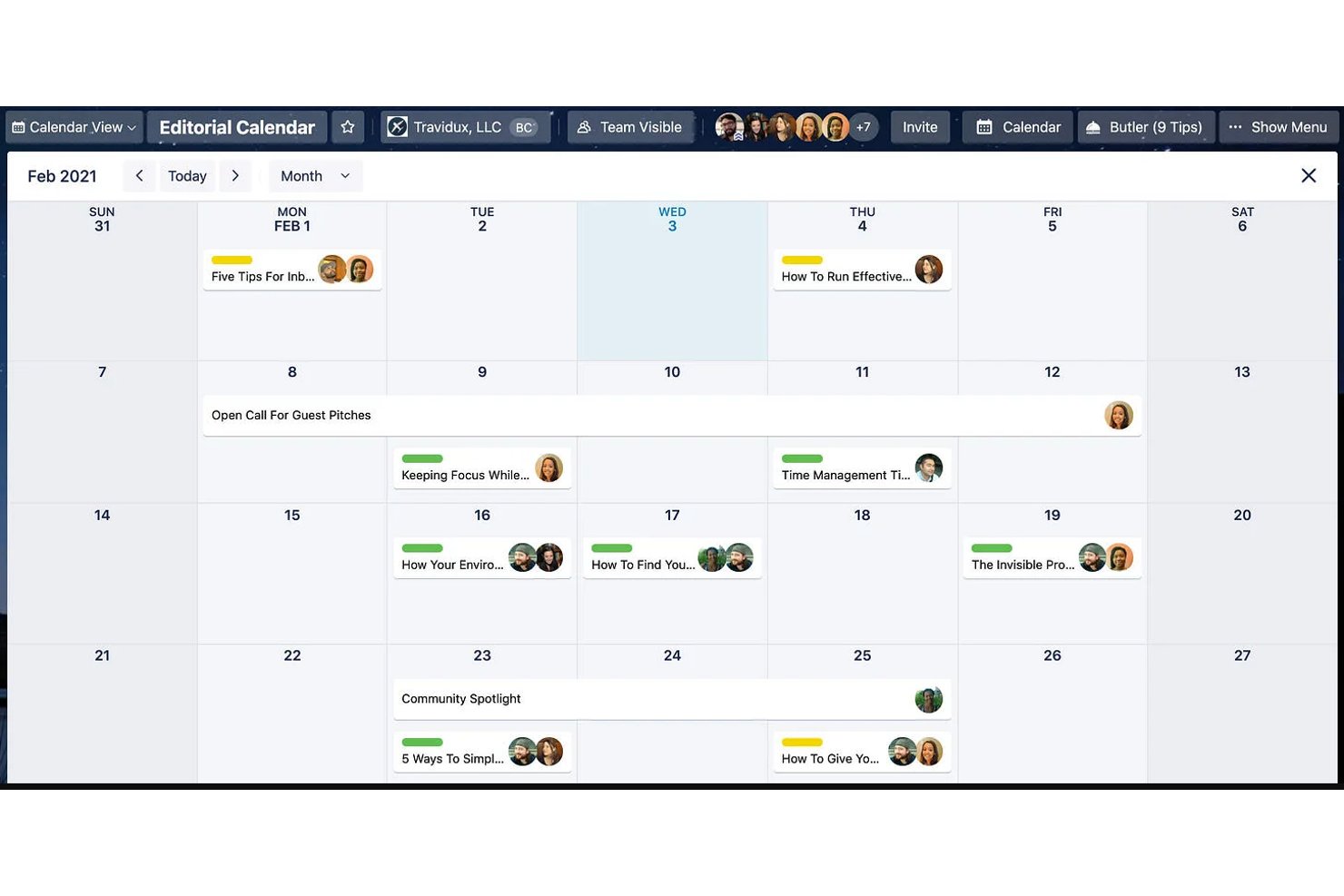
Trello è uno strumento visivo per la gestione dei progetti che organizza il lavoro tramite bacheche Kanban, viste calendario, sequenze temporali e un calendario dell'area di lavoro multi-bacheca per monitorare le scadenze e le pianificazioni delle schede nei vari progetti.
Per chi è più adatto Trello?
Trello è ideale per i piccoli team e i responsabili operativi che desiderano un modo visivo e semplice per monitorare attività e scadenze senza una curva di apprendimento ripida.
Perché ho scelto Trello
Trello è entrato nella mia selezione ristretta perché il suo approccio alla gestione delle attività, basato innanzitutto sull'aspetto visivo, si traduce direttamente nella pianificazione sul calendario. Mi piace molto il fatto che il Calendario dell'area di lavoro raccolga le scadenze di un massimo di 20 bacheche in un'unica vista filtrabile, così posso vedere cosa scade nei vari progetti senza passare da una bacheca all'altra. La riprogrammazione tramite trascinamento sia nella vista Calendario sia in quella del Calendario dell'area di lavoro rende semplice spostare le scadenze al volo, mentre l'escalation dei colori dei badge fa sì che le schede scadute siano impossibili da non notare.
Funzionalità principali di Trello
- Vista Calendario dell'area di lavoro: aggrega in un unico calendario filtrabile le schede con scadenze provenienti da un massimo di 20 bacheche all'interno di una singola area di lavoro.
- Vista Sequenza temporale: mostra la durata delle schede in una sequenza temporale ingrandibile da un giorno a un anno, con raggruppamento per elenco, membro o etichetta.
- Scadenze ricorrenti: consente di impostare la ripetizione automatica delle schede secondo una pianificazione, direttamente dalla vista dei dettagli della scheda.
- Regole di automazione: attiva azioni senza codice quando le schede raggiungono o superano le scadenze, senza strumenti di terze parti.
Integrazioni di Trello
Trello supporta oltre 200 integrazioni del marketplace tramite Power-Up, tra cui Slack, Microsoft Teams, Google Drive, Confluence e Salesforce. La connettività nativa dei calendari include Google Calendar e Outlook tramite Planner, mentre i feed iCal supportano Google, Outlook e Apple Calendar.
Pros and Cons
Pros:
- I team riferiscono di poter iniziare rapidamente
- La riprogrammazione tramite trascinamento aggiorna le date delle schede
- Il Calendario dell'area di lavoro combina fino a 20 bacheche
Cons:
- Le viste calendario native richiedono un piano a pagamento
- Nessuna dipendenza tra attività o percorso critico integrati

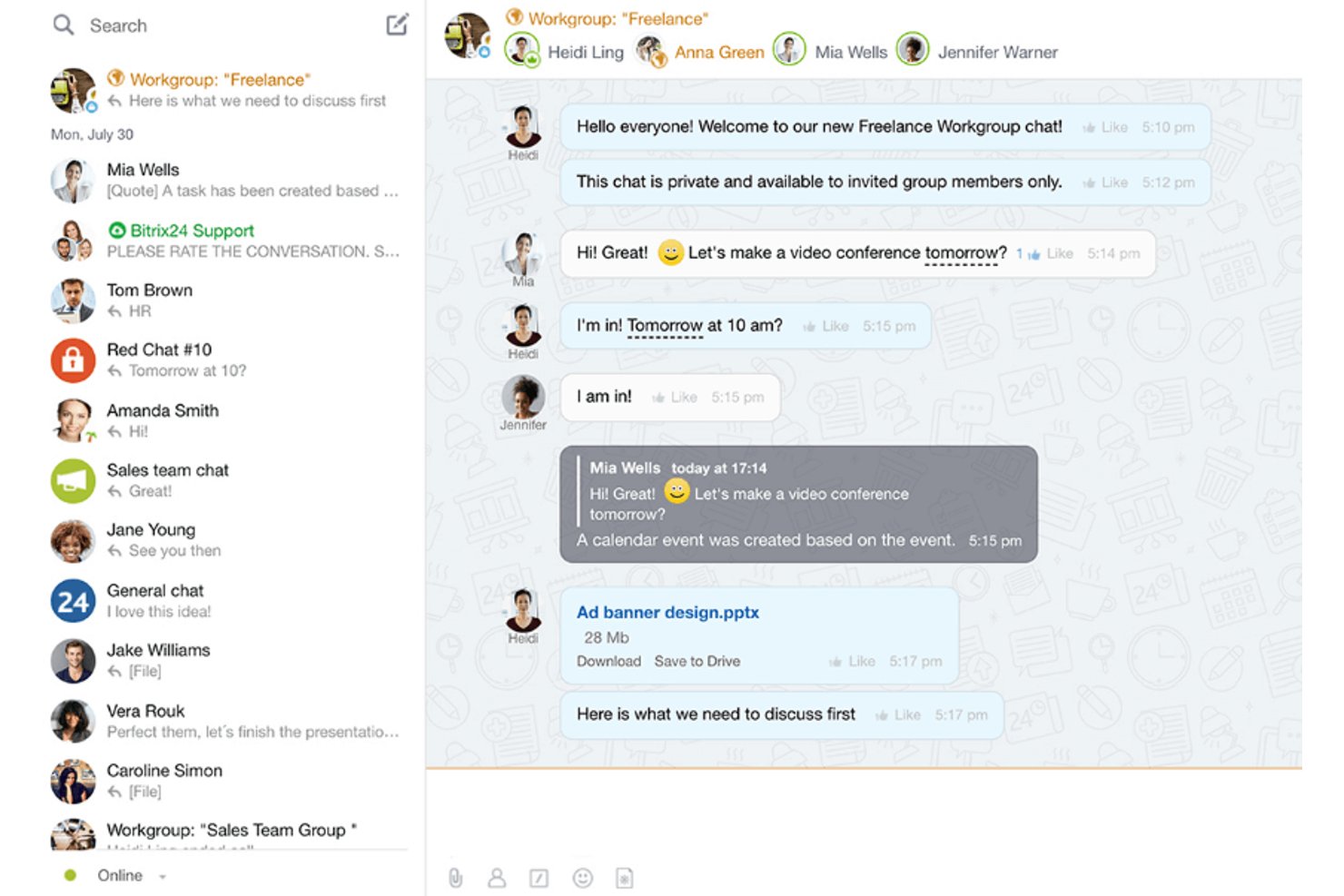
Bitrix24
Ideal para agendamento de calendários com dependências obrigatórias

Ideale per prevenire il sovraccarico delle risorse
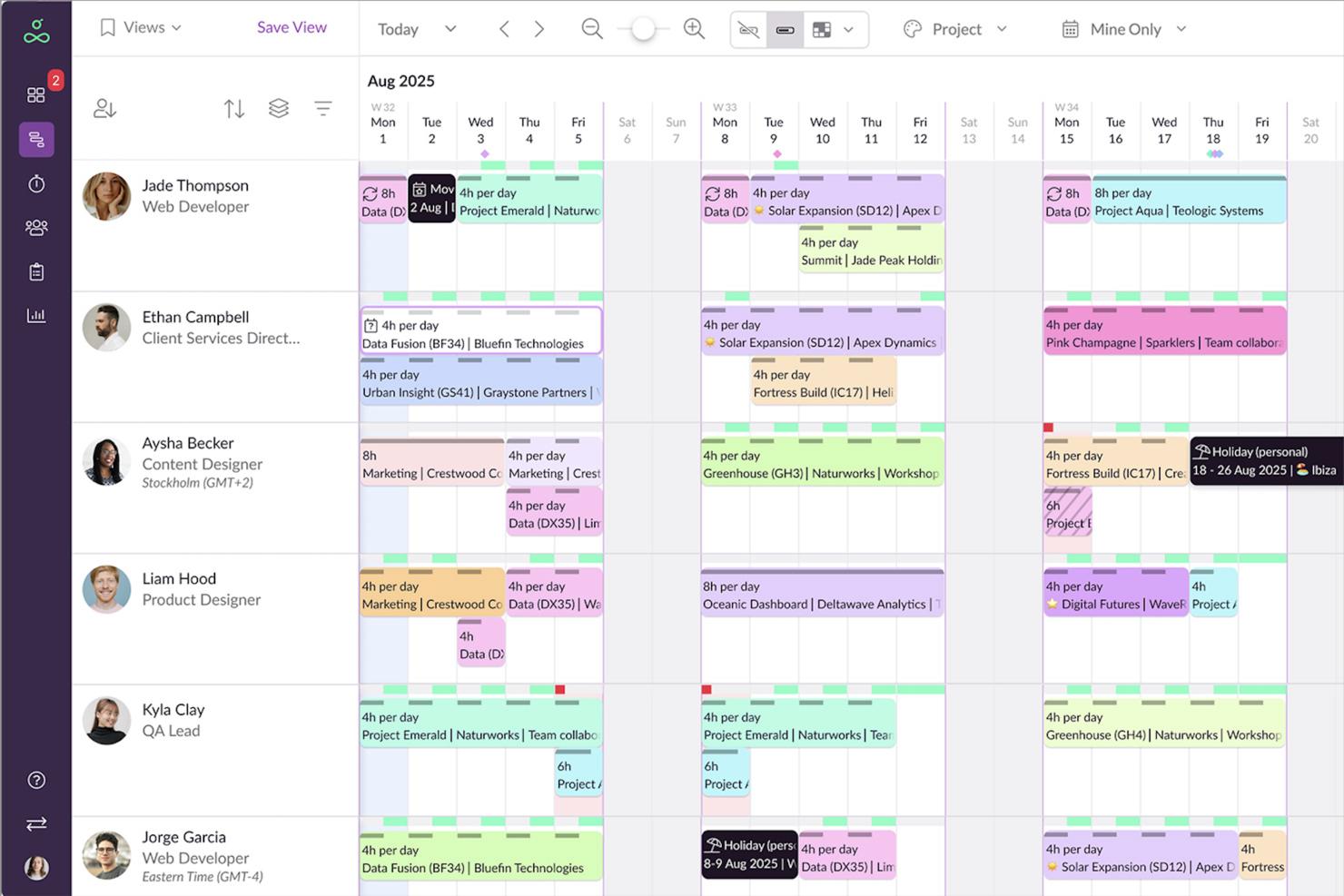
Resource Guru è uno strumento di gestione delle risorse e pianificazione progettato per portare chiarezza e ordine nella gestione dei tuoi progetti. Offre una suite di funzionalità che ti aiutano a gestire le risorse, pianificare la capacità e monitorare il tempo, risultando uno strumento essenziale per i team che desiderano ottimizzare i loro flussi di lavoro.
Perché ho scelto Resource Guru
Ho scelto Resource Guru per le sue solide capacità di pianificazione delle risorse, che permettono di visualizzare la disponibilità del team e gestire efficacemente i carichi di lavoro. Questa funzionalità aiuta ad evitare conflitti di pianificazione e assicura che il team lavori sempre alla massima capacità. Inoltre, la funzionalità di pianificazione della capacità è preziosa per la gestione a lungo termine dei progetti, poiché permette di prevedere i potenziali colli di bottiglia e affrontarli prima che diventino problemi.
Un altro motivo per cui Resource Guru si distingue è la sua funzionalità di monitoraggio del tempo, che consente di confrontare le ore pianificate con quelle effettivamente lavorate. Questa funzione è cruciale per prendere decisioni basate sui dati e migliorare i risultati dei progetti. Offre anche report personalizzabili, che forniscono approfondimenti sulle prestazioni e aiutano a individuare le aree di miglioramento.
Funzionalità principali di Resource Guru
Resource Guru offre una gamma di altre funzionalità per la gestione di progetti e pianificazioni.
- Integrazione con il calendario: Puoi sincronizzarti facilmente con Google Calendar e Outlook per consolidare le pianificazioni e ridurre la possibilità di conflitti.
- Gestione delle assenze: Integra direttamente i periodi di assenza del team nella pianificazione così da avere una chiara visione della disponibilità.
- Gestione dei conflitti: Identifica e risolve automaticamente i conflitti di pianificazione per mantenere un'allocazione efficiente delle risorse.
- Report personalizzabili: Puoi generare report su misura per le esigenze specifiche del progetto e ottenere insight sulle prestazioni del team e sull'avanzamento dei lavori.
Integrazioni di Resource Guru
Le integrazioni includono Google Calendar e Microsoft Outlook, oltre a Slack, Salesforce e Microsoft Teams tramite Zapier.
Pros and Cons
Pros:
- Aggiornamenti automatici della timeline
- Funzionalità drag-and-drop intuitiva
- Implementazione semplice
Cons:
- Mancano funzionalità di comunicazione presenti in altri strumenti
- Nessuna app mobile
New Product Updates from Resource Guru

Resource Guru Adds More Control Over Calendar Sync
Resource Guru adds more control over Google and Outlook Calendar sync, including source calendar selection and destination calendar options. These updates help users manage external events and Resource Guru bookings with less clutter. For more information, visit Resource Guru’s official site.
 .
.Altri strumenti di calendario per la gestione dei progetti
Ecco alcune altre opzioni di software di calendario per la gestione dei progetti che non sono rientrate nella mia selezione principale, ma che vale la pena prendere in considerazione se non hai trovato ciò che cercavi sopra.
- Float.com
Ideale per la pianificazione in base alla disponibilità del team
- GoodDay
Ideale per spazi di lavoro personalizzabili
- Smartsheet
Ideale per creare report BI
- Paymo
Ideale per freelance e piccoli team
- ProjectManager
Ideale per la pianificazione del calendario con dipendenze obbligatorie
- Teamwork.com
Ideale per le voci del calendario codificate per colore
- Ravetree
Ideale per la gestione delle risorse
- Hive
Ideale per viste di progetto flessibili


Come Valuto i Calendari di Gestione Progetti
Divido la mia valutazione in due livelli: criteri di base che uno strumento deve soddisfare—come la visualizzazione delle milestone di più progetti e la sincronizzazione bidirezionale del calendario—e fattori che distinguono i migliori strumenti.
Funzionalità di Base (Requisiti Minimi per Questa Lista)
Quando seleziono gli strumenti per la mia lista, li valuto ciascuno su una scala da 0 (non offre la funzionalità) a 5 (eccelle in quest'area) per ogni funzionalità principale elencata di seguito. Poi calcolo il punteggio totale dello strumento e lo converto in percentuale. Ogni strumento deve ottenere un punteggio totale minimo del 75% per essere considerato per l'inclusione.
- Opzioni di Visualizzazione del Calendario: Cerco viste giornaliere, settimanali, mensili e a timeline o Gantt, così i team possono concentrarsi sui meeting quotidiani o allargare la visione per rivedere le milestone trimestrali.
- Pianificazione di Attività e Milestone: È importante poter creare attività con date di inizio e fine direttamente nel calendario—verifico la presenza di indicatori per le milestone, sotto-attività e supporto per eventi ricorrenti.
- Riprogrammazione con Drag-and-Drop: Quando uno sprint slitta o un cliente sposta una scadenza, valuto quanto sia veloce poter trascinare un'attività e spostarla su una nuova data senza dover aprire un modulo.
- Dipendenze e Rilevamento dei Conflitti: Esamino come ogni strumento gestisce i collegamenti predecessore/successore e se segnala sovrapposizioni di pianificazione, come due consegne che impegnano la stessa risorsa.
- Collaborazione di Team e Condivisione: Qui sono importanti le viste di calendario condivise con permessi basati sui ruoli—controllo se è possibile dare a un cliente accesso in sola lettura senza occupare un posto a pagamento.
- Sincronizzazione con Calendari Esterni: Valuto se lo strumento supporta la sincronizzazione bidirezionale con Google Calendar, Outlook o iCal in modo che le scadenze dei progetti compaiano dove il team già lavora.
Una volta che ho una lista di strumenti che soddisfano questi criteri, considero cosa distingue ogni piattaforma.
Fattori Differenzianti (Cosa Distingue i Fornitori)
Ecco come confronto e confronto i vari fornitori:
Funzionalità Distintive
Le heatmap di carico delle risorse sono un grande elemento di differenziazione—cerco strumenti che mostrano la capacità del team direttamente sul calendario per individuare un designer sovraccarico prima che inizi lo sprint. Anche le regole di pianificazione automatica sono rilevanti. Quando una scadenza cambia, i migliori strumenti propagano le modifiche su tutte le attività dipendenti senza bisogno di aggiornamenti manuali. Valuto anche i portali per i clienti che permettono agli stakeholder esterni di visualizzare le timeline dei progetti senza necessità di una licenza a pagamento o accesso completo alla piattaforma.
Oltre le Funzionalità
La profondità di integrazione è una delle prime cose che valuto—uno strumento calendario che si sincronizza con Slack, Jira e Google Drive mantiene aggiornati i progetti senza cambiare continuamente scheda. Verifico inoltre come i prezzi crescano all'aumentare del team, dato che alcuni fornitori riservano funzionalità come le dipendenze o le viste condivise ai piani più elevati. Importanti sono anche le risorse per l'onboarding. Gli strumenti dotati di modelli predefiniti per i tipi di progetto più comuni—lanci prodotto, campagne marketing, fasi di costruzione—aiutano i team a ottenere valore sin dal primo giorno, senza dover costruire le viste da zero.
Come scegliere gli strumenti di calendario per la gestione dei progetti
È facile perdersi in lunghi elenchi di funzionalità e strutture tariffarie complesse. Per aiutarti a rimanere concentrato mentre affronti il tuo processo personale di selezione del software, ecco una lista di fattori da tenere a mente:
| Fattore | Cosa considerare |
|---|---|
| Scalabilità | Assicurati che lo strumento possa crescere insieme al tuo team. Cerca opzioni in grado di gestire un numero crescente di progetti e utenti senza problemi di prestazioni. |
| Integrazioni | Verifica che il software si integri perfettamente con gli strumenti che già utilizzi, come gestori delle attività, CRM o piattaforme di comunicazione come Slack o Microsoft Teams. |
| Personalizzazione | Verifica di poter adattare le visualizzazioni del calendario, le etichette e i flussi di lavoro ai processi e alle preferenze specifici del tuo team. |
| Facilità d'uso | Valuta l'interfaccia in termini di semplicità e accessibilità. Il tuo team non dovrebbe aver bisogno di una formazione approfondita per iniziare. |
| Budget | Confronta i piani tariffari e assicurati che siano in linea con il tuo budget, considerando sia i costi iniziali sia le spese a lungo termine. |
| Misure di sicurezza | Verifica la presenza di funzionalità come la crittografia, l'accesso basato sui ruoli e la conformità agli standard di protezione dei dati per proteggere le informazioni sensibili sui tuoi progetti. |
| Accesso da dispositivi mobili | Cerca strumenti ottimizzati per i dispositivi mobili che consentano a te e al tuo team di aggiornare o consultare i calendari ovunque vi troviate. |
| Funzionalità di collaborazione | Dai priorità agli strumenti con funzionalità di collaborazione in tempo reale, come aggiornamenti condivisi del calendario, notifiche e discussioni nei commenti, per mantenere tutti allineati. |
Tendenze negli strumenti di calendario per la gestione dei progetti
Durante la mia ricerca, ho raccolto innumerevoli aggiornamenti di prodotto, comunicati stampa e registri delle versioni di diversi fornitori di applicazioni di calendario. Ecco alcune delle tendenze emergenti che sto tenendo d'occhio:
- Pianificazione basata sull'intelligenza artificiale: gli strumenti utilizzano l'intelligenza artificiale per ottimizzare i programmi, prevedere i ritardi e suggerire l'allocazione delle risorse. Ad esempio, alcuni dei migliori strumenti di visualizzazione dei calendari digitali possono analizzare i carichi di lavoro del team e modificare automaticamente le scadenze per evitare il sovraccarico.
- Flussi di lavoro visivi: i fornitori si stanno concentrando su visualizzazioni del calendario più dinamiche e interattive, come animazioni della sequenza temporale e dashboard con funzionalità di trascinamento della selezione, oltre alle visualizzazioni dei calendari digitali. Queste funzionalità rendono più semplice per gli utenti vedere a colpo d'occhio le dipendenze e le sovrapposizioni delle attività nella loro pianificazione digitale.
- Attenzione alle esigenze del lavoro ibrido: sono state progettate nuove funzionalità per supportare i team che lavorano in fusi orari diversi, come calendari condivisi delle disponibilità e suggerimenti sugli orari delle riunioni nelle app di calendario per i team. Alcuni strumenti ora evidenziano anche gli orari di lavoro dei membri del team da remoto e in ufficio, diventando così i migliori calendari condivisi.
- Strumenti di collaborazione avanzati: gli aggiornamenti in tempo reale, le discussioni nei commenti direttamente sugli elementi del calendario e l'integrazione video stanno diventando sempre più standard nelle app di calendario collaborative. Queste aggiunte possono aiutare i team a discutere modifiche e aggiornamenti senza cambiare piattaforma, una soluzione ideale per il calendario di una piccola impresa.
- Approfondimenti basati sui dati: le funzionalità avanzate di reporting possono ora monitorare gli schemi nel completamento delle attività, nei ritardi e nella produttività del team. Ad esempio, alcuni strumenti di pianificazione del calendario possono generare dashboard analitiche per aiutare i responsabili ad adeguare i piani.
Che cos'è uno strumento di calendario per la gestione dei progetti?
Gli strumenti di calendario per la gestione dei progetti sono soluzioni software che aiutano a pianificare, organizzare e monitorare programmi, attività e scadenze dei progetti in un unico posto. Puoi trascinare le attività nel calendario per assegnarle e modificarle facilmente, impostare attività e promemoria ricorrenti e utilizzare colori diversi per le attività, così da dare priorità al lavoro e pianificarlo.
Puoi inoltre utilizzare gli strumenti di calendario per la gestione dei progetti per mantenere il team allineato su cosa è in scadenza e quando, monitorare la capacità del team e gestire i conflitti di risorse, nonché condividere le informazioni in modo trasparente con clienti e parti interessate per creare fiducia.
Funzionalità degli strumenti di calendario per la gestione dei progetti
Quando scegli uno strumento di calendario per la gestione dei progetti, presta attenzione alle seguenti funzionalità chiave:
- Pianificazione delle attività: consente di assegnare le attività, impostare le scadenze e spostare gli elementi nel calendario. Offre a tutti una visione chiara di chi fa cosa e quando, evitando che qualcuno debba tirare a indovinare o affrettarsi all'ultimo minuto.
- Allocazione delle risorse: puoi vedere chi è disponibile e quali risorse sono prenotate. Questo evita di prenotare accidentalmente la stessa persona due volte e permette al team di lavorare senza intoppi.
- Strumenti di collaborazione: includono chat integrata, commenti e condivisione di documenti, consentendo al team di lavorare insieme direttamente e riducendo le lunghe conversazioni via e-mail.
- Monitoraggio delle tappe fondamentali: puoi contrassegnare facilmente gli obiettivi principali e le scadenze e vedere i progressi a colpo d'occhio. Questo consente di ottenere rapidamente aggiornamenti sullo stato e di tenere tutti al corrente.
- Eventi ricorrenti: consente di impostare riunioni settimanali o controlli periodici con pochi clic, risparmiando tempo ed energie da dedicare al lavoro effettivo sul progetto.
- Notifiche e promemoria: ricevi utili promemoria prima delle riunioni o delle scadenze, per evitare che le attività vengano trascurate.
- Integrazioni del calendario: puoi sincronizzare il calendario del progetto con Google, Outlook o i dispositivi mobili, per mantenere tutto in un unico posto.
- Visualizzazioni personalizzabili: consente di passare da layout giornalieri, settimanali o mensili alle visualizzazioni della cronologia o dei diagrammi di Gantt. Puoi scegliere ciò che ti aiuta a visualizzare meglio i carichi di lavoro e le scadenze.
- Controllo degli accessi: puoi impostare le autorizzazioni affinché le persone giuste possano visualizzare o modificare determinati eventi o dettagli. Questo aiuta a proteggere i piani sensibili.
Funzionalità comuni dell'intelligenza artificiale nei calendari per la gestione dei progetti
Oltre alle funzionalità standard degli strumenti di calendario per la gestione dei progetti elencate sopra, molte soluzioni integrano funzionalità di intelligenza artificiale come:
- Pianificazione automatizzata: l'intelligenza artificiale può suggerire gli orari ideali per le riunioni e le scadenze delle attività in base alla disponibilità e al carico di lavoro, riducendo le e-mail necessarie per organizzare gli appuntamenti.
- Definizione intelligente delle priorità delle attività: l'intelligenza artificiale può esaminare l'elenco delle attività, le scadenze e le risorse e stabilire quali debbano essere completate per prime, mantenendo il team concentrato.
- Adeguamento predittivo delle scadenze: l'intelligenza artificiale può individuare potenziali ritardi e suggerire modifiche, consentendoti di affrontare proattivamente i problemi e rispettare le scadenze.
- Creazione di eventi in linguaggio naturale: puoi aggiungere eventi semplicemente digitando o parlando e l'intelligenza artificiale può configurare automaticamente la riunione e inviare gli inviti.
- Rilevamento automatico dei conflitti: l'intelligenza artificiale può cercare prenotazioni sovrapposte o risorse programmate per più attività contemporaneamente e avvisarti, evitando sorprese dell'ultimo minuto.
Vantaggi degli strumenti di calendario per la gestione dei progetti
L'implementazione di strumenti di calendario per la gestione dei progetti può offrire diversi vantaggi al team e all'azienda. Ecco alcuni dei vantaggi che puoi aspettarti:
- Migliore gestione del tempo: aiuta i team ad allocare e monitorare efficacemente il tempo dedicato alle attività e alle scadenze.
- Migliore collaborazione del team: consente a tutti di visualizzare e pianificare insieme i propri programmi in un unico posto.
- Definizione più semplice delle priorità delle attività: semplifica l'ordinamento e la concentrazione innanzitutto sul lavoro più importante.
- Maggiore visibilità sul progetto: mostra tutte le attività, le tappe fondamentali e le scadenze in formato visivo.
- Meno scadenze non rispettate: invia promemoria e avvisi per mantenere le attività in linea con i programmi.
- Adeguamenti più semplici del programma: consente di apportare rapidamente modifiche quando cambiano le priorità o le tempistiche.
- Aggiornamenti centralizzati del progetto: riunisce tutti i programmi e gli aggiornamenti relativi al progetto in un unico strumento.
Costi e prezzi degli strumenti di calendario per la gestione dei progetti
I costi degli strumenti di calendario per la gestione dei progetti variano generalmente in base alle funzionalità, alle dimensioni del team, ai componenti aggiuntivi e ad altri fattori. La tabella seguente riassume i piani più comuni, i relativi prezzi medi e le funzionalità tipicamente incluse nelle soluzioni di calendario per la gestione dei progetti:
Tabella comparativa dei piani degli strumenti di calendario per la gestione dei progetti
| Tipo di piano | Prezzo medio | Funzionalità comuni |
|---|---|---|
| Piano gratuito | $0 | Pianificazione di base, promemoria delle attività, integrazioni limitate e accesso al calendario condiviso. |
| Piano personale | $5-$15/utente/mese | Visualizzazioni personalizzabili, accesso all'app mobile, gestione delle attività e notifiche via email. |
| Piano aziendale | $15-$30/utente/mese | Strumenti avanzati di collaborazione, condivisione di più calendari, analisi e integrazioni. |
| Piano aziendale | $30-$50/utente/mese | Assistenza prioritaria, integrazioni a livello aziendale, autorizzazioni degli utenti e scalabilità. |
Domande frequenti sul calendario di gestione dei progetti
Trova le risposte alle domande più comuni che le persone pongono su questo argomento.
Quali sono alcune buone pratiche per utilizzare un calendario di progetto?
Inizia assicurandoti che il calendario sia visibile e accessibile a tutto il team. Mantienilo aggiornato e pianifica controlli periodici per confermare che le attività di tutti siano aggiornate e corrispondano a ciò su cui si sta effettivamente lavorando.
Assegna colori alle attività o alle tappe fondamentali per consultarle rapidamente e utilizza convenzioni di denominazione chiare. Imposta promemoria per le notifiche, in modo che nulla venga dimenticato. Esamina regolarmente il calendario durante le riunioni del team per individuare tempestivamente eventuali colli di bottiglia e mantenere il lavoro sulla buona strada.
Quali sono alcune difficoltà comuni nell'utilizzo dei calendari di progetto?
Le difficoltà comuni includono mantenere accurati i dati del calendario quando cambiano i piani e le informazioni sul progetto. È facile rimanere indietro con gli aggiornamenti se il responsabile se ne dimentica o se le attività cambiano spesso. I membri del team potrebbero confondersi se tutto finisce in un unico posto senza etichette chiare o codici colore. Per risolvere questi problemi, assegna la gestione del calendario come responsabilità condivisa e stabilisci regole chiare per gli aggiornamenti.
Gli strumenti di calendario per la gestione dei progetti possono integrarsi con i miei strumenti esistenti, come Slack, Trello o Outlook?
Sì, la maggior parte dei principali strumenti di calendario per la gestione dei progetti offre integrazioni con app popolari come Slack, Trello, Outlook, Google Calendar e Microsoft Teams. Queste integrazioni consentono di sincronizzare gli eventi, inviare notifiche e gestire gli aggiornamenti su piattaforme diverse. Controlla le informazioni sulle integrazioni per ogni strumento che stai valutando, per assicurarti che supporti le app specifiche utilizzate dal tuo team.
Come posso utilizzare un calendario di gestione dei progetti per gestire scadenze variabili o modifiche dell'ultimo minuto?
Puoi aggiornare rapidamente le attività o le tappe fondamentali nel calendario di gestione dei progetti per riflettere le nuove date. La maggior parte degli strumenti dispone di funzionalità di trascinamento che consentono di riprogrammare le attività e impostare avvisi immediati, così il team viene informato delle modifiche. La maggior parte degli strumenti consente di monitorare la cronologia delle modifiche, permettendoti di vedere come si sono evoluti i piani. Esamina regolarmente il calendario con il team per mantenere tutti sincronizzati quando cambiano le priorità.
È possibile automatizzare le attività ricorrenti o i promemoria in un calendario di gestione dei progetti?
Sì, molti strumenti di calendario per la gestione dei progetti consentono di impostare attività ricorrenti e promemoria automatici. Puoi pianificare riunioni periodiche, aggiornamenti sullo stato e controlli settimanali o mensili. I promemoria automatici aiutano il team a rimanere aggiornato sul lavoro di routine senza interventi manuali. Controlla le impostazioni di automazione o del flusso di lavoro dello strumento per configurarli.