

I 10 migliori software di gestione dei progetti edilizi per il 2026

10 Elenco dei migliori software per la gestione dei progetti edilizi


Il software per la gestione dei progetti edilizi aiuta i team a pianificare, programmare ed eseguire i progetti di costruzione in modo più efficiente, centralizzando tempistiche, budget, attività e comunicazioni in un unico luogo. Dal monitoraggio dei subappaltatori e delle RFI alla gestione dei progressi in cantiere e della conformità, il software giusto mantiene i progetti edilizi organizzati e in linea con il programma.
Per aiutarti a trovare la soluzione più adatta, ho testato e recensito i principali strumenti per la gestione dei progetti edilizi sulla base di funzionalità come i report sul campo, la gestione del budget, la collaborazione tra team e il controllo dei documenti. Che tu gestisca costruzioni residenziali o progetti infrastrutturali su larga scala, questa guida mette in evidenza i migliori strumenti disponibili nel 2025 per mantenere i progetti edilizi in linea con i programmi.
Che cos'è il software per la gestione dei progetti edilizi?
Il software per la gestione dei progetti edilizi è uno strumento che aiuta i team a pianificare, coordinare e controllare i progetti di costruzione dall'inizio alla fine.
Supporta la programmazione, la gestione del budget, la gestione dei documenti e la collaborazione in tempo reale, mantenendo i progetti nei tempi e nei limiti di budget. Progettato per i team del settore edilizio e manifatturiero, semplifica la comunicazione, migliora la visibilità e riduce gli errori costosi nei flussi di lavoro complessi dei progetti.
Perché fidarsi dei nostri consigli sui software
Il nostro team testa e recensisce software dal 2012. In quanto project manager noi stessi, sappiamo quanto sia difficile — e importante — scegliere il software giusto.
Per questa guida, abbiamo valutato gli strumenti attraverso test pratici e ricerche indipendenti, assegnando un punteggio agli strumenti in base ai nostri criteri di selezione. Ci basiamo inoltre sulle competenze di leader di pensiero del settore e di professionisti attivi nella gestione dei progetti.
Le nostre recensioni riflettono il nostro giudizio editoriale umano, non un discorso di vendita.
Revisori esperti:
Tabella comparativa dei software per la gestione dei progetti edilizi
Puoi utilizzare la tabella seguente per trovare il miglior strumento per la gestione dei progetti edilizi in base alle tue esigenze:
| Tool | Best For | Trial Info | Price | ||
|---|---|---|---|---|---|
| 1 | Ideale per un coordinamento efficiente tra stakeholder | Prova gratuita di 14 giorni + piano gratuito disponibile | A partire da $9/utente/mese (fatturazione annuale) | Website | |
| 2 | Ideale per collegare flussi di lavoro tra cantiere e ufficio | Prova gratuita + demo gratuita disponibile | Da $9/membro/mese (fatturato annualmente) | Website | |
| 3 | Ideale per il controllo dei grandi progetti di capitale | Demo gratuita disponibile | Prezzo su richiesta | Website | |
| 4 | Ideale con una piattaforma a database unico | Demo gratuita disponibile | Prezzo su richiesta | Website | |
| 5 | Ideale per dati e analisi in tempo reale | Prova gratuita di 14 giorni | Da $10/utente/mese (fatturato annualmente) | Website | |
| 6 | Ideale per integrazioni approfondite con ERP e sistemi contabili | Demo gratuita disponibile | Prezzi su richiesta | Website | |
| 7 | Ideale per onboarding e formazione guidata | Demo gratuita disponibile | Prezzo su richiesta | Website | |
| 8 | Ideale per strumenti di coordinamento dei modelli integrati | Demo gratuita disponibile | Da $29/utente/mese (fatturazione annuale) | Website | |
| 9 | Ideale con strumenti di budgeting integrati | Prova gratuita di 15 giorni + piano gratuito + demo gratuita disponibile | Da $4/utente/mese (fatturati annualmente) | Website | |
| 10 | Ideale per flussi di lavoro personalizzabili | Piano gratuito + demo gratuita disponibile | Da $7/utente/mese (fatturazione annuale) | Website |


Recensioni dei migliori software per la gestione dei progetti edilizi
Questi sono i migliori strumenti software per la gestione dei progetti edilizi attualmente disponibili sul mercato:

Ideale per un coordinamento efficiente tra stakeholder
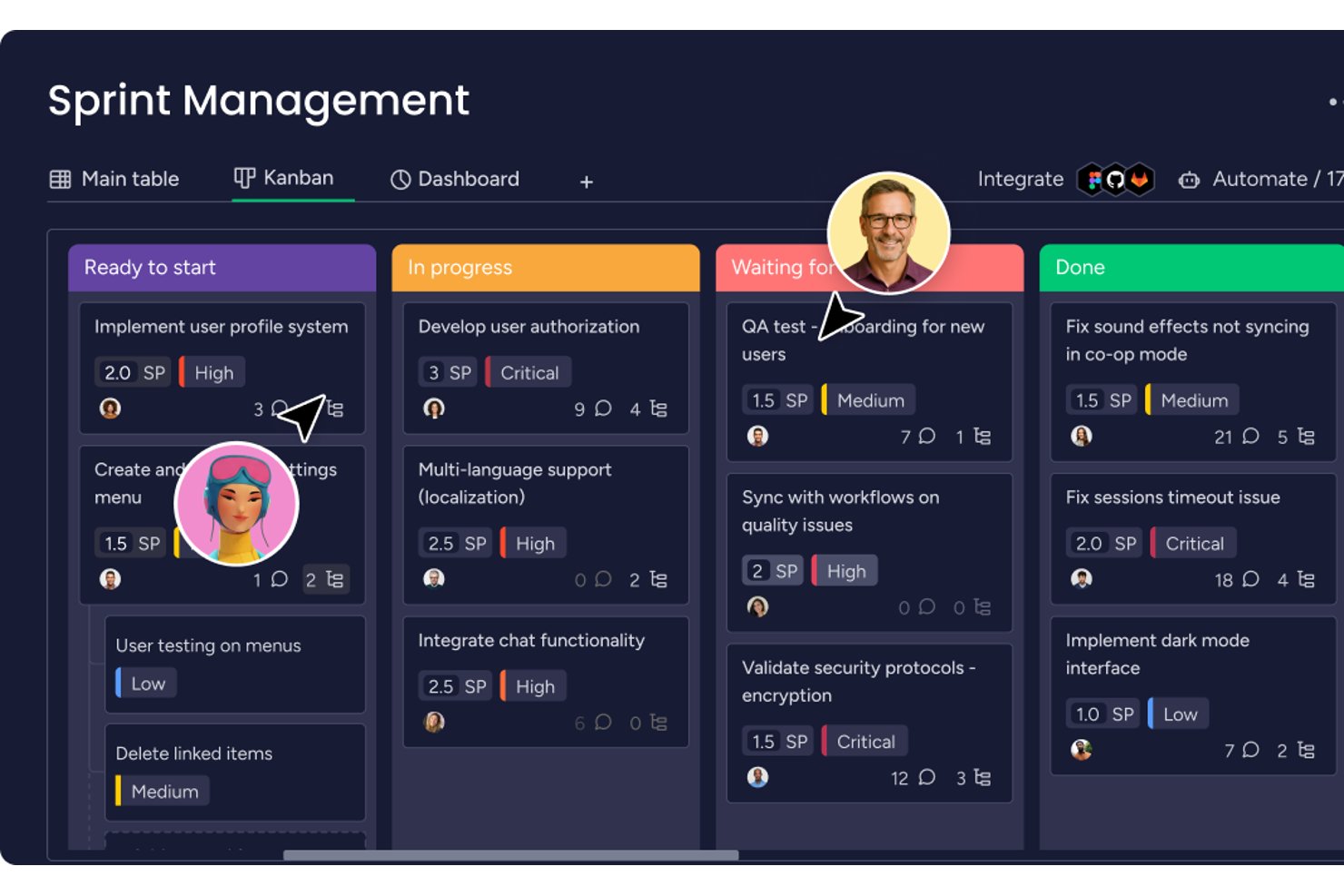
monday AI Workspace è una piattaforma di gestione del lavoro polivalente che unisce bacheche di progetto configurabili, programmazione basata su Gantt, automazione e coordinamento delle attività assistito dall’IA per aiutare i team di ufficio nel settore edile a monitorare più progetti da un unico hub.
Per chi è ideale monday AI Workspace?
È una soluzione ideale per i team d’ufficio e i coordinatori di progetto nel settore edile che necessitano di una gestione flessibile di pianificazioni, comunicazioni e conformità su più progetti in corso.
Perché ho scelto monday AI Workspace
Ho scelto monday AI Workspace perché il suo motore di automazione gestisce il lavoro ripetitivo di coordinamento che sottrae tempo ai project manager. Lo utilizzo per notificare automaticamente ai subappaltatori la scadenza dei certificati assicurativi e segnalare le attività in ritardo su varie bacheche di progetto senza alcun sollecito manuale. L’AI Sidekick riepiloga anche gli esiti delle riunioni e mette in evidenza le attività in ritardo, in modo che non debba rincorrere aggiornamenti di stato da una dozzina di stakeholder manualmente.
Funzionalità chiave di monday AI Workspace
- Vista configurabile del diagramma di Gantt: Visualizza le tempistiche di progetto, le fasi, le dipendenze e le scadenze in una interfaccia Gantt dedicata.
- Modelli personalizzati di bacheche: Configura bacheche di progetto personalizzate per tracciare pianificazioni, budget e avanzamenti di cantiere utilizzando strutture riutilizzabili.
- Caricamento e archiviazione documenti: Allega e organizza contratti, specifiche e file di progetto direttamente all’interno delle bacheche e delle attività.
- Controlli di permesso basati sui ruoli: Imposta i diritti di accesso per utenti o ospiti per garantire la protezione dei dati sensibili del progetto.
Integrazioni di monday AI Workspace
monday AI Workspace offre centinaia di integrazioni native, tra cui Slack, Google Workspace, Microsoft 365, Salesforce, Jira, GitHub, Zoom, Dropbox, HubSpot e Zendesk. Supporta anche Zapier e fornisce un’API per integrazioni personalizzate.
Pros and Cons
Pros:
- Bacheche altamente personalizzabili per la gestione di più progetti
- L'automazione IA riduce le attività manuali di coordinamento
- Viste del carico di lavoro visuali tra diversi team di progetto
Cons:
- Assenza di flussi di lavoro RFI o di presentazione nativi
- Strumenti limitati per la valutazione dei costi e il monitoraggio del budget
New Product Updates from monday AI Workspace
monday AI Workspace Adds Human Approval Routing
monday AI Workspace adds a human-in-the-loop approval block to AI Workflows, sending approval requests and routing workflow paths based on responses. For more information, visit monday AI Workspace's official site.

Ideale per collegare flussi di lavoro tra cantiere e ufficio
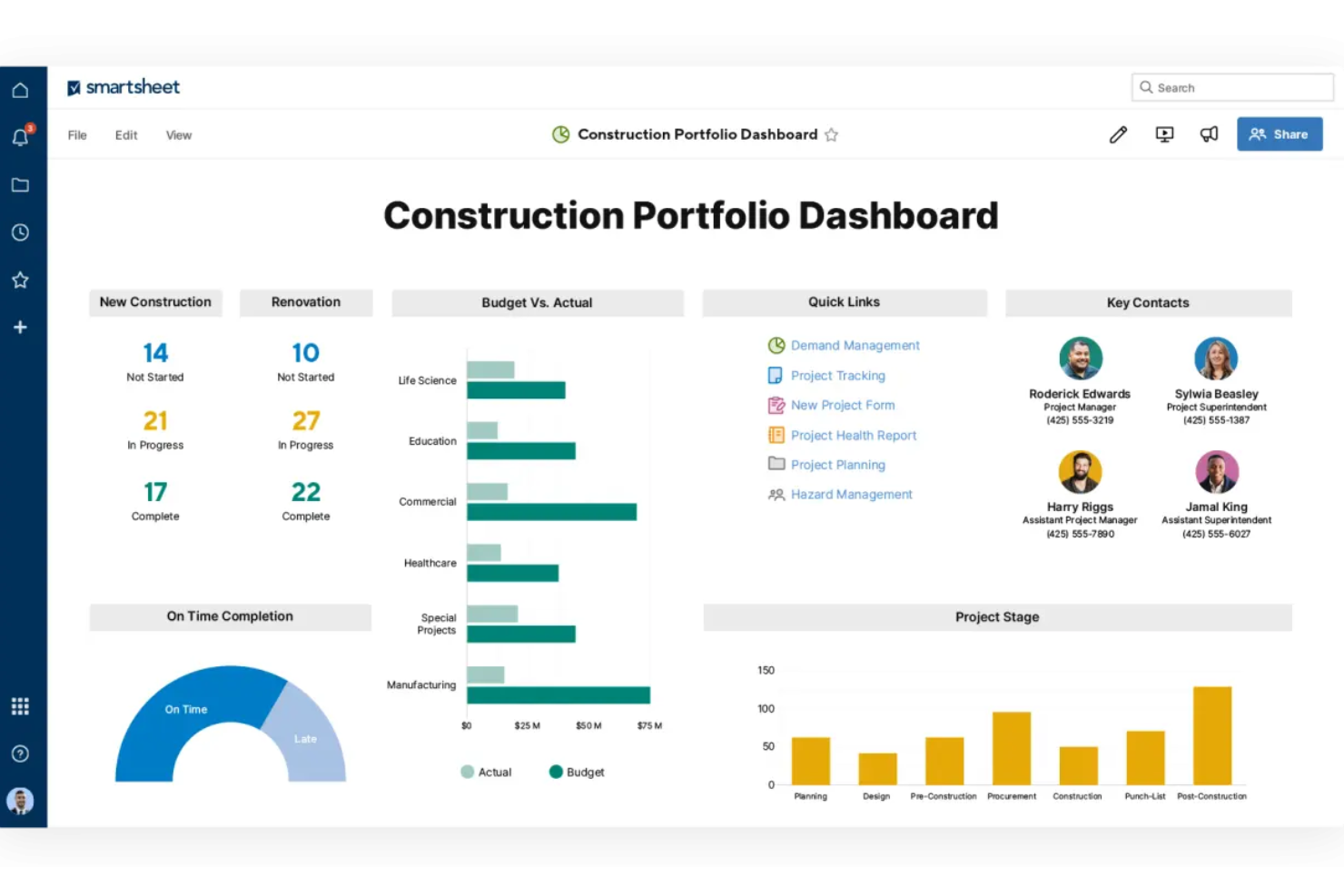
Smartsheet offre una piattaforma flessibile basata su fogli di calcolo per i team di costruzione che vogliono unire il lavoro d’ufficio e quello in cantiere in una sola visualizzazione. Se gestisci progetti di costruzione, infrastrutture o ristrutturazione e hai bisogno sia del monitoraggio sul campo sia della visibilità sulla pianificazione a lungo termine, Smartsheet può servire appaltatori generali, project manager, supervisori di cantiere e proprietari.
Per chi è migliore Smartsheet?
Per team che necessitano di una piattaforma di gestione del lavoro e delle risorse che includa fogli di calcolo, utile per collegare i flussi di lavoro in ufficio e in cantiere grazie a viste personalizzabili e automazione.
Perché ho scelto Smartsheet
Ho scelto Smartsheet perché consente di collegare i flussi di lavoro tra campo e ufficio tramite due capacità fondamentali rilevanti per l’edilizia: la raccolta dati abilitata per i dispositivi mobili per i team sul campo (in modo che aggiornamenti, ispezioni e segnalazioni di incidenti possano essere inseriti direttamente dal cantiere) e gli strumenti di automazione e pianificazione (per attivare allarmi, aggiornare le tempistiche e gestire automaticamente le dipendenze). Queste funzioni sono fondamentali quando occorre allineare diversi partner operativi e assicurare che varianti, ispezioni e attività di chiusura non vengano trascurate.
Caratteristiche principali di Smartsheet
Oltre alla raccolta mobile e all’automazione già menzionate, ecco altre funzionalità utili per la gestione di progetti edili:
- Gestione RFI/RFP: Semplifica la gestione delle richieste di informazioni e proposte per garantire risposte tempestive e decisioni rapide.
- Monitoraggio delle operazioni in cantiere: Fornisce strumenti per monitorare e gestire le attività sul campo, assicurando che le operazioni in loco siano allineate con le tempistiche e gli obiettivi di progetto.
- Allocazione delle risorse: Agevola la distribuzione e l’utilizzo efficiente delle risorse, aiutando a ottimizzare i risultati dei progetti e ridurre gli sprechi.
- Modelli per l’edilizia: Modelli preimpostati per cronoprogrammi, budget, punch-list e registri di ispezione ti aiutano a iniziare senza dover creare ogni cosa da zero.
Integrazioni Smartsheet
Le integrazioni includono Procore, Microsoft 365, Google Workspace, Salesforce, Jira, Box, Slack, ServiceNow, Docusign e Tableau.
Pros and Cons
Pros:
- Le automazioni aiutano a ridurre i solleciti ripetitivi e assicurare che le attività si attivino correttamente.
- Una buona libreria di modelli specifici per l’edilizia riduce i tempi di avvio.
- Ottima visibilità per i responsabili grazie a dashboard e report su tutti i progetti.
Cons:
- Sebbene il formato a foglio di calcolo sia familiare, l’interfaccia e la configurazione possono risultare complesse per gli utenti meno tecnici.
- Per esigenze molto semplici di task-list o gestione subappaltatori può risultare più complesso del necessario.
New Product Updates from Smartsheet

Smartsheet Adds Non-Plan User Management in Admin Center
Smartsheet adds a Non plan users tab to the Seat types and true-up page in Admin Center. This lets system admins review non-plan users and add them to the plan or remove them from the organization in one place. For more information, visit Smartsheet’s official site.

InEight
Ideale per il controllo dei grandi progetti di capitale
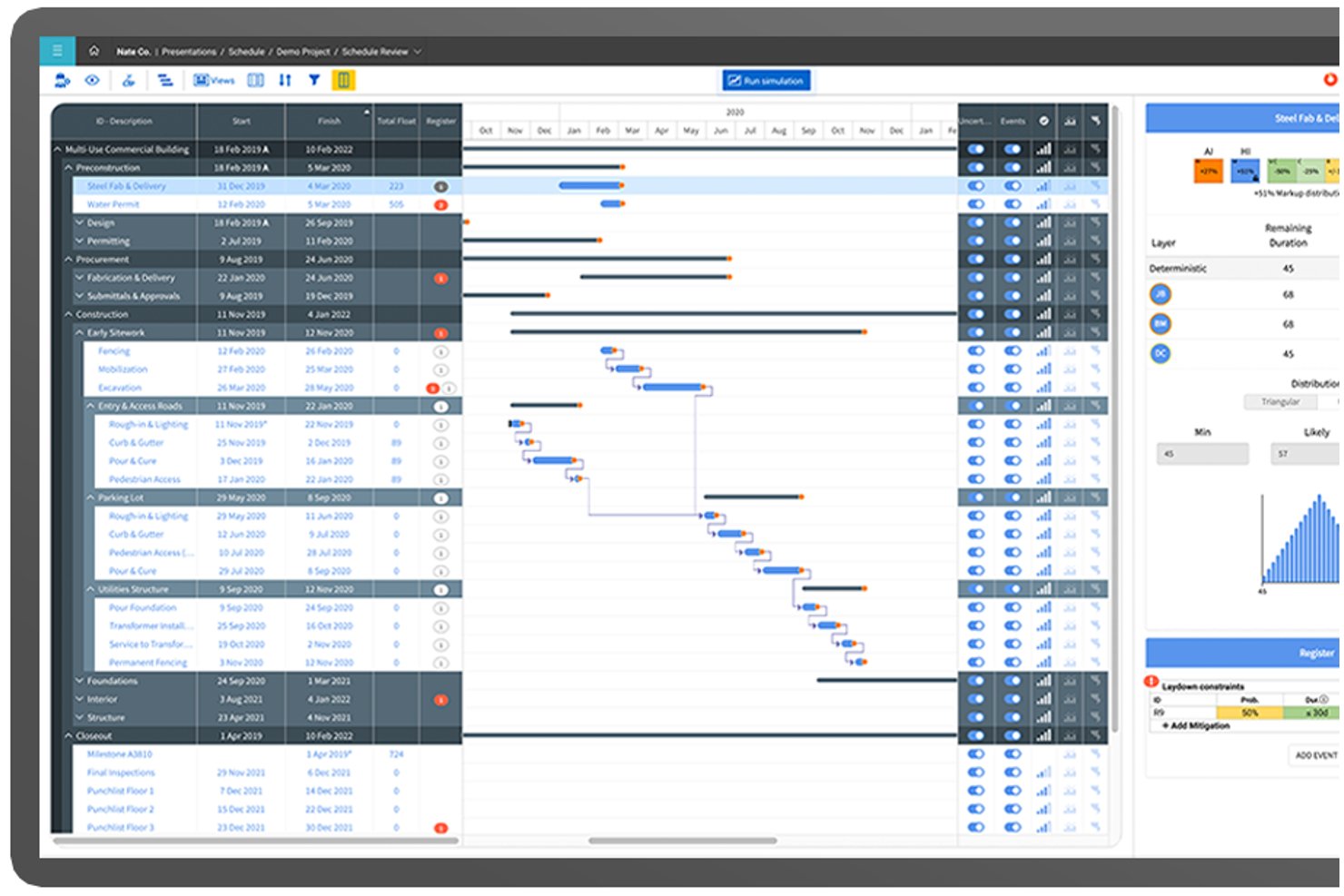
InEight è una piattaforma modulare di gestione dei progetti di costruzione pensata per i progetti di capitali, che combina controllo dei costi, programmazione CPM, gestione dei contratti, controllo dei documenti e strumenti di esecuzione in campo in un'unica suite integrata.
Per chi è più adatto InEight?
InEight è particolarmente indicato per imprese general contractor, committenti e società EPC che gestiscono grandi progetti infrastrutturali, energetici, minerari o pubblici.
Perché ho scelto InEight
InEight si guadagna un posto nella mia lista ristretta perché nessun'altra piattaforma eguaglia la sua profondità nel controllo dei costi nei mega-progetti. InEight Control traccia budget, costi impegnati e previsioni in tempo reale con una granularità che la maggior parte dei software di costruzione semplicemente non permette. L'integrazione bidirezionale con P6 è ciò che davvero la distingue: le variazioni di programma si riflettono direttamente sulle proiezioni dei costi. Così, quando una fase subisce uno slittamento in un progetto con oltre 80.000 attività di pianificazione, le previsioni si aggiornano automaticamente invece di richiedere un ciclo manuale di riconciliazione.
Funzionalità chiave di InEight
- Integrazione con modelli 3D BIM: Collega i dati di progetto in tempo reale direttamente ai modelli 3D per supportare il coordinamento in campo e il rilevamento delle interferenze.
- Raccolta dati in campo tramite dispositivi mobili: Permette alle squadre di inviare registri giornalieri, quantità e foto dai cantieri utilizzando dispositivi mobili.
- Gestione avanzata dei documenti: Centralizza contratti, elaborati grafici e revisioni con tracciabilità dettagliata delle versioni e condivisione sicura.
- Integrazioni ERP e di programmazione: Offre connettività 'plug & play' con SAP, Oracle, Primavera P6 e altri sistemi per l'edilizia.
Integrazioni di InEight
InEight offre integrazioni native con SAP, Oracle E-Business Suite, Oracle P6, QuickBooks Desktop, Sage 300, AdobeSign, Autodesk Civil 3D e Ping Identity, e mette a disposizione un'API aperta per integrazioni personalizzate.
Pros and Cons
Pros:
- Gestisce il controllo dei costi su progetti di capitale di ampia scala
- Programmazione CPM avanzata con integrazione P6
- Solida coordinazione di documenti e modelli BIM
Cons:
- Bidding per subappalto e strumenti di campo limitati
- App mobile con feedback contrastanti dagli addetti in campo
CMiC
Ideale con una piattaforma a database unico
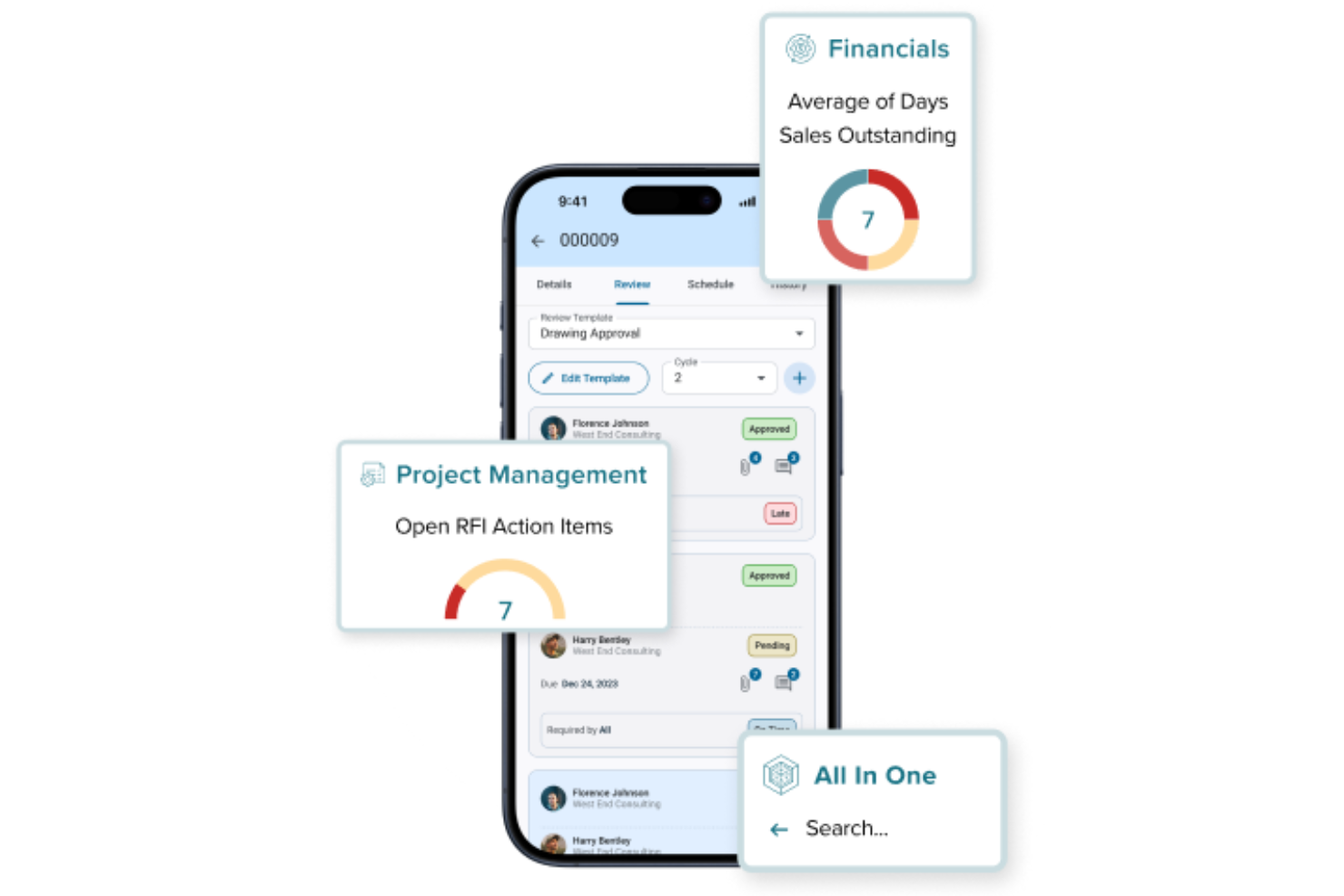
CMiC offre una piattaforma unificata di gestione progetti edilizi progettata specificamente per le esigenze di appaltatori e imprese di costruzione. Il software è rivolto ai team che cercano un'integrazione profonda tra controllo dei progetti, gestione finanziaria e operazioni sul campo. Se la tua azienda ha bisogno di un'unica fonte affidabile per gestire workflow complessi nel settore delle costruzioni, CMiC è pensato per affrontare queste sfide.
Per chi è ideale CMiC?
CMiC è particolarmente indicato per aziende di costruzioni di medie e grandi dimensioni che necessitano di una gestione integrata di progetto e controllo finanziario all'interno di un'unica piattaforma.
Perché ho scelto CMiC
Ho scelto CMiC perché la sua piattaforma a database unico si distingue per i team di costruzione che necessitano di dati coerenti e in tempo reale in tutte le fasi di progetto. Con tutto—dalla gestione dei progetti alle finanze—archiviato in un unico sistema unificato, si evitano i silos di dati e i problemi di controllo delle versioni che spesso rallentano i workflow edilizi. Apprezzo come questa architettura favorisca funzionalità come la gestione centralizzata dei documenti e i report unificati, così che le squadre lavorino sempre sulla stessa fonte attendibile di dati. Questo approccio è particolarmente prezioso per le aziende che gestiscono più progetti e stakeholder che fanno affidamento su informazioni accurate e aggiornate.
Funzionalità principali di CMiC
Altre funzionalità che i team di costruzione potrebbero trovare utili includono:
- Gestione mobile sul campo: Accedi ai dati di progetto, invia diari giornalieri e gestisci le liste di controllo direttamente dal campo tramite dispositivi mobili.
- Gestione delle varianti: Tieni traccia, esamina e approva le varianti all'interno della piattaforma per mantenere il controllo su ambito e costi di progetto.
- Pianificazione delle risorse: Assegna manodopera, attrezzature e materiali su più progetti con uno strumento di pianificazione visiva.
- Gestione dei subappaltatori: Amministra contratti, documenti di conformità e comunicazioni con i subappaltatori in un unico posto.
Integrazioni CMiC
Le integrazioni includono Arcoro, Prophix, Workday, Cosential, HammerTech e SmartBarrel. È inoltre disponibile un'API per integrazioni personalizzate.
Pros and Cons
Pros:
- Funzionalità AI supportano analisi predittive dei progetti
- Diari giornalieri e reportistica di cantiere inclusi
- Gestione sicurezza integrata e tracciamento della conformità
Cons:
- Configurazione iniziale e onboarding possono essere complessi
- Integrazioni di terze parti predefinite limitate

Wrike
Ideale per dati e analisi in tempo reale
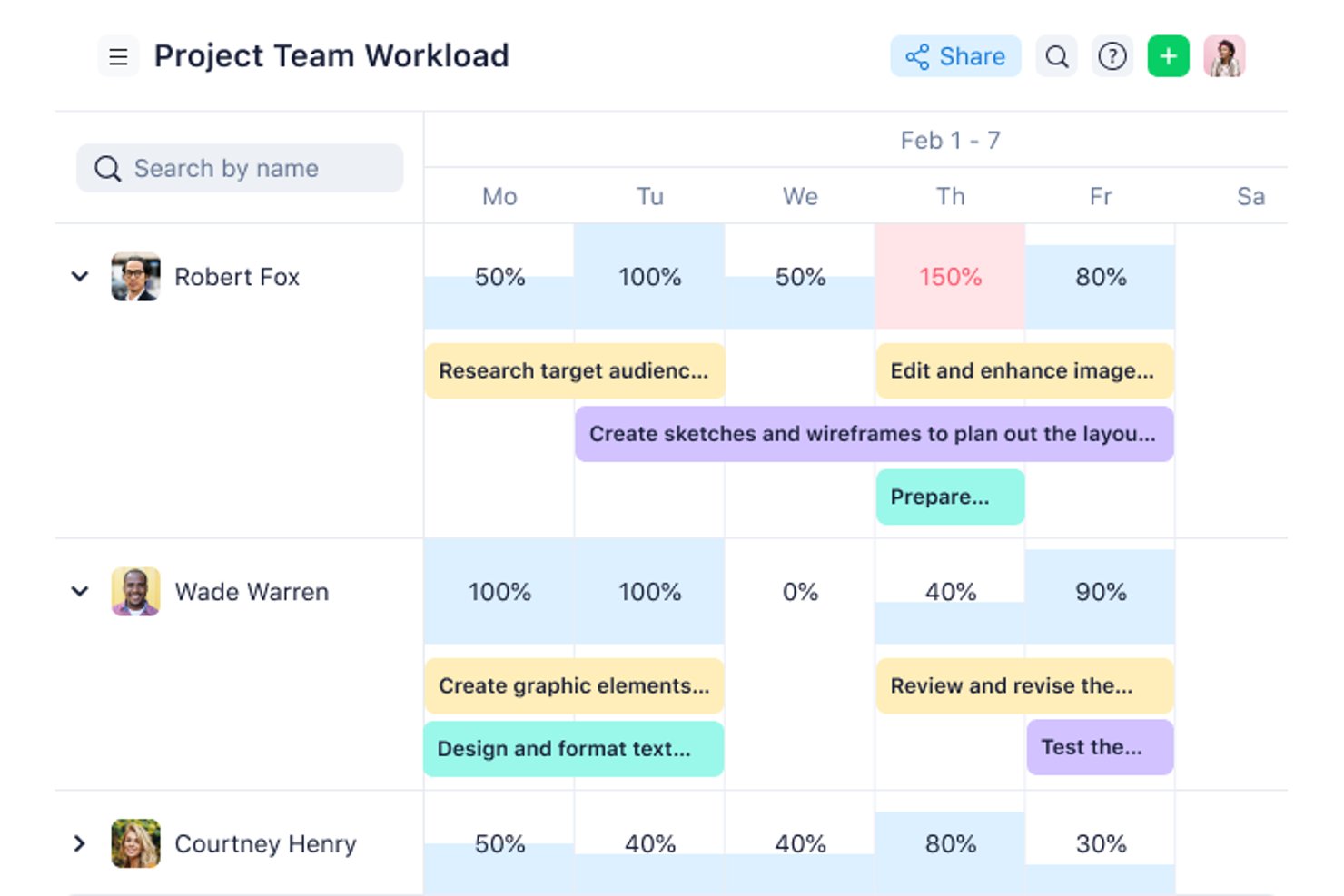
Wrike è una piattaforma generale di gestione del lavoro che riunisce pianificazione, dashboard in tempo reale, analisi e collaborazione tra team in un unico spazio di lavoro configurabile per team di costruzione e team che lavorano per progetti.
Per chi è più adatto Wrike?
Wrike è una scelta eccellente per i team di progetto di medie e grandi dimensioni che hanno bisogno di visibilità in tempo reale su più flussi di lavoro e parti interessate.
Perché ho scelto Wrike
Ho scelto Wrike come una delle soluzioni migliori perché le sue dashboard in tempo reale e i widget AI Insights offrono ai team di costruzione una visibilità aggiornata sullo stato dei progetti senza dover attendere le riunioni di aggiornamento. Apprezzo in particolare il modo in cui Wrike Copilot mette in evidenza rischi e tendenze tra i vari flussi di lavoro, consentendo di individuare i ritardi nella pianificazione prima che si aggravino. Le baseline vengono memorizzate come campi utilizzabili nei report, perciò lo scostamento tra pianificato ed effettivo viene mostrato direttamente in dashboard condivisibili che le parti interessate possono monitorare autonomamente.
Funzionalità principali di Wrike
- Diagrammi di Gantt interattivi: Crea e modifica le pianificazioni con l'editor con funzionalità di trascinamento, la riprogrammazione automatica delle dipendenze e l'evidenziazione del percorso critico in tutte le fasi del progetto.
- Accesso degli ospiti: Includi subappaltatori, architetti, ingegneri e committenti in progetti specifici con autorizzazioni controllate, senza richiedere licenze complete per ogni partecipante.
- Modello di richiesta di modifica: Registra e monitora gli ordini di modifica con un modello predefinito che raccoglie in un unico luogo l'ambito, il budget e l'impatto sulle tempistiche.
- Oltre 400 integrazioni predefinite: Collega Wrike a strumenti come Salesforce, Microsoft Teams, Slack e QuickBooks, con un'API REST aperta disponibile in ogni piano per le integrazioni personalizzate.
Integrazioni di Wrike
Wrike offre oltre 400 integrazioni native predefinite, tra cui QuickBooks, Microsoft Teams, Slack, Salesforce, NetSuite, Google Workspace, Dropbox, Jira e GitHub. Un'API REST aperta è disponibile in ogni piano, incluso quello gratuito, per le integrazioni personalizzate.
Pros and Cons
Pros:
- Le dashboard in tempo reale evidenziano i rischi per la pianificazione
- I diagrammi di Gantt supportano dipendenze complesse
- L'accesso degli ospiti coordina i partner esterni del progetto
Cons:
- Nessun flusso di lavoro nativo per RFI o documenti da sottoporre
- I team sul campo non dispongono di strumenti per i report giornalieri
New Product Updates from Wrike
Wrike Adds Klaxoon MCP Integration
Wrike’s Klaxoon MCP integration is now generally available, enabling AI agents to navigate between Wrike tasks and attached whiteboards, read task context, and manage whiteboard attachments via API. For more information, visit Wrike's official site.

Procore
Ideale per integrazioni approfondite con ERP e sistemi contabili
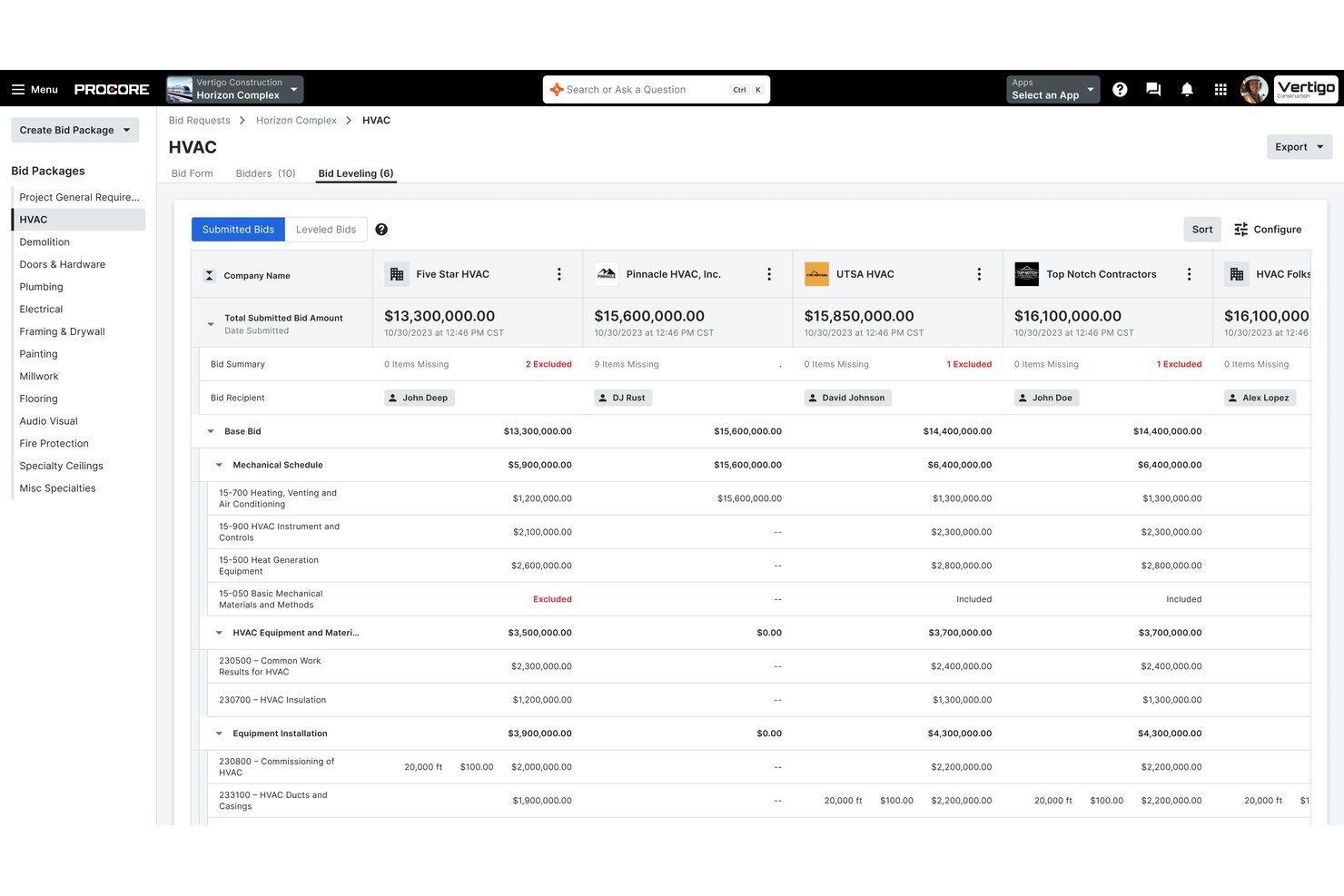
Procore è una piattaforma completa di gestione della costruzione che copre la programmazione dei progetti, la gestione dei documenti e dei disegni, RFIs, presentazioni, costi di lavoro, reportistica sul campo e gestione delle offerte durante tutto il ciclo di vita del progetto.
Per chi è più adatto Procore?
Procore è particolarmente adatto per imprese generali di medie e grandi dimensioni che gestiscono progetti complessi e multi-sito e che necessitano di mantenere connessi sistemi ERP o contabili esistenti.
Perché ho scelto Procore
Procore si guadagna la sua posizione tra i migliori della mia lista grazie alla profonda integrazione con i sistemi contabili specifici per l’edilizia come Sage 300 CRE, Viewpoint Vista e Acumatica. Mi piace che i costi impegnati, le varianti d’ordine e le fatture dei subappaltatori si sincronizzino direttamente con il libro mastro generale senza reinserimento manuale. Il flusso bidirezionale dei dati sui costi significa che gli aggiornamenti sui costi fatti sul campo sono visibili sull’ERP lo stesso giorno, mantenendo l’allineamento in tempo reale tra la situazione finanziaria del progetto e la contabilità.
Funzionalità chiave di Procore
- Visualizzatore BIM e markup: Permette agli utenti di visualizzare, navigare e annotare modelli 3D da Revit e Navisworks direttamente nell’app web o mobile.
- Automazione dei flussi di lavoro configurabile: Supporta flussi di approvazione personalizzati per RFIs, presentazioni, contratti e ispezioni.
- App mobile per il cantiere con modalità offline: Consente ai team sul campo di registrare registri giornalieri, moduli di sicurezza e foto anche in aree senza connettività.
- Gestione della prequalifica e della conformità: Tiene traccia delle certificazioni dei subappaltatori, assicurazioni e stato di prequalifica in un sistema centralizzato.
Integrazioni di Procore
Procore offre oltre 15 integrazioni native con sistemi di contabilità per l’edilizia e ERP, tra cui Sage 100 Contractor, Sage 300 CRE, Viewpoint Vista, Viewpoint Spectrum, QuickBooks, Acumatica, MRI, Yardi, NetSuite, CMiC, Xero e altri. Sono disponibili API e un marketplace di app per integrazioni personalizzate.
Pros and Cons
Pros:
- Aggiornamenti in tempo reale dei costi di cantiere visibili da tutti i team
- Versionamento automatico dei disegni con cronologia delle annotazioni
- Prequalifica dei subappaltatori e portale offerte integrati
Cons:
- Tempi di implementazione lunghi per le grandi aziende
- Curva di apprendimento ripida per i nuovi utenti

Ideale per onboarding e formazione guidata
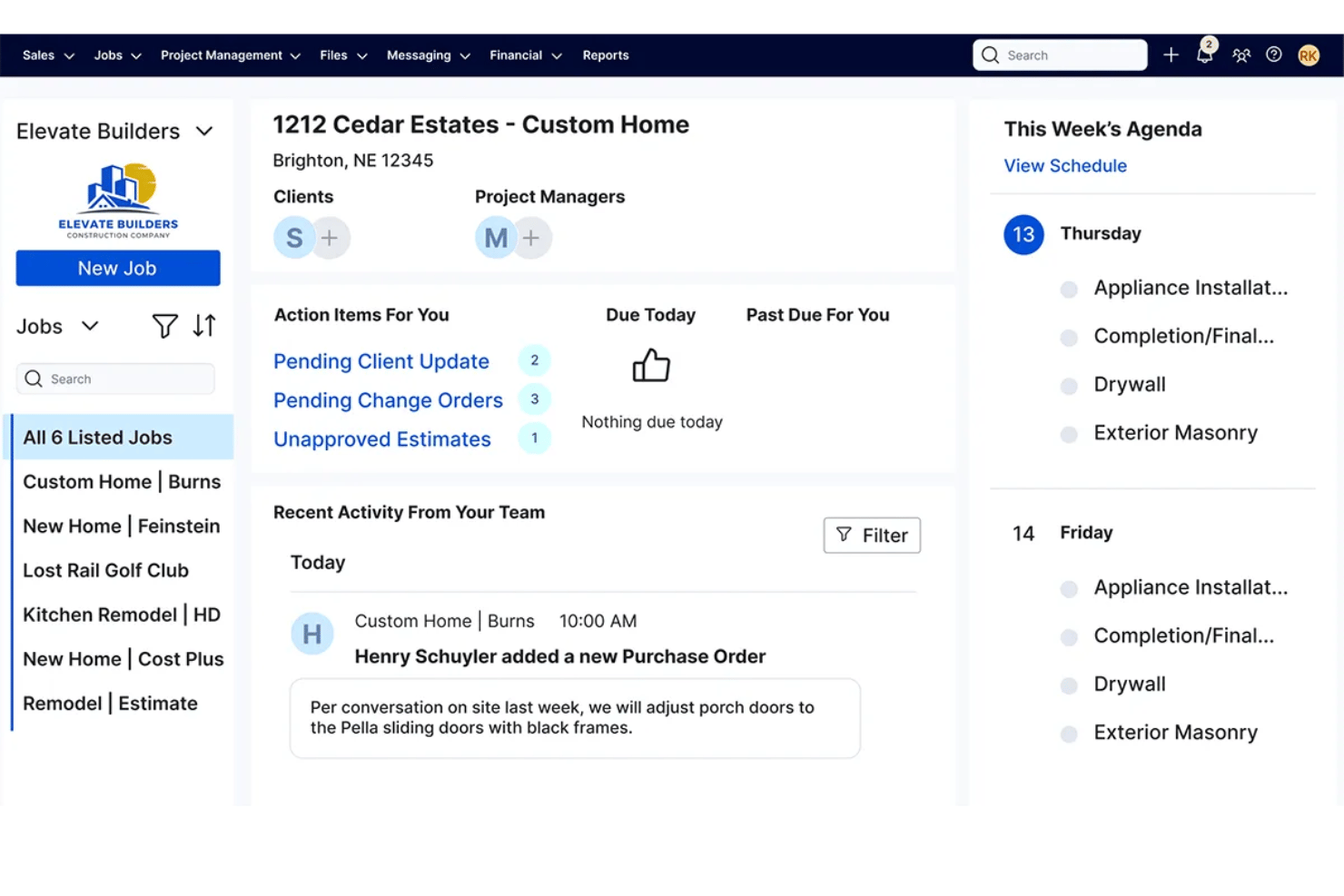
Buildertrend è una piattaforma di gestione progetti edili che copre la pianificazione delle attività, la stima dei costi, la gestione dei documenti, il coordinamento dei subappaltatori, la comunicazione con i clienti e i report sul campo per progetti residenziali e commerciali.
Per chi è più adatto Buildertrend?
Buildertrend è particolarmente indicato per costruttori e ristrutturatori residenziali di piccole e medie dimensioni che gestiscono più progetti contemporaneamente e hanno bisogno di una piattaforma unica per gestirli dall'inizio alla fine.
Perché ho scelto Buildertrend
Buildertrend merita un posto nella mia selezione per la serietà con cui aiuta i team di costruzione ad avviarsi. Apprezzo molto il programma di onboarding strutturato di 12 settimane, durante il quale un responsabile onboarding dedicato ti guida nella configurazione dell'account e ti affianca nell'esecuzione di un progetto reale. La Buildertrend University e la Learning Academy offrono una formazione basata sui ruoli che coinvolge tutto il team, dagli estimatori che rivedono i budget dei costi di lavoro alle squadre in cantiere che registrano i report giornalieri dal sito.
Caratteristiche principali di Buildertrend
- Gestione delle varianti: Crea, approva e archivia le varianti di progetto con firme digitali e tracciamento delle revisioni.
- Budget dei costi di lavoro: Monitora costi impegnati, previsioni e consuntivi rispetto al budget per codice di costo e attività.
- Rilevazione delle ore in campo: Registra le ore delle squadre e i dati di localizzazione dal cantiere tramite l'app mobile.
- Inviti a offerte: Invia richieste di offerta ai subappaltatori, monitora le risposte e gestisci i contratti in un unico sistema.
Integrazioni di Buildertrend
Buildertrend offre integrazioni native con QuickBooks, Xero e Sage 100 Contractor. È disponibile un'API per integrazioni personalizzate.
Pros and Cons
Pros:
- Onboarding strutturato di 12 settimane con responsabile dedicato
- Portale clienti progettato per la comunicazione con il proprietario
- Registri giornalieri mobile con documentazione fotografica
Cons:
- Curva di apprendimento ripida per le squadre sul campo
- Le prestazioni dell'app mobile possono essere lente

Ideale per strumenti di coordinamento dei modelli integrati
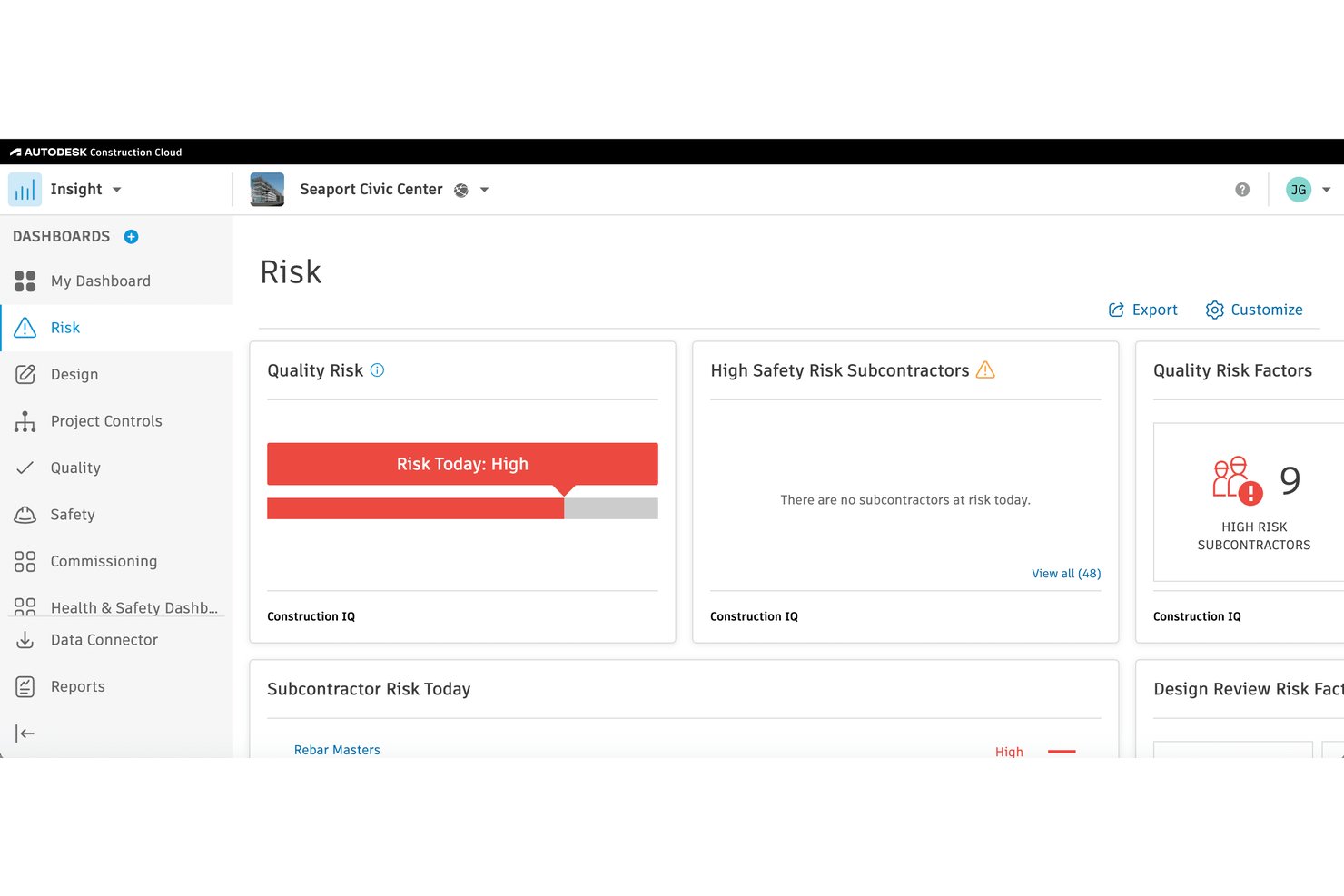
Autodesk Construction Cloud è una piattaforma di gestione dei progetti di costruzione che unifica la gestione dei documenti, il coordinamento dei modelli BIM, le RFI, le sottomissioni, i report di cantiere, il monitoraggio dei costi e la gestione delle offerte durante l’intero ciclo di vita del progetto.
Per chi è Autodesk Construction Cloud?
È particolarmente indicata per grandi appaltatori generali e imprese di costruzione che gestiscono progetti complessi e ricchi di progettazione, che richiedono una stretta coordinazione tra ufficio, campo e flussi di lavoro BIM.
Perché ho scelto Autodesk Construction Cloud
Ho incluso Autodesk Construction Cloud nella mia shortlist per come il coordinamento del modello è profondamente integrato nella piattaforma stessa. Mi piace che il rilevamento automatico delle interferenze avvenga direttamente sui modelli Revit live, senza dover esportare file o cambiare strumenti. In pratica, la mia squadra può individuare e risolvere i conflitti progettuali prima dell’inizio dei lavori, proprio dove è più economico intervenire.
Funzionalità principali di Autodesk Construction Cloud
- Gestione documentale: Centralizza tutti i file di progetto con controllo delle versioni, strumenti di annotazione e impostazioni dei permessi.
- Workflow per RFI e sottomissioni: Permette di creare, monitorare e gestire RFI, sottomissioni e varianti con percorsi di approvazione personalizzati.
- Suite di gestione delle offerte: Integra BuildingConnected per la gestione delle offerte, inviti ai subappaltatori e prequalificazione.
- Strumenti di report di cantiere: Consente la compilazione di diari di cantiere, punch list, ispezioni di sicurezza e raccolta di foto da qualsiasi cantiere, anche da mobile.
Integrazioni di Autodesk Construction Cloud
Autodesk Construction Cloud offre integrazioni nativamente con Revit, Navisworks, Microsoft 365, Dropbox, Box, Procore, PlanGrid e BIM 360. Si collega inoltre con Sage 300 CRE, Viewpoint Vista, QuickBooks e mette a disposizione un'API per integrazioni personalizzate.
Pros and Cons
Pros:
- Rilevamento interferenze BIM nativo nella piattaforma
- Copertura completa dal progetto fino alla chiusura
- Ottimi strumenti di campo per mobile con sincronizzazione offline
Cons:
- Configurazione e onboarding richiedono tempo significativo
- Può risultare impegnativa per team di progetto più piccoli

Ideale con strumenti di budgeting integrati
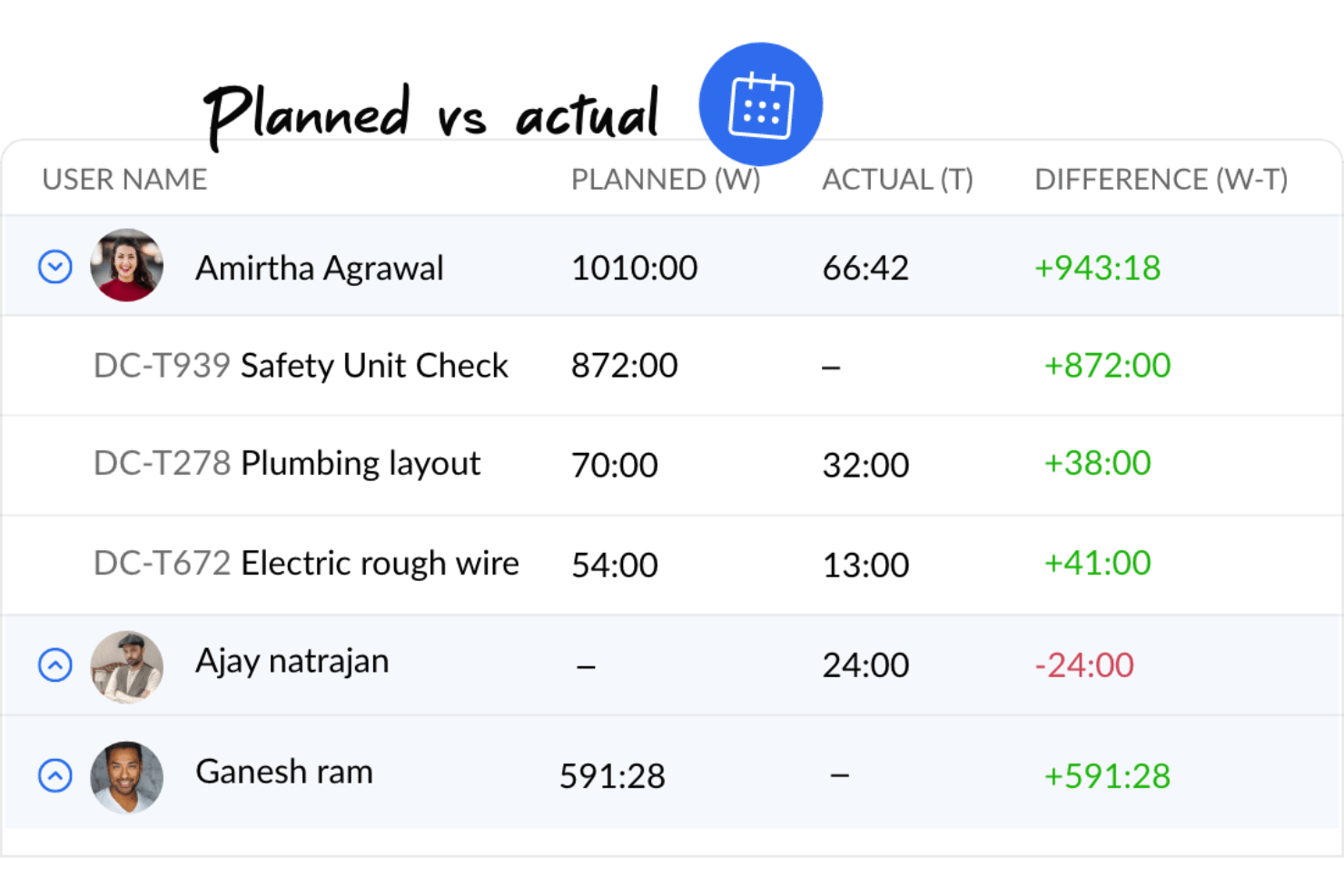
Se stai cercando un software di project management per l'edilizia con strumenti integrati per la gestione del budget e il controllo dei costi, Zoho Projects merita sicuramente attenzione. È ideale per project manager e appaltatori che desiderano monitorare le spese, allocare risorse e tenere sotto controllo i budget insieme a scadenze e attività. La piattaforma aiuta i team a mantenere la piena visibilità delle finanze collegate alle attività quotidiane del progetto.
Per chi è consigliato Zoho Projects?
Piccoli e medi team che desiderano una gestione progetti accessibile, con strumenti integrati di budgeting e monitoraggio del tempo.
Perché ho scelto Zoho Projects
Il budgeting e la gestione dei costi sono spesso priorità per i team edili, ed è per questo che Zoho Projects si distingue in questo settore. La piattaforma include strumenti integrati per impostare budget di progetto, monitorare i costi reali e confrontarli in tempo reale con le stime. Ho scelto Zoho Projects anche perché offre la registrazione delle spese e l’allocazione delle risorse, permettendo di tenere sempre sotto controllo la destinazione delle risorse finanziarie all'interno del progetto. Queste funzionalità consentono ai responsabili di progetto di mantenere il controllo finanziario senza bisogno di strumenti di contabilità separati.
Funzionalità principali di Zoho Projects
Altre funzioni utili per i team edili includono:
- Diagrammi di Gantt: Visualizza tempistiche del progetto, dipendenze e scadenze in un'unica vista.
- Automazione delle attività: Imposta regole per automatizzare compiti ripetitivi e notifiche sul progetto.
- Gestione dei timesheet: Registra le ore di lavoro e genera report per paghe o fatturazione.
- Monitoraggio delle problematiche: Segnala, assegna e monitora problematiche o difetti man mano che si presentano.
Integrazioni Zoho Projects
Le integrazioni includono Zoho CRM, Zoho Books, Zoho Invoice, Zoho Analytics, Zoho People, Google Drive, Microsoft Teams, Slack, Dropbox e GitHub.
Pros and Cons
Pros:
- Ottima integrazione con la Suite Zoho
- Permette la personalizzazione dei flussi di lavoro e dei modelli di progetto
- Include gestione delle attività, monitoraggio del tempo e diagrammi di Gantt
Cons:
- Mancano funzionalità avanzate richieste per progetti edili complessi
- La piattaforma non dispone di una robusta funzionalità offline
New Product Updates from Zoho Projects
Zoho Projects Adds CodeX Scripts for Custom Modules
Zoho Projects now supports CodeX Scripts for custom modules, enabling conditional logic and rules for creating, updating, and deleting records. For more information, visit Zoho Projects' official site.
 .
.
ClickUp
Ideale per flussi di lavoro personalizzabili
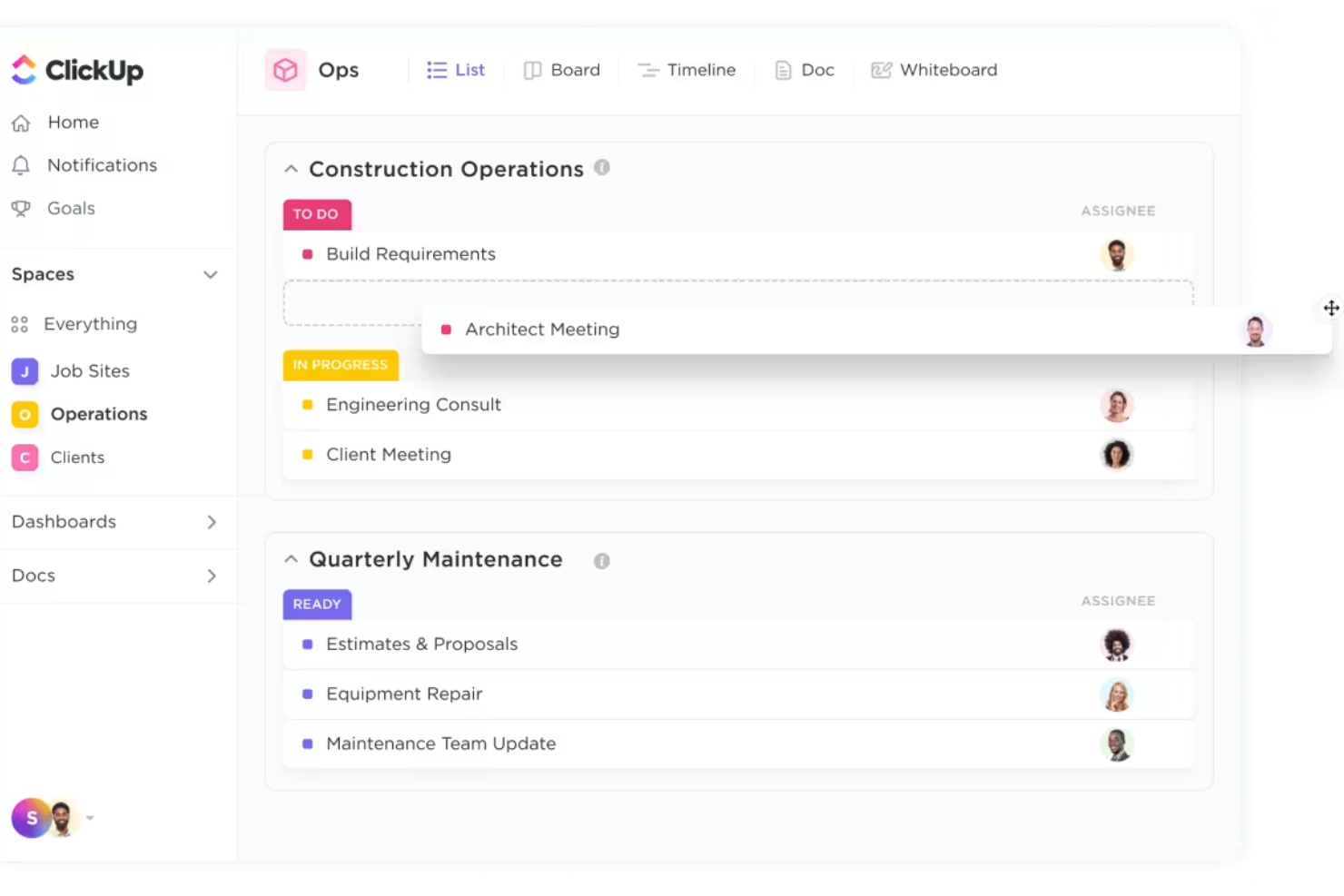
ClickUp offre ai project manager e ai team del settore edile una piattaforma flessibile per progettare flussi di lavoro che rispecchiano i loro processi unici. È una soluzione ideale per aziende che gestiscono diversi tipi di progetti o che devono adattare le strutture delle attività a clienti e cantieri differenti. Grazie agli stati delle attività personalizzabili, ai modelli e alle automazioni, ClickUp aiuta i team di costruzione a organizzare tutto, dalla pianificazione pre-costruzione alle check-list finali, in un unico posto.
Per chi è ClickUp?
Team che desiderano flussi di lavoro, visualizzazioni e strutture di lavoro altamente personalizzabili tra progetti e attività, con posizionamento flessibile delle risorse.
Perché ho scelto ClickUp
La possibilità di personalizzare i flussi di lavoro è ciò che distingue ClickUp nella gestione dei progetti edili. Ho scelto ClickUp perché permette di creare spazi progetto con stati attività, campi e modelli personalizzati adatti al modo in cui lavora realmente il tuo team. Puoi creare automazioni per gestire le fasi ripetitive, come spostare attività tra fasi o assegnare check-list per le ispezioni. Questa flessibilità rende semplice adattare ClickUp a diversi tipi di progetto, esigenze di subappaltatori o richieste dei clienti senza obbligare il team a seguire una struttura rigida.
Funzionalità principali di ClickUp
Altre funzionalità che rendono ClickUp utile per i team di cantiere includono:
- Diagrammi di Gantt: Visualizza le tempistiche dei progetti e le dipendenze per gestire scadenze e obiettivi.
- Monitoraggio del tempo: Registra le ore direttamente sulle attività per monitorare la manodopera e l'avanzamento dei progetti.
- Gestione documentale: Archivia, condividi e collabora sui file di progetto all'interno di ogni area di lavoro.
- Chat integrata: Comunica con i membri del team in tempo reale senza uscire dalla piattaforma.
Integrazioni ClickUp
Le integrazioni comprendono Slack, Google Drive, Dropbox, OneDrive, Microsoft Teams, Zoom, Outlook, Gmail, Zapier, Trello, Jira, Salesforce, HubSpot, Evernote e Toggl.
Pros and Cons
Pros:
- Possibilità di creare flussi di lavoro su misura
- Offre numerose opzioni di integrazione
- Ampie funzionalità per la gestione di attività, tempi e documenti
Cons:
- Funzionalità specifiche per il settore edile limitate
- La personalizzazione della piattaforma può essere impegnativa
New Product Updates from ClickUp
ClickUp Adds Meetings Hub, Super Agent Templates, and ZoomInfo Integration
ClickUp adds a searchable Meetings Hub, new ways to clone and template Super Agents, and a ZoomInfo integration through the App Center. These updates improve meeting retrieval, agent reuse, and access to sales intelligence. For more information, visit ClickUp’s official site.
Altri strumenti per la gestione dei progetti edilizi
Questi strumenti per la gestione dei progetti edilizi non sono entrati nella mia selezione dei 10 migliori, ma vale comunque la pena considerarli:
- Contractor Foreman
Miglior gestione di risorse e documenti
- ProjectManager
Ideale per la pianificazione e la programmazione dei progetti
- Joist
Migliore app per professionisti edili
- Geniebelt
Ideale per la sincronizzazione degli stakeholder
- CMiC
Ideale per i controlli di progetto
- ConstructionOnline
Ideale per la contabilità di commessa
- Jonas Construction
Ideale per progetti di costruzione complessi
- Onware
Ideale per la raccolta dei documenti
- VPO
Ideale per l'accessibilità multi-dispositivo
- BrickControl
Migliore soluzione cloud-based
- Candy CSS
Ideale per le stime
- Builterra
Ideale per l'amministrazione dei contratti
- PASKR
Ideale per l'automazione
- GanttPRO
Ideale per diagrammi di Gantt dinamici
- Scoro
Ottimo per l'allocazione informata delle risorse
- ProWorkflow
Ideale per il controllo dei progetti dal preventivo alla fattura
- GoodDay
Ideale per flussi di lavoro personalizzabili
- CrewCost
Ideale per collegare la contabilità alle operazioni


Recensioni correlate di software per la gestione dei progetti
- Software per la gestione dei progetti
- Software per la gestione delle risorse
- Software per l'automazione dei flussi di lavoro
- Software per il monitoraggio del tempo
- Software per la gestione delle attività
- Strumenti di collaborazione
- Software per la gestione dei progetti di investimento
Come Valuto i Software di Gestione Progetti Edili
Divido la mia valutazione in due livelli: la base che ogni strumento deve raggiungere—RFIs, computi metrici, registri di cantiere—e i fattori che differenziano le migliori opzioni a seconda dei team e dei tipi di progetto.
Funzionalità Principali (Requisiti Indispensabili per Questa Lista)
Quando seleziono gli strumenti per la mia lista, valuto ciascuno su una scala da 0 (non offre la funzionalità) a 5 (eccelle in quest’area) per ogni funzionalità principale elencata di seguito. Poi, calcolo il punteggio totale dello strumento in percentuale. Ogni strumento deve ottenere un punteggio totale minimo del 65% per essere preso in considerazione.
- Pianificazione Progetto & Diagrammi di Gantt: Verifico la presenza di gestione delle dipendenze, visibilità del cammino critico e gestione delle scadenze che rispecchino le reali fasi di costruzione come i lavori preparatori, la struttura e la chiusura.
- Gestione Documenti & Disegni: Qui contano il controllo delle versioni, strumenti di markup e il confronto tra tavole—soprattutto quando i team lavorano su disegni architettonici o strutturali rivisti.
- Workflow di RFI & Sottomissioni: Valuto come ogni strumento gestisce la creazione delle RFI, l’instradamento, il monitoraggio del ball-in-court e l’integrazione delle varianti durante l’intero ciclo di vita del progetto.
- Gestione Budget & Costi: Analizzo la gestione dei costi tramite strutture di codici di costo, il monitoraggio degli impegni di spesa e l’impatto finanziario delle varianti, per supportare decisioni di budget in tempo reale.
- Reportistica di Cantiere & Giornaliera: I registri giornalieri mobili, le punch list, le checklist di sicurezza e la documentazione fotografica devono funzionare onsite, idealmente anche offline per i cantieri remoti.
- Gestione Subappaltatori & Gare d’Appalto: Gli inviti alla gara, i workflow di prequalifica e il monitoraggio dei contratti aiutano i GC a gestire le relazioni con i subappaltatori dalla gara alla consegna.
Una volta che ho una lista di strumenti che soddisfano i criteri, considero ciò che distingue ciascuna piattaforma.
Fattori Differenzianti (Cosa Distingue i Fornitori)
Ecco come confronto diversi fornitori:
Funzionalità Distintive
L’integrazione BIM è un grande elemento distintivo. Cerco strumenti che permettano ai team di visualizzare e coordinare modelli 3D all’interno della piattaforma, individuando clash progettuali prima che arrivino sul cantiere. I portali per committenti e clienti sono fondamentali quando il GC deve permettere ad architetti o sviluppatori di vedere in tempo reale pianificazioni e budget senza concedere accesso completo al sistema. Il monitoraggio di attrezzature e risorse su più cantieri aiuta i team più grandi a evitare macchinari fermi e conflitti di pianificazione delle squadre durante le fasi di progetto sovrapposte.
Oltre le Funzionalità
Le integrazioni sono fondamentali in questo settore. Valuto se uno strumento si collega ai sistemi di contabilità e ERP effettivamente usati dalle imprese edili, come Sage 300 CRE, Viewpoint Vista o QuickBooks. Anche la capacità mobile e offline è una priorità—le squadre in cantiere remoto devono poter compilare registri e scattare foto giornalieri senza dipendere dalla copertura telefonica. Considero inoltre il supporto all’implementazione, perché introdurre una nuova piattaforma tra personale d’ufficio e squadre operative richiede onboarding strutturato e formazione su ruoli specifici per favorire una vera adozione.
Come scegliere il software per la gestione dei progetti edilizi
Mentre selezioni, provi e scegli il software per la gestione dei progetti di costruzione considera quanto segue:
- Quale problema stai cercando di risolvere? Inizia identificando la lacuna nelle funzionalità del software per la gestione dei progetti di costruzione che stai cercando di colmare, per chiarire quali caratteristiche e funzionalità il software deve offrire.
- Chi dovrà utilizzarlo? Per valutare costi e requisiti, considera chi utilizzerà il software e di quante licenze avrai bisogno. Dovrai valutare se sarà necessario l'accesso solo per il tuo team di progetto o per l'intera organizzazione. Considera se dare priorità alla facilità d'uso per tutti oppure alla velocità per gli utenti più esperti.
- Con quali altri strumenti deve funzionare? Chiarisci quali strumenti stai sostituendo, quali rimarranno in uso e con quali strumenti dovrai integrarlo, come quelli per la contabilità, il CRM, le risorse umane o il software per la stima dei costi. Verifica se puoi sostituire più strumenti con un unico software consolidato per la gestione dei progetti di costruzione.
- Quali risultati sono importanti? Considera il risultato che il software deve produrre per essere considerato un successo, quale capacità vuoi acquisire, cosa vuoi migliorare e come misurerai il successo. Sebbene gli strumenti generali per l'edilizia soddisfino la maggior parte delle esigenze, gli strumenti specializzati per la gestione dei progetti di architettura offrono funzionalità specifiche del settore per i flussi di lavoro di progettazione e possono supportare risultati diversi.
- Come si integrerebbe nella tua organizzazione? Valuta la scelta del software insieme ai tuoi flussi di lavoro e alla metodologia di realizzazione dei progetti. Esamina ciò che funziona bene e gli aspetti che devono essere affrontati. Ricorda che ogni azienda è diversa: non dare per scontato che, solo perché uno strumento è popolare, funzionerà nella tua organizzazione.
Tendenze nel software per la gestione dei progetti di costruzione
Ecco alcune tendenze che stanno plasmando il futuro del software per la gestione dei progetti di costruzione.
- Integrazione con il GPS e funzionalità mobili: strumenti come Contractor Foreman hanno potenziato il tracciamento GPS e le funzionalità delle app mobili, consentendo il monitoraggio in tempo reale dei team e delle risorse e migliorando l'efficienza dell'assegnazione degli interventi e della pianificazione dei progetti. Nei progetti di copertura, dove i costi dei materiali e della manodopera variano rapidamente, il software per la gestione dei progetti di copertura si sta evolvendo per includere previsioni basate sull'intelligenza artificiale e integrazioni in tempo reale con i fornitori, aiutando gli appaltatori a ottimizzare costi e pianificazione.
- Gestione avanzata dei documenti: include moduli personalizzabili, modelli e liste di controllo per le ispezioni, consentendo di soddisfare i requisiti specifici di ogni progetto. Poiché la documentazione è al centro dei progetti di costruzione, dai contratti con gli appaltatori a permessi e licenze, mi aspetto ulteriori sviluppi relativi alla possibilità di effettuare ricerche nella documentazione.
- Gestione avanzata del budget e delle spese: piattaforme come Zoho Projects integrano potenti strumenti di budgeting nell'interfaccia di gestione dei progetti, consentendo un monitoraggio più ravvicinato delle finanze e delle spese del progetto.
Funzionalità del software per la gestione dei progetti di costruzione
Quando scegli un software per la gestione dei progetti di costruzione, presta attenzione a queste funzionalità essenziali:
- Gestione dei documenti: carica, archivia e organizza progetti, contratti e altri documenti essenziali del progetto in un'unica posizione sicura. Non dovrai più cercare tra le e-mail: tutto ciò di cui hai bisogno è a portata di mano.
- Pianificazione e monitoraggio delle attività: crea programmi di progetto, assegna attività e imposta scadenze, così tutti sanno cosa fare. Questo aiuta a mantenere il progetto nei tempi previsti e riduce il rischio di ritardi.
- Controllo del budget e dei costi: imposta budget, monitora le spese e confronta i costi effettivi con le tue previsioni. Questa funzione ti aiuta a gestire la spesa ed evitare spiacevoli sorprese finanziarie.
- Gestione delle risorse: monitora l'utilizzo della manodopera, delle attrezzature e dei materiali per prevenire carenze o eccedenze. Un'assegnazione efficiente delle risorse mantiene il progetto in movimento senza intoppi.
- Strumenti di collaborazione: comunica in tempo reale con i membri del team, i subappaltatori e i clienti. Le funzioni integrate di messaggistica e commento semplificano la collaborazione e la risoluzione dei problemi.
- Gestione degli ordini di modifica: documenta facilmente le modifiche, monitora le approvazioni e aggiorna budget o programmi secondo necessità. Rimani organizzato e reattivo quando i piani cambiano.
- Report e analisi: accedi a report dettagliati e dashboard sull'avanzamento del progetto, sui costi, sui rischi e molto altro. Utilizza questi dati per prendere decisioni informate e affrontare tempestivamente i problemi.
- Accesso da dispositivi mobili: aggiorna le informazioni, esamina i progetti e invia aggiornamenti da qualsiasi luogo, che tu sia in ufficio o sul cantiere.
- Monitoraggio della conformità e della sicurezza: monitora le certificazioni di sicurezza, registra gli incidenti e gestisci le attività relative alla conformità per mantenere il tuo team al sicuro e il progetto conforme alle normative.
- Funzionalità di integrazione: collega software di contabilità, strumenti BIM e sistemi di approvvigionamento per semplificare i flussi di lavoro e ridurre l'inserimento manuale dei dati.
Funzionalità comuni dell'IA nei software di gestione dei progetti di costruzione
I moderni software di gestione dei progetti di costruzione utilizzano sempre più l'intelligenza artificiale per aiutare i team a lavorare in modo più intelligente, non più intensamente. Ecco alcune funzionalità comuni dell'IA da cercare:
- Pianificazione automatizzata: l'IA può analizzare le tempistiche del progetto, la disponibilità delle risorse e le dipendenze per suggerire programmi ottimali e segnalare potenziali colli di bottiglia prima che diventino problemi.
- Previsione dei rischi: gli algoritmi di IA analizzano i dati del progetto per identificare schemi e prevedere potenziali rischi, come sforamenti dei costi, ritardi o incidenti di sicurezza, consentendoti di intervenire tempestivamente.
- Automazione dei documenti: l'IA può estrarre informazioni chiave da contratti, fatture e RFI, riducendo l'inserimento manuale dei dati e aiutandoti a mantenere l'organizzazione.
- Report e analisi intelligenti: le dashboard basate sull'IA evidenziano le tendenze, prevedono i risultati e forniscono raccomandazioni operative, rendendo più semplice tenere sotto controllo lo stato del progetto.
- Elaborazione del linguaggio naturale: i chatbot e gli assistenti basati sull'IA possono rispondere alle domande, programmare riunioni o aiutare a trovare documenti, facendoti risparmiare tempo e semplificando la comunicazione.
Vantaggi dei software di gestione dei progetti di costruzione
Ecco cinque vantaggi principali dei software di gestione dei progetti di costruzione.
- Maggiore visibilità sul progetto: consente a utenti e aziende di essere informati su ogni aspetto del progetto, facilitando un processo decisionale proattivo e adeguamenti tempestivi per mantenere i progetti nei tempi previsti.
- Migliore assegnazione delle risorse: consentendo il monitoraggio e la pianificazione precisi delle risorse, il software di gestione dei progetti di costruzione aiuta a ridurre gli sprechi e garantisce un utilizzo efficiente delle risorse, con conseguente riduzione dei costi e aumento della redditività.
- Comunicazione semplificata: riduce la probabilità di incomprensioni ed errori e garantisce che tutte le parti abbiano accesso agli aggiornamenti, ai documenti e ai programmi più recenti, migliorando in definitiva la collaborazione e i risultati del progetto.
- Documentazione e conformità automatizzate: semplifica la gestione dei documenti essenziali e il rispetto delle normative. Il software di gestione dei progetti di costruzione automatizza l'archiviazione, il recupero e la gestione dei documenti di progetto, dei permessi e dei report di conformità, riducendo il rischio di smarrimento dei documenti o di sanzioni per non conformità.
- Informazioni e report basati sui dati: fornisce analisi e report personalizzabili sulle prestazioni del progetto. Queste informazioni consentono ai responsabili di progetto e alle organizzazioni di comprendere a fondo le dinamiche del progetto, identificare le tendenze e prendere decisioni informate sulla base di dati in tempo reale, migliorando la pianificazione strategica e il successo dei progetti futuri.
Costi e prezzi dei software di gestione dei progetti di costruzione
Di seguito è riportata una panoramica semplificata delle opzioni di piano più comuni disponibili nei software di gestione dei progetti di costruzione.
Tabella di confronto dei piani per software di gestione dei progetti edilizi
| Tipo di piano | Prezzo medio | Funzionalità comuni incluse |
|---|---|---|
| Base | $20 - $50 / mese | Monitoraggio di attività e progetti, condivisione di documenti, numero limitato di utenti |
| Standard | $50 - $150 / mese | Funzionalità avanzate di gestione dei progetti, strumenti per la definizione del budget, progetti illimitati, sicurezza avanzata |
| Premium | $150 - $300 / mese | Tutte le funzionalità del piano Standard, report personalizzati, accesso API, assistenza prioritaria |
| Enterprise | Prezzo personalizzato | Tutte le funzionalità del piano Premium, integrazioni personalizzate, assistenza dedicata, servizi di formazione e avviamento |
| Gratuito | $0 | Gestione di base delle attività, spazio di archiviazione per documenti limitato, accesso per un piccolo team |
Domande frequenti sul software di gestione dei progetti di costruzione
Ecco alcune risposte alle domande comuni sul software di gestione dei progetti di costruzione, per aiutarti a comprendere meglio questo tipo di strumento e gli aspetti da considerare quando ne scegli uno.
Quali funzionalità dovrei cercare in un software di gestione dei progetti di costruzione?
Cerca funzionalità che supportino la pianificazione, la gestione dei documenti, la collaborazione e la comunicazione sul cantiere. Avrai bisogno anche di strumenti per la gestione del budget, la gestione degli ordini di modifica e il monitoraggio delle attività in tempo reale. L’integrazione con strumenti di contabilità o progettazione può semplificare i tuoi flussi di lavoro. La piattaforma giusta dovrebbe aiutarti a centralizzare le informazioni, ridurre l’inserimento manuale dei dati e mantenere l’intero team aggiornato.
In che modo il software di gestione dei progetti di costruzione può migliorare la comunicazione in cantiere?
Gli strumenti di gestione dei progetti migliorano la comunicazione in cantiere centralizzando aggiornamenti, avvisi e condivisione dei documenti in un unico centro. Puoi inviare messaggi ai subappaltatori, condividere file, assegnare attività e monitorare i progressi con meno ritardi o incomprensioni. Gli aggiornamenti in tempo reale facilitano la connessione e la reazione rapida ai cambiamenti da parte di tutti: lavoratori sul campo, personale d’ufficio e parti interessate.
Il software di gestione dei progetti di costruzione può aiutare con la conformità e il monitoraggio della sicurezza?
Sì, molte piattaforme dispongono di moduli dedicati alla segnalazione degli incidenti di sicurezza e alla documentazione della conformità. Puoi impostare promemoria automatici per le ispezioni, archiviare i moduli di sicurezza firmati e generare report sulla conformità. In questo modo i documenti restano accessibili e il tuo team può rispettare i requisiti senza dover cercare tra le pratiche cartacee durante gli audit.
Come funzionano le integrazioni con gli strumenti di contabilità o BIM nel software di gestione dei progetti di costruzione?
La maggior parte delle soluzioni principali offre integrazioni con software di contabilità come QuickBooks o Sage e piattaforme BIM come Revit. In genere, le integrazioni sincronizzano automaticamente tra i sistemi i budget dei progetti, le fatture e i disegni. Questo riduce il doppio inserimento dei dati e garantisce che tutti lavorino con i dati più recenti, semplificando sia la gestione finanziaria sia la pianificazione.
Per il mio team è migliore un software di gestione dei progetti di costruzione basato sul cloud o installato localmente?
Gli strumenti basati sul cloud sono la scelta migliore per la maggior parte dei team, perché consentono di accedere ai dati ovunque, una caratteristica ideale per il lavoro sul campo. Sono più facili da aggiornare e da estendere a più cantieri. Le piattaforme installate localmente possono essere adatte alle aziende con esigenze di sicurezza rigorose o con una connettività in cantiere inaffidabile. Scegli in base alle tue sedi abituali, alle dimensioni del team e ai requisiti di sicurezza.
Qual è il software di gestione dei progetti di costruzione più utilizzato?
Procore, Buildertrend e Autodesk Construction Cloud sono tra le piattaforme più utilizzate dai responsabili dei progetti di costruzione. Questi strumenti sono apprezzati per le solide funzionalità di pianificazione, controllo dei documenti e collaborazione. La scelta migliore dipende dalle dimensioni del progetto e dalle esigenze specifiche, ma questi marchi sono spesso tra le prime scelte del settore.
Qual è la differenza tra il software di gestione dei progetti di costruzione e il software di gestione dei progetti di ingegneria?
Gli strumenti di gestione dei progetti di costruzione si concentrano sul coordinamento del cantiere, sulla pianificazione, sulle richieste di approvazione, sulle RFI e sulla comunicazione con il team sul campo. Il software di gestione dei progetti di ingegneria riguarda maggiormente i risultati della progettazione, i flussi di lavoro tecnici e il controllo dei documenti durante le fasi di progettazione e pre-costruzione. Scegli strumenti specifici per la costruzione se la tua priorità è l’esecuzione sul campo e la gestione dei subappaltatori.
Qual è la differenza tra il software di gestione dei progetti di costruzione e il software di gestione dei progetti immobiliari?
Gli strumenti per la costruzione aiutano a gestire i progetti edilizi in corso, monitorare le attività in cantiere e coordinare team e budget durante la costruzione. Il software di gestione dei progetti immobiliari è orientato all’acquisizione di immobili, alla locazione, alla gestione degli asset e alla manutenzione a lungo termine. Se la tua attività quotidiana si concentra sulla realizzazione di opere piuttosto che sulla gestione continuativa degli asset, una piattaforma specifica per la costruzione sarà più adatta.