I 10 migliori software di gestione dei progetti di marketing per il 2026

10 Elenco dei migliori software di gestione dei progetti di marketing


Il miglior software di gestione dei progetti di marketing ti aiuta a consegnare campagne e progetti nei tempi previsti, rispettando il budget e l'ambito definito. Senza questo strumento, dovrai affrontare problemi di comunicazione con i clienti, scadenze mancate e una scarsa chiarezza sull'assegnazione delle attività, tutti fattori che possono portare al fallimento del progetto.
Ho utilizzato i miei 15 anni di esperienza nel marketing e nella gestione dei progetti per valutare oltre 25 strumenti di gestione dei progetti di marketing. Leggi di seguito la mia analisi di ogni strumento, delle funzionalità principali e dei casi d'uso. Ti aiuterò a trovare lo strumento giusto per migliorare la visibilità, la responsabilità e la collaborazione nei tuoi progetti di marketing, oltre a monitorare i carichi di lavoro del team, quanto tempo e budget vengono utilizzati e il ritorno sull'investimento del progetto.
Perché fidarsi dei nostri consigli sui software
Il nostro team testa e recensisce software dal 2012. In quanto project manager noi stessi, sappiamo quanto sia difficile — e importante — scegliere il software giusto.
Per questa guida, abbiamo valutato gli strumenti attraverso test pratici e ricerche indipendenti, assegnando un punteggio agli strumenti in base ai nostri criteri di selezione. Ci basiamo inoltre sulle competenze di leader di pensiero del settore e di professionisti attivi nella gestione dei progetti.
Le nostre recensioni riflettono il nostro giudizio editoriale umano, non un discorso di vendita.
Revisori esperti:
Tabella comparativa dei software di gestione dei progetti di marketing
Questa tabella comparativa riassume i dettagli dei prezzi delle mie migliori selezioni di software di gestione dei progetti di marketing:
| Tool | Best For | Trial Info | Price | ||
|---|---|---|---|---|---|
| 1 | Ideale per soluzioni end-to-end | Prova gratuita di 14 giorni | Da $8/utente/mese | Website | |
| 2 | Ideale per agenzie e servizi professionali | Prova gratuita di 14 giorni | Da $12.50/utente/mese | Website | |
| 3 | Ideale per il monitoraggio delle prestazioni finanziarie | Prova gratuita di 14 giorni + demo gratuita disponibile | A partire da $19,90/utente/mese (fatturato annualmente) | Website | |
| 4 | Ideale per organizzazioni in crescita | Prova gratuita di 14 giorni | A partire da $9.80/utente/mese | Website | |
| 5 | Ideale per flussi di lavoro di marketing potenziati dall’IA | Demo gratuita | Da $20/utente/mese | Website | |
| 6 | Ideale per la gestione completa dell’intero ciclo di vita del servizio | Non disponibile | Prezzo su richiesta | Website | |
| 7 | Ideale per diverse visualizzazioni di progetto | Prova gratuita di 14 giorni | Da $12/utente/mese | Website | |
| 8 | Ideale per obiettivi di campagna e traguardi | Prova gratuita di 15 giorni + piano gratuito + demo gratuita disponibile | Da $4/utente/mese (fatturazione annuale) | Website | |
| 9 | Ideale per solopreneur e il marketing delle piccole imprese | Prova gratuita di 14 giorni disponibile | Da $29/mese | Website | |
| 10 | Ideale per automazioni senza codice | Prova gratuita di 30 giorni | Da $35/utente/mese (fatturazione annuale) | Website |


Recensioni dei migliori software di gestione dei progetti di marketing
Ecco le mie recensioni dei migliori software di gestione dei progetti per agenzie di marketing che ho utilizzato.

Ideale per soluzioni end-to-end
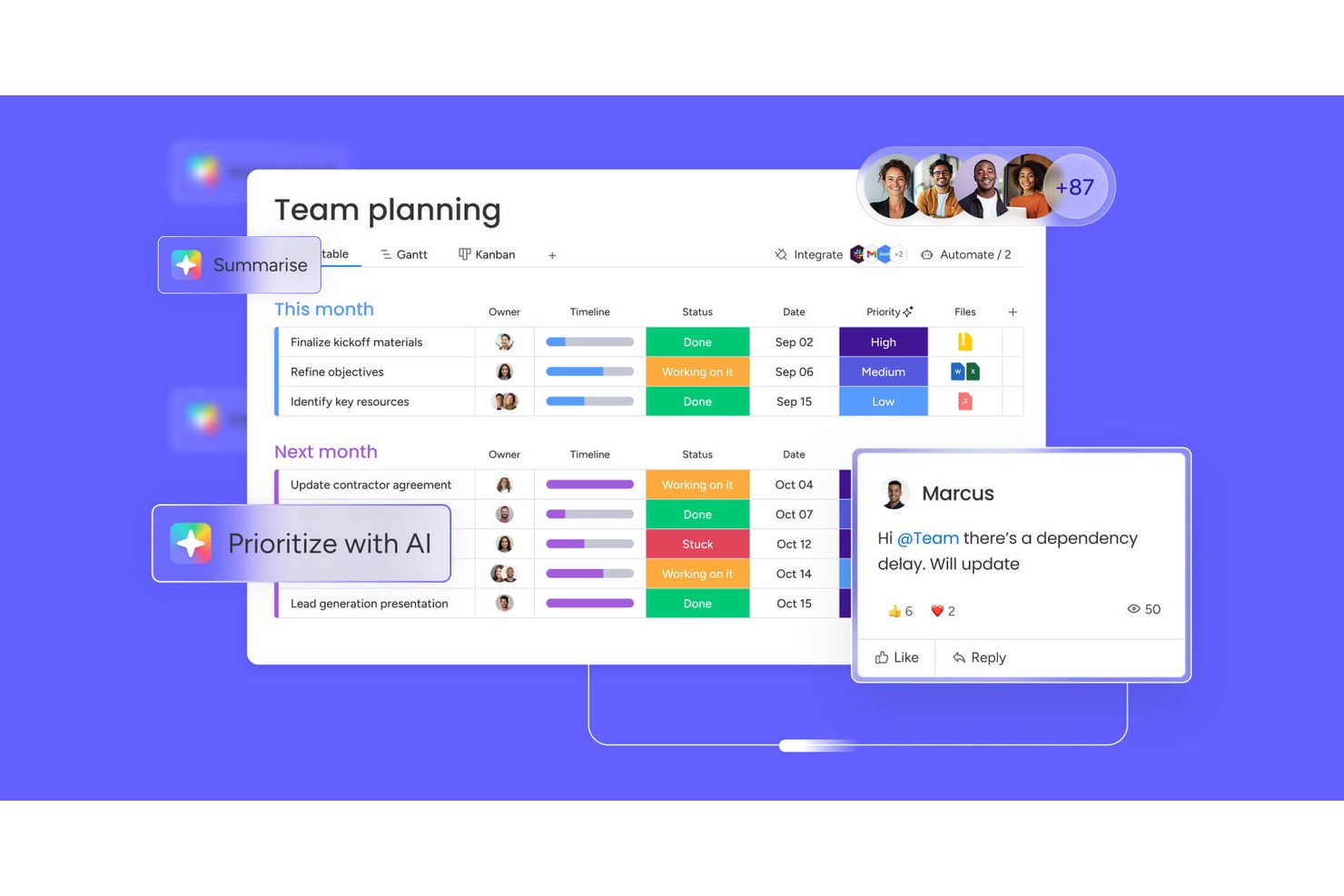
monday AI Workspace è una piattaforma configurabile per la gestione del lavoro che unisce pianificazione delle campagne, flussi di lavoro potenziati dall'IA, gestione delle risorse e reporting trasversale tra progetti e portafogli marketing.
Per chi è pensato monday AI Workspace?
È particolarmente indicato per le operazioni di marketing di medie e grandi aziende e per team di agenzie interne che gestiscono più campagne contemporaneamente coinvolgendo stakeholder interfunzionali.
Perché ho scelto monday AI Workspace
monday AI Workspace si guadagna un posto nella mia shortlist perché è una delle poche piattaforme su cui posso gestire una campagna dall'inizio al lancio senza passare da uno strumento all'altro. Apprezzo in particolare l'AI Workflow Builder, che mi permette di concatenare agenti e automazioni in modo che attività come la raccolta dei brief e gli aggiornamenti agli stakeholder vengano eseguiti senza intervento manuale. Il blocco di approvazione umana lo rende pratico: posso inserire direttamente nel flusso di lavoro i gate di approvazione, passando automaticamente allo stadio successivo non appena arriva il via libera.
Funzionalità chiave di monday AI Workspace
- Viste di pianificazione multiple: Passa senza interruzioni tra Gantt, Kanban, calendario, timeline e tabelle per una programmazione avanzata delle campagne.
- Moduli di raccolta personalizzabili: Raccogli, indirizza e valuta automaticamente i brief creativi e le richieste di marketing all'interno dello spazio di lavoro.
- Pianificazione del carico di lavoro e delle capacità: Visualizza e assegna le risorse del team in base a disponibilità e ruolo su progetti simultanei.
- Integrazioni native con software marketing: Collega direttamente strumenti come Adobe Creative Cloud, HubSpot, Salesforce e Google Ads per centralizzare asset e attività di campagna.
Integrazioni di monday AI Workspace
monday AI Workspace offre centinaia di integrazioni native, tra cui Slack, Google Workspace, Microsoft 365, Salesforce, Jira, GitHub, Zoom, Dropbox, HubSpot e Zendesk. Supporta anche Zapier e mette a disposizione un'API per integrazioni personalizzate.
Pros and Cons
Pros:
- La stesura dei brief tramite IA accelera l'avvio delle campagne
- I moduli di raccolta automatizzano l'instradamento delle richieste creative
- Le viste di portfolio trasversali migliorano la visibilità su progetti multipli
Cons:
- Gli strumenti di revisione nativi sono inferiori rispetto alle alternative dedicate
- La complessità della configurazione dell'automazione cresce con l'aumentare della scala della campagna
New Product Updates from monday AI Workspace
monday AI Workspace Adds Human Approval Routing
monday AI Workspace adds a human-in-the-loop approval block to AI Workflows, sending approval requests and routing workflow paths based on responses. For more information, visit monday AI Workspace's official site.

Ideale per agenzie e servizi professionali

Productive è un software di gestione per agenzie completo che ti offre gli strumenti e i dati necessari per far funzionare senza intoppi la tua agenzia o attività di servizi professionali.
Danyon Togia, fondatore dell'agenzia SEO Expert SEO, afferma che Productive si è rivelato perfetto per il suo team. 'Usare Productive è stato come avere finalmente le bollette di internet, luce e gas tutte con un'unica compagnia', dice. Ha davvero fatto la differenza: 'Avere tutto in un solo sistema significava meno cose da gestire, più concentrazione e un flusso di lavoro più efficiente per me e il mio team', aggiunge.
Perché ho scelto Productive
Productive offre la gestione di clienti e potenziali clienti nella pipeline di vendita, permettendoti anche di gestire il flusso delle trattative e organizzare le vendite. Le funzioni di pianificazione delle risorse, rilevazione dei tempi e collaborazione sulle attività ti aiutano a garantire che il lavoro venga completato in tempo, a fatturare correttamente i clienti e a mantenere un lavoro di squadra efficace. Ottieni inoltre report utili su redditività e costi per la gestione finanziaria, oltre a report in tempo reale su margini, utilizzo delle risorse e lo storico di ogni dipendente o collaboratore, inclusi report sugli stipendi.
Funzionalità principali di Productive
Productive offre anche diverse funzionalità che possono aiutare te e il tuo team a migliorare i processi di gestione dei progetti di marketing.
- Gestione delle attività: Semplifica l'assegnazione dei compiti e il monitoraggio dello stato di avanzamento, così il tuo team rimane allineato agli obiettivi di progetto.
- Portale clienti: Offre uno spazio dedicato ai clienti per visualizzare gli aggiornamenti dei progetti e collaborare, migliorando la trasparenza e la comunicazione.
- Dashboard personalizzate: Ti permette di creare visualizzazioni personalizzate dei dati di progetto e di concentrarti sulle metriche più importanti.
- Approfondimenti con IA: Le funzionalità di intelligenza artificiale forniscono analisi predittive e suggerimenti utili per prendere decisioni in modo proattivo.
Integrazioni di Productive
Le integrazioni disponibili includono Xero, QuickBooks, HubSpot, Jira, Slack, Zapier, Google Calendar e Sage.
Pros and Cons
Pros:
- Allinea la consegna con il monitoraggio finanziario
- Permette di simulare cambi di personale o budget
- Evidenzia i progetti che stanno sforando il budget
Cons:
- La profondità dei report può richiedere configurazioni aggiuntive
- Curva di apprendimento ripida per sfruttare tutte le funzionalità
New Product Updates from Productive
Productive Adds Voice Dictation, Slack Connector, Proposals, and Overtime
Productive adds voice dictation, a Slack Connector, proposal controls, and overtime tracking. These updates support faster AI interactions, client proposals, and time management. For more information, visit Productive’s official site.

Scoro
Ideale per il monitoraggio delle prestazioni finanziarie
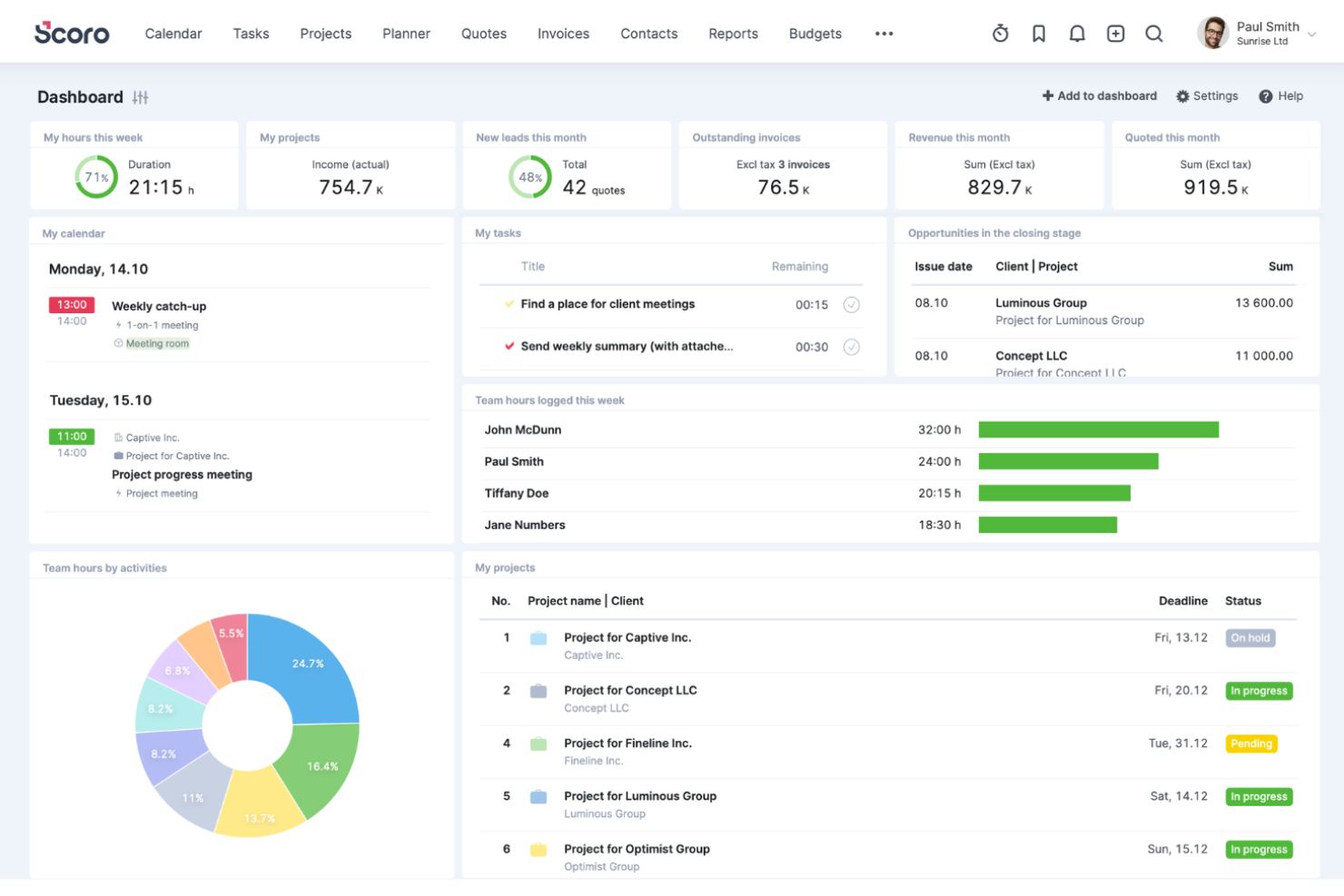
Scoro è un software completo di gestione del lavoro progettato per diversi servizi professionali, come il marketing. Offre una suite di strumenti per supportare la realizzazione dei progetti di marketing dalla concezione alla fatturazione.
Perché ho scelto Scoro
La piattaforma è una soluzione di project management tutto-in-uno che offre controllo e visibilità su ogni parte del tuo progetto di marketing, come preventivi e fatturazione, pipeline di vendita, account clienti, pianificazione delle risorse, cronologie e assegnazione dei compiti. Ho apprezzato il fatto che Scoro abbia una dashboard centralizzata e intuitiva che offre una panoramica di tutte le attività di marketing, consentendo ai team di monitorare ogni campagna dall'inizio all'esecuzione.
Inoltre, Scoro offre funzionalità di analisi approfondite e di reportistica in tempo reale. I responsabili marketing possono sfruttare questi strumenti per valutare le prestazioni delle campagne rispetto agli indicatori chiave e adattare le strategie in tempo reale.
Caratteristiche principali di Scoro
Scoro offre una varietà di altri strumenti che possono ulteriormente migliorare i processi di gestione dei progetti di marketing del tuo team.
- Report e Analisi: Monitora e analizza la redditività a livello di cliente, servizio, team o progetto con approfondimenti sulle prestazioni e sulle finanze dell'agenzia.
- Automazione e Fatturazione: Automatizza le attività ripetitive e la fatturazione dei contratti a canone per aiutare la tua agenzia a essere pagata più velocemente e a mantenere la redditività.
- Strumenti di Collaborazione: Agevola la comunicazione tra i membri del team tramite thread di discussione e commenti per mantenere tutti connessi.
- Gestione del Tempo e del Calendario: Utilizza timer integrati e un calendario unificato per gestire la rilevazione delle ore, le riunioni e le scadenze.
Integrazioni di Scoro
Le integrazioni includono Google Calendar, HubSpot, Jira, Slack, Xero, QuickBooks, Zendesk, WooCommerce, Asana, Dropbox, PayPal, Expensify, Stripe, Mailchimp, Sage Intacct, Microsoft Exchange e molte altre. Puoi anche collegarti ad altre app tramite l'integrazione con Zapier.
Pros and Cons
Pros:
- Collega direttamente i preventivi ai piani di progetto
- Unisce finanza e operatività di progetto
- Supporta multi-valuta e multi-azienda
Cons:
- L'interfaccia può sembrare affollata con un uso intensivo
- La personalizzazione dei modelli può essere limitata
New Product Updates from Scoro

Scoro Adds Time Mobile App and ELI Improvements
Scoro adds the Scoro Time mobile app for iOS/Android to track time anywhere and expands ELI with attachments, smarter filtering, and trigger-based actions. For more information, visit Scoro's official site.

Wrike
Ideale per organizzazioni in crescita

Wrike è una piattaforma di gestione dei progetti per il marketing pluripremiata, progettata per migliorare i processi di gestione dei progetti di marketing, aumentare la produttività e incrementare il ritorno sull'investimento (ROI).
Ho parlato con Nicola Leiper, Direttrice & Responsabile della Gestione Progetti presso Espresso Translations, riguardo all'esperienza del suo team con Wrike. 'Wrike ha salvato l'accordo più importante con il nostro cliente quando il nostro progetto farmaceutico era deragliato,' spiega. 'Ci stavamo occupando di scadenze per la conformità medica e di domande regolatorie che bloccavano tutto. Ho creato un flusso di lavoro su Wrike e riuscivo chiaramente a vedere dove si sarebbe diffuso il problema e in pochi minuti tutto il team era in una posizione migliore,' afferma, facendo riferimento a rapidi aggiustamenti delle risorse e risoluzione dei problemi.
Perché ho scelto Wrike
È altamente configurabile e scalabile, e puoi personalizzare flussi di lavoro, dashboard, report e moduli di richiesta per massimizzare i tuoi sforzi. Wrike ti permette di passare tra bacheche Kanban, diagrammi di Gantt interattivi drag-and-drop e viste del carico di lavoro per visualizzare le priorità.
Include anche il monitoraggio di tempi e costi, la gestione di attività e progetti, revisione visiva (proofing), modelli per attività di marketing comuni, reportistica e gestione ed allocazione delle risorse. Wrike è particolarmente ideale per la collaborazione su design e contenuti grazie alla sua interfaccia altamente visiva e alla possibilità di comunicare direttamente all'interno delle attività.
Offre anche la possibilità di creare flussi di lavoro per richieste e approvazioni e permette ai membri del team di modificare e gestire file e documenti in un unico luogo.
Funzionalità principali di Wrike
Wrike offre numerose altre funzionalità preziose per la gestione dei progetti di marketing.
- Gestione delle Risorse: Questa funzione aiuta a bilanciare i carichi di lavoro del team e garantisce che i progetti vengano completati in tempo senza sovraccaricare nessun membro.
- Calendari di Marketing: Offre una visione globale delle tempistiche di produzione dei contenuti e delle campagne per garantire l'allineamento tra team e progetti.
- Dashboard: Puoi monitorare visivamente le performance delle campagne e degli eventi e ottenere informazioni che aiutano a prendere decisioni informate.
- Revisione Collaborativa: Tu e il tuo team potete rivedere e approvare asset digitali in un unico posto, il che aiuta a semplificare i feedback e le revisioni.
Integrazioni di Wrike
Le integrazioni includono oltre 400 integrazioni native predefinite, tra cui i software di gestione file più popolari di Microsoft, Google e Dropbox, oltre a software di vendita e marketing come Salesforce e Marketo, e app creative di Adobe.
Pros and Cons
Pros:
- Gestisce flussi di lavoro complessi a misura di team in crescita
- Gli agenti AI aiutano a gestire le attività di routine
- Potenti strumenti di revisione e valutazione degli asset
Cons:
- La mole di funzionalità può disorientare i team piccoli
- Alcune funzionalità disponibili solo tramite componenti aggiuntivi
New Product Updates from Wrike
Wrike Adds Klaxoon MCP Integration
Wrike’s Klaxoon MCP integration is now generally available, enabling AI agents to navigate between Wrike tasks and attached whiteboards, read task context, and manage whiteboard attachments via API. For more information, visit Wrike's official site.

Ideale per flussi di lavoro di marketing potenziati dall’IA

Screendragon è un software di gestione dei progetti di marketing altamente configurabile, utilizzato e apprezzato da aziende Fortune 500 e agenzie globali come Kellogg’s, BP, il Comitato Olimpico Internazionale e McCann World Group.
Recentemente ho parlato con Gal Cohen, il cui team utilizza Screendragon per i loro progetti di riparazione e installazione di porte. 'Ha portato tutta la comunicazione, le attività e le scadenze in un’unica piattaforma, migliorando notevolmente la capacità del mio team,' afferma. 'La possibilità di avere tutto sotto lo stesso tetto ha reso molto semplice mantenere l’ordine e rispettare le scadenze richieste,' spiega.
Perché ho scelto Screendragon
I suoi flussi di lavoro di marketing basati sull’IA utilizzano l’automazione per eliminare le attività ripetitive, velocizzare le approvazioni e semplificare i processi complessi. Questo permette ai team creativi e di marketing di concentrarsi su attività di maggior valore mantenendo i progetti sulla giusta strada. Oltre alle sue capacità di automazione, Screendragon offre un’interfaccia visuale facile da usare e una robusta funzionalità end-to-end. I team beneficiano inoltre di opzioni di personalizzazione flessibili come UX con marchio, moduli personalizzati intelligenti, dashboard personalizzati e livelli di autorizzazione avanzati, rendendolo particolarmente adatto a organizzazioni grandi e globali.
Inoltre, la gestione delle attività consente ancora più flessibilità con board Kanban visuali, diagrammi di Gantt interattivi e viste a elenco come opzioni per le interfacce.
Caratteristiche principali di Screendragon
Screendragon offre anche numerose altre funzionalità per la gestione dei progetti di marketing per soddisfare le esigenze del tuo team.
- Dashboard personalizzabili: Permettono di personalizzare i tuoi report e di avere sempre in primo piano metriche e stati dei progetti importanti.
- Moduli dinamici: Questa funzione consente di creare e modificare moduli per raccogliere dati specifici del progetto, raccogliendo e analizzando facilmente le informazioni adattate alle esigenze del team.
- Previsione risorse assistita dall’IA: Questa funzione ti aiuta a prevedere e allocare efficacemente le risorse, riducendo al minimo il rischio di sotto-utilizzo o sovraccarico dei membri del team.
- Libreria di template: Hai accesso a oltre 100 template e modelli che danno al tuo team un vantaggio iniziale nei progetti, aiutano a mantenere la coerenza e risparmiare tempo nella fase di avvio.
Integrazioni Screendragon
Le integrazioni includono i principali sistemi ERP come SAP e PeopleSoft. Offre migliaia di integrazioni con app popolari attraverso Zapier come Jira, Trello, Slack, Box, Google Drive, Office 365 e Microsoft Dynamics. Dispone inoltre di un’API aperta che ti consente di configurare integrazioni personalizzate con qualsiasi sistema.
Pros and Cons
Pros:
- Automatizza la distribuzione dei carichi di lavoro tra i membri del team
- Garantisce la governance tramite tracciabilità degli audit
- Collega le revisioni creative ai flussi di progetto
Cons:
- Configurazione e implementazione richiedono una pianificazione approfondita
- Alcuni moduli potrebbero essere eccessivi per team piccoli
New Product Updates from Screendragon
Screendragon Unveils New AI Hub
Screendragon introduced AI Hub, a new capability that lets teams build and manage AI agents directly within workflows. The update helps marketing teams automate tasks, maintain governance controls, and scale AI-driven operations more efficiently. For more information, visit Screendragon's official site.

Kantata
Ideale per la gestione completa dell’intero ciclo di vita del servizio
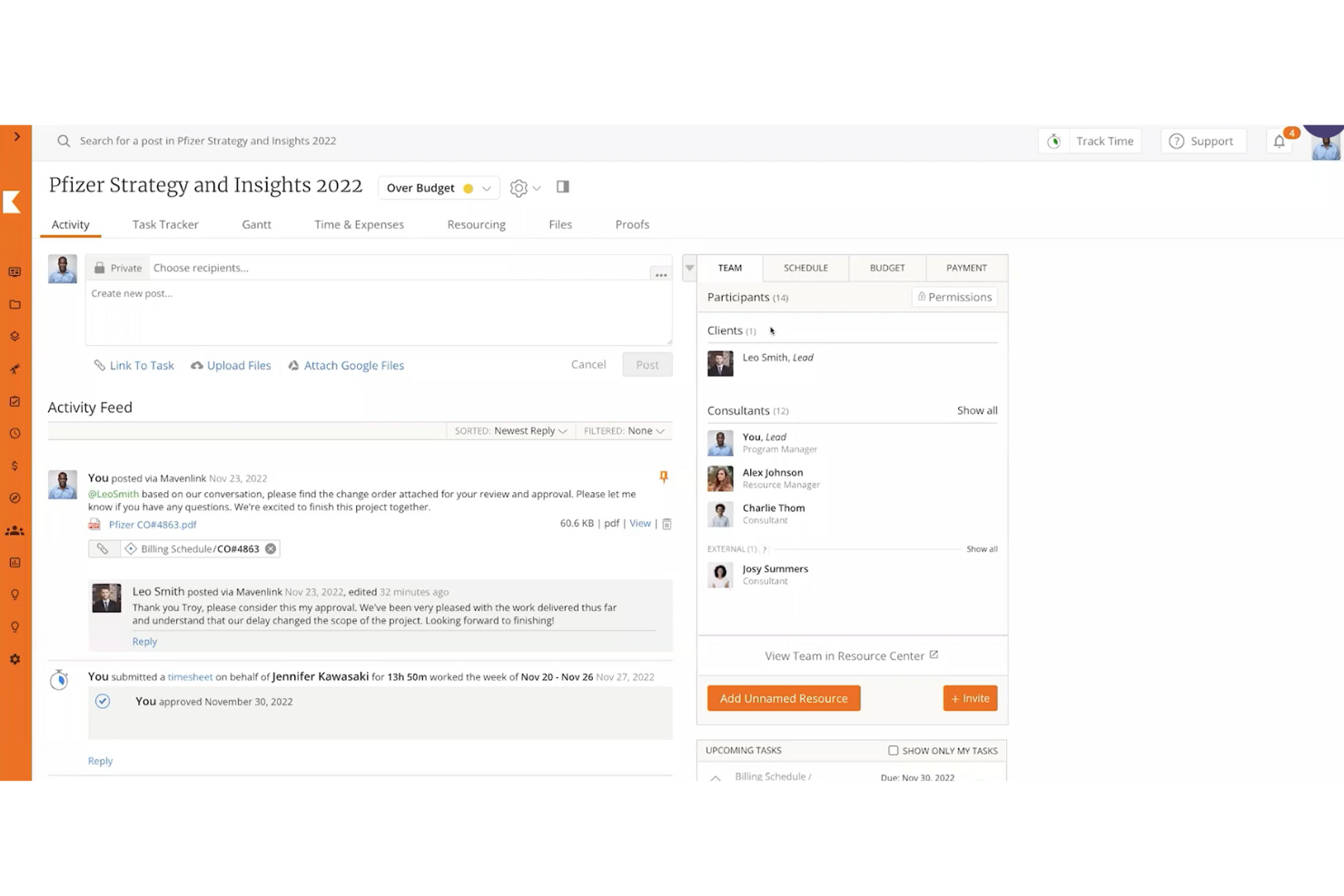
Kantata è una soluzione di gestione del lavoro pensata per le esigenze di agenzie e team di servizi professionali. Ti aiuta a mantenere campagne, progetti per i clienti e risorse allineati in un unico posto, così il tuo team può consegnare il lavoro nei tempi, rispettando il budget e su larga scala.
Recentemente ho parlato con Cal Singh, responsabile marketing e partnership presso Equipment Finance Canada, sull'uso di Kantata da parte del suo team. 'Abbiamo utilizzato Kantata in particolare per tenere sotto controllo, in un unico posto, tutti i dettagli di un progetto di marketing', dice. Questo ha avuto un impatto positivo sui progetti e sul morale del team: 'Possiamo vedere insieme attività, scadenze e carichi di lavoro del team, rendendo più chiara e gestibile la gestione di campagne e partnership (e anche dei nostri livelli di stress)', spiega.
Perché ho scelto Kantata
Kantata mi ha colpito perché unifica progetti, risorse e aspetti finanziari in un unico sistema, supporta l’intero ciclo di vita del progetto e offre una visione chiara di redditività e prestazioni.
I suoi strumenti di pianificazione delle risorse incentrati sulle persone assicurano inoltre che designer, copywriter e account manager siano assegnati in modo efficace secondo competenze e disponibilità, riducendo il burnout e migliorando i risultati. Grazie alla visibilità in tempo reale sull’avanzamento delle campagne, sulla spesa del budget e sulla salute del portafoglio, oltre a dashboard di business intelligence integrate, il tuo team può monitorare la produttività e la soddisfazione del cliente restando collaborativo.
Funzionalità principali di Kantata
Kantata offre diverse funzionalità aggiuntive pensate per le esigenze di gestione dei progetti di marketing
- Modelli di progetto: puoi semplificare la configurazione dei progetti con modelli personalizzabili progettati per diverse attività di marketing, mantenere la coerenza e risparmiare tempo.
- Gestione delle attività: questa funzione ti consente di organizzare e dare priorità alle attività con facilità, fornendo al team indicazioni chiare e migliorando la produttività generale.
- Strumenti di collaborazione: puoi migliorare la comunicazione tra membri del team e clienti e favorire un ambiente collaborativo che guida il successo dei progetti.
- Report e analisi: puoi accedere a report dettagliati e analisi per monitorare l’andamento dei progetti, adattare facilmente le strategie e raggiungere gli obiettivi.
Integrazioni Kantata
Le integrazioni includono Slack, Sage, Quickbooks, Expensify, BambooHR, NetSuite, Jira, Salesforce, Xero e Google Workspace.
Pros and Cons
Pros:
- Individua in anticipo i rischi di progetto
- Unifica pianificazione, delivery e finanza
- Supporta più valute e società
Cons:
- L’implementazione può richiedere supporto esterno
- La complessità della personalizzazione può aumentare con la scala
New Product Updates from Kantata

Kantata Adds Access Group Change History
Kantata adds Access Groups History, letting account administrators track changes to group details, membership, and permissions in Recent History. The update also makes these events available through the Subscribed Events API for broader monitoring. For more information, visit Kantata’s official site.
 .
.
Hive
Ideale per diverse visualizzazioni di progetto

Hive è uno strumento di gestione progetti e una piattaforma di collaborazione che supporta aziende come Starbucks, Uber, WeWork e IBM. Hive è il primo software al mondo costruito dalla comunità, con una roadmap composta interamente da funzionalità votate dai clienti.
Perché ho scelto Hive
Con viste di progetto flessibili, dipendenze e migliaia di integrazioni, Hive semplifica il tuo lavoro in un'unica piattaforma centralizzata e offre molto di più dei semplici diagrammi di Gantt. Utilizzato da team di dimensioni variabili, da 10 a 1.000 persone, Hive è un'ottima opzione per un team marketing con una gamma diversificata di modalità di lavoro.
Il monitoraggio del tempo di Hive, le analisi e le viste flessibili permettono una comprensione trasparente del lavoro degli altri membri del team e dei progetti futuri. Hive include anche integrazioni complete con la posta elettronica all'interno del suo strumento di gestione progetti, permettendo di inviare e ricevere messaggi Gmail e Outlook direttamente dall'app. Scegli Hive se cerchi uno strumento ben strutturato e completo che può essere scalato in base alle necessità del tuo team.
Funzionalità Principali di Hive
Hive offre una serie di funzionalità aggiuntive su misura per i team di marketing.
- Revisione & Approvazioni: Puoi semplificare il processo di feedback sui design con strumenti che centralizzano commenti e revisioni.
- Obiettivi: Ti consente di impostare e visualizzare le tappe principali del progetto, assicurando che le tue campagne di marketing rimangano in linea con i programmi.
- Moduli: Puoi raccogliere facilmente feedback e richieste dei clienti, facilitando una migliore comunicazione e allineamento nei progetti.
- Gestione Risorse: Ti permette di gestire le assegnazioni del team e visualizzare la disponibilità per garantire una distribuzione ottimale delle risorse per i tuoi progetti di marketing.
Integrazioni di Hive
Le integrazioni includono oltre mille app di terze parti ma richiedono un piano a pagamento tramite Zapier.
Pros and Cons
Pros:
- Offre flussi di lavoro personalizzabili per soddisfare esigenze di marketing diversificate
- Portali clienti integrati per una comunicazione e una trasparenza migliorate
- Fornisce modelli di progetto per un'esecuzione coerente delle campagne
Cons:
- Personalizzazione limitata in alcuni elementi della dashboard
- La complessità dell'impostazione richiede tempo di onboarding

Ideale per obiettivi di campagna e traguardi

Zoho Projects è una piattaforma di project management basata su cloud, particolarmente adatta ai team di marketing. Offre funzionalità personalizzabili come viste individuali, campi personalizzati per i progetti, modelli di progetto e una dashboard di reportistica.
Ho parlato con Martin Cox, Direttore dell'agenzia Postino, su come lui e il suo team utilizzano questo strumento. 'Il software in sé è favoloso—è approfondito, ben organizzato e davvero capace come soluzione di project management,' afferma. Ha menzionato una curva di apprendimento ripida, ma sostiene che sia un ottimo strumento 'se riesci a superare questa difficoltà.'
Perché ho scelto Zoho Projects
I team di marketing possono suddividere le loro campagne in progetti, attività e sottoattività più piccole, che possono essere definite e assegnate ai membri del team più appropriati. I traguardi e gli obiettivi aiutano i membri del team a vedere il quadro generale e a monitorare i progressi e l’impatto delle iniziative più estese. Gli utenti possono progettare flussi di lavoro visivi con la funzione Blueprints drag-and-drop, che possono essere salvati e riutilizzati per progetti futuri.
Le funzioni del software coprono pianificazione, programmazione, budgeting e reportistica di progetto. I team di marketing possono usare questi strumenti per mantenere i progetti e le campagne entro i budget, monitorare i progressi e tracciare il tempo di ogni membro del team. La collaborazione sui documenti permette ai team di marketing di organizzare facilmente i file e lavorarci con controllo delle versioni, note e cronologia delle revisioni. La dashboard offre funzionalità di reporting sia preimpostate che personalizzabili, permettendo agli utenti di monitorare gli indicatori più rilevanti per loro.
Caratteristiche principali di Zoho Projects
Zoho Projects offre anche altre funzionalità dedicate ai bisogni specifici dei team di marketing.
- Integrazioni: Zoho Projects può collegarsi facilmente ad altre applicazioni Zoho come CRM e strumenti di analisi, migliorando l'intero processo di gestione dei progetti.
- Archiviazione cloud: Centralizza i documenti per un accesso e un’organizzazione semplici, garantendo che il team possa collaborare senza problemi con i file.
- Viste e dashboard personalizzate: Puoi personalizzare l'ambiente di lavoro per una gestione efficiente delle attività e ottenere una panoramica dei progetti su misura per il flusso di lavoro del tuo team.
- Attività ricorrenti: Agevola la pianificazione delle attività di marketing ricorrenti, permette di automatizzare i compiti ripetitivi e lascia tempo al team per concentrarsi su iniziative più strategiche.
Integrazioni di Zoho Projects
Le integrazioni includono Box, Dropbox, GitHub, Google Workspace, Microsoft Teams, Slack e Zendesk.
Pros and Cons
Pros:
- Visibilità sui traguardi integrata nei piani di progetto
- Transizioni di attività automatizzate tramite regole blueprint
- Gestione dei carichi di lavoro delle risorse integrata
Cons:
- Alcune funzioni avanzate necessitano di piani superiori
- Le funzionalità AI potrebbero richiedere configurazione
New Product Updates from Zoho Projects
Zoho Projects Adds CodeX Scripts for Custom Modules
Zoho Projects now supports CodeX Scripts for custom modules, enabling conditional logic and rules for creating, updating, and deleting records. For more information, visit Zoho Projects' official site.
 .
.
Enji
Ideale per solopreneur e il marketing delle piccole imprese
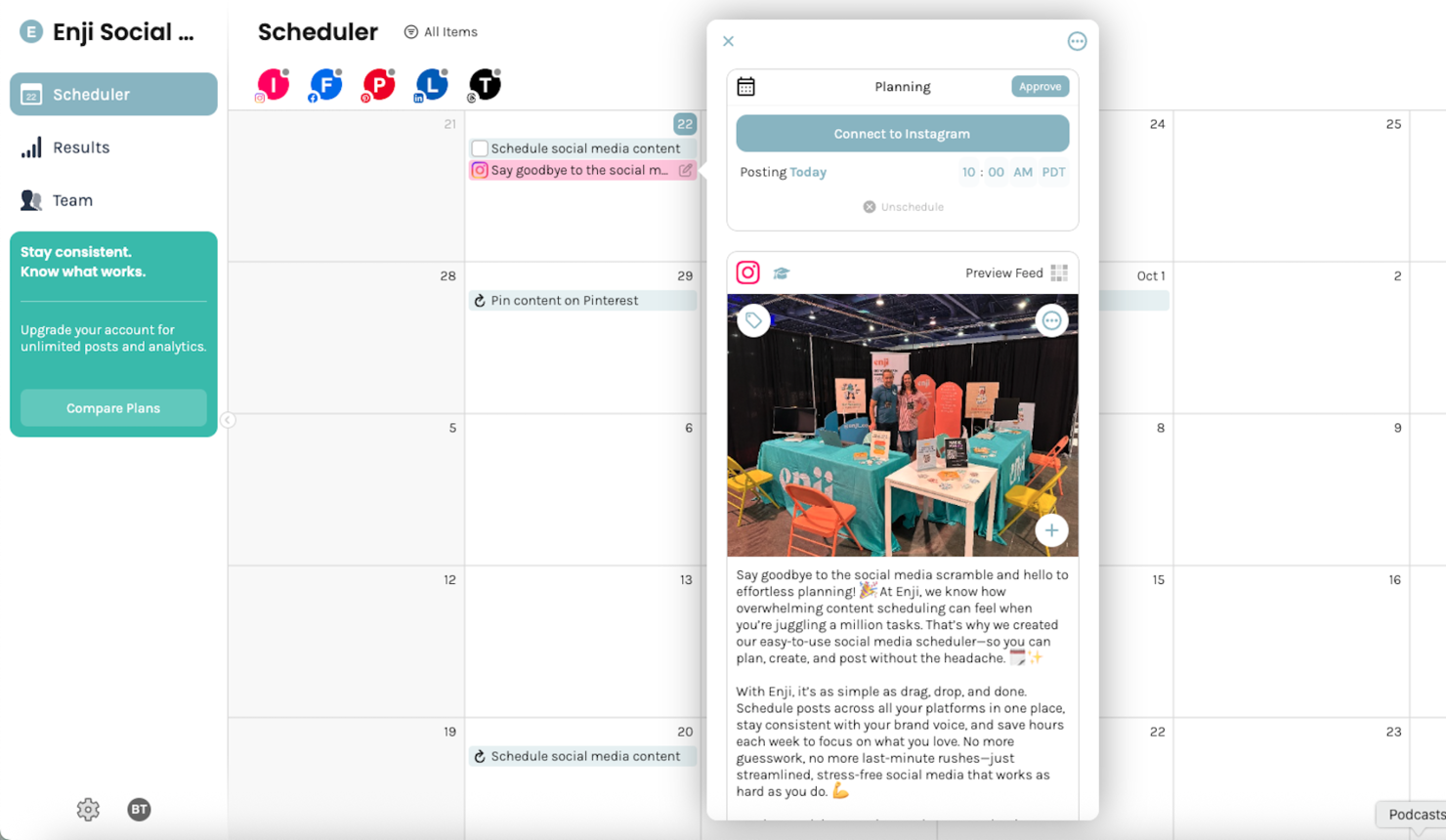
Enji è una piattaforma di project management per il marketing progettata per team che desiderano pianificare, programmare, organizzare ed eseguire campagne, contenuti e flussi di lavoro di marketing utilizzando calendari dedicati, modelli e processi guidati.
Per chi è ideale Enji?
Enji è adatto a piccoli team di marketing e marketer freelance che necessitano di un metodo strutturato per pianificare e gestire campagne senza una configurazione complessa.
Perché ho scelto Enji
Enji si distingue per i suoi calendari di contenuti di marketing integrati e i flussi di lavoro guidati per la pianificazione delle campagne. Quando gli utenti creano una strategia di marketing su Enji, la piattaforma genera automaticamente attività e tempistiche collegate agli obiettivi della campagna, riducendo la necessità di costruire flussi di lavoro manualmente. Il calendario combina attività di marketing, pianificazione dei contenuti, gestione delle campagne e programmazione social in una singola vista con filtri per diversi tipi di attività. Gli utenti possono redigere contenuti, programmare post, gestire attività e monitorare lo stato di avanzamento delle campagne direttamente dall'interfaccia del calendario. Enji include inoltre dashboard KPI che consolidano i dati delle performance di marketing per reportistica e analisi continuative.
Funzionalità principali di Enji
- Bozze di contenuti con AI: Enji utilizza l'AI per generare idee per i contenuti e redigere post per ogni canale con la voce del tuo marchio.
- Pianificazione e pubblicazione sui social media: Collega i tuoi account social e Enji pubblicherà automaticamente i post programmati su piattaforme come Instagram, Pinterest, LinkedIn e TikTok.
- Dashboard per il monitoraggio dei KPI: Enji raccoglie le analisi social e del sito web in un unico luogo così puoi monitorare le performance senza cambiare scheda.
- Gestione del marchio: Conserva la voce, le immagini e i principali dettagli aziendali del tuo brand in un unico posto per mantenere la coerenza dei contenuti nelle campagne.
Integrazioni Enji
Enji non elenca pubblicamente le proprie integrazioni.
Pros and Cons
Pros:
- Suggerimenti con AI per idee e post dei contenuti
- Configurazione del profilo brand mantiene la coerenza del messaggio
- Schedulazione nativa per i principali canali social inclusa
Cons:
- Il caricamento di post in blocco non è attualmente supportato
- I modelli di campagna non sono specifici per settore

Quickbase
Ideale per automazioni senza codice
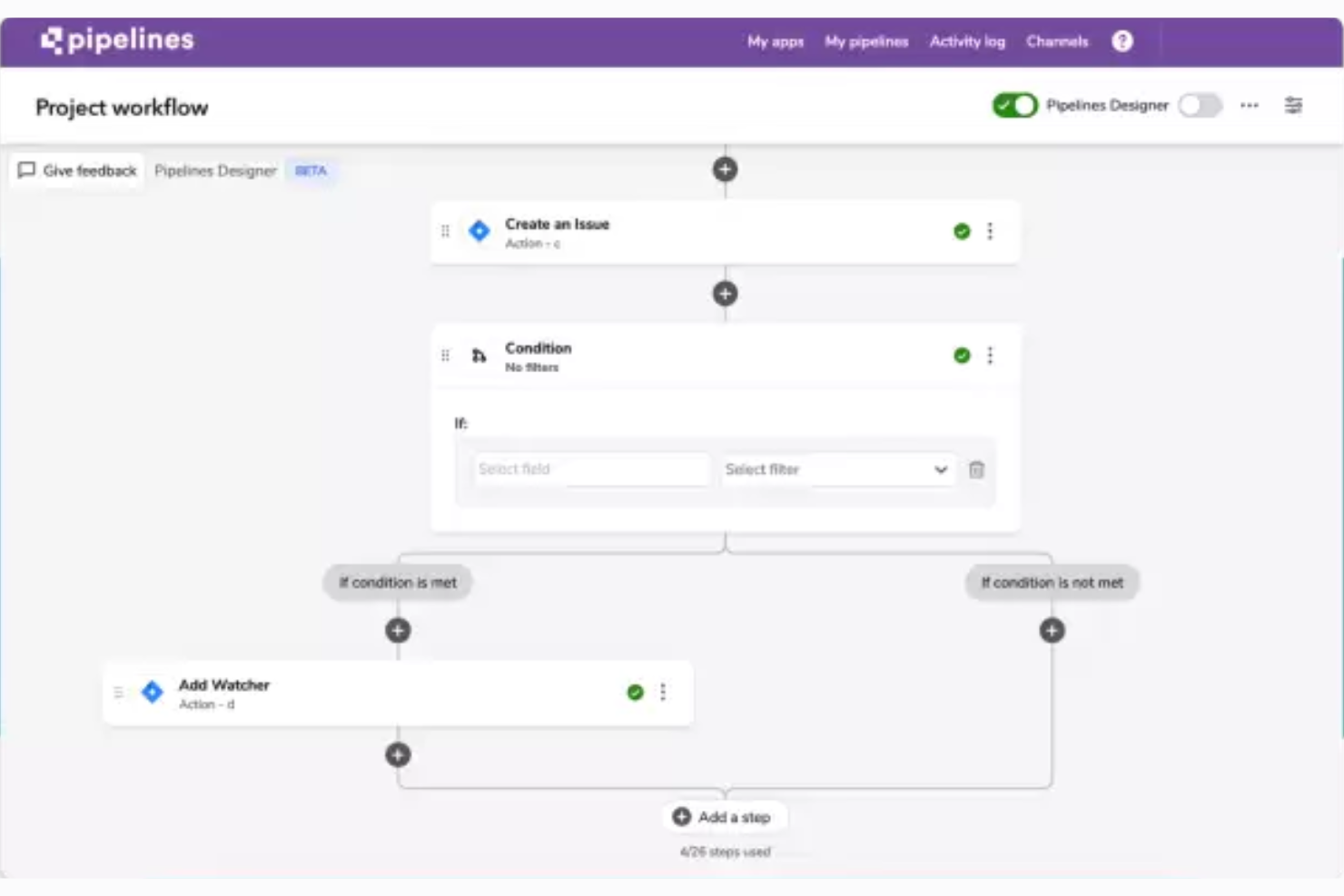
QuickBase è uno strumento di gestione dei flussi di lavoro progettato per aiutarti a creare applicazioni aziendali personalizzate che facilitino diversi processi business fondamentali.
Jensen Savage, che utilizza Quickbase come CEO dell'agenzia di marketing Savage Growth Partners, afferma che 'Quickbase è altamente personalizzabile, il che è particolarmente utile se gestisci progetti complessi o devi collaborare tra reparti o team.'
Perché ho scelto Quickbase
Questo software è versatile e facile da usare, rendendolo adatto praticamente a qualsiasi contesto aziendale. Puoi utilizzare il builder no-code per creare app, integrazioni e automazioni a supporto delle attività del tuo team marketing. Questo ti permette sia di alleggerire i carichi di lavoro manuali sia di garantire coerenza nei tuoi processi.
Quando crei un flusso di lavoro personalizzato o un’automazione senza codice nel software, puoi stabilire regole chiare e best practice per la gestione di compiti specifici. In questo modo aiuti il tuo team a creare processi condivisi a cui tutti possono facilmente attenersi. Ciò è particolarmente utile se lavori su un portafoglio o in un contesto di agenzia.
Funzionalità chiave di Quickbase
Quickbase include diverse altre funzionalità che rispondono alle esigenze dei tuoi team di marketing.
- Gestione delle risorse: Questa funzione consente al tuo team di allocare e monitorare efficacemente le risorse, mantenendo un utilizzo ottimale e riducendo al minimo i colli di bottiglia nelle campagne di marketing.
- Supervisione delle attività: Puoi assegnare, tracciare e gestire le attività nei tuoi progetti di marketing per mantenere tutti allineati e in linea con le tempistiche.
- Archiviazione documenti: Quickbase offre una posizione centralizzata per archiviare e accedere ai documenti di progetto importanti, favorendo una collaborazione fluida e assicurando che tutti abbiano sempre le informazioni più aggiornate.
- Monitoraggio del budget: Puoi tenere sotto controllo il budget marketing grazie al tracciamento delle spese di Quickbase, che ti aiuta a gestire i costi e allocare i fondi dove sono più necessari.
Integrazioni di Quickbase
Le integrazioni includono Outlook, Microsoft Teams, Google Workspace, Slack, Box, Dropbox, OneDrive, Trello, Asana, Jira, Zendesk e Docusign.
Pros and Cons
Pros:
- Le dashboard rispondono in tempo reale
- Gestisce logica condizionale e diramazioni nelle pipeline
- Permette di creare flussi di lavoro complessi senza codice
Cons:
- L'interfaccia può apparire meno moderna rispetto ai concorrenti
- Curva di apprendimento ripida per i flussi di lavoro avanzati
Altri software di gestione dei progetti di marketing
https://www.youtube.com/watch?v=oICi7bL1ZAkSe non hai trovato quello che cercavi sopra, ecco alcune altre valide opzioni.
- Miro
Ideale per la collaborazione visiva
- ClickUp
Miglior piano gratuito robusto
- Kintone
Ideale per creare app di marketing personalizzate
- Workzone
Ideale per raccolta richieste, revisione e approvazioni
- Teamwork.com
Ideale per la visibilità sui progetti
- Adobe Workfront
Ideale per flussi di lavoro di progetto
- Bonsai Agency Software
Ideale per progetti di agenzia end-to-end
- Basecamp
Ideale per le bacheche di progetto
- Planview AdaptiveWork
Ideale per il marketing digitale
- Function Point
Migliore per usabilità ed esperienza utente
- Ravetree
Ideale per le operazioni di marketing tutto-in-uno
- Workamajig Platinum
Ideale per team di qualsiasi dimensione
- Height
Ideale per la collaborazione con i clienti
- Air
Ideale per la ricerca di risorse tramite IA
- GoodDay
Ideale per diverse metodologie di gestione dei progetti
- RoboHead
Ideale per le funzionalità di raccolta feedback


Guarda il nostro video sui 5 migliori strumenti di gestione dei progetti di marketing!


Recensioni correlate sui software di gestione dei progetti
Se non hai ancora trovato quello che stai cercando qui, dai un'occhiata a questi altri strumenti correlati che abbiamo testato e valutato:
- Software di gestione dei progetti
- Software per progetti di produzione video
- Software di gestione delle risorse
- Software di automazione dei flussi di lavoro
- Software per il monitoraggio del tempo
- Software di gestione delle attività
- Strumenti di collaborazione
- Software di gestione dei progetti di pubbliche relazioni
- Software di gestione dei progetti SEO
Come valuto il software di project management per il marketing
Valuto gli strumenti su due livelli: i requisiti di base come la pianificazione delle campagne e la revisione dei contenuti creativi, e i fattori differenzianti che distinguono un'opzione dall'altra.
Funzionalità di base (Requisiti indispensabili per questa lista)
Quando seleziono gli strumenti per la mia lista, ne valuto ognuno su una scala da 0 (non offre la funzionalità) a 5 (eccelle in quest'area) per ciascuna delle funzionalità di base elencate qui sotto. Poi calcolo il punteggio totale dello strumento come percentuale. Ogni strumento deve raggiungere un punteggio totale minimo del 65% per essere considerato per l'inclusione.
- Pianificazione e programmazione delle campagne: Verifico se puoi pianificare una campagna multicanale tramite viste Gantt, calendario e board, con dipendenze e traguardi tra le attività.
- Workflow creativo e revisione: Il ciclo di revisione è importante: cerco annotazioni visive, confronto tra versioni e flussi di approvazione strutturati per asset come annunci e landing page.
- Gestione delle risorse di marketing: Bilanciare i carichi tra designer, copywriter e strategist richiede viste delle capacità, quindi valuto come ogni strumento rende visibili i dati di utilizzo.
- Gestione degli asset digitali: I team gestiscono centinaia di file per campagna. Cerco librerie centralizzate con versionamento, tag e permessi che vadano oltre il semplice allegato file.
- Integrazioni con lo stack marketing: Uno strumento deve collegarsi alle tue app creative, CRM, MAP e piattaforme social — strumenti come Asana, monday.com e Wrike gestiscono tutto questo in modi diversi.
- Reportistica e dashboard di marketing: Valuto se le dashboard vanno oltre il completamento delle attività per coprire lo stato della timeline, l'utilizzo dei team e i KPI a livello di campagna in un'unica vista.
Una volta che ho una lista di strumenti che rispettano i criteri, considero cosa rende unica ogni piattaforma.
Fattori differenzianti (cosa distingue i fornitori)
Ecco come confronto e metto a confronto i diversi fornitori:
Funzionalità distintive
L'automazione delle richieste di lavoro è un grande elemento differenziante. Quando un product manager invia una richiesta di campagna tramite un modulo strutturato che genera automaticamente i task e li assegna al team giusto, si elimina il ping-pong che rallenta le fasi iniziali. Valuto anche le capacità di IA: alcuni strumenti ora stendono brief o riassumono i thread di feedback, risparmiando davvero tempo durante i cicli di revisione. Sono importanti anche i portali per gli stakeholder, soprattutto per i team che ricevono richieste da vendite o dirigenti che hanno bisogno di visibilità sui progetti senza acquistare una licenza completa.
Oltre le funzionalità
Considero quanto bene uno strumento si adatti alla struttura specifica del team marketing. Un team di contenuti di cinque persone ha esigenze molto diverse rispetto a un'agenzia interna da cinquanta persone che gestisce campagne in contemporanea su più brand. È importante anche il tempo necessario per ottenere valore — cerco template precompilati come playbook di lancio campagne e calendari editoriali che consentano ai team di partire subito. La trasparenza nei prezzi completa la mia valutazione, in particolare come i fornitori gestiscono i posti reviewer e stakeholder, visto che normalmente le squadre marketing hanno molti più collaboratori che utenti con licenza.
Come scegliere un software di gestione dei progetti di marketing
Durante la selezione preliminare, la valutazione e la scelta di un software di gestione dei progetti di marketing, considera quanto segue:
- Quale problema stai cercando di risolvere? Inizia identificando la lacuna nelle funzionalità di gestione dei progetti di marketing che stai cercando di colmare, per chiarire quali caratteristiche e funzionalità il software di gestione dei progetti di marketing deve offrire.
- Chi dovrà utilizzarlo? Per valutare costi e requisiti, considera chi utilizzerà il software e di quante licenze avrai bisogno. Dovrai valutare se l'accesso sarà richiesto solo dal team di marketing o dall'intera organizzazione. Una volta chiarito questo aspetto, vale la pena considerare se stai dando priorità alla facilità d'uso per tutti oppure alla velocità per gli utenti più esperti.
- Con quali altri strumenti deve funzionare? Chiarisci quali strumenti stai sostituendo, quali rimarranno in uso e con quali strumenti dovrai integrarlo, ad esempio software di contabilità, CRM o risorse umane. Può trattarsi di una ricerca specifica, come quella di un software di gestione dei progetti che si integri con Salesforce, oppure più generica, come quella di un software di gestione dei progetti con CRM. Dovrai decidere se gli strumenti dovranno integrarsi tra loro o, in alternativa, se puoi sostituire più strumenti con un unico strumento consolidato per la gestione dei progetti di marketing digitale.
- Quali risultati sono importanti? Considera il risultato che il software deve produrre per essere considerato efficace, quale capacità vuoi acquisire, cosa vuoi migliorare e come misurerai il successo. Ad esempio, un risultato potrebbe essere la possibilità di ottenere una maggiore visibilità sulle prestazioni.
- Come funzionerebbe all'interno della tua organizzazione? Valuta la scelta del software insieme ai tuoi flussi di lavoro e alla metodologia di realizzazione. Analizza cosa funziona bene e quali sono gli aspetti che causano problemi. Ogni azienda è diversa: non dare per scontato che, solo perché uno strumento è popolare, funzionerà anche nella tua organizzazione.
Tendenze nei software di gestione dei progetti di marketing
Queste tendenze non dimostrano solo il rapido ritmo dell'innovazione, ma evidenziano anche gli ambiti in cui i team di marketing cercano funzionalità ed efficienza migliorate.
- Maggiore utilizzo della realtà aumentata (AR) e della realtà virtuale (VR): un numero crescente di strumenti per la gestione dei progetti di marketing integra tecnologie di realtà aumentata e realtà virtuale per offrire esperienze immersive di pianificazione e visualizzazione. Ciò indica uno spostamento verso processi di pianificazione più coinvolgenti ed esperienziali nei software di gestione dei progetti per agenzie di marketing.
- Funzionalità di monitoraggio della sostenibilità: in linea con la crescente attenzione alla responsabilità sociale d'impresa, alcuni dei migliori strumenti per la gestione dei progetti di marketing incorporano funzionalità che aiutano i team a monitorare la sostenibilità delle proprie campagne. Ciò include il monitoraggio dell'impronta di carbonio, dell'utilizzo sostenibile delle risorse e dell'approvvigionamento etico. Un numero sempre maggiore di strumenti per agenzie pubblicitarie fornisce informazioni sull'impatto ambientale delle attività di marketing.
- Blockchain per una maggiore sicurezza e trasparenza: le piattaforme di gestione dei progetti di marketing offrono la tecnologia blockchain per contribuire alla sicurezza e alla trasparenza, in particolare in ambiti come la definizione del budget e la spesa. Utilizzando la blockchain, questi strumenti di gestione dei progetti di marketing possono fornire registri a prova di manomissione delle transazioni e delle modifiche ai progetti, favorendo la fiducia tra le parti interessate e mantenendo al sicuro i dati di marketing.
- Assistenti IA personalizzati per la pianificazione del marketing: molti strumenti offrono ora assistenti IA personalizzati per la gestione dei progetti di marketing. Questi assistenti forniscono una guida personalizzata, automatizzano la definizione delle priorità delle attività e offrono informazioni basate sull'analisi dei dati.
- Integrazione con le piattaforme di commercio elettronico: poiché il commercio elettronico continua a dominare il panorama della vendita al dettaglio, gli strumenti di gestione dei progetti di marketing offrono sempre più integrazioni dirette con le principali piattaforme di commercio elettronico. Ciò consente di pianificare, eseguire e monitorare senza problemi campagne direttamente collegate ai canali di vendita online. Questo riflette la crescente necessità che le attività di marketing siano strettamente allineate ai risultati delle vendite.
Che cos'è un software di gestione dei progetti di marketing?
Il software di gestione dei progetti di marketing è uno strumento che aiuta i team di marketing a pianificare, eseguire e monitorare i propri progetti e campagne. Combina funzionalità di gestione dei progetti come l'assegnazione delle attività, l'allocazione delle risorse e il monitoraggio dei progressi con funzionalità utilizzate dai team di marketing, come calendari di marketing, modelli di campagne e gestione delle risorse per i materiali di marketing e di marchio.
Il software per la gestione dei progetti è un tipo di software per agenzie di marketing che aiuta a gestire meglio i carichi di lavoro, rispettare le scadenze e raggiungere gli obiettivi di marketing, il che significa realizzare campagne più efficaci, capaci di avere un impatto significativo sul pubblico target.
Funzionalità del software per la gestione dei progetti di marketing
Quando scegli un software per la gestione dei progetti di marketing, presta attenzione alle seguenti funzionalità chiave:
- Gestione delle attività: puoi organizzare, assegnare e stabilire la priorità delle attività, così il tuo team sa cosa deve essere fatto e quando. Questo aiuta tutti a rimanere concentrati e a rispettare le scadenze.
- Strumenti di collaborazione: tu e il tuo team potete comunicare, condividere aggiornamenti e lavorare insieme sui documenti in tempo reale, così tutti rimangono connessi e i progetti avanzano senza intoppi.
- Allocazione delle risorse: questa funzionalità ti permette di monitorare e assegnare le risorse (ad esempio persone, tempo o budget), evitare colli di bottiglia e sfruttare al meglio i talenti del tuo team.
- Monitoraggio del tempo: puoi tenere sotto controllo quanto tempo richiedono le attività e i progetti, il che aiuta nella pianificazione futura e ti permette di capire dove il tuo team può lavorare in modo più efficiente.
- Condivisione e archiviazione dei file: questa funzionalità ti permette di caricare, archiviare e condividere i file dei progetti, così tutti possono accedere facilmente alle versioni più recenti.
- Modelli di progetto: puoi utilizzare modelli già pronti per avviare rapidamente i progetti, standardizzare i flussi di lavoro ed evitare di reinventare ogni volta la ruota.
- Calendario e pianificazione: questa funzionalità ti permette di centralizzare riunioni, scadenze e traguardi in un calendario condiviso, così l'intero team può vedere cosa sta per accadere e pianificare di conseguenza.
- Monitoraggio del budget: puoi monitorare le spese dei progetti e rimanere entro il budget registrando i costi, individuando tempestivamente gli sforamenti e prendendo decisioni ponderate sulle spese.
Funzionalità comuni di intelligenza artificiale nei software per la gestione dei progetti di marketing
Oltre alle funzionalità standard dei software per la gestione dei progetti di marketing elencate sopra, molte di queste soluzioni stanno integrando funzionalità di intelligenza artificiale come:
- Prioritizzazione automatica delle attività: puoi utilizzare l'intelligenza artificiale per analizzare scadenze, carico di lavoro e dipendenze, quindi assegnare automaticamente la priorità alle attività per mantenere in primo piano il lavoro più importante.
- Tempistiche di progetto predittive: questa funzionalità ti permette di utilizzare l'intelligenza artificiale per prevedere le date di completamento analizzando le prestazioni passate e i progressi attuali, così puoi stabilire aspettative realistiche.
- Ottimizzazione intelligente delle risorse: questo strumento di intelligenza artificiale può analizzare le competenze, la disponibilità e le attività passate del tuo team per consigliare la migliore allocazione delle risorse per ogni progetto.
- Suggerimenti e ottimizzazione dei contenuti: questa funzionalità di intelligenza artificiale può consigliare titoli, parole chiave o elementi di design per le campagne di marketing sulla base di ciò che è di tendenza o ha dimostrato di funzionare bene.
- Reportistica automatizzata: puoi utilizzare l'intelligenza artificiale per raccogliere le metriche chiave e creare report di facile consultazione che forniscono informazioni immediate sullo stato di salute del progetto.
Vantaggi del software per la gestione dei progetti di marketing
Di seguito illustro cinque vantaggi principali che i migliori software per la gestione del marketing offrono agli utenti e alle organizzazioni:
- Collaborazione migliorata: i membri del team possono comunicare e collaborare in tempo reale. Utilizzando uno strumento di gestione dei progetti per il marketing, elimini le barriere comunicative e fai sì che tutti siano sulla stessa lunghezza d'onda e lavorino insieme, indipendentemente dalla loro posizione fisica.
- Maggiore produttività: l'automazione e i processi ottimizzati liberano tempo per consentire ai membri del team di concentrarsi su attività più strategiche e creative, aumentando la produttività e l'efficienza complessive all'interno dell'organizzazione.
- Migliore visibilità sui progetti: grazie a dashboard e funzionalità di reportistica in tempo reale, gli stakeholder ottengono una panoramica completa dell'avanzamento dei progetti. Questo ti permette di prendere rapidamente decisioni informate, modificare le strategie secondo necessità e assicurarti che i progetti siano sulla buona strada per rispettare scadenze e obiettivi.
- Migliore gestione delle risorse: il software ti permette di allocare e monitorare meglio le risorse, inclusi budget, tempo e personale. Una gestione efficace delle risorse aiuta le organizzazioni a ottimizzarne l'utilizzo, ridurre gli sprechi e assicurarsi che i progetti vengano completati rispettando i vincoli di budget.
- Scalabilità: il software per la gestione dei progetti di marketing può crescere insieme alla tua azienda e supportare nel tempo un numero maggiore di utenti, progetti e livelli di complessità. Questo ti permette di continuare a utilizzare il sistema durante la crescita dell'azienda ed evitare modifiche o aggiornamenti del software costosi e dispendiosi in termini di tempo.
Costi e prezzi del software per la gestione dei progetti di marketing
Ecco una panoramica delle opzioni di piano più comuni per aiutarti a prendere una decisione consapevole:
Tabella comparativa dei piani per i software di gestione dei progetti di marketing
| Tipo di piano | Prezzo medio | Funzionalità comuni |
|---|---|---|
| Gratuito | $0 | Accesso per un numero limitato di utenti, funzionalità di base per la gestione dei progetti, spazio di archiviazione limitato, assistenza della community |
| Base | $10-20 per utente/mese | Accesso per un numero maggiore di utenti, strumenti avanzati per la gestione dei progetti, integrazioni con altri strumenti, funzionalità di base per la reportistica, assistenza via e-mail |
| Professionale | $20-50 per utente/mese | Funzionalità avanzate per la gestione dei progetti, dashboard e report personalizzabili, strumenti di collaborazione, assistenza prioritaria, maggiore spazio di archiviazione |
| Enterprise | Prezzo personalizzato | Personalizzabile in base alle dimensioni e alle esigenze dell'organizzazione, funzionalità di sicurezza avanzate, account manager dedicato, inserimento e formazione continua, spazio di archiviazione e integrazioni illimitati |
Domande frequenti sui software di gestione dei progetti di marketing
Trova le risposte alle domande frequenti su questo argomento.
In che modo un software di gestione dei progetti di marketing può aiutare il mio team a collaborare meglio?
Il software di gestione dei progetti di marketing aiuta il tuo team a collaborare centralizzando comunicazioni, file e feedback in un’unica piattaforma. Puoi assegnare attività, condividere aggiornamenti e fornire feedback sui materiali creativi senza dover passare continuamente da un’app all’altra. Le notifiche e i calendari condivisi aiutano tutti a rimanere coordinati e riducono i problemi di comunicazione.
La maggior parte degli strumenti offre funzionalità come thread di commenti, flussi di approvazione e gestione delle versioni dei documenti, così il tuo team può lavorare insieme in modo efficiente, anche se lavora da remoto.
Gli strumenti di gestione dei progetti di marketing possono integrarsi con altre piattaforme di marketing (come CRM, e-mail, DAM)?
Sì, la maggior parte degli strumenti di gestione dei progetti di marketing può integrarsi con piattaforme diffuse come i CRM, gli strumenti di e-mail marketing e i sistemi di gestione delle risorse digitali. Questo ti permette di sincronizzare i contatti, automatizzare la creazione di attività in base ai piani delle campagne di marketing e accedere ai materiali creativi senza uscire dalla dashboard del progetto.
Prima di scegliere uno strumento, controlla l’elenco delle integrazioni disponibili. Puoi anche utilizzare strumenti come Zapier per creare integrazioni personalizzate se non è disponibile una connessione diretta.
Qual è il modo migliore per introdurre il mio team di marketing a un nuovo software di gestione dei progetti?
Per introdurre il tuo team al nuovo software, inizia fornendo una breve sessione di formazione o una presentazione video delle funzionalità che il team utilizzerà più spesso. Configurate insieme il primo progetto reale, in modo che i membri del team possano vedere lo strumento in azione. Assegna attività semplici e incoraggia le domande.
Condividi guide o schede riassuntive come riferimento. Un’assistenza continua e la condivisione dei risultati positivi, come feedback più rapidi o scadenze chiare, possono motivare il tuo team ad adottare la nuova piattaforma.
Come posso monitorare le prestazioni delle campagne e le scadenze utilizzando un software di gestione dei progetti di marketing?
Puoi utilizzare funzionalità del software di gestione dei progetti di marketing come dashboard dei progetti, cronologie e report personalizzabili per monitorare le tue campagne di marketing dall’inizio alla fine.
Imposta traguardi e scadenze chiare per ogni fase. Molti strumenti consentono di associare direttamente indicatori KPI o metriche ai progetti, così puoi monitorare le prestazioni in tempo reale. I promemoria automatici e le barre di avanzamento ti aiutano a individuare in anticipo eventuali ritardi.
Quali strumenti di gestione dei progetti di marketing sono adatti ai team remoti o distribuiti?
Molti strumenti di gestione dei progetti di marketing sono progettati pensando ai team remoti e distribuiti. Cerca funzionalità come chat in tempo reale, integrazione video, condivisione dei file e accesso basato sul cloud da qualsiasi dispositivo. Gli strumenti con gestione dei fusi orari, comunicazione asincrona e app mobili rendono inoltre più semplice per i team remoti rimanere connessi e produttivi.
Quanto sono sicuri i miei dati di marketing quando utilizzo un software di gestione dei progetti?
La maggior parte delle piattaforme affidabili per la gestione dei progetti di marketing offre solide funzionalità di sicurezza come crittografia dei dati, autorizzazioni basate sui ruoli e backup regolari. Scegli strumenti con certificazioni di conformità pertinenti al tuo settore (ad esempio GDPR o SOC 2). Controlla l’informativa sulla privacy dei dati del fornitore e chiedi informazioni sulle opzioni relative ai log di audit o all’accesso singolo, strumenti eccellenti per proteggere i tuoi dati di marketing.