

I 10 strumenti software più semplici per la gestione dei progetti nel 2026

10 Il software per la gestione dei progetti più facile da usare: selezione
- 9. Nifty


Il software per la gestione dei progetti più facile da usare consente di pianificare, monitorare e completare i progetti con la minima complessità. Questo permette ai team di concentrarsi sul lavoro reale invece di dover lottare con lo strumento.
Dopo 13 anni trascorsi a recensire software, ho osservato che gli utenti spesso incontrano difficoltà a causa di funzionalità nascoste in menu annidati, processi di configurazione lunghi o flussi di lavoro rigidi. Questi problemi possono causare scadenze mancate, confusione sulla responsabilità delle attività e frequenti cambi di contesto. Per affrontare questi punti critici, mi sono dedicato alla ricerca di strumenti intuitivi che riducano gli ostacoli.
Mi concentro su soluzioni che offrono schede con trascinamento, automazioni intelligenti e sequenze temporali visive, rendendo semplice stabilire le priorità, delegare e monitorare i progressi senza difficoltà. Dopo aver testato decine di strumenti nel corso degli anni, considero queste piattaforme affidabili per ridurre i tempi di apprendimento, migliorare l'adozione e mantenere i progetti in movimento senza intoppi.
Perché fidarsi dei nostri consigli sui software
Il nostro team testa e recensisce software dal 2012. In quanto project manager noi stessi, sappiamo quanto sia difficile — e importante — scegliere il software giusto.
Per questa guida, abbiamo valutato gli strumenti attraverso test pratici e ricerche indipendenti, assegnando un punteggio agli strumenti in base ai nostri criteri di selezione. Ci basiamo inoltre sulle competenze di leader di pensiero del settore e di professionisti attivi nella gestione dei progetti.
Le nostre recensioni riflettono il nostro giudizio editoriale umano, non un discorso di vendita.
Revisori esperti:
Tabella comparativa dei software per la gestione dei progetti più facili da usare
| Tool | Best For | Trial Info | Price | ||
|---|---|---|---|---|---|
| 1 | Ideale per responsabili di progetto con più progetti contemporanei | 14 giorni di prova gratuita | A partire da $9.80/utente/mese | Website | |
| 2 | Ricco di funzionalità e ideale per DPM esperti | Piano gratuito disponibile; prova gratuita di 14 giorni | A partire da $8/utente/mese | Website | |
| 3 | Ideale per scalabilità e flessibilità | Piano gratuito disponibile | A partire da $4/utente/mese (fatturato annualmente) | Website | |
| 4 | Il miglior software completo per la gestione di progetti e portafogli | Prova gratuita di 14 giorni + demo gratuita disponibile | A partire da $10/utente/mese (fatturato annualmente) | Website | |
| 5 | Ideale per lo sviluppo di app senza codice | Prova gratuita di 30 giorni | A partire da $35/utente/mese (con fatturazione annuale) | Website | |
| 6 | Ideale per il monitoraggio del tempo integrato nelle attività dei progetti | Piano gratuito disponibile | A partire da $12/utente/mese | Website | |
| 7 | Ideale per la collaborazione visiva e l'innovazione | Piano gratuito + prova gratuita di 14 giorni disponibile | A partire da $8/utente/mese (con fatturazione annuale) | Website | |
| 8 | Ideale per importare fogli di calcolo con molteplici visualizzazioni | Piano gratuito disponibile | A partire da $20 per utente al mese | Website | |
| 9 | Piano gratuito disponibile; prova gratuita di 14 giorni | Da $16/utente/mese | Website | ||
| 10 | Ideale per trasformare la gestione complessa | Piano gratuito disponibile | Da $10.99/utente/mese (fatturato annualmente) | Website |


Recensioni dei software per la gestione dei progetti più facili da usare
Ecco una breve descrizione di ogni strumento per la gestione dei progetti, con la mia esperienza di utilizzo, alcune funzionalità degne di nota e schermate che offrono una panoramica dell’interfaccia utente.

Wrike
Ideale per responsabili di progetto con più progetti contemporanei
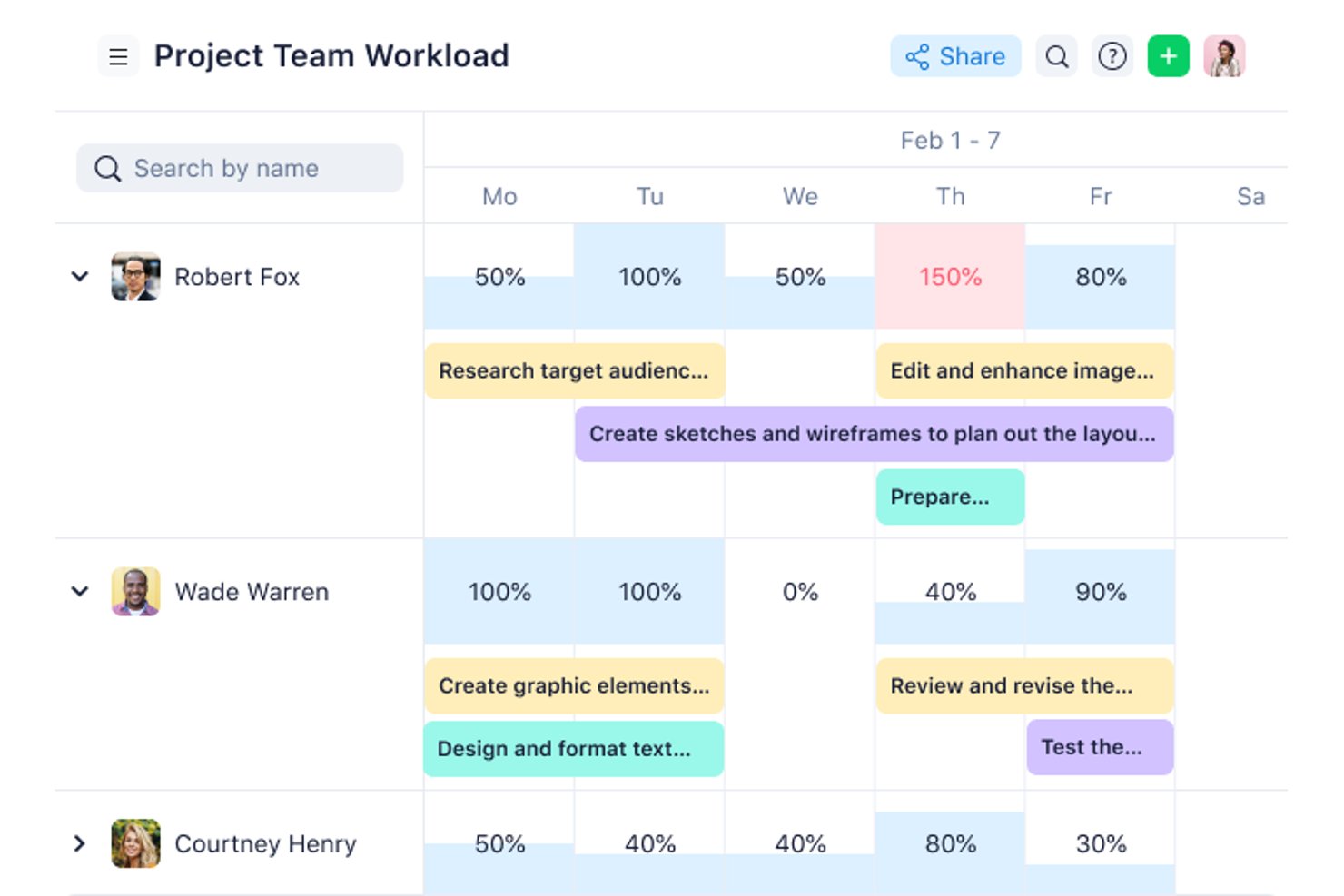
Wrike è una piattaforma per la gestione del lavoro che riunisce il monitoraggio delle attività, i diagrammi di Gantt, la visualizzazione del carico di lavoro, l'automazione e i report tra progetti in un unico spazio di lavoro configurabile.
Per chi è più adatto Wrike?
Wrike è adatto ai project manager e ai responsabili dei team che gestiscono diversi progetti contemporaneamente e hanno bisogno di visibilità tra i progetti, monitoraggio del carico di lavoro e collaborazione strutturata in un unico luogo.
Perché ho scelto Wrike
Ho scelto Wrike come una delle migliori soluzioni perché è progettato per gestire la realtà di diversi progetti contemporaneamente senza perdere di vista ciò che procede e ciò che è bloccato. Trovo particolarmente utili i diagrammi del carico di lavoro tra progetti: mostrano l'impegno assegnato a ciascun membro del team per giorno o settimana, così posso individuare i sovraccarichi e riassegnare le attività prima che qualcosa subisca ritardi. Passare dalle visualizzazioni Gantt, bacheca e tabella sugli stessi dati di progetto significa non essere mai vincolato a un unico modo di visualizzare il lavoro.
Funzionalità principali di Wrike
- Generatore di automazioni senza codice: Crea regole di automazione QUANDO–SE–ALLORA per attività e progetti senza scrivere codice.
- Diagrammi di Gantt interattivi: Visualizza le pianificazioni delle attività, le dipendenze e le tappe fondamentali in una visualizzazione a sequenza temporale trascinabile.
- Moduli di richiesta personalizzati: Raccogli le richieste di lavoro in arrivo e indirizzale direttamente allo spazio o al progetto corretto.
- Dashboard in tempo reale: Crea dashboard personalizzate con widget per monitorare lo stato dei progetti e l'attività del team nei diversi flussi di lavoro.
Integrazioni di Wrike
Wrike si integra con oltre 400 applicazioni, tra cui Slack, Microsoft Teams, Google Sheets, Jira, Google Drive e Zoom. Offre un'API RESTful per le integrazioni personalizzate e supporta Zapier.
Pros and Cons
Pros:
- Assegnatari, scadenze e dipendenze delle attività ben definiti
- Cambia visualizzazione senza duplicare i dati del progetto
- Mantieni file e approvazioni accanto alle attività
Cons:
- La configurazione dello spazio di lavoro richiede una pianificazione prima dell'implementazione per il team
- I menu affollati possono rallentare i nuovi utenti
New Product Updates from Wrike

Wrike Redesigns AI Agent Builder
Wrike redesigns its AI Agent Builder with a side-by-side setup, Scopes, sentence-style triggers and actions, and clearer filters. These changes make it easier to configure, test, and manage agent behavior. For more information, visit Wrike’s official site.

Ricco di funzionalità e ideale per DPM esperti
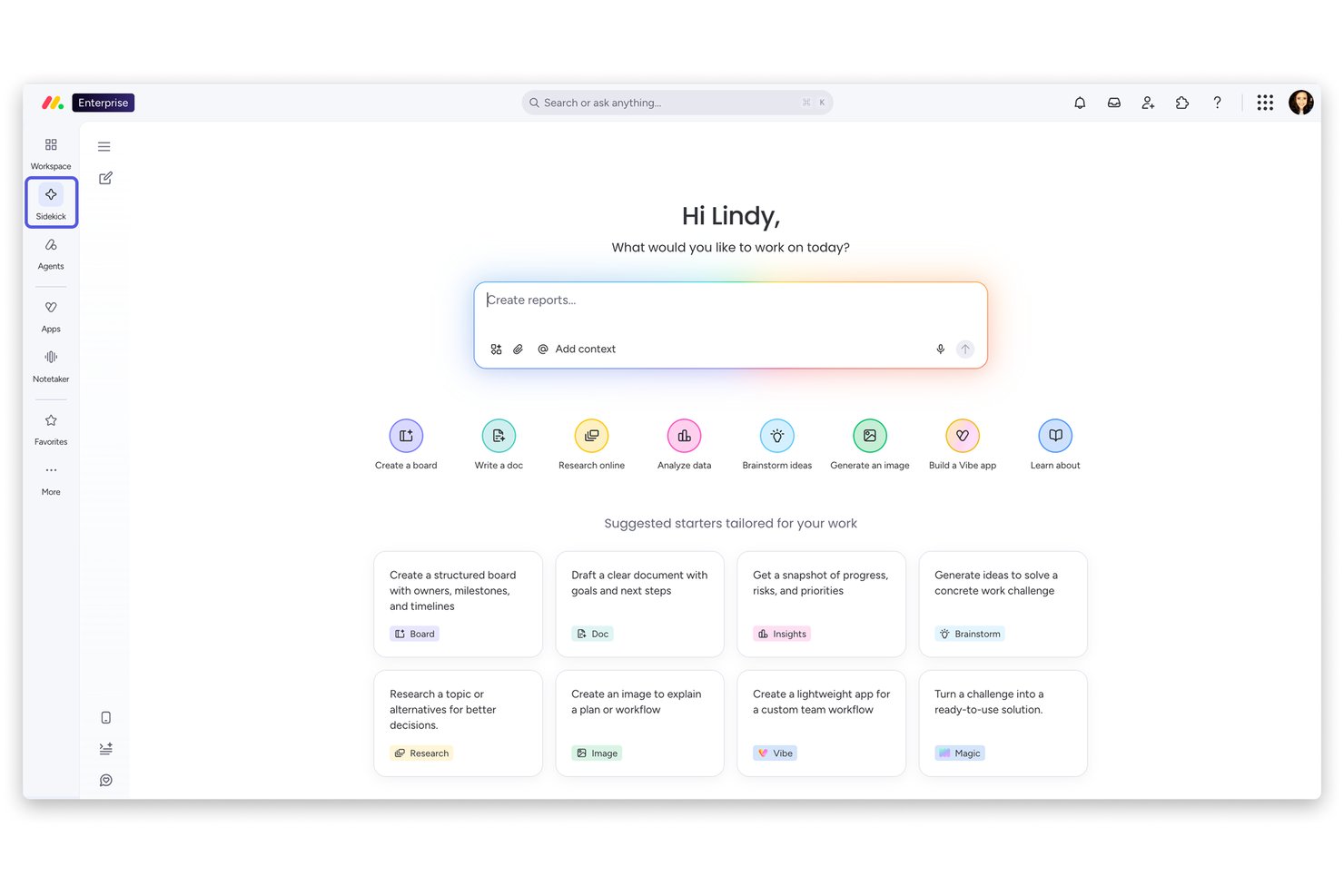
monday work management è una piattaforma di gestione dei progetti che riunisce bacheche visive, diagrammi di Gantt, viste Kanban, automazioni e strumenti di pianificazione basati sull'IA in uno spazio di lavoro altamente personalizzabile.
Per chi è più indicato lo spazio di lavoro IA di monday?
monday work management è particolarmente adatto a responsabili di team e manager di aziende in crescita che hanno bisogno di una visibilità completa su più progetti e flussi di lavoro.
Perché ho scelto lo spazio di lavoro IA di monday
Ho incluso lo spazio di lavoro IA di monday tra le mie scelte migliori perché è una delle piattaforme di gestione dei progetti più ricche di funzionalità che abbia utilizzato e i DPM esperti troveranno molte possibilità interessanti. Apprezzo in particolare i piani di progetto generati dall'IA, che producono elenchi strutturati di attività, responsabili assegnati, traguardi e viste Gantt collegate alle dipendenze a partire da una semplice descrizione in linguaggio naturale. Il widget Carico di lavoro offre una panoramica chiara della distribuzione dell'impegno tra i membri del team, mentre lo strumento Analisi dei rischi del portafoglio esamina attivamente tempistiche e dipendenze per individuare le attività a rischio prima che diventino problematiche.
Funzionalità principali dello spazio di lavoro IA di monday
- Bacheche Kanban: le bacheche con funzionalità di trascinamento consentono di spostare le attività tra le varie fasi e riordinare le priorità in tempo reale.
- Accesso degli ospiti: invita collaboratori esterni, come clienti, fornitori o freelance, a bacheche specifiche senza consentire l'accesso all'intero account.
- Ricette di automazione: imposta regole basate su trigger per assegnare automaticamente le attività, aggiornare gli stati o inviare notifiche senza scrivere codice.
- Documenti di lavoro: modifica insieme ai collaboratori documenti dinamici direttamente all'interno di monday.com, con dati delle bacheche incorporati e aggiornati automaticamente.
Integrazioni dello spazio di lavoro IA di monday
monday.com elenca oltre 850 integrazioni e app, tra cui Slack, Google Calendar, Microsoft Teams, Google Drive, Jira e Zoom. Supporta inoltre Zapier e le API GraphQL e SDK per le integrazioni personalizzate.
Pros and Cons
Pros:
- Le bacheche con codici colore rendono gli stati facili da consultare
- I modelli offrono ai team strutture di progetto già pronte
- Gli aggiornamenti delle attività mantengono la discussione accanto al lavoro
Cons:
- Le automazioni complesse richiedono configurazione e tentativi ed errori
- L'app mobile non include le viste Gantt e del carico di lavoro
New Product Updates from monday AI Workspace
monday AI Workspace Adds Human Approval Routing
monday AI Workspace adds a human-in-the-loop approval block to AI Workflows, sending approval requests and routing workflow paths based on responses. For more information, visit monday AI Workspace's official site.

Ideale per scalabilità e flessibilità
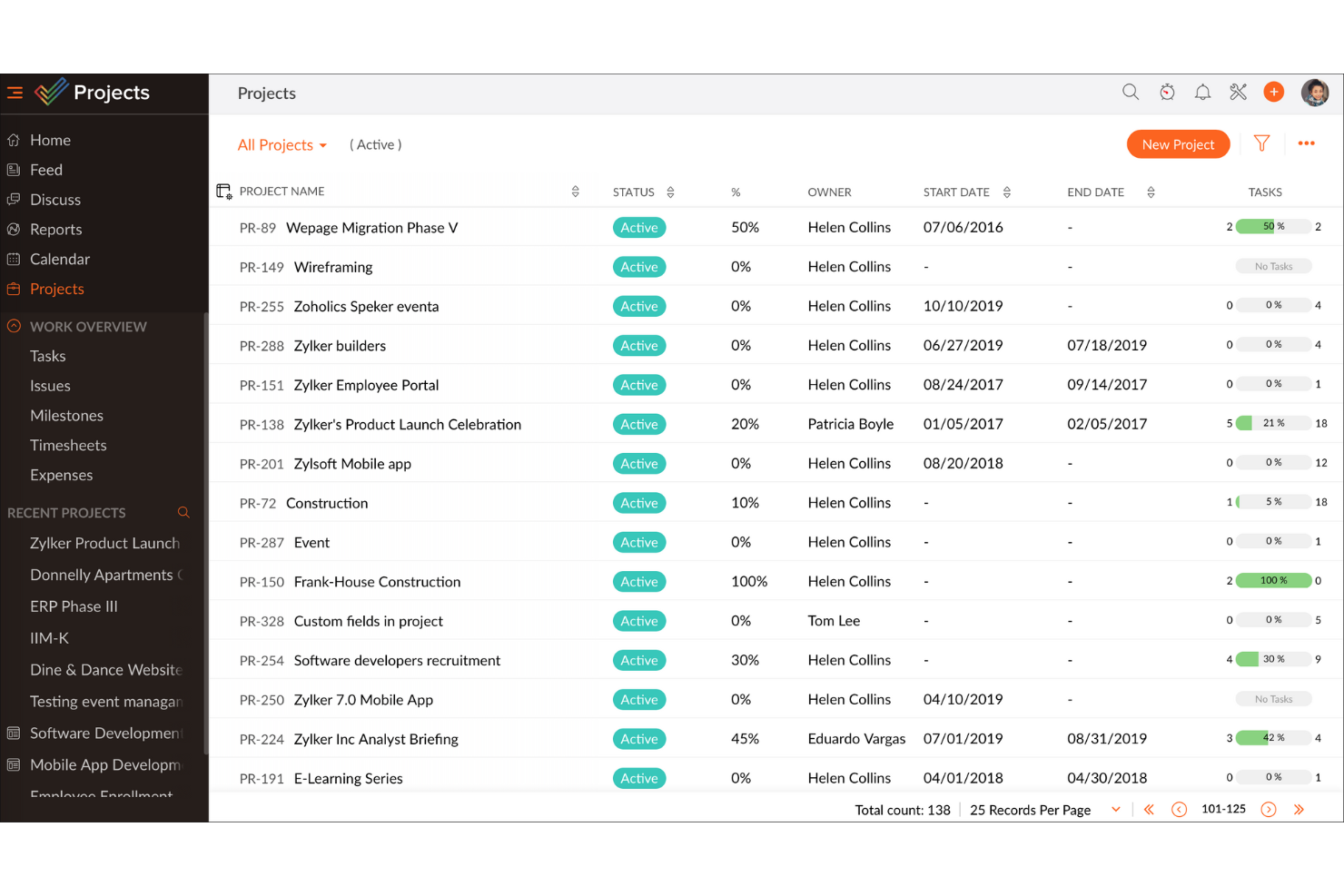
Zoho Projects è una piattaforma di gestione dei progetti basata sul cloud che combina gestione delle attività, diagrammi di Gantt, monitoraggio del tempo, tracciamento dei problemi e strumenti di collaborazione del team per un numero illimitato di progetti.
Per chi è più adatto Zoho Projects?
Zoho Projects è adatto ai team in crescita che hanno bisogno di uno strumento di gestione dei progetti in grado di scalare da una piccola attività a un flusso di lavoro aziendale senza dover cambiare piattaforma.
Perché ho scelto Zoho Projects
Zoho Projects si è guadagnato un posto nella mia selezione perché cresce insieme al tuo team in modi che la maggior parte degli strumenti semplicemente non riesce a offrire. L'ho visto passare dalla configurazione di una startup di cinque persone a un flusso di lavoro aziendale con più team senza dover cambiare piattaforma. Funzionalità come i flussi di lavoro personalizzabili e l'accesso basato sui ruoli permettono di ridefinire il modo in cui il lavoro viene organizzato man mano che il team evolve, mentre il diagramma di Gantt integrato mantiene visibili le tempistiche complesse e mutevoli di ogni progetto.
Funzionalità principali di Zoho Projects
- Tracciamento dei problemi: Un modulo integrato consente di registrare, assegnare e stabilire la priorità di errori o impedimenti direttamente all'interno del progetto.
- Monitoraggio del tempo: I membri del team possono registrare le ore relative ad attività specifiche utilizzando cronometri o inserimenti manuali collegati alle tappe fondamentali del progetto.
- Grafico di utilizzo delle risorse: Un pannello visivo mostra il carico di lavoro di ogni membro del team, permettendoti di individuare un'assegnazione eccessiva delle attività prima che diventi un problema.
- Schema operativo: Uno strumento per flussi di lavoro automatizzati che definisce le fasi del processo e impone le transizioni tra le fasi delle attività.
Integrazioni di Zoho Projects
Zoho Projects offre integrazioni native con Zoho CRM, Zoho Desk, Google Calendar, Microsoft Teams, Slack, GitHub, GitLab, Jira Cloud e Zendesk. Supporta inoltre l'automazione dei flussi di lavoro tramite Zapier.
Pros and Cons
Pros:
- Gli schemi operativi guidano il passaggio ripetibile delle attività
- I diagrammi di Gantt chiariscono le tempistiche mutevoli
- Il tracciamento dei problemi integrato mantiene il contesto degli impedimenti
Cons:
- Le schermate dense possono rallentare la configurazione iniziale
- La configurazione estesa richiede diverse decisioni iniziali
New Product Updates from Zoho Projects
Zoho Projects Adds CodeX Scripts for Custom Modules
Zoho Projects now supports CodeX Scripts for custom modules, enabling conditional logic and rules for creating, updating, and deleting records. For more information, visit Zoho Projects' official site.
 .
.
Celoxis
Il miglior software completo per la gestione di progetti e portafogli
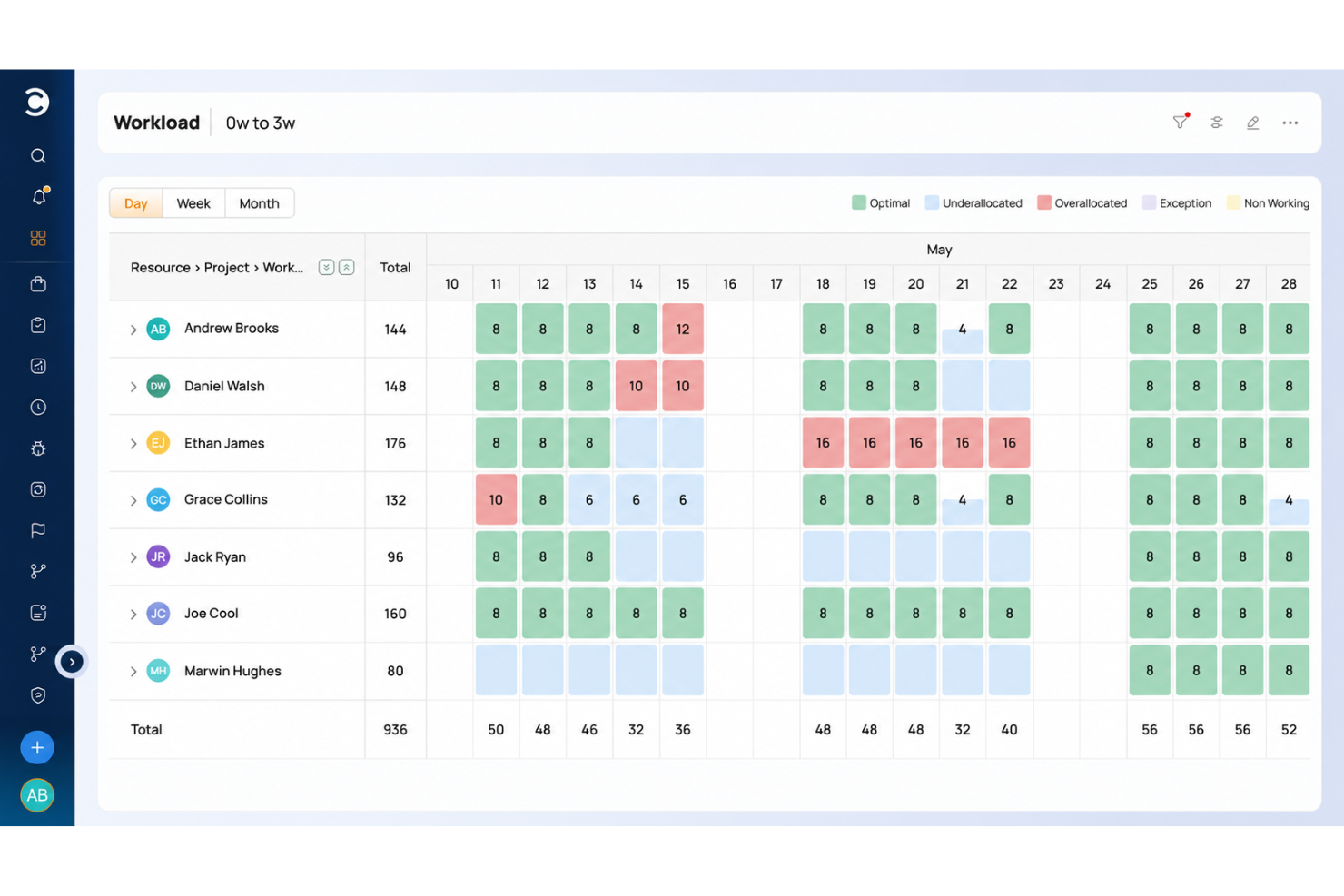
Celoxis è una piattaforma per la gestione di progetti e portafogli che riunisce in un unico spazio la pianificazione dei progetti, la pianificazione della capacità delle risorse, la visualizzazione del carico di lavoro, il monitoraggio finanziario e la reportistica trasversale tra i progetti.
Per chi è più adatto Celoxis?
Celoxis è particolarmente adatto ai responsabili di progetto e ai team PMO che devono monitorare più progetti, risorse e budget all'interno di un portafoglio da un'unica piattaforma.
Perché ho scelto Celoxis
Ho scelto Celoxis come una delle soluzioni migliori perché è l'unico strumento di questo elenco che copre l'intero ciclo di vita della gestione di progetti e portafogli in un'unica piattaforma. Sono particolarmente colpito dalla pianificazione della capacità delle risorse tra progetti, che consente di vedere esattamente dove i membri del team sono sovraccarichi prima che ciò diventi un problema per la consegna. Il diagramma di Gantt dell'intero portafoglio e i pannelli personalizzabili offrono inoltre una visione in tempo reale delle pianificazioni, degli indicatori di stato e dei dati finanziari senza dover combinare report separati.
Funzionalità principali di Celoxis
- Monitoraggio del tempo integrato: Registra il tempo utilizzando timer integrati nell'app o una griglia per il registro ore settimanale, con flussi di approvazione e promemoria per le registrazioni mancanti.
- Monitoraggio di rischi e problemi: Monitora i rischi dei progetti, i problemi e le richieste di modifica utilizzando le app integrate incluse a partire dal piano Professional.
- Portale clienti: Offri ai clienti uno spazio personalizzato con il tuo marchio e controllato tramite autorizzazioni, per visualizzare e collaborare sui progetti e sulle attività autorizzati.
- Avvisi sul carico di lavoro e sui conflitti: Ricevi avvisi automatici quando un membro del team è sovraccarico o viene superata una soglia di pianificazione.
Integrazioni di Celoxis
Celoxis offre 21 integrazioni native, tra cui Microsoft Excel, Google Drive, Jira, Microsoft 365, Outlook e Google Sheets. Si collega a oltre 400 app tramite Zapier o la sua API REST, tra cui Slack e Trello.
Pros and Cons
Pros:
- La visibilità del carico di lavoro tra progetti previene il sovraccarico delle risorse
- I diagrammi di Gantt chiariscono dipendenze e pianificazioni
- Gli aggiornamenti centralizzati delle attività riducono il monitoraggio frammentato
Cons:
- I menu complessi rallentano la configurazione iniziale del progetto
- Gli strumenti mobili sono meno efficaci per la gestione dei progetti

Ideale per lo sviluppo di app senza codice
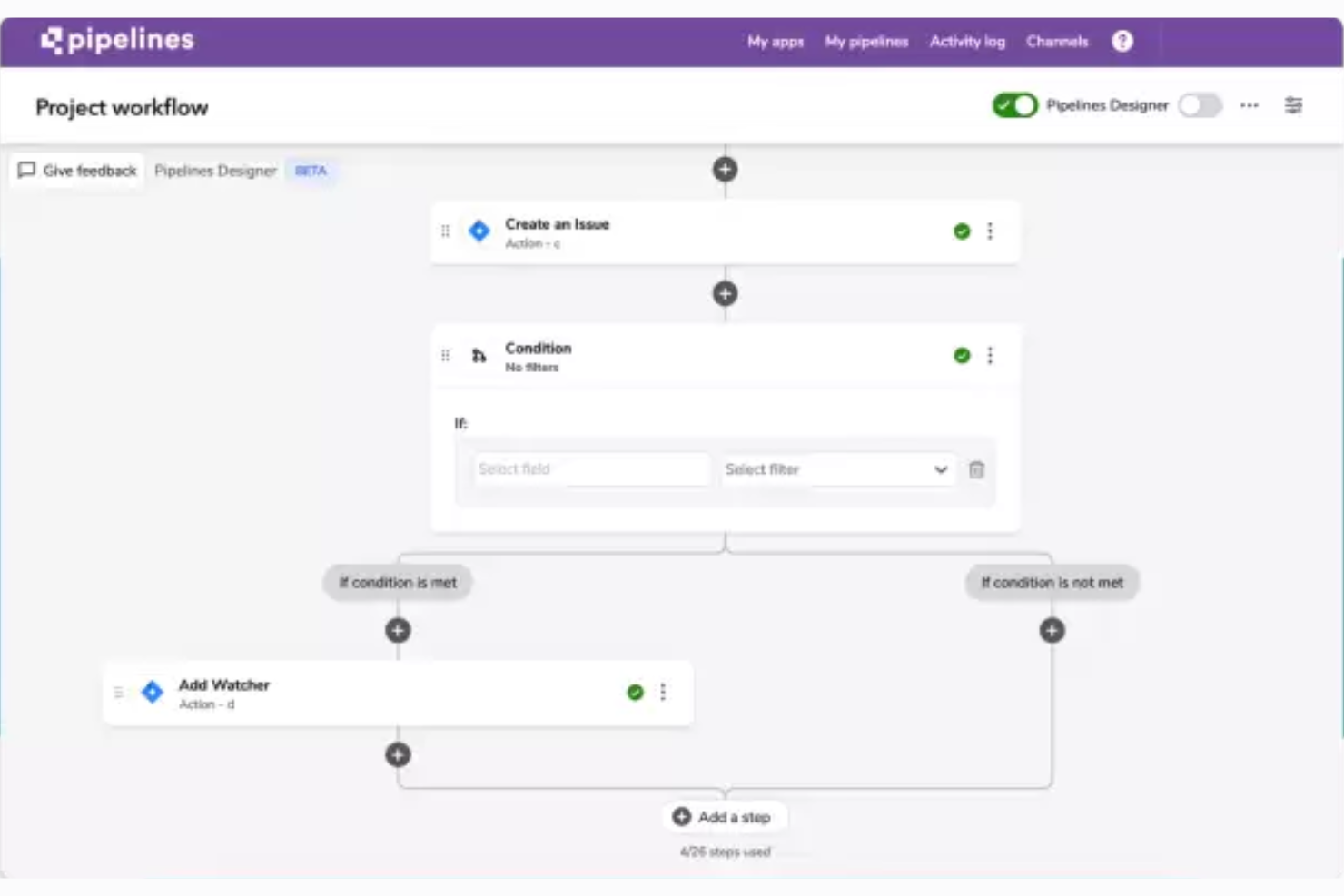
Quickbase è una piattaforma di gestione dei progetti senza codice che consente ai team di creare app personalizzate, automatizzare i flussi di lavoro, monitorare attività e scadenze e visualizzare i dati dei progetti nelle viste Kanban, Gantt e calendario.
Per chi è più adatto Quickbase?
Quickbase è adatto ai responsabili dei team e ai manager che lavorano in ambienti operativi complessi e hanno bisogno di creare app di monitoraggio personalizzate senza scrivere codice.
Perché ho scelto Quickbase
Ho scelto Quickbase come una delle migliori opzioni perché è il più potente strumento per la creazione di app senza codice presente in questo elenco. Invece di costringerti ad adattare il tuo lavoro a un modello fisso, puoi descrivere il tuo processo e lasciare che Quickbase AI generi un'app di progetto personalizzata, oppure importare un foglio di calcolo esistente e fare in modo che strutturi automaticamente i tuoi dati in un database relazionale. Il modello di plug-in Gantt include già tabelle per attività, dipendenze, linee di base e assegnazioni delle risorse, tutte collegate tra loro, così puoi basarti su una logica di progetto reale fin dal primo giorno.
Funzionalità principali di Quickbase
- Dashboard personalizzate in base al ruolo: ogni utente visualizza una dashboard adattata al proprio ruolo, con i report e i dati di progetto più rilevanti.
- Quickbase Pipelines: un generatore visivo di flussi di lavoro che collega strumenti di terze parti e definisce flussi di lavoro automatizzati in più passaggi tra diversi sistemi, senza scrivere codice.
- Monitoraggio del budget con avvisi sulle variazioni dei costi: i team possono monitorare il budget rispetto ai valori effettivi e alla spesa impegnata, ricevendo avvisi automatici quando i costi si discostano dal piano.
- Importazione di fogli di calcolo: carica un file Excel e Quickbase struttura i tuoi dati in un database relazionale, consentendoti di mappare i tipi e le etichette dei campi prima della creazione dell'app.
Integrazioni di Quickbase
Quickbase dichiara di offrire oltre 40 integrazioni predefinite, tra cui connessioni native a Salesforce, SAP, Oracle e Microsoft Teams, oltre a SharePoint e Google Drive. Supporta inoltre API RESTful e Zapier per connettività personalizzata.
Pros and Cons
Pros:
- Le dashboard riuniscono lo stato e i rischi del progetto
- Le importazioni da fogli di calcolo diventano app di progetto strutturate
- Le automazioni gestiscono il passaggio delle attività e gli avvisi
Cons:
- I flussi di lavoro avanzati richiedono una configurazione aggiuntiva
- La creazione di app basata su formule richiede pratica

Toggl
Ideale per il monitoraggio del tempo integrato nelle attività dei progetti
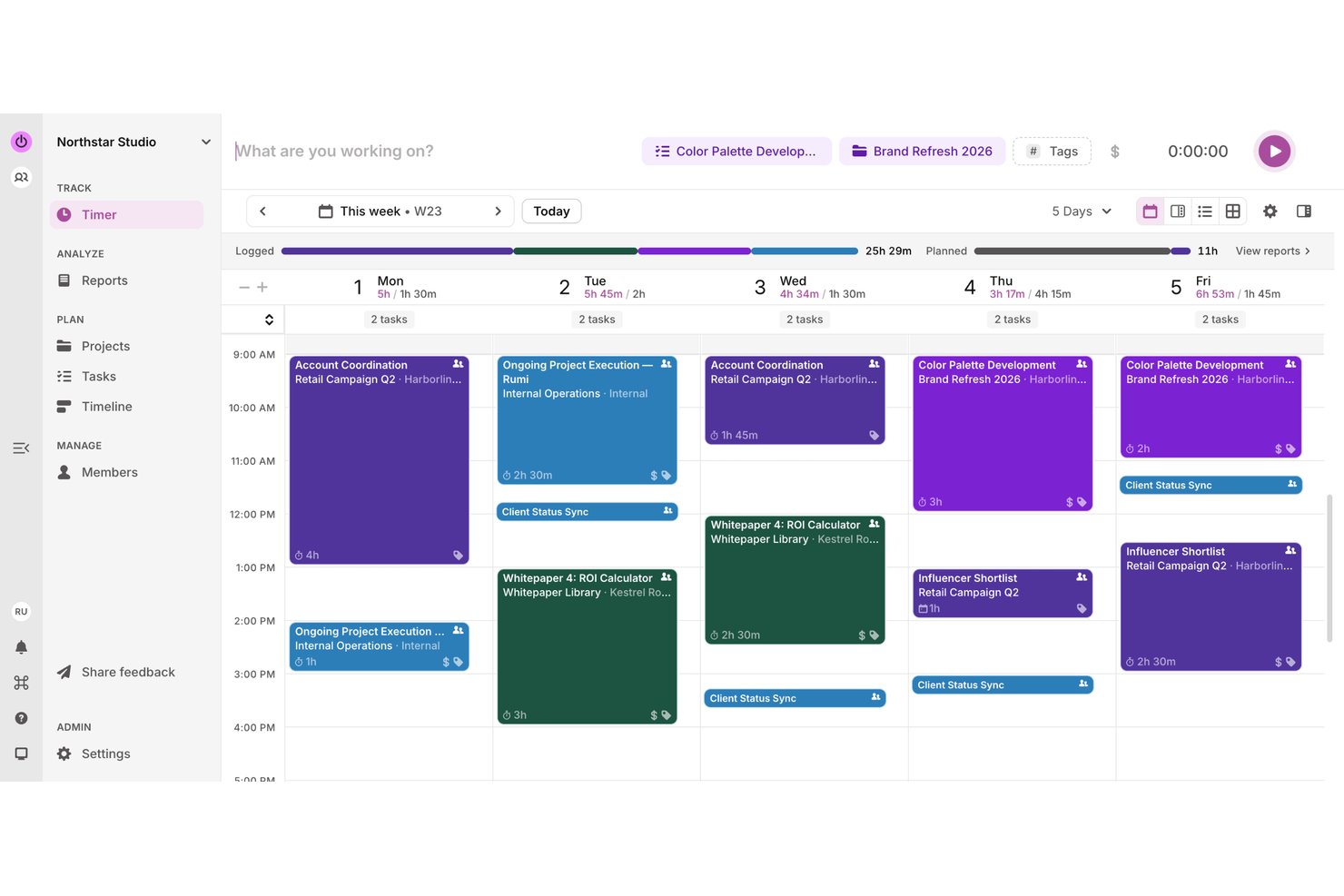
Toggl è uno strumento per il monitoraggio del tempo e la gestione dei progetti che combina timer in tempo reale, bacheche delle attività, pianificazione della capacità e visualizzazione del carico di lavoro in un unico spazio di lavoro.
Per chi è più indicato Toggl?
Toggl è una soluzione ideale per piccoli team e freelance che hanno bisogno di monitorare le ore fatturabili insieme alle attività dei progetti senza dover gestire strumenti separati.
Perché ho scelto Toggl
Ho scelto Toggl come uno dei migliori perché è l'unico strumento di questo elenco che integra il monitoraggio del tempo direttamente nelle attività dei progetti, invece di trattarlo come un flusso di lavoro separato. Mi piace molto poter avviare un timer dall'interno di un'attività, così le ore fatturabili vengono associate automaticamente al progetto corretto. Il Creatore di attività AI consente inoltre di fotografare un elenco di cose da fare scritto a mano e trasformarlo istantaneamente in attività strutturate: ho constatato che questo riduce concretamente i tempi di configurazione.
Funzionalità principali di Toggl
- Pianificazione del carico di lavoro e della capacità: Visualizza la capacità di ogni membro del team rispetto al lavoro pianificato per individuare chi è sovraccarico o sottoutilizzato prima che diventi un problema.
- Visualizzazioni multiple dei progetti: Passa dalle visualizzazioni Bacheca, Elenco attività, Calendario e Cronologia, tutte basate sugli stessi dati delle attività.
- Dashboard dei progetti: Confronta il tempo effettivo con le stime e visualizza l'avanzamento suddiviso per attività e membro del team in un unico posto.
- Impostazioni delle tariffe fatturabili: Imposta le tariffe a livello di spazio di lavoro, membro o progetto per mantenere accurata la fatturazione senza riconciliazioni manuali.
Integrazioni di Toggl
Toggl offre integrazioni native con Asana, Google Calendar, Outlook Email & Calendar, Jira e Slack, oltre a integrazioni tramite estensioni del browser con GitHub, Todoist e Trello. Supporta inoltre Zapier e un'API REST, webhook, un server MCP e una CLI per connessioni personalizzate.
Pros and Cons
Pros:
- I timer rapidi mantengono insieme i registri del tempo delle attività
- Viste a bacheca, elenco, calendario e cronologia
- I recensori apprezzano il monitoraggio intuitivo quotidiano del tempo
Cons:
- Nessuna scadenza o dipendenza delle attività documentata
- L'assegnazione delle attività non attiva notifiche per gli utenti

Miro
Ideale per la collaborazione visiva e l'innovazione
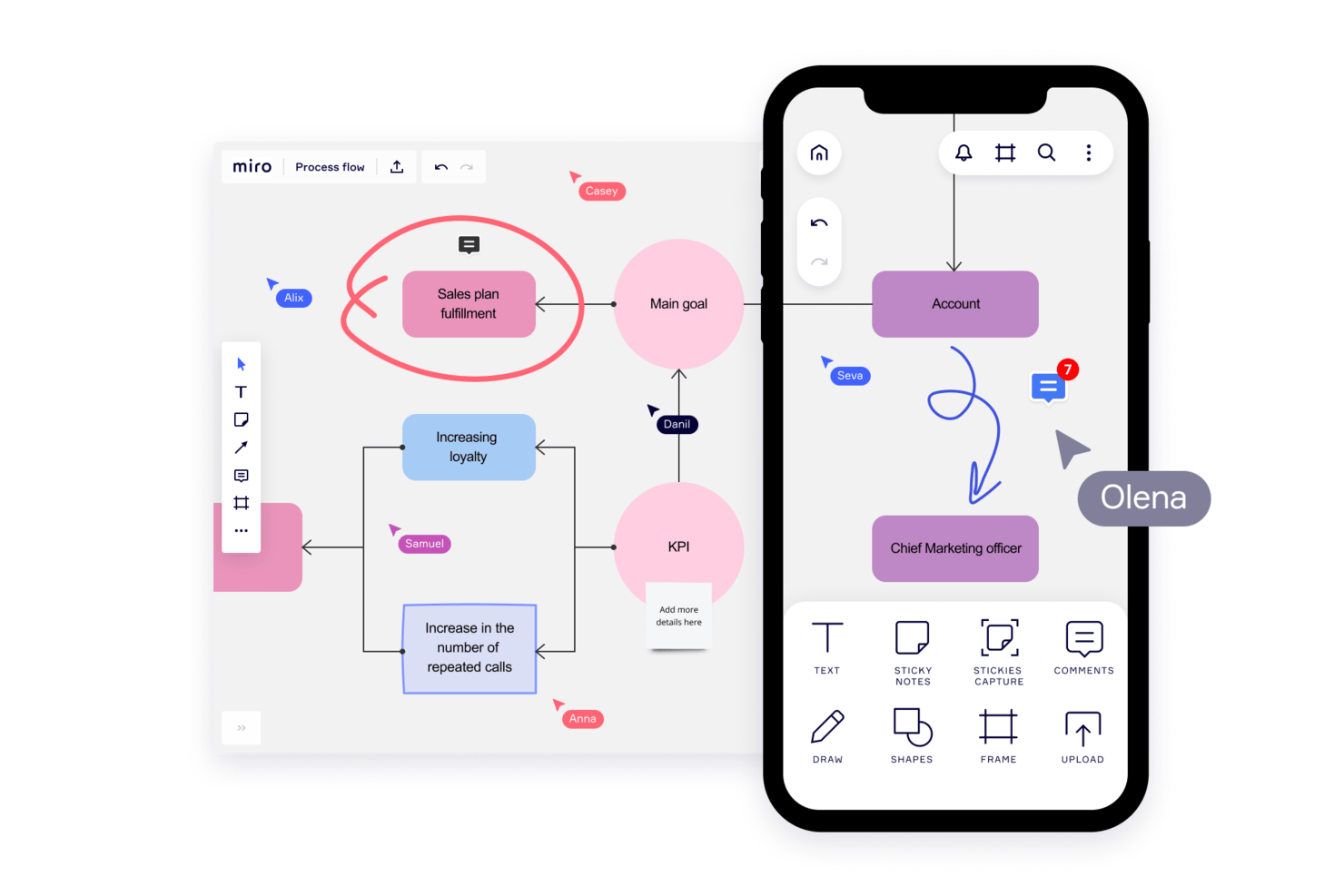
Miro è una piattaforma di collaborazione visiva che combina una tela infinita con il monitoraggio dei progetti, bacheche Kanban, sequenze temporali, modelli e strumenti di collaborazione in tempo reale per i team.
Per chi è più adatto Miro?
Miro funziona al meglio per i team interfunzionali che danno priorità al pensiero visivo, in particolare i team di prodotto, progettazione e innovazione che hanno bisogno di uno spazio condiviso per fare brainstorming, pianificare e allinearsi prima di passare all'esecuzione.
Perché ho scelto Miro
Miro si è guadagnato un posto nella mia selezione perché è l'unico strumento qui presente che considera la tela stessa come il progetto. Adoro il modo in cui i Blueprint consentono al mio team di avviare in pochi minuti uno spazio di lavoro completamente strutturato, completo di tabella di marcia, bacheca Kanban e dipendenze, senza dover creare nulla da zero. In pratica, questo significa che il mio team può svolgere una sessione di pianificazione dello sprint e convertire immediatamente le note adesive in record tracciati nella Tabella, con assegnatari e scadenze sulla stessa bacheca.
Funzionalità principali di Miro
- Co-modifica in tempo reale: Più membri del team possono lavorare contemporaneamente sulla stessa bacheca, con modifiche visibili istantaneamente a tutti.
- Importazione di Excel per le tabelle: I team possono importare i file
.xlsxdirettamente nelle Tabelle di Miro per migrare i dati esistenti dei fogli di calcolo senza reinserirli manualmente. - Videotour Talktrack: Gli utenti possono registrare tour video narrati e interattivi di una bacheca, così i colleghi possono esaminare gli aggiornamenti in modo asincrono.
- Riepiloghi delle bacheche basati sull'intelligenza artificiale: Miro AI analizza i contenuti della bacheca ed evidenzia i temi principali, le decisioni e i passaggi successivi suggeriti in un riepilogo facilmente consultabile.
Integrazioni di Miro
Miro supporta oltre 250 integrazioni, tra cui Microsoft 365, Google Workspace, Jira, Asana, Slack, Microsoft Teams e Figma. Offre inoltre API REST, Web SDK, API Enterprise, un server MCP e Zapier.
Pros and Cons
Pros:
- Le bacheche modello consentono di avviare rapidamente i progetti
- Le modifiche in tempo reale mantengono allineati i team distribuiti
- La conversione delle note adesive crea attività tracciabili
Cons:
- Le bacheche di grandi dimensioni diventano disordinate e lente
- L'assegnazione lineare delle attività risulta meno naturale
New Product Updates from Miro
Miro Adds Japan Data Residency for Enterprise Customers
Miro has introduced Japan data residency for enterprise customers, offering in-region storage for production data, backups, and metadata, plus in-region compute infrastructure. For more information, visit Miro's official site.

Airtable
Ideale per importare fogli di calcolo con molteplici visualizzazioni
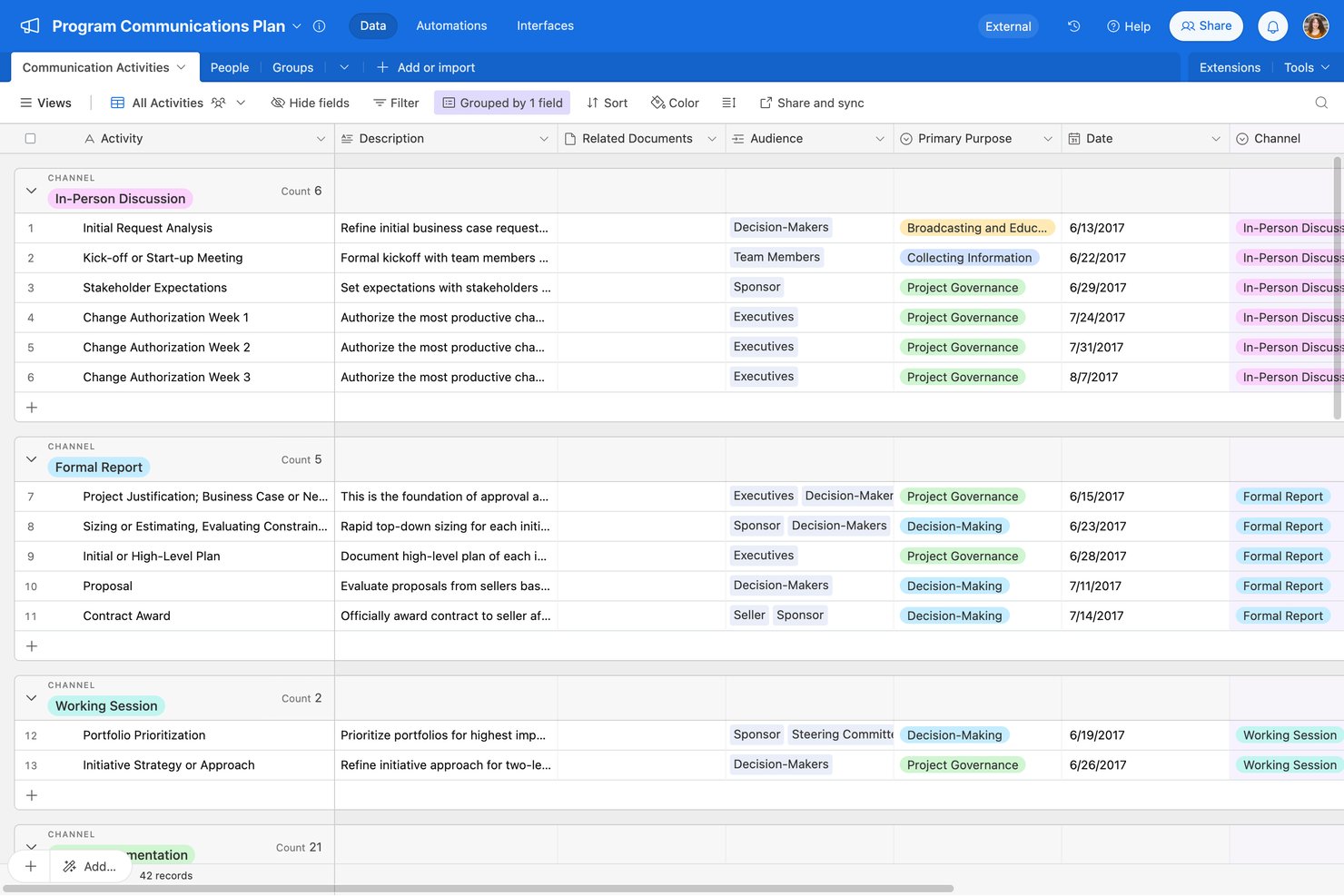
Airtable è una piattaforma per la gestione dei progetti senza codice che combina una base di dati relazionale con griglie in stile foglio di calcolo, molteplici visualizzazioni, flussi di lavoro automatizzati e creazione di app assistita dall'IA.
Per chi è più adatto Airtable?
Airtable è particolarmente adatto ai piccoli team e ai responsabili di team che desiderano trasferire il monitoraggio dei progetti basato su fogli di calcolo in uno spazio di lavoro più strutturato e con molteplici visualizzazioni.
Perché ho scelto Airtable
Ho scelto Airtable come una delle migliori opzioni perché è il percorso più semplice che abbia visto per trasferire i dati dei fogli di calcolo in uno spazio di lavoro strutturato per i progetti. È possibile importare dati da CSV, Excel o Google Sheets e accedere immediatamente a sette tipi di visualizzazione, tra cui Kanban, Gantt e cronologia, che utilizzano tutti gli stessi dati sottostanti. Apprezzo particolarmente il modello per il monitoraggio delle attività, che include già assegnatari, dipendenze tra date, sottoattività e un'automazione per la notifica dell'assegnatario già configurata.
Funzionalità principali di Airtable
- Modello per la pianificazione della capacità: Un pannello di controllo del carico di lavoro preconfigurato che monitora le ore assegnate a ciascun membro del team, la percentuale di utilizzo e lo stato di sovraccapacità nei vari progetti.
- Automazioni con attivatori e azioni: Uno strumento per la creazione di automazioni senza codice che collega attivatori e azioni in più fasi tra Airtable e strumenti esterni come Slack, Gmail e Salesforce.
- Progettazione dell'interfaccia: Uno strumento con funzionalità di trascinamento per creare visualizzazioni personalizzate e specifiche per ruolo dei dati di base senza scrivere codice.
- Propagazione delle dipendenze tra date: Una funzionalità di pianificazione che aggiorna automaticamente le date delle attività dipendenti quando cambia una data precedente, mantenendo allineate le tempistiche tra i record collegati.
Integrazioni di Airtable
Airtable offre integrazioni con Google Sheets, Excel, Jira, Slack, Google Drive, Salesforce e Box. Fornisce inoltre un'API per integrazioni personalizzate e supporta Zapier.
Pros and Cons
Pros:
- Le importazioni dei fogli di calcolo popolano molteplici visualizzazioni
- I modelli preconfigurano le assegnazioni delle attività e le notifiche
- I pannelli di controllo condivisi mantengono visibile lo stato del progetto
Cons:
- Le basi avanzate richiedono una progettazione e una manutenzione attente
- L'app mobile non include gli strumenti Gantt, cronologia e automazione

Nifty
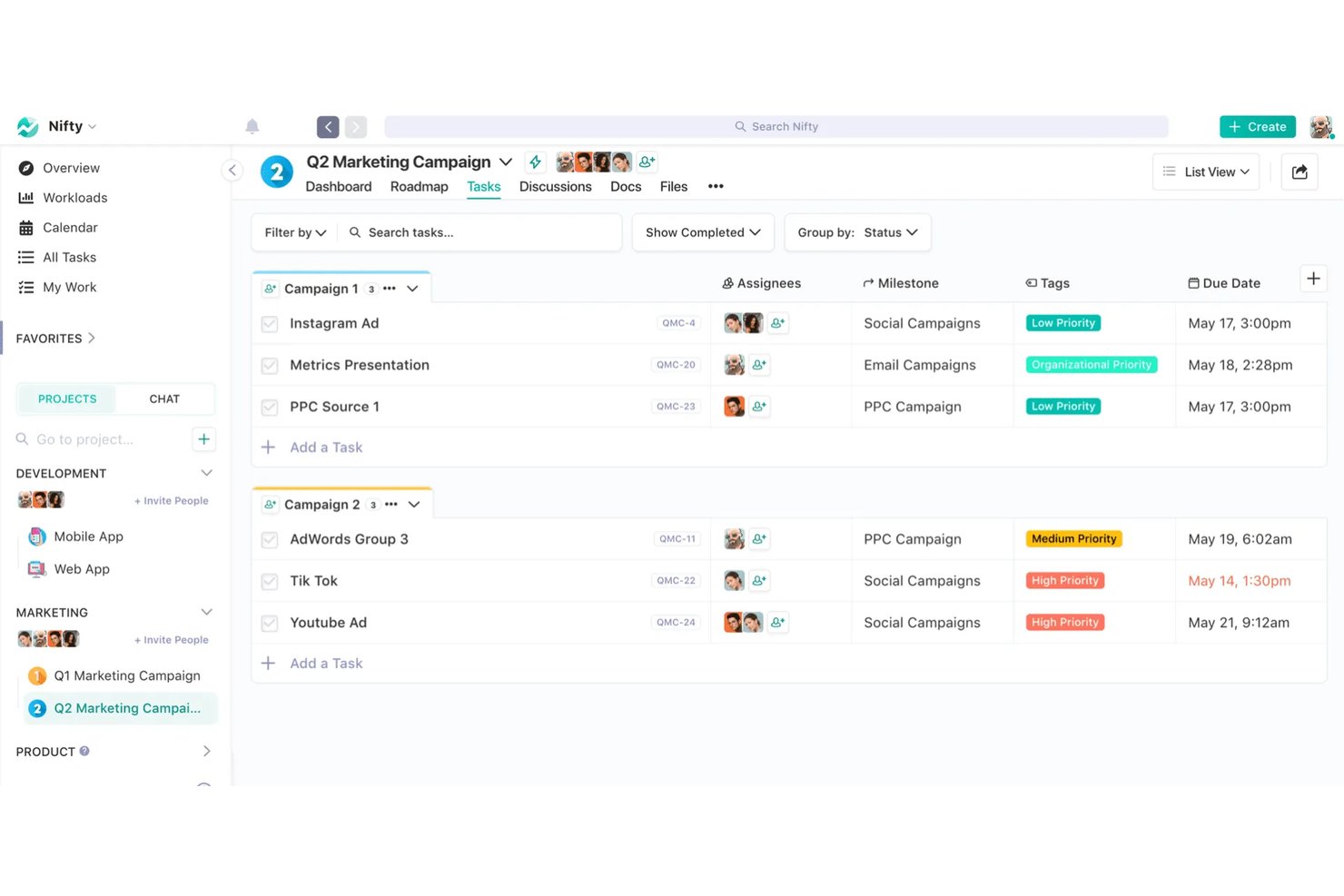
Nifty è una piattaforma di gestione dei progetti che combina monitoraggio delle attività, roadmap, discussioni del team, documenti e monitoraggio del tempo in un unico spazio di lavoro.
Per chi è più adatto Nifty?
Nifty è particolarmente adatto a piccoli team e freelance che desiderano gestire attività, documenti, discussioni e monitoraggio del tempo in un unico posto, senza dover utilizzare più strumenti.
Perché ho scelto Nifty
Ho incluso Nifty tra le mie migliori scelte perché la sua funzionalità Orbit AI consente di generare un progetto completamente strutturato, completo di elenchi, stati, attività e sottoattività, direttamente da un prompt in testo semplice o da un documento con le specifiche. Mi piace anche il fatto che possa trasformare un messaggio di Slack o di una discussione in un'attività con assegnatari, scadenze e campi personalizzati già compilati. Questa combinazione porta un nuovo progetto dall'idea all'operatività in pochi minuti, con un intervento manuale minimo.
Funzionalità principali di Nifty
- Visualizzazioni multiple delle attività: Passa dalle visualizzazioni Kanban, Elenco, Swimlane, Cronologia e Calendario per vedere il lavoro nel modo più adatto al tuo team.
- Monitoraggio del tempo integrato: Avvia un timer direttamente da qualsiasi attività, dalla sezione Il mio lavoro o dalla visualizzazione Elenco, quindi esporta i report del tempo in formato CSV o PDF.
- Accesso per ospiti e clienti: Invita i clienti a singoli progetti, così potranno visualizzare i progressi e comunicare sulle attività senza accedere al tuo intero spazio di lavoro.
- Automazioni personalizzate dei flussi di lavoro: Imposta regole se/allora per assegnare automaticamente le attività, aggiornare gli stati, aggiungere sottoattività o pubblicare messaggi in base agli eventi attivati.
Integrazioni di Nifty
Nifty offre integrazioni native con Slack, GitHub, Microsoft Suite, Google Drive e Calendar, Miro, Typeform, Figma, Harvest, Webex e Zoom. Supporta inoltre un'API REST, webhook, OAuth 2.1 e Zapier.
Pros and Cons
Pros:
- L'IA crea strutture di attività a partire dai prompt
- Gli elenchi in stile foglio di calcolo facilitano l'organizzazione delle attività
- I clienti possono seguire i progressi del progetto
Cons:
- Le notifiche a volte arrivano solo dopo la riapertura
- L'app mobile non include alcune funzionalità desktop

Asana
Ideale per trasformare la gestione complessa
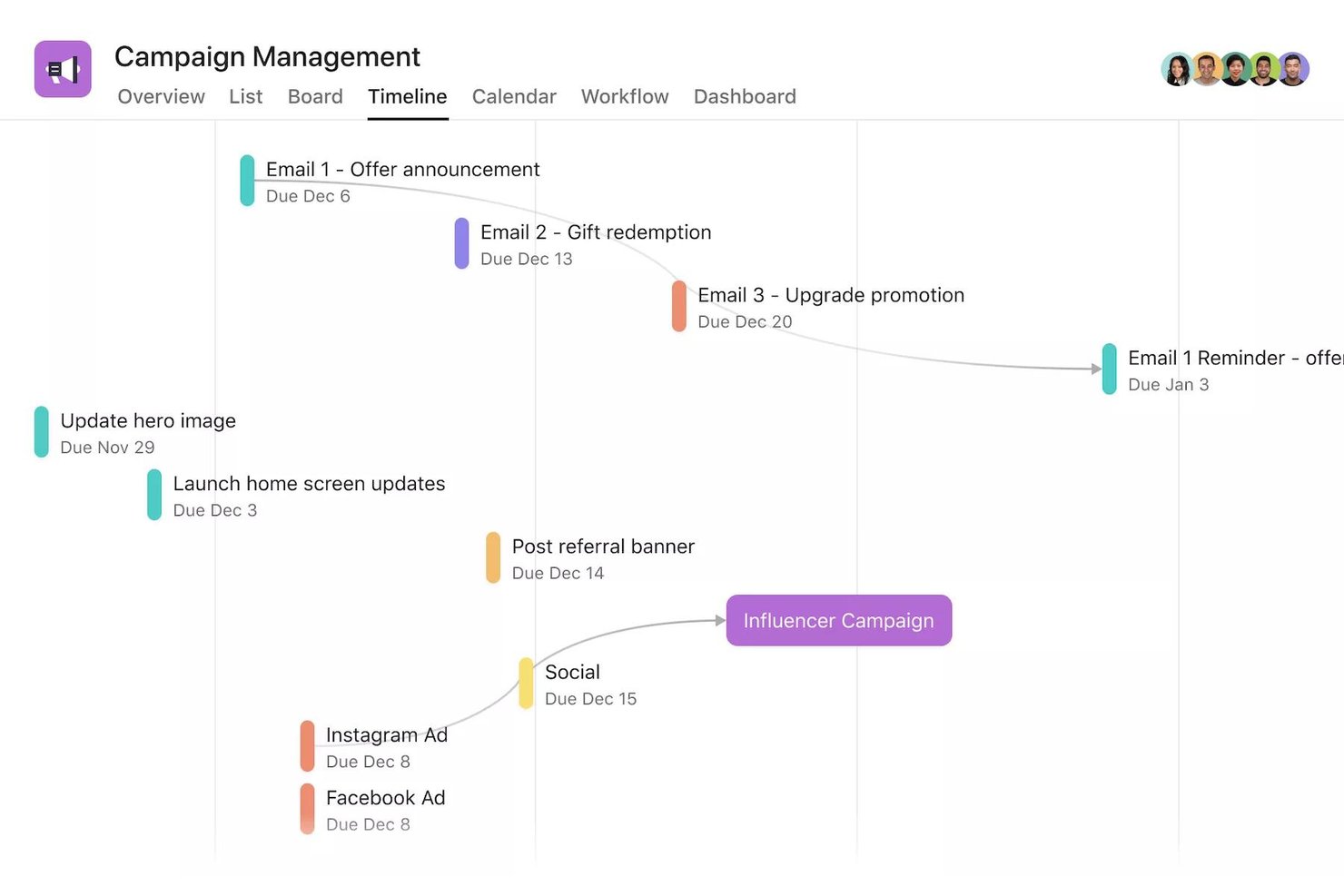
Asana è una piattaforma per la gestione del lavoro che combina il monitoraggio delle attività, le viste dei progetti, l'automazione dei flussi di lavoro e il coordinamento basato sull'intelligenza artificiale tra team e progetti.
Per chi è più adatta Asana?
Asana è adatta ai team che devono gestire progetti articolati e composti da più fasi tra diverse funzioni, senza perdere visibilità su chi è responsabile di cosa.
Perché ho scelto Asana
Asana è una delle mie scelte principali perché apprezzo il modo in cui gestisce il lavoro complesso e articolato senza costringerti a scegliere un unico modo di visualizzarlo. Posso passare dalla vista elenco, bacheca, sequenza temporale e Gantt sullo stesso progetto, mentre le dipendenze tra le attività notificano automaticamente alla persona giusta quando un blocco viene risolto. I colleghi basati sull'IA possono inoltre selezionare e indirizzare le richieste in arrivo, mantenendo attivi i flussi di lavoro strutturati senza un intervento manuale costante.
Funzionalità principali di Asana
- Accesso degli ospiti: Invita collaboratori esterni a specifiche attività, progetti o team senza conteggiarli nel limite di utenti a pagamento.
- Importazione CSV: Trasferisci in Asana i dati esistenti dei fogli di calcolo importando un file CSV, con ogni riga trasformata in un'attività.
- Regole di automazione: Imposta regole basate su attivatori e azioni per riassegnare automaticamente le attività, inviare notifiche o spostare il lavoro tra le fasi del flusso di lavoro.
- Vista del carico di lavoro: Visualizza le assegnazioni di ogni membro del team in base al numero di attività o all'impegno richiesto e modifica la capacità direttamente dalla stessa vista.
Integrazioni di Asana
Asana offre oltre 270 integrazioni con app, incluse connessioni del marketplace con Google Drive, Google Sheets, Microsoft 365, Slack, Jira, GitHub, Figma e Salesforce. Supporta REST API, webhook e Zapier.
Pros and Cons
Pros:
- I progetti di base iniziano in pochi secondi
- Le bacheche mostrano immediatamente il lavoro bloccato
- I commenti sulle attività mantengono le decisioni accanto alle assegnazioni
Cons:
- Le regole complesse richiedono convenzioni di configurazione
- I progetti complessi affollano le viste e le notifiche
Altri software per la gestione dei progetti facili da usare
Ecco alcune alternative che non sono entrate nella selezione principale, ma che meritano di essere prese in considerazione.
- ProofHub
Ideale per il monitoraggio delle attività e delle scadenze del team a tariffa fissa
- Paymo
Ideale per fatturare ai clienti il tempo monitorato sui progetti
- Resource Guru
Ideale per una pianificazione flessibile tramite trascinamento
- Quire
Ideale per suddividere progetti complessi
- Smartsheet
Ideale per il lavoro in stile foglio di calcolo con più visualizzazioni
- Trello
Ideale per progetti con poche o nessuna dipendenza
- ClickUp
Ideale per essere intuitivo, facile da navigare e interattivo
- GanttPRO
Ideale per creare grafici di Gantt in pochi minuti
- awork
Ideale per la pianificazione delle agenzie basata sull'intelligenza artificiale
- Productive
Ideale per la gestione completa dei progetti e della fatturazione di un'agenzia
- Notion
Ideale per documenti, attività e wiki tutto-in-uno


Come valuto il software di project management più semplice
Divido la mia valutazione in due livelli: criteri di base che uno strumento deve soddisfare — come la creazione di attività e le bacheche visive — e i fattori differenzianti che rendono una scelta più adatta a team non tecnici.
Funzionalità principali (requisiti minimi per questa lista)
Quando seleziono gli strumenti per la mia lista, valuto ciascuno di essi su una scala da 0 (non offre la funzionalità) a 5 (eccelle in quest'area) per ogni funzionalità principale elencata di seguito. Poi calcolo il punteggio totale dello strumento e lo trasformo in una percentuale. Ogni strumento deve raggiungere un punteggio totale minimo del 65% per essere considerato per l'inclusione.
- Creazione di attività e progetti: Valuto quanto rapidamente puoi passare da zero a un progetto organizzato con attività assegnate, scadenze e priorità senza dover navigare in schermate di configurazione complesse.
- Visualizzazioni visive del progetto: Gli strumenti dovrebbero offrire più visualizzazioni come bacheche Kanban, elenchi e calendari. Controllo se il passaggio tra le viste mantiene i dati e le scelte di layout.
- Template predefiniti: Cerco una libreria di modelli che copra casi d'uso reali come lanci di prodotto o pianificazione di sprint, così i team possono iniziare subito a lavorare invece di partire da zero.
- Strumenti di collaborazione del team: Commenti, @menzioni e condivisione di file dovrebbero essere direttamente sulle attività. Valuto se il tuo team può avere una conversazione completa nel contesto senza cambiare app.
- Tracciamento scadenze e avanzamento: Date di scadenza, promemoria e indicatori di stato devono offrire un quadro chiaro dello stato di un progetto. Strumenti come Asana e monday.com gestiscono questa funzione in modo differente, quindi confronto gli approcci.
- Interfaccia drag-and-drop: Spostare un'attività tra colonne o riprogrammarla su una timeline dovrebbe essere immediato. Controllo che il drag-and-drop funzioni in modo coerente su tutte le viste disponibili.
Una volta che ho una lista di strumenti che soddisfano i criteri, considero cosa distingue ogni piattaforma.
Fattori differenzianti (cosa distingue i fornitori)
Ecco come confronto e metto a confronto i diversi fornitori:
Funzionalità distintive
L'automazione no-code è un grande elemento distintivo. Cerco strumenti che ti permettano di creare semplici regole — come assegnare automaticamente un revisore quando un'attività viene spostata su "Completato" — senza scrivere una sola riga di codice. Anche l'accesso per ospiti e clienti è importante, soprattutto per i freelance che condividono materiali con interlocutori esterni senza dover acquistare licenze extra. Valuto anche le funzionalità supportate dall'IA. Strumenti come monday.com e ClickUp ora offrono IA che redige descrizioni di attività o sintetizza aggiornamenti di progetto, aiutando i project manager alle prime armi a lavorare più velocemente.
Oltre le funzionalità
L'esperienza di onboarding è la prima cosa che valuto. Uno strumento promosso come "facile" dovrebbe portarti dalla registrazione a un progetto funzionante in pochi minuti — tour guidati, tooltip e wizard di configurazione fanno davvero la differenza per chi è alle prime armi con il project management. Controllo anche l'esistenza di un piano gratuito realmente utilizzabile, visto che freelance e piccoli team hanno bisogno di tempo per valutare uno strumento prima di impegnarsi. Anche il supporto alle integrazioni è importante. Cerco connessioni native a strumenti di uso quotidiano come Google Workspace, Slack e Microsoft 365 affinché gli utenti non tecnici possano integrare la piattaforma nel loro stack esistente facilmente, senza soluzioni alternative.
Come scegliere il software per la gestione dei progetti più facile da usare
È facile sentirsi sopraffatti da lunghi elenchi di funzionalità e prezzi complessi. Per aiutarti a rimanere concentrato durante il processo di selezione del software, ecco una lista di controllo dei fattori principali da tenere a mente:
| Fattore | Cosa considerare |
| Scalabilità | Assicurati che il software possa crescere insieme al tuo team, offrendo funzionalità come spazio di archiviazione aggiuntivo o più postazioni utente senza una curva di apprendimento ripida. |
| Integrazioni | Assicurati che il software si colleghi agli strumenti che già utilizzi, come Slack, Google Workspace o i sistemi CRM, per semplificare i flussi di lavoro del team. |
| Personalizzazione | Cerca opzioni per personalizzare flussi di lavoro, dashboard ed etichette delle attività in base alle esigenze del tuo team, senza richiedere competenze tecniche avanzate. |
| Facilità d'uso | Dai priorità a un software con un'interfaccia intuitiva e facile da utilizzare per tutti i membri del team, anche senza una formazione precedente. |
| Budget | Scegli uno strumento con prezzi trasparenti che rientri nel tuo budget. Cerca piani convenienti senza costi nascosti. |
| Misure di sicurezza | Garantisci la protezione dei dati con crittografia, accesso basato sui ruoli e conformità a standard come il GDPR o la norma ISO 27001. |
| Opzioni di supporto | Verifica la disponibilità dell'assistenza clienti, incluse chat dal vivo, email e una base di conoscenza, per risolvere rapidamente i problemi. |
| Accessibilità da dispositivi mobili | Verifica che il software disponga di una solida app mobile, così il tuo team potrà gestire le attività e collaborare anche mentre è in movimento. |
Nonostante ciò, ricorda che il software di gestione dei progetti più semplice potrebbe essere quello più adatto al tuo settore. In questo caso, il software di gestione dei progetti per l'istruzione, l'ingegneria, il settore aziendale o altri settori potrebbe essere la soluzione più adatta alla tua organizzazione.
Tendenze nel software di gestione dei progetti
Nella mia ricerca ho analizzato innumerevoli aggiornamenti di prodotto, comunicati stampa e registri delle versioni di diversi fornitori di software di gestione dei progetti facili da usare. Ecco le principali tendenze che sto monitorando:
- Semplificazione basata sull'IA: gli strumenti di gestione dei progetti basati sull'IA creano elenchi di attività a partire da brevi descrizioni, facendo risparmiare tempo e semplificando l'inserimento dei nuovi utenti.
- Mappatura visiva dei flussi di lavoro: schede con funzionalità di trascinamento, sequenze temporali e attività codificate a colori rendono facile visualizzare i progressi senza dover consultare report.
- Inserimento guidato degli utenti: tutorial interattivi e procedure guidate aiutano i team a iniziare rapidamente senza formazione esterna.
- Strumenti per il feedback immediato: i commenti integrati e gli aggiornamenti dello stato riducono le email e centralizzano la comunicazione.
- Condivisione leggera dei dati: le esportazioni con un solo clic e i link condivisibili tengono informate le parti interessate senza richiedere ulteriori accessi.
Cos'è un software semplice di gestione dei progetti?
Il software semplice di gestione dei progetti è uno strumento progettato per semplificare la pianificazione, l'organizzazione e il monitoraggio delle attività per i team con un'esperienza tecnica minima.
Aiuta gli utenti a gestire i progetti attraverso funzionalità semplici come elenchi di attività, calendari e strumenti di collaborazione di base. I responsabili di progetto, i piccoli team e gli utenti non tecnici utilizzano spesso software semplici di gestione dei progetti per coordinare il lavoro, monitorare i progressi e rispettare le scadenze senza la difficoltà di dover utilizzare sistemi complessi.
Funzionalità del software semplice di gestione dei progetti
Quando selezioni un software semplice di gestione dei progetti, presta attenzione alle seguenti funzionalità chiave:
- Interfaccia utente intuitiva: un'interfaccia facile da navigare, anche se non hai mai gestito progetti prima. Puoi iniziare subito a pianificare e monitorare i progetti senza ore di formazione o complicazioni nella configurazione.
- Gestione semplice delle attività: un modo chiaro per creare, assegnare e stabilire la priorità delle attività. In questo modo puoi vedere chiaramente chi è responsabile di cosa, mantenendo i progetti in carreggiata senza email interminabili.
- Funzionalità di trascinamento: sposta facilmente attività o progetti con un semplice clic del mouse. Questa funzione ti aiuta ad aggiornare rapidamente le tempistiche o le responsabilità, facendo sembrare il cambiamento delle priorità meno simile a un numero da circo.
- Modelli integrati: scegli tra modelli di progetto già pronti per configurare il tuo flusso di lavoro in pochi minuti. I modelli ti evitano di dover reinventare la ruota e rendono facile per tutti iniziare con il piede giusto.
- Strumenti di collaborazione: funzionalità per commentare in tempo reale, condividere file e chattare con il team. Rendono semplice per tutti rimanere aggiornati, riducendo le incomprensioni e aiutando il team a procedere nella stessa direzione.
- dashboard di report chiari: le dashboard visive mostrano a colpo d'occhio l'avanzamento del progetto, le scadenze e il carico di lavoro. In questo modo rimani informato e puoi individuare i problemi prima che diventino vere e proprie catastrofi.
- Accessibilità da dispositivi mobili: usa il software sul telefono o sul tablet per controllare gli aggiornamenti dei progetti o apportare modifiche mentre sei in movimento. Una flessibilità di questo tipo significa che raramente sei costretto a stare alla scrivania.
- Opzioni di integrazione semplici: collega le tue app preferite per calendario, email o archiviazione dei file, così i tuoi strumenti funzionano insieme senza problemi. Non perderai tempo a passare da una piattaforma all'altra per completare piccole attività.
- Promemoria automatici: il software invia promemoria amichevoli sulle scadenze imminenti. Questo aiuta te e il tuo team a ricordare cosa deve essere consegnato, evitando altri momenti del tipo «Me ne sono dimenticato!».
- Controlli delle autorizzazioni: decidi chi può visualizzare o modificare i progetti e le informazioni sensibili. In questo modo le persone giuste hanno l'accesso corretto, senza creare confusione o problemi di sicurezza.
Funzionalità di AI nei software semplici per la gestione dei progetti
Molte soluzioni software semplici per la gestione dei progetti dispongono ora di funzionalità di AI integrate che rendono il lavoro ancora più fluido. Le funzionalità comuni dei software di gestione dei progetti con AI includono:
- Suggerimenti intelligenti per le attività: l'AI può consigliare i passaggi successivi o aiutarti a suddividere i progetti complessi in attività gestibili, così non rimani mai bloccato a chiederti cosa fare dopo.
- Pianificazione automatica: l'AI analizza i carichi di lavoro e le scadenze per suggerire le tempistiche migliori per i tuoi progetti, aiutandoti a bilanciare la capacità del team senza sovraccaricare nessuno.
- Analisi predittiva: ricevi avvisi tempestivi su possibili colli di bottiglia o ritardi prima che si verifichino, grazie a informazioni basate sui dati del tuo progetto e generate dall'AI.
- Chatbot basati sull'AI: hai bisogno di aiuto rapido o vuoi aggiornare un'attività? I chatbot possono rispondere alle domande, recuperare informazioni o apportare modifiche al posto tuo, facendoti risparmiare tempo e clic.
- Gestione intelligente dei documenti: l'AI può organizzare automaticamente i file, aggiungere tag ai documenti o persino riassumere gli appunti delle riunioni, così passi meno tempo a cercare e più tempo a lavorare.
Vantaggi dei software semplici per la gestione dei progetti
L'implementazione di un software semplice per la gestione dei progetti può offrire diversi vantaggi al tuo team e alla tua azienda. Ecco alcuni dei principali:
- Inserimento più rapido: le interfacce semplici aiutano i nuovi membri a iniziare rapidamente senza lunghe sessioni di formazione.
- Maggiore visibilità sulle attività: dashboard e bacheche delle attività mostrano chi sta facendo cosa e qual è il prossimo passo.
- Migliore gestione del tempo: promemoria e scadenze mantengono le attività nei tempi previsti e prevengono i ritardi.
- Collaborazione potenziata: i commenti integrati e la condivisione dei file riducono lo scambio continuo di email e centralizzano la comunicazione.
- Report semplificati: gli strumenti di reportistica di base permettono di creare e condividere facilmente aggiornamenti con gli stakeholder.
- Stress ridotto: layout e flussi di lavoro chiari minimizzano la confusione, permettendo ai team di concentrarsi sul lavoro.
- Maggiore produttività: gli strumenti semplici riducono i tempi di configurazione, lasciando ai team più tempo per concentrarsi sul completamento dei progetti.
Costi e prezzi dei software semplici per la gestione dei progetti
La scelta di un software semplice per la gestione dei progetti richiede la comprensione dei diversi modelli di prezzo e dei piani disponibili. I costi variano in base alle funzionalità, alle dimensioni del team e ai componenti aggiuntivi. La tabella seguente mostra i piani comuni, i prezzi medi e le funzionalità tipiche dei software semplici per la gestione dei progetti:
Tabella comparativa dei piani per un software di gestione dei progetti semplice
| Tipo di piano | Prezzo medio | Funzionalità comuni |
| Piano gratuito | $0/user/month | Gestione di base delle attività, spazio di archiviazione limitato e collaborazione per piccoli team. |
| Piano personale | $5–$15/user/month | Monitoraggio delle attività, condivisione di file, integrazione del calendario e strumenti di reporting limitati. |
| Piano aziendale | $20–$50/user/month | Reporting avanzato, strumenti di collaborazione del team, personalizzazione dei flussi di lavoro e maggiore capacità di archiviazione. |
| Piano per grandi aziende | $60–$100/user/month | Sicurezza di livello aziendale, assistenza prioritaria, utenti illimitati e opzioni di onboarding personalizzabili. |
Domande frequenti sui software semplici per la gestione dei progetti
Ecco alcune risposte alle domande comuni sui software di gestione dei progetti più semplici da usare: