I 10 migliori software di gestione delle risorse di marketing per il 2026

Elenco dei migliori software per la gestione delle risorse di marketing


Il software per la gestione delle risorse di marketing è il modo più semplice per allocare e ottimizzare correttamente le risorse per i tuoi progetti di marketing. Esistono numerosi strumenti software, ma non tutti saranno adatti alle tue esigenze.
Ho selezionato i migliori software per la gestione delle risorse di marketing sulla base della mia esperienza con decine di diversi strumenti per la gestione delle risorse, utilizzati da grandi team e per grandi progetti di marketing, per aiutarti a scegliere più facilmente.
Perché fidarsi dei nostri consigli sui software
Il nostro team testa e recensisce software dal 2012. In quanto project manager noi stessi, sappiamo quanto sia difficile — e importante — scegliere il software giusto.
Per questa guida, abbiamo valutato gli strumenti attraverso test pratici e ricerche indipendenti, assegnando un punteggio agli strumenti in base ai nostri criteri di selezione. Ci basiamo inoltre sulle competenze di leader di pensiero del settore e di professionisti attivi nella gestione dei progetti.
Le nostre recensioni riflettono il nostro giudizio editoriale umano, non un discorso di vendita.
Revisori esperti:
Tabella comparativa dei software per la gestione delle risorse di marketing
Ecco una pratica tabella in cui puoi confrontare gli strumenti che ho selezionato.
| Tool | Best For | Trial Info | Price | ||
|---|---|---|---|---|---|
| 1 | Ideale per la gestione agile delle risorse | Prova gratuita di 14 giorni + demo gratuita disponibile | Da $19.90/utente/mese (fatturazione annuale) | Website | |
| 2 | Ideale per la redditività delle agenzie | Prova gratuita di 14 giorni + demo gratuita disponibile | Da $10/mese (fatturato annualmente) | Website | |
| 3 | Il migliore per bilanciare il carico di lavoro | Prova gratuita di 14 giorni | Da $9.80/utente/mese | Website | |
| 4 | La migliore gestione risorse e workflow potenziata dall'AI | Demo gratuita | Da $20 /utente/mese | Website | |
| 5 | Ideale per il resource management incentrato sulle persone | Non disponibile | Prezzi personalizzati/utente/mese | Website | |
| 6 | Ideale per utenti alle prime armi | Prova gratuita di 14 giorni | Da $6/utente/mese | Website | |
| 7 | Ideale per la collaborazione creativa | Piano gratuito disponibile | Da $8/utente/mese | Website | |
| 8 | Ideale per creare app di marketing personalizzate | 30 giorni di prova gratuita | Da $24/utente/mese | Website | |
| 9 | Ideale per la gestione finanziaria basata su cloud | Demo gratuita disponibile | Prezzo su richiesta | Website | |
| 10 | Ideale per la pianificazione della capacità | Prova gratuita | A partire da $719/mese | Website |


Recensioni dei migliori software per la gestione delle risorse di marketing
Ecco una breve descrizione di ciascun software per la gestione delle risorse di marketing presente nel mio elenco e delle sue principali funzionalità. Dai un’occhiata a \u003ca href=\u0022#how-I-picked\u0022\u003ecome li ho scelti\u003c/a\u003e in qualsiasi momento.

Scoro
Ideale per la gestione agile delle risorse
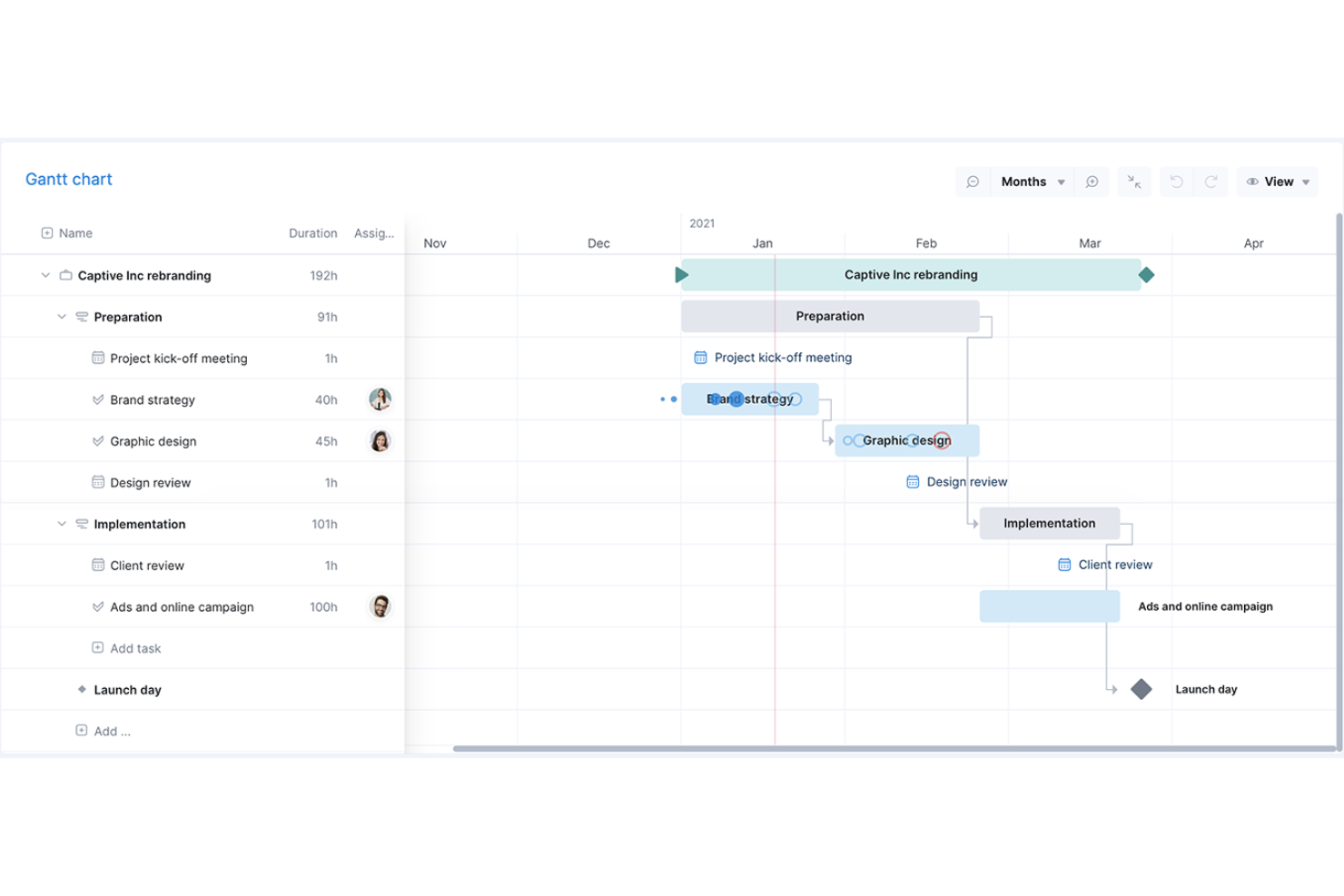
Scoro è un software di gestione del lavoro che si rivolge ai servizi professionali offrendo una suite di strumenti per gestire progetti, finanze e risorse all'interno di un unico sistema.
Perché ho scelto Scoro: La piattaforma dispone di una funzionalità di diagramma di Gantt agile che facilita una migliore gestione delle risorse per i marketer. È possibile avere una visione in tempo reale dei carichi di lavoro programmati di tutti, così da vedere quando il tuo team è disponibile per determinati progetti o attività. Questa funzione consente anche di risparmiare tempo perché si aggiorna automaticamente quando le attività sono collegate, aiutandoti a ridurre gli sforzi necessari per gli aggiornamenti manuali.
Inoltre, mi piace che Scoro offra capacità di gestione dei progetti end-to-end, così che i team di marketing possano unificare vendite, consegna dei progetti e fatturazione in un'unica piattaforma, fornendo visibilità e controllo completi sulla capacità delle risorse e sulla redditività.
Funzionalità e integrazioni di spicco di Scoro
Funzionalità includono reportistica e analisi per le operazioni dell'agenzia nel suo complesso (e non solo per singolo progetto), fornendo informazioni su risorse, avanzamento e risultati complessivi. Lo strumento include anche una funzionalità che invia automaticamente le fatture per i contratti a canone, aiutando la tua agenzia a ricevere i pagamenti più rapidamente e a rimanere redditizia.
Le integrazioni includono Xero, QuickBooks, Sage Intacct, Microsoft Exchange, Expensify, Stripe, Google Calendar, Jira, Slack, Asana, Dropbox, PayPal e altro ancora.
New Product Updates from Scoro

Scoro Adds Time Mobile App and ELI Improvements
Scoro adds the Scoro Time mobile app for iOS/Android to track time anywhere and expands ELI with attachments, smarter filtering, and trigger-based actions. For more information, visit Scoro's official site.

Ideale per la redditività delle agenzie

Productive è un software di gestione del lavoro completo, ideale per agenzie e aziende di servizi professionali. Riunisce in un'unica soluzione la gestione dei progetti, la pianificazione delle risorse, il monitoraggio del tempo, la gestione del budget e la collaborazione tra i membri del team.
Perché ho scelto Productive: Puoi distribuire il lavoro in modo efficace tra il tuo team assegnando le attività nel contesto del carico di lavoro di ciascuno. Da qui, puoi monitorare chi sta lavorando su quali attività e progetti. I membri del team possono registrare il loro tempo direttamente sulla piattaforma, aiutandoti a tenere traccia delle ore destinate a clienti, progetti e compiti diversi. Questo consente una fatturazione più accurata.
Il software offre un sistema di gestione delle attività completo che consente agli utenti di assegnare compiti a membri specifici del team, impostare delle scadenze e monitorare l'avanzamento dei lavori fino al completamento. Gli utenti possono anche impostare attività ricorrenti, così da non doverle ricreare ogni volta manualmente. È inoltre possibile caricare documenti sulla piattaforma oppure collegarli da altri servizi di archiviazione cloud, associandoli a determinati progetti o attività. Inoltre, Productive dispone di solidi strumenti per il monitoraggio della redditività, così puoi allineare le risorse della tua agenzia ai progetti che generano il maggior impatto sul fatturato.
Caratteristiche e integrazioni principali di Productive
Le funzionalità comprendono visualizzazioni a elenco, tabella, calendario, timeline e board; attività ricorrenti; stime di tempo; monitoraggio delle ore; budgeting; gestione documentale; pianificazione delle risorse; segnaposto per lavori futuri; e fatturazione ai clienti.
Le integrazioni includono Dropbox, Exact, Google Workplace, Jira, Harvest Economic, Outlook, Microsoft Calendar, Slack, QuickBooks e Xero. È disponibile anche un'integrazione con Zapier, che consente di sbloccare ulteriori integrazioni con un abbonamento a pagamento.
New Product Updates from Productive
Productive Adds Voice Dictation, Slack Connector, Proposals, and Overtime
Productive adds voice dictation, a Slack Connector, proposal controls, and overtime tracking. These updates support faster AI interactions, client proposals, and time management. For more information, visit Productive’s official site.

Wrike
Il migliore per bilanciare il carico di lavoro
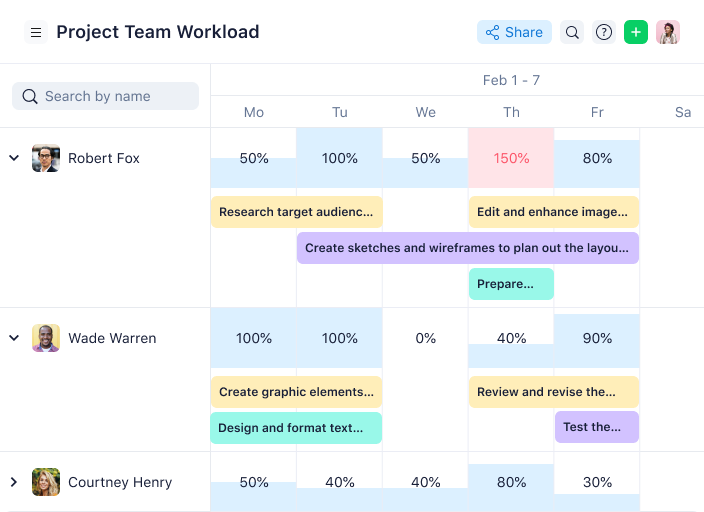
Wrike è un software di project management per il marketing che offre visibilità su tutto il lavoro del team, così puoi visualizzare la capacità a colpo d'occhio e bilanciare le risorse in modo appropriato.
Perché ho scelto Wrike: È altamente configurabile e consente agli utenti di personalizzare flussi di lavoro, dashboard, report e moduli di richiesta in base alle loro esigenze specifiche. Le potenti funzionalità di gestione delle risorse di Wrike permettono una consegna costante nei tempi prestabiliti, assicurano l'equilibrio del carico di lavoro e aiutano il tuo team a rispettare le scadenze e il budget.
L'interfaccia intuitiva di Wrike consente agli utenti di lavorare nel modo che preferiscono, sia cambiando tra le board Kanban, utilizzando i diagrammi di Gantt interattivi con drag-and-drop, sia avviando le viste di carico di lavoro per visualizzare le priorità. Wrike offre monitoraggio di tempi e spese, gestione intuitiva di task e progetti, revisione visiva, template preimpostati per le attività di marketing più comuni, reporting, nonché gestione e allocazione delle risorse.
Wrike presenta una navigazione intuitiva con Spazi, cartelle e task distinti. Puoi passare facilmente dalla schermata principale ai timesheet, dashboard, calendari, report e al flusso di attività. Wrike dispone anche di un centro assistenza dedicato con formazione interattiva, video e una pratica guida di 'Primi Passi'.
Funzionalità e integrazioni di punta di Wrike
Funzionalità includono segnaposto per ruoli lavorativi, informazioni visive sull'allocazione, facile riassegnazione di task, monitoraggio del tempo e gestione del budget.
Integrazioni includono oltre 400 integrazioni native preimpostate, tra cui i più popolari software di gestione file di Microsoft, Google e Dropbox, insieme a software di vendita e marketing come Salesforce e Marketo.
New Product Updates from Wrike

Wrike Adds Quick Search to Table View
Wrike adds Quick Search to Table View with full-table search across titles, descriptions, and fields, plus highlighted matches. This helps users find tasks faster in large tables. For more information, visit Wrike’s official site.

La migliore gestione risorse e workflow potenziata dall'AI
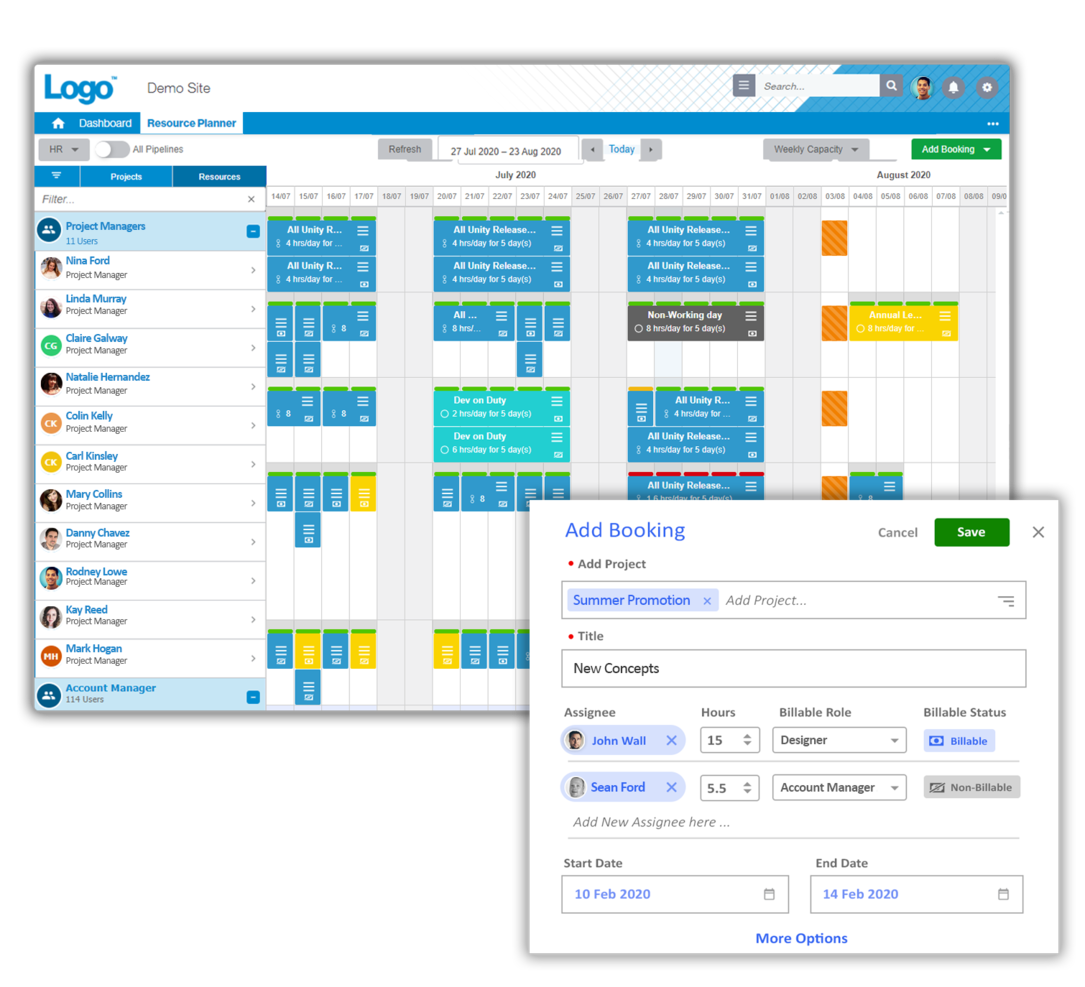
Screendragon è una piattaforma per le operazioni di marketing scelta da marchi e agenzie globali come Kellogg’s, BP, il Comitato Olimpico Internazionale e McCann World Group. È progettata per i team di marketing in crescita e offre funzionalità avanzate di gestione delle risorse, tra cui previsione delle risorse, monitoraggio dell’utilizzo in tempo reale, heatmap della capacità, raccomandazioni AI per il personale e molto altro.
Include funzionalità per la gestione di progetti, gestione delle risorse, gestione del budget, automazione dei workflow, e monitoraggio di tempi e spese. Screendragon è personalizzabile, consentendoti di controllare l’esperienza utente con il tuo brand, moduli intelligenti personalizzati, dashboard personalizzati, reportistica su misura e livelli avanzati di permessi.
Le funzionalità di gestione delle attività di Screendragon includono bacheche Kanban visuali, diagrammi di Gantt interattivi e visualizzazione a elenco disponibili come opzioni d’interfaccia.
Screendragon offre integrazioni profonde con i principali sistemi ERP come SAP e PeopleSoft. Permette migliaia di integrazioni con app popolari attraverso Zapier, tra cui Jira, Trello, Slack, Box, Google Drive, Office 365 e Microsoft Dynamics. Dispone inoltre di un’API aperta per consentire integrazioni personalizzate con qualsiasi sistema.
Screendragon parte da $20/utente/mese e una demo gratuita è disponibile.
New Product Updates from Screendragon
Screendragon Unveils New AI Hub
Screendragon introduced AI Hub, a new capability that lets teams build and manage AI agents directly within workflows. The update helps marketing teams automate tasks, maintain governance controls, and scale AI-driven operations more efficiently. For more information, visit Screendragon's official site.

Kantata
Ideale per il resource management incentrato sulle persone
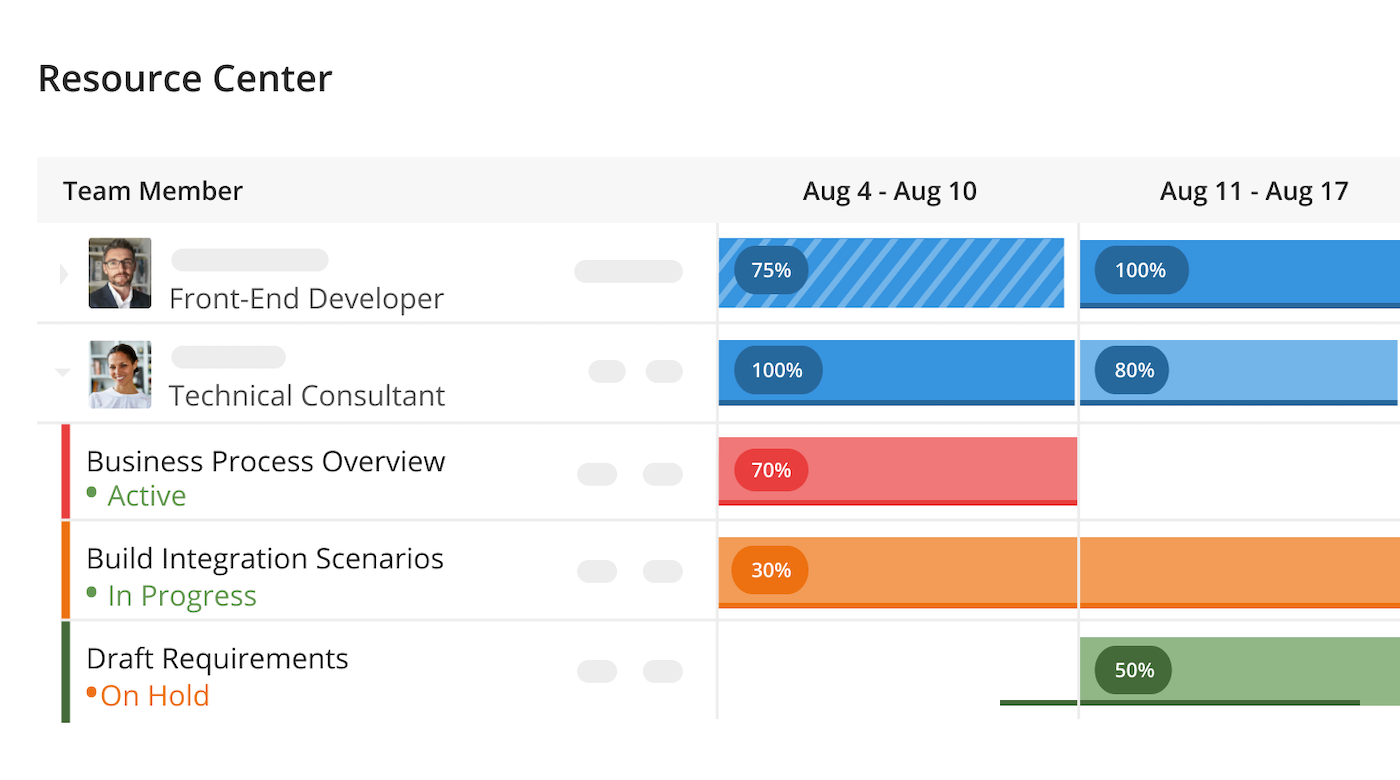
Kantata è una piattaforma di gestione delle risorse creata per i servizi professionali, inclusi team e agenzie di marketing. Ti aiuta a bilanciare i carichi di lavoro, assegnare le persone giuste alle campagne giuste e monitorare la redditività in tempo reale. Unificando progetti, risorse e aspetti finanziari, assicura che il tuo team garantisca risultati costanti senza rischiare il burnout.
Perché ho scelto Kantata: Kantata adotta un approccio incentrato sulle persone nella pianificazione delle risorse, particolarmente prezioso negli ambienti di marketing dinamici. Gli strumenti di previsione e capacità ti permettono di vedere quando designer, copywriter e strategist rischiano il sovraccarico, mentre l’assegnazione basata sulle competenze garantisce ai progetti il giusto mix di talenti. Questo riduce i colli di bottiglia e mantiene fluida la consegna delle campagne, anche su più clienti contemporaneamente.
Oltre allo staffing, Kantata offre una visione più approfondita su come le risorse influenzano i risultati. Gli strumenti BI integrati consentono di misurare fianco a fianco utilizzo, redditività e soddisfazione dei clienti, mentre le funzionalità contabili come la determinazione dei costi di progetto e la fatturazione collegano direttamente le decisioni sulle risorse alle prestazioni finanziarie.
Funzionalità e integrazioni distintive di Kantata
Funzionalità includono cruscotti dinamici che visualizzano lo stato delle campagne, tracciamento di tempi e spese distinguendo tra fatturabile e non fatturabile, e bacheche attività che individuano rischi come scadenze mancate o dipendenze non allineate. Kantata supporta inoltre la collaborazione con feed di attività e notifiche in-app, mantenendo informati sia i team interni che i clienti.
Le integrazioni includono BambooHR, Hubstaff, Desktop.com, Gigasheet, Salesforce, Microsoft 365, Slack, Hubspot CRM, Jira, Time Doctor, QuickBooks e Google Drive.
New Product Updates from Kantata

Kantata Adds Access Group Change History
Kantata adds Access Groups History, letting account administrators track changes to group details, membership, and permissions in Recent History. The update also makes these events available through the Subscribed Events API for broader monitoring. For more information, visit Kantata’s official site.
 .
.
Ideale per utenti alle prime armi
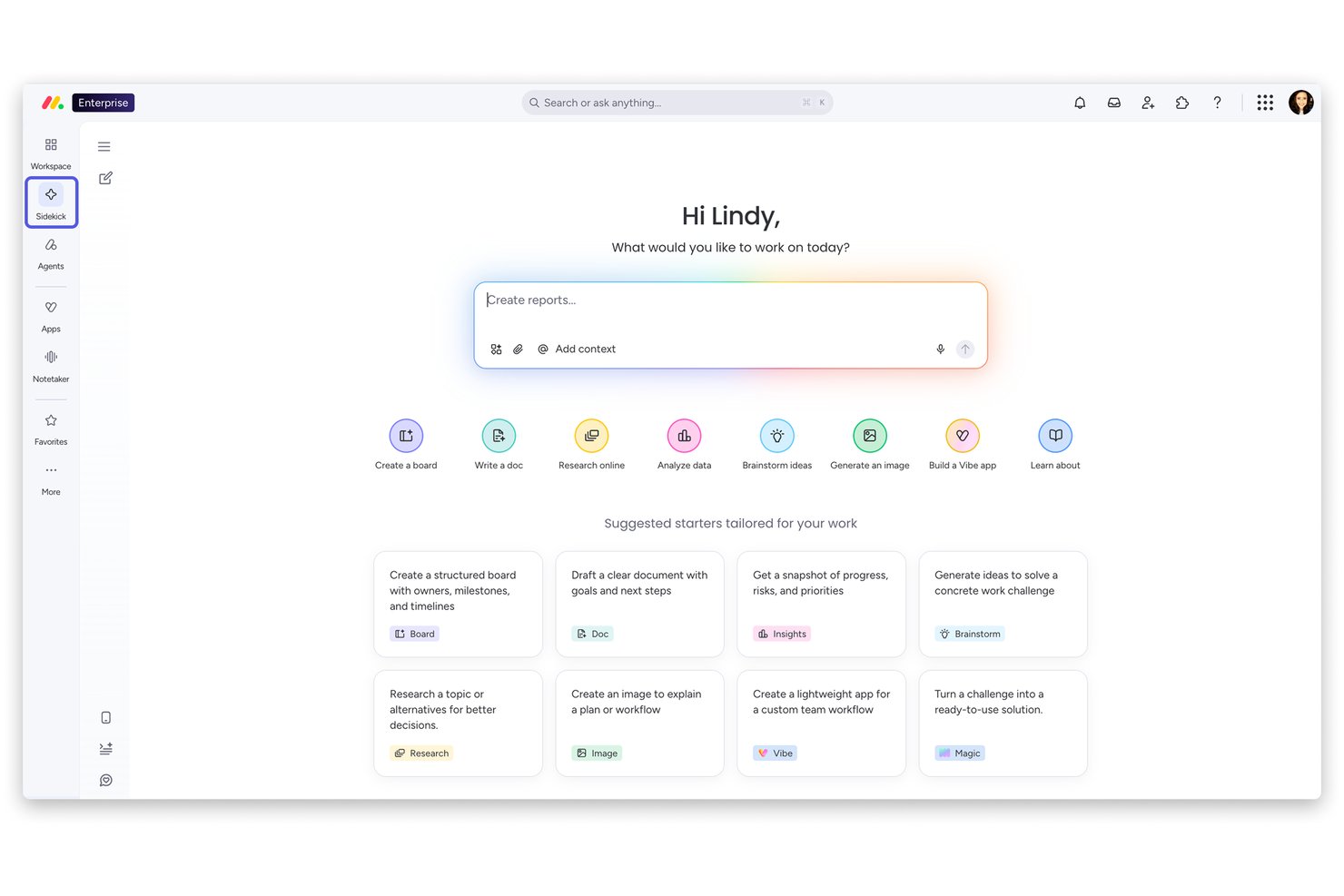
monday AI Workspace è una piattaforma di gestione del lavoro che unisce la pianificazione dei progetti di marketing, il monitoraggio delle campagne, la gestione delle risorse e l'automazione dei flussi di lavoro grazie all'intelligenza artificiale tra i team.
Per chi è ideale monday AI Workspace?
È una scelta naturale per team di marketing di piccole e medie dimensioni che sono alle prime armi con la gestione strutturata dei progetti e hanno bisogno di una piattaforma che possano adottare rapidamente senza una lunga formazione iniziale.
Perché ho scelto monday AI Workspace
Ho scelto monday AI Workspace tra i migliori perché i suoi oltre 200 modelli predefiniti permettono a un team marketing di passare dall'iscrizione a una board attiva in meno di un'ora. Mi piace particolarmente come l'AI Sidekick aiuti i nuovi utenti a costruire flussi di lavoro rispondendo a semplici richieste in linguaggio naturale, eliminando così la barriera dell'impostazione iniziale. Le visualizzazioni Gantt e timeline risultano chiare sin dal primo giorno, consentendo ai nuovi utenti di monitorare le dipendenze delle campagne anche senza formazione pregressa.
Funzionalità chiave di monday AI Workspace
- Integrazioni cross-platform: Si connette con strumenti di marketing come Mailchimp, HubSpot, Adobe Creative Cloud e Canva per una fluida condivisione dei dati.
- Gestione automatizzata del carico di lavoro: Assegna le risorse e monitora la capacità dei team tramite board e dashboard dedicate al carico di lavoro.
- Dashboard per le performance delle campagne: Offre dashboard di progetto personalizzabili per visualizzare lo stato delle campagne, i parametri di performance e le tempistiche in un colpo d'occhio.
- Strumenti di pianificazione multi-vista: Include viste Kanban, Gantt, timeline, calendario e board personalizzate per un monitoraggio flessibile dei progetti.
Integrazioni monday AI Workspace
Pros and Cons
Pros:
- I modelli predefiniti di campagne marketing velocizzano l'attivazione
- AI Sidekick genera flussi di lavoro da richieste in linguaggio naturale
- Le board visive del carico di lavoro semplificano l'allocazione delle risorse tra i team
Cons:
- La gestione del budget non prevede fatture e gestione ordini d'acquisto (PO)
- Nessuna gestione integrata degli asset digitali o DAM
New Product Updates from monday AI Workspace
monday AI Workspace Adds Human Approval Routing
monday AI Workspace adds a human-in-the-loop approval block to AI Workflows, sending approval requests and routing workflow paths based on responses. For more information, visit monday AI Workspace's official site.

Miro
Ideale per la collaborazione creativa
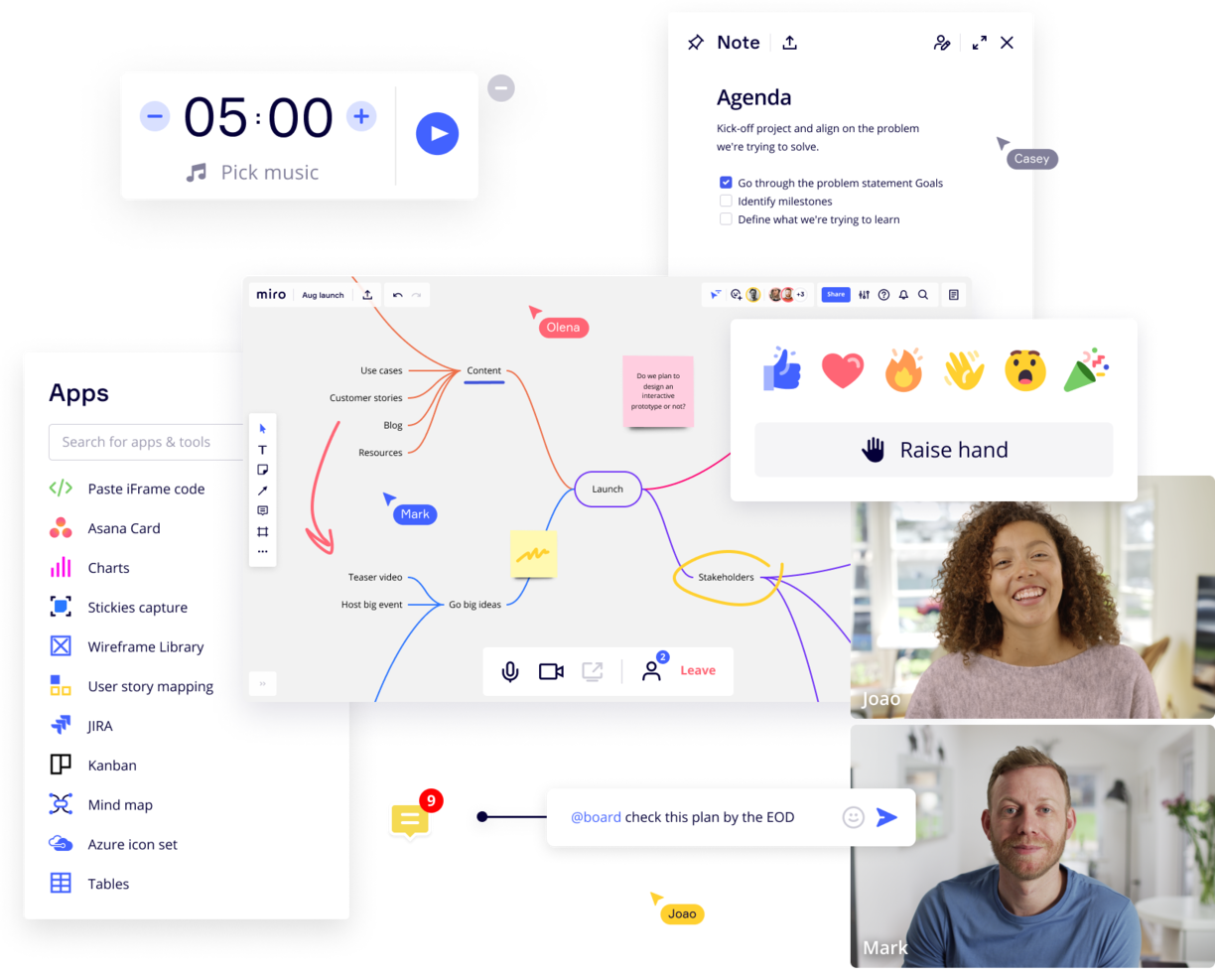
Miro è una lavagna online collaborativa con oltre 1.000 modelli, tra cui mappe mentali, bacheche Kanban, diagrammi di Gantt, wireframe di prodotti, bacheche per la ricerca e diagrammi di flusso.
Perché ho scelto Miro: Questa piattaforma è una risorsa eccellente per le sessioni di brainstorming con il team creativo, soprattutto se il team lavora in gran parte da remoto. La sua tela infinita e la vasta gamma di modelli offrono molteplici opzioni per presentare le informazioni ai team distribuiti. La piattaforma supporta inoltre l'espressione delle idee in molteplici formati, tra cui testo, immagini e video.
Inoltre, funzionalità come Miro Assist aiutano a generare idee a partire da prompt di base, mentre TalkTrack consente la spiegazione asincrona delle mappe dei processi. Inoltre, le funzionalità di collaborazione asincrona facilitano il contributo continuo dei membri del team, grazie a commenti e reazioni.
Funzionalità e integrazioni principali di Miro
Le funzionalità includono funzionalità di intelligenza artificiale che puoi utilizzare per attività come il raggruppamento delle note adesive e l'elaborazione di idee abbozzate. Lo strumento dispone inoltre di un'ampia raccolta di modelli per casi d'uso e traguardi specifici dei progetti, come tempistiche dei progetti, riunioni di avvio e pianificazione dei progetti.
Le integrazioni comprendono un'intera suite di strumenti, tra cui Zoom, Figma, Asana, Monday.com, Confluence, Microsoft Teams, Jira, Slack, Google Drive, Box, Airtable, Notion, Azure e Webex. Alcune integrazioni sono disponibili solo nei piani a pagamento.
New Product Updates from Miro
Miro Adds Japan Data Residency for Enterprise Customers
Miro has introduced Japan data residency for enterprise customers, offering in-region storage for production data, backups, and metadata, plus in-region compute infrastructure. For more information, visit Miro's official site.
Kintone
Ideale per creare app di marketing personalizzate
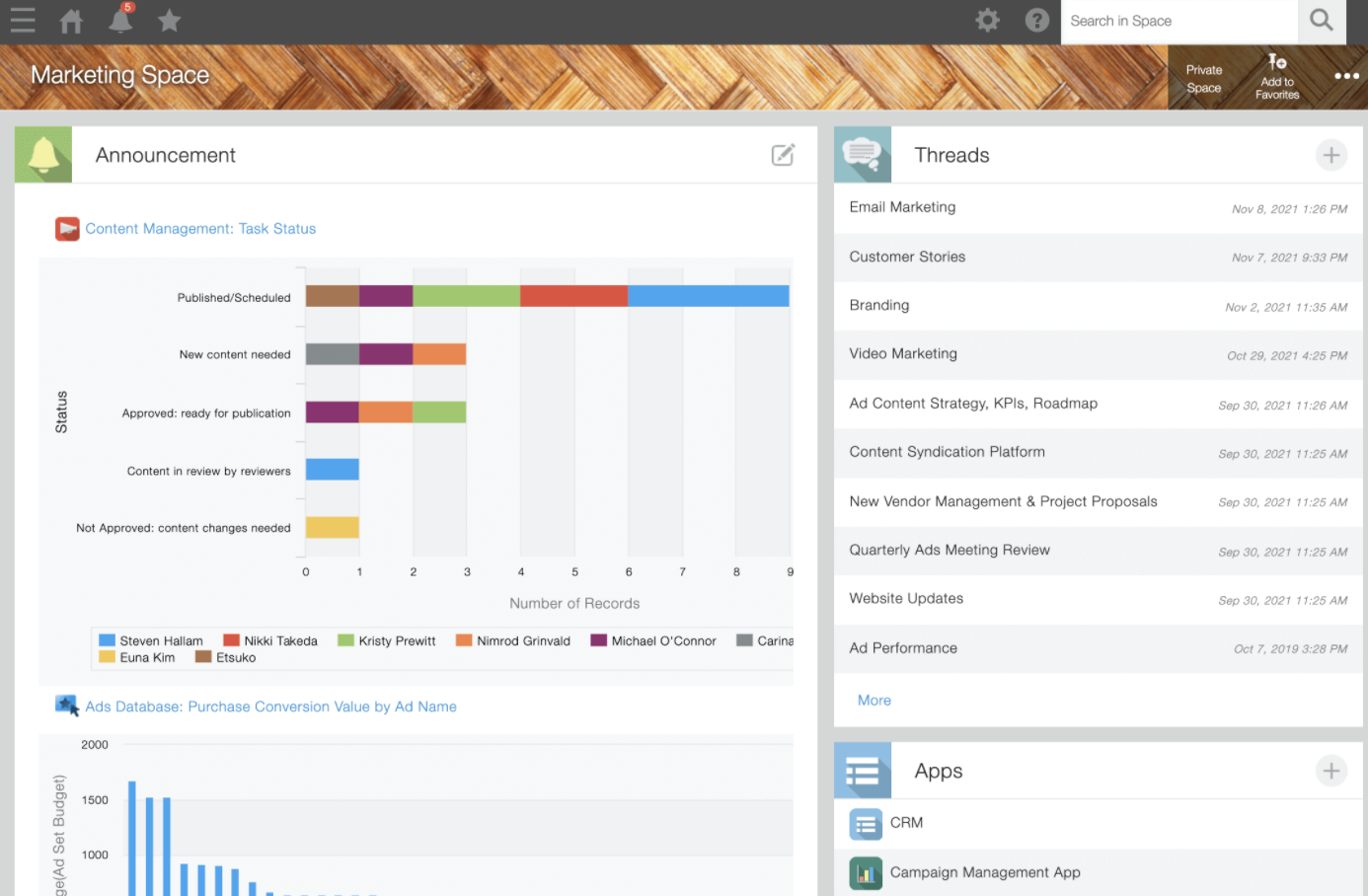
Kintone è una piattaforma personalizzabile di gestione delle risorse di marketing utilizzata da team di Volvo Trucks North America, Japan Airlines, Shiseido e oltre 23.000 organizzazioni in tutto il mondo. Il loro approccio unico alla gestione del marketing ti consente di creare una vasta gamma di 'app' personalizzabili, partendo da zero, usando modelli o dai tuoi fogli di calcolo esistenti, per la gestione dei dati, dei processi aziendali e dei flussi di lavoro. Le app di Kintone possono essere personalizzate per la gestione dei progetti, CRM, database di partner, report di spese, liste di cose da fare condivise, gestione di eventi, feedback sui prodotti e molto altro ancora.
Perché ho scelto Kintone: Ti permette di creare app per il monitoraggio dei progetti senza bisogno di codice, trascinando e rilasciando gli elementi che vuoi vedere nella pagina: campi di testo ricco, campi data, menu a tendina, campi numerici con calcoli integrati, spazi per allegati, menu di selezione utente o gruppo, dati correlati da altre app, tabelle e molto altro.
Una volta che hai creato l'app che desideri, puoi utilizzarla per gestire più facilmente qualsiasi dato e attività che tu e il tuo team dovete monitorare. E con notifiche e promemoria personalizzati, oltre a impostazioni dettagliate dei permessi, il tuo strumento di collaborazione può avere l'aspetto e funzionare esattamente come preferisci.
Le funzionalità di comunicazione integrate di Kintone consentono inoltre ai team di discutere i progetti direttamente nell'app e in thread basati su argomenti o progetti. Gli 'spazi' dedicati organizzano tutto ciò di cui il tuo team ha bisogno per il progetto, inclusi app di monitoraggio delle attività e thread di conversazione ricercabili.
Caratteristiche & integrazioni di Kintone
Caratteristiche includono una funzionalità di 'Integrazione app a livello di spazio' per creare spazi di progetto dedicati con app personalizzate, tracker di attività e file condivisi. Le sue capacità di automazione dei flussi di lavoro ti consentono inoltre di progettare flussi di lavoro con logiche condizionali, affinché le attività passino facilmente tra i membri del team in base a criteri predefiniti.
Integrazioni includono plugin nativi gratuiti realizzati dal team di Kintone, nonché integrazioni con altri strumenti come Slack, Gmail, Google Calendar, Outlook, Tableau, Dropbox, Salesforce, HubSpot, Eventbrite, WordPress, QuickBooks, MailChimp e molti altri tramite un piano a pagamento con Zapier o via integrazioni API.

Ideale per la gestione finanziaria basata su cloud
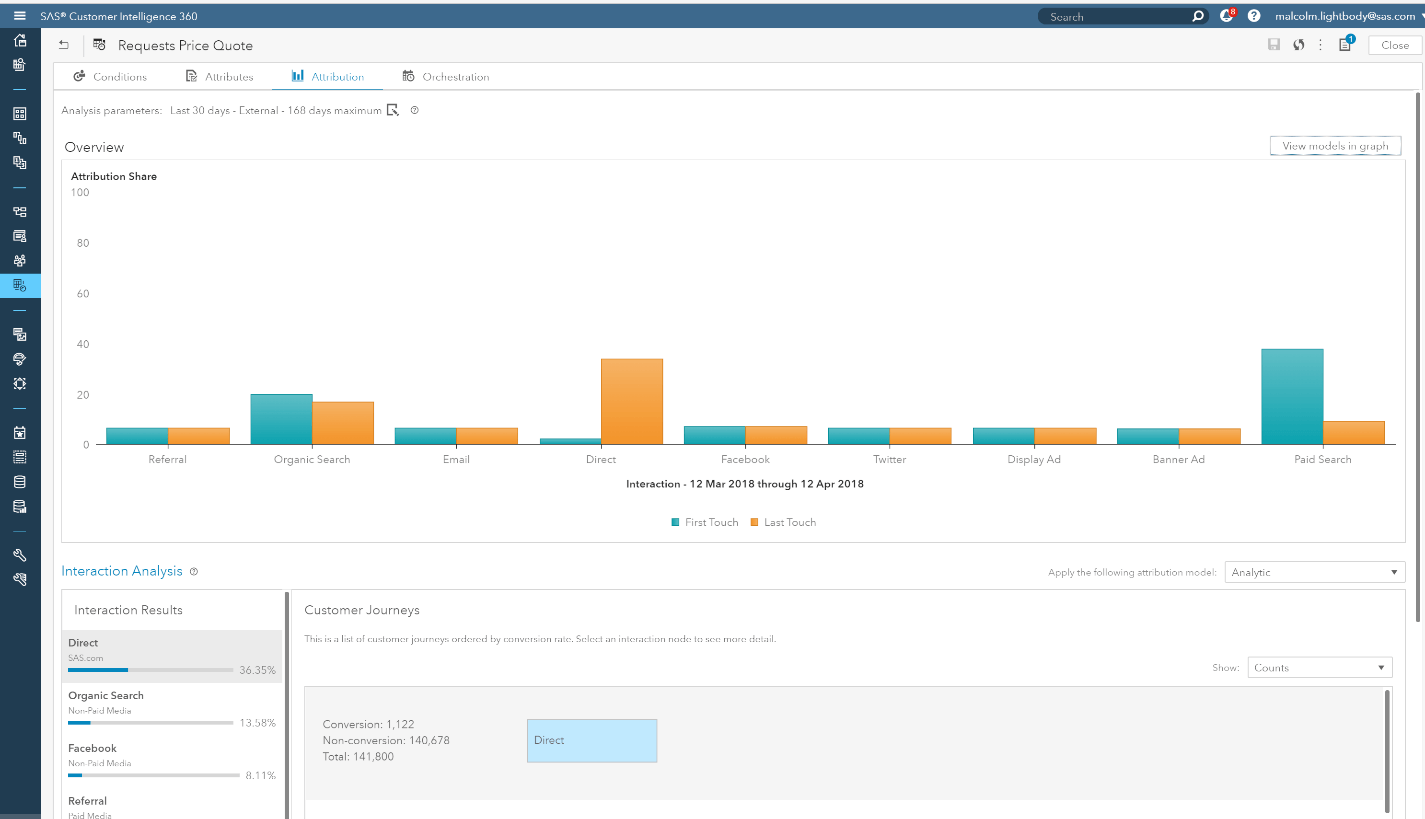
Acumatica si distingue per le organizzazioni che necessitano di una gestione finanziaria basata su cloud strettamente collegata a una pianificazione delle risorse più ampia. È una scelta ideale per responsabili finanziari e team operativi in settori come distribuzione, produzione ed edilizia che desiderano una visibilità in tempo reale sui costi, sui budget e sulle risorse dei progetti. Grazie alla sua piattaforma modulare, Acumatica aiuta a unificare dati finanziari, inventario e progetti in un unico posto.
Per chi è Acumatica?
Acumatica è adatto per responsabili finanziari e operativi di aziende di medie dimensioni nei settori distribuzione, produzione e servizi. Supporta le organizzazioni che cercano una gestione finanziaria basata su cloud collegata alle operazioni aziendali più ampie.
Perché ho scelto Acumatica
Ciò che distingue Acumatica è l’attenzione alla gestione finanziaria cloud progettata per scalare con le organizzazioni in crescita. Ho scelto Acumatica perché la sua suite di gestione finanziaria collega contabilità, budgeting e monitoraggio dei costi dei progetti direttamente ai flussi di lavoro di pianificazione delle risorse. I dashboard in tempo reale della piattaforma ti permettono di monitorare spese, impegni e utilizzo delle risorse su più progetti o unità aziendali. Per i team che devono gestire finanze complesse insieme alle risorse aziendali, l’approccio unificato di Acumatica è particolarmente adatto.
Funzionalità principali di Acumatica
Altre funzionalità che rendono Acumatica prezioso per la gestione delle risorse aziendali includono:
- Dashboard basati sui ruoli: Configura dashboard per visualizzare KPI e dati rilevanti per ogni utente o dipartimento.
- Contabilità di progetto: Monitora nel dettaglio budget, spese e fatturazione di ogni iniziativa.
- Gestione dell’inventario: Monitora i livelli di stock, automatizza il rifornimento e gestisci più magazzini.
- Automazione dei flussi di lavoro: Configura processi di approvazione personalizzati e automatizza compiti finanziari o operativi di routine.
Integrazioni di Acumatica
Le integrazioni includono Salesforce, Shopify, Adobe Document Cloud, Avalara e Amazon Marketplace.
Pros and Cons
Pros:
- Eccellenti articoli di supporto sempre aggiornati.
- Facile da navigare.
- Piattaforma flessibile e basata su cloud.
Cons:
- Difficile trovare dati specifici.
- Creare report è complesso.

Meisterplan
Ideale per la pianificazione della capacità
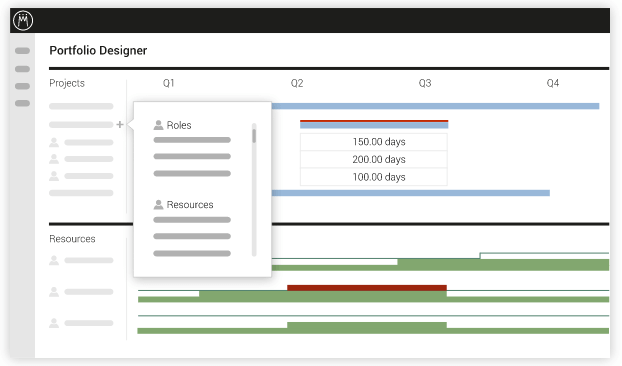
Meisterplan assiste in tutti gli aspetti della gestione del portafoglio progetti e della pianificazione della capacità. I suoi strumenti permettono di gestire efficacemente il presente e pianificare il futuro. Oltre a ciò, sono disponibili funzionalità avanzate—come un monitor delle risorse—che aiutano a comprendere l’impatto delle modifiche sulle operazioni di marketing.
Meisterplan costa a partire da $719/mese e offre una prova gratuita.
Altri software per la gestione delle risorse di marketing
Ecco alcune altre opzioni che non sono rientrate nella mia lista dei 10 migliori, ma che vale comunque la pena prendere in considerazione se vuoi ampliare la tua ricerca.\r\n\u003cul\u003e\r\n \t\u003cli\u003eMa quando \u003ca href=\u0022https://thedigitalprojectmanager.com/projects/how-to-choose-resource-management-software/\u0022\u003escegli un’applicazione software\u003c/a\u003e, ci sono persone dedicate a offrirti la migliore esperienza cliente possibile.\u003c/li\u003e\r\n\u003c/ul\u003e
- Bonsai Agency Software
Ideale per agenzie
- Parallax
Ideale per l'intelligenza predittiva delle risorse
- Allocadia
Ideale per i responsabili di budget
- Ravetree
Ideale per CRM integrato
- MARMIND
Ideale per la pianificazione del budget marketing
- Acquia DAM (Widen)
Ideale per la gestione dei contenuti di marketing
- Bynder
Ideale per creare un flusso di lavoro creativo
- Celoxis
Ideale per l’analisi avanzata dei costi di progetto
- Float.com
Ideale per la pianificazione delle risorse
- Hub Planner by Milient
Miglior strumento di reportistica personalizzabile


Recensioni correlate dei software per la gestione dei progetti
Se non hai ancora trovato quello che cerchi, dai un'occhiata a questi altri strumenti correlati che abbiamo testato e valutato:
- Software per la gestione dei progetti
- Software per la gestione delle risorse
- Software per la gestione delle attività
- Strumenti di collaborazione
- Software per il monitoraggio dei progetti
- Software per la gestione delle risorse aziendali
- Software per la gestione dei progetti di marketing
- Alternative a Resource Guru
- Software per la gestione delle risorse multimediali
Come Valuto i Software di Gestione delle Risorse di Marketing
Divido la mia valutazione in criteri di base che ogni strumento deve soddisfare—come la pianificazione delle campagne e la gestione delle risorse digitali—e in elementi differenzianti che distinguono le migliori opzioni per le esigenze specifiche del tuo team.
Funzionalità Principali (Requisiti Fondamentali per Questo Elenco)
Quando seleziono gli strumenti per il mio elenco, valuto ciascuno su una scala da 0 (non offre la funzionalità) a 5 (eccelle in quest'area) per ogni funzionalità principale elencata sotto. Poi, calcolo il punteggio totale dello strumento come percentuale. Ogni strumento deve raggiungere un punteggio minimo totale del 65% per essere preso in considerazione per l'inclusione.
- Pianificazione di Progetti di Marketing: Cerco strutture di progetto a livello di campagna con tempistiche, dipendenze e modelli pronti all'uso—come avviare un lancio di prodotto con deliverable collegati tra team di contenuto, design e media a pagamento.
- Gestione delle Risorse Digitali: Qui è fondamentale una libreria centralizzata e ricercabile di asset, con etichettatura tramite metadati, cronologia delle versioni e permessi, così che i team possano trovare rapidamente il logo giusto o un creativo approvato senza cercare tra molte cartelle condivise.
- Workflow Creativo & Revisione: Valuto come ogni strumento gestisce i cicli di revisione—se gli stakeholder possono annotare direttamente su una prova grafica, instradare le approvazioni attraverso più fasi e confrontare le versioni affiancate.
- Monitoraggio Budget & Spese: I team di marketing devono monitorare la spesa pianificata rispetto a quella effettiva a livello di campagna o progetto, quindi verifico se lo strumento permette di allocare budget, registrare i costi e segnalare gli sforamenti prima che diventino un problema.
- Gestione delle Risorse & della Capacità: Controllo se la piattaforma offre visibilità sul carico di lavoro del team—vedendo chi è al limite, chi ha disponibilità e se è possibile pianificare gli incarichi in base a disponibilità e competenze.
- Calendario di Marketing & Reportistica: Un calendario di marketing unificato che mappa campagne, lanci e contenuti su tutti i canali è fondamentale, insieme a dashboard che evidenziano lo stato dei progetti e i dati operativi senza necessità di assemblaggio manuale.
Una volta che ho una lista di strumenti che soddisfano i criteri, considero cosa distingue ciascuna piattaforma.
Fattori Differenzianti (Cosa Distingue i Fornitori)
Ecco come confronto e differenzio i vari fornitori:
Funzionalità Distintive
La gestione delle richieste di ingresso è un elemento altamente differenziante—cerco moduli strutturati di brief creativo con regole di instradamento e monitoraggio SLA, così che i team non siano sommersi da richieste improvvisate. Sono importanti anche i portali per il governo del marchio, soprattutto per le organizzazioni multi-brand dove i team distribuiti hanno bisogno di accesso self-service a template approvati e risorse protette da modifiche. Le funzionalità di automazione basate sull'IA, come etichettatura intelligente degli asset e instradamento dei flussi di lavoro, possono ridurre il lavoro manuale durante cicli di campagne ad alto volume.
Oltre le Funzionalità
Le integrazioni con la martech stack sono una priorità—verifico se una piattaforma si collega nativamente a strumenti come Adobe Creative Cloud, HubSpot o Salesforce, così che i dati delle campagne fluiscano senza passaggi manuali. Anche la scalabilità è importante. Valuto se lo strumento supporta configurazioni multi-brand o multi-regione al crescere dell'organizzazione. La sicurezza completa la mia analisi, incluso il rispetto della conformità SOC 2 e la gestione dei diritti digitali per le risorse creative con necessità di tracciamento dell'utilizzo.
Come scegliere un software per la gestione delle risorse di marketing
Mentre selezioni, provi e scegli un software per la gestione delle risorse di marketing, considera quanto segue:
- Quale problema stai cercando di risolvere? Individua la lacuna nelle funzionalità di gestione delle risorse di marketing che stai cercando di colmare, per chiarire quali caratteristiche e funzionalità il software deve offrire.
- Chi dovrà utilizzarlo? Per valutare costi e requisiti, considera chi utilizzerà il software e di quante licenze avrai bisogno. Valuta se l'accesso sarà necessario solo per i responsabili di progetto o per l'intera organizzazione. Una volta chiarito questo aspetto, considera se dare priorità alla facilità d'uso per tutti oppure alla velocità per gli utenti più esperti del software.
- Con quali altri strumenti dovrà funzionare? Chiarisci quali strumenti stai sostituendo, quali rimarranno in uso e con quali strumenti dovrai integrarti, come software di contabilità, CRM, app per la produttività o software per le risorse umane. Decidi se gli strumenti dovranno integrarsi tra loro oppure se puoi sostituire più strumenti con un unico strumento consolidato per la gestione delle risorse di marketing.
- Quali risultati sono importanti? Considera il risultato che il software deve offrire per essere considerato un successo, quale capacità vuoi acquisire, cosa vuoi migliorare e come misurerai il successo. Ad esempio, un risultato potrebbe essere la possibilità di ottenere una maggiore visibilità sulle prestazioni.
- Come funzionerebbe all'interno della tua organizzazione? Considera la scelta del software insieme ai tuoi flussi di lavoro e alla tua metodologia di distribuzione. Valuta cosa funziona bene e quali sono gli aspetti che stanno causando problemi. Ogni azienda è diversa: non dare per scontato che, solo perché uno strumento è popolare, funzionerà anche nella tua organizzazione.
Tendenze del software per la gestione delle risorse di marketing nel 2025
Ecco uno sguardo più da vicino alle tendenze attuali che, a mio avviso, continueranno a influenzare in futuro il software MRM e il settore del marketing nel suo complesso.
- Maggiore attenzione all'IA e all'apprendimento automatico: Le analisi basate sull'IA e le funzionalità di apprendimento automatico stanno diventando sempre più diffuse e offrono generalmente informazioni predittive e l'automazione delle attività di routine. Queste tecnologie di gestione delle risorse basate sull'IA aiutano a prevedere le prestazioni delle campagne, automatizzare l'aggiunta di etichette ai contenuti e personalizzare le attività di marketing su larga scala.
- Funzionalità avanzate per la collaborazione e il lavoro da remoto: Poiché il lavoro da remoto rimane una realtà consolidata in molte organizzazioni, gli strumenti MRM stanno introducendo funzionalità migliori per la collaborazione. La modifica in tempo reale, i cicli di riscontro e le integrazioni con gli spazi di lavoro virtuali facilitano il lavoro di squadra senza interruzioni, indipendentemente dalle distanze geografiche.
- Personalizzazione dei contenuti su larga scala: Gli strumenti MRM utilizzano l'IA per offrire funzionalità avanzate di personalizzazione dei contenuti. Ciò include la creazione di contenuti dinamici che si adattano in tempo reale in base al comportamento e alle preferenze del pubblico, consentendo ai professionisti del marketing di creare campagne altamente personalizzate ed efficaci.
- Interfacce utente vocali e conversazionali: L'integrazione di interfacce vocali e conversazionali nelle piattaforme MRM sta prendendo piede. Ciò consente agli utenti di interagire con il software utilizzando l'elaborazione del linguaggio naturale (NLP), rendendo gli strumenti più accessibili e accelerando l'esecuzione delle attività tramite comandi vocali.
- Blockchain per trasparenza ed efficienza: Gli strumenti software stanno esplorando la tecnologia blockchain e il suo potenziale per apportare trasparenza ed efficienza alle operazioni di marketing. Stanno emergendo funzionalità come il tracciamento sicuro e trasparente delle risorse digitali e i contratti intelligenti per la gestione dei rapporti con i fornitori, offrendo nuovi modi per semplificare i flussi di lavoro e rafforzare la fiducia.
Che cos'è il software per la gestione delle risorse di marketing?
Il software per la gestione delle risorse di marketing (MRM) è uno strumento che aiuta le aziende a pianificare, eseguire e monitorare le proprie attività di marketing. Organizza e semplifica i processi di marketing, gestisce le risorse digitali di marketing e allinea le strategie di marketing agli obiettivi aziendali.
Questo software aiuta nella definizione del budget, nella pianificazione e nell'allocazione delle risorse, assicurando che le attività di marketing siano efficienti ed efficaci. È utile per mantenere coordinati i gruppi di marketing e monitorare le prestazioni delle campagne di marketing con gli strumenti di gestione delle risorse dei clienti.
Funzionalità del software per la gestione delle risorse di marketing
Di seguito illustro alcune delle funzionalità principali da cercare nella scelta di una piattaforma MRM.
- Gestione centralizzata delle risorse: questa funzionalità garantisce che tutte le risorse di marketing siano archiviate in un'unica posizione accessibile. Elimina il tempo sprecato nella ricerca di file tra sistemi diversi, migliorando la produttività.
- Automazione dei flussi di lavoro: automatizzando le attività ripetitive, questa funzionalità fa risparmiare tempo prezioso e riduce la possibilità di errori umani, consentendo ai team di concentrarsi su iniziative più strategiche.
- Strumenti di collaborazione: gli strumenti di collaborazione integrati nel software MRM consentono al team di comunicare e lavorare insieme in modo efficace, un aspetto fondamentale per allineare le attività di marketing ed evitare i silos.
- Monitoraggio e gestione del budget: consente di tenere sotto stretto controllo la spesa di marketing rispetto al budget e contribuisce a garantire un utilizzo efficiente delle risorse finanziarie, così da massimizzare il ROI.
- Analisi delle prestazioni: grazie alle informazioni sulle prestazioni delle campagne di marketing, è possibile modificare le strategie in tempo reale per ottenere risultati migliori e fare delle decisioni basate sui dati la norma.
- Conformità alla marca: garantisce che tutti i materiali di marketing siano coerenti con le linee guida della marca, consentendo di mantenere un'identità di marca uniforme su tutti i canali e punti di contatto.
- Dashboard personalizzabili: offrono una panoramica personalizzata delle metriche e dei KPI principali, consentendo di valutare rapidamente lo stato di salute delle campagne e prendere decisioni informate.
- Calendario dei contenuti e strumenti di pianificazione: questi strumenti aiutano a pianificare e programmare le attività di marketing, consentendo un approccio strategico alla distribuzione dei contenuti e all'esecuzione delle campagne.
- Allocazione e programmazione delle risorse: gestendo in modo efficiente i carichi di lavoro e le risorse del team, questa funzionalità previene l'esaurimento e garantisce la consegna dei progetti nei tempi previsti.
- Gestione delle risorse digitali (DAM): offre molto più della semplice archiviazione, grazie a funzionalità per etichettare, categorizzare e ottimizzare l'utilizzo delle risorse digitali, migliorandone inoltre la reperibilità e il riutilizzo.
Vantaggi del software di gestione delle risorse di marketing
Ecco cinque vantaggi principali che evidenziano perché il software MRM rappresenta un investimento intelligente per le aziende che desiderano potenziare le proprie attività di marketing:
- Maggiore efficienza: il software MRM semplifica i processi di marketing e riduce il tempo dedicato alle attività manuali. Ciò consente agli utenti di concentrarsi maggiormente sulle attività creative e strategiche, aumentando la produttività complessiva.
- Collaborazione migliorata: grazie alle funzionalità che facilitano la comunicazione e il monitoraggio dei progetti, i membri del team possono lavorare insieme indipendentemente dalla loro posizione. Questo porta a iniziative di marketing meglio coordinate e a tempi di completamento dei progetti più rapidi.
- Migliore gestione del budget: il software fornisce strumenti per monitorare in tempo reale le spese di marketing, consentendo di rispettare i budget e allocare i fondi in modo più efficace. Questa supervisione finanziaria permette di massimizzare il ritorno sull'investimento delle campagne di marketing.
- Messaggi della marca coerenti: il software MRM garantisce che tutti i materiali di marketing siano in linea con le linee guida della marca, consentendo di mantenere un'immagine della marca coerente su tutti i canali. Questa coerenza è fondamentale per costruire fiducia e riconoscibilità presso il pubblico.
- Decisioni basate sui dati: il software MRM consente di misurare con precisione le prestazioni delle campagne e utilizzare queste informazioni per prendere decisioni informate in grado di migliorare le future strategie di marketing.
Costi e prezzi del software di gestione delle risorse di marketing
Ecco una panoramica dei piani, dei prezzi e delle funzionalità tipici che potresti trovare nella scelta del software MRM più adatto alle tue esigenze.
| Tipo di piano | Prezzo medio | Funzionalità comuni |
|---|---|---|
| Gratuito | $0 | Gestione di base delle risorse, utenti limitati, strumenti essenziali di collaborazione, assistenza della comunità |
| Base | $20-$100/user/month | Gestione avanzata delle risorse, automazione dei flussi di lavoro, analisi di base, assistenza via e-mail |
| Professionale | $100-$300/user/month | Gestione completa delle risorse digitali (DAM), analisi complete, accesso API, assistenza 24/7 |
| Aziendale | Prezzo personalizzato | Integrazioni personalizzate, funzionalità di sicurezza avanzate, responsabile dell'account dedicato, spazio di archiviazione illimitato |
Quando selezioni un piano, è importante considerare anche le esigenze immediate e future del tuo team di marketing. Iniziare con un piano base o professionale potrebbe essere più conveniente e dovrebbe offrire la flessibilità necessaria per passare a un piano superiore man mano che il team cresce e richiede funzionalità più avanzate.
Domande frequenti sul software di gestione delle risorse di marketing
Trova risposte alle domande comuni che altre persone pongono su questo argomento.
Come si confrontano i software MRM?
- Funzionalità: Nessuna soluzione ha lo stesso elenco di funzionalità, quindi questo è un buon punto da cui iniziare il confronto. Dalla gestione dei contenuti all’automazione del marketing, esistono funzionalità per ogni team o utente. Assicurati di scegliere una soluzione adatta al tuo caso d’uso.
- Prezzo: Cerchi un flusso di lavoro migliore e un modo per automatizzare le attività, ma solo se la soluzione rientra nel tuo budget. Confronta le soluzioni software tenendo conto del tuo budget mensile e annuale.
- Usabilità: I professionisti del marketing non vogliono passare ore e ore a imparare come utilizzare una nuova applicazione software. Per questo motivo, la maggior parte delle soluzioni è facile da usare, ma ricorda che alcune saranno più adatte a te di altre.
Perché il caricamento delle risorse è importante nei team di marketing?
Il caricamento delle risorse è importante perché consiste nel calcolo del tempo necessario per completare le attività di un progetto in base alla disponibilità delle risorse, ovvero alla quantità di lavoro che il team di progetto è programmato per svolgere.
E, contrariamente a quanto pensa la maggior parte delle persone, non possiamo avere persone con tassi di utilizzo del 100%! Forse quando l’AI prenderà il sopravvento, ma non con gli esseri umani.