

10 migliori alternative a Planview per la pianificazione dei progetti nel 2026

Le migliori alternative a Planview: selezione


Planview è uno strumento avanzato per la gestione del portafoglio progetti che offre funzionalità per la gestione delle risorse, la pianificazione strategica e la gestione del portafoglio. È uno strumento prezioso, ma potresti renderti conto che non è la soluzione più adatta al tuo team.
Per aiutarti a trovare l'alternativa giusta a Planview, ho valutato una serie di opzioni basandomi sulla mia vasta esperienza con i software di gestione dei progetti.
Che cos'è Planview?
Planview è un software per la gestione dei progetti e dei portafogli che offre strumenti per la pianificazione strategica, la gestione dei portafogli e delle risorse e la collaborazione sul lavoro. Supporta i processi decisionali e migliora i risultati aziendali fornendo informazioni sull'allocazione delle risorse, sull'avanzamento dei progetti e sull'ottimizzazione del portafoglio.
Perché fidarsi dei nostri consigli sui software
Il nostro team testa e recensisce software dal 2012. In quanto project manager noi stessi, sappiamo quanto sia difficile — e importante — scegliere il software giusto.
Per questa guida, abbiamo valutato gli strumenti attraverso test pratici e ricerche indipendenti, assegnando un punteggio agli strumenti in base ai nostri criteri di selezione. Ci basiamo inoltre sulle competenze di leader di pensiero del settore e di professionisti attivi nella gestione dei progetti.
Le nostre recensioni riflettono il nostro giudizio editoriale umano, non un discorso di vendita.
Revisori esperti:
Tabella di confronto delle alternative a Planview
Questa tabella di confronto riassume i dettagli dei prezzi delle mie migliori alternative a Planview:
| Tool | Best For | Trial Info | Price | ||
|---|---|---|---|---|---|
| 1 | Ideale per la pianificazione strategica a livello enterprise | Prova gratuita di 14 giorni + demo gratuita disponibile | Da $19.90/utente/mese (fatturazione annuale) | Website | |
| 2 | Ideale per la gestione integrata dei progetti e la collaborazione | Prova gratuita di 15 giorni + piano gratuito + demo gratuita disponibile | A partire da $4/utente/mese (fatturazione annuale) | Website | |
| 3 | Ideale per una pianificazione dettagliata dei progetti e la gestione delle risorse | Prova gratuita di 30 giorni | Da $10/utente/mese (fatturazione annuale) | Website | |
| 4 | Ideale per il monitoraggio collaborativo dell'onboarding dei clienti | Prova gratuita + demo gratuita disponibili | Da $19/utente/mese (fatturazione annuale) | Website | |
| 5 | Ideale per spazio di lavoro tutto-in-uno e gestione delle conoscenze | Piano gratuito disponibile | A partire da $10/utente/mese (fatturato annualmente) | Website | |
| 6 | Ideale per il controllo unificato dei progetti e la revisione dei clienti | Prova gratuita di 14 giorni + demo gratuita disponibile | A partire da $45/mese (fatturato annualmente) | Website | |
| 7 | Ideale per la gestione del lavoro e la reportistica nelle aziende | Demo gratuita disponibile | Prezzo su richiesta | Website | |
| 8 | Ideale per analisi avanzata e automazione dei processi | Demo gratuita + prova gratuita di 14 giorni disponibile | A partire da $8/utente/mese (fatturazione annuale) | Website | |
| 9 | Ideale per semplici bacheche Kanban e monitoraggio delle attività | Piano gratuito disponibile | Da $5/utente/mese (fatturazione annuale) | Website | |
| 10 | Ideale per lo sviluppo Agile e il monitoraggio delle issue | Piano gratuito disponibile | Da $7,91/utente/mese | Website |

Recensioni delle migliori alternative a Planview
Ecco la mia analisi approfondita e una panoramica di ciascuna alternativa a Planview. Ho illustrato in dettaglio i pro e i contro, le funzionalità e i casi d’uso di ogni strumento per guidarti nel processo decisionale.

Scoro
Ideale per la pianificazione strategica a livello enterprise
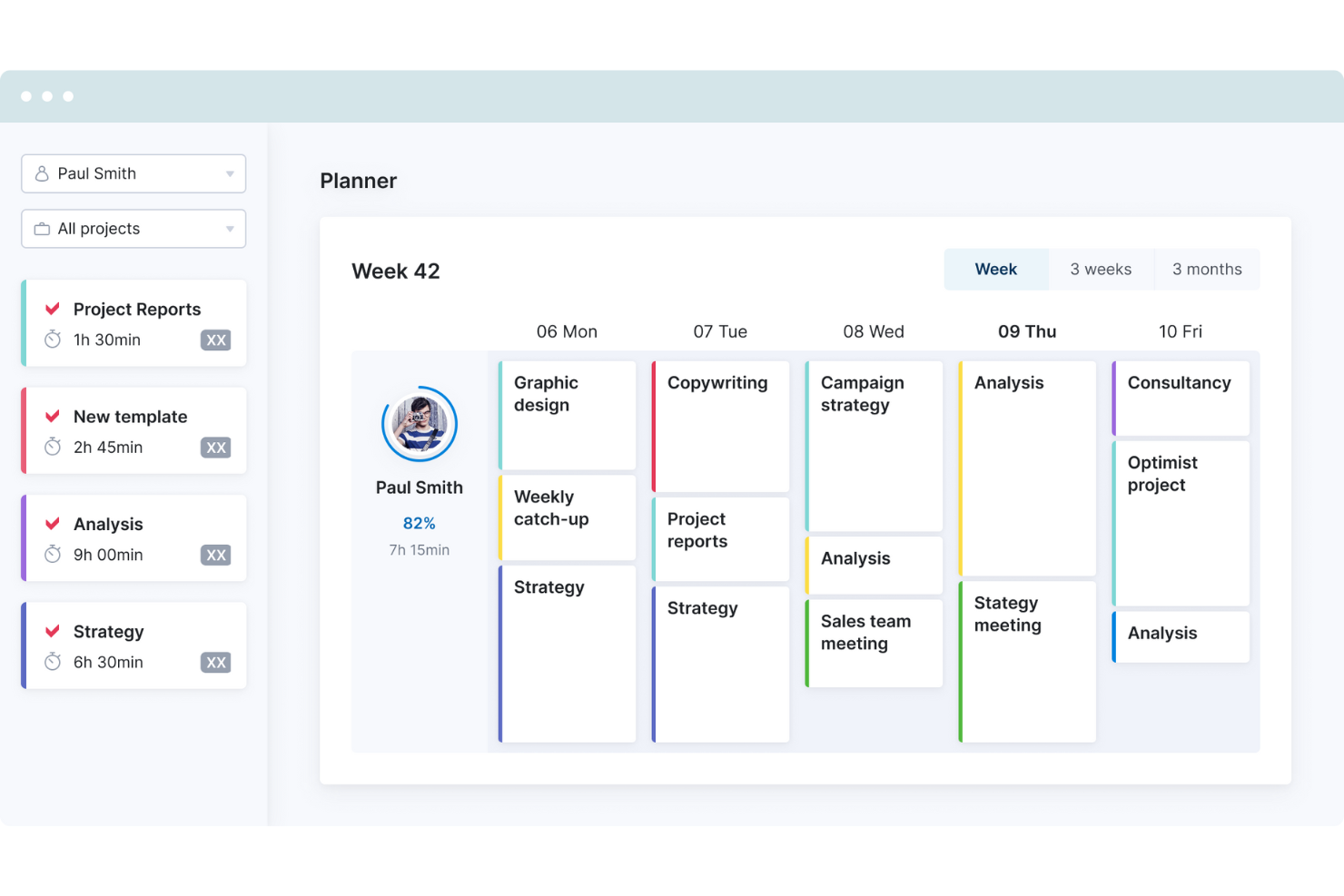
Scoro è una piattaforma di automazione per servizi professionali (PSA) che ti aiuta a gestire tutto, dalla preventivazione e pianificazione fino alla fatturazione e al monitoraggio della redditività. Lo consiglio ai team che vogliono abbandonare strumenti sparsi e riunire tutte le operazioni in un unico posto. Puoi mantenere collegati vendite, gestione dei progetti e parte finanziaria, facilitando così la comprensione di cosa sta realmente accadendo nella tua azienda.
Perché è una valida alternativa a Planview: Planview funziona bene per la pianificazione strategica a livello enterprise, ma ho scelto Scoro perché è più accessibile a team di piccole e medie dimensioni. Hai comunque visibilità su progetti e risorse, ma con una configurazione meno complessa. Ho anche apprezzato quanto sia semplice iniziare—Scoro non ti sovraccarica con funzionalità inutili. Se vuoi monitorare la redditività dei progetti in tempo reale, è una scelta solida in grado di crescere con te.
Caratteristiche e integrazioni principali:
Le funzionalità includono strumenti per preventivi e budget, CRM clienti, contabilità di progetto, fatturazione ed emissione di fatture, rilevamento del tempo e pianificazione della capacità. Puoi anche monitorare gli incarichi a canone, gestire lavori ricorrenti e suddividere i carichi di lavoro del team così che nessuno sia sovraccarico.
Le integrazioni includono Google Calendar, HubSpot, Slack, Xero, QuickBooks, Jira, Stripe, Microsoft Exchange, Sage Intacct, Zapier, Salesforce, Dropbox e altro ancora.
Pros and Cons
Pros:
- Monitora la redditività a livello di progetto, cliente e team
- Unisce dati di progetto, finanziari e commerciali
- Solide integrazioni native di contabilità
Cons:
- La versione mobile ha meno funzionalità
- Richiede tempo per la configurazione di casi d'uso complessi
New Product Updates from Scoro

Scoro Adds Time Mobile App and ELI Improvements
Scoro adds the Scoro Time mobile app for iOS/Android to track time anywhere and expands ELI with attachments, smarter filtering, and trigger-based actions. For more information, visit Scoro's official site.

Ideale per la gestione integrata dei progetti e la collaborazione
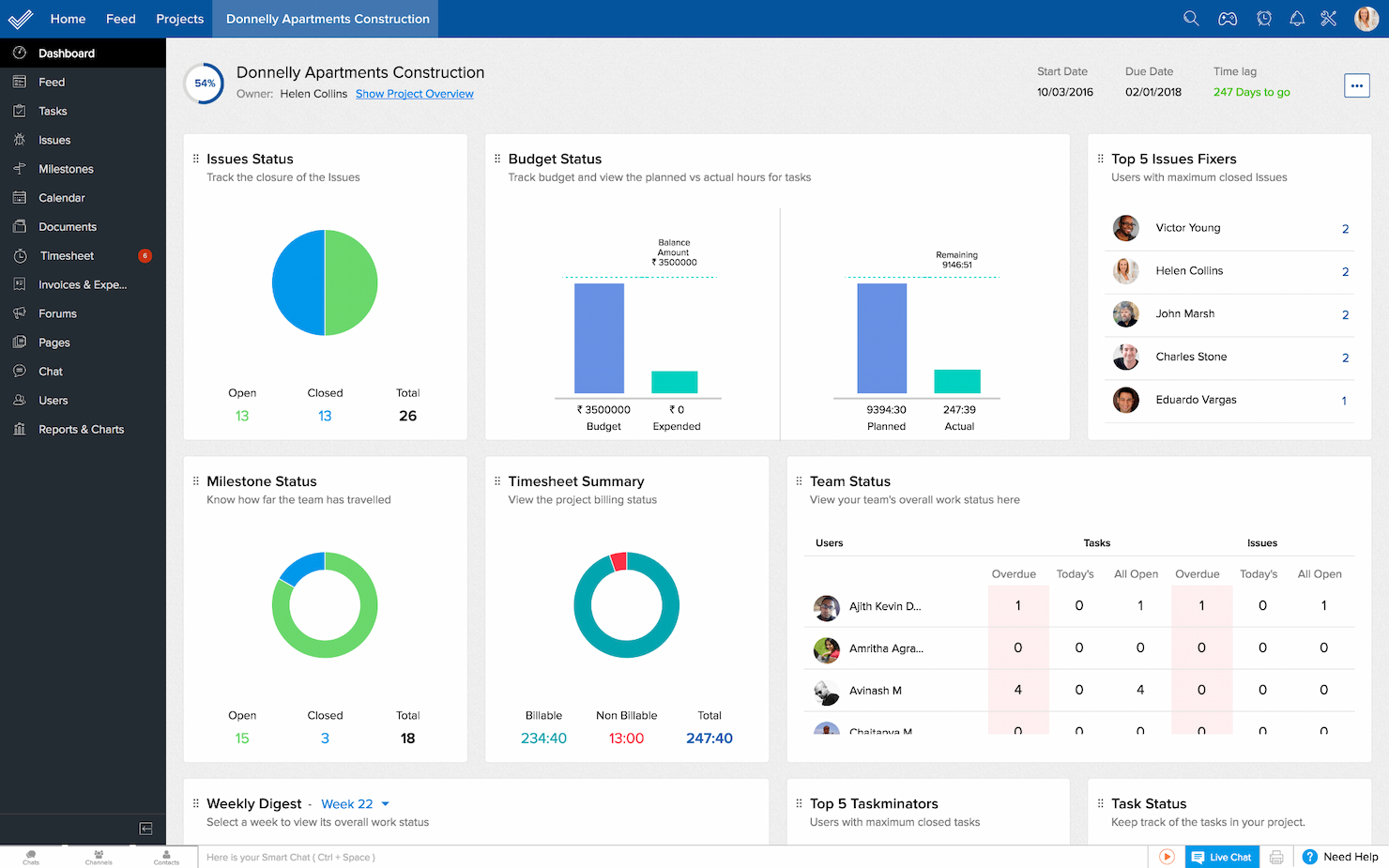
Zoho Projects è una soluzione avanzata per la gestione dei progetti che si distingue per l'integrazione di diversi aspetti della pianificazione, esecuzione e collaborazione. È particolarmente adatto a team che cercano una piattaforma unificata che combini gestione delle attività, rilevamento del tempo e comunicazione senza interruzioni.
Perché è una valida alternativa a Planview: Zoho Projects offre una suite completa di funzionalità che facilitano non solo la gestione dei progetti ma anche la collaborazione del team in un ambiente coeso. L'integrazione con l'ecosistema Zoho e altri strumenti business lo rende una scelta versatile per team dinamici e collaborativi.
Funzionalità e integrazioni di spicco:
Le funzionalità includono gestione delle attività, monitoraggio delle tappe, diagrammi di Gantt, rilevamento del tempo, segnalazione dei problemi, condivisione di documenti, strumenti di collaborazione, forum di progetto, report personalizzabili, allocazione delle risorse e controllo del budget.
Le integrazioni includono Zoho CRM, Zoho Creator, Zoho Desk, Gmail, Google Calendar, Slack e GitHub.
Pros and Cons
Pros:
- Funzionalità complete per la gestione di attività e progetti
- Robusta suite di strumenti di collaborazione
- Ampia gamma di integrazioni
Cons:
- Può risultare complesso a causa della ricchezza di funzioni
- Le opzioni di personalizzazione possono richiedere un periodo di apprendimento
New Product Updates from Zoho Projects
Zoho Projects Adds CodeX Scripts for Custom Modules
Zoho Projects now supports CodeX Scripts for custom modules, enabling conditional logic and rules for creating, updating, and deleting records. For more information, visit Zoho Projects' official site.
 .
.
Ideale per una pianificazione dettagliata dei progetti e la gestione delle risorse

Microsoft Project è uno strumento avanzato di gestione dei progetti noto per le sue capacità di pianificazione dettagliata e gestione completa delle risorse. È pensato per i project manager che necessitano di strumenti avanzati per pianificare, eseguire e monitorare progetti complessi con precisione.
Perché è una buona alternativa a Planview: Microsoft Project offre agli utenti funzionalità sofisticate di pianificazione dei progetti e gestione delle risorse senza paragoni. Questo strumento garantisce profondità e precisione nella pianificazione, fondamentale per gestire progetti di grandi dimensioni e complessità.
Caratteristiche principali & integrazioni:
Caratteristiche includono diagrammi di Gantt per la pianificazione dei progetti, gestione delle risorse, analisi del budget, prioritizzazione delle attività, modelli personalizzabili, monitoraggio dell’avanzamento, strumenti di collaborazione, funzionalità di reportistica e gestione della domanda.
Integrazioni includono Microsoft Excel, Microsoft Dynamics 365, Microsoft Word, Microsoft SharePoint, Procore, Microsoft Power BI, Wrike, Microsoft Office 365 Timesheet App e GanttPRO.
Pros and Cons
Pros:
- Strumenti completi di pianificazione dei progetti
- Gestione dettagliata delle risorse
- Forte integrazione con la suite Microsoft 365
Cons:
- Curva di apprendimento ripida
- Flessibilità limitata fuori dall'ecosistema Microsoft

Ideale per il monitoraggio collaborativo dell'onboarding dei clienti

Rocketlane è una piattaforma per la gestione della consegna dei progetti progettata per i team che desiderano una gestione strutturata, trasparente e collaborativa dei progetti con i clienti. È ideale per i team di customer success, onboarding e implementazione che vogliono ottenere un'esecuzione dei progetti più fluida e un maggiore coinvolgimento dei clienti.
Per chi è ideale Rocketlane?
I team di onboarding e implementazione dei clienti nelle aziende SaaS che necessitano di una gestione strutturata dei progetti orientati al cliente.
Perché Rocketlane è una valida alternativa a Planview
Ho scelto Rocketlane in particolare per il modo in cui gestisce il monitoraggio dei progetti rivolti ai clienti durante l'onboarding. A differenza di Planview, che è basato sulla gestione interna del portafoglio e delle risorse, Rocketlane offre al mio team uno spazio di lavoro condiviso in cui i clienti possono vedere lo stato di avanzamento delle attività, completare task e restare aggiornati senza dover chiedere aggiornamenti sullo stato. Apprezzo particolarmente il workspace unificato che riunisce attività, documenti e conversazioni in un unico luogo—così nulla si perde tra le email. In pratica, questo significa che il mio team può gestire progetti di onboarding strutturati con piena visibilità per il cliente fin dal primo giorno.
- Modelli di progetto: Avvia progetti da modelli predefiniti che si popolano automaticamente con i dati CRM e i contesti di progetti precedenti.
- Rilevazione delle ore lavorate: Registra ore fatturabili direttamente nei progetti tramite il rilevamento integrato delle ore collegato alle attività.
- Gestione risorse e personale: Assegna i membri del team in base a disponibilità, competenze e carico di lavoro sui progetti attivi.
- Dashboard Business IQ: Visualizza report in tempo reale su salute dei progetti, aspetti finanziari, utilizzo delle risorse e soddisfazione dei clienti.
Integrazioni di Rocketlane
Rocketlane offre integrazioni native con Slack, Salesforce, HubSpot, Jira, Google Calendar, Outlook e Zapier. È disponibile un'API per integrazioni personalizzate.
Pros and Cons
Pros:
- Automazione integrata del flusso di lavoro per l'onboarding dei clienti
- Collaborazione in tempo reale per progetti rivolti ai clienti
- Monitoraggio dell'avanzamento visibile a clienti e team
Cons:
- Supporto limitato alla gestione delle risorse di portafoglio
- Le opzioni di reportistica avanzata possono risultare limitanti
New Product Updates from Rocketlane

Rocketlane Introduces Governance and Workforce Agents
Rocketlane introduces Governance Agents and Workforce Agents to automate delivery processes and recurring tasks. These updates help teams enforce rules and streamline project execution. For more information, visit Rocketlane’s official site.
 .
.
Notion
Ideale per spazio di lavoro tutto-in-uno e gestione delle conoscenze
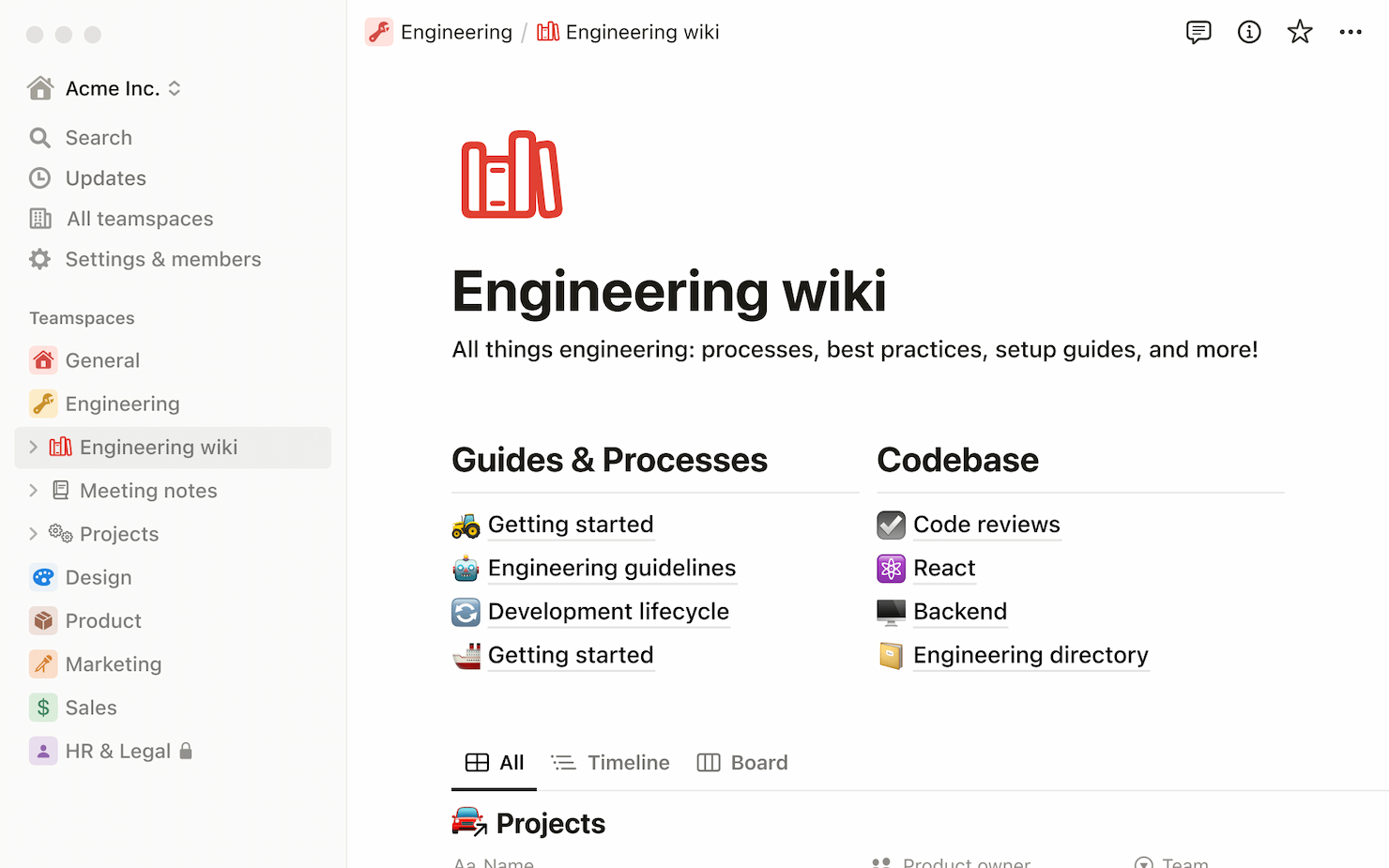
Notion è uno strumento versatile che funge da spazio di lavoro tutto-in-uno, combinando note, documenti, database e gestione delle attività in un'unica piattaforma. È ideale per team e singoli che desiderano centralizzare la gestione delle conoscenze e ottimizzare i loro flussi di lavoro in un'unica posizione accessibile.
Perché è una buona alternativa a Planview: Notion offre un approccio unico nel fondere vari tipi di contenuto e funzionalità in un unico spazio di lavoro unificato, senza eguali. Questa adattabilità lo rende una valida alternativa a Planview, soprattutto per i team che danno valore alla flessibilità e all'integrazione della gestione delle conoscenze nelle operazioni quotidiane.
Funzionalità di rilievo & integrazioni:
Funzionalità includono presa di appunti, database, bacheche Kanban, wiki, calendari, gestione attività, promemoria, incorporamento di documenti, collaborazione in tempo reale, supporto per contenuti multimediali, modelli e visualizzazioni personalizzabili.
Integrazioni includono Slack, Google Calendar, Trello e GitHub.
Pros and Cons
Pros:
- Spazio di lavoro altamente personalizzabile
- Integra note, attività, database e wiki
- Interfaccia intuitiva
Cons:
- Le prestazioni possono diminuire con grandi quantità di dati
- Funzionalità offline limitate

ProofHub
Ideale per il controllo unificato dei progetti e la revisione dei clienti
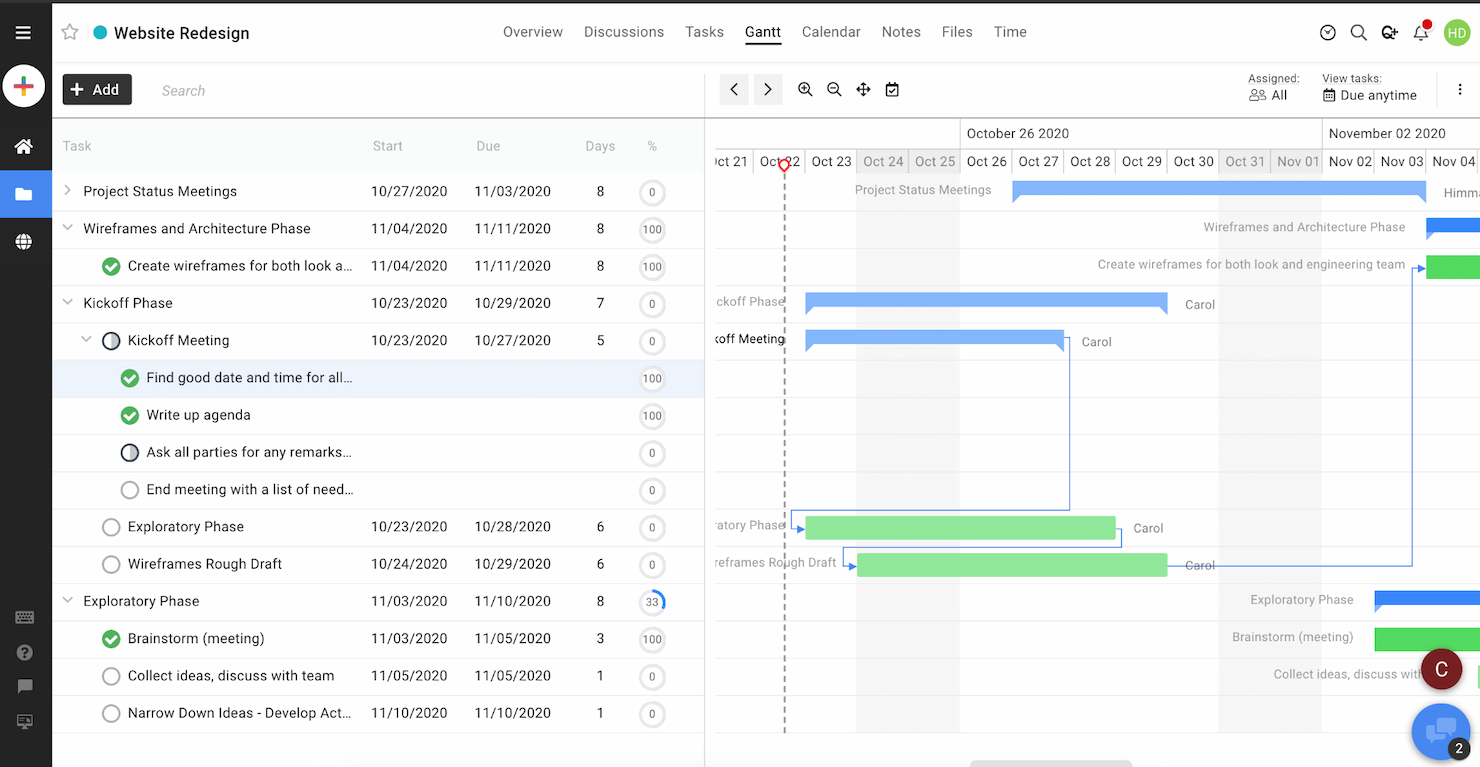
ProofHub è una piattaforma centralizzata di gestione progetti che si distingue per offrire un controllo unificato sui progetti e processi di revisione clienti semplificati. È pensata per i team che necessitano di un coordinamento stretto e di un chiaro processo di approvazione per consegnare i progetti in modo efficiente e soddisfare con precisione le aspettative dei clienti.
Perché è una valida alternativa a Planview: L'approccio integrato di ProofHub al controllo dei progetti e alla revisione dei clienti contribuisce notevolmente a migliorare la produttività del team e la soddisfazione dei clienti. Questo strumento si distingue per la sua capacità di riunire pianificazione dei progetti, collaborazione e interazioni con i clienti in un'unica piattaforma, garantendo flussi di lavoro fluidi e una comunicazione chiara.
Funzionalità principali & integrazioni:
Funzionalità comprendono gestione del portafoglio, allocazione delle risorse, monitoraggio del tempo, pianificazione dei progetti, gestione della domanda, pianificazione strategica, gestione finanziaria, gestione del ciclo di vita del prodotto, pianificazione della capacità, strumenti di collaborazione e avanzati sistemi di analisi e reportistica.
Le integrazioni includono Google Drive, FreshBooks, Google Calendar, OneDrive, Dropbox e Box.
Pros and Cons
Pros:
- Gestione unificata dei progetti e delle interazioni con i clienti
- Personalizzazione flessibile di attività e flussi di lavoro
- Prezzo fisso per utenti illimitati
Cons:
- Funzionalità di reportistica avanzata limitate
- Nessuna funzionalità per app mobile

Ideale per la gestione del lavoro e la reportistica nelle aziende
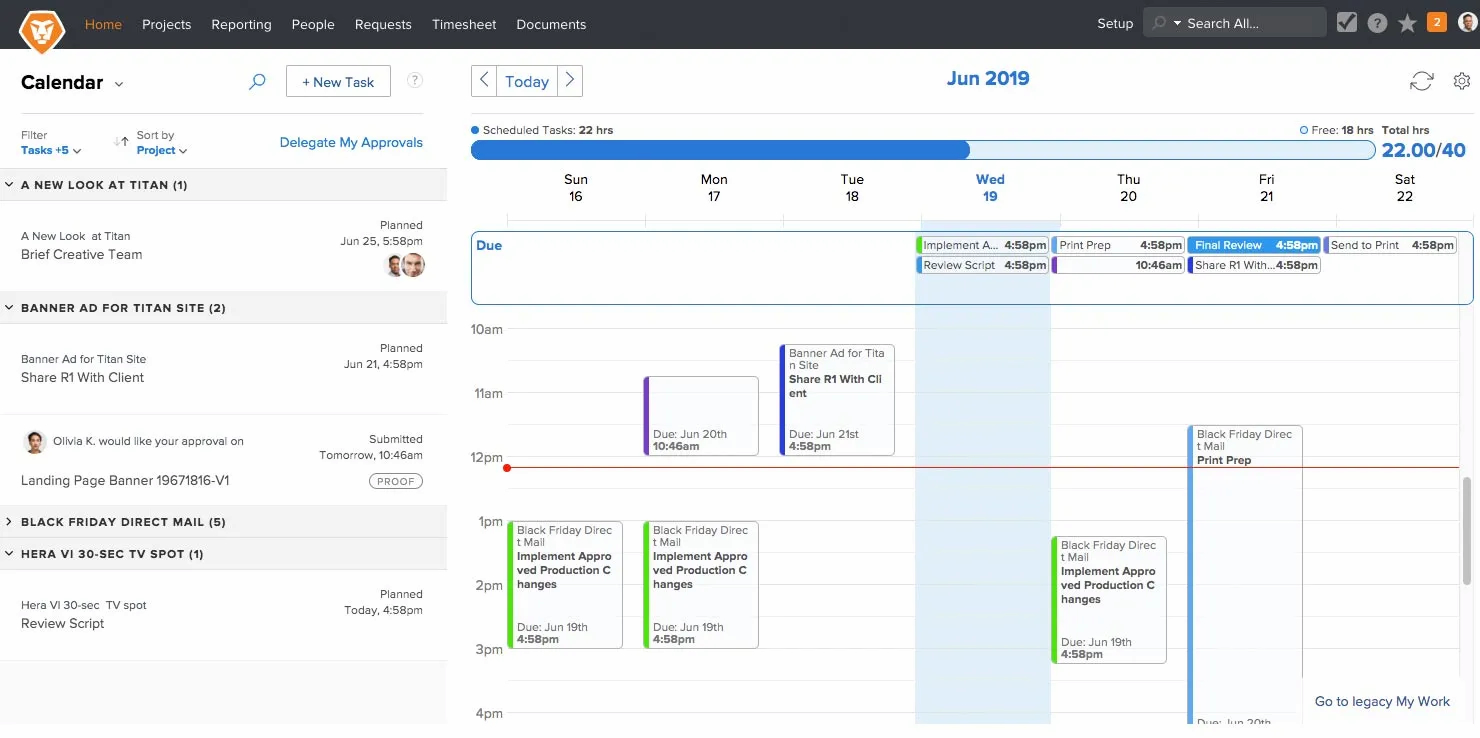
Workfront è una soluzione avanzata di gestione dei progetti progettata per le imprese che necessitano di una gestione del lavoro avanzata e di reportistica dettagliata. Eccelle nell'offrire strumenti strategici per pianificare, eseguire e analizzare progetti complessi in diversi dipartimenti e team.
Perché è una valida alternativa a Planview: Le capacità di gestione del lavoro a livello enterprise e la reportistica sofisticata di Workfront sono impareggiabili per le grandi organizzazioni. Si distingue per la capacità di integrare flussi di lavoro complessi e fornire approfondimenti che incrementano efficienza e produttività su larga scala.
Funzionalità e integrazioni principali:
Funzionalità includono dashboard personalizzabili, report in tempo reale con analisi approfondite, automazione di attività di routine e strumenti per l'allocazione delle risorse e la pianificazione della capacità.
Le integrazioni includono Adobe Creative Cloud, Jira, Salesforce e Microsoft Office 365.
Pros and Cons
Pros:
- Reportistica e analisi approfondite
- Personalizzazione avanzata dei flussi di lavoro
- Opzioni di integrazione complete
Cons:
- Complesso per i team più piccoli
- Curva di apprendimento ripida per i nuovi utenti

Ideale per analisi avanzata e automazione dei processi

Businessmap è uno strumento dinamico progettato per migliorare la visualizzazione dei progetti e la gestione dei flussi di lavoro. Permette ai team di creare mappe dettagliate e personalizzabili che rappresentano diversi flussi operativi, facilitando la comprensione immediata di processi complessi.
Perché è una valida alternativa a Planview: Businessmap si distingue offrendo una rappresentazione visiva chiara dei flussi di lavoro, elemento essenziale per una gestione efficace dei progetti. La possibilità di tracciare visivamente le fasi di un processo aiuta a individuare inefficienze e ottimizzare le operazioni. Questa qualità, unita a un'interfaccia intuitiva, rende Businessmap una scelta distintiva tra gli strumenti di gestione dei progetti.
Funzionalità e integrazioni principali:
Le funzionalità comprendono pianificazione strategica, gestione dei rischi, monitoraggio delle prestazioni, gestione dei progetti, visualizzazione dei dati, analisi di scenario, monitoraggio del budget, dashboard personalizzabili e reportistica in tempo reale.
Le integrazioni includono Slack, Google Drive, Trello, Power BI, Looker Studio, Tableau, Asana, Microsoft Azure, Okta, One Login e Box.
Pros and Cons
Pros:
- Strumenti di visualizzazione dettagliati
- Collaborazione in tempo reale
- Opzioni di integrazione solide
Cons:
- Funzionalità di analisi limitate
- Può richiedere una curva di apprendimento per i nuovi utenti


Trello è uno strumento di gestione progetti facile da usare, incentrato sulle bacheche Kanban, che rende il monitoraggio delle attività semplice e visivo. È pensato per team e singoli che hanno bisogno di un modo semplice per organizzare attività e progetti senza configurazioni o formazione complesse.
Perché è una valida alternativa a Planview: Trello semplifica la gestione dei progetti grazie alle sue bacheche Kanban intuitive con drag-and-drop e a un approccio minimalista. Questo focus su semplicità e chiarezza lo distingue in un mercato dove molti strumenti scelgono funzionalità e interfacce più complesse.
Funzionalità e integrazioni principali:
Funzionalità includono bacheche Kanban personalizzabili, ordinamento delle schede, assegnazione di date di scadenza, integrazione di checklist, strumenti di collaborazione, tag e etichette, allegati dei file, flussi di lavoro personalizzabili, accesso da mobile e desktop, notifiche automatiche e registro delle attività.
Integrazioni includono Slack, Google Drive, Dropbox e Jira.
Pros and Cons
Pros:
- Interfaccia Kanban intuitiva
- Ampia gamma di integrazioni
- Flessibile e facile da personalizzare
Cons:
- Funzionalità limitate per la gestione di progetti complessi
- Eccessiva dipendenza dai power-up per funzionalità aggiuntive

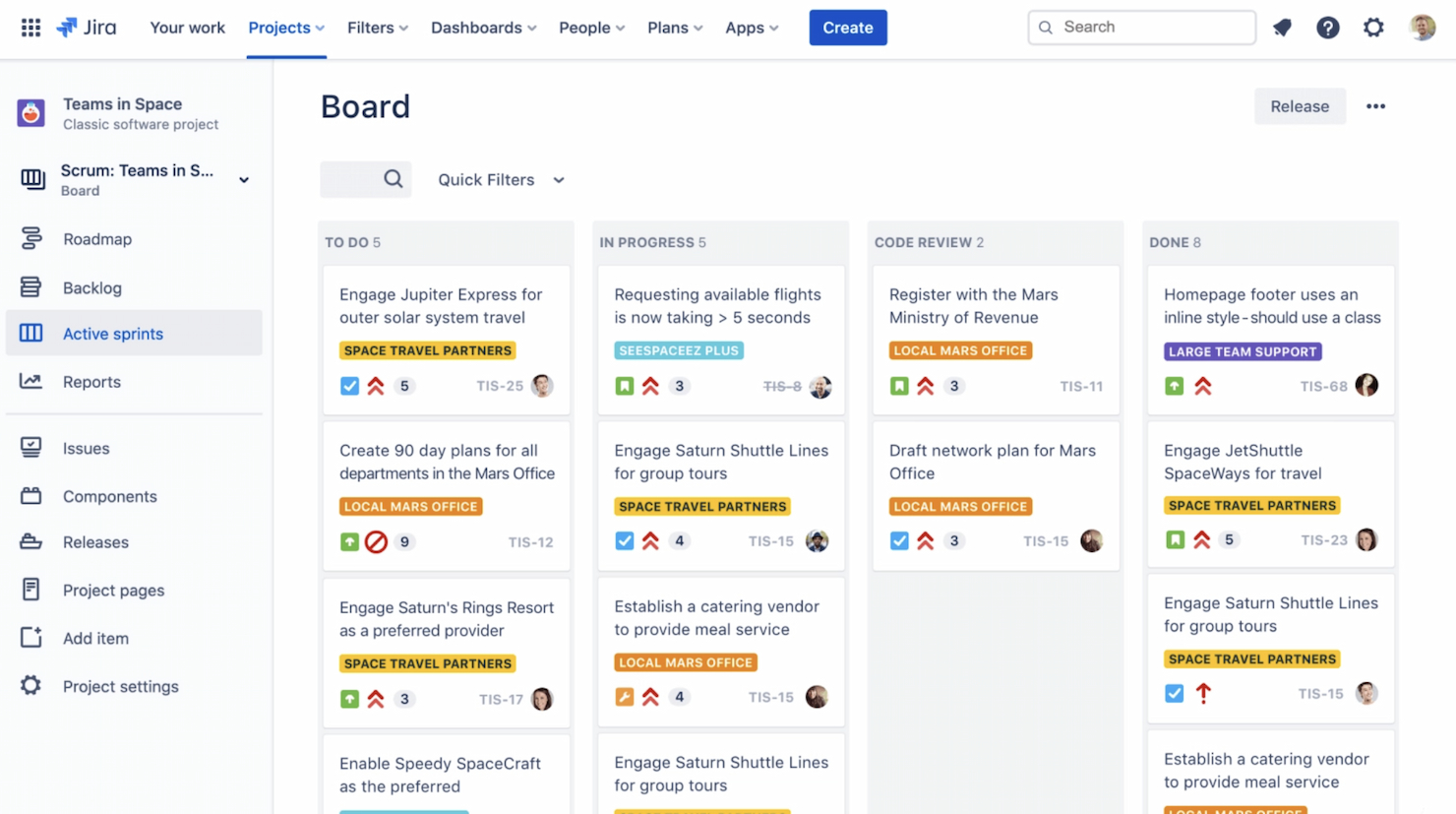
Jira è un potente strumento di gestione dei progetti pensato per i team Agile che devono monitorare le issue e gestire efficacemente i cicli di sviluppo. La sua elevata funzionalità supporta una varietà di metodologie Agile, tra cui Scrum e Kanban, rendendolo ideale per team di sviluppo software e project manager focalizzati sul miglioramento continuo e sull'efficienza.
Perché è una buona alternativa a Planview: Jira offre strumenti specializzati per lo sviluppo Agile e il monitoraggio delle issue, fondamentali per i team che desiderano ottimizzare i processi di sviluppo software. La sua adattabilità a diversi framework Agile e la capacità di gestire flussi di lavoro complessi lo distinguono dagli altri strumenti.
Funzionalità in evidenza & integrazioni:
Funzionalità includono bacheche Scrum e Kanban personalizzabili, backlog dettagliati, strumenti per la pianificazione degli sprint, ampie capacità di reporting, grafici burndown e altri indicatori chiave essenziali per i team Agile.
Le integrazioni includono Confluence, Bitbucket, GitHub e Slack.
Pros and Cons
Pros:
- Funzionalità dettagliate di gestione dei progetti Agile
- Ampie opzioni di personalizzazione
- Reportistica e analisi avanzate
Cons:
- Può risultare complesso per i nuovi utenti
- Le prestazioni possono rallentare con una personalizzazione estesa
Altre alternative a Planview
Ecco alcune ulteriori alternative a Planview che ho selezionato. Non sono rientrate nella top 10, ma vale la pena valutarle se non hai trovato un’opzione valida tra quelle precedenti.
- monday AI Workspace
Ideale per la generazione automatizzata di flussi di lavoro
- Celoxis
Ideale per il monitoraggio di progetti trasversali ai reparti
- Wrike
Ideale per diagrammi di Gantt dinamici


Recensioni correlate sui software di gestione dei progetti
Se non hai ancora trovato quello che cerchi, dai un'occhiata a questi altri strumenti correlati che abbiamo testato e valutato:
- Software di gestione dei progetti
- Software per la gestione delle risorse
- Software per l'automazione dei flussi di lavoro
- Software per il monitoraggio del tempo
- Software per la gestione delle attività
- Strumenti di collaborazione
- Creatore di diagrammi di Gantt
- Strumenti per la produttività
- Software per il monitoraggio dei progetti
- Software per la pianificazione dei progetti
Come Valuto le Alternative a Planview
Analizzo le alternative a Planview su due livelli: gli aspetti irrinunciabili come la gestione del portafoglio e la pianificazione della capacità, e i fattori di differenziazione che distinguono le opzioni più adatte.
Funzionalità Principali (Requisiti Fondamentali per Questa Lista)
Quando seleziono gli strumenti per la mia lista, valuto ciascuno su una scala da 0 (non offre la funzionalità) a 5 (eccelle in quest'area) per ogni funzionalità principale elencata di seguito. Poi, calcolo il punteggio totale dello strumento in percentuale. Ogni strumento deve raggiungere un punteggio minimo totale del 65% per essere preso in considerazione per l'inclusione.
- Gestione del Portafoglio: Valuto se posso raggruppare, prioritizzare e gestire più progetti in un’unica vista—ad esempio, valutando e sequenziando un backlog di iniziative finanziate tra vari programmi.
- Pianificazione della Capacità delle Risorse: Assegnare le persone giuste su progetti contemporanei è spesso dove la maggior parte dei PMO incontra difficoltà, quindi verifico la previsione della domanda, il monitoraggio dell’utilizzo e l’assegnazione in base alle competenze.
- Pianificazione Strategica (Roadmapping): Cerco roadmap che colleghino la strategia a monte con l’esecuzione a valle—collegando OKR o obiettivi aziendali direttamente ai progetti e alle milestone da cui dipendono.
- Monitoraggio Finanziario e del Budget: Qui sono importanti i riepiloghi di budget, il monitoraggio delle varianze e le previsioni sia a livello di progetto sia di portafoglio—soprattutto per i team che devono riportare CapEx vs. OpEx al reparto finanziario.
- Dashboard Esecutive e Reportistica: Le viste sullo stato del portafoglio devono essere utili a un VP o a un direttore PMO senza che sia necessario un analista dati, quindi verifico la presenza di KPI configurabili, approfondimenti e report programmati.
- Gestione del Lavoro e delle Attività: Anche il livello esecutivo sottostante è importante—cerco dipendenze tra attività, viste Gantt e Kanban, e automazioni dei flussi di lavoro che mantengano i team di delivery produttivi ogni giorno.
Una volta ottenuta una lista di strumenti che soddisfano questi criteri, considero cosa distingue ciascuna piattaforma dalle altre.
Fattori di Differenziazione (Cosa Distingue i Fornitori)
Ecco come confronto i diversi fornitori:
Caratteristiche Distintive
La pianificazione degli scenari è un elemento di forte differenziazione—cerco strumenti che permettano di modellare linee temporali alternative o spostamenti di risorse prima di prendere una decisione sul portafoglio. Anche il supporto per metodologie agili e ibride è importante, specialmente per i team che utilizzano SAFe insieme al classico metodo waterfall. Verifico se una piattaforma offre un intake strutturato della domanda con modelli di scoring, poiché i PMO senza un flusso formale di richieste finiscono per gestire le attività tramite fogli di calcolo o email.
Oltre le Caratteristiche
L’ecosistema di integrazione è una delle prime cose che valuto. Se i tuoi team di delivery usano Jira o Azure DevOps, l’alternativa deve offrire connettori nativi—non solo un’API aperta su cui il team debba lavorare. Il costo totale di proprietà merita attenzione, visto che il licensing e i costi di implementazione di Planview sono una delle cause principali per cui i team cercano alternative. Considero anche il time-to-value: quanto velocemente un PMO può realmente distribuire la piattaforma con template predefiniti e configurazione guidata rispetto a mesi di servizi professionali.
Perché cercare un'alternativa a Planview?
Dovresti prendere in considerazione la ricerca di un'alternativa a Planview se:
- Hai dubbi sui costi: Planview è un'opzione relativamente economica, ma se hai bisogno di meno licenze o hai un budget più limitato, una soluzione alternativa potrebbe essere la scelta migliore.
- Stai riscontrando problemi di complessità: L'interfaccia utente di Planview può essere complessa, il che potrebbe ostacolare le prestazioni del team. I team che necessitano di un'interfaccia più intuitiva potrebbero trarre vantaggio da un'opzione alternativa.
- Hai bisogno di più funzionalità: Planview offre numerose funzionalità, ma i team e i progetti più grandi potrebbero richiedere funzionalità ancora più estese.
- Richiedi integrazioni migliori: Se Planview non si integra bene con il tuo attuale insieme di strumenti, potresti dover acquistare una soluzione alternativa che funzioni bene con il software esistente.
- Vuoi un'assistenza clienti maggiore: Una formazione aggiuntiva e un'assistenza clienti estesa possono aiutarti a ottenere il massimo dal software scelto.
Funzionalità principali delle alternative a Planview
Ecco alcune funzionalità chiave di Planview che la tua alternativa dovrebbe offrire o migliorare:
- Gestione del portafoglio progetti: questa funzionalità aiuta a bilanciare la capacità dei progetti con la domanda e ad assicurarsi che le risorse siano allocate in modo efficiente tra i progetti. Puoi inoltre mantenere l'allineamento tra l'esecuzione dei progetti e gli obiettivi aziendali e ottimizzare l'utilizzo delle risorse in tutta la tua organizzazione.
- Gestione agile dei programmi: supporta la definizione della visione, la pianificazione e la realizzazione delle iniziative chiave, aiuta a facilitare una risposta flessibile ai cambiamenti e a mantenere l'attenzione sulla creazione di valore. È essenziale se vuoi implementare o migliorare le tue metodologie agili e la tua capacità di risposta.
- Gestione snella del portafoglio: integra la gestione strategica del portafoglio con la realizzazione agile, così puoi migliorare i risultati e allineare gli obiettivi con le realtà dell'esecuzione. È particolarmente utile se devi adattarti ai cambiamenti e mantenere una visione chiara degli obiettivi a lungo termine.
- Kanban aziendale: ti aiuta a migliorare la produttività del team e l'agilità organizzativa, a gestire i flussi di lavoro in modo efficiente e a fornire ai team una visibilità chiara sull'avanzamento delle attività e sulle dipendenze, elementi fondamentali negli ambienti agili.
- Innovazione continua: la possibilità di gestire il processo di ideazione, dalla concezione all'implementazione, in un unico luogo favorisce un'innovazione continua. Supporta inoltre il miglioramento e lo sviluppo costanti, aspetti fondamentali per rimanere competitivi.
- Gestione del carico di lavoro: fornisce ai team gli strumenti necessari per pianificare, gestire e visualizzare il proprio lavoro in modo collaborativo. Puoi promuovere un lavoro di squadra efficace e assicurarti che il team sia allineato agli obiettivi e ai progressi del progetto.
- Pianificazione strategica: consiste nell'utilizzo di roadmap strategiche per delineare progetti e iniziative future ed è fondamentale per allineare gli obiettivi strategici a lungo termine con la pianificazione operativa e assicurarsi che l'organizzazione proceda in modo coeso verso i propri obiettivi.