
27 Best Project Dashboards In Software And Apps For 2026

Best Dashboard Software List
Here’s a shortlist of the best project management dashboard software tools:


Tracking project performance and progress can be overwhelming without the right tools. That’s where project dashboard software comes in, offering centralized, visual insights to help you stay on top of your projects. However, with so many options out there, selecting the right tool is difficult.
In this post I share from my personal experience tracking hundreds of projects, using many different project dashboard platforms, and share my picks of the best project dashboard software.
Why You Can Trust Us
The Best Project Dashboard Software Tools Summary Chart
| Tool | Best For | Trial Info | Price | ||
|---|---|---|---|---|---|
| 1 | Best for aligning employees, contractors, & stakeholders | Free plan + free demo + 14-day free trial available | From $10/user/month (billed annually) | Website | |
| 2 | Best for real-time project budgeting | Free demo available | From $12/user/month (billed annually) | Website | |
| 3 | Best for pre-set reports & dashboard templates | 30-day free trial + free demo available | From $14/user/month (billed annually) | Website | |
| 4 | Best project dashboard in an enterprise asset management software | Free demo available | Pricing upon request | Website | |
| 5 | Best for agile project tracking | 14-day free trial + free plan available | From $7.91/user/month | Website | |
| 6 | Best resource capacity planning dashboards | Free demo available | From $9/user/month (billed annually) | Website | |
| 7 | Best for startups & small teams | Free demo available | From $3/user/month | Website | |
| 8 | Best for ease of use | Free demo available | Pricing upon request | Website | |
| 9 | Best for goal setting & tracking via dashboards | 14 days free trial | Pricing per request | Website | |
| 10 | Best for project financial insights | Free demo available | Pricing upon request | Website |

-

Insightful
Visit WebsiteThis is an aggregated rating for this tool including ratings from Crozdesk users and ratings from other sites.4.8 -
Accelo
Visit WebsiteThis is an aggregated rating for this tool including ratings from Crozdesk users and ratings from other sites.4.4 -
Forecast
Visit WebsiteThis is an aggregated rating for this tool including ratings from Crozdesk users and ratings from other sites.4.6




Overviews of the Best Project Dashboard Software
Here’s a brief description of each of the dashboard tools that are featured on this list.

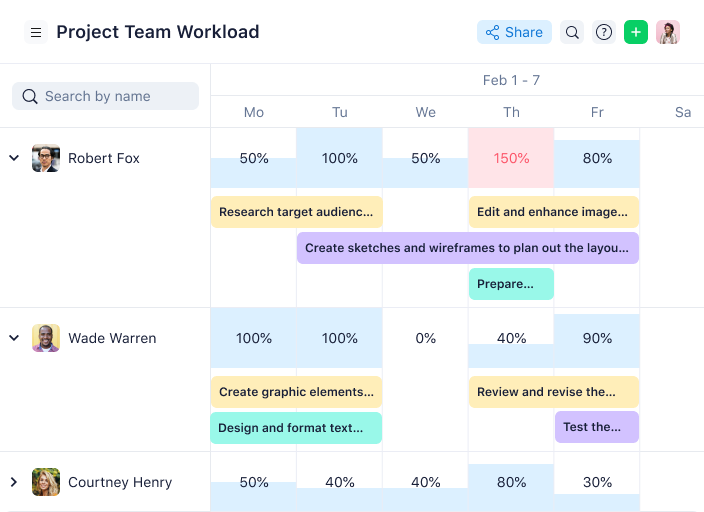
Wrike is an award-winning, easy-to-use project dashboard software trusted by 20,000+ organizations worldwide. The tool is suitable for teams with anywhere from five members to an unlimited number of team members. It’s highly configurable and allows users to customize workflows, dashboards, reports, request forms, and more.
Why I Picked Wrike: Wrike’s simple project dashboard software enables users to switch between Kanban boards, interactive drag-and-drop Gantt charts, and traditional workload views, allowing users to tailor their views and dashboards to their needs. Wrike also features task lists, shared workflows, file sharing, and project health analysis tools such as flagging roadblocks.
Wrike has an easy-to-use, intuitive interface and navigation with distinct spaces, folders, and tasks. Users can toggle between the home screen and timesheets, dashboards, calendars, reports, and an activity stream. Wrike has a dedicated help center with interactive training, videos, a ‘Getting Started’ guide, and a thriving community.
Wrike Standout Features & Integrations
Features include project management, task scheduling/tracking, resource management, expense tracking, API, budgeting, Gantt charts, marketing automations, collaboration support, and reporting.
Integrations include 400+ pre-built native integrations, including integrations with the most popular file management software from Microsoft, Google, and Dropbox, along with sales and marketing software from Salesforce and Marketo.
Pros and Cons
Pros:
- View projects and tasks in different views (list, table, Kanban, Gantt)
- User-friendly and intuitive for all skill levels
- Users have access to a variety of fully customizable dashboards
Cons:
- Time tracking is included in Business and Enterprise plans only
- Only 2GB of storage space with the freemium plan
- Shareable dashboards are limited to paid plans
New Product Updates from Wrike

Streamlining Workspaces with New Updates
Wrike announces custom space templates, AI Agents in Wrike Labs, and a new Guage widget to improve project management. For more information, visit Wrike's official site.

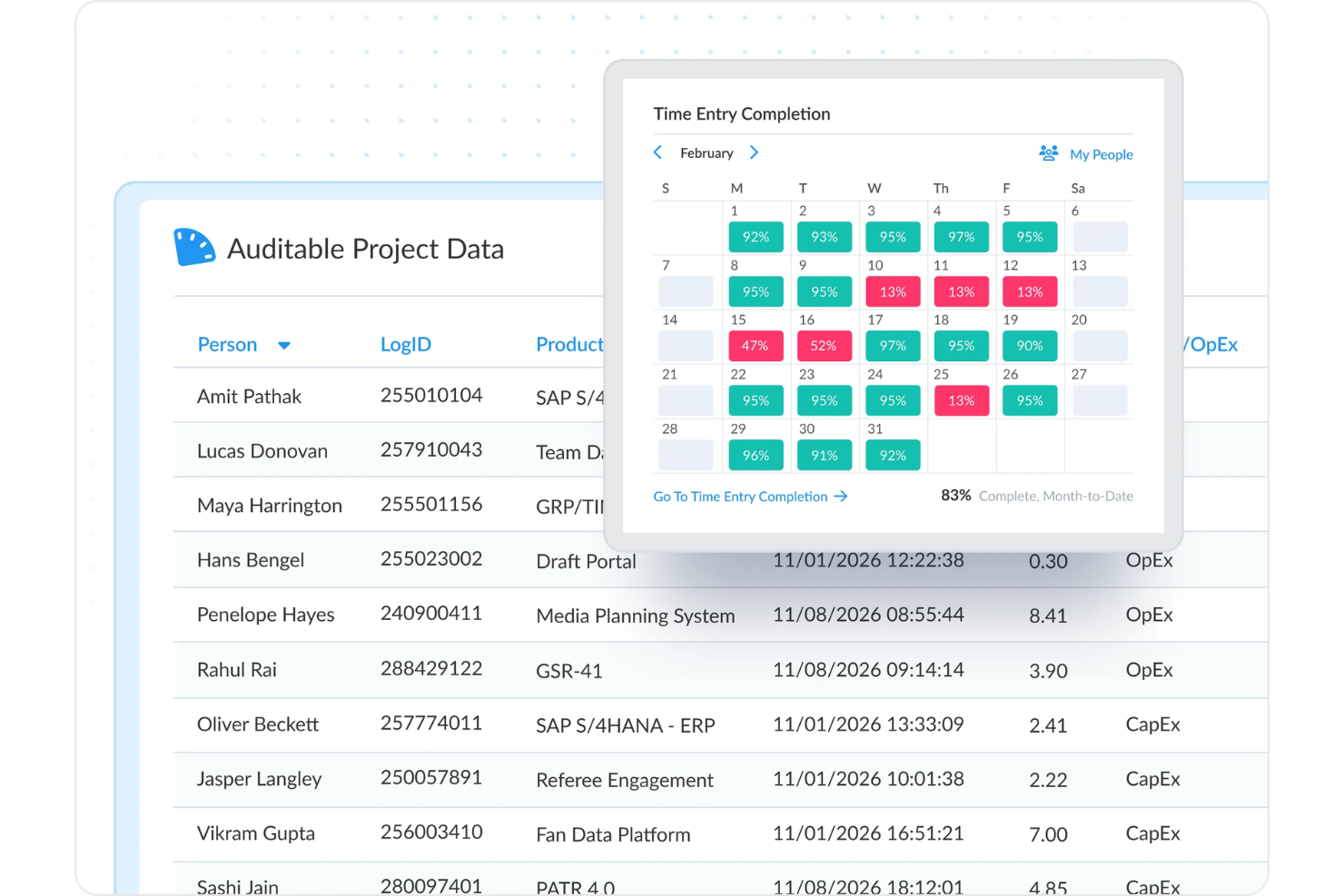
For teams seeking a solution to enhance project oversight and financial management, ClickTime offers a comprehensive platform that addresses labor cost management, time tracking, and resource planning. This tool could be particularly appealing to industries such as professional services, IT, and government, where accurate time tracking and expense management are crucial. ClickTime effectively tackles challenges like project budgeting and resource allocation, ensuring you have the insights needed for informed decision-making.
Why I Picked ClickTime
I picked ClickTime for its unique ability to provide precise labor data collection and real-time project budgeting, which are crucial for effective project management. With its automated time tracking from tools like Jira and Google Calendar, you can minimize manual entry errors and focus on project progress. I also appreciate its DCAA-compliant records and Single Sign-On for secure access, ensuring that both compliance and security are seamlessly integrated into your workflow.
ClickTime Key Features
In addition to its strong budgeting and compliance features, ClickTime offers several other capabilities that can enhance your project management experience.
- Mobile Timesheets: Enable your team to submit time entries on the go, making it easier to capture accurate data wherever they are.
- Expense Management: Streamline your expense tracking and reimbursement processes, reducing administrative overhead and improving financial accuracy.
- Resource Capacity Planning: Gain insights into your team's availability and workload, allowing for strategic staffing and resource allocation.
- Custom Reporting: Utilize the Report Studio to create tailored reports that fit your specific project needs and provide actionable insights.
ClickTime Integrations
Integrations include Sage Intacct, Bamboo HR, Rippling, Salesforce, Slack, and the platform also offers a robust API for custom integrations.
Pros and Cons
Pros:
- Mobile timesheets for approvals
- Built-in resource capacity planning
- DCAA compliant time tracking
Cons:
- Setup may require time
- Limited employee activity monitoring


ProjectManager.com is a well-rounded, award-winning project management software with real-time project dashboards. The tool's cloud-based software runs on both Windows and Mac computers with no downloads or complex installation needed.
Why I Picked ProjectManager.com: Using ProjectManager.com, you can create project plans, manage tasks, create reports, and manage timesheets, expenses, and workloads. ProjectManager.com also includes the ability to switch between Gantt chart, task list, and Kanban board views. You can use the in-app communication features to comment on tasks and assign them to team members.
Their real-time reports are easy to use—you can use their pre-set reports (project status, timesheets, expenses), or set up your own custom reports. You can also use the real-time dashboard to get an overview of your current project stats.
ProjectManager.com Standout Features & Integrations
Features include project management, Gantt charts, resource management, time tracking, collaboration, reporting, customizable dashboards, mobile app, Agile processes, and third-party integrations.
Integrations include Google Apps like Drive, Gmail, Calendar, etc. as well as Microsoft Office and Microsoft Project. For all other integrations, you can use Zapier to sync ProjectManager.com with other tools.
Pros and Cons
Pros:
- Multilingual and very flexible
- Time and expense tracking
- Customizable schedule templates
- Excellent high level view of project
Cons:
- Doesn’t output schedule files to .mpp
- No way to update partially complete tasks
- No mobile app

Wedia
Best project dashboard in an enterprise asset management software

Wedia is a digital asset management solution that helps enterprise businesses keep their creative assets organized and accounted for.
Why I picked Wedia: Users can manage their projects using the Kanban-style dashboard, and keep track of their creative assets with the Digital Asset Management (DAM) tool in the software. Marketing projects can be defined with contributors, goals, briefs, and the campaigns they're associated with. Approval flows and audit trails allow enterprise businesses to maintain brand and legal standards across all marketing projects.
The software also has tools to manage digital experiences and distributed marketing operations. It's a robust system that can handle the needs of large-scale creative operations, with a friendly user interface that anyone can navigate with ease.
Wedia Standout Features & Integrations
Features include Kanban board, digital asset management (DAM), project-specific comment threads, approval workflows, audit trails, track changes, task notifications, online and offline editing, and AI-powered asset editing tools.
Integrations include Akamai, Azure, Dailymotion, Empower, Google Analytics, Mailjet, Microsoft Suite, Okta, OneLogin, Shutterstock, Unsplash, WordPress, and YouTube.
Pros and Cons
Pros:
- Tools to support distributed marketing departments
- Compliance features for large-scale enterprise needs
- Asset, experience, and project management in one
Cons:
- Customization cannot be managed by the user
- Not suitable for small and medium-sized businesses

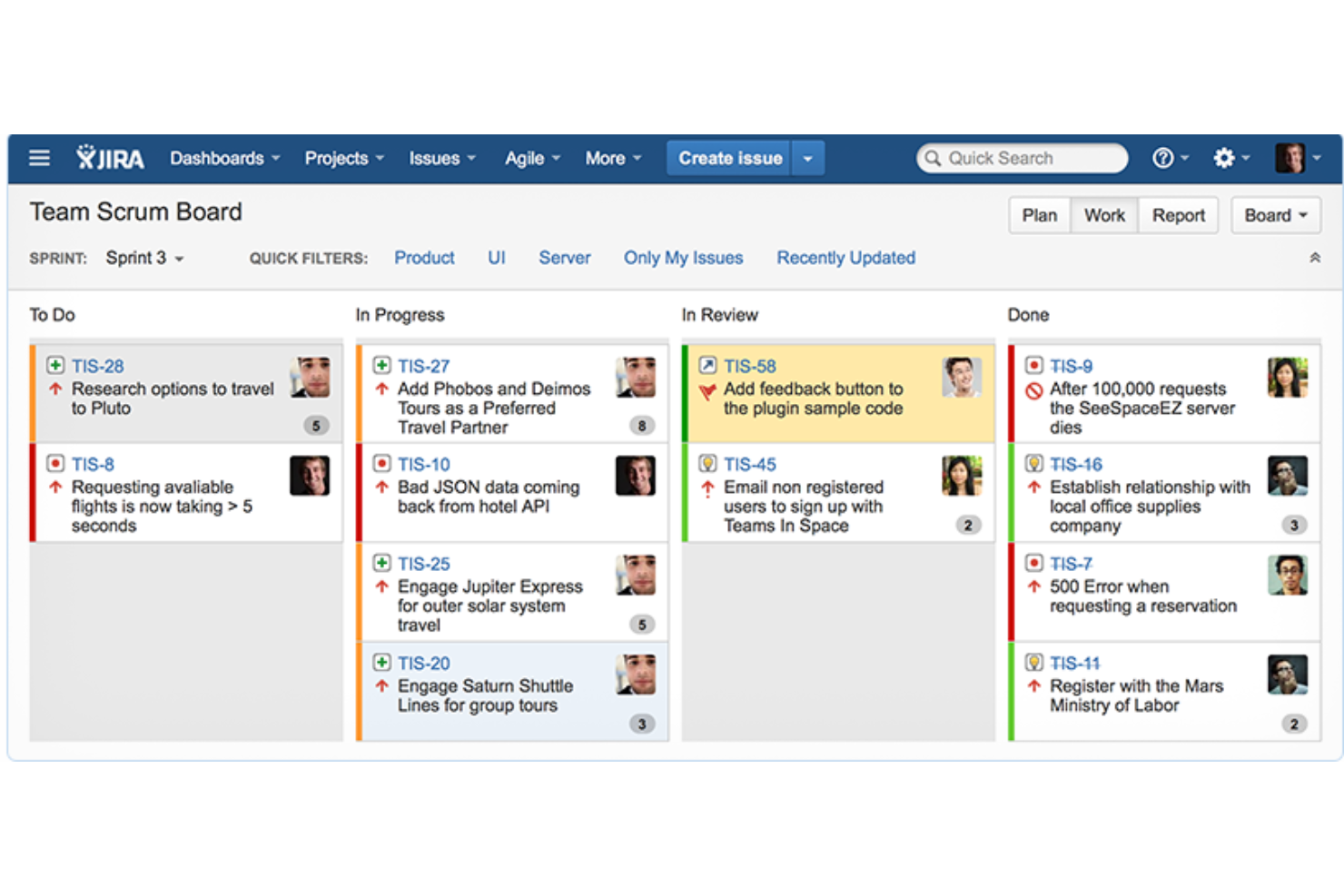
Jira Software is a project and issue tracking tool developed by Atlassian, aimed at assisting agile teams in managing their work. The tool is designed to facilitate visibility and collaboration by breaking down complex tasks into smaller, manageable units. The software also supports various work methodologies, including Scrum and Kanban, and offers templates for bug tracking and DevOps, among others.
Why I picked Jira Software: Jira Software serves as a project dashboard software that provides teams with customizable dashboards to display a variety of project metrics and real-time information. These dashboards and reports are designed to offer insights into team performance, project progress, and workload management, making it a comprehensive tool for project management and team collaboration.
The software also includes features such as search and filter options, customizable layouts, and the ability to create and manage multiple dashboards tailored to different project needs. With Jira Software, users can monitor their work, collaborate in real-time, and access project data with ease.
Jira Software Standout Features & Integrations
Features include planning and tracking tools, release management capabilities, automated processes, a mobile applications, and features to ensure data security and compliance with industry standards.
Integrations include Opsgenie, GitHub, Slack, Zendesk, Invision, Figma, Trello, Microsoft Teams, Confluence, and Bitbucket.
Pros and Cons
Pros:
- Includes customizable workflow management functionality
- Scalable for large teams and complex projects
- Provides strong support for agile methodologies
Cons:
- Steep learning curve for new users
- Slow load times can affect productivity

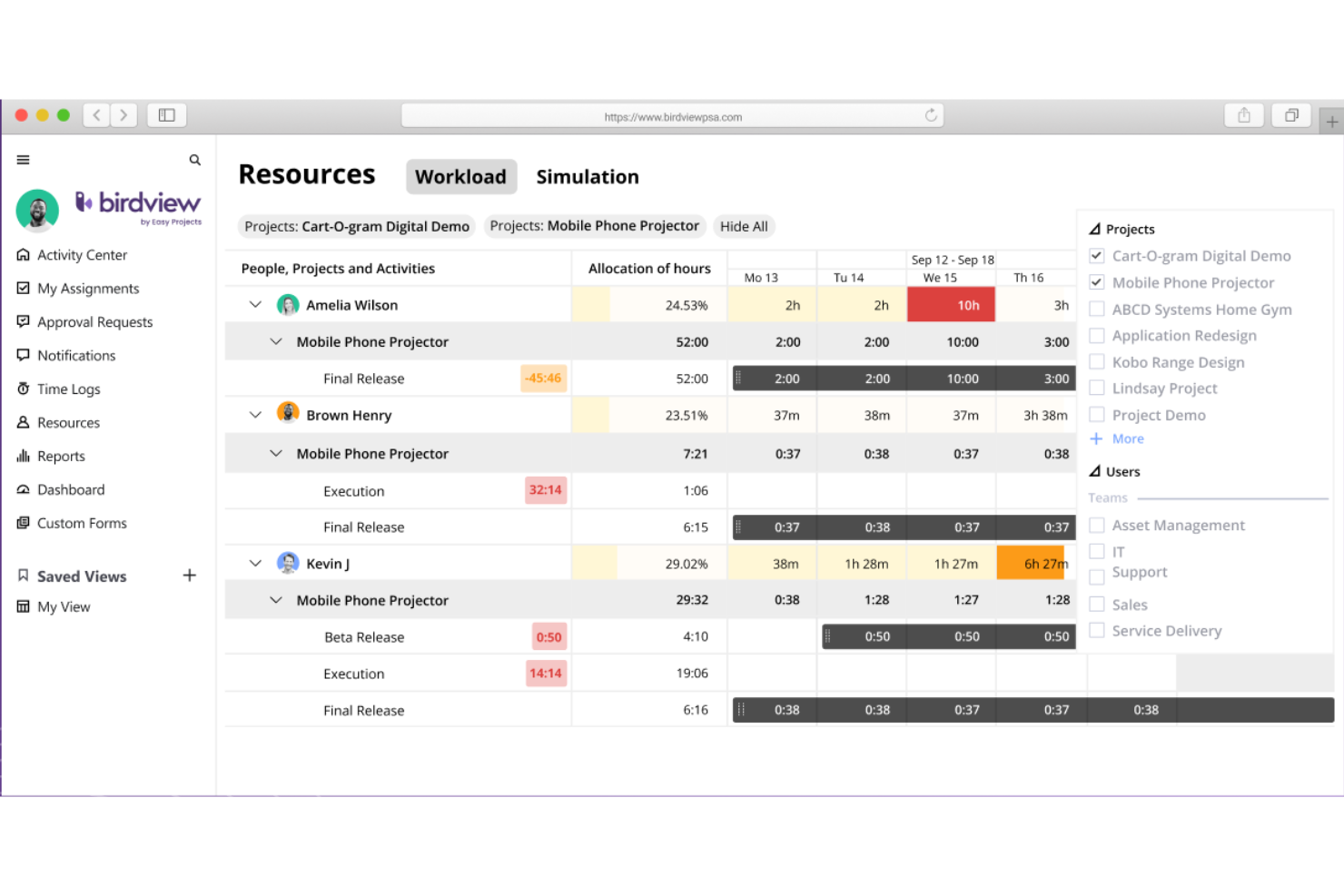
Birdview PSA is a project dashboard software with resource management, project management, financial management, project portfolio planning, time tracking, and collaboration tools. They offer hundreds of integrations, meaning you can pull data from third-party apps and visualize it in Birdview PSA dashboards. They have hundreds of dashboard and report templates, so you don't have to start from scratch.
Why I Picked Birdview PSA: Birdview PSA excels in project dashboards with a strong emphasis on resource management due to its ability to provide a holistic view of resource allocation, availability, and utilization. The platform offers customizable dashboards that allow project managers to track and analyze resource data in real-time, facilitating informed decision-making. With intuitive visualizations and robust reporting capabilities, Birdview PSA empowers stakeholders to easily identify resource bottlenecks, optimize resource allocation, and make data-driven decisions to ensure efficient project execution.
Birdview PSA Standout Features & Integrations
Features include 250+ ready-to-use dashboards and reports for business intelligence, including templates for executive summaries, project scorecards, demand projections, and expected vs actual budgets. I mentioned their resource planning tools above but one particular feature I wanted to highlight is their resource loading simulation tool. You can set up trial projects with available resources and track whether your estimates are accurate before committing to your plan.
Integrations include Microsoft Teams, Microsoft Project, Jira, Adobe Creative Cloud, MS Excel, Outlook, Hubspot, Salesforce, Oracle NetSuite, Gmail, Slack, Zoom, Github, Gitlab, HelpScout, HelpDocs, Olark, and other options for time tracking, design, ERP, and accounting software. You can also use their RESTful API to build additional integrations.
Pros and Cons
Pros:
- Hundreds of integration options, native and otherwise
- 250+ templates for dashboards and reports of all sorts
- AI-powered planning and communications assistance
Cons:
- 2+ custom workflows requires Enterprise plan
- Resource loading tool not on lowest paid plan

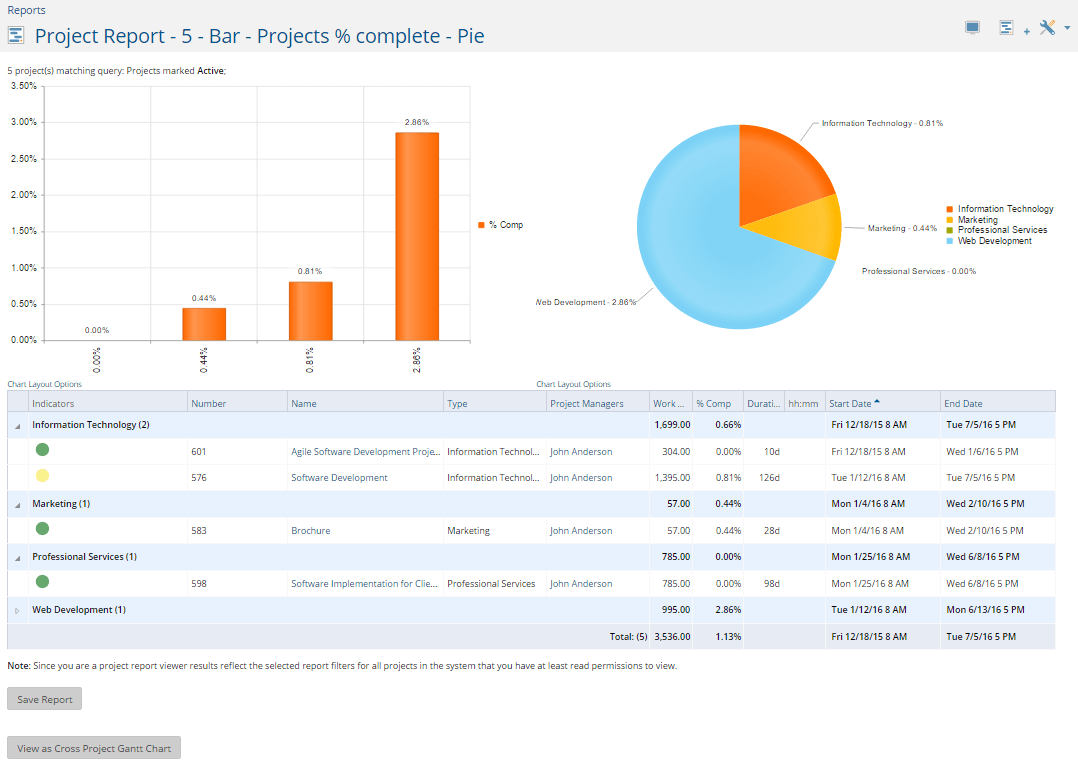
Project Insight is a work and project management software with a complete dashboard tool designed to act as a personalized source of information for you and your team members. The personalized dashboard feature is available as an add-on and will unlock a higher level of collaboration for your projects.
Why I Picked Project Insight: Project Insight's dashboard gives you access to all projects, tasks, and other items assigned to you. Like many other dashboards, you can drag and drop items to rearrange them according to your needs. Additionally, select from 12 different layout options to personalize it even further! One thing I'd like to point out is that Project Insight will aggregate information from the software you integrate into it. Then, it will use that information and your saved projects as a source of data for anything ranging from project management to HR.
Project Insight Standout Features & Integrations
Features include customizable dashboards, project management, resource planning, collaboration, flexible workflows, Agile support, financial management, reporting & analytics, mobile app, time tracking, mobile app, and third-party integrations.
Integrations include Jira, Zendesk, DevOps, and QuickBooks. Additional integrations include Trello, Office 365, Microsoft Project, Gmail, Google Drive, Slack, and Microsoft Teams.
Pros and Cons
Pros:
- Agile support
- Comprehensive project management tools
- Flexible, drag-and-drop dashboards
Cons:
- Has a learning curve
- Somewhat outdated UI
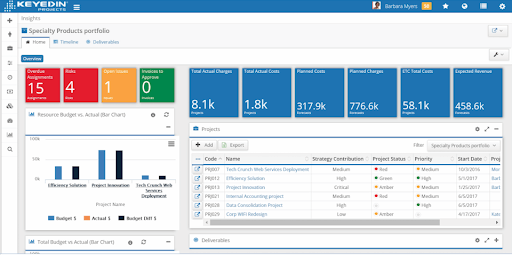
KeyedIn was recognized as an August 2019 Gartner Peer Insights Customer Choice for Project and Portfolio Management. Key features include portfolio insights, revenue forecasting, executive oversight, capacity planning, and CRM and ERP integrations.
Why I Picked KeyedIn: KeyedIn is particularly good at striking a balance between being easy-to-use and also feature-rich. When addressing blind spots in the tool’s capabilities, the dynamic customer support team is quick to point out viable alternatives. This scored them very well in Usability per the evaluation criteria.
KeyedIn Standout Features & Integrations
Features include customizable dashboards, project management, resource management, time tracking, collaboration, flexible workflows, reporting & analytics, mobile app, Agile methodologies, project portfolio management, and third-party integrations.
Integrations include Jira, Microsoft Dynamics CRM, Dynamics 365, SharePoint, QuickBooks, Microsoft Outlook, Sage Intacct, Salesforce App Cloud, SugarCRM, SAP CRM, Pivotal Tracker, Microsoft Dynamics GP, VersionOne, Fulcrum. Additionally, the software uses API Version 3 that makes it easier for its customers to share or extract project and portfolio data with other business software solutions.
Pros and Cons
Pros:
- Supports multiple languages and currencies
- Robust forecast dashboard with charts
- Data-rich dashboards with multiple views
Cons:
- No customer portal available yet
- Project hierarchy gets complex for multiple projects
- Must scroll through tabs to get a holistic view

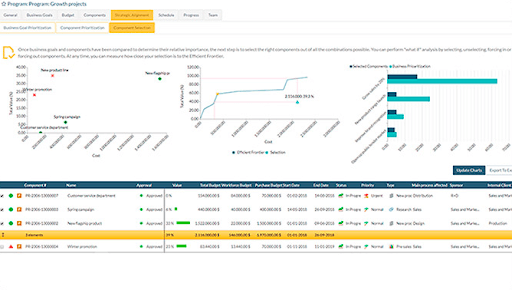
Headquartered in Madrid, Spain, ITM Platform is a SaaS portfolio management tool with robust project dashboard capabilities. ITM Platform is hugely customizable and many teams will find the flexibility useful to their objectives. For example, custom fields are easy-to-add and endlessly useful.
Why I Picked ITM Platform: One of the strengths of ITM Platform is its project portfolio management capabilities as they align with individual and team goals. The software provides tools for aligning project goals with overall business strategy and managing multiple projects more effectively. This allows organizations to prioritize projects based on their strategic importance and allocate resources accordingly.
ITM Platform also provides comprehensive resource management features, allowing users to track utilization, resolve conflicts, and optimize resource allocation. Additionally, the software includes a time tracker that enables users to track time spent on tasks and bill clients for time worked.
ITM Platform Standout Features & Integrations
Features include project portfolio management, resource management, time tracking, task management, collaboration, flexible workflows, reporting & analytics, mobile app, Agile methodologies, financial management, and third-party integrations.
Integrations include Slack, Microsoft Project, Jira, and Teambot. More integration options are available by linking the software to Zapier or using their API that allows you to integrate with third-party tools, like PowerBI or an ERP.
Pros and Cons
Pros:
- Accessible price
- Initiative user interface
- Customizable properties and fields
- Program and project prioritization
Cons:
- No desktop or mobile versions
- No drag and drop functionality

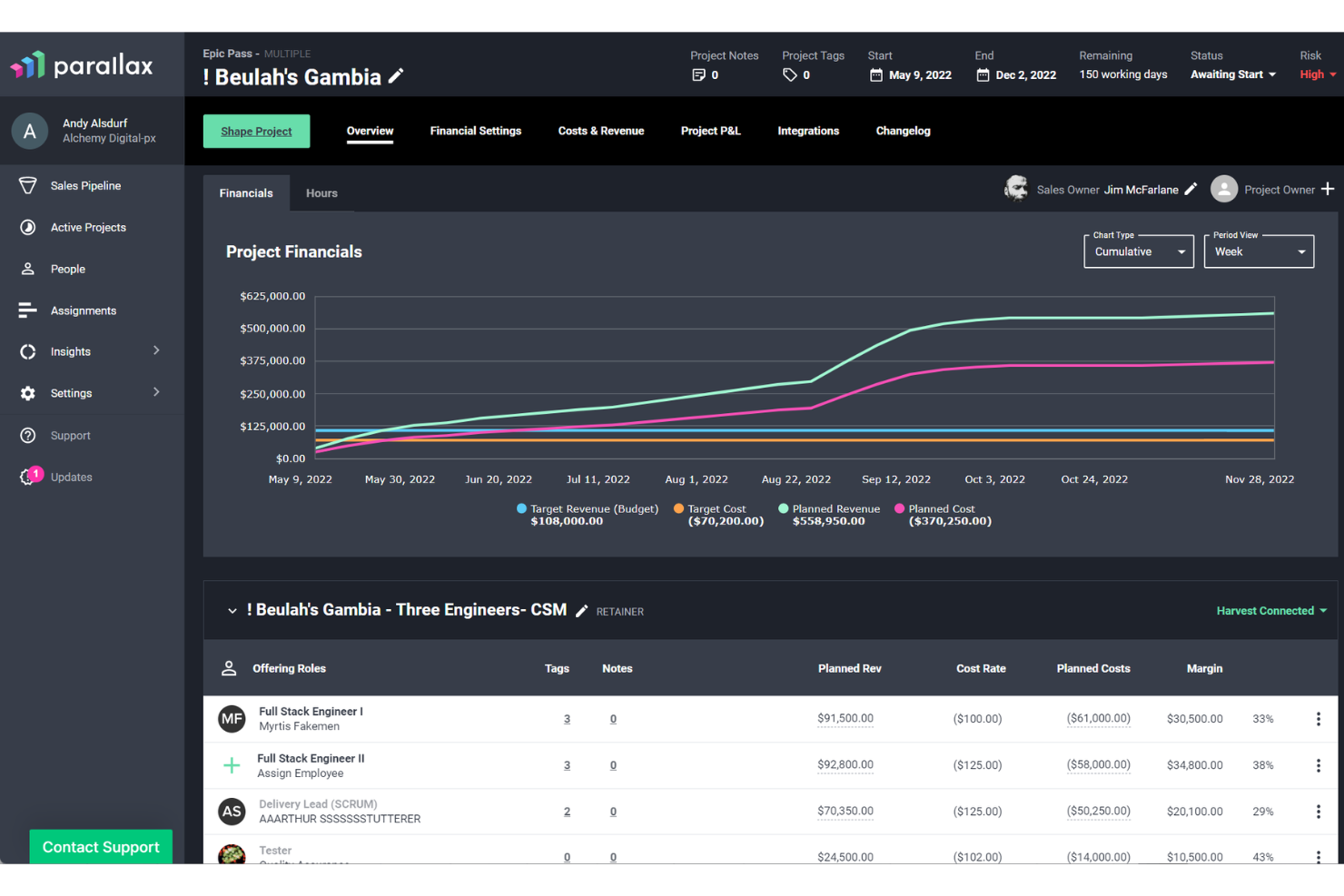
Parallax is a strategic operations software designed for digital service organizations, focusing on capacity and resource planning. It helps businesses improve utilization, achieve margin goals, and proactively manage resources throughout project lifecycles.
Why I Picked Parallax: I picked Parallax for its dashboards that cater to resource planning, financial tracking, and forecasting. These features allow teams to gain real-time insights into their capacity and project burn rates, which is crucial for maximizing margins and ensuring projects stay on track financially. The ability to forecast revenue and margin in real time helps project teams make informed decisions, reducing the risk of budget overruns and missed deadlines. Additionally, Parallax's project health tracking provides real-time financial snapshots, allowing for early adjustments to align with client expectations and project goals.
Parallax Standout Features & Integrations
Features include visual capacity planning and a predictive operations intelligence feature that offers critical alerts and informs hiring decisions based on utilization data, optimizing revenue and operational excellence. It also has a project financials feature that provides real-time insights into project profitability, enabling teams to forecast revenue and monitor budgets effectively.
Integrations include Salesforce, HubSpot, Copper, Pipedrive, Zoho, Monday.com, Advantage, Clockify, Harvest, Jira, Kimai, Toggl, Everhour, NetSuite, Noko, Redmine, Replicon, Teamwork, Tempo, Asana, Microsoft Teams, and Slack.
Pros and Cons
Pros:
- Forecasting features to help stay on budget
- Good insights into utilization, revenue, and project risk
- Extensive resource planning features
Cons:
- Initial setup can be time-consuming
- Navigating the platform can be complex
Other Project Management Tracking Tools
Here are a few more that didn’t make the top list. If you need additional suggestions for handy status dashboards, check these out:
- Changepoint
Dashboard UX/UI
- ClickUp
For dashboard widgets for expanded functions
- monday.com
For integrations, add-ons, and widgets
- Hive
For team collaboration & planning
- Smartsheet
Dashboards system for robust project portfolios
- Celoxis
For ad hoc budgeting & costs dashboards
- Bonsai Agency Software
For holistic views across all business operations
- Adobe Workfront
For enterprise-level project dashboards
- Hub Planner by Milient
For real-time resource scheduling
- GoodDay
For customizable workspaces
- ReptonPOD
For dashboard configuration
- Zoho Analytics
Segment comprehensive project intelligence data according to any criteria
- ProWorkflow
Dashboard built right into your homepage
- GoodDay
Tile-based dashboards with support for multiple project management methodologies.
- Genius Project
Dashboards that include reports, charts, and documents that can be customized to your project-specific requirements
- Acuity PPM
Portfolio-level dashboards that help you see risk and make decisions across different projects.
- Bubble
Live data and automated reporting tools designed to be highly configurable and supportive of your existing processes
- Deltek Project & Portfolio Management
In-depth information dashboard that requires analysis to obtain actionable insights.


How I Picked the Best Dashboard Reporting Software
If you're wondering how I selected the best project dashboard software, here's where I'll break it all down for you. First of all, I started with project dashboard software that have high user review and satisfaction ratings. Then, using my experience in project management, I discerned what key criteria were most important for project dashboard software and compared how each of them stacked up against the rest.
Comparison Criteria
What am I looking for when I select dashboard reporting software? Here’s a summary of my evaluation criteria:
User Interface (UI): Is the office team dashboard UX clean, attractive, and easy to navigate? Does it have good use of space and enough whitespace to properly display project data?
Data Sources: I want to know the places where the software can pull information from. Is it only from a specific module, the entire platform, or even third-party applications?
Integrations: I see if it is easy to connect with other tools. Mainly pre-built integrations and native ones. Can my dashboard connect to these tools through an external connector, webhook or similar?
Pricing: I look at pricing and paid tiers. Also, the level at which dashboards are available and any information on free trials and free software versions.
Not looking for dashboard reporting tools? Check out our other lists of useful project tools:
- If you want dashboards and project tracking specifically for marketing projects, marketing project management tools will have what you need.
- Take a look at business intelligence tools that come with great dashboards and analytics tools.
How to Choose Project Dashboard Software
It’s easy to get bogged down in long feature lists and complex pricing structures. To help you stay focused as you work through your unique software selection process, here’s a checklist of factors to keep in mind:
| Factor | What to Consider |
|---|---|
| Scalability | Ensure the software can grow with your team. Consider if it can handle more projects and users as your business expands, without sacrificing performance. |
| Integrations | Check if it integrates with tools you already use, like Slack or Google Workspace. Seamless integration can enhance workflow and productivity. |
| Customizability | Look for flexible options to tailor dashboards, reports, and workflows. Customization ensures the software meets your specific project needs. |
| Ease of Use | Evaluate the user interface and learning curve. A straightforward tool saves time and helps your team adopt it quickly. |
| Budget | Compare pricing plans and make sure it fits your financial limits. Consider any hidden costs or fees that may arise from additional features. |
| Security Safeguards | Prioritize data protection features such as encryption and compliance with industry standards like GDPR. Security is crucial for safeguarding sensitive information. |
| Support Services | Examine the availability and quality of customer support. Responsive support can be crucial when you face challenges or need assistance with the software. |
| Reporting Tools | Assess the software's ability to generate insightful reports. Effective reporting can aid in decision-making and project tracking. |
Honestly, it's a lot to digest—and there's a lot of pressure to get it right so I'd suggest using our project management software advisory service to help you shortlist project manager tools that'll be a good fit for you and your organization's specific needs.
Trends in Project Dashboard Software
In my research, I sourced countless product updates, press releases, and release logs from different project dashboard software vendors. Here are some of the emerging trends I’m keeping an eye on:
- AI-Powered Insights: More vendors are using AI to provide predictive analytics and insights. This helps teams anticipate project risks and optimize resource allocation. For example, some tools offer AI-driven suggestions for task prioritization.
- Remote Collaboration Tools: With the rise of remote work, there's a growing demand for tools that enhance virtual collaboration. Features like virtual whiteboards and integrated video conferencing are becoming common, enabling more interactive remote teamwork.
- Real-Time Data Visualization: Users want immediate insights into project metrics. Real-time dashboards that update instantly are becoming essential. These visualizations help teams make quick, informed decisions and track progress effectively.
- Sustainability Tracking: Some vendors are incorporating features to track sustainability metrics. This trend aligns with businesses focusing on eco-friendly practices. Dashboards now sometimes include carbon footprint tracking or resource consumption analytics.
- User Feedback Loops: Incorporating user feedback into the development cycle is gaining traction. Vendors are adding features to gather direct user input on product usability and feature requests, ensuring that tools evolve with user needs.
What Is Project Dashboard Software?
Project dashboard software is a tool that provides a visual representation of the key aspects and performance metrics of a project. It aggregates and displays data such as progress, deadlines, budgets, and resource allocation in an easy-to-understand format.
Project dashboard tools help project managers and teams to quickly assess the status of a project, monitor its health, and make informed decisions based on real-time data. The dashboard typically includes charts, graphs, and progress indicators, offering a comprehensive overview at a glance to facilitate better project management and communication.
Features of Project Dashboard Software
When selecting project dashboard software, prioritize tools with these essential features to enhance project management and team collaboration:
- Real-Time Data Visualization: Real-time data visualization provides immediate access to project metrics through charts, graphs, and dashboards. This feature empowers teams to monitor progress, identify bottlenecks, and make informed decisions on the spot. By displaying live updates on KPIs, budgets, and timelines, project managers can ensure that projects stay on track and within scope.
- AI-Powered Insights: AI-powered insights use predictive analytics to identify trends, anticipate risks, and suggest improvements in resource allocation. For instance, the software might alert managers to potential delays or recommend reallocating resources to meet deadlines. This feature enhances decision-making by offering data-driven predictions and actionable recommendations.
- Customizable Dashboards: Customizable dashboards enable users to create tailored views that highlight the most relevant information for their roles or projects. Whether a team member needs to track daily tasks or a project manager requires a high-level overview, this flexibility ensures everyone sees what matters most. Customizable reports also facilitate stakeholder communication by focusing on key project metrics.
- Remote Collaboration Tools: Remote collaboration tools are essential for distributed teams, offering features like integrated video conferencing, virtual whiteboards, and real-time commenting. These tools foster seamless communication, reduce misunderstandings, and ensure all team members stay aligned, regardless of location. Integration with other platforms, like Slack or Microsoft Teams, further streamlines collaboration.
- Gantt and Calendar Views: Gantt charts and calendar views provide clear visualizations of project timelines, milestones, and task dependencies. These tools help teams plan effectively, identify potential schedule conflicts, and adjust timelines as needed. They are particularly useful for tracking progress against deadlines and ensuring timely project delivery.
- Resource Management: Resource management features assist in scheduling and allocating resources efficiently across multiple projects. These tools provide visibility into resource availability, workload distribution, and potential conflicts, enabling teams to avoid overbooking or underutilizing resources. Some advanced tools also include resource forecasting to help with long-term planning.
- Automated Workflows: Automated workflows streamline project management by reducing manual effort on repetitive tasks. For example, the software can automate task assignments, approval processes, or status updates, saving time and ensuring consistency. Automation also minimizes the risk of human error and allows teams to focus on high-priority work.
- Sustainability Tracking: Sustainability tracking measures and reports on eco-friendly practices, such as energy use, carbon footprint, and resource consumption. This feature supports organizations in meeting their environmental goals, improving transparency, and aligning with sustainability initiatives. Some tools also offer insights on how to optimize resource usage to reduce waste.
- User Feedback Loops: User feedback loops gather input directly from users to improve tool usability and functionality. Features like in-app surveys, feedback forms, or dedicated user forums allow teams to voice their needs and suggest enhancements. This continuous feedback helps vendors refine their software to better align with real-world use cases.
Selecting the right project dashboard software is key to improving project visibility, collaboration, and decision-making. Look for tools with features like real-time data visualization, AI-powered insights, and customizable dashboards to ensure your team can track progress and adapt quickly. With capabilities such as Gantt views, resource management, and automated workflows, the right software can streamline operations and drive project success. Prioritize solutions that align with your team’s needs for maximum impact.
Project Dashboard Software FAQ
See answers to some common questions about project dashboard software below.
What is a project dashboard?
A project dashboard presents you with information surrounding your key performance indicators. Whether you are tracking key metrics for conversion rate, click-through rate, resource scheduling, or employee log time, a project dashboard will display a summary of the relevant data on a single page, sometimes called a KPI dashboard, for you to peruse quickly and easily.
What to put on a project management dashboard?
Building a dashboard can be a challenging first step. Good dashboard design will be data-rich, thorough, clean, easy to read, and contains summaries of all of your key performance indicators (KPIs). You will want to create dashboards that include items that pertain to your long-term and short-term goals, like customer conversion, lead collection, page views, social impressions, time-spent per task, resource allocation, error/bug reports, and more.
What is a portfolio dashboard?
A project portfolio dashboard is meant to help you with tracking multiple projects at once. It will most likely display a birds-eye-view of every account you have on the go with options to narrow in on specific clients, projects, tasks, and goals. A portfolio dashboard is particularly helpful for agencies that have an ever-changing list of clients and projects at any given time.
What are the different types of dashboards?
Different types of dashboards will specialize in different types of data display (sales versus impression, for example) and also might specialize in different types of industries (a marketing dashboard will look much different than an accounting dashboard, for example). You might encounter dashboards like marketing dashboard, task management dashboard, business intelligence (BI) dashboard, team workload dashboard, and more.
What are the key features of dashboard reporting software?
These are must-haves for any dashboard reporting solution.
- Real-time data updates – The dashboard connects to your project and displays real-time data. It requires no manual effort other than setting it up for the first time.
- Customizable interface – The user can decide what, when, where, and how they want to view different areas of their data dashboard. Moreover, customization should be intuitive and easy to learn such as in the case of white label dashboards which use drag-and-drop functionality.
- Interactive charts, dashboard templates or graphs – The best dashboard software will incorporate some element of interactive visuals. Also, it should have templates to help beginners get started.
- Project health analysis – Users can quickly and easily spot bottlenecks, delays, problems, missed deadlines, resource warnings, and other indicators for their projects. Therefore, helping you make decisions.
What’s Next:
If you're in the process of researching project dashboard software, connect with a SoftwareSelect advisor for free recommendations.
You fill out a form and have a quick chat where they get into the specifics of your needs. Then you'll get a shortlist of software to review. They'll even support you through the entire buying process, including price negotiations.