

10 Best Free Project Management Software Reviewed For 2026

10 Best Free Project Management Software Shortlist


Free project management software gives teams access to essential planning, tracking, and collaboration tools—without the upfront cost. Whether you're managing tasks for a small business, startup, nonprofit, or internal team, these tools can help you stay organized, hit deadlines, and improve team communication without breaking your budget.
To help you find the right fit, I tested and reviewed dozens of free project management platforms, evaluating them for usability, feature limitations, scalability, and integrations. This guide covers the top free project management software available in 2026, so you can find a tool that supports your workflow and scales with your team.
Why Trust Our Project Management Software Reviews
We’ve been testing and reviewing project management software since 2012. As project manager ourselves, we know how critical and difficult it is to make the right decision when selecting software.
We invest in deep research to help our audience make better software purchasing decisions. We’ve tested more than 2,000 tools for different project management use cases and written over 1,000 comprehensive software reviews. Learn how we stay transparent & our review methodology.
Table of Contents
The Best Free Project Management Software Comparison Chart
Compare your options at a glance with this table.
| Tool | Best For | Trial Info | Price | ||
|---|---|---|---|---|---|
| 1 | Best for customizable workflows | Free plan available | From $9/user/month (billed annually) | Website | |
| 2 | Best free project management software for customizable views | 14-day free trial + free plan available | From $10/user/month | Website | |
| 3 | Best for custom workflows | 30-day free trial | From $35/user/month (billed annually) | Website | |
| 4 | Best for scalability & flexibility | 15-day free trial + free plan + free demo available | From $4/user/month (billed annually) | Website | |
| 5 | Best for customizability | Free plan available | From $3/user/month (billed annually) | Website | |
| 6 | Best for unlimited free projects | 14-day free trial | From $1.49/user/month (billed annually) + free plan available | Website | |
| 7 | Best for unlimited free users | Free forever plan available | From $3.99/user/month (billed annually) | Website | |
| 8 | Best for agile project management | 7-day free trial | From $7.91/user/month | Website | |
| 9 | Best for PowerPoint Gantt charts | Free plan available | Pricing upon request | Website | |
| 10 | Best for Kanban boards | 30-day free trial + free demo available | From $9.99/user/month (billed annually) | Website |


-

Accelo
Visit WebsiteThis is an aggregated rating for this tool including ratings from Crozdesk users and ratings from other sites.4.4 -
Wrike
Visit WebsiteThis is an aggregated rating for this tool including ratings from Crozdesk users and ratings from other sites.4.3 -
monday.com
Visit WebsiteThis is an aggregated rating for this tool including ratings from Crozdesk users and ratings from other sites.4.6



Best Free Project Management Software Reviews
Find our project management software comparisons below, along with screenshots that show what each tool looks like. Scroll further down to find more options and FAQs.

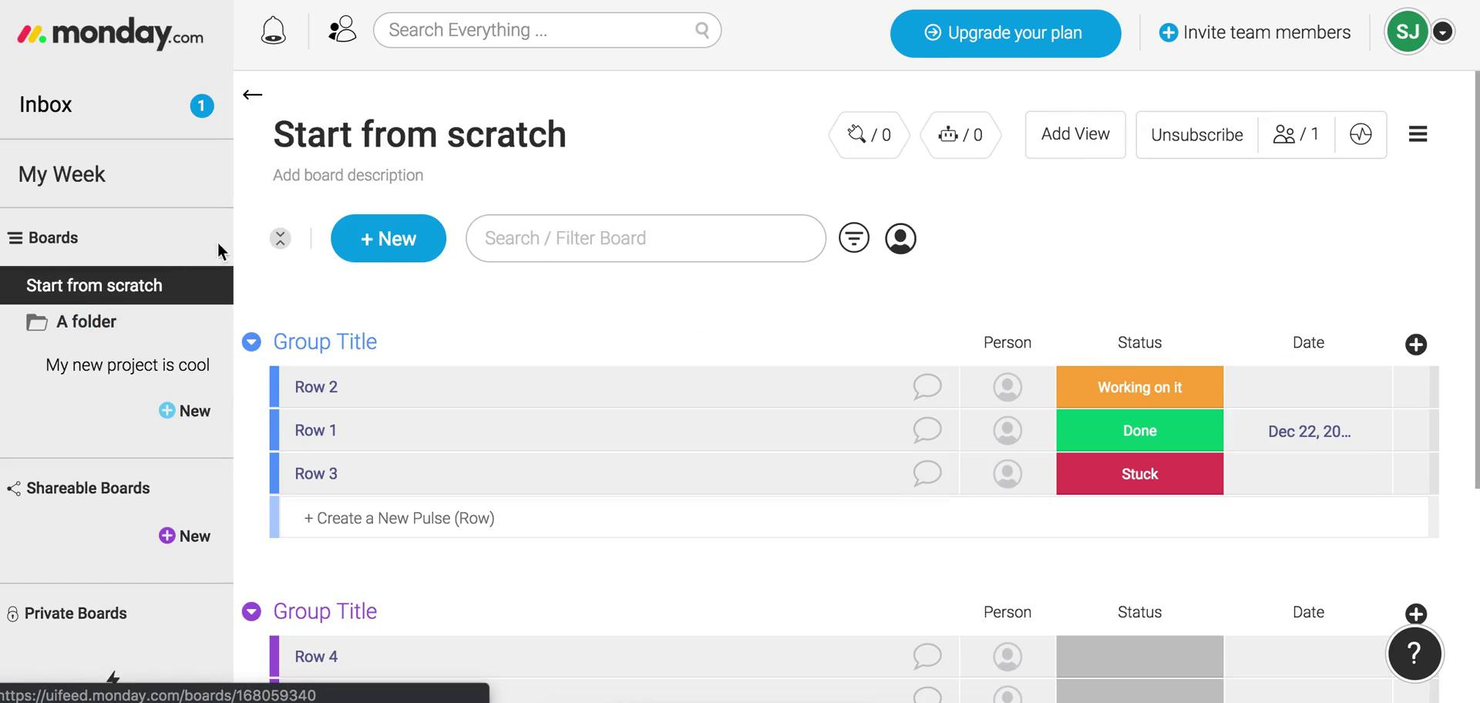
monday.com gives teams in tech, marketing, and operations a flexible platform to organize projects, manage tasks, and collaborate in real time, allowing workflows to adapt as needs change.
Who Is monday.com Best For?
monday.com is a strong fit for small to mid-sized teams that need a visual, adaptable way to manage projects without heavy setup or technical overhead.
Why I Picked monday.com
monday.com earns its spot on my shortlist because of how far its workflow customization goes. I like that you can build boards from scratch or start from one of hundreds of templates, then layer in custom columns, status labels, and conditional logic to match exactly how your team tracks work. The no-code automation builder is where it clicks—you can set up rules like "when status changes to In Review, notify the assignee and move the item to the QA board" without writing a single line of code. I also use the multiple view options (Gantt, Kanban, calendar, timeline) to switch context depending on whether I'm planning a sprint or reporting to stakeholders.
monday.com Key Features
- Workload view: See each team member's assigned tasks and capacity in a single visual dashboard to spot over-allocation at a glance.
- Task dependencies: Link related tasks so that when one item is delayed, dependent tasks automatically shift to reflect the updated timeline.
- Guest access: Invite external collaborators like clients or contractors to specific boards without giving them access to your full workspace.
- Dashboard reporting: Aggregate data from multiple boards into a single high-level dashboard to track progress across projects simultaneously.
monday.com Integrations
Integrations include Slack, Gmail, Google Calendar, Outlook, Microsoft Teams, Salesforce, QuickBooks, HubSpot, Zendesk, and GitHub.
What's Free?
monday.com offers a free-forever plan for up to 2 users. This plan includes 3 boards, 1,000 items, and limited access to integrations and automation.
Pros and Cons
Pros:
- Integrations include Slack Google Drive
- Customizable workflows using numerous columns
- Multiple views support varied management
Cons:
- Free plan limits users features
- Advanced features restricted to higher-tier
New Product Updates from monday.com
monday.com Enhances List View With Column Mapping
monday.com introduces column mapping in List View. This update improves visibility across connected boards. For more information, visit monday.com’s official site.


Wrike gives project managers and teams in tech, marketing, and professional services a flexible workspace to organize tasks, manage deadlines, and collaborate on projects—all without upfront costs.
Who Is Wrike Best For?
Wrike suits growing teams and mid-size organizations seeking a structured yet adaptable project management tool across marketing, product, and IT.
Why I Picked Wrike
I chose Wrike for its view flexibility, available right out of the box even on the free plan. You can toggle between list, board (Kanban), and table views depending on how your team thinks about work—so a developer tracking sprint tasks and a marketer managing a campaign calendar aren't forced into the same layout. The Gantt chart view is available on paid plans, giving teams a clear upgrade path as their needs grow. The cross-tagging feature is particularly useful: you can add a single task to multiple folders or projects so it appears in the right view for each team without duplication.
Scott Crosby, a Technical Project Manager, highlighted how Wrike delivers in real-world scenarios: “Wrike's strength is its visual project timelines and dependency tracking. When we were rolling out our client portal system, Wrike made it easy to see how backend development delays would impact frontend testing phases. The Gantt charts were intuitive enough that even our non-technical team members could understand project bottlenecks.”
Wrike Key Features
- Custom request forms: Build dynamic intake forms that automatically generate tasks, assign owners, and trigger workflows when submitted.
- Task and subtask management: Create tasks, break them into subtasks, and cross-tag them across multiple folders or projects without duplicating entries.
- Real-time dashboards: Build dashboards with custom widgets to track project status, workload, and KPIs across teams in one view.
- Workflow automation: Set up rule-based triggers to move tasks through stages, send notifications, or reassign work without manual intervention.
Wrike Integrations
Integrations include Salesforce, Microsoft Teams, Google Drive, Microsoft SharePoint, Zoom, Adobe Creative Cloud, QuickBooks, Power BI, Tableau, and Miro.
What's Free?
Wrike offers a free-forever plan for up to 5 users. The free plan includes basic task and project management features but does not support integrations or advanced views like Gantt charts.
Pros and Cons
Pros:
- Effective for content creation and collaboration among remote teams.
- The mobile app allows quick task management and real-time updates.
- Wrike's task integration enhances visibility and organization.
Cons:
- Users find the platform complex and overwhelming.
- AI functionalities can complicate tasks rather than streamline them.

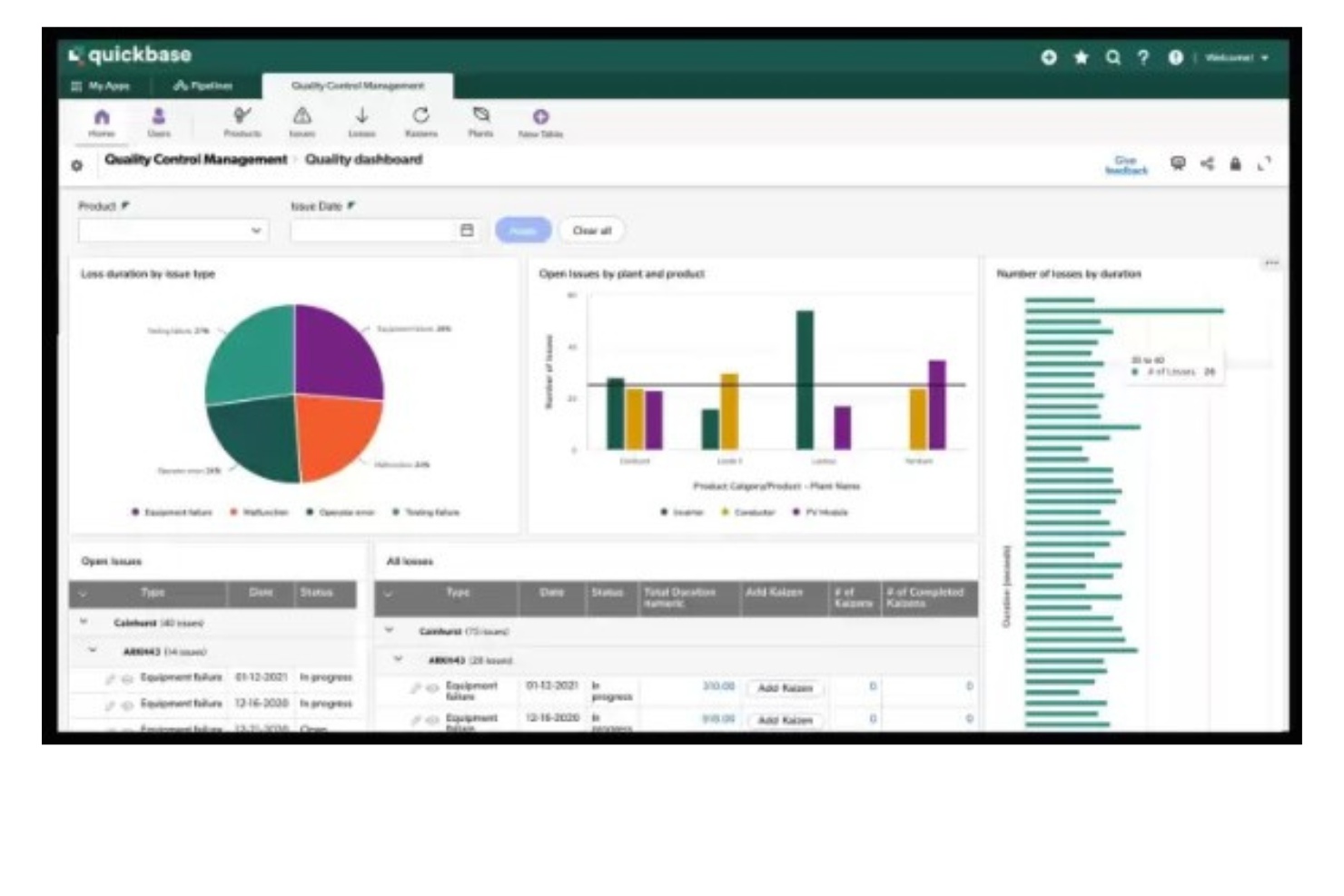
Quickbase gives teams in industries like construction, manufacturing, and IT a way to build custom project management apps that fit their unique workflows, helping them organize tasks, automate processes, and collaborate without relying on rigid, one-size-fits-all tools.
Who Is Quickbase Best For?
Quickbase is a strong fit for mid-size to large teams in operations-heavy industries like construction, manufacturing, and logistics who need project management tools tailored to their specific processes.
Why I Picked Quickbase
I've included Quickbase in my top picks because its no-code app builder lets teams design project management workflows from scratch rather than adapting to a fixed structure. I like that you can configure custom stage gates and approval routing directly in the workflow builder—so when a construction team needs a permit sign-off before moving to the next phase, that logic is built right into the app. Quickbase's Pipelines feature also lets you automate task handoffs between teams using drag-and-drop logic, so my team doesn't have to chase status updates across departments. The budget vs. actuals tracking with real-time alerts is another feature I find genuinely useful for keeping multi-phase projects from quietly going over budget.
Sergio Oliveira, Director of Development at DesignRush, shared his experience: “Quickbase enabled us to quickly consolidate our project data, even on the free plan. It allows us to track tasks, write reports, and ensure accountability without worrying about managing different spreadsheets.”
Quickbase Key Features
- Dynamic reports and dashboards: Build real-time reports with filters, groupings, and charts to track project status across multiple apps.
- Role-based permissions: Control who can view, edit, or manage data at the field, table, or app level.
- Mobile app access: Access and update project data from iOS and Android devices while working in the field.
- Gantt chart views: Visualize project timelines, task dependencies, and milestones in a drag-and-drop Gantt interface.
Quickbase Integrations
Integrations include Salesforce, SAP, Oracle, Microsoft Teams, SharePoint, Google Drive, and an API is available for custom integrations.
What's Free?
Quickbase offers a free trial, but there is no free-forever plan. The trial allows you to test the platform’s features, but user limits and integration access are restricted during the trial period.
Pros and Cons
Pros:
- Highly scalable for both small and large teams
- Integrates with a range of external tools
- Low-code customizable workflows
Cons:
- Limited ready-made templates
- Not ideal for those who want a quick-start solution

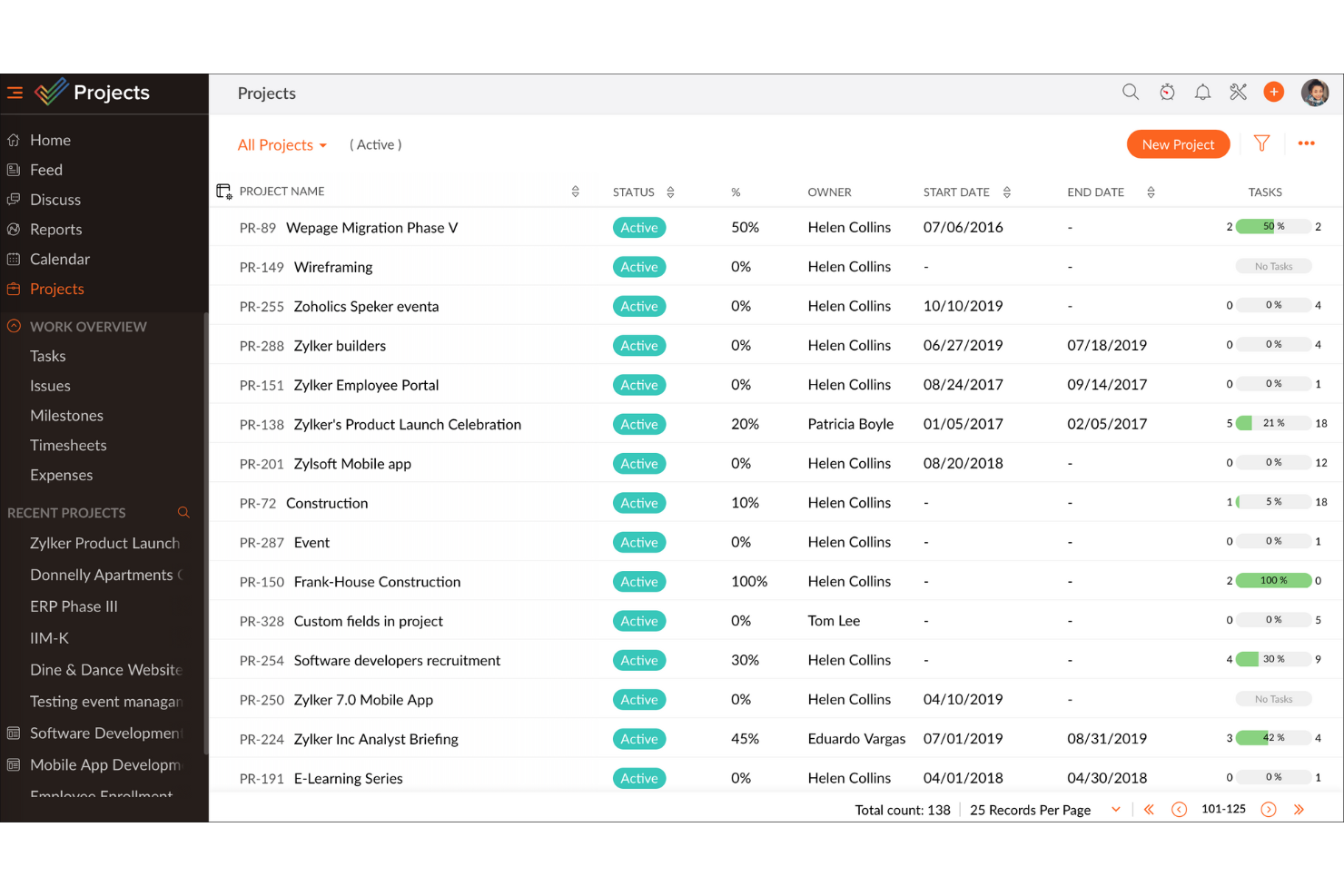
Zoho Projects gives teams in tech, marketing, and service-based businesses a flexible way to organize tasks, track progress, and collaborate on projects without upfront costs, making it a practical choice for those seeking a free project management platform that can grow with them.
Who Is Zoho Projects Best For?
Zoho Projects is a strong fit for small to mid-sized teams that need a free starting point but expect their project management needs to grow over time.
Why I Picked Zoho Projects
Zoho Projects earns its spot on my shortlist because it's one of the few free project management tools that genuinely scales with your team without forcing you to rebuild your workflow every time you grow. I like that the free plan gives you real task management capabilities—milestones, task lists, subtasks, and Gantt charts—so you're not stuck with a stripped-down experience just because you haven't paid yet. When your team is ready to move up, the Blueprint feature lets you design automated task workflows that trigger status changes, field updates, and team alerts, which is something I've found makes a real difference when managing multiple concurrent projects. The custom layouts and custom fields also mean you can shape the tool around how your team actually works, rather than adapting your process to fit the software.
Michael Alexander, Managing Director at Tangible Digital, explained: “The flexibility of Zoho Projects is what makes it stand apart, as it has enabled us to tailor task views and reporting hierarchy based on our operational requirements."
Zoho Projects Key Features
- Issue tracking: Log bugs and issues directly within a project, assign them to team members, and monitor resolution progress in one place.
- Resource management: View each team member's workload and reassign tasks when someone is over- or under-allocated.
- Project baseline: Capture a snapshot of your project plan at any point and compare it against actual progress to spot schedule drift early.
- Timesheet management: Log time manually or via task timers, with admin controls to approve or reject entries for payroll and client billing.
Zoho Projects Integrations
Integrations include Zoho CRM, Zoho Desk, Zoho Analytics, Zoho Books, Google Calendar, Microsoft Teams, Dropbox, Github, Slack, and Zendesk.
What's Free?
Zoho Projects offers a free-forever plan for up to 5 users and 3 projects, with 5 GB of storage and limited workflow actions. Integrations are limited to Google apps and Office 365 on the free plan.
Pros and Cons
Pros:
- Easily integrates with other Zoho apps and third-party tools, improving workflow continuity.
- Provides precise tracking of time spent on tasks, aiding productivity analysis.
- Offers detailed task breakdowns and organization, enhancing clarity.
Cons:
- Customization options are not as extensive as some competitors, which may hinder tailored solution.
- The mobile app lacks some functionalities available on the desktop version, affecting on-the-go management.
New Product Updates from Zoho Projects

Zoho Projects Infinity Unveiled
Zoho Projects introduces Zoho Projects Infinity with custom modules, reports, dashboards, and enhanced AI capabilities. These updates improve flexibility, visibility, and automation across project workflows. For more information, visit Zoho Projects' official site.
 .
.
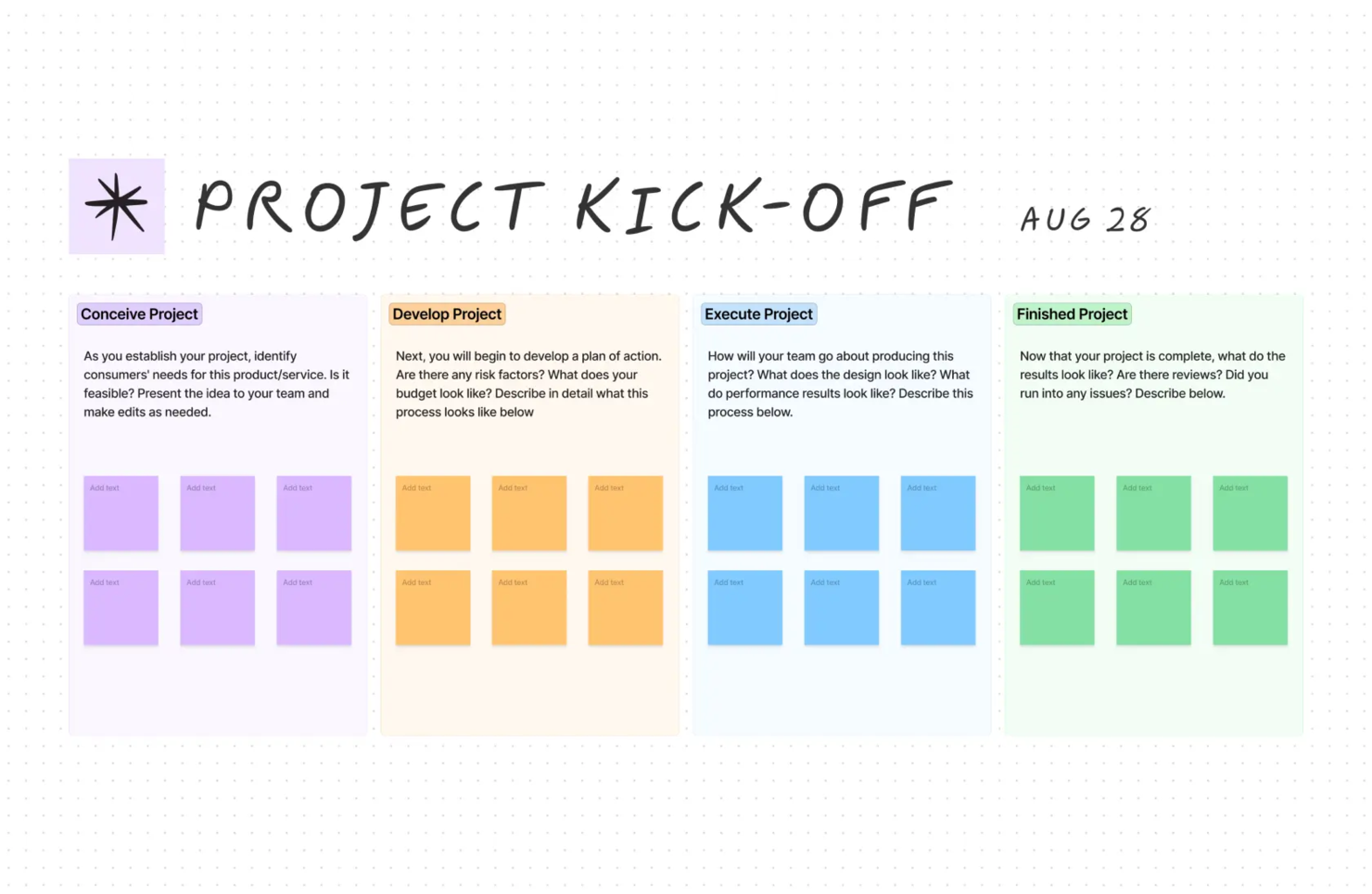
FigJam is an online whiteboard built for teams who want to visually organize projects, brainstorm ideas, and map out workflows together in real time, making it a popular choice for product managers, designers, and cross-functional teams looking for flexible project planning.
Who Is FigJam Best For?
FigJam is a strong fit for product and design teams at startups and mid-size tech companies who need a shared visual space for planning, ideation, and collaboration.
Why I Picked FigJam
FigJam earns its spot on my shortlist because of how much you can shape it to fit your team's exact way of working. I love that you can build your own templates from scratch—so instead of adapting a generic sprint retro board, my team can create one that mirrors our actual workflow, labels, and structure. The widgets library extends this further, letting you drop in interactive tools like voting trackers, timers, and polls directly onto a board. FigJam's AI generates custom templates from a simple text prompt, so I can create a tailored project kickoff or roadmap view in seconds instead of starting from a blank canvas.
FigJam Key Features
- Sticky notes and dot voting: Add color-coded sticky notes to a board and use dot voting to let the team prioritize ideas or decisions together.
- Diagramming with shapes and connectors: Build flowcharts, user flows, and system maps using shapes and connectors that snap to a grid.
- Spotlight mode: Direct meeting participants' attention to a specific area of the board during live sessions.
- AI-powered sticky note sorting: Automatically group sticky notes into themes or summarize board output into action items with a single click.
FigJam Integrations
Integrations include Asana, Jira, and ChatGPT.
What's Free?
FigJam offers a free-forever plan with unlimited files and collaborators. Some advanced features and integrations are limited to paid plans.
Pros and Cons
Pros:
- Offers community templates for various use cases.
- Offers versatile tools for effective brainstorming sessions.
- Seamless integration with Figma enhances design collaboration.
Cons:
- Limited sharing access for non-Figma users
- Not ideal for non-visual project management

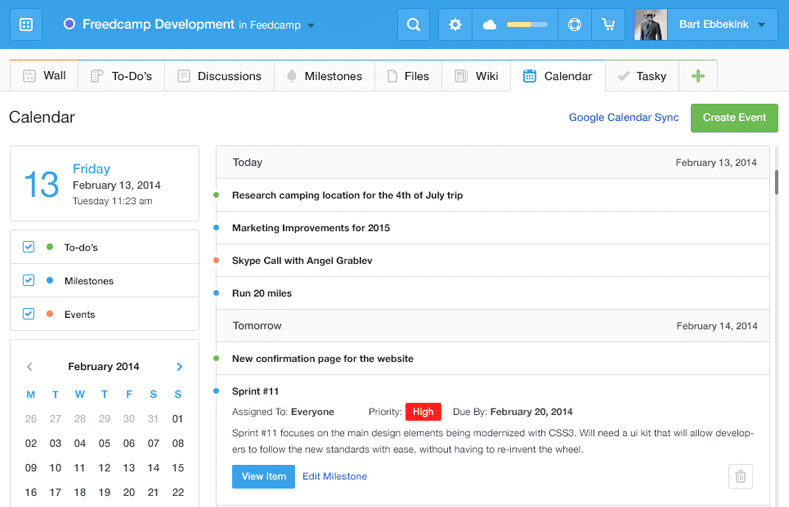
Freedcamp gives startups, agencies, and small businesses a flexible project management platform with task lists, kanban boards, and collaboration tools that help teams organize work and manage multiple projects without hitting usage limits.
Who Is Freedcamp Best For?
Freedcamp is a great fit for small teams and freelancers who need to manage multiple projects simultaneously without paying for a premium plan.
Why I Picked Freedcamp
Freedcamp earns its spot on my shortlist because it's one of the few tools that genuinely doesn't cap the number of projects or users on its free plan. I like that my team can run as many concurrent projects as needed without hitting a paywall—something most free tiers quietly restrict. The Task Board is a feature I use regularly; it pulls tasks from every active project into a single view, which makes it easy to spot bottlenecks across workstreams without jumping between projects. I also rely on the milestones feature to group related tasks under a target date, which keeps larger initiatives from drifting.
Freedcamp Key Features
- Time tracking: Log hours directly against tasks and projects from within the platform.
- File storage: Attach and organize files at the task or project level, keeping assets easy to find.
- Discussion boards: Create threaded conversations tied to specific projects to keep team communication organized.
- Password manager: Store and share project-related login credentials securely across your team.
Freedcamp Integrations
Integrations include Google Calendar, Google Drive, Dropbox, and more.
What's Free?
Freedcamp offers a free-forever plan with unlimited projects, tasks, storage, and users. The main restriction is a 10MB maximum file upload size per file.
Pros and Cons
Pros:
- Affordable pricing for additional features and users.
- Offers collaborative tools like discussions and calendars.
- Extensive free plan supports unlimited projects and users.
Cons:
- May not meet the needs of enterprises requiring high customization.
- Mobile app is less polished than the desktop version.

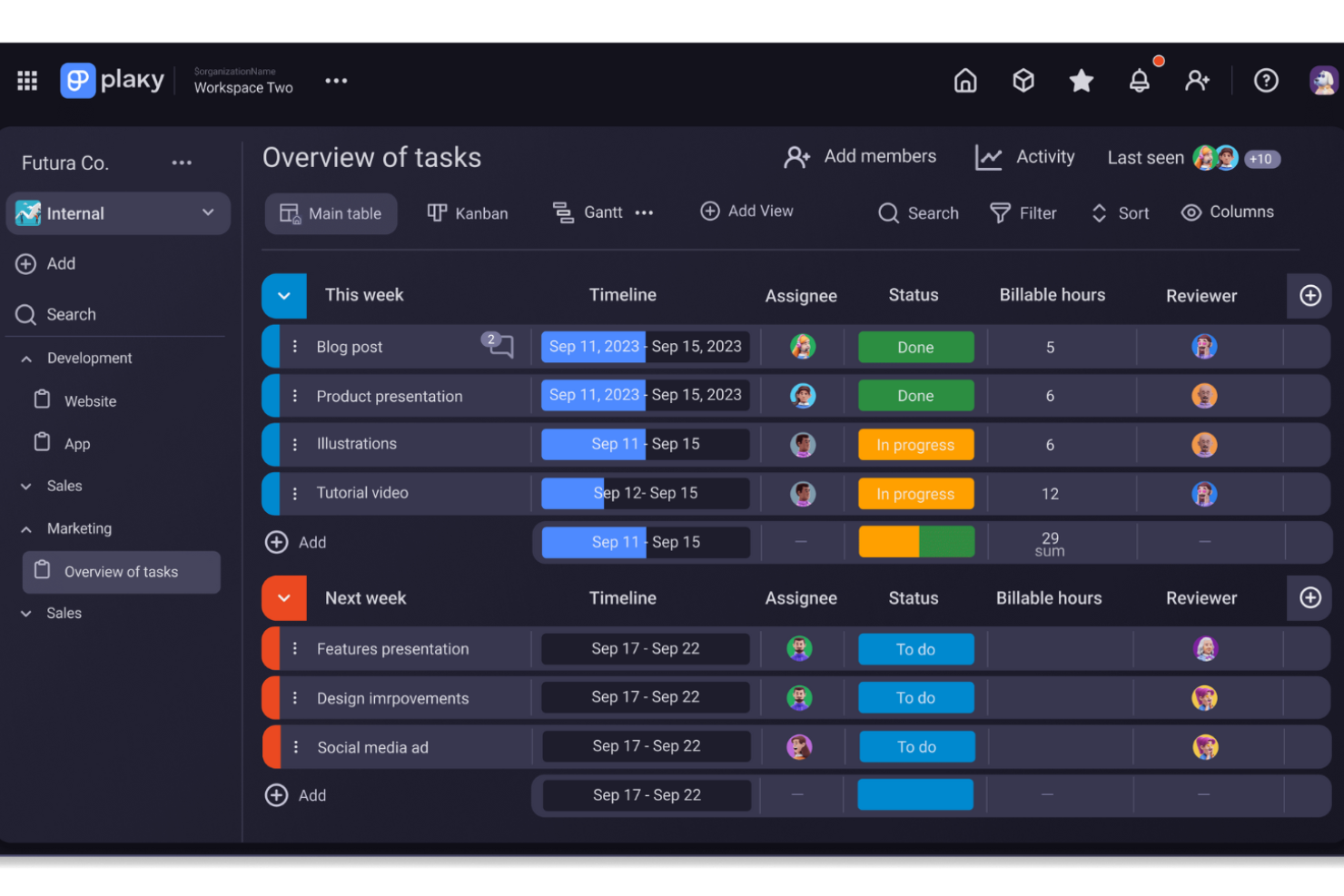
For those seeking a user-friendly project management tool without the cost, Plaky offers a compelling solution tailored for small businesses and nonprofits. It provides a platform for organizing tasks with customizable boards and fields, making it an ideal choice for teams aiming to enhance productivity and collaboration. With features like automation for repetitive tasks and integration with communication tools, Plaky addresses the common challenges of task management and team coordination, ensuring that your projects are not only well-organized but also efficiently executed.
Why I Picked Plaky
I picked Plaky because it offers a standout feature for free project management software—unlimited users. This makes it particularly appealing for small businesses and nonprofits that need to involve multiple team members without incurring extra costs. With features like customizable task boards and multiple view options, such as Gantt charts, Plaky ensures your team can efficiently track progress and manage tasks in a centralized location. Additionally, the ability to share files and comment directly on tasks enhances collaboration, making it easier for your team to stay aligned and focused on project goals.
Plaky Key Features
In addition to its unlimited user capability, Plaky offers several features that enhance its functionality as a free project management tool.
- Task Management: Organize tasks using boards, custom fields, and templates, allowing your team to efficiently set up and manage projects.
- Team Collaboration: Share updates, files, and comments directly within task cards, with notifications keeping everyone informed of task assignments and updates.
- Mobile Apps: Access tasks and updates on the go through mobile applications, ensuring your team stays connected wherever they are.
- Security & Privacy: Rest assured knowing your data is protected with ISO 27001, SOC 2 certifications, and GDPR compliance, safeguarding user information.
Plaky Integrations
Integrations include Pumble and Clockify.
Pros and Cons
Pros:
- Provides essential security features, including GDPR compliance.
- Customizable workflows adaptable to various needs.
- Offers unlimited users and projects in the free plan.
Cons:
- Lacks advanced features compared to competitors.
- Limited to only list and Kanban views.


Jira gives software teams and digital project managers a flexible platform to organize tasks, track progress, and manage complex workflows, making it a popular choice for teams looking for a free project management solution with agile capabilities.
Who Is Jira Best For?
Jira is a strong fit for software development and product teams that work in agile or scrum environments and need structured issue tracking alongside sprint planning.
Why I Picked Jira
Jira earns its spot as one of the best on my shortlist because it's one of the few free project management tools built specifically around agile delivery. I use scrum boards and sprint planning to break work into focused two-week cycles, which keeps my team moving without losing sight of the backlog. I also rely on Jira's dependency mapping to coordinate releases across product, engineering, and design—especially when one team's work is blocking another's. The burndown charts and cycle time reports give me real data on team performance, not just a status update.
Jira Key Features
- Customizable workflows: Build and modify issue workflows to match how your team actually moves work from start to finish.
- Roadmaps: Visualize work across multiple sprints and teams on a timeline to track progress against delivery goals.
- Automation rules: Set trigger-based automation to handle repetitive tasks like assigning issues or updating statuses.
- Reporting dashboard: Access built-in reports including velocity charts and cumulative flow diagrams to monitor team output.
Jira Integrations
Integrations include Confluence, Trello, Bitbucket, Slack, Microsoft Teams, Google Workspace, Zoom, Tempo Timesheets, Zephyr, and Loom.
What's Free?
Jira offers a free-forever plan for up to 10 users. The free plan includes basic project management features but limits storage to 2 GB and does not include advanced admin controls or premium support.
Pros and Cons
Pros:
- Excellent issue management capabilities for bug tracking and problem-solving.
- Supports Agile methodologies, ideal for software development teams.
- Highly customizable and scalable to fit different project needs and team sizes.
Cons:
- Occasional slow performance with large projects
- May be too feature-rich for teams managing simple projects


Office Timeline is a project visualization tool for professionals who need to create clear, presentation-ready timelines and Gantt charts directly in PowerPoint, making it easy to communicate project plans and schedules with clients or stakeholders.
Who Is Office Timeline Best For?
Office Timeline is a strong fit for project managers and consultants who regularly present project plans to stakeholders using Microsoft PowerPoint.
Why I Picked Office Timeline
Office Timeline earns its spot on my list because it's the only tool I've found that builds Gantt charts directly inside PowerPoint as a native add-in, rather than exporting a static image you can't edit. I use it to pull project data from Excel or Jira and generate a slide-ready Gantt chart, which eliminates the manual reformatting I used to dread before exec reviews. The swimlane feature lets me group tasks by workstream on a single slide, so stakeholders can see the full picture without digging through a project management tool. The free plan covers basic timeline creation, which makes it a genuinely useful starting point before committing to a paid tier.
Office Timeline Key Features
- Drag-and-drop visual editor: Move milestones, tasks, and date ranges directly on your PowerPoint slide without re-entering data.
- Planned vs. actual tracking: Compare original project baselines against real progress using built-in variance tracking on your timeline.
- Pre-designed themes and templates: Apply designer-grade themes to Gantt charts and timelines to produce consistent, polished slides.
- Percent complete indicators: Display task progress visually on each bar within your timeline to show how far along each workstream is.
Office Timeline Integrations
Integrations include Microsoft PowerPoint, Microsoft Excel, Microsoft Project, Microsoft Word, and Office 365.
What's Free?
Office Timeline offers a free-forever plan that lets you create basic timelines and Gantt charts in PowerPoint. The free version limits access to advanced templates, integrations, and some customization features.
Pros and Cons
Pros:
- Offers customizable templates to suit various project needs.
- Seamlessly integrates with Microsoft PowerPoint for presentations.
- Allows quick creation of professional Gantt charts and timelines.
Cons:
- Limited flexibility for complex or large-scale project workflows.
- Advanced features require a paid subscription for full access.

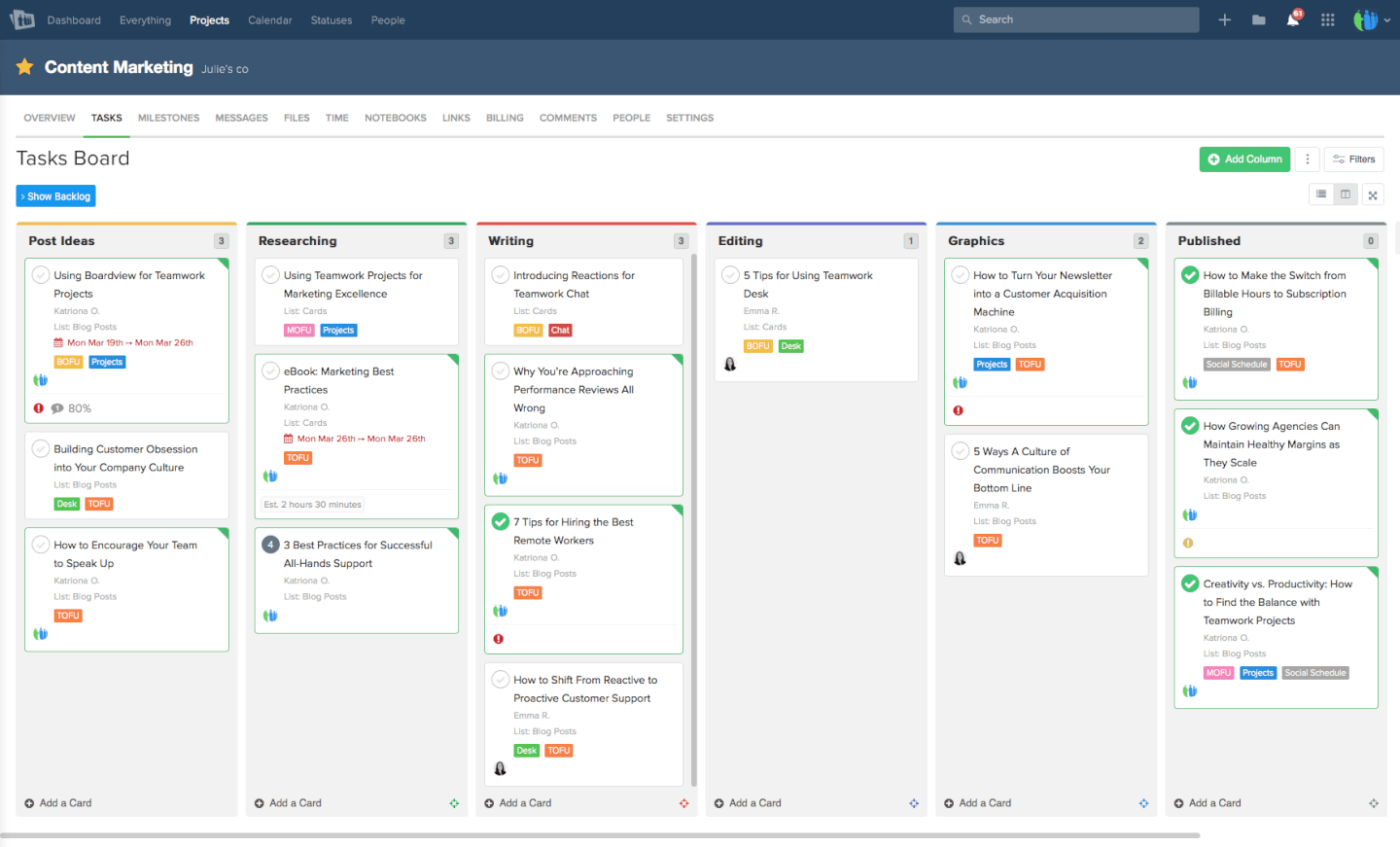
Teamwork.com gives project managers and small businesses a flexible platform to organize tasks, track progress, and collaborate with teams, helping manage multiple projects without the cost or complexity of enterprise tools.
Who Is Teamwork.com Best For?
Teamwork.com is a good fit for small to mid-sized teams in agencies, consulting, or professional services who need structured project tracking without a steep learning curve.
Why I Picked Teamwork.com
Teamwork.com earns its spot on my shortlist because its Kanban boards go well beyond basic column views. It lets you set up Triggers directly on the board—when a task moves from "In Review" to "Approved," it automatically reassigns the task, updates the due date, or fires off a notification without any manual follow-up. The boards are also fully customizable, so whether my team runs Scrum, Kanban, or a hybrid, I can shape the columns to match exactly how work actually moves. The free plan includes board view access, providing a useful starting point for teams who want visual task tracking without committing to a paid tier.
Teamwork.com Key Features
- Milestone tracking: Set checkpoints within a project so your team and clients always know what's due and when.
- Native time tracking: Log time with timers, create timesheets, and mark hours as billable or non-billable directly within tasks.
- Workflow automation: Build automation rules from a template gallery or create custom ones to cut down on repetitive manual steps.
- Gantt chart view: Visualize your full project timeline and see task dependencies to keep delivery on track.
Teamwork.com Integrations
Integrations include Slack, Microsoft Office, Google Drive, Dropbox, Box, Jira, Harvest, Xero, BugHerd, and ChatGPT.
What's Free?
Teamwork.com offers a free-forever plan for up to 5 users and 2 projects. Some advanced features and integrations are only available on paid plans.
Pros and Cons
Pros:
- Features a user-friendly interface praised for quick onboarding.
- Provides a free plan for up to 5 users, suitable for small teams.
- Offers a range of customizable templates and workflows for various projects.
Cons:
- Lacks advanced reporting and proofing tools compared to competitors.
- The interface can be overwhelming due to numerous features.
Other Free Project Management Software
Here are some additional tools that didn’t make my final list, but are still good options for you to consider if you didn’t find a fit above.
- Redbooth
For team communication and video chat
- Nutcache
Free project management software with custom workflows
- Podio
For task management capabilities
- Bitrix24
For small teams
- GoodDay
For visualizing project dependencies
- nTask Manager
For visual project timelines
- ReptonPOD
For tailoring the project governance level
- Miro
For pre-built templates
- ClickUp
For growing teams
- Project.co
For built-in client communication
- Smartsheet
Project management software with a mobile app
- Hubstaff
Free tool for agile project management
- Lucidspark
For project brainstorming
- Celoxis
For data-driven project decisions
- GoodDay
For task visualization
- Kissflow
Project management software for non-project managers
- Hub Planner by Milient
For resource scheduling
- Trello
For automation capabilities
- Airtable
For its free plan with unlimited bases and 2 GB of attachment space per base
- TeamGantt
For creating Gantt charts


Related Project Management Software Reviews
If you still haven't found what you're looking for here, check out these other related tools that we've tested and evaluated:
- Project Management Software
- Free Client Tracking Software
- PR Project Management Software
- Resource Management Software
- Workflow Automation Software
- Time Tracking Software
- Task Management Software
- Collaboration Tools
- Project Management Software for Windows
- Paymo Alternatives
- Redmine Alternatives
Selection Criteria For Free Project Management Software
Through hands-on trials and thorough research, I've developed a set of criteria that guides my selection process for free project manager software and makes sure each tool I recommend offers significant value.
Core Project Management Software Functionality: 25% of total score
- Efficient task management and delegation
- Real-time collaboration and communication among team members
- Time tracking for better workload management
- Centralized document storage for easy access and organization
- Performance reporting for insights into project progress and team productivity
Additional Standout Features: 25% of total score
- Innovative project visualization tools, like interactive Gantt charts or advanced Kanban boards
- AI-driven analytics for predictive project management and risk assessment
- Integrated chat and video conferencing features
- Customizable dashboards and reports
- Automation of repetitive tasks and workflows
- Scalability
Usability: 10% of total score
- Intuitive interfaces, such as drag-and-drop scheduling tools
- Clean, uncluttered design that simplifies navigation and reduces the learning curve for new users
- Responsive design that ensures a seamless experience across desktop and mobile devices
Onboarding: 10% of total score
- Availability of comprehensive onboarding resources, including interactive tutorials, training videos, and product tours
- Pre-designed templates for various project types to help users get started quickly
- Access to a knowledge base or community forums for peer support and learning
Customer Support: 10% of total score
- Quick and helpful customer service through multiple channels, including live chat, email, and phone support
- Proactive support resources like FAQs, troubleshooting guides, and best practice tips
Value For Money: 10% of total score
- A free version that scales with users’ needs and offers the core functionalities without immediately pressuring you to upgrade
- Clear, transparent upgrade paths for when your needs grow
Customer Reviews: 10% of total score
- Positive feedback on ease of use and interface design, indicating a smooth user experience
- High ratings for customer support responsiveness and helpfulness
- Strong user satisfaction scores related to the free team management app’s value for money, especially considering its free features
How to Choose Free Project Management Software
As you're shortlisting, trialing, and selecting free project management software, consider the following:
- What problem are you trying to solve? Start by identifying the project management feature gap you're trying to fill to clarify the features and functionality the free project management software needs to provide.
- Who will need to use it? Consider who'll be using the software and how many licenses you'll need. Evaluate if it'll just be your project managers, or the whole organization that will require access. When that's clear, it's worth considering if you're prioritizing ease of use for all, or speed for your power users.
- What other tools it needs to work with? Clarify what tools you're replacing, what tools are staying, and the tools you'll need to integrate with, such as accounting, CRM. or HR software. Figure out whether you can replace multiple tools with one consolidated free project management tool.
- What outcomes are important? Consider the result that the software needs to deliver to be considered a success, what capability you want to gain, what you want to improve, and how you will be measuring success. For example, an outcome could be the ability to get greater visibility into performance.
- How it would work within your organization? Consider the software selection alongside your workflows and delivery methodology. Evaluate what's working well and the areas that are causing issues. Every business is different—don’t assume that because a tool is popular that it'll work in your organization. Look for free software that offers a great feature set and can scale in functionality as your needs grow.
Trends in Free Project Management Software
Here are several key trends that will continue to shape project management free tools.
- AI and machine learning features: Some of the best free project management apps have begun incorporating AI-driven analytics, predictive task management, and automated risk assessment. These advanced features offer insights and automation that were previously only available in premium tools.
- Virtual reality (VR) and augmented reality (AR) for project visualization: A few pioneering project planner free tools are experimenting with VR and AR to offer immersive project planning and visualization experiences. This novel use of technology allows team members to engage with project plans and designs in a more interactive and intuitive manner.
- Widespread adoption of cloud-based platforms: There's a significant shift towards cloud-based project management solutions (i.e. free project management software online) which means better accessibility, scalability, and collaboration. This trend caters to the increasing need for remote work capabilities, as team members can access the project management tool and project data from anywhere, at any time.
- Enhanced security measures: As project management tools for free become more integrated into the daily operations of businesses, the emphasis on security and data protection has grown. Features such as end-to-end encryption, two-factor authentication, and advanced access controls are becoming standard to address concerns about data breaches and unauthorized access.
What Is Free Project Management Software?
Free project management software is a no-cost tool that helps individuals and teams plan, track, and manage tasks, deadlines, and collaboration.
Often available as web, desktop, or mobile apps, these tools include features like task assignment, scheduling, and progress tracking. They’re ideal for startups, freelancers, or small teams who need to stay organized and on schedule—without the cost of premium tools. Free project management software is often open source or a paid tool that follows a freemium model.
Features of Free Project Management Software
When selecting free project management software, keep an eye out for the following key features:
- Automated task suggestions: AI can analyze your workflow and suggest new tasks, deadlines, or priorities based on project history and team habits.
- Smart scheduling: AI tools can recommend optimal timelines, assign resources, and adjust schedules automatically when conflicts or delays arise.
- Predictive analytics: Get insights into potential risks, project delays, or budget overruns before they happen, so you can take action early.
- Natural language processing: Quickly create tasks, set reminders, or search for information using simple language—just type or speak your request.
- AI-powered reporting: Automatically generate progress reports, performance summaries, or project updates, saving you time on manual tracking.
- Intelligent notifications: Receive personalized alerts about tasks that need your attention, upcoming deadlines, or changes that impact your work.
- Smart document management: AI can help categorize, tag, and find documents faster, so your team spends less time searching and more time working.
- Automated meeting notes: Some tools use AI to transcribe meetings, summarize key points, and assign action items, making it easier to keep everyone aligned.
AI Features in Free Project Management Software
Many free project management software options are starting to include AI-powered features to help teams work smarter and more efficiently. Here are some AI capabilities to look for:
- Automated task suggestions: AI can analyze your workflow and suggest new tasks, deadlines, or priorities based on project history and team habits.
- Smart scheduling: AI tools can recommend optimal timelines, assign resources, and adjust schedules automatically when conflicts or delays arise.
- Predictive analytics: Get insights into potential risks, project delays, or budget overruns before they happen, so you can take action early.
- Natural language processing: Quickly create tasks, set reminders, or search for information using simple language—just type or speak your request.
- AI-powered reporting: Automatically generate progress reports, performance summaries, or project updates, saving you time on manual tracking.
- Intelligent notifications: Receive personalized alerts about tasks that need your attention, upcoming deadlines, or changes that impact your work.
- Smart document management: AI can help categorize, tag, and find documents faster, so your team spends less time searching and more time working.
- Automated meeting notes: Some tools use AI to transcribe meetings, summarize key points, and assign action items, making it easier to keep everyone aligned.
Benefits of Free Project Management Software
Here are five primary benefits that free project management software offers to users and organizations:
- Cost efficiency: Drastically reduces operational costs. By eliminating the need for a financial investment in software, businesses can allocate their budgets to other areas where it is more urgently needed, which improves overall resource management and financial flexibility.
- Improved collaboration: Facilitates better teamwork and communication. Free project management software provides a platform where team members can collaborate in real-time, share documents, and update each other on progress, thereby improving workflows and productivity.
- Enhanced organization: Keeps tasks and deadlines clearly structured. Users benefit from features such as task lists, calendars, and Kanban boards, which help you organize projects more effectively and make sure all team members are aware of their responsibilities and timelines.
- Accessibility: Offers flexibility and convenience. Most free project management tools are online and cloud-based, so team members can access project information from anywhere, at any time, using any device with internet connectivity. This makes it easier to work remotely or on-the-go.
- Risk mitigation: Aids in identifying and addressing potential project risks early. The ability to track progress and generate reports helps in spotting bottlenecks or delays before they become critical issues, allowing for timely adjustments and decision-making to keep projects on track.
Costs & Pricing for Project Management Software
While free plans are a great starting point, especially for small teams, startups, and nonprofits, it is still a good idea to be aware of the paid plans—and associated features—available on the market.
Below is a breakdown of the typical plan options, average pricing, and common features included in each plan to help guide your decision-making process.
Plan Comparison Table for Project Management Software
| Plan Type | Average Price | Common Features |
|---|---|---|
| Free | $0 | Task and project management, basic collaboration tools, limited storage |
| Basic | $5-10 per user/month | Enhanced task management, time tracking, additional storage, basic reporting |
| Standard | $10-25 per user/month | Full project planning and scheduling, advanced collaboration features, integrations with other tools, enhanced security options |
| Premium | $25-50 per user/month | Resource management, advanced reporting and analytics, customizable dashboards, priority support |
| Enterprise | Custom pricing | Unlimited projects and users, dedicated support and training, advanced security and compliance, customizable features and integrations |
You can find more project management software for nonprofits here.
Free Project Management Software Frequently Asked Questions
Find common answers to questions other people are asking about this topic.
What features are usually limited in free project management software?
Most free project management software limits advanced capabilities to encourage upgrades. You’ll typically see restrictions on things like Gantt charts, time tracking, advanced reporting, or built-in budget management. User caps are common, so only a handful of team members can collaborate for free. You might also get less file storage, fewer project templates, and basic integration options instead of premium apps (like Slack, Salesforce, or CRM tools). If you need features like automation, role-based permissions, or detailed dashboards, expect these to sit behind a paywall. Always review the free plan details before onboarding your team to make sure it covers your essential workflows.
Are free project management tools secure for client or sensitive data?
Most free project management tools provide a baseline level of security, like SSL encryption, password protection, and regular software updates. However, these tools might not offer advanced security features such as two-factor authentication, audit logs, encrypted file storage, or compliance certifications like SOC 2 or HIPAA. For most general internal projects, free tools are usually fine, but if you’re handling confidential client data, contracts, or regulated information, you’ll want to verify the tool’s privacy policy and security practices. You can also reach out to their support to ask about data privacy—and upgrade to paid plans if you need more robust protections.
Is there a free Microsoft project management software?
Yes, Microsoft provides a couple of free, lightweight options for basic project management. Microsoft Planner comes included with free Microsoft 365 accounts and allows you to organize tasks, create simple boards, and collaborate with small teams. Microsoft To Do is also available for individual task tracking. If you’re part of an organization already using Microsoft’s ecosystem, these tools can help manage simple workflows. For more powerful features like timeline views, advanced reporting, or resource management, you’ll need Microsoft Project, which requires a separate paid subscription.
Does Google have a free project management software?
No, Google doesn’t offer a purpose-built project management tool like Trello or Monday.com, but you can create basic systems using Google Workspace apps. For instance, you can use Google Sheets to build project trackers, Google Docs for meeting notes, and Calendar for deadline reminders. You can also set up shared folders in Google Drive and assign tasks to team members. While this approach takes more setup, it works well if you want a free, flexible option and your team already uses Google tools. There are also third-party templates, add-ons, and Google integrations for project management if you need more structure.
What are some free open source project management software options?
There are several reliable open-source project management tools to explore. Taiga is popular for agile teams, offering boards, sprints, and issue tracking. OpenProject includes Gantt charts, task dependencies, and time tracking—making it suitable for more traditional or hybrid workflows. ProjectLibre works as a free alternative to Microsoft Project, especially for planning and scheduling. With open-source software, you can customize the code and, if you host it on your own server, keep full control over your data. However, expect to invest more time for setup, maintenance, and occasional troubleshooting, since technical support may be more limited.
Should I use free agile project management software?
Yes, if you’re starting out or managing smaller agile projects, free tools like Jira’s free tier, Taiga, or ClickUp can handle the basics—like sprints, backlogs, user stories, and Kanban boards. These tools often include enough functionality for lightweight scrum or Kanban teams and let you experiment with agile workflows before making a financial commitment. As your projects grow in complexity, you might hit limits on user numbers, analytics, or integration features, at which point you can choose whether to upgrade or switch tools. Many teams successfully run regular standups, retrospectives, and sprint planning on the free versions.
How can I migrate from free to paid project management software?
Moving from a free plan to a paid one is usually simple, requiring just a few clicks from your account dashboard or billing section. Most vendors keep your existing data, projects, attachments, and user permissions intact—you’ll just instantly unlock premium features like advanced reports, integrations, or more storage. Before upgrading, it’s smart to export a backup copy of key project data, review what new features you’ll get, and check for any changes to user roles or billing cycles. If you’re switching platforms entirely, look for tools that support data import/export or offer a migration guide to help ease the transition.
What's Next?
Once you outgrow a free tool, you will have to transition to a paid tool. Learn how to get the most out of software demos and 8 reasons why you should use PM software.