

10 WorkflowMax Alternatives for Job Management in 2026

10 Best WorkflowMax Alternatives Shortlist


Managing projects can be tough. You're juggling deadlines, resources, and team dynamics. It's only natural to look for a project management tool that truly fits your needs.
If WorkflowMax isn't hitting the mark for you, you're not alone. Maybe it's lacking features or isn't user-friendly enough. I get it: you want software that makes your life easier, not harder.
Exploring alternatives to WorkflowMax can open up new possibilities. I'll share unbiased reviews of top picks that could better suit your team's needs.
You'll find insights into features, usability, and what sets each option apart. Let's find the right fit for your project management challenges.
What is WorkflowMax?
WorkflowMax by BlueRock is a project management software designed to help you manage your projects from start to finish. It's commonly used by creative professionals, accountants, and consultants who need to keep track of their time, tasks, and billing. Time tracking, job management, and invoicing features help you organize your work, manage your team, and stay on top of deadlines. Overall, WorkflowMax offers a centralized solution for managing your projects effectively.
WorkflowMax Alternatives Comparison Table
The table below compares features and pricing details for my top WorkflowMax alternatives.
| Tool | Best For | Trial Info | Price | ||
|---|---|---|---|---|---|
| 1 | Best for billable project teams | Free plan + 14-day free trial available | From $11.95/month | Website | |
| 2 | Best for agency project management | Free plan + 14-day trial + demo available | From $9.99/user/month (billed annually) | Website | |
| 3 | Best for architecture and engineering firms | Free demo available | From $45/month | Website | |
| 4 | Best for project financial insights | 21-day free trial + free demo available | From $17/user/month (billed annually) | Website | |
| 5 | Best for A&E firm-wide billing and job costing | Free demo available | Pricing upon request | Website | |
| 6 | Best for client work billed by retainer or phase | Free demo available | From $39/user/month | Website | |
| 7 | Best for large ad agencies | Free demo available | From $49/user/month | Website | |
| 8 | Best for trades job-to-invoice workflows | 14-day free trial + free demo available | From $45/user/month | Website | |
| 9 | Best for WorkflowMax migrants in trades | 14-day free trial + free demo available | From $350/month | Website | |
| 10 | Best for agency profitability tracking | 14-day free trial | From $10/user/month (billed annually) | Website |

Why Trust Our Software Recommendations
Our team has been testing and reviewing software since 2012. As project managers ourselves, we know how difficult—and important—it is to choose the right software.
For this guide, we evaluated tools using hands-on testing and independent research, scoring tools using our selection criteria. We also draw on insights from industry thought leaders and practicing project management experts.
Our reviews reflect our human editorial judgment, not a sales pitch.
Expert reviewers:
Best WorkflowMax Alternatives Reviews
Below are my detailed summaries of the best WorkflowMax alternatives that made it onto my shortlist. My reviews offer a detailed look at the key features, pros and cons, integrations, and ideal use cases of each tool to help you find the best one for you.
Avaza
Best for billable project teams
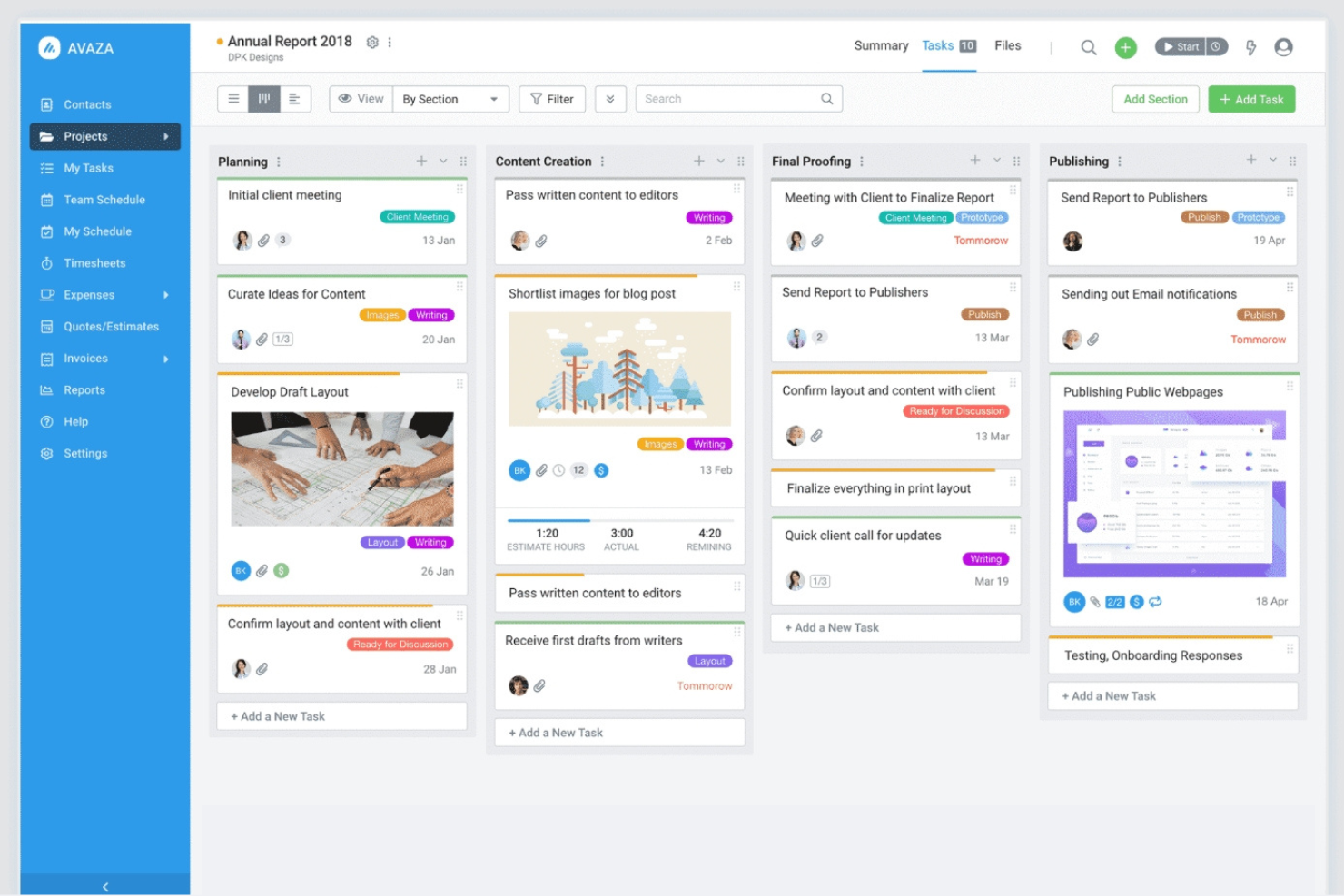
Avaza is an all-in-one project management and collaboration tool designed for businesses of all sizes. It helps teams manage projects, track time, and handle invoicing in a single platform.
Why Avaza is a good WorkflowMax alternative: Avaza combines time tracking, project management, and invoicing into a single workflow, making it particularly useful for service-based teams that bill by time or deliverables. Its strength lies in connecting project work directly to client billing without add-ons.
Standout features and integrations:
Features include customizable task views to suit your workflow, expense management for tracking costs, and visual project resource scheduling to keep teams on track. These features help your team work efficiently and stay organized.
Integrations include Xero, QuickBooks, Slack, Google Drive, Dropbox, Zapier, Stripe, Evernote, Mailchimp, and more.
Pros and Cons
Pros:
- Internal team chat
- Full-featured invoicing features
- Easy resource scheduling
Cons:
- Requires consistent data entry
- May require setup time

Best for agency project management
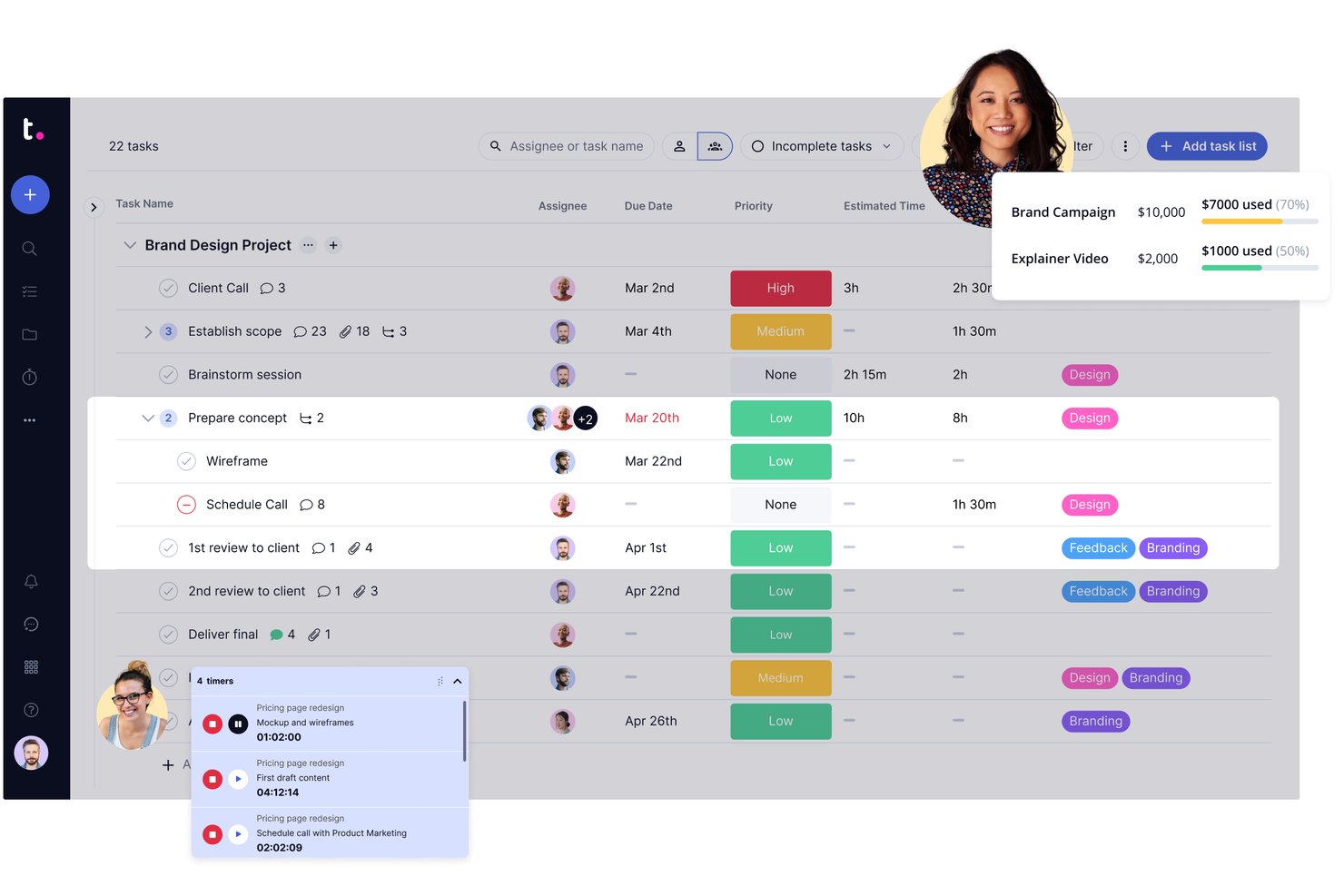
Teamwork.com gives client-service teams a shared place to plan projects, assign work, and track deadlines, helping agencies coordinate delivery across multiple client engagements.
Who Is Teamwork.com Best For?
Teamwork.com suits agency project managers who need to coordinate client work, deadlines, and delivery across multiple engagements.
Why I Picked Teamwork.com
I picked Teamwork.com as my “Best for agency project management” option because it connects client delivery with project finances. I like its built-in time tracking and project budgets, which help compare billable hours with planned costs. Profitability reports also help me spot when scope changes are putting a client engagement’s margin at risk.
Teamwork.com Key Features
- Workload management: View team capacity and reassign work.
- Project views: Track work in list, board, table, or Gantt views.
- Milestones: Add milestone dates to project plans.
- Proofs: Collect reviews and approvals on project work.
Teamwork.com Integrations
Teamwork.com’s documented integrations include Slack, HubSpot, QuickBooks, Xero, Google Drive, Microsoft OneDrive, and Microsoft Teams; availability depends on your subscription, and Zapier is also supported. Teamwork.com provides an API for custom integrations.
Pros and Cons
Pros:
- Capacity views help balance concurrent client work
- Billable time and budgets expose margin drift
- Client portals keep approvals tied to delivery
Cons:
- Advanced settings and reports take setup
- Pages can slow on large projects

Best for architecture and engineering firms
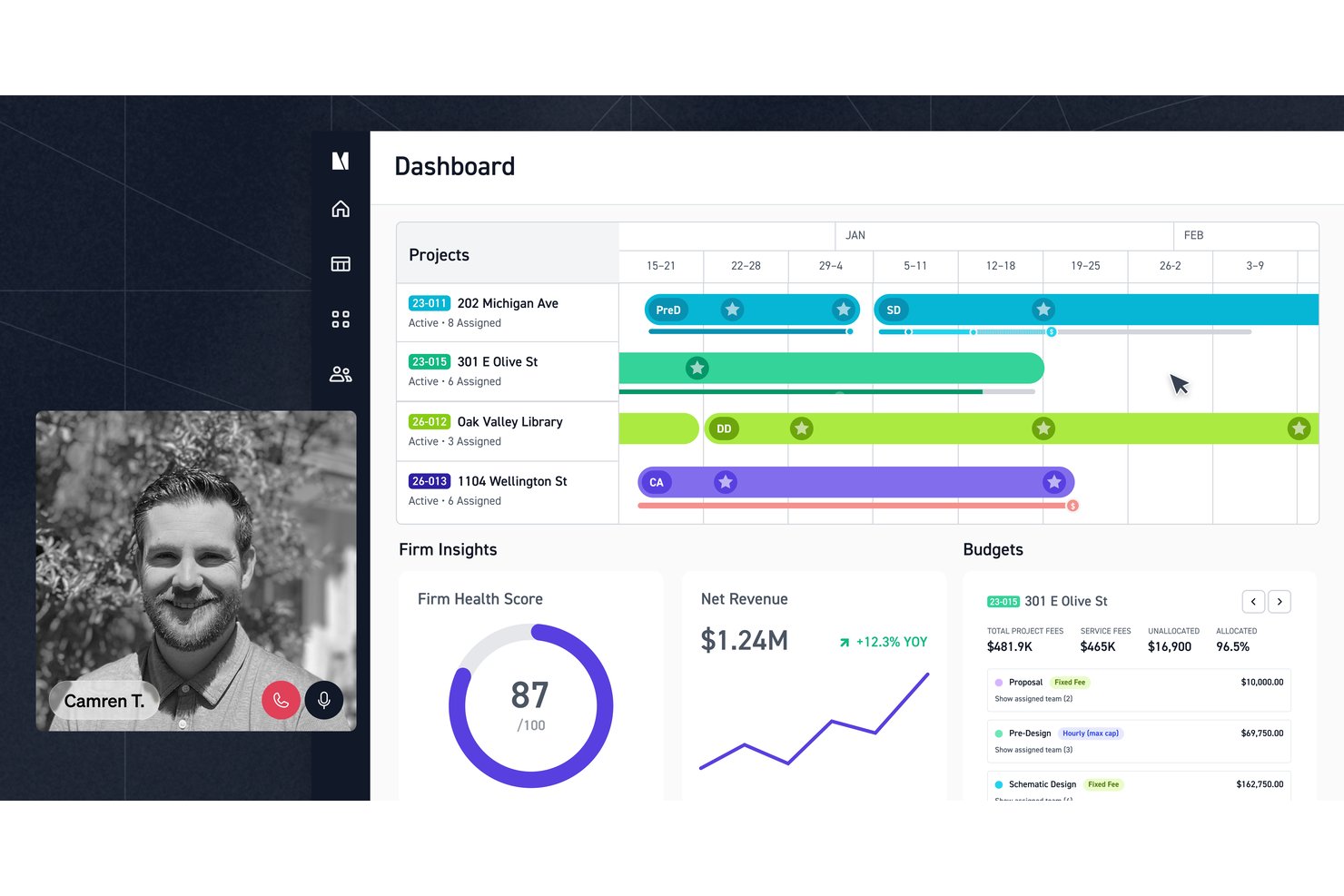
Monograph combines project planning, time tracking, and financial management for architecture and engineering firms that need clearer visibility into budgets, staffing, and project delivery.
Who Is Monograph Best For?
Monograph suits architecture and engineering firms coordinating client projects across design teams and billable work.
Why I Picked Monograph
I picked Monograph as a WorkflowMax alternative because it’s best for architecture and engineering firms. I like how its project planner handles fixed-fee, hourly, and hybrid budgets by phase, then assigns staff and planned hours to those phases. You can also budget consultant fees by phase and adjust plans as project work changes.
Monograph Key Features
- Proposal builder: Create, send, and sign architecture and engineering proposals.
- Time tracking: Record project hours in timesheets.
- Expense tracking: Log expenses against projects.
- Invoicing: Generate invoices from project hours, expenses, and fees.
Monograph Integrations
Monograph integrates with QuickBooks Online for accounting, Google Calendar, Google Drive, and Gmail, and connects with Stripe for electronic invoice payments. QuickBooks Online syncs invoices, expenses, and project cost data; Google Drive requires the Data Add-on, and Monograph doesn’t offer an open API.
Pros and Cons
Pros:
- Timesheets link labor to project profitability
- Staff forecasts connect workload to project schedules
- Phase-based budgets expose fee overruns early
Cons:
- Invoice layouts struggle with varied contract terms
- Reporting filters and data exports are limited

Best for project financial insights
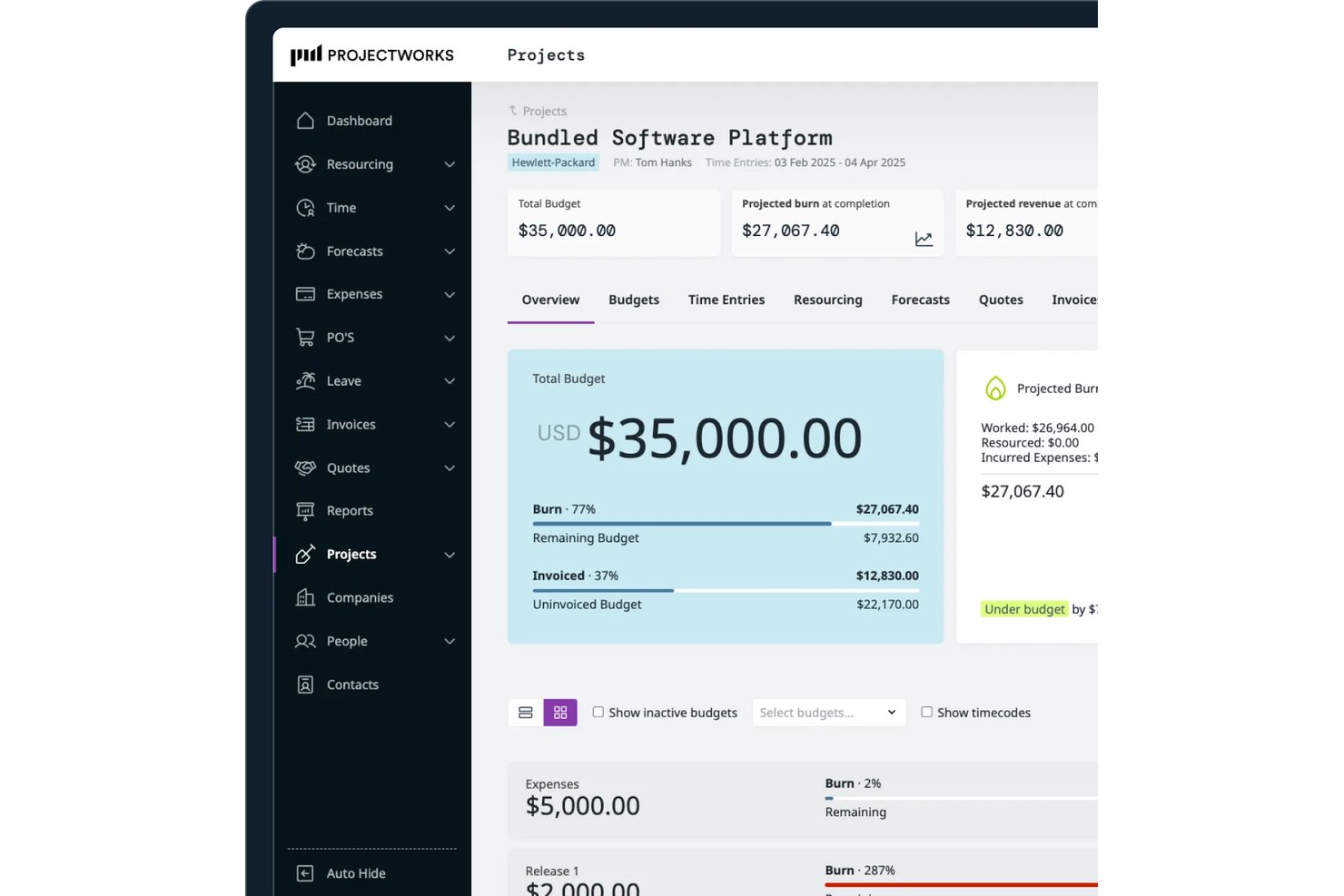
Projectworks is a project and services management platform for professional services teams coordinating delivery, resources, time, and budgets, and is Best for project financial insights.
Who Is Projectworks Best For?
Projectworks is a good fit for project managers at consultancies and agencies who need to connect client delivery decisions with project-level financial performance.
Why I Picked Projectworks
I picked Projectworks as a WorkflowMax alternative because it’s Best for project financial insights. Its live dashboards track work in progress, margin, and utilization, while forecasts show projected burn, revenue, and margin. When project burn rises ahead of plan, those figures help you assess the financial impact before month-end.
Projectworks Key Features
- Deal tracking: Manage client opportunities and move won work into delivery.
- Proposal drafting: Create proposals with AI trained on your firm’s winning proposals.
- Time and expense tracking: Record billable and non-billable hours alongside project expenses.
- Invoice generation: Build invoices for time, expenses, fixed-price, retainer, or lump-sum work.
Projectworks Integrations
Projectworks offers integrations with Xero, QuickBooks Online, Sage Intacct, MYOB AccountRight, HubSpot, Salesforce, Jira, and Azure DevOps. It also connects with Zapier and provides a REST API for custom integrations.
Pros and Cons
Pros:
- WorkflowMax migration preserves historic data
- Capacity heatmaps reveal utilization gaps
- Live margin and burn forecasts
Cons:
- No built-in task dependency mapping
- Expense reports lack reconciliation detail

BQE Core
Best for A&E firm-wide billing and job costing
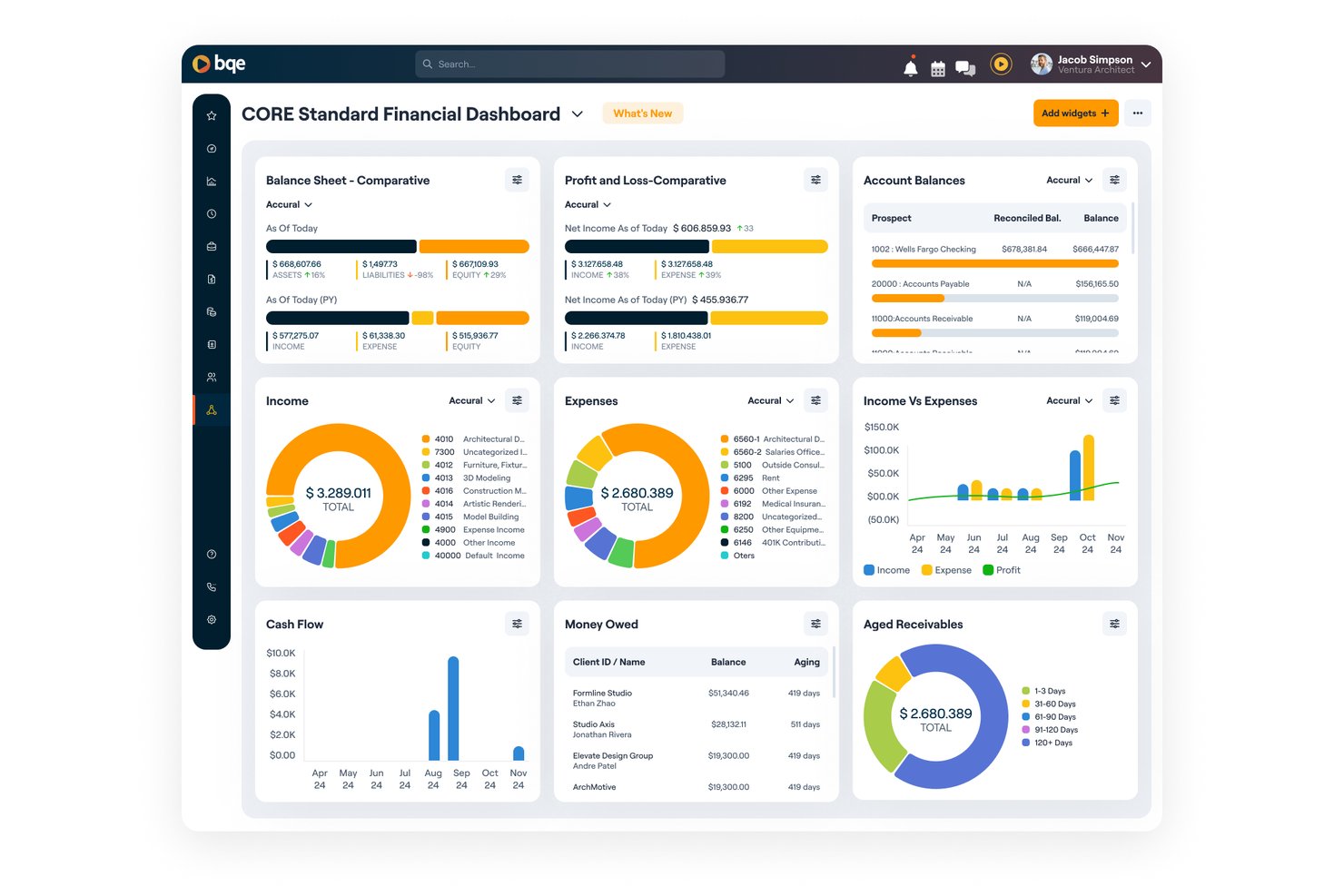
Built for architecture and engineering practices, BQE Core is project management software that helps teams coordinate project work, track budgets, and manage client engagements in one place.
Who Is BQE Core Best For?
BQE Core suits architecture and engineering firms that need firm-wide billing and job-cost visibility across projects.
Why I Picked BQE Core
I picked BQE Core because it connects project budgets with firm-wide billing and job-cost visibility across projects. Its fit is clear: Best for A&E firm-wide billing and job costing. I like that teams can coordinate project work and manage client engagements in the same system.
BQE Core Key Features
- CRM: Track opportunities and client relationships.
- Proposal creation: Prepare proposals for prospective projects.
- Staffing and scheduling: Assign staff and schedule project work.
- Time and expense tracking: Record staff hours and project expenses.
BQE Core Integrations
BQE Core documents integrations with QuickBooks, DocuSign, Power BI, Xero, Google, and Microsoft. It also connects with Zapier and offers an open API for custom integrations.
Pros and Cons
Pros:
- Tracks staff performance by project phase
- Automates invoicing from submitted timecards
- Connects project budgets directly to billing
Cons:
- Large reports and mobile screens can lag
- Project setup can clash with project-number systems

Ravetree
Best for client work billed by retainer or phase
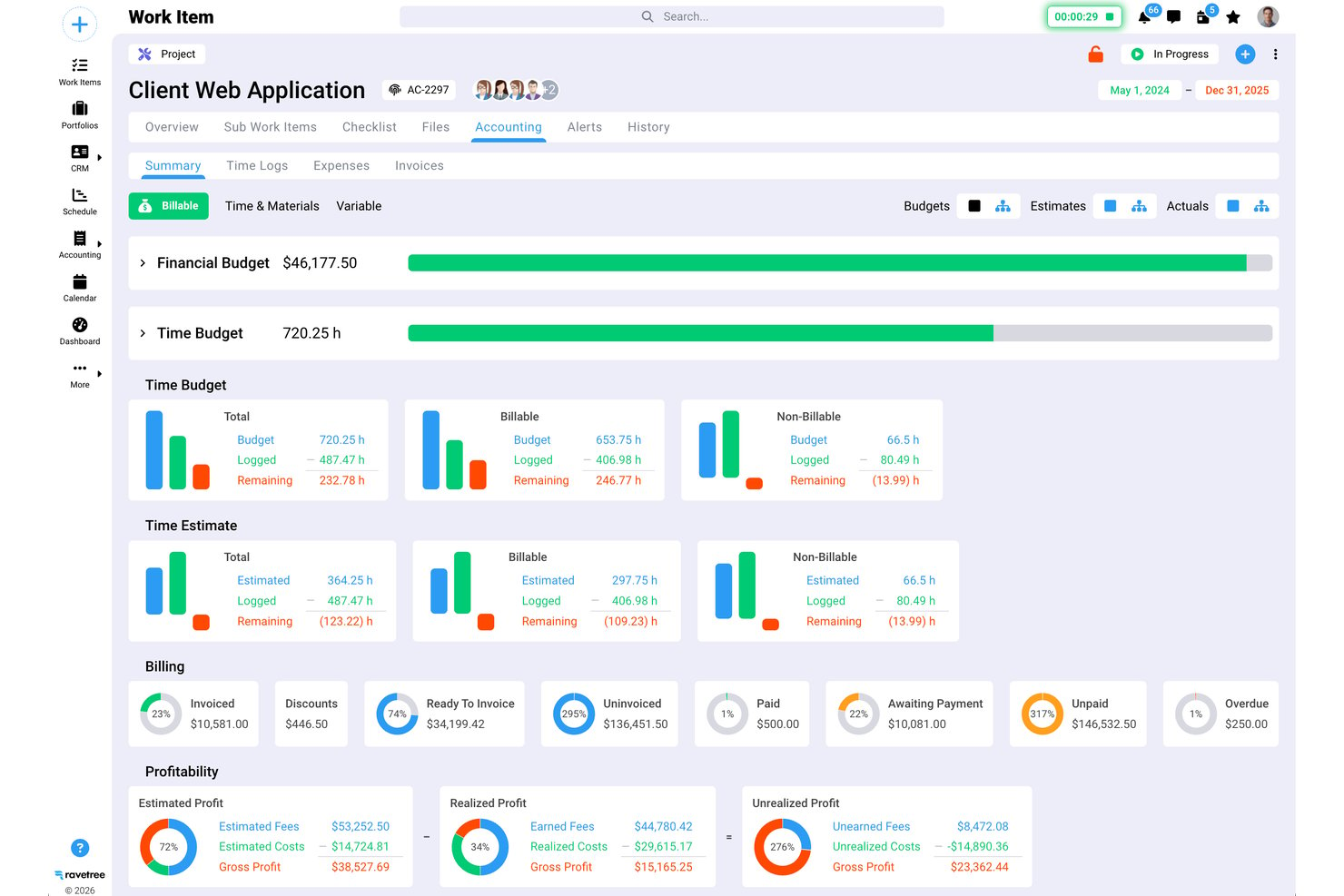
Ravetree is a work management platform for agencies and professional services teams that brings projects, resources, and client work together, helping managers coordinate delivery and track team workloads.
Who Is Ravetree Best For?
Ravetree suits agency and professional services teams that organize client engagements around retainers or delivery phases.
Why I Picked Ravetree
I picked Ravetree because it’s Best for client work billed by retainer or phase. It tracks retainer burn-down from time and expenses, while fixed-fee phases can be invoiced at completion or in installments. I like that one client can combine phase fees, retainers, and hourly out-of-scope work.
Ravetree Key Features
- Project templates: Create projects and tasks from reusable templates.
- Gantt charts: Map task timelines and link work with dependencies.
- Kanban boards: Organize tasks in boards built around custom workflows.
- Client portals: Share project status, files, and requests with clients.
Ravetree Integrations
Ravetree lists integrations with QuickBooks, Xero, Stripe, HubSpot, Google Drive, Dropbox, OneDrive, Google Calendar, and Outlook Calendar, and it connects with Zapier. It also provides an API for custom integrations.
Pros and Cons
Pros:
- Reviewers praise responsive onboarding and support
- Project budgets connect delivery with profitability
- Retainer burn-down ties time to billing
Cons:
- Users report bugs and unsaved time entries
- Dated interface makes navigation less clear


Workamajig is a project management software designed for advertising and marketing agencies. It offers project management, sales CRM, and resource management in a single system.
Why Workamajig is a good WorkflowMax alternative: Workamajig is tailored for large or growing creative agencies and in-house creative teams, offering features such as fully integrated accounting, CRM, and detailed reporting tools. These capabilities help you manage projects, resources, and finances without stitching together multiple tools. It enables larger or distributed teams to track project costs, time, and profitability all within one native platform.
Standout features and integrations:
Features include native accounting, expert support with training, and real-time reporting tools. These features help your team manage finances, gain insights, and ensure projects are completed on time.
Integrations include BIONIC, Edenred Pay, AvidXchange, Avalara, Google Calendar, and more.
Pros and Cons
Pros:
- Expert support available
- Integrated accounting features
- Tailored for large and growing ad agencies
Cons:
- Steeper learning curve than lightweight PM tools
- Complex setup process
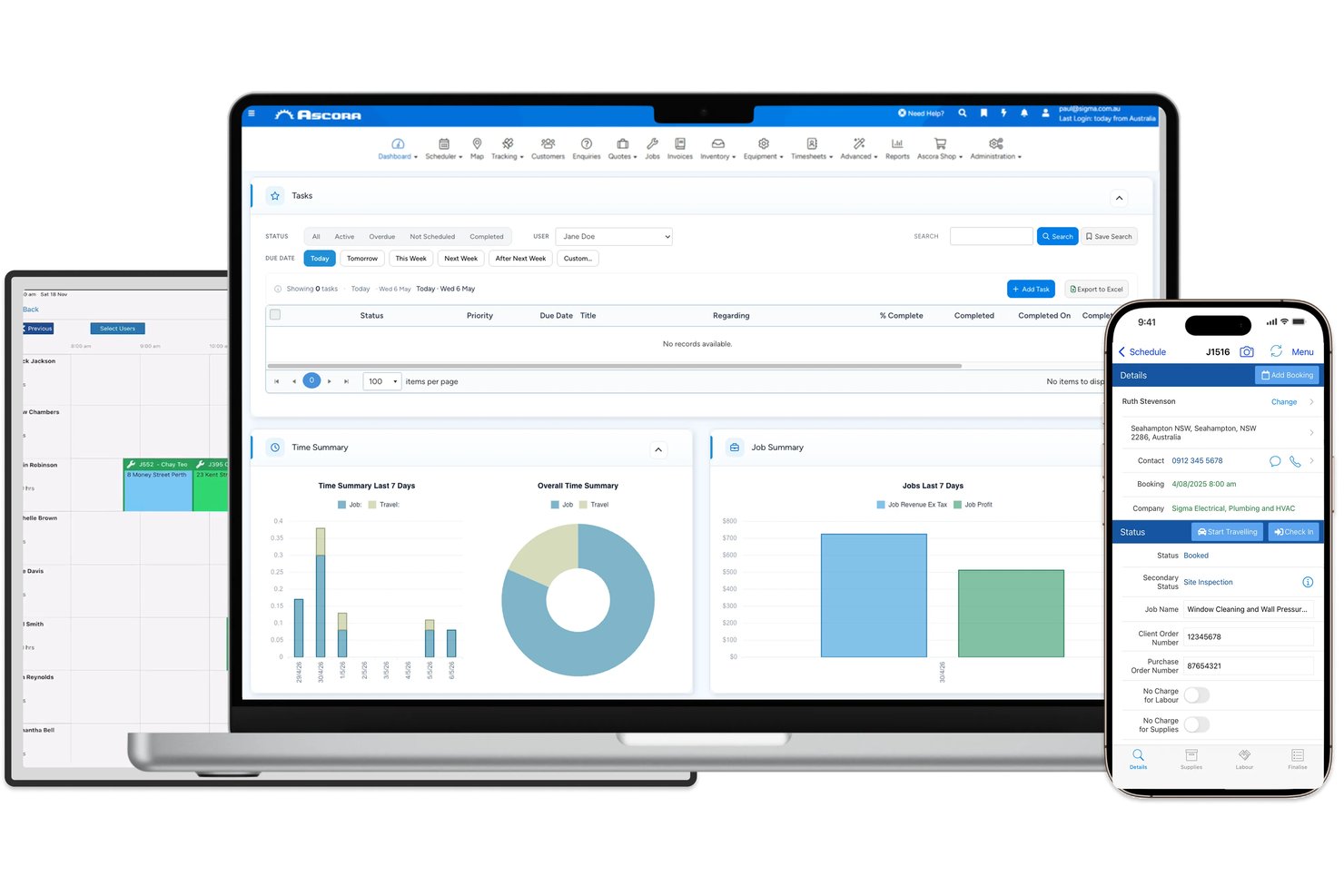
Ascora is job management software for trade and field service businesses, helping teams coordinate schedules, track work, and manage customer and billing details.
Who Is Ascora Best For?
Ascora suits trade contractors who need to connect field jobs with invoicing and customer records.
Why I Picked Ascora
I picked Ascora as a WorkflowMax alternative because it’s built for Best for trades job-to-invoice workflows. I like that teams can convert estimates into jobs, track job costs and change orders, then bill by project progress. Field crews can record time and materials in the app, giving the office job details to use when preparing invoices.
Ascora Key Features
- Visual scheduling: Assign technicians to one-off, project, and recurring jobs on a drag-and-drop calendar.
- Inventory tracking: Monitor stock across warehouses and vans, with barcode scanning and reorder alerts.
- Digital forms: Give field teams electronic forms to complete on mobile.
- Accounting integrations: Connect Ascora with Xero, MYOB, and QuickBooks.
Ascora Integrations
Ascora documents integrations with nine tools: Xero, MYOB, QuickBooks Online, EzzyBills, Groundplan, Stripe, eWay, Reece maX, and vControl. It also offers an open API for custom integrations and connects with Zapier.
Pros and Cons
Pros:
- Custom forms track equipment and compliance records
- Captures field labor and materials for costing
- Connects quotes, jobs, and progress invoices
Cons:
- App crashes can erase unsaved job notes
- GPS timesheets can duplicate or miss check-ins
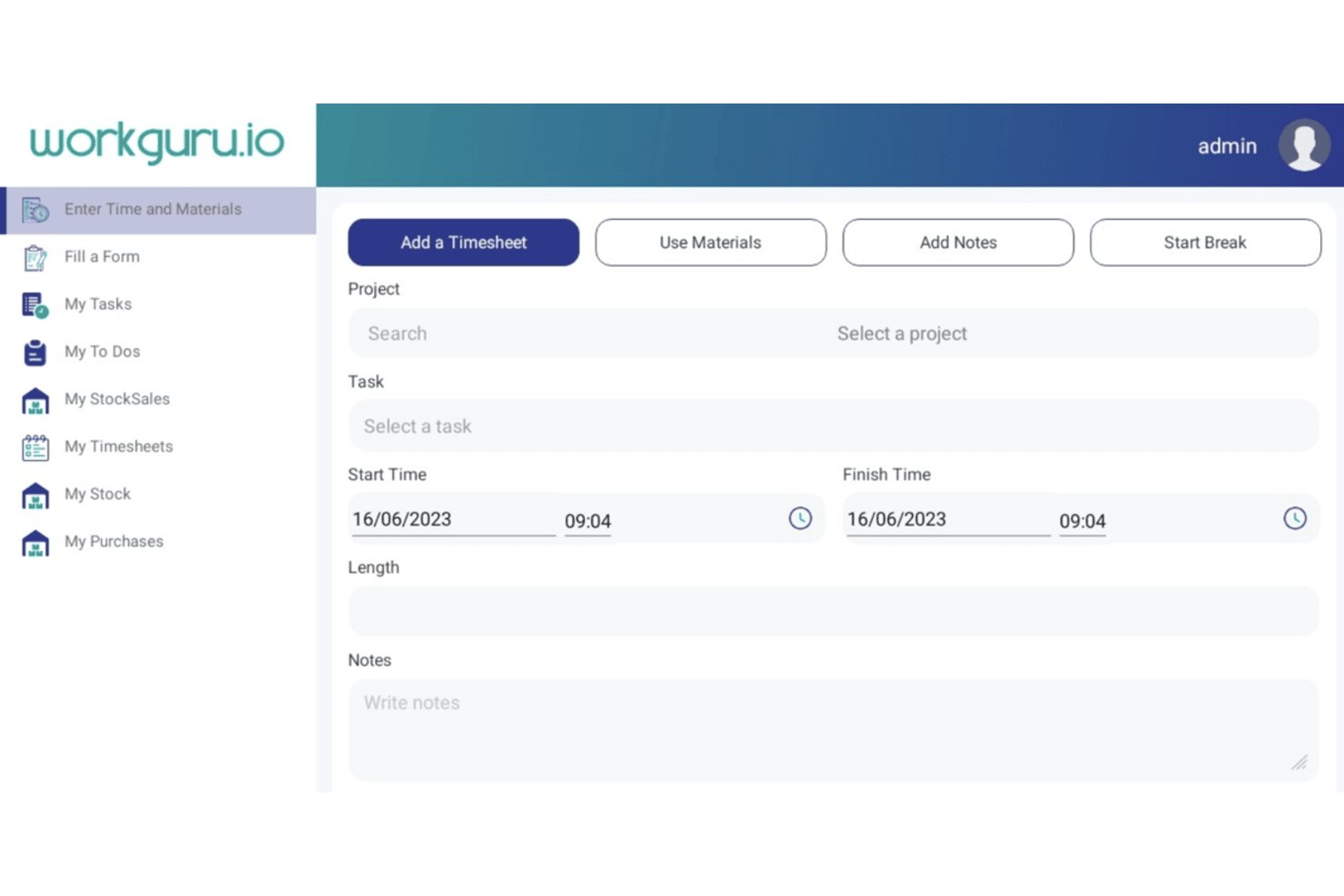
WorkGuru is a project and job management platform for trade and construction businesses, connecting estimates, scheduling, job costs, and on-site work with back-office operations.
Who Is WorkGuru Best For?
WorkGuru suits trade and construction businesses moving from WorkflowMax that need to manage estimates, job costs, scheduling, and on-site work in one platform.
Why I Picked WorkGuru
I picked WorkGuru for its “Best for WorkflowMax migrants in trades” fit. I like that it connects estimates, job costs, scheduling, and on-site work with back-office operations, giving trade businesses a way to track a job from estimate through field activity.
WorkGuru Key Features
- Sales pipeline: Set customizable stages and automate quote follow-ups.
- Project chat: Share messages with your team within a project.
- Flexible invoicing: Create progress, milestone, deposit, fixed-price, and percentage-based invoices.
- Project reporting: Use pivot reports, charts, and dashboard widgets to view project data.
WorkGuru Integrations
WorkGuru documents integrations with Xero, MYOB, QuickBooks Online, EzzyBills, Shopify, Asana, Employment Hero, Tanda, Dropbox Business, Google Drive, and SuiteFiles. Its Public API supports custom integrations.
Pros and Cons
Pros:
- Reports help assess project performance
- Tracks stock and costs against jobs
- Connects quoting, job costs, and invoicing
Cons:
- One reviewer questioned value for cost
- Some users report mobile navigation issues

Productive
Best for agency profitability tracking
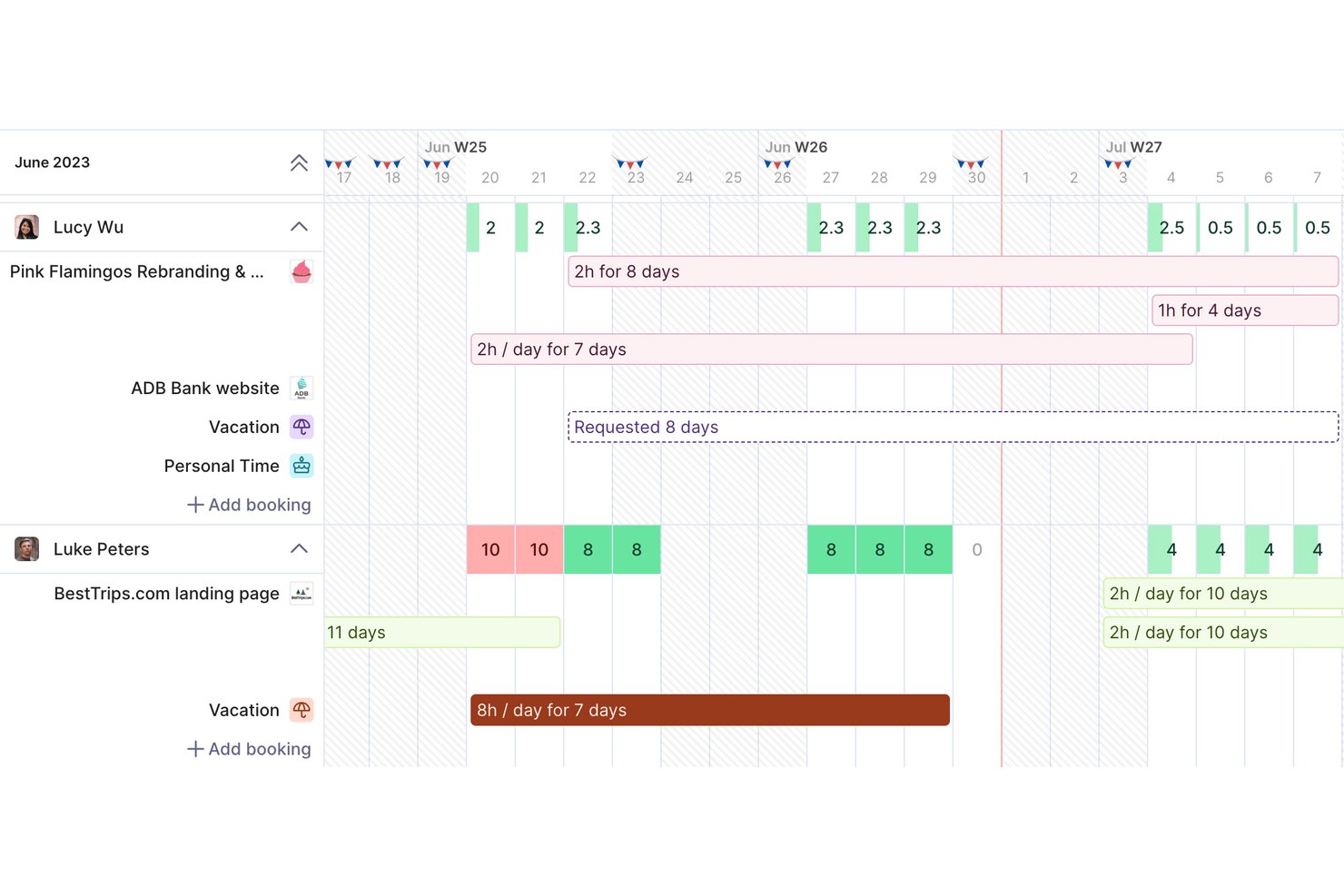
Productive is a project management and professional services automation platform for agencies and consultancies, combining project planning, resource scheduling, time tracking, and budgeting to help teams coordinate client work and catch delivery issues.
Who Is Productive Best For?
Productive suits agency owners and operations leads who need visibility into project budgets, team utilization, and profitability across client work.
Why I Picked Productive
I picked Productive for Best WorkflowMax Alternatives Reviewed because its budgeting and scheduling tools connect agency profitability to day-to-day delivery. Project budgets and tracked time help me see when a client job is nearing its cost limit, while resource scheduling shows team capacity and utilization. That makes margin risks easier to spot before delivery slips.
Productive Key Features
- Project views: Organize tasks in Board, List, Table, Gantt, Calendar, or Timeline views.
- Project docs: Create project specs and meeting notes with text, tables, images, and code blocks.
- Forms: Collect team or client feedback and turn submissions into tasks or emails.
- Automations: Trigger actions such as opening projects, creating invoices, or sending Slack messages.
Productive Integrations
Productive offers built-in integrations with Jira, HubSpot, Xero, QuickBooks, Google Calendar, Slack, Microsoft Outlook, Gmail, and Microsoft Teams, and connects with Zapier. It also provides an open API for custom integrations.
Pros and Cons
Pros:
- Projects, time, and finances share one workspace
- Capacity planning shows utilization and availability
- Budget tracking connects logged hours to profitability
Cons:
- Mobile app feels less capable than web
- Some reports feel clunky or require exports
New Product Updates from Productive
Productive Adds Voice Dictation, Slack Connector, Proposals, and Overtime
Productive adds voice dictation, a Slack Connector, proposal controls, and overtime tracking. These updates support faster AI interactions, client proposals, and time management. For more information, visit Productive’s official site.
Other WorkflowMax Alternatives
Here are some additional WorkflowMax alternatives that didn’t make it onto my shortlist, but are still worth checking out:
- Scoro
For end-to-end business management
- Accelo
For AI-driven profitability forecasting
- Zoho Projects
For customizable project templates
- ActiveCollab
For agency billing from tracked time
- BigTime
For QuickBooks-connected services billing
- Deltek Vantagepoint
For AEC firm resource and project accounting
- Flowlu
For replacing tools with one workspace
- Bonsai
For freelancers managing contracts
- Harvest
For time tracking and invoicing
- Abtrac
For professional services billing history


How I Evaluate WorkflowMax Alternatives
I split my evaluation into three parts. First—and most important—I check whether a tool can track jobs through defined stages and log billable hours against those jobs. Then I look for standout features like client portal access or resource capacity planning. Finally, I consider migration support and pricing structure.
Core Functionality (Table Stakes For This List)
When I'm selecting tools for my list, I score each one on a scale from 0 (does not offer the functionality) to 5 (excels in this area) for each core functionality listed below. I then convert the total into a percentage to help assess each tool's overall fit, with extra weight on any functionalities I’ve deemed essential.
- Job & Project Tracking (Essential): I look for assigned jobs moving through clear stages, with owners and due dates visible as client work shifts from planning to delivery.
- Time Tracking (Essential): I check that billable and non-billable hours attach to jobs or tasks, so timesheets support invoicing and reveal effort overruns.
- Quotes & Invoices: I assess whether teams can turn a client quote into a job, then use tracked work to prepare an invoice.
- Job Costing & Budgets: I look for budgets that can be compared with actual hours and costs, making overruns visible while work is still underway.
- Client Records: I check whether client contacts, job history, and related projects live together, so teams can follow work across engagements.
- Profitability Reporting: I evaluate reports on job margins and staff utilization to see whether managers can compare project performance and spot delivery issues.
Once I have a list of tools that meet the criteria, I consider what sets each platform apart.
Differentiating Factors (What Sets Vendors Apart)
Here's how I compare and contrast different vendors:
Standout Features
I check whether a tool offers a client portal where customers can review quotes, approve estimates, and follow job progress without emailing your team. Resource capacity planning also matters—I look for visual workload views that flag overallocation before you've committed staff to overlapping jobs. Data migration tools are worth evaluating too, especially for firms moving active WIP and client history out of WorkflowMax under a deadline.
Beyond Features
Migration support matters most right now. I check whether a vendor offers hands-on onboarding to move active jobs, client records, and WIP data—not just a CSV importer. Firms mid-billing-cycle can't afford gaps. I also evaluate accounting ecosystem fit, specifically whether the tool maintains a native two-way sync with Xero or QuickBooks that keeps invoicing and WIP reports accurate without manual reconciliation. Finally, vendor stability weighs heavily: after the WorkflowMax sunset, I look at update frequency and roadmap transparency to gauge long-term viability.
Why Look For a WorkflowMax Alternative?
While WorkflowMax is a good choice of project management software, there are a number of reasons why some users seek out alternative solutions. Reasons you might be looking for a WorkflowMax alternative may include:
- You need more customization options
- Your team requires better reporting tools
- You want wider integration capabilities
- Your business is expanding globally
- You need a simpler user interface
- Your team needs Agile support
If any of these sound like you, you’ve come to the right place. My list contains several project management software options that are better suited for teams facing these challenges than WorkflowMax.
WorkflowMax Key Features
Here are some of the key features of WorkflowMax, to help you contrast and compare what alternative solutions offer:
- Job estimating and quoting: Create customizable quotes and estimates to simplify your sales process.
- Time tracking: Capture billable hours accurately to ensure you maximize revenue for your team.
- Invoicing: Generate professional invoices to expedite payment and manage cash flow.
- Lead management: Track leads and sales pipelines to optimize your business development efforts.
- Project management: Oversee tasks and deadlines from a single platform to keep your projects on track.
- Document management: Centralized access to important project documents for easy retrieval and collaboration.
- Reporting and dashboard: Utilize real-time data to make informed decisions and improve business performance.
- Customization options: Tailor invoices, reports, and other documents to fit your specific business needs.
- Integrations: Connect with cloud-based accounting software, such as Xero and QuickBooks, to enhance efficiency and reduce manual work.