

10 Best Timely Alternatives for Auto Time Tracking in 2026

Best Timely Alternatives Shortlist


Managing projects efficiently is no easy task. You might find that Timely isn't addressing all your needs. Maybe you're seeking better features or more flexibility, or you just want a tool that aligns with your team's unique workflow.
I understand the challenges you face. In my experience, finding the right time-tracking software can make a big difference. It can help you keep projects on track, manage your team's time better, and ultimately improve productivity.
In this article, I'll share my top Timely alternatives. I've tested and reviewed each option to ensure you have the best information. Whether you're looking for specific features or a better fit for your team, I've got you covered. Let's have a look at the options that could be a great solution for your project management needs.
What Is Timely?
Timely is a time-tracking software designed to help businesses and individuals monitor and manage their time efficiently. It's commonly used by freelancers, project managers, and teams looking to improve productivity and accountability. Automatic time tracking, reporting, and project management capabilities help with understanding where time is spent and optimizing workflows. Overall, Timely provides valuable insights that can enhance your team's time management and project execution.
Timely Alternatives Comparison Table
This comparison table summarizes pricing details for my top Timely alternative selections.
| Tool | Best For | Trial Info | Price | ||
|---|---|---|---|---|---|
| 1 | Best for browser extension tracking | Free plan available | From $4.99/user/month | Website | |
| 2 | Best for automated tracking | 14-day free trial + free plan + free demo available | From $3.99/user/month (billed annually) | Website | |
| 3 | Best for native tool integration | Free plan available + 14-day free trial | From $5.83/user/month (billed annually) | Website | |
| 4 | Best for AI workforce analytics | Free demo + 14-day free trial available | From $6.67/user/month (billed annually) | Website | |
| 5 | Best for privacy-focused tracking | 14-day free trial | From $14/month (billed annually) | Website | |
| 6 | Best for cost-effective management | Free plan + 30-day free trial + free demo available | From $6/user/month (billed annually) | Website | |
| 7 | Best for GPS time tracking | Free demo + 14-day free trial available | From $4.99/user/month (billed annually) | Website | |
| 8 | Best for remote and on-site teams | 14-day free trial + free demo available | From $6.42/user/month (billed annually) | Website | |
| 9 | Best for data ownership | Free plan available | From $4/user/month (billed annually) | Website | |
| 10 | Best for payment processing | Not available | From $620/month | Website |


Why Trust Our Software Recommendations
Our team has been testing and reviewing software since 2012. As project managers ourselves, we know how difficult—and important—it is to choose the right software.
For this guide, we evaluated tools using hands-on testing and independent research, scoring tools using our selection criteria. We also draw on insights from industry thought leaders and practicing project management experts.
Our reviews reflect our human editorial judgment, not a sales pitch.
Expert reviewers:
Best Timely Alternatives Reviews
Below are my detailed summaries of the best Timely alternatives that made it onto my shortlist. My reviews offer a detailed look at the key features, pros and cons, integrations, and ideal use cases of each tool to help you find the best one for you.

Clockify
Best for browser extension tracking
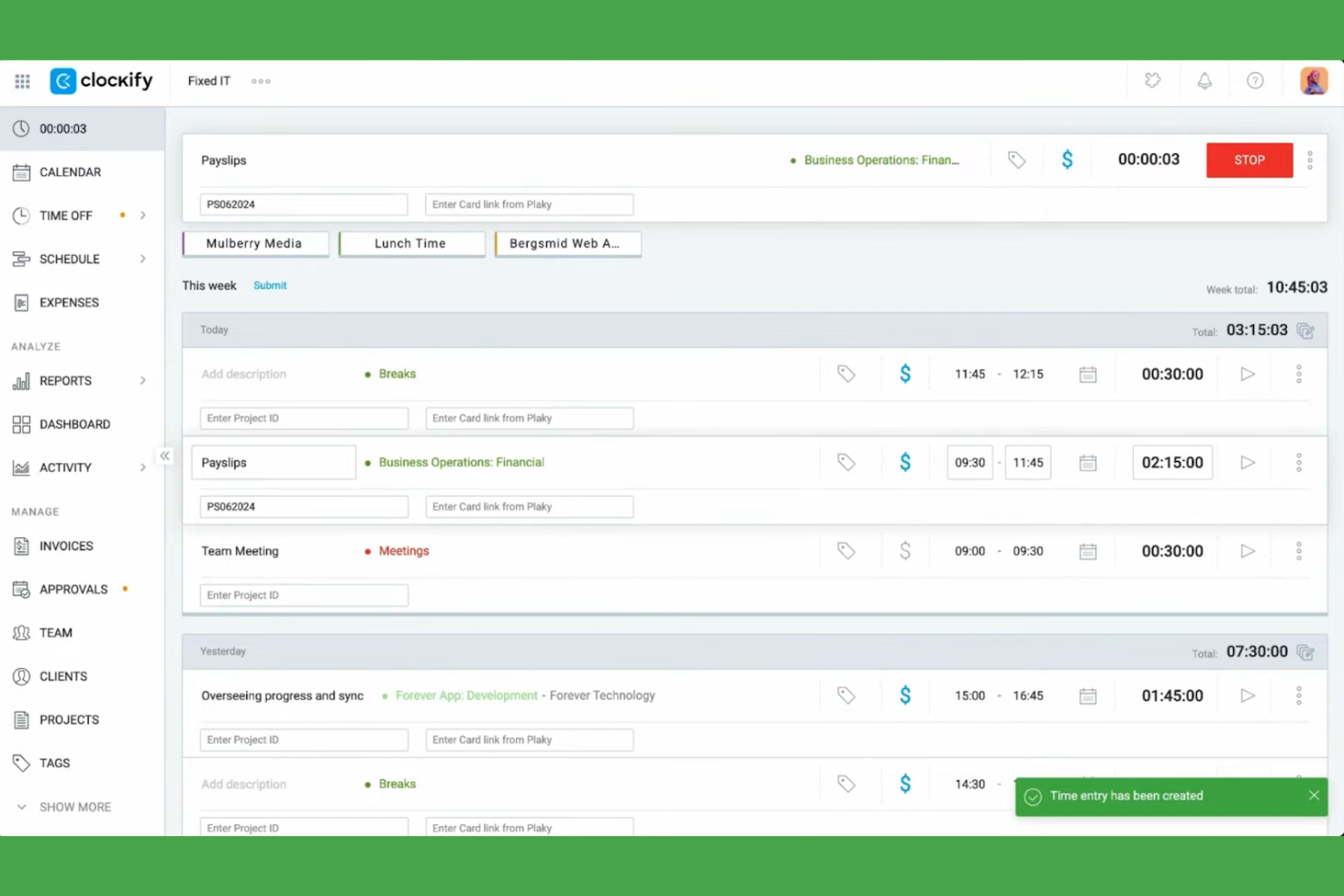
Clockify is a time-tracking software designed for freelancers, small businesses, and enterprises to efficiently track work hours and manage projects. It helps users keep track of billable hours, project progress, and team productivity.
Why Clockify is a good Timely alternative: I selected Clockify because its browser extension allows team members to trigger tracking timers directly inside existing web applications without breaking focus. The software includes multiple project views and detailed reporting, letting you see how your team is performing, and is available on Windows, Mac, and Linux. This makes it a flexible and accessible option for teams of all sizes.
Standout features and integrations:
Features include time tracking, project management, and detailed reporting. You can set billable rates for projects and monitor team activity through a user-friendly dashboard. The software also provides insightful analytics to help you optimize time management.
Integrations include Asana, Trello, Jira, QuickBooks, monday.com, Notion, Google Calendar, GitHub, Salesforce, and more.
Pros and Cons
Pros:
- Customizable project views
- Detailed reporting capabilities
- Broad cross-platform device and extension support
Cons:
- Only basic project management tools
- Limited advanced features

TimeCamp
Best for automated tracking
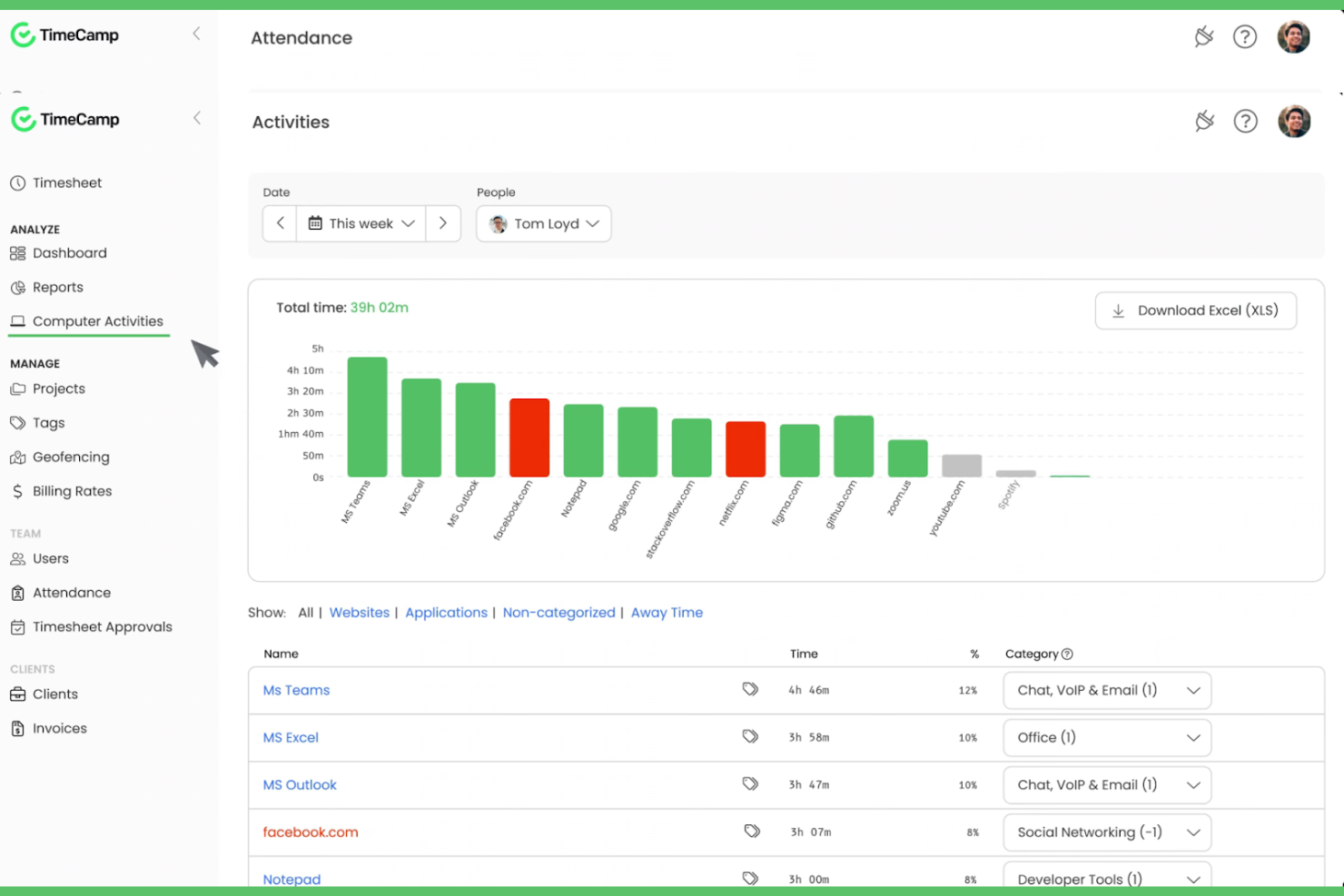
TimeCamp is a time tracker and project management tool designed for freelancers, small businesses, and large enterprises. It helps users track billable hours, manage projects, and enhance their productivity through detailed reporting and analytics.
Why TimeCamp is a good Timely alternative: TimeCamp offers automated time tracking, meaning there's no need for manual entries, which saves your team valuable time. With its ability to track time spent on applications and websites, you get a more accurate picture of your productivity. The tool provides useful reporting features to analyze project progress and help with team management. Its easy-to-use dashboards allow you to manage multiple projects.
Standout features and integrations:
Features include the ability to track time across different devices, whether using Android or iOS, ensuring flexibility for remote teams. You can set custom billing rates for projects, making it easier to manage budgets. TimeCamp also offers productivity tracking to identify and address potential time-wasters.
Integrations include Trello, Asana, Slack, QuickBooks, Jira, monday.com, Google Calendar, Microsoft Teams, GitHub, Salesforce, and more.
Pros and Cons
Pros:
- Tracks time across devices
- Custom billing rates
- Automated time tracking
Cons:
- Limited customization options
- Initial setup can be complex
TMetric
Best for native tool integration
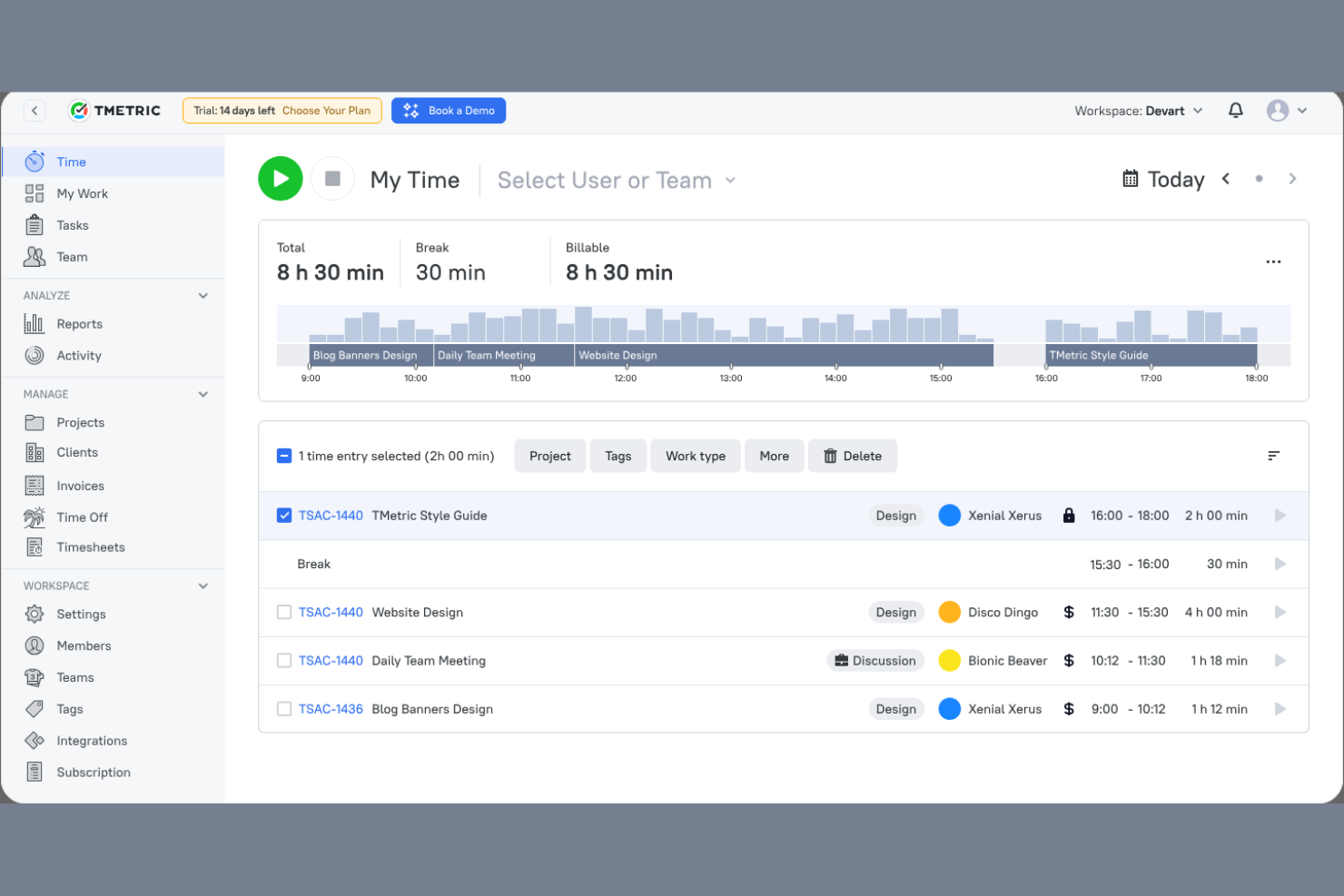
TMetric is a time-tracking software designed for freelancers, small businesses, and large enterprises. It helps teams track time, manage projects, and optimize productivity through detailed reporting and analysis.
Why TMetric is a good Timely alternative: TMetric offers built-in tool integration, allowing you to connect with various platforms for a unified workflow. Its time-tracking features let you easily log hours for multiple projects. The software provides detailed reporting, helping you analyze productivity and billing. You can also track billable hours and manage budgets more effectively, making it a versatile choice for different business needs.
Standout features and integrations:
Features include the ability to set hourly rates for different projects, ensuring flexible billing. You can also monitor team activity in real time, giving you insights into work patterns. TMetric has a user-friendly interface that simplifies time management and project tracking.
Integrations include Trello, Asana, Jira, GitHub, QuickBooks, Google Calendar, Todoist, Salesforce, and more.
Pros and Cons
Pros:
- Native integration with other popular tools
- Flexible billing with hourly rates
- Real-time team activity monitoring
Cons:
- No built-in overtime tracking or break rules
- Slow load times when tracking many tasks

Best for AI workforce analytics
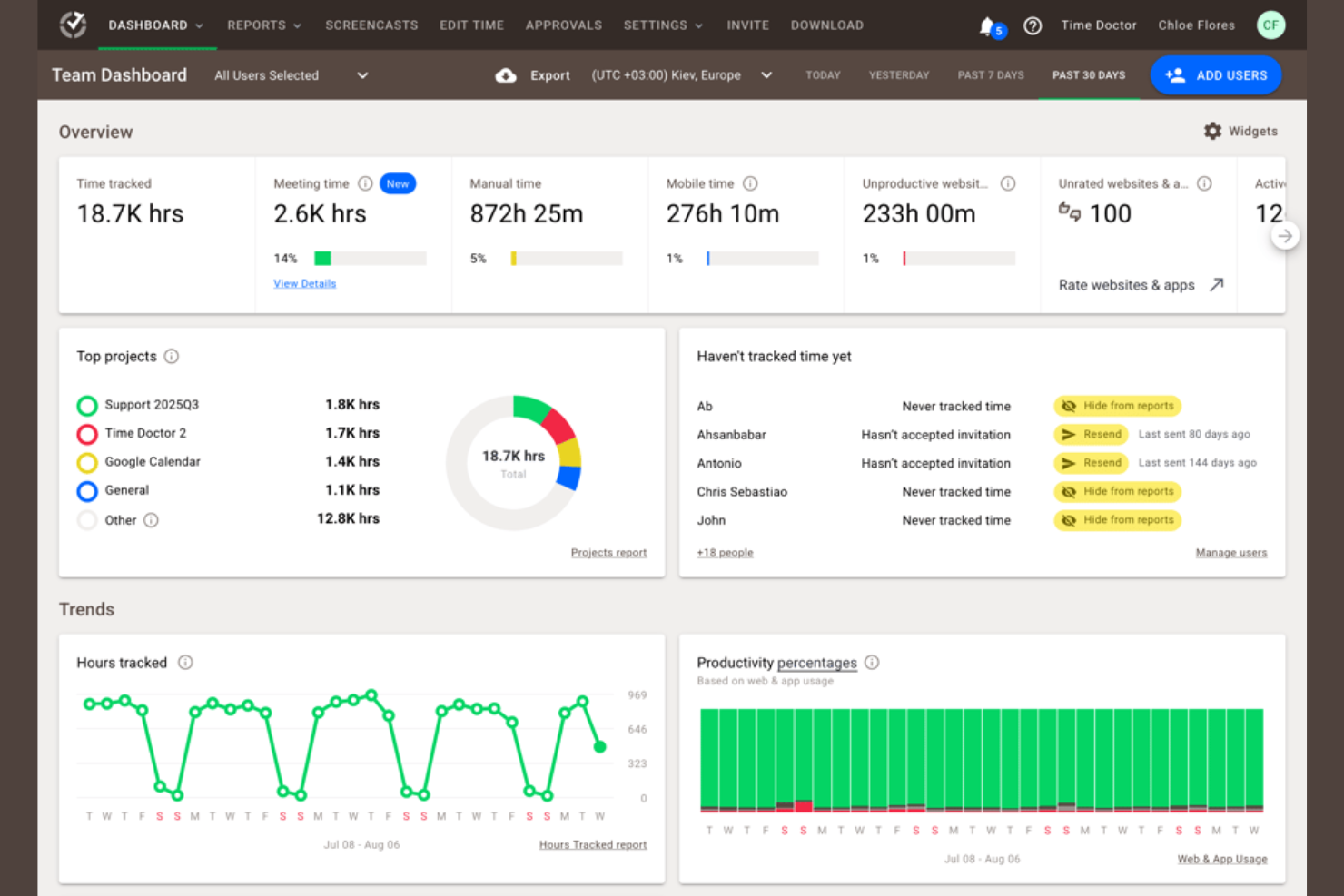
Time Doctor is a time-tracking and productivity management tool designed for businesses of all sizes. It helps teams track time spent on tasks, monitor productivity, and manage remote work efficiently.
Why Time Doctor is a good Timely alternative: Time Doctor offers AI workforce analytics that provide insights into team productivity and performance. With real-time monitoring, you can track how time is spent on tasks and identify areas for improvement. The tool's screenshot capturing and activity tracking features help ensure team accountability. Customizable reports allow you to analyze productivity trends and make informed decisions.
Standout features and integrations:
Features include distraction alerts to keep your team focused on tasks. You can set productivity goals and track progress against them, helping teams stay focused on results. Time Doctor also offers payroll management, making it easier to handle payments for billable hours.
Integrations include Trello, Asana, Jira, Basecamp, monday.com, GitHub, Sentry, Salesforce, and more.
Pros and Cons
Pros:
- Built-in payroll management
- Customizable productivity reports
- AI-driven productivity insights
Cons:
- Only has basic mobile app features
- Initial setup can be time-consuming

Memtime
Best for privacy-focused tracking
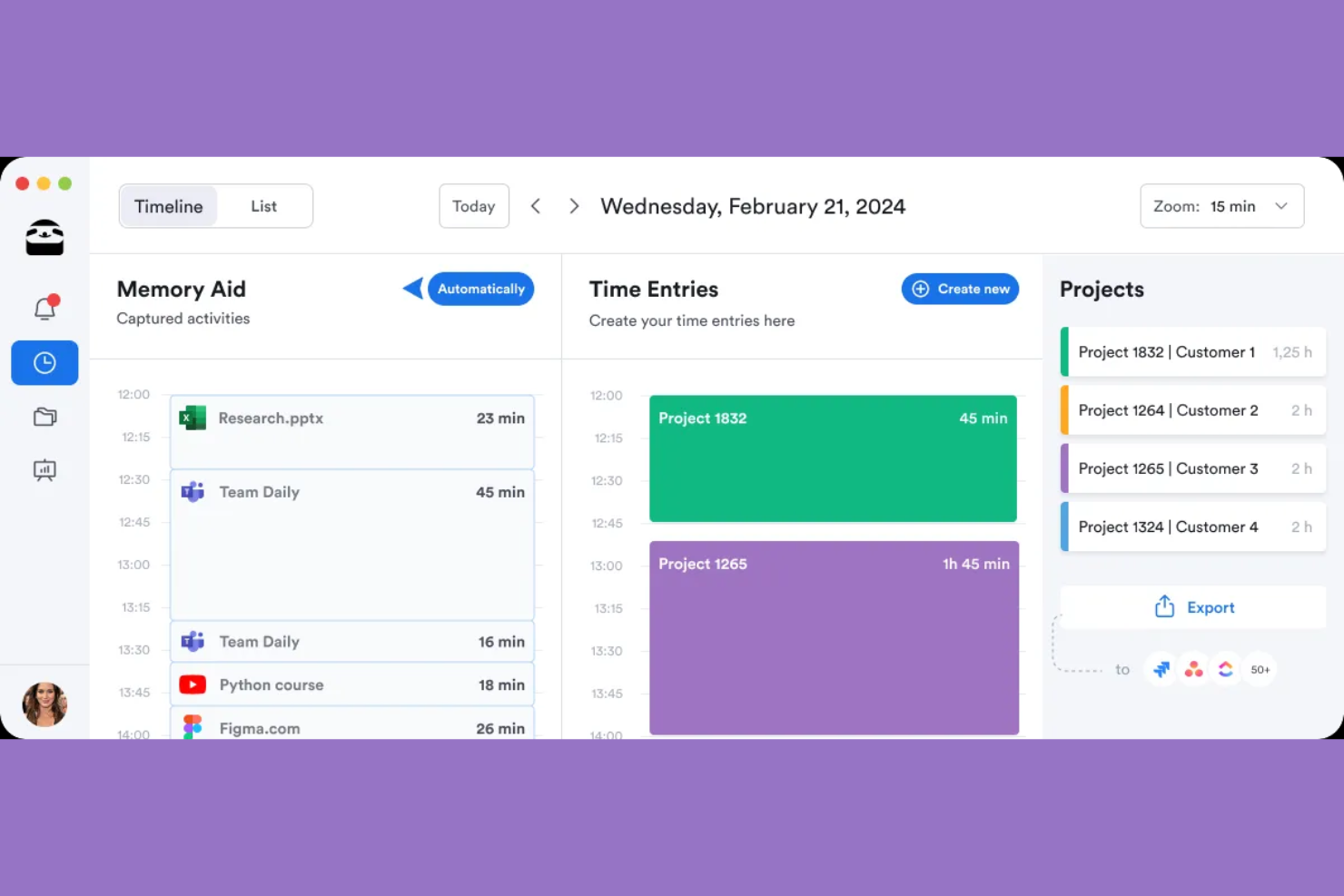
memtime is a time-tracking tool that lets you instantly log your time spent on projects. It is designed for professionals across industries such as legal, marketing, and software development, helping them track their work hours and improve billing accuracy.
Why memtime is a good Timely alternative: memtime offers privacy-focused tracking by storing data offline, differentiating it from Timely. You can log time for specific projects, making it easier to manage and keep track of workloads. Time entries can be exported or synced with your project software. Detailed activity reviews provide insights into daily productivity, helping you optimize project planning.
Standout features and integrations:
Features include an auto tracker, which captures time spent on tasks without manual input. You can easily log time against projects, aiding in accurate billing. Detailed activity reviews help you analyze daily work patterns for better project management.
Integrations include Asana, Zoho Books, Jira, QuickBooks, Microsoft Teams, Google Calendar, and more.
Pros and Cons
Pros:
- Detailed daily activity reviews
- Automatic time capture
- Privacy-focused offline data storage
Cons:
- Limited customization options
- No mobile time-tracking app

actiTIME
Best for cost-effective management

actiTIME is a time-tracking and project management tool designed for businesses of all sizes. It helps teams manage tasks, track work hours, and optimize project workflows.
Why actiTIME is a good Timely alternative: actiTIME offers affordable paid plans, making it an attractive option for budget-conscious teams. Its time-tracking features allow you to monitor work hours and ensure project budgets are maintained. With task management tools, you can assign and track tasks easily. The software also provides useful reports to help you analyze project performance and make informed decisions.
Standout features and integrations:
Features include the ability to set up custom workflows, which helps refine your team's processes. You can track project costs and budgets in real time to avoid overspending. actiTIME also offers a user-friendly interface that simplifies time tracking and task management.
Integrations include QuickBooks, Jira, Trello, Todoist, Microsoft Outlook, Salesforce, Zapier, and more.
Pros and Cons
Pros:
- User-friendly interface
- Real-time cost tracking
- Cost-effective for budget-conscious teams
Cons:
- Basic mobile app functionality
- Limited advanced features
New Product Updates from actiTIME

actiTIME Visual Hour Indicator and Time-Track Report Redesign
actiTIME adds a wave-style hour indicator to the Timesheet and Calendar views and refreshes the Time-Track report for smoother navigation and clearer visuals. For more information, visit actiTIME's official site.

Hubstaff
Best for GPS time tracking

Hubstaff is a time tracker and employee monitoring tool designed for remote teams and businesses with mobile workforces. It helps users track time, monitor their productivity, and manage employee activities effectively.
Why Hubstaff is a good Timely alternative: Hubstaff offers GPS time tracking, making it ideal for teams that need to track location-based work and removing the need to clock in. You can monitor where your team members are working and ensure accountability for mobile employees. The tool shows activity levels and provides screenshot capturing to give you insights into how time is being spent. You can also generate detailed reports to analyze your team's productivity and make informed decisions.
Standout features and integrations:
Features include automatic payroll management, which simplifies payments based on tracked hours. You can set productivity goals and monitor progress to keep your team focused. Hubstaff also offers automated timesheet generation, simplifying the payment process.
Integrations include QuickBooks, Asana, Trello, Salesforce, Jira, Slack, GitHub, Zendesk, PayPal, and more.
Pros and Cons
Pros:
- Timesheet approval process
- Automatic payroll management
- GPS tracking for location-based work
Cons:
- High total cost for add-ons and advanced functionality
- Requires initial setup time

DeskTime
Best for remote and on-site teams
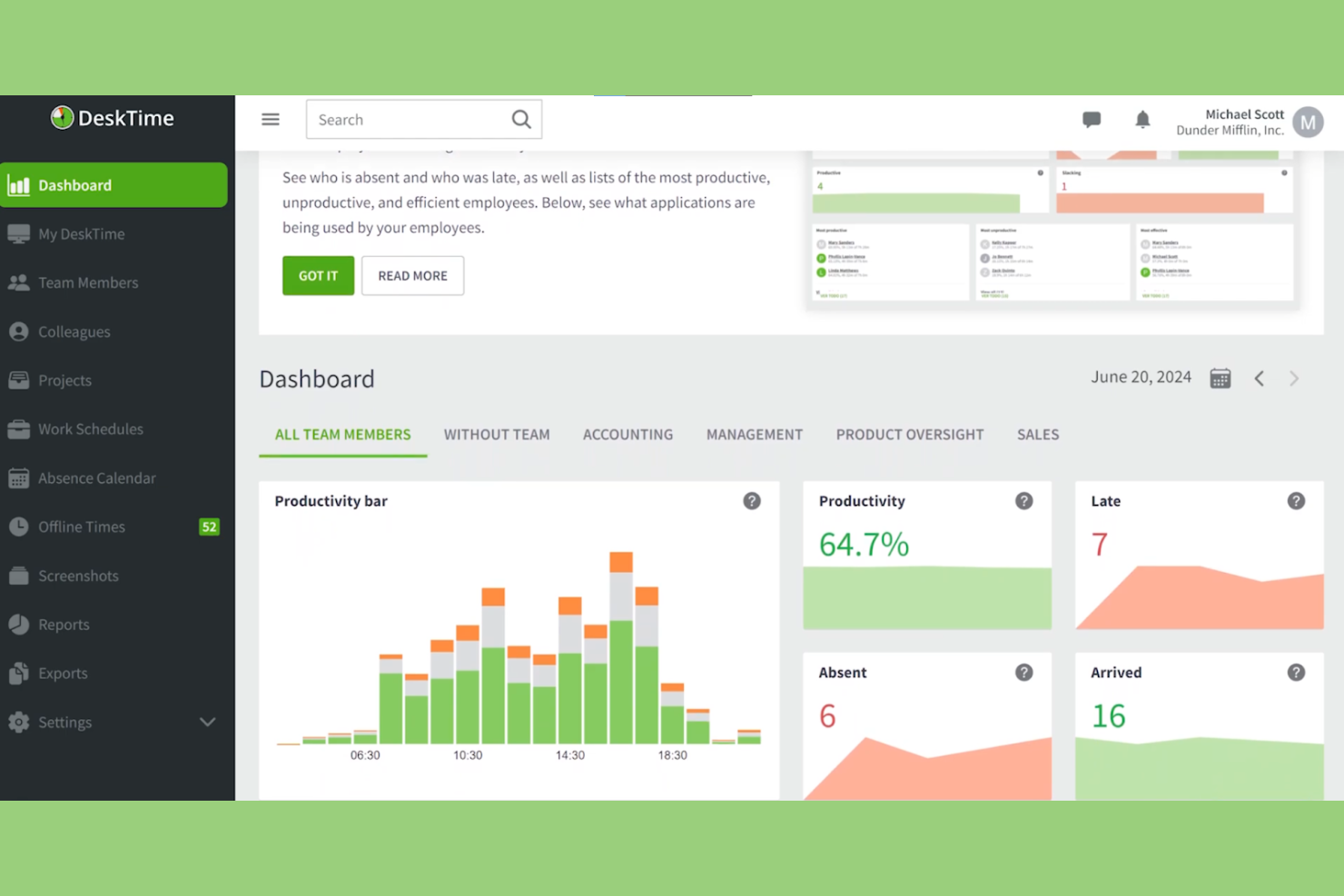
DeskTime is a time-tracking and productivity analysis software designed for both remote and on-site teams. It helps businesses monitor employee productivity, manage projects, and optimize work processes.
Why DeskTime is a good Timely alternative: DeskTime offers features that are useful to both remote and on-site teams, providing flexibility and adaptability. It includes automatic time tracking, which runs in the background without manual input, ensuring accurate time logs. With its productivity analysis tools, you can get insights into which applications and websites are being used. The software also provides daily productivity scores, helping you identify and address team inefficiencies.
Standout features & integrations:
Features include offline time tracking, which allows you to capture work hours when you're not connected to the internet. You can also set work schedules and monitor your team's adherence to them, ensuring accountability. DeskTime provides detailed reports that help you analyze team performance and make informed decisions.
Integrations include Trello, Asana, Jira, GitLab, Google Calendar, Zapier, and Outlook.
Pros and Cons
Pros:
- Offers offline tracking
- Provides daily productivity scores
- Automatic background tracking
Cons:
- Extensive tracking can lead to privacy concerns
- Limited integrations

Best for data ownership
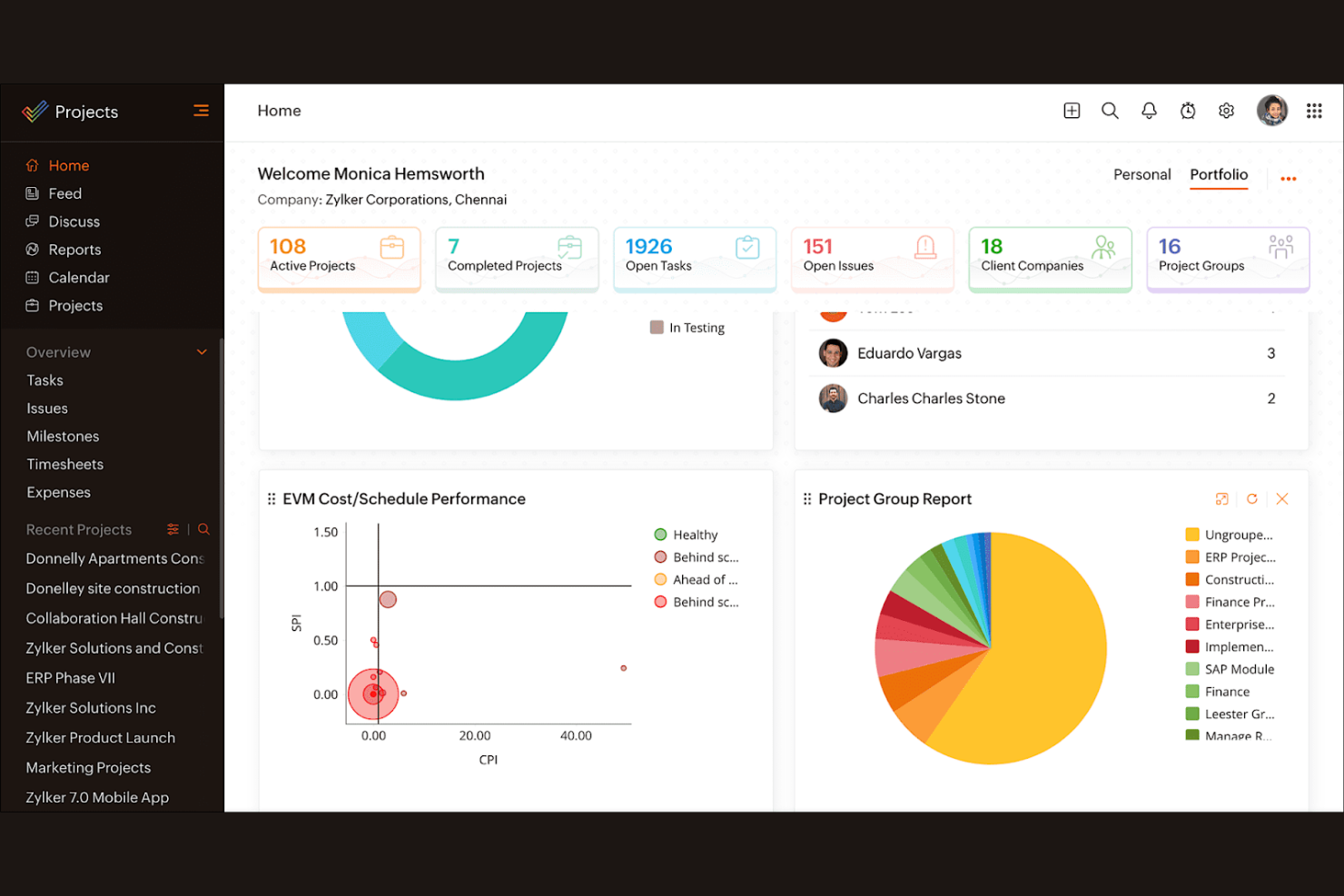
Zoho Projects is a project management software designed for teams of all sizes. It helps businesses plan projects, track progress, and collaborate effectively.
Why Zoho Projects is a good Timely alternative: Zoho Projects offers features that emphasize data ownership, ensuring your team's information is secure and accessible. Its task management tools allow you to break down projects into manageable parts and assign tasks easily. The software provides Gantt charts for visualizing project timelines and dependencies. With its time-tracking capabilities, you can monitor project hours and ensure you stay on budget.
Standout features and integrations:
Features include project templates that simplify the setup of recurring tasks, saving you time. You can also use issue tracking to manage and resolve project challenges efficiently. Zoho Projects offers document management, enabling your team to store and share files in one place.
Integrations include Dropbox, Microsoft Teams, Zapier, Slack, GitHub, Zoho CRM, Zoho Books, Zoho Invoice, and more.
Pros and Cons
Pros:
- Centralized document management
- Efficient issue tracking
- Emphasizes data ownership
Cons:
- Complex interface
- Steep learning curve for new users
New Product Updates from Zoho Projects
Zoho Projects Adds CodeX Scripts for Custom Modules
Zoho Projects now supports CodeX Scripts for custom modules, enabling conditional logic and rules for creating, updating, and deleting records. For more information, visit Zoho Projects' official site.
 .
.
Stripe
Best for payment processing

Other Timely Alternatives
Here are some additional Timely alternatives that didn’t make it onto my shortlist but are still worth checking out:
- Avaza
For tracking invoicing and expenses
- ProofHub
For team collaboration
- SimplyBook.me
For service-based businesses
- Jibble
For mobile time tracking
- ClickTime
For budget management
- Acuity Scheduling
For client self-booking
- Appointy
For multi-location booking
- Everhour
For tracking billable hours
- Calendly
For automated meeting scheduling
- Connecteam
For a deskless workforce
- Boulevard
For salon businesses
- Corexta
For data visualization


How I Evaluate Timely Alternatives
I evaluate tools on two layers—the baseline requirements like passive time capture and billable project allocation, and the differentiators that reveal which option fits your team's actual workflow.
Core Functionality (Table Stakes For This List)
When I'm selecting tools for my list, I rank each one on a scale from 0 (does not offer the functionality) to 5 (excels in this area) for each core functionality listed below. Then, I calculate the tool's total score into a percentage. Each tool needs to achieve a minimum total score of 65% to be considered for inclusion.
- Automatic Time Tracking: I check whether the tool passively captures app, browser, and document activity so users aren't stuck starting and stopping timers throughout the day.
- Project & Client Allocation: Tracked hours need to map cleanly to clients, projects, and tasks—especially for agencies juggling multiple retainer accounts at once.
- Timesheets & Approvals: I look for editable timesheets with approval workflows that let managers review and lock entries before they flow into billing or payroll.
- Billable Rates & Budgets: Tools should support per-project or per-user billable rates alongside budget caps, so consultants can monitor margins without a separate spreadsheet.
- Reporting & Analytics: I evaluate whether dashboards surface utilization and profitability data you can filter by team member, client, or date range and export for stakeholder reviews.
- Integrations Ecosystem: The tool should connect with the PM, calendar, and accounting platforms your team already uses—think Jira, Google Calendar, QuickBooks, or Xero.
Once I have a list of tools that meet this criteria, I consider what sets each platform apart.
Differentiating Factors (What Sets Vendors Apart)
Here's how I compare and contrast different vendors:
Standout Features
Employee privacy controls matter a lot here. Some tools let individuals review their raw activity data before anything reaches a manager, which makes adoption far easier across teams. I also look at whether a platform includes capacity planning—being able to forecast team workload against upcoming project hours helps prevent burnout and overbooking. Native invoicing is another differentiator worth evaluating. Tools that generate client-ready invoices directly from tracked billable hours cut out the manual export-to-accounting step entirely.
Beyond Features
Data privacy and compliance deserve close attention when activity tracking is involved. I check whether vendors hold certifications like SOC 2 or GDPR compliance and whether they offer screenshot-free policies. Pricing structure also plays a big role—some tools gate automatic tracking behind higher tiers, so a freelancer's needs look very different from a 50-person agency. Platform coverage rounds out my evaluation. Teams that split work between desktop and mobile need native apps on both, ideally with offline tracking that syncs when connectivity returns.
Why Look For a Timely Alternative?
While Timely is a good choice of time-tracking software, there are a number of reasons why some users seek out alternative solutions. You might be looking for a Timely alternative because…
- You need more advanced reporting features
- Your team requires offline tracking capabilities
- You need better integration with existing tools
- Your team has outgrown Timely's user limits
- You require a more budget-friendly option
- You need support for multiple languages
If any of these sound like you, you've come to the right place. My list contains several time-tracking software options that are better suited for teams facing these challenges with Timely and looking for alternative solutions.
Timely Key Features
Here are some of the key features of Timely to help you contrast and compare what alternative solutions offer:
- Automatic time tracking: Uses AI to automatically log time spent on tasks, reducing manual entry for your team.
- AI timesheets: Completes timesheets quickly by using AI to suggest time entries, saving you time.
- Project dashboards: Provide a visual overview of all projects, helping you monitor progress and deadlines.
- Billable rates: Allows you to set different billing rates for tasks and projects, ensuring accurate client invoicing.
- Idle detection: Alerts you when no activity is detected, ensuring time logs remain accurate and reflective of actual work.
- Memory tracker: Records computer activity automatically, offering high accuracy without manual timers.
- Capacity planning: Helps you understand available time for billable work, optimizing resource allocation.
- Task management: Lets you assign and track tasks, keeping your team aligned with project goals.
- Detailed reporting: Offers insights into time usage and productivity, aiding in performance analysis.