

10 Hubstaff Alternative Tools for Workforce Tracking in 2026

Best Alternatives To Hubstaff Shortlist


If you’re managing a remote or hybrid team, you know that tracking time and monitoring productivity can quickly become challenging, especially when juggling multiple projects. Hubstaff is a popular choice for businesses looking to streamline these tasks, but it’s not the right fit for everyone. Fortunately, there are plenty of alternatives worth considering.
In this article, I’ve rounded up the best Hubstaff alternatives based on my hands-on testing of time tracking software and workforce management tools. I’ll walk you through options that offer robust employee monitoring, simple time tracking, and powerful reporting—helping you find the right fit for your team.
What Is Hubstaff?
Hubstaff is a time-tracking and productivity management tool designed to help remote teams, freelancers, and agencies monitor work hours and productivity. It caters to businesses wanting to accurately track project time, manage tasks, and analyze work habits to enhance efficiency. Hubstaff automates administrative tasks such as payroll, invoicing, and scheduling, saving time and improving project management.
Why Trust Our Software Recommendations
Our team has been testing and reviewing software since 2012. As project managers ourselves, we know how difficult—and important—it is to choose the right software.
For this guide, we evaluated tools using hands-on testing and independent research, scoring tools using our selection criteria. We also draw on insights from industry thought leaders and practicing project management experts.
Our reviews reflect our human editorial judgment, not a sales pitch.
Expert reviewers:
Pricing Comparison Table
Use this comparison table to review pricing, free trials, and demo availability side by side.
| Tool | Best For | Trial Info | Price | ||
|---|---|---|---|---|---|
| 1 | Best for customizable punch-in options | 14-day free trial + free demo available | From $4.99/user/month + $19/month base fee (billed annually) | Website | |
| 2 | Best for productivity management | Free trial available | From $7/user/month | Website | |
| 3 | Best for PM-focused time tracking without monitoring | 30-day free trial + free plan available | From $9/user/month (billed annually) | Website | |
| 4 | Best for invoicing and budgeting | 14-day free trial + free plan + free demo available | From $3.99/user/month (billed annually) | Website | |
| 5 | Best for shift scheduling | 14-day free trial + free demo available | From $5/user/month | Website | |
| 6 | Best for distraction management | 14-day free trial available | From $7/month (billed annually) | Website | |
| 7 | Best for simplified project planning | 14-day free trial + free demo available | From $45/month (billed annually) | Website | |
| 8 | Best for visual time tracking | 30-day free trial | From $7.50/user/month (billed annually) | Website | |
| 9 | Best for integrated risk management | Free plan available + 7-day free trial | From $3/user/month (billed annually) | Website | |
| 10 | Best for professional online portfolios | 14-day free trial + free plan available | From $4.99/user/month | Website |

Best Hubstaff Alternative Reviews
Based on my extensive experience, I’ll provide a detailed analysis and overview of each Hubstaff alternative. You’ll learn about its pros and cons, key features, integrations, and best use cases.

Best for customizable punch-in options
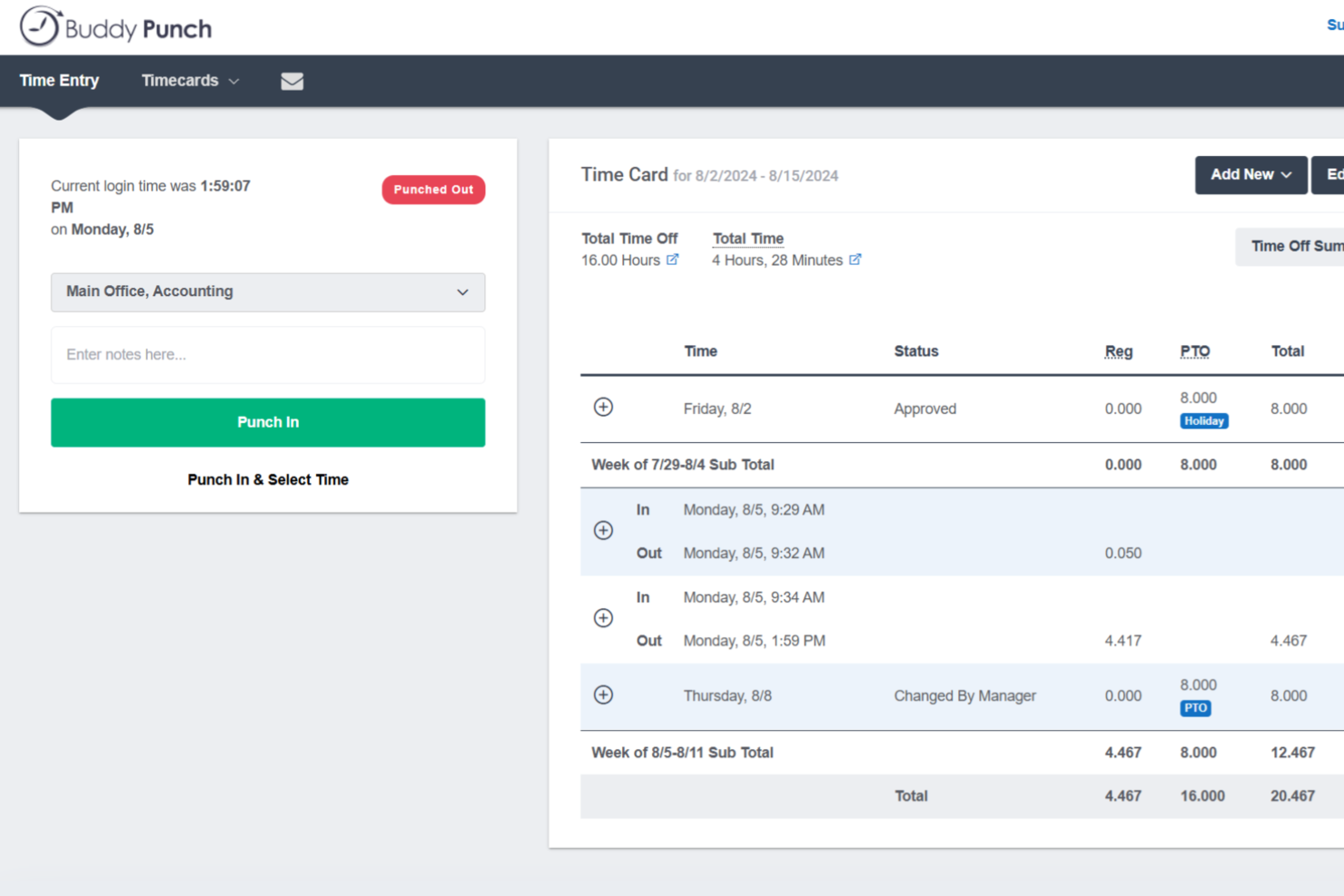
Buddy Punch is a time tracking and workforce management tool that combines employee clock-in, scheduling, PTO tracking, and payroll reporting with GPS tracking and flexible punch-in options built for distributed and hourly teams.
Who Is Buddy Punch Best For?
Buddy Punch is a strong fit for small to mid-sized businesses managing hourly or field-based workers across industries like construction, retail, and healthcare.
Why I Picked Buddy Punch
Buddy Punch is one of my top picks because I love the sheer variety of punch-in methods it supports. My team can clock in via mobile app, QR code scan, PIN on a shared kiosk tablet, or even a text message for field workers without internet access. I also appreciate the group punch feature, which lets a supervisor clock an entire crew in and out at once. That kind of flexibility is something Hubstaff simply doesn't offer.
Buddy Punch Key Features
- Facial recognition: Verifies employee identity at clock-in using photo capture to prevent buddy punching.
- Geofencing: Restricts clock-ins to a defined geographic radius so employees can only punch in from approved job sites.
- IP address locking: Limits punch access to specific IP addresses, keeping remote or office-based clock-ins tied to designated locations.
- Overtime alerts: Notifies managers when employees approach overtime thresholds before hours are exceeded.
Buddy Punch Integrations
Buddy Punch offers native integrations focused on payroll, including QuickBooks Online, QuickBooks Desktop, ADP Workforce Now, Gusto, Paychex, Paycor, Paylocity, Rippling, Workday, and iSolved. It also supports single sign-on through Google, Apple, Okta, and OneLogin. Buddy Punch connects with Zapier and provides an API for custom integrations.
Pros and Cons
Pros:
- Configurable PTO accrual rules per employee
- Geofencing restricts clock-ins to approved sites
- Multiple punch-in methods including facial recognition
Cons:
- No offline mode for poor connectivity
- Mobile app has fewer features than web

Apploye
Best for productivity management
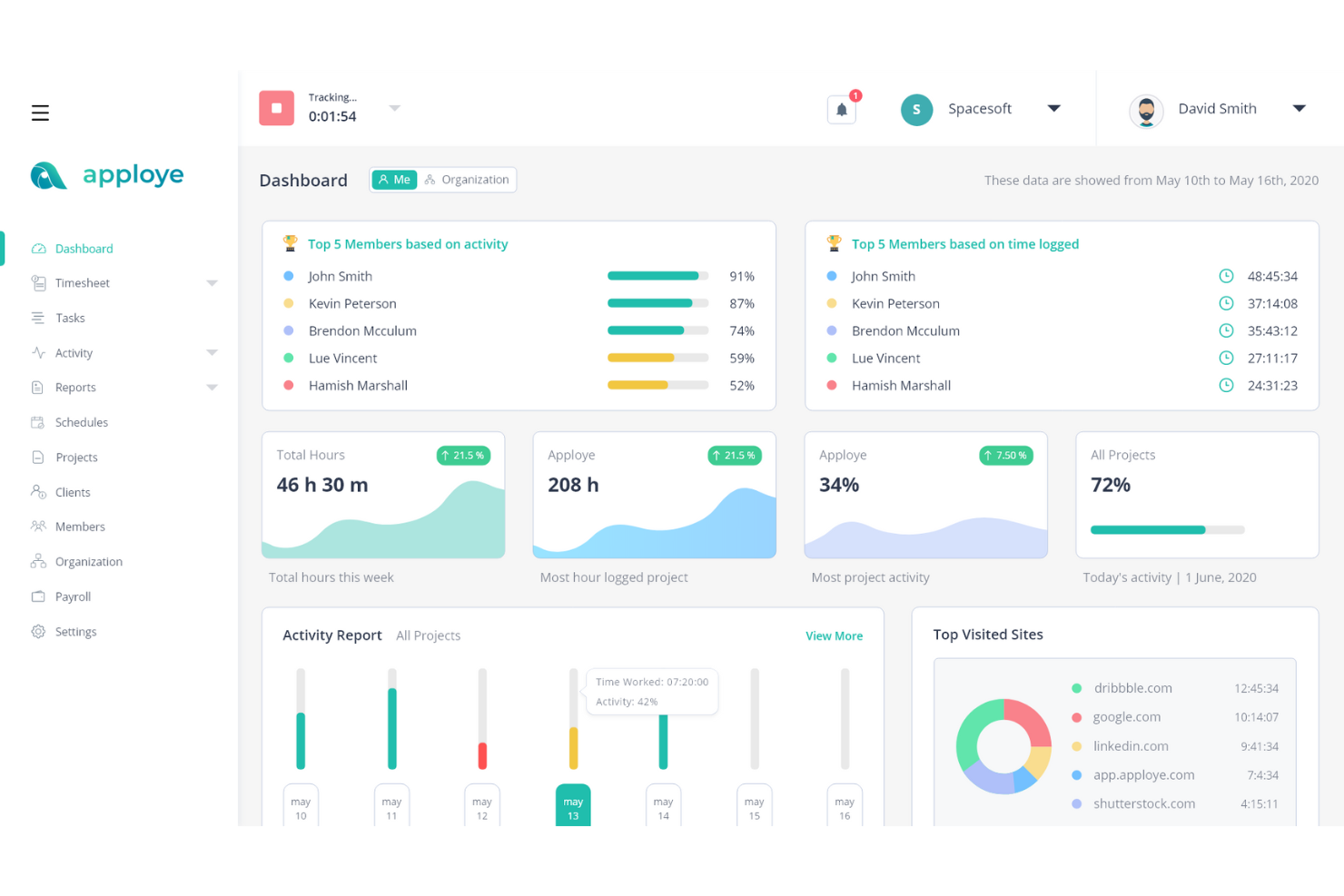
Tailored for businesses aiming to optimize workforce performance, Apploye offers features that cater to diverse industries, including marketing agencies, software development teams, and virtual assistant companies. By addressing challenges like productivity tracking and streamlined project management, Apploye provides a comprehensive approach to managing remote and hybrid teams effectively.
Why I Picked Apploye
I picked Apploye as a Hubstaff alternative for its focus on productivity management and detailed reporting. The platform’s productivity-tracking feature lets you measure daily performance, helping ensure your team stays focused on their tasks. Additionally, advanced reporting tools provide workforce intelligence, enabling businesses to make informed decisions based on real-time data. These features collectively address the need for detailed monitoring and analytics, making it a compelling choice for those seeking alternatives.
Apploye Key Features
In addition to its productivity management capabilities, Apploye offers:
- Employee Monitoring: Provides real-time tracking of workforce activity, ensuring that your team remains productive throughout their work hours.
- Screenshot Monitoring: Captures screen activity at intervals, offering visibility into your team’s workflow and helping identify areas for improvement.
- Project & Task Management: Organizes projects efficiently, with tools that assist in task assignment, progress monitoring, and budget tracking.
- Payroll & Invoice: Automates payment processing, simplifying payroll management and invoicing for businesses.
Apploye Integrations
Integrations include ClickUp, Trello, Jira, and Asana.
Pros and Cons
Pros:
- Automatic time tracking reduces manual data entry
- Monitors employees effectively without feeling overly invasive
- Tracks team activity clearly for remote productivity monitoring
Cons:
- Activity detection sometimes misrepresents actual work engagement
- Idle detection activates incorrectly during team conversations
Beebole
Best for PM-focused time tracking without monitoring
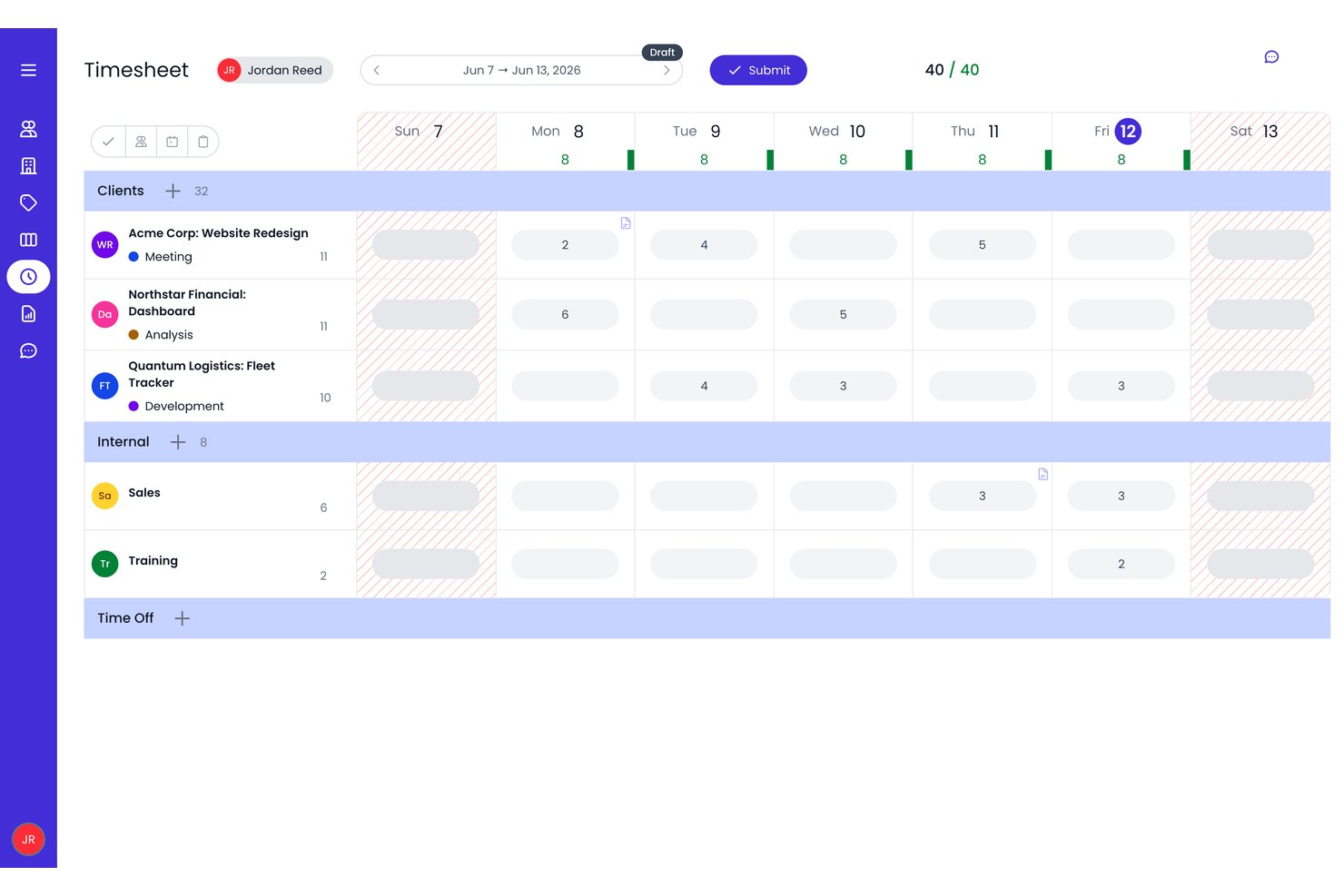
Beebole is a planning, time tracking, and reporting platform that combines project-based time logging, Gantt and Kanban planning, billable hour management, and customizable reporting — all without any employee monitoring features.
Who Is Beebole Best For?
Beebole is a strong fit for project managers and agency ops teams who need billable hour tracking and resource planning without employee surveillance.
Why I Picked Beebole
I've included Beebole in my top picks because it's the cleanest swap I know of for teams that want Hubstaff's project time tracking without the surveillance layer. Where Hubstaff monitors screenshots and app usage, Beebole focuses that energy on PM workflows: Gantt and staffing timeline views that auto-populate team timesheets from planned tasks, plus real-time plan-vs-actual budget tracking at the project level. I also love the AI-suggested time entries, which help employees log hours accurately without any management oversight required.
Beebole Key Features
- Multi-level timesheet approval workflows: Route timesheet submissions through configurable approval chains before they're finalized.
- AI-suggested time entries: Beebole uses desktop activity and browser signals to suggest time log entries directly to employees.
- DCAA and GDPR compliance tools: Built-in audit trails, data portability, and right-to-erasure support meet regulatory requirements for government contractors and international teams.
- Billable rate configuration: Set billing rates at the project, task, or tag level to match how your team actually prices work.
Beebole Integrations
Beebole offers various documented native integrations, including Asana, Linear, monday.com, Google Calendar, Outlook Calendar, QuickBooks Online, Xero, BambooHR, Google Sheets, and Excel. It also provides webhooks and an open API for custom integrations.
Pros and Cons
Pros:
- Planned hours from the Gantt and Staffing views pre-fill each person's timesheet
- Detailed multidimensional project and profitability reports
- No employee monitoring or surveillance features
Cons:
- No GPS, field, or mobile location tracking
- No native invoicing or payroll processing

TimeCamp
Best for invoicing and budgeting

TimeCamp is a versatile time-tracking and project-management tool. It’s best for invoicing and budgeting because of its financial management features.
Why it's a good Hubstaff alternative:
I chose TimeCamp because of its invoicing and budgeting features, which are essential for project-based work. Its ability to track time and expenses makes it a valuable alternative to Hubstaff, especially for those who need detailed financial reporting and invoicing capabilities.
Standout features & integrations:
Features include automatic time tracking, productivity tracking, and detailed reporting.
Integrations include Trello, Asana, Quickbooks, Google Calendar, Slack, Microsoft Teams, Xero, Jira, Salesforce, and Todoist.
Pros and Cons
Pros:
- Offers both desktop and mobile apps for tracking
- A wide array of integrations with popular tools
- Detailed invoicing and budgeting features
Cons:
- Interface requires some updating
- May have a learning curve for new users

Deputy
Best for shift scheduling

Deputy is a workforce management tool that simplifies the process of scheduling shifts, tracking time and attendance, and managing staff leave. It caters to industries requiring hourly workforce management.
Why it's a good Hubstaff alternative:
I chose Deputy as it has a specific feature set for businesses dependent on shift work, especially those managing complex shift schedules. Its user-friendly interface and efficient shift scheduling capabilities make it a good alternative to Hubstaff.
Standout features & integrations:
Features include auto-scheduling, which helps managers quickly create conflict-free schedules and seamless integration with payroll systems. The tool also offers a mobile app for iOS and Android, allowing managers and employees to communicate and manage shifts on the go.
Integrations include Gusto, QuickBooks, Xero, BambooHR, ADP, Square, Clover, Vend, Lightspeed, and Sage.
Pros and Cons
Pros:
- Seamless payroll integration
- Efficient shift scheduling and auto-scheduling
- User-friendly interface
Cons:
- Limited customization options
- Slight learning curve for new users

Best for distraction management

RescueTime is a fully automated time-tracking software that tracks time spent on apps and websites. It offers tools to block distractions and generates detailed reports to enhance focus.
Why it's a good Hubstaff alternative:
I chose RescueTime because of its approach to distraction management. It automates tracking and gives detailed insights into how one spends their time. It’s a good alternative to Hubstaff, which is focused on manual tracking and employee monitoring.
Standout features & integrations:
Features include automatic time tracking without manual entry, detailed reports on time spent on various activities, and the ability to block distracting websites and apps. It also offers offline time tracking to provide a complete view of your day.
Integrations include Asana, Slack, and calendar apps.
Pros and Cons
Pros:
- Detailed productivity reports
- Distraction blocking capabilities
- Automated time tracking
Cons:
- Some users may find it challenging to adjust to automated tracking
- May be less suitable for manual time-tracking needs

ProofHub
Best for simplified project planning

ProofHub is a project management tool that simplifies planning and collaboration for teams of all sizes. Its flat-rate pricing model, which includes unlimited users and features without per-user fees, makes it best for simplified project planning.
Why it's a good Hubstaff alternative:
I chose ProofHub because it offers a unique pricing structure that is cost-effective for teams with many users. Unlike Hubstaff, which charges per user, ProofHub's flat-rate pricing means larger teams can save money. Its focus on simplifying project planning makes it an excellent alternative for teams looking for an all-in-one solution.
Standout features & integrations:
Features include task management with boards and table views, Gantt charts for visual project planning, time tracking, custom roles, and reporting tools.
Integrations include Slack, Box, Dropbox, Google Calendar, Google Drive, One Drive, Freshbooks, and QuickBooks.
Pros and Cons
Pros:
- A complete set of project management and collaboration features
- Unlimited users and projects in the Ultimate Control plan
- Flat-rate pricing with no per-user fee
Cons:
- No mention of advanced analytics or reporting features beyond the basic project and resource reports
- Storage space is capped at 15GB for the Essential plan and 100GB for the Ultimate Control plan

Timeular
Best for visual time tracking

Timeular offers a visual time-tracking solution. Its unique approach involves logging hours using a physical time-tracking device and an interactive interface.
Why it's a good Hubstaff alternative:
I chose Timeular because it provides a tangible way to track time, which is more engaging and less intrusive than traditional digital-only methods. Its visual and physical aspects make it stand out as a good alternative to the more conventional Hubstaff.
Standout features & integrations:
Features include automatic time tracking, which captures app, website, and document usage, and a physical time tracker that makes time management more interactive. The software also offers leave and work hours tracking, billable time tracking with automatic calculations, and personalized productivity insights.
Integrations include Jira, Trello, Slack, ClickUp, Xero, Zendesk, Todoist, Salesforce, GitLab, GitHub, and Basecamp.
Pros and Cons
Pros:
- Integrates with over 3,000 apps
- Automatic time tracking for apps, websites, and documents
- Unique physical time tracker for a tangible time tracking experience
Cons:
- GDPR compliance and anti-surveillance features may not be necessary for all users
- The physical tracker is sold separately, which could be an additional cost
nTask
Best for integrated risk management

nTask is a project management platform with dedicated risk management features.
Why it's a good Hubstaff alternative:
I chose nTask because it focuses on risk management within its project management suite. This makes it a good Hubstaff alternative for teams prioritizing risk assessment and mitigation in their projects.
Standout features & integrations:
Features include task management, Gantt charts for planning, meeting management, team collaboration tools, issue tracking, a Kanban board for workflow visualization, time tracking, and specifically, risk management tools.
Integrations include Slack, Google Drive, Dropbox, Microsoft Teams, Zapier, Trello, GitHub, Jira, Asana, and Bitbucket.
Pros and Cons
Pros:
- Provides a unique focus on integrated risk management
- Includes a complete set of project management tools
- Affordable per-user pricing
Cons:
- Doesn’t work in offline mode
- Light on reporting features


Workfolio is a tool designed for creating professional online portfolios. It is best for individuals and enterprises looking to showcase their work and enhance their professional visibility.
Why it's a good Hubstaff alternative:
I chose Workfolio because it offers features tailored for professional online portfolios, a niche not covered by Hubstaff. Its focus on enhancing professional visibility makes it an excellent option for users who need more than just time tracking and productivity monitoring.
Standout features & integrations:
Features include unlimited tracking, computer activity tracking, and custom rules to detect slacking employees. It also offers screenshots every minute, timelapse videos of work progress, and data export to CSV and XLS formats.
Integrations include Slack, Trello, Asana, Google Drive, Dropbox, Microsoft Teams, Zoom, Jira, GitHub, and Salesforce.
Pros and Cons
Pros:
- Free plan available
- Affordable starting price
- Affordable starting price
Cons:
- Limited to professional portfolio use cases
- Limited advanced project management features
Other Hubstaff Alternatives
Below is a list of additional Hubstaff alternatives that I shortlisted, but did not make it to the top list.
- Insightful
For employee monitoring
- Toggl
For flexible time tracking
- Monitask
For screenshot-based monitoring
- Connecteam
For operational procedures
- DeskTime
For efficiency analysis
- Homebase
For team availability tracking
- GoodDay
For flexible work environments
- Time Doctor
For employee monitoring
- Teramind
For data loss prevention
- ClickUp
For task management features


Related Project Management Software Reviews
If you still haven't found what you're looking for, check out these related project management tools we've tested and reviewed.
- Project Management Software
- Resource Management Software
- Workflow Automation Software
- Gantt Chart Maker
How I Evaluate Hubstaff Alternatives
I split my evaluation into baseline requirements—like time tracking, project attribution, and billing—and differentiators that separate the best fit from the rest.
Core Functionality (Table Stakes For This List)
When I'm selecting tools for my list, I rank each one on a scale from 0 (does not offer the functionality) to 5 (excels in this area) for each core functionality listed below. Then, I calculate the tool's total score into a percentage. Each tool needs to achieve a minimum total score of 65% to be considered for inclusion.
- Time Tracking: I look for tools that go beyond a basic timer—automatic tracking, idle detection, and the ability to attribute hours to specific projects and tasks matter when teams log time across multiple clients.
- Project & Task Management: Each tool should let you organize deliverables into projects with task assignments, deadlines, and progress views like Kanban boards or Gantt charts.
- Productivity Monitoring: I evaluate whether a tool offers activity-level tracking, screenshot capture, or app/URL logging—features remote team leads rely on for visibility into distributed workdays.
- Team & Workforce Management: Scheduling, attendance tracking, user roles, and workload views all factor in here, especially for agencies juggling shift-based and project-based workers on the same roster.
- Budgeting & Billing: Tools that connect billable rates to tracked hours and support budget caps, invoice generation, or payroll exports score higher—manual workarounds for billing defeat the purpose.
- Reporting & Integrations: I check for customizable time and project reports alongside native integrations with tools like Jira, QuickBooks, or Slack that most PM-oriented teams already use.
Once I have a list of tools that meet this criteria, I consider what sets each platform apart.
Differentiating Factors (What Sets Vendors Apart)
Here's how I compare and contrast different vendors:
Standout Features
Privacy controls are a big differentiator—I look for tools that let you configure screenshot frequency, blur sensitive content, or let employees pause tracking. For agency teams, client-facing dashboards where stakeholders can view logged hours and project status without a full license save a lot of back-and-forth reporting. Native payroll processing is another separator, especially for teams managing contractors across multiple regions who want to go from tracked hours to payment without exporting to a third-party tool.
Beyond Features
Platform coverage matters—I check whether a tool offers native desktop apps across Windows, Mac, and Linux, plus mobile apps for field or hybrid teams who track time on the go. Compliance is another factor I weigh carefully, since employee monitoring data raises real GDPR and privacy concerns. I look for SOC 2 compliance, role-based access, and clear data retention policies. Finally, I consider how easy it is to transition from Hubstaff, including whether a vendor supports data migration, in-app onboarding, and change management resources for teams adjusting to new monitoring workflows.
Why Look For A Hubstaff Alternative
You might be looking for an alternative to Hubstaff if you have any of the following issues.
- Cost Concerns: You may find the pricing model of Hubstaff to be outside your budget
- Features: You may seek additional or different features that Hubstaff does not offer
- User Experience: You may prefer a more intuitive or user-friendly interface
- Integration Needs: You may require better integration options with other tools and services.
- Support and Resources: You may want more customer support or educational resources
Alternatives to Hubstaff may offer features and benefits and meet specific needs that Hubstaff doesn’t. For example, they may better fit certain businesses due to cost, feature requirements, user experience, and support.
Hubstaff Key Features
Here are some of the key features of Hubstaff, to help you contrast and compare what alternative solutions offer:
- Time tracking: Accurately track work hours with GPS capabilities and screenshots to verify work, integrating with task management software for seamless project tracking.
- Productivity insights: Monitor employee productivity with real-time metrics and app usage insights.
- Payroll & payments: Process payroll online, create custom invoices, and track overtime for accurate payments.
- Integrations: Connect with over 35 popular tools like Jira, Slack, and Google Calendar to enhance workflow.
- Workforce management: Manage employee schedules, attendance, and team structures while integrating with collaboration tools to enhance communication.
- Project management: Manage project costs, track billable hours, and oversee client budgets effectively.
- Employee monitoring: Gain insights into productivity and maintain activity logs for better performance tracking.
- Privacy focus: Use options to blur sensitive data while maintaining productivity tracking without compromising privacy.
- Resources: Access a help center, blog, and resource hub for support and guidance.
- Free trial: Experience the software with a 14-day free trial to explore its capabilities.