

10 Best AI Workflow Management Software Reviewed in 2026

Best AI Workflow Management Software Shortlist


Managing projects can be a juggling act. You’ve got deadlines to meet, resources to allocate, and a team to keep on track. AI workflow management software can lighten your load by automating repetitive tasks and improving team collaboration.
In my experience, these tools can transform how you work, allowing you to focus on what really matters. By leveraging AI, you can enhance efficiency and reduce errors in your projects.
In this article, I’ll share my top picks for AI workflow management software. I’ve independently tested and reviewed each one to help you make an informed decision. Whether you're looking to simplify complex tasks or improve team communication, you’ll find a solution that fits your needs.
Why Trust Our Software Recommendations
Our team has been testing and reviewing software since 2012. As project managers ourselves, we know how difficult—and important—it is to choose the right software.
For this guide, we evaluated tools using hands-on testing and independent research, scoring tools using our selection criteria. We also draw on insights from industry thought leaders and practicing project management experts.
Our reviews reflect our human editorial judgment, not a sales pitch.
Expert reviewers:
AI Workflow Management Software Comparison Table
This comparison table summarizes pricing details for my top AI workflow management software selections.
| Tool | Best For | Trial Info | Price | ||
|---|---|---|---|---|---|
| 1 | Best for secure client interactions | Free plan available | From $99/month | Website | |
| 2 | Best for no-code AI workflow generation | Free plan available | From $9/user/month (billed annually) | Website | |
| 3 | Best for marketing teams | Free demo available | Pricing upon request | Website | |
| 4 | Best with prebuilt connectors for major apps | 30-day free trial | Pricing upon request | Website | |
| 5 | Best for AI orchestration | 14-day free trial and free plan available | From $19.99/month (billed annually) | Website | |
| 6 | Best for visual automation | Free plan + free demo available | From $9/month (billed annually) | Website | |
| 7 | Best for open-source enthusiasts | Free trial available | From €20/month (billed annually) | Website | |
| 8 | Best for digital asset management | Free demo available | Pricing upon request | Website | |
| 9 | Best for data visualization | Free trial + demo available | Pricing upon request | Website | |
| 10 | Best for integration capabilities | 30-day free trial | Pricing upon request | Website |


Best AI Workflow Management Software Reviews
Below are my detailed summaries of the best AI workflow management software that made it onto my shortlist. My reviews offer a detailed look at the key features, pros & cons, integrations, and ideal use cases of each tool to help you find the best one for you.

Moxo
Best for secure client interactions
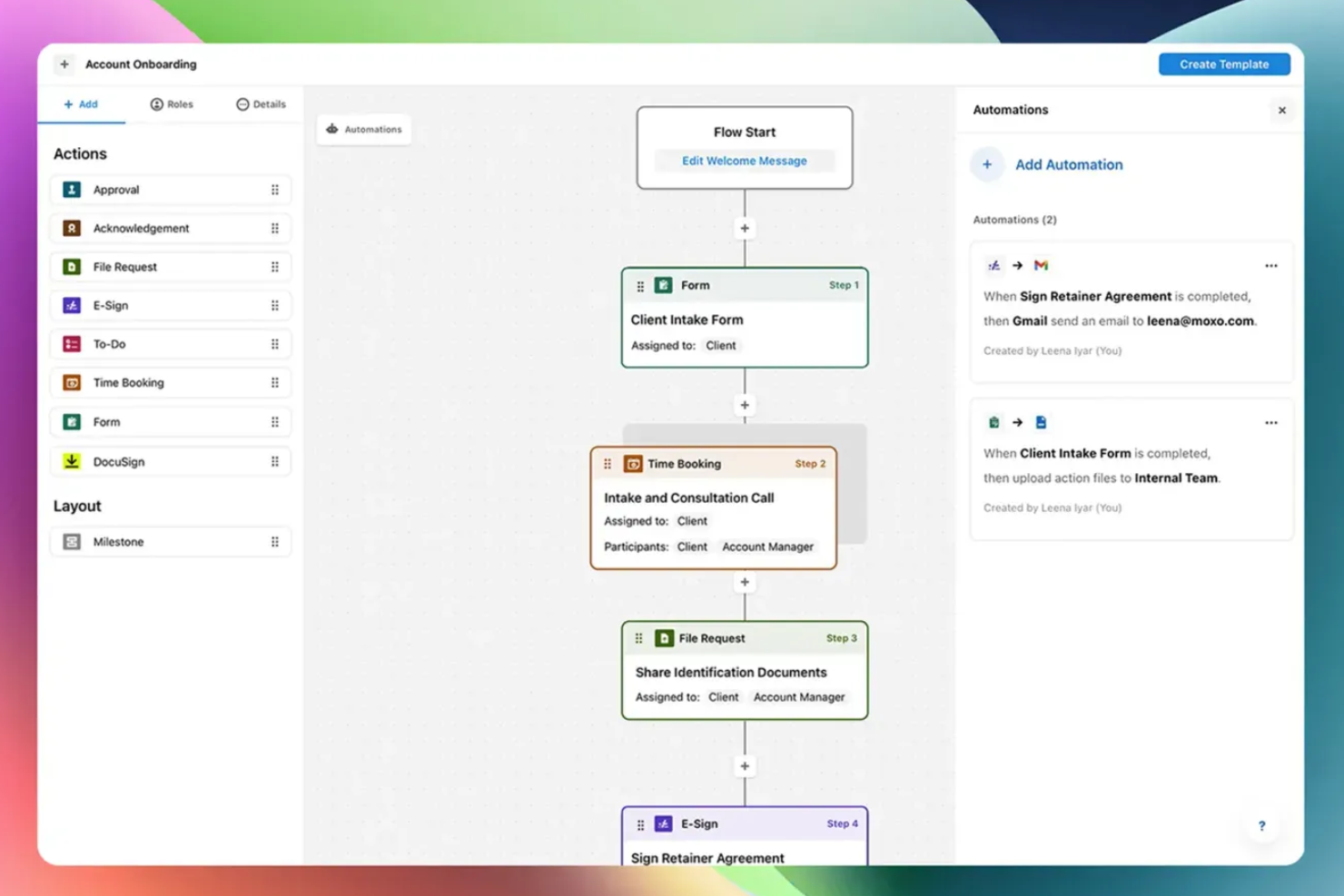
Moxo is an AI workflow management platform that orchestrates business processes across internal teams, external stakeholders, and AI agents—handling routing, validation, document coordination, and client interactions within a single no-code workflow builder.
Who Is Moxo Best For?
Moxo is a strong fit for professional services firms—like financial services, legal, and consulting—that manage complex, document-heavy workflows with external clients.
Why I Picked Moxo
I've included Moxo in my top picks because its security architecture is built directly into how client workflows run, not bolted on as an afterthought. Every client interaction happens inside an encrypted, access-controlled workspace with granular role-based permissions and a full audit trail. I especially like that SOC 2 Type II compliance and end-to-end encryption apply across messaging, file sharing, and eSignatures within the same workflow, so nothing leaks out to unsecured channels mid-process.
Moxo Key Features
- AI workflow builder: Design multi-step workflows with conditional branching, parallel paths, and looping using a no-code visual editor.
- AI agents: Deploy Assist, Automate, and Amplify agents to handle task preparation, data validation, and process monitoring within live workflows.
- SLA-based escalations: Set time-bound rules that automatically reroute or escalate stalled workflow steps to keep processes moving.
- Agent Foundry: Build and configure custom AI agents tailored to specific workflow stages using Moxo's native agent creation environment.
Moxo Integrations
Moxo offers direct data sync connectors with Salesforce, HubSpot, Microsoft Dynamics, Zoho, Wealthbox, Redtail, Filevine, Global Relay, Smarsh, and Xero, along with documented integrations for DocuSign, Stripe, Slack, Jira, Google Drive, Dropbox, Box, OneDrive, Zendesk, and QuickBooks. It also connects with Zapier and provides a REST API and webhooks for custom integrations.
Pros and Cons
Pros:
- Dedicated workspace per client or project
- SOC 2 Type II and GDPR compliant
- Built-in eSignatures, forms, and approvals
Cons:
- No built-in task timer for tracking
- Mobile app less capable than desktop

Best for no-code AI workflow generation
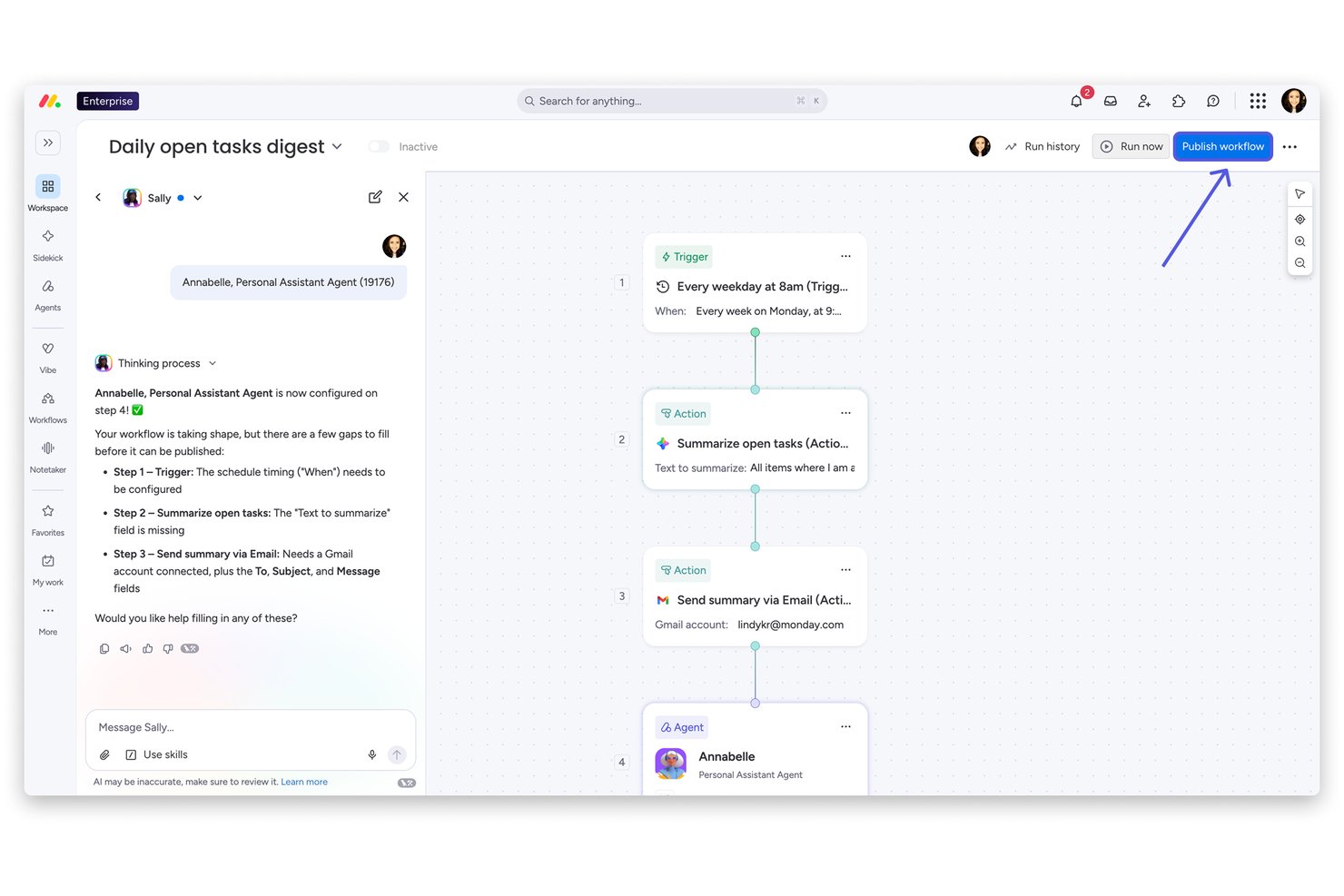
monday AI Workspace is an AI work platform that combines no-code workflow automation, multi-product project orchestration, and a built-in AI agent layer across work management, CRM, dev, and service use cases.
Who Is monday AI Workspace Best For?
It's a strong fit for mid-market and enterprise teams in operations, PMO, or cross-functional delivery roles who need flexible, AI-driven workflow orchestration across multiple business functions.
Why I Picked monday AI Workspace
monday AI Workspace earns its spot as one of the best on my shortlist because the AI Workflow Builder genuinely delivers on no-code workflow generation. I can describe a multi-step approval or handoff process in plain language, and the platform assembles the logic, assigns AI agents to execute each step, and routes work across teams automatically. The Vibe App Builder takes this further, letting me spin up a custom business app from a plain-English prompt in minutes.
monday AI Workspace Key Features
- AI agent workforce: Deploy AI agents to take on specialized project tasks and support automated execution at scale.
- Resource management module: Allocate team capacity, forecast workloads, and monitor resource utilization across portfolios.
- Meeting notetaker AI: Transform meetings into structured notes, action items, and workflow triggers directly within your workspace.
- Multi-tool integrations: Connect with tools like Jira, Salesforce, Slack, HubSpot, and more through native integrations and open API.
monday AI Workspace Integrations
monday AI Workspace offers hundreds of native integrations, including Slack, Jira, Salesforce, HubSpot, Google Workspace, Microsoft 365, GitHub, GitLab, Zendesk, Dropbox, and Zoom. It also supports Zapier and provides an API for custom integrations.
Pros and Cons
Pros:
- Portfolio-wide visibility across multiple workstreams
- AI agents autonomously handle multi-step tasks
- No-code AI workflow builder included natively
Cons:
- Platform breadth can overwhelm smaller teams
- Advanced AI features require higher-tier plans
New Product Updates from monday AI Workspace
monday AI Workspace Adds Human Approval Routing
monday AI Workspace adds a human-in-the-loop approval block to AI Workflows, sending approval requests and routing workflow paths based on responses. For more information, visit monday AI Workspace's official site.

Best for marketing teams

Screendragon is an AI-powered productivity platform designed for marketing teams and agencies, focusing on workflow automation. Its main users are global brands and agencies aiming to optimize resources and enhance project management.
Why I picked Screendragon: It's tailored for marketing teams needing to manage complex workflows efficiently. The platform offers features like marketing work management and content operations that cater specifically to marketing needs. With AI-powered automation, you can streamline tasks and focus on creative projects. It's particularly beneficial for agencies looking to improve profitability and resource management.
Standout features & integrations:
Features include advanced project templates that help you manage recurring tasks. You can benefit from content approval workflows to ensure quality control. The platform also provides real-time analytics to track project performance.
Integrations include Microsoft Teams, Slack, Adobe Creative Cloud, Salesforce, SAP, Google Workspace, SharePoint, JIRA, Trello, and Asana.
Pros and Cons
Pros:
- Customizable workflows
- AI-driven process automation
- Advanced project templates
Cons:
- Complex for new users
- Limited to marketing focus
New Product Updates from Screendragon
Screendragon Unveils New AI Hub
Screendragon introduced AI Hub, a new capability that lets teams build and manage AI agents directly within workflows. The update helps marketing teams automate tasks, maintain governance controls, and scale AI-driven operations more efficiently. For more information, visit Screendragon's official site.

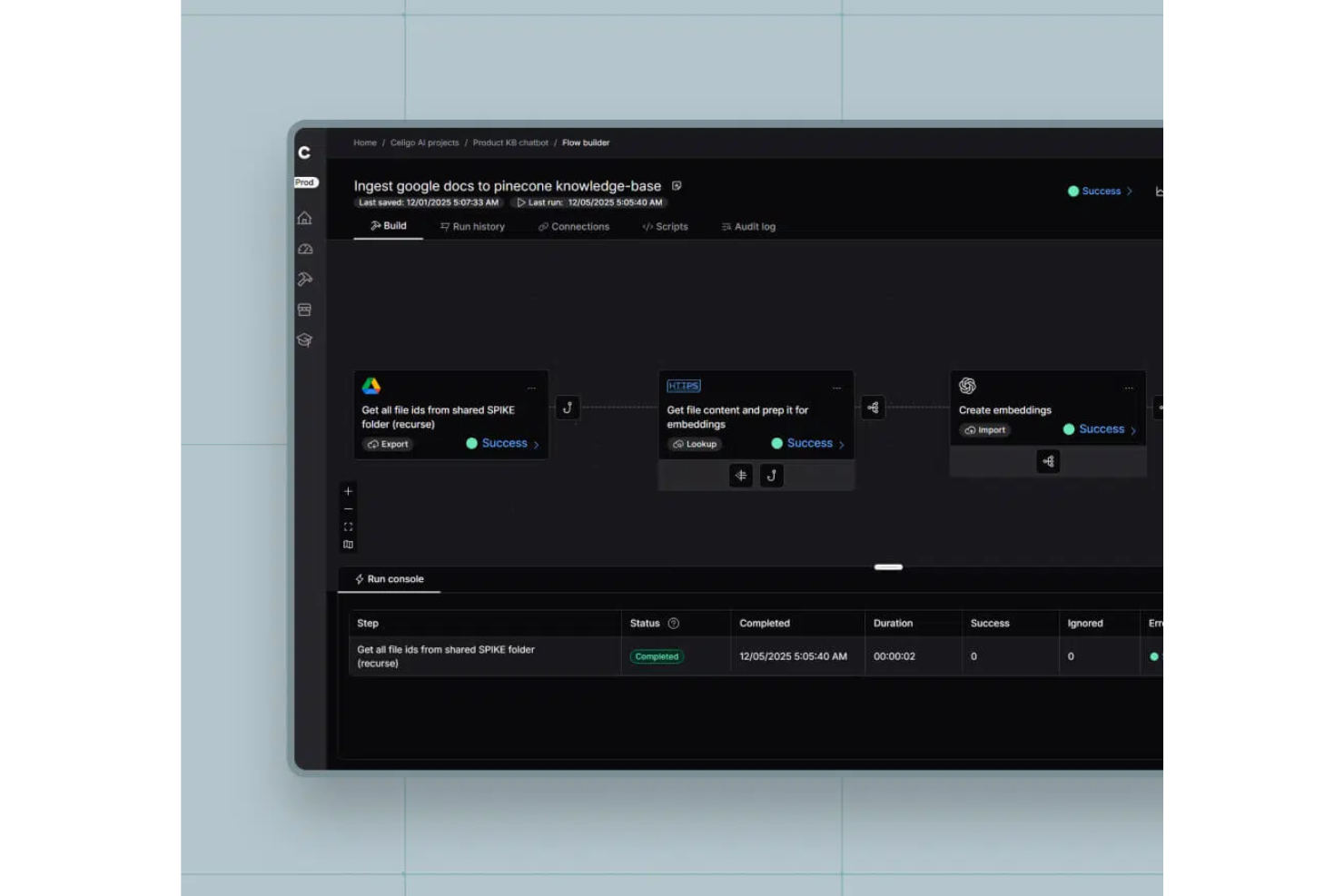
Celigo is an AI-powered workflow automation platform for teams who need to connect, orchestrate, and manage business processes across multiple SaaS and enterprise applications.
Who Is Celigo Best For?
Celigo is a good fit for IT and operations teams at mid-sized to large businesses that need to automate and connect workflows across multiple cloud applications.
Why I Picked Celigo
I picked Celigo as one of the best because its library of prebuilt connectors covers a huge range of major SaaS and enterprise apps. My team is able to quickly connect Salesforce, NetSuite, and ServiceNow without custom development. I like that these connectors come with built-in logic for common business processes, so we can automate workflows across platforms right out of the box.
Celigo Key Features
- AI error management: Uses AI to detect, diagnose, and resolve integration errors automatically.
- Flow builder: Lets you design, customize, and automate workflows with a visual drag-and-drop interface.
- Monitoring dashboard: Provides real-time visibility into integration health, status, and performance.
- Role-based access controls: Allows you to manage permissions and restrict access to sensitive workflows and data.
Celigo Integrations
Celigo offers 1,000+ native prebuilt connectors, including Salesforce, NetSuite, ServiceNow, SAP, Microsoft Dynamics 365, Shopify, Amazon, Jira, Slack, Google Sheets, and Snowflake. An API is available for custom integrations.
Pros and Cons
Pros:
- Role-based access controls for workflow security
- Real-time monitoring dashboard for integration health
- Agent builder supports autonomous, multi-step workflows
Cons:
- Support response times can vary by plan
- Limited offline or on-premises deployment options
New Product Updates from Celigo
Celigo Adds API Group Assignment During API Setup
Celigo adds API group assignment during create, clone, and move actions. This reduces extra setup steps by letting teams organize APIs before the relative URI is defined. For more information, visit Celigo’s official site.
 .
.
Zapier
Best for AI orchestration

Zapier is an AI orchestration platform that connects thousands of apps and helps teams automate multi-step workflows without code. It's used across marketing, sales, RevOps, IT, HR, and operations teams to turn disconnected tools into intelligent, AI-powered systems.
Why I picked Zapier: Zapier stands out for its combination of ease of use and depth. Non-technical users can build workflows using natural language with Zapier Copilot, while advanced teams can layer in multi-step logic, AI actions, and governance controls. With one of the largest integration ecosystems available, including hundreds of AI apps, Zapier scales well from two-step task automations to complex, cross-team workflows.
Standout features & integrations:
Features include multi-step workflows, conditional logic, AI-powered automation steps, and built-in tools like Zapier Tables and Forms for managing data and inputs. Enterprise plans add admin controls, audit logs, and security features.
Integrations include Google Sheets, Slack, Notion, HubSpot, Salesforce, Stripe, Mailchimp, Airtable, Typeform, Shopify, OpenAI, Trello, and more.
Pros and Cons
Pros:
- No-code, AI-powered workflow creation
- Massive app and AI integration ecosystem
- Built-in database, forms builder, and process mapping
Cons:
- Free plan limited to two-step workflows
- No mobile app

Make
Best for visual automation

Make is a visual automation platform designed for businesses and teams that need to automate workflows and processes without coding. It caters to a wide range of users, from small businesses to large enterprises, enabling them to automate repetitive tasks and improve efficiency.
Why I picked Make: It's ideal for visual automation, offering a no-code, intuitive interface that lets your team design workflows easily. With its drag-and-drop functionality, you can create complex workflows without needing technical expertise. Make provides you the flexibility to automate a variety of tasks across different applications. For teams looking to enhance productivity through visual tools, Make offers a user-friendly solution.
Standout features & integrations:
Features include a visual editor that simplifies the creation of automation workflows. You can set conditional triggers to customize your workflows further. The platform also provides real-time monitoring to track workflow performance and make adjustments as needed.
Integrations include Google Drive, Dropbox, Slack, HubSpot CRM, Salesforce, Mailchimp, Trello, Shopify, Microsoft Teams, and Asana.
Pros and Cons
Pros:
- Suitable for various business sizes
- Flexible automation options
- Real-time workflow monitoring
Cons:
- Can be resource-intensive
- Limited advanced features

n8n
Best for open-source enthusiasts

n8n is an open-source workflow automation tool designed for developers and tech-savvy users. It allows you to create complex workflows and automate tasks across various applications.
Why I picked n8n: It's perfect for open-source enthusiasts who want control over their automation processes. You can host it on your own server, providing flexibility and customization options. n8n's visual workflow editor makes it easy to design workflows without extensive coding. For those who value transparency and adaptability, it offers a unique open-source solution.
Standout features & integrations:
Features include a visual workflow editor that simplifies the creation of automation tasks. It provides conditional logic to customize workflows based on specific criteria. You can also access its extensive community support for troubleshooting and ideas.
Integrations include Slack, Google Sheets, GitHub, Trello, Salesforce, Dropbox, X (Twitter), HubSpot, Zendesk, and Airtable.
Pros and Cons
Pros:
- Open-source flexibility
- Visual workflow editor
- Self-hosting option
Cons:
- Can be resource-intensive
- Requires technical knowledge
Canto
Best for digital asset management

Canto is a digital asset management tool designed for businesses that need to organize and distribute media files efficiently. It serves marketing teams and creative departments by streamlining the management of images, videos, and other digital assets.
Why I picked Canto: It's ideal for teams that require structured digital asset management. Canto offers an all-in-one centralized library where you can store and categorize media files easily. Its intuitive search functions allow you to find assets quickly, saving your team valuable time. With customizable branding options, it helps maintain consistency across your digital content.
Standout features & integrations:
Features include customizable portals that allow you to share assets with external partners securely. You can automate tagging and file organization to reduce manual work. Canto also provides analytics to track asset usage and performance.
Integrations include Adobe Creative Cloud, Microsoft Office, Slack, WordPress, Hootsuite, Shopify, Box, Dropbox, Google Drive, and Microsoft Teams.
Pros and Cons
Pros:
- Automated tagging and organization
- Secure sharing with partners
- Efficient asset categorization
Cons:
- Can be complex for new users
- Limited advanced editing tools
Domo
Best for data visualization

Domo is a cloud-based business intelligence platform designed for organizations that need in-depth data visualization and analytics. It serves a wide range of industries by using its private LLMs and AI features tools to connect, analyze, and visualize data for informed decision-making.
Why I picked Domo: It's tailored for those who need advanced data visualization capabilities to make data-driven decisions. Domo offers a user-friendly interface with customizable dashboards that enable you to view and interact with your data easily. With its real-time data updates, your team can respond quickly to changes. Domo provides a powerful platform supported by AI models for predictive analysis and informed decision-making.
Standout features & integrations:
Features include customizable dashboards to visualize data your way. An integrated AI assistant helps analyze metrics, generate summaries, and highlight key insights. Real-time updates keep insights current, while collaboration tools support team discussions and decisions.
Integrations include Salesforce, Google Analytics, Facebook Ads, LinkedIn, Adobe Analytics, Shopify, QuickBooks, Microsoft Excel, and Dropbox.
Pros and Cons
Pros:
- Suitable for various industries
- Supports team collaboration
- Advanced data visualization
Cons:
- High learning curve for beginners
- Limited offline capabilities


Boomi Flow is a cloud-based application development platform that primarily serves enterprises looking to automate workflows and integrate various business processes. Enables workflow orchestration, connecting systems and managing complex tasks visually and at scale.
Why I picked Boomi Flow: It's known for its integration capabilities, making it a great choice for teams needing to connect multiple applications. You can design workflows using a low-code environment, which simplifies app development. Its AI agents enhance automation by intelligently managing data and process execution across systems. For enterprises, Boomi Flow provides scalability and flexibility in handling complex workflows.
Standout features & integrations:
Features include a visual flow builder that allows you to create workflows intuitively. The platform supports real-time collaboration, enabling your team to work together efficiently. You can also access detailed analytics to monitor and improve workflow performance.
Integrations are available through Boomi Flow’s API.
Pros and Cons
Pros:
- Detailed analytics available
- Low-code development environment
- Strong integration capabilities
Cons:
- Customization may need additional support
- May require technical expertise
Other AI Workflow Management Software
Here are some additional AI workflow management software options that didn’t make it onto my shortlist, but are still worth checking out:


How I Evaluate AI Workflow Management Software
Every tool on this list needs to do more than slap an AI label on basic automations—it has to deliver real value, like predicting schedule risks or reassigning tasks when priorities shift. I split my evaluation into two layers: the core functionality a tool must have to qualify and the differentiating factors that separate good options from great ones.
Core Functionality (Table Stakes For This List)
When I'm selecting tools for my list, I rank each one on a scale from 0 (does not offer the functionality) to 5 (excels in this area) for each core functionality listed below. Then, I calculate the tool's total score into a percentage. Each tool needs to achieve a minimum total score of 65% to be considered for inclusion.
- AI-Driven Workflow Automation: I evaluate whether each tool can automate multi-step workflows using adaptive AI logic, like re-routing an approval chain when a stakeholder is OOO.
- Predictive Project Intelligence: Each platform should surface risk and delay forecasts, such as flagging a sprint likely to miss its deadline based on velocity trends.
- Intelligent Task Orchestration: I look for AI-assisted task assignment and prioritization that accounts for workload, skills, and dependencies across teams.
- Natural Language Interaction: The tool should support conversational queries and AI summaries, like asking "what's blocking the Q3 launch?" and getting a usable answer.
- Smart Workflow Recommendations: Proactive optimization suggestions matter here, such as the platform recommending a streamlined handoff process based on past project patterns.
- Integrations & AI-Ready Data Layer: I check for broad connectivity with tools like Jira, Slack, and Smartsheet, plus structured data sync that actually feeds the AI features.
Once I have a list of tools that meet this criteria, I consider what sets each platform apart.
Differentiating Factors (What Sets Vendors Apart)
Here's how I compare and contrast different vendors:
Standout Features
Resource capacity forecasting is a big differentiator—I look for AI that models staffing scenarios across concurrent projects so you can plan ahead when two launches overlap. Cross-project dependency mapping matters just as much, especially for program managers where a delay in one workstream creates ripple effects across a portfolio. I also value no-code AI workflow builders that let PMs design adaptive workflows without waiting on engineering support.
Beyond Features
AI transparency is something I weigh heavily—I check whether the platform explains why it made a recommendation and whether PMs can override AI decisions at key approval stages. Data governance matters too, particularly how vendors handle customer data in their AI models and whether they meet SOC 2 or ISO 27001 standards. I also evaluate time-to-value: a tool with prebuilt PM workflow templates and guided onboarding gets teams running far sooner than one that requires weeks of custom configuration.
How to Choose AI Workflow Management Software
It’s easy to get bogged down in long feature lists and complex pricing structures. To help you stay focused as you work through your unique software selection process, here’s a checklist of factors to keep in mind:
| Factor | What to Consider |
|---|---|
| Scalability | Will the software grow with your team? Consider future needs and if the tool can handle increased users and workflows without performance issues. |
| Integrations | Does it connect with your existing tools? Check compatibility with software you already use to avoid manual data entry and ensure smooth workflows. |
| Customizability | Can you tailor it to your processes? Look for options that let you adjust workflows, fields, and dashboards to fit your specific needs. |
| Ease of use | Is the interface simple and intuitive? Ensure your team can adopt it quickly without extensive training or frustration. |
| Implementation and onboarding | How long to set up and train? Consider the time and resources needed to get your team up and running, including available support and training materials. |
| Cost | Does it fit your budget? Compare pricing plans and total cost of ownership, including any hidden fees or additional costs for integrations or upgrades. |
| Security safeguards | Are your data protected? Look for encryption, access controls, and compliance with data protection regulations to keep your information safe. |
| Support availability | Is help available when you need it? Check for 24/7 support, multiple contact methods, and a responsive team to assist with any issues that arise. |
What Is AI Workflow Management Software?
AI workflow management software is a tool that automates and optimizes business processes through artificial intelligence. These tools are generally used by project managers, operations teams, and IT professionals to increase efficiency and reduce manual tasks. Automation, integration, and analytics capabilities help with task management, data flow, and decision-making. Overall, these tools boost productivity and help teams work smarter.
Features
When selecting AI workflow management software, keep an eye out for the following key features:
- Automation: Automates repetitive tasks, freeing up time for more strategic work.
- Integration capabilities: Connects with existing software to ensure smooth data flow across platforms.
- Customizable workflows: Allows you to tailor processes to fit your specific business needs.
- Real-time analytics: Provides insights into workflow performance to help with decision-making.
- User-friendly interface: Ensures ease of use and quick adoption by your team.
- Collaboration tools: Facilitate communication and teamwork within and across departments.
- Security safeguards: Protects sensitive data with encryption and access controls.
- Scalability: Supports growth by accommodating increased users and workflow complexity.
- Conditional logic: Enables workflows to adapt based on specific criteria or triggers.
Benefits
Implementing AI workflow management software provides several benefits for your team and your business. Here are a few you can look forward to:
- Increased efficiency: Automates repetitive tasks, letting your team focus on more strategic work.
- Improved collaboration: Offers tools that enhance communication and teamwork across departments.
- Enhanced decision-making: Provides real-time analytics to guide data-driven decisions.
- Flexibility: Offers customizable workflows, enabling you to adapt processes to fit your needs.
- Scalability: Supports growth by handling more users and complex workflows.
- Data security: Ensures sensitive information is protected with strong security measures.
Costs and Pricing of AI Workflow Management Software
Selecting AI workflow management software requires an understanding of the various pricing models and plans available. Costs vary based on features, team size, add-ons, and more. The table below summarizes common plans, their average prices, and typical features included in AI workflow management software solutions:
Plan Comparison Table for AI Workflow Management Software
| Plan Type | Average Price | Common Features |
|---|---|---|
| Free Plan | $0 | Basic task management, limited integrations, and basic automation. |
| Personal Plan | $5-$25/user/month | Task management, basic integrations, customizable workflows, and email support. |
| Business Plan | $30-$60/user/month | Advanced automation, multiple integrations, analytics and reporting, and enhanced customer support. |
| Enterprise Plan | $70-$150/user/month | Unlimited integrations, advanced security features, personalized onboarding, and dedicated account management. |
AI Workflow Management Software FAQs
Here are some answers to common questions about AI workflow management software:
What industries benefit most from AI workflow management software?
AI workflow management software is beneficial across various industries, including healthcare, finance, marketing, and manufacturing. In healthcare, it can automate patient scheduling and record-keeping. Finance teams use it for compliance and reporting. Marketing departments streamline campaign management, while manufacturers automate supply chain processes. Evaluate your industry-specific needs to see how these tools can help.
Is technical expertise required to use AI workflow management software?
No, most AI workflow management software is designed to be user-friendly with drag-and-drop interfaces. However, some complex automation might require basic technical skills. If your team lacks technical expertise, look for solutions with strong customer support and training resources to ease the transition.
How does AI workflow management software improve team collaboration?
AI workflow management software improves team collaboration by centralizing tasks and communication. It provides shared dashboards where team members can track progress and update one another in real time. Features like automated notifications and collaborative tools ensure everyone stays informed and aligned on project goals.