


Zapier vs. Make: Comparison & Expert Reviews For 2026



If you’re trying to automate your work, you’ve probably hit that point where your apps don’t talk to each other, your team is juggling manual tasks, and everything just feels more complicated than it should be. Maybe you’re tired of stitching tools together on your own, or you’re worried you’ll choose the wrong platform and waste hours rebuilding workflows later. In this review, I try to make things easier by breaking down what Zapier and Make offer, how they work, and what you can expect from each one, so you can pick the workflow automation software that actually supports the way you and your team get things done.
Zapier vs. Make: An Overview
Zapier


Make
Why Trust Our Software Recommendations
Our team has been testing and reviewing software since 2012. As project managers ourselves, we know how difficult—and important—it is to choose the right software.
For this guide, we evaluated tools using hands-on testing and independent research, scoring tools using our selection criteria. We also draw on insights from industry thought leaders and practicing project management experts.
Our reviews reflect our human editorial judgment, not a sales pitch.
Expert reviewers:
Zapier vs. Make Pricing Comparison
| Zapier | Make | |
|---|---|---|
| Free Trial | 14-day free trial and free plan available | Free plan + free demo available |
| Pricing | From $19.99/month (billed annually) | From $9/month (billed annually) |
Zapier vs. Make Pricing & Hidden Costs
Zapier's pricing model uses tiered plans that support different levels of automation complexity and monthly task volume, with add-ons like premium apps or higher-tier support potentially increasing total costs. Make's structure is credit-based, with higher usage tied to more credits, and extra charges can come from advanced features, higher data transfer needs, or enterprise-grade add-ons.
Compare how each platform bills for usage, look at your team's actual automation volume, and test sample workflows to see which pricing model fits your real workload — not just your budget.
Zapier vs. Make Feature Comparison
Zapier’s multi-step workflows make it easy to automate tasks across thousands of apps — like routing new leads to your CRM and using AI to notify the right sales rep to follow up. With features like looping, paths, and AI-assisted custom actions, Zapier handles advanced automation while still keeping the building experience fast and approachable.
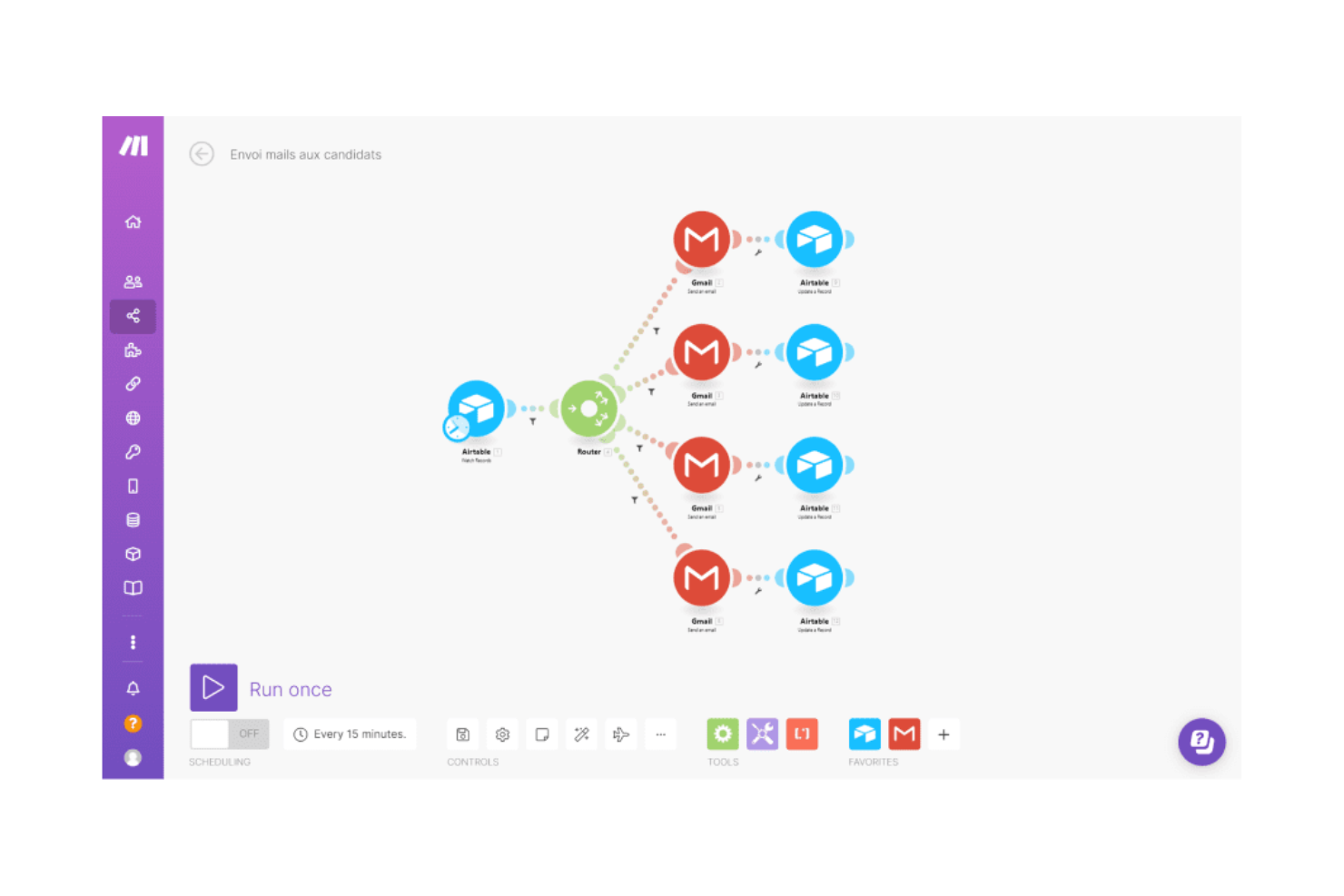
Make, on the other hand, offers a visual builder that can handle intricate, multi-branch logic. It’s powerful, but the learning curve is steeper and typically requires more technical skill to use effectively.
In short, Zapier gives you robust automation capabilities with a smoother setup experience, while Make is a better fit if you prefer a visual environment and don’t mind the extra setup time.
| Zapier | Make | |
|---|---|---|
| API | ||
| Approval Workflows | ||
| Batch Permissions & Access | ||
| Compliance Tracking | ||
| Contact Management | ||
| Custom Reports | ||
| Dashboard | ||
| Data Export | ||
| Data Import | ||
| Data Visualization | ||
| Document Management | ||
| External Integrations | ||
| Inventory Tracking | ||
| Marketing Automation | ||
| Notifications | ||
| Process Modeling | ||
| Process Reporting | ||
| Project Management | ||
| Roadmapping | ||
| Sales Automation | ||
| Supplier Management | ||
| Third-Party Plugins/Add-Ons | ||
| Workflow Management |
Zapier vs. Make Integrations
| Integration | Zapier | Make |
| Google Sheets | ✅ | ✅ |
| Slack | ✅ | ✅ |
| HubSpot | ✅ | ✅ |
| Salesforce | ✅ | ✅ |
| Airtable | ✅ | ✅ |
| Notion | ✅ | ✅ |
| Facebook Lead Ads | ✅ | ✅ |
| Gmail | ✅ | ✅ |
| API | ✅ | ✅ |
| Zapier | — | ✅ |
Both Zapier and Make offer tons of integrations with apps across your workflow. However, Zapier offers more options (8,000+) compared to Make (3,000+).
Zapier vs. Make Security, Compliance & Reliability
| Factor | Zapier | Make |
| Data Privacy | Uses AES-256 encryption, IP allow-listing, and strict access controls to safeguard data across all workflows. | Follows GDPR and SOC 2 Type II, encrypts data end-to-end, and supports privacy-by-design across scenarios. |
| Regulatory Compliance | Offers SOC 2 Type II, SOC 3, GDPR, CCPA, SSO, SCIM, and EU data residency. | Supports GDPR compliance, SSO, SCCs for international transfers, and enterprise governance controls. |
| Reliability | Guarantees 99.9% uptime with multi-region redundancy and real-time threat detection. | Delivers stable execution with AWS hosting, analytics dashboards, and credit overage protection. |
| Access Control | Provides granular permissions, role-based controls, shared folders, and audit logs. | Uses role-based access, scenario-level permissions, audit logs, and domain-based SSO. |
| Observability | Offers alerting, version control, and analytics across automation activity. | Provides Make Grid for landscape visibility, execution logs, and real-time monitoring. |
Zapier offers more built-in enterprise security options, while Make gives you stronger visual oversight of how data moves across your workflows. When evaluating security, review each tool’s authentication controls, audit logs, and compliance certifications to match what your team actually needs to stay secure.
Zapier vs. Make Ease of Use
| Factor | Zapier | Make |
| Interface | Clean, linear editor; visual canvas lets you drag, drop, and map complex workflows with AI-generated suggestions. | Visual canvas that lets you drag, drop, and map complex flows more freely. |
| Onboarding | Simple guided setup with templates and clear prompts. | More technical onboarding with deeper configuration options. |
| Workflow Building | Fast to create sophisticated, multi-step automations with a linear, step-by-step interface that's intuitive to use. | Visual drag-and-drop canvas that's useful when designing workflows with complex branching, data transformations, or custom logic. |
| Support | Extensive documentation and layered chat/email help on paid plans. | Strong help center and tutorials, but more hands-on time needed to master the tool. |
| Learning Curve | Copilot makes it easy for all users, regardless of technical expertise, to build workflows using natural language | Steeper curve due to flexibility and visual logic mapping. |
Zapier feels easier when you want quick wins without learning a complicated new system, while Make becomes more powerful once you climb the learning curve and need deeper workflow control.
Zapier vs Make: Pros & Cons
Zapier
- Accessible to everyone across an organization, including non-technical users.
- 8,000+ app integrations, including 500+ AI apps.
- Built-in database, forms builder, and process mapping.
- Free plan is limited to two-step workflows.
- Dedicated email support available on paid plans only.
- No mobile app available.
Make
- User-friendly interface allows you to easily automate complex workflows
- Customizable features allow your team to tailor solutions to fit your business needs
- Extensive app connections enhance team productivity
- The onboarding process can be challenging
- Occasional delays in support team response times
- The initial learning curve can be steep for those new to no-code automation.
Best Use Cases for Zapier and Make
Zapier
- RevOps Teams Integrate CRM, billing, and analytics platforms to maintain data accuracy and visibility across revenue funnels.
- Sales Teams Automate lead capture, CRM updates, and follow-ups so you can accelerate deal cycles and keep your pipeline moving.
- Marketing Departments Unify campaign data and automate omnichannel marketing operations at scale
- HR Departments Streamline recruitment, onboarding, and employee engagement workflows so you can deliver a smoother employee experience.
- IT Departments Centralize workflows and eliminate fragmented automations to simplify compliance and app management. You can also automate ticket creation, route issues, and trigger real-time alerts for faster incident response and administrative efficiency.
- E-Commerce Teams Automate complex order management and customer service workflows, saving time and reducing manual errors.
Make
- Marketing teams You can automate repetitive tasks like social media posts or email campaigns, freeing up time for creative work.
- IT departments Make allows your team to connect and manage various software tools efficiently.
- Small businesses The platform provides cost-effective automation through its free plan and scalable paid plans, helping you scale operations without extra hires.
- E-commerce You can streamline order processing, invoicing, and inventory management through automated workflows.
- Project management Make integrates with tools like Trello to enhance coordination, task tracking, and scenario execution.
- Startups Make offers flexible automation that allows your team to adapt quickly to changing needs and scale efficiently.
Who Should Use Zapier, and Who Should Use Make?
Zapier is the stronger fit if you want to roll out multi-step automations quickly across different teams and skill levels, with minimal setup and predictable performance. Its balance of ease-of-use, breadth of integrations, and growing advanced capabilities makes it well-suited for organizations that need speed without sacrificing reliability.
Make is a good match when you have the technical depth to take advantage of its highly customizable, visual approach to workflow design. Teams that prefer detailed control, complex branching logic, or hands-on scenario tuning may find Make's editor more flexible.
Overall, Zapier supports teams aiming for fast, scalable automation with low maintenance, while Make suits builders who prioritize granular control and a visual canvas for building workflows. If you want streamlined, dependable automation, choose Zapier; if you need deep customization and don't mind the added complexity, choose Make.
Differences Between Zapier and Make
| Zapier | Make | |
|---|---|---|
| Ease of Use | Best for getting started quickly with a short learning curve. | Best for complex workflows with a steeper learning curve. |
| Enterprise Readiness | Strong governance, SSO, SCIM, audit logs, and compliance certifications. | Strong visibility tools like Make Grid with enterprise security options. |
| Integrations | Offers 8,000+ apps and AI tools. | Supports 3,000+ apps with custom API connections for niche tools. |
| Pricing Model | Task-based plans with limits tied to task usage. | Credit-based system tied to actions and processing volume. |
| Workflows | Uses an AI assistant to build workflows using natural language, plus a visual editor. | Uses a visual map for flexible branching and complex paths. |
| Visit ZapierOpens new window | Read Make ReviewOpens new window |
Similarities Between Zapier and Make
| Artificial Intelligence | Each tool includes AI assistance to help you build workflows faster and automate decision-making. |
|---|---|
| Automation | Both let you build automations without coding. |
| Cloud-Based | Both run entirely in the cloud, letting you build, monitor, and update automations from anywhere without installing local software. |
| Collaboration | Both offer shared workflows, permissions, and tools to manage automations across teams. |
| Customization | Both support conditional logic, data formatting, and branching paths. |
| Visit ZapierOpens new window Read Make ReviewOpens new window | |