

20 Best AI Professional Services Software in 2026

Best AI Professional Services Software Shortlist


AI professional services software uses artificial intelligence to help you manage projects, allocate resources, and automate workflows across consulting, agency, and client-service teams. If you’re searching for the best tools to stay ahead in a fast-moving, highly competitive industry, you need solutions that increase accuracy, transparency, and delivery speed without adding new headaches. This guide cuts through the noise and breaks down the top AI tools—so you can compare options, see which fit your business, and make confident decisions as you plan your next steps.
Why Trust Our Software Recommendations
Our team has been testing and reviewing software since 2012. As project managers ourselves, we know how difficult—and important—it is to choose the right software.
For this guide, we evaluated tools using hands-on testing and independent research, scoring tools using our selection criteria. We also draw on insights from industry thought leaders and practicing project management experts.
Our reviews reflect our human editorial judgment, not a sales pitch.
Expert reviewers:
AI Professional Services Software Comparison Table
This comparison table summarizes pricing details for my top AI professional services software selections.
| Tool | Best For | Trial Info | Price | ||
|---|---|---|---|---|---|
| 1 | Best for resource and project forecasting | Free demo available | Pricing upon request | Website | |
| 2 | Best for automated team planning | Free demo | Pricing upon request | Website | |
| 3 | Best for tracking profitability by project | 14-day free trial + free demo available | From $10/user/month (billed annually) | Website | |
| 4 | Best for all-in-one business oversight | 14-day free trial | From $19.90/user/month (billed annually) | Website | |
| 5 | Best for time and billing management | Free demo available | From $20/user/month | Website | |
| 6 | Best for unified financial management | 21-day free trial + free demo available | From $17.10/user/month (billed annually) | Website | |
| 7 | Best for real-time project visibility | Free demo available | Pricing upon request | Website | |
| 8 | Best for native Salesforce integration | Free demo available | Pricing upon request | Website | |
| 9 | Best for enterprise-grade reporting tools | Free demo available | Pricing upon request | Website | |
| 10 | Best for smooth ERP integration | Free demo available | Pricing upon request | Website |


Best AI Professional Services Software Reviews
Below are my detailed summaries of the best AI professional services software that made it onto my shortlist. My reviews offer a detailed look at the features, integrations, and best use cases of each platform to help you make data-driven decisions to find the best one for you.

Kantata
Best for resource and project forecasting
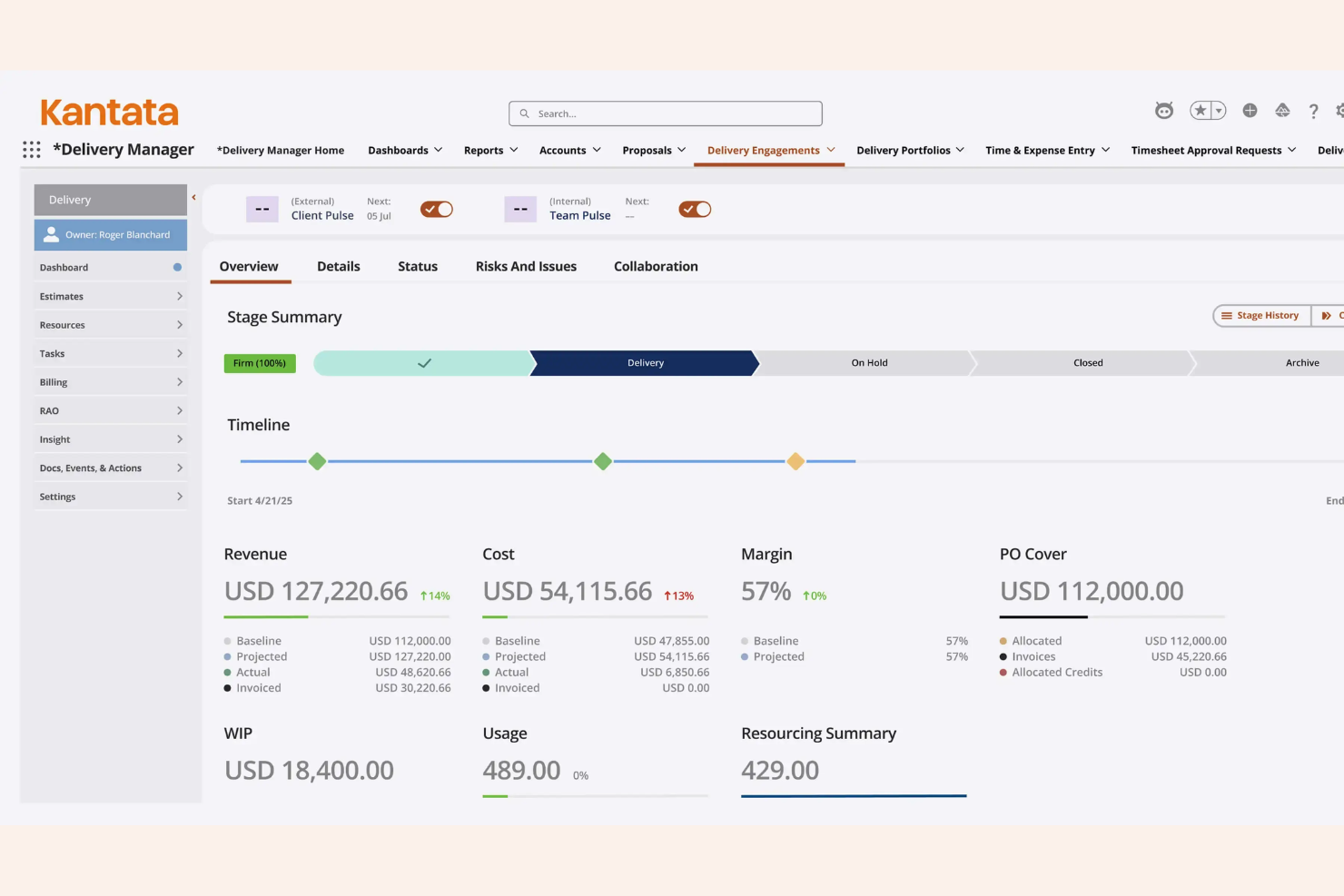
Kantata is an AI-driven professional services automation platform integrating generative AI capabilities to offer advanced project management, resource scheduling, analytics, and financial tools for service-based organizations.
Who Is Kantata Best For?
Kantata suits professional services teams at medium to large organizations that need an AI assistant alongside advanced controls for project and resource management.
Why I Picked Kantata
Kantata is one of my top picks because I get detailed resource planning, scenario modeling, and AI-powered forecasts. I like how I can compare project timelines, track capacity, and adjust allocations before making big commitments.
Kantata Key Features
- Financial management modules: Track budgets, invoices, expenses, and revenue in one place.
- Project accounting tools: Get real-time project financials and margin analysis.
- Skill-based resource matching: Assign team members based on skills and certifications.
- Time and expense tracking: Capture billable hours and expenses across projects.
Kantata Integrations
Kantata offers native integrations with Salesforce, Slack, Jira, HubSpot, QuickBooks, Xero, Microsoft 365, Google Workspace, Expensify, and NetSuite. An API is available for custom integrations.
Pros and Cons
Pros:
- Scenario modeling for future project planning
- Granular resource scheduling and allocation views
- AI-driven project forecasting tools
Cons:
- Custom reporting requires technical expertise
- Complex setup process for new accounts
New Product Updates from Kantata

Kantata Adds Access Group Change History
Kantata adds Access Groups History, letting account administrators track changes to group details, membership, and permissions in Recent History. The update also makes these events available through the Subscribed Events API for broader monitoring. For more information, visit Kantata’s official site.
 .
.
Mosaic
Best for automated team planning
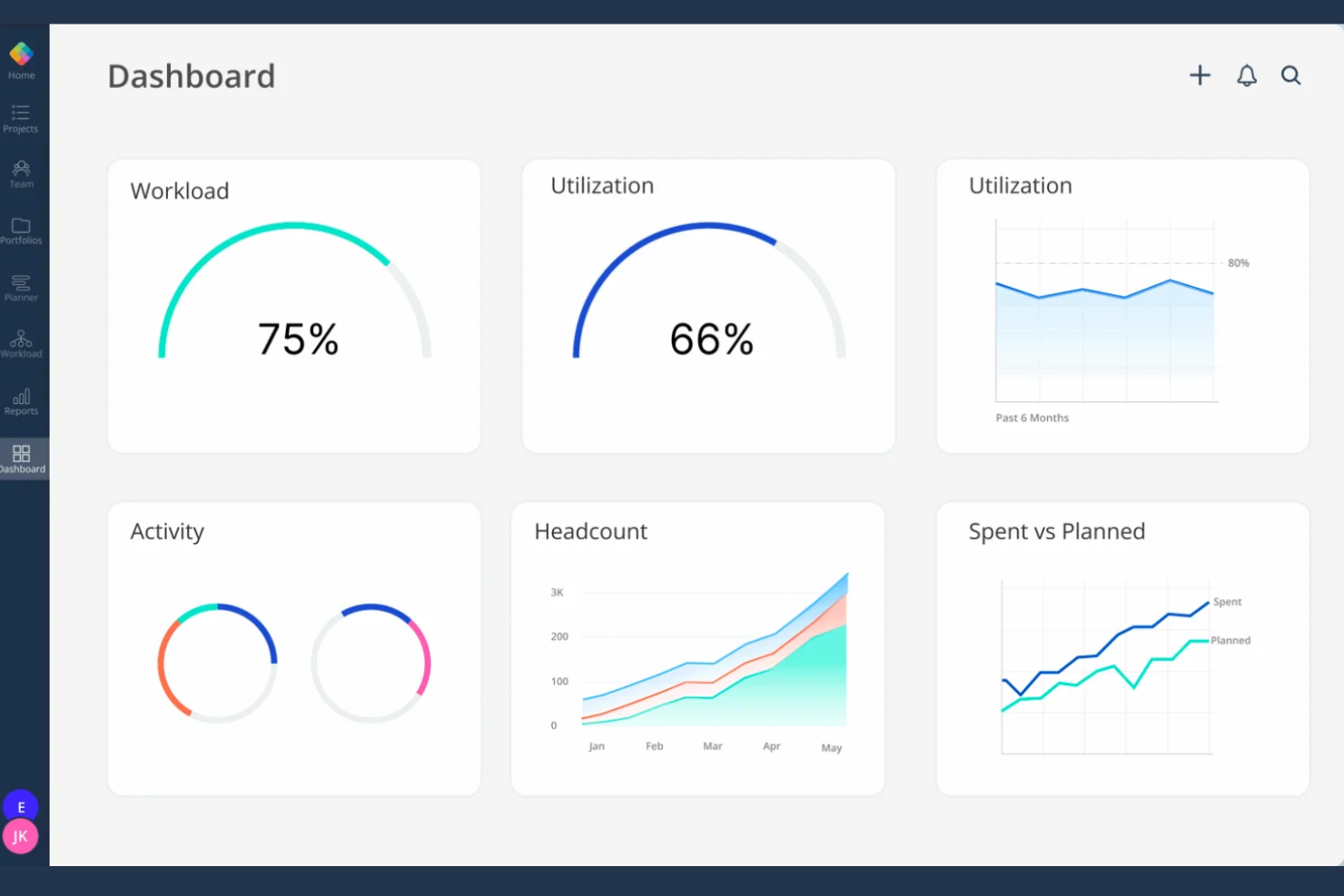
Mosaic is a resource management and team planning platform for professional services teams, leveraging AI agents to offer automated workload forecasting, project scheduling, time tracking, and staffing analytics.
Who Is Mosaic Best For?
Mosaic suits project leads and operations managers in growing professional services firms needing real-world AI-powered resource planning for distributed or hybrid teams.
Why I Picked Mosaic
I picked Mosaic as one of the best because I use its AI-driven scheduling engine to automate team assignments and balance workloads as projects shift. I also rely on its real-time utilization tracking and heatmaps to instantly spot resource constraints.
Mosaic Key Features
- Project request intake: Capture and centralize incoming project requests directly in the platform.
- Skill-based resourcing: Match assignments to team members based on tracked skillsets.
- Visual timeline view: Display projects, phases, and allocations in a single interactive timeline.
- AI forecasting: Predict future resource needs using AI-driven analytics.
Mosaic Integrations
Mosaic offers native integrations with Jira, QuickBooks, Slack, Google Workspace, Microsoft 365, Salesforce, HubSpot, Asana, Capsule, ClickUp, Deel, Gusto, GitHub, HiBob, BambooHR, Procore, and more. Zapier is supported, and an API is available for custom integrations.
Pros and Cons
Pros:
- Visual dashboards for real-time team capacity
- Skill-based matching for project assignments
- AI workload prediction across multiple projects
Cons:
- Initial platform setup requires time
- Custom field configuration is limited

Best for tracking profitability by project
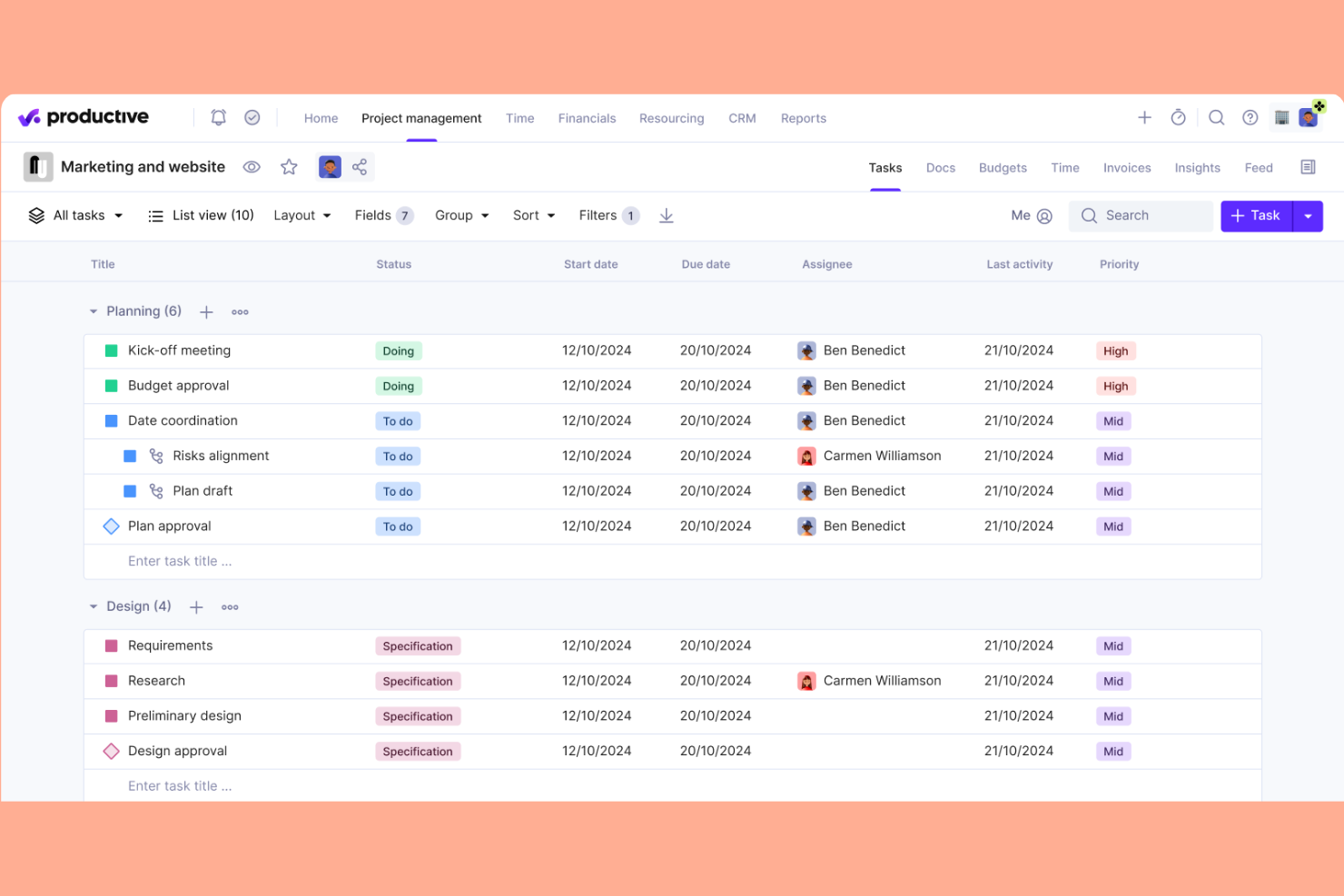
Productive is a professional services automation platform for AI consulting, social media agencies, and digital service firms that covers project management, resource planning, budgeting, time tracking, and invoicing in one unified system.
Who Is Productive Best For?
Productive suits mid-sized and larger digital, creative, or IT services firms that need visibility into project-level financials and resource allocation.
Why I Picked Productive
I picked Productive because tracking profit margins on every project is a core feature, not a reporting afterthought. I use real-time budget tracking and custom cost rates to monitor profitability as delivery progresses. I rely on granular invoicing tied to project progress.
Productive Key Features
- Resource planning: Schedule team members and allocate capacity to projects in a drag-and-drop interface.
- Task management: Organize assignments, set deadlines, and track task status in project boards or lists.
- Custom fields: Add personalized data fields to projects, tasks, and budgets for process flexibility.
- Document storage: Upload, share, and organize project files directly in the platform.
Productive Integrations
Productive offers native integrations with Slack, Jira, Amplitude, Notion, Stripe, QuickBooks, Xero, Google Workspace, and HubSpot. An API is available for custom integrations.
Pros and Cons
Pros:
- Financial and utilization dashboards are built in
- Custom cost rates by person or role
- Project budgets update in real time
Cons:
- Custom field formula options are limited
- Limited automation for multi-step workflows
New Product Updates from Productive
Productive Adds Voice Dictation, Slack Connector, Proposals, and Overtime
Productive adds voice dictation, a Slack Connector, proposal controls, and overtime tracking. These updates support faster AI interactions, client proposals, and time management. For more information, visit Productive’s official site.

Scoro
Best for all-in-one business oversight

Scoro is an all-in-one professional services management platform that supports natural language querying to bring together project management, sales, billing, CRM, and reporting in a unified system for service-based businesses.
Who Is Scoro Best For?
Scoro is ideal for mid-sized professional services teams that need deep data analysis to unify project tracking, sales, and financials in one system.
Why I Picked Scoro
I picked Scoro because I rely on its unified workspace to manage projects, sales, quotes, and invoicing side by side. I use centralized dashboards to connect all operational data, giving full oversight across every business function from a single platform.
Scoro Key Features
- Task automation: Automate recurring tasks with templates and triggers.
- Gantt chart view: Visualize project timelines and dependencies with a drag-and-drop interface.
- Time tracking: Log billable and non-billable hours from desktop or mobile.
- Resource planner: Allocate team capacity and manage workload in real time.
Scoro Integrations
Scoro offers native integrations with Xero, QuickBooks, Avalara, Stripe, Jira, Envoice, Google Calendar, Outlook, Slack, Mailchimp, and Dropbox. Zapier and an API are available for custom integrations.
Pros and Cons
Pros:
- Real-time budget and profitability reporting
- Detailed time tracking across teams and projects
- Highly configurable project and billing templates
Cons:
- Mobile app offers fewer features than the web
- Setting up task hierarchies is rigid
New Product Updates from Scoro

Scoro Adds Time Mobile App and ELI Improvements
Scoro adds the Scoro Time mobile app for iOS/Android to track time anywhere and expands ELI with attachments, smarter filtering, and trigger-based actions. For more information, visit Scoro's official site.

BigTime
Best for time and billing management
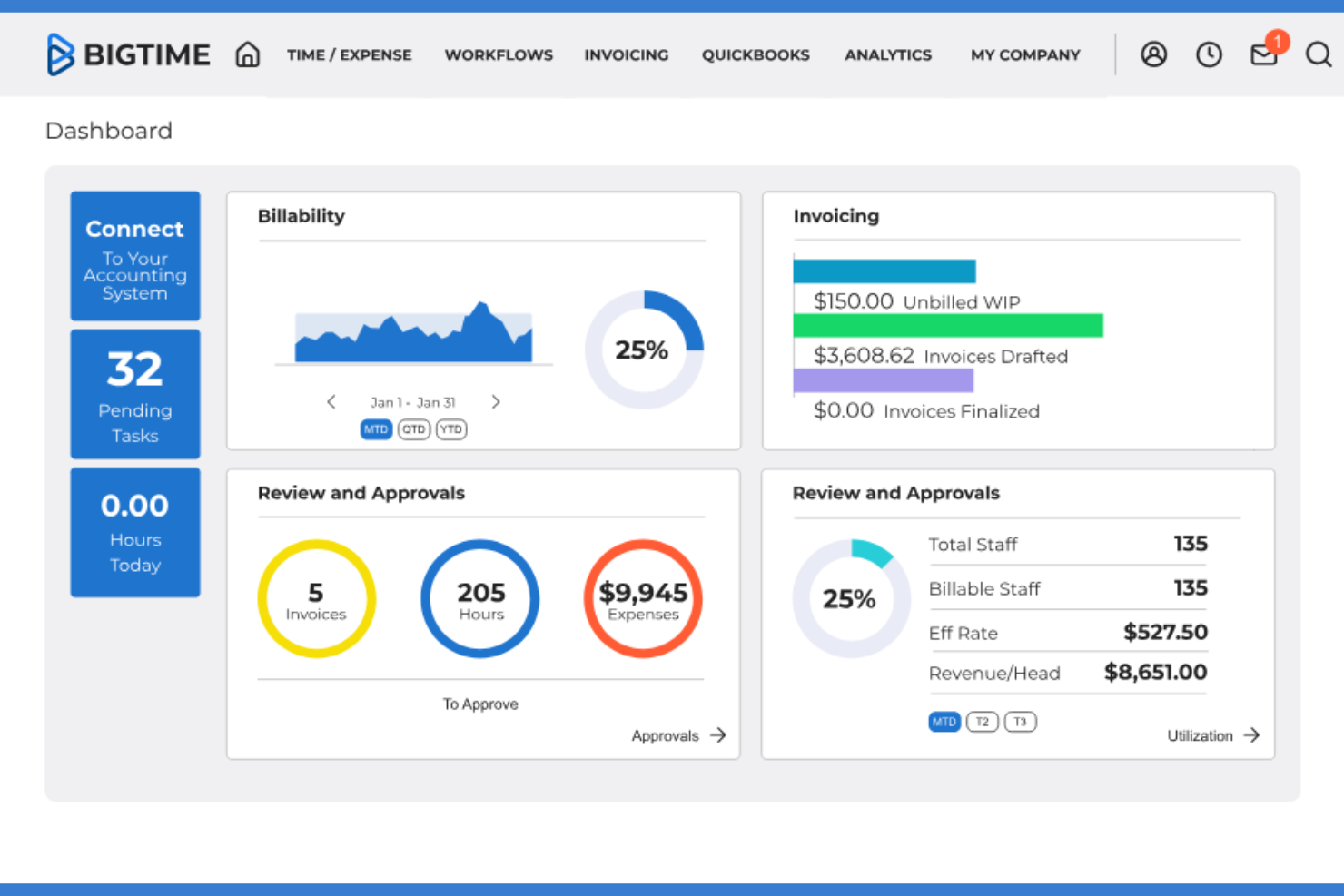
BigTime is a cloud-based time tracking and billing management platform for professional services firms, offering project budgeting, expense tracking, invoicing, and resource management tools.
Who Is BigTime Best For?
BigTime suits midsize professional services firms that need accurate project time tracking and billing tools for client work.
Why I Picked BigTime
I picked BigTime as one of the best because I use its toolset to generate high-quality financial insights, centralized time tracking, and detailed billing tools to optimize project accounting. The platform lets me automate billing cycles and create client-ready, professional invoices.
BigTime Key Features
- Project budgeting and forecasting: Set project budgets, forecast future spend, and monitor progress in real time.
- Resource allocation management: Assign staff to projects based on availability and skill set.
- Customizable dashboard reporting: Build tailored dashboards to track utilization, performance, and project status.
- Mobile time entry app: Submit and review time entries from mobile devices.
BigTime Integrations
BigTime offers native integrations with QuickBooks, Xero, Sage Intacct, Hubspot, Jira, Smartsheet, Zendesk, Okta, Salesforce, Lacerte, Slack, and more, and provides an API for custom integrations.
Pros and Cons
Pros:
- Custom approval workflows for time and expense
- Granular role-based access controls
- AI-driven project time entry suggestions
Cons:
- Limited workflow automation beyond time and billing
- Hard limit on active dashboard views

Best for unified financial management

Projectworks is a professional services automation platform for AI teams, aligning your functional business model with project planning, resource management, timesheets, invoicing, and forecasting in one system.
Who Is Projectworks Best For?
Projectworks is a strong choice for small to mid-sized consulting firms needing centralized financial oversight and project resource management.
Why I Picked Projectworks
I picked Projectworks as one of the best because I can handle project budgets, forecasting, and invoicing all in one view. I use its real-time financial dashboards to spot margin trends and proactively manage client profitability.
Projectworks Key Features
- Resource scheduling: Assign and balance workloads with visual tools for your team.
- Capacity planning dashboard: See staff availability and project allocation in real time.
- Customizable project templates: Set up repeatable project structures for consistent delivery.
- Integrated time tracking: Track time directly within each project and task.
Projectworks Integrations
Projectworks offers native integrations with Xero, QuickBooks Online, Salesforce, Employment Hero, Power BI, BambooHR, and HubSpot. Zapier and an API are available for custom integrations.
Pros and Cons
Pros:
- Role-based access control for sensitive financials
- Forecasting links resource, revenue, and utilization views
- Project margin reporting is highly granular
Cons:
- No built-in AI-driven resource suggestions
- Settings are overly complex initially

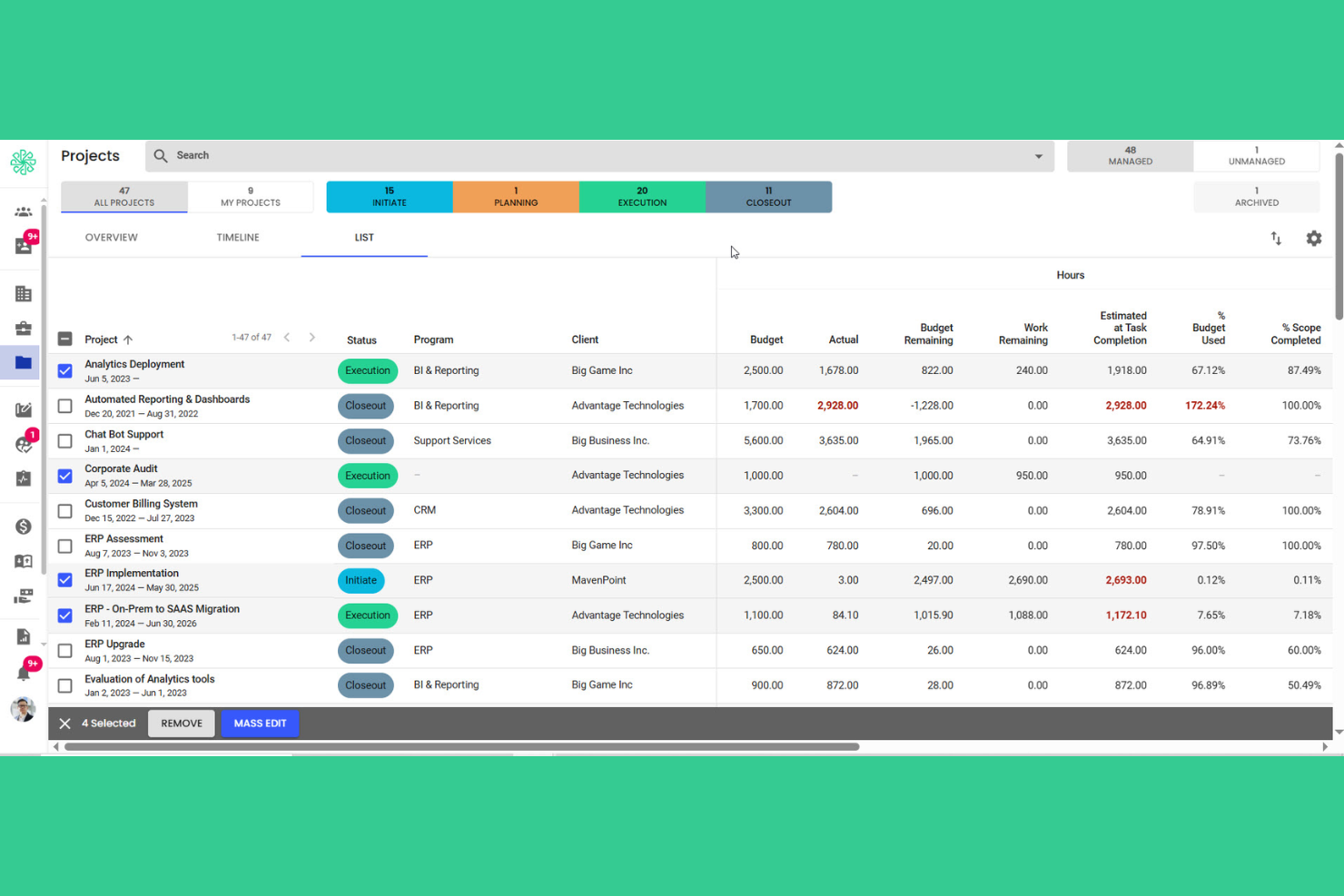
Polaris PSA is a professional services automation platform that utilizes advanced AI models to bring together project planning, resource management, budgeting, and timesheet capabilities for services teams managing complex work.
Who Is Polaris PSA Best For?
Polaris PSA suits any modern corporate law firm or professional services organization needing granular project tracking and resource forecasting across multiple teams.
Why I Picked Polaris PSA
I picked Polaris PSA because it integrates large language models to present project health, resources, and budgets in real time from executive dashboards. I rely on AI-powered SmartBeats for up-to-date project status, plus advanced analytical outputs for informed decision-making as projects evolve.
Polaris PSA Key Features
- Resource management module: Assign people to projects based on roles, skills, and availability.
- Skill tracking database: Catalog and update team member skills for better project staffing.
- Automated timesheet system: Capture, validate, and approve resource hours directly in the platform.
- Configurable project templates: Standardize workflows with reusable templates for project setup and planning.
Polaris PSA Integrations
Polaris PSA offers native integrations with Deltek ERP systems, Salesforce, QuickBooks, Xero, Jira, and Microsoft 365. An API is available for custom integrations.
Pros and Cons
Pros:
- Configurable workflows for resource scheduling and billing
- SmartBeats for automated project status updates
- Real-time project health and financial dashboards
Cons:
- Mobile app sync can lag
- Complex initial configuration and setup process

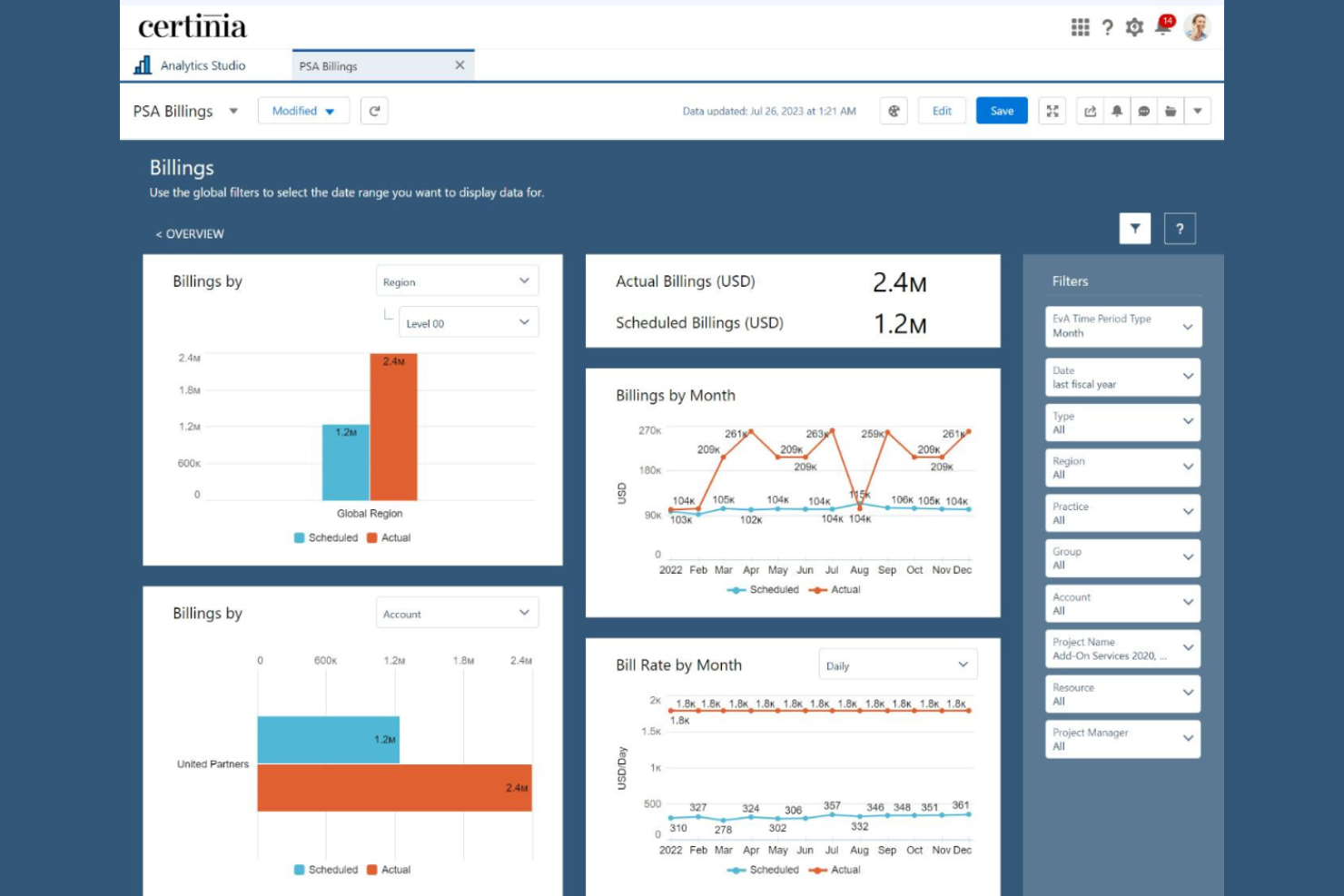
Certinia PS Cloud is a professional services automation platform that prioritizes data privacy while unifying project management, resource planning, time tracking, and financial management for service-based organizations.
Who Is Certinia PS Cloud Best For?
Professional services teams already operating on the Salesforce platform will find Certinia PS Cloud especially aligned to their workflows.
Why I Picked Certinia PS Cloud
I picked Certinia PS Cloud because it allows for hands-on management of project delivery, resources, and billing right inside Salesforce, with real-time project status and revenue data synced to my CRM.
Certinia PS Cloud Key Features
- Resource demand planning: Forecast staffing needs and match resources to projects.
- Timesheet management: Capture and approve project hours within the platform.
- Project risk tracking: Flag and track project risks with configurable risk criteria.
- Flexible billing models: Support milestone, time and materials, or fixed fee invoicing.
Certinia PS Cloud Integrations
Certinia PS Cloud offers native integrations with Salesforce, Jitterbit, Expensify, SAP Concur, Avalara, Celigo, Zankraft, Conga, and DocuSign, and provides an API for custom integrations.
Pros and Cons
Pros:
- Custom workflows for resource management and billing
- Strong native alignment with Salesforce data model
- Real-time project and financial visibility
Cons:
- Dashboard layouts feel overly cluttered
- Initial configuration can be complex

Workday PSA is an enterprise professional services automation platform that leverages fine-tuned LLMs to bring together project management, resource planning, financials, and workforce analytics in one cloud-based system.
Who Is Workday PSA Best For?
Workday PSA is a solid choice for large enterprises and global organizations with complex service delivery and analytics requirements.
Why I Picked Workday PSA
I picked Workday PSA as one of the best because its specialized AI use cases grant access to customizable dashboards, ad hoc analysis, and prebuilt reporting templates. My team can drill into project, resource, and financial data at scale with enterprise-grade reporting tools.
Workday PSA Key Features
- Integrated resource management: Plan and allocate staff across client projects using a unified dashboard.
- Project budgeting tools: Set budgets, monitor spend, and compare projections versus actuals for each engagement.
- Mobile app access: Track projects, expenses, and approvals from any mobile device.
- Workflow automation engine: Automate project approvals, notifications, and task assignments with configurable workflows.
Workday PSA Integrations
Native integrations are not publicly listed. Workday PSA offers an API for custom integrations.
Pros and Cons
Pros:
- Workflow design with customizable approval processes
- Resource allocation tools integrated with project management
- Advanced analytics for financial project visibility
Cons:
- Most adjustments require IT help
- Initial implementation takes significant time
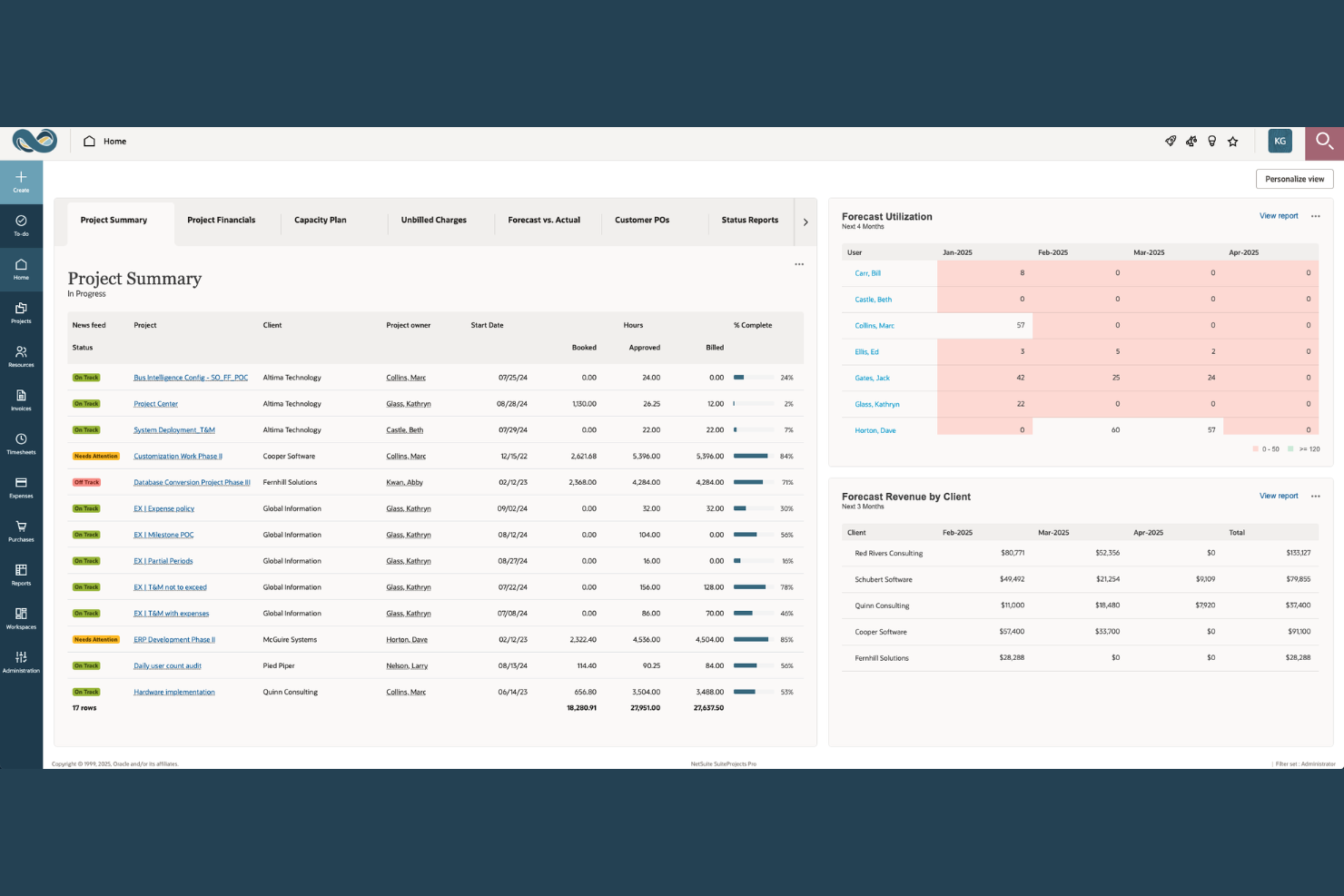
NetSuite SuiteProjects Pro fits global professional services organizations that need to streamline core business processes across finance, project delivery, and resource management.
Who Is NetSuite SuiteProjects Pro Best For?
SuiteProjects Pro fits global professional services organizations that need unified processes across finance, project delivery, and resource management.
Why I Picked NetSuite SuiteProjects Pro
I picked NetSuite SuiteProjects Pro as one of the best because I can manage project delivery, finance, and resource planning within the same ERP. I use its native project accounting for instant updates across billing, revenue, and time tracking. My team benefits from unified project financials and operations.
NetSuite SuiteProjects Pro Key Features
- Resource management dashboard: View real-time staff allocation and project capacity in a visual dashboard.
- Document management: Store and share project files and contracts within the platform.
- Gantt chart project planning: Build and adjust project timelines with interactive Gantt charts.
- Time off request workflows: Submit and approve leave requests in the project context.
NetSuite SuiteProjects Pro Integrations
NetSuite SuiteProjects Pro offers native integrations across the Oracle NetSuite ecosystem, including NetSuite ERP and NetSuite CRM. An API is available for custom integrations.
Pros and Cons
Pros:
- Full project visibility from the ERP dashboard
- Direct project-to-invoice workflow for billing
- Built-in resource forecasting and allocation tools
Cons:
- The outdated user interface feels clunky
- Complex initial setup for project teams
Other AI Professional Services Software
Based on user feedback and published case studies, here are some additional AI professional services software options that didn’t make it onto my shortlist, but are still worth checking out:
- Accelo
For workflow automation
- Dayshape
For AI-driven resource optimization
- Wrike
For customizable project workspaces
- Forecast
For unified project and financial insights
- VOGSY
For workflow-driven quote-to-cash processes
- Runn
For scenario-based capacity planning
- Rocketlane
For collaborative client onboarding
- Parallax
For aligning sales and delivery teams
- Birdview PSA
For cross-project resource coordination
- Klient PSA
For Salesforce-centric service delivery


How I Evaluate AI Professional Services Software
Every tool on this list needs to deliver real AI value—not just rebrand a filter as "intelligent." I split my evaluation into two layers: the core functionality a platform must have to qualify (like AI resource matching, predictive analytics, and quote-to-cash billing) and the differentiating factors that separate good options from great ones.
Core Functionality (Table Stakes For This List)
When I'm selecting tools for my list, I rank each one on a scale from 0 (does not offer the functionality) to 5 (excels in this area) for each core functionality listed below. Then, I calculate the tool's total score into a percentage. Each tool needs to achieve a minimum total score of 55% to be considered for inclusion.
- AI Resource Optimization: I look for ML-driven staffing recommendations that factor in skills, availability, and utilization—not just a filterable roster dressed up as "smart matching."
- Predictive Project Analytics: The platform should surface risks like margin erosion or timeline slippage before they hit, using historical patterns rather than static threshold alerts.
- Project & Engagement Management: I evaluate how well a tool handles the full engagement lifecycle—phases, deliverables, dependencies, and client milestones—across billing models like T&M and fixed fee.
- Time, Expense & Billing: AI-assisted time entry matters here, whether that's auto-suggesting entries from calendar data or flagging missing billable hours at the end of the week.
- PSA Financial Management: I check for services-specific financials like WIP tracking, revenue recognition, and project-level margin analysis rather than generic budget-vs.-actual reporting.
- Demand & Capacity Forecasting: Strong tools pull pipeline data from CRMs to project future resource demand against bench availability, helping leaders plan hiring cycles proactively.
Once I have a list of tools that meet this criteria, I consider what sets each platform apart.
Differentiating Factors (What Sets Vendors Apart)
Here's how I compare and contrast different vendors:
Standout Features
Generative AI assistants are a major differentiator. I look for copilots that draft SOWs, auto-generate weekly status reports, and summarize project notes without manual input. Intelligent time capture adds real value too, especially when AI infers billable hours from calendar events and emails, then routes entries for one-click approval. Real-time profitability dashboards round out what I evaluate—the strongest ones blend actuals, forecasts, and pipeline data so partners spot margin shifts as they happen rather than in a month-end review.
Beyond Features
Integration depth matters a lot in this space. I check whether a platform offers bi-directional sync with CRMs like Salesforce or HubSpot so opportunity data flows into project setup without manual re-entry. AI governance is another factor I weigh—consultancies handle sensitive client data, so I look for clear policies on data residency, LLM training opt-outs, and SOC 2 compliance. Firm size fit also plays a role. A tool that works for a 50-person agency may buckle under multi-entity, multi-currency operations at a global consultancy.
How to Choose AI Professional Services Software
It’s easy to get bogged down in long feature lists and complex pricing structures. To help you stay focused as you work through your unique software selection process, here’s a checklist of factors to keep in mind:
| Factor | What to Consider |
|---|---|
| Scalability | Will the software handle your growth plans, such as adding locations, service lines, or users, without unpredictable costs or complicated upgrades? |
| Integrations | Does it connect natively to your other business-critical tools, like CRM, accounting, or HR platforms? Consider the impact of missing integrations on workflows. |
| Customizability | How much flexibility do you have to tailor project structures, permissions, and reporting? Can the software adapt to your evolving delivery models? |
| Ease of use | Can team members across functions get up and running quickly, or will you face resistance and frequent support requests? |
| Implementation and onboarding | How long will it take to roll out, and what internal resources will you need? Are migration, data import, and role-based training supported? |
| Cost | Are the pricing tiers easy to compare, with no hidden user, integration, or reporting fees? Make sure the real cost matches your budget over time. |
| Security safeguards | Does the software support your security requirements, such as data encryption, role-based access, and audit logs? Will it hold up under security review? |
| Support availability | Is real-time help available during your business hours, and does the vendor offer clear escalation paths for urgent issues? |
What Are AI Professional Services Software?
AI professional services software is a digital tool designed to help businesses manage, automate, and optimize client-centered projects with built-in artificial intelligence. These platforms support functions like resource allocation, forecasting, financial tracking, and reporting for service-based teams. By integrating AI, they help firms improve decision-making, optimize workflows, and gain better visibility into project health and business performance.
Features of AI Professional Services Software
When selecting AI professional services software, keep an eye out for the following key features:
- Project management dashboard: Offers an at-a-glance view of active projects, deadlines, budgets, and team progress, making it easier to monitor project health across your client portfolio.
- Resource allocation tools: Let you assign staff to projects and tasks based on skills, availability, and workload, helping you avoid both overbooking and underutilization.
- Time tracking: Enables team members to log and categorize hours worked on different projects, providing accurate utilization insights and supporting client billing.
- Automated invoicing: Optimizes billing by generating invoices directly from project timesheets, expenses, or milestones, reducing manual effort and speeding up revenue cycles.
- Financial forecasting: Uses historical and real-time data to predict project revenue, costs, and margins, helping leaders make informed decisions about resource planning and profitability.
- Customizable reporting: Lets you build and schedule tailored reports by pulling data from multiple datasets regarding project performance, financials, and team metrics, enabling data-driven management and clear client communication.
- AI-driven analytics: Applies machine learning to surface trends, forecast risks, and recommend resource or cost optimizations in your project delivery portfolio.
- Document management: Provides a secure space for storing, versioning, and sharing project documents, contracts, and client communications in one central hub.
- Role-based permissions: Controls who can access, edit, or approve financial data, project information, or sensitive client details, supporting compliance and internal controls.
- Client portal: Gives clients real-time visibility into timelines, deliverables, invoices, and approvals, fostering transparency and building trust.
Benefits of AI Professional Services Software
Implementing AI professional services software provides several benefits for your team and your business. Here are a few you can look forward to:
- Improved project visibility: Real-time dashboards and reporting keep everyone informed about project health, progress, and budgets.
- More accurate forecasting: AI-powered analytics predict resource needs, revenue, and potential risks so you can plan proactively.
- Faster client billing: Automated invoicing turns time tracking and expense data into ready-to-send invoices, reducing manual work and billing delays.
- Enhanced resource utilization: Smart allocation tools match team capacity to project demands, preventing both burnout and idle time.
- Centralized information access: Document management and client portals put contracts, project files, and communications in one place for your team and clients.
- Better compliance and security: Role-based permissions and audit-ready records protect sensitive client data and support regulatory needs.
- Stronger client relationships: Transparent workflows, shared timelines, and client collaboration spaces build trust and reduce miscommunication.
Costs and Pricing of AI Professional Services Software
Selecting AI professional services software requires an understanding of the various pricing models and plans available. Costs vary based on features, team size, add-ons, and more. The table below summarizes common plans, their average prices, and typical features included in AI professional services software solutions:
Plan Comparison Table for AI Professional Services Software
| Plan Type | Average Price | Common Features |
|---|---|---|
| Free Plan | $0 | Basic project tracking, limited user seats, simple time tracking, and email support. |
| Personal Plan | $10-$25/user/month | Individual project management, resource planning, standard reporting, limited automation, and basic integrations. |
| Business Plan | $30-$60/user/month | Multi-project management, advanced reporting, automated invoicing, custom workflows, and API access. |
| Enterprise Plan | $70-$120/user/month | Unlimited projects, AI-driven analytics, advanced security, client portals, dedicated support, and compliance tools. |
AI Professional Services Software FAQs
Here are some answers to common questions about AI professional services software:
How does AI improve professional services software?
AI enhances professional services software by automating tasks like resource allocation, forecasting, and risk detection. This helps your team make better decisions, save time on manual processes, and respond proactively to changing project demands.
What types of businesses benefit most from AI professional services software?
Professional services firms—such as consultancies, digital agencies, and IT service providers—with project-based, client-facing work benefit most. These tools are a good fit if you need to manage multiple projects, balance resource schedules, and track metrics like billable hours.
Can AI professional services software handle complex billing structures?
Yes, most solutions support complex billing needs, such as fixed-fee, milestone-based, and time-and-materials billing. However, you should confirm that a platform’s invoicing and contract logic fits your client agreements before moving forward.
Is it hard to migrate existing projects into a new system?
Not necessarily. Many platforms offer data import tools, onboarding checklists, and migration support. Still, you should plan for some upfront work and test imports to minimize issues with data accuracy or missing context.
How secure is AI professional services software?
Modern solutions include efficient security features like data encryption, audit logs, and role-based access control. Always review the vendor’s compliance certifications and discuss security requirements with your IT team before implementation.
Are there hidden costs or fees to watch out for?
Yes, you should review pricing for extra charges on integrations, advanced reporting, or user upgrades. Always ask for a full breakdown of included and add-on features to avoid surprises as your team grows.