

10 Best AI Gantt Chart Maker Reviewed in 2026

10 Best AI Gantt Chart Maker Shortlist


AI Gantt chart makers take the chaos out of project planning. They help you visualize timelines, balance workloads, and stay ahead of shifting priorities, without endless spreadsheets or chasing updates across tools.
As someone who’s spent countless hours testing project management software, I know how overwhelming it can feel when you’re trying to keep multiple projects, people, and deadlines in sync. That’s exactly why I put this guide together—to help you cut through the noise and find a tool that actually makes your day easier.
In this article, I’ll walk you through the best AI Gantt chart makers available right now, breaking down what makes each one worth your attention. Whether you’re leading a small creative team or overseeing enterprise-scale projects, you’ll find options that fit your workflow, your goals, and your sanity.
Why You Can Trust Us
We’ve been testing and reviewing project management software since 2012. As project managers ourselves, we know how critical and difficult it is to make the right decision when selecting software.
We invest in deep research to help our audience make better software purchasing decisions. We’ve tested more than 2,000 tools for different project management use cases and written over 1,000 comprehensive software reviews. Learn how we stay transparent & our software review methodology.
AI Gantt Chart Maker Comparison Table
This comparison table summarizes pricing details for my top AI Gantt chart maker selections.
| Tool | Best For | Trial Info | Price | ||
|---|---|---|---|---|---|
| 1 | Best for fast implementation and user adoption | Free plan available | From $12/user/month (billed annually) | Website | |
| 2 | Best with drag-and-drop timeline editing | 14-day free trial | From $7/user/month (billed annually) | Website | |
| 3 | Best for customizable project workflows | Free plan available | From $4/user/month (billed annually) | Website | |
| 4 | Best for automated scheduling | Free trial available | From $19/seat/month (billed annually) | Website | |
| 5 | Best for open-source projects | Free plan available | From $9.99/user/month (billed annually) | Website | |
| 6 | Best for simplicity in planning | 14-day free trial | From $9.95/user/month (1 project for free) | Website | |
| 7 | Best for visual AI insights | Free plan available | From $6.58/month | Website | |
| 8 | Best for team collaboration | 30-day free trial + free plan available | From $24/manager/month | Website | |
| 9 | Best for AI task predictions | Free plan available | From $3/month | Website | |
| 10 | Best for resource management | 7-day free trial | From $7.99/user/month | Website |

Best AI Gantt Chart Maker Review
Below are my detailed summaries of the best AI Gantt chart software that made it onto my shortlist. My reviews offer a detailed look at the key features, pros & cons, integrations, and ideal use cases of each tool to help you find the best one for you.

Best for fast implementation and user adoption
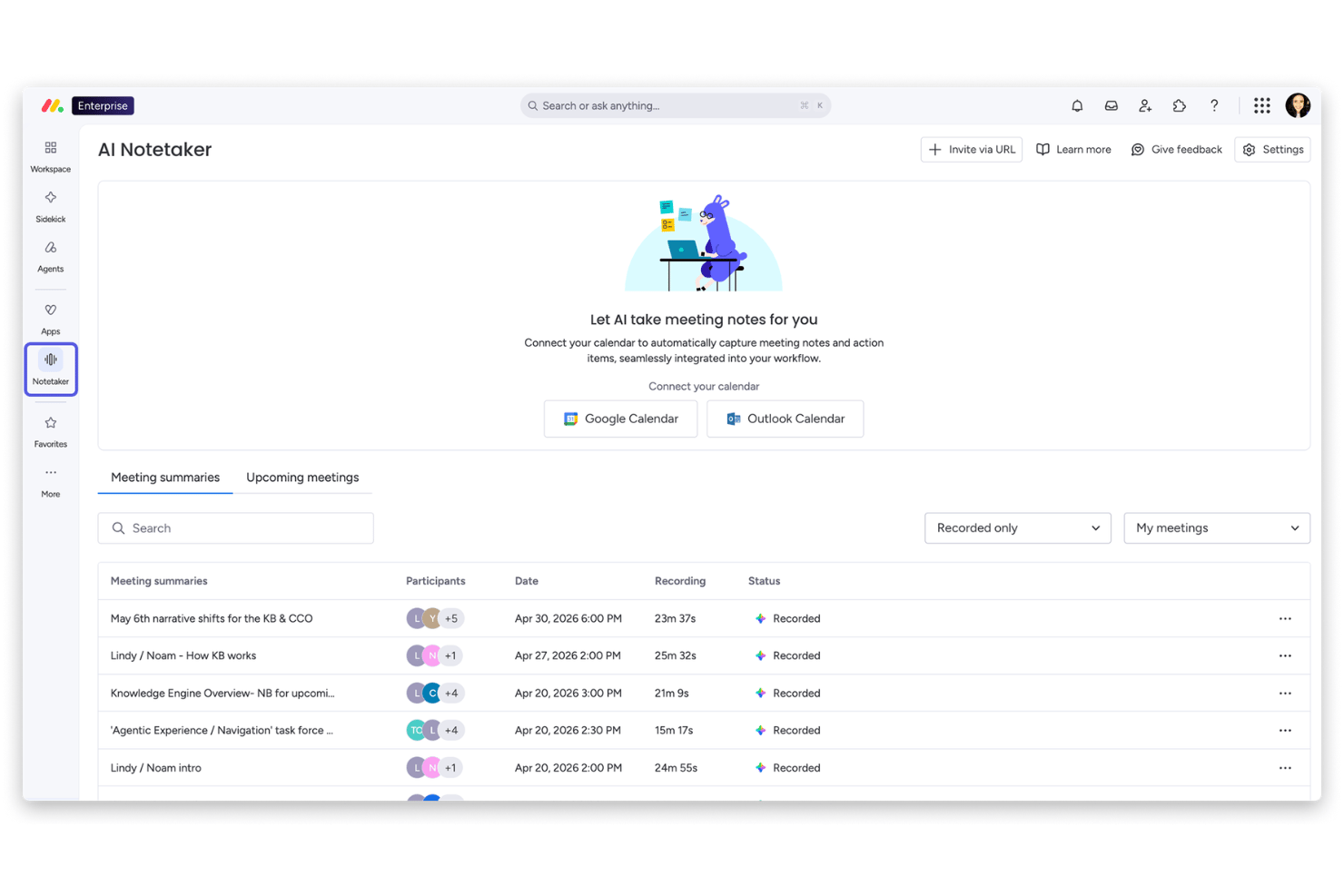
monday AI Workspace is an AI-powered work management platform that combines Gantt chart views, timeline planning, dependency tracking, and AI-driven workflow tools including an AI Sidekick, AI Columns, and an AI workflow builder.
Who Is monday AI Workspace Best For?
It's a strong fit for cross-functional teams in mid-market companies who need a project tracking tool that non-technical users can pick up quickly.
Why I Picked monday AI Workspace
I picked monday AI Workspace as one of the best because its AI Workflow Builder lets teams generate a structured project board from a prompt, which means you can move from a blank canvas to a working Gantt view in minutes. I also like that the Gantt syncs in real time with Kanban, Workload, and Timeline views, so different stakeholders stay oriented without rebuilding anything. The AI Sidekick adds another layer by surfacing risks and summarizing progress directly inside the timeline.
monday AI Workspace Key Features
- AI Columns: Automatically extract, summarize, and structure information from unstructured data within your project boards.
- Workload view: Visualize team capacity and assigned tasks to easily manage resource distribution across projects.
- Document ingestion: Convert meeting notes, emails, or spreadsheets into actionable tasks that feed directly into project timelines.
- Real-time comments and mentions: Collaborate on projects interactively with threaded discussions and user tagging on Gantt charts.
monday AI Workspace Integrations
monday AI Workspace offers native integrations with Slack, Salesforce, HubSpot, Google Workspace, Microsoft Teams, Outlook, Jira, GitHub, Dropbox, and Zoom. It also supports Zapier and provides an API for custom integrations.
Pros and Cons
Pros:
- Risk insights and summaries inside the timeline
- Gantt charts sync with other views instantly
- AI builds project boards from plain text
Cons:
- Baselines and critical path are enterprise only
- Dependencies require manual configuration each time
New Product Updates from monday AI Workspace
monday AI Workspace Adds Human Approval Routing
monday AI Workspace adds a human-in-the-loop approval block to AI Workflows, sending approval requests and routing workflow paths based on responses. For more information, visit monday AI Workspace's official site.

GanttPRO
Best with drag-and-drop timeline editing
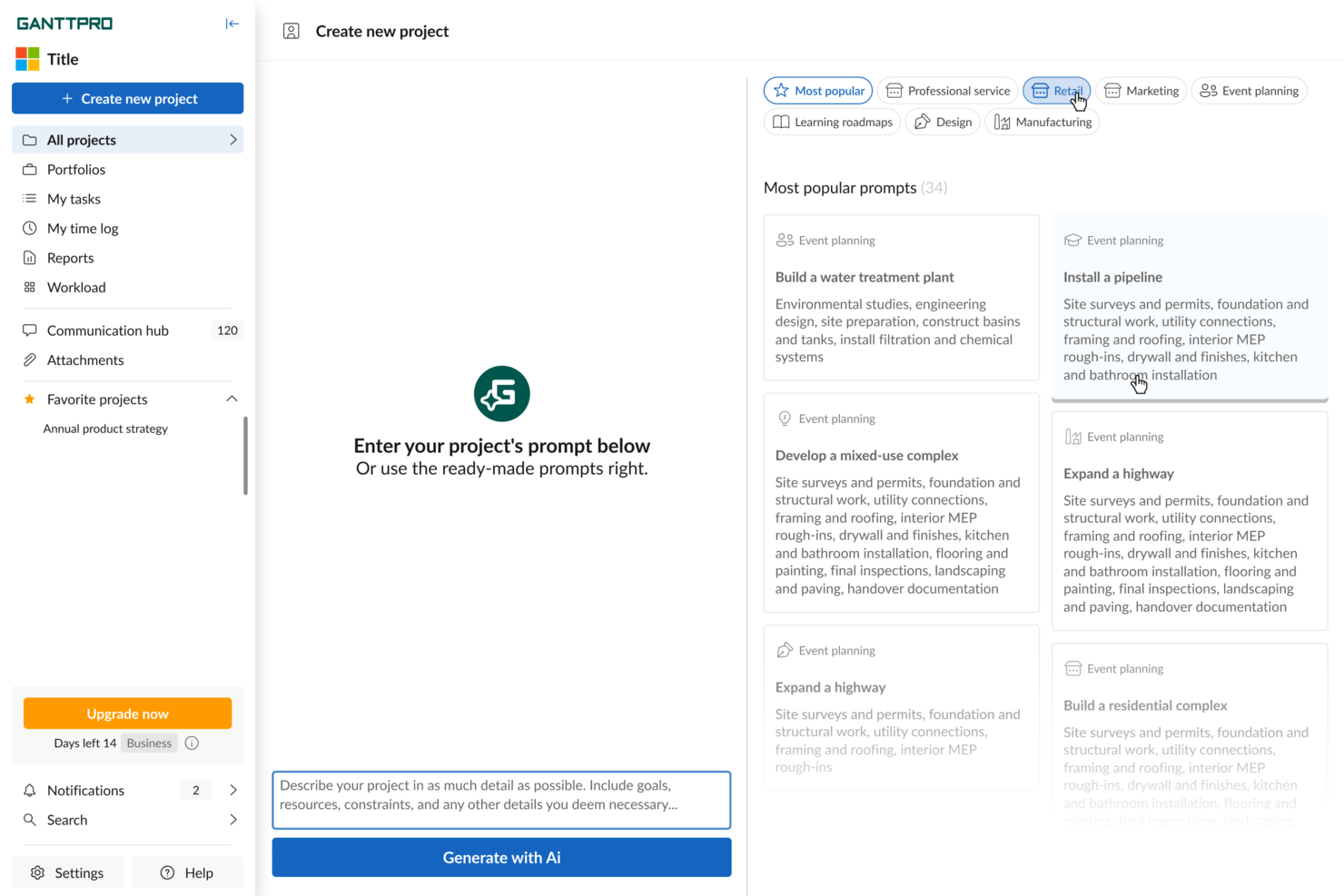
GanttPRO earns a spot for its reliable drag-and-drop timeline editing, which is where I’ve seen most Gantt tools fall short. When I’m mapping project dependencies or shifting large schedules mid-sprint, moving bars and milestones feels natural and responsive.
What I like most is how it lets you adjust entire phases without fuss, so you can handle delays and rescheduling painlessly. For projects with lots of moving parts, this is usually where teams get stuck, but GanttPRO just lets you drag, drop, and keep moving.
GanttPRO’s Best For
- Project managers who need fast timeline changes
- Teams handling resource planning and dependency mapping
GanttPRO’s Not Great For
- Organizations needing deep AI task recommendations
- Users focused on task-level automation or recurring tasks
What sets GanttPRO apart
GanttPRO is built around a visual-first planning style. Unlike Jira, which leans into ticket and backlog management, GanttPRO focuses you on intuitive timeline editing. You adjust dates, dependencies, and phases directly on the chart itself. I find this matches teams that want to plan visually and see project flow at a glance, without lots of buried configuration or menus.
Tradeoffs with GanttPRO
GanttPRO optimizes for fast, visual planning, but you lose some automation and depth you get from tools that focus more on task-level AI and rules. If you need recurring task logic or advanced AI-driven scheduling, you’ll find yourself limited.
Pros and Cons
Pros:
- Baseline tracking shows plan vs. actual
- Supports task dependencies with drag-and-drop editing
- AI generates full project timelines automatically
Cons:
- Collaboration features are behind paywall tiers
- Limited customization of Gantt chart color themes

Best for customizable project workflows

Zoho Projects is on my list because its Gantt chart features are deeply customizable and let teams tailor workflows to complex needs. When I test AI-driven task automation here, I see teams use blueprint workflows to adapt project stages and approvals right in the Gantt view.
What stands out for me is how you can trigger dependencies and status updates automatically, which helps on projects where change requests and client reviews keep shifting timelines.
Zoho Projects’ Best For
- Teams that need customizable Gantt workflows
- Organizations managing projects with frequent approval cycles
Zoho Projects’ Not Great For
- Teams wanting a simple, out-of-the-box Gantt tool
- Users needing advanced resource management or portfolio tracking
What sets Zoho Projects apart
Zoho Projects is built around flexible workflow automation and customizable Gantt charts. Unlike more rigid tools like Microsoft Project, Zoho expects you to design your own project stages, blueprint flows, and custom fields as your process evolves. In practice, this fits when you want the Gantt chart to drive your process and adapt as requirements shift mid-project.
Tradeoffs with Zoho Projects
Zoho optimizes for customization and workflow flexibility, but that also means you spend more time up front configuring, which can slow new teams or those who want fast adoption.
Pros and Cons
Pros:
- Integrates seamlessly with Zoho and external applications
- Offers detailed reporting and analytics for project insights
- Provides robust time tracking and billing functionalities
Cons:
- Performance slowdowns when handling large or complex projects
- Some useful features locked behind higher pricing tiers
New Product Updates from Zoho Projects

Zoho Projects Adds Time Log Grid View for Faster Tracking
Zoho Projects adds Time Log Grid View, a unified interactive grid for logging and reviewing hours across tasks and issues, helping teams enter time faster and identify work patterns more easily. For more information, visit Zoho Projects’ official site.
 .
.
Motion
Best for automated scheduling

Motion earns its spot on my shortlist for its AI-driven scheduling built into Gantt-style planning. I see this working best when teams want their tasks, meetings, and project dependencies automatically scheduled without constant manual tweaking.
What I like is how Motion shifts schedules in real time as plans change, so your Gantt chart is always current even if priorities move around.
Motion’s Best For
- Teams needing automatic task and meeting scheduling
- Project managers who want AI-powered Gantt chart updates
Motion’s Not Great For
- Organizations with rigid, fixed project timelines
- Teams that want advanced custom Gantt chart styling
What sets Motion apart
Motion is built around the idea that schedules should be dynamic, not fixed. Instead of requiring you to constantly move tasks around on a Gantt chart like you would in ClickUp or Smartsheet, Motion uses automation to update project timelines as meetings and priorities shift. In practice, I’ve found this especially helpful when teams want their calendar, tasks, and project chart to stay in sync automatically.
Tradeoffs with Motion
Motion optimizes for automation and schedule flexibility, but that means you lose granular control over Gantt chart layouts and custom dependencies. This can frustrate teams that need highly detailed project visuals or strict task sequencing.
Pros and Cons
Pros:
- Shared calendar integration
- AI assistants for task optimization
- Automated task scheduling
Cons:
- Not ideal for complex projects
- Basic design aesthetics

Best for open-source projects

ProjectLibre earns its spot for being a truly open-source choice if you want direct control over your project data while building Gantt charts. I find this tool fits best when teams want a no-frills, locally hosted alternative to cloud-first platforms. ProjectLibre’s critical path visualization and baseline comparison help you keep a tight handle on shifting deadlines, especially when open access and transparency matter most. I appreciate how it lets you customize workflows for unusual or nonstandard project needs.
ProjectLibre’s Best For
- Open-source teams managing projects on-premises
- Organizations that need customizable Gantt chart workflows
ProjectLibre’s Not Great For
- Teams needing built-in AI-powered planning tools
- Users who prefer modern, cloud-based collaboration
What sets ProjectLibre apart
ProjectLibre is structured for teams that want full control of project plans on their own infrastructure instead of relying on commercial solutions like Microsoft Project or cloud-based tools such as Smartsheet. The workflow feels familiar if you’ve used legacy desktop Gantt tools, and the open-source approach means you can adapt the software to unique needs or integrate with custom scripts. In practice, teams invested in maintaining local data or working behind strict firewalls find it much easier to adopt than web-first apps.
Tradeoffs with ProjectLibre
ProjectLibre optimizes for autonomy and customizability, which means you lose out on built-in real-time collaboration and the AI-powered planning tools now common in modern cloud platforms.
Pros and Cons
Pros:
- Suitable for educational use
- Detailed cost tracking
- Supports task dependencies
Cons:
- Limited customer support
- Outdated user interface


Tom’s Planner makes my shortlist for how it strips back Gantt chart building to the core mechanics. When I need to create and visualize timelines quickly without managing extra complexity, this is where I land. I like that you can add, move, and modify tasks on a single page—no nested menus or layers to dig through. It’s especially good for teams who want to focus on their plan, not on learning a new tool.
Tom’s Planner’s Best For
- Small teams who want visual project planning
- Project managers needing fast, no-frills Gantt charts
Tom’s Planner’s Not Great For
- Teams needing custom automation or advanced AI features
- Organizations managing complex, multi-layered projects
What sets Tom’s Planner apart
Tom’s Planner is built for people who want to sketch out timelines and dependencies without spending time configuring templates or complex boards. Instead of the multi-layered approach you see in Jira or even Smartsheet, this tool focuses on letting you build a Gantt chart quickly and adjust it in real time. In practice, I see teams using it when they just want to map out a project plan fast without fielding a learning curve.
Tradeoffs with Tom’s Planner
Tom’s Planner optimizes for speed and simplicity, but you lose out on custom automations and advanced scheduling. This can limit what you can coordinate once projects become large or require rigid workflows.
Pros and Cons
Pros:
- Color-coding for tasks
- Quick setup process
- Easy drag-and-drop interface
Cons:
- Not suitable for large teams
- Limited advanced features


Edraw.AI stands out for me because of its unique AI-driven chart generation and analysis. When I tested its visual AI insights, I found that turning raw project data into Gantt charts feels immediate and clear, especially when handling large or changing datasets.
What I appreciate is how it automatically highlights trends or bottlenecks in visual form, making it a solid fit for teams who rely on seeing smart data-driven insights at a glance.
Edraw.AI’s Best For
- Teams needing AI-generated visual Gantt insights
- Users who want instant visual analysis from data
Edraw.AI’s Not Great For
- Projects requiring custom task automation
- Teams needing deep workflow process control
What sets Edraw.AI apart
Edraw.AI is focused on turning project data into visual timelines using AI, letting you instantly see and adjust project plans. Unlike Gantt chart tools like Smartsheet, it expects you to start with data imports or text inputs rather than building everything task by task. This works well when you want the insights and visualizations driven by your own project data, quickly surfaced in chart form.
Tradeoffs with Edraw.AI
Edraw.AI optimizes for automatic visualization, but you lose out on hands-on control over workflow automation and detailed task customizations. If you want step-by-step process refinement or integrated task dependencies, you’ll run into limits.
Pros and Cons
Pros:
- AI-driven formatting suggestions
- Intuitive interface for quick learning
- Wide range of templates available
Cons:
- Advanced features may need a learning curve
- Limited mobile optimization


TeamGantt is on my list because it turns the classic Gantt chart into something you can actually collaborate in, not just look at. When I'm working with teams who need to coordinate handoffs, update deadlines live, and manage priorities together, this is the first place I check.
I’ve found the drag-and-drop scheduling, team-based assignments, and discussion threads right on tasks make true project collaboration way less chaotic. What I like best is how everyone can stay updated in context, not chasing down separate chats or email chains.
TeamGantt’s Best For
- Teams that need to coordinate work directly on a shared Gantt chart
- Project leads managing schedules and dependencies with live team input
TeamGantt’s Not Great For
- Teams that need advanced resource forecasting or workload balancing
- Organizations looking for heavy automation or AI-driven suggestions
What sets TeamGantt apart
TeamGantt puts real-time project collaboration at the center, letting multiple people update timelines, assign tasks, and keep conversations all in one place. While tools like Asana or Trello focus more on tasks or boards, TeamGantt expects you to plan visually first and make decisions directly on the chart together. This works well for groups that want face-to-face-level coordination without endless status meetings.
Tradeoffs with TeamGantt
TeamGantt optimizes for shared planning and live coordination, but you lose out on deeper automation and workload forecasting. For teams needing predictive scheduling or sophisticated resource management, that's a real limitation.
Pros and Cons
Pros:
- Customizable project templates
- Real-time updates for team collaboration
- Easy drag-and-drop scheduling
Cons:
- Can be slow with large projects
- Limited advanced reporting features


GanttChart.ai stands out to me for its ability to predict project task durations and dependencies using AI, which you don’t see in most traditional Gantt makers. I think the auto-adjustment of timelines as tasks change is where this tool really shines, especially when your requirements shift or new blockers emerge.
What I like most is how the AI uses existing project data to suggest more realistic timelines, saving my teams from endless rescheduling. When you need forecasts that adapt as your projects evolve, this tool’s automated adjustments are tough to beat.
GanttChart.ai’s Best For
- Project teams needing dynamic, AI-driven timeline adjustments
- Managers who want predictive scheduling based on real data
GanttChart.ai’s Not Great For
- Teams wanting classic, manual-only Gantt charts
- Projects needing deep integrations with engineering tools
What sets GanttChart.ai apart
GanttChart.ai expects you to approach project planning as a living process, not just a static chart. It pulls past project data and current changes into its scheduling logic, making adjustments and predictions on the fly. Unlike classic tools like Microsoft Project that require every adjustment to be manual, this tool does much of the heavy lifting for you.
In practice, this is good for environments where task durations or dependencies change often and you want less timeline babysitting.
Tradeoffs with GanttChart.ai
GanttChart.ai optimizes for automation and rapid adjustments, but you lose hands-on control over every timeline detail, which can frustrate teams that need highly custom Gantt structures.
Pros and Cons
Pros:
- Clear workload management
- Great for team collaboration
- Simple timeline visualization
Cons:
- Slight learning curve
- Limited reporting options


Ingantt makes my shortlist because its approach to resource management is more detailed and actionable than most AI-driven Gantt tools. I like how you can instantly see resource assignments, track workload, and rebalance staff directly from the Gantt view, which keeps task timelines connected to actual capacity. You’ll get scheduling insights that help spot bottlenecks early and adjust without hunting through scattered reports. This comes in handy when teams work across multiple projects and need to avoid overloading key people.
Ingantt’s Best For
- Project managers who need live resource allocation
- Teams juggling multiple projects and dependencies
Ingantt’s Not Great For
- Teams only needing basic Gantt chart features
- Organizations seeking extensive integrations or automation
What sets Ingantt apart
Ingantt is structured for hands-on resource management right inside your Gantt chart. Unlike simple timeline tools like ClickUp or Trello, it expects you to actively assign and rebalance work as you plan. I find this approach works well when you need to see exactly who is overloaded and make immediate staffing changes from the project view.
This type of workflow lets you connect scheduling with actual team capacity, not just task deadlines.
Tradeoffs with Ingantt
Ingantt optimizes for precise resource matching, but that focus means you give up broader automation and fewer integration options. If you rely on syncing project data with lots of SaaS tools, expect more manual work.
Pros and Cons
Pros:
- Edits update across charts instantly
- Auto-levels team workloads easily
- Detects resource overloads early
Cons:
- Mobile plan priced differently
- Enterprise quote required for upgrade
Other AI Gantt Chart Maker
Here are some additional AI Gantt chart maker options that didn’t make it onto my shortlist, but are still worth checking out:
- ONES.com
For enterprise solutions
- Miro
For whiteboard-style collaboration and visual brainstorming
- Instagantt
For Trello integration
- Wrike
For cross-team collaboration
- Zenhub
For GitHub integration


How I Evaluate AI Gantt Chart Makers
I look for tools where AI saves real planning hours—say, building a full schedule from a project brief or resequencing tasks when a deadline shifts. I split my evaluation into core functionality every tool needs to qualify and differentiating factors that set one vendor apart.
Core Functionality (Table Stakes For This List)
When I'm selecting tools for my list, I rank each one on a scale from 0 (does not offer the functionality) to 5 (excels in this area) for each core functionality listed below. Then, I calculate the tool's total score into a percentage. Each tool needs to achieve a minimum total score of 65% to be considered for inclusion.
- AI-Powered Chart Generation: I check whether a tool can turn a plain-text project brief or a pasted task list into a structured Gantt chart without manual setup.
- Automated Task Scheduling: Each tool should assign dates and sequence tasks using AI, like auto-building a sprint plan when you drop in a backlog.
- Dependency & Timeline Management: I look for standard Gantt features like drag-and-drop editing, milestones, critical path views, and multiple dependency types.
- Predictive Risk & Delay Insights: The tool's AI should flag risks before they hit—for example, warning that a delayed design review will push a launch date.
- Smart Resource Allocation: I evaluate whether AI can suggest task reassignments based on team capacity, not just show who's overloaded after the fact.
- Collaborative Project Workspace: Teams need real-time co-editing, comment threads on tasks, and sharing controls so stakeholders can view timelines without full access.
Once I have a list of tools that meet this criteria, I consider what sets each platform apart.
Differentiating Factors (What Sets Vendors Apart)
Here's how I compare and contrast different vendors:
Standout Features
Scenario simulation is a big differentiator for me. I want to see if a tool lets you model alternate timelines—like what happens to your launch date if engineering loses a sprint—and compare AI-projected outcomes side by side. Auto-generated status reports also save real hours; the best tools pull live Gantt data and draft stakeholder updates you can send with minimal editing. For PMO leads running multiple workstreams, I look for a portfolio view that tracks cross-project dependencies with AI.
Beyond Features
Integration depth matters a lot here. A Gantt tool that doesn't sync with your existing stack—Jira, Asana, Slack, or whatever your team runs on—creates more manual work than it eliminates. I also evaluate how each vendor handles AI data privacy, especially whether project data fed into prompts is used for model training. For enterprise buyers, I check for SSO, audit logs, and role-based permissions. Finally, onboarding support makes a real difference when teams are adopting AI-driven planning for the first time.
How to Choose an AI Gantt Chart Maker
It’s easy to get bogged down in long feature lists and complex pricing structures. To help you stay focused as you work through your unique software selection process, here’s a checklist of factors to keep in mind:
| Factor | What to Consider |
| Scalability | Will the tool grow with your team? Consider if it can handle more users or projects as your team expands without significant cost increases. |
| Integrations | Does it connect with your existing tools? Ensure it integrates with platforms like Slack, Trello, or Jira to enhance workflows. |
| Customizability | Can you tailor the tool to fit your needs? Look for options to modify views, fields, and reports to match your team's workflow. |
| Ease of use | Is the tool intuitive? A user-friendly interface reduces training time and helps your team adopt the software quickly. |
| Implementation and onboarding | How quickly can you get started? Evaluate the availability of tutorials, customer support, and set up resources to ease the transition. |
| Cost | Does the pricing fit your budget? Compare the cost against features offered and check for hidden fees or required upgrades. |
| Security safeguards | How secure is your data? Ensure the tool offers encryption, regular backups, and complies with industry standards. |
| Support availability | What support is available? Consider the response times, availability of live chat, and whether technical support is included in your plan. |
What Is an AI Gantt Chart Maker?
An AI Gantt chart maker is a tool that helps project managers create and manage project timelines using artificial intelligence. These tools are commonly used by project managers, team leads, and planners to enhance organization and efficiency. Automated scheduling, task dependencies, and real-time collaboration features support efficient project management and team coordination. Overall, these tools simplify complex project planning and execution, saving time and reducing errors.
Features of AI Gantt Chart Makers
When selecting an AI Gantt chart maker, keep an eye out for the following key features:
- Automated scheduling: Automatically adjust project timelines based on task dependencies and team availability, saving time and reducing manual errors.
- Task dependencies: Link tasks together so that changes in one task automatically update related tasks, ensuring accurate project timelines.
- Real-time collaboration: Allow multiple team members to work on the same project simultaneously, improving communication and coordination.
- Customizable templates: Use pre-designed templates to quickly set up new projects, tailoring them to fit specific industry or team needs.
- Drag-and-drop interface: Easily move tasks around on the timeline to adjust schedules, providing flexibility in project planning.
- Resource allocation: Assign team members to tasks and monitor their workloads, helping to balance responsibilities and prevent burnout.
- Progress tracking: Monitor task completion and project milestones to keep the team informed and on schedule.
- Integration capabilities: Connect with other tools like Slack, Trello, or Jira to centralize project management and support workflows.
- Data security: Ensure project data is protected with encryption and regular backups, maintaining confidentiality and compliance.
- Visual timeline: Use a clear, visual representation of project tasks and timelines to make complex projects easier to understand and manage.
Benefits of an AI Gantt Chart Maker
Implementing an AI Gantt chart maker provides several benefits for your team and your business. Here are a few you can look forward to:
- Improved efficiency: Automated scheduling and task dependencies reduce manual adjustments, saving time and minimizing errors.
- Enhanced collaboration: Real-time collaboration features keep your team connected and informed, improving communication and coordination.
- Better resource management: Resource allocation tools help you balance workloads and prevent burnout, ensuring your team stays productive.
- Clear project visibility: Visual timelines provide a straightforward view of project progress, making it easier to manage and understand complex tasks.
- Increased flexibility: Drag-and-drop interfaces allow you to quickly adjust schedules, providing adaptability in project planning.
- Simplified project setup: Customizable templates let you start projects faster, tailoring them to your specific industry or team needs.
- Secure data handling: Data security measures protect your project information, ensuring confidentiality and compliance with industry standards.
Costs and Pricing of AI Gantt Chart Maker Tools
Selecting an AI Gantt chart maker requires an understanding of the various pricing models and plans available. Costs vary based on features, team size, customer onboarding, add-ons, and more. The table below summarizes common plans, their average prices, and typical features included in AI Gantt chart maker solutions:
Plan Comparison Table for AI Gantt Chart Makers
| Plan Type | Average Price | Common Features |
| Free Plan | $0 | Basic Gantt chart creation, limited tasks, and minimal storage. |
| Personal Plan | $5-$15/user/month | Task dependencies, basic reporting, and limited integrations. |
| Business Plan | $15-$40/user/month | Real-time collaboration, advanced reporting, and resource management. |
| Enterprise Plan | $40-$100/user/month | Customizable templates, dedicated support, and enhanced security features. |
AI Gantt Chart Maker FAQs
Here are some answers to common questions about AI Gantt chart tools:
How does AI improve Gantt chart creation?
AI enhances Gantt chart creation by automating the scheduling process. It uses algorithms to analyze tasks and dependencies, reducing manual input. This means you can save time and minimize errors. AI can also adjust timelines automatically as project details change.
Can I integrate Gantt charts with other tools?
Yes, many AI Gantt chart makers offer integrations with popular tools like Slack, Trello, and Jira. This helps you centralize project data and improve workflow efficiency. Before choosing a tool, check its in-app integration options to ensure it fits your existing tech stack.
What should I consider when choosing a Gantt chart maker?
When selecting a Gantt chart maker, consider factors like scalability, ease of use, and integration capabilities to increase retention. Think about your project complexity and what repetitive tasks could be automated to save time. Ensure the tool offers features that match your workflow and can grow with your needs. Additionally, research and discuss the customer onboarding process to ensure a productive software integration. These considerations will improve the chances of a successful onboarding process, lower churn, and improve customer experience.
How do AI Gantt charts handle task dependencies?
AI Gantt charts manage task dependencies by automatically updating related tasks when changes occur. This ensures your project timeline stays accurate. You can link tasks to reflect real-world dependencies, helping you visualize the project flow and avoid bottlenecks.
Are there security concerns with AI Gantt chart tools?
Security is important when using AI Gantt chart tools. Look for features like data encryption and regular backups to build your trust in a platform. Ensure the tool complies with industry standards to protect your project information. Always review the security measures a provider offers.
Do AI Gantt chart makers offer mobile access?
Many AI Gantt chart makers provide mobile access, allowing you to manage projects on the go. Check if the tool offers a mobile app or a responsive web version. This flexibility can be useful for teams needing access to project data anytime, anywhere.
What’s Next:
If you're in the process of researching an AI Gantt chart maker, connect with a SoftwareSelect advisor for free recommendations.
You fill out a form and have a quick chat where they get into the specifics of your needs. Then you'll get a shortlist of software to review. They'll even support you through the entire buying process, including price negotiations.