

ProjectLibre Review: Pros, Cons, Features, and Pricing



ProjectLibre is an open-source project planning software built around Gantt charts, resource management, and work breakdown structures. It's worth looking into it if your team needs desktop-based project scheduling and you don't want to pay for a Microsoft Project license. I'd especially recommend it if Microsoft Project's feature depth is more than you need and its cost is hard to justify—ProjectLibre covers the core scheduling and resource tracking workflows without the overhead.
ProjectLibre Evaluation Summary
- From $9.99/user/month (billed annually)
- Free plan available
Why Trust Our Software Recommendations
Our team has been testing and reviewing software since 2012. As project managers ourselves, we know how difficult—and important—it is to choose the right software.
For this guide, we evaluated tools using hands-on testing and independent research, scoring tools using our selection criteria. We also draw on insights from industry thought leaders and practicing project management experts.
Our reviews reflect our human editorial judgment, not a sales pitch.
Expert reviewers:
ProjectLibre Overview
In my opinion, ProjectLibre is a solid choice for teams wanting a cost-effective project planning tool. It's especially helpful for small businesses and educational institutions that need basic project management without spending a lot. While its features are basic compared to other tools such as Smartsheet, it offers good value for money. However, onboarding can be challenging due to limited documentation, and customer support might not be as responsive as you would hope. For teams that can handle a steeper learning curve, ProjectLibre is a viable option for information technology teams looking for budget-conscious project management.
pros
-
It offers a user-friendly interface similar to Microsoft Project.
-
It supports Gantt charts to help you visualize and manage project timelines.
-
You can handle multiple projects simultaneously on Windows, Linux, or macOS.
cons
-
Limited documentation can make it hard for your team to troubleshoot issues.
-
Customer support response times may be slower than ideal.
-
Its automation and time tracking features may be limited compared to competitors.
-

Celoxis
Visit WebsiteThis rating combines scores from multiple user review sites to reflect overall customer sentiment about the product.4.5 -
Smartsheet
Visit WebsiteThis rating combines scores from multiple user review sites to reflect overall customer sentiment about the product.4.5 -
Accelo
Visit WebsiteThis rating combines scores from multiple user review sites to reflect overall customer sentiment about the product.4.4





Our Review Methodology
How We Test & Score Tools
We’ve spent years building, refining, and improving our software testing and scoring system. The rubric is designed to capture the nuances of software selection and what makes a tool effective, focusing on critical aspects of the decision-making process.
Below, you can see exactly how our testing and scoring works across seven criteria. It allows us to provide an unbiased evaluation of the software based on core functionality, standout features, ease of use, onboarding, customer support, integrations, customer reviews, and value for money.
Core Functionality (25% of final scoring)
The starting point of our evaluation is always the core functionality of the tool. Does it have the basic features and functions that a user would expect to see? Are any of those core features locked to higher-tiered pricing plans? At its core, we expect a tool to stand up against the baseline capabilities of its competitors.
Standout Features (25% of final scoring)
Next, we evaluate uncommon standout features that go above and beyond the core functionality typically found in tools of its kind. A high score reflects specialized or unique features that make the product faster, more efficient, or offer additional value to the user.
We also evaluate how easy it is to integrate with other tools typically found in the tech stack to expand the functionality and utility of the software. Tools offering plentiful native integrations, 3rd party connections, and API access to build custom integrations score best.
Ease of Use (10% of final scoring)
We consider how quick and easy it is to execute the tasks defined in the core functionality using the tool. High scoring software is well designed, intuitive to use, offers mobile apps, provides templates, and makes relatively complex tasks seem simple.
Onboarding (10% of final scoring)
We know how important rapid team adoption is for a new platform, so we evaluate how easy it is to learn and use a tool with minimal training. We evaluate how quickly a team member can get set up and start using the tool with no experience. High scoring solutions indicate little or no support is required.
Customer Support (10% of final scoring)
We review how quick and easy it is to get unstuck and find help by phone, live chat, or knowledge base. Tools and companies that provide real-time support score best, while chatbots score worst.
Customer Reviews (10% of final scoring)
Beyond our own testing and evaluation, we consider the net promoter score from current and past customers. We review their likelihood, given the option, to choose the tool again for the core functionality. A high scoring software reflects a high net promoter score from current or past customers.
Value for Money (10% of final scoring)
Lastly, in consideration of all the other criteria, we review the average price of entry level plans against the core features and consider the value of the other evaluation criteria. Software that delivers more, for less, will score higher.
Core Features
Gantt Charts: ProjectLibre lets you use Gantt charts to visualize your project's timeline and track progress. This helps your team see task dependencies clearly.
Task Management: You can assign and manage tasks efficiently, ensuring everyone knows their responsibilities. This keeps your projects organized and on schedule.
Resource Allocation: Allocate resources effectively with ProjectLibre to prevent overallocation. This feature helps you manage workloads effectively.
Milestone Tracking: Set and track milestones to ensure your project stays on track. This allows you to measure progress and meet important deadlines.
Project Templates: Use pre-built templates to start projects quickly rather than building them from scratch. This saves your team time and effort.
Baseline Management: Create baselines to compare planned versus actual project performance. This helps your team stay aligned with project goals.
Ease of Use
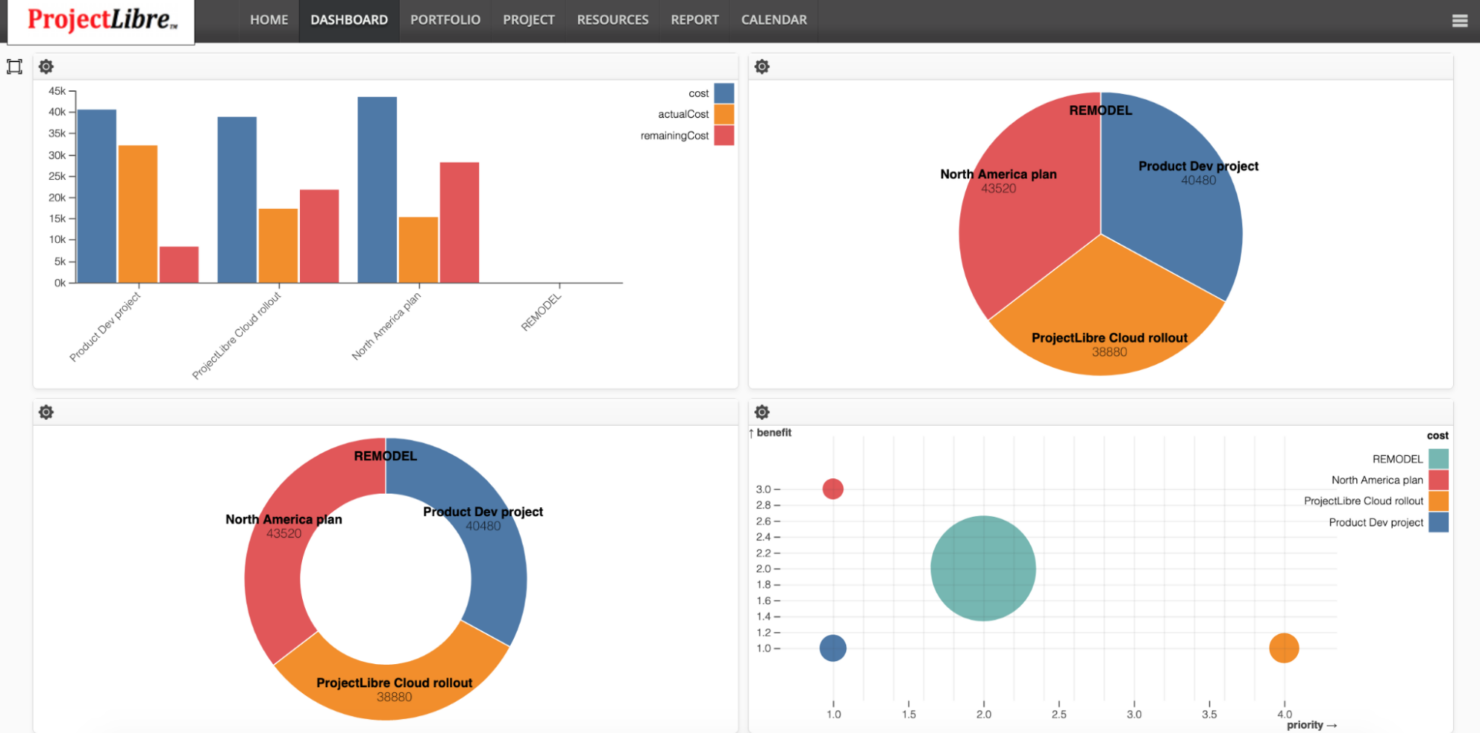
ProjectLibre's interface is considered user-friendly, making it easy to get used to. While it offers essential features such as Gantt charts and task management, the learning curve might slow down your team initially. The software's design isn't as intuitive as others, which can make onboarding a challenge. However, once you get familiar with it, ProjectLibre provides the core functionalities needed to manage projects effectively, especially for teams comfortable with spreadsheet-style layouts.
Integrations
ProjectLibre integrates with Microsoft Project. It does not offer an API or connect with third-party integration tools.
ProjectLibre Specs
- A/B Testing
- API
- Automated Testing
- Browser Compatibility Testing
- Bug Tracking
- Calendar Management
- CI/CD Integration
- Dashboard
- Data Export
- Data Import
- Data Visualization
- Developer Tools
- External Integrations
- History/Version Control
- Manual Testing
- Multi-User
- Notifications
- Performance Testing
- Regression Testing
- Scheduling
- Status Notifications
- Third-Party Plugins/Add-Ons


