

De 10 beste systemverktøyene for byråadministrasjon vurdert for 2026

10 Liste over de beste systemene for byråstyring


De beste systemene for byråstyring samler prosjekt-, ressurs- og økonomistyring på ett sted for å forbedre teamets effektivitet og sikre resultater til rett tid. Bruk av flere verktøy til disse funksjonene kan gjøre håndteringen av kundeprosjekter, ressurser og budsjetter fragmentert, noe som kan føre til oversittede frister, ukontrollert utvidelse av prosjektomfanget og økonomiske avvik.
Med 20 års erfaring fra byrådrift og over et tiår som programvareanmelder har jeg vurdert og tatt i bruk en rekke systemer for byråstyring. Dette har vist meg hvordan riktig programvare kan øke effektiviteten, redusere feil og forbedre kunderelasjonene.
Etter å ha testet over 20 ulike verktøy har jeg satt sammen en liste over de mest pålitelige alternativene som er tilgjengelige, med vekt på viktige funksjoner, priser og mer, slik at du kan velge det som passer best for teamet ditt.
Why Trust Our Software Recommendations
Our team has been testing and reviewing software since 2012. As project managers ourselves, we know how difficult—and important—it is to choose the right software.
For this guide, we evaluated tools using hands-on testing and independent research, scoring tools using our selection criteria. We also draw on insights from industry thought leaders and practicing project management experts.
Our reviews reflect our human editorial judgment, not a sales pitch.
Expert reviewers:
Sammenligningstabell for verktøy for byråstyring
Denne sammenligningstabellen oppsummerer prisdetaljene for mine beste utvalgte verktøy for byråstyring:
| Tool | Best For | Trial Info | Price | ||
|---|---|---|---|---|---|
| 1 | Best all-in-one agency management system with sales and invoicing tools | 14-day free trial | From $10/user/month (billed annually) | Website | |
| 2 | Best depth of functionality and reporting | Free bespoke demo | From $17/month | Website | |
| 3 | Best for end-to-end work management | 14-day free trial | From $17/user/month | Website | |
| 4 | Best for AI-powered workflows and resourcing | Free demo available | Pricing upon request | Website | |
| 5 | Best agency management software for customizable views | 14-day free trial | Pricing upon request | Website | |
| 6 | Best customizable advertising agency software | Free plan available | From $9/user/month (billed annually) | Website | |
| 7 | Best for full lifecycle service delivery | Free demo available | Pricing upon request | Website | |
| 8 | Best agency management system for multiple project views | Free plan + 14-day free trial + free demo available | From $5/user/month (billed annually) | Website | |
| 9 | Best free plan with unlimited tasks and users | Free plan available | From $9/user/month (billed annually) | Website | |
| 10 | best for enabling client collaboration | Free plan + 14-day free trial available | From $9.99/user/month (billed annually) | Website |


Anmeldelser av de beste systemene for byråstyring
Her er en kort beskrivelse av hvert av systemene for byråstyring som er med på denne topp 10-listen.

Best all-in-one agency management system with sales and invoicing tools

Productive is a well-rounded agency management software with a stack of powerful functionality that gives you the tools and data you need to keep an agency running smoothly. The tool was built by a team with a decade of experience in founding, managing, and scaling a software development shop, so it's especially well-suited to digital agencies. Fran Vižintin, Senior Account Executive at Productive, explains why the platform works so well for agencies: “Productive is designed for agencies and supports high-level resource planning. It allows agencies to assign services, billable rates, and track budget within each project phase.”
The tool's features fully satisfy my criteria for agency management tools. You'll find client and prospect management in the Sales Pipeline (manage deal flow, get sales organized). The Resource Planning feature, time tracker, and task collaboration tools fit the criteria for resource and project management that I look for in an agency tool or platform.
Billing and invoicing can also be managed straight from the tool, along with useful reports on profitability and costs to help with finance management. The reporting feature actually goes quite a bit beyond that, with real-time reports on margins, utilization, and a whole lot more—including reports on individual employees' or contractors' history with the company, salary report, etc.
Productive's integrations include Zapier as well as Jira, Open API, QuickBooks Online, Xero, and Exact.
Productive costs $9/user/month (billed annually). They also offer a fully-featured, free 14-day trial.
New Product Updates from Productive
Productive Adds Voice Dictation, Slack Connector, Proposals, and Overtime
Productive adds voice dictation, a Slack Connector, proposal controls, and overtime tracking. These updates support faster AI interactions, client proposals, and time management. For more information, visit Productive’s official site.

Best depth of functionality and reporting

Synergist is a comprehensive agency management software designed to support growing agencies by providing tools for tracking project profitability, managing projects, and overseeing team utilization. For agencies aiming to improve their financial performance, Synergist can be used to monitor profitability metrics and forecast pipelines, profits, and payments.
I specifically picked this software because it offers an all-in-one solution with a depth of functions, such as reporting, a scheduling tool, project-tracking capabilities, and a centralized system for managing client interactions and finances. It also ensures that resources and teams are optimally allocated to enhance efficiency across the board.
Overall, Synergist stands out as an indispensable tool for agencies focused on maximizing profitability due to its access to real-time insights and financial control over projects.
Synergist integrates with various software systems, including Microsoft 365, Google, Xero, Sage, HubSpot, Salesforce CRM, Outlook Calendar, and iCal, alongside file management through Microsoft OneDrive, Google Drive, and Dropbox.

Scoro
Best for end-to-end work management

Scoro is an agency management system designed to help businesses manage operations more effectively. It combines tools for project management, sales and customer relationship management (CRM), quoting, resource planning, time tracking, billing, and reporting, bringing every aspect of agency work into one centralized platform.
The system facilitates end-to-end project management across the entire lifecycle, from initial quotes to final invoicing. Real-time dashboards and detailed reports provide visibility into progress, results, and overall performance, helping teams make informed decisions and minimize miscommunication.
Scoro also includes resource planning capabilities that help allocate workloads efficiently and prevent team burnout. Its retainer management functionality ensures that recurring client work is tracked and delivered consistently across projects.
The platform integrates with Google Calendar, Microsoft Exchange, HubSpot, Jira, Xero, QuickBooks, Sage Intacct, Exact Online, Expensify, Stripe, BambooHR, Slack, Asana, Dropbox, PayPal, and more. You can also connect additional tools through Zapier for extended automation.
Pricing starts from $19.9/user/month, with a free trial available.
New Product Updates from Scoro

Scoro Adds Time Mobile App and ELI Improvements
Scoro adds the Scoro Time mobile app for iOS/Android to track time anywhere and expands ELI with attachments, smarter filtering, and trigger-based actions. For more information, visit Scoro's official site.

Best for AI-powered workflows and resourcing

Screendragon is an agency management software designed to manage projects, people, processes, and profitability in one place. It is easy to use and offers powerful customization. The world’s top agency groups like Omnicom, WPP, and IPG rely on Screendragon to power their agency operations.
Screendragon is seamlessly integrated offering project management, workflow management, resource management, and forecasting, time-tracking, budget management, and asset management. The tool is highly configurable, giving users the ability to customize forms, dashboards, templates, workflow rules, permissions, notifications, reports, and even the terminology used on the platform.
Screendragon’s integrated budget module enables users to build SOW’s and estimates, as well as forecast future revenues and resourcing needs. Reviews and approvals are made simple with features for visual proofing, real-time collaboration, version control, and granular permissions. Screendragon’s advanced automation capabilities facilitate the secure and efficient approval of assets and can adapt easily to support scaling agencies. Intuitive task management allows users to switch between Kanban boards, interactive Gantt charts, and list views.
Screendragon offers native integrations with ERP systems such as SAP and PeopleSoft and can integrate with thousands of apps through Zapier like Slack, Trello, Google Drive, Office 365, and Microsoft Dynamics. It also has an open API, allowing custom integrations with any solution.
Screendragon starts from $20/user/month with a one-off implementation fee, and a free demo is available.
New Product Updates from Screendragon
Screendragon Unveils New AI Hub
Screendragon introduced AI Hub, a new capability that lets teams build and manage AI agents directly within workflows. The update helps marketing teams automate tasks, maintain governance controls, and scale AI-driven operations more efficiently. For more information, visit Screendragon's official site.

Wrike
Best agency management software for customizable views

Wrike is an easy-to-use advertising agency software that is suitable for teams with five or more members. It’s highly configurable, allowing users to customize processes, workflows, dashboards, reports, and request forms to suit their exact needs. It can help you break down costly silos between teams, centralize communication, and automate time-consuming admin tasks. For agencies dealing with complex or high-pressure projects, Wrike can also prove invaluable in times of uncertainty. Danilo Coviello, Founder of Espresso Translations, explained: “The real value of Wrike is seen in crisis management. A client in the fintech sector expressed compliance changes that were required in three countries. The dependency mapping indicated to me exactly what tasks will be hit prior to any damage occurring.”
Wrike enables users to switch between customizable Kanban boards, one-click Gantt charts, and classic workload views, so teams can choose how to visualize their campaign deliverables. Wrike also features task lists, subtasks, shared calendars, custom workflows, file sharing, and real-time collaboration. Users can get advanced performance insights across 50 marketing platforms, assess resource management and allocation, and track time.
Wrike has an easy-to-use, intuitive interface and navigation with distinct spaces, folders, and tasks. Toggle between the home screen and timesheets, dashboards, calendars, reports, and the activity stream. Wrike has a dedicated help center with interactive training, videos, a ‘Getting Started’ guide, and a thriving community. The tool also offers a specific solution for marketing teams, as well as a variety of templates for common organizational processes.
Wrike offers 400+ pre-built native integrations, including integrations with Adobe Creative Cloud; file management software from Microsoft, Google, and Dropbox; and over 50 marketing-specific tools.
New Product Updates from Wrike
Wrike Adds Klaxoon MCP Integration
Wrike’s Klaxoon MCP integration is now generally available, enabling AI agents to navigate between Wrike tasks and attached whiteboards, read task context, and manage whiteboard attachments via API. For more information, visit Wrike's official site.

Best customizable advertising agency software
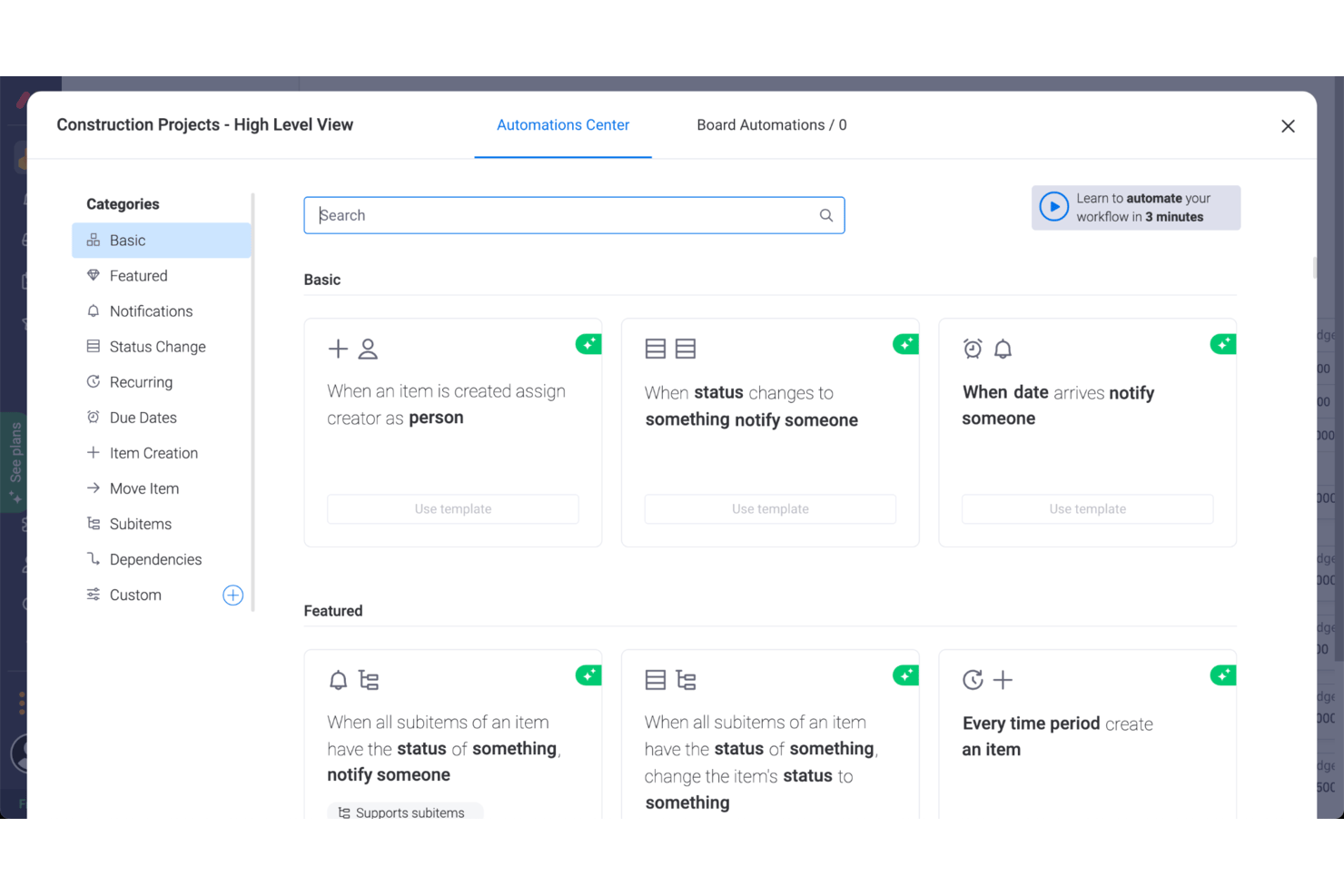
monday AI Workspace is a great advertising agency software because of the way the tool has done away with a lot of the trimmings of typical management tools and focused on simple, visually intuitive layouts that help clarify the sequence of work.
monday AI Workspace features for managing advertising projects include resource and project management modules, as well as some great collaboration tools. For example, users can upload and attach files to cards, make comments, mention teammates, and more. It also offers a great project reporting dashboard that can collect data from multiple boards, allowing better tracking abilities of progress. And while monday AI Workspace doesn't offer a complete set of tools for project accounting and invoicing solutions, you can use monday AI Workspace to track hours, timelines, and invoices. monday AI Workspace also adds AI-powered capabilities that can help agencies automate routine work and move projects forward faster. Teams can use AI to summarize information, generate and refine content, extract insights from work data, and automate parts of their workflows.
Overall, it's a highly customizable tool that lets you work in whatever methodology—kanban or otherwise—that fits your project and team. You'll also find some useful workflow tools for automating parts of your process.
monday AI Workspace's integrations include project management apps like Slack, Google Drive, Gmail, Google Calendar, Jira, GitHub, Trello, Dropbox, Typeform, and many more, accessible via Zapier.
monday AI Workspace costs from $9/user/month and comes with a free 14-day trial. They offer a free plan for up to 2 users.
New Product Updates from monday AI Workspace
monday AI Workspace Adds Human Approval Routing
monday AI Workspace adds a human-in-the-loop approval block to AI Workflows, sending approval requests and routing workflow paths based on responses. For more information, visit monday AI Workspace's official site.

Kantata
Best for full lifecycle service delivery

Kantata is an agency management platform built to unify every stage of the client delivery lifecycle. From project planning and resource scheduling to financial tracking and client reporting, it gives agencies a centralized system to manage operations, improve profitability, and scale efficiently.
The platform includes features designed specifically for agencies, such as client onboarding tools, project planning, time and resource tracking, invoicing, contracts, and collaboration hubs. These capabilities make it easy to track your team’s progress against deadlines and budgets, monitor client satisfaction, and forecast utilization or revenue—all from the same platform. By consolidating workstreams, Kantata eliminates silos and provides a complete view of agency health.
Beyond daily project management, Kantata supports data-driven decision-making across the entire service lifecycle. Dynamic dashboards, business intelligence reporting, and scenario planning let agency leaders identify risks, adjust plans, and demonstrate value to clients. This combination of visibility and flexibility helps agencies deliver on promises while strengthening client trust.
Some other notable features include customizable skills databases for tracking your team’s expertise, scenario-specific reports (like profitability trackers and executive scorecards), Kanban views for agile campaign work, and automated alerts that flag potential timeline or task misalignments.
Kantata integrates with a range of tools, like Salesforce, SAP, Jira, Xero, BambooHR, Slack, Worday, QuickBooks, HubSpot, and NetSuite.
New Product Updates from Kantata

Kantata Adds Access Group Change History
Kantata adds Access Groups History, letting account administrators track changes to group details, membership, and permissions in Recent History. The update also makes these events available through the Subscribed Events API for broader monitoring. For more information, visit Kantata’s official site.
 .
.
Hive
Best agency management system for multiple project views

Hive is a robust tool for agency management, project organization, and flexible task coordination. It lets agencies organize projects in a Gantt chart, Kanban board, table, or calendar, and also easily switch between each layout. Additionally, each user can choose to look at a project through different views, so each member of your team can use the view that works for them. Updates are reflected across all project views so the agency is informed no matter what option they use.
Hive enables users to easily collaborate by sending messages directly to agency individuals or groups. Need to share a document? Upload it directly to a task, project, or message. Hive’s Forms feature eliminates constant emails and collects all necessary information through simple fill-in-the-blanks.
It’s worth noting that if you’re switching to Hive from another tool, you can import tasks from tools including Asana, Trello, Basecamp, Smartsheet, and a few others.
Hive integrates with Google Drive, Salesforce, Jira, Dropbox, Slack, Zoom, One Drive, Box, and more than one thousand other tools through Zapier.
Hive costs from $12/user/month.

ClickUp
Best free plan with unlimited tasks and users

ClickUp is a work management software tool with project management, team collaboration, goal-setting, and document management functionality. Users can plan projects and assign tasks to manage team members' workloads and time. The task management features include subtasks, checklists, prioritization, reminders, and templates. Users can filter and sort tasks and reorder them to meet their preferences.
Gantt charts, Kanban boards, calendars, and timelines are all available for visualizing team workloads. Time tracking can be done directly in the platform or through a third-party integration. Files can be shared through the platform and users can collaborate on work through live chat, whiteboards, comments, and work proofing features. Users can set measurable goals right in the platform and connect them with specific tasks, helping keep team members aligned on shared objectives.
Reporting dashboards are available in the software to monitor team productivity, project progress, KPIS, and other team metrics. This includes goal tracking, workload tracking, milestone tracking, and even automatic pulse checks from the software's machine learning capabilities.
Clickup has native integrations for other SaaS apps like Dropbox, Figma, GitHub, Google Drive, Harvest, HubSpot, Intercom, Loom, Microsoft Teams, OneDrive, Outlook, Slack, Toggl Track, Webhooks, Zoom, and more. Zapier can also unlock additional integrations.
A freemium plan is available with unlimited tasks and users, and paid plans start from $9/user/month.
New Product Updates from ClickUp
ClickUp Adds Meetings Hub, Super Agent Templates, and ZoomInfo Integration
ClickUp adds a searchable Meetings Hub, new ways to clone and template Super Agents, and a ZoomInfo integration through the App Center. These updates improve meeting retrieval, agent reuse, and access to sales intelligence. For more information, visit ClickUp’s official site.

Teamwork.com
best for enabling client collaboration

Teamwork is a flexible agency management system that helps agencies become more productive and profitable. It enables agencies to manage high volumes of client projects from start to finish. Teamwork allows you to build flexible, custom workflows and gives you one central place to visualize your team and client projects.
Teamwork offers a number of tools and features to help agencies manage their work. With the Workload feature, you can get a complete picture of your team’s capacity and manage resources and keep your team on track. Another popular tool is the Gantt view. As Melody MacKeand, project manager and former Principal Consultant at Teamwork, shares: “In Teamwork, the Gantt view is very intuitive; you can move tasks around, and the timeline auto-updates.” There's also built-in time-tracking on Teamwork to log hours spent working on tasks and track billable hours. Profitability reports allow you to track financial performance by project or team member and compare it against the budget for that client.
Something especially useful about this agency software is that you can add clients as collaborators for free so they can communicate with your team, leave comments in context, review assets and get visibility on project progress.
Teamwork integrates easily with other tools including Gmail, Harvest, Hubspot, QuickBooks, Slack, Dropbox and more.
Teamwork costs from $10/user/month. They also offer a 30-day free trial
Andre systemer for byråstyring
Digitale reklamebyråer kan ha problemer med å finne den riktige komplette programvareløsningen, så her er noen flere alternativer som ikke kom med på topplisten. Hvis du trenger flere forslag til nyttige byråsystemer, kan du se nærmere på disse.
- Bonsai Agency Software
For managing the entire agency process
- Nutcache
Agency management system for invoicing and managing expenses
- FunctionFox
Software for creative teams and agencies
- Parallax
Agency management software for resource tracking & forecasting
- Yanado
Agency management tool for Gmail users
- Ravetree
Agency management system with retainers and billing
- Workamajig Platinum
For marketing & creative teams
- Service Provider Pro
Software for client portals & billing
- Height
For collaborating with clients on projects
- Punchlist
The best free tool for client feedback management
- Gain
Social media agency management system
- Synergist
Agency operations management software
- Insightful
For agency workforce intelligence
- Monitask
For tracking agency productivity
- Project.co
For collaborating with clients
- ClickTime
For real-time staffing insights
- Accelo
For mid-sized agencies and consultancies
- Float.com
For resourcing with financial visibility
- VOGSY
For international agencies managing global resources
- GoodDay
For integrated time tracking
- Hub Planner by Milient
For scheduling agency resources
- Adobe Workfront
Enterprise agency management system
- Forecast
Advertising agency software for intelligent automation
- Function Point
Tool for managing agency finances, billing, and forecasting
- Streamtime
Creative agency management system
- TeamGantt
Visual agency management software for simple timelines and charts
- flow
Simple agency management software


Du kan også se nærmere på disse verktøyene som ofte brukes i byråer:
- Verktøy for å holde oversikt over kundedatabasen
- Programvare for planlegging og styring av arbeidsflyten
How I Evaluate Agency Management Systems
I evaluate agency management systems across two layers: the baseline capabilities a platform must have—like time tracking, client billing, and resource planning—and the differentiators that separate a strong fit from a generic one.
Core Functionality (Table Stakes For This List)
When I'm selecting tools for my list, I rank each one on a scale from 0 (does not offer the functionality) to 5 (excels in this area) for each core functionality listed below. Then, I calculate the tool's total score into a percentage. Each tool needs to achieve a minimum total score of 65% to be considered for inclusion.
- Project & Task Management: I check whether you can plan deliverables across multiple client accounts with dependencies, milestones, and templates suited to campaign or retainer work.
- Time Tracking & Timesheets: Distinguishing billable from non-billable hours at the task level matters here, along with timesheet approvals and logging options like timers or mobile entry.
- Resource & Capacity Planning: I look for workload views that show team availability against active assignments so you can staff new projects without overloading your senior designers or developers.
- Budgeting & Project Profitability: The platform should track cost rates and bill rates per project or client, giving you real-time margin visibility rather than a spreadsheet reconciliation at month-end.
- Client & CRM Management: I evaluate whether client records connect meaningfully to projects, contacts, and engagement history rather than living in a disconnected contact list.
- Invoicing & Billing: Agency billing is rarely simple, so I look for support across billing models like time-and-materials, fixed-fee, and retainer arrangements with tracked hours flowing into invoices.
Once I have a list of tools that meet the criteria, I consider what sets each platform apart.
Differentiating Factors (What Sets Vendors Apart)
Here's how I compare and contrast different vendors:
Standout Features
Retainer management is a big differentiator. Agencies running monthly retainers need to track rollover hours and burn-down rates per client, and not every platform handles this well. I also look at utilization and forecasting dashboards—knowing your team's billable efficiency and projected revenue helps you make staffing decisions before gaps become problems. A built-in proposal builder is worth noting too, especially when scoped estimates convert directly into active projects without re-entering data.
Beyond Features
Accounting integrations matter a lot here. If your agency runs on QuickBooks or Xero, I check whether invoices and expenses sync bi-directionally to eliminate double entry between delivery and finance teams. Agency size fit is another consideration—a platform built for 200-person shops may overwhelm a 10-person creative studio, and vice versa. I also evaluate pricing transparency, specifically whether add-on modules for CRM or resourcing inflate the cost as your team scales beyond initial seat counts.
Slik velger du et system for byråstyring
Det er lett å bli overveldet av lange funksjonslister og kompliserte priser. For å hjelpe deg med å holde fokus under prosessen med å velge programvare, har vi laget en sjekkliste over viktige faktorer du bør ha i bakhodet:
| Faktor | Hva du bør vurdere |
| Skalerbarhet | Sørg for at systemet kan vokse i takt med byråets behov. Se etter funksjoner som utvidelse av antall brukere, støtte for flere kunder og tilpasningsdyktige arbeidsflyter etter hvert som virksomheten vokser. |
| Integrasjoner | Bekreft at systemet kan integreres med verktøyene teamet bruker, for eksempel regnskapsprogramvare, CRM-systemer eller e-postplattformer, for å effektivisere driften og unngå siloer. |
| Tilpasningsmuligheter | Se etter alternativer for å tilpasse programvarens dashbord, arbeidsflyter og rapportering til teamets prosesser. |
| Brukervennlighet | Teamet ditt trenger et system de raskt kan ta i bruk. Velg plattformer med intuitive grensesnitt, enkel navigasjon og ressurser for opplæring og innføring. |
| Budsjett | Forstå de totale kostnadene, inkludert engangsavgifter, løpende abonnementer, tillegg og implementering. Velg en løsning som balanserer kostnadseffektivitet med nødvendige funksjoner. |
| Sikkerhetstiltak | Sørg for at kunde- og byrådata er beskyttet. Se etter funksjoner som datakryptering, rollebaserte tilgangskontroller og samsvar med sikkerhetsstandarder som GDPR. |
| Rapporteringsverktøy | Velg et system med avanserte rapporteringsmuligheter. Funksjoner som dashbord i sanntid og tilpasset analyse kan bidra til å følge med på resultater og forbedre beslutningstakingen. |
| Supportalternativer | Pålitelig kundestøtte er viktig. Se etter døgnåpen assistanse, dedikerte kundeansvarlige eller selvbetjeningsressurser for å løse problemer raskt. |
Trender innen systemer for byråadministrasjon
I undersøkelsen min hentet jeg inn en rekke produktoppdateringer, pressemeldinger og versjonslogger fra ulike leverandører av systemer for byråadministrasjon. Her er noen fremvoksende trender jeg følger med på:
- AI-drevet analyse: Leverandører integrerer AI for å analysere kundedata og byråets resultater, noe som kan hjelpe team med å forutsi trender og optimalisere driften. Verktøy som AI-drevet prognostisering og sentimentanalyse gjør det også mulig å planlegge smartere.
- Selvbetjeningsportaler for kunder: Flere systemer inkluderer nå avanserte portaler som lar kunder få tilgang til oppdateringer, dele tilbakemeldinger og se fremdriften i prosjekter. Dette reduserer kommunikasjonen frem og tilbake og forbedrer åpenheten.
- Tilpassbare dashbord: Byråer ønsker fleksible dashbord der team kan dra og slippe widgeter, filtrere nøkkeltall og fokusere på viktig innsikt. Et markedsføringsbyrå kan for eksempel vise kampanjenes avkastning, kundebudsjetter og tidslinjer side om side for å få en oversikt ved første øyekast.
- Innebygd ressursoptimalisering: Verktøy hjelper nå med å fordele kompetanse og tid ved å følge med på arbeidsmengder og foreslå justeringer. Funksjoner som balansering av arbeidsmengde hindrer at team blir overbelastet.
- Forbedrede personvernkontroller: Etter hvert som datasikkerhet blir stadig viktigere, legger systemer til verktøy som rollebasert tilgang og revisjonsspor for å beskytte sensitiv informasjon, samtidig som de oppfyller strenge samsvarsstandarder som GDPR.
Hva er et system for byråadministrasjon?
Et system for byråadministrasjon (AMS) er en type programvare for profesjonelle tjenester som hjelper byråer med å administrere oppgaver som kundeprosjekter, økonomi, kommunikasjon og ressurser.
AMS gjør det mulig for markedsførings-, reklame- og bemanningsbyråer å administrere driften effektivt. Ved å sentralisere arbeidsflyter, automatisere oppgaver og forbedre samarbeidet effektiviserer systemet prosessene og samler viktige variabler – som kundedata, budsjetter, prosjektfremdrift og teamets resultater – på én enkelt plattform. Denne integrasjonen legger til rette for bedre organisering, åpenhet og informerte beslutninger.
Funksjoner
Når du velger systemer for byråadministrasjon, bør du se etter følgende viktige funksjoner:
- Klientadministrasjon: Håndter all klientinformasjonen din på ett sted, fra kontaktopplysninger til transaksjonshistorikk. Du kan tilpasse tjenestene, følge opp kommunikasjonen og slippe å lete gjennom uoversiktlige regneark igjen.
- Poliseadministrasjon: Administrer forsikringspoliser gjennom hele livssyklusen, inkludert tilbud, endringer, fornyelser og oppsigelser. Denne funksjonen hjelper deg med å spare tid og unngå kostbare feil når du håndterer komplekse policyendringer.
- Dokumentadministrasjon: Lagre, organiser og hent dokumenter på en enkel måte. Si farvel til febrilske søk – denne funksjonen lar deg laste opp og få tilgang til viktige filer akkurat når du trenger dem.
- Provisjonsoppfølging: Beregn, overvåk og rapporter provisjoner automatisk. Dette holder deg oppdatert på betalinger uten at du må regne manuelt (med mindre du virkelig liker regneark).
- Arbeidsflytautomatisering: Effektiviser daglige oppgaver som fornyelser, dokumentforespørsler og oppfølginger. Det er som å sette opp små roboter til å håndtere rutinearbeidet, slik at du kan fokusere på klientene dine.
- Rapportering og analyse: Generer detaljerte rapporter om salg, inntekter, produktivitet og klientbevaring. Med denne funksjonen kan du ta informerte beslutninger basert på faktiske data i stedet for å bare gjette.
- Integrasjonsmuligheter: Koble til annen populær programvare, som e-postplattformer, regnskapsverktøy eller bransjedatabaser. Sømløse integrasjoner sparer deg for tid og reduserer manuell dataregistrering.
- Oppgave- og kalenderadministrasjon: Tildel oppgaver, angi påminnelser og hold byrået organisert med en delt kalender. Dette hjelper alle med å holde oversikten, selv på de travleste dagene.
- Sikker datatilgang: Beskytt sensitiv kundeinformasjon med robuste brukertillatelser og datakryptering. Du kan være trygg på at byråets og klientenes data er sikre.
- Mobiltilgang: Administrer byrået mens du er på farten med mobiltilpasset tilgang eller dedikerte apper. Du kan følge opp klientforespørsler og byråoppgaver enten du sitter ved skrivebordet eller er ute i møte med klienter.
AI-funksjoner
Byråstyringssystemer tar i økende grad i bruk AI, og AI-byråstyringssystemer åpner for nye nivåer av effektivitet og innsikt.
- Automatisk dataregistrering: AI kan skanne e-poster og dokumenter for automatisk å oppdatere klientoppføringer, slik at du slipper tidkrevende manuelt arbeid.
- Prediktiv analyse: Få prognoser for klientbevaring, salgstrender og polisefornyelser, slik at du proaktivt kan håndtere potensielle problemer og gripe nye muligheter.
- Smarte anbefalinger: AI foreslår muligheter for kryssalg eller mersalg basert på klientprofiler og atferd, slik at du kan utvikle virksomheten med mindre gjetting.
- Chatboter og virtuelle assistenter: Gi umiddelbare svar på klienthenvendelser, avtal møter og håndter rutineforespørsler – døgnet rundt.
- Bedragerioppdagelse: Avanserte AI-algoritmer markerer mistenkelig aktivitet eller uoverensstemmelser i skademeldinger og søknader, slik at du kan beskytte byrået og klientene dine.
- Sentimentanalyse: AI kan analysere klientkommunikasjon for å vurdere tilfredshetsnivået, slik at du kan gripe inn tidlig hvis noen virker misfornøyde.
Fordeler
Implementering av et byråstyringssystem kan gi flere fordeler for teamet og virksomheten din. Her er noen viktige fordeler:
- Bedre organisering: Samler klient-, prosjekt- og ressursdata, slik at alt er enkelt å finne og administrere på ett sted.
- Bedre tidsstyring: Fører oversikt over tiden som brukes på oppgaver og prosjekter, slik at teamene holder seg produktive og fokuserte.
- Økt lønnsomhet: Overvåker budsjetter, utgifter og fakturering for å holde prosjektene økonomisk på rett spor og redusere overforbruk.
- Bedre samarbeid: Holder teamene samkjørte med verktøy for delte oppgavelister, prosjektoppdateringer og kommunikasjon i sanntid.
- Nøyaktig rapportering: Gir tydelig innsikt i prosjektresultater, ressursbruk og lønnsomhet for bedre beslutningstaking.
- Forenklede arbeidsflyter: Automatiserer repetitive oppgaver som fakturering, rapportering og oppgavetildeling for å spare tid og redusere manuelt arbeid.
- Bedre datasikkerhet: Beskytter sensitiv informasjon med rollebaserte tillatelser og sikkerhetsfunksjoner med fokus på samsvar.
Kostnader og priser
Valg av et byråstyringssystem krever en forståelse av de ulike prismodellene og planene som er tilgjengelige. Kostnadene varierer basert på funksjoner, teamstørrelse og tillegg. Tabellen nedenfor viser vanlige planer, gjennomsnittspriser og typiske funksjoner som finnes i løsninger for byråstyringssystemer:
Sammenligningstabell for byråstyringssystem
| Plantype | Gjennomsnittspris | Vanlige funksjoner |
| Gratisplan | $0-$10/bruker/måned | Grunnleggende klientstyring, oppgavesporing, begrenset lagringsplass og grunnleggende rapportering. |
| Personlig plan | $10-$30/bruker/måned | Klientstyring, prosjektsporing, tidsregistrering, grunnleggende rapportering og begrensede integrasjoner. |
| Forretningsplan | $30-$80/bruker/måned | Avansert rapportering, ressursallokering, økonomistyring, dokumentlagring og samarbeidsverktøy. |
| Foretaksplan | $80+/bruker/måned | Tilpassede arbeidsflyter, avansert analyse, forbedret sikkerhet, rollebaserte tillatelser og dedikert kundestøtte. |
Vanlige spørsmål
Finn svar på vanlige spørsmål andre stiller om dette emnet.
Hvordan velger jeg det beste byråstyringssystemet for teamets arbeidsflyt?
\u003cp class=\u0022p1\u0022\u003eStart med å kartlegge teamets arbeidsflyt og lage en liste over nødvendige funksjoner. Se etter systemer som passer til byråets størrelse, prosjekttype og samarbeidsform. Be om demonstrasjoner for å se om grensesnittet er tydelig og samsvarer med hvordan teamet ditt arbeider. Sjekk brukeranmeldelser og vurder leverandører med god opplæring og kundestøtte. Prioriter verktøy med solide integrasjoner og rapportering.\u003c/p\u003e
Kan byråstyringsprogramvare integreres med verktøyene teamet mitt allerede bruker?
Ja, de fleste byråstyringssystemer tilbyr direkte integrasjoner med vanlige verktøy som Slack, Google Workspace eller regnskapsplattformer. Før du bestemmer deg, bør du be leverandørene om en fullstendig liste over støttede integrasjoner og undersøke API-muligheter for tilpassede koblinger. Testing av integrasjonene med de daglige verktøyene dine kan bidra til å unngå forstyrrelser i arbeidsflyten.
Hvilken type opplæring og kundestøtte bør jeg forvente fra en leverandør av byråstyringssystemer?
De fleste anerkjente leverandører tilbyr opplæring som spenner fra selvbetjente ressurser til skreddersydd teamopplæring. Du får vanligvis en kunnskapsbase, støtte via e-post/chat og direktesendinger som hjelper teamet ditt i gang. Sjekk om løpende kundestøtte er inkludert, eller om det kommer ekstra kostnader. Rask kundestøtte er avgjørende for rask feilsøking.
Hvordan kan et byråstyringssystem bidra til bedre prosjektinnsikt og rapportering?
Byråstyringsprogramvare gir en tydelig oversikt over prosjektstatus med dashbord, tidslinjer for oppgaver og fremdriftssporing. Du får rapportering i sanntid om ressursbruk, budsjetter og tidsfrister. Dette gjør det mulig å oppdage problemer tidlig og ta datadrevne beslutninger. Tilpassbare rapporter kan hjelpe deg med å vise verdien for klienter eller ledelsen.
Hvordan håndterer byråstyringssystemer datasikkerhet og klientkonfidensialitet?
Ledende systemer bruker kryptering, sikre innloggingsprotokoller og strenge brukertillatelser for å beskytte dataene dine. Mange følger bransjestandarder som GDPR eller SOC 2. Spør leverandørene om datalagring, sikkerhetskopieringsrutiner og retningslinjer for å holde klientfiler konfidensielle. Velg en plattform med åpne og oppdaterte sikkerhetsrutiner.
