De 10 beste programvarene for automatisering av profesjonelle tjenester i 2026

10 Beste programvare for automatisering av profesjonelle tjenester


Den beste programvaren for automatisering av profesjonelle tjenester hjelper deg med å administrere prosjektleveranser, følge med på utnyttelsesgrad og fakturerbare satser, samt forbedre driften og forretningsprosessene for å gi kundene en bedre opplevelse. Du kan bruke den til å opprettholde gode relasjoner med kundene dine, bygge et godt omdømme og skalere virksomheten din slik at du kan tilby flere tjenester til flere kunder.
Jeg har brukt mine 15 års erfaring innen profesjonelle tjenester og prosjektledelse til å evaluere mer enn 20 verktøy for automatisering av profesjonelle tjenester. Les analysen min av hvert verktøy, de viktigste funksjonene og bruksområdene nedenfor. Jeg hjelper deg med å finne det riktige verktøyet for å forbedre oversikten, ressursallokeringen og faktureringen, samt få bedre innsikt i økonomien, driften og den generelle kundetilfredsheten.
Sammenligningstabell for programvareløsninger for automatisering av profesjonelle tjenester
Denne sammenligningstabellen oppsummerer prisdetaljene for mine utvalgte programvareløsninger for automatisering av profesjonelle tjenester
| Tool | Best For | Trial Info | Price | ||
|---|---|---|---|---|---|
| 1 | Best for all-in-one work management automation | 14-day free trial + demo available | From $17/user/month | Website | |
| 2 | Best for tracking time and expenses together | Free demo available | From $20/user/month | Website | |
| 3 | Best for end-to-end PSA management | 14-day free trial + free demo available | From $10/user/month | Website | |
| 4 | Best for maximizing project profitability from quote-to-cash | Free demo available | Pricing upon request | Website | |
| 5 | Best for IT automation | Free trial available | From $149/user/month (billed annually) | Website | |
| 6 | Best for built-in client collaboration automations | Free plan + 14-day free trial + free demo available | From $10/user/month (billed annually) | Website | |
| 7 | Best for full lifecycle service delivery | Free demo available | Pricing upon request | Website | |
| 8 | Best for service organizations with global resources and projects | Free trial available | From $16/user/month (billed annually) | Website | |
| 9 | Best for MSP operational growth | 14-day free trial | Pricing upon request | Website | |
| 10 | Best with 1,000+ prebuilt app connectors | 30-day free trial available | Pricing upon request | Website |


Hvorfor du kan stole på våre programvareanbefalinger
Teamet vårt har testet og anmeldt programvare siden 2012. Vi er selv prosjektledere, så vi vet hvor vanskelig og hvor viktig det er å velge riktig programvare.
I denne guiden har vi vurdert verktøyene gjennom praktisk testing og uavhengig research og gitt dem poeng ut fra våre utvelgelseskriterier. Vi bygger også på innsikt fra ledende eksperter i bransjen og erfarne prosjektledere.
Anmeldelsene våre bygger på vår egen redaksjonelle vurdering. De er ikke et salgsargument.
Ekspertanmeldere:
Oversikt over de beste programvareløsningene for automatisering av profesjonelle tjenester
Her er en kort beskrivelse av hver løsning for automatisering av profesjonelle tjenester på listen min, det beste bruksområdet, noen bemerkelsesverdige funksjoner og skjermbilder som gir deg et innblikk i brukergrensesnittet.

Scoro
Best for all-in-one work management automation
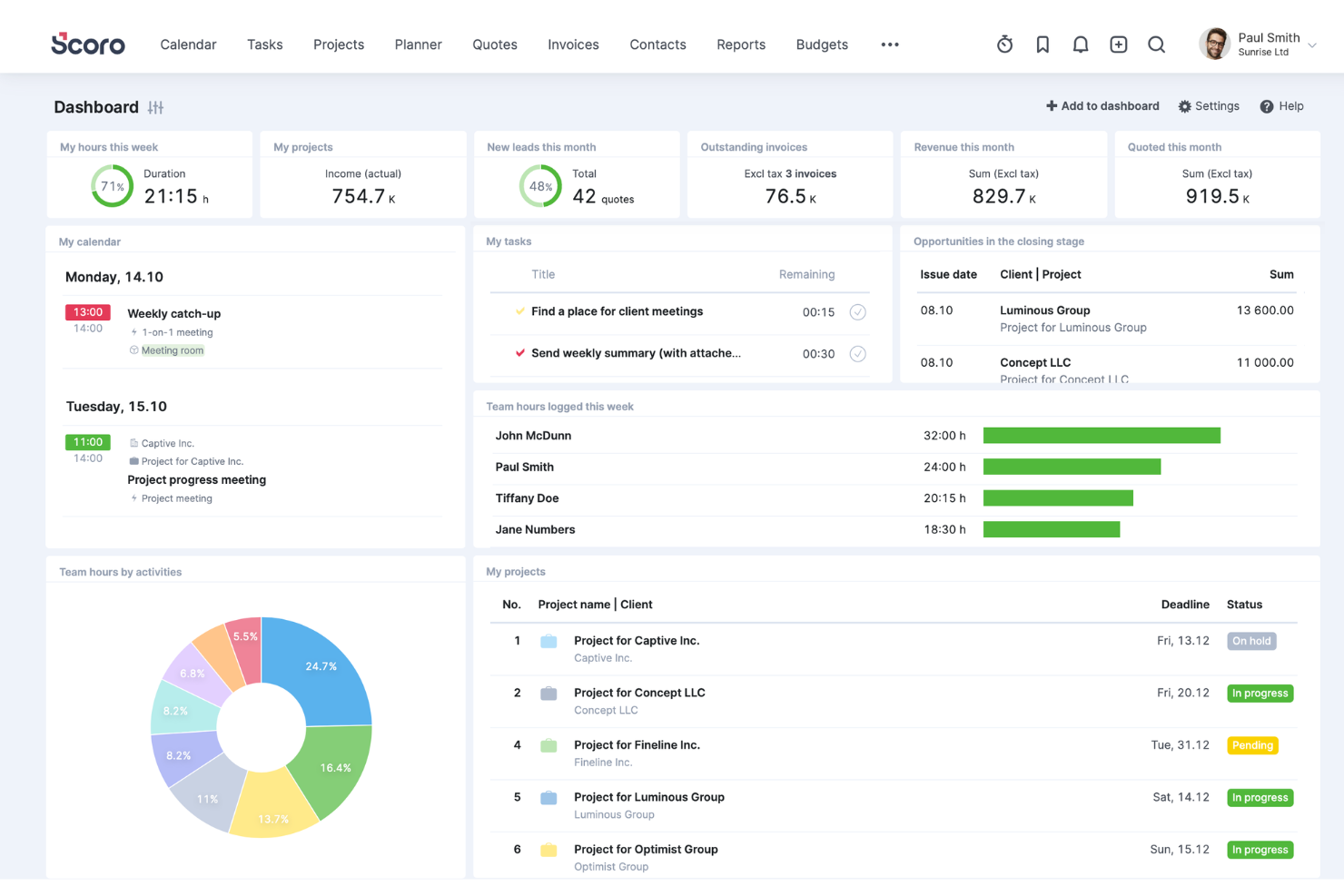
Scoro is a professional services automation software that can help you manage your operations more effectively. It provides a suite of tools for various roles within an organization and addresses every aspect of service delivery from project planning and execution to customer relationship management and billing. This level of integration is essential for services firms that need to maintain alignment across various departments and projects.
Why I Picked Scoro
Scoro excels in automating the critical yet time-consuming aspects of professional services, such as time tracking, invoicing, and reporting. The automated billing features let you quickly create detailed invoices based on the tracked time and expenses, which reduces errors and saves valuable administrative time. The software's ability to generate in-depth, customizable reports also gives you and your stakeholders insights into business performance, client profitability, and operational efficiency.
Another key aspect that sets Scoro apart is its CRM functionality, which allows for a seamless flow of information from initial client contact to project delivery and follow-up. You can manage client interactions, store critical data, and track communication history. Furthermore, the ability to link CRM data with project management and billing processes helps you keep clients informed and contributes to better client satisfaction and retention.
Scoro Key Features
Scoro also offers a range of other features that are designed to help you improve your professional services operations.
- Task Management: This helps you simplify task assignment and tracking, so your team stays organized and on schedule.
- Time Tracking: Scoro provides multiple options for logging hours, including a built-in timer for real-time tracking.
- Collaboration Tools: This centralizes project-related communication to foster better collaboration and let team members comment and tag each other.
- Customizable Dashboards: You can tailor your workspace to your needs and get a personalized view of KPIs and project statuses.
Scoro Integrations
Integrations include Google Calendar, Microsoft Exchange, Xero, QuickBooks, Sage Intacct, Expensify, Stripe, Jira, Slack, Asana, Dropbox, and PayPal.
Pros and Cons
Pros:
- AI assistant surfaces actionable insights
- Interlinked internal and external cost tracking
- Quote estimation matrix with margin insight
Cons:
- Gaps in mobile functionality compared to desktop features
- Custom reporting may need technical setup
New Product Updates from Scoro

Scoro Adds Time Mobile App and ELI Improvements
Scoro adds the Scoro Time mobile app for iOS/Android to track time anywhere and expands ELI with attachments, smarter filtering, and trigger-based actions. For more information, visit Scoro's official site.

BigTime
Best for tracking time and expenses together
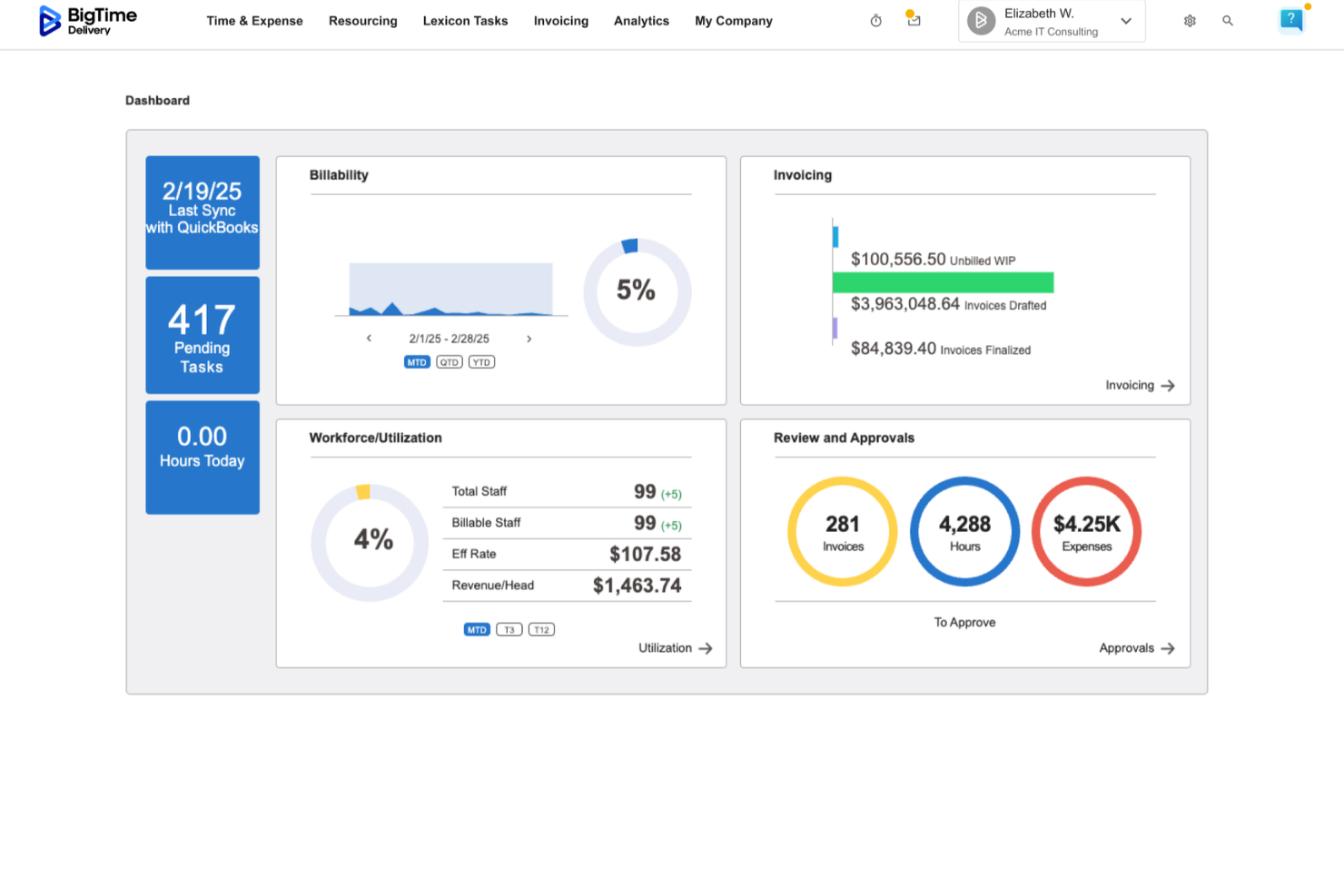
BigTime is a professional services automation (PSA) platform designed for IT, engineering, and consulting firms. It connects time tracking, billing, and financial reporting in a single system, helping teams manage projects from initial time entry through invoicing and revenue tracking. The software supports firms that rely on tools like QuickBooks and Sage by syncing financial data across systems. Billing rules, rate cards, and revenue recognition settings can be configured within BigTime to align with existing accounting structures. This allows finance teams to monitor work-in-progress (WIP), margins, and invoicing activity without relying solely on end-of-period reporting.
I recently spoke with Moti Gamburd, CEO of CARE Homecare, about how his team uses BigTime to manage time tracking and billing. He noted that time entries flow directly into billable hours with minimal manual adjustment. According to Gamburd, this helped reduce administrative errors and improved visibility into project-level profitability as work progressed.
Why I Picked BigTime
I picked BigTime because it combines time tracking, billing, and financial reporting within a system that integrates closely with general ledger platforms like QuickBooks and Sage. Teams can begin with core functionality such as time and expense tracking, billing, and profitability reporting. Additional modules, including resource management, quoting, and payment processing, can be added as operational needs expand. Each module uses the same underlying financial configuration, so billing structures and reporting logic remain consistent as usage grows. For finance leaders who need visibility into billing accuracy, WIP balances, and project margins, BigTime provides reporting and controls without requiring a full enterprise system implementation.
BigTime Key Features
BigTime offers a suite of other features that can help improve the way you manage your professional services offerings.
- Project portfolio management: Centralized visibility into active projects, including budget tracking and performance monitoring.
- Expense tracking: Capture and allocate project-related expenses to maintain budget control.
- Invoicing and payments: Generate invoices based on tracked time and expenses, with tools for monitoring payment status.
- Reporting and analytics: Access dashboards and reports focused on utilization, profitability, WIP, and financial performance.
BigTime Integrations
Integrations include QuickBooks, Salesforce, HubSpot, Jira, Xero, and Sage.
Pros and Cons
Pros:
- Unified time, billing, and financial tracking
- Modular structure allows expanded functionality over time
- Auto reminders help team compliance
Cons:
- Financial configuration may require upfront setup
- Less focused on client collaboration features compared to delivery-first tools

Best for end-to-end PSA management

Productive is a professional services automation software that's designed to help businesses streamline their operations. It's an end-to-end tool that covers everything from project management and time tracking to sales pipeline and profitability analysis.
I recently spoke with Miguel Angel Gongora Meza, the founder and director of Evolution Treks Peru, about his org's use of Productive. "I liked the fact that it presented the number of the hours worked as compared to the planned expenditures," he says. This saved them money as well. "In one of our projects we were able to save nearly 500 dollars as we were in a position to detect the inefficiencies early. It provided me with a clearer idea of how money and time were being spent and this is quite important when the resources are limited," he explains.
Why I Picked Productive
The project management feature is particularly impressive. It lets you plan projects, assign tasks, track progress, and forecast future work. The sales pipeline feature gives you a clear overview of your sales process, and the profitability analysis feature helps you understand your financial performance.
Productive's resource management and utilization insights provide a deep understanding of their team's workload and availability, which allows for better resource allocation and preventing burnout. The platform provides detailed reports and visualizations that display workloads, capacity, and efficiency levels so you can make informed decisions on task assignments and redistribute workloads as needed to optimize team performance and project efficiency.
Productive Key Features
Here are several other features offered by Productive that can help you with professional services automation.
- Time Tracking: This feature lets your team log hours with ease so you can get real-time insights into project timelines and resource allocation.
- Revenue Forecasting: You can predict future revenue streams based on current projects and resource availability, which helps with strategic planning.
- Profitability Analysis: This feature offers detailed reports on the profitability of projects and clients to help you make informed financial decisions.
- Integration with Accounting Tools: You can connect Productive to popular accounting software to facilitate efficient financial management and reporting.
Productive Integrations
Integrations include Quickbooks, Jira, Xero, Exact, Slack, Fortnox, and Personio.
Pros and Cons
Pros:
- Profitability insights available in real time
- Automations reduce repetitive task load
- End-to-end linking of projects to finances
Cons:
- You may need support to use advanced features effectively
- Customization limits in niche workflows
New Product Updates from Productive
Productive Adds Voice Dictation, Slack Connector, Proposals, and Overtime
Productive adds voice dictation, a Slack Connector, proposal controls, and overtime tracking. These updates support faster AI interactions, client proposals, and time management. For more information, visit Productive’s official site.

Accelo
Best for maximizing project profitability from quote-to-cash

Accelo is a professional services automation platform that helps businesses manage their operations more effectively. It offers features that automate various aspects of client management, project management, resource management, and financial management.
I recently spoke with Mircea Dima, the founder, CEO, and CTO of AlgoCademy. He's used Accelo in the past, and he says that "it simplified the process of project management...it was easy to coordinate with other members of my team and keep everything under control." He found the automation feature particularly useful. "Workflow automation made sure that tasks were being done on schedule and everybody remained on the same eye level," he says.
Why I Picked Accelo
Accelo links your sales process right to project delivery and invoicing, so there’s less friction handing off work. It also offers quote templates that let easily you turn estimates into project plans with time budgets, smart resource allocation to keep utilization high, and real-time cost vs. time tracking so you can see when a job is unprofitable. Built-in dashboards let you monitor margins across all open projects so small losses don’t become big ones.
Accelo Key Features
In addition to helping you optimize profitability, Accelo offers more features that can improve your team's productivity and service delivery.
- Task Management Dashboard: This feature provides a centralized view of all tasks to help your team prioritize and manage workloads effectively.
- Client Portal: This lets clients access project updates and billing information in real-time to foster transparency and better client relationships.
- Custom Reporting: You can create detailed reports tailored to your business needs, get insights into project performance, and make data-driven decisions.
- Automated Time Tracking: This feature can automatically log time spent on various tasks to maintain accurate billing and resource allocation without manual entry.
Accelo Integrations
Integrations include Google Workspace, Microsoft 365, Xero, QuickBooks Online, HubSpot, Mailchimp, Salesforce, Zapier, Stripe, PayPal, Jira, Continuum, Microsoft Power BI, Expensify, and Gusto.
Pros and Cons
Pros:
- Alerts help catch cost overruns early
- Adaptive schedules adjust with changes
- Better visibility into project profit margins
Cons:
- Mobile app more limited than web
- Some reports lack deep customization
New Product Updates from Accelo

Accelo Rebuilds Mobile App for Project and Time Management
Accelo rebuilds its mobile app with task management, new work creation, and mobile timesheets for Forecast customers. This helps teams keep project and time data current while working away from a desktop. For more information, visit Accelo’s official site.

Atera
Best for IT automation
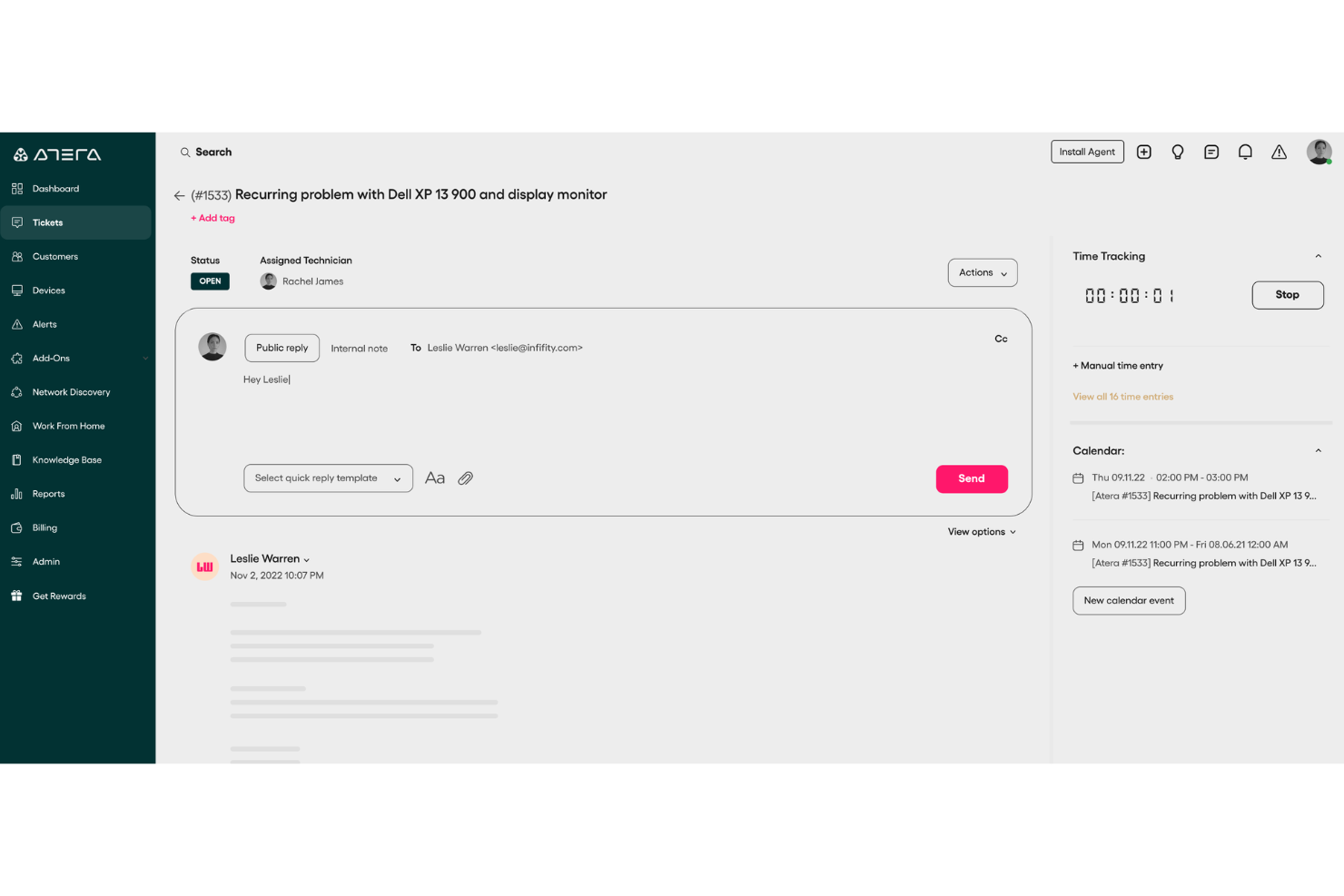
Atera offers an integrated platform that simplifies IT management for managed service providers (MSPs) and IT professionals by combining remote monitoring, management, and professional services automation. Its all-in-one nature makes it particularly appealing to businesses looking to streamline their IT operations and enhance service delivery.
Why I Picked Atera
I picked Atera because of its unique integration of remote monitoring and PSA functionalities, which is vital for IT service management. Its comprehensive ticketing system, combined with AI-powered insights, ensures that your team can manage client requests and issues effectively. Additionally, Atera's automated reporting feature allows you to track performance metrics and make informed decisions, which is crucial for maintaining service quality and client satisfaction.
Atera Key Features
In addition to its ticketing and reporting capabilities, I also found several other noteworthy features:
- Customer Portal: Provides clients with a dedicated platform to submit requests and track their status, enhancing transparency and communication.
- Flexible Contracts and Billing: Allows customization of contracts and billing processes to suit different client needs and agreements.
- Time Tracking: Facilitates accurate tracking of time spent on various tasks and projects, essential for billing and performance assessment.
- AI Ticket Tagging: Automates the classification of tickets using AI, improving response times and ticket management efficiency.
Atera Integrations
Integrations include QuickBooks, Xero, FreshBooks, Dropbox, Google Workspace, Microsoft 365, TeamViewer, Splashtop, AnyDesk, and Zapier. An API is also available for custom integrations.
Pros and Cons
Pros:
- AI-driven automation improves service quality and reduces workload.
- Integrated RMM and PSA features reduce tool redundancies.
- Centralized dashboard enhances IT management efficiency.
Cons:
- Additional costs for advanced reporting features.
- Less granular control for highly complex custom workflows or integrations.
New Product Updates from Atera

Atera Adds Webhook Triggers for Technician Assignment Changes
Atera ticket automation rules now support a webhook trigger when a ticket’s technician assignment changes, expanding automation beyond creation, status updates, and closure/resolution events. For more information, visit Atera's official site.

Wrike
Best for built-in client collaboration automations
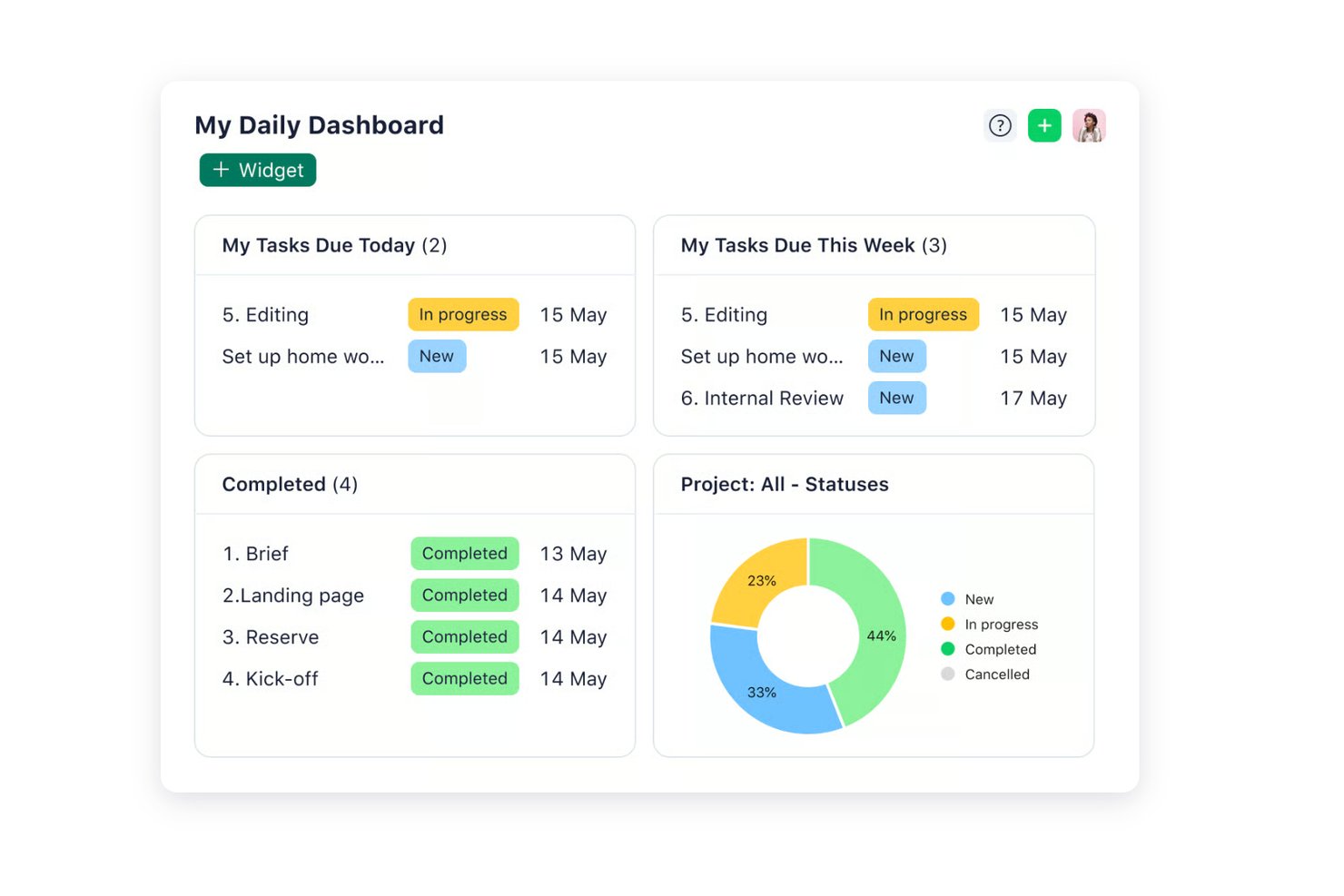
Wrike is a work management platform that combines project planning, time tracking, resource and capacity planning, workflow automation, and client collaboration tools, with budgeting available on higher tiers.
Who Is Wrike Best For?
Wrike is a strong fit for project managers and operations teams at professional services firms that need structured resource planning and client collaboration, and already have a dedicated billing or finance system in place.
Why I Picked Wrike
I've included Wrike in my top picks because its built-in client collaboration automations set it apart for teams managing high-volume, feedback-heavy client work. Wrike connects customizable intake forms directly to project blueprints, so a client request can automatically trigger a scoped project with the right workflow attached. It's worth noting that Wrike tracks time and effort against client work and offers resource and capacity planning, with budgeting on higher tiers, but it works alongside a billing system rather than replacing one.
Wrike Key Features
- Workload charts: Visual dashboards that display each team member's scheduled tasks and effort over time, letting you reassign or reschedule work directly from the view.
- Gantt chart with automatic dependency rescheduling: Interactive timelines that support four dependency types and automatically shift dependent tasks when you adjust a predecessor's dates.
- Customizable request forms connected to blueprints: Dynamic intake forms that route incoming client or internal requests directly into pre-scoped project templates.
- QuickBooks Online time export: Automated or manual export of time entries—including duration, entry date, and task details—from Wrike into QuickBooks Online for downstream invoicing.
Wrike Integrations
Wrike offers 400+ pre-built native integrations, including Salesforce, QuickBooks Online, Slack, and HubSpot. It also provides an open REST API and Wrike Integrate for systems without a native connector.
Pros and Cons
Pros:
- Gantt dependencies expose schedule impacts
- Workload views help spot overbooked staff
- Client feedback stays with project tasks
Cons:
- Financial reporting stops short of project margins
- No native client invoicing or expense tracking
New Product Updates from Wrike

Wrike Redesigns AI Agent Builder
Wrike redesigns its AI Agent Builder with a side-by-side setup, Scopes, sentence-style triggers and actions, and clearer filters. These changes make it easier to configure, test, and manage agent behavior. For more information, visit Wrike’s official site.

Kantata
Best for full lifecycle service delivery

Kantata is a professional services automation (PSA) platform for firms that need to manage projects, resources, and financials in one place. Instead of juggling multiple systems, Kantata brings the entire service delivery lifecycle into a single cloud-based solution. This makes it easier to plan, staff, track, and report on client work with full visibility from start to finish.
Why I Picked Kantata
The software features powerful resource management and scheduling tools, project and portfolio management capabilities, and built-in financial oversight. Business intelligence dashboards and real-time analytics provide actionable insights, so leaders can make informed decisions on timelines, budgets, and client outcomes. The result is better visibility, stronger profitability, and smoother service delivery.
Kantata also supports ongoing collaboration and client engagement. Features like activity feeds, task boards, time tracking, and pulse surveys keep professional services teams aligned and give leaders feedback on both team morale and client sentiment throughout the project lifecycle. This people-first layer adds another dimension to traditional PSA software and makes delivery more predictable and client-focused.
Kantata Key Features
Kantata also offers several other features that make it useful as a professional services automation software.
- AI-Powered Tools: This feature uses artificial intelligence to help you optimize resource allocation and project delivery so you can make sure your team is always working at its best capacity.
- Collaboration Tools: You can facilitate seamless communication and collaboration among team members and clients to keep everyone aligned and informed.
- Advanced Business Intelligence: This provides real-time insights and analytics that empower your team with data-driven decision-making capabilities to improve project outcomes.
- Customizable Workflows: You can tailor processes to fit your specific operational needs to improve efficiency and make sure the software adapts to your business rather than the other way around.
Kantata Integrations
Integrations include Salesforce, SAP, Jira, Xero, BambooHR, Slack, Workday, QuickBooks, HubSpot, and NetSuite.
Pros and Cons
Pros:
- Built-in feedback mechanisms
- AI forecasting built in
- Multi-currency and multi-rate support
Cons:
- Configuration overhead for customization
- Implementation can be complex
New Product Updates from Kantata

Kantata Adds Access Group Change History
Kantata adds Access Groups History, letting account administrators track changes to group details, membership, and permissions in Recent History. The update also makes these events available through the Subscribed Events API for broader monitoring. For more information, visit Kantata’s official site.
 .
.
VOGSY
Best for service organizations with global resources and projects

VOGSY is a cloud solution that brings together project delivery, resource planning, and finance across multiple geographies. It’s for firms operating in several countries that need to manage international projects, staffing, and financials, and it supports opportunity management, allocation, time tracking, invoicing, and financial consolidation.
Why I Picked VOGSY
This tool lets you and your team run work across borders without losing track of local financial rules or currency conversions. VOGSY lets you set up multiple legal entities, local accounting tools, and tax regimes while maintaining a shared resource pool and unified dashboards. It provides intercompany invoicing and revenue distribution so internal costs are handled automatically. You also get opportunity pipelines that are linked to resource forecasts, project budgets tied into local and consolidated financials, and reports that roll up across all your entities. It's built to connect your global operations rather than forcing you to adopt a one-size-fits-all system.
VOGSY Key Features
In addition to global resource management capabilities, VOGSY offers several other features that improve your operational efficiency.
- Time and Expense Tracking: This feature lets you automate time tracking with auto-populated timesheets and simplifies expense management through easy receipt uploads.
- Task Management: This provides visual task tracking for team members across projects and improves collaboration and accountability.
- Billing and Invoicing: You can automate billing processes, as well as schedule invoices for various project types. This helps maintain accuracy and timeliness.
- Real-Time Reporting: You can create custom reports for stakeholders and your team, and use them for informed decision-making and strategic planning.
VOGSY Integrations
Integrations include Google Workspace, Jira, Microsoft 365, Xero, QuickBooks, Copper, HubSpot, Salesforce, and Zoho.
Pros and Cons
Pros:
- Intercompany revenue and cost automation
- Shared resource pool across entities
- Handles multi-country operations in one system
Cons:
- Requires careful configuration for tax regimes
- Setup complexity in multinational contexts
New Product Updates from VOGSY
VOGSY Adds Velocity Agent Verdicts for Quote Approvals
VOGSY adds Velocity agent verdicts for quote approval requests with risk levels, margin checks, discount analysis, and reasoning. This helps approvers assess quote risk before making a final decision. For more information, visit VOGSY’s official site.
 .
.
SuperOps
Best for MSP operational growth

For IT teams and managed service providers that want to improve their operational efficiency, SuperOps provides an AI-driven professional services automation solution that offers essential functionalities like service desk management and contract oversight. It simplifies ticketing and resource tracking, can help you improve your workflows, and offers features like mobile device management and integrations with other remote monitoring tools.
Why I Picked SuperOps
I chose SuperOps because it's a unified PSA and remote monitoring and management platform that includes service desk management, contract management, and service automation, and it can drive MSP operational growth. The AI-driven profitability tools and advanced policy management for endpoint discovery are standout features that can help improve your efficiency and automate routine tasks.
The platform's ability to streamline processes and improve service delivery makes it an ideal choice for MSPs that want to grow their operations. These functionalities save time and increase profitability, which makes SuperOps a strategic asset for any MSP that wants to increase service quality and client satisfaction.
SuperOps Key Features
SuperOps offers a range of other features that professional services teams will find useful.
- Task and Reply Templates: These let your team save time and maintain consistency by using pre-defined templates for common tasks and responses.
- Kanban View: This provides a visual representation of your workflows to help you and your team track progress and manage tasks more effectively.
- Customer Satisfaction Surveys: You can gather valuable feedback from your clients with built-in surveys to continuously improve service quality and client satisfaction.
- Runbooks: You can automate routine tasks and streamline approvals using runbooks, which help maintain consistency and reduce manual errors in operations.
SuperOps Integrations
Integrations include ESET, Splashtop, Acronis, QuickBooks, Xero, Microsoft Azure, Stripe, and TeamViewer.
Pros and Cons
Pros:
- AI-driven features for improved IT management
- Solid service desk and project management tools
- Strong automation capabilities improve operational efficiency
Cons:
- Relatively few integrations
- Limited customization options compared to competitors
New Product Updates from SuperOps

SuperOps Improves Ticket Visibility, Dynamic Forms, and Dashboard Views
SuperOps introduces improvements to ticket visibility, dynamic forms, and dashboard visualizations. These updates help technicians manage customer conversations, simplify ticket creation, and keep dashboard views consistent across teams. For more information, visit SuperOps' official site.
 .
.

Celigo is an integration and automation platform for professional services teams that connects business applications, automates workflows, and manages data across multiple systems.
Who Is Celigo Best For?
Celigo suits IT and operations teams at mid-sized to large organizations that need to automate and connect multiple business applications.
Why I Picked Celigo
I picked Celigo as one of the best because I can access over 1,000 prebuilt app connectors, which makes connecting our core business tools fast and reliable. My team uses these connectors to automate project handoffs between CRM, ERP, and time tracking platforms. I like that we can quickly deploy integrations for new clients without building custom connections from scratch.
Celigo Key Features
- Workflow automation designer: Build and customize multi-step workflows across business applications.
- Error management dashboard: Monitor, troubleshoot, and resolve integration errors from a single interface.
- Role-based access controls: Set permissions and manage user access for sensitive data and workflows.
- Real-time data synchronization: Keep information updated instantly between connected systems.
Celigo Integrations
Celigo offers 1,000+ native prebuilt connectors, including Salesforce, NetSuite, Microsoft Dynamics 365, SAP, QuickBooks, Shopify, HubSpot, Jira, Slack, Google Sheets, and Snowflake. An API is available for custom integrations.
Pros and Cons
Pros:
- Supports SOC 2 Type II and GDPR compliance
- AI-guided integration builder accelerates setup
- Offers 1,000+ prebuilt app connectors
Cons:
- Limited offline or on-premises deployment options
- Advanced features require higher-tier plans
New Product Updates from Celigo
Celigo Adds Shopify–Microsoft Business Central Integration Template
Celigo adds a pre-built Shopify–Microsoft Business Central integration template for D2C and B2B commerce. This helps merchants launch connected commerce workflows faster. For more information, visit Celigo’s official site.
 .
.Andre alternativer for programvare for automatisering av profesjonelle tjenester
Her er noen verktøy som ikke kom med på topplisten min, men som likevel er verdt å vurdere hvis du ikke fant det du lette etter ovenfor.
- Rocketlane
For AI-powered project delivery
- Forecast
For mid-sized agencies and consultancies
- Projectworks
For linking resources and financial data
- Workday
For fast-moving businesses
- Birdview
For automating and optimizing service delivery cycle
- Polaris PSA By Replicon
For AI-driven resource optimization
- PSOhub
For automating recurring project work
- ProjectManager
For no-code workflow automation
- Hello Bonsai
For managing projects, clients, and finances
- Parallax
For efficient resource management
- ConnectWise
For intelligent automation for small businesses
- Ravetree
For retainer contracts
- Dynamics 365 Project Operations
For connecting sales and project delivery
- NinjaOne
For PSA and billing alignment
- Smartsheet
For customer onboarding and project visibility
- Celoxis
For managing your project portfolio, resources, and budgets
- ClickTime
For mid-sized businesses with employees across projects
- Screendragon
AI-powered workflow and automation for PSA
- Planview
For more predictable and profitable customer engagements
- Dayshape
With real-time reporting dashboards


Relaterte anmeldelser av prosjektstyringsprogramvare
- Beste programvare for profesjonelle tjenester
- Ressursstyringsprogramvare for profesjonelle tjenester
How I Evaluate Professional Services Automation Software
I split my evaluation into two layers: the baseline capabilities a tool must have—like time tracking, billing, and resource planning—and the differentiators that set the best options apart.
Core Functionality (Table Stakes For This List)
When I'm selecting tools for my list, I rank each one on a scale from 0 (does not offer the functionality) to 5 (excels in this area) for each core functionality listed below. Then, I calculate the tool's total score into a percentage. Each tool needs to achieve a minimum total score of 65% to be considered for inclusion.
- Project & Engagement Management: I look for structured project planning with Gantt views, dependencies, and templates built around client engagements rather than generic task boards.
- Resource Planning & Utilization: Each tool should let you match consultants to projects by skill, availability, and capacity so you can spot staffing gaps before they hit delivery.
- Time & Expense Tracking: Billable vs. non-billable hour capture tied to specific clients and projects matters here, along with expense logging and approval workflows.
- Billing & Invoicing: I evaluate whether a tool supports multiple billing models like fixed-fee, time & materials, and milestone-based, since most services firms juggle several across their book of business.
- Project Financials & Profitability: Real-time budget-to-actual tracking and margin visibility at the project level are what I check for, especially the ability to flag at-risk engagements early.
- Services Analytics & Reporting: Dashboards covering utilization rates, realization, backlog, and project performance help services leaders make staffing and pricing decisions with actual data.
Once I have a list of tools that meet the criteria, I consider what sets each platform apart.
Differentiating Factors (What Sets Vendors Apart)
Here's how I compare and contrast different vendors:
Standout Features
Quote-to-cash automation is a big differentiator—tools that connect SOW creation to invoicing and revenue recognition save finance teams from chasing approvals across spreadsheets. I also evaluate AI-powered forecasting, which helps resource managers predict demand and flag margin risk before a project goes sideways. Subcontractor management matters too, especially for firms that blend internal and external talent across engagements and need unified billing for both.
Beyond Features
Integrations are a major consideration—I check whether a tool connects natively to accounting systems like QuickBooks or Sage Intacct and CRMs like Salesforce, since broken data flows between PSA and finance create billing nightmares. Industry fit also matters. A platform built for IT consulting firms won't always suit a creative agency. I look at whether vendor-specific templates and workflows align with the buyer's delivery model. Finally, I evaluate implementation support, because PSA rollouts touch every department and a poor onboarding experience stalls adoption.
Slik velger du programvare for automatisering av profesjonelle tjenester
Det er lett å gå seg vill i lange funksjonslister og komplekse prismodeller. For å hjelpe deg med å holde fokus mens du går gjennom den unike prosessen din for valg av programvare, er her en sjekkliste over faktorer du bør ha i tankene:
| Faktor | Hva du bør vurdere |
|---|---|
| Skalerbarhet | Kontroller at programvaren kan vokse med virksomheten din. Se etter funksjoner som fleksible brukerbegrensninger og muligheten til å håndtere økende prosjektkompleksitet. |
| Integrasjoner | Kontroller at den kan kobles til verktøyene du allerede bruker, for eksempel CRM-, regnskaps- eller prosjektstyringsplattformer. |
| Tilpasningsmuligheter | Kontroller om du kan tilpasse dashbord, arbeidsflyter og rapporter slik at de samsvarer med teamets spesifikke behov og prosesser. |
| Brukervennlighet | Velg programvare som er intuitiv og enkel for teamet å bruke uten omfattende opplæring. Dette bidrar til raskere introduksjon og bedre produktivitet. |
| Budsjett | Vurder kostnader på forhånd, abonnementsavgifter og eventuelle skjulte kostnader. Sammenlign prismodeller for å sikre at løsningen passer med de økonomiske målene dine. |
| Sikkerhetstiltak | Kontroller at programvaren har robuste funksjoner for databeskyttelse, som kryptering, rollebasert tilgang og samsvar med bransjestandarder som GDPR. |
| Rapportering | Se etter avanserte rapporteringsverktøy som gir teamet handlingsrettet innsikt i resultater, ressursfordeling og lønnsomhet. |
| Støttealternativer | Bekreft at det finnes pålitelig kundestøtte, enten via direktechat, e-post eller en dedikert kundeansvarlig, slik at problemer kan løses raskt. |
Trender innen programvare for automatisering av profesjonelle tjenester
Her er noen av trendene som begynner å gjøre seg gjeldende, og som jeg følger med på:
- KI-drevet innsikt: Leverandører legger til KI-funksjoner som kan analysere prosjektdata og forutsi risikoer, forsinkelser eller flaskehalser i ressursbruken. Dette gir teamene mulighet til å korrigere kursen før problemer oppstår. Noen verktøy foreslår for eksempel nå omfordeling av ressurser basert på tidligere resultater.
- Dynamiske prismodeller: Noen leverandører tilbyr verktøy som kan brukes til å beregne priser i sanntid for tjenester basert på markedstrender, tilgjengelige ressurser og prosjektomfang. Dette gir større fleksibilitet for både kunder og leverandører.
- Fokus på medarbeideropplevelsen: Plattformene introduserer funksjoner som ferdighetssporing, dashbord for karriereutvikling og innsikt i teamets trivsel for å støtte medarbeidernes utvikling og engasjement.
- Desentralisert prosjektsporing: Ettersom hybridarbeid er kommet for å bli, utvikles verktøyene for å støtte desentraliserte team med støtte for flere tidssoner, alternativer for asynkron kommunikasjon og globale dashbord i sanntid.
Hva er programvare for automatisering av profesjonelle tjenester?
Programvare for automatisering av profesjonelle tjenester er et verktøy som brukes av tjenestebaserte organisasjoner, som konsulentselskaper, regnskapsfirmaer og advokatfirmaer, til å administrere og automatisere driftsoppgaver som økonomi, ressursstyring, tidsregistrering og fakturering.
Den integrerer prosjektstyring, klientrelasjonsstyring, økonomistyring samt tids- og utgiftsregistrering i ett system for å effektivisere håndteringen av prosjekter og ressurser, øke faktureringsnøyaktigheten, forbedre teamsamarbeidet og redusere administrasjonsarbeidet.
Funksjoner i programvare for automatisering av profesjonelle tjenester
Når du velger programvare for automatisering av profesjonelle tjenester, bør du se etter følgende viktige funksjoner:
- Prosjektstyring: Forenkle prosjektplanlegging, oppgavefordeling og fremdriftssporing, slik at du kan holde alle organisert, oppdage flaskehalser tidlig og overholde tidsfrister.
- Tidsregistrering: Registrer fakturerbare timer nøyaktig med brukervennlige tidtakere eller manuell registrering, slik at du ikke går glipp av inntekter og enkelt kan fakturere kundene.
- Ressursfordeling: Se hvem som er tilgjengelig, og koble de riktige personene til de riktige prosjektene for å unngå utbrenthet og sikre at teamets ferdigheter utnyttes best mulig.
- Fakturering og betaling: Generer fakturaer raskt, følg opp betalinger og administrer kundefordringer for å ha kontroll på kontantstrømmen.
- Utgiftsstyring: Lagre kvitteringer, kategoriser utgifter og knytt kostnader direkte til prosjekter. Hold også oversikt over hvor mye du bruker, og hva pengene går til.
- Klientstyring (CRM): Oppbevar klientinformasjon, kommunikasjon og kontrakter på ett sted. Dette gjør det enkelt å pleie relasjoner og levere førsteklasses tjenester.
- Rapportering og analyse: Få tydelig innsikt i teamets resultater, prosjektmarginer og lønnsomhet med tilpassbare rapporter.
- Dokumentstyring: Lagre, del og organiser prosjektfiler på en sikker måte, slik at alle på teamet alltid har den nyeste versjonen lett tilgjengelig.
Vanlige AI-funksjoner i programvare for automatisering av profesjonelle tjenester
I tillegg til standardfunksjoner i programvare for automatisering av profesjonelle tjenester tilbyr mange AI-drevne PSA-verktøy funksjoner som:
- Automatisk prioritering av oppgaver: Bruker AI til å analysere arbeidsmengder og tidsfrister og anbefale hvilke oppgaver du bør fokusere på først for å maksimere effektiviteten.
- Prediktiv ressursprognostisering: Bruker prosjekttrender og teamutnyttelse til å hjelpe deg med å forutse bemanningsbehov og unngå hektiske situasjoner i siste liten.
- Smart tidsregistrering: Registrerer arbeidsaktivitet automatisk og foreslår tidsregistreringer, slik at du og teamet ditt aldri glemmer å loggføre fakturerbare timer.
- AI-drevne varsler om prosjektrisiko: Overvåker prosjektets tilstand og identifiserer potensielle risikoer før de blir problemer, slik at du kan korrigere kursen tidlig.
- Chatboter for kundeinteraksjon: Håndterer enkle kundespørsmål eller trinn i innføringsprosessen, slik at teamet ditt kan fokusere på mer komplekse kundebehov.
Vanlige spørsmål om programvare for automatisering av profesjonelle tjenester
Her finner du svar på noen vanlige spørsmål om programvare for automatisering av profesjonelle tjenester.
Hvilke integrasjoner bør jeg se etter i PSA-programvare?
Sørg for at PSA-programvaren du vurderer, kan integreres med prosjektstyringsplattformer, CRM-systemer, regnskapsverktøy og apper for tidsregistrering som du allerede bruker. Integrasjoner med verktøy som Salesforce, QuickBooks, Slack og Microsoft Teams kan bidra til å koble sammen arbeidsflyten i teamet ditt, redusere manuell dataregistrering og automatisere rapportering. Tenk på hvilke systemer teamet ditt allerede bruker daglig, og prioriter PSA-løsninger som synkroniseres med dem.
Hvordan kan jeg måle avkastningen på investeringen i PSA-programvare?
For å måle avkastningen på investeringen i PSA-programvare kan du følge med på hvor mye tid den sparer, forbedringer i utnyttelsen av fakturerbare ressurser, færre prosjektoverskridelser og færre feil i fakturering eller økonomi. Sammenlign leveringstider for prosjekter, fortjenestemarginer og kundetilfredshet før og etter implementeringen. De fleste PSA-plattformer bør tilby oversikter som viser utnyttelsesgrad, prosjektkostnader og marginer, slik at du kan tallfeste verdien du får ut av systemet.
Hvilke utfordringer kan jeg møte når jeg implementerer PSA-programvare?
Vanlige utfordringer omfatter å få støtte fra teamet, migrere eksisterende data og lære brukerne opp i nye systemer. Prosjekter kan stoppe opp hvis det er komplisert å konfigurere integrasjoner med de eksisterende verktøyene dine, eller hvis PSA-plattformen ikke kan tilpasses arbeidsflytene dine. For å gjøre prosessen enklere bør du gi teamet tydelige veiledninger, utnevne en intern pådriver og prioritere plattformer som tilbyr god støtte under innføringen.
Hjelper PSA-programvare med ressursstyring og prognoser?
Ja, PSA-programvare kan hjelpe deg med å styre ressurser og prognostisere arbeidsmengder. Den lar deg se hvem som er tildelt hva, identifisere flaskehalser og analysere kapasiteten for kommende prosjekter. Mange verktøy inkluderer visuell planlegging, etterspørselsprognoser og sporing av tilgjengelighet, slik at du kan optimalisere utnyttelsen og unngå under- eller overbooking av teamet ditt.