10 beste programvareløsninger for reklamebyråer for styring i 2026

10 Listen over den beste programvaren for reklamebyråer


Det kan være krevende å håndtere utfordringene ved å drive et reklamebyrå. Du må holde styr på flere prosjekter, stramme tidsfrister og kundenes forventninger. Det er lett å føle seg overveldet når ting ikke går som planlagt.
Programvare for reklamebyråer kan være til hjelp. Den er utviklet for å gjøre prosjektstyringen enklere, slik at teamet ditt kan holde seg organisert og fokusert. Etter min erfaring kan riktig programvare utgjøre en stor forskjell for hvor effektivt teamet ditt arbeider.
Jeg har selvstendig testet og vurdert ulike programvarealternativer. Målet mitt er å gi deg et objektivt innblikk i de beste tilgjengelige verktøyene. Du finner mine beste anbefalinger i denne artikkelen, og hvert verktøy er valgt ut på grunn av evnen til å løse vanlige utfordringer i bransjen. La oss finne den rette løsningen for teamet ditt.
Hvorfor du kan stole på våre programvareanbefalinger
Teamet vårt har testet og anmeldt programvare siden 2012. Vi er selv prosjektledere, så vi vet hvor vanskelig og hvor viktig det er å velge riktig programvare.
I denne guiden har vi vurdert verktøyene gjennom praktisk testing og uavhengig research og gitt dem poeng ut fra våre utvelgelseskriterier. Vi bygger også på innsikt fra ledende eksperter i bransjen og erfarne prosjektledere.
Anmeldelsene våre bygger på vår egen redaksjonelle vurdering. De er ikke et salgsargument.
Ekspertanmeldere:
Sammenligningstabell for programvare for reklamebyråer
Denne sammenligningstabellen oppsummerer prisopplysningene for mine beste utvalgte programvareløsninger for reklamebyråer:
| Tool | Best For | Trial Info | Price | ||
|---|---|---|---|---|---|
| 1 | Best for agency business process management | Free trial available | From $10/user/month (billed annually) | Website | |
| 2 | Best for all-in-one project management | 14-day free trial + free demo available | From $17/user/month | Website | |
| 3 | Best advertising agency software for team collaboration | 14-day free trial | Pricing upon request | Website | |
| 4 | Best for ease-of-use and intuitive UI | Free plan available | From $9/user/month (billed annually) | Website | |
| 5 | Best for AI-powered advertising agency management | Free demo available | Pricing upon request | Website | |
| 6 | Best for full lifecycle service delivery | Free demo available | Pricing upon request | Website | |
| 7 | Best for a range of templates forvarious workflows | Free plan available | From $7/user/month (billed annually) | Website | |
| 8 | Best for issues & changes management | Free plan + 14-day free trial + free demo available | From $79/user/month (billed annually) | Website | |
| 9 | Best for creatives & design teams | 30-day free trial | From $40/month, fixed price available | Website | |
| 10 | best for enabling client collaboration | Free plan + 14-day free trial + free demo available | From $9.99/user/month (billed annually) | Website |


Oversikt over de 15 beste programvareløsningene for reklamebyråer
Nedenfor finner du detaljerte beskrivelser av verktøyene, med skjermbilder og fremtredende funksjoner. Du kan når som helst se hvordan jeg valgte ut programvaren på denne listen.

Best for agency business process management

Productive is an agency management software that can handle all your business processes, including sales, invoicing and billing, resource planning, and project management.
Why I Picked Productive: The Sales Pipeline functionality lets you keep track of sales and your deal flow with sales reports and tracking for lost contracts. This is also great for keeping your sales process organized.
Productive has a built-in time tracker as well, which makes it easy for your team to track their time, and communication and task management functionalities make collaboration on tasks simple. Also included are resource planning features, as well as profitability tracking features for keeping track of project costs, key metrics, budgets, and invoicing.
Productive Standout Features & Integrations
Features include project management, resource planning, budgeting, reporting, time tracking, billing, sales enablement, and third-party integrations.
Integrations include Jira, QuickBooks, Xero, Google Calendar, Exact, Slack, Outlook, Visma e-conomic, Harvest Import, Fortnox, Personio, and more using their open API.
New Product Updates from Productive
Productive Adds Voice Dictation, Slack Connector, Proposals, and Overtime
Productive adds voice dictation, a Slack Connector, proposal controls, and overtime tracking. These updates support faster AI interactions, client proposals, and time management. For more information, visit Productive’s official site.

Scoro
Best for all-in-one project management

Scoro is an all-in-one professional services automation software designed to standardize operations and streamline workflows for agencies. It combines CRM, quoting, project management, billing, and reporting tools into a single platform, enabling teams to manage their work more efficiently.
Why I Picked Scoro: With Scoro, you can manage projects from start to finish, including quoting, budgeting, task scheduling, and time tracking. This end-to-end approach ensures that all aspects of a project are interconnected, reducing the chances of miscommunication and errors. Additionally, Scoro’s resource planning feature allows you to allocate work effectively across your team, ensuring optimal utilization and preventing burnout. The platform also makes it easier to manage client accounts, sales pipelines, and financials while providing tools for planning and forecasting work for better visibility across your operations.
Scoro standout features and integrations:
Features include invoicing capabilities that let you automate billing processes, reducing manual work and the potential for mistakes. Additionally, detailed reporting and dashboards provide real-time insights into your business performance, allowing you to monitor key metrics and make data-driven decisions. The platform also includes retainer management functionality for tracking and managing recurring client work, plus Gantt charts, a drag-and-drop planner or Kanban board, and a comprehensive CRM to keep all client communications and invoices connected.
Integrations include HubSpot, Google Calendar, Microsoft Exchange, Jira, Xero, QuickBooks, Sage Intacct, Exact Online, Expensify, Stripe, Google Drive, BambooHR, Slack, Asana, Dropbox, PayPal, and more. You can also connect to other apps through Zapier.
New Product Updates from Scoro

Scoro Adds Time Mobile App and ELI Improvements
Scoro adds the Scoro Time mobile app for iOS/Android to track time anywhere and expands ELI with attachments, smarter filtering, and trigger-based actions. For more information, visit Scoro's official site.

Wrike
Best advertising agency software for team collaboration

Wrike is an advertising agency software that is best for teams of five up to an unlimited number of team members. Wrike enables managers and teams to visualize projects on Kanban boards and drag-and-drop Gantt charts, as well as customize workflows, dashboards, reports, and request forms.
Why I Picked Wrike: Wrike allows teams and individuals to arrange their dashboard and task list in a view that suits their working style, as well as offers automations for admin tasks. Wrike also features employee capacity monitoring, resource management, and onboarding templates.
Wrike also offers a dedicated help center with interactive training, videos, a ‘Getting Started’ guide, and a thriving community. The tool includes a variety of specific solutions for every type of team or organization, including marketing teams and professional service teams. Users also have access to a variety of templates for common organizational processes.
Wrike Standout Features & Integrations
Features include project management, task scheduling/tracking, resource management, expense tracking, API, budgeting, Gantt charts, marketing automations, collaboration support, and reporting.
Integrations include over 400 pre-built integrations with the most popular file management software from Microsoft, Slack, Google, and Dropbox, along with sales and marketing software like Salesforce and Marketo.
New Product Updates from Wrike

Wrike Redesigns AI Agent Builder
Wrike redesigns its AI Agent Builder with a side-by-side setup, Scopes, sentence-style triggers and actions, and clearer filters. These changes make it easier to configure, test, and manage agent behavior. For more information, visit Wrike’s official site.

Best for ease-of-use and intuitive UI
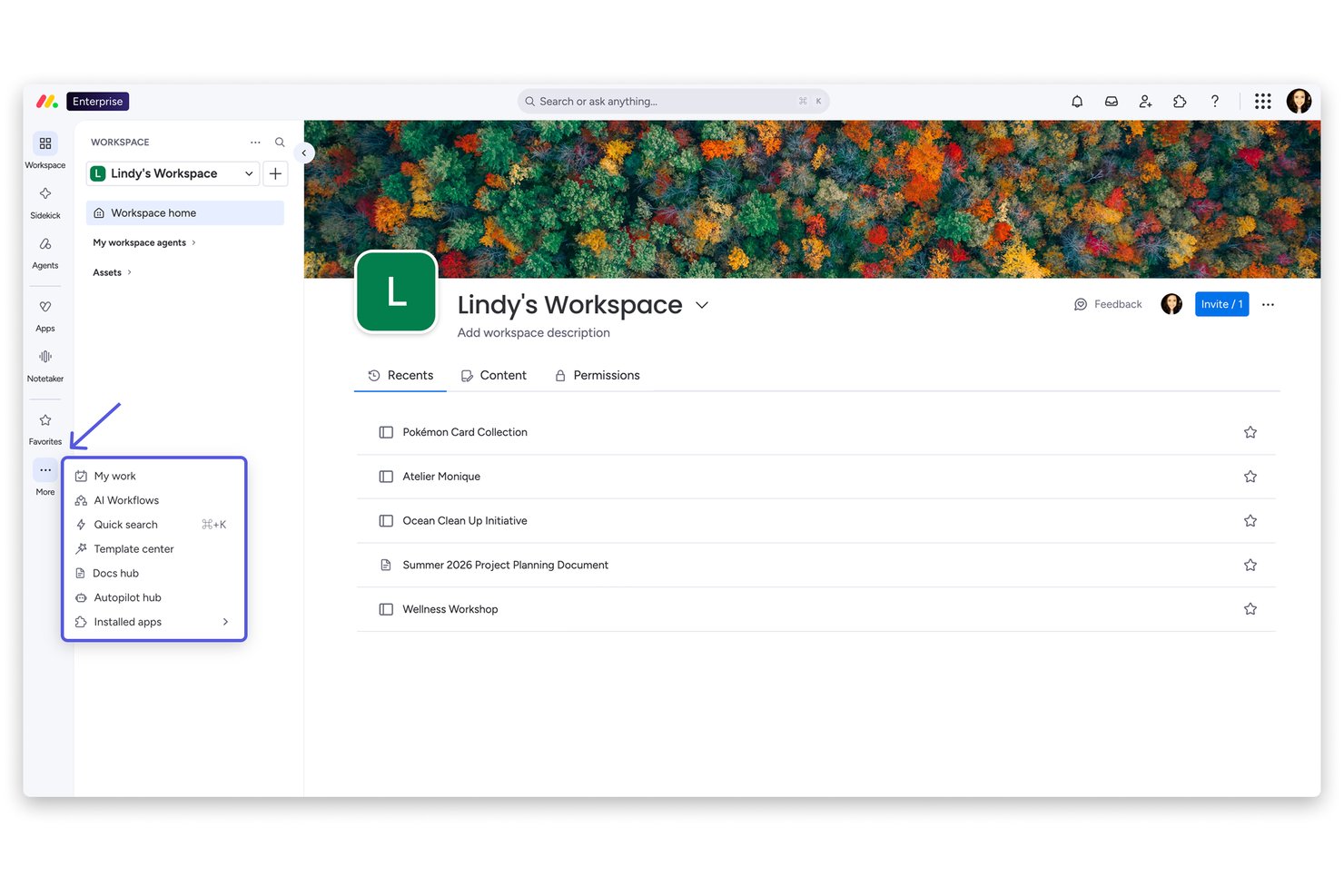
monday AI Workspace is a general-purpose work management platform that combines campaign planning, task and timeline management, workflow automation, and AI-assisted project coordination across teams and client accounts.
Who Is monday AI Workspace Best For?
It's a strong fit for marketing and agency teams at mid-size to large organizations that need a flexible, visually intuitive workspace to manage multiple concurrent projects.
Why I Picked monday AI Workspace
I've included monday AI Workspace in my top picks because the drag-and-drop board setup genuinely removes the onboarding friction that slows down busy agency teams. I like that you can flip between Kanban, Gantt, and timeline views without rebuilding anything, which is practical when you're juggling multiple client campaigns at once. The 200+ pre-built templates mean a new campaign board takes minutes to spin up, not hours.
monday AI Workspace Key Features
- Resource management dashboards: Visualize and balance team workloads across projects with real-time capacity views.
- AI-powered automations: Set up triggers and workflows to automate repetitive tasks and status updates for campaigns.
- Client account hierarchies: Organize boards and folders by client, enabling clear separation between engagements and deliverables.
- Time tracking columns: Log billable and non-billable hours at the task level to support agency project accounting.
monday AI Workspace Integrations
monday AI Workspace offers hundreds of integrations through its built-in integrations and marketplace, including Slack, Salesforce, HubSpot, Google Workspace, Microsoft 365, Adobe Creative Cloud, Jira, QuickBooks, Dropbox, and Zapier. It also provides an API for custom integrations.
Pros and Cons
Pros:
- Custom intake forms simplify creative brief collection
- Drag-and-drop setup needs no technical training
- Highly visual campaign boards across multiple clients
Cons:
- Reporting lacks agency profitability and margin depth
- No native creative proofing or annotation tools
New Product Updates from monday AI Workspace
monday AI Workspace Adds Human Approval Routing
monday AI Workspace adds a human-in-the-loop approval block to AI Workflows, sending approval requests and routing workflow paths based on responses. For more information, visit monday AI Workspace's official site.

Best for AI-powered advertising agency management

Screendragon is an advertising agency management software designed to manage projects, processes, people, and profitability in one place. The world’s top agency groups like Omnicom, WPP, and IPG rely on Screendragon to power their agency operations.
Why I Picked Screendragon: Anyone can leverage Screendragon’s integrated budget module to build SOW’s and estimates, as well as forecast future revenues and resourcing needs. Screendragon is also highly configurable, giving users the ability to customize forms, dashboards, templates, workflow rules, permissions, notifications, reports, and even the terminology used on the platform.
Screendragon also includes intuitive task management features that enable users to switch between different interfaces like visual Kanban boards, interactive Gantt charts, and list views. Reviews and approvals are made simple with features for visual proofing, real-time collaboration, version control, and granular permissions. Automated approvals facilitate the secure and efficient approval of assets. Screendragon’s robust offering in the area of advertising agency software tends to make it more suited to mid to large-sized agencies.
Screendragon’s user interface is easy-to-use and allows users to custom brand the interface. The tool provides functionality for project management, workflow management, resource management and forecasting, time-tracking, budget management, and asset management.
Screendragon Standout Features & Integrations
Features include project management, collaboration, resource management, time tracking, budget management, reporting, mobile app, and third-party integrations.
Integrations include SAP and PeopleSoft and can integrate with thousands of apps through Zapier like Slack, Trello, Google Drive, Office 365, and Microsoft Dynamics. It also has an open API, allowing custom integrations with any solution.
New Product Updates from Screendragon
Screendragon Unveils New AI Hub
Screendragon introduced AI Hub, a new capability that lets teams build and manage AI agents directly within workflows. The update helps marketing teams automate tasks, maintain governance controls, and scale AI-driven operations more efficiently. For more information, visit Screendragon's official site.

Kantata
Best for full lifecycle service delivery

Kantata is a professional services work management platform designed to support the entire lifecycle of client campaigns. From scoping and planning to staffing, delivery, and reporting, it provides agencies with one centralized hub to manage projects, align resources, and keep budgets under control while ensuring work is delivered on time.
Why I Picked Kantata: Kantata goes beyond basic task and project tracking by connecting every part of the campaign lifecycle. Agencies can plan projects, forecast demand, and staff the right mix of talent, while also managing financials and tracking performance in real time. Its collaboration and communication tools help creative, account, and strategy teams stay aligned with clients throughout the campaign. With built-in business intelligence and profitability tracking, Kantata helps agencies manage not just the work, but the health of the business behind it.
Kantata Standout Features & Integrations
Features include dynamic dashboards for campaign performance, portfolio-level views to track multiple client accounts, resource capacity planning to balance workloads, and time and expense tracking for accurate billing.
Integrations include NetSuite, QuickBooks, Salesforce, Google Workspace, Jira, Expensify, Xero, Concur, Sage Intacct, Slack, HubSpot, Microsoft platforms, and more.
New Product Updates from Kantata

Kantata Adds Access Group Change History
Kantata adds Access Groups History, letting account administrators track changes to group details, membership, and permissions in Recent History. The update also makes these events available through the Subscribed Events API for broader monitoring. For more information, visit Kantata’s official site.
 .
.
ClickUp
Best for a range of templates forvarious workflows
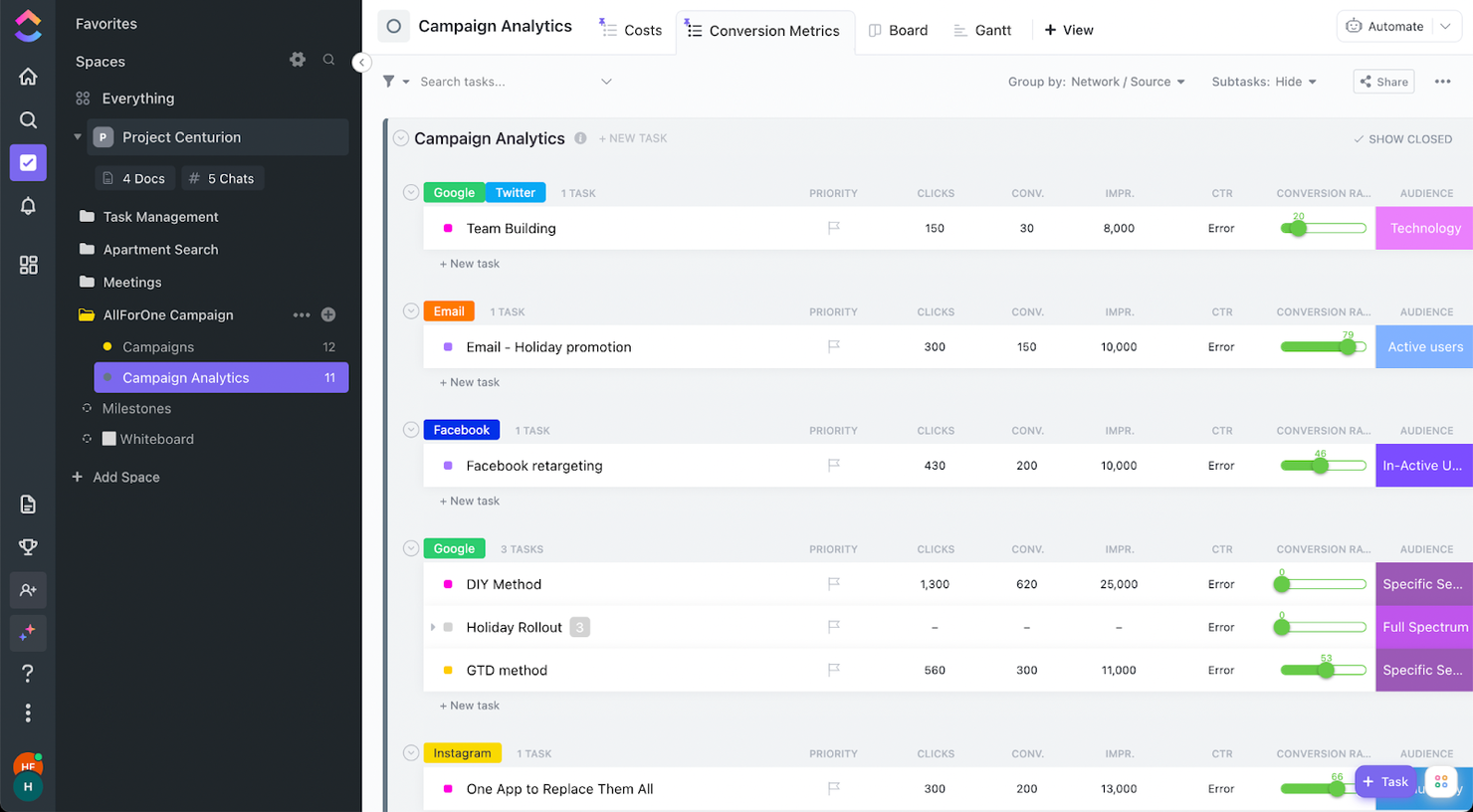
ClickUp is a powerful tool that will keep your agency projects running smoothly. It is customizable in almost every way and can help with project and resource management. I want to highlight its proofing and tracking features.
Why I Picked ClickUp: Proofing is a space for your team to collaborate on a digital asset and add comments, tag members, and attach screen-sharing videos to show people exactly what you want to convey. Now, let's talk about tracking. Tracking can happen directly in your list, as seen in the screenshot above. All of these tasks have a table created within them and feed the information you see. This way, you can see your conversion rate, clicks, etcetera in one quick glance.
ClickUp Standout Features & Integrations
Features include task scheduling/tracking, project management, resource management, budgeting, contact management, data visualizations, employee database, expense tracking, file sharing, third-party plugins, collaboration support, timesheets, roadmapping, chat, customer management, email integration, feedback management, and process reporting.
Integrations include native integrations with Slack, Google Workspace, Dropbox, and many more tools, as well as over 1,000+ integrations through Zapier (may incur additional costs).
New Product Updates from ClickUp
ClickUp Adds Meetings Hub, Super Agent Templates, and ZoomInfo Integration
ClickUp adds a searchable Meetings Hub, new ways to clone and template Super Agents, and a ZoomInfo integration through the App Center. These updates improve meeting retrieval, agent reuse, and access to sales intelligence. For more information, visit ClickUp’s official site.
Nifty
Best for issues & changes management

Nifty puts your agency’s best on display by creating timeline clarity while managing files, copy, communications, and feedback. Combine your daily team collaboration with your client delivery by selecting which Tasks and Milestones are visible to your Guest. Cross-project overviews give portfolio clarity as your project milestone timelines are updated when corresponding tasks are completed.
Why I Picked Nifty: Nifty boast automated project status reporting based on task completion, built-in Google Docs, Sheets, and Presentations to integrate into your workflow as well as a time tracker to track time across members, tasks, and projects. Nifty also has a task list and Kanban view for added task management flexibility.
Nifty keeps your team and project stakeholders aligned as daily workflows update Milestone progress. Guests enjoy an immersive Nifty experience as they’re permitted to create and complete tasks to empower your client collaboration. This reduces the time spent hunting for transmissions or feedback across many communication channels.
Nifty Standout Features & Integrations
Features task management, resource management, collaboration, dashboards, reports, a mobile app, customizations, and third-party integrations.
Integrations include Github, Google Drive and Calendar, Microsoft Suite, Slack, and Zoom with native integrations and more than 1000 integrations are available through Zapier.

Best for creatives & design teams

Streamtime is a powerful agency management tool that allows you to create, plan, and manage projects while keeping your team in the loop. Streamtime’s interactive to-do screen can replace timesheets, making chasing timesheet completion a thing of the past. On the market since 2002, Streamtime has been recognized with a 2020 Webby award along with D&AD, AGDA Pinnacle, and Best Design Awards.
Why I Picked Streamtime: With flexible project planning, autmoated estimating and invoicing, innovative time tracking, slick scheduling, and intelligent reporting, Streamtime serves up all the functionality you need within a beautiful, intuitive interface. Design and advertising agencies across the globe have used Streamtime to improve visibility of business and client performance, as well as capitalize on robust scheduling views to improve capacity planning and resourcing.
Streamtime Standout Features & Integrations
Features include project management, budget tracking, collaboration, reporting, flexible workflows, mobile access, job costing, invoicing, asset management, and third-party integrations.
Integrations include Xero, Quickbooks, PayPal, Stripe, Google apps, Microsoft Office, Trello, HubSpot, Salesforce, Gmail, Microsoft Outlook, Dropbox, Google Drive, and other tools.

Teamwork.com
best for enabling client collaboration

Teamwork is a flexible advertising agency management software that helps agencies become more productive and profitable. It enables agencies to manage high volumes of client projects from start to finish. Teamwork allows you to build flexible, custom workflows and gives you one central place to visualize your team and client projects.
Teamwork offers a number of tools and features to help agencies manage their work. With the Workload feature, you can get a complete picture of your team’s capacity and manage resources and keep your team on track. There's built-in time-tracking on Teamwork to log hours spent working on tasks and track billable hours. Profitability reports allow you to track financial performance by project or team member and compare it against the budget for that client.
Something especially useful about this agency software is that you can add clients as collaborators for free so they can communicate with your team, leave comments in context, review assets and get visibility on project progress.
Teamwork integrates easily with other tools including Gmail, Harvest, Hubspot, QuickBooks, Slack, Dropbox and more.
Teamwork costs from $10/user/month. They also offer a 30-day free trial.
Annen programvare for reklamebyråer
Her er en liste over programvare som ikke kom med på topplisten, men som er verdt å vurdere.
- Bonsai Agency Software
For managing the entire advertising agency process
- Admation
For proofing & approvals processes
- FunctionFox
For creative teams & agencies
- Parallax
For proactive resource planning
- Intervals
Reporting features for time & expenses
- Function Point
For identifying task dependencies in agency projects
- Ravetree
Agency software for real-time client portals
- Workamajig Platinum
Advertising agency software for integrations
- SegMetrics
For campaign tracking
- Mosaic
Advertising agency software for visualizing workload and staffing projects
- Olavana
For posting & reviewing HTML banner ads
- Copper
Advertising agency software CRM capabilities
- Hubstaff
For hybrid/remote teams
- Hive
For communication & collaboration tools
- Accelo
For tracking one-time projects and recurring work
- VOGSY
Advertising agency software for Google Workspace users


How I Evaluate Advertising Agency Software
I split my evaluation into two layers: a baseline every agency PM tool must clear—campaign tracking, billable time, client proofing—and the differentiators that separate the best.
Core Functionality (Table Stakes For This List)
When I'm selecting tools for my list, I rank each one on a scale from 0 (does not offer the functionality) to 5 (excels in this area) for each core functionality listed below. Then, I calculate the tool's total score into a percentage. Each tool needs to achieve a minimum total score of 65% to be considered for inclusion.
- Campaign Project Management: I look for tools that let you spin up multi-phase campaign projects with task dependencies, milestones, and timeline views so a rebrand launch or seasonal ad push stays on track.
- Resource & Capacity Planning: Agencies juggle overlapping client deadlines constantly, so I check whether a tool shows real-time workload views and lets you reassign staff when a pitch deck suddenly takes priority.
- Time Tracking & Budget Controls: Every billable hour matters at an agency. I evaluate whether time tracking ties directly to client projects with budget thresholds that flag overruns before they eat into margins.
- Creative Proofing & Approvals: I look for native markup and annotation tools that support multiple file types, version comparison, and structured approval routing—so a client review cycle on video or display ads doesn't live in email threads.
- Client & Account Management: Keeping client work organized is table stakes. I check for account-level hierarchies that group projects, briefs, and contacts under each client for easy navigation and reporting.
- Agency Profitability Reporting: I evaluate whether a tool offers project-level profitability, utilization rates, and budget burn dashboards that help operations leads answer "are we making money on this account?" without exporting to a spreadsheet.
Once I have a list of tools that meet this criteria, I consider what sets each platform apart.
Differentiating Factors (What Sets Vendors Apart)
Here's how I compare and contrast different vendors:
Standout Features
A built-in DAM makes a real difference when your team reuses logos, templates, and approved assets across dozens of client accounts—no more digging through shared drives. I also look for creative brief intake tools that route structured requests straight into project workflows, cutting out the back-and-forth that slows down kickoffs. White-label client portals are another feature I value, since they let you share status updates and collect approvals under your agency's branding instead of exposing a generic tool interface.
Beyond Features
Integration coverage matters a lot—I check whether a platform connects to Adobe Creative Cloud, Slack, and accounting tools like QuickBooks or Xero, since agencies rely on that data flow daily. Pricing structure is equally important. Agencies scale up with freelancers and scale down between pitches, so I evaluate whether licensing accommodates fluctuating headcount without penalizing you for guest reviewers or client seats. I also consider onboarding support, especially whether the vendor offers agency-specific templates and migration help to shorten time to value.
Slik velger du programvare for reklamebyråer
Det er lett å gå seg vill i lange funksjonslister og kompliserte prismodeller. For å hjelpe deg med å holde fokus mens du går gjennom den unike prosessen med å velge programvare, får du her en sjekkliste over faktorer du bør ha i mente:
| Faktor | Hva du bør vurdere |
|---|---|
| Skalerbarhet | Kan programvaren vokse sammen med byrået ditt? Ta hensyn til fremtidig kundemengde og utvidelse av teamet. Se etter verktøy som håndterer økte datamengder og brukerbehov. |
| Integrasjoner | Fungerer den med verktøyene du bruker i dag? Kontroller kompatibiliteten med CRM-, e-post- og analyseplattformer som teamet allerede bruker. |
| Tilpasningsmuligheter | Kan du tilpasse den til arbeidsflytene dine? Vurder mulighetene for å justere dashbord, rapporter og brukerinnstillinger slik at de passer byråets behov. |
| Brukervennlighet | Vil teamet ditt ta den i bruk raskt? Se etter enkle grensesnitt og lett navigering. Unngå verktøy som krever omfattende opplæring for å brukes effektivt. |
| Implementering og introduksjon | Hvor lang tid tar det å komme i gang? Ta hensyn til tiden det tar å sette opp løsningen og lære opp teamet. Kontroller om det finnes tilgjengelige ressurser som veiledninger og brukerstøtte. |
| Kostnad | Passer den inn i budsjettet ditt? Sammenlign prisplaner og skjulte gebyrer. Se etter god verdi i form av funksjoner og tilbudt brukerstøtte. |
| Sikkerhetstiltak | Er kundenes data beskyttet? Kontroller krypteringsstandarder og overholdelse av personvernregelverket. |
| Tilgjengelig brukerstøtte | Er hjelp lett tilgjengelig? Se etter brukerstøtte døgnet rundt og flere kontaktalternativer. Vurder leverandørens omdømme når det gjelder å løse problemer raskt. |
Hva er programvare for reklamebyråer?
Programvare for reklamebyråer er et verktøy som er utviklet for å hjelpe byråer med å administrere kampanjer, kundekommunikasjon og prosjektarbeidsflyter. Fagpersoner som prosjektledere, kundeansvarlige og kreative team bruker disse verktøyene for å forbedre effektiviteten og samarbeidet. Funksjoner for oppgavehåndtering, budsjettoppfølging og analyse bidrar til å organisere prosjekter og ta datadrevne beslutninger. Alt i alt gjør disse verktøyene det enklere å håndtere komplekse reklameprosjekter og øker teamets produktivitet.
Funksjoner
Når du velger programvare for reklamebyråer, bør du se etter følgende viktige funksjoner:
- Kampanjehåndtering: Hjelper med å planlegge, gjennomføre og overvåke reklamekampanjer fra start til slutt, slik at leveranser skjer i tide og er i tråd med kundens mål.
- Klientsamarbeid: Tilrettelegger for kommunikasjon og dokumentdeling med klienter, noe som forbedrer åpenheten og relasjonsbyggingen.
- Rapportering og analyse: Gir innsikt i kampanjeresultater, slik at du kan ta datadrevne beslutninger og optimalisere kampanjene.
- Budsjettoppfølging: Overvåker utgifter og beregner fremtidige økonomiske behov, slik at byråer kan holde seg innenfor budsjettet og administrere ressursene effektivt.
- Oppgaveplanlegging: Organiserer oppgaver og tidsfrister, slik at teammedlemmene kjenner ansvarsområdene sine og overholder prosjektets tidsplaner.
- Integrasjoner: Kobler seg til eksisterende verktøy som CRM- og e-postplattformer, skaper en samlet arbeidsflyt og reduserer manuell dataregistrering.
- Tilpassbare dashbord: Gjør det mulig for brukere å tilpasse arbeidsområdet for rask tilgang til den mest relevante informasjonen og de viktigste måleverdiene.
- Sikkerhetstiltak: Beskytter sensitive kundedata med kryptering og overholdelse av personvernregelverket.
- Brukervennlig grensesnitt: Sikrer enkel bruk med intuitiv navigering, noe som oppmuntrer til bruk og reduserer opplæringstiden.
- Tilgjengelig brukerstøtte: Tilbyr pålitelig kundestøtte for å løse problemer raskt og holde prosjektene på rett spor.
Fordeler
Implementering av programvare for reklamebyråer gir flere fordeler for teamet og virksomheten din. Her er noen av fordelene du kan se frem til:
- Bedre organisering: Med oppgaveplanlegging og kampanjehåndtering kan teamet holde oversikt over tidsfrister og prosjektdetaljer, noe som reduserer kaos.
- Bedre samarbeid: Funksjoner for klientsamarbeid gjør det enklere å dele oppdateringer og tilbakemeldinger, noe som fremmer bedre relasjoner og kommunikasjon.
- Datadrevne beslutninger: Rapportering og analyse gir deg innsikt i resultatene, slik at du kan ta velinformerte valg og optimalisere kampanjene.
- Budsjettkontroll: Budsjettoppfølging holder utgiftene under kontroll, slik at prosjektene holder seg innenfor de økonomiske rammene og ressursene brukes på en fornuftig måte.
- Økt produktivitet: Et brukervennlig grensesnitt og tilpassbare dashbord betyr mindre tid brukt på navigering og mer tid på meningsfylt arbeid.
- Integrerte arbeidsflyter: Integrasjoner med eksisterende verktøy sikrer en smidig dataflyt, reduserer manuell registrering og minimerer risikoen for feil.
- Datasikkerhet: Sikkerhetstiltak beskytter kundeinformasjonen, gir trygghet og opprettholder tilliten.
Kostnader & priser
Valg av programvare for reklamebyråer krever en forståelse av de ulike prismodellene og abonnementene som er tilgjengelige. Kostnadene varierer basert på funksjoner, teamstørrelse, tillegg og mer. Tabellen nedenfor oppsummerer vanlige abonnementer, gjennomsnittsprisene deres og typiske funksjoner som er inkludert i programvareløsninger for reklamebyråer:
Sammenligningstabell for programvare for reklamebyråer
| Abonnementstype | Gjennomsnittspris | Vanlige funksjoner |
|---|---|---|
| Gratisabonnement | $0 | Grunnleggende oppgavehåndtering, begrenset brukertilgang og minimal lagringsplass. |
| Personlig abonnement | $10-$30/bruker/måned | Oppgavehåndtering, klientsamarbeid, grunnleggende rapportering og e-postintegrasjon. |
| Forretningsabonnement | $50-$100/bruker/måned | Avansert analyse, budsjettsporing, verktøy for teamsamarbeid og tilpassede dashbord. |
| Abonnement for store virksomheter | $150+/bruker/måned | Komplett funksjonssett, prioritert kundestøtte, ubegrenset antall brukere og avanserte sikkerhetsalternativer. |
Vanlige spørsmål om programvare for reklamebyråer
Finn svar på vanlige spørsmål som andre stiller om dette emnet.
Kan programvare for reklamebyråer hjelpe med fjernarbeid?
Ja, programvare for reklamebyråer inkluderer ofte samarbeidsverktøy som støtter fjernarbeid. Funksjoner som skylagring, oppdateringer i sanntid og kommunikasjonskanaler gjør det enklere for team å samarbeide fra ulike steder. Dette kan forbedre produktiviteten og sørge for at alle arbeider mot de samme prosjektmålene.
Hvordan sikrer jeg at dataene mine er trygge med programvare for reklamebyråer?
Velg programvare som tilbyr sterke sikkerhetstiltak, for eksempel kryptering og samsvar med personvernforordninger. Gå alltid gjennom leverandørens personvernerklæring og sikkerhetssertifiseringer. Det kan også være lurt å undersøke om de tilbyr regelmessige sikkerhetsoppdateringer og har et robust supportsystem på plass for eventuelle problemer.
Er det vanskelig å bytte til ny programvare for reklamebyråer?
Det kan være utfordrende å bytte, men mange leverandører tilbyr ressurser som kan hjelpe. Se etter verktøy som tilbyr støtte ved oppstart, for eksempel veiledninger og kundeservice. Du bør også planlegge datamigrering og opplæring av teamet for å sikre en smidig overgang. Vurder å starte med en prøveperiode for å teste kompatibiliteten.