

10 Best AI Agency Management System Reviewed in 2026

Best AI Agency Management System Shortlist


AI agency management tools help agencies stay on top of client work, project timelines, and internal operations by automating repetitive tasks, improving visibility, and streamlining collaboration. Whether you're juggling multiple clients, shifting priorities, or managing a hybrid team, the right AI-powered platform can bring structure to the chaos.
I’ve tested and reviewed leading AI agency management software to identify tools that actually support fast-moving teams. From project tracking and resource allocation to automated reporting and client communication, each tool in this guide is designed to help agencies deliver great work—faster and with fewer headaches.
Why Trust Our Software Recommendations
Our team has been testing and reviewing software since 2012. As project managers ourselves, we know how difficult—and important—it is to choose the right software.
For this guide, we evaluated tools using hands-on testing and independent research, scoring tools using our selection criteria. We also draw on insights from industry thought leaders and practicing project management experts.
Our reviews reflect our human editorial judgment, not a sales pitch.
Expert reviewers:
AI Agency Management System Comparison Table
This comparison table summarizes pricing details for my top AI agency management system selections:
| Tool | Best For | Trial Info | Price | ||
|---|---|---|---|---|---|
| 1 | Best for AI-driven decision-making | 14-day free trial | From $19.90/user/month (billed annually) | Website | |
| 2 | Best with real-time resource allocation insights | 14-day free trial + free demo available | From $10/user/month (billed annually) | Website | |
| 3 | Best for workflow tracking across client projects | Free demo available | Pricing upon request | Website | |
| 4 | Best for AI-powered agency management | Free demo available | Pricing upon request | Website | |
| 5 | Best for onboarding projects | 14-day free trial + free demo available | From $19/user/month (billed annually) | Website | |
| 6 | Best for process automation | 14-day free trial | From $40/user/month (billed annually) | Website | |
| 7 | Best for CRM integration | 30-day free trial | From $25/user/month | Website | |
| 8 | Best for agency profitability | 14-day free trial | From $10/user/month (billed annually) | Website | |
| 9 | Best for insurance industry | Free demo available | Pricing upon request | Website | |
| 10 | Best for all-in-one business suite | 14-day free trial + free demo available | From $19.90/user/month (billed annually) | Website |


Best AI Agency Management System Reviews
Below are my detailed summaries of the best AI agency management system that made it onto my shortlist. My reviews offer a detailed look at the key features, pros & cons, integrations, and ideal use cases of each tool to help you find the best one for you.

Scoro
Best for AI-driven decision-making

Scoro is designed for teams looking to elevate their agency management with AI-driven insights and automation. It caters to businesses needing project tracking, resource allocation, and financial oversight. By addressing the complexities of AI integration, Scoro appeals to those seeking efficiency and agility in their operations.
Why I Picked Scoro
I picked Scoro for its integration of AI capabilities that enhance decision-making and operational efficiency. The AI engine, ELI, stands out by interpreting complex business data and providing actionable insights. Additionally, Scoro's advanced quoting and resource planning features support precise financial management and resource allocation.
Scoro Key Features
In addition to its AI-powered insights, I also found several features that enhance its functionality:
- Time Tracking: Allows you to monitor billable and non-billable hours, ensuring accurate billing and resource allocation.
- Reporting and Dashboards: Provides real-time visibility into project progress and financial health, aiding in informed decision-making.
- Invoicing: Automates billing processes, reducing manual entry and errors while ensuring timely payments.
- Collaboration Tools: Facilitates seamless communication within teams, keeping everyone aligned and informed.
Scoro Integrations
Integrations include Google Calendar, Microsoft Exchange, Xero, QuickBooks, Sage Intacct, Exact Online, Expensify, Stripe, HubSpot, and Jira.
Pros and Cons
Pros:
- Strong financial management tools
- Advanced resource planning capabilities
- AI powered business insights
Cons:
- Steep learning curve initially
- Higher pricing for small teams
New Product Updates from Scoro

Scoro Adds Time Mobile App and ELI Improvements
Scoro adds the Scoro Time mobile app for iOS/Android to track time anywhere and expands ELI with attachments, smarter filtering, and trigger-based actions. For more information, visit Scoro's official site.

Best with real-time resource allocation insights
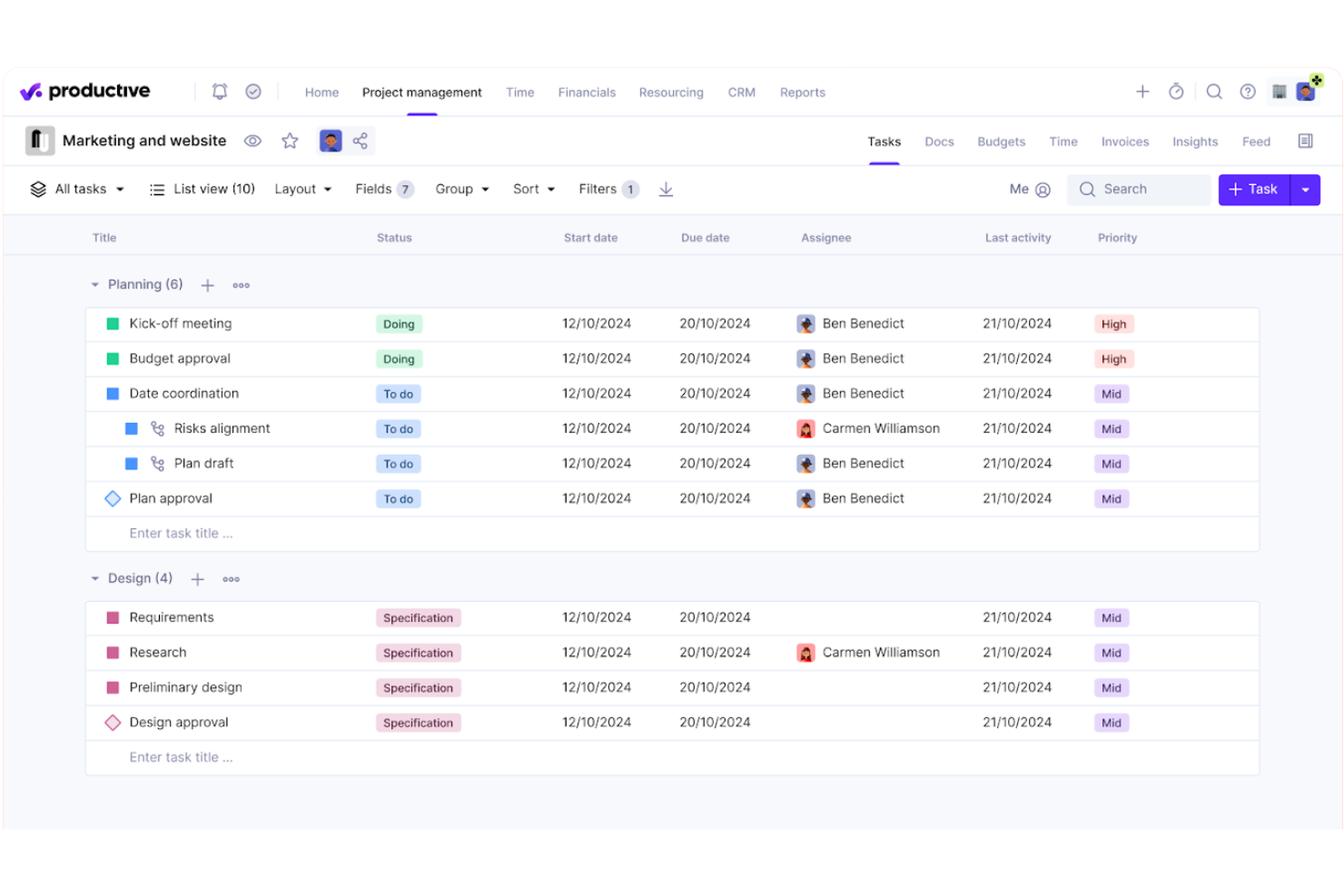
Productive is a professional services automation platform built for agencies that combines project management, resource planning, time tracking, and financial oversight—including budgeting, invoicing, and profitability reporting—in a single system.
Who Is Productive Best For?
Productive is a strong fit for digital agencies and consultancies that need to manage people, projects, and finances without stitching together multiple tools.
Why I Picked Productive
Productive earns its spot on my shortlist because of how clearly it surfaces resource data across an active portfolio. The resource planning view shows team availability, workload, and scheduled time off together, so I can catch allocation gaps before they become delivery problems. I also like the AI Reporting layer, which pulls margin and cost data instantly, and the Scenario Builder for modelling capacity before committing to new work.
Productive Key Features
- AI Assistant: Lets you draft project specs, generate content, and summarize documents right inside the platform.
- Recurring budgets: Support setting up repeating budgets for retainers or long-term projects.
- HRIS and invoicing integrations: Connect to tools like BambooHR, Personio, QuickBooks, and Xero to sync financials and HR data.
- Customizable reporting: Build dashboards and reports using custom fields for detailed insights into agency operations.
Productive Integrations
Productive offers native integrations with Slack, QuickBooks, HubSpot, Google Calendar, Xero, Jira, BambooHR, Personio, CharlieHR, BreatheHR, and Sage. An API is available for custom integrations.
Pros and Cons
Pros:
- Scenario modeling for resource planning
- Built-in AI assistant for automations
- Real-time insights into project profitability
Cons:
- Some features locked behind higher plans
- Report customization requires advanced setup
New Product Updates from Productive
Productive Adds Voice Dictation, Slack Connector, Proposals, and Overtime
Productive adds voice dictation, a Slack Connector, proposal controls, and overtime tracking. These updates support faster AI interactions, client proposals, and time management. For more information, visit Productive’s official site.

Accelo
Best for workflow tracking across client projects

Accelo is a PSA platform that uses AI to connect project management, resource planning, time tracking, financial reporting, and client billing for agencies managing multiple engagements at once.
Who Is Accelo Best For?
Accelo is a strong fit for mid-size agencies and professional services firms managing multiple client engagements simultaneously across project, retainer, and support work.
Why I Picked Accelo
Accelo is one of my top picks because I love how it connects every stage of client work in one place, from the moment a quote is approved through to the final invoice. My team uses Accelo to track project milestones, dependencies, and scope in real time, and the AI surfaces project risks before they become delivery problems. I also rely on the scope creep tracking to catch out-of-scope work early and log change orders before unplanned hours quietly eat into margins.
Accelo Key Features
- AI-assisted resourcing: Assign team members to project tasks based on skill, availability, and workload using AI-powered recommendations.
- Automated timesheets: Accelo captures time spent on tasks and emails automatically, reducing manual time entry across active projects.
- Retainer tracking: Monitor retainer utilization and performance across recurring client accounts alongside one-time project work.
- Project templates: Launch new client projects from pre-built templates with auto-populated tasks, timelines, and role assignments.
Accelo Integrations
Accelo offers 30+ native integrations, including Salesforce, HubSpot, Jira, Slack, Google Workspace, Microsoft 365, QuickBooks, Xero, Sage Intacct, and GitHub. It also connects with Zapier and provides a RESTful API for custom integrations.
Pros and Cons
Pros:
- Automated time capture logs billable hours
- AI flags scope creep and margin risk
- Connects quote-to-cash workflow in one platform
Cons:
- Implementation requires weeks of guided onboarding
- Mobile app lacks full desktop functionality
New Product Updates from Accelo
Accelo Adds Quote Designer and Pipeline Management
Accelo adds Quote Designer, enhanced pipeline views, and quote tracking with version history. This helps teams create proposals and manage opportunities from scoped work. For more information, visit Accelo’s official site.

Best for AI-powered agency management
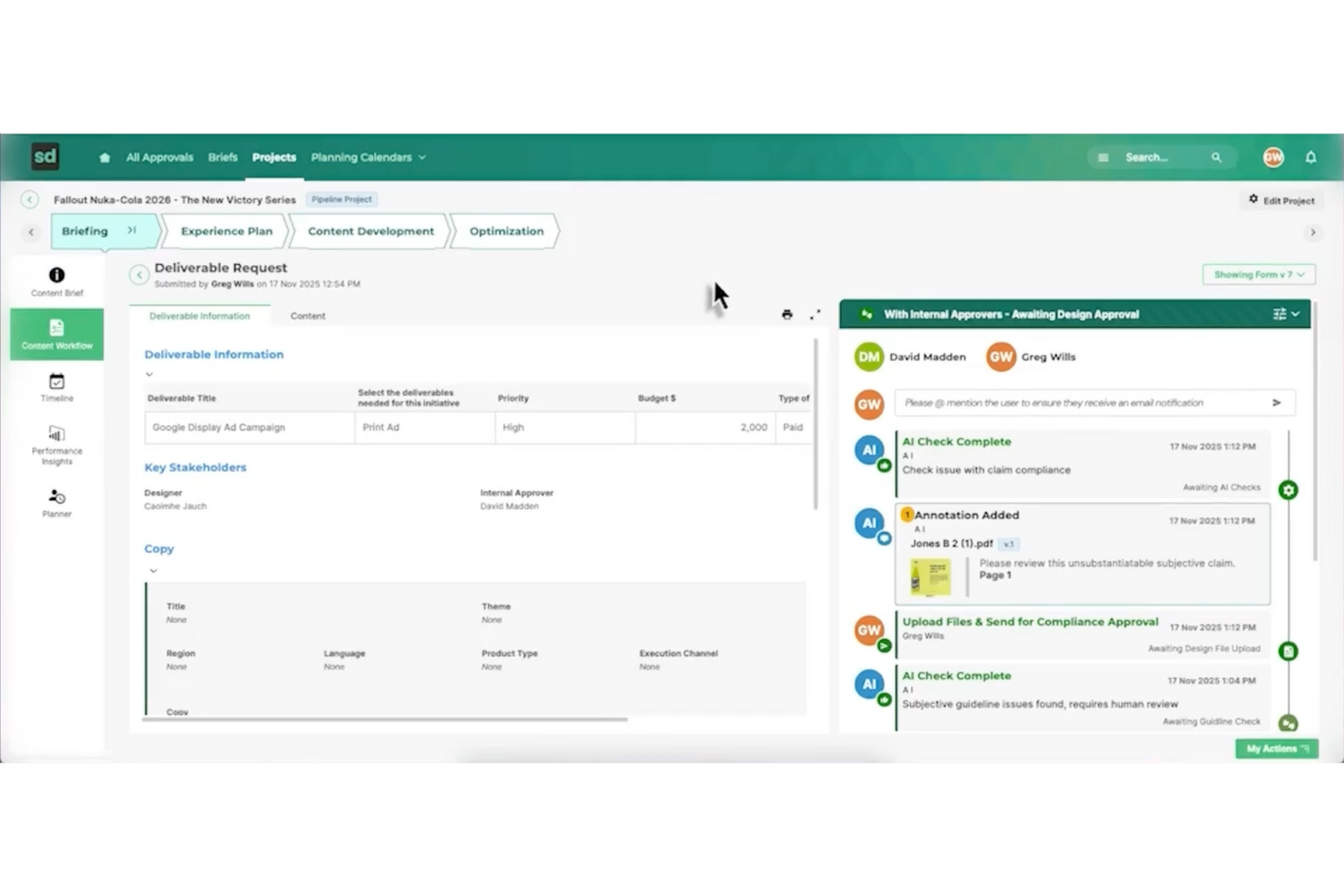
Screendragon is an AI agency management system built for marketing and creative operations that need AI-driven workflow automation. It offers a no-code platform that helps teams manage tasks, approvals, and project flows in one place. With real-time visibility into work progress, Screendragon supports better day-to-day coordination and more efficient project execution.
Why I Picked Screendragon
I picked Screendragon for its unique ability to seamlessly integrate AI-driven workflow automation with project and resource management. This system excels at automating complex workflows without programming knowledge, a significant advantage for teams aiming to improve efficiency. Additionally, its real-time insights and enterprise-grade security add functionality that directly addresses the needs of agencies managing multiple projects and teams. These features make Screendragon a compelling choice for anyone seeking a comprehensive AI agency management solution.
Screendragon Key Features
In addition to AI-driven workflow automation, Screendragon offers:
- Visual Workflow Builder: Allows you to create and customize workflows visually, simplifying the process of managing complex tasks.
- Dynamic Custom Forms: Enables your team to design forms that adapt to your specific operational needs, ensuring data collection is both relevant and efficient.
- Advanced Permission Controls: Provides robust security measures by allowing you to set detailed access permissions, safeguarding sensitive information.
- Proofing and Version Control: Facilitates creative workflows by enabling easy review and version tracking of creative content, ensuring consistency and quality.
Screendragon Integrations
Integrations include Adobe Creative Cloud, Slack, Microsoft Teams, SharePoint, Salesforce, JIRA, Workday, Oracle, SAP, and Google Workspace.
Pros and Cons
Pros:
- Project and resource management features help centralize work details
- Collaborative tools that improve team coordination and project visibility
- Flexible customization lets teams tailor workflows and project structures
Cons:
- Reporting and manual report creation can feel limited or complex
- The admin console and settings may be confusing for new users
New Product Updates from Screendragon
Screendragon Unveils New AI Hub
Screendragon introduced AI Hub, a new capability that lets teams build and manage AI agents directly within workflows. The update helps marketing teams automate tasks, maintain governance controls, and scale AI-driven operations more efficiently. For more information, visit Screendragon's official site.
Best for onboarding projects
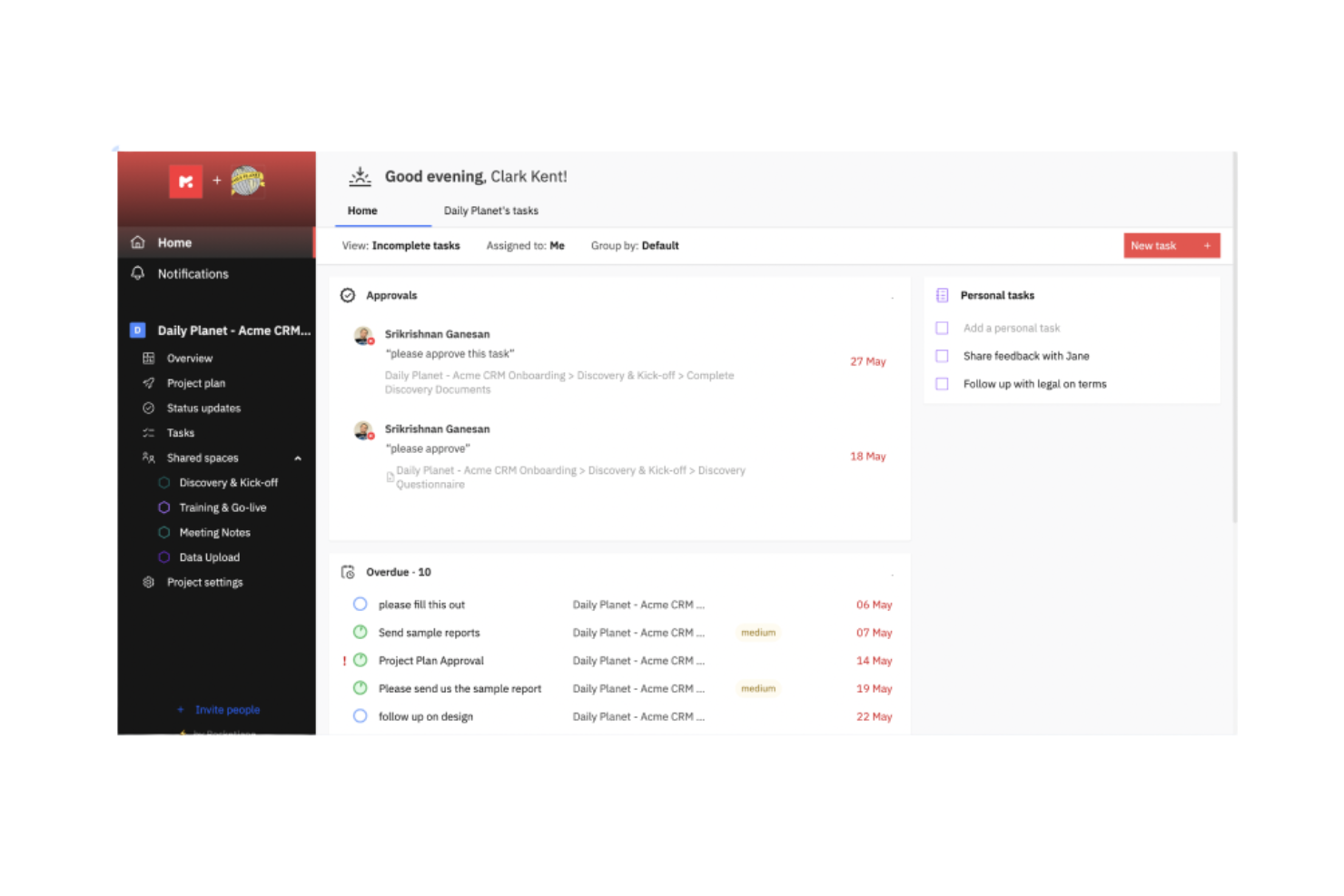
Rocketlane is a project management and customer onboarding software designed for businesses that want to enhance their project delivery and client interactions. It serves professional services teams by providing tools for efficient project tracking and customer collaboration.
Why I picked Rocketlane: Rocketlane specializes in onboarding projects, offering features like collaborative project planning and customer-facing dashboards. Its standout function is the AI-driven client updates, which keep your clients informed without manual effort. The platform also provides real-time financial insights to help your team manage resources effectively. The ability to automate time logging and integrate project data ensures that your onboarding processes are both efficient and transparent.
Standout Features & Integrations:
Features include AI-driven automations that simplify task allocation and resource planning. Time tracking is integrated to provide real-time insights into project profitability. Additionally, the tool offers collaborative workspaces that enhance communication between your team and clients.
Integrations include Salesforce, HubSpot, Slack, Microsoft Teams, Google Workspace, Trello, Asana, QuickBooks, Jira, and Zoom.
Pros and Cons
Pros:
- Detailed reporting tools
- Efficient onboarding support
- Easy to navigate interface
Cons:
- Limited day view on the schedule
- Occasional lag with large data
New Product Updates from Rocketlane

Rocketlane Introduces Governance and Workforce Agents
Rocketlane introduces Governance Agents and Workforce Agents to automate delivery processes and recurring tasks. These updates help teams enforce rules and streamline project execution. For more information, visit Rocketlane’s official site.
 .
.
Creatio
Best for process automation
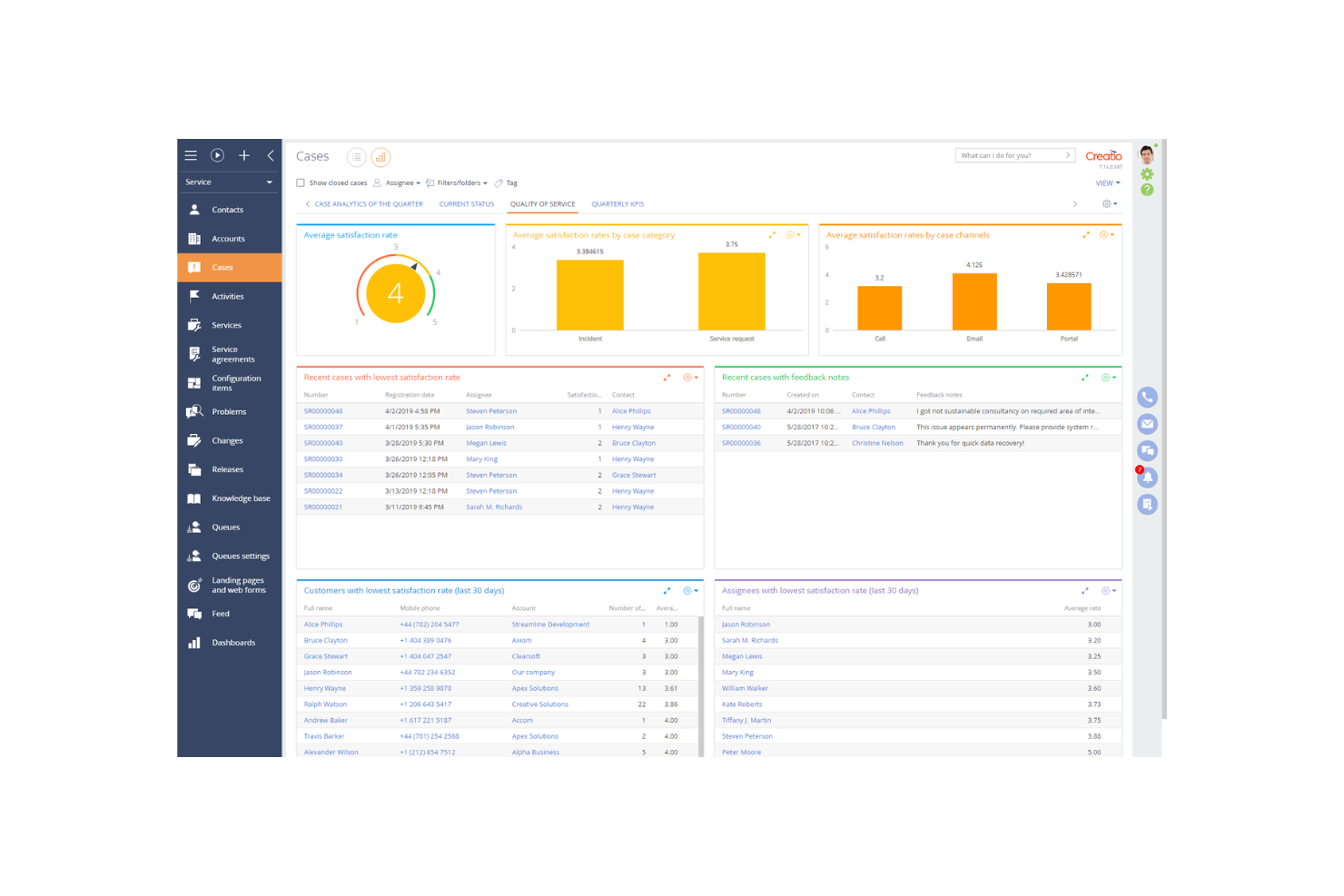
Creatio is a low-code platform designed for businesses looking to automate processes and enhance customer relationship management. It primarily serves mid-sized to large enterprises, offering tools for sales, marketing, and service automation.
Why I picked Creatio: Creatio excels in process automation, providing a platform that allows you to create workflows without extensive coding knowledge. The drag-and-drop interface simplifies the creation of custom processes. With its robust CRM capabilities, your team can manage customer interactions effectively. The platform's flexibility ensures it adapts to various business needs, making it a versatile choice for automation.
Standout Features & Integrations:
Features include the low-code process designer that simplifies workflow creation. The CRM tools offer a comprehensive view of customer interactions and data. Additionally, the marketing automation features help you manage campaigns and track results efficiently.
Integrations include Microsoft Outlook, Google Workspace, Mailchimp, Zapier, DocuSign, LinkedIn, Slack, QuickBooks, Facebook, and Twilio.
Pros and Cons
Pros:
- Flexible process automation
- Strong CRM capabilities
- Low-code platform for easy customization
Cons:
- Requires training for full utilization
- Complexity in initial setup

Best for CRM integration
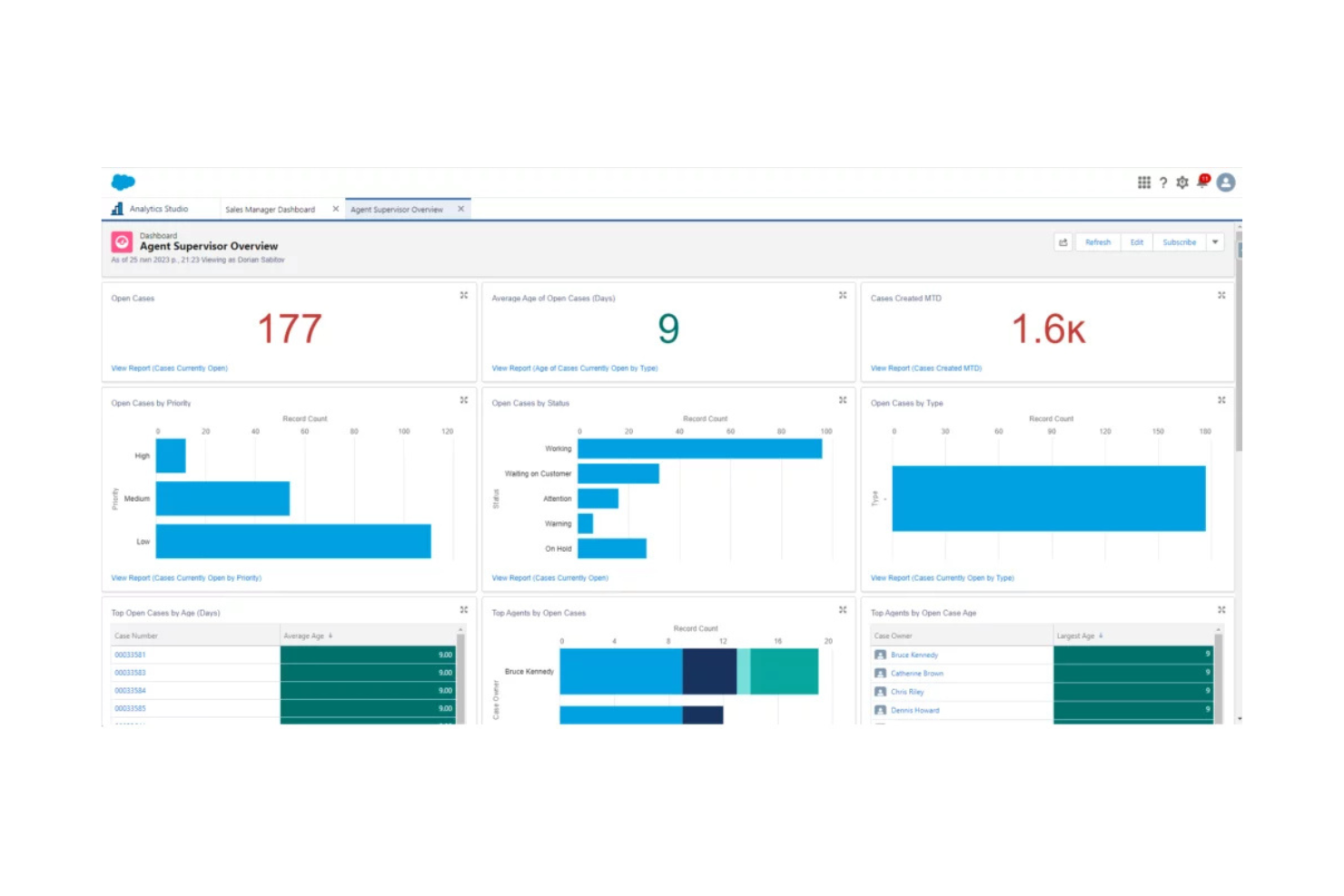
Salesforce is a cloud-based customer relationship management (CRM) platform used by businesses across various industries to manage customer interactions, sales, and data analytics. It helps companies improve customer service, automate sales processes, and enhance team collaboration.
Why I picked Salesforce: Salesforce excels in CRM integration, offering a platform that connects with numerous business tools to streamline your operations. The customizable dashboards give you insights into customer data and sales performance. With its automation capabilities, your team can handle repetitive tasks efficiently. The platform's scalability ensures it grows with your business, adapting to changing needs.
Standout Features & Integrations:
Features include customizable dashboards that let you track key metrics and performance indicators. The automation tools help manage repetitive tasks, freeing up your team for more strategic work. Additionally, the platform's scalability ensures it can grow with your business, adapting to your evolving needs.
Integrations include Mailchimp, QuickBooks, Slack, Dropbox, Google Workspace, Microsoft Outlook, LinkedIn Sales Navigator, DocuSign, Zoom, and HubSpot.
Pros and Cons
Pros:
- Extensive customization options
- Strong data analytics capabilities
- Highly scalable for growing businesses
Cons:
- Requires training for new users
- Can be complex to set up
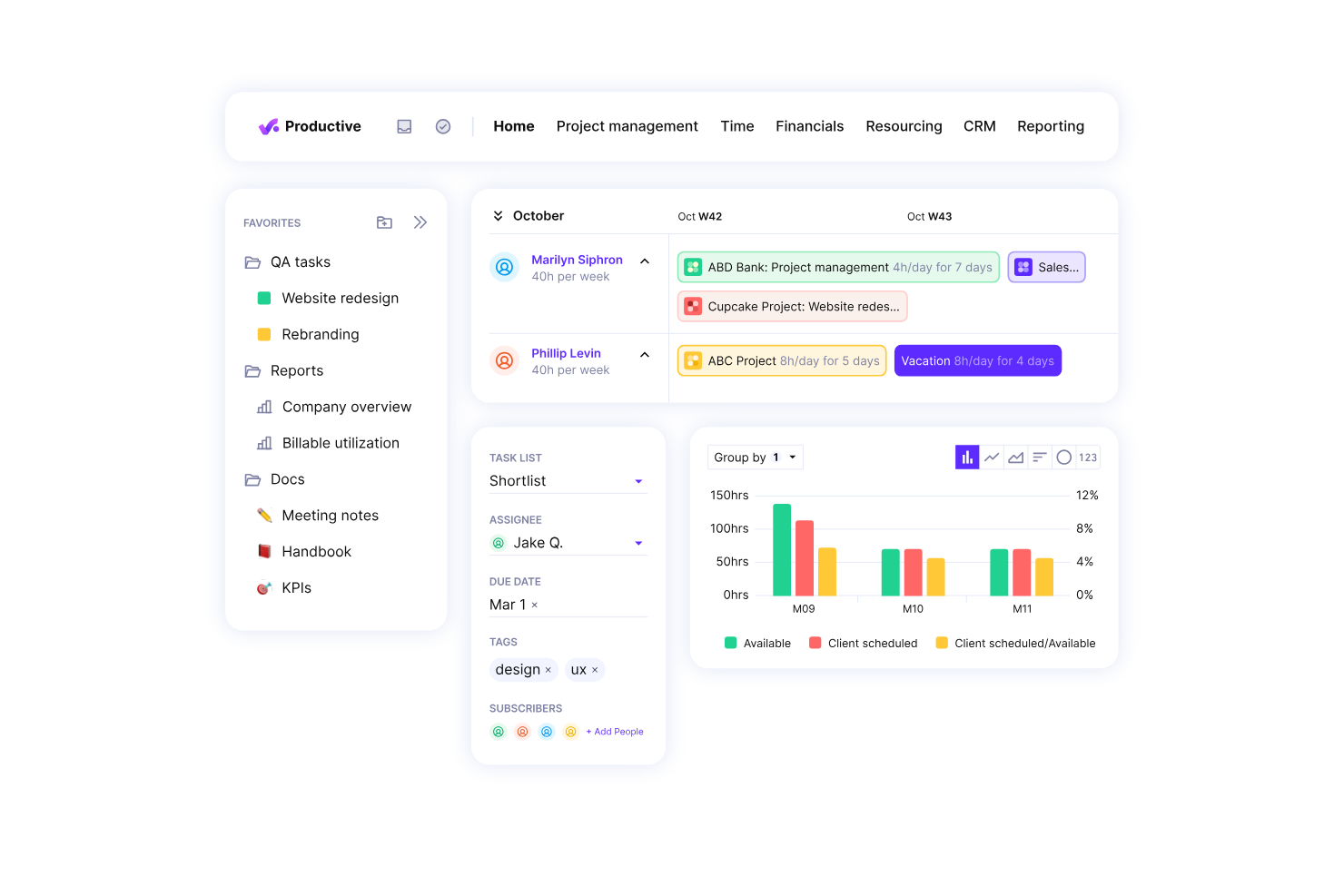
Productive.io is a professional services automation software designed for agencies and service businesses. It excels in resource planning, project management, and financial management, making it ideal for those focused on improving profitability.
Why I picked Productive.io: Productive.io is tailored for agencies aiming to boost profitability. It offers real-time profitability tracking, which helps your team make informed decisions quickly. Features like budgeting and invoicing are integrated, allowing you to handle financial aspects efficiently. The platform's growth forecasting tools ensure you can plan for future success without missing a beat.
Standout Features & Integrations:
Features include detailed project tracking that helps you monitor progress at every stage. The budgeting tools allow for precise financial planning, ensuring that your projects remain profitable. Additionally, the time tracking feature integrates seamlessly with your workflow to provide accurate billing.
Integrations include Xero, Slack, QuickBooks, Jira, Trello, Google Workspace, Microsoft Teams, Asana, HubSpot, and Zoom.
Pros and Cons
Pros:
- Effective resource planning
- Real-time profitability tracking
- Detailed financial insights
Cons:
- Complex setup for large teams
- May require training for new users


Applied Systems provides software solutions specifically designed for the insurance industry, offering tools for agency management, policy administration, and customer engagement. It serves insurance agencies and brokers by streamlining their operations and improving client interactions.
Why I picked Applied Systems: Applied Systems is tailored for the insurance industry with its comprehensive agency management capabilities. It offers policy management features that help your team handle client policies efficiently. The customer engagement tools ensure you maintain strong relationships with your clients. Its emphasis on industry-specific needs makes it a reliable choice for insurance professionals.
Standout Features & Integrations:
Features include automated policy management that simplifies handling client policies. The client communication tools enhance engagement by offering multiple channels for interaction. Additionally, the reporting feature provides insights into agency performance, helping you make informed decisions.
Integrations include Microsoft 365, Salesforce, DocuSign, QuickBooks, Vertafore, IBM, Oracle, Adobe Sign, Google Workspace, and Slack.
Pros and Cons
Pros:
- Strong client communication tools
- Efficient policy management
- Tailored for insurance agencies
Cons:
- Complex for new users
- Pricing details not transparent

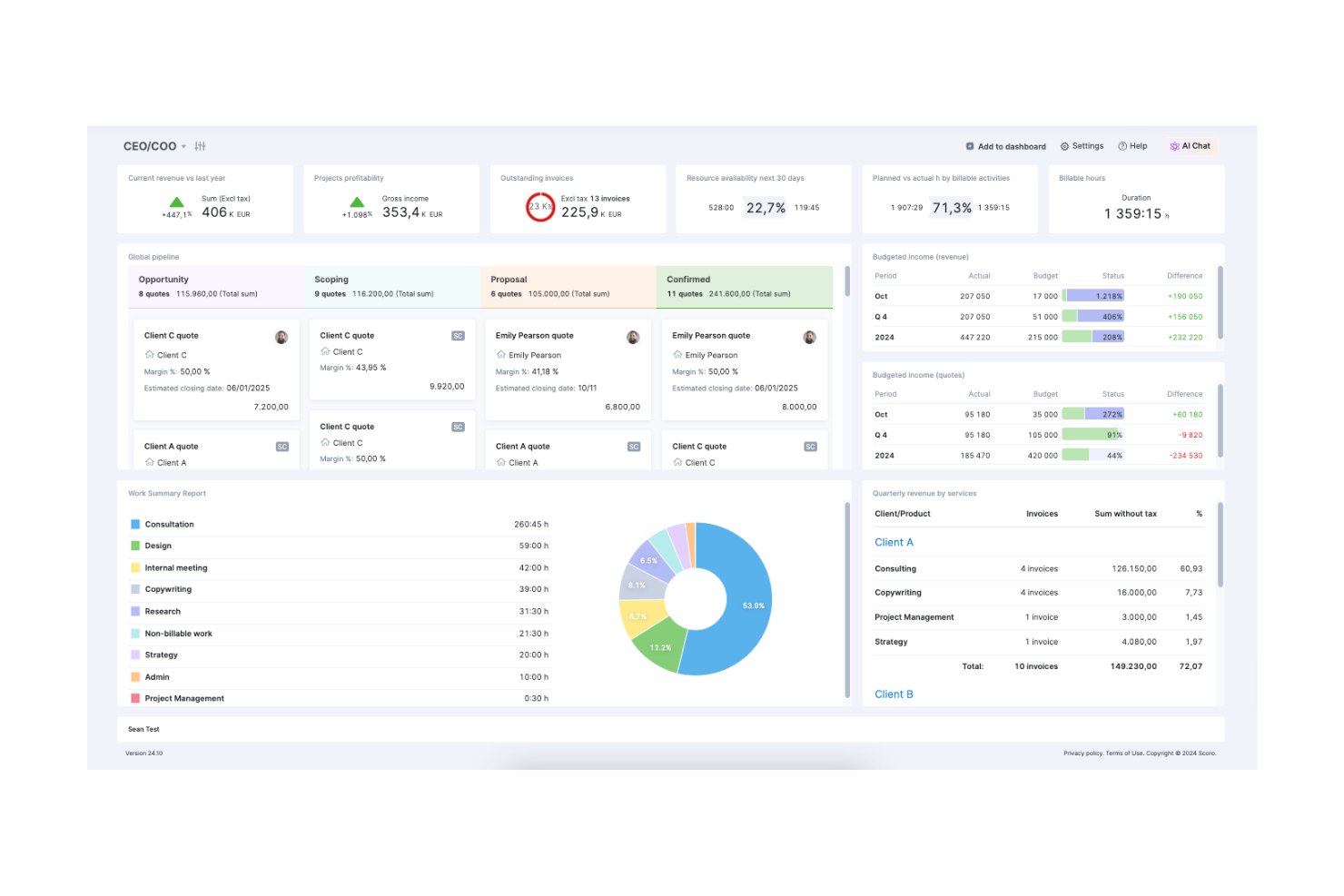
Scoro is an all-in-one business management software designed for small to medium-sized businesses. It handles project management, billing, and reporting, offering a comprehensive suite of tools to keep your operations running smoothly.
Why I picked Scoro: Scoro is ideal for businesses looking to have everything in one place. It combines project management with billing and CRM, ensuring you don't have to switch between multiple tools. The platform's dashboard provides an overview of your business, helping you track KPIs and financial metrics. With Scoro, your team can manage projects, finances, and customer relations seamlessly.
Standout Features & Integrations:
Features include a customizable dashboard that lets you track your key metrics at a glance. The time management tools help you allocate resources efficiently across projects. Additionally, Scoro offers financial management features that integrate with your project data for accurate billing.
Integrations include Xero, Slack, QuickBooks, Asana, Dropbox, Google Calendar, Mailchimp, HubSpot, Zapier, and Outlook.
Pros and Cons
Pros:
- Fast customer support response
- Customizable dashboard options
- Comprehensive project overview
Cons:
- Limited mobile app functionality
- Steep learning curve for new users
Other AI Agency Management Systems
Here are some additional AI agency management system options that didn’t make it onto my shortlist, but are still worth checking out:
- EZLynx
For insurance quoting
- Equisoft
For financial services
- monday.com
For team collaboration
- Attio
For contact management


How I Evaluate AI Agency Management Systems
Every tool on this list needs to deliver AI that actually moves the needle—automating client workflows, surfacing project risks, or forecasting capacity—not just slapping a chatbot on a dashboard. I split my evaluation into two layers: the core functionality a platform must have to qualify, and the differentiating factors that separate good options from great ones.
Core Functionality (Table Stakes For This List)
When I'm selecting tools for my list, I rank each one on a scale from 0 (does not offer the functionality) to 5 (excels in this area) for each core functionality listed below. Then, I calculate the tool's total score into a percentage. Each tool needs to achieve a minimum total score of 65% to be considered for inclusion.
- Agency Project Management: I look for multi-client workspace organization, milestone tracking, and dependency mapping that lets teams run concurrent engagements without cross-project confusion.
- AI Automation Engine: Each tool should automate real agency workflows like generating meeting notes, creating follow-up tasks, or drafting status updates rather than offering basic rule triggers.
- Resource & Capacity Management: I evaluate how well the platform tracks team utilization across active retainers and projects, including workload views that flag overallocation before it causes burnout.
- Time Tracking & Billing: The tool needs to connect billable hours to client invoicing, supporting common agency billing models like retainers, fixed-fee, and time-and-materials engagements.
- AI Forecasting & Insights: I check whether AI surfaces useful predictions around budget burn, delivery risk, or capacity shortfalls—not just dashboards that repackage data you already have.
- Client Collaboration Portal: Agencies need a client-facing layer for approvals, feedback, and reporting. I look for portals that reduce back-and-forth emails and keep stakeholders informed.
Once I have a list of tools that meet the criteria, I consider what sets each platform apart.
Differentiating Factors (What Sets Vendors Apart)
Here's how I compare and contrast different vendors:
Standout Features
Predictive risk alerts are a major differentiator. I look for tools that flag scope creep or timeline slippage early enough to adjust before a client escalation hits. Profitability intelligence matters just as much, especially platforms tracking margins per client or project in real time. I also evaluate whether a tool offers AI agent workflows that autonomously handle multi-step tasks like drafting weekly client reports from live project data.
Beyond Features
Integration ecosystems matter a lot for agencies. I check whether a platform connects natively with accounting tools like QuickBooks or Xero and creative tools like Figma, since broken sync between billing and project data creates real headaches. AI trust and data governance is another factor I weigh—agencies handle sensitive client work, so I look for clear policies on how AI models use that data. Pricing model alignment also deserves attention, particularly whether client or collaborator seats are included or billed separately.
How to Choose AI Agency Management System
It’s easy to get bogged down in long feature lists and complex pricing structures. To help you stay focused as you work through your unique software selection process, here’s a checklist of factors to keep in mind:
| Factor | What to Consider |
|---|---|
| Scalability | Can the tool grow with your agency? Consider if it can handle increased workloads and users without sacrificing performance. Look for options that offer scalable pricing plans. |
| Integrations | Does it integrate with the tools you already use? Evaluate the ease of connecting with existing platforms like CRMs, email, and project management tools. |
| Customizability | Can you tailor the software to fit your workflows? Check if it allows modifications to dashboards, reports, and processes to suit your agency’s needs. |
| Ease of Use | Is the interface intuitive for your team? A steep learning curve can slow down adoption. Test the software to ensure it’s user-friendly for all team members. |
| Implementation and Onboarding | How quickly can you get started? Consider the resources required for setup and training. Look for software with a straightforward onboarding process and available support. |
| Cost | Does it fit your budget? Compare the cost of ownership, including subscription fees, setup charges, and any hidden costs. Look for value rather than just low prices. |
| Security Safeguards | Does it protect your data? Evaluate the security measures in place, such as encryption and access controls, to ensure client and agency information stays safe. |
| Support Availability | Is help easily accessible? Check if the vendor offers 24/7 support, live chat, or dedicated account managers to assist when issues arise. |
What Is AI Agency Management System?
AI agency management system is a software solution designed to help agencies manage their projects, resources, and client interactions efficiently. These tools are generally used by project managers, team leaders, and agency executives to enhance productivity and collaboration.
Time tracking, task assignment, and client communication features help with managing workloads, meeting deadlines, and maintaining client satisfaction. Overall, these tools provide agencies with the ability to operate more effectively and deliver better results to their clients.
Features of AI Agency Management System
When selecting an AI agency management system, keep an eye out for the following key features:
- Project management: Helps organize and oversee projects from start to finish, ensuring tasks are completed on time.
- Time tracking: Monitors how time is spent on tasks, providing insights into productivity and helping with accurate billing.
- Task assignment: Allows for clear delegation of responsibilities, ensuring team members know what they need to do.
- Client communication: Facilitates interactions with clients, keeping them informed and engaged throughout the project lifecycle.
- Reporting and analytics: Offers insights into project performance and agency operations, aiding in data-driven decision-making.
- Customizability: Lets you tailor the software to fit your agency’s specific workflows and needs, enhancing usability.
- Integrations: Connects with other tools your agency uses, streamlining operations and centralizing data.
- Security safeguards: Protect sensitive information with encryption and access controls, ensuring data privacy.
- Automation: Reduces manual tasks by automating repetitive processes, freeing up time for strategic work.
Benefits of AI Agency Management System
Implementing an AI agency management system provides several benefits for your team and your business. Here are a few you can look forward to:
- Improved efficiency: Automation features reduce manual tasks, allowing your team to focus on strategic work.
- Better collaboration: Task assignment and client communication tools help your team work together and keep clients in the loop.
- Enhanced decision-making: Reporting and analytics provide insights into performance, helping you make informed choices.
- Increased productivity: Time tracking helps identify bottlenecks, ensuring resources are used effectively.
- Custom fit: Customizability allows you to tailor the system to your agency’s needs, making it easier to use.
- Centralized operations: Integrations connect your existing tools, streamlining processes and keeping data in one place.
Costs and Pricing of AI Agency Management System
Selecting an AI agency management system requires an understanding of the various pricing models and plans available. Costs vary based on features, team size, add-ons, and more. The table below summarizes common plans, their average prices, and typical features included in AI agency management system solutions:
Plan Comparison Table for AI Agency Management System
| Plan Type | Average Price | Common Features |
|---|---|---|
| Free Plan | $0 | Basic project management, task assignment, and limited integrations. |
| Personal Plan | $5-$25/user/month | Project management, time tracking, task assignment, and basic reporting. |
| Business Plan | $30-$60/user/month | Advanced reporting, client communication, integrations, and customization options. |
| Enterprise Plan | $75-$150/user/month | Full customization, premium support, advanced security features, and comprehensive analytics. |
AI Agency Management System FAQs
Here are some answers to common questions about AI agency management system:
How do I integrate an AI agency management system with existing tools?
Integrating an AI agency management system with your current tools involves checking compatibility with your software ecosystem. Most systems offer APIs or built-in integrations with popular tools like CRMs, email platforms, and project management software. Ensure to evaluate the ease of integration and any technical support provided by the vendor.
What should I consider regarding data security?
Data security is crucial when choosing an AI agency management system. Look for systems with robust encryption, access controls, and compliance with data protection regulations like GDPR. Ask about the vendor’s security protocols and how they handle data breaches to ensure your client information remains safe.
Can AI agency management systems handle remote teams?
Yes, many AI agency management systems support remote work by offering cloud-based access, mobile apps, and collaboration features. These tools help keep your team connected, allowing them to manage projects, communicate, and access data from anywhere. Check for features that enhance remote collaboration and connectivity.
How do AI agency management systems improve client communication?
These systems enhance client communication by centralizing contact information, tracking interactions, and offering communication tools like email templates and chat. This helps your team maintain consistent contact with clients, ensuring timely updates and responses, which improves client satisfaction and retention.
What level of customization is possible?
The level of customization varies between systems, but most offer options for tailoring dashboards, workflows, and reports. Assess how easy it is to customize the system to fit your agency’s specific needs. Some systems may require technical assistance for more advanced customizations, so consider your team’s capabilities.
What are the common challenges during implementation?
Common challenges include data migration, user training, and adapting workflows to the new system. To mitigate these, ensure your vendor provides comprehensive onboarding resources like tutorials, webinars, and support. Plan for a transition period where your team can acclimate to the new system without pressure.