

De 10 beste programmene for ressursstyring av ansatte vurdert i 2026

10 Beste programvare for ressursstyring av ansatte – kortliste


Med det store utvalget av programvare for ressursstyring av ansatte som finnes, kan det være en reell utfordring å velge riktig løsning. Du ønsker å administrere teamets ressurser effektivt og trenger et pålitelig verktøy til dette. Jeg forstår behovene dine, og jeg er her for å veilede deg gjennom beslutningsprosessen. Med utgangspunkt i min omfattende erfaring med ulike digitale produktivitetsverktøy er dette mine anbefalinger for den beste programvaren for ressursstyring av ansatte.
Hvorfor du kan stole på våre programvareanbefalinger
Teamet vårt har testet og anmeldt programvare siden 2012. Vi er selv prosjektledere, så vi vet hvor vanskelig og hvor viktig det er å velge riktig programvare.
I denne guiden har vi vurdert verktøyene gjennom praktisk testing og uavhengig research og gitt dem poeng ut fra våre utvelgelseskriterier. Vi bygger også på innsikt fra ledende eksperter i bransjen og erfarne prosjektledere.
Anmeldelsene våre bygger på vår egen redaksjonelle vurdering. De er ikke et salgsargument.
Ekspertanmeldere:
Sammenligningstabell for programvare for ressursstyring av ansatte
Denne sammenligningstabellen oppsummerer prisopplysningene for mine beste anbefalinger av programvare for ressursstyring av ansatte:
Score legend (out of 5)
- Excellent 4.5–5
- Good 4–4.4
- Average 3–3.9
- Below average 2–2.9
- Poor 1–1.9
| Tool | Starting Price | Website | |||||||
|---|---|---|---|---|---|---|---|---|---|
| Best for utilization management | 3.5 out of 5 | 2 | 3 | 4 | 4 | 4 | 4 | $17/user/month 14-day free trial | Book Demo |
| Best for tentative project planning | 3.7 out of 5 | 3 | 4 | 3 | 4 | 4 | 4 | $7/resource/month 30-day free trial available | Book Demo |
| Best for auto-populated schedules | 3.5 out of 5 | 3 | 3 | 4 | 4 | 3 | 4 | Pricing upon request Not available | Book Demo |
| Best for resource planning around client work | 3.5 out of 5 | 2 | 4 | 3 | 4 | 4 | 4 | Pricing upon request Free demo available | Website |
| Best for resourcing client-service teams | 3.7 out of 5 | 3 | 3 | 4 | 4 | 4 | 4 | $9.99/user/month Free plan + 14-day free trial + free demo available | Website |
| Best for matching skills to project roles | 3.7 out of 5 | 3 | 4 | 3 | 4 | 4 | 4 | Pricing upon request Free demo available | Website |
| Best for staffing within project workflows | 3.5 out of 5 | 3 | 4 | 4 | 3 | 3 | 4 | $9/user/month 30-day free trial + demo available | Book Demo |
| Best for weighing project demand and capacity | 3.2 out of 5 | 2 | 3 | 4 | 4 | 2 | 4 | $10/user/month 14-day free trial | Website |
| Best for matching skills across project teams | 3.3 out of 5 | 3 | 5 | 3 | 3 | 2 | 4 | €25/user/month 30-day free trial | Website |
| Best for Salesforce-native resource planning | 3.3 out of 5 | 3 | 3 | 2 | 4 | 4 | 4 | Pricing upon request Not available | Website |
Anmeldelser av den beste programvaren for ressursstyring av ansatte
Her er mine detaljerte vurderinger av hver programvare på denne listen, inkludert hva de gjør godt, og de beste bruksområdene for hver av dem.

Scoro
Best for utilization management
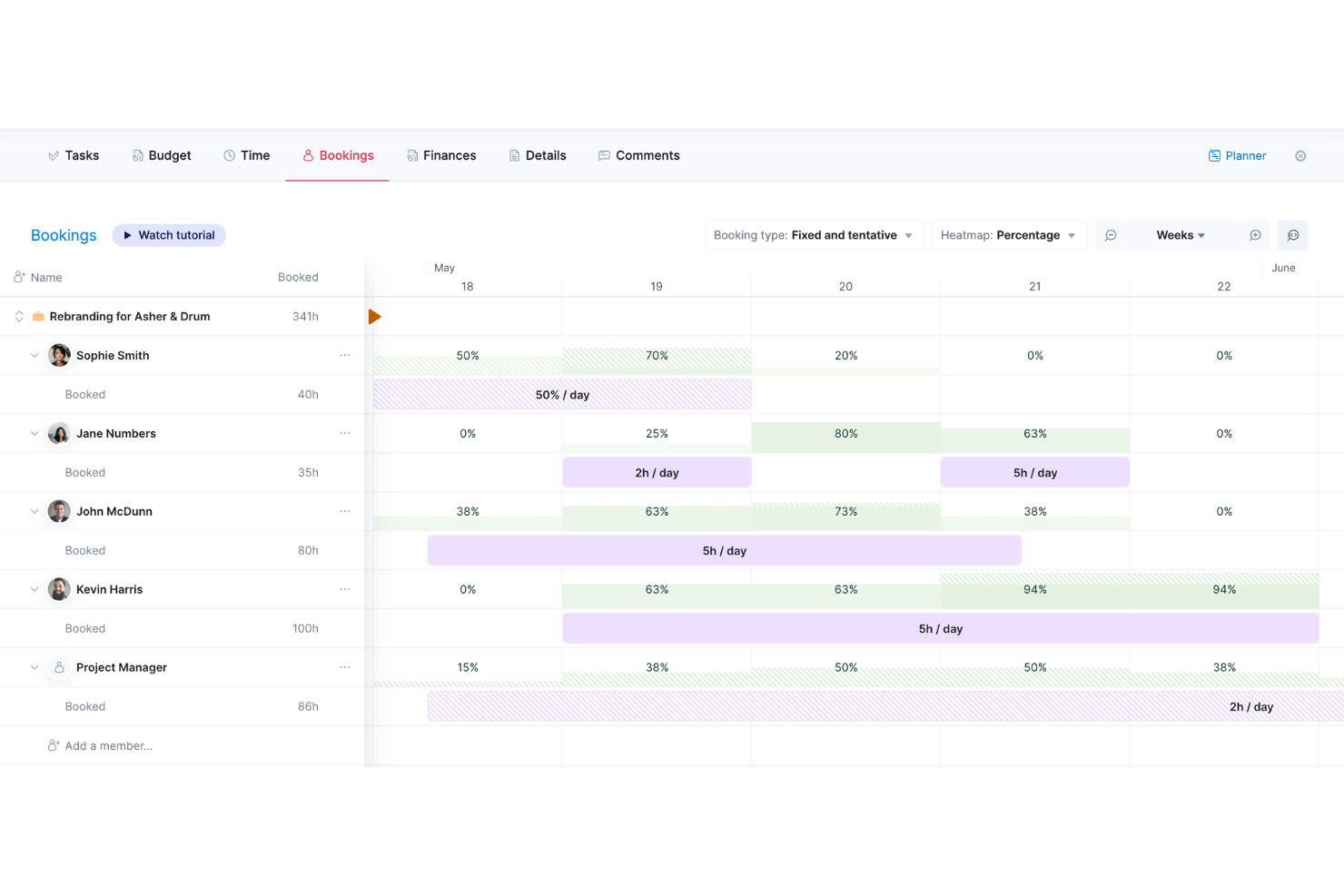
Scoro is a professional services automation platform that connects resource planning, capacity tracking, project delivery, billable time management, and financial reporting in one system.
Who Is Scoro Best For?
Scoro is a strong fit for project managers and operations leads at professional services firms who need resource planning, billable time tracking, and financial reporting in one connected system.
Why I Picked Scoro
Scoro earns its spot on my shortlist because utilization management is genuinely central to how it works, not an afterthought. I like that the utilization report lets you filter by billable versus total time across roles and individuals, so you can see exactly where capacity is going on any given project. The Bookings heatmap adds another layer: you can create tentative bookings for pipeline work, check whether your team has room, then lock them in when the project is confirmed.
Scoro Key Features
- Project budget burn charts: Track estimated versus actual spend alongside labor costs in real time, with forecasts based on booked and planned work.
- Tentative bookings: Create placeholder resource bookings for pipeline work to check team capacity before a project is confirmed.
- ELI workload balancing: Use Scoro's AI assistant to evaluate and redistribute team bookings across the current or upcoming month.
- BambooHR and HiBob integrations: Sync approved time-off data from HR tools directly into Scoro for accurate capacity planning.
Scoro Integrations
Scoro documents 40+ integrations, including native BambooHR, Google Calendar, Jira, and Slack connections, plus marketplace integrations for Factorial, HiBob, and Asana. It also supports an API, webhooks, and Zapier.
Pros and Cons
Pros:
- Project time connects to budget health
- Utilization reports reveal over- and underuse
- Bookings make team availability visible
Cons:
- Utilization reports cannot be exported
- Skill matching relies on user-defined tags
New Product Updates from Scoro

Scoro Adds Time Mobile App and ELI Improvements
Scoro adds the Scoro Time mobile app for iOS/Android to track time anywhere and expands ELI with attachments, smarter filtering, and trigger-based actions. For more information, visit Scoro's official site.
 .

Runn
Best for tentative project planning
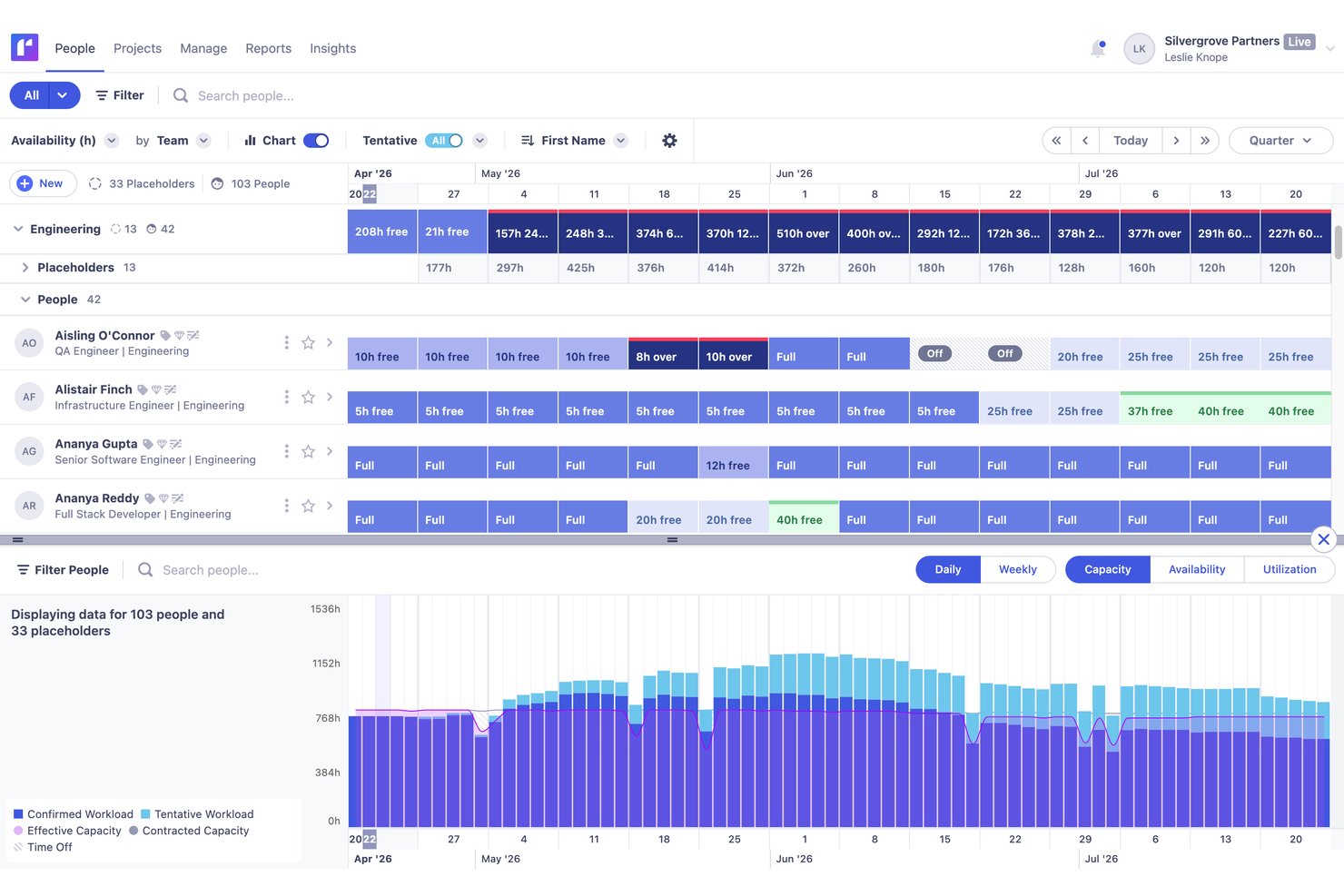
Runn is a resource management and capacity planning tool that combines people scheduling, billable utilization tracking, scenario planning, and project financial oversight in a single web-based platform.
Who Is Runn Best For?
Runn is a strong fit for project-based teams—like consulting firms and digital agencies—where resource planners and project managers need to map people across multiple concurrent projects.
Why I Picked Runn
I picked Runn as one of the best because its tentative project planning feature genuinely sets it apart: you can model a pipeline project's capacity impact before committing a single person to it, with confirmed work staying visible alongside speculative assignments in the same view. I also love that you can toggle tentative project workload in and out of utilization calculations, so capacity numbers reflect exactly the scenario you're stress-testing.
Runn Key Features
- People Planner: A drag-and-drop scheduling view that shows each person's availability, workload, and utilization across projects in real time, with visual overbooking flags.
- Billable vs. non-billable utilization tracking: Separate utilization metrics calculated against effective capacity for both billable and non-billable work, surfaced in reports.
- Skills and proficiency matching: Skill records with proficiency levels (0–4) let you filter and assign people by specific capabilities, and set skill-level requirements on placeholders.
- Project financial dashboard: A per-project view that tracks budget, cost, revenue, and margin alongside actual and scheduled hours, with alerts for missing timesheets.
Runn Integrations
Native integrations include Jira, Harvest, Clockify, Workday, BambooHR, HiBob, ADP Workforce Now, and Gusto. Runn also offers a REST API and integrations via Zapier, including Asana and Slack.
Pros and Cons
Pros:
- Budget dashboards connect staffing with profitability
- Tentative projects support capacity what-if planning
- Cross-project workload views expose allocation gaps
Cons:
- Historical planner utilization can diverge from actuals
- Reports offer limited stakeholder-level flexibility

Best for auto-populated schedules
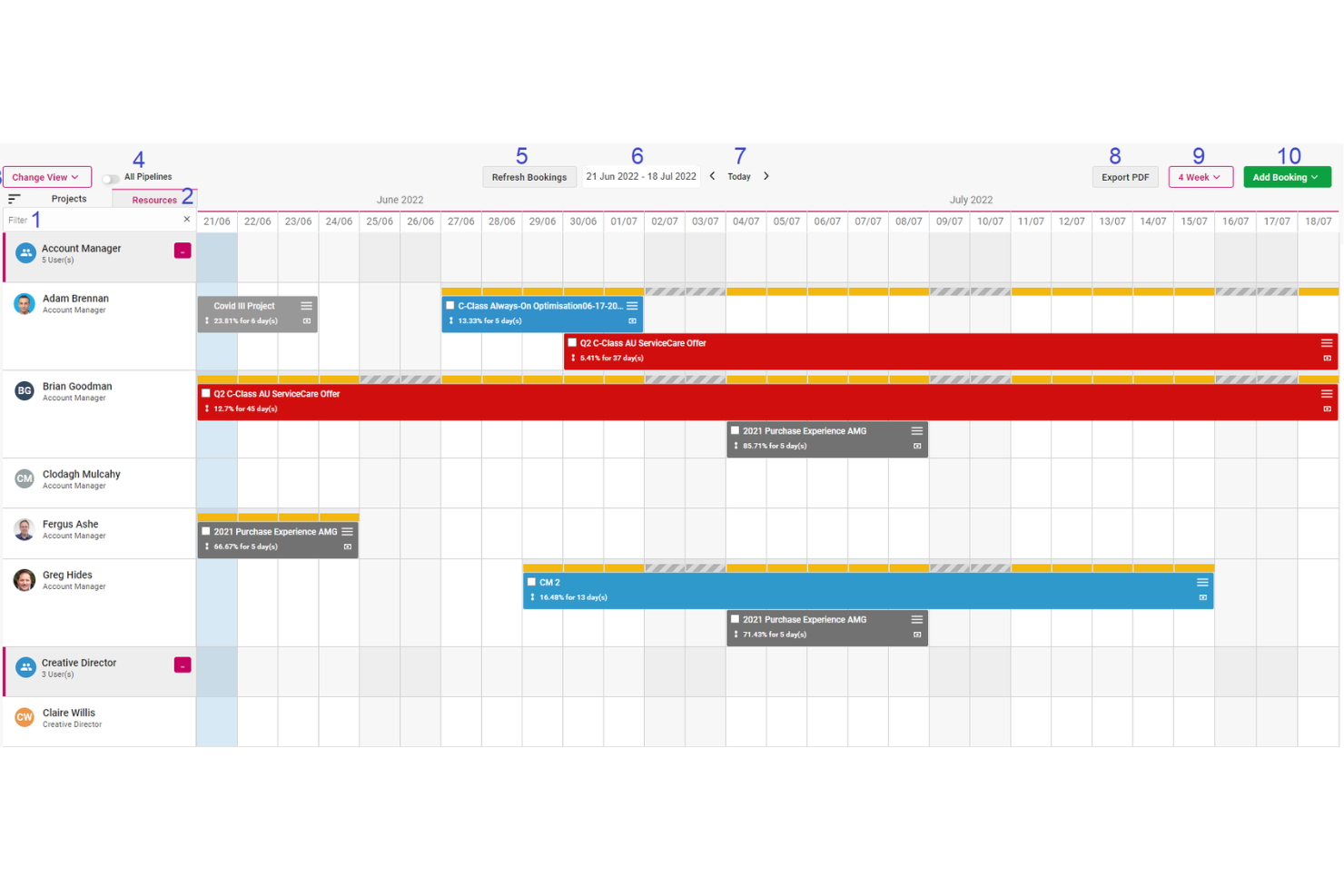
Screendragon is a work management platform for marketing, creative, and agency teams that combines resource scheduling, capacity planning, workflow automation, and time and budget tracking.
Who Is Screendragon Best For?
Screendragon is a strong fit for marketing and creative agency teams that need to connect resource scheduling, budget tracking, and workflow approvals in one place.
Why I Picked Screendragon
I picked Screendragon as one of the best because of how it handles auto-populated schedules: when you build out a project plan, it converts directly into a resource plan, matching assignments to skills, roles, and availability without manual entry. I also like that the AI Resourcing Agent actively recommends who to assign based on live workload and capacity data. Pair that with real-time timesheet tracking tied to job budgets and overrun alerts, and you get a genuinely connected picture of where your people are and what it's costing.
Screendragon Key Features
- No-code workflow builder: Design and configure approval workflows visually using templates and conditional routing logic, without writing any code.
- Demand forecasting: Model future resource demand against current availability to identify capacity gaps before they affect delivery.
- Profitability reporting: Track margins by client, project, retainer, and service line using timesheet data, purchase costs, and resource bookings.
- Universal API Connector: Connect Screendragon to any standard API-based endpoint using configurable authentication and request mapping.
Screendragon Integrations
Screendragon offers documented native integrations with Microsoft Power BI, Smartsheet, Workato, HubSpot, and Amazon S3. It also supports REST APIs and webhooks for custom integrations, with Jira Software and Slack listed as additional integrations.
Pros and Cons
Pros:
- Match assignments to skills, roles, and capacity
- Link timesheets to budgets and flag overruns
- Track availability across concurrent projects
Cons:
- Custom setup and reporting require extra effort
- Long tasks can obscure uneven period-by-period hours

Forecast
Best for resource planning around client work

Accelo is a professional services automation platform that connects resource scheduling, capacity planning, project management, time tracking, and project financials in one system built for client-facing service teams.
Who Is Accelo Best For?
Accelo is a strong fit for project managers and operations leads at professional services firms who need to connect resource scheduling, time tracking, and project financials in one place.
Why I Picked Accelo
I picked Accelo as one of the best because it's purpose-built for resource planning around client work, connecting capacity scheduling directly to live project financials. I love how Tentative Scheduling lets you model proposed quote work against your team's actual availability before a deal is even confirmed, so you're never caught scrambling when a retainer converts. The Utilization Dashboard then tracks billable versus non-billable hours in real time, giving you a clear view of where margin is leaking across active engagements.
Accelo Key Features
- Dynamic Scheduling: Automatically updates predicted task start and due dates as time is logged and work is rescheduled, adjusting dependent milestones in real time.
- Timesheet approvals workflow: Lets managers review, approve, or decline submitted weekly timesheets, with approved time locked and made available for invoicing.
- AI-assisted timesheet suggestions: Recommends timesheet entries based on logged work activity and links confirmed time to project performance and utilization reporting.
- Workload monitoring: Surfaces overallocation, idle capacity, and delivery bottlenecks across the team with availability views filterable by division, role, or skill set.
Accelo Integrations
Accelo lists integrations with Jira, Slack, Google Workspace, Microsoft 365, QuickBooks, Xero, and Zapier. It also provides RESTful, Forms, and MCP APIs for custom connectivity.
Pros and Cons
Pros:
- Workload visibility spans client engagements
- Billable and non-billable hours connect to projects
- Tentative allocations preview pipeline capacity
Cons:
- Schedule views can misstate task effort
- Skills filters don't confirm assignment matching
Best for resourcing client-service teams
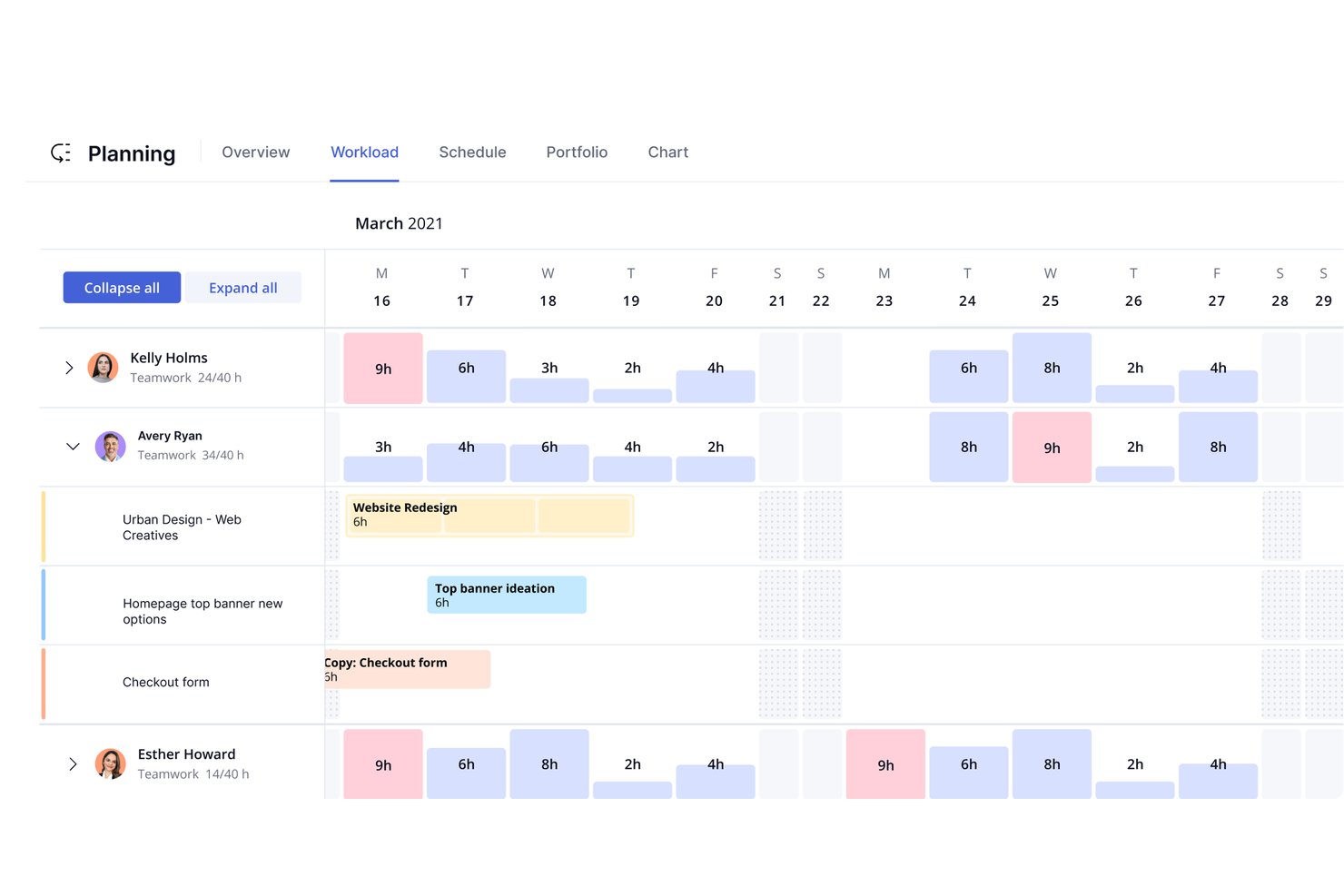
Teamwork.com is a project and resource management platform built for client-service teams, combining workload scheduling, capacity planning, billable utilization tracking, time tracking, and project budgeting in one tool.
Who Is Teamwork.com Best For?
Teamwork.com is a strong fit for agencies and client-service teams that need to manage billable utilization, project budgets, and resource scheduling in one place.
Why I Picked Teamwork.com
I've included Teamwork.com in my top picks because it's purpose-built for client-service teams that need resourcing and project financials to live in the same place. I particularly like how the utilization report splits billable and non-billable time against each person's available hours, so I can instantly see who's overallocated before a sprint starts. Tentative projects let me block capacity for pipeline retainers and convert them to confirmed work without rebuilding schedules from scratch.
Teamwork.com Key Features
- Tentative project planning: Reserve capacity and build schedules, allocations, and budgets for unconfirmed pipeline work before deals close.
- Time approvals: Submit weekly or monthly timesheets for review, with timesheets locked after approval until a reviewer reopens them.
- Budget threshold notifications: Set spend thresholds on time-and-materials budgets to trigger email or mobile push alerts when limits are approached.
- Skills filtering: Tag users with named skills and filter by role or skill in the Schedule, Workload Planner, and Planning Overview when assigning work.
Teamwork.com Integrations
Teamwork.com offers 150+ integrations, including native Slack, Google Calendar, Outlook Calendar, and Microsoft Teams connections, plus marketplace integrations for Jira via Unito and Rippling HR. It also provides an API, webhooks, and Zapier.
Pros and Cons
Pros:
- Client-facing budgets connect work to profitability
- Billable and non-billable utilization reports
- Reviewers praise workload and availability visibility
Cons:
- Skill tags lack structured proficiency matching
- Detailed resource scheduling requires top-tier plans

Parallax
Best for matching skills to project roles

Parallax is a resource planning and forecasting platform built for professional services firms, combining CRM pipeline data, capacity tracking, skill-based allocation, and project financial visibility in one place.
Who Is Parallax Best For?
Parallax is a strong fit for resource managers and project managers at professional services firms who need to match people to project roles by skill set and availability.
Why I Picked Parallax
I picked Parallax as one of the best because its skill-tag system lets you match people to open project roles by specific attributes like tools, languages, and experience level, then autofill those roles based on live availability. The Project Shaper ties those allocations directly to timesheet actuals, so you can see projected margin shift in real time as planned hours change. That combination of skill-based staffing and financial visibility in one view is where Parallax genuinely earns its place.
Parallax Key Features
- CRM pipeline integration: Connects directly to CRMs like HubSpot, Salesforce, and Pipedrive to pull deal stages into your resource planning view.
- Billable utilization classification: Tracks billable versus non-billable time based on each project's financial model, not just timesheet labels.
- Multi-currency support: Lets you configure different currencies and locations for costs, bill rates, and reporting across your teams.
- Permissions management: Offers five configurable permission levels across 24 individual permissions to control what each user can view and edit.
Parallax Integrations
Parallax has documented integrations with HubSpot, Salesforce, Jira, Asana, Harvest, Clockify, Toggl, and Slack. It also offers an HTTP/JSON API and webhooks for custom integrations.
Pros and Cons
Pros:
- Role autofill matches skills and availability
- Project margin views flag delivery risks
- Pipeline forecasts expose future capacity gaps
Cons:
- Some teams report months before trusting data
- Sync updates can lag or miss changes
Best for staffing within project workflows
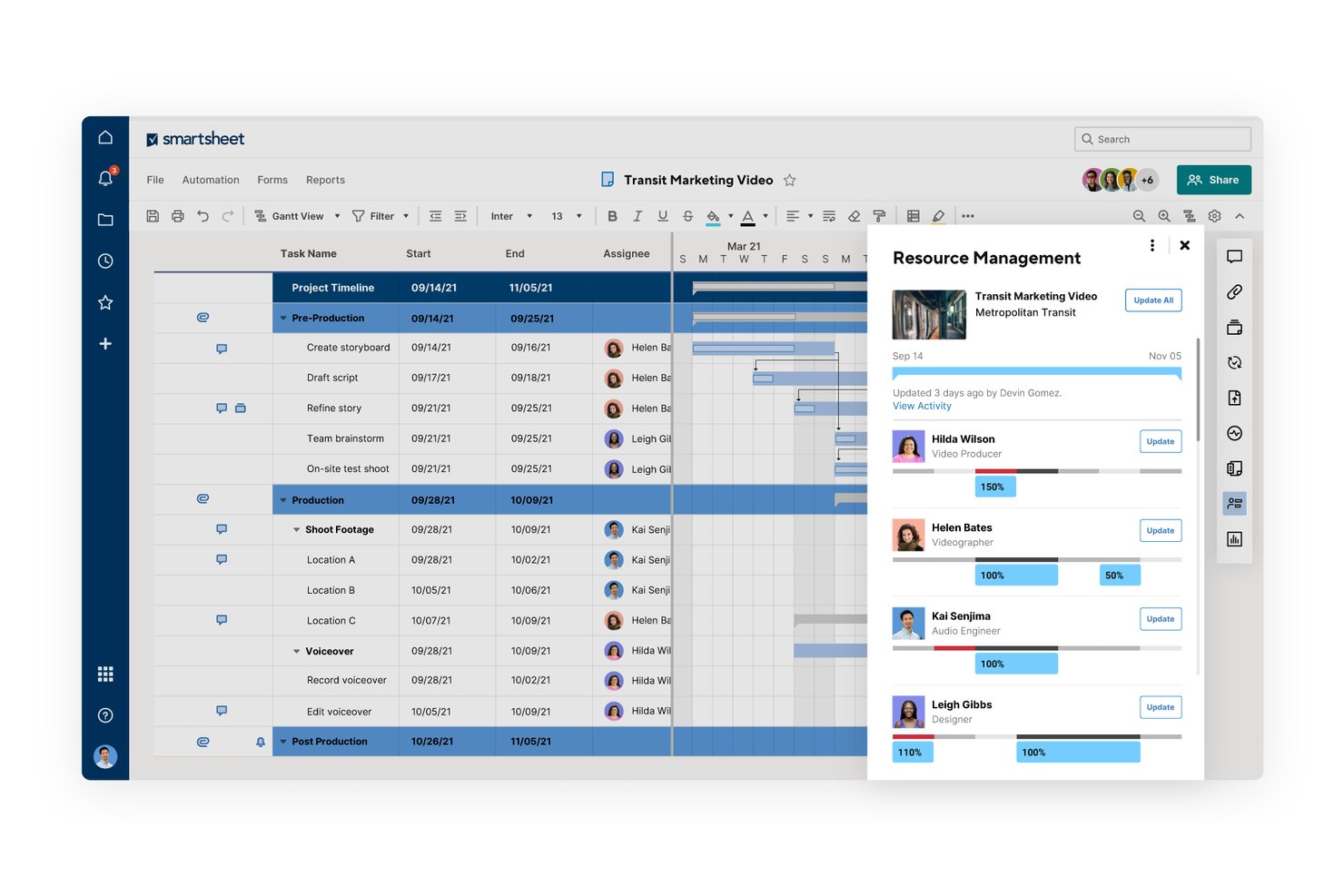
Smartsheet is a work management platform with a dedicated Resource Management add-on that covers capacity planning, skills-based staffing, workload balancing, time tracking, and staffing forecasts.
Who Is Smartsheet Best For?
Smartsheet's Resource Management add-on is a strong fit for project and program managers who already run work in Smartsheet and want staffing, capacity, and time tracking built into the same environment.
Why I Picked Smartsheet
I picked Smartsheet as one of the best because it's the only tool on this list that embeds resource management directly into an active project environment rather than treating staffing as a separate workflow. I like how skills-based staffing works here: you filter your schedule by role, discipline, and custom skill tags to surface available people for a project without leaving the tool where that project actually lives. Scenario Planning also lets me reassign resources and shift task dates across up to five project sheets without touching the live plan.
Smartsheet Key Features
- Placeholder assignments: Create role- and skill-tagged placeholders to map out future staffing needs before a specific person is assigned.
- Utilization reports: Combine historical incurred hours with future scheduled assignments to show actual vs. target utilization at the individual level.
- Time entry methods: Log work in half-day increments, hours and minutes, or itemized time with categories and notes recorded against project budgets.
- Workload tracking: Consolidate assignments across multiple project sheets into a single schedule view that flags over-allocation in real time.
Smartsheet Integrations
Smartsheet lists 175+ integrations, including Jira Software, Microsoft Teams, Slack, Workday, Power BI, Salesforce, and Google Workspace. It also offers Resource Management and Smartsheet APIs, SDKs, webhooks, an MCP server, and Zapier.
Pros and Cons
Pros:
- Pipeline staffing with scenario plans
- Billable and non-billable utilization tracking
- Cross-project workload visibility
Cons:
- Scenario planning excludes portfolio tradeoffs
- No predictive burnout warnings
New Product Updates from Smartsheet

Smartsheet Adds Non-Plan User Management in Admin Center
Smartsheet adds a Non plan users tab to the Seat types and true-up page in Admin Center. This lets system admins review non-plan users and add them to the plan or remove them from the organization in one place. For more information, visit Smartsheet’s official site.
 .

Celoxis
Best for weighing project demand and capacity
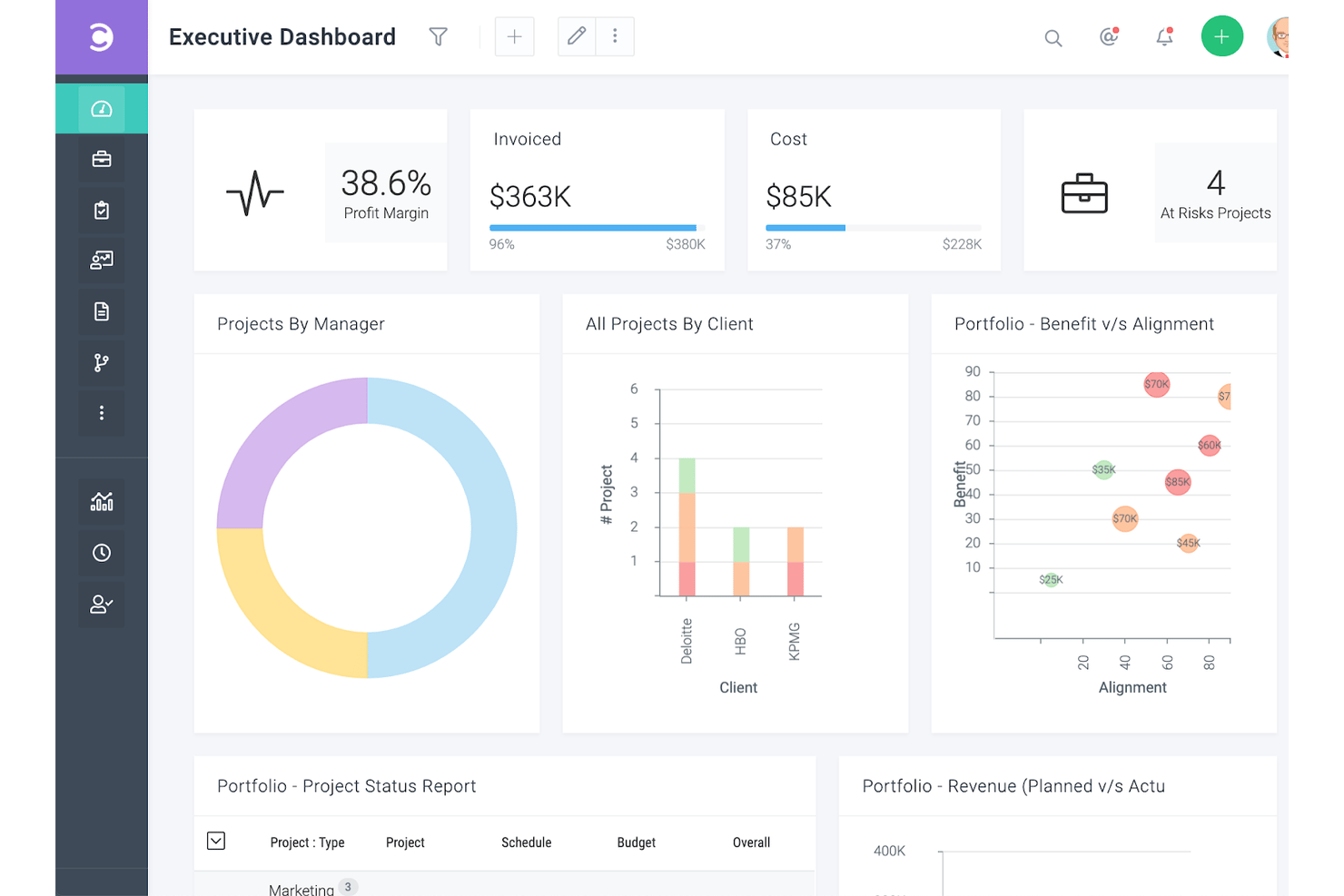
Celoxis is a project and portfolio management platform that combines resource capacity planning, Gantt scheduling, workload visibility, timesheet tracking, and project financial management.
Who Is Celoxis Best For?
Celoxis is a strong fit for project and program managers overseeing multiple concurrent projects who need capacity planning and financial tracking in one place.
Why I Picked Celoxis
I picked Celoxis as one of the best because it's one of the few tools that lets you hold project demand and available capacity side by side before committing a single resource. I like that what-if analysis lets me evaluate incoming projects against current workloads, so I can pressure-test a new engagement without reshuffling half my team. Overload alerts and cross-project capacity views then keep that balance visible once work is underway.
Celoxis Key Features
- Gantt scheduling with critical-path analysis: Build and adjust project schedules in an interactive Gantt chart that automatically recalculates timelines when predecessor dates change.
- Project intake and demand prioritization: Score, rank, and route incoming project requests using configurable business KPIs and approval workflows before any resources are committed.
- Timesheet and time approval workflows: Log time via timers or a weekly grid, with configurable multi-level approval chains and reminders for missing entries.
- Portfolio financial tracking: Track budgets, labor costs, margins, and planned-versus-actual performance across projects from a single portfolio view.
Celoxis Integrations
Celoxis has 21 integrations configured inside the platform, including Azure DevOps, Microsoft Project, Google Sheets, QuickBooks Online, Harvest, and GitHub, plus a REST API for custom connections. It also connects with Jira and Slack through Zapier.
Pros and Cons
Pros:
- Scenario-test incoming project demand before committing
- Timesheets connect resource plans with project costs
- Cross-project overload visibility helps rebalance work
Cons:
- Capacity views depend on current task updates
- No billable-versus-non-billable utilization split

Epicflow
Best for matching skills across project teams
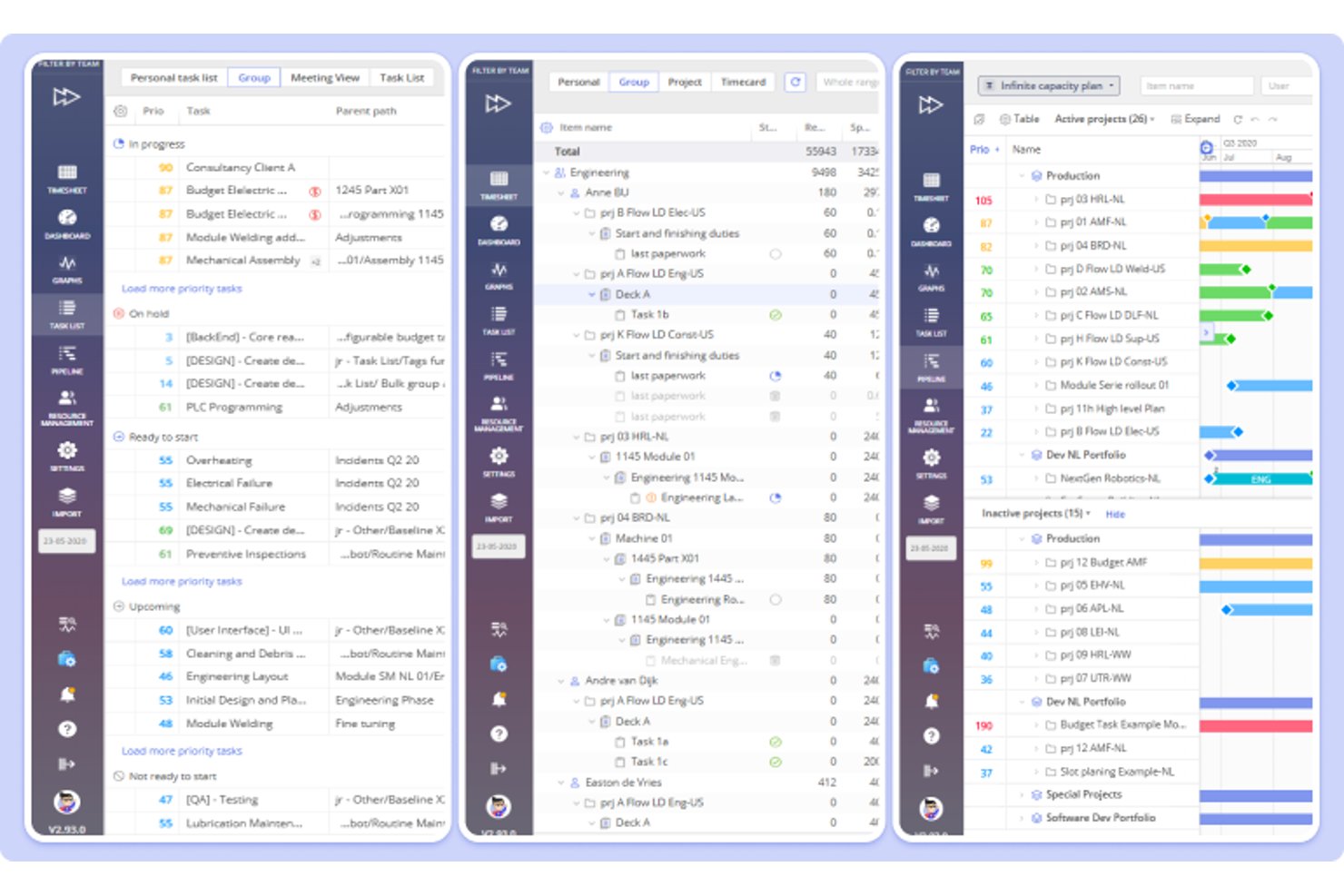
Epicflow is a project portfolio and resource management platform that combines capacity planning, skills-based allocation, workload analysis, What-If scenario modeling, and project forecasting across multi-project environments.
Who Is Epicflow Best For?
Epicflow suits project and portfolio managers at mid-to-large organizations running multiple concurrent projects who need to match the right people to the right work across shared resource pools.
Why I Picked Epicflow
I picked Epicflow as one of the best because it treats skills matching as a first-class feature, not an afterthought. User Cards store each person's competencies and proficiency levels, while Task Cards define what's needed, so when you assign work, Epicflow flags exact matches, gaps, and overqualification in one view. The Resource Allocation Advisor then searches across your entire resource pool to surface people with the right skills and enough capacity at the right time, which is exactly what you need when juggling shared teams across multiple concurrent projects.
Epicflow Key Features
- What-If scenario modeling: Run simulations on an isolated copy of your portfolio to test changes to project dates, staffing, scope, or priorities before touching the live plan.
- Pipeline view: See all upcoming projects in a prioritized list, compare load against capacity over time, and estimate when a new project can realistically start.
- Workload and bottleneck analysis: Identify which tasks, projects, or resource groups are causing overload, and surface underused capacity across teams.
- Timesheet tracking: Log hours by person and task, then compare spent, remaining, and baseline hours to keep project budgets and effort estimates accurate.
Epicflow Integrations
Epicflow offers native integrations with Jira, Microsoft Project, Oracle Primavera, and Hurma HRM, plus connections to other HRM systems. It supports CSV import/export, a REST API, and custom integrations; Asana and Slack aren’t documented.
Pros and Cons
Pros:
- Scenario simulations compare staffing tradeoffs
- Skills matching flags competence gaps
- Capacity forecasts expose overloaded individuals
Cons:
- Forecasts depend on timely, accurate updates
- No billable versus nonbillable utilization split

Kantata
Best for Salesforce-native resource planning
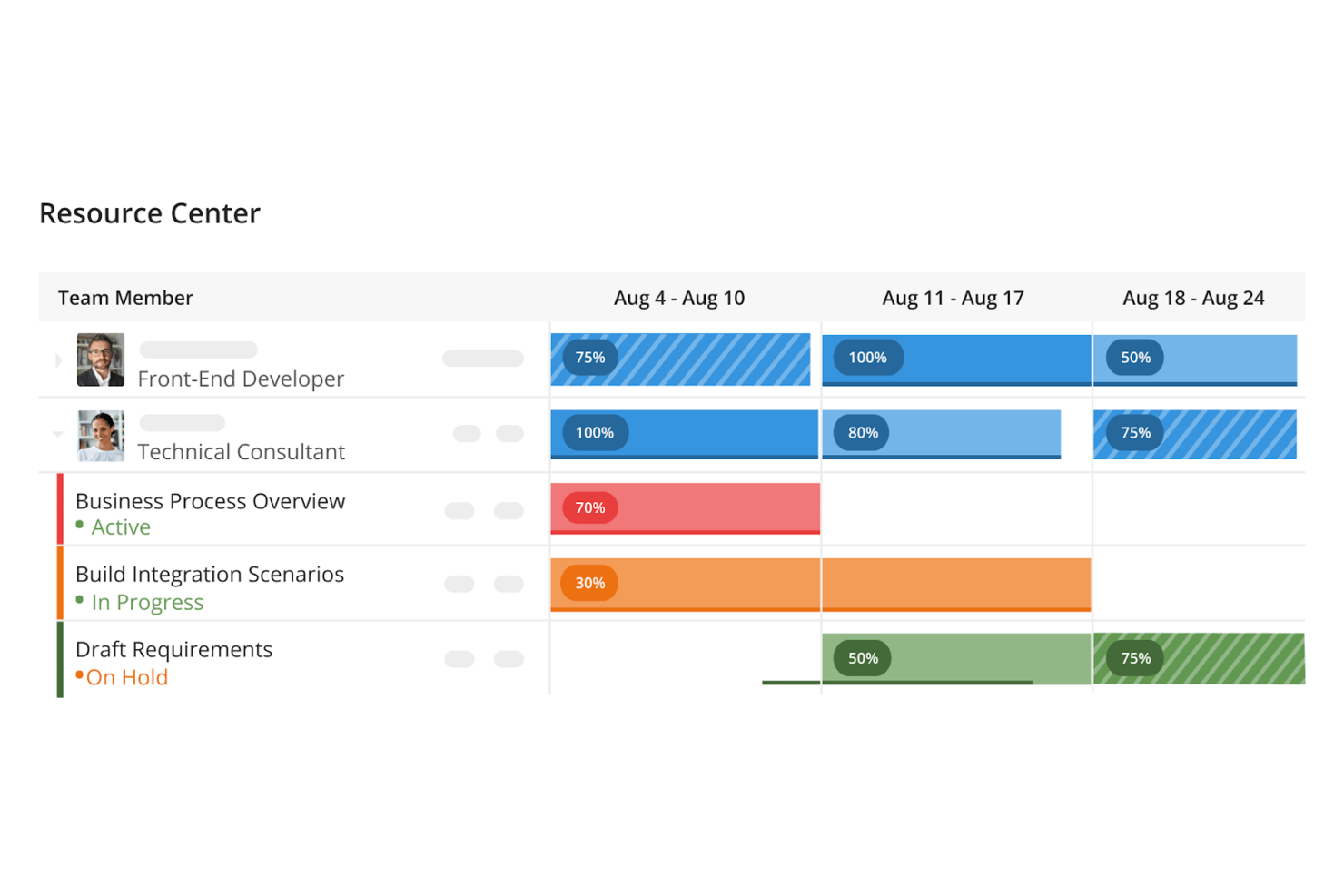
Kantata is a professional services automation (PSA) platform that covers resource allocation, capacity planning, skills-based staffing, utilization tracking, time and expense management, and project financial visibility.
Who Is Kantata Best For?
Kantata fits professional services organizations—consulting firms, agencies, and managed-service teams—that need to connect resource planning directly to project financials and delivery performance.
Why I Picked Kantata
Kantata earns its spot on my shortlist because of how tightly it connects resource planning to Salesforce, which matters when your pipeline and your staffing decisions need to move together. With Kantata SX embedded natively in Salesforce, I can see sales opportunities and immediately model capacity, skills, and delivery readiness without switching tools. The skills-based staffing engine lets me rank resource matches by availability, proficiency level, and project fit, so I'm not just filling seats.
Kantata Key Features
- Utilization Analytics: View scheduled versus actual hours, billable versus non-billable time, and percent-to-target comparisons for each resource in a single report.
- Talent Network: Add up to 15 external partners or freelancers to your staffing plans alongside internal staff, with their own skills, cost rates, and availability.
- What-If Scenarios: Model potential cost, revenue, and exchange-rate changes across active engagements and pre-sales activities to evaluate financial impact before committing.
- Project workspace financials: Track total budget, actual fees, estimate at completion (EAC), and estimate to completion (ETC) by resource and task directly within each project.
Kantata Integrations
Kantata SX is embedded in Salesforce, while Kantata lists over 1,200 prebuilt connectors and names HubSpot, SAP, BambooHR, QuickBooks, NetSuite, and Sage Intacct. A REST API with OAuth 2.0 and OpenAPI supports custom HRIS, CRM, and ERP integrations.
Pros and Cons
Pros:
- Skills filters support project staffing decisions
- Utilization reports connect hours to billability
- Resource scheduling exposes shared team capacity
Cons:
- Routine time entry can take extra clicks
- Sprint planning lacks dedicated agile workflows
New Product Updates from Kantata

Kantata Adds Access Group Change History
Kantata adds Access Groups History, letting account administrators track changes to group details, membership, and permissions in Recent History. The update also makes these events available through the Subscribed Events API for broader monitoring. For more information, visit Kantata’s official site.
 .
Annen programvare for ressursstyring av ansatte
Nedenfor finner du en liste over annen programvare for ressursstyring av ansatte som jeg vurderte, men som ikke kom med på topplisten. Det kan likevel være verdt å ta en titt på dem.
- Saviom
For choosing your hosting environment
- Retain
For project staffing with 30,000 skills
- Wrike
For connecting HR and project resourcing
- Resource Guru
For scheduling staff, leave, and equipment
- awork
For client-facing agency resourcing
- Productive
For resourcing around HRIS time off
- Toggl Plan
For comparing capacity with tracked time
- Mosaic
For Costpoint-linked resource planning
- Float
For syncing resource plans with NetSuite
- eResource Scheduler
For self-hosted resource planning


Relaterte anmeldelser av prosjektstyringsverktøy
Hvis du fortsatt ikke har funnet det du leter etter her, kan du se nærmere på disse andre anmeldelsene av prosjektstyringsverktøy som vi har samlet for deg:
- Gantt-diagramverktøy
- Produktivitetsverktøy
- Programvare for prosjektsporing
- Programvare for prosjektplanlegging
- Programvare for prosjektstyring
- Medieressursstyring
- Programvare for ressursstyring
How I Evaluate Employee Resource Management Software
I split my evaluation into three parts, giving the most weight to assigning people by availability and tracking booked capacity against demand. Next, I look for differentiators like scenario planning to model a new project’s staffing impact. Finally, I consider onboarding, support, and pricing value.
Core Functionality (Table Stakes For This List)
When I'm selecting tools for my list, I score each one on a scale from 0 (does not offer the functionality) to 5 (excels in this area) for each core functionality listed below. I then convert the total into a percentage to help assess each tool's overall fit, with extra weight on any functionalities I’ve deemed essential.
- Resource Allocation & Scheduling (Essential): I look for assignments that account for availability, skills, and workload, such as spotting a designer booked across overlapping launches.
- Capacity & Utilization (Essential): The view should show booked time against available capacity by person, so I can catch an overloaded engineer before a delivery date slips.
- Skills & Competencies: Searchable skills and certifications help me assess whether a team can cover a new platform build without relying on free-text profiles.
- Forecasting & Demand Planning: I check whether upcoming project demand appears beside future capacity, and whether a proposed start date exposes a staffing gap.
- Workforce Data & Reporting: Look for centralized records of roles, availability, and leave, plus reports that reveal allocation and utilization across teams.
- Cross-Team Visibility: I assess whether planners can compare capacity across departments when one team needs support and another has available people.
Once I have a list of tools that meet the criteria, I consider what sets each platform apart.
Differentiating Factors (What Sets Vendors Apart)
Here's how I compare and contrast different vendors:
Standout Features
I look for scenario-based what-if modeling that lets me simulate adding a project or shifting a team member before I commit—helpful when a client wants to pull a launch date forward and I need to see who's affected. I also evaluate whether native time tracking feeds directly into utilization calculations, since disconnected data leads to capacity plans built on guesses rather than actuals.
Beyond Features
I check whether a tool connects to the PM and financial systems my team already uses, since two-way sync between resource plans and project schedules prevents the manual re-entry errors that quietly wreck utilization data. Scalability matters too—I evaluate whether role-based permissions and multi-department structures hold up as headcount grows, because migrating platforms mid-scale is painful and expensive. I also look at onboarding support, especially configurable templates and dedicated success teams that help non-technical managers adopt the tool without a months-long rollout.
Slik velger du programvare for ressursstyring av ansatte
Mens du arbeider deg gjennom din unike prosess for valg av programvare, bør du ha følgende punkter i tankene:
- Identifiser spesifikke behov: Før du begynner utvelgelsesprosessen, er det avgjørende å identifisere organisasjonens spesifikke behov. Programvare for personaladministrasjon bør ta hensyn til de unike utfordringene virksomheten din står overfor, for eksempel planlegging, tidsregistrering eller ressursallokering. Et byggefirma kan for eksempel ha behov for viktige funksjoner som planlegging for å administrere arbeidsstyrken på tvers av flere byggeplasser, mens et konsulentfirma kan prioritere tidsregistrering for å fakturere kundene nøyaktig.
- Integrasjonsmuligheter: Muligheten til å integrere med eksisterende systemer er en viktig vurdering. Programvaren bør fungere sammen med andre verktøy virksomheten bruker, for eksempel lønnssystemer, HR-programvare eller prosjektstyringsprogramvare. En detaljhandelsvirksomhet kan for eksempel se etter programvare som integreres med kassasystemet for å effektivisere planlegging av arbeidstid og lønnsbehandling.
- Skalerbarhet: Velg programvare som kan vokse sammen med virksomheten din. Programvaren bør kunne håndtere et økende antall ansatte uten redusert ytelse. En oppstartsbedrift vil for eksempel ha fordel av programvare som enkelt kan skaleres fra å administrere en håndfull ansatte til hundrevis etter hvert som virksomheten vokser, uten behov for en fullstendig systemomlegging. Mellomstore virksomheter vil ha fordel av skalerbare funksjoner for ting som introduksjon av nye ansatte, kontinuerlig oppfølging av medarbeiderengasjement, talentstyring, innebygde medarbeidersamtaler og HR-administrasjon, noe som vil avlaste HR-teamet når dere ansetter nye medarbeidere.
- Brukervennlig grensesnitt: Programvaren bør være enkel å bruke for brukere på alle nivåer. Et komplekst system kan føre til en bratt læringskurve og motstand blant de ansatte. En ideell organisasjon med frivillige med varierende teknologisk kompetanse vil for eksempel ha behov for programvare som er enkel og tilgjengelig, slik at den blir tatt i bruk av flest mulig.
- Overholdelse av regelverk og rapportering: Sørg for at programvaren oppfyller juridiske krav og tilbyr omfattende rapporteringsverktøy. Den bør bidra til å sikre overholdelse av arbeidsrettslige bestemmelser og levere rapporter for analyse og beslutningstaking. En helsetjenesteleverandør må for eksempel følge strenge bemanningsregler og vil ha fordel av programvare som automatisk kan flagge mulige avvik fra regelverket og generere relevante bemanningsrapporter.
Trender innen programvare for personalressursstyring
Her er noen aktuelle og interessante trender jeg legger merke til innen teknologi for programvare for personalressursstyring.
- Integrasjon med fjernarbeidsmiljøer: Programvaren er i økende grad tilpasset eksterne team. Denne trenden gjenspeiler overgangen til fleksible arbeidsordninger. Den er avgjørende for å opprettholde samhold og produktivitet i teamet.
- Større vekt på medarbeidernes trivsel: Verktøyene inneholder nå ofte funksjoner for å overvåke og fremme medarbeidernes trivsel. Denne trenden understreker den økende anerkjennelsen av psykisk helse på arbeidsplassen. Det er viktig for å skape en støttende arbeidskultur.
- Avansert dataanalyse: Det er en økende bruk av avansert analyse for å optimalisere arbeidsstyringen. Denne trenden drives av behovet for datadrevet beslutningstaking. Den er avgjørende for strategisk planlegging og ressursallokering.
- Kunstig intelligens og maskinlæring: Kunstig intelligens og maskinlæring integreres for å automatisere oppgaver. Denne trenden endrer hvordan ledere beregner og planlegger ressursbehov. Den er viktig for å øke effektiviteten og redusere menneskelige feil.
- Tilpasning og fleksibilitet: Programvaren blir stadig mer tilpasningsdyktig til spesifikke virksomhetsbehov. Denne trenden er et svar på organisasjoners ulike og stadig skiftende krav. Den er avgjørende for å sikre at programvaren forblir relevant og nyttig.
Disse trendene viser en dynamisk utvikling innen programvare for personalressursstyring, med stort fokus på tilpasningsdyktighet og medarbeidersentrerte funksjoner. Enten du ser etter et verktøy akkurat nå eller undersøker markedet, er dette noen av de viktigste funksjonene du vil begynne å se i programvare for personalressursstyring, og som vil fortsette å forme bransjen.
Hva er programvare for personalressursstyring?
Programvare for personalressursstyring er en digital plattform utviklet for å administrere og optimalisere arbeidsstyrken i en organisasjon. Den brukes av ledere og HR-medarbeidere til å samordne de ansattes kompetanse og tilgjengelighet med virksomhetens behov og prosjekter. Denne programvaren fungerer som et sentralt knutepunkt for oversikt over de ansattes arbeidsplaner, oppgaver og arbeidsbelastning, slik at personalet effektivt kan settes inn for å nå organisasjonens mål.
Programvare for personalressursstyring består av ulike komponenter, blant annet verktøy for planlegging, tidsregistrering, kompetansestyring og analyse. Disse elementene fungerer sammen for å gi en helhetlig oversikt over tilgjengelige og utnyttede ressurser, slik at man kan ta informerte beslutninger og administrere arbeidsstyrken proaktivt.
Funksjoner i programvare for personalressursstyring
Programvare for personalressursstyring er et viktig verktøy for virksomheter som ønsker å administrere arbeidsstyrken effektivt. Nedenfor beskriver jeg de viktigste funksjonene du bør vurdere når du velger slik programvare for organisasjonen din.
- Medarbeiderplanlegging: Denne funksjonen muliggjør effektiv planlegging og administrasjon av skift. Den er avgjørende for å sikre at alle skift er tilstrekkelig bemannet, og at medarbeiderne blir informert om arbeidsplanene sine i god tid.
- Registrering av arbeidstid og oppmøte: Nøyaktig registrering av arbeidstimer bidrar til å opprettholde samsvar med arbeidslovgivningen og sikrer at medarbeiderne får rettferdig kompensasjon for tiden de arbeider.
- Permisjonsadministrasjon: Effektiviserer prosessen med å be om og godkjenne fri, noe som er avgjørende for å opprettholde en balansert og tilfreds arbeidsstyrke.
- Resultatstyring: Gjør det mulig å følge opp og analysere medarbeidernes prestasjoner, og gir verdifull innsikt for utvikling og anerkjennelse av medarbeidere.
- Ressursfordeling: Bidrar til effektiv fordeling av oppgaver og prosjekter mellom medarbeidere, noe som er avgjørende for å maksimere produktiviteten og nå virksomhetens mål.
- Opplæring og utvikling: Tilrettelegger for organisering og gjennomføring av opplæringsprogrammer for medarbeidere, noe som er viktig for kompetanseheving og karriereutvikling.
- Samsvarsadministrasjon: Bidrar til å sikre at virksomheten overholder arbeidslover og forskrifter, noe som er avgjørende for å unngå juridiske problemer og opprettholde en velrenommert virksomhet.
- Rapportering og analyse: Gir datadrevet innsikt i arbeidsstyringsadministrasjonen, slik at virksomheten kan ta informerte beslutninger og drive strategisk planlegging.
- Selvbetjening for medarbeidere: Gir medarbeiderne mulighet til å administrere personopplysninger, personalgoder og andre personalrelaterte oppgaver, noe som kan øke engasjementet og redusere den administrative arbeidsmengden.
- Mobil tilgang: Gir medarbeidere og ledere fleksibilitet til å få tilgang til systemet hvor som helst fra, noe som blir stadig viktigere i dagens mobilorienterte verden.
Hver funksjon bidrar til å skape en mer produktiv, engasjert og regelverksetterlevende arbeidsstyrke, noe som til syvende og sist bidrar til virksomhetens suksess. Når du vurderer alternativene dine, bør du se på hvordan disse funksjonene samsvarer med virksomhetens spesifikke behov og mål.
Fordeler med programvare for medarbeiderressursstyring
Programvare for medarbeiderressursstyring er et viktig verktøy for virksomheter som ønsker å forbedre arbeidsstyrkens effektivitet og effektivisere personalprosessene. Nedenfor finner du fem hovedfordeler organisasjoner kan forvente ved å ta i bruk denne typen programvare.
- Forbedret planlegging og tidsstyring: Programvare for medarbeiderressursstyring gir en tydelig oversikt over medarbeidernes arbeidsplaner, noe som gjør det enklere å administrere tid og ressurser effektivt. Dette fører til bedre utnyttelse av medarbeiderne og sikrer at prosjektene er tilstrekkelig bemannet.
- Bedre kommunikasjon og samarbeid: Programvaren legger til rette for bedre kommunikasjonskanaler innad i teamene, slik at de kan dele oppdateringer og samarbeide i sanntid. Dette sikrer at alle er samkjørte og kan bidra mer effektivt til teamets mål.
- Effektiviserte administrative prosesser: Automatisering av rutineoppgaver som innsending av timelister og permisjonssøknader reduserer den administrative belastningen. Dette gjør det mulig for personalmedarbeidere å fokusere på mer strategiske initiativer som kommer organisasjonen til gode.
- Datadrevet beslutningstaking: Med omfattende rapporteringsverktøy gjør programvaren det mulig for ledere å ta informerte beslutninger basert på sanntidsdata. Dette kan føre til mer effektiv styring av arbeidsstyrken og bedre driftsresultater.
- Økt selvbetjening for medarbeidere: Medarbeiderne kan administrere personopplysningene sine, sende inn forespørsler og få tilgang til viktige dokumenter, noe som gir dem større selvstendighet og reduserer arbeidsbelastningen for personalavdelingene.
Programvare for medarbeiderressursstyring er en grunnpilar for moderne virksomheter som ønsker å fremme en produktiv og velorganisert arbeidsstyrke. Ved å utnytte disse verktøyene kan virksomheter ikke bare forbedre driftseffektiviteten, men også tilby et mer tilfredsstillende arbeidsmiljø for medarbeiderne.
Kostnader og priser for programvare for medarbeiderressursstyring
Programvare for medarbeiderressursstyring er et viktig verktøy for virksomheter i alle størrelser som ønsker å administrere arbeidsstyrken effektivt. Den omfatter en rekke funksjoner, blant annet rekruttering, introduksjon av nyansatte, lønn, resultatstyring og mer. Prisen på slik programvare kan variere betydelig avhengig av antall medarbeidere, hvilke funksjoner som kreves, og hvilket støttenivå som er nødvendig. Nedenfor finner du en oversikt over de ulike planalternativene og prisene deres, noe som kan hjelpe programvarekjøpere med liten eller ingen erfaring med å velge riktig løsning for behovene sine.
Sammenligningstabell for planer for programvare for medarbeiderressursstyring
| Plantype | Gjennomsnittspris | Vanlige funksjoner |
| Gratisplan | $0 | Grunnleggende HR-funksjoner, begrenset brukertilgang og støtte fra fellesskapet |
| Grunnplan | $30 - $50 per måned | Grunnleggende HR-funksjoner, lønn, onboarding, et begrenset antall ansatte og e-poststøtte |
| Plan per ansatt | $5 - $10 per ansatt | Alle funksjonene i grunnplanen, i tillegg til prising per ansatt for skalerbarhet og ekstra støtte |
| Avansert plan | $80 - $250 per ansatt | Avanserte HR-funksjoner, tilpassede integrasjoner, AI-drevne arbeidsflyter og prioritert støtte |
Når programvarekjøpere vurderer hvilken plan de skal velge, bør de vurdere størrelsen på arbeidsstyrken, kompleksiteten i HR-prosessene og hvilket støttenivå de forventer å trenge. Det er også viktig å ta hensyn til programvarens potensial for vekst og skalerbarhet.
Vanlige spørsmål om programvare for administrasjon av ansattes ressurser
Her er noen vanlige spørsmål jeg ønsket å besvare for deg.
Hvordan forbedrer programvare for administrasjon av ansattes ressurser produktiviteten?
Ved å tilby en sentralisert plattform for all informasjon relatert til ansatte gir denne programvaren rask tilgang til ansattdata, noe som sparer tid og reduserer feil. Den legger til rette for bedre planlegging og fordeling av ressurser, slik at de riktige ansatte blir satt til de riktige oppgavene. I tillegg kan den automatisere rutineoppgaver som tidsregistrering og permisjonsadministrasjon, slik at ledere og HR-medarbeidere kan konsentrere seg om mer strategiske aktiviteter.
Kan programvare for administrasjon av ansattes ressurser integreres med andre systemer?
Ja, mange løsninger for administrasjon av ansattes ressurser tilbyr integrasjonsmuligheter med andre forretningssystemer, for eksempel verktøy for lønn, regnskap og prosjektstyring. Denne integrasjonen gir en mer helhetlig tilnærming til håndtering av ansattdata og kan føre til mer nøyaktig og oppdatert informasjon på tvers av ulike forretningsfunksjoner.
Passer programvare for administrasjon av ansattes ressurser for små bedrifter?
Programvare for administrasjon av ansattes ressurser er nyttig for bedrifter av alle størrelser. For små bedrifter kan den automatisere og forenkle HR-prosessene, slik at eiere og ledere kan fokusere på vekst og drift. Mange programvarealternativer er skalerbare og tilbyr fleksible prismodeller som imøtekommer behovene og budsjettene til mindre organisasjoner.
Hvor sikker er programvare for administrasjon av ansattes ressurser?
Sikkerhet er en topprioritet for leverandører av programvare for administrasjon av ansattes ressurser. Anerkjente programvareløsninger bruker robuste sikkerhetstiltak som datakryptering, sikre datasentre og regelmessige sikkerhetsrevisjoner for å beskytte sensitiv informasjon om ansatte. Det er viktig å gjennomgå sikkerhetsfunksjonene i all programvare du vurderer, og kontrollere at de er i samsvar med bransjestandarder og regelverk.
Kan programvare for administrasjon av ansattes ressurser støtte eksterne team?
Ja, det meste av moderne programvare for administrasjon av ansattes ressurser er utviklet for å støtte eksterne team. Disse løsningene omfatter ofte funksjoner som mobiltilgang, skybaserte plattformer og kommunikasjonsverktøy for å legge til rette for samarbeid og administrasjon av ansatte, uavhengig av hvor de befinner seg.
Hvilken type støtte kan jeg forvente fra leverandører av programvare for administrasjon av ansattes ressurser?
Støttetilbudene varierer fra leverandør til leverandør, men mange tilbyr en rekke støttetjenester, blant annet nettbaserte ressurser, opplæring, kundeservice og dedikerte kundeansvarlige. Når du vurderer ulike programvarealternativer, bør du ta hensyn til støttenivået som tilbys, og kontrollere at det samsvarer med organisasjonens behov.