

10 beste programvareverktøy for ressursplanlegging i 2026

10 Kortliste over den beste programvaren for ressursplanlegging


Den beste programvaren for ressursplanlegging hjelper deg med å tildele de riktige personene til de riktige oppgavene, administrere teamets tilgjengelighet og løse konflikter før de påvirker prosjektleveransen. Uten slik programvare må du manuelt balansere kalendere, regneark og e-poster for å holde prosjektene på rett spor, noe som gjør det spesielt vanskelig å se hvem som har for mange oppgaver eller ikke utnyttes godt nok.
Med over 20 års erfaring med å administrere komplekse prosjekter for globale merkevarer og 10 år som programvareanmelder har jeg utforsket markedet for prosjektstyringsprogramvare grundig. Etter å ha testet mer enn 30 verktøy for ressursplanlegging har jeg identifisert dem som effektivt minimerer friksjon i planleggingen, synliggjør tilgjengelighet i sanntid og tilpasser seg endrede prosjektbehov.
I denne veiledningen finner du programvare som gir bedre oversikt, balanserer arbeidsmengder og hjelper deg med å ta trygge beslutninger om ressursbruk. Hver anbefaling inneholder en omfattende oversikt over verktøyets funksjoner, priser og unike fordeler, slik at du kan finne det som passer best for behovene og budsjettet ditt.
Why Trust Our Software Recommendations
Our team has been testing and reviewing software since 2012. As project managers ourselves, we know how difficult—and important—it is to choose the right software.
For this guide, we evaluated tools using hands-on testing and independent research, scoring tools using our selection criteria. We also draw on insights from industry thought leaders and practicing project management experts.
Our reviews reflect our human editorial judgment, not a sales pitch.
Expert reviewers:
Sammenligningstabell for programvare for ressursplanlegging
Denne tabellen oppsummerer noen av de viktigste funksjonene for å hjelpe deg med å ta en beslutning.
| Tool | Best For | Trial Info | Price | ||
|---|---|---|---|---|---|
| 1 | Best for agencies and professional services | 14-day free trial | From $10/user/month (billed annually) | Website | |
| 2 | Best for real-time workload visibility | 14-day free trial | From $17/user/month | Website | |
| 3 | Best for multi-departmental complex organizations | Free demo available | Pricing upon request | Website | |
| 4 | Best for profitable resource scheduling | 30-day free trial available | From $7/scheduled user/month | Website | |
| 5 | Best for real-time planning | 30-day free trial | From $7/user/month (billed annually) | Website | |
| 6 | Best for automated and interactive resourcing | Free demo available | Pricing upon request | Website | |
| 7 | Best for complex projects | 14-day free trial | Pricing upon request | Website | |
| 8 | Best for manufacturer resource planning | 30-day free trial | From $49/user/month | Website | |
| 9 | Best for people-centric resource scheduling | Free demo available | Pricing upon request | Website | |
| 10 | Best for multi-location shift scheduling | 14-day free trial | From $29/month (billed annually) | Website |


Anmeldelser av den beste programvaren for ressursplanlegging
Her finner du hvert verktøy og dets fremragende funksjoner, samt informasjon om hva som gjør det godt egnet for ressursplanlegging.

Best for agencies and professional services

Productive is purpose-built for agencies and professional services teams that need to manage people, projects, and profitability in one place. It’s especially useful for operations leads and resource managers who want to balance workloads, track billable hours, and forecast capacity across multiple clients. The platform’s focus on agency workflows and integrated financial tracking sets it apart from more generic resource scheduling tools.
Who Is Productive Best For?
Agencies and professional services firms that want integrated resource planning, budgeting, time tracking, and financial visibility.
Why I Picked Productive
Agencies and professional services teams have unique needs when it comes to resource scheduling, and Productive is built with those workflows in mind. The platform’s resource planning module lets you assign people to projects based on skills, availability, and billable rates, which is essential for managing client work. I appreciate how Productive connects scheduling with time tracking and project budgets, so you can see the impact of resource allocation on profitability in real time. This focus on agency-specific resource management makes it a strong fit for teams juggling multiple clients and shifting priorities.
Productive Key Features
Some other features that make Productive useful for agencies and professional services include:
- Customizable Project Templates: Let you create and reuse templates for common project types and workflows.
- Utilization Reporting: Tracks team member workload and utilization rates across projects.
- Integrated Document Management: Stores project files and documents directly within the platform.
- Client Portal: Provides clients with access to project updates, deliverables, and communication threads.
Productive Integrations
Integrations include Jira, Xero, Exact, Slack, QuickBooks, Microsoft Outlook, Fortnox, Personio, and Zapier. It also has an open API available for custom integrations.
Pros and Cons
Pros:
- Built-in time management can bill multiple business entities
- Plenty of custom tags to choose from
- Quite easy to set up collaborative tasks
Cons:
- Invoicing and quotation features are limited
- Roles/user rights are not as granular
New Product Updates from Productive
Productive Adds Voice Dictation, Slack Connector, Proposals, and Overtime
Productive adds voice dictation, a Slack Connector, proposal controls, and overtime tracking. These updates support faster AI interactions, client proposals, and time management. For more information, visit Productive’s official site.

Scoro
Best for real-time workload visibility

Scoro gives project managers and operations leads a real-time view of team workloads and project timelines. Agencies and consultancies use Scoro to spot bottlenecks, balance assignments, and adjust plans as priorities shift. Its live dashboards and visual planners help you make fast, informed decisions about resource allocation.
Who Is Scoro Best For?
Services businesses that need real-time insight into workloads, utilization, and business performance across projects and teams.
Why I Picked Scoro
Scoro stands out for its ability to give you instant visibility into team workloads and project progress. The real-time dashboards and interactive Gantt charts let you see who’s overloaded, who’s available, and where deadlines might slip. I appreciate how Scoro’s workload planner updates automatically as tasks shift, so you always have an up-to-date picture of resource allocation. This level of transparency is especially useful for agencies and consultancies managing multiple projects at once.
Scoro Key Features
In addition to its real-time workload visibility, Scoro offers several other features that support resource scheduling:
- Calendar Sync: Connects with Google Calendar and Outlook for unified scheduling across platforms.
- Task Dependencies: Lets you set and manage dependencies between tasks to control project flow.
- Billable and Non-Billable Time Tracking: Tracks both billable and internal hours for accurate reporting.
- Customizable Dashboards: Allows you to tailor dashboard widgets to display the metrics and data most relevant to your team.
Scoro Integrations
Integrations include Google Calendar, Xero, QuickBooks, Sage Intacct, Exact Online, Expensify, Stripe, Jira, HubSpot, Salesforce, Google Drive, Dropbox, Okta, Azure AD, and Zapier.
Pros and Cons
Pros:
- Real-time project tracking
- Robust utilization reports
- Good invoicing and financial management features
Cons:
- Mobile app is less robust than web version
- Its many customization options can feel overwhelming
New Product Updates from Scoro

Scoro Adds Time Mobile App and ELI Improvements
Scoro adds the Scoro Time mobile app for iOS/Android to track time anywhere and expands ELI with attachments, smarter filtering, and trigger-based actions. For more information, visit Scoro's official site.
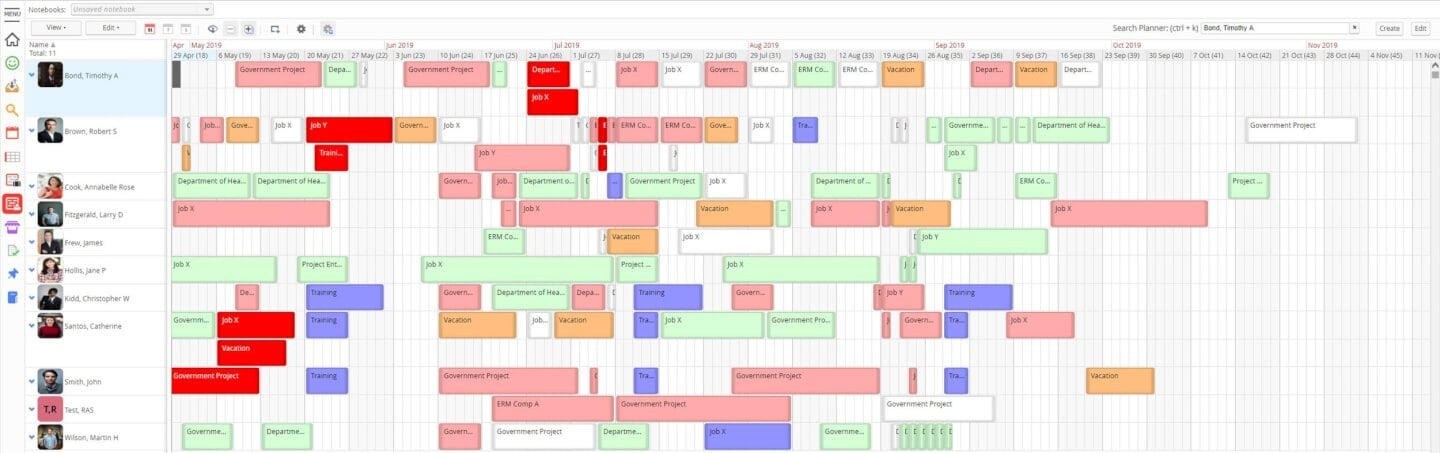
If your team needs resource scheduling with a focus on analytics, Retain is worth a look. It’s designed for organizations that want to dig into utilization, demand, and allocation trends across projects. Retain is especially useful for professional services and enterprise teams that rely on detailed reporting to guide resource planning decisions.
Who Is Retain Best For?
Enterprises that require detailed reporting and analytics to manage resource utilization and business performance.
Why I Picked Retain
What sets Retain apart for resource scheduling is its focus on comprehensive reporting and analytics. I picked Retain because it gives you detailed visibility into resource utilization, capacity, and future demand, which is essential for teams managing complex projects. The platform’s customizable dashboards and exportable reports help you analyze trends and make informed allocation decisions. For organizations that need more than just scheduling, Retain’s reporting depth is a clear advantage.
Retain Key Features
In addition to its reporting strengths, Retain offers several features that support resource scheduling:
- Drag-and-Drop Assignment: Quickly move resources between projects or tasks using a visual interface.
- Multi-Project Calendar: View and manage resource bookings across multiple projects in one place
- Absence and Leave Tracking: Monitor team availability by logging vacations, sick days, and other absences.
- Role-Based Permissions: Control access to sensitive scheduling data by assigning user roles and permissions.
Retain Integrations
Integrations include Microsoft Excel, Microsoft Power BI, Salesforce, SAP, Oracle, Workday, and Microsoft Dynamics.
Pros and Cons
Pros:
- Easy to duplicate bookings
- Data-rich dashboards
- Supports multiple currencies
- Drag-and-drop organization
Cons:
- Search functionality could use improvement
- Displays can get pretty busy

Best for profitable resource scheduling

Float.com offers a tailored approach to resource scheduling. By bringing together resource scheduling, capacity planning, time tracking, and delivery reporting, it helps teams make informed decisions and improve project delivery. With features like real-time tracking of roles and skills, along with finance and estimation capabilities, Float provides a comprehensive solution for organizations looking to forecast revenue and enhance operational efficiency.
Who Is Float.com Best For?
For creative and professional services teams, agencies, and consultancies that need a live view of team capacity, billable utilization, and profitability across projects.
Why I Picked Float.com
Float earns its spot on my shortlist because it excels in profitable resource scheduling, making it a strong choice for organizations looking to optimize project margins and resource allocation. The software's visual scheduling interface provides a clear overview of team workloads, allowing you to efficiently allocate and adjust resources in real time. Its capacity planning tools help you forecast revenue and manage project costs, ensuring that your team is working on the most profitable projects. Time tracking feeds directly from scheduled allocations, helping keep actuals accurate while reducing manual timesheet administration.
Float.com Key Features
In addition to its capacity planning and financial insights, Float offers several other features that enhance its appeal as a resource scheduling software.
- Visual Resource Schedule: Provides a live drag-and-drop view of team workloads with real-time capacity indicators and conflict flagging.
- Built-in Time Tracking: Log hours directly in the platform, with timesheets pre-populated from scheduled allocations to improve accuracy and reduce manual entry.
- Skill-Based Assignment: Match tasks to team members based on skills, helping optimize resource utilization and improve project outcomes.
Float.com Integrations
Integrations include Asana, Basecamp, ClickUp, Jira, Google Calendar, Aprimo, Hubspot, Karbon, monday.com, and Salesforce.
Pros and Cons
Pros:
- Built-in time tracking enhances project accuracy and timelines.
- Strong forecasting tools improve resource allocation decisions.
- Flexible dashboards help organize complex project management.
Cons:
- Interface complexity may overwhelm users with simple projects.
- Time tracking features require a higher plan.
New Product Updates from Float.com

Float Adds Rate Cards and Multi-Currency Billing
Float introduced centralized rate cards to standardize bill rates across projects and added multi-currency support to bill clients consistently across regions. For more information, visit Float's official site.

Runn
Best for real-time planning
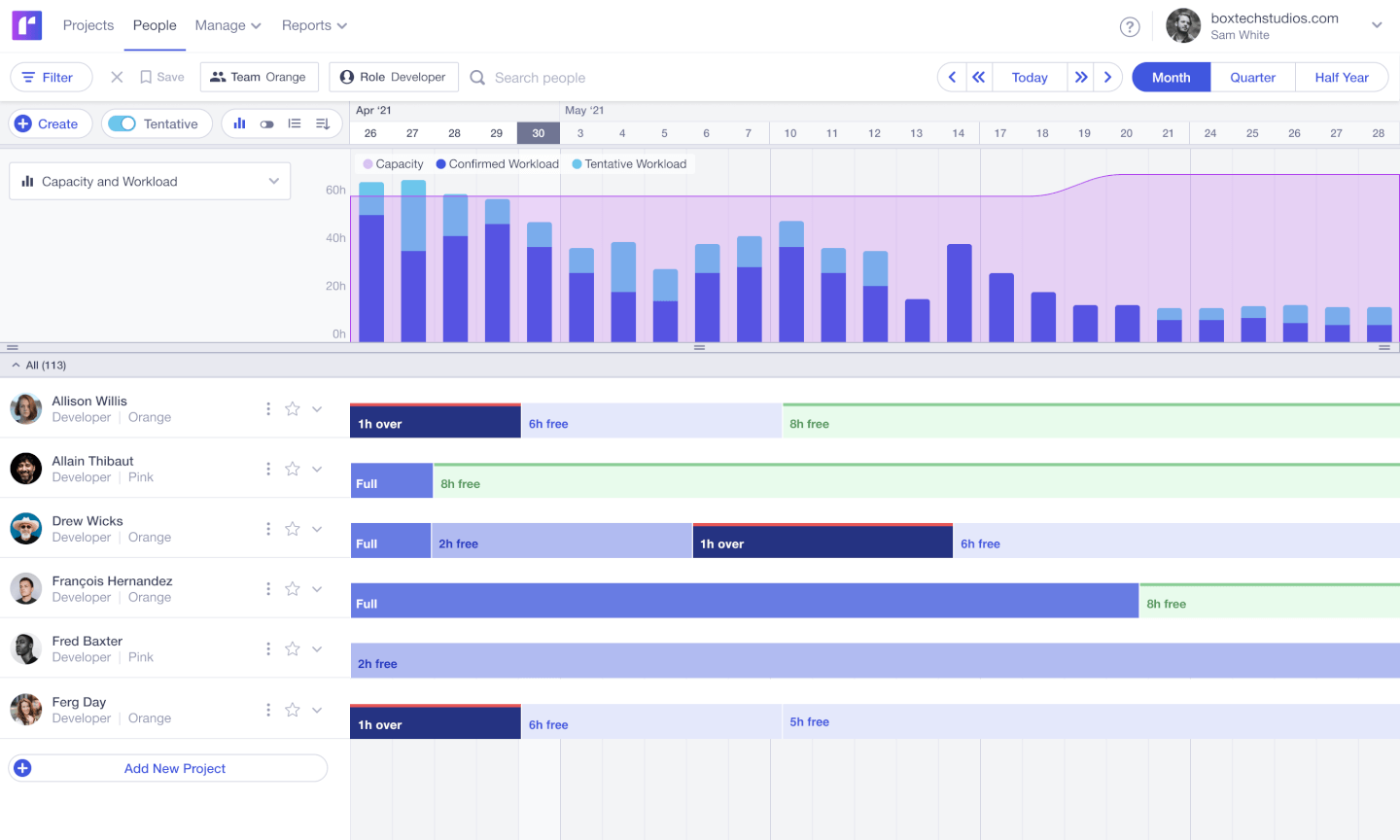
If your team needs to adjust project plans on the fly, Runn gives you real-time visibility into resource availability and workload. This tool is built for agencies, consultancies, and digital teams that juggle shifting priorities and need instant updates when schedules change. Its live planner and forecasting tools help you spot conflicts and make quick decisions as new work comes in.
Who Is Runn Best For?
Project-based teams that need real-time forecasting, scenario planning, and visibility into team capacity.
Why I Picked Runn
What sets Runn apart is its focus on real-time planning, which is essential for teams that need to respond quickly to changing project demands. I picked Runn because its live planner updates instantly as you move bookings or adjust allocations, so you always see the latest resource picture. The tool’s dynamic forecasting lets you model different scenarios and immediately see the impact on capacity and workload. This makes Runn a strong fit for agencies and consultancies that need to keep pace with shifting priorities and client requests.
Runn Key Features
Some other features in Runn that support resource scheduling include:
- Timesheet entry: Team members can log actual hours worked directly in the platform for accurate tracking.
- Public holidays management: Automatically accounts for regional holidays in resource availability calculations.
- Skills tracking: Lets you assign and filter resources based on specific skills or roles.
- API access: Enables you to connect Runn with other tools and automate data flows.
Runn Integrations
Integrations include Harvest, WorkflowMax, and Clockify for importing project, client, and people data and syncing time entries. With Runn’s API, you can build your own integration to send data across your favorite tools.
Pros and Cons
Pros:
- Native integrations & API available
- Free version available for 5 users
- Clean UI that’s easy to use & navigate
Cons:
- Time tracking requires a Google Chrome extension
- Colors are not customisable

Best for automated and interactive resourcing
Screendragon is a work management platform designed for marketing, agency, and professional services teams. It combines project management, workflow automation, resource scheduling, financial tracking, and proofing tools to help teams improve operational efficiency and maintain visibility across complex campaigns and client work.
Who Screendragon Is Best For?
Marketing operations teams, in-house creative departments, agencies, and professional services organizations that need structured resource planning, budget oversight, and workflow control across multiple concurrent projects.
Why I Picked Screendragon
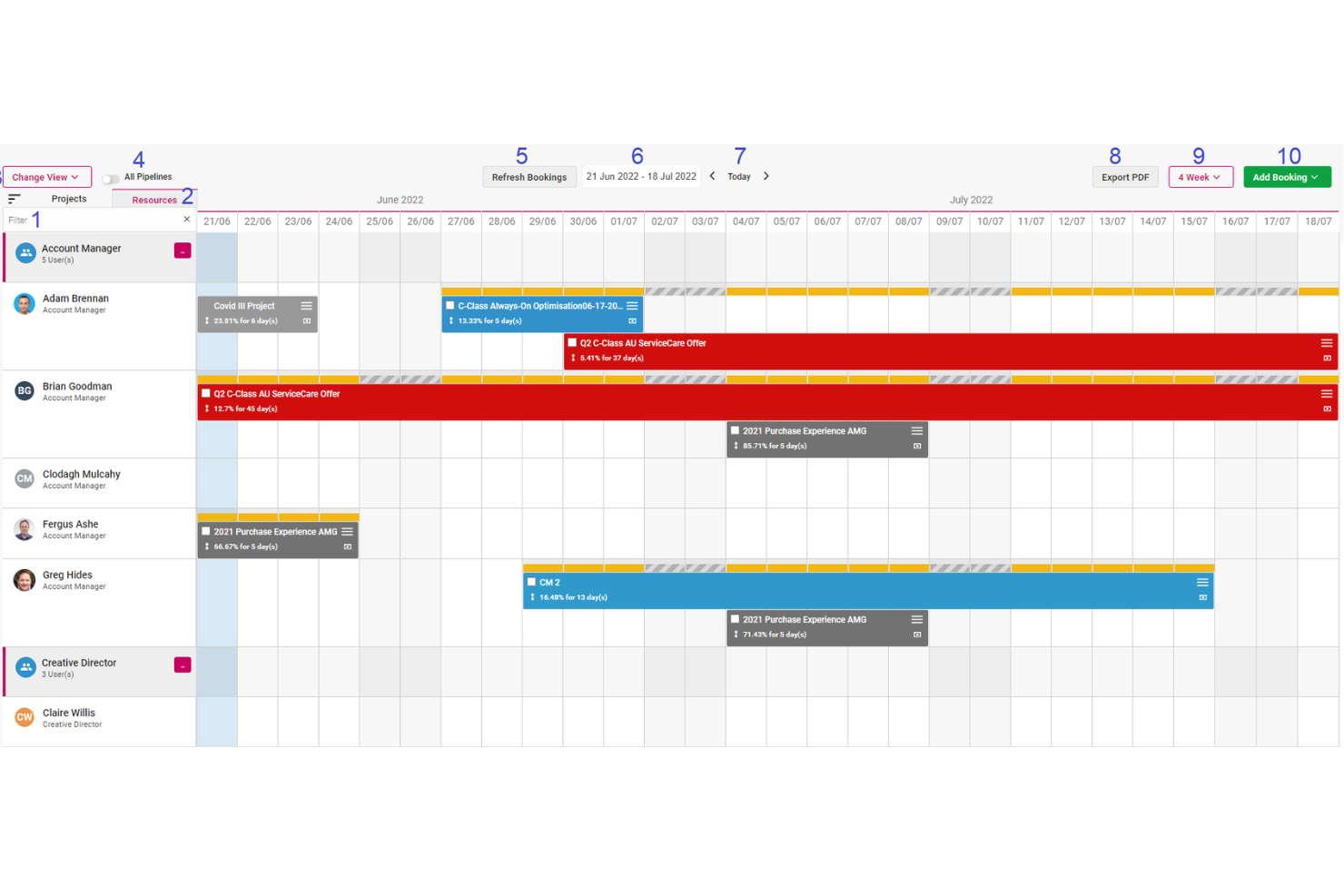
One of the main reasons Screendragon stands out is its automated and interactive resource scheduling. The platform can auto-populate schedules directly from scoped staff plans, reducing manual setup and aligning resources with approved budgets from the start. Teams can then adjust allocations using a drag-and-drop interface, with changes reflected in real time. This keeps budgets current and gives leadership immediate insight into resource allocation and financial performance.
Screendragon also offers capacity planning heatmaps that display utilization at both role and individual levels. These visual tools help management spot overbooking or underutilization early, preventing bottlenecks before they disrupt delivery timelines. By clearly showing who is assigned to what and when, teams can forecast more accurately and plan upcoming projects with greater confidence.
Screendragon Features
Features include AI-driven agentic workflows that automate repetitive tasks and support better operational decision-making. Smart forms with conditional logic guide users through required inputs and automatically route information to the appropriate stakeholders. The platform also provides online proofing tools that support markup across multiple media types, version control, and real-time collaboration between internal teams and clients.
Integrations
Integrations include MS Power BI, Slack, MS Teams, Zapier, Google Drive, Trello, Microsoft 365, Box, Jira, Microsoft OneDrive, and PeopleSoft.
Pros and Cons
Pros:
- Integrates various tools like project management and budget tracking
- Good resource planning features
- Can tailor the platform to your specific needs
Cons:
- The platform's depth can lead to complexity
- Time-consuming setup
New Product Updates from Screendragon
Screendragon Unveils New AI Hub
Screendragon introduced AI Hub, a new capability that lets teams build and manage AI agents directly within workflows. The update helps marketing teams automate tasks, maintain governance controls, and scale AI-driven operations more efficiently. For more information, visit Screendragon's official site.

Wrike
Best for complex projects

Wrike brings advanced resource management to teams handling complex, multi-phase projects with shifting priorities. Project managers in IT, marketing, and professional services use Wrike to coordinate cross-functional work, manage dependencies, and balance workloads across large teams. Its customizable workflows and real-time visibility help you keep projects on track, even as requirements change.
Who Is Wrike Best For?
Organizations managing complex, cross-functional projects that require structured workflows, detailed tracking, and enterprise-grade collaboration.
Why I Picked Wrike
When projects involve multiple teams, shifting deadlines, and complex dependencies, Wrike stands out for its ability to handle that level of complexity. Its workload charts and resource allocation tools let you visualize team capacity and adjust assignments as priorities change. I appreciate how Wrike’s dynamic Gantt charts and task dependencies help you manage overlapping schedules and avoid bottlenecks. These features make Wrike a strong fit for organizations that need to coordinate large, multifaceted projects with many moving parts.
Wrike Key Features
Some other features in Wrike help teams manage resources and projects more efficiently:
- Custom Request Forms: Collect project and resource requests with tailored forms that route work to the right teams.
- Time Tracking: Log hours directly on tasks to monitor effort and compare planned versus actual time spent.
- Document Sharing and Proofing: Upload, share, and review files within tasks, with markup and approval tools built in.
- Automated Workflows: Set up rules to automate task assignments, status updates, and notifications based on project triggers.
Wrike Integrations
Integrations include Salesforce, Microsoft Teams, Google Drive, QuickBooks, Tableau, Power BI, Miro, Adobe Creative Cloud, Google Sheets, and Microsoft SharePoint.
Pros and Cons
Pros:
- Building custom dashboards is great for highly specific resource tracking
- Good variety of dashboard views to accommodate different user needs
- Resource request and approvals are easy and well organized
Cons:
- May require additional training for an understanding of the full functionality
- Best resource tools are limited to the higher level paid plans
New Product Updates from Wrike
Wrike Adds Klaxoon MCP Integration
Wrike’s Klaxoon MCP integration is now generally available, enabling AI agents to navigate between Wrike tasks and attached whiteboards, read task context, and manage whiteboard attachments via API. For more information, visit Wrike's official site.
MRPeasy
Best for manufacturer resource planning
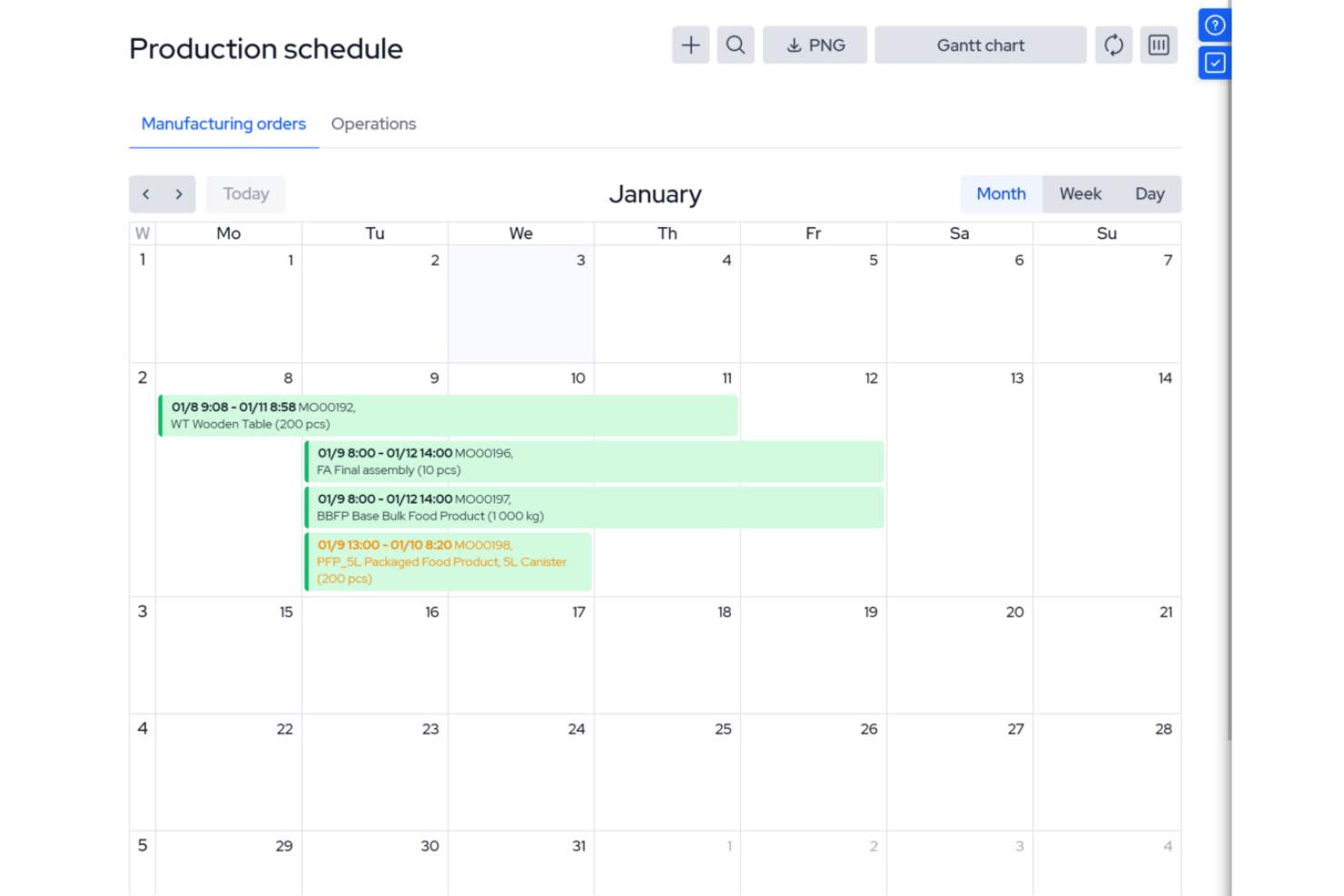
MRPeasy is a manufacturing resource planning (MRP) software, specifically tailored for the manufacturing sector. It integrates with industry processes, offering real-time visibility into production scheduling, inventory management, and operational efficiency. It’s especially useful for operations managers and production planners who want to automate job routing, track materials, and manage shop floor workloads. The platform’s focus on manufacturing resource planning sets it apart from general project scheduling tools.
Who Is MRPeasy For?
Small to mid-sized manufacturers that need integrated production scheduling and resource planning tied to inventory and operations.
Why I Picked MRPeasy
For manufacturers who need more than basic scheduling, MRPeasy offers resource planning tools built specifically for production environments. The platform’s visual production calendar and drag-and-drop job scheduling help you allocate machines, workstations, and labor with precision. I like that MRPeasy automatically factors in material availability and lead times when generating production schedules. This level of manufacturing-specific detail makes it a strong fit for teams managing complex shop floor operations.
MRPeasy Key Features
Some other features that stand out for manufacturers using MRPeasy include:
- BOM (Bill of Materials) Management: Lets you create, edit, and track multi-level BOMs for accurate production planning.
- Shop Floor Reporting: Provides real-time updates from the shop floor on job status and worker activity.
- Inventory Tracking: Monitors raw materials and finished goods across multiple locations.
- Purchase Order Management: Automates the creation and tracking of purchase orders for materials and components.
MRPeasy Integrations
Integrations include Amazon, Xero, WooCommerce, BigCommerce, Crossfire, Dropbox, Google Drive, OneDrive, HubSpot, QuickBooks, ShipStation, Salesforce, Shopify, Zapier, and more.
Pros and Cons
Pros:
- Comprehensive view of resource scheduling
- Automated production planning
- Simple, easy-to-use interface
Cons:
- Limited customizations
- Lack of advanced features due to a simple platform
New Product Updates from MRPeasy
MRPeasy Adds Stocktake for Physical Inventory Counts
MRPeasy adds Stocktake for planning, conducting, and documenting physical inventory counts. This supports both full warehouse counts and cycle counts for selected items. For more information, visit MRPeasy’s official site.
 .
.
Kantata
Best for people-centric resource scheduling

Kantata is designed for organizations that need to match the right people to the right projects based on skills, availability, and preferences. Professional services teams and consultancies use Kantata to manage resource allocation with a focus on individual strengths and workload balance. Its people-centric approach helps you optimize project outcomes while supporting employee satisfaction and retention.
Who Is Kantata Best For?
People-focused professional services organizations that need to balance resource planning with skills, availability, and project demand.
Why I Picked Kantata
What sets Kantata apart is its focus on aligning people’s skills and interests with project needs. The resource management dashboard lets you see individual availability, skill sets, and utilization rates, making it easier to assign the right person to each task. I like how Kantata’s talent profiles and forecasting tools help you plan for future project demands while considering employee preferences. This people-centric approach supports both project delivery and team satisfaction, which is especially valuable for professional services organizations.
Kantata Key Features
Some other features in Kantata help teams manage resources and projects more effectively:
- Project Portfolio Management: Track multiple projects and their resource needs in one centralized view.
- Role-Based Permissions: Control access to sensitive resource and project data based on user roles.
- Time and Expense Tracking: Capture billable hours and expenses directly within the platform.
- Scenario Planning: Model different resource allocation scenarios to see potential impacts before making changes.
Kantata Integrations
Integrations include Salesforce, SAP, Jira, Xero, BambooHR, Slack, Worday, QuickBooks, HubSpot, and NetSuite.
Pros and Cons
Pros:
- Distinguishes between soft and firm allocation
- Resourcing fully integrated with master planning
- Good reporting functionality for resource data
- Easy capacity management
Cons:
- Custom reports can be difficult to create without training
- Proofing solution is an add-on
New Product Updates from Kantata

Kantata Adds Access Group Change History
Kantata adds Access Groups History, letting account administrators track changes to group details, membership, and permissions in Recent History. The update also makes these events available through the Subscribed Events API for broader monitoring. For more information, visit Kantata’s official site.
 .
.
Connecteam
Best for multi-location shift scheduling

Connecteam is a resource scheduling and employee management platform designed for deskless teams. It combines scheduling, time tracking, and task management into one mobile-friendly system, making it easier for businesses to manage employees across multiple locations.
Who Is Connecteam Best For?
Multi-location businesses with deskless or frontline employees that need shift scheduling and workforce coordination.
Why I Picked Connecteam
When you need to manage shift scheduling across several locations, Connecteam stands out for its location-based scheduling and mobile-first design. The platform lets managers assign shifts to specific sites, track employee check-ins with GPS, and quickly fill open shifts with qualified staff. I like that you can set location-specific rules and notifications, which helps prevent scheduling conflicts and ensures coverage where it’s needed most. These features make Connecteam a strong fit for businesses with distributed teams and complex shift requirements.
Connecteam Key Features
Some other features that make Connecteam useful for resource scheduling include:
- Shift Templates: Create and reuse common shift patterns for faster scheduling.
- Automated Shift Reminders: Sends push notifications to employees before their shifts start.
- Time Off Requests: Allows staff to submit vacation or sick leave requests directly in the app.
- Payroll Export: Exports timesheets and attendance data for payroll processing.
Connecteam Integrations
Integrations include Gusto, QuickBooks, Paychex, Xero, ADP, Zapier, Wix Bookings, Lightspeed POS, and PrismHR.
Pros and Cons
Pros:
- Detailed time tracking with GPS stamping
- Customizable forms and task workflows
- Auto-scheduling reduces manual shift planning
Cons:
- Geolocation tools may struggle in remote areas
- Interface can feel complex for new users
New Product Updates from Connecteam

Connecteam Expands Break and Timesheet Controls
Connecteam adds flexible break thresholds, personalized policies, auto-end options, a centralized exceptions report, and improved timesheet issue visibility to help teams manage breaks and timesheets more effectively. For more information, visit Connecteam’s official site.
 .
.Annen programvare for ressursplanlegging
Nedenfor finner du en liste over flere verktøy for ressursplanlegging som ikke kom med på topplisten:
- Hive
For visualizing team availability
- Microsoft Project
For Microsoft integrations
- Rocketlane
For seamless onboarding collaboration
- ClickUp
For workload and box views
- Ezo
For centralized asset requests
- ActiveCollab
For client invoicing
- Jira
For project issue tracking
- Bonsai Agency Software
For resource planning and forecasting
- Birdview
For professional services companies
- Schedule It
For contractor scheduling
- Planview AdaptiveWork
For enterprise project management
- elapseit
For integrated financial features
- Polaris PSA By Replicon
For combined PSA and PPM
- Parallax
For software development firms
- Planview Vantage
For project portfolio management
- Silverbucket
For project-based work
- eResource Scheduler
Simple, standalone scheduling module
- Acuity PPM
For strategic portfolio resource alignment
- Primetric
For IT service companies
- monday AI Workspace
For customizable AI workflows
- Resource Guru
For capacity planning with timesheets
- Smartsheet
For custom workflow automations
- Celoxis
For advanced resource allocation
- ClickTime
For project schedule analytics
- Zoho Projects
For growing businesses
- Accelo
For dynamic scheduling
- VOGSY
For Google Workspace users
- GoodDay
For customizable workspaces
- Saviom
For multi-dimensional resource scheduling
- Hub Planner by Milient
For midsized to large companies


Relaterte anmeldelser av programvare for ressursplanlegging
Hvis du fortsatt ikke har funnet det du leter etter her, kan du ta en titt på disse andre relaterte verktøyene som vi har testet og vurdert:
- Programvare for prosjektstyring
- Nettbasert programvare for ressursplanlegging
- Programvare for ressursstyring
- Programvare for arbeidsflytautomatisering
- Programvare for tidsregistrering
- Produktivitetsverktøy
- Programvare for prosjektplanlegging
- Programvare med åpen kildekode for ressursstyring
How I Evaluate Resource Scheduling Software
Resource scheduling software is what a digital agency relies on to avoid double-booking its UX team across five client projects, or what a PMO lead uses to map future resource demand before a new project even kicks off. When I evaluate tools in this space, I work through two layers: a baseline that every pick on this list has to clear, and a set of differentiators that determine which tools actually rise to the top.
Core Functionality (Table Stakes for This List)
For resource scheduling software, the core functionality I test and evaluate is:
- Visual scheduling: I look for drag-and-drop timelines or Gantt views that let you see every assignment at a glance—like spotting a developer booked on three sprints at once.
- Resource allocation: Each tool should let you assign people, equipment, or spaces to tasks at full or partial capacity, such as booking a designer at 50% across two projects.
- Capacity tracking: I check whether the tool surfaces available hours vs. booked hours per resource so you can tell who's maxed out before the next project lands.
- Conflict detection: Double-bookings kill schedules. I evaluate how each tool flags overlapping assignments and whether it suggests alternatives or just alerts you.
- Resource pool management: A filterable, searchable database of resources with attributes like skills, roles, location, and cost rate is essential for matching the right people to the right work.
- Utilization reporting: I look for reports that compare planned vs. actual utilization, since that's the metric most services teams and PMOs use to measure scheduling health.
- Availability & time-off tracking: The tool needs to account for PTO, holidays, and non-working days so your schedule reflects real-world availability, not just headcount.
A tool has to deliver most of these capabilities to earn a spot on the list. From there, I consider what sets each tool apart.
Standout Features (What Separates the Picks)
Some tools stand out by offering deep scenario planning or forecasting, so you can model future demand and hiring needs before project start dates are even set. I also look for built-in integrations with project management, HR, and time tracking platforms, because real-time syncing with Jira or BambooHR can make or break scheduling workflows. Finally, API access and automation capabilities often let larger teams connect resource scheduling to custom internal processes or dashboards.
What I Weigh Beyond Features
I consider who each tool is actually built for, because a 15-person agency and a 500-person consulting firm have very different scheduling needs. Pricing structure matters too—per-resource pricing can get expensive fast when you're scheduling contractors alongside full-time staff. I also evaluate onboarding complexity, since tools like Float can be running in a day while enterprise platforms may need weeks of configuration. Finally, I check how well each tool fits common tech stacks in project-driven organizations.
Slik velger du programvare for ressursplanlegging
Det er lett å gå seg vill i lange funksjonslister og komplekse prismodeller. For å hjelpe deg med å holde fokus mens du går gjennom den unike prosessen med å velge programvare, får du her en sjekkliste over faktorer du bør ha i mente:
| Faktor | Hva bør vurderes |
| Skalerbarhet | Vil dette verktøyet fortsatt fungere for teamets størrelse om seks måneder? Se etter løsninger som kan håndtere flere brukere, prosjekter og ressurser uten ekstra oppsett. |
| Integrasjoner | Synkroniserer verktøyet med prosjektstyrings- eller tidsregistreringsverktøyene dine? Sørg for at det kobles til den nåværende arbeidsflyten din for å unngå dobbeltarbeid. |
| Tilpasningsmuligheter | Kan du justere visninger, tillatelser og tagger slik at de passer teamets prosess? Unngå rigide systemer som tvinger deg til å endre måten du allerede arbeider på. |
| Brukervennlighet | Kan teammedlemmene lære seg programvaren uten omfattende opplæring? Et ryddig grensesnitt og dra-og-slipp-planlegging bidrar til å redusere behovet for brukerstøtte. |
| Implementering og innføring | Hvor raskt kan teamet faktisk begynne å bruke verktøyet? Spør om maler, gjennomganger eller direkte hjelp med innføringen for å unngå lange forsinkelser i utrullingen. |
| Kostnad | Passer prisen til bruksområdet ditt? Vær oppmerksom på begrensninger for brukere, prosjekter eller planvisninger som kan tvinge deg over på et dyrere nivå for tidlig. |
| Sikkerhetstiltak | Hvilke beskyttelsestiltak finnes for teamets data? Spør om rollebasert tilgang, datakryptering og hvor dataene lagres. |
| Behov for interne ressurser | Hvem i teamet skal ha ansvar for oppsett og vedlikehold? Hvis dere har begrenset kapasitet, bør dere velge et verktøy med lite vedlikeholdsbehov og pålitelig leverandørstøtte. |
Trender innen programvare for ressursplanlegging i 2025
I undersøkelsen min hentet jeg inn utallige produktoppdateringer, pressemeldinger og lanseringslogger fra ulike leverandører av programvare for ressursplanlegging. Her er noen av trendene som er i ferd med å vokse frem, og som jeg følger med på:
- AI-drevet prognostisering av arbeidsbelastning: Verktøy begynner å bruke AI til å forutsi ubalanser i arbeidsbelastningen og anbefale ressursfordelinger. Dette hjelper ledere med å handle før flaskehalser oppstår.
- Synkronisering av tilgjengelighet i sanntid: Flere verktøy synkroniserer teamkalendere og ferie- og fraværsplaner i sanntid for å vise oppdatert tilgjengelighet. Dette reduserer risikoen for overbooking og gjør det enklere å endre planer raskt – særlig når det kombineres med en AI-planleggingsassistent som automatisk kan foreslå optimale justeringer.
- Scenario-planlegging for ressursfordeling: Noen verktøy lar team bygge ressursbaserte «hva om»-scenarioer for å teste hvordan endringer påvirker leveringstidene. Dette er nyttig for beredskapsplanlegging og beslutninger om ansettelser.
- Detaljert merking og matching av ferdigheter: I stedet for bare å matche personer med oppgaver basert på rolle, tillater nyere verktøy merking på ferdighetsnivå for mer presise tildelinger. Dette gir bedre samsvar med prosjektet og hjelper junioransatte med å utvikle seg.
- Mindre vekt på manuell tidsfordeling: Det blir stadig mindre relevant å tildele timer per dag til hvert teammedlem manuelt. Verktøy prioriterer nå innsats- eller resultatbasert planlegging med innebygde sikkerhetsmekanismer for å forhindre utbrenthet.
Hva er programvare for ressursplanlegging?
Programvare for ressursplanlegging er et verktøy som hjelper organisasjoner med å planlegge, tildele og administrere ressurser som personell, utstyr eller tid på tvers av ulike prosjekter.
Det sørger for at de riktige ressursene er tilgjengelige for de riktige oppgavene til riktig tid, noe som reduserer konflikter og forbedrer teamets effektivitet. Viktige funksjoner omfatter ofte kalendervisninger, håndtering av arbeidsbelastning og sporing av tilgjengelighet i sanntid for å støtte effektiv ressursplanlegging og prosjektgjennomføring.
Funksjoner i programvare for ressursplanlegging
Når du velger programvare for ressursplanlegging, bør du se etter følgende viktige funksjoner:
- Dra-og-slipp-planlegging: Lar brukere enkelt tildele og flytte oppgaver på en visuell tidslinje for raske oppdateringer og justeringer.
- Sporing av tilgjengelighet i sanntid: Viser oppdatert ressurstilgjengelighet ved å synkronisere ansattkalendere og fraværsplaner.
- Balansering av arbeidsbelastning: Bidrar til å fordele oppgaver jevnt mellom teammedlemmene for å unngå overbooking eller underutnyttelse.
- Ferdighetsbasert tildeling: Matcher oppgaver med teammedlemmer basert på spesifikke ferdigheter for å forbedre prosjektresultatene.
- Prognoser og kapasitetsplanlegging: Forutsier fremtidige ressursbehov basert på nåværende og kommende prosjekter.
- Scenario-planlegging: Gjør det mulig for brukere å teste ulike planleggingsresultater uten å påvirke aktive planer.
- Integrert tidsregistrering: Registrerer arbeidede timer direkte i verktøyet, slik at estimater kan sammenlignes med faktiske tall.
- Rollebasert tilgangskontroll: Lar ledere begrense hva ulike brukere kan se og gjøre, basert på rollene deres.
- Rapportering og analyse: Gir data om ressursutnyttelse, prosjekttidslinjer og teamets resultater.
- Mobil tilgang: Gjør det mulig for brukere å se og justere planer på farten via en mobilapp eller nettleser.
Fordeler med programvare for ressursplanlegging
Implementering av programvare for ressursplanlegging kan gi flere fordeler for teamet og virksomheten din. Her er noen du kan se frem til:
- Færre planleggingskonflikter: Sanntidstilgjengelighet og kalendersynkronisering bidrar til å unngå dobbeltbooking av personer eller overskridelse av frister.
- Bedre utnyttelse av teamets kapasitet: Balansering av arbeidsmengde og prognoser viser hvor personer er overbooket eller har kapasitet til flere oppgaver.
- Raskere prosjektplanlegging: Tidslinjer med dra-og-slipp og samsvar mellom ferdigheter gjør det raskere å tildele oppgaver og planlegge hvem som skal gjøre hva.
- Mer nøyaktige prognoser: Verktøy for kapasitetsplanlegging og rapportering gjør det enklere å forutsi ressursbehov og leveringstidslinjer.
- Enklere endringshåndtering: Scenarioplanlegging lar deg teste ulike alternativer før du justerer aktive planer.
- Bedre oversikt for ledere: Instrumentpaneler og rapporter viser hvordan ressursene brukes, og hvor ting kan komme ut av kurs.
- Mindre manuelt arbeid: Automatiske oppdateringer og innebygd tidsregistrering reduserer behovet for stadig å følge opp eller oppdatere regneark.
Kostnader og priser for programvare for ressursplanlegging
Ved valg av programvare for ressursplanlegging må du ha en forståelse av de ulike prismodellene og planene som er tilgjengelige. Kostnadene varierer basert på funksjoner, teamstørrelse, tillegg og mer. Tabellen nedenfor oppsummerer vanlige planer, gjennomsnittsprisene deres og typiske funksjoner som er inkludert i løsninger for programvare for ressursplanlegging:
Sammenligningstabell for planer for programvare for ressursplanlegging
| Plantype | Gjennomsnittspris | Vanlige funksjoner |
|---|---|---|
| Gratis | $0 | Grunnleggende planlegging, begrenset antall ressurser, standardrapporter, brukerstøtte fra fellesskapet |
| Grunnleggende | $10-20/user/month | Utvidede planleggingsfunksjoner, flere ressurser, grunnleggende integrasjoner, brukerstøtte via e-post |
| Profesjonell | $20-40/user/month | Avanserte planleggingsalternativer, ubegrenset antall ressurser, komplett utvalg av rapporter, prioritert brukerstøtte via e-post |
| Bedrift | $40+/user/month | Tilpassede integrasjoner, avanserte sikkerhetsalternativer, dedikert brukerstøtte, tjenester for introduksjon og opplæring |
Når du velger en plan, bør du vurdere dine nåværende behov og tenke på fremtidig vekst. En god plan bør passe budsjettet ditt og vokse sammen med organisasjonen din, samtidig som den tilbyr fleksibiliteten og verktøyene som trengs for effektiv ressursstyring.
Vanlige tidspunkter for når en virksomhet kan oppgradere prisplanen sin, inkluderer:
- Teamvekst: Flere ansatte eller avdelinger kan trenge bedre planleggingsverktøy for å håndtere en større arbeidsstyrke.
- Prosjektutvidelse: Flere eller større prosjekter krever mer avanserte planleggingsfunksjoner.
- Flere kunder: En større kundebase trenger bedre planlegging, flere tilpasningsmuligheter og bedre verktøy for kundeoppfølging.
- Behov for avanserte funksjoner: Over tid kan virksomheter ønske funksjoner som samarbeid i sanntid, analyse, automatisering og systemintegrasjoner.
- Geografisk ekspansjon: Håndtering av ressurser på tvers av regioner eller tidssoner krever ofte verktøy som støtter planlegging på flere lokasjoner.
Ofte stilte spørsmål om programvare for ressursplanlegging
Finn svar på de vanligste spørsmålene om dette emnet.
Hvordan velger jeg riktig programvare for ressursplanlegging for teamet mitt?
Begynn med å liste opp funksjonene teamet ditt må ha, for eksempel integrasjonsmuligheter, rapportering eller brukervennlighet. Sammenlign verktøy basert på disse behovene, les ekte brukeranmeldelser og benytt deg av gratis prøveperioder. Sørg for at programvaren passer til prosjektets størrelse og arbeidsflyt før du tar en beslutning.
Kan verktøy for ressursplanlegging integreres med programvaren jeg allerede bruker til prosjektstyring?
Ja, de fleste verktøy for ressursplanlegging fungerer med populære programmer for prosjektstyring, som Asana, Jira eller Trello. Sjekk integrasjonsdetaljene på programvarens nettsted eller i hjelpedokumentasjonen for å bekrefte at det passer inn i teknologipakken din. Integrasjoner sparer tid ved å holde data og tidslinjer automatisk synkronisert.
Hvordan bidrar disse verktøyene til å forhindre overbelastning eller utbrenthet?
Programvare for ressursplanlegging varsler deg når noen har for mange oppgaver. Du får se oversikter eller arbeidsbelastningsdiagrammer som gjør det enkelt å oppdage problemer. Noen verktøy sender også påminnelser eller advarsler, slik at du kan flytte oppgaver og holde arbeidsbelastningen realistisk.
Hva er den beste måten å gå fra regneark til dedikert programvare for planlegging på?
Eksporter dataene fra regnearket, og bruk deretter import- eller konfigurasjonsverktøyene som følger med den nye programvaren. Organiser en kort opplæringsøkt for teamet, og start med et eksempelprosjekt for å bli kjent med løsningen. Avslutt bruken av de gamle regnearkene etter hvert som alle tilpasser seg det nye systemet.
Trenger jeg en dedikert ressursansvarlig for å bruke programvare for ressursplanlegging effektivt?
Nei, du trenger ikke en dedikert ressursansvarlig. Prosjektledere kan håndtere ressursplanleggingen selv, særlig med brukervennlige verktøy. Noen større team ansetter etter hvert en dedikert ressursansvarlig, men det meste av programvaren er utviklet for å være enkel å bruke for alle.