10 beste programvarer for styring av markedsføringsressurser i 2026

Beste programvare for ressursstyring av markedsføring – kortliste


Programvare for ressursstyring av markedsføring er den enkleste måten å fordele og optimalisere ressurser på riktig måte for markedsføringsprosjektene dine. Det finnes mange programvareverktøy der ute, men ikke alle passer til behovene dine.
Jeg har valgt ut mine anbefalinger av den beste programvaren for ressursstyring av markedsføring basert på erfaringen min med å bruke dusinvis av ulike ressursstyringsverktøy med store markedsføringsteam og -prosjekter, slik at det blir enkelt for deg å velge.
Why Trust Our Software Recommendations
Our team has been testing and reviewing software since 2012. As project managers ourselves, we know how difficult—and important—it is to choose the right software.
For this guide, we evaluated tools using hands-on testing and independent research, scoring tools using our selection criteria. We also draw on insights from industry thought leaders and practicing project management experts.
Our reviews reflect our human editorial judgment, not a sales pitch.
Expert reviewers:
Sammenligningstabell for ressursstyring av markedsføring
Her er en praktisk tabell der du kan sammenligne verktøyene jeg har valgt ut.
| Tool | Best For | Trial Info | Price | ||
|---|---|---|---|---|---|
| 1 | Best for agile resource management | 14-day free trial | From $17/user/month | Website | |
| 2 | Best for agency profitability | 14-day free trial | From $10/user/month (billed annually) | Website | |
| 3 | Best workload balancing | 14-day free trial | Pricing upon request | Website | |
| 4 | Best AI-powered resourcing & workflow management | Free demo available | Pricing upon request | Website | |
| 5 | Best for people-centric resourcing | Free demo available | Pricing upon request | Website | |
| 6 | Best for first-time users | Free plan available | From $9/user/month (billed annually) | Website | |
| 7 | Best for creative collaboration | Free plan + 14-day free trial available | From $8/user/month (billed annually) | Website | |
| 8 | Best for building custom marketing apps | 30-day free trial + free demo available | From $24/user/month | Website | |
| 9 | Best for complete planning | Free trial available | Pricing upon request | Website | |
| 10 | Best for capacity planning | 30-day free trial; free demo available | Pricing upon request | Website |


Anmeldelser av den beste programvaren for ressursstyring av markedsføring
Her er en kort beskrivelse av hver av programvarene for ressursstyring av markedsføring på listen min, samt de viktigste funksjonene for hver av dem. Du kan når som helst se nærmere på \u003ca href=\u0022#how-I-picked\u0022\u003ehvordan jeg valgte dem\u003c/a\u003e.

Scoro
Best for agile resource management

Scoro is a work management software that caters to professional services by offering a suite of tools to manage projects, finances, and resources within a single system.
Why I picked Scoro: The platform has an agile Gantt chart feature that facilitates better resource management for marketers. You can get a real-time view of everyone's scheduled workloads, so you can see when your team is available for certain projects or tasks. This feature also saves time because it automatically updates when tasks are linked, helping you minimize your effort toward manual updates.
Furthermore, I like that Scoro offers end-to-end project management capabilities so marketing teams can unify their sales, project delivery, and billing in a single platform, providing complete visibility and control over resource capacity and profitability.
Scoro Standout Features & Integrations
Features include reporting and analytics for agency operations as a whole (rather than just on a per-project basis), which provides insights into resourcing, progress, and overall results. The tool also includes a feature that automatically sends invoices for retainers to help your agency get paid faster and stay profitable.
Integrations include Xero, QuickBooks, Sage Intacct, Microsoft Exchange, Expensify, Stripe, Google Calendar, Jira, Slack, Asana, Dropbox, PayPal, and more.
New Product Updates from Scoro

Scoro Adds Time Mobile App and ELI Improvements
Scoro adds the Scoro Time mobile app for iOS/Android to track time anywhere and expands ELI with attachments, smarter filtering, and trigger-based actions. For more information, visit Scoro's official site.

Best for agency profitability

Productive is a comprehensive work management software ideal for agencies and professional services businesses. It combines project management, resource planning, time tracking, budgeting, and team collaboration in one solution.
Why I picked Productive: You can allocate work effectively across your team by assigning tasks within the context of everyone's workload. From there, you can keep track of who's working on which tasks and projects. Team members can track their time in the platform, helping you keep a log of hours allocated to various clients, projects, and tasks. This makes for more accurate billing.
The software offers a comprehensive task management system that allows users to assign tasks to specific team members, set deadlines, and track task progress through to completion. Users can also set up recurring tasks so they don’t have to worry about manually creating them each time. You can also upload documents in the platform or link them from other cloud storage services, and connect them with specific projects or tasks. Additionally, Productive has robust profitability tracking features, so you can align your agency resources with the projects that make the most impact on revenue.
Productive Standout Features & Integrations
Features include list, table, calendar, timeline, and board views; recurring tasks; time estimations; time tracking; budgeting; document management; resource planning; upcoming work placeholders; and client billing.
Integrations include Dropbox, Exact, Google Workplace, Jira, Harvest Economic, Outlook, Microsoft Calendar, Slack, QuickBooks, and Xero. A Zapier integration is also available, which can unlock more integrations with a paid account.
New Product Updates from Productive
Productive Adds Voice Dictation, Slack Connector, Proposals, and Overtime
Productive adds voice dictation, a Slack Connector, proposal controls, and overtime tracking. These updates support faster AI interactions, client proposals, and time management. For more information, visit Productive’s official site.

Wrike
Best workload balancing

Wrike is a marketing project management software that provides visibility across an entire team’s work, so you can visualize capacity at a glance and balance resources appropriately.
Why I picked Wrike: It is highly configurable and allows users to customize workflows, dashboards, reports, and request forms to suit their specific needs. Wrike’s powerful resource management features enable consistent on-target delivery, ensure workload balance, and help your team deliver on time and on budget.
Wrike’s user-friendly interface enables users to work how they want, whether that’s switching between Kanban boards, using interactive drag-and-drop Gantt charts, or launching workload views to visualize priorities. Wrike features time and expense tracking, intuitive task and project management, visual proofing, pre-built templates for common marketing tasks, reporting, and resource management and allocation.
Wrike has an intuitive navigation with distinct Spaces, folders, and tasks. Easily switch from the home screen to timesheets, dashboards, calendars, reports, and the activity stream. Wrike also has a dedicated help center with interactive training, videos, and a helpful ‘Getting Started’ guide.
Wrike Standout Features & Integrations
Features include job role placeholders, visual allocation information, easy re-assigning of tasks, time tracking, and budget management.
Integrations include 400+ pre-built native integrations, including the most popular file management software from Microsoft, Google, and Dropbox, along with sales and marketing software from Salesforce and Marketo.
New Product Updates from Wrike
Wrike Adds Klaxoon MCP Integration
Wrike’s Klaxoon MCP integration is now generally available, enabling AI agents to navigate between Wrike tasks and attached whiteboards, read task context, and manage whiteboard attachments via API. For more information, visit Wrike's official site.

Best AI-powered resourcing & workflow management

Screendragon is a marketing operations platform trusted by global brands and agencies like Kellogg’s, BP, The International Olympic Committee and McCann World Group. It is designed for scaling marketing teams with advanced resource management functionality including resource forecasting, real-time utilization, capacity heatmaps, AI staff recommendations and much more.
It comes with features for management, resource management, budget management, workflow automation and time and expense tracking. Screendragon is customizable, giving you control over branded UX, smart custom forms, personalized dashboards, custom reporting and advanced permission levels.
Screendragon's task management features include visual Kanban boards, interactive Gantt charts, and list views as options for interfaces.
Screendragon provides deep integrations with leading ERP systems such as SAP and PeopleSoft. It offers thousands of integrations with popular apps through Zapier like Jira, Trello, Slack, Box, Google Drive, Office 365 and Microsoft Dynamics. It also has an open API, enabling custom integrations with any system.
Screendragon starts from $20/user/month and a free demo is available.
New Product Updates from Screendragon
Screendragon Unveils New AI Hub
Screendragon introduced AI Hub, a new capability that lets teams build and manage AI agents directly within workflows. The update helps marketing teams automate tasks, maintain governance controls, and scale AI-driven operations more efficiently. For more information, visit Screendragon's official site.

Kantata
Best for people-centric resourcing

Kantata is a resource management platform built for professional services, including marketing teams and agencies. It helps you balance workloads, assign the right people to the right campaigns, and track profitability in real time. By unifying projects, resources, and financials, it ensures your team delivers consistently without burning out.
Why I picked Kantata: Kantata takes a people-centric approach to resource planning, which is especially valuable in fast-paced marketing environments. Its forecasting and capacity tools let you see when designers, copywriters, and strategists are at risk of overload, while skills-based staffing ensures projects get the right mix of talent. This reduces bottlenecks and keeps campaign delivery smooth, even across multiple client accounts.
Beyond staffing, Kantata gives you deeper insight into how resources connect to outcomes. Built-in BI tools let you measure utilization, profitability, and client satisfaction side by side, while accounting features like project costing and invoicing link resource decisions directly to financial performance.
Kantata Standout Features & Integrations
Features include dynamic dashboards that visualize campaign health, time and expense tracking with billable vs. non-billable distinctions, and task boards that flag risks like missed deadlines or misaligned dependencies. Kantata also supports collaboration with activity feeds and in-app notifications, keeping both internal teams and clients in the loop.
Integrations include BambooHR, Hubstaff, Desktop.com, Gigasheet, Salesforce, Microsoft 365, Slack, Hubspot CRM, Jira, Time Doctor, QuickBooks, and Google Drive.
New Product Updates from Kantata

Kantata Adds Access Group Change History
Kantata adds Access Groups History, letting account administrators track changes to group details, membership, and permissions in Recent History. The update also makes these events available through the Subscribed Events API for broader monitoring. For more information, visit Kantata’s official site.
 .
.
Best for first-time users
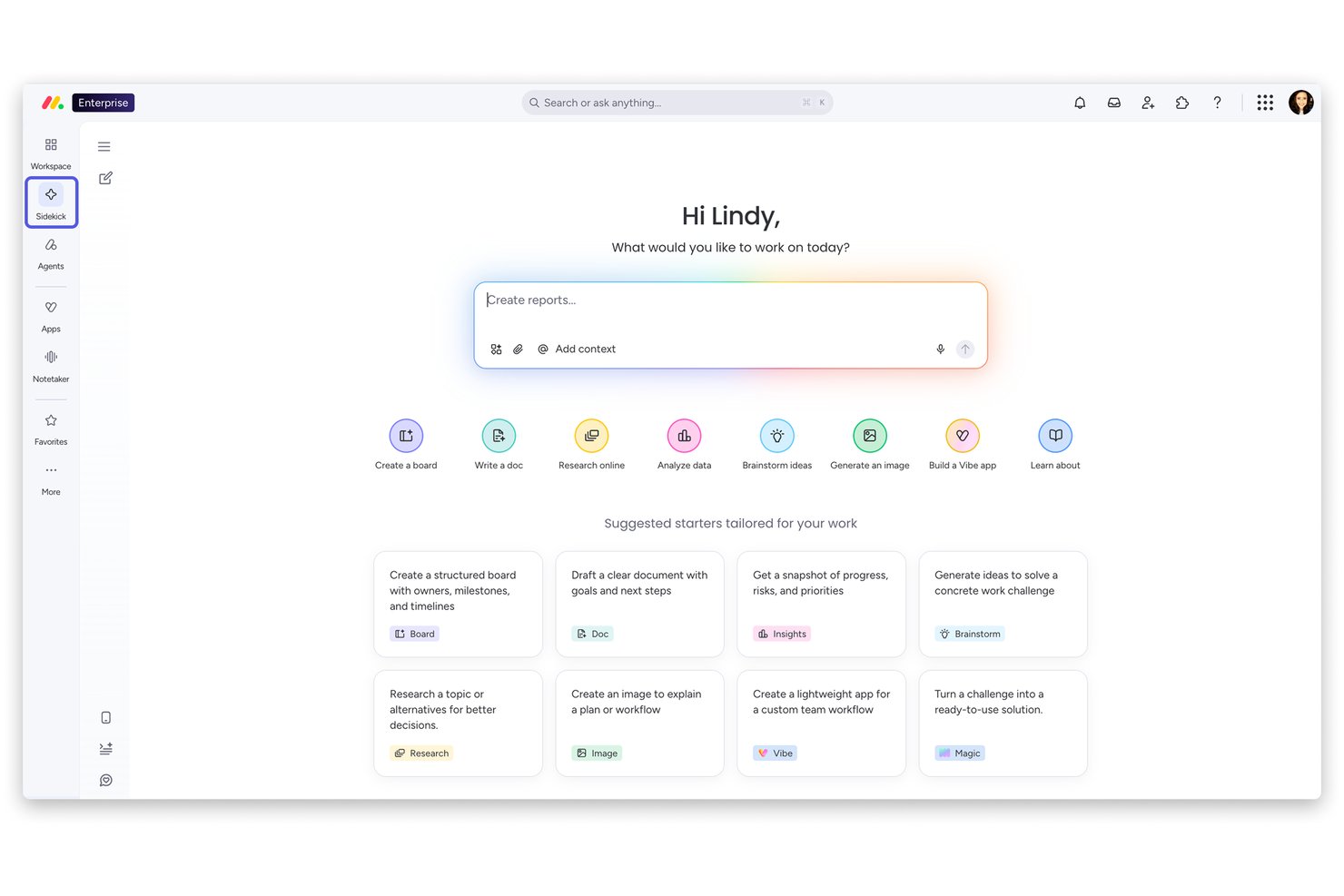
monday AI Workspace is a work management platform that combines marketing project planning, campaign tracking, resource management, and AI-powered workflow automation across teams.
Who Is monday AI Workspace Best For?
It's a natural fit for small-to-mid-size marketing teams that are new to structured project management and need a platform they can adopt quickly without heavy onboarding.
Why I Picked monday AI Workspace
I picked monday AI Workspace as one of the best because its 200+ pre-built templates mean a marketing team can go from sign-up to a running campaign board in under an hour. I particularly like how the AI Sidekick helps first-time users build workflows by answering plain-language prompts, which removes the usual setup barrier. The visual Gantt and timeline views are readable from day one, so new users can track campaign dependencies without any prior training.
monday AI Workspace Key Features
- Cross-platform integrations: Connects with marketing tools like Mailchimp, HubSpot, Adobe Creative Cloud, and Canva for smooth data flow.
- Automated workload management: Allocates resources and tracks team capacity using built-in workload boards and resource dashboards.
- Campaign performance dashboards: Offers customizable project dashboards to visualize campaign statuses, performance metrics, and timelines at a glance.
- Multi-view planning tools: Includes Kanban, Gantt, timeline, calendar, and custom board views for flexible project tracking.
monday AI Workspace Integrations
Pros and Cons
Pros:
- Visual workload boards simplify resource allocation across teams
- AI Sidekick generates workflows from plain-language prompts
- Pre-built marketing campaign templates accelerate setup
Cons:
- No built-in digital asset management or DAM
- Budget tracking lacks invoice and PO management
New Product Updates from monday AI Workspace
monday AI Workspace Adds Human Approval Routing
monday AI Workspace adds a human-in-the-loop approval block to AI Workflows, sending approval requests and routing workflow paths based on responses. For more information, visit monday AI Workspace's official site.

Miro
Best for creative collaboration

Miro is a collaborative online whiteboard with over 1,000 templates including mind maps, Kanban boards, Gantt charts, product wireframes, research boards, and flowcharts.
Why I picked Miro: This platform is an excellent resource for your brainstorming sessions with the creative team, especially if your team is largely remote. Its infinite canvas and a vast array of templates give you multiple options to present information to distributed teams. The platform also supports the expression of ideas in multiple formats, including text, images, and videos.
Moreover, features like Miro Assist help generate ideas from basic prompts, while TalkTrack enables the asynchronous explanation of process maps. Additionally, asynchronous collaboration features, such as comments and reactions, facilitates continuous input from team members.
Miro Standout Features & Integrations
Features include AI capabilities that you can use to help with tasks like clustering sticky notes and fleshing out rough ideas. The tool also has an extensive library of templates for specific project use cases and milestones like project timelines, kickoffs, and project planning.
Integrations with a whole suite of tools, including Zoom, Figma, Asana, Monday.com, Confluence, Microsoft Teams, Jira, Slack, Google Drive, Box, Airtable, Notion, Azure, and Webex. Some integrations are limited to paid plans only.
New Product Updates from Miro
Miro Adds Japan Data Residency for Enterprise Customers
Miro has introduced Japan data residency for enterprise customers, offering in-region storage for production data, backups, and metadata, plus in-region compute infrastructure. For more information, visit Miro's official site.
Kintone
Best for building custom marketing apps

Kintone is a customizable marketing resource management platform used by teams at Volvo Trucks North America, Japan Airlines, Shiseido, and over 23,000 organizations worldwide. Their unique approach to marketing management lets you build a wide variety of customizable “apps” either from scratch, using templates or from your existing spreadsheets, for data management, business processes, and workflows. Kintone apps can be customized for project management, CRM, partner databases, expense reports, shared to-do lists, event management, product feedback, and much more.
Why I picked Kintone: It lets you build no-code project tracking apps by dragging and dropping elements that you want to see onto the page: rich text fields, date fields, drop-down menus, number fields with built-in calculations, spaces for attachments, user or group selection menus, related data from other apps, tables, and more.
Once you’ve built the app you want, you can use it to more easily manage whatever data and tasks you and your team need to track. And with custom notifications and reminders as well as detailed permissions settings, your collaboration tool can look and work however you want it to.
Kintone’s built-in communication features also allow teams to discuss projects directly in the app and in topic or project-based threads. Dedicated “spaces” organize everything your team needs for your project, including task-tracking apps and searchable conversation threads.
Kintone Standout Features & Integrations
Features include a "Space-Level App Integration" feature for creating dedicated project spaces with custom apps, task trackers, and shared files. Its automated workflow handoff capabilities also allow you to design workflows with conditional logic so tasks move easily between team members based on predefined criteria.
Integrations include free native plugins built by the Kintone team as well as integrations with other tools like Slack, Gmail, Google Calendar, Outlook, Tableau, Dropbox, Salesforce, HubSpot, Eventbrite, WordPress, QuickBooks, MailChimp, and many more through a paid plan with Zapier or via API integrations.

Best for complete planning

SAS is an analytics, artificial intelligence, and data platform that helps makes sense of all the data your company produces.
Why I picked SAS: The company has a product called SAS IT Resource Management that helps you monitor your IT enterprise. This not only keeps track of people, but of all resources that impact an IT operation.
Using this product, you manage a data warehouse created from the needs of all your organization. From this data source, you can extract reports and digested information that will help you make better informed decisions.
SAS Standout Features & Integrations
Features include AI capabilities that help you plan and develop marketing content and creative, as well as an embedded customer data platform that you can use to collect and sort customer data, as well as features for audience targeting, behavioral data collection, and identity resolution.
Integrations in this tool are available through its REST API. IT teams can use it to build custom integrations and connect your current tech stack with this platform.

Meisterplan
Best for capacity planning

Meisterplan assists with all aspects of project portfolio management and capacity planning. Its tools allow you to effectively manage the present and plan for the future. This is in addition to advanced features—such as a resource monitor—that assist with understanding the impact of changes to marketing operations.
Meisterplan costs from $719/month and has a free trial.
Annen programvare for ressursstyring av markedsføring
Her er noen flere alternativer som ikke kom med på topp 10-listen min, men som likevel er verdt å se nærmere på hvis du vil utvide undersøkelsen din.
\u003cul\u003e
\t\u003cli\u003eMen når du \u003ca href=\u0022https://thedigitalprojectmanager.com/projects/how-to-choose-resource-management-software/\u0022\u003evelger en programvareapplikasjon\u003c/a\u003e, finnes det personer som er dedikert til å gi deg en best mulig kundeopplevelse.\u003c/li\u003e
\u003c/ul\u003e
- Bonsai Agency Software
For agencies
- Parallax
For predictive resource intelligence
- Allocadia
For budget owners
- Ravetree
For a built-in CRM
- MARMIND
For marketing budget planning
- Acquia DAM (Widen)
For managing marketing content
- Bynder
For establishing a creative workflow
- Celoxis
For advanced project cost analysis
- Float.com
For planning resources
- Hub Planner by Milient
Customizable reporting tool
- Filecamp
For easy-setup and onboarding
- ReportGarden
For marketing analytics
- LeanData
For existing Salesforce users
- TapClicks
For built-in business intelligence capabilities
- MarcomCentral
For ease-of-use
- InfiniGrow
For SaaS marketers
- Hive9
For built-in financials and budgeting capabilities
- 10,000ft by Smartsheet
For project planning
- Adobe Campaign
For integrating multiple marketing channels
- NetX
For custom metadata fields
- BrandMaker
For built-in marketing calendars
- CampaignDrive by Pica9
For building and creating ads
- OnTrack Workflow
For brand asset management
- Percolate
For combined resource management & campaign management
- MRP Prelytix
For account-based marketing
- IntelligenceBank Digital Asset Management
For asset management amongst multiple teams
- Bizible
For B2B marketing teams
- FunnelDash
For built-in social media management
- Attribution
For B2C marketing teams
- Vya
For marketing automations


Relaterte anmeldelser av prosjektstyringsprogramvare
Hvis du fortsatt ikke har funnet det du leter etter her, kan du ta en titt på disse andre relaterte verktøyene som vi har testet og evaluert:
- Prosjektstyringsprogramvare
- Ressursstyringsprogramvare
- Oppgavestyringsprogramvare
- Samarbeidsverktøy
- Programvare for prosjektsporing
- Programvare for virksomhetsressursstyring
- Programvare for prosjektstyring av markedsføring
- Alternativer til Resource Guru
- Programvare for medieressursstyring
How I Evaluate Marketing Resource Management Software
I split my evaluation into baseline criteria every tool must meet—like campaign planning and asset management—and differentiators that separate the best options for your team's specific needs.
Core Functionality (Table Stakes For This List)
When I'm selecting tools for my list, I rank each one on a scale from 0 (does not offer the functionality) to 5 (excels in this area) for each core functionality listed below. Then, I calculate the tool's total score into a percentage. Each tool needs to achieve a minimum total score of 65% to be considered for inclusion.
- Marketing Project Planning: I look for campaign-level project structures with timelines, dependencies, and templates—like spinning up a product launch with linked deliverables across content, design, and paid media teams.
- Digital Asset Management: A searchable, centralized asset library matters here, with metadata tagging, version history, and permissions so teams can find the right logo or approved creative without digging through shared drives.
- Creative Workflow & Proofing: I evaluate how each tool handles review cycles—whether stakeholders can annotate directly on a design proof, route approvals through multiple stages, and compare versions side by side.
- Budget & Spend Tracking: Marketing teams need to track planned versus actual spend at the campaign or project level, so I check whether the tool lets you allocate budgets, log costs, and flag overruns before they snowball.
- Resource & Capacity Management: I look at whether the platform gives you workload visibility across your team—seeing who's at capacity, who has bandwidth, and whether you can plan assignments based on availability and skill sets.
- Marketing Calendar & Reporting: A unified marketing calendar that maps campaigns, launches, and content across channels is key, along with dashboards that surface project status and operational metrics without manual assembly.
Once I have a list of tools that meet the criteria, I consider what sets each platform apart.
Differentiating Factors (What Sets Vendors Apart)
Here's how I compare and contrast different vendors:
Standout Features
Intake request management is a big differentiator—I look for structured creative brief forms with routing rules and SLA tracking so teams aren't buried in ad hoc requests. Brand governance portals also matter, especially for multi-brand organizations where distributed teams need self-service access to approved templates and locked-down assets. AI-powered automation features like smart asset tagging and workflow routing can cut manual overhead during high-volume campaign cycles.
Beyond Features
Martech stack integrations are a priority—I check whether a platform connects natively to tools like Adobe Creative Cloud, HubSpot, or Salesforce so campaign data flows without manual handoffs. Scalability also matters. I evaluate whether the tool supports multi-brand or multi-region setups as your organization grows. Security posture rounds out my assessment, including SOC 2 compliance and digital rights management for licensed creative assets that need usage tracking.
Slik velger du programvare for ressursstyring av markedsføring
Når du lager en kortliste, prøver ut og velger programvare for ressursstyring av markedsføring, bør du vurdere følgende:
- Hvilket problem prøver du å løse? Identifiser mangelen på funksjonalitet innen markedsressursstyring som du prøver å dekke, for å tydeliggjøre hvilke funksjoner og hvilken funksjonalitet programvaren må tilby.
- Hvem trenger å bruke det? For å vurdere kostnader og krav bør du vurdere hvem som skal bruke programvaren, og hvor mange lisenser du trenger. Vurder om det bare er prosjektlederne dine eller hele organisasjonen som trenger tilgang. Når dette er avklart, bør du vurdere om du skal prioritere brukervennlighet for alle eller hastighet for de mest erfarne brukerne av programvaren.
- Hvilke andre verktøy må det fungere sammen med? Avklar hvilke verktøy du erstatter, hvilke verktøy som skal beholdes, og hvilke verktøy du trenger å integrere med, for eksempel regnskap, CRM, produktivitetsapper eller HR-programvare. Bestem om verktøyene må integreres med hverandre, eller om du alternativt kan erstatte flere verktøy med ett samlet verktøy for markedsressursstyring.
- Hvilke resultater er viktige? Vurder hvilket resultat programvaren må levere for å regnes som vellykket, hvilken kapasitet du ønsker å oppnå, hva du ønsker å forbedre, og hvordan du skal måle suksess. Et eksempel på et resultat kan være muligheten til å få bedre oversikt over ytelsen.
- Hvordan vil det fungere i organisasjonen din? Vurder valg av programvare sammen med arbeidsflytene og leveringsmetodikken din. Evaluer hva som fungerer godt, og hvilke områder som skaper problemer. Alle virksomheter er forskjellige – ikke anta at et verktøy vil fungere i organisasjonen din bare fordi det er populært.
Trender innen programvare for markedsressursstyring i 2025
Her ser vi nærmere på aktuelle trender som jeg tror vil fortsette å påvirke MRM-programvare og markedsføringsbransjen som helhet i fremtiden.
- Større vekt på kunstig intelligens og maskinlæring: KI-drevet analyse og maskinlæringsfunksjonalitet blir stadig mer utbredt og tilbyr vanligvis prediktiv innsikt og automatisering av rutineoppgaver. Disse teknologiene for ressursstyring basert på KI bidrar til å forutsi kampanjeytelse, automatisere tagging av innhold og tilpasse markedsføringsinnsatsen i stor skala.
- Forbedrede funksjoner for samarbeid og fjernarbeid: Ettersom fjernarbeid fortsatt er en fast del av hverdagen i mange organisasjoner, introduserer MRM-verktøy bedre samarbeidsfunksjoner. Redigering i sanntid, tilbakemeldingssløyfer og integrasjoner med virtuelle arbeidsområder legger til rette for sømløst teamarbeid, uavhengig av geografiske begrensninger.
- Personalisering av innhold i stor skala: MRM-verktøy bruker KI til å tilby avanserte funksjoner for personalisering av innhold. Dette omfatter dynamisk innholdsproduksjon som justeres i sanntid basert på målgruppens atferd og preferanser, slik at markedsførere kan utforme svært personaliserte og effektive kampanjer.
- Stemme- og samtalebaserte brukergrensesnitt: Integreringen av stemme- og samtalebaserte grensesnitt i MRM-plattformer får stadig større utbredelse. Dette gjør det mulig for brukere å samhandle med programvaren ved hjelp av naturlig språkbehandling (NLP), slik at verktøyene blir mer tilgjengelige og kan fremskynde gjennomføringen av oppgaver ved hjelp av talekommandoer.
- Blokkjede for åpenhet og effektivitet: Programvareverktøy utforsker blokkjedeteknologi og potensialet den har for å tilføre åpenhet og effektivitet til markedsføringsoperasjoner. Funksjoner som sikker og transparent sporing av digitale ressurser og smarte kontrakter for håndtering av leverandørforhold er på fremmarsj. Dette gir nye måter å effektivisere arbeidsflyter og styrke tilliten på.
Hva er programvare for markedsressursstyring?
Programvare for markedsressursstyring (MRM) er et verktøy som hjelper virksomheter med å planlegge, gjennomføre og overvåke markedsføringsaktivitetene sine. Den organiserer og effektiviserer markedsføringsprosesser, håndterer digitale markedsføringsressurser og samordner markedsføringsstrategier med virksomhetens mål.
Denne programvaren hjelper med budsjettering, planlegging og ressursallokering, og sørger for at markedsføringsinnsatsen er effektiv og gir gode resultater. Den er nyttig for å holde markedsføringsteam samkjørte og for å spore resultatene av markedsføringskampanjer ved hjelp av verktøy for klientressursstyring.
Funksjoner i programvare for markedsressursstyring
Her beskriver jeg noen av de viktigste funksjonene du bør se etter når du velger en MRM-plattform.
- Sentralisert forvaltning av ressurser: Denne funksjonen sørger for at alle markedsføringsressurser lagres på ett enkelt, tilgjengelig sted. Den eliminerer tiden som går til å lete etter filer på tvers av ulike systemer, og forbedrer produktiviteten.
- Automatisering av arbeidsflyt: Ved å automatisere repetitive oppgaver sparer denne funksjonen verdifull tid og reduserer risikoen for menneskelige feil, slik at teamene kan fokusere på mer strategiske initiativer.
- Samarbeidsverktøy: Samarbeidsverktøy i MRM-programvare gjør det mulig for teamet ditt å kommunisere og jobbe effektivt sammen, noe som er avgjørende for å samordne markedsføringsarbeidet og unngå siloer.
- Budsjettsporing og -styring: Dette gjør det mulig å følge nøye med på markedsføringskostnadene opp mot budsjettet og bidrar til å sikre at økonomiske ressurser utnyttes effektivt, slik at du kan maksimere avkastningen på investeringen.
- Ytelsesanalyse: Med innsikt i resultatene fra markedsføringskampanjer kan du justere strategiene dine i sanntid for å oppnå bedre resultater og gjøre datadrevne beslutninger til standard praksis.
- Overholdelse av merkevareretningslinjer: Dette sørger for at alt markedsføringsmateriell er i samsvar med merkevareretningslinjene, slik at du kan opprettholde en helhetlig merkevareidentitet på tvers av alle kanaler og kontaktpunkter.
- Tilpassbare kontrollpaneler: Dette gir en personlig oversikt over viktige måltall og KPI-er, slik at du raskt kan vurdere tilstanden til kampanjene dine og ta velinformerte beslutninger.
- Innholdskalender og planleggingsverktøy: Disse verktøyene bidrar til å planlegge og tidsplanlegge markedsføringsaktiviteter, slik at du får en strategisk tilnærming til distribusjon av innhold og gjennomføring av kampanjer.
- Ressursfordeling og tidsplanlegging: Ved å administrere teamets arbeidsmengde og ressurser effektivt forhindrer denne funksjonen utbrenthet og sørger for at du kan levere prosjekter i tide.
- Digital ressursforvaltning (DAM): Dette går utover enkel lagring med funksjoner for merking, kategorisering og optimalisering av bruken av digitale ressurser, samt forbedret søkbarhet og gjenbruk.
Fordeler med programvare for markedsføringsressursstyring
Her er fem sentrale fordeler som viser hvorfor MRM-programvare er en smart investering for virksomheter som ønsker å løfte markedsføringsarbeidet sitt:
- Forbedret effektivitet: MRM-programvare effektiviserer markedsføringsprosessene og reduserer tiden du bruker på manuelle oppgaver. Det betyr at brukerne kan fokusere mer på kreative og strategiske oppgaver, noe som øker den samlede produktiviteten.
- Bedre samarbeid: Med funksjoner som legger til rette for kommunikasjon og prosjektsporing kan teammedlemmer jobbe sammen, uavhengig av hvor de befinner seg. Dette fører til bedre koordinerte markedsføringsaktiviteter og kortere tid til prosjektgjennomføring.
- Bedre budsjettstyring: Programvaren tilbyr verktøy for å følge markedsføringsutgifter i sanntid, slik at du kan holde deg innenfor budsjettene og fordele midlene mer effektivt. Denne økonomiske oversikten gjør det mulig å maksimere avkastningen på investeringen i markedsføringskampanjer.
- Konsekvent merkevarebudskap: MRM-programvare sørger for at alt markedsføringsmateriell er i samsvar med merkevareretningslinjene, slik at du kan opprettholde et konsekvent merkevarebilde på tvers av alle kanaler. Denne konsekvensen er avgjørende for å bygge tillit og kjennskap hos målgruppen.
- Datadrevne beslutninger: MRM-programvare gjør det mulig å måle resultatene av kampanjene dine nøyaktig og bruke denne informasjonen til å ta velinformerte beslutninger som kan forbedre fremtidige markedsføringsstrategier.
Kostnader og priser for programvare for markedsføringsressursstyring
Her er en oversikt over typiske abonnementer, priser og funksjoner du kan møte når du velger riktig MRM-programvare for deg.
| Abonnementstype | Gjennomsnittlig pris | Vanlige funksjoner |
|---|---|---|
| Gratis | $0 | Grunnleggende ressursforvaltning, begrenset antall brukere, viktige samarbeidsverktøy, brukerstøtte fra fellesskapet |
| Grunnleggende | $20-$100/bruker/måned | Avansert ressursforvaltning, automatisering av arbeidsflyt, grunnleggende analyse, brukerstøtte via e-post |
| Profesjonell | $100-$300/bruker/måned | Full digital ressursforvaltning (DAM), omfattende analyse, API-tilgang, brukerstøtte døgnet rundt |
| Bedrift | Tilpasset pris | Tilpassede integrasjoner, avanserte sikkerhetsfunksjoner, dedikert kundeansvarlig, ubegrenset lagring |
Når du velger et abonnement, er det også viktig å ta hensyn til både de umiddelbare og fremtidige behovene til markedsføringsteamet ditt. Det kan være mer kostnadseffektivt å starte med et grunnleggende eller profesjonelt abonnement, og det bør gi deg fleksibilitet til å oppgradere etter hvert som teamet vokser og trenger mer avanserte funksjoner.
Vanlige spørsmål om programvare for markedsføringsressursstyring
Finn svar på vanlige spørsmål andre stiller om dette emnet.
Hvordan sammenligner du programvare for markedsføringsressursstyring?
- Funksjoner: Ingen to løsninger har den samme funksjonslisten, så dette er et godt sted å begynne sammenligningen. Fra innholdsadministrasjon til markedsføringsautomatisering finnes det funksjoner for alle team eller brukere. Sørg for å velge noe som passer til ditt bruksområde.
- Pris: Du ser etter en bedre arbeidsflyt og en måte å automatisere oppgaver på, men bare hvis det passer inn i budsjettet ditt. Sammenlign programvareløsninger med tanke på det månedlige og årlige budsjettet ditt.
- Brukervennlighet: Markedsførere ønsker ikke å bruke timevis på å lære hvordan de skal bruke en ny programvareapplikasjon. Derfor er de fleste løsningene brukervennlige, men husk at noen vil passe deg bedre enn andre.
Hvorfor er ressursbelastning viktig i markedsføringsteam?
Ressursbelastning er viktig fordi det er en beregning av hvor lang tid det tar å fullføre prosjektoppgaver basert på tilgjengelige ressurser, eller mengden arbeid prosjektteamet ditt er planlagt å ta på seg.
Og i motsetning til hva de fleste tror, kan vi ikke ha personer med en utnyttelsesgrad på 100 %! Kanskje når AI tar over, men ikke med mennesker.