

10 beste alternativer for kapasitetsplanleggingsprogramvare i 2026

10 Beste programvare for kapasitetsplanlegging – kortliste


Den beste programvaren for kapasitetsplanlegging gir tydelig innsikt i teamets tilgjengelighet, forhindrer overbelastning og forutsier fremtidige ressursbehov, slik at du kan overholde tidsfrister og unngå at teamet blir utbrent.
Med over 20 års erfaring innen prosjektledelse forstår jeg hvordan frakoblede regneark og uklare oppgavefordelinger kan føre til tidsplankonflikter, skjulte flaskehalser og ujevne arbeidsbelastninger. Den rette programvaren hjelper deg med å følge med på ressurstilgjengelighet, balansere arbeidsbelastningen på tvers av prosjekter og forutse etterspørselen før kapasitetsgrensene nås.
Etter å ha gjennomgått og testet over 20 verktøy for kapasitetsplanlegging siden 2012 som programvareanmelder, har jeg identifisert de mest effektive løsningene som hjelper deg med å planlegge med trygghet, fordele arbeid nøyaktig og holde prosjektene på rett spor.
Hvorfor du kan stole på våre programvareanbefalinger
Teamet vårt har testet og anmeldt programvare siden 2012. Vi er selv prosjektledere, så vi vet hvor vanskelig og hvor viktig det er å velge riktig programvare.
I denne guiden har vi vurdert verktøyene gjennom praktisk testing og uavhengig research og gitt dem poeng ut fra våre utvelgelseskriterier. Vi bygger også på innsikt fra ledende eksperter i bransjen og erfarne prosjektledere.
Anmeldelsene våre bygger på vår egen redaksjonelle vurdering. De er ikke et salgsargument.
Ekspertanmeldere:
Sammenligningstabell for programvare for kapasitetsplanlegging
Her er en tabell der du kan sammenligne alle verktøyene vi nettopp gikk gjennom i oversiktene.
| Tool | Best For | Trial Info | Price | ||
|---|---|---|---|---|---|
| 1 | Best for agile capacity planning | 14-day free trial + free demo available | From $17/user/month | Website | |
| 2 | Best real-time capacity planning and forecasting | 60-day free trial + free demo | Pricing upon request | Website | |
| 3 | Best for intuitive scheduling and live forecasting | 30-day free trial available | From $7/scheduled user/month | Website | |
| 4 | Best for resource planning with financial insights | 14-day free trial + free demo available | From $10/user/month (billed annually) | Website | |
| 5 | Best with adaptive project scheduling | Free demo available | Pricing upon request | Website | |
| 6 | Best for AI-powered resource allocation | Free demo available | Pricing upon request | Website | |
| 7 | Best for financial planning | Free plan available; 30-day free trial; free demo available | From $9/user/month (billed annually) | Website | |
| 8 | Best for customization | Free plan available | From $9/user/month (billed annually) | Website | |
| 9 | Best for cost and performance analysis | 14-day free trial | From $10/user/month (billed annually) | Website | |
| 10 | Best for combined time tracking and utilization data | 30-day free trial + free plan available | From $9/user/month (billed annually) | Website |


Anmeldelser av den beste programvaren for kapasitetsplanlegging
Her er en kort beskrivelse av hver app for kapasitetsplanlegging, med det beste bruksområdet for hvert verktøy, noen bemerkelsesverdige funksjoner og skjermbilder som gir et innblikk i brukergrensesnittet.

Scoro
Best for agile capacity planning

Scoro is an all-in-one work management platform that offers capacity planning solutions designed to help businesses manage their resources and workload effectively.
The tool includes an agile Gantt chart feature that provides real-time updates for capacity planning. You can view live overviews of your team's workload and schedule tasks accordingly. When dependencies are created between tasks, Scoro automatically updates timelines and workloads, helping you avoid manual entry and overbooking scenarios.
One standout feature is that Scoro goes beyond capacity planning and integrates multiple business functions within a single platform. These include project management, sales and pipeline management, CRM, quoting and billing, reporting, and customizable dashboards.
Scoro integrates with Dropbox, PayPal, Expensify, Stripe, Google Calendar, Jira, Slack, Xero, QuickBooks, Sage Intacct, Microsoft Exchange, Asana, and more.
Pricing starts from $19.9/user/month with a free trial available.
New Product Updates from Scoro

Scoro Adds Time Mobile App and ELI Improvements
Scoro adds the Scoro Time mobile app for iOS/Android to track time anywhere and expands ELI with attachments, smarter filtering, and trigger-based actions. For more information, visit Scoro's official site.
Saviom
Best real-time capacity planning and forecasting

Saviom is a highly configurable and scalable resource capacity planning software built to address resourcing challenges across all industries. It helps align resource capacity to changing demands for current and future projects in the pipeline. You can allocate the right resources to every project at the right time and cost to boost operational efficiency and improve project delivery.
Some of the advanced features of Saviom include demand management, real-time optimization, pipeline management, bench management, real-time project financial forecasting, and BI-powered reports/dashboards.
What really stands out is the tool's new and improved all-in-one resource planner, which offers a comprehensive suite of advanced functionalities such as multi-dimensional analysis, embedded capacity planning, heat mapping, intelligent matchmaking, early warning, and KPI forecaster. All these features collectively help boost billable utilization of every resource, bridge skills gaps proactively, eliminate burnout, and minimize hiring/firing costs.
Saviom integrates with your everyday business applications such as Salesforce, MS Excel, SAP, and more.

Best for intuitive scheduling and live forecasting

Float.com caters to professional services firms and creative teams looking to optimize how they plan and allocate resources. By focusing on effective people management and offering features like finance and estimation for revenue forecasting, Float helps you improve project management and operational efficiency. Whether you're in a large global agency or a small consultancy, Float's capabilities in resource scheduling, time tracking, and reporting can support your growth and improve project delivery rates.
Why I Picked Float.com
I picked Float because it excels in intuitive scheduling and live forecasting, making it an excellent choice for capacity planning. With features like real-time capacity tracking and over-capacity alerts, you can ensure balanced workloads and avoid burnout. The platform also allows for customized availability settings and efficient leave management, which are crucial for maintaining team productivity. Additionally, Float's integration capabilities with other tools enhance workflow efficiency, making it a valuable asset for professional services firms and creative teams.
Float.com Key Features
In addition to its intuitive scheduling and live forecasting, Float offers several other features that enhance capacity planning for your team:
- Customizable Team Setups: You can standardize roles and filter employees based on skills and location, allowing for more precise resource allocation and management.
- Time Off Management: Float allows you to manage time off with customizable policies, ensuring that team availability is accurately reflected in your planning.
- Integrations with Popular Tools: By integrating with tools like Google Calendar, Slack, and Jira, Float enhances workflow efficiency and keeps your data accurate and up-to-date.
- Real-time Collaboration: This feature enables team members to work together seamlessly, ensuring everyone stays informed about project changes and updates.
Float.com Integrations
Integrations include Asana, Basecamp, ClickUp, Jira, Google Calendar, Aprimo, Hubspot, Karbon, Slack, and Trello.
Pros and Cons
Pros:
- Integration with popular tools enhances workflow efficiency.
- Real-time updates keep all team members informed.
- Visual timelines improve scheduling clarity for teams.
Cons:
- Integration challenges with certain niche tools exist.
- Limited customization options may not suit all needs.
New Product Updates from Float.com

Float Adds Rate Cards and Multi-Currency Billing
Float introduced centralized rate cards to standardize bill rates across projects and added multi-currency support to bill clients consistently across regions. For more information, visit Float's official site.

Best for resource planning with financial insights

Productive is a complete workforce management software designed primarily for agencies and other service-based industries. The software's resource planning module helps make the most of every team member's time and keep workload capacities in check. Users can access visual representations of team members’ workload and availability, and use this information to assign tasks and distribute work. Employees can also be grouped by skill sets and departments to enable better resource allocation.
The software's time tracking tool is directly connected to its capacity planning functionality, because employees can log the time they're spending on various tasks and projects. This information feeds into the resource planning tools, supporting smarter scheduling through forecasting and predictive insights. Project managers can use previous project data to forecast future work requirements accurately, including estimated time ranges to complete a tasks and what-if scenarios.
Budgeting and financial planning are also included in the feature set. This can be tied to the capacity and workload planning tools, ensuring teams don't go over budget on projects. Other functionalities included in the software are project management, document management, billing, and reporting tools.
Teams can connect the software with their other SaaS tools like Dropbox, Jira, Outlook, Microsoft Calendar, Slack, QuickBooks, and Xero. A Zapier integration is also available for configuring additional integrations.
New Product Updates from Productive
Productive Adds Voice Dictation, Slack Connector, Proposals, and Overtime
Productive adds voice dictation, a Slack Connector, proposal controls, and overtime tracking. These updates support faster AI interactions, client proposals, and time management. For more information, visit Productive’s official site.

Accelo
Best with adaptive project scheduling

Accelo is a project and resource management platform designed for service-based teams that need structured capacity planning. It brings together project scheduling, workload tracking, time management, and workflow automation in one system.
Who Is Accelo Best For?
Accelo is best suited for project managers and professional services teams that need visibility into team capacity, timelines, and client work across multiple projects.
Why I Picked Accelo
I picked Accelo for its adaptive scheduling tools and real-time workload visibility. The drag-and-drop Gantt chart allows teams to adjust timelines and reassign tasks quickly. When project scope or availability changes, the scheduling engine updates timelines to reflect new resource allocations, helping maintain accurate capacity plans.
Accelo Key Features
- Resource utilization dashboard: View team capacity and identify over- or under-allocation at a glance.
- Project scheduling tools: Adjust timelines using drag-and-drop Gantt charts.
- Time tracking: Log billable and non-billable hours directly within projects.
- Retainer management: Track recurring client work and allocate ongoing resources.
- Workflow automation: Automate approvals and task assignments using configurable rules.
Accelo Integrations
Accelo integrates with Google Workspace, Microsoft 365, Xero, QuickBooks Online, HubSpot, Salesforce, Mailchimp, Slack, and Zapier. An API is available for custom integrations.
Pros and Cons
Pros:
- Centralizes client, project, and resource data
- Automated project scheduling adapts to changes
- Real-time visibility into team workloads
Cons:
- Steep setup for advanced workflow features
- Minimum three-user subscription required
New Product Updates from Accelo

Accelo Rebuilds Mobile App for Project and Time Management
Accelo rebuilds its mobile app with task management, new work creation, and mobile timesheets for Forecast customers. This helps teams keep project and time data current while working away from a desktop. For more information, visit Accelo’s official site.

Best for AI-powered resource allocation

Screendragon is a work management platform designed to help marketing, agency, and professional services teams manage projects, resources, and budgets in one place. It centralizes project activities, reducing the need to switch between multiple tools.
One reason I chose Screendragon is its ability to provide a comprehensive view of resource allocation. You can see who is working on what and when, allowing for better workload distribution. This visibility helps in identifying potential bottlenecks and ensures that resources are utilized effectively. Additionally, the platform's capacity planning dashboards integrate new business pipeline data with confirmed project commitments, offering a forward-looking perspective on resourcing needs. This predictive capability allows your team to anticipate future demands and adjust resources accordingly, ensuring that upcoming projects are adequately staffed.
I also like that Screendragon has budget and estimate management, which allows you to create accurate project estimates based on resource staff plans and deliverables, automatically tracking scheduled versus actual project costs.
Integrations include MS Power BI, Slack, MS Teams, Zapier, Google Drive, Trello, Microsoft 365, Box, Jira, Microsoft OneDrive, and PeopleSoft.
New Product Updates from Screendragon
Screendragon Unveils New AI Hub
Screendragon introduced AI Hub, a new capability that lets teams build and manage AI agents directly within workflows. The update helps marketing teams automate tasks, maintain governance controls, and scale AI-driven operations more efficiently. For more information, visit Screendragon's official site.
Toggl
Best for financial planning

Toggl is a time tracking, project planning, and hiring software with features that let you track your teams capacity and quickly make decisions.
Why I picked Toggl: It’s a very complete tool that has features that let you track work and turn that information into budgets, billing, and invoicing. Toggl’s simple drag-and-drop timelines let you create effective work schedules, get visibility into your team's availability and workload, and easily follow up on tasks.
Additionally, you can use the tool on any platform you want, as they have a mobile app, desktop app, browser plugins, and online tool.
Toggl Standout Features & Integrations
Features include time tracking, reporting, project tracking, revenue tracking, and team scheduling.
Integrations are already at 100+ and include Asana, Jira, Notion, Salesforce, Slack, Trello, Airtable, Adobe Creative Suite, and Zapier.
Toggl Plans & Pricing
The free version is available for up to 5 users. There are three plans and pricing starts at $10/user/month.

Best for customization
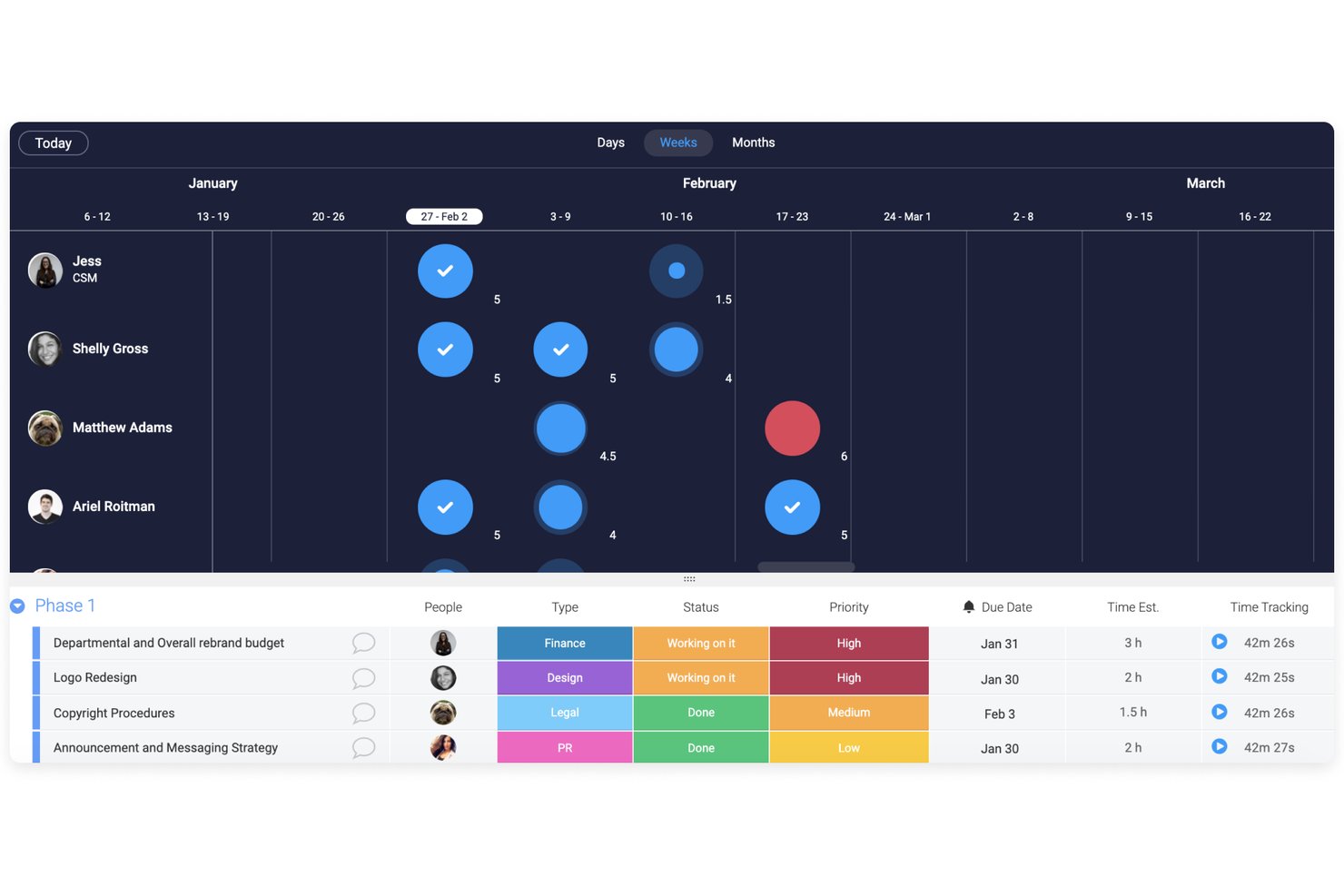
monday AI Workspace is a work management platform that combines project planning, workload visualization, and AI-powered resource tracking to help teams manage capacity across projects and portfolios.
Who Is monday AI Workspace Best For?
It's a strong fit for mid-sized to enterprise teams managing multiple projects simultaneously and needing flexible, visual tools to track team workloads.
Why I Picked monday AI Workspace
monday AI Workspace earns its spot on my shortlist because no other tool in this space lets me shape capacity planning as precisely as my team's actual workflow demands. I love that I can combine custom columns, time estimate fields, and color-coded Workload views into a board layout that reflects exactly how my team tracks availability. The monday Vibe builder takes this further, letting me create purpose-built capacity planning apps without writing any code.
monday AI Workspace Key Features
- Workload view: Visualizes task allocations by team member, highlighting over and under-capacity with color coding.
- Portfolio management: Offers a centralized dashboard to oversee multiple projects and monitor progress in one place.
- AI capacity insights: Uses AI to surface capacity risks and draft workload summaries based on actual usage data.
- Automation builder: Automates routine tasks like notifications, status updates, and resource assignments across boards.
monday AI Workspace Integrations
monday AI Workspace offers hundreds of integrations through its built-in integrations and marketplace, including Slack, Salesforce, HubSpot, Google Workspace, Microsoft Teams, Jira, Dropbox, GitHub, Zendesk, and Asana. It also supports Zapier and provides an API for custom integrations.
Pros and Cons
Pros:
- Scales across multiple teams and portfolios
- AI-generated capacity summaries save planning time
- Highly customizable workload boards and views
Cons:
- Scenario planning requires manual workarounds
- Native capacity forecasting is less specialized
New Product Updates from monday AI Workspace
monday AI Workspace Adds Human Approval Routing
monday AI Workspace adds a human-in-the-loop approval block to AI Workflows, sending approval requests and routing workflow paths based on responses. For more information, visit monday AI Workspace's official site.

Celoxis
Best for cost and performance analysis
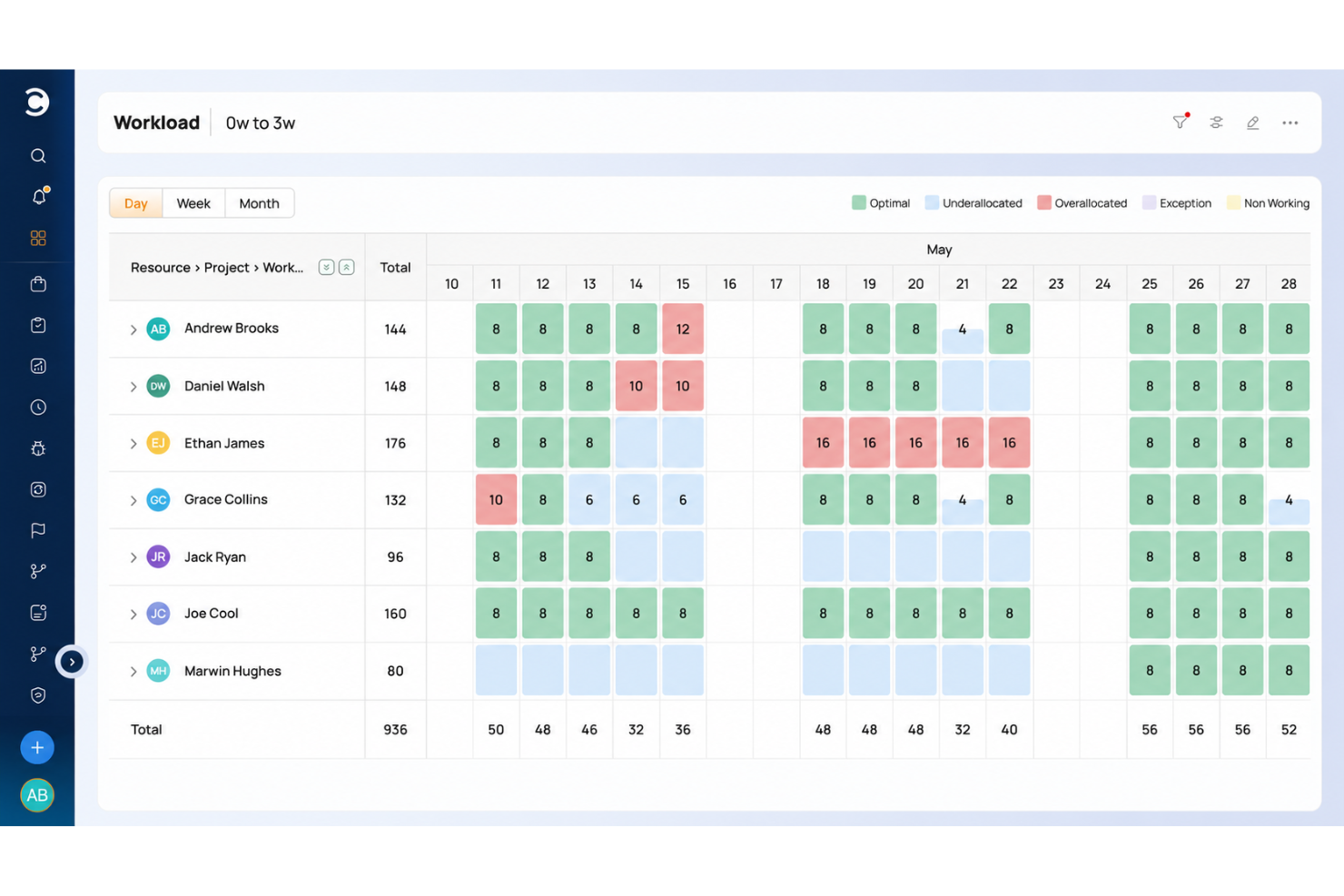
Celoxis serves as an exceptional capacity planning tool, offering organizations a comprehensive solution to effectively manage and optimize their resources. With its intuitive interface and powerful resource tracking features, Celoxis allows users to allocate personnel and other resources efficiently, preventing overallocation or underutilization.
Celoxis provides real-time visibility into resource availability, workloads, and project timelines, enabling teams to make informed decisions and ensure that the right resources are allocated to the right tasks. Additionally, Celoxis's customizable reports and dashboards provide valuable insights into resource allocation trends, helping organizations enhance productivity and achieve better project outcomes through data-driven capacity planning.
Celoxis stands out with its comprehensive and user-friendly Earned Value Management (EVM) module, surpassing the capabilities of many competitors. EVM is a potent method for analyzing project cost and performance, and Celoxis equips project managers with the tools to effortlessly implement and track essential EVM metrics like the Cost Performance Index (CPI) and Schedule Performance Index (SPI).
Celoxis seamlessly integrates EVM into other project management functions, empowering project managers to make informed, data-driven decisions based on real-time insights into project progress, cost-effectiveness, and scheduling precision. This invaluable feature is especially advantageous for organizations necessitating thorough financial analysis and performance monitoring within their projects.
Integrations include pre-built connections with Google Drive, Outlook, Microsoft Project, Excel, Salesforce and hundreds of other tools like JIRA, Slack & Trello.
Celoxis costs from $25/user/month and comes with a 30-day free trial.
Beebole
Best for combined time tracking and utilization data
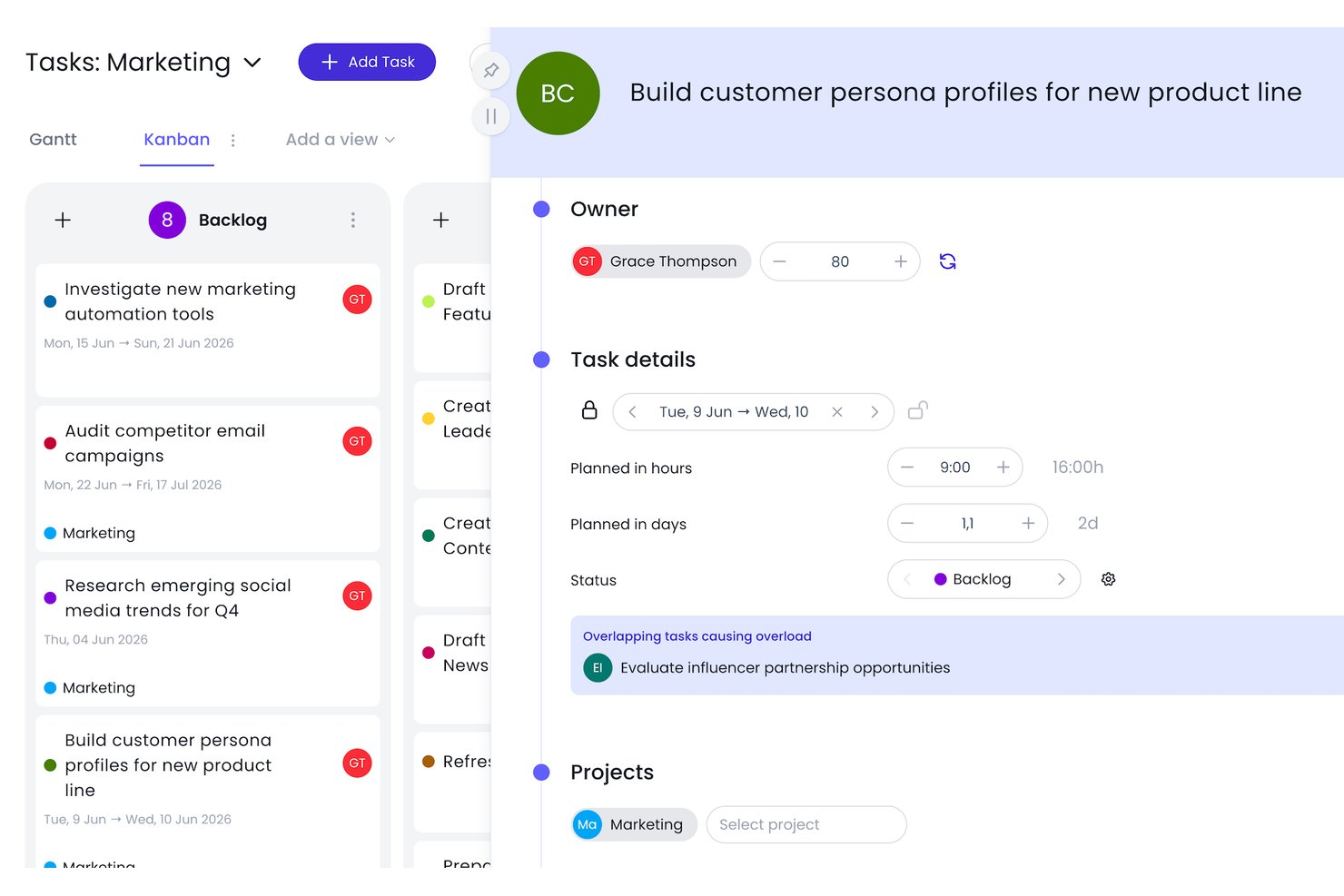
Beebole is a time tracking and resource planning platform that combines timesheets, workload scheduling, and utilization reporting into a single system.
Who Is Beebole Best For?
Beebole is a strong fit for professional services teams and PMO leaders who need billable utilization and profitability data in the same place as their resource plans.
Why I Picked Beebole
I picked Beebole as one of the best because it's the only tool on this list where time tracking and capacity planning share the same data layer. I love that planned hours flow directly into timesheets, so when I pull a budget-status report, planned time and actual time are already reconciled without any manual export. The custom utilization reports let me cut billable hours, margin %, and forecast-vs-actual by person or project in one view, which is exactly the kind of data professional services teams need to move utilization numbers like Olsys did, raising PM billable cost coverage from 28% to 80%.
Beebole Key Features
- Tentative bookings: Mark resource assignments as tentative while project plans are still forming, then confirm them when ready.
- Multi-stage timesheet approvals: Set up approval chains with quorum settings, automated reminders, and email-based approvals for distributed teams.
- Skill tag filtering: Tag team members with skills and filter the staffing timeline by those tags to find available people with the right expertise.
- Project budget tracking: Set budgets in hours, cost, or billing rates and monitor spend against them in real time across nested projects.
Beebole Integrations
Beebole has documented integrations with Asana, monday.com, Linear, Google Calendar, Outlook Calendar, BambooHR, QuickBooks Online, Xero, Google Sheets, and Excel. Its GraphQL API and webhooks support custom integrations.
Pros and Cons
Pros:
- Availability views flag overloads early
- Utilization reports connect margins to staffing
- Planned hours flow into timesheets
Cons:
- Skill tags lack proficiency-based matching
- No scenario modeling for hiring decisions
Når du bør bruke programvare for kapasitetsplanlegging
Programvare for kapasitetsplanlegging gir deg en sanntidsoversikt over hvem som er tilgjengelig, hva de jobber med, og om teamet faktisk kan ta på seg det som kommer. Hvis noen av scenarioene nedenfor høres kjente ut, er det sannsynligvis på tide å legge til et slikt verktøy i verktøystakken din:
- Teamet ditt fortsetter å gå glipp av tidsfrister til tross for «nok» folk: Du har 10 personer på prosjektet, men tre er begravd i annet arbeid, og ingen har varslet om det. Programvare for kapasitetsplanlegging avdekker overbelastning før det forsinker leveransen, slik at du kan omfordele arbeidet mens det fortsatt er tid til å korrigere kursen.
- Du lager ressursplanen i regneark: Du følger med på tilgjengeligheten til et team på 15 personer i en delt Excel-fil som er utdatert allerede på torsdag. Et dedikert verktøy samler tilgjengelighet, fravær og prosjekttildelinger i én oppdatert oversikt, noe som reduserer planleggingstiden og eliminerer kaoset med ulike versjoner.
- Du tar ansettelsesbeslutninger basert på magefølelse: Du er usikker på om du bør hente inn en konsulent eller vente til tredje kvartal, fordi du ikke kan se etterspørselen lenger frem enn neste måned. Programvare for kapasitetsplanlegging modellerer oppdragsporteføljen din, slik at du kan ta beslutninger om ressurser basert på faktiske data.
- Det tar for lang tid å bemanne nye prosjekter: Hver gang et prosjekt starter, bruker du en uke på å finne ut hvem som er ledig og i hvilken prosentandel. Med programvare for kapasitetsplanlegging kan du se tilgjengeligheten med et øyekast og tildele de rette personene på timer, ikke dager.
- Du driver flere prosjekter med delte ressurser: Designerne og utviklerne dine er fordelt på fire aktive prosjekter, og ingen har en tydelig oversikt over den totale belastningen. Verktøy for kapasitetsplanlegging gir alle innsyn i det delte teamets kapasitet, slik at konflikter oppdages før de fører til utbrenthet.
Annen programvare for kapasitetsplanlegging
Her er noen flere alternativer som ikke kom med på topplisten, men som er verdt å vurdere.
- Kantata
For people-centric resourcing
- Zoho Projects
For balancing team bandwidth
- VOGSY
For work-in-progress management
- Wrike
Keep track of your project’s progress in real-time
- Miro
For visual collaboration & innovation
- Rocketlane
For resource forecasting in client projects
- ClickUp
Plan for the future with adaptable templates
- Meisterplan
For its role-based resource allocation prior to staffing
- awork
For AI-powered task allocation
- Bonsai Agency Software
For agency resourcing and forecasting
- Birdview
For professional services companies
- ProjectManager
Assess project progression with ease
- Parallax
For digital agencies and software development firms
- eResource Scheduler
For time tracking, scheduling, financials, and reports
- Acuity PPM
For enterprise governance
- Mosaic
The only capacity planning software purpose-built to increase utilization rates
- Resource Guru
For visual capacity planning & forecasting
- Smartsheet
Save time when planning a new project
- ClickTime
For balancing workloads and allocating staff in real time
- Epicflow
For AI resource capacity planning
- GoodDay
For flexibility in data display
- Runn
For forecasting & planning
- Hub Planner by Milient
For visual resource management
- Revcast
For AI-driven revenue forecasting
- Skedulo
Productivity software designed to help companies that collaborate with international freelancers to keep their projects on track.
- Planful
Financial planning and analysis platform that helps with capacity planning and delivers actionable insights based on your company’s data.
- Connecteam
Workforce management tool that enables project managers to automate recurring tasks and create shifts for their employees.


Relaterte anmeldelser av programvare for prosjektledelse
Hvis du fortsatt ikke har funnet det du leter etter her, kan du se nærmere på disse andre relaterte verktøyene som vi har testet og evaluert:
- Programvare for prosjektstyring
- Programvare for ressursstyring
- Programvare for arbeidsflytautomatisering
- Programvare for tidsregistrering
- Programvare for oppgavestyring
- Programvare for prosjektplanlegging
How I Evaluate Capacity Planning Software
I split every evaluation into two layers: the baseline a tool must clear—think real-time availability tracking and what-if modeling—and the differentiators that separate the best options.
Core Functionality (Table Stakes For This List)
When I'm selecting tools for my list, I rank each one on a scale from 0 (does not offer the functionality) to 5 (excels in this area) for each core functionality listed below. Then, I calculate the tool's total score into a percentage. Each tool needs to achieve a minimum total score of 65% to be considered for inclusion.
- Resource Availability Tracking: I check whether a tool surfaces real-time availability that accounts for PTO, holidays, and existing project commitments—not just a static headcount list.
- Capacity vs. Demand Forecasting: A good tool lets planners compare available hours against upcoming project demand, so I evaluate how far out the forecast extends and how granular the breakdowns are.
- Workload Allocation & Assignment: I look for flexible allocation methods—hours, percentages, or FTE—plus the ability to quickly reassign people when a sprint scope changes or a project timeline shifts.
- Skills & Role-Based Planning: Teams staffing cross-functional projects need to filter by skill set or role, so I evaluate how each tool tags, searches, and matches resources to project requirements.
- Scenario Planning & What-If Modeling: I look at whether planners can model hiring decisions or pipeline changes in a sandbox without touching live data, then compare scenarios side by side.
- Utilization Reporting & Analytics: Strong reporting breaks utilization down by billable vs. non-billable hours, team, and time period—I evaluate whether dashboards are customizable or limited to preset views.
Once I have a list of tools that meet the criteria, I consider what sets each platform apart.
Differentiating Factors (What Sets Vendors Apart)
Here's how I compare and contrast different vendors:
Standout Features
Financial forecasting is a major differentiator—I look for tools that connect rate cards and cost data to allocations so you can see margin impact before committing a senior developer to a low-budget project. Pipeline and CRM sync matters just as much, especially for services firms staffing against deals that haven't closed yet. Probability-weighted demand gives planners a realistic view of what's coming next quarter. I also evaluate automated over-allocation alerts and resource request approvals, which save resource managers from manually auditing schedules every week.
Beyond Features
Integrations matter a lot here—capacity planning tools need to pull task and project data from wherever your teams actually work, whether that's Jira, Asana, or Monday. Without that sync, planners end up manually reconciling two sources of truth. I also evaluate how pricing scales with headcount. Some vendors charge per resource managed, others per planner seat, and the difference adds up fast when you're running a 200-person resource pool. Licensing for view-only stakeholders is worth checking too, since leadership often just needs dashboard access.
Slik velger du programvare for kapasitetsplanlegging
Det er lett å gå seg vill i lange funksjonslister og komplekse prismodeller. For å hjelpe deg med å holde fokus mens du går gjennom den unike prosessen med å velge programvare, har vi laget en sjekkliste over faktorer du bør ha i bakhodet:
| Faktor | Hva du bør vurdere |
| Skalerbarhet | Kan programvaren håndtere flere prosjekter og ressurser etter hvert som teamet ditt vokser? Se etter verktøy som støtter flere brukere eller større datamengder uten at du trenger en omfattende oppgradering. |
| Integrasjoner | Kobler verktøyet seg sømløst til prosjektstyrings-, HR- eller økonomiverktøyene dine? Unngå verktøy som krever mye manuelt arbeid eller dobbeltregistrering av data. |
| Tilpasningsmuligheter | Kan du justere felter, arbeidsflyter og rapporter slik at de samsvarer med hvordan teamet ditt arbeider? Overdrevent rigide verktøy tvinger deg ofte til å endre prosessen slik at den passer til programvaren. |
| Brukervennlighet | Vil teamet ditt raskt lære seg å bruke programvaren? Se etter enkle grensesnitt, dra-og-slipp-planlegging og oversiktlige dashbord som ikke krever timevis med opplæring. |
| Implementering og innføring | Hvor lang tid vil det ta å få programvaren i drift? Sjekk om leverandøren tilbyr maler, opplæringsøkter eller støtte ved migrering, slik at du ikke må finne ut av alt på egen hånd. |
| Kostnad | Passer prisen budsjettet ditt over tid? Ta høyde for skjulte kostnader som premiumstøtte, tilleggsfunksjoner eller brukerbasert prising som kan øke kraftig etter hvert som du vokser. |
| Sikkerhetstiltak | Har verktøyet sikkerhetstiltak som rollebasert tilgang, kryptering og revisjonslogger? Du må beskytte sensitive ressursdata, særlig hvis du administrerer innleide eller eksterne samarbeidspartnere. |
| Tilgjengelig kundestøtte | Når får du hjelp hvis noe slutter å fungere? Se etter korte svartider, direktechat eller dedikerte kundeansvarlige. |
Trender innen programvare for kapasitetsplanlegging i 2025
I undersøkelsen min samlet jeg inn utallige produktoppdateringer, pressemeldinger og versjonslogger fra ulike leverandører av programvare for kapasitetsplanlegging. Her er noen av de fremvoksende trendene jeg følger med på:
- Prediktiv analyse for etterspørselsprognoser: Verktøy tar i bruk maskinlæringsalgoritmer for å forutsi fremtidige ressursbehov og forbedre nøyaktigheten i kapasitetsplanleggingen.
- AI-drevet ressursallokering: Noen plattformer benytter nå AI-basert ressursstyring for å automatisere tildelingen av ressurser, noe som reduserer det manuelle arbeidet betydelig.
- Sømløs integrasjon med ERP- og prosjektstyringssystemer: Muligheten til å integrere med ERP-systemer og prosjektstyringsverktøy blir stadig bedre, noe som muliggjør datautveksling i sanntid og bedre oversikt over alle ressurser.
- Verktøy for samarbeid i sanntid: Noe programvare for kapasitetsplanlegging introduserer funksjoner for samarbeid i sanntid, slik at team kan planlegge og justere ressursfordelingen dynamisk.
- Analyse av miljøpåvirkning: Mange plattformer gjør det nå mulig for brukere å vurdere miljøpåvirkningen av ressursbruken i prosjekter.
Hva er programvare for kapasitetsplanlegging?
Programvare for kapasitetsplanlegging er et verktøy som hjelper team med å prognostisere ressursbehov, fordele arbeidsmengder og følge med på tilgjengelighet.
Den gir oversikt over kapasiteten på tvers av prosjekter, noe som muliggjør bedre planlegging, balanserte arbeidsmengder og levering i tide. Prosjektledere, ressursledere og teamledere bruker den til å optimalisere ressursutnyttelsen, forhindre overbooking og tilpasse bemanningen til prosjektbehovet.
Funksjoner i programvare for kapasitetsplanlegging
Når du velger programvare for kapasitetsplanlegging, bør du se etter følgende nøkkelfunksjoner:
- Ressursprognoser: Forutsi kommende behov for personale, utstyr eller plass ved å analysere historiske trender og fremtidige prosjektkrav. Dette gir deg et forsprang når du skal planlegge fremover og unngå stress i siste liten.
- Etterspørselsstyring: Følg med på og håndter innkommende prosjekter eller arbeidsmengder, slik at du kan tilpasse tilbudet til etterspørselen mer nøyaktig og unngå å overbelaste teamene eller systemene dine.
- Scenariomodellering: Kjør «hva om»-simuleringer for å teste ulike kapasitetsstrategier før du gjør faktiske endringer. Dette lar deg spille ut mulige resultater på en trygg måte – tenk på det som en risikofri generalprøve for virkeligheten.
- Integrasjon av sanntidsdata: Koble deg til aktuelle forretningsdata – som salg, produksjon eller lagerbeholdning – for å få løpende oppdateringer om kapasitetssituasjonen din. Innsyn i sanntid betyr at du får umiddelbart nyttig innsikt og færre uventede flaskehalser.
- Automatiserte varsler og meldinger: Sett opp automatiske påminnelser eller advarsler når ressursene begynner å ta slutt eller du nærmer deg kapasitetsgrensene. Disse varslene hjelper deg med å holde kursen uten at du hele tiden må kontrollere alt manuelt.
- Dashbord og rapportering: Få tilgang til visuelle, lettleste sammendrag og detaljert analyse av ressursbruken, etterspørselen og kapasiteten din. Dashbord gjør det enkelt å oppdage trender, følge med på resultater og dele tydelige oppdateringer med resten av teamet.
- Samarbeidsverktøy: La flere brukere samarbeide om ressursplanlegging, enten de er på teamet ditt eller i en annen avdeling. Innebygde funksjoner for kommunikasjon og deling effektiviserer samarbeid og beslutningstaking.
- Kapasitetsoptimalisering: Få konkrete forslag til omfordeling av ressurser eller justering av arbeidsmengder for å maksimere effektiviteten, minimere nedetid og sikre smidig drift.
Vanlige AI-funksjoner i programvare for kapasitetsplanlegging
Utover standardfunksjonene i programvare for kapasitetsplanlegging som er nevnt ovenfor, har mange løsninger nå integrert AI. Programvare for AI-basert kapasitetsplanlegging legger vekt på funksjoner som:
- Prediktiv analyse: Bruk AI-drevne modeller til å forutsi fremtidig etterspørsel, ressursbehov eller risiko basert på mønstre i dataene dine. Dette styrker evnen din til å ta smarte, proaktive beslutninger.
- Automatisert planlegging: La AI håndtere den krevende oppgaven med å tildele ressurser og opprette tidsplaner, samtidig som prioriteringer balanseres og endringer i siste liten håndteres med minimalt bryderi for deg.
- Avviksdeteksjon: La AI skanne kapasitets- og bruksdataene dine etter uvanlige mønstre – tenk på det som en assistent som alltid er på vakt og oppdager problemer før de utvikler seg til store utfordringer.
- Intelligente anbefalinger: Motta AI-drevne forslag til ressursfordeling, lagernivåer eller justeringer av tidslinjer, slik at du kontinuerlig kan forbedre og videreutvikle planleggingsprosessen.
- Grensesnitt for behandling av naturlig språk (NLP): Samhandle med programvaren ved hjelp av et enkelt, samtalebasert språk – still spørsmål om kapasitet, få rask innsikt og gjør justeringer uten å måtte lete gjennom dashbord.
Fordeler med programvare for kapasitetsplanlegging
Implementering av programvare for kapasitetsplanlegging kan gi flere fordeler for teamet og virksomheten din, blant annet:
- Bedre ressursfordeling: Se hvem som er tilgjengelig, og tildel arbeid basert på kapasitetsdata i sanntid for å unngå å overbelaste teamet.
- Bedre prosjektprognoser: Bruk verktøy for ressursprognoser til å forutsi fremtidige behov og planlegge kommende prosjekter med trygghet.
- Færre flaskehalser: Oppdag overbookede ressurser tidlig med automatiserte varsler, og juster arbeidsmengden før de bremser fremdriften.
- Bedre oversikt: Få en tydelig oversikt over kapasiteten i alle prosjekter med dashbord som viser utnyttelse og tilgjengelighet på et øyeblikk.
- Raskere beslutningstaking: Bruk sanntidsrapporter til raskt å justere bemanning eller tidsplaner uten å vente på manuelle oppdateringer.
- Kostnadsbesparelser: Unngå ansettelser i siste liten eller utgifter til overtid ved å planlegge kapasiteten nøyaktig med funksjoner for prognoser og oppfølging.
- Mer tilfredse team: Fordel arbeidsmengden rettferdig med verktøy for arbeidsmengdestyring som forebygger utbrenthet og forbedrer den generelle trivselen.
Kostnader og priser for programvare for kapasitetsplanlegging
Valg av programvare for kapasitetsplanlegging krever en forståelse av de ulike prismodellene og abonnementene som er tilgjengelige. Kostnadene varierer basert på funksjoner, teamstørrelse, tillegg og mer. Tabellen nedenfor oppsummerer vanlige abonnementer, gjennomsnittsprisene deres og typiske funksjoner som er inkludert i {keyword}-løsninger:
Sammenligningstabell for kapasitetsplanleggingsprogramvare
| Plantype | Gjennomsnittspris | Vanlige funksjoner |
|---|---|---|
| Gratis | $0 | Grunnleggende ressursplanlegging, begrenset antall prosjekter, standardrapportering, brukerstøtte fra fellesskapet |
| Grunnleggende | $10-20/bruker/måned | Forbedret ressursplanlegging, ubegrenset antall prosjekter, avansert rapportering, brukerstøtte via e-post |
| Profesjonell | $20-40/bruker/måned | Alle funksjonene i Grunnleggende, pluss ressursprognoser, integrasjonsmuligheter, prioritert brukerstøtte |
| Bedrift | Tilpasset | Alle funksjonene i Profesjonell, pluss tilpassede integrasjoner, dedikert kundeansvarlig, brukerstøtte døgnet rundt, avansert sikkerhet |
Vanlige spørsmål om programvare for kapasitetsplanlegging
