

I 10 migliori strumenti di gestione dei progetti da remoto recensiti per il 2026

10 Elenco dei migliori strumenti per la gestione remota dei progetti


La gestione dei progetti da remoto comporta una serie di ostacoli specifici, poiché è necessario facilitare la comunicazione, assegnare attività e rispettare le scadenze, il tutto senza interazioni faccia a faccia. Senza gli strumenti giusti per mantenere tutti sulla stessa linea, i progetti possono facilmente deragliare.
Per questo ho raccolto questo elenco di strumenti per la gestione remota dei progetti. Queste soluzioni sono progettate per aiutare il tuo team a rimanere connesso, organizzato e produttivo, indipendentemente dal luogo in cui lavora.
Ho esaminato personalmente ogni strumento per offrirti una valutazione onesta e imparziale delle sue funzionalità e dei suoi vantaggi. In questo articolo troverai una panoramica chiara di ciò che offre ciascuna soluzione per la gestione remota dei progetti, così potrai scegliere quella più adatta al tuo team.
Perché fidarsi dei nostri consigli sui software
Il nostro team testa e recensisce software dal 2012. In quanto project manager noi stessi, sappiamo quanto sia difficile — e importante — scegliere il software giusto.
Per questa guida, abbiamo valutato gli strumenti attraverso test pratici e ricerche indipendenti, assegnando un punteggio agli strumenti in base ai nostri criteri di selezione. Ci basiamo inoltre sulle competenze di leader di pensiero del settore e di professionisti attivi nella gestione dei progetti.
Le nostre recensioni riflettono il nostro giudizio editoriale umano, non un discorso di vendita.
Revisori esperti:
Confronta le specifiche fianco a fianco
| Tool | Best For | Trial Info | Price | ||
|---|---|---|---|---|---|
| 1 | Ideale per gestire i flussi di lavoro di team da remoto | Prova gratuita di 14 giorni + demo gratuita disponibile | Da $19.90/utente/mese (fatturato annualmente) | Website | |
| 2 | Ideale per il monitoraggio in tempo reale della redditività | Prova gratuita di 14 giorni + demo gratuita disponibile | A partire da $10/mese (fatturazione annuale) | Website | |
| 3 | Ideale per la collaborazione da remoto tra dipartimenti | Versione gratuita fino a 5 utenti | Da $9.80/utente/mese | Website | |
| 4 | Miglior strumento di PM remoto per integrazioni di terze parti | Prova gratuita di 14 giorni | A partire da $6/utente/mese | Website | |
| 5 | Miglior software per la pianificazione di progetti remoti con funzioni di collaborazione | Prova gratuita di 15 giorni + piano gratuito + demo gratuita disponibile | Da $4/utente/mese (fatturato annualmente) | Website | |
| 6 | La migliore gestione progetti da remoto per portafogli in crescita | Prova gratuita di 30 giorni | Da $22.50/utente/mese (minimo 5 utenti) | Website | |
| 7 | Ideale per suddividere progetti complessi | Prova gratuita di 30 giorni + piano gratuito disponibile | A partire da $7,65/membro/mese (fatturazione annuale) | Website | |
| 8 | Miglior strumento per la gestione delle attività online e da remoto | Versione gratuita per un massimo di 3 progetti | A partire da $8.25/utente/mese | Website | |
| 9 | Miglior strumento di gestione progetti da remoto per la registrazione dello schermo | Versione gratuita con funzionalità limitate | Da $5/utente/mese | Website | |
| 10 | Ideale per creare flussi di lavoro di progetto personalizzati | 30 giorni di prova gratuita (senza necessità di carta di credito) | Da $24/utente/mese con minimo 5 utenti | Website |


Recensioni dei migliori strumenti per la gestione remota dei progetti
Ecco una breve descrizione di ciascuno degli strumenti per la gestione remota dei progetti presenti nel mio elenco, con indicazione dei loro punti di forza e schermate che mostrano alcune delle funzionalità.

Scoro
Ideale per gestire i flussi di lavoro di team da remoto

Scoro è uno strumento di gestione progetti da remoto versatile che migliora il modo in cui gestisci progetti, risorse e aspetti finanziari. È progettato per aiutare i team ad aumentare la produttività e ottimizzare i flussi di lavoro grazie alla sua gamma completa di funzionalità.
Ho scelto Scoro perché offre gestione delle attività e monitoraggio del tempo, elementi essenziali per i team che lavorano da remoto. Queste funzionalità ti aiutano ad assicurarti che il tuo team rimanga sulla buona strada e rispetti le scadenze, anche lavorando da luoghi diversi. Apprezzerai anche le capacità di reporting, che forniscono panoramiche sulle prestazioni del team e sullo stato dei progetti, permettendoti così di prendere decisioni informate rapidamente.
Un altro motivo per cui ho scelto Scoro è la sua attenzione alla gestione delle risorse e al controllo finanziario. Grazie a questi strumenti puoi allocare le risorse e monitorare il budget senza dover usare diverse piattaforme. Questa integrazione garantisce che il tuo team possa collaborare senza intoppi, condividendo dati e aggiornamenti in tempo reale, fattore cruciale per la gestione dei progetti da remoto.
Le funzionalità includono la creazione di preventivi avanzati, che ti permette di realizzare preventivi dettagliati per i clienti, aiutandoti a gestire meglio le aspettative. La funzione di fatturazione consente di generare e inviare fatture direttamente dalla piattaforma, risparmiando tempo e riducendo gli errori. Inoltre, Scoro offre una sicurezza di livello enterprise, assicurando che i tuoi dati sensibili di progetto rimangano sempre protetti.
Le integrazioni comprendono Google Calendar, Microsoft Exchange, Jira, Xero, Exact Online, QuickBooks, Sage Intacct, Stripe, Expensify, HubSpot, Salesforce e Google Drive.
Pros and Cons
Pros:
- Si integra con le principali piattaforme business
- Fornisce preventivi e fatturazione avanzata
- Offre report dettagliati e analisi avanzate
Cons:
- La complessità dell'interfaccia riduce la facilità d'uso
- Il prezzo elevato ne limita l'accessibilità
New Product Updates from Scoro

Scoro Adds Time Mobile App and ELI Improvements
Scoro adds the Scoro Time mobile app for iOS/Android to track time anywhere and expands ELI with attachments, smarter filtering, and trigger-based actions. For more information, visit Scoro's official site.

Ideale per il monitoraggio in tempo reale della redditività
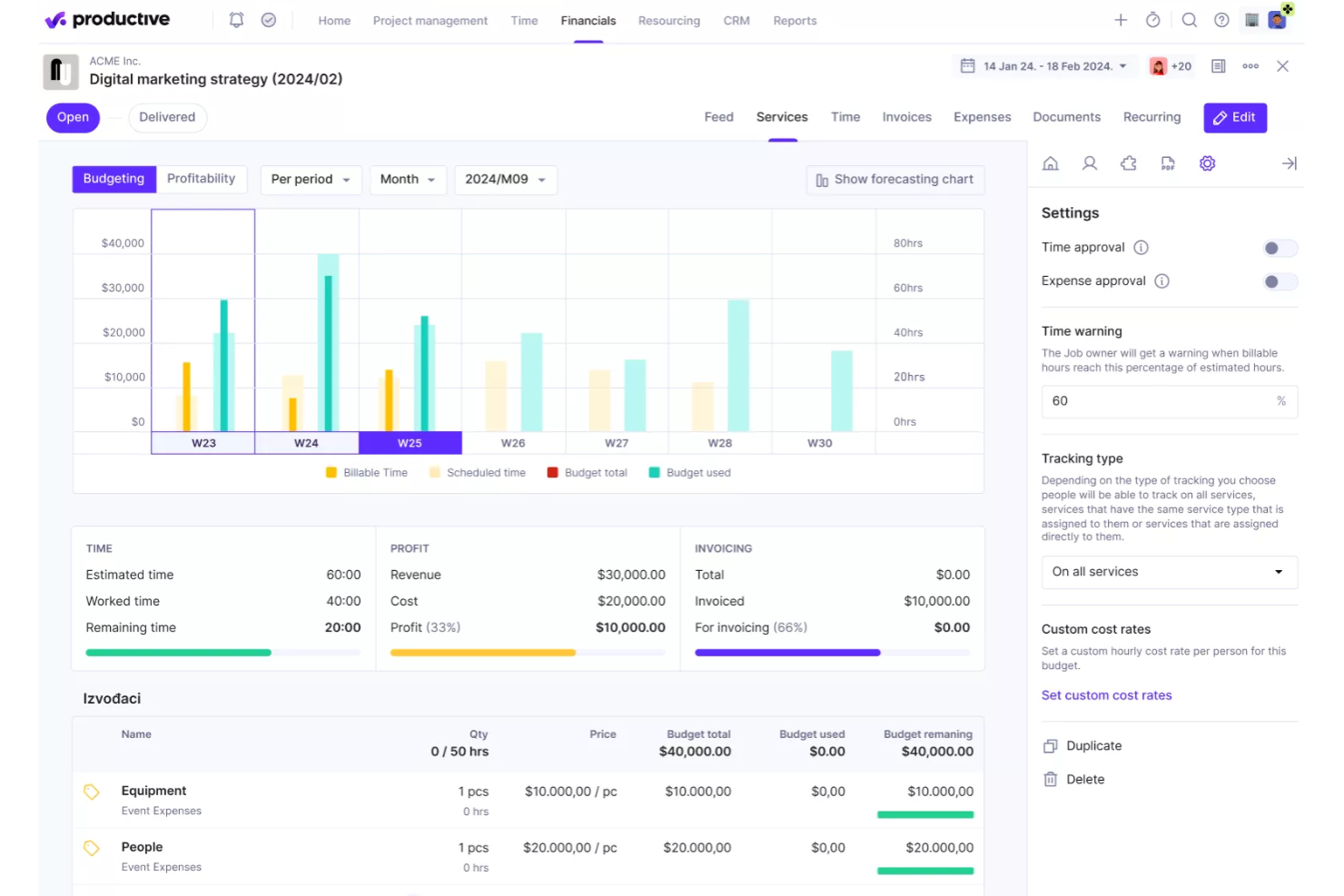
Productive è un software di automazione per servizi professionali progettato per agenzie e società di consulenza. Combina la gestione dei progetti con il controllo finanziario, permettendoti di gestire attività, risorse e budget senza dover utilizzare più strumenti diversi.
Ho scelto Productive per il monitoraggio in tempo reale della redditività. Questa funzione ti consente di vedere se i progetti rimangono redditizi man mano che progrediscono, fornendoti visibilità su costi, ricavi e margini mentre variano. Per i team remoti che lavorano con più clienti, questo tipo di visione finanziaria istantanea può fare la differenza tra un trimestre profittevole e uno che va fuori rotta.
Oltre al monitoraggio della redditività, Productive offre la pianificazione delle risorse, così puoi bilanciare i carichi di lavoro del team ed evitare il sovraccarico. Include anche il monitoraggio del tempo per una fatturazione precisa e strumenti di budgeting che evidenziano dove stai spendendo troppo o troppo poco. Insieme, queste funzionalità rendono più semplice mantenere allineati sia i progetti che le finanze.
Le integrazioni includono Google Calendar, MS Outlook, Xero, QuickBooks, Exact, Visma e-conomic, Jira, Slack, Zapier, Gmail, Mailchimp e Trello.
Pros and Cons
Pros:
- Monitoraggio accurato della redditività
- Pianificazione delle risorse efficace
- Monitoraggio del tempo integrato
Cons:
- Opzioni di personalizzazione limitate
- Configurazione iniziale complessa
New Product Updates from Productive
Productive Adds Voice Dictation, Slack Connector, Proposals, and Overtime
Productive adds voice dictation, a Slack Connector, proposal controls, and overtime tracking. These updates support faster AI interactions, client proposals, and time management. For more information, visit Productive’s official site.

Wrike
Ideale per la collaborazione da remoto tra dipartimenti

Wrike è una piattaforma cloud per la gestione del lavoro con solide funzionalità di workflow da remoto, e rappresenta una scelta popolare tra team aziendali e di agenzia. I project manager apprezzeranno la possibilità di creare dashboard e flussi di lavoro personalizzati, così come implementare automazioni per team specifici. I report sull'avanzamento possono essere facilmente condivisi tra clienti, stakeholder e membri del team, ovunque si trovino.
Wrike offre un piano gratuito con funzionalità limitate e una prova gratuita per i piani a pagamento.
Pros and Cons
Pros:
- Varietà di visualizzazioni di progetto per soddisfare le esigenze degli utenti
- Modellazione delle attività ampia e completa
- Facilità d'uso e configurazione
Cons:
- Il sistema di commenti dovrebbe essere più visibile
- Le migliori funzionalità sono limitate al piano Business
New Product Updates from Wrike

Wrike Adds Quick Search to Table View
Wrike adds Quick Search to Table View with full-table search across titles, descriptions, and fields, plus highlighted matches. This helps users find tasks faster in large tables. For more information, visit Wrike’s official site.

Miglior strumento di PM remoto per integrazioni di terze parti
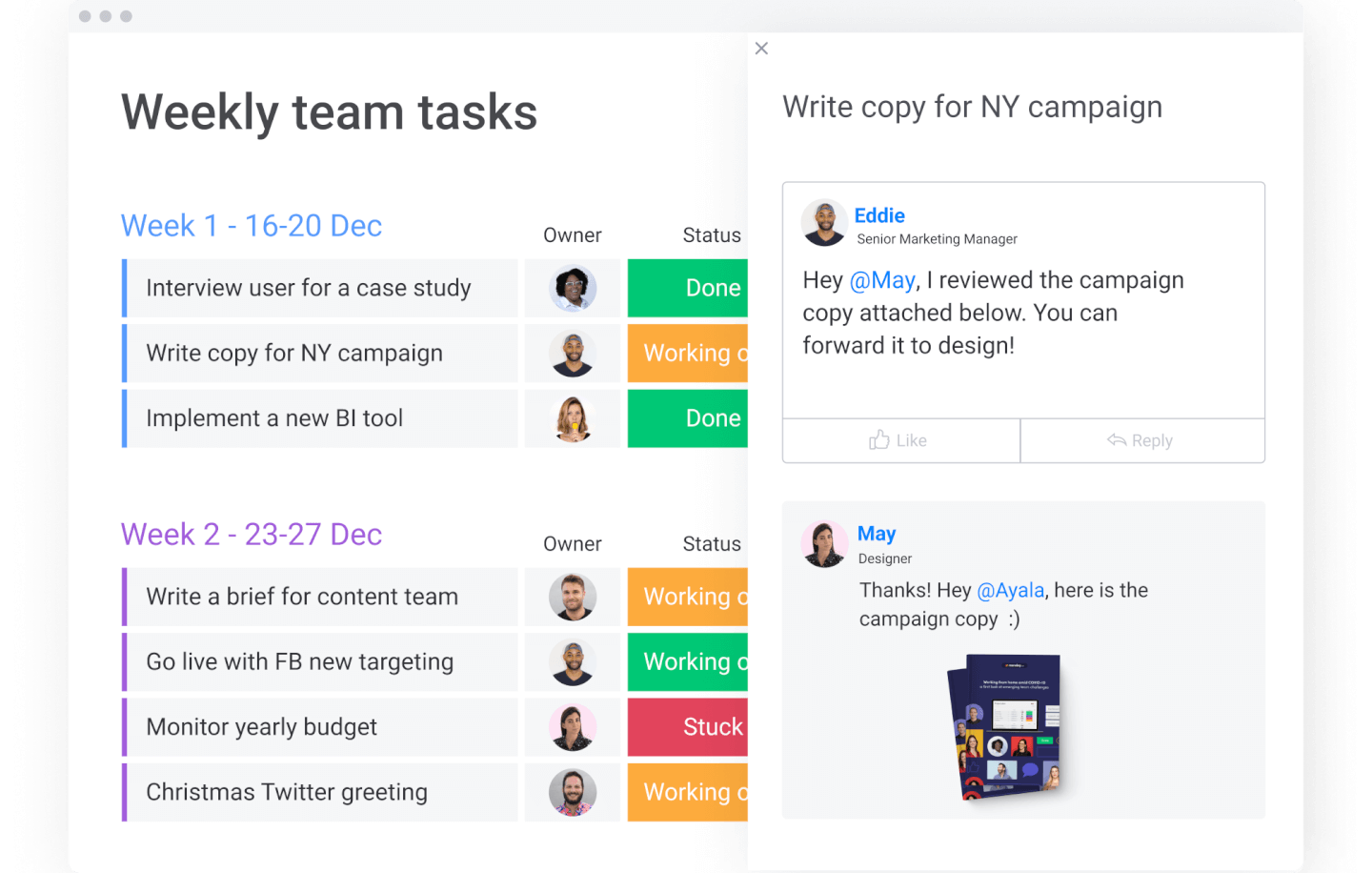
monday.com è uno strumento di lavoro remoto versatile, colorato e intuitivo per i team moderni. Consente di pianificare, monitorare e consegnare progetti utilizzando centinaia di template visivi e personalizzabili. Visualizza i dati su mappa, calendario, cronologia, board kanban e altro ancora. Automatizza le attività amministrative ripetitive, come la creazione di nuove voci di contatto in base alle email ricevute.
monday.com ha un prezzo a partire da $6/utente/mese e offre una prova gratuita di 14 giorni. È disponibile un piano gratuito fino a 2 utenti.
Pros and Cons
Pros:
- Eccellenti funzionalità collaborative
- Organizzazione semplice trascinando e rilasciando le attività
- Molto facile invitare altri, condividere cronologie e assegnare compiti
Cons:
- Le migliori funzionalità sono disponibili solo nelle versioni Standard o Pro
- Le automazioni non sono completamente personalizzabili
- Nessuna identificazione o supporto dei colli di bottiglia
New Product Updates from monday AI Workspace
monday AI Workspace Adds Human Approval Routing
monday AI Workspace adds a human-in-the-loop approval block to AI Workflows, sending approval requests and routing workflow paths based on responses. For more information, visit monday AI Workspace's official site.

Miglior software per la pianificazione di progetti remoti con funzioni di collaborazione
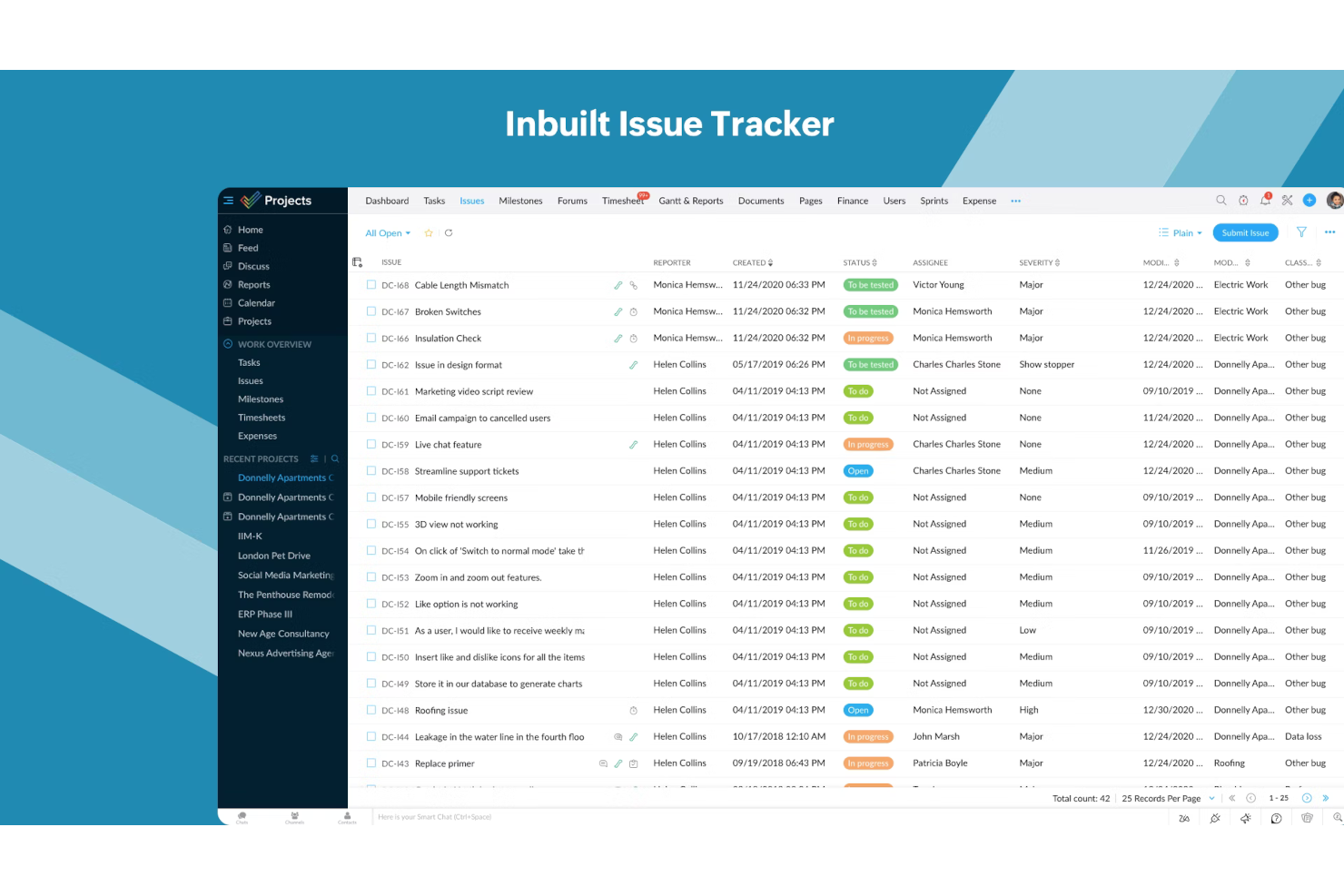
Zoho Projects è una soluzione di gestione progetti basata su cloud che può supportare team distribuiti e remoti. Il software è in grado di gestire più progetti e dispone di uno spazio di archiviazione online sicuro che funge da database centralizzato per tutte le informazioni rilevanti del progetto.
I modelli predefiniti possono velocizzare la pianificazione dei progetti, aiutando a garantire che nessun dettaglio venga trascurato. Gli utenti possono creare più attività e sotto-attività e distribuirle tra diversi membri del team. È possibile identificare e gestire le dipendenze, oltre ad automatizzare processi chiave e promemoria.
Il software è inoltre dotato di strumenti di collaborazione che supportano la gestione remota dei progetti. I membri del team possono commentare le attività, chattare, condividere file e notificare agli altri le attività completate. I dati dei report della piattaforma forniscono approfondimenti dettagliati sulla produttività e sulle prestazioni dei progetti.
Zoho Projects è completamente gratuito fino a tre utenti. I piani a pagamento partono da $5 per utente/mese con il pacchetto Premium.
Pros and Cons
Pros:
- Migrazione da un altro fornitore di software
- Gratuito fino a 2 progetti e fino a 3 utenti
- Le funzioni di collaborazione supportano il lavoro di squadra virtuale
Cons:
- Documentazione di supporto minima
- È necessario tempo per familiarizzare con l'ampia gamma di funzioni
New Product Updates from Zoho Projects
Zoho Projects Adds CodeX Scripts for Custom Modules
Zoho Projects now supports CodeX Scripts for custom modules, enabling conditional logic and rules for creating, updating, and deleting records. For more information, visit Zoho Projects' official site.
 .
.
Celoxis
La migliore gestione progetti da remoto per portafogli in crescita
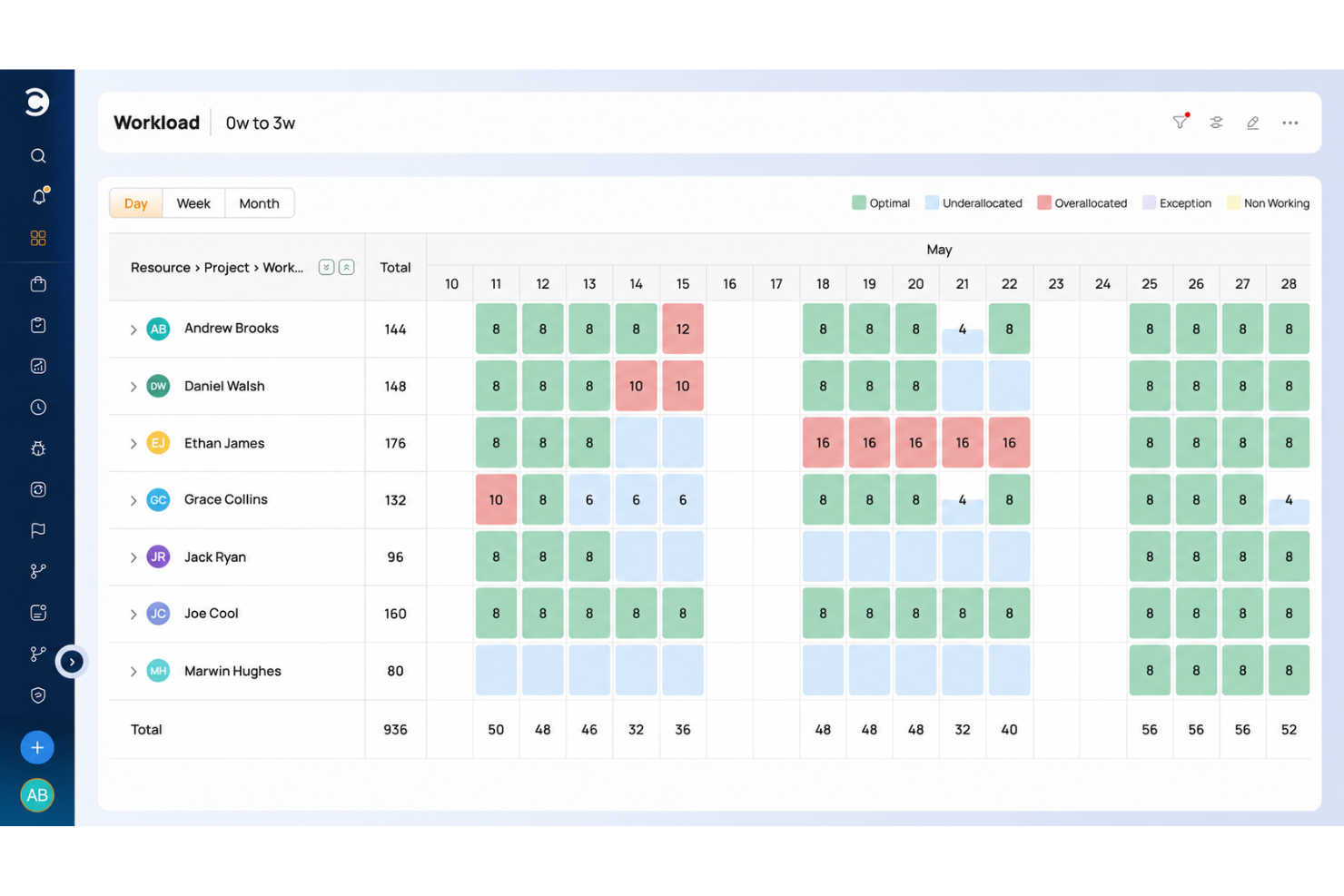
Le funzionalità complete di Celoxis affrontano le complessità reali della gestione di progetti tra organizzazioni e funzioni; eccelle nella pianificazione, delega, collaborazione, monitoraggio e reportistica, con agilità e facilità d'uso. Celoxis può aiutarti a pianificare e gestire portafogli di progetti reali e diversi, ed è altamente personalizzabile per adattarsi a una varietà di esigenze aziendali.
Celoxis vanta funzionalità di programmazione sia automatica sia manuale che si adattano a team di progetto remoti distribuiti geograficamente. La piattaforma può adattarsi a diversi fusi orari, attività con limiti di tempo, risorse part-time, assenze inevitabili, sostituzioni temporanee di risorse e persino eccezioni una tantum come team che lavorano nei weekend per rispettare le scadenze.
Oltre a tutto ciò che ti aspetti dalla pianificazione di progetti e attività da remoto, Celoxis offre un'intera suite di strumenti di contabilità integrati, distinguendosi così dalla concorrenza. Celoxis può generare report su spese di budget, crediti e redditività su progetti e portafogli. Può anche gestire il monitoraggio dei margini, la previsione delle entrate e KPI finanziari personalizzati.
Celoxis si integra con oltre 400 app di terze parti come Google Drive, MS Excel, JIRA, QuickBooks Online, Salesforce, Evernote, Slack, Zendesk, G Suite, Trello, Harvest, MailChimp e molte altre tramite un account a pagamento con Zapier.
Celoxis costa a partire da $22,50/utente/mese con un minimo di 5 utenti e offre una prova gratuita di 30 giorni.
Pros and Cons
Pros:
- Pianificazione per team distribuiti geograficamente
- Dashboard personalizzabili per ogni membro del team
- Interfaccia facile da usare
Cons:
- Solo 2GB di spazio per utente inclusi nel piano cloud
- Nessun rimborso in caso di cancellazione dopo l'acquisto
- Nessun piano gratuito

Quire
Ideale per suddividere progetti complessi
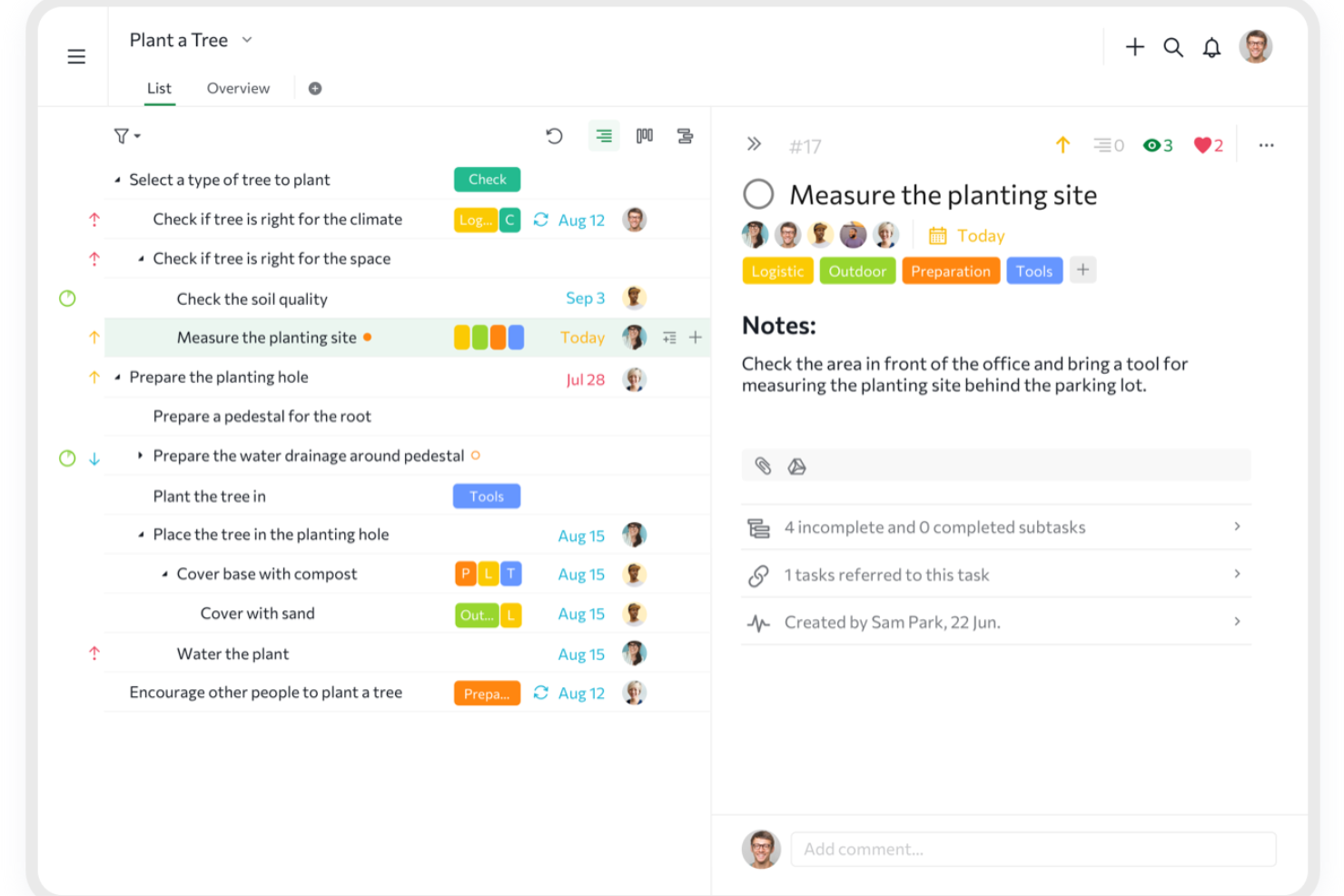
Quire è uno strumento di gestione progetti basato su cloud progettato per aiutare i team a organizzare le attività, collaborare in modo efficiente e raggiungere i propri obiettivi.
La visualizzazione a elenco annidato della piattaforma consente al tuo team di suddividere progetti complessi in sottoattività gestibili, mantenendo chiarezza ed efficienza. Questa struttura gerarchica aiuta a organizzare le attività all'interno di un quadro chiaro, permettendo ai team di concentrarsi su componenti specifici senza perdere di vista il progetto globale.
La funzione di timeline dinamica in Quire consente inoltre di visualizzare il percorso del progetto, rispettare le scadenze e raggiungere traguardi. Regolando le tempistiche e monitorando i progressi, il tuo team può collaborare per una gestione dei progetti più efficiente.
Alcune delle integrazioni di Quire includono Google Calendar, Gmail, Slack, Outlook, Zoho Flow, GitHub, Apple Calendar Sync, Box, Dropbox, Google Drive e Microsoft Teams.
Pros and Cons
Pros:
- Possibilità di creare attività e sottoattività annidate, permettendo una suddivisione dettagliata dei progetti
- Facilità di collaborazione con i membri del team
- Molteplici viste del progetto, inclusi elenchi, bacheche e timeline
Cons:
- La versione mobile è priva di alcune funzionalità disponibili su desktop
- Potenziale sovraccarico di notifiche, soprattutto lavorando con team numerosi
New Product Updates from Quire

Quire Adds Task and Standalone Reminders
Quire adds task reminders and standalone reminders with shared notifications, recurring schedules, and automatic date tracking. These updates help teams stay ahead of deadlines and manage reminders that do not need a task. For more information, visit Quire’s official site.
 .
.
Miglior strumento per la gestione delle attività online e da remoto

MeisterTask consente ai team remoti di organizzare e gestire le attività in un ambiente dal design accattivante e personalizzabile che si adatta alle esigenze individuali di ogni utente. Le bacheche di progetto in stile Kanban permettono ai team di creare flussi di lavoro snelli e automatizzati, indipendentemente dalla loro posizione geografica nel mondo. L'app è disponibile anche per Android e iOS.
MeisterTask ha un costo a partire da $8.25/utente/mese e offre una versione gratuita per un massimo di 3 progetti.
Pros and Cons
Pros:
- Accesso illimitato a bacheche di progetto
- Gestione molto semplice di più progetti contemporaneamente
- Interfaccia intuitiva e facile da usare
Cons:
- Dopo aver caricato un file in un'attività, non può essere scaricato immediatamente
- Gli allegati ai file sono limitati a 200 MB per file
- La visualizzazione cronologica e i campi personalizzati sono disponibili solo per gli account Business

ClickUp
Miglior strumento di gestione progetti da remoto per la registrazione dello schermo

ClickUp è uno strumento flessibile per la pianificazione dei progetti che può adattarsi sia a piccoli che a grandi team che necessitano di liste di cose da fare, gestione dei progetti, documenti e wiki, fogli di calcolo, email e chat, eventi, promemoria, monitoraggio degli obiettivi, rilevamento del tempo e gestione delle risorse. Un aspetto interessante di questo strumento è che include funzionalità di screenshot e registrazione direttamente integrate. Gli utenti possono importare facilmente i dati da altre app di produttività.
ClickUp parte da $5/utente/mese e offre una versione gratuita con funzionalità limitate.
Pros and Cons
Pros:
- Organizzazione impressionante: crea cartelle, sottogruppi e sotto-attività
- Facile passare tra piani di progetto non correlati
Cons:
- Sarebbero gradite più integrazioni di terze parti
- Inviare email con allegati è complicato, a volte i file non si aprono
- Curva di apprendimento ripida a causa del numero di funzionalità
New Product Updates from ClickUp
ClickUp Adds Meetings Hub, Super Agent Templates, and ZoomInfo Integration
ClickUp adds a searchable Meetings Hub, new ways to clone and template Super Agents, and a ZoomInfo integration through the App Center. These updates improve meeting retrieval, agent reuse, and access to sales intelligence. For more information, visit ClickUp’s official site.
Kintone
Ideale per creare flussi di lavoro di progetto personalizzati
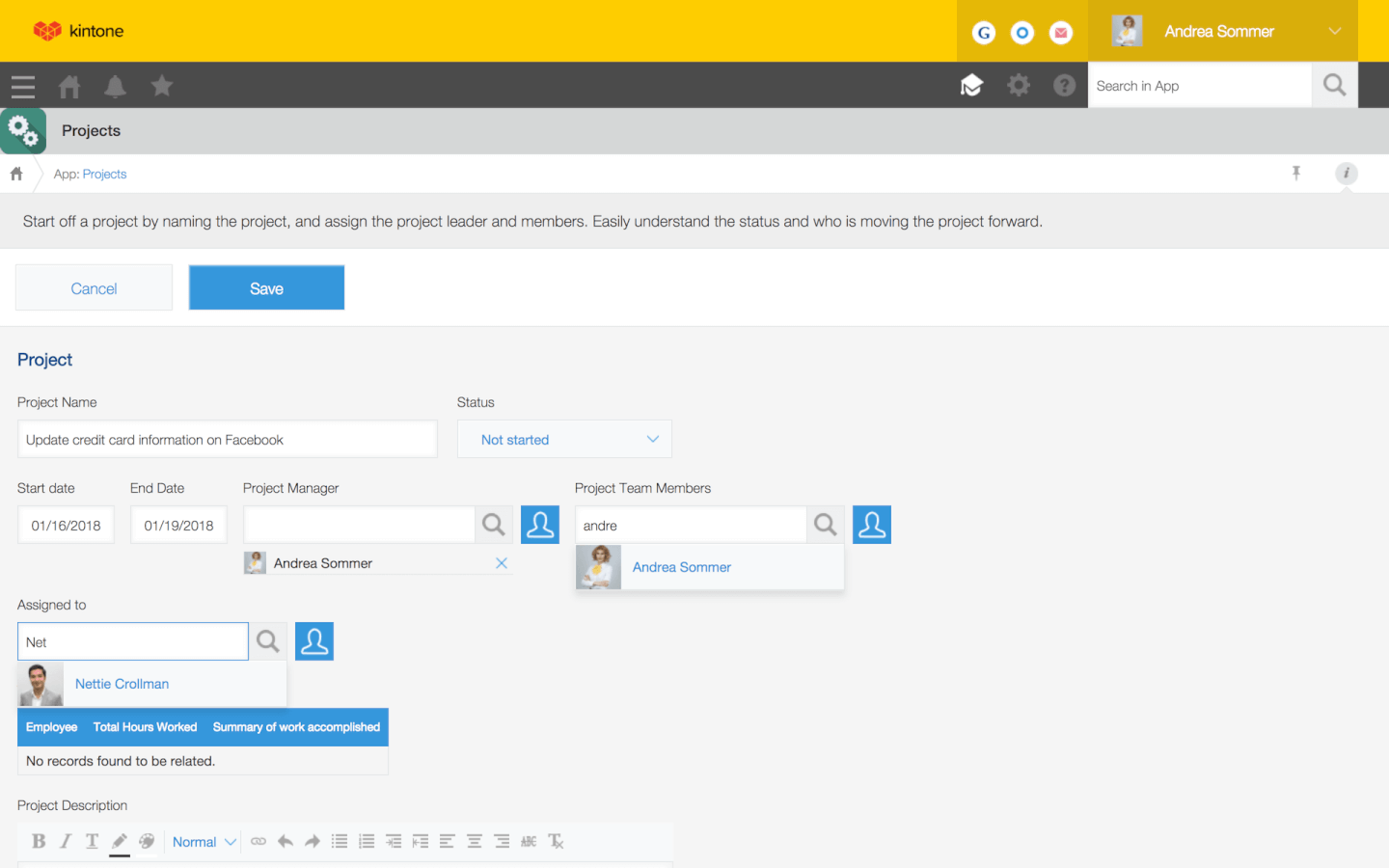
Kintone è uno strumento di gestione progetti basato su web utilizzato da team di Volvo Trucks North America, Japan Airlines, Shiseido e oltre 23.000 organizzazioni in tutto il mondo. Il suo approccio unico alla gestione di progetti e attività consente di creare una vasta gamma di “app” personalizzabili, da zero, utilizzando modelli predefiniti o importando i tuoi fogli di calcolo, per la gestione dei dati, dei processi aziendali e dei flussi di lavoro. Le app di Kintone possono essere personalizzate per la gestione dei progetti, CRM di vendita, database clienti, report spese, liste di attività condivise, gestione delle attrezzature, feedback sui prodotti e molto altro ancora.
Kintone permette di creare app di gestione progetti online trascinando e rilasciando sulla pagina gli elementi che desideri visualizzare: campi di testo formattato, campi data, menu a discesa, campi numerici con calcoli integrati, spazi per allegati, menu per selezione di utenti o gruppi, dati correlati da altre app, tabelle e molto altro.
Una volta costruita l'app secondo le tue esigenze, potrai utilizzarla per gestire in modo più semplice tutti i dati e le attività che tu e il tuo team dovete monitorare. Grazie a notifiche personalizzate, promemoria e a impostazioni avanzate dei permessi, la tua soluzione di gestione progetti online potrà essere configurata e funzionare esattamente come desideri.
Ciò che rende Kintone particolarmente adatto alla gestione progetti online sono le funzionalità per filtrare e dare priorità alle attività per campo dati o membro del team al fine di generare report personalizzati o viste dashboard, oltre alla possibilità di automatizzare promemoria e passaggi di consegne tra membri del team in flussi di lavoro multi-step. Poiché Kintone è una piattaforma cloud, gli utenti possono anche visualizzare, modificare e aggiornare i flussi di lavoro da un browser desktop o dall'app mobile della piattaforma.
Kintone permette di espandere le sue funzionalità con plugin nativi gratuiti realizzati dal team di Kintone, oltre che con integrazioni con altri strumenti come Slack, Gmail, Google Calendar, Outlook, Tableau, Dropbox, Salesforce, HubSpot, Eventbrite, WordPress, QuickBooks, MailChimp e molti altri tramite un piano a pagamento con Zapier o tramite integrazioni API.
Kintone costa $24/utente/mese con un requisito minimo di 5 utenti. Offre una prova gratuita di 30 giorni (senza necessità di carta di credito) e prezzi scontati per nonprofit e insegnanti. Il team Kintone offre inoltre la creazione gratuita di un'app personalizzata come parte del processo di prova gratuita.
Pros and Cons
Pros:
- Ottimo rapporto qualità-prezzo
- Estremamente flessibile e personalizzabile
- Facilità d’uso e adattabilità
Cons:
- Funzionalità di ricerca avanzata sarebbe gradita
- Richiede tempo per configurare le proprie app
Altri strumenti per la gestione remota dei progetti
Ecco qualche altra soluzione che non è entrata nell’elenco principale.
- Workzone
Ideale per la gestione del ciclo di vita dei progetti
- Shortcut
Ideale per team Agile e Scrum
- Teamwork.com
Ideale per grandi aziende e imprese
- ProjectManager
Il miglior software per team remoti che utilizzano metodologie di progetto ibride
- GoodDay
Ideale per ambienti di lavoro personali personalizzabili
- Ravetree
Miglior project management in una piattaforma di lavoro tutto-in-uno
- Height
Ideale per organizzare e semplificare progetti complessi
- Miro
La migliore lavagna collaborativa per team ibridi
- Smartsheet
Il miglior strumento di gestione progetti da remoto per i rappresentanti di vendita
- Hive
Miglior strumento per i modelli di progetto
- GoodDay
Ideale per la gestione progetti Agile con focus Kanban
- Kantata
Miglior software di gestione progetti da remoto per aziende di servizi
- Kissflow
Il miglior software di gestione progetti semplice per team da remoto
- Hub Planner by Milient
Ideale per la pianificazione dei team, la gestione della capacità e la richiesta di lavoro
- PathPro
Ideale per i team di sviluppo prodotto


Come Valuto gli Strumenti di Project Management da Remoto
Divido la mia valutazione in due livelli: le capacità di base che uno strumento deve avere per mantenere allineato un team distribuito tra diversi fusi orari, e le caratteristiche distintive che differenziano le migliori opzioni.
Funzionalità Principali (Requisiti Minimi per Questa Lista)
Quando seleziono gli strumenti per la mia lista, valuto ciascuno su una scala da 0 (non offre la funzionalità) a 5 (eccelle in quest'area) per ogni funzionalità di base elencata qui sotto. Quindi calcolo il punteggio totale dello strumento in percentuale. Ogni strumento deve raggiungere un punteggio totale minimo del 65% per essere preso in considerazione.
- Gestione di Attività e Progetti: Verifico se è possibile creare attività con sotto-attività, dipendenze e campi personalizzati—la struttura di cui un team distribuito ha bisogno per passarsi il lavoro tra turni diversi.
- Viste Multiple del Progetto: Membri del team diversi preferiscono layout diversi, quindi cerco almeno opzioni Kanban, elenco, calendario e Gantt simili a quelle offerte da Asana e monday.com.
- Collaborazione in Tempo Reale: Valuto come i team possano comunicare dentro lo strumento stesso—commenti, @menzioni, editing condiviso—così chi lavora da remoto resta nel contesto senza passare alle email.
- Accessibilità Cloud: L’accesso completo via web e mobile è fondamentale quando il team si estende su più fusi orari, quindi verifico la parità di funzionalità su tutte le piattaforme e una sincronizzazione offline affidabile.
- Condivisione File e Documentazione: Cerco spazio di archiviazione nativo, tracciamento delle versioni e integrazioni con cloud come Google Drive o OneDrive per mantenere gli asset del progetto centralizzati e accessibili.
- Monitoraggio del Progresso e Reportistica: Dashboard, viste sul carico di lavoro e report di stato aiutano i manager da remoto a restare aggiornati senza organizzare call di verifica, quindi valuto profondità e livello di personalizzazione in quest’area.
Una volta ottenuta una lista di strumenti che soddisfano i criteri, considero cosa distingue ciascuna piattaforma.
Fattori Differenzianti (Cosa Distingue i Fornitori)
Ecco come confronto e metto a confronto i diversi fornitori:
Funzionalità di Spicco
Le regole di automazione sono un grande elemento distintivo—cerco strumenti che permettono di assegnare automaticamente attività o aggiornare gli stati in base a condizioni specifiche, così che il passaggio di consegne tra membri in diversi fusi orari avvenga senza dover aspettare un intervento manuale. Anche le funzionalità di intelligenza artificiale stanno diventando sempre più importanti, con strumenti come ClickUp e monday.com che offrono riassunti generati automaticamente e suggerimenti per le attività che riducono il ping pong asincrono. Valuto anche la pianificazione delle risorse e delle capacità, visto che le mappe di calore del carico di lavoro aiutano i manager a individuare rischi di burnout nei team distribuiti prima che le scadenze vengano sforate.
Oltre le Funzionalità
La profondità delle integrazioni è importante quando il tuo stack remoto si basa su Slack, Microsoft Teams o Zoom per i daily standup—controllo se lo strumento si collega nativamente o richiede soluzioni alternative. La sicurezza è un altro fattore chiave per i team distribuiti dove i dati attraversano diverse giurisdizioni. Cerco conformità SOC 2, SSO e permessi basati sui ruoli che permettono di dare agli appaltatori accesso limitato. Anche la flessibilità dei prezzi è rilevante; posti per ospiti o collaboratori esterni sono preziosi quando coinvolgi regolarmente clienti o freelance senza dover pagare licenze complete.
Come scegliere gli strumenti per la gestione remota dei progetti
È facile perdersi in lunghi elenchi di funzionalità e strutture tariffarie complesse. Per aiutarti a rimanere concentrato mentre affronti il tuo processo di selezione del software, ecco un elenco di fattori da tenere a mente:
| Fattore | Cosa considerare |
| Scalabilità | Assicurati che lo strumento possa crescere insieme alle esigenze del tuo team, dai piccoli progetti ai carichi di lavoro a livello aziendale. |
| Integrazioni | Verifica la compatibilità con gli strumenti che già utilizzi, come Slack, Google Workspace o Asana. |
| Possibilità di personalizzazione | Cerca opzioni che consentano di adattare dashboard, flussi di lavoro e visualizzazioni delle attività alle preferenze del tuo team. |
| Facilità d'uso | Dai priorità a un'interfaccia pulita e a un design intuitivo che non sovraccarichi il tuo team. |
| Budget | Valuta se il prezzo è in linea con le dimensioni del tuo team e con le funzionalità necessarie, senza componenti aggiuntivi imprevisti. |
| Misure di sicurezza | Assicurati che lo strumento offra funzionalità come la crittografia dei dati, l'accesso basato sui ruoli e backup regolari. |
| Funzionalità di collaborazione | Verifica che lo strumento supporti la chat in tempo reale, la condivisione dei file e gli aggiornamenti sull'avanzamento per mantenere tutti sulla stessa linea. |
| Strumenti di reportistica | Cerca analisi dettagliate e report personalizzati per monitorare l'avanzamento e individuare i colli di bottiglia. |
Tendenze negli strumenti per la gestione remota dei progetti
Nella mia ricerca, ho raccolto innumerevoli aggiornamenti sui prodotti, comunicati stampa e registri delle versioni di diversi fornitori di strumenti per la gestione remota dei progetti. Ecco alcune delle tendenze emergenti che sto tenendo d'occhio:
- Analisi basate sull'intelligenza artificiale: Gli strumenti utilizzano sempre più l'intelligenza artificiale per prevedere i ritardi dei progetti, allocare le risorse in modo più efficiente e fornire informazioni utili. Queste funzionalità analizzano i dati e gli schemi dei progetti passati per aiutare i team a prendere decisioni migliori e ottimizzare i flussi di lavoro.
- Attenzione alla salute mentale: I fornitori stanno aggiungendo funzionalità come il bilanciamento del carico di lavoro e gli indicatori del benessere del team per ridurre il rischio di esaurimento. Gli strumenti ora includono sondaggi periodici e funzionalità che incoraggiano abitudini di lavoro più sane per i team distribuiti.
- Collaborazione avanzata per i team ibridi: Gli strumenti si stanno evolvendo per offrire spazi di lavoro virtuali in cui i team da remoto e quelli in ufficio possono collaborare efficacemente. Questi includono spazi visivi condivisi, strumenti di comunicazione in tempo reale per simulare l'interazione in presenza e funzionalità di condivisione dello schermo per presentazioni e risoluzione collaborativa dei problemi durante le riunioni.
- Monitoraggio della sostenibilità: Sempre più spesso, gli strumenti di gestione dei progetti integrano il monitoraggio dell'impronta di carbonio e dell'utilizzo delle risorse per aiutare le aziende a raggiungere gli obiettivi di sostenibilità.
- Interfacce orientate alla visualizzazione: Le piattaforme danno priorità alle bacheche Kanban, ai diagrammi di Gantt e ad altri flussi di lavoro visivi per semplificare la gestione dei progetti complessi. Questi design riducono la dipendenza dai formati ricchi di testo, rendendo più facile per i team visualizzare a colpo d'occhio l'avanzamento dei progetti.
Cosa sono gli strumenti per la gestione remota dei progetti?
Gli strumenti per la gestione remota dei progetti sono soluzioni software che aiutano i team a pianificare, organizzare e monitorare il lavoro, anche quando i membri si trovano in luoghi diversi. Questi strumenti sono comunemente utilizzati da responsabili di progetto, responsabili dei team e liberi professionisti che devono collaborare e gestire i progetti da remoto. Funzionalità come il monitoraggio delle attività, la comunicazione del team e la condivisione dei file aiutano i team a rimanere allineati, rispettare le scadenze ed evitare incomprensioni. In generale, questi strumenti semplificano la gestione efficiente dei progetti, indipendentemente dal luogo in cui si trovano i membri del team.
Funzionalità degli strumenti per la gestione remota dei progetti
Quando selezioni gli strumenti per la gestione remota dei progetti, cerca le seguenti funzionalità chiave dei software di gestione dei progetti:
- Gestione delle attività: Consente di assegnare, monitorare e stabilire la priorità delle attività per mantenere i progetti organizzati e rispettare il programma.
- Comunicazione del team: Fornisce sistemi di messaggistica o bacheche di discussione integrati per semplificare la comunicazione tra i membri del team.
- Condivisione dei file: Permette ai team di caricare, condividere e archiviare i documenti in un'unica posizione centralizzata, per facilitarne l'accesso.
- Monitoraggio del tempo: Aiuta a monitorare quanto tempo viene dedicato alle attività e ai progetti per migliorare la produttività e la definizione del budget. Consulta le nostre scelte per i migliori software per il monitoraggio del tempo da remoto.
- Monitoraggio dell'avanzamento: Offre strumenti visivi come diagrammi di Gantt o bacheche Kanban per monitorare le tappe fondamentali e le scadenze dei progetti.
- Allocazione delle risorse: Garantisce che i membri del team e le risorse siano assegnati in modo efficiente per evitare sovraccarichi o sottoutilizzo.
- Accesso da dispositivi mobili: Consente ai membri del team di gestire le attività e collaborare da smartphone o tablet mentre sono in movimento.
- Reportistica dei progetti: Genera report e informazioni utili per valutare le prestazioni dei progetti e individuare le aree di miglioramento.
- Autorizzazioni degli utenti: Consente agli amministratori di impostare autorizzazioni basate sui ruoli per un utilizzo sicuro e controllato della piattaforma.
- Opzioni di integrazione: Si collega ad altri strumenti come calendari, posta elettronica e sistemi CRM per mantenere connessi i flussi di lavoro.
Vantaggi degli strumenti per la gestione remota dei progetti
L'implementazione di strumenti per la gestione remota dei progetti può offrire diversi vantaggi al tuo team e alla tua azienda. Eccone alcuni di cui potrai beneficiare:
- Collaborazione migliorata: Aiuta il team a rimanere connesso con funzionalità come chat, condivisione dei file e aggiornamenti in tempo reale, indipendentemente dal luogo in cui si lavora.
- Maggiore produttività: Mantiene le attività organizzate e visibili, così i membri del team possono concentrarsi su ciò che conta di più.
- Migliore gestione delle risorse: Monitora i carichi di lavoro e la disponibilità per garantire che nessuno sia sovraccarico o sottoutilizzato.
- Maggiore trasparenza: Offre a tutti accesso agli aggiornamenti sull'avanzamento e alle scadenze, riducendo confusione e incomprensioni.
- Risparmio di tempo: Automatizza attività ripetitive come promemoria e reportistica, liberando tempo per attività più importanti.
- Controllo dei costi: Monitora il tempo e le risorse impiegati nei progetti per aiutarti a rispettare il budget.
- Scalabilità: Si adatta alla crescita del team o alle esigenze mutevoli dei progetti, garantendo un'utilità a lungo termine.
Costi e prezzi dei software per la gestione dei progetti da remoto
La scelta di un software per la gestione dei progetti da remoto richiede la comprensione dei vari modelli di prezzo e dei piani disponibili. I costi variano in base alle funzionalità, alle dimensioni del team, ai componenti aggiuntivi e ad altri fattori. La tabella seguente riassume i piani più comuni, i relativi prezzi medi e le funzionalità tipicamente incluse nelle soluzioni software per la gestione dei progetti da remoto:
Tabella di confronto dei piani per i software di gestione dei progetti da remoto
| Tipo di piano | Prezzo medio | Funzionalità comuni |
| Piano gratuito | $0/utente/mese | Gestione di base delle attività, spazio di archiviazione limitato, semplici strumenti di collaborazione e accesso per piccoli team. |
| Piano personale | $5-$15/utente/mese | Definizione delle priorità delle attività, strumenti di base per la reportistica, integrazioni con i calendari e condivisione limitata dei file. |
| Piano aziendale | $15-$40/utente/mese | Reportistica avanzata, monitoraggio del tempo, automazione dei flussi di lavoro, spazio di archiviazione illimitato e dashboard personalizzate. |
| Piano per grandi aziende | $40+/utente/mese | Assistenza dedicata, funzionalità di sicurezza avanzate, integrazioni personalizzate, scalabilità e accesso all'API. |
Domande frequenti sul software per la gestione dei progetti da remoto
Ecco alcune risposte alle domande comuni sul software per la gestione dei progetti da remoto: