

I 10 migliori software di gestione dei progetti aziendali del 2026

10 Elenco dei migliori software di gestione dei progetti aziendali


La gestione dei flussi di lavoro dei progetti tra team numerosi si complica rapidamente quando le attività quotidiane perdono di vista gli obiettivi organizzativi. Ho guidato progetti aziendali per oltre 20 anni, quindi so quanto velocemente la mancanza di visibilità sul portafoglio possa creare team isolati e ritardi nelle consegne.
Ho valutato decine di strumenti per la gestione dell'assegnazione delle risorse, delle autorizzazioni degli utenti e delle dipendenze tra più team, per trovare le opzioni più efficaci. Continua a leggere per scoprire le mie migliori scelte di software di gestione dei progetti aziendali per il tuo team.
Perché fidarsi dei nostri consigli sui software
Il nostro team testa e recensisce software dal 2012. In quanto project manager noi stessi, sappiamo quanto sia difficile — e importante — scegliere il software giusto.
Per questa guida, abbiamo valutato gli strumenti attraverso test pratici e ricerche indipendenti, assegnando un punteggio agli strumenti in base ai nostri criteri di selezione. Ci basiamo inoltre sulle competenze di leader di pensiero del settore e di professionisti attivi nella gestione dei progetti.
Le nostre recensioni riflettono il nostro giudizio editoriale umano, non un discorso di vendita.
Revisori esperti:
Tabella riepilogativa dei migliori software di gestione dei progetti aziendali
Ecco una comoda tabella in cui puoi confrontare tutti gli strumenti che ho selezionato. Se hai bisogno di ulteriore aiuto nella scelta degli strumenti, ricorda che disponiamo di un \u003ca href=\u0022#need-expert-help\u0022\u003eservizio gratuito\u003c/a\u003e che può aiutarti a restringere la ricerca.
| Tool | Best For | Trial Info | Price | ||
|---|---|---|---|---|---|
| 1 | Ideale per una supervisione completa dei progetti | Prova gratuita di 14 giorni + demo gratuita disponibile | Da $19,90/utente/mese (fatturato annualmente) | Website | |
| 2 | Ideale per la scalabilità | 14 giorni di prova gratuita | Da $9,80/utente/mese e versione freemium fino a 5 utenti | Website | |
| 3 | Ideale per il monitoraggio della redditività dei progetti | Prova gratuita di 14 giorni + demo gratuita disponibile | Da $10/mese (fatturazione annuale) | Website | |
| 4 | Ideale per la pianificazione delle risorse | Demo gratuita disponibile | Prezzi su richiesta | Website | |
| 5 | Ideale per la protezione dei dati | Prova gratuita di 14 giorni | Da $6/utente/mese | Website | |
| 6 | Ideale per la pianificazione del portafoglio dalla strategia all'esecuzione | Prova gratuita disponibile | Da $10/mese (fatturato annualmente, 3 utenti) | Website | |
| 7 | Ideale per la pianificazione CPM su larga scala | Demo gratuita disponibile | Prezzi su richiesta | Website | |
| 8 | Ideale per i dati finanziari dei portafogli multivaluta | Demo gratuita disponibile | Prezzi su richiesta | Website | |
| 9 | Ideale per allineare i portafogli aziendali alla strategia | Demo gratuita disponibile | Prezzo su richiesta | Website | |
| 10 | Ideale per PPM chiavi in mano con pianificazione di scenari | Demo gratuita disponibile | Prezzi su richiesta | Website |


Recensioni dei migliori software di gestione dei progetti aziendali
Ecco le mie descrizioni dettagliate di ogni strumento, così puoi distinguerli e scegliere quello più adatto alle tue esigenze.

Scoro
Ideale per una supervisione completa dei progetti
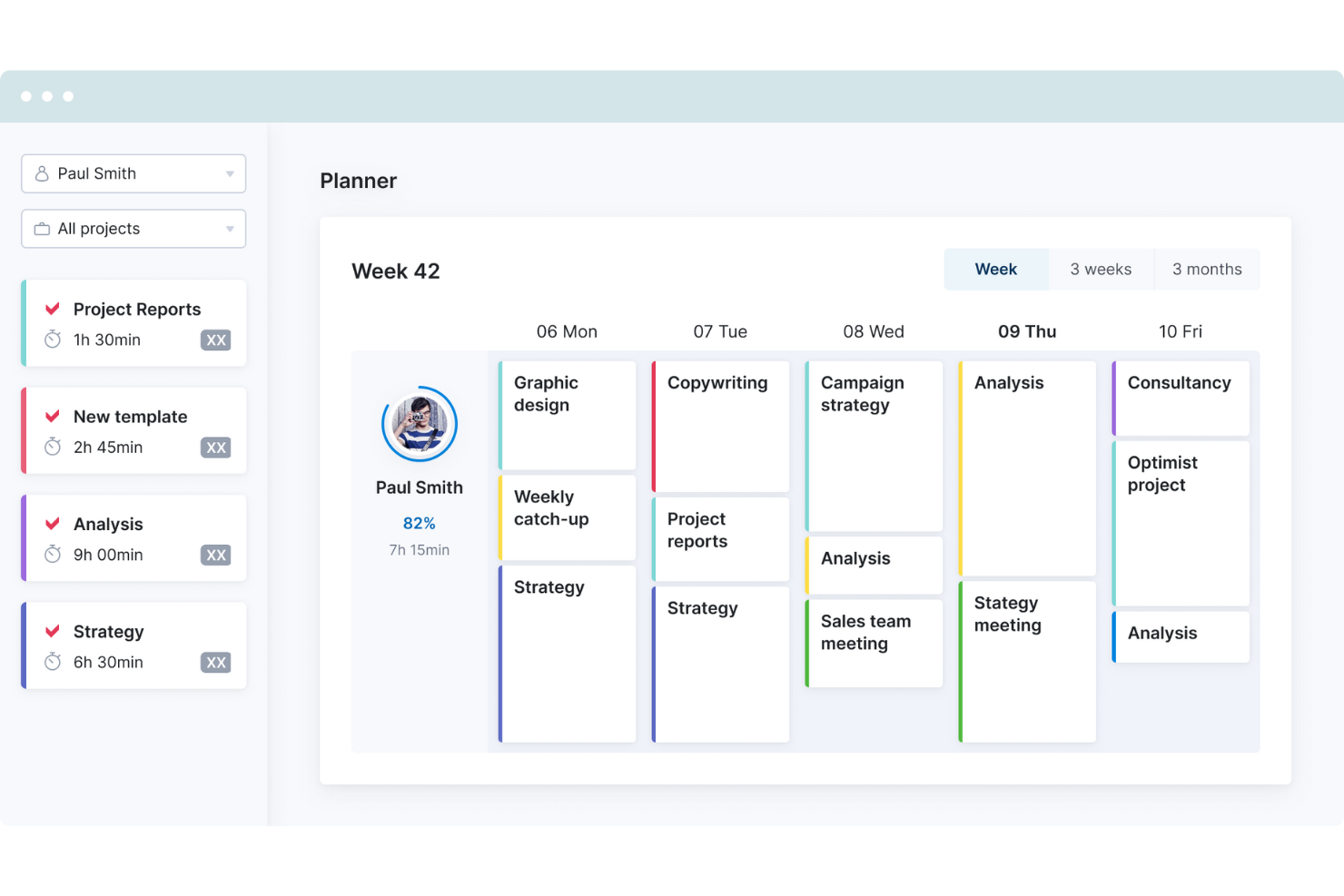
Scoro è una piattaforma di automazione per i servizi professionali che combina gestione dei progetti, pianificazione delle risorse, monitoraggio del tempo, CRM, preventivi e fatturazione in un unico sistema completo.
Per chi è Scoro?
Scoro è particolarmente indicato per le aziende di servizi professionali—agenzie, società di consulenza e aziende IT—che necessitano di un unico sistema per collegare l'erogazione dei progetti alla fatturazione.
Perché ho scelto Scoro
Scoro merita un posto nella mia shortlist perché nessun'altra piattaforma in questo settore collega così strettamente l'erogazione dei progetti agli obiettivi finanziari. Utilizzo la tabella preventivo vs. consuntivo per individuare eventuali scostamenti di budget prima che diventino un problema, e la previsione di costi e profitti mi offre una visione in tempo reale sull'andamento di ogni commessa. Nel piano Enterprise, i report multi-account aggregano tutto su diversi clienti, dandomi il tipo di supervisione che di solito richiede uno strumento di BI separato.
Funzionalità principali di Scoro
- Pianificatore delle risorse: Prevedi la capacità, assegna risorse ai progetti e gestisci i carichi di lavoro dei team in una vista interattiva unica.
- Supporto multi-valuta: Monitora budget dei progetti, fatture e profittabilità in più valute per clienti globali.
- Set personalizzati di autorizzazioni: Crea controlli di accesso dettagliati con impostazioni avanzate dei ruoli utente per la sicurezza dei dati e la governance dei flussi di lavoro.
- Fatturazione automatizzata: Genera, invia e pianifica le fatture direttamente dai dati di progetto, riducendo il lavoro manuale di fatturazione.
Integrazioni di Scoro
Scoro offre integrazioni native con Xero, QuickBooks, Sage Intacct, HubSpot, Salesforce, Slack, Jira e Zapier. È disponibile un'API per integrazioni personalizzate.
Pros and Cons
Pros:
- Collega l'esecuzione del progetto alle finanze in tempo reale
- Ottima visibilità preventivo vs. consuntivo del budget
- Previsioni di profitto in tempo reale per ogni commessa
Cons:
- Strumenti limitati per la governance di portafoglio a livello enterprise
- Configurazione più complessa per organizzazioni di grandi dimensioni
New Product Updates from Scoro

Scoro Adds Time Mobile App and ELI Improvements
Scoro adds the Scoro Time mobile app for iOS/Android to track time anywhere and expands ELI with attachments, smarter filtering, and trigger-based actions. For more information, visit Scoro's official site.

Wrike
Ideale per la scalabilità
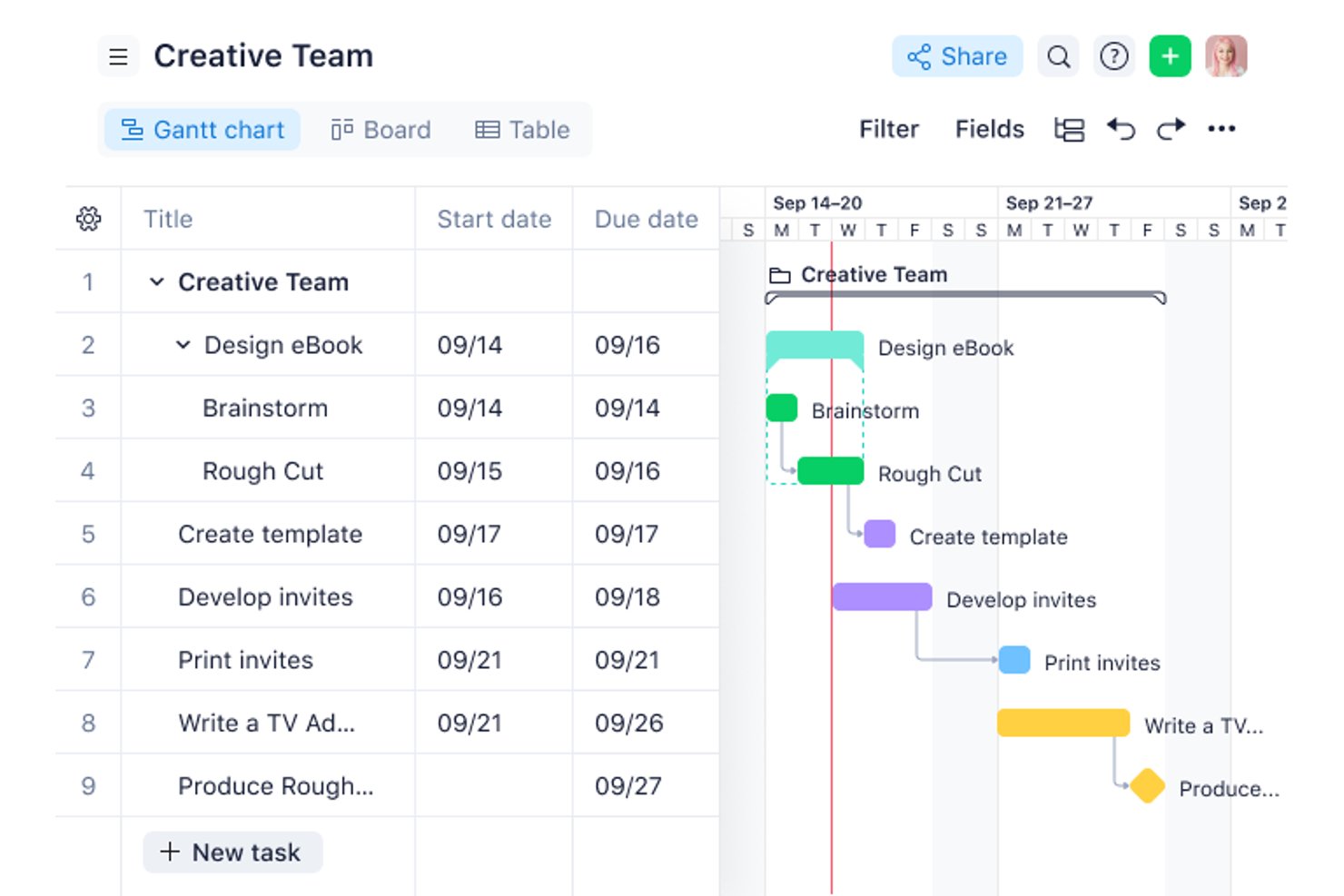
Wrike è una piattaforma di gestione del lavoro per le aziende che combina la gestione del portafoglio, la pianificazione delle risorse e delle capacità, l'automazione dei flussi di lavoro e la reportistica trasversale ai progetti in un unico ambiente controllato.
Per chi è ideale Wrike?
Wrike è particolarmente indicato per i direttori del PMO e i responsabili di portafoglio in aziende di medie e grandi dimensioni che gestiscono flussi di lavoro complessi e interfunzionali tra più dipartimenti.
Perché ho scelto Wrike
Wrike merita un posto nella mia shortlist perché è una delle poche piattaforme che regge davvero la crescita di un'organizzazione da 50 a oltre 5.000 utenti. Mi piace soprattutto come l'architettura in abbonamento cresca con l'aumentare del personale in gruppi di posti definiti, invece di costringere a una migrazione di piattaforma dispendiosa. Al livello Apex, Wrike Integrate e Wrike Two-Way Sync sono inclusi nativamente, il che significa che posso collegare la piattaforma a sistemi ERP, HRIS e toolchain di sviluppo esistenti senza necessità di sviluppo personalizzato.
Funzionalità principali di Wrike
- Reportistica aggregata sul portafoglio: Consolida gli stati, le milestone e i KPI di più progetti in una dashboard unificata.
- Controlli granulari dei permessi basati sui ruoli: Permette agli amministratori di impostare livelli di accesso dettagliati per utenti e team.
- Moduli di richiesta personalizzati: Automatizza la raccolta e l'instradamento di nuove richieste di progetto o attività tra i dipartimenti.
- Log delle attività pronto per audit: Registra e marca temporalmente ogni azione di progetto per conformità e supervisione.
Integrazioni di Wrike
Wrike offre centinaia di integrazioni tramite i componenti integrati e il marketplace, inclusi strumenti come Google Workspace, Microsoft 365, Salesforce, Jira, Slack, GitHub e Zoom. Supporta inoltre Zapier e mette a disposizione una API per integrazioni personalizzate.
Pros and Cons
Pros:
- Si adatta ad aziende multi-team di grandi dimensioni
- Ottima visibilità a livello di portafoglio sui progetti
- Workflow di approvazione e revisione altamente configurabili
Cons:
- La configurazione della reportistica richiede molto tempo da parte degli amministratori
- L'app per dispositivi mobili è meno avanzata rispetto all'esperienza desktop
New Product Updates from Wrike

Wrike Adds Quick Search to Table View
Wrike adds Quick Search to Table View with full-table search across titles, descriptions, and fields, plus highlighted matches. This helps users find tasks faster in large tables. For more information, visit Wrike’s official site.

Ideale per il monitoraggio della redditività dei progetti
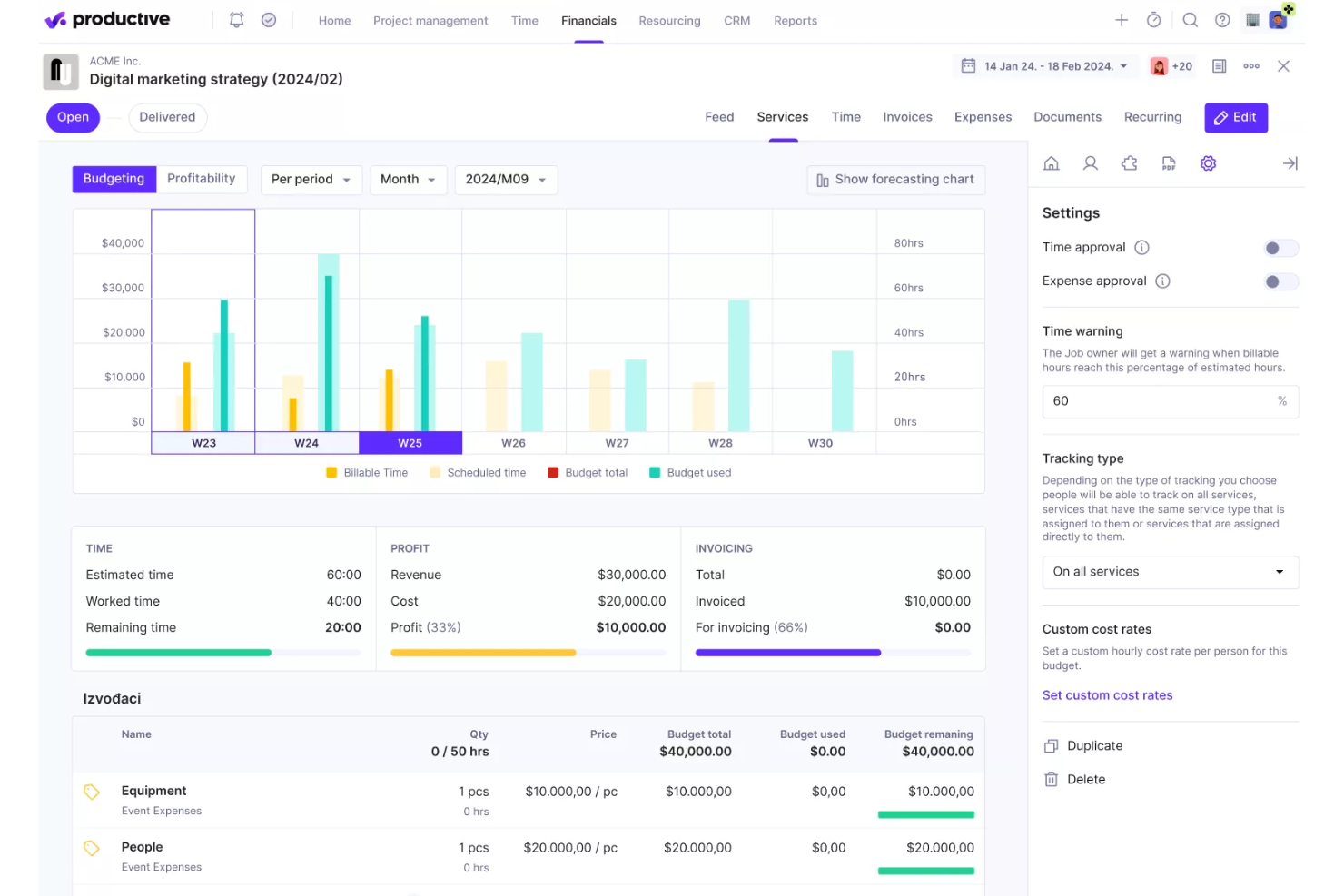
Productive è una piattaforma di project management e automazione dei servizi professionali focalizzata sulle agenzie, che unisce pianificazione delle risorse, rilevazione delle ore, budgeting, fatturazione e previsione finanziaria in un unico sistema.
Per chi è più indicato Productive?
Productive è particolarmente adatto per agenzie e società di servizi professionali che hanno bisogno di gestire le finanze dei progetti, il tempo fatturabile e l'utilizzo del team in un unico posto.
Perché ho scelto Productive
Ho scelto Productive tra i migliori perché il suo approccio alla redditività dei progetti è più dettagliato rispetto alla maggior parte degli strumenti di project management. Tiene traccia del margine a livello di singoli servizi, clienti e membri del team, non solo a livello di progetto. Funzionalità come il calcolo dei costi generali e il riconoscimento dei ricavi forniscono ai team orientati alla finanza una visione chiara di dove effettivamente si guadagna o si perde denaro durante i lavori in corso.
Funzionalità chiave di Productive
- Pianificazione e programmazione delle risorse: Organizza i carichi di lavoro e prevedi l'utilizzo del team su tutti i progetti dei clienti in una singola vista calendario.
- Rilevazione delle ore con flussi di approvazione: Registra le ore fatturabili e non fatturabili e abilita processi di approvazione multilivello direttamente dalla piattaforma.
- Fatturazione automatizzata: Genera e invia fatture personalizzabili basate sul lavoro registrato, sulle spese e sulle tariffe dei progetti.
- Conformità SOC 2 Tipo II: Rispetta gli standard di sicurezza aziendale con SSO obbligatorio, registri di audit e gestione centralizzata dei permessi.
Integrazioni di Productive
Productive offre integrazioni native con Xero, QuickBooks, Slack, Jira, HubSpot, BambooHR e Google Calendar. Zapier e un'API sono disponibili per integrazioni personalizzate.
Pros and Cons
Pros:
- Traccia la redditività a livello di servizio e di cliente
- Reportistica finanziaria integrata su tutti i progetti
- Unisce gestione delle risorse e fatturazione in un unico strumento
Cons:
- Gestione limitata a livello di portafoglio per grandi aziende
- Opzioni limitate di personalizzazione dei report
New Product Updates from Productive

Productive Adds Agent Triggers, Teams Integration, and Time Controls
Productive adds automated agent triggers, broader AI file support, Microsoft Teams integration, Resource Planner improvements, and new time entry controls. These updates expand automation while improving scheduling, collaboration, and time tracking. For more information, visit Productive’s official site.

Ideale per la pianificazione delle risorse
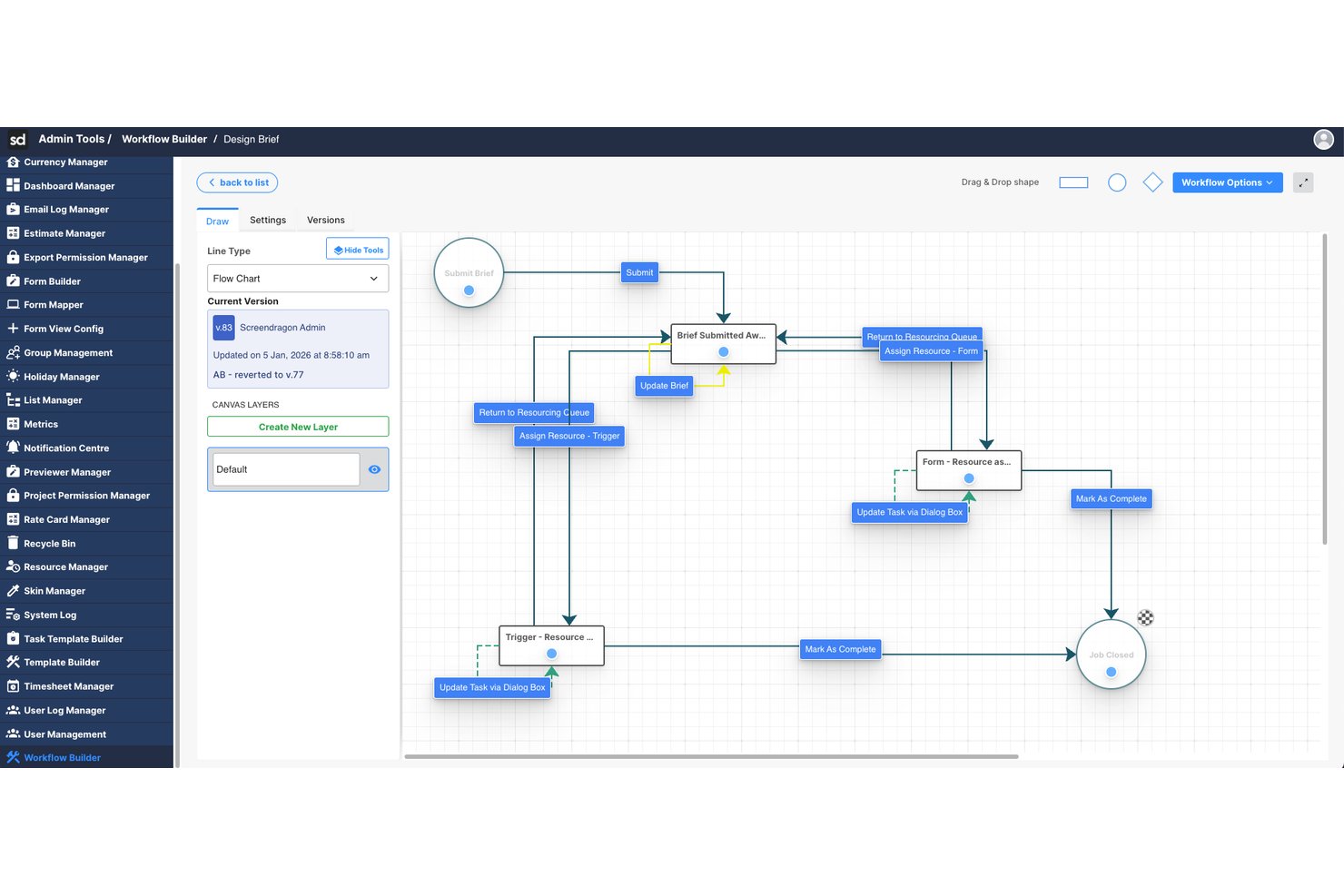
Screendragon è una piattaforma aziendale per la gestione del lavoro che combina la gestione di progetti e portafogli, l'automazione dei flussi di lavoro, la pianificazione delle risorse, il monitoraggio dei budget e le approvazioni in un unico sistema configurabile, sviluppato per grandi team di marketing e agenzie.
Per chi è più adatto Screendragon?
Screendragon è particolarmente adatto ai team di marketing aziendali e alle agenzie interne che gestiscono grandi volumi di lavoro su più marchi, aree geografiche o account clienti.
Perché ho scelto Screendragon
Screendragon si è guadagnato un posto tra le migliori soluzioni della mia selezione grazie alla stretta connessione tra la pianificazione delle risorse e i dati aggiornati dei progetti. Apprezzo molto la visualizzazione della capacità tramite mappa di calore, che mostra esattamente dove i membri del team sono sovraccarichi ancora prima dell'avvio di un progetto. Posso inoltre prevedere la domanda e bilanciare i carichi di lavoro tra i team nella stessa piattaforma in cui il lavoro viene eseguito, senza dover passare da uno strumento separato per la gestione delle risorse a un sistema di monitoraggio dei progetti.
Funzionalità principali di Screendragon
- Generatore di flussi di lavoro senza codice: Progetta e automatizza approvazioni e processi di progetto articolati in più fasi utilizzando un'interfaccia con funzionalità di trascinamento.
- Reportistica con pannelli di controllo personalizzati: Crea pannelli di controllo in tempo reale che aggregano dati su portafogli, progetti e risorse per diversi ruoli utente.
- Autorizzazioni di livello aziendale: Imposta controlli di accesso basati sui ruoli e a livello di campo per proteggere le informazioni sensibili relative a progetti e finanze.
- Integrazioni native con sistemi DAM ed ERP: Collegati a sistemi come Aprimo, SAP e Salesforce senza sviluppo personalizzato.
Integrazioni di Screendragon
Screendragon offre integrazioni native con SAP, Salesforce, Workday, Adobe Creative Cloud, Microsoft 365, Slack e Jira. Fornisce inoltre un'API per integrazioni personalizzate.
Pros and Cons
Pros:
- Mappe di calore visive per la pianificazione della capacità aziendale
- Generatore di flussi di lavoro senza codice per approvazioni complesse
- Progettato specificamente per grandi team operativi di marketing
Cons:
- Non progettato per team di sviluppo software agili
- Configurazione iniziale complessa per le configurazioni articolate
New Product Updates from Screendragon
Screendragon Unveils New AI Hub
Screendragon introduced AI Hub, a new capability that lets teams build and manage AI agents directly within workflows. The update helps marketing teams automate tasks, maintain governance controls, and scale AI-driven operations more efficiently. For more information, visit Screendragon's official site.

Ideale per la protezione dei dati
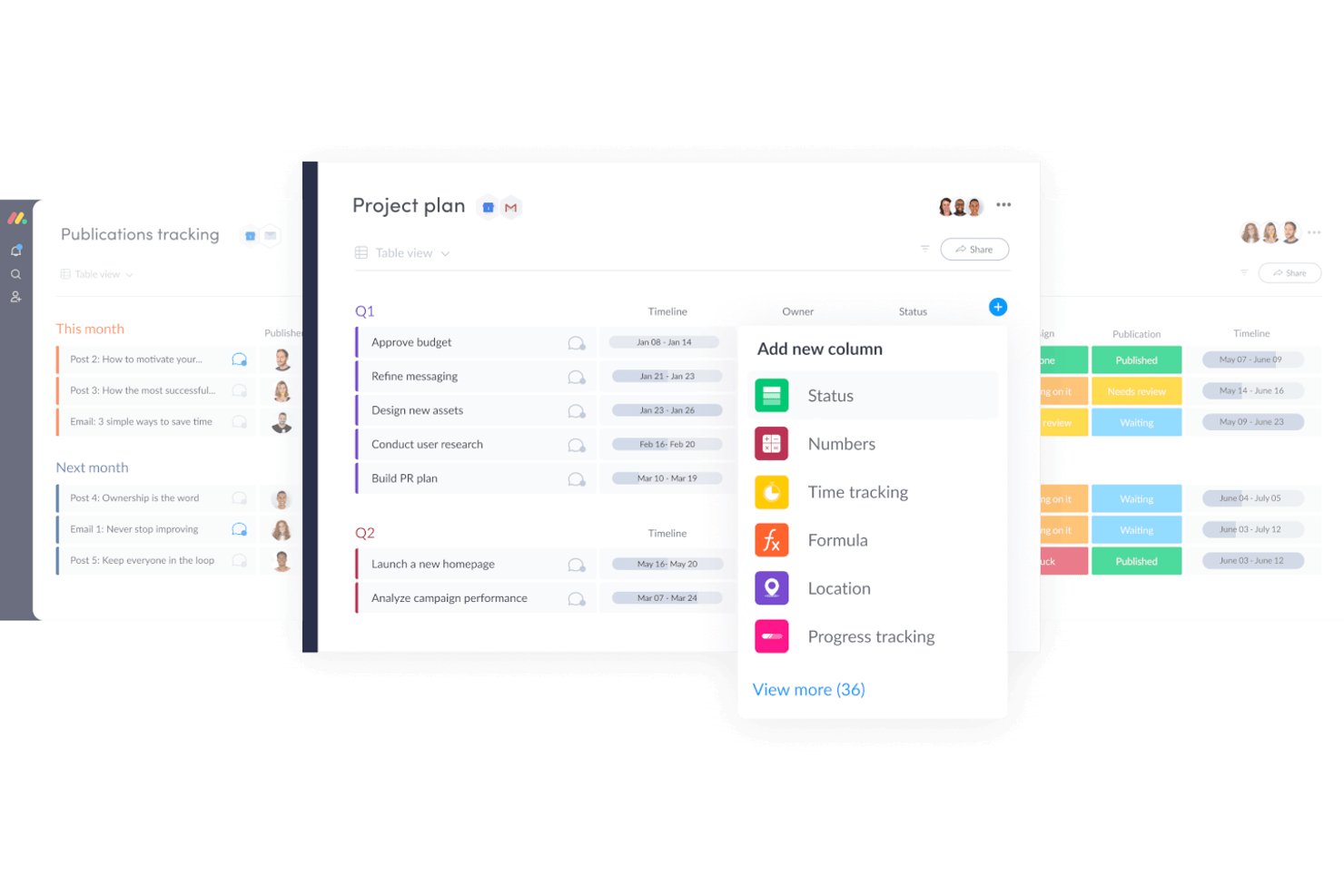
monday AI Workspace è una piattaforma di gestione del lavoro potenziata dall'IA che combina il monitoraggio dei progetti, la gestione dei portafogli, l'automazione dei flussi di lavoro e strumenti di governance aziendale per team trasversali alle funzioni aziendali.
Per chi è più adatto monday AI Workspace?
È particolarmente indicato per i team PMO aziendali e i manager di programmi trasversali che devono coordinare attività su larga scala tra diversi reparti rispettando rigorose esigenze di governance dei dati.
Perché ho scelto monday AI Workspace
Ho inserito monday AI Workspace nella mia lista di soluzioni grazie alla serietà con cui gestisce la governance dei dati a livello aziendale. Apprezzo in particolare la crittografia Bring Your Own Key (BYOK), che consente alle organizzazioni di mantenere il pieno controllo sulle proprie chiavi dati, e la API avanzata dei log di audit che offre ai team di sicurezza un registro dettagliato di ogni azione utente sulla piattaforma. Un ulteriore punto di forza è che i modelli di monday AI non vengono allenati sui dati dei clienti, un aspetto fondamentale quando si gestiscono portafogli di progetti sensibili in uno spazio di lavoro assistito dall'IA.
Funzionalità chiave di monday AI Workspace
- Cruscotti per la gestione dei portafogli: Crea visualizzazioni unificate e in tempo reale di progetti, programmi e dipendenze.
- Pianificazione della capacità delle risorse: Monitora carichi di lavoro e utilizzo dei team su più portafogli e periodi temporali.
- Reportistica e analisi personalizzabili: Costruisci cruscotti interattivi con filtri e KPI trasversali per aumentare la visibilità alla leadership.
- Costruttore di automazione dei flussi di lavoro: Automatizza le azioni di progetto ripetitive e gli aggiornamenti di stato con trigger basati su regole senza codice.
Integrazioni di monday AI Workspace
monday AI Workspace offre centinaia di integrazioni native e app di marketplace, tra cui Salesforce, Jira, Slack, HubSpot, Google Workspace, Zendesk, Microsoft Teams, Dropbox, GitHub e Outlook. Supporta Zapier e fornisce una API per integrazioni personalizzate.
Pros and Cons
Pros:
- Crittografia BYOK per il controllo dati di livello enterprise
- L'IA genera automaticamente riepiloghi sullo stato del progetto
- Viste altamente flessibili per metodi di delivery misti
Cons:
- Il monitoraggio finanziario avanzato richiede strumenti di terze parti
- La personalizzazione dei report diventa complessa in presenza di grandi portafogli
New Product Updates from monday AI Workspace
monday AI Workspace Adds Human Approval Routing
monday AI Workspace adds a human-in-the-loop approval block to AI Workflows, sending approval requests and routing workflow paths based on responses. For more information, visit monday AI Workspace's official site.
OnePlan
Ideale per la pianificazione del portafoglio dalla strategia all'esecuzione


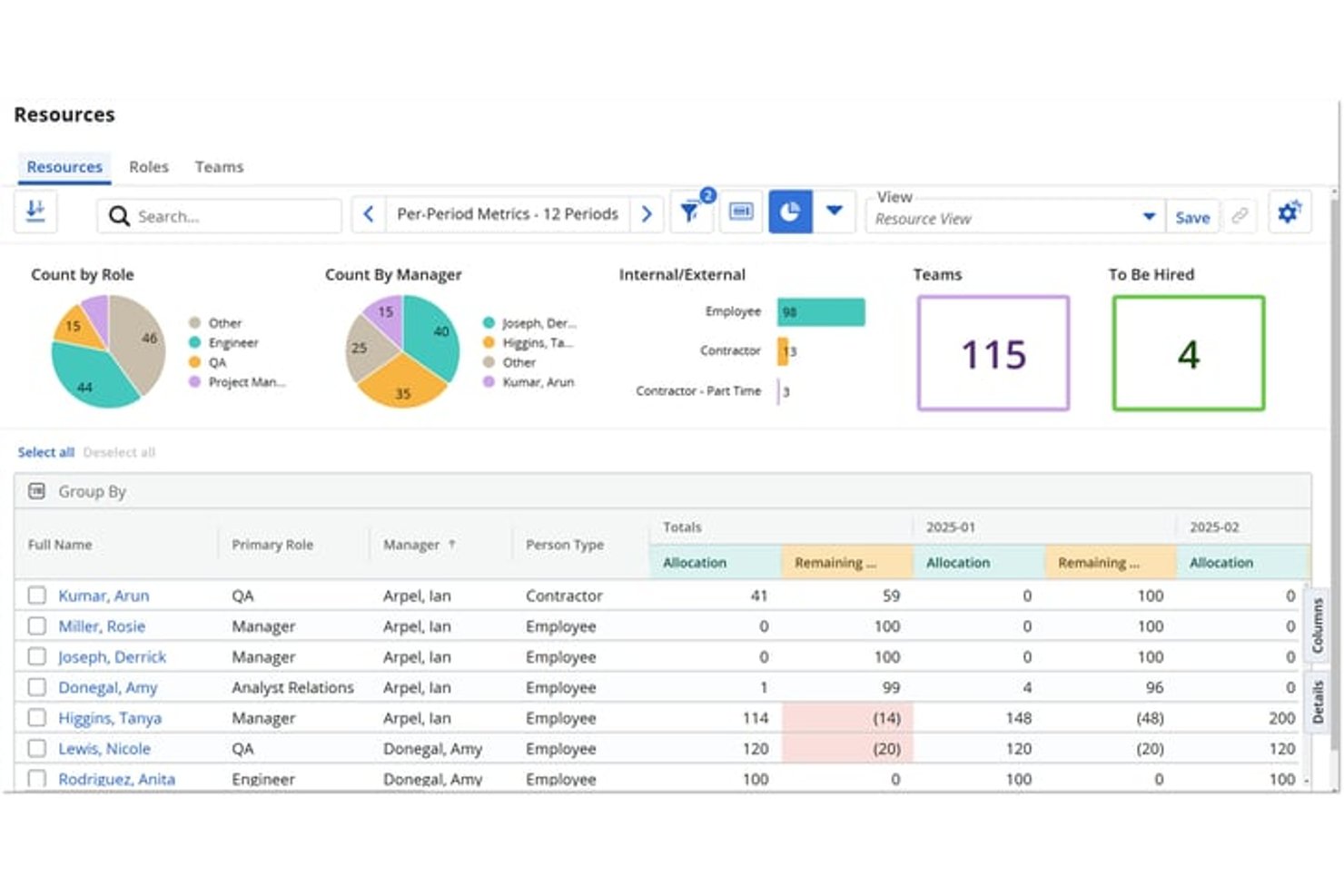
Broadcom Clarity è la piattaforma strategica di gestione del portafoglio di Broadcom, progettata per gestire la pianificazione del portafoglio su scala aziendale, la gestione finanziaria multivaluta, la pianificazione della capacità delle risorse e la definizione delle roadmap all'interno di gerarchie di investimento ampie e complesse.
Per chi è più adatto Broadcom Clarity?
Broadcom Clarity è particolarmente adatto ai responsabili dei PMO aziendali e ai portfolio manager IT che devono governare portafogli di investimento ampi e complessi distribuiti tra più unità aziendali.
Perché ho scelto Broadcom Clarity
Broadcom Clarity si è guadagnato un posto nella mia selezione perché nessun altro strumento gestisce i dati finanziari dei portafogli multivaluta con lo stesso livello di profondità. Mi riferisco alla conversione valutaria effettiva a livello di transazione, utilizzando i tassi di cambio della data della transazione, ai piani dei costi collegati direttamente agli investimenti finanziati e a un modulo per i costi non legati alla manodopera che riunisce tutto in un'unica vista consolidata. Se il tuo portafoglio comprende unità aziendali situate in Paesi diversi e il tuo CFO ha bisogno di dati chiari e riconciliati, il livello finanziario di Clarity offre una copertura che la maggior parte degli strumenti di gestione dei progetti semplicemente non raggiunge.
Funzionalità principali di Broadcom Clarity
- Definizione strategica delle roadmap: Le roadmap visive si collegano direttamente agli investimenti finanziati, con il monitoraggio delle dipendenze e la sincronizzazione quasi in tempo reale con i dati dei progetti sottostanti.
- Area di lavoro per l'assegnazione del personale: Abbina le risorse ai ruoli aperti in base alle competenze e alla disponibilità, supportando la pianificazione della capacità sull'intero portafoglio.
- Pianificazione degli scenari: La modellazione delle ipotesi tramite trascinamento consente di confrontare gli scenari del portafoglio prima di approvare un piano o una decisione di riallocazione.
- Controllo degli accessi basato sull'OBS: La sicurezza basata sulla Struttura di scomposizione organizzativa governa l'accesso ai dati in base ai ruoli e alla gerarchia sull'intera piattaforma.
Integrazioni di Broadcom Clarity
Clarity offre integrazioni native ConnectALL con Jira, Microsoft Azure DevOps, Microsoft Project, Salesforce, ServiceNow e Rally. Supporta inoltre un adattatore universale, REST, SOAP, XOG e OData per integrazioni personalizzate e strumenti di business intelligence esterni.
Pros and Cons
Pros:
- Dati finanziari multivaluta monitorati a livello di transazione
- Strumenti di pianificazione degli scenari integrati nelle roadmap
- Abbinamento delle risorse in base a competenze e disponibilità
Cons:
- La gestione agile dei progetti richiede il componente aggiuntivo Rally
- L'interfaccia utente appare obsoleta per molti team
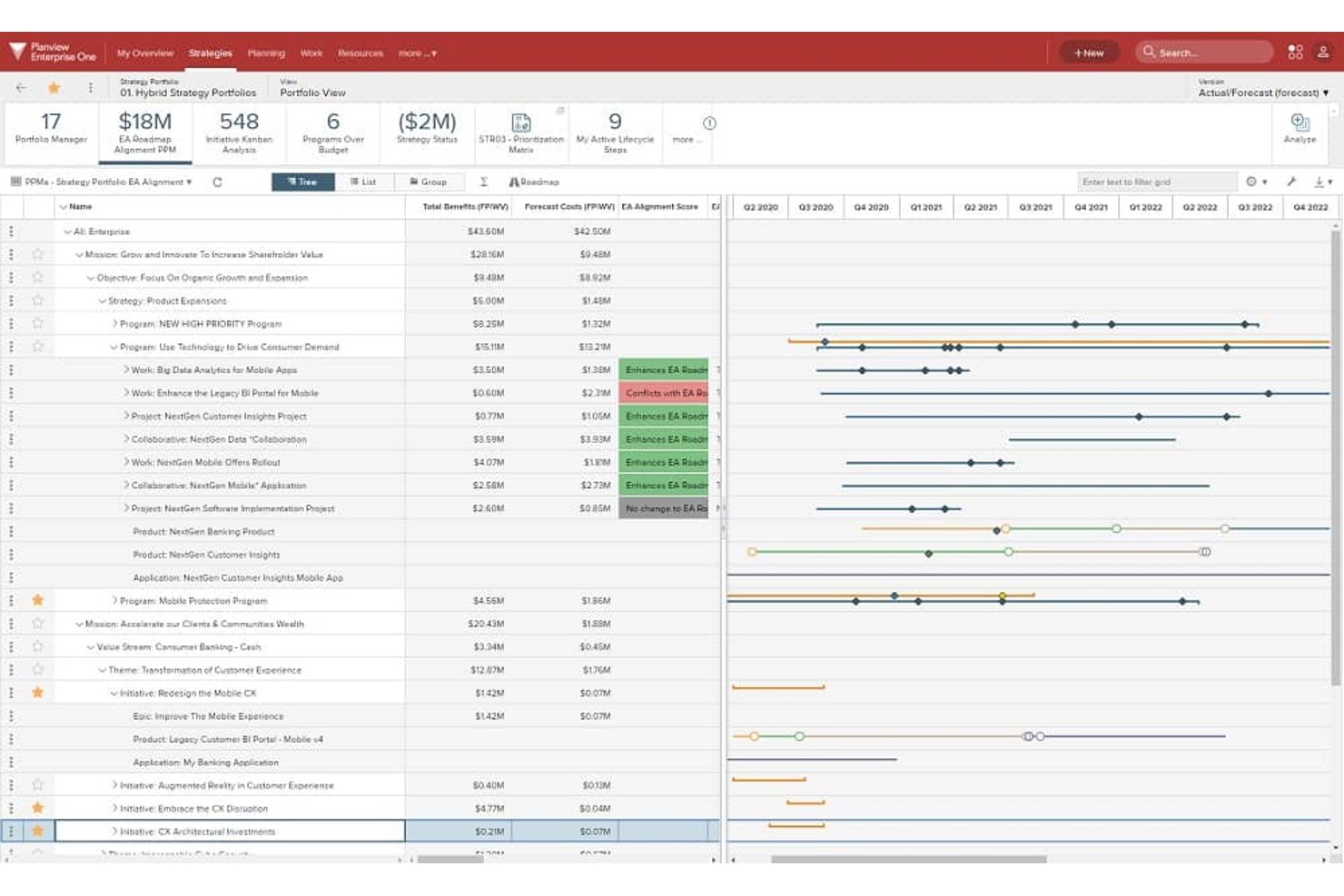
Planview Portfolios è una piattaforma aziendale per la gestione dei portafogli che collega la pianificazione strategica, la definizione delle priorità degli investimenti, la capacità delle risorse e l'esecuzione ibrida dei progetti all'interno di organizzazioni grandi e complesse.
A chi è più adatto Planview Portfolios?
Planview Portfolios è progettato per i responsabili dei PMO aziendali e i gestori dei portafogli che devono collegare direttamente la pianificazione strategica agli investimenti finanziati in organizzazioni grandi e articolate in più divisioni.
Perché ho scelto Planview Portfolios
Planview Portfolios si è guadagnato un posto nella mia lista perché nessun altro strumento collega gli investimenti finanziati agli obiettivi strategici in modo altrettanto diretto. Apprezzo particolarmente il modo in cui le sue funzionalità di definizione delle tabelle di marcia e gli OKR consentono di seguire un investimento di capitale dall'obiettivo aziendale fino ai singoli programmi in più divisioni, proprio ciò di cui avevano bisogno grandi organizzazioni come Corning quando hanno unificato 12 divisioni in un'unica vista del portafoglio. Anche gli strumenti di pianificazione degli scenari sono altrettanto impressionanti, perché permettono di confrontare le opzioni relative a personale, tempistiche e priorità prima di impegnare il budget.
Funzionalità principali di Planview Portfolios
- Gestione della domanda: Un sistema centralizzato di raccolta delle richieste che acquisisce, monitora e valuta le idee e le richieste di progetto prima che entrino nel portafoglio.
- Erogazione del lavoro ibrido: Un'unica istanza supporta i metodi di erogazione Lean-Agile, collaborativi e a cascata, con reportistica unificata del portafoglio per tutti questi metodi.
- Oltre 200 report pronti all'uso: Report e visualizzazioni del portafoglio predefiniti che coprono strategia, programmi, progetti, risorse e tecnologia.
- Planview Anvi AI: Un assistente di intelligenza artificiale conversazionale che consente di interrogare i dati del portafoglio in linguaggio naturale e mette in evidenza segnali di rischio in tempo reale dagli aggiornamenti sullo stato.
Integrazioni di Planview Portfolios
Planview Portfolios documenta integrazioni con oltre 12 sistemi, tra cui SAP, Oracle ERP, Salesforce, Workday, ServiceNow, Atlassian, Microsoft, NetSuite e Apptio. Planview Hub collega catene di strumenti come Jira e Azure DevOps.
Pros and Cons
Pros:
- Collega la strategia del portafoglio all'esecuzione dei progetti
- Oltre 200 report per la gestione del portafoglio e delle risorse
- Pianificazione degli scenari per personale e investimenti
Cons:
- Lo scambio di dati tra moduli può creare difficoltà
- Le implementazioni complesse richiedono spesso servizi esterni

Planisware
Ideale per PPM chiavi in mano con pianificazione di scenari
Altri software di gestione dei progetti aziendali
Ecco alcuni altri software di gestione dei progetti aziendali che non sono entrati nella lista principale, ma che meritano la tua considerazione.
- Celoxis
Ideale per team remoti distribuiti a livello globale
- Zoho Projects
Ideale per una personalizzazione semplice
- Quickbase
Ideale per flussi di lavoro standardizzati e automatizzati
- Miro
Ideale per la collaborazione visiva
- Workzone
Ideale per report predefiniti
- Jira Enterprise
Ideale per la gestione e i test delle modifiche su più siti
- Smartsheet
Ideale per la gestione progetti basata su fogli di calcolo
- ClickUp
Ideale per la governance basata sull'intelligenza artificiale e le tracce di controllo
- Triskell
Ideale per la pianificazione ipotetica del portafoglio in scenari multipli
- ServiceNow Strategic Portfolio Management
Ideale per l'allineamento della strategia di portafoglio pensata nativamente per l'IT


Recensioni correlate sui software di gestione dei progetti
Se non hai ancora trovato quello che cerchi, dai un'occhiata a queste altre recensioni di strumenti di gestione dei progetti che abbiamo selezionato per te:
- Software di gestione dei progetti
- Cruscotto per la gestione dei progetti aziendali
- Software di gestione dei progetti PR
- Software di gestione delle risorse
- Software di automazione dei flussi di lavoro
- Software per il monitoraggio del tempo
- Software di gestione delle attività
- Strumenti di collaborazione
- Software di gestione dei progetti di investimento


Come Valuto il Software di Gestione Progetti per le Aziende
Per gli uffici di gestione progetti (PMO) che gestiscono portafogli su team globali, guardo a due livelli: i criteri di accettazione fondamentali che ogni strumento deve soddisfare e i fattori distintivi che differenziano le migliori opzioni.
Funzionalità di Base (Requisiti Fondamentali per Questa Lista)
Quando seleziono gli strumenti per il mio elenco, valuto ciascuno su una scala da 0 (non offre la funzionalità) a 5 (eccelle in quest'area) per ogni funzionalità di base elencata di seguito. Poi calcolo il punteggio totale dello strumento come percentuale. Ogni strumento deve ottenere un punteggio minimo totale del 65% per essere preso in considerazione per l'inclusione.
- Gestione di Portafogli & Programmi: Valuto come ogni strumento gestisce portafogli multi-progetto, cercando mappatura delle dipendenze, viste aggregate e la capacità di raggruppare iniziative sotto programmi strategici.
- Pianificazione delle Risorse & della Capacità: Equilibrare centinaia di persone su più flussi di lavoro concomitanti è la vera prova, quindi verifico la tracciabilità dell'utilizzo, la previsione della domanda e le viste dei carichi di lavoro.
- Reportistica & Analisi: Cerco dashboard personalizzabili che aggregano dati tra progetti e dipartimenti, offrendo ai direttori PMO KPI a livello di portafoglio senza dover ricorrere a fogli di calcolo manuali.
- Sicurezza & Governance Aziendale: SSO, SAML, provisioning SCIM, permessi basati sui ruoli e log di audit sono tutti elementi importanti, insieme alle certificazioni di conformità come SOC 2 e ISO 27001.
- Gestione di Budget & Finanze: Il monitoraggio dei costi a livello di progetto conta, ma valuto anche se gli strumenti supportano la previsione, il collegamento tempi-costi e l'aggregazione dei budget su un portafoglio completo.
- Integrazioni & Scalabilità: I team aziendali operano su stack interconnessi, quindi controllo la presenza di connettori nativi con strumenti come Jira, Salesforce e SAP, oltre a un'API matura e la comprovata scalabilità.
Dopo aver selezionato gli strumenti che soddisfano questi criteri, considero ciò che distingue ciascuna piattaforma.
Fattori Differenzianti (Cosa Distingue i Fornitori)
Ecco come confronto e valuto i diversi fornitori:
Funzionalità Distintive
La modellazione degli scenari è un grande elemento distintivo. Quando un PMO deve valutare l'impatto di posticipare un'iniziativa per accelerarne un'altra, l'analisi what-if a livello di portafoglio permette di risparmiare settimane di ricalcoli manuali. Valuto anche la capacità di collegare i progetti agli obiettivi strategici: il monitoraggio degli OKR che connette il lavoro a livello di task agli obiettivi aziendali offre alla leadership una reale visibilità su quanto la consegna stia producendo risultati concreti. La flessibilità metodologica è altrettanto importante, poiché nelle grandi organizzazioni raramente si adotta una metodologia puramente Agile o Waterfall ovunque. Cerco piattaforme che supportino la delivery ibrida tra i diversi team.
Oltre le Funzionalità
Le implementazioni di gestione progetti a livello aziendale possono richiedere mesi, quindi valuto il supporto all'implementazione fornito da ciascun venditore. Team di onboarding dedicati, risorse per la gestione del cambiamento e template preconfigurati fanno davvero la differenza quando si distribuisce lo strumento a migliaia di utenti. Anche la struttura delle licenze è importante. Alcune piattaforme offrono accessi a livelli con ruoli solo visualizzazione, il che aiuta a mantenere i costi prevedibili quando la leadership necessita solo di accedere alle dashboard. Per i settori regolamentati, verifico opzioni di deployment come cloud privato, hosting on-premise e controlli sulla residenza dei dati per garantire che lo strumento si adatti ai requisiti di conformità esistenti.
Che cos'è un software di gestione dei progetti aziendali?
Mentre gli strumenti standard di gestione dei progetti si concentrano sul monitoraggio delle attività per i piccoli team, il software di gestione dei progetti aziendali deve supportare portafogli complessi composti da più progetti, una rigorosa governance dei dati e l'allineamento tra i diversi reparti.
Tre capacità fondamentali distinguono il software aziendale dagli strumenti PM di base:
- Supervisione del portafoglio a livello aziendale: il software combina i dati di ogni team in dashboard per i dirigenti, monitora le dipendenze tra diversi progetti e misura i progressi verso i principali obiettivi aziendali.
- Sicurezza e governance di livello bancario: include funzionalità di sicurezza avanzate come l'accesso singolo (SSO tramite Okta/SAML), controlli automatizzati degli accessi degli utenti (SCIM), controllo degli accessi basato sui ruoli (RBAC), registri di audit e rigorosi standard di conformità (SOC 2 Type II, ISO 27001, HIPAA).
- Integrazione approfondita con l'ecosistema aziendale: il software aziendale non può esistere in un silo. Richiede funzionalità native di sincronizzazione bidirezionale con gli ecosistemi aziendali fondamentali, inclusi i software ERP per la contabilità (SAP, Oracle), le piattaforme CRM (Salesforce), gli hub per i servizi IT (ServiceNow) e gli strumenti per sviluppatori (Jira).
EPM vs. EPPM: qual è la differenza?
| Categoria | Gestione dei progetti aziendali (EPM) | Gestione del portafoglio di progetti aziendali (EPPM) |
|---|---|---|
| Obiettivo principale | Eseguire i progetti in modo efficiente (nei tempi e nel budget). | Massimizzare il ROI e il valore strategico di tutti gli investimenti aziendali. |
| Domanda fondamentale | "Come possiamo consegnare questo progetto nei tempi previsti, rispettando il budget e le specifiche?" | "Stiamo investendo il nostro budget tecnologico nei prodotti e nelle piattaforme giusti?" |
| Funzionalità principali | Diagrammi di Gantt, lavagne Kanban, elenchi delle attività arretrate degli sprint, dipendenze tra attività, report sullo stato. | Piani strategici per i dirigenti, modellazione di scenari ipotetici, framework per la valutazione dei progetti. |
| Dati finanziari e KPI | Velocità di consumo del budget del progetto: monitoraggio delle ore registrate a livello di progetto, dei pagamenti dei traguardi e dei costi delle attività. | ROI del portafoglio: allocazione dei budget annuali di capitale e valutazione del ritorno complessivo sull'investimento. |
| Utenti principali | Responsabili di progetto, responsabili dei team, responsabili di reparto. | Alta dirigenza, direttori del PMO, direttori della strategia. |
Come scegliere il software di gestione dei progetti aziendali
Per trovare il software di gestione dei progetti aziendali più adatto al tuo team, devi valutare le esigenze operative specifiche della tua organizzazione. Ti consiglio di concentrarti su cinque fattori di valutazione fondamentali per restringere rapidamente le opzioni.
| Fattore di valutazione | Cosa cercare |
|---|---|
| Sicurezza e conformità aziendale | SSO (Okta/SAML), provisioning degli utenti SCIM, crittografia BYOK, SOC 2 Type II, ISO 27001 e registri di audit aziendali. |
| Scalabilità e gestione delle risorse | Allocazione della capacità delle risorse su oltre 100 progetti simultanei, monitoraggio del carico di lavoro tra i reparti e pianificazione multi-team. |
| Integrazioni e API personalizzate | Connettori nativi per ERP (SAP, NetSuite), CRM (Salesforce) e strumenti di sviluppo (Jira), oltre ad API REST per flussi di lavoro personalizzati. |
| Profondità delle funzionalità e personalizzazione | Dashboard gerarchiche di aggregazione del portafoglio, viste dinamiche Gantt/Kanban, campi personalizzati e instradamento automatizzato delle approvazioni in più fasi. |
| ROI misurabile e governance | Previsioni in tempo reale dei margini dei progetti, aggregazione dei budget in più valute e visibilità sullo stato di salute del portafoglio a livello dirigenziale. |
Scegliere il software di gestione dei progetti aziendali in base alla metodologia di progetto
La metodologia di realizzazione dei progetti determina le funzionalità software specifiche e le viste di monitoraggio visivo di cui il tuo team ha bisogno. La scelta di una piattaforma in linea con il tuo approccio alla realizzazione garantisce una maggiore adozione da parte degli utenti e un'esecuzione coerente.
- Metodologia Agile: i team di ingegneria del software e di progettazione dei prodotti hanno bisogno di piattaforme che supportino sprint iterativi, perfezionamento dell'elenco delle attività arretrate e grafici di avanzamento. Suggerisco di scegliere piattaforme come Jira o ClickUp che offrano funzionalità native per la stima in punti storia e il monitoraggio dei bug.
- Metodologia a cascata: i progetti di edilizia, produzione e sviluppo hardware richiedono fasi lineari e dipendenze rigorose. Cerca software con diagrammi di Gantt dinamici, definizione delle baseline e analisi del percorso critico, come Microsoft Project o Planview.
- Metodologia ibrida: le agenzie creative, le aziende di servizi professionali e i reparti di marketing spesso combinano un'esecuzione iterativa con scadenze rigide per i clienti. Consiglio piattaforme flessibili come Wrike o monday.com, che consentono agli utenti di passare da lavagne Kanban a visualizzazioni della sequenza temporale e fogli di calcolo.
Tendenze nel software di gestione dei progetti aziendali
Ecco alcuni progressi emergenti che possono aiutarti a scegliere quale piattaforma di gestione dei progetti utilizzare.
- Maggiore sicurezza e conformità: Software come monday.com hanno posto una forte enfasi sulle funzionalità di sicurezza, come il provisioning SCIM e le modalità di emergenza per bloccare gli account in caso di compromissione delle credenziali, indicando una tendenza verso misure di sicurezza e conformità più rigorose.
- Flussi di lavoro personalizzabili e pianificazione dinamica: Strumenti come Wrike e LiquidPlanner offrono flussi di lavoro altamente personalizzabili e una pianificazione dinamica dei progetti, che consentono di adattarsi alle circostanze mutevoli e apportare modifiche in tempo reale. Questo risponde alla necessità di flessibilità nella pianificazione e nell'esecuzione dei progetti.
- Gestione avanzata delle risorse e del tempo: Le funzionalità dedicate all'allocazione delle risorse, al monitoraggio del tempo e all'ottimizzazione, evidenziate da Wrike, suggeriscono una tendenza verso funzioni sofisticate di gestione delle risorse e del tempo, che possono contribuire a un'esecuzione efficiente dei progetti.
Se supervisioni iniziative su larga scala, il software giusto renderà molto più semplice gestire obiettivi, scadenze e risorse, adattandosi alle esigenze specifiche del tuo settore. Puoi anche optare per strumenti specifici per il tuo settore (ad es. software di gestione dei progetti immobiliari o software di gestione dei progetti nel settore manifatturiero).
Funzionalità del software di gestione dei progetti aziendali
Quando valuti le piattaforme aziendali, cerca queste funzionalità fondamentali. Puoi utilizzare questo elenco come lista di controllo dei requisiti principali prima di acquistare un nuovo software.
- Gestione del portafoglio progetti: Cruscotti di alto livello per monitorare più flussi di progetto rispetto agli obiettivi aziendali principali. La dirigenza può collegare direttamente le iniziative attive dei vari reparti agli obiettivi aziendali e verificare i progressi di tutti i team.
- Pianificazione della capacità delle risorse: Strumenti per monitorare i carichi di lavoro dei team e prevenire l'esaurimento nei vari reparti durante qualsiasi fase del ciclo di vita del progetto. Puoi visualizzare in tempo reale le situazioni di sovraccarico e riassegnare le attività per bilanciare la capacità del team.
- Sicurezza aziendale: Controlli di governance essenziali come l'accesso singolo (SSO), le autorizzazioni basate sui ruoli e le certificazioni di conformità (come SOC 2 o FedRAMP). Queste funzionalità di sicurezza di livello aziendale garantiscono che i dati dei tuoi progetti rispettino gli standard di conformità aziendali.
- Automazione avanzata e rilevamento dei rischi tramite IA: Attivatori personalizzati dei flussi di lavoro e rilevamento dei rischi basato sull'IA, che riducono al minimo la supervisione manuale. Gli strumenti integrati analizzano le tempistiche dei progetti, migliorano la gestione degli arretrati e attivano flussi di lavoro automatizzati per i passaggi di consegne delle attività.
- Cruscotti e report personalizzabili: Strumenti di reportistica visiva personalizzati, inclusi campi personalizzati e moduli di richiesta dinamici, che si adattano alle specifiche esigenze di monitoraggio degli stakeholder. I cruscotti personalizzati forniscono dati in tempo reale sullo stato complessivo del progetto, sull'allocazione delle risorse e sul ritmo di consumo del budget utilizzando funzionalità avanzate di analisi aziendale.
- Pianificazione dinamica e programmazione visiva: Diagrammi di Gantt interattivi e bacheche Kanban per la pianificazione visiva dei progetti e il monitoraggio delle tempistiche nei framework agili come Scrum. Questi strumenti aiutano i responsabili a definire pianificazioni realistiche, allinearsi alla metodologia di gestione dei progetti scelta, assegnare dipendenze tra le attività, gestire la pianificazione degli sprint e modificare rapidamente l'ambito del progetto.
- Strumenti di collaborazione in tempo reale: Spazi centralizzati per la comunicazione del team, l'assegnazione incrociata di tag, i commenti diretti sulle attività e la condivisione dei documenti. Queste funzionalità aiutano i team remoti e interfunzionali a lavorare insieme senza dover fare affidamento su lunghe conversazioni via e-mail.
- Monitoraggio integrato di tempi e spese: Funzionalità di monitoraggio del tempo che registrano le ore dedicate a specifici risultati del progetto. I timer integrati forniscono dati accurati per la fatturazione dei clienti, supportano la gestione finanziaria complessiva, evidenziano i punti di attrito operativi e mantengono sotto controllo i budget dei progetti.
- Integrazioni con l'ecosistema software: Integrazioni di terze parti che collegano direttamente la piattaforma di gestione dei progetti con software esterni. Cerca connettori predefiniti per piattaforme CRM, Adobe Creative Cloud, software di contabilità, sistemi HR e strumenti di comunicazione.
Vantaggi del software di gestione dei progetti aziendali
Ecco cinque vantaggi principali dell'utilizzo di software per la gestione dell'IT aziendale:
- Maggiore visibilità sul progetto: offre una panoramica completa di tutte le attività del progetto, delle tempistiche, dei diagrammi di Gantt, del monitoraggio del tempo e della gestione delle risorse. Questa visibilità consente di gestire la pianificazione della capacità e l'allocazione delle risorse per prendere decisioni informate, prevedere potenziali colli di bottiglia, rimanere in linea con i piani e mantenere la scalabilità a lungo termine.
- Collaborazione avanzata del team: facilita la comunicazione e la collaborazione tra team interfunzionali, indipendentemente dalla loro posizione geografica. Fornendo una piattaforma centralizzata per le discussioni, la condivisione dei documenti e la pianificazione delle risorse, i membri del team allineano gli OKR, monitorano gli indicatori chiave di prestazione (KPI) e lavorano in modo coordinato verso gli obiettivi del progetto.
- Ottimizzazione del flusso di lavoro e automazione delle attività: automatizza le attività di routine e utilizza l'automazione dei flussi di lavoro per semplificare i processi, riducendo il lavoro manuale e il rischio di errore umano. L'integrazione con i sistemi ERP centrali fornisce informazioni preziose sul lavoro, consentendo ai team di concentrarsi su attività di maggior valore che contribuiscono direttamente al successo del progetto.
- Gestione e mitigazione dei rischi: aiuta a identificare, valutare e affrontare proattivamente i rischi del progetto. Attraverso il rilevamento e l'intervento tempestivi, i project manager possono ridurre al minimo l'impatto dei rischi sulle tempistiche e sul budget del progetto.
- Processo decisionale basato sui dati: fornisce accesso a dati, analisi, integrazioni e report in tempo reale, consentendo di prendere decisioni basate sulle informazioni più aggiornate del progetto. Questo accesso a dati accurati e aggiornati supporta una migliore pianificazione strategica, pianificazione delle risorse e valutazione dei rischi, migliorando la qualità complessiva e il tasso di successo dei progetti.
Costi e prezzi dei software di gestione dei progetti aziendali
Se fai parte di una grande azienda e cerchi una supervisione completa dei progetti, esiste un piano adatto a ogni scenario.
Tabella di confronto dei piani per i software di gestione dei progetti aziendali
| Opzione del piano | Prezzo medio | Funzionalità comunemente incluse |
|---|---|---|
| Base | $10 - $20 /user/month | Gestione delle attività e dei progetti, report di base, integrazioni limitate e accesso per un piccolo team di utenti |
| Standard | $25 - $35 /user/month | Monitoraggio avanzato dei progetti, più integrazioni, strumenti di collaborazione e supporto per un team più numeroso |
| Professionale | $50 - $75 /user/month | Report e analisi avanzati, progetti illimitati, supporto prioritario e ampie opzioni di integrazione |
| Aziendale | Prezzo personalizzato | Funzionalità personalizzabili, opzioni di sicurezza avanzate, supporto dedicato e formazione per le grandi organizzazioni |
| Gratuito | $0 | Gestione di base delle attività, progetti limitati e strumenti essenziali di collaborazione per verificare se lo strumento è adatto alle proprie esigenze |
Valuta la possibilità di iniziare con un piano gratuito o di base per comprendere le funzionalità della soluzione di gestione aziendale e poi aumentare il livello del piano man mano che le tue esigenze crescono e diventano più complesse.
Domande frequenti sul software di gestione dei progetti aziendali
Trova le risposte alle domande frequenti su questo argomento.
Qual è la differenza tra gli strumenti di gestione dei progetti e il software di gestione dei progetti aziendali?
Gli strumenti di gestione dei progetti si concentrano generalmente sulla gestione delle attività a livello operativo, sulla collaborazione del team e sui programmi di base dei progetti per team di piccole e medie dimensioni. Il software di gestione dei progetti aziendali è scalabile per un’intera organizzazione e offre la gestione del portafoglio progetti aziendale (PPM), la previsione della capacità delle risorse per migliaia di utenti, l’aggregazione dei budget in più valute e una conformità avanzata in materia di sicurezza, come SOC 2 e SSO.
Come si integra il software di gestione dei progetti aziendali con un ERP?
Integrare il software di gestione dei progetti aziendali con un sistema ERP (ad es. SAP o NetSuite) collega direttamente l’avanzamento dei progetti ai dati finanziari della tua azienda. Puoi collegarli in tre modi:
-
Connettori predefiniti: Integrazioni pronte all’uso fornite dai produttori di software per una configurazione rapida.
-
API: Codice personalizzato che consente ai due sistemi di condividere automaticamente i dati.
-
Strumenti di integrazione: Piattaforme middleware aziendali come Workato o Zapier Enterprise che trasferiscono i dati in modo sicuro tra gli strumenti.
Collegare questi sistemi consente di monitorare il budget in tempo reale, fatturare più rapidamente i clienti e ottenere una visibilità chiara sui costi tra i vari reparti, senza inserire i dati due volte.
Perché il software di gestione dei progetti aziendali è fondamentale per le grandi organizzazioni?
Il software di gestione dei progetti aziendali centralizza i flussi di lavoro frammentati tra più reparti. Fornisce ai responsabili una visibilità in tempo reale sullo stato del portafoglio progetti, previene il sovraccarico dei team attraverso la pianificazione delle risorse aziendali, automatizza i complessi passaggi di consegna per le approvazioni e garantisce che tutti i dati dei progetti siano conformi alle politiche aziendali di governance dei dati.