

I 10 migliori software per la gestione delle attività di gruppo recensiti nel 2026

10 Elenco dei migliori software per la gestione delle attività del team


Scegliere il software giusto per la gestione delle attività del team può essere un compito impegnativo. Sai di dover ottimizzare il coordinamento dei progetti e migliorare il lavoro di squadra, ma determinare quale strumento sia più adatto alle tue esigenze è difficile. Ed è qui che entro in gioco io! Grazie alla mia vasta esperienza come esperto di software, conosco le peculiarità dei diversi strumenti presenti sul mercato. I software per la gestione delle attività del team aiutano a gestire attività, scadenze e comunicazioni in un'unica piattaforma centralizzata. Ecco le mie scelte per il miglior software per la gestione delle attività del team.
Perché fidarsi dei nostri consigli sui software
Il nostro team testa e recensisce software dal 2012. In quanto project manager noi stessi, sappiamo quanto sia difficile — e importante — scegliere il software giusto.
Per questa guida, abbiamo valutato gli strumenti attraverso test pratici e ricerche indipendenti, assegnando un punteggio agli strumenti in base ai nostri criteri di selezione. Ci basiamo inoltre sulle competenze di leader di pensiero del settore e di professionisti attivi nella gestione dei progetti.
Le nostre recensioni riflettono il nostro giudizio editoriale umano, non un discorso di vendita.
Revisori esperti:
Tabella di confronto: software per la gestione delle attività del team
Questa tabella di confronto riassume i dettagli dei prezzi dei miei migliori software selezionati per la gestione delle attività del team.
| Tool | Best For | Trial Info | Price | ||
|---|---|---|---|---|---|
| 1 | Ideale per dashboard personalizzabili | Prova gratuita di 14 giorni + piano gratuito disponibile | Da $9/utente/mese (fatturato annualmente) | Website | |
| 2 | Ideale per un'integrazione approfondita con Google Workspace | Prova gratuita di 14 giorni + piano gratuito disponibile | A partire da $4/utente/mese (fatturato annualmente) | Website | |
| 3 | Ideale per il monitoraggio approfondito dei progetti | Prova gratuita di 15 giorni + piano gratuito + demo gratuita disponibile | Da $4/utente/mese (fatturato annualmente) | Website | |
| 4 | Ideale per la visibilità sui progetti tra i team | Prova gratuita di 14 giorni + piano gratuito disponibile | Da $10/utente/mese (fatturato annualmente) | Website | |
| 5 | Ideale per suddividere progetti complessi | Prova gratuita di 30 giorni + piano gratuito disponibile | A partire da $7.65/membro/mese (fatturazione annuale) | Website | |
| 6 | Ideale per pianificatori di progetti dettagliati | Prova gratuita di 30 giorni | Da $10/utente/mese (fatturazione annuale) | Website | |
| 7 | Ideale per team agili | Prova gratuita + piano gratuito + demo gratuita disponibili | Da $13/utente/mese (fatturazione annuale) | Website | |
| 8 | Ideale per la gestione agile dei progetti | Piano gratuito + demo gratuita disponibile | Da $7/utente/mese (fatturato annualmente) | Website | |
| 9 | Ideale per la pianificazione visiva dei progetti | Piano gratuito disponibile | Da $5/utente/mese (fatturato annualmente) | Website | |
| 10 | Ideale per il tracciamento dei bug | Piano gratuito + prova gratuita di 30 giorni disponibile | A partire da $35/mese (fino a 30 utenti) | Website |


Panoramica dei 10 migliori software per la gestione delle attività del team
Ecco le mie opinioni dettagliate su ciascun software presente in questo elenco, compresi i suoi punti di forza e le difficoltà che presenta.

Ideale per dashboard personalizzabili
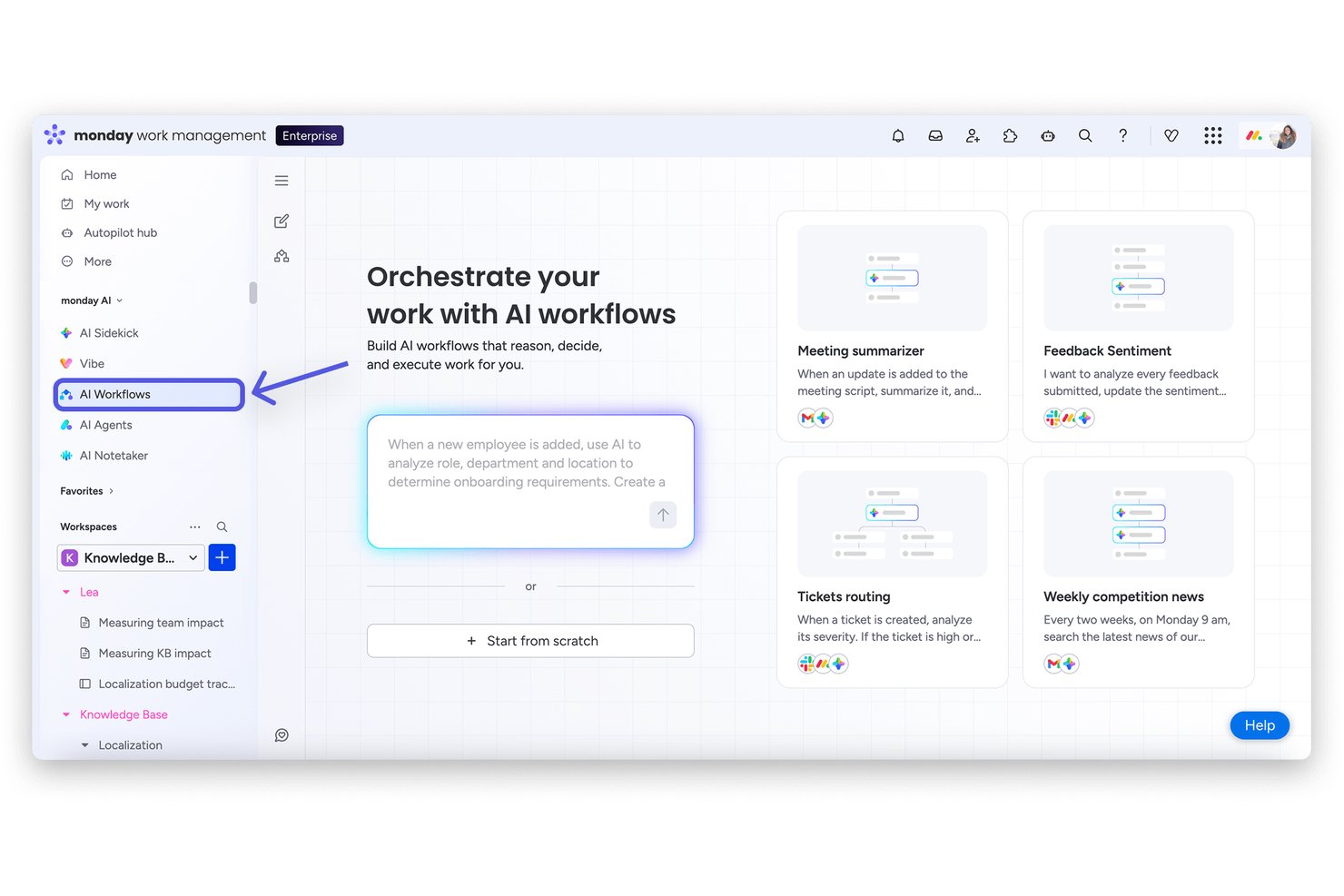
monday AI Workspace è una piattaforma di gestione del lavoro che combina assegnazione dei compiti, monitoraggio dei progetti con viste multiple, collaborazione tra team e automazione dei flussi di lavoro basata su intelligenza artificiale attraverso board, dashboard e spazi di lavoro integrati.
Per chi è più adatto monday AI Workspace?
Si adatta particolarmente a team di medie e grandi dimensioni che gestiscono attività tra più dipartimenti e necessitano di una piattaforma unica e configurabile per coordinare compiti, progetti e reportistica.
Perché ho scelto monday AI Workspace
monday AI Workspace si guadagna il suo posto nella mia shortlist perché il costruttore di dashboard è sinceramente uno dei più flessibili che abbia mai usato. Posso integrare oltre 80 widget fra carico di lavoro, timeline, burndown e stato, combinando dati da più board in una sola vista aggiornata in tempo reale. Le dashboard con intelligenza artificiale lanciate nel 2026 permettono anche al mio team di evidenziare automaticamente i blocchi, senza dover ricostruire i report a ogni ciclo di sprint.
Principali funzionalità di monday AI Workspace
- Assegnazione dei compiti con automazione: Assegna automaticamente attività, responsabili e priorità tramite regole di flusso di lavoro senza codice.
- Monitoraggio del tempo: Registra le ore lavorate sui compiti con timer e timesheet integrati.
- Sotto-attività e dipendenze: Crea attività multilivello e imposta relazioni tra i compiti per progetti complessi.
- App mobili native: Aggiorna, commenta e gestisci le attività da dispositivi iOS e Android tramite app ricche di funzionalità.
Integrazioni di monday AI Workspace
monday AI Workspace offre centinaia di integrazioni native, tra cui Slack, Google Workspace, Microsoft 365, Salesforce, Jira, GitHub, Zoom, Dropbox, HubSpot e Zendesk. Supporta anche Zapier e offre un'API per integrazioni personalizzate.
Pros and Cons
Pros:
- Il costruttore di dashboard supporta oltre 80 widget personalizzabili
- L'IA individua automaticamente blocchi e ritardi delle attività
- Molteplici viste di progetto, inclusi carico di lavoro e timeline
Cons:
- Le funzionalità di automazione richiedono abbonamenti di livello superiore
- Il monitoraggio del tempo non include tariffe di fatturazione e fatturazione
New Product Updates from monday AI Workspace
monday AI Workspace Adds Human Approval Routing
monday AI Workspace adds a human-in-the-loop approval block to AI Workflows, sending approval requests and routing workflow paths based on responses. For more information, visit monday AI Workspace's official site.

GQueues
Ideale per un'integrazione approfondita con Google Workspace
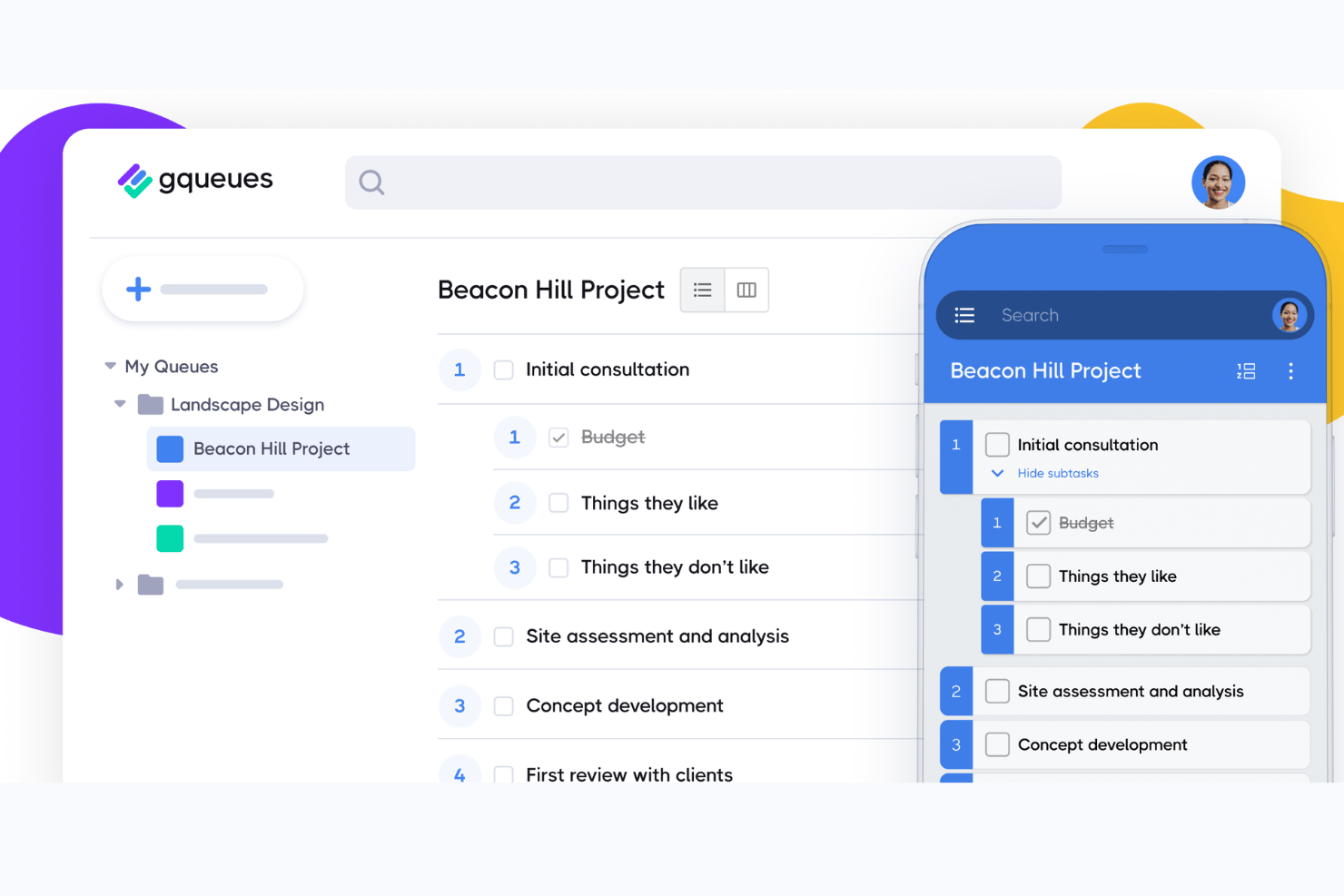
GQueues è uno strumento di gestione delle attività creato esclusivamente per Google Workspace, che offre assegnazione delle attività, code condivise, visualizzazioni a scheda Kanban, attività ricorrenti e sincronizzazione bidirezionale con Google Calendar.
Per chi è più adatto GQueues?
GQueues è adatto a team di piccole e medie dimensioni nel settore dell'istruzione, nelle organizzazioni non profit e nei servizi professionali, che gestiscono l'intero flusso di lavoro all'interno di Google Workspace.
Perché ho scelto GQueues
GQueues si è guadagnato un posto nella mia lista ristretta perché l'integrazione con Google Workspace va ben oltre una semplice sincronizzazione del calendario. Il componente aggiuntivo di Gmail mi consente di trasformare direttamente le email in attività senza uscire dalla posta in arrivo, mentre la sincronizzazione bidirezionale con Google Calendar fa sì che ogni attività con una scadenza compaia automaticamente nel mio calendario in tempo reale. Anche gli allegati di Drive vengono gestiti in modo nativo, con le autorizzazioni dei file amministrate automaticamente, così non devo occuparmi dei problemi di accesso del team.
Funzionalità principali di GQueues
- Code condivise: Crea elenchi di attività collaborativi a cui più membri del team possono accedere e che possono aggiornare in tempo reale.
- Code intelligenti: Utilizza filtri standardizzati per organizzare automaticamente le attività in base a priorità, scadenza, assegnatario o etichetta.
- Azioni in blocco: Applica modifiche come assegnare, spostare o completare più attività contemporaneamente per semplificare gli aggiornamenti del team.
- Attività ricorrenti: Configura attività che si ripetono automaticamente con cadenza giornaliera, settimanale o personalizzata, grazie a opzioni di ricorrenza flessibili.
Integrazioni di GQueues
GQueues offre integrazioni native con gli strumenti di Google Workspace, tra cui Google Calendar, Google Drive, Google Contacts e Gmail.
Pros and Cons
Pros:
- La sincronizzazione nativa con Google Calendar aggiorna i dati in entrambe le direzioni
- Trasforma direttamente le email di Gmail in attività
- Il supporto per le attività ricorrenti offre opzioni di ricorrenza flessibili
Cons:
- Nessuna visualizzazione della cronologia o del diagramma di Gantt
- I rapporti sul carico di lavoro dei membri del team sono limitati

Ideale per il monitoraggio approfondito dei progetti
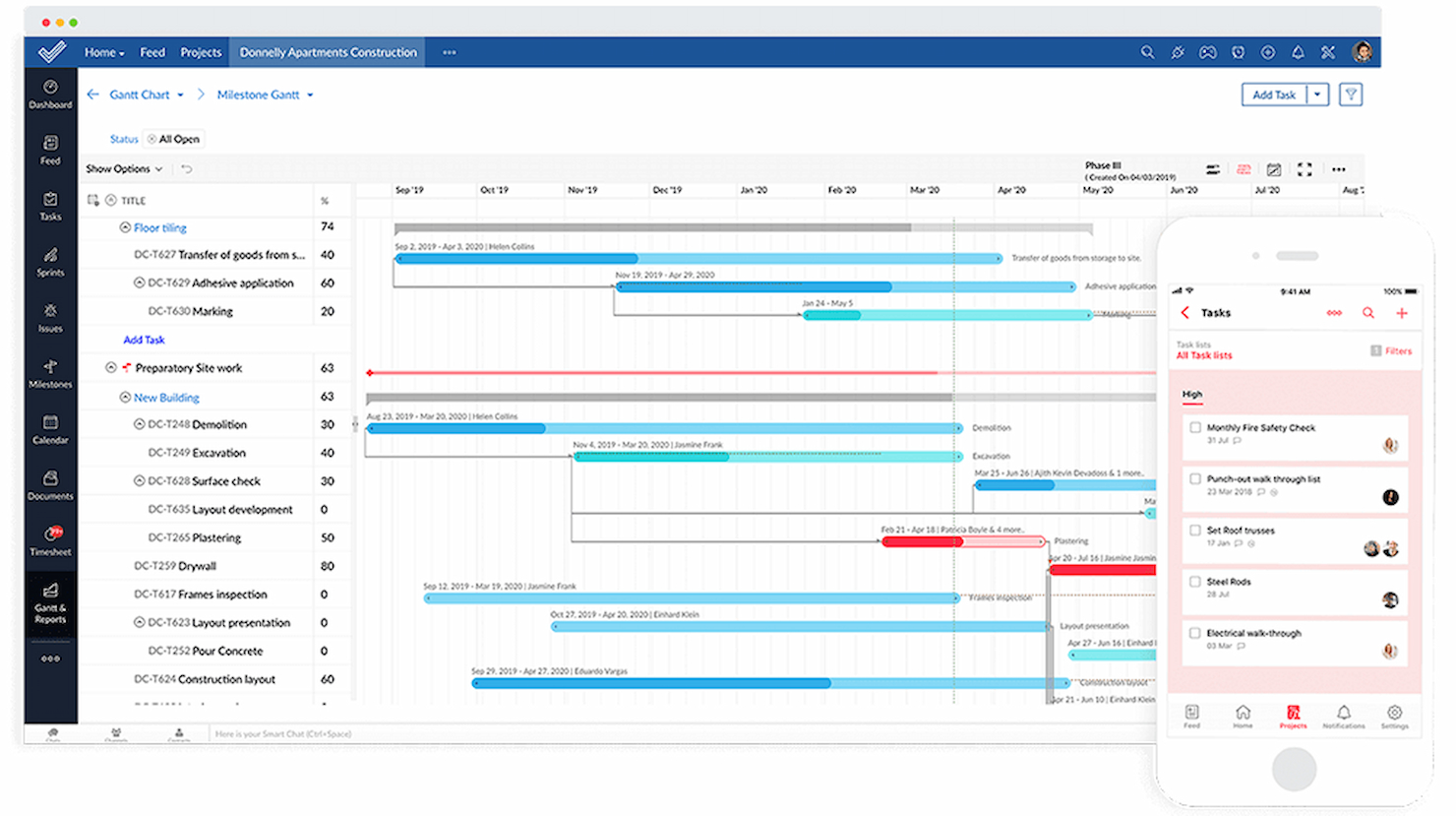
Zoho Projects è una piattaforma di gestione delle attività di squadra che ti aiuta a organizzare le attività, monitorare i progressi, gestire le scadenze e collaborare con il tuo team utilizzando funzionalità come elenchi di attività, diagrammi di Gantt e strumenti di comunicazione integrati.
Per chi è più adatto Zoho Projects?
Zoho Projects è ideale per team di piccole e medie dimensioni che necessitano di una piattaforma strutturata e completa per gestire attività, tempistiche e collaborazione tra colleghi.
Perché ho scelto Zoho Projects
Ho scelto Zoho Projects tra i migliori proprio per la profondità di monitoraggio che offre in un'unica piattaforma. Il diagramma di Gantt è dove passo la maggior parte del tempo: mi permette di impostare quattro tipi di dipendenze tra le attività, confrontare le baseline con i progressi reali e segnalare le attività in ritardo tramite la funzione End Variance. Questo livello di dettaglio permette al mio team di individuare gli slittamenti di programma prima che diventino critici. Apprezzo anche l'evidenziazione del percorso critico, che rende semplice vedere quali attività potrebbero compromettere l'intero progetto se dovessero subire dei ritardi.
Funzionalità principali di Zoho Projects
- Automazione delle attività: Imposta regole per assegnare automaticamente attività, aggiornare stati o inviare notifiche al verificarsi di condizioni specifiche.
- Timesheet e monitoraggio del tempo: Registra le ore direttamente sulle attività e genera report dei timesheet per monitorare come il team impiega il proprio tempo.
- Tracciamento dei problemi: Crea, assegna e monitora bug o problemi insieme alle attività di progetto senza dover passare a un altro strumento.
- Forum di progetto: Pubblica aggiornamenti, condividi file e partecipa a discussioni di team in forum organizzati direttamente collegati a ciascun progetto.
Integrazioni di Zoho Projects
Zoho Projects offre oltre 50 integrazioni native, tra cui Slack, Google Drive, Microsoft Teams, GitHub, Bitbucket, Dropbox, Zoho CRM, Zoho Books e Trello. È disponibile su Zapier e dispone di un'API per integrazioni personalizzate.
Pros and Cons
Pros:
- Funzionalità avanzate per il monitoraggio dei progetti
- Integrazione con l'ecosistema Zoho
- Flussi di lavoro e report personalizzabili
Cons:
- Può essere complesso da configurare
- Curva di apprendimento iniziale per i nuovi utenti
- Funzionalità dell'app mobile limitate rispetto alla versione web
New Product Updates from Zoho Projects
Zoho Projects Adds CodeX Scripts for Custom Modules
Zoho Projects now supports CodeX Scripts for custom modules, enabling conditional logic and rules for creating, updating, and deleting records. For more information, visit Zoho Projects' official site.
 .
.
Wrike
Ideale per la visibilità sui progetti tra i team

Wrike è una piattaforma di gestione delle attività del team progettata per team digitali che necessitano di flussi di lavoro personalizzabili, collaborazione in tempo reale e una visibilità avanzata su progetti e reparti.
Per chi è Wrike?
Wrike è particolarmente adatto a team di medie e grandi dimensioni nei settori tecnologici e digitali che gestiscono progetti complessi e multi-team, i quali richiedono flussi di lavoro strutturati e un chiaro coordinamento cross-funzionale.
Perché ho scelto Wrike
Wrike si guadagna un posto nella mia lista perché gestisce perfettamente la visibilità tra più team che lavorano allo stesso progetto. Mi piacciono in particolare le dashboard interfunzionali, che permettono al mio team di raccogliere dati aggregati da diversi flussi di lavoro in un'unica visualizzazione—senza dover rincorrere aggiornamenti di stato da ogni responsabile. In pratica, questo significa che posso vedere quali attività sono in corso, quali a rischio e dove le dipendenze si stanno accumulando, tutto da un'unica piattaforma. La funzione di cross-tagging di Wrike consente inoltre alle attività di apparire contemporaneamente in più cartelle di progetto, così ogni team vede solo ciò che è rilevante per sé mentre io ho sempre una panoramica completa.
Funzionalità principali di Wrike
- Moduli di richiesta personalizzati: crea moduli di raccolta dati dinamici che generano automaticamente attività, assegnano responsabili e attivano flussi di lavoro al momento dell'invio.
- Vista diagramma di Gantt: mappa visivamente le dipendenze tra attività e le tempistiche di progetto, con pianificazione drag-and-drop per modificare le date in tutto il piano.
- Flussi di lavoro automatizzati: imposta regole di automazione senza codice per spostare attività tra le fasi, segnalare elementi a rischio e notificare le persone giuste senza necessità di intervento manuale.
- Prenotazione delle risorse: riserva membri del team o ruoli specifici per determinati progetti e verifica la loro disponibilità rispetto allo sforzo stimato prima di assegnare il lavoro.
Integrazioni di Wrike
Wrike offre oltre 400 integrazioni native, tra cui Google Drive, Microsoft Teams, Salesforce, Slack, Jira, GitHub, Box, Dropbox, Adobe Creative Cloud e Zoom, ed è disponibile su Zapier. È inoltre disponibile una API per integrazioni personalizzate.
Pros and Cons
Pros:
- Visualizza con facilità le performance dei flussi di lavoro
- Singoli utenti e team possono monitorare i carichi di lavoro
- Chat integrata per ridurre il cambio app durante la collaborazione
Cons:
- Limitato a 10 flussi di lavoro per spazio
- Non adatto a organizzazioni di piccole dimensioni
New Product Updates from Wrike
Wrike Adds Klaxoon MCP Integration
Wrike’s Klaxoon MCP integration is now generally available, enabling AI agents to navigate between Wrike tasks and attached whiteboards, read task context, and manage whiteboard attachments via API. For more information, visit Wrike's official site.

Quire
Ideale per suddividere progetti complessi

Quire è una piattaforma di gestione dei compiti di squadra che ti aiuta a organizzare i progetti con elenchi di attività annidate, bacheche visive e strumenti di collaborazione in tempo reale progettati per mantenere i team allineati e produttivi.
Per chi è Quire?
Quire è adatto a team di piccole e medie dimensioni che necessitano di un modo strutturato per gestire progetti a più livelli senza il carico di strumenti di livello enterprise.
Perché ho scelto Quire
Quire si guadagna il suo posto nella mia shortlist grazie all'incredibile gestione degli elenchi di attività a livelli infiniti, che si adattano perfettamente a strutture di progetto complesse. Lo utilizzo per suddividere grandi iniziative in livelli di sotto-attività, scendendo nei rami specifici senza perdere di vista la gerarchia generale. La funzione 'Zoom In' è particolarmente utile: posso concentrarmi su un singolo compito principale e vedere solo le sue sotto-attività, eliminando il superfluo quando il mio team è impegnato in una singola fase del progetto. La funzione Smart Sublist consente inoltre a ciascun membro del team di avere una vista focalizzata esclusivamente sulle attività assegnate, evitando di dover scorrere tra i compiti che non li riguardano.
Funzionalità principali di Quire
- Bacheca Kanban: Trascina e rilascia i compiti tra colonne personalizzabili per gestire le fasi del flusso di lavoro in modo visivo.
- Vista cronologia: Mappa attività e traguardi su una cronologia in stile Gantt per monitorare le scadenze del progetto.
- Collaborazione in tempo reale: Commenta i compiti, tagga i colleghi e visualizza gli aggiornamenti in modo istantaneo in tutto il team.
- Attività ricorrenti: Imposta i compiti in modo che si ripetano secondo una pianificazione per registrare automaticamente le attività di routine.
Integrazioni di Quire
Quire offre integrazioni native con Google Drive, Google Calendar, Slack e GitHub. Ulteriori collegamenti (inclusi strumenti come Microsoft Teams) sono generalmente supportati tramite Zapier o altri connettori. È disponibile anche un'API per integrazioni personalizzate.
Pros and Cons
Pros:
- Facile collaborazione con i membri del team
- Varie visualizzazioni di progetto, incluse liste, bacheche e cronologie
- Possibilità di creare attività annidate e sotto-attività, permettendo una suddivisione dettagliata dei progetti
Cons:
- La versione mobile non include alcune funzionalità presenti nella versione desktop
- Possibile sovraccarico di notifiche, soprattutto lavorando con team numerosi
New Product Updates from Quire
Quire Adds Custom Field Locking and Comment Reaction API Support
Quire adds custom field locking and API support for reading and setting emoji reactions on comments. These updates give teams more control over field data and expand comment interaction options for developers. For more information, visit Quire’s official site.
 .
.
Ideale per pianificatori di progetti dettagliati
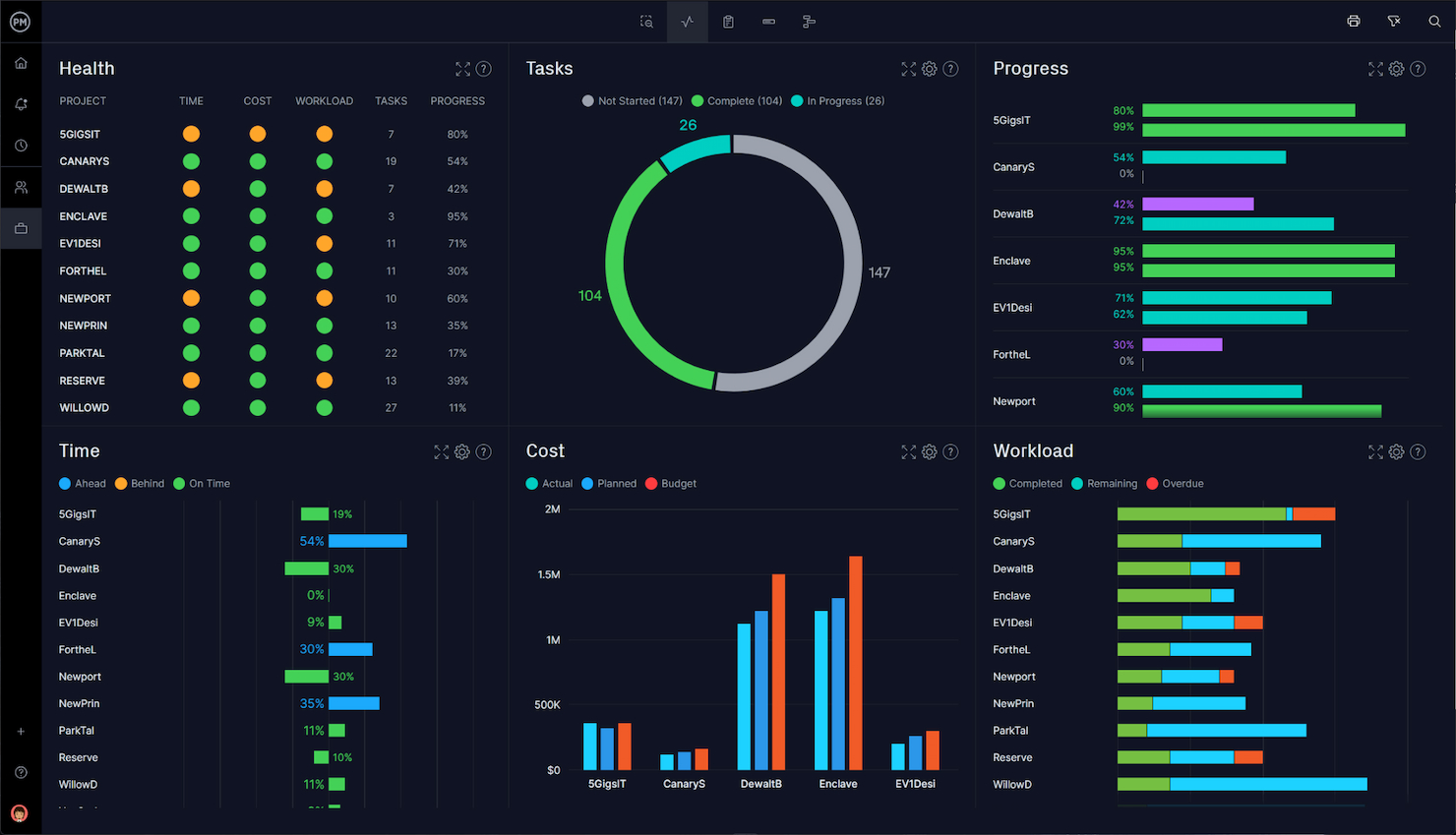
Microsoft Project è una piattaforma di gestione delle attività di squadra progettata per i project manager che necessitano di strumenti avanzati per la pianificazione, l'allocazione delle risorse e il monitoraggio dettagliato per coordinare progetti complessi e mantenere le squadre allineate.
Per chi è più indicato Microsoft Project?
Microsoft Project è particolarmente adatto a team di medie e grandi dimensioni che gestiscono progetti strutturati e con scadenze precise, e che necessitano di una pianificazione e gestione risorse accurate.
Perché ho scelto Microsoft Project
Ho scelto Microsoft Project tra i migliori per via delle sue funzionalità avanzate di pianificazione. La visualizzazione cronologica (Gantt) permette al mio team di mappare le dipendenze tra le attività con precisione, incluse impostazioni sofisticate di anticipo e ritardo, così possiamo modellare esattamente come un ritardo in una parte del progetto influisce sull'intero piano. Apprezzo anche le funzionalità di richiesta risorse, che ci permettono di segnalare bisogni di capacità prima che diventino ostacoli. Per i team che gestiscono progetti suddivisi in più fasi dove la sequenza è fondamentale, la combinazione di tracciamento delle dipendenze e gestione delle persone in un unico piano è particolarmente utile.
Principali funzionalità di Microsoft Project
- Vista a schede: Visualizza le attività in una bacheca in stile kanban per monitorare lo stato del lavoro fra i membri del team e nelle varie fasi del progetto.
- Backlog e sprint: Organizza il lavoro futuro in un backlog e pianifica cicli sprint per i team che adottano metodi agili.
- Obiettivi di progetto: Imposta obiettivi misurabili a livello di progetto o di team e collegali direttamente alle attività che determinano il progresso.
- Gestione dei programmi: Gestisci più progetti correlati insieme per tracciare dipendenze e progressi nell'ambito di un'iniziativa più ampia.
Integrazioni di Microsoft Project
Microsoft Project offre integrazioni native con tutto l'ecosistema Microsoft, inclusi Microsoft 365 e Azure. È anche possibile connetterlo a fonti di dati come Microsoft Access, SharePoint, SQL Server, Exchange Server e Microsoft Entra ID. È disponibile un'API per integrazioni personalizzate.
Pros and Cons
Pros:
- Strumenti completi per la pianificazione dei progetti
- Profonda integrazione con i prodotti Microsoft
- Funzionalità avanzate di reportistica
Cons:
- Principalmente adatto a progetti grandi o complessi
- Curva di apprendimento moderata

Ideale per team agili

MeisterTask è una piattaforma di gestione delle attività di squadra progettata per aiutare i team a organizzare i progetti, visualizzare i flussi di lavoro e automatizzare le attività ripetitive con bacheche Kanban personalizzabili e funzionalità di collaborazione in tempo reale.
Per chi è più indicato MeisterTask?
MeisterTask è adatto a team piccoli e medi che necessitano un modo visivo e intuitivo per gestire lavori iterativi su prodotto, design e sviluppo.
Perché ho scelto MeisterTask
MeisterTask si guadagna un posto nella mia lista perché le sue bacheche di progetto in stile Kanban si adattano perfettamente ai flussi di lavoro agili. Ogni bacheca è completamente personalizzabile, così il mio team può impostare colonne che riflettono le nostre reali fasi di sprint invece di costringere il lavoro in un modello generico. Mi piace anche il livello di automazione – consente di attivare azioni come l’assegnazione automatica di un responsabile attività o lo spostamento di una scheda alla fase successiva al completamento di una checklist, mantenendo il lavoro in movimento tra le iterazioni senza dover intervenire manualmente. La vista cronologica mi permette di associare le attività a date specifiche, così posso monitorare gli impegni di sprint e segnalare rischi di scadenze prima che diventino ostacoli.
Caratteristiche principali di MeisterTask
- Panoramica progetti: Una dashboard centralizzata che mostra stato, scadenze e attività in ritardo di tutti i progetti attivi.
- Ruoli e permessi: Assegna livelli di accesso specifici ai membri del team e controlla cosa possono vedere o modificare i collaboratori esterni.
- Reportistica: Monitora i dati sulle performance dei progetti con filtri per responsabile, stato e data di scadenza per tenere traccia della produttività del team.
- Dashboard personale: Una vista personale che raccoglie in un unico posto le attività imminenti, notifiche e to-do di ciascun membro del team.
Integrazioni di MeisterTask
MeisterTask offre integrazioni native con Slack, Microsoft Teams, Google Workspace, GitHub, Zendesk, Dropbox, Box, Bitbucket e Outlook, ed è anche disponibile su Zapier. È disponibile un’API per integrazioni personalizzate.
Pros and Cons
Pros:
- Interfaccia altamente intuitiva
- Ottimo supporto alle metodologie agili
- Efficaci funzionalità di collaborazione in tempo reale
Cons:
- Capacità di reportistica limitate per analisi complesse
- Il prezzo può essere elevato per i team più grandi
- Meno opzioni avanzate di personalizzazione rispetto ai concorrenti

ClickUp
Ideale per la gestione agile dei progetti

ClickUp è una piattaforma di gestione delle attività di team che unisce bacheche di attività personalizzabili, cronologie e strumenti di collaborazione per aiutare i team a organizzare, monitorare e consegnare il lavoro su progetti di qualsiasi dimensione.
Per chi è ideale ClickUp?
ClickUp è adatto a team tecnologici e di prodotto che hanno bisogno di un workspace flessibile e tutto-in-uno per gestire attività, sprint e progetti interfunzionali in un unico posto.
Perché ho scelto ClickUp
Ho scelto ClickUp come uno dei migliori per la gestione agile dei progetti perché gestisce l’intero ciclo di vita dello sprint senza richiedere uno strumento separato. Utilizzo ClickUp Sprints per impostare le date degli sprint, assegnare story point e trasferire automaticamente le attività non concluse allo sprint successivo—così il mio team non deve riorganizzare manualmente il backlog a fine ciclo. I grafici burndown e burnup mi forniscono una lettura in tempo reale su come stiamo andando rispetto agli obiettivi, cosa che trovo molto più utile di uno stato statico. Inoltre, le integrazioni native con GitHub e GitLab mantengono sincronizzati il lavoro di sviluppo e il tracciamento delle attività del mio team senza aggiornamenti manuali.
Funzionalità principali di ClickUp
- Status attività personalizzabili: Crea fasi di workflow che corrispondano al processo del tuo team, da “In revisione” a “Bloccato” o qualsiasi altra fase che si adatti al tuo flusso di lavoro.
- Vista carico di lavoro: Visualizza le attività assegnate e la capacità di ciascun membro del team in un determinato periodo per individuare sovraccarichi prima che diventino un problema.
- Automazioni: Imposta regole basate su trigger per aggiornare automaticamente lo stato delle attività, riassegnare lavori o inviare notifiche quando si verificano determinate condizioni.
- Obiettivi: Definisci obiettivi di alto livello e collegali direttamente alle attività, così l’avanzamento si aggiorna automaticamente con il completamento del lavoro.
Integrazioni di ClickUp
ClickUp offre oltre 100 integrazioni native, tra cui Slack, GitHub, GitLab, Microsoft Teams, Google Drive, Dropbox, Outlook, Zoom, Figma, HubSpot, Salesforce e Zendesk, ed è disponibile su Zapier. È disponibile anche un’API per integrazioni personalizzate.
Pros and Cons
Pros:
- Piattaforma altamente personalizzabile
- Funzionalità per la collaborazione di team
- Varie modalità di visualizzazione dell'avanzamento del progetto
Cons:
- La personalizzazione estesa può risultare impegnativa
- La configurazione iniziale può richiedere tempo
New Product Updates from ClickUp
ClickUp Adds Meetings Hub, Super Agent Templates, and ZoomInfo Integration
ClickUp adds a searchable Meetings Hub, new ways to clone and template Super Agents, and a ZoomInfo integration through the App Center. These updates improve meeting retrieval, agent reuse, and access to sales intelligence. For more information, visit ClickUp’s official site.

Trello
Ideale per la pianificazione visiva dei progetti

Trello è una piattaforma di gestione delle attività di squadra che consente di organizzare i progetti utilizzando bacheche visive, flussi di lavoro personalizzabili e strumenti collaborativi per monitorare i progressi e gestire le attività insieme.
Per chi è ideale Trello?
Trello è perfetto per team piccoli e medi che preferiscono un approccio visivo e leggero alla gestione delle attività e dei progetti, senza una curva di apprendimento ripida.
Perché ho scelto Trello
Trello si guadagna il suo posto nella mia shortlist perché l'esperienza di pianificazione visiva è davvero una delle migliori che abbia mai usato. La bacheca Kanban è la base, ma ciò che mi piace davvero è la possibilità di passare tra diverse visualizzazioni—Timeline, Calendario, Dashboard e Tabella—senza dover ricostruire nulla. Quando il mio team è a metà di uno sprint e le priorità cambiano, posso trascinare e rilasciare le schede direttamente sulla Timeline per modificare le date di inizio e scadenza al volo. La visualizzazione Dashboard mostra metriche come il numero di schede per lista e attività in ritardo, così posso identificare i colli di bottiglia prima che blocchino il team, invece che dopo.
Funzionalità principali di Trello
- Checklist delle schede: Suddividi le attività in sotto-attività direttamente all'interno di una scheda, con l'avanzamento monitorato tramite una barra checklist visiva.
- Power-Ups: Estendi la funzionalità della bacheca con componenti aggiuntivi come votazioni, campi personalizzati e connessioni con app di terze parti.
- Automazione (Butler): Imposta trigger basati su regole per spostare schede, assegnare membri o aggiornare le date di scadenza.
- Spazi di lavoro di squadra: Organizza più bacheche in uno spazio di lavoro condiviso con accesso e permessi centralizzati per i membri.
Integrazioni di Trello
Trello offre oltre 200 integrazioni native, tra cui Slack, Jira Cloud, Google Drive, Dropbox, Microsoft Teams, Confluence, Miro, GitHub e Salesforce. È disponibile su Zapier e dispone di un'API per integrazioni personalizzate.
Pros and Cons
Pros:
- Interfaccia visiva intuitiva
- Sistema flessibile di schede e bacheche
- Ampia gamma di integrazioni
Cons:
- Funzionalità limitate per la gestione di progetti complessi
- Può diventare caotico con grandi volumi di attività
Backlog
Ideale per il tracciamento dei bug

Backlog è una piattaforma di gestione delle attività di team che unisce pianificazione dei progetti, monitoraggio delle attività e collaborazione, con funzionalità integrate di gestione dei problemi e dei bug per i team che hanno bisogno di gestire lavoro sia di sviluppo che non all'interno di un unico strumento.
Per chi è Backlog?
Backlog è particolarmente adatto per i team di sviluppo software e IT che devono gestire attività e tenere traccia dei bug senza dover utilizzare più strumenti.
Perché ho scelto Backlog
Backlog si è guadagnato un posto nella mia lista perché gestisce il tracciamento dei bug come parte integrante del flusso di lavoro di gestione delle attività, e non come una funzionalità aggiuntiva. Mi piace che a ogni problema si possa assegnare un tipo di bug, un livello di priorità e uno stato di risoluzione, così il mio team non deve improvvisare una soluzione all'interno di uno strumento generale per attività. La possibilità di collegare direttamente i bug ai commit Git o SVN l'ho trovata davvero utile: mette in relazione il problema segnalato con la precisa modifica al codice che lo ha risolto. Quel tipo di tracciabilità è difficile da ottenere senza passare a uno strumento dedicato agli sviluppatori.
Funzionalità principali di Backlog
- Diagrammi di Gantt: Visualizza le tempistiche dei progetti e le dipendenze tra le attività con una pianificazione drag-and-drop attraverso i flussi di lavoro del tuo team.
- Bacheche Kanban: Gestisci l'avanzamento delle attività usando bacheche personalizzabili che consentono al tuo team di spostare il lavoro tra le diverse fasi del flusso operativo.
- Wiki: Crea e conserva la documentazione di progetto, le note delle riunioni e il know-how del team direttamente all'interno di ogni progetto su Backlog.
- Watchlist: Segui specifiche attività o problemi per ricevere aggiornamenti senza essere assegnato direttamente a essi.
Integrazioni di Backlog
Backlog offre integrazioni native con GitHub, Slack, Redmine, Typetalk e Jenkins. È disponibile su Zapier e dispone di un'API per integrazioni personalizzate.
Pros and Cons
Pros:
- Le milestone aiutano a coordinare rilasci e scadenze
- Commenti e allegati ai file direttamente su attività e problemi
- Integrazione con il controllo versione Git e Subversion
Cons:
- Personalizzazione e integrazioni limitate per alcuni casi d'uso
- Alcuni utenti hanno segnalato problemi di prestazioni e velocità
Altri software per la gestione delle attività del team da prendere in considerazione
Di seguito è riportato un elenco di ulteriori software per la gestione delle attività del team che abbiamo selezionato, ma che non sono entrati nell’elenco principale. Vale sicuramente la pena dare loro un’occhiata.
- Workzone
Ideale per la visibilità sul ciclo di vita dei progetti
- ProofHub
Ideale per strumenti di comunicazione del team
- ProjectManager
Ideale per dashboard di progetto in tempo reale
- nTask
Ideale per le funzionalità di gestione dei rischi
- Pneumatic Workflow
Ideale per workflow automatizzati
- Notion
Ideale per note e attività integrate
- GoodDay
Ideale per attività e progetti flessibili
- TaskRay
Ideale per la gestione delle attività di team in Salesforce
- PathPro
Ideale per trasformare le richieste di funzionalità in compiti


Come Valuto il Software di Gestione delle Attività di Squadra
Suddivido la mia valutazione in due livelli: la funzionalità di base di cui un team cross-funzionale ha bisogno per coordinare il lavoro tra progetti e passaggi di consegne, e i fattori differenzianti che rendono uno strumento più adatto di un altro.
Funzionalità di Base (Requisiti Indispensabili per Questa Lista)
Quando seleziono gli strumenti per la mia lista, valuto ciascuno su una scala da 0 (non offre la funzionalità) a 5 (eccelle in quest'area) per ogni funzionalità di base elencata di seguito. Poi, calcolo il punteggio totale dello strumento in percentuale. Ogni strumento deve raggiungere un punteggio minimo totale del 75% per essere preso in considerazione.
- Assegnazione delle Attività e Proprietà: Verifico se è possibile assegnare le attività a persone specifiche con date di scadenza, livelli di priorità e campi personalizzati—come etichettare una revisione di design come ad alta priorità e indirizzarla alla persona giusta.
- Visualizzazioni Multiple delle Attività: I team lavorano in modo diverso, quindi cerco almeno tre opzioni di visualizzazione (elenco, board, calendario o Gantt) che permettano di cambiare prospettiva sugli stessi dati senza dover ricostruire nulla.
- Strumenti di Collaborazione di Squadra: Valuto quanto funzioni bene la collaborazione a livello di attività—@menzioni, commenti in thread e allegati dovrebbero mantenere le discussioni legate all'attività invece di disperderle tra le email.
- Monitoraggio dei Progressi & Stato: Dashboard e campi di stato sono importanti qui. Cerco una visibilità in tempo reale su ciò che è terminato, ciò che è bloccato e come il lavoro è distribuito fra i membri del team.
- Sottoattività & Dipendenze: Le consegne complesse necessitano di struttura. Verifico la presenza di sottoattività multilivello e la mappatura delle dipendenze così che un ritardo nella revisione del wireframe faccia slittare automaticamente la data d’inizio dello sprint di sviluppo.
- Notifiche & Promemoria: Valuto se lo strumento invia avvisi tempestivi su vari canali—email, notifiche push su mobile e in-app—affinché gli assegnatari vedano effettivamente i promemoria delle scadenze prima che le attività sfuggano di mano.
Una volta creata una lista di strumenti che soddisfano questi criteri, considero ciò che distingue ciascuna piattaforma.
Fattori Differenzianti (Cosa Distingue i Fornitori)
Ecco come confronto e metto a contrasto i diversi fornitori:
Funzionalità Distintive
L'automazione del flusso di lavoro è un punto chiave—cerco regole senza codice che assegnano automaticamente le attività o cambiano lo stato quando vengono soddisfatte certe condizioni, come spostare un’attività su "In Revisione" nel momento in cui una sottoattività viene completata. Anche i modelli personalizzati sono importanti, perché i team che gestiscono sprint ricorrenti o progetti di onboarding non dovrebbero dover ricreare da zero le strutture delle attività ogni volta. Valuto inoltre se uno strumento può collegare le attività agli obiettivi o agli OKR, il che aiuta la leadership a vedere come il lavoro quotidiano si collega agli obiettivi trimestrali.
Oltre le Funzionalità
Le integrazioni sono una priorità importante—verifico se uno strumento si collega nativamente a Slack, Microsoft Teams, GitHub e piattaforme di archiviazione file che il team già utilizza quotidianamente. Anche la struttura dei prezzi conta, specialmente come un fornitore riesce a scalare da una piccola squadra a una PMO da 200 persone senza costringere a una migrazione di piattaforma. Valuto infine il supporto all'onboarding, perché il lancio di uno strumento di gestione delle attività su più dipartimenti fallisce rapidamente senza percorsi di migrazione solidi, modelli e risorse di formazione che favoriscano l’adozione.
Come scegliere il software per la gestione delle attività del team
Mentre affronti il tuo personale e unico processo di selezione del software, tieni presenti i seguenti punti:
- Scalabilità: scegli un software in grado di crescere insieme al tuo team e ai tuoi progetti. Con l'aumento delle dimensioni dei progetti e del numero dei membri del team, il software dovrebbe essere in grado di gestire flussi di lavoro più complessi e un volume maggiore di attività senza compromettere le prestazioni. Ad esempio, se prevedi che la tua startup raddoppi le dimensioni entro un anno, assicurati che lo strumento supporti questa crescita
- Funzionalità di integrazione: cerca un software che si integri perfettamente con gli altri strumenti utilizzati dal tuo team. L'integrazione con piattaforme di posta elettronica, servizi di condivisione dei file e altri strumenti di gestione dei progetti garantisce che il flusso di lavoro rimanga ininterrotto e che tutte le informazioni siano accessibili centralmente. Ad esempio, un team di marketing potrebbe aver bisogno di un software che si integri bene con i sistemi CRM e gli strumenti di email marketing.
- Esperienza utente: opta per un software dotato di un'interfaccia intuitiva. La facilità d'uso influisce direttamente sui tassi di adozione tra i membri del team. Un'interfaccia semplice e ordinata riduce i tempi di formazione e aiuta a mantenere l'attenzione sulle attività anziché sulla navigazione del software. Valuta se i nuovi membri del team possono comprendere facilmente lo strumento senza una formazione approfondita.
- Personalizzazione: assicurati che il software consenta di personalizzare i flussi di lavoro e i report in base alle esigenze specifiche del tuo team. Dashboard personalizzabili e la possibilità di modificare i flussi di lavoro consentono al software di adattarsi a diversi stili di gestione dei progetti, siano essi agili, scrum o a cascata. Questo è fondamentale per i team dei settori creativi, in cui i tipi di progetto cambiano frequentemente.
- Funzionalità di sicurezza: dai priorità a un software dotato di solide misure di sicurezza per proteggere i tuoi dati. Ciò include la crittografia dei dati, l'archiviazione sicura dei dati e la conformità alle normative internazionali sulla protezione dei dati, elementi fondamentali per i team che gestiscono informazioni sensibili, come quelli del settore sanitario o dei servizi finanziari.
Tendenze dei software per la gestione delle attività del team
Ecco alcune tendenze attuali e interessanti che sto osservando nella tecnologia per la gestione delle attività dei team.
Funzionalità e tecnologia in evoluzione
- Integrazione con l'intelligenza artificiale e l'apprendimento automatico: molte piattaforme per la gestione delle attività dei team stanno integrando l'intelligenza artificiale per automatizzare la definizione delle priorità delle attività, l'allocazione delle risorse e la valutazione dei rischi. Questa tendenza risponde alla necessità di una gestione dinamica dei progetti, in grado di adattarsi ai cambiamenti in tempo reale e di migliorare i processi decisionali. Esistono già anche specifici strumenti software per la gestione delle attività con funzionalità di intelligenza artificiale.
- Strumenti di collaborazione in tempo reale potenziati: con il perdurare del lavoro da remoto, è aumentata la richiesta di strumenti migliori per la collaborazione in tempo reale all'interno dei software per la gestione delle attività dei team. Gli aggiornamenti includono strumenti di chat più sofisticati, videoconferenze integrate e collaborazione sui documenti in tempo reale, riflettendo la necessità costante di strumenti che supportino una comunicazione fluida tra aree geografiche diverse.
Funzionalità innovative e insolite
- Riunioni e spazi di lavoro in realtà virtuale (VR): alcuni strumenti all'avanguardia per la gestione delle attività dei team stanno iniziando a sperimentare funzionalità di VR, che consentono ai membri del team di interagire in uno spazio virtuale. Questa funzionalità innovativa è progettata per aumentare la sensazione di presenza nelle riunioni da remoto, con l'obiettivo di colmare il divario tra la collaborazione a distanza e quella in presenza.
Funzionalità più importanti e richieste
- Dashboard e analisi complete: c'è una forte domanda di dashboard avanzate che forniscano analisi complete sullo stato dei progetti, sulle prestazioni del team e sulla situazione del budget. Queste funzionalità sono fondamentali per i manager che devono tenere sotto controllo numerose variabili di progetto e prevedere efficacemente i risultati.
- Accessibilità multipiattaforma: garantire che il software per la gestione delle attività dei team funzioni senza problemi su dispositivi e piattaforme diversi rimane una priorità assoluta. Questa funzionalità è essenziale per supportare l'odierna forza lavoro mobile e flessibile.
Funzionalità in declino
- Notifiche basate sulle email: con la diffusione delle notifiche integrate in tempo reale e di strumenti di comunicazione più diretti all'interno delle piattaforme, si riduce la dipendenza dalle notifiche via email per gli aggiornamenti sulle attività. I team si stanno orientando verso forme di comunicazione più immediate e meno ingombranti.
Queste tendenze riflettono un movimento più ampio verso la creazione di strumenti di gestione più integrati, intuitivi e flessibili, in grado di supportare le esigenze complesse e diversificate dei team moderni. Concentrandosi su questi ambiti, gli sviluppatori software stanno affrontando direttamente le sfide dei project manager e dei responsabili dei team di oggi.
Che cos'è il software per la gestione delle attività dei team?
Il software per la gestione delle attività dei team è una piattaforma digitale progettata per facilitare l'organizzazione, il monitoraggio e il completamento delle attività all'interno di un team o tra più team. Questo tipo di software viene utilizzato principalmente da aziende e organizzazioni per migliorare la collaborazione tra i team, aumentare la visibilità sulle attività e semplificare i flussi di lavoro dei progetti. Tra gli utenti più comuni vi sono i project manager, i responsabili dei team e i membri che necessitano di un sistema centralizzato per gestire efficacemente le attività quotidiane, le scadenze dei progetti e gli incarichi del team.
I componenti fondamentali del software per la gestione delle attività dei team includono funzionalità per la creazione e l'assegnazione delle attività, strumenti per il monitoraggio dei progressi, funzionalità di comunicazione e collaborazione e capacità di reporting.
Funzionalità del software per la gestione delle attività dei team
Quando si seleziona un'app per la gestione delle attività dei team, è essenziale individuare le funzionalità che supportano un'assegnazione efficace delle attività, semplificano la comunicazione e migliorano la visibilità sui progetti. Di seguito descrivo le principali funzionalità che contribuiscono al raggiungimento di questi obiettivi negli ambienti di gestione delle attività dei team.
- Definizione delle priorità e pianificazione delle attività: Aiuta a gestire i progetti consentendo ai team di impostare priorità e scadenze per attività e sottoattività, assicurando che le tappe fondamentali del progetto vengano raggiunte nei tempi previsti.
- Strumenti di collaborazione in tempo reale: Essenziali per semplificare la comunicazione e facilitare discussioni e aggiornamenti istantanei tra i membri del team e le parti interessate, indipendentemente dalla loro posizione.
- Condivisione dei file e gestione dei documenti: Centralizza i documenti del progetto in un'unica posizione accessibile, semplificando il processo di condivisione delle informazioni e il controllo delle versioni.
- Monitoraggio del tempo: Consente ai team di registrare il tempo dedicato alle attività, fornendo informazioni sulla produttività e sull'allocazione delle risorse per una migliore gestione dei progetti.
- Pannelli di controllo personalizzabili: Offrono panoramiche personalizzate di progetti e attività, consentendo agli utenti di valutare rapidamente i progressi e prendere decisioni informate.
- Accessibilità da dispositivi mobili: Garantisce che i membri del team possano accedere alla piattaforma e rimanere produttivi anche in movimento utilizzando iOS, Android e altri dispositivi diffusi.
- Capacità di integrazione: Consente un'ampia integrazione con altri strumenti software come e-mail, calendario, sistemi CRM e altro ancora, migliorando le funzionalità e riducendo la necessità di utilizzare più sistemi distinti.
- Notifiche automatiche: Mantiene i membri del team informati su aggiornamenti e modifiche, assicurando che tutti siano a conoscenza delle nuove attività, delle scadenze o degli adeguamenti.
- Report e analisi: Fornisce dati preziosi sulle prestazioni del progetto e sulla produttività del team, aiutando i responsabili a prendere decisioni basate sui dati per migliorare i risultati del progetto.
- Funzionalità di sicurezza: Protegge i dati sensibili del progetto con solide misure di sicurezza, un aspetto essenziale per qualsiasi organizzazione che desideri mantenere la riservatezza e l'integrità delle informazioni.
- Autorizzazioni degli utenti: Assicurano che i dati più sensibili siano accessibili esclusivamente a chi dispone dell'approvazione aziendale.
- Visualizzazione della sequenza temporale: Possibilità di organizzare le attività in una prospettiva distribuita nel tempo, così da poter impostare scadenze e visualizzare i livelli di priorità nell'arco della settimana, del mese e del trimestre.
- Tabella di marcia: Indicazione visiva di come avanzeranno nel tempo un progetto e le relative attività, comprese le dipendenze.
- Etichette/campi codificati a colori: Codifica i dati in base a chi sta lavorando su cosa, al progetto a cui è collegata un'attività o anche agli indicatori di priorità.
Queste funzionalità costituiscono la base di un efficace software per la gestione delle attività dei team, garantendo che i team possano operare in modo efficiente e che i progetti possano procedere senza ritardi. La possibilità di adattarsi rapidamente ai cambiamenti, comunicare in modo efficace e accedere ai dati fondamentali da qualsiasi luogo e in qualsiasi momento consente ai team di raggiungere con successo gli obiettivi dei propri progetti.
Vantaggi del software per la gestione delle attività dei team
Il software per la gestione delle attività dei team è uno strumento trasformativo per le aziende che mirano ad aumentare la produttività, migliorare la comunicazione e semplificare la gestione dei progetti. Ecco come il giusto software per la gestione delle attività dei team può rivoluzionare le tue operazioni:
- Collaborazione migliorata: Favorisce un ambiente collaborativo fornendo strumenti per la messaggistica, la condivisione dei file e gli aggiornamenti in tempo reale. Ciò facilita la collaborazione efficace tra i membri del team, indipendentemente dalla loro posizione fisica.
- Maggiore produttività: Automatizza le attività di routine e organizza i processi di lavoro, contribuendo a ridurre il tempo dedicato alla gestione delle assegnazioni e delle scadenze. I team possono concentrarsi maggiormente sull'esecuzione delle attività anziché sulla loro pianificazione.
- Migliore visibilità sui progetti: Offre pannelli di controllo e strumenti di reportistica che forniscono una panoramica chiara dello stato dei progetti e delle tappe fondamentali. Questa visibilità aiuta responsabili e membri del team a rimanere informati sui progressi del progetto e sui potenziali colli di bottiglia.
- Migliore allocazione delle risorse: Include funzionalità per monitorare il tempo e analizzare la distribuzione del carico di lavoro tra i membri del team. Ciò garantisce un utilizzo efficiente delle risorse e aiuta a prevenire il sovraccarico e l'allocazione eccessiva.
- Scalabilità: Si adatta alla crescita della tua azienda supportando un numero crescente di progetti e membri del team senza sacrificare le prestazioni. La flessibilità di espansione contribuisce a garantire la longevità e la continua rilevanza del software all'interno dell'organizzazione.
Centralizzando la gestione delle attività, migliorando la comunicazione e fornendo informazioni chiave sulle dinamiche dei progetti e dei team, le organizzazioni possono ottenere operazioni più strutturate ed efficaci.
Costi e prezzi del software per la gestione delle attività dei team
Comprendere la struttura dei costi del software per la gestione delle attività dei team è fondamentale per le aziende che mirano a integrare efficacemente questi strumenti nelle proprie operazioni. Ogni piano a pagamento può variare significativamente in base alle funzionalità, alla scalabilità e alle opzioni di supporto. Ecco una panoramica delle opzioni di piano tipiche che potresti incontrare nella scelta di un software per la gestione delle attività dei team:
| Tipo di piano | Prezzo medio | Funzionalità comuni |
| Piano gratuito | $0 | Gestione base delle attività, utenti limitati, integrazioni essenziali |
| Base | $5 - $10/utente/mese | Gestione avanzata delle attività, integrazioni aggiuntive, più utenti |
| Professionale | $10 - $20/utente/mese | Pianificazione completa dei progetti, reportistica avanzata, assistenza prioritaria |
| Aziendale | $20 - $50/utente/mese | Funzionalità personalizzate, progetti illimitati, account manager personale |
Nel valutare quale piano scegliere, rifletti sulle esigenze specifiche della tua organizzazione e sulla scala delle tue attività. Il prezzo dovrebbe essere in linea non solo con i requisiti attuali, ma anche adattarsi alla crescita e alla complessità future.
Domande frequenti sul software di gestione delle attività del team
Ecco alcune domande frequenti sul software di gestione delle attività del team:
A cosa serve il software di gestione delle attività del team?
Il software di gestione delle attività del team aiuta a organizzare, monitorare e stabilire le priorità delle attività all’interno di un team o tra più team. Facilita la gestione dei progetti, migliora la collaborazione e aumenta la produttività fornendo strumenti per gestire le scadenze, condividere documenti e comunicare in modo efficace.
In che modo il software di gestione delle attività del team migliora la produttività?
Questo software automatizza le attività ripetitive, centralizza le informazioni e fornisce aggiornamenti in tempo reale. Semplifica il monitoraggio dei progetti e riduce la probabilità di errori, consentendo ai membri del team di concentrarsi maggiormente sulle proprie responsabilità principali e meno sulle attività amministrative.
Il software di gestione delle attività del team può essere integrato con altri strumenti?
Sì, la maggior parte delle piattaforme di gestione delle attività del team offre ampie funzionalità di integrazione con strumenti diffusi come client di posta elettronica, app di calendario, servizi di condivisione dei file e sistemi CRM. Questa integrazione contribuisce a semplificare i flussi di lavoro e mantiene tutte le informazioni relative al progetto in un unico luogo accessibile.
Il software di gestione delle attività del team è adatto alle piccole imprese?
Assolutamente. Molte soluzioni offrono funzionalità scalabili e piani tariffari flessibili in grado di adattarsi alle esigenze e ai budget delle piccole imprese. Alcune offrono persino versioni gratuite che possono supportare adeguatamente le esigenze di gestione dei progetti dei team più piccoli.
Il software di gestione delle attività del team supporta i team remoti?
Sì, è progettato per supportare i team remoti fornendo strumenti che facilitano la comunicazione e la collaborazione tra sedi diverse. Funzionalità come l’accesso basato sul cloud, gli aggiornamenti in tempo reale e gli strumenti di comunicazione integrati sono particolarmente utili per il coordinamento dei team remoti.
Esistono rischi per la sicurezza legati all'uso del software di gestione delle attività del team?
Come per qualsiasi piattaforma online, esistono potenziali rischi per la sicurezza, ma la maggior parte dei fornitori affidabili implementa solide misure di sicurezza, tra cui la crittografia dei dati, server sicuri e audit regolari per proteggere i dati degli utenti. Verifica sempre le credenziali di sicurezza di un software prima di adottarlo.
