

I 10 migliori software per la gestione delle attività dei progetti recensiti per il 2026

10 Elenco dei migliori software per la gestione delle attività dei progetti


Vuoi organizzare, stabilire le priorità e monitorare le attività dei tuoi progetti in modo più efficace, ma devi capire quale strumento sia più adatto a te. Dopotutto, con così tante soluzioni diverse per la gestione delle attività dei progetti disponibili, può essere difficile capire quale sia quella giusta per te. Ci penso io!
In questo articolo ti aiuterò a scegliere facilmente condividendo la mia esperienza personale nell'utilizzo di decine di diversi strumenti per la gestione delle attività con una varietà di progetti, incluse le mie scelte per i migliori software per la gestione delle attività dei progetti disponibili sul mercato.
Perché fidarsi dei nostri consigli sui software
Il nostro team testa e recensisce software dal 2012. In quanto project manager noi stessi, sappiamo quanto sia difficile — e importante — scegliere il software giusto.
Per questa guida, abbiamo valutato gli strumenti attraverso test pratici e ricerche indipendenti, assegnando un punteggio agli strumenti in base ai nostri criteri di selezione. Ci basiamo inoltre sulle competenze di leader di pensiero del settore e di professionisti attivi nella gestione dei progetti.
Le nostre recensioni riflettono il nostro giudizio editoriale umano, non un discorso di vendita.
Revisori esperti:
Tabella comparativa dei software per la gestione delle attività dei progetti
Ecco una tabella che puoi utilizzare per confrontare gli strumenti appena esaminati nelle panoramiche:
| Tool | Best For | Trial Info | Price | ||
|---|---|---|---|---|---|
| 1 | La migliore soluzione di gestione del lavoro tutto-in-uno per agenzie | Prova gratuita di 14 giorni + demo gratuita disponibile | Da $10/mese (fatturazione annuale) | Website | |
| 2 | Software di gestione delle attività di progetto con modelli di project management integrati | Prova gratuita di 14 giorni | Da $9.80/utente/mese | Website | |
| 3 | Ideale per il monitoraggio visivo con Kanban e Gantt | Prova gratuita di 14 giorni | A partire da $6/utente/mese | Website | |
| 4 | Il migliore per l'integrazione approfondita con Google Workspace | Prova gratuita di 14 giorni + piano gratuito disponibile | Da $4/utente/mese (con fatturazione annuale) | Website | |
| 5 | Ideale per flussi di lavoro senza codice su scala aziendale | Demo gratuita disponibile | Prezzi su richiesta | Website | |
| 6 | Ideale per suddividere compiti complessi | Prova gratuita di 30 giorni + piano gratuito disponibile | A partire da $7,65/membro/mese (fatturato annualmente) | Website | |
| 7 | Ideale per la gestione di progetti connessi all'interno di un portfolio | Prova gratuita + demo gratuita disponibile | Da $10/utente/mese (fatturazione annuale) | Website | |
| 8 | Ideale per una collaborazione fluida e la visualizzazione efficace nella gestione dei progetti | Piano gratuito disponibile | Da $8/membro/mese (fatturazione annuale) | Website | |
| 9 | Software di gestione delle attività di progetto per la priorizzazione dei compiti | Prova gratuita di 30 giorni | A partire da $7/utente/mese | Website | |
| 10 | Ideale per brainstorming, ideazione e gestione delle attività in una sola piattaforma | Prova gratuita + piano gratuito + demo gratuita disponibili | A partire da $13/utente/mese (fatturazione annuale) | Website |


Recensioni dei migliori software per la gestione delle attività dei progetti
Ecco tutti i dettagli su ciascuno strumento e sulle funzionalità che offre.

La migliore soluzione di gestione del lavoro tutto-in-uno per agenzie
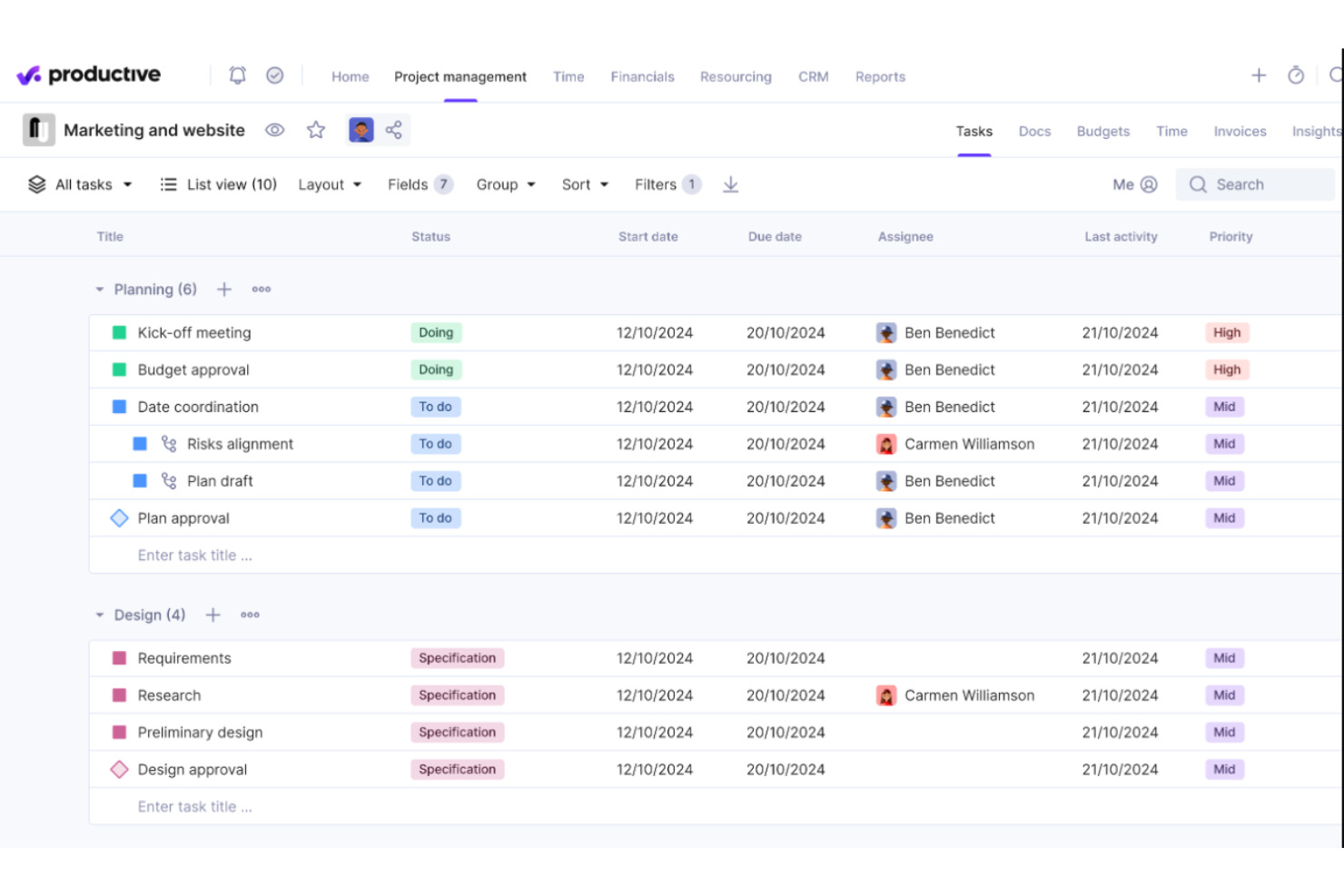
Productive è uno strumento di gestione del lavoro tutto-in-uno pensato per soddisfare le esigenze delle agenzie. Offre strumenti per pianificare e gestire progetti, suddividere e assegnare attività, monitorare il tempo dei dipendenti, gestire la fatturazione e la creazione di fatture e molto altro. Quando pianifichi i progetti del tuo team, puoi assegnare compiti a membri specifici, impostare scadenze e quindi monitorare l'avanzamento delle attività man mano che il team procede.
Grazie alla gestione delle risorse integrata, puoi anche assegnare incarichi in base alla capacità e alle competenze dei dipendenti. I membri del team registrano il loro tempo direttamente nel sistema, offrendoti indicazioni chiare su quanto tempo richieda completare determinate attività e consentendoti di assegnare il lavoro in modo più efficace. Lo strumento di rilevamento del tempo è inoltre collegato alle funzionalità di fatturazione e permette ai dipendenti di tenere traccia sia delle ore lavorative fatturabili che di quelle non fatturabili.
Questo software si integra con diversi altri strumenti di lavoro molto utilizzati, inclusi Dropbox, Exact, Jira, Outlook, Microsoft Calendar, Slack, QuickBooks e Xero. È disponibile anche un'integrazione Zapier, che può sbloccare ulteriori integrazioni con un account a pagamento.
New Product Updates from Productive
Productive Adds Voice Dictation, Slack Connector, Proposals, and Overtime
Productive adds voice dictation, a Slack Connector, proposal controls, and overtime tracking. These updates support faster AI interactions, client proposals, and time management. For more information, visit Productive’s official site.

Wrike
Software di gestione delle attività di progetto con modelli di project management integrati

Wrike è una piattaforma di gestione del lavoro con dashboard, flussi di lavoro e moduli di richiesta che puoi utilizzare per completare attività e progetti. Dispone di diagrammi di Gantt e bacheche Kanban che ti permettono di valutare visivamente l’avanzamento del tuo team e aiutarti a determinare se puoi rispettare una scadenza o se hai bisogno di più tempo dal tuo cliente. Wrike include una funzionalità di condivisione dei file che consente ai membri del progetto di collaborare per rispettare le scadenze.
I grandi progetti richiedono tempo e sono più facili da gestire se li suddividi in fasi. Se hai bisogno di un software di gestione delle attività di progetto con modelli integrati e personalizzabili, Wrike dovrebbe essere in cima alla tua lista. Wrike ti permette di creare più fasi per un progetto e suddividere ulteriormente le fasi in attività per renderle più gestibili. Puoi anche assegnare traguardi o scadenze per ciascuna fase, così gli assegnatari sanno esattamente quanto tempo hanno a disposizione per completare un’attività.
Wrike si integra con altri strumenti di gestione del tempo e del lavoro come Microsoft OneDrive, MS Excel, MS Project, Microsoft Office 365, Dropbox, ecc.
Wrike offre una versione gratuita e una prova gratuita dei piani a pagamento.
New Product Updates from Wrike
Wrike Adds Klaxoon MCP Integration
Wrike’s Klaxoon MCP integration is now generally available, enabling AI agents to navigate between Wrike tasks and attached whiteboards, read task context, and manage whiteboard attachments via API. For more information, visit Wrike's official site.

Ideale per il monitoraggio visivo con Kanban e Gantt
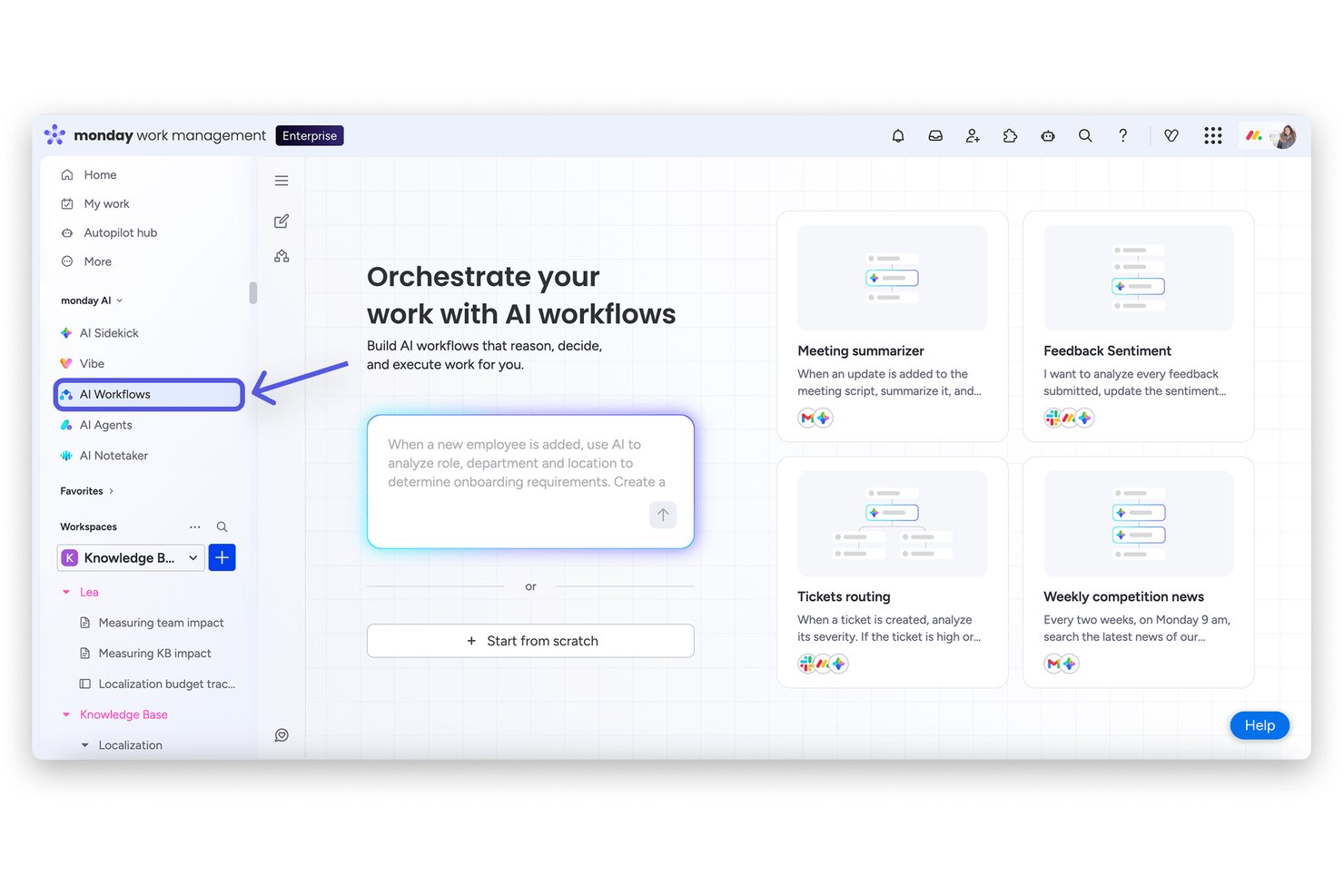
monday AI Workspace è una piattaforma di gestione del lavoro che combina monitoraggio delle attività potenziato dall'IA, viste multiple dei progetti, automazione dei flussi di lavoro e strumenti di collaborazione inter-team in un unico workspace configurabile.
Per chi è più adatto monday AI Workspace?
È una soluzione ideale per team di medie e grandi dimensioni che gestiscono più progetti simultanei tra reparti e necessitano di uno spazio di lavoro condiviso per mantenere tutti allineati.
Perché ho scelto monday AI Workspace
monday AI Workspace si guadagna il suo posto tra i migliori sulla mia lista grazie al funzionamento pratico del suo monitoraggio visivo dei progetti. Posso passare da una bacheca Kanban a una vista Gantt in pochi secondi, il che significa che il mio team può alternare facilmente tra flusso di lavoro sprint e pianificazione temporale senza dover ricostruire nulla. Il tracciamento delle dipendenze nella vista Gantt segnala anche i conflitti di programmazione prima che diventino un problema, caratteristica che reputo molto utile nella gestione di flussi di lavoro sovrapposti.
Funzionalità principali di monday AI Workspace
- Dashboard potenziate dall'IA: Gli utenti possono creare e personalizzare dashboard in tempo reale che estraggono dati da qualsiasi bacheca per un monitoraggio dettagliato dei progetti.
- Builder di workflow automatizzati: I team possono creare automazioni basate su regole per ridurre l’inserimento manuale e il lavoro amministrativo ripetitivo nei progetti.
- Gestione del portafoglio: Consente di raggruppare più progetti in portafogli con reportistica trasversale e monitoraggio degli obiettivi strategici per la leadership.
- Monitoraggio del tempo nativo: Registra le ore direttamente sulle attività, traccia il lavoro fatturabile e non fatturabile, e genera report dettagliati sulle presenze.
Integrazioni di monday AI Workspace
monday AI Workspace offre centinaia di integrazioni native tramite le sue integrazioni integrate e il marketplace, tra cui Slack, Google Workspace, Microsoft 365, Jira, Dropbox, Zoom, HubSpot, Salesforce, GitHub e Outlook. Supporta inoltre Zapier e mette a disposizione un’API per integrazioni personalizzate.
Pros and Cons
Pros:
- Viste di progetto Kanban e Gantt intercambiabili
- Riepiloghi delle attività e aggiornamenti di stato generati dall'IA
- Dashboard a livello portafoglio su più progetti
Cons:
- Automazioni limitate nei piani base
- Profondità delle analisi avanzata solo con abbonamenti di livello superiore
New Product Updates from monday AI Workspace
monday AI Workspace Adds Human Approval Routing
monday AI Workspace adds a human-in-the-loop approval block to AI Workflows, sending approval requests and routing workflow paths based on responses. For more information, visit monday AI Workspace's official site.

GQueues
Il migliore per l'integrazione approfondita con Google Workspace
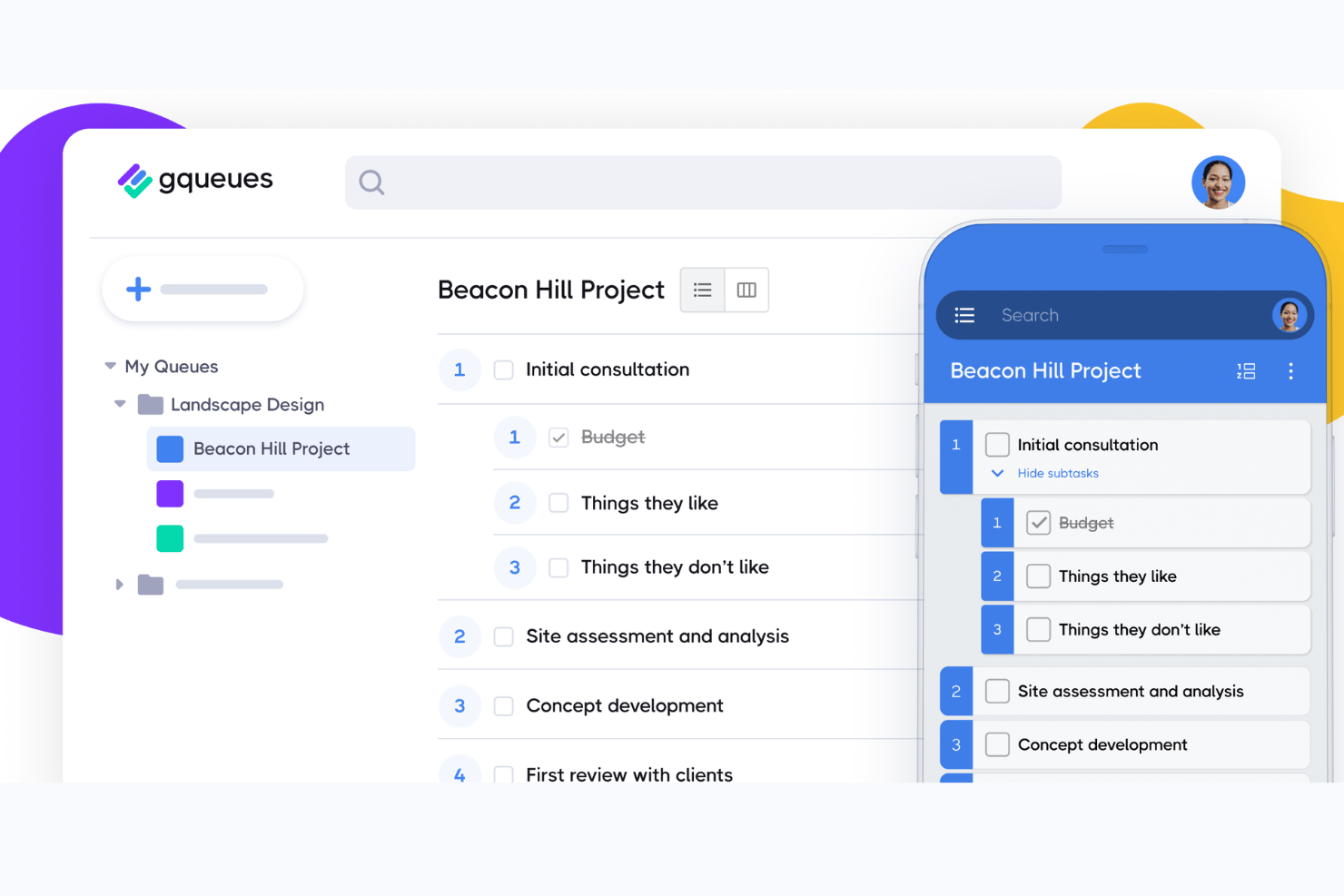
GQueues è uno strumento di gestione delle attività creato nativamente per Google Workspace, che combina creazione e assegnazione delle attività, sottoattività, bacheche Kanban e sincronizzazione bidirezionale tra Google Calendar, Gmail e Drive.
A chi è più adatto GQueues?
GQueues è adatto ai team di piccole e medie dimensioni che gestiscono il proprio lavoro interamente all'interno di Google Workspace e desiderano gestire le attività senza uscire da quell'ecosistema.
Perché ho scelto GQueues
Ho incluso GQueues tra le mie scelte principali perché la sua integrazione con Google Workspace è più approfondita di quella di qualsiasi altro strumento di gestione delle attività che abbia utilizzato. Creare un'attività direttamente da una conversazione Gmail, visualizzarla immediatamente in Google Calendar e allegare un file di Drive senza uscire dalla visualizzazione dell'attività sono funzioni su cui faccio affidamento ogni giorno. La sincronizzazione bidirezionale con Calendar è particolarmente utile: le attività con scadenze diventano veri eventi del calendario, non semplici promemoria dell'app.
Funzionalità principali di GQueues
- Code intelligenti: Salva filtri personalizzati per le attività e accedi istantaneamente al lavoro prioritario, contrassegnato o pianificato.
- Sottoattività illimitate: Crea suddivisioni dettagliate delle attività con sottoattività nidificate illimitate per flussi di lavoro complessi.
- Code condivise: Collabora con il tuo team su elenchi di attività condivisi, ciascuno con il proprio set di autorizzazioni.
- App per dispositivi mobili: Accedi a tutte le tue attività e gestiscile su dispositivi Android e iOS con supporto completo delle funzionalità.
Integrazioni di GQueues
GQueues offre integrazioni native con Google Calendar, Gmail, Google Drive, Google Contatti, Google Chrome e Google Workspace Marketplace.
Pros and Cons
Pros:
- Sincronizzazione bidirezionale approfondita con Google Calendar
- Attività create direttamente dalle conversazioni Gmail
- Pianificazione affidabile delle attività ricorrenti integrata
Cons:
- Nessuna visualizzazione Gantt o della sequenza temporale
- Le funzionalità di reportistica sono minime e basilari

Ideale per flussi di lavoro senza codice su scala aziendale
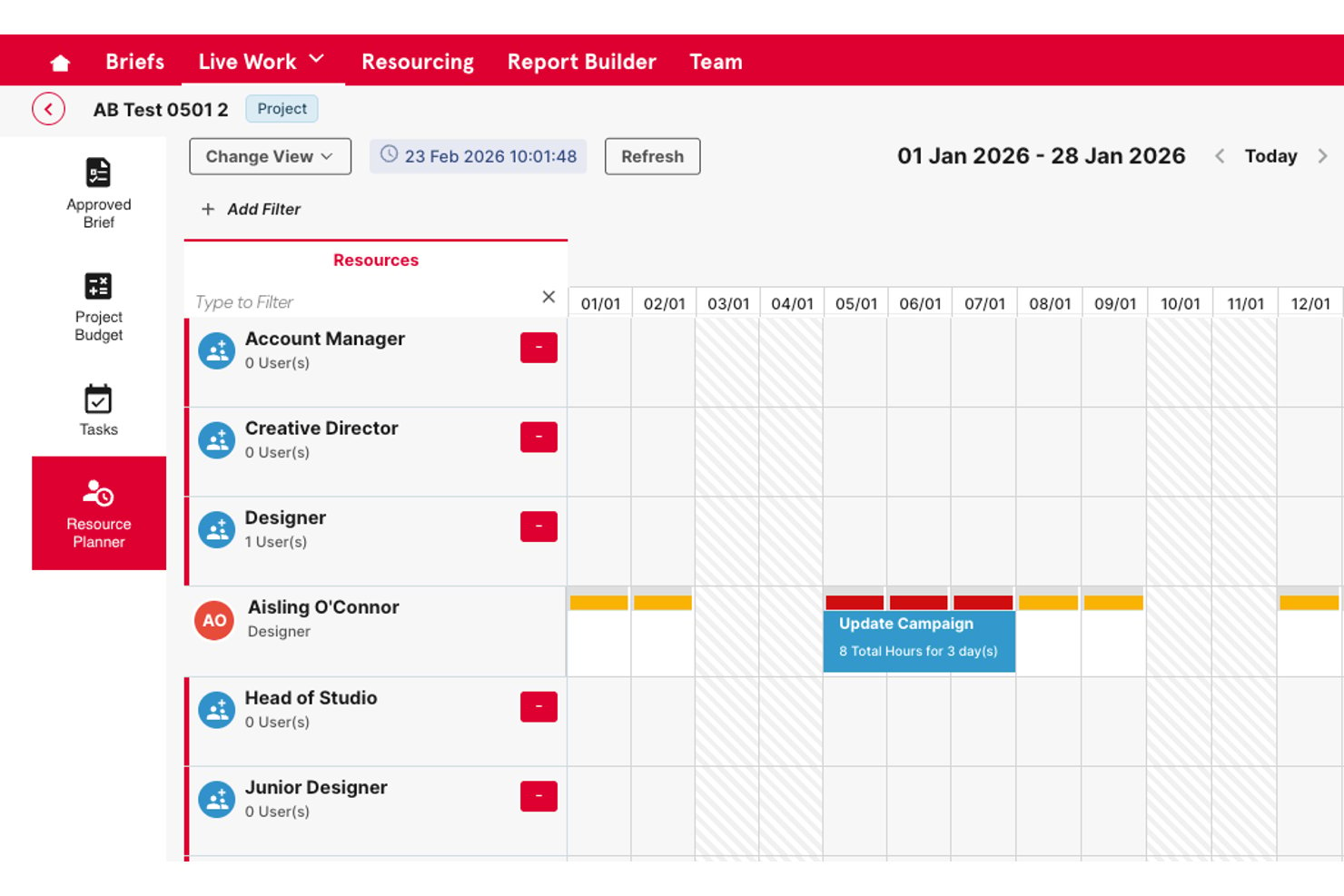
Screendragon è una piattaforma aziendale per la gestione del lavoro che combina la creazione di flussi di lavoro senza codice, il monitoraggio di attività e progetti, la pianificazione delle risorse, l'automazione delle approvazioni e la reportistica operativa in un unico sistema configurabile.
Per chi è più adatto Screendragon?
Screendragon è particolarmente adatto ai team aziendali di marketing e delle operazioni creative che gestiscono flussi di lavoro ad alto volume e con molte parti interessate su larga scala.
Perché ho scelto Screendragon
Ho scelto Screendragon come una delle soluzioni migliori perché il suo generatore di flussi di lavoro senza codice consente ai team aziendali di progettare processi complessi di approvazione e revisione in più fasi senza scrivere una sola riga di codice. Apprezzo in particolare il modo in cui i moduli dinamici si collegano direttamente alle sequenze di flussi di lavoro automatizzate, sostituendo le catene di e-mail frammentate che in genere rallentano le operazioni creative e di marketing. Il Centro IA fa un ulteriore passo avanti, consentendo al mio team di implementare agenti IA direttamente nei flussi di lavoro attivi per gestire l'instradamento, i controlli di conformità e le approvazioni su larga scala.
Funzionalità principali di Screendragon
- Pianificazione delle risorse e del carico di lavoro: Consente di assegnare le risorse, monitorare la capacità e bilanciare i carichi di lavoro del team tra i progetti.
- Pannello di controllo per la gestione del portafoglio: Offre una visibilità a livello dirigenziale con riepiloghi trasversali dei progetti e monitoraggio dei KPI.
- Moduli personalizzati per l'acquisizione delle richieste: Trasforma le richieste di lavoro in attività strutturate utilizzando moduli configurabili adattati a ciascun flusso di lavoro.
- Autorizzazioni avanzate e registri di audit: Supporta controlli degli accessi granulari e basati sui ruoli e conserva registri dettagliati di ogni modifica.
Integrazioni di Screendragon
Screendragon offre integrazioni native con Google Drive, Box, OneDrive, Egnyte, Adobe Creative Cloud, Jira, Trello, Salesforce, Microsoft Dynamics 365 e Microsoft 365. È disponibile un'API per le integrazioni personalizzate.
Pros and Cons
Pros:
- Il generatore di flussi di lavoro senza codice gestisce processi complessi
- Autorizzazioni basate sui ruoli per team numerosi
- Instradamento integrato delle approvazioni con fasi di revisione automatizzate
Cons:
- La personalizzazione della reportistica richiede una configurazione iniziale
- Processo di configurazione più complesso rispetto agli strumenti leggeri per la gestione delle attività
New Product Updates from Screendragon
Screendragon Unveils New AI Hub
Screendragon introduced AI Hub, a new capability that lets teams build and manage AI agents directly within workflows. The update helps marketing teams automate tasks, maintain governance controls, and scale AI-driven operations more efficiently. For more information, visit Screendragon's official site.

Quire
Ideale per suddividere compiti complessi

Quire è un software di gestione delle attività di progetto che aiuta i team a pianificare, organizzare e monitorare il lavoro in modo strutturato. Supporta elenchi di attività nidificati, bacheche kanban e viste cronologiche per gestire i progetti dall'inizio alla fine.
Uno dei motivi per cui ho scelto Quire è la sua struttura di attività nidificata, che consente di suddividere progetti complessi in parti più piccole e gestibili. Puoi creare attività e sotto-attività in un formato ad albero, rendendo facile visualizzare la gerarchia e le relazioni tra le diverse parti del progetto.
Un'altra caratteristica che si distingue è la vista dinamica della cronologia, che offre una rappresentazione visiva del programma del progetto. Puoi vedere come si sovrappongono le attività, identificare potenziali colli di bottiglia e regolare le scadenze secondo necessità. Questo è particolarmente utile per i team che devono coordinare più incarichi e assicurarsi che tutto rimanga nei tempi previsti.
Alcune delle integrazioni di Quire includono Google Calendar, Gmail, Slack, Outlook, Zoho Flow, GitHub, Apple Calendar Sync, Box, Dropbox, Google Drive e Microsoft Teams.
New Product Updates from Quire
Quire Adds Custom Field Locking and Comment Reaction API Support
Quire adds custom field locking and API support for reading and setting emoji reactions on comments. These updates give teams more control over field data and expand comment interaction options for developers. For more information, visit Quire’s official site.
 .
.
Celoxis
Ideale per la gestione di progetti connessi all'interno di un portfolio
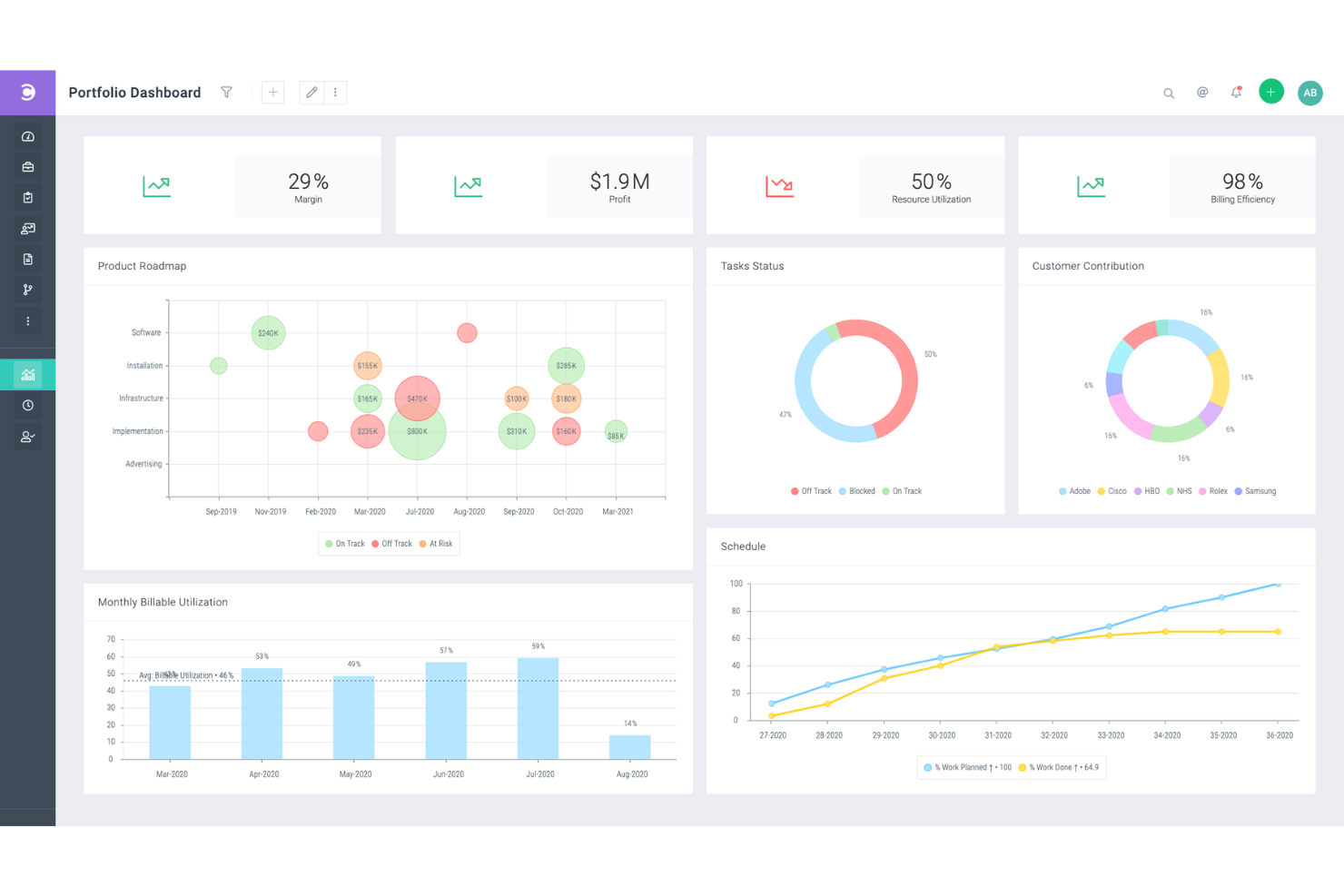
Celoxis è un software di gestione del portafoglio progetti (PPM) con funzionalità di gestione di progetti, risorse, tempi, spese e workflow. È in grado di gestire progetti complessi e interconnessi, ed è particolarmente adatto alle esigenze di aziende enterprise e società di servizi professionali.
Lo strumento di diagramma di Gantt ti aiuta a pianificare una panoramica ad alto livello di ciascuno dei tuoi progetti. Include funzionalità come la codifica a colori, attività ricorrenti e dipendenze tra attività di diversi progetti. Non solo puoi collegare attività tra progetti differenti, ma puoi anche assegnare più risorse alla stessa attività. Tutti questi strumenti ti consentono di chiarire la tua strategia multi-progetto o multi-prodotto e di mantenere ben documentati i tuoi piani.
Oltre alla gestione dei progetti, il software offre strumenti di gestione delle risorse. Il lavoro può essere assegnato a membri specifici del team in base alla capacità e ad altri fattori. Puoi anche gestire le spese di progetto sulla piattaforma e monitorare il tempo dedicato alle varie attività e ai progetti. Questo ti aiuta a mantenere il budget sempre aggiornato e accurato, evitando di sforare prima che accada.
Include diverse integrazioni predefinite con strumenti come Google Drive, Microsoft Excel, Microsoft Project, Jira, Slack, Salesforce, Google Calendar, Outlook, Evernote e QuickBooks Online. Sono disponibili ulteriori integrazioni con un account Zapier a pagamento.
I piani a pagamento di Celoxis partono da $25 per utente, al mese. È disponibile anche una prova gratuita di 30 giorni.

Miro
Ideale per una collaborazione fluida e la visualizzazione efficace nella gestione dei progetti
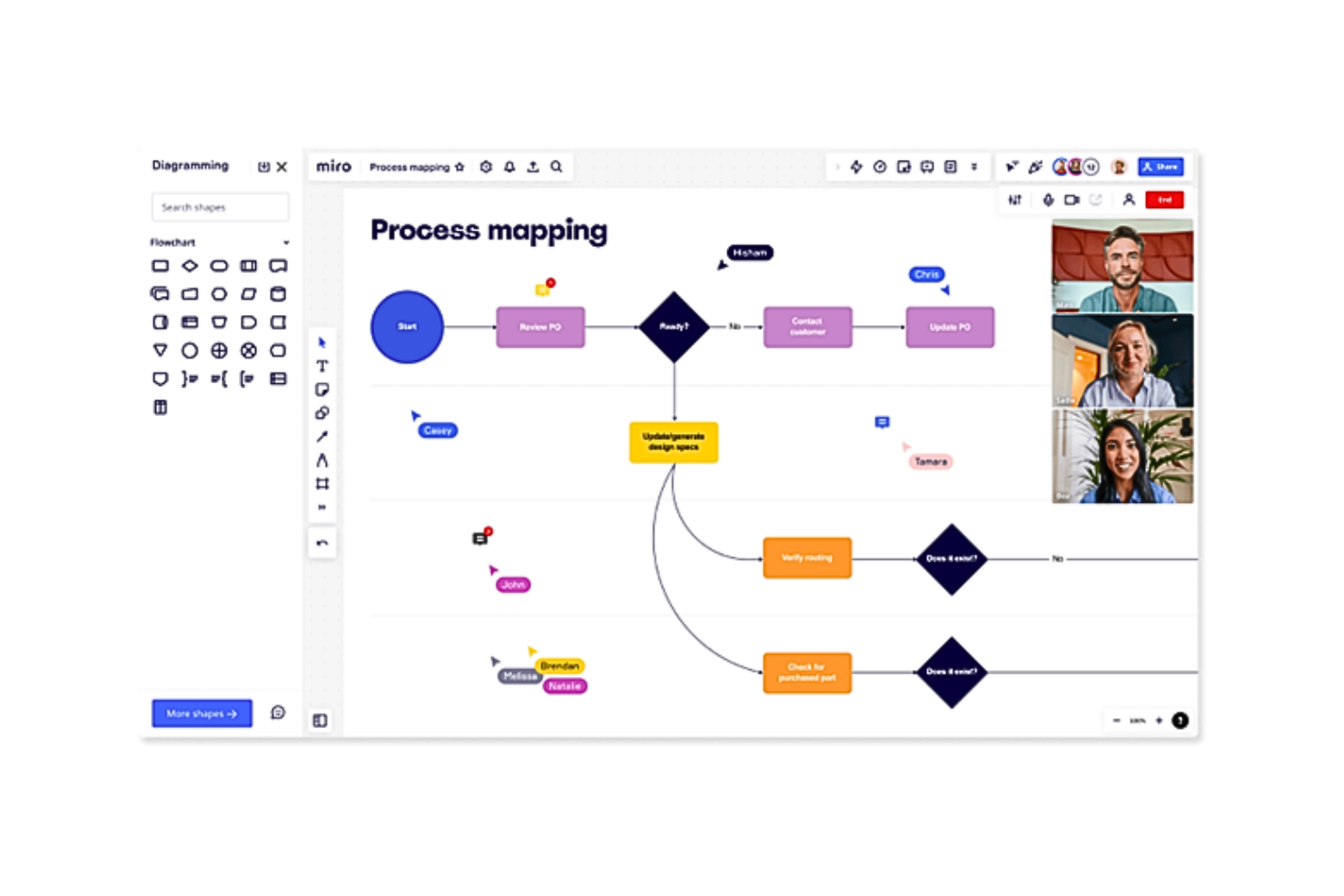
Miro è una piattaforma di lavagna online pensata per il lavoro collaborativo e visivo nella gestione dei progetti. È uno strumento in cui i team, siano essi co-locati o remoti, possono dare vita alle proprie idee in uno spazio condiviso e interattivo. Questo software di gestione delle attività di progetto si adatta a vari tipi e dimensioni di team, dagli sviluppatori tecnologici ai marketer fino alle piccole aziende.
La flessibilità della piattaforma permette a tutti di esprimere idee, consentendo agli utenti di incorporare vari tipi di dati, tra cui immagini, video e testo, nelle loro bacheche di progetto. Questa adattabilità aiuta a creare elementi visivi dettagliati e informativi per i progetti. Inoltre, la funzione planner di Miro offre una rappresentazione visiva delle attività suddivise per categorie, come sprint o stato di avanzamento, mentre l'app delle dipendenze fornisce indicazioni sulle interdipendenze delle attività, aiutando i team a orientarsi e gestire le complessità dei progetti.
Le integrazioni includono Asana, monday.com, Notion, Webex, Figma, Jira, Azure DevOps, Confluence, Trello, Slack, Microsoft Teams, Google Workspace, Zoom e oltre 100 altri strumenti. Puoi accedere a migliaia di strumenti aggiuntivi tramite l'integrazione con Zapier. Questo può comportare un costo aggiuntivo.
New Product Updates from Miro
Miro Adds Japan Data Residency for Enterprise Customers
Miro has introduced Japan data residency for enterprise customers, offering in-region storage for production data, backups, and metadata, plus in-region compute infrastructure. For more information, visit Miro's official site.

Software di gestione delle attività di progetto per la priorizzazione dei compiti

Profit.co è un software OKR (Objectives and Key Results) progettato per aiutarti a misurare e raggiungere gli obiettivi aziendali. Profit.co ti aiuta a pianificare la tua lista di cose da fare per concentrarti sui compiti urgenti da svolgere durante la giornata. Puoi utilizzare Profit.co per monitorare facilmente le attività ordinandole e organizzando i progetti in base al loro progresso o livello di importanza, assicurandoti così di dare priorità ai progetti con scadenze imminenti. Profit.co ti permette anche di creare spazi di lavoro dove puoi comunicare e collaborare con i membri del team in modo privato per proteggere i progetti riservati o sensibili.
Per quanto si desideri trattare tutte le attività allo stesso modo, alcune sono critiche e richiedono un'attenzione immediata, rendendo Profit.co una soluzione ideale per la gestione e la priorizzazione delle attività. Quando crei un'attività tramite Profit.co, puoi impostare un livello di priorità così che gli assegnatari sappiano che occorre completare rapidamente un determinato compito. Il software permette inoltre di assegnare una data e un orario di scadenza, così i membri del team sanno entro quando completare il loro lavoro e possono stimare se necessitano di proroghe.
Profit.co si integra bene con altri strumenti di gestione attività come Microsoft Planner, Asana, G Suite, BambooHR e altri.
Profit.co offre un piano gratuito per un massimo di 5 utenti, mentre i prezzi dei piani a pagamento partono da $7/utente/mese. È inoltre disponibile una prova gratuita di 30 giorni.

MeisterTask
Ideale per brainstorming, ideazione e gestione delle attività in una sola piattaforma
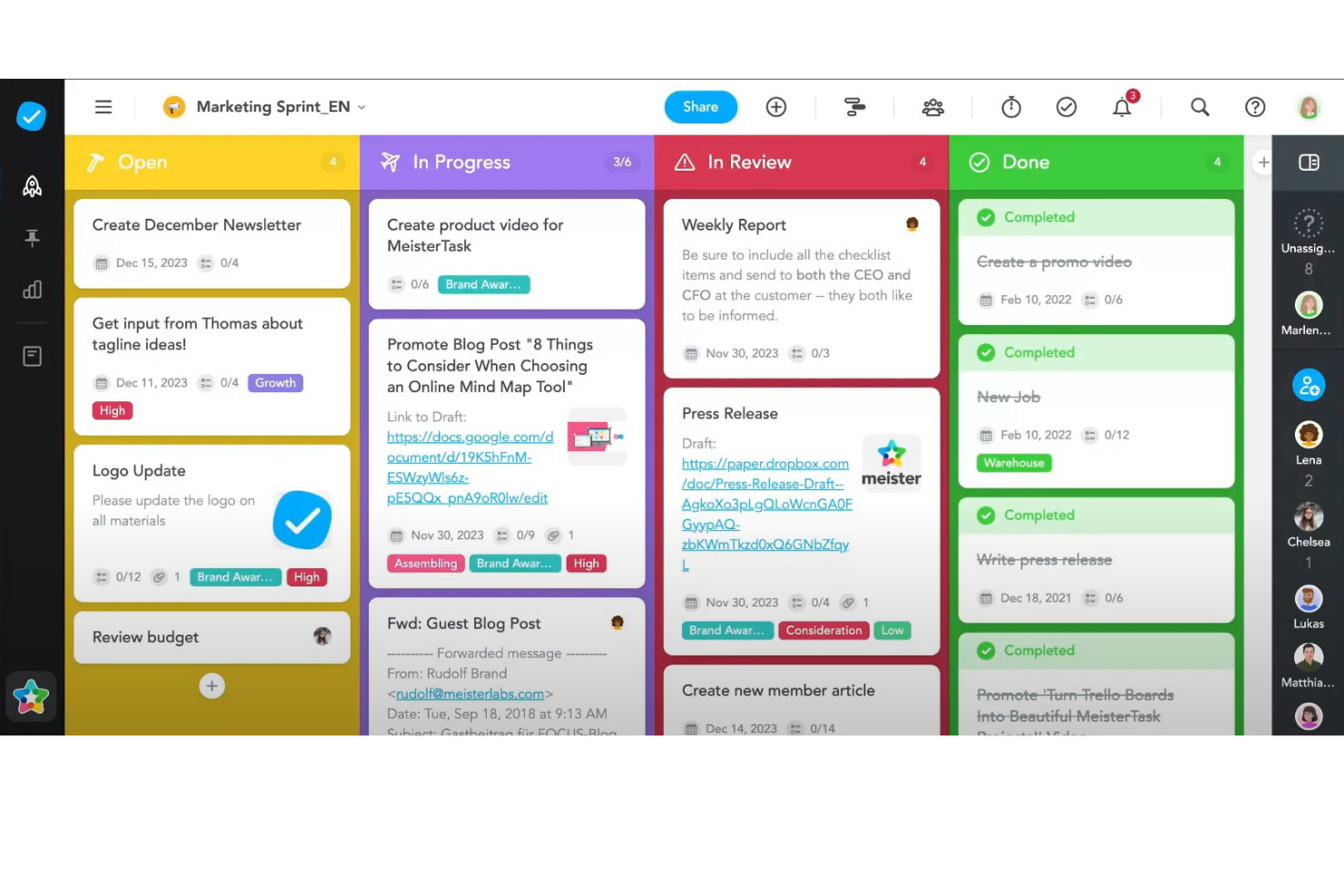
MeisterTask è un software di gestione delle attività di progetto che si distingue per offrire una piattaforma snella e intuitiva, ideale per aiutare i team a gestire le proprie attività e progetti in modo efficiente. Adotta un approccio visuale alla gestione delle attività tramite l'uso di bacheche Kanban, facilitando così agli utenti l'organizzazione dei compiti, il monitoraggio dell'avanzamento e l'adattamento dei flussi di lavoro in tempo reale. Il software è progettato per adattarsi a una vasta gamma di tipologie e dimensioni di progetto, offrendo bacheche personalizzabili che possono essere modificate secondo le necessità specifiche. Funzionalità come l'automazione delle attività, i promemoria delle scadenze e il monitoraggio del tempo sono integrate nella piattaforma, semplificando il processo di gestione e permettendo ai team di concentrarsi sul lavoro più importante.
Oltre alle sue capacità principali di gestione delle attività, MeisterTask si distingue per la sua attenzione alla collaborazione e all'integrazione. Il software consente una comunicazione fluida all'interno del team grazie a funzionalità come la condivisione di file, i commenti e l'assegnazione delle attività, garantendo che tutti i membri del team siano sempre aggiornati. Inoltre, MeisterTask offre ampie opzioni di integrazione con strumenti popolari come Slack, Google Drive e MindMeister, quest'ultimo offrendo un collegamento unico fra mappe mentali e gestione delle attività. Questa integrazione consente un passaggio fluido dalle fasi di brainstorming e pianificazione a compiti azionabili, migliorando produttività e creatività dell'intero team.
Le integrazioni includono Slack, Dropbox, Github, Google Drive, Microsoft Teams, Outlook, Trello, Asana, MindMeister e centinaia di altri tramite un abbonamento a pagamento con Zapier.
MeisterTask ha un costo a partire da $14.50/mese (fatturato annualmente) e offre una prova gratuita.
Altri software per la gestione delle attività dei progetti
Ecco qualche altra opzione che non è entrata nell’elenco principale.
- ClickUp
Software di gestione delle attività di progetto che consente di suddividere grandi progetti in sotto-attività
- Backlog
Ideale per flussi di lavoro Agile e tracciamento dei bug
- Workzone
Ideale per gestire più progetti e clienti
- ActiveCollab
Ideale per la sua attenzione alla semplicità
- Teamwork.com
Software di gestione delle attività di progetto con portfolio di progetti e relativi stati
- Bonsai Agency Software
Ideale per la gestione integrata di progetti, clienti e finanze
- Birdview
Ideale per allocazione delle risorse e gestione del portafoglio
- FunctionFox
Software di gestione delle attività di progetto con funzione di rilevamento del tempo
- Ravetree
Ideale per gestire progetti, risorse e richieste in un unico posto
- Stackfield
Ideale per team conformi al GDPR
- Height
Gestione efficiente di attività e progetti per team da remoto.
- Mosaic
Software di gestione delle attività di progetto che consente di delineare i compiti del progetto
- Smartsheet
Software di gestione delle attività di progetto che consente di automatizzare i processi
- Hive
Ideale per i team che cercano un'interfaccia facile da usare
- Accelo
Ideale per la gestione di progetti, attività e risorse
- ProWorkflow
Ideale per gli strumenti di gestione delle risorse
- Kantata
Software di gestione delle attività di progetto con strumenti di collaborazione per il team
- PathPro
Ideale per i team di sviluppo prodotto


Come Valuto il Software di Gestione delle Attività di Progetto
Divido la mia valutazione in due livelli: le capacità di base che uno strumento deve avere per qualificarsi—come dipendenze tra attività e visualizzazioni Gantt—e i fattori differenzianti come la gestione del carico di lavoro e i report di portafoglio.
Funzionalità di Base (Requisiti Fondamentali per questa Lista)
Quando seleziono gli strumenti per la mia lista, valuto ognuno su una scala da 0 (non offre la funzionalità) a 5 (eccelle in quest'area) per ogni funzionalità di base elencata sotto. Successivamente, calcolo il punteggio totale dello strumento in percentuale. Ogni strumento deve raggiungere un punteggio minimo totale del 75% per essere considerato per l'inclusione.
- Creazione & Assegnazione delle Attività: Verifico se è possibile creare attività con assegnatari, date di scadenza, priorità e campi personalizzati—le basi per gestire uno sprint o il lancio di un prodotto.
- Visualizzazioni Multiple dei Progetti: Cambiare tra Kanban, Gantt, calendari e liste è importante perché stakeholder diversi assimilano i progressi in modi diversi.
- Dipendenze tra Attività & Sotto-attività: Valuto quanto bene uno strumento gestisce dipendenze finish-to-start e sotto-attività annidate, come mappare un rilascio a fasi dove il QA non può iniziare finché lo sviluppo non ha dato l'ok.
- Collaborazione & Commenti: Cerco commenti in thread, @menzioni e allegati ai task—i team non dovrebbero inseguire aggiornamenti tra Slack ed email.
- Monitoraggio dei Progressi & Reportistica: Dashboard e report sullo stato dovrebbero mostrare completamento delle attività, stato dei traguardi e distribuzione del carico di lavoro senza dover esportare manualmente fogli Excel.
- Automazione del Workflow & Integrazioni: Valuto se uno strumento si collega al tuo stack esistente (Slack, Google Workspace, GitHub) e consente di automatizzare passaggi ricorrenti come cambi di stato o assegnazione dei responsabili.
Una volta che ho una lista di strumenti che soddisfano i criteri, considero cosa distingue ogni piattaforma.
Fattori Differenzianti (Cosa Distingue i Fornitori)
Ecco come confronto e metto a paragone i diversi fornitori:
Funzionalità Distintive
La gestione delle risorse e del carico di lavoro è un grande punto di distinzione—cerco strumenti che mostrino la capacità di ogni membro del team sui diversi progetti così da poter ribilanciare le assegnazioni prima che le scadenze vengano mancate. La gestione del portafoglio è fondamentale quando si supervisionano più progetti contemporaneamente, perché raggruppare stato e progresso in un'unica dashboard è meglio che compilare aggiornamenti manuali per la direzione. Valuto anche se uno strumento offre funzionalità di intelligenza artificiale che possono redigere sommari delle attività o generare report di stato, risparmiando tempo sulle attività amministrative.
Oltre le Funzionalità
La profondità delle integrazioni è molto importante—controllo se uno strumento si collega nativamente a piattaforme di sviluppo come GitHub o Jira, poiché i project manager in ambito tech spesso hanno bisogno che gli aggiornamenti vengano sincronizzati con i flussi di lavoro dell'ingegneria. La trasparenza dei prezzi è un altro fattore che considero attentamente, in particolare se le funzionalità principali di gestione delle attività sono disponibili già nei piani base o se sono bloccate dietro piani enterprise. Valuto inoltre come uno strumento scala, da un team di cinque persone fino a un dipartimento di 200, senza la necessità di una migrazione completa in seguito.
Come scegliere il software per la gestione delle attività dei progetti
È facile perdersi in lunghi elenchi di funzionalità e strutture di prezzo complesse. Per aiutarti a rimanere concentrato mentre affronti il tuo particolare processo di selezione del software, ecco un elenco di fattori da tenere a mente:
| Fattore | Cosa considerare |
| Scalabilità | Cerca un software in grado di crescere insieme al tuo team. Scegli uno strumento che possa accogliere più utenti e progetti quando necessario. |
| Integrazioni | Assicurati che il software si integri con gli strumenti già utilizzati dal tuo team, come Slack, Google Workspace o le piattaforme CRM. |
| Personalizzazione | Seleziona uno strumento che ti permetta di adattare i flussi di lavoro, i pannelli di controllo e i campi delle attività ai processi del tuo team. |
| Facilità d'uso | Scegli uno strumento con un'interfaccia semplice e intuitiva, così il tuo team potrà adottarlo rapidamente senza una formazione approfondita. |
| Budget | Considera sia i costi iniziali sia eventuali componenti aggiuntivi di cui potresti aver bisogno. Verifica la disponibilità di prove gratuite per valutare lo strumento senza impegnarti completamente. |
| Misure di sicurezza | Scegli un software con una solida protezione dei dati, come la crittografia e backup regolari, per mantenere al sicuro le tue informazioni. |
| Strumenti di collaborazione | Assicurati che il software offra funzionalità come commenti sulle attività, condivisione di file e notifiche per una comunicazione fluida tra i membri del team. |
| Accessibilità da dispositivi mobili | Se il tuo team lavora da remoto o viaggia, cerca una soluzione con un'app mobile che ti aiuti a gestire le attività ovunque ti trovi. |
Tendenze dei software per la gestione delle attività dei progetti nel 2025
Nella mia ricerca, ho raccolto innumerevoli aggiornamenti sui prodotti, comunicati stampa e registri delle versioni di diversi fornitori di software per la gestione delle attività di progetto. Un tema principale comune a tutti? Una maggiore automazione. Molte piattaforme si stanno evolvendo in solide soluzioni di software per l'automazione delle attività, con nuove funzionalità progettate per ridurre il lavoro manuale e migliorare la produttività complessiva. Ecco alcune delle tendenze emergenti che sto tenendo d'occhio:
- Definizione delle priorità delle attività assistita dall'IA: l'IA può ora aiutare gli utenti a stabilire la priorità delle attività in base a scadenze, carico di lavoro e dipendenze. Questa tendenza mira a ridurre l'affaticamento decisionale e migliorare la produttività, guidando i team a concentrarsi ogni giorno su ciò che conta di più.
- Analisi predittiva dei risultati dei progetti: le funzionalità predittive analizzano i dati dei progetti passati per prevedere le tempistiche, identificare potenziali ritardi e valutare i rischi. Queste informazioni possono aiutare i team a gestire le aspettative e migliorare l'accuratezza della pianificazione senza affidarsi esclusivamente alla programmazione manuale.
- Riconoscimento delle emozioni per il benessere del team: alcuni strumenti stanno sperimentando l'analisi del sentiment per valutare il morale del team attraverso le chat o i commenti sulle attività. Questa tendenza aiuta i responsabili a identificare i rischi di esaurimento e fornisce informazioni utili per migliorare il benessere del team, un aspetto particolarmente rilevante negli ambienti di lavoro da remoto e ibridi.
- Gamification del completamento delle attività: le funzionalità di gamification, come badge, punti e classifiche, sono sempre più diffuse per motivare i team. L'aggiunta di questi elementi rende la gestione delle attività più coinvolgente e può aumentare la produttività, soprattutto nei contesti altamente collaborativi.
- Visualizzazione in tempo reale della gestione delle risorse: i fornitori stanno potenziando gli strumenti di visualizzazione che mostrano in tempo reale la disponibilità delle risorse, il carico di lavoro e i potenziali conflitti. Questa tendenza aiuta i responsabili a effettuare rapidamente gli adeguamenti e migliorare l'efficienza, bilanciando le attività tra team e progetti. Con l'adozione sempre più diffusa di modalità di lavoro ibride o completamente da remoto, gli strumenti di collaborazione basati sul cloud stanno diventando essenziali per gestire flussi di lavoro distribuiti, consentire aggiornamenti in tempo reale e mantenere tutti allineati tra le diverse sedi.
Che cos'è il software per la gestione delle attività di progetto?
Il software per la gestione delle attività di progetto è uno strumento che aiuta a organizzare e tenere traccia delle diverse attività di un progetto. Consente di creare un elenco di attività, assegnarle alle persone, impostare scadenze e monitorare i progressi di ciascuna attività. Questo tipo di software può essere davvero utile per mantenere tutto in un unico posto, così non è necessario gestire informazioni distribuite su piattaforme diverse o perdere di vista ciò che deve essere fatto.
Il principale vantaggio dell'utilizzo di un software per la gestione delle attività di progetto è che rende la gestione dei progetti molto più semplice e chiara. Aiuta a vedere immediatamente cosa deve essere fatto, chi sta lavorando su cosa e quando le attività devono essere completate. Questo può essere davvero utile per i team, poiché tutti sanno cosa dovrebbero fare e possono collaborare in modo più efficace. È inoltre ottimo per assicurarsi che nulla venga dimenticato o trascurato e può aiutare a mantenere i progetti nei tempi previsti.
Funzionalità del software per la gestione delle attività di progetto
Quando scegli un software per la gestione delle attività di progetto, presta attenzione alle seguenti funzionalità chiave:
- Assegnazione delle attività: assegna le attività a membri specifici del team, garantendo una responsabilità e un livello di titolarità chiari per ogni attività.
- Monitoraggio delle scadenze: tiene traccia delle date di scadenza per mantenere i progetti nei tempi previsti ed evitare il mancato rispetto delle scadenze.
- Gestione delle dipendenze: imposta le dipendenze tra le attività per identificare i colli di bottiglia e gestire i flussi di lavoro in modo più efficace.
- Monitoraggio dei progressi: controlla in tempo reale i progressi delle attività, così il team può rimanere aggiornato e modificare le priorità secondo necessità.
- Monitoraggio del tempo: tiene traccia del tempo dedicato alle attività per analizzare la produttività e allocare le risorse in modo più efficace.
- Strumenti di collaborazione: consentono la comunicazione del team tramite commenti, menzioni e condivisione di file direttamente all'interno delle attività.
- Dashboard personalizzabili: personalizzano le dashboard per ruoli diversi, così tutti possono accedere facilmente alle informazioni pertinenti.
- Report e analisi: generano report sul completamento delle attività, sulla produttività del team e sull'avanzamento dei progetti per prendere decisioni basate sui dati.
- Integrazione con il calendario: sincronizza attività e scadenze con calendari esterni per semplificare la programmazione e i promemoria.
- Notifiche e avvisi: invia notifiche tempestive sugli aggiornamenti delle attività e sulle scadenze imminenti, mantenendo tutti allineati.
Vantaggi del software per la gestione delle attività di progetto
L'implementazione di un software per la gestione delle attività di progetto può offrire diversi vantaggi sia al team sia all'azienda nel suo complesso. Eccone alcuni che puoi aspettarti:
- Organizzazione migliorata: mantenere tutte le attività, i file e le discussioni in un unico luogo rende molto più semplice per il team rimanere organizzato e trovare ciò di cui ha bisogno.
- Maggiore responsabilità: assegnazioni chiare delle attività e monitoraggio dei progressi permettono a tutti di sapere chi è responsabile di cosa, riducendo la confusione.
- Migliore gestione del tempo: funzionalità come il monitoraggio delle scadenze e del tempo aiutano a gestire gli impegni in modo più efficace ed evitare il mancato rispetto delle scadenze.
- Maggiore produttività: mantenendo le attività organizzate per priorità e visibili, il team può concentrarsi sul lavoro importante senza distrarsi.
- Decisioni più consapevoli: report e analisi forniscono informazioni sulla produttività e sull'avanzamento dei progetti, aiutandoti a prendere decisioni basate sui dati.
- Maggiore flessibilità: dashboard e visualizzazioni personalizzabili consentono a ogni membro del team di visualizzare le proprie attività nel modo più adatto alle proprie esigenze.
- Collaborazione migliorata: gli strumenti di collaborazione integrati consentono ai membri del team di comunicare facilmente direttamente all'interno delle attività, mantenendo tutte le discussioni pertinenti e accessibili.
Costi e prezzi del software per la gestione delle attività di progetto
La scelta di un software per la gestione delle attività di progetto richiede la comprensione dei vari modelli di prezzo e dei piani disponibili. I costi variano in base alle funzionalità, alle dimensioni del team, ai componenti aggiuntivi e ad altri fattori. La tabella seguente riepiloga i piani più comuni, i relativi prezzi medi e le funzionalità generalmente incluse nelle soluzioni software per la gestione delle attività di progetto:
Tabella di confronto dei piani per il software di gestione delle attività di progetto
| Tipo di piano | Prezzo medio | Funzionalità comuni |
| Piano gratuito | $0 | Gestione di base delle attività, progetti limitati, report di base e strumenti di collaborazione di base. |
| Piano personale | $5-$15/utente/mese | Assegnazione delle attività, monitoraggio delle scadenze, integrazioni di base, dashboard personalizzabili e supporto prioritario. |
| Piano aziendale | $15-$25/utente/mese | Report avanzati, opzioni di automazione, monitoraggio del tempo, strumenti di collaborazione del team e flussi di lavoro personalizzati. |
| Piano aziendale avanzato | $25-$50/utente/mese | Sicurezza avanzata, integrazioni personalizzate, supporto dedicato, analisi avanzate e progetti illimitati. |
Domande frequenti sul software per la gestione delle attività di progetto
Ecco alcune risposte alle domande più comuni sul software per la gestione delle attività di progetto: