

Le 10 migliori app per liste di cose da fare recensite nel 2026

Elenco delle migliori app per liste di cose da fare


Il lavoro sui progetti procede rapidamente, così come le richieste sul tuo tempo. Quando gestisci più attività, scadenze e aggiornamenti, è facile perdere di vista i dettagli.
Le app per le liste di cose da fare possono offrire una visione chiara di ciò che deve essere fatto, di chi ne è responsabile e di cosa verrà dopo. Tuttavia, trovare quella adatta al tuo flusso di lavoro non è sempre semplice.
In questo articolo presenterò le app per liste di cose da fare che ho testato personalmente e che funzionano bene per i responsabili di progetto. Mi concentro sugli strumenti che supportano un autentico lavoro di squadra, una chiara gestione delle attività e un efficace completamento quotidiano.
Perché fidarsi dei nostri consigli sui software
Il nostro team testa e recensisce software dal 2012. In quanto project manager noi stessi, sappiamo quanto sia difficile — e importante — scegliere il software giusto.
Per questa guida, abbiamo valutato gli strumenti attraverso test pratici e ricerche indipendenti, assegnando un punteggio agli strumenti in base ai nostri criteri di selezione. Ci basiamo inoltre sulle competenze di leader di pensiero del settore e di professionisti attivi nella gestione dei progetti.
Le nostre recensioni riflettono il nostro giudizio editoriale umano, non un discorso di vendita.
Riepilogo delle migliori app per liste di cose da fare
Questa tabella comparativa riassume i dettagli sui prezzi delle mie migliori selezioni di app per liste di cose da fare, per aiutarti a trovare quella più adatta al tuo budget e alle esigenze della tua azienda.
| Tool | Best For | Trial Info | Price | ||
|---|---|---|---|---|---|
| 1 | Ideale per l'organizzazione personalizzabile delle attività | Piano gratuito disponibile | Da $9/utente/mese (fatturato annualmente) | Website | |
| 2 | Ideale per la collaborazione ai progetti di squadra | Piano gratuito disponibile | Da $39/mese (fatturato annualmente) | Website | |
| 3 | Ideale per la pianificazione di progetti gratuita | Prova gratuita di 14 giorni | A partire da $1.49/utente/mese (fatturazione annuale) + piano gratuito disponibile | Website | |
| 4 | Ideale per integrazioni con Microsoft | Piano gratuito disponibile | Gratis da usare | Website | |
| 5 | Ideale per la presa di appunti completa | Piano gratuito disponibile | Da $8.33/mese (fatturato annualmente) | Website | |
| 6 | Ideale per la produttività personale | Piano gratuito disponibile | A partire da $35.99/anno | Website | |
| 7 | Ideale per il monitoraggio visivo dei progetti | Piano gratuito disponibile | Da $15/utente/mese (fatturato annualmente) | Website | |
| 8 | Ideale per la gestione semplice delle attività | Piano gratuito disponibile | Da $4,99/mese (fatturato annualmente) | Website | |
| 9 | Ideale per l'assistenza alla pianificazione con IA | Prova gratuita disponibile | Da $29/postazione/mese | Website | |
| 10 | Migliore per l'organizzazione elegante delle attività | Prova gratuita di 15 giorni | Da $9.99/utente/mese (fatturato annualmente) | Website |

Recensioni delle migliori app per liste di cose da fare
Di seguito trovi i miei riepiloghi dettagliati delle migliori app per liste di cose da fare incluse nella mia selezione. Le mie recensioni offrono uno sguardo approfondito alle funzionalità principali, ai pro e contro, alle integrazioni e ai casi d’uso ideali di ogni strumento, per aiutarti a trovare quello più adatto a te.

Ideale per l'organizzazione personalizzabile delle attività
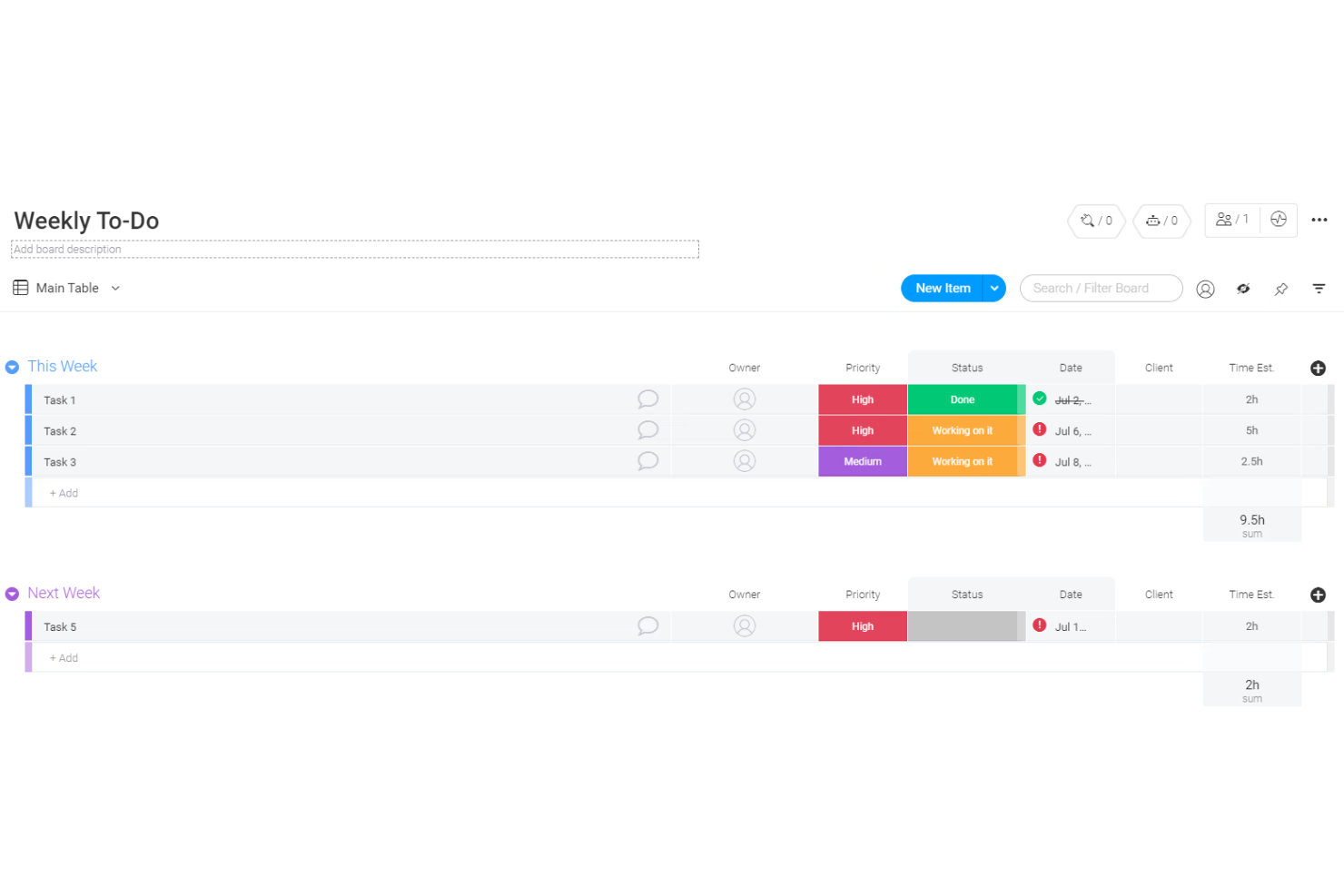
monday.com è una piattaforma di gestione dei progetti con solide capacità di gestione delle attività. Offre un'interfaccia flessibile e visiva che ti aiuta a organizzare le attività, tenere traccia dei progressi e gestire le priorità, rendendola adatta sia alla gestione personale che di gruppo delle liste di cose da fare.
Perché ho scelto monday.com: Ho scelto monday.com per la sua capacità di unire organizzazione delle attività e collaborazione in un'unica piattaforma. Puoi creare flussi di lavoro personalizzati, assegnare compiti e gestire le scadenze, mantenendo tutto visibile tramite le sue bacheche visuali. Le opzioni di automazione riducono inoltre il lavoro ripetitivo, permettendoti di concentrarti su ciò che conta di più. Inoltre, monday.com supporta la collaborazione di squadra, risultando perfetto sia per singoli che per gruppi.
Funzionalità e integrazioni principali
Funzionalità includono dashboard personalizzabili per una panoramica visiva, viste Gantt e Kanban per monitorare le attività, strumenti di automazione per ridurre il lavoro manuale e gestione documentale integrata.
Integrazioni includono Slack, Gmail, Microsoft Teams, GitLab, Mailchimp, Excel, Outlook, DocuSign, Google Drive e Trello.
Pros and Cons
Pros:
- Opzioni flessibili di organizzazione delle attività
- Potenti strumenti di collaborazione di squadra
- Ampia gamma di integrazioni
Cons:
- Le funzionalità avanzate richiedono apprendimento
- Accessibilità offline limitata
New Product Updates from monday AI Workspace
monday AI Workspace Adds Human Approval Routing
monday AI Workspace adds a human-in-the-loop approval block to AI Workflows, sending approval requests and routing workflow paths based on responses. For more information, visit monday AI Workspace's official site.

Nifty
Ideale per la collaborazione ai progetti di squadra
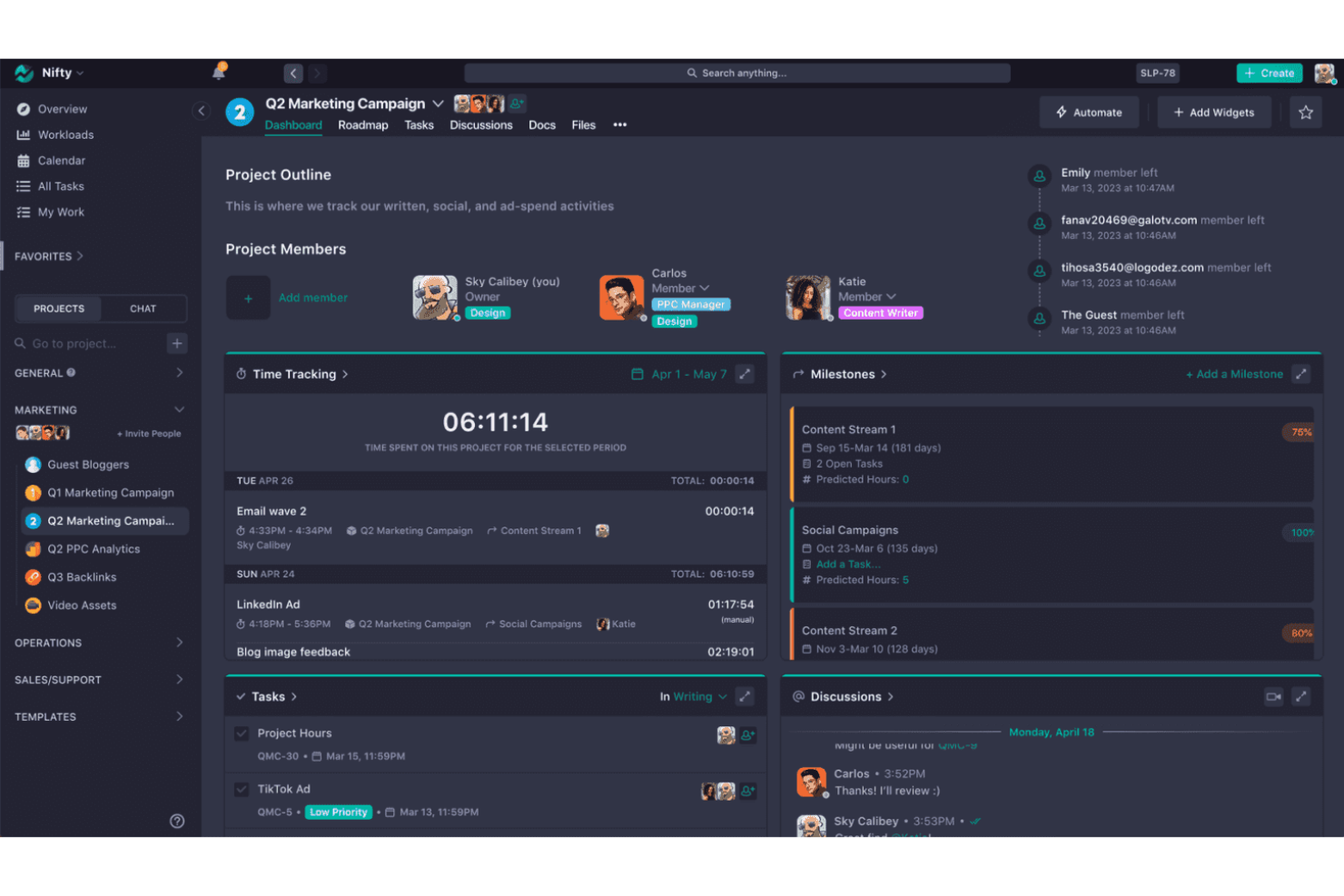
Nifty semplifica la gestione dei progetti e migliora la collaborazione del team. Si distingue nella collaborazione ai progetti di gruppo grazie a strumenti robusti progettati per unificare comunicazione, gestione e flusso di lavoro in un'unica piattaforma.
Perché ho scelto Nifty:
Ho scelto Nifty per il suo approccio completo alla gestione dei progetti, che integra molteplici aspetti del lavoro di squadra in un ambiente coeso. Favorisce un'atmosfera collaborativa fornendo ai team gli strumenti di cui hanno bisogno per restare allineati e far avanzare i progetti insieme.
Funzionalità e integrazioni principali:
Le funzionalità includono traguardi di progetto, assegnazione e monitoraggio delle attività, collaborazione su documenti e messaggistica diretta integrata.
Le integrazioni includono Google Docs, Google Sheets, Google Calendar, Slack, Zoom, Dropbox, GitHub, Trello, Asana e ClickUp.
Pros and Cons
Pros:
- Soluzione di project management tutto-in-uno
- Messaggistica diretta per la comunicazione tra team
- Integrazione con strumenti di terze parti molto diffusi
Cons:
- Il numero minimo di postazioni richieste può essere proibitivo per i team più piccoli
- La fatturazione annuale può non essere flessibile per tutte le organizzazioni

Ideale per la pianificazione di progetti gratuita
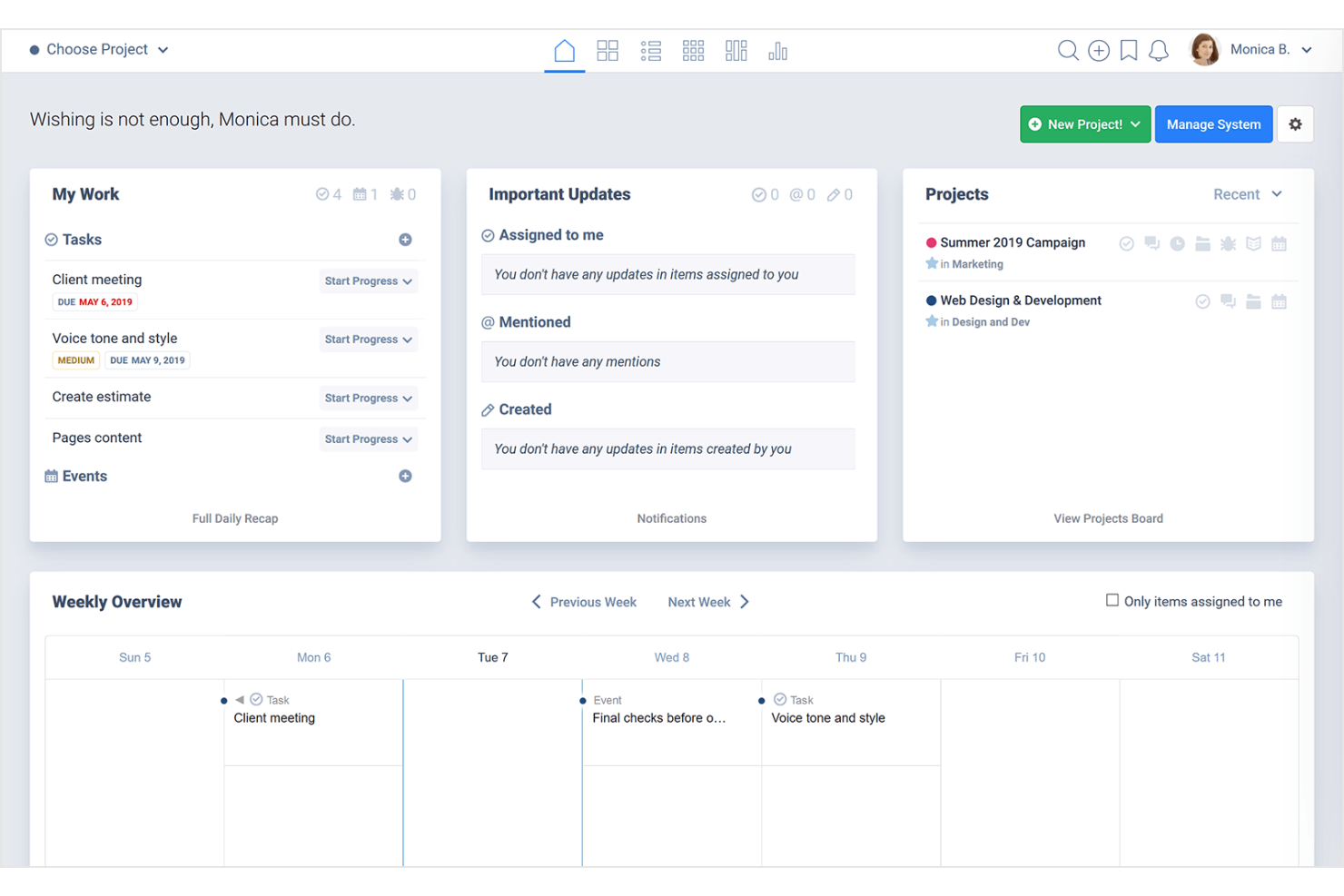
Freedcamp è un'applicazione di gestione progetti che facilita la collaborazione e l'organizzazione del team. È riconosciuta come la migliore per la pianificazione di progetti gratuita, offrendo un ricco set di strumenti senza costi.
Perché ho scelto Freedcamp:
Ho selezionato Freedcamp per questa lista perché unisce in modo unico l'efficacia in termini di costi a un set di funzionalità completo, rendendo la gestione dei progetti accessibile a tutti. Offre agli utenti la possibilità di gestire un numero illimitato di progetti e attività, aspetto cruciale per una pianificazione dettagliata, tutto gratuitamente.
Funzionalità e integrazioni principali:
Le funzionalità includono liste di attività, sottoattività, diagrammi di Gantt, visualizzazioni del calendario e tracciamento dei problemi, elementi essenziali per una gestione efficiente dei progetti. Lo strumento supporta anche l'archiviazione e la condivisione di file, il monitoraggio del tempo e la fatturazione.
Le integrazioni includono Google Drive, Dropbox, OneDrive, Zapier.
Pros and Cons
Pros:
- Versione gratuita disponibile con funzionalità essenziali
- Piani premium convenienti
- Buona integrazione con i più diffusi servizi di cloud storage
Cons:
- Funzionalità limitate nel piano gratuito
- Interfaccia utente basilare rispetto agli strumenti più moderni

Ideale per integrazioni con Microsoft
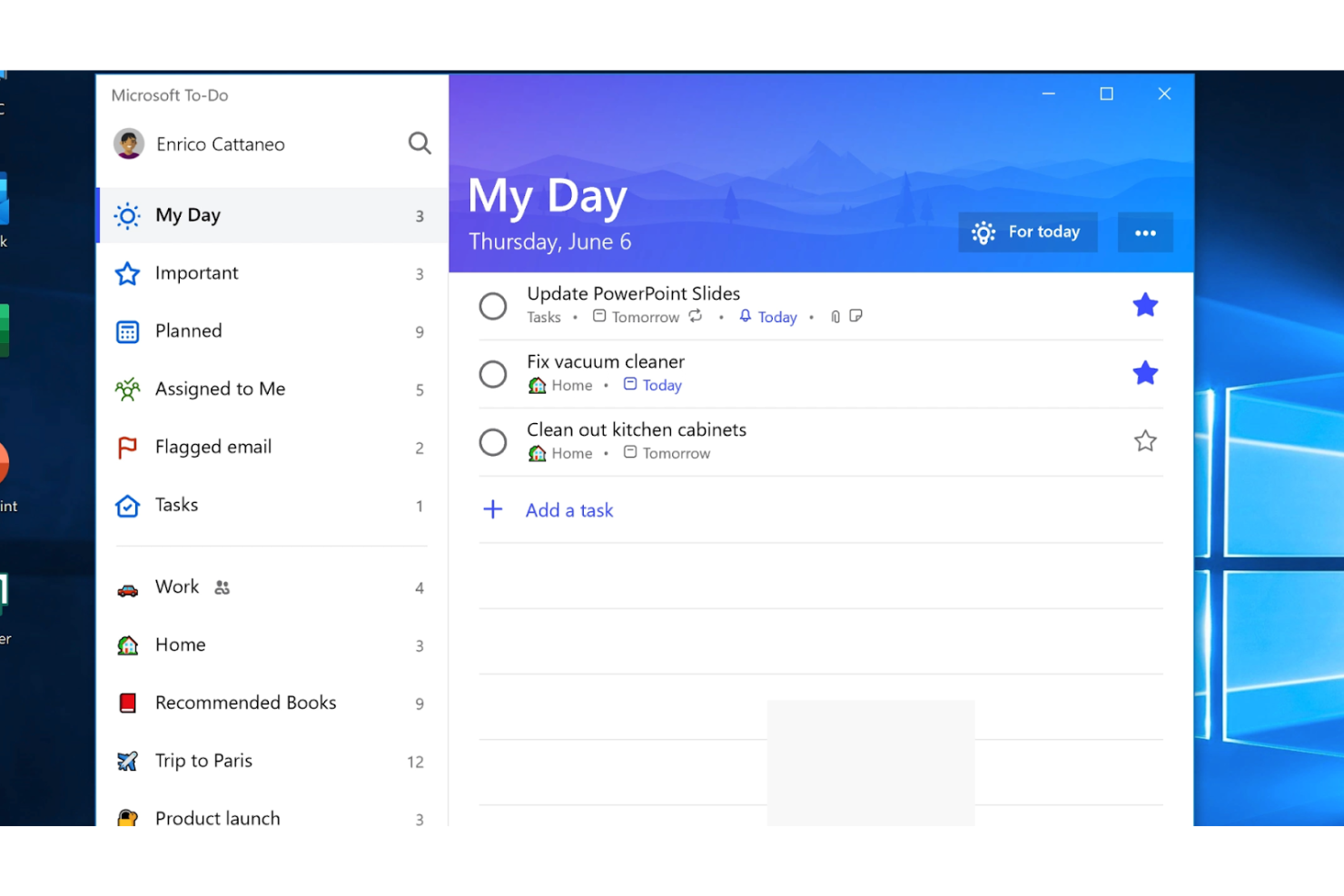
Microsoft To Do è un'applicazione di gestione delle attività che semplifica l'organizzazione dei compiti. È ideale per le integrazioni con Microsoft grazie alla sua connettività fluida con la suite di prodotti Microsoft.
Perché ho scelto Microsoft To Do:
Ho selezionato Microsoft To Do per la sua eccezionale integrazione nell'ecosistema Microsoft, una caratteristica di spicco per chi si affida alle applicazioni Microsoft per uso personale e professionale. Sfrutta l'infrastruttura Microsoft esistente per migliorare la gestione delle attività e la produttività.
Funzionalità e integrazioni principali:
Le funzionalità includono un pianificatore giornaliero intelligente chiamato Il Mio Giorno, condivisione delle liste, sottoattività, scadenze e promemoria.
Le integrazioni includono Microsoft Outlook, Microsoft 365, OneNote, OneDrive, Microsoft Planner, Microsoft Teams, Cortana, Microsoft Power Automate, SharePoint e Microsoft Launcher.
Pros and Cons
Pros:
- Nessun costo per l'uso con un account Microsoft
- Integrazione diretta con Outlook e altri servizi Microsoft
- Disponibilità cross piattaforma
Cons:
- Funzionalità più limitate rispetto agli strumenti completi di gestione dei progetti
- Funzionalità basilari di prioritizzazione delle attività

Evernote
Ideale per la presa di appunti completa
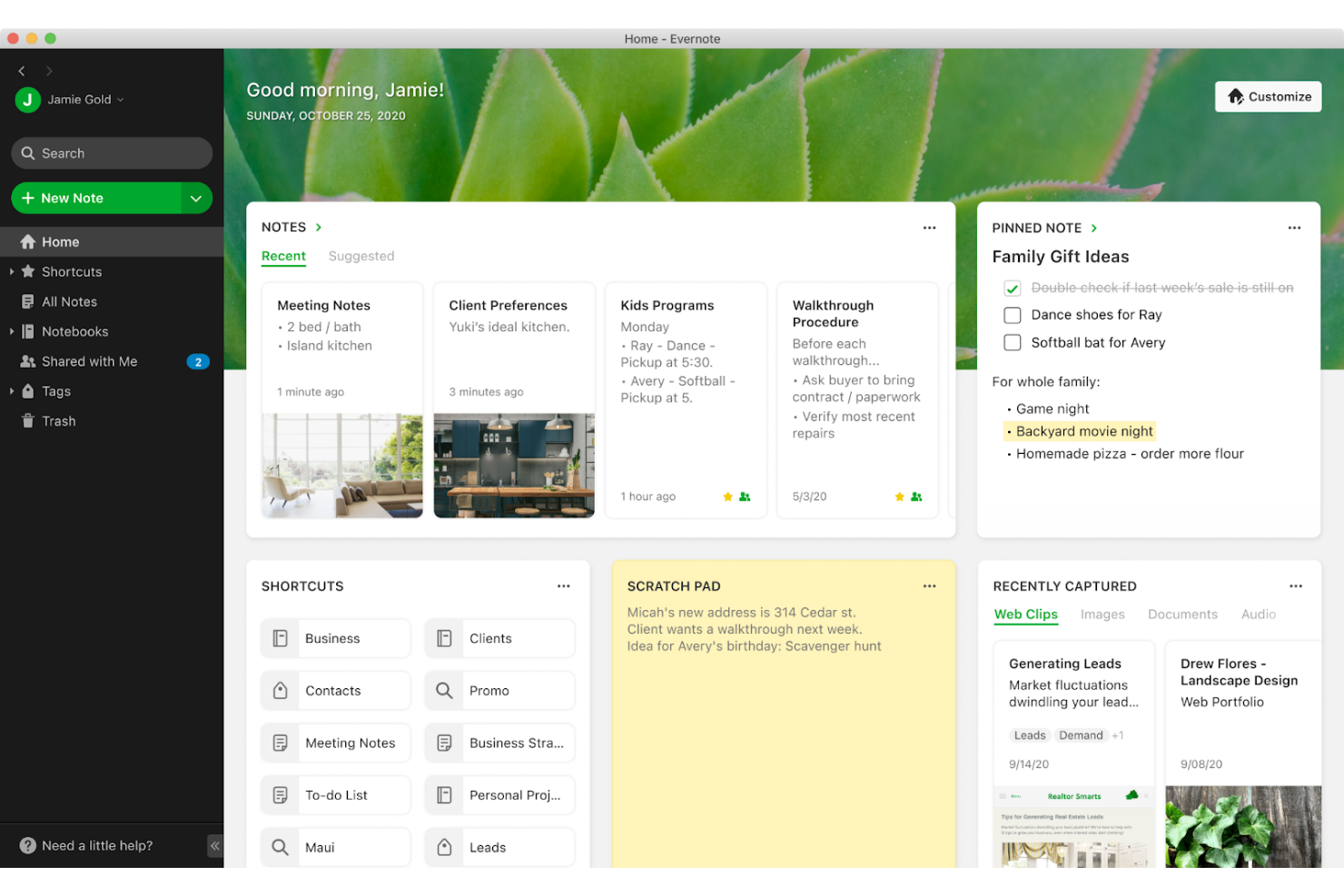
Evernote funge da piattaforma completa per la presa di appunti e l'organizzazione delle informazioni. Permette agli utenti di catturare, organizzare e condividere note da qualsiasi luogo, migliorando la produttività e la memorizzazione delle informazioni.
Perché ho scelto Evernote:
Ho selezionato Evernote per l'elenco perché è ampiamente riconosciuta per le sue capacità complete di presa di appunti che superano molte altre app di questa categoria. La sua caratteristica distintiva risiede nella profondità e ampiezza delle funzionalità che facilitano non solo la presa di appunti ma anche una gestione complessa delle informazioni. Eccelle nel creare un archivio strutturato e ricercabile per tutti i tipi di note e documenti, il che è prezioso per gli utenti che necessitano di un archivio esteso e dettagliato del proprio lavoro.
Caratteristiche e integrazioni principali:
Le caratteristiche includono la possibilità di catturare vari tipi di contenuto (testo, immagini e PDF), un potente motore di ricerca capace persino di riconoscere note scritte a mano, la scansione di documenti e il web clipping per consolidare informazioni da più fonti.
Le integrazioni includono Google Drive, Outlook, Slack, Salesforce e Microsoft Teams.
Pros and Cons
Pros:
- Strumenti avanzati per la presa di appunti e l'organizzazione
- Integrazione con popolari app di produttività
- Accesso offline alle note su dispositivi mobili
Cons:
- I piani premium possono risultare costosi per alcuni utenti
- Può risultare più complesso rispetto ad app di appunti più semplici

TickTick
Ideale per la produttività personale

TickTick è un'app di gestione delle attività versatile. È perfetta per la produttività personale grazie a una serie di funzionalità pensate per le esigenze individuali.
Perché ho scelto TickTick:
Ho selezionato TickTick per il suo design intuitivo e per le funzionalità che supportano la gestione personale delle attività, distinguendosi da altri strumenti di produttività. Offre un'esperienza su misura che può essere personalizzata per adattarsi alle abitudini e preferenze uniche di ogni utente, migliorando così la loro efficienza e organizzazione.
Funzionalità e integrazioni principali:
Funzionalità includono organizzazione delle attività, timer Pomodoro integrato, tracciamento delle abitudini e visualizzazioni del calendario.
Integrazioni includono Google Calendar, Outlook e app di terze parti tramite Zapier.
Pros and Cons
Pros:
- Funzionalità di gestione delle attività personalizzabili
- Timer di concentrazione e tracciamento delle abitudini integrati
- Sincronizzazione multipiattaforma
Cons:
- Personalizzazione limitata rispetto ad altri strumenti
- Nessuna opzione di fatturazione mensile
Ideale per il monitoraggio visivo dei progetti
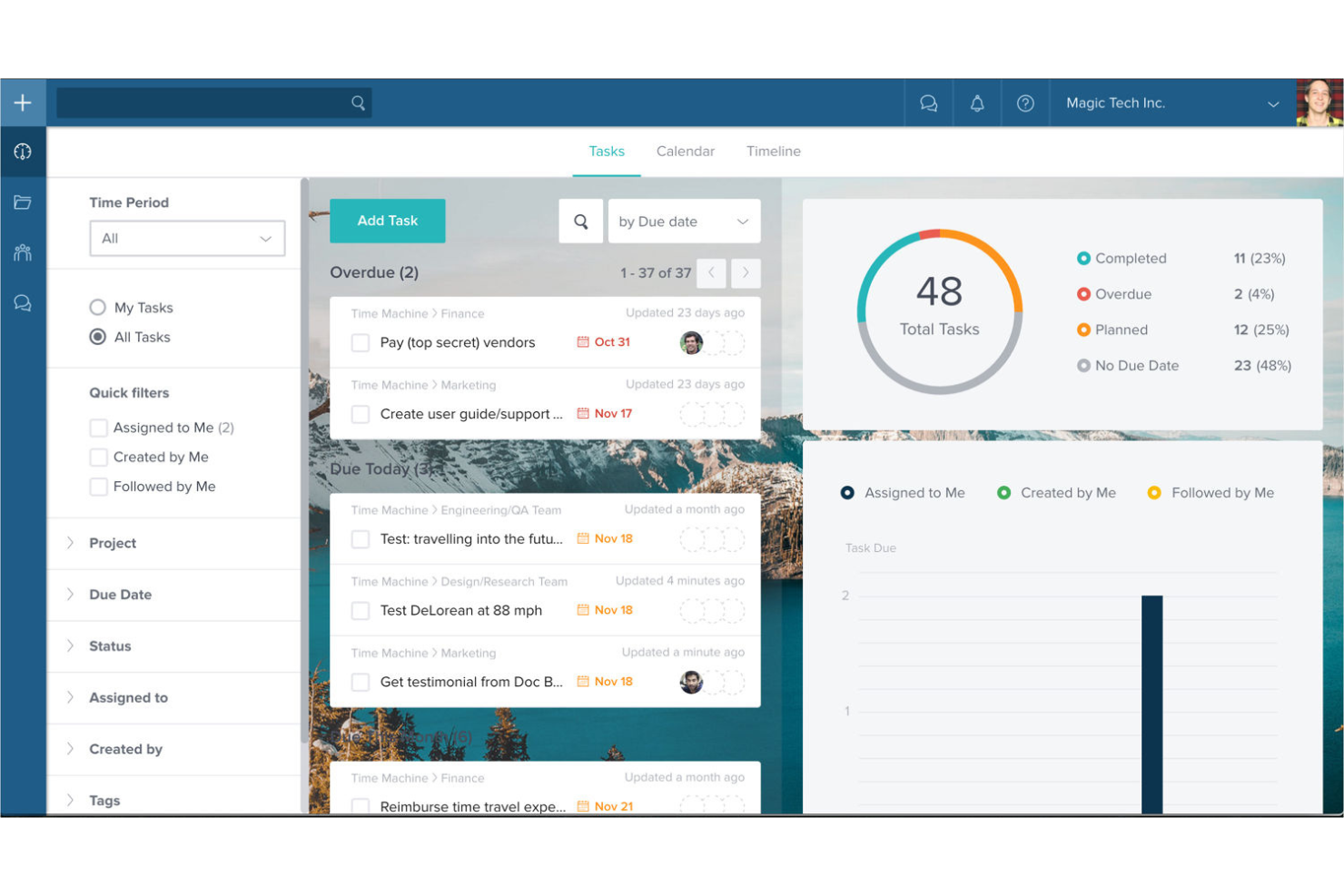
Taskworld è uno strumento che facilita la collaborazione del team e la gestione dei progetti. È ideale per il monitoraggio visivo dei progetti grazie alle sue capacità di visualizzazione complete.
Perché ho scelto Taskworld:
Ho selezionato Taskworld per le sue eccezionali funzionalità di monitoraggio visivo dei progetti, che lo distinguono dagli altri software di liste di cose da fare. La chiarezza e il livello di dettaglio nella rappresentazione visiva delle attività permettono ai team di comprendere rapidamente lo stato e il flusso di lavoro dei progetti. Fornisce utili strumenti visivi come le bacheche Kanban, la vista cronologica e i calendari condivisi, fondamentali per gestire progetti complessi e scadenze.
Funzionalità principali e integrazioni:
Le funzionalità includono gestione delle attività con checklist, timeline dei progetti, gestione dei file e messaggistica diretta. Questi strumenti sono essenziali per mantenere l’organizzazione del progetto e assicurare una comunicazione efficace all’interno del team.
Le integrazioni includono Google Calendar, Google Drive, Dropbox, Box, Outlook, Slack e Zapier.
Pros and Cons
Pros:
- Monitoraggio visivo dei progetti con timeline interattive
- Strumenti integrati di analisi e reportistica
- Sistema di feedback efficace sulle attività
Cons:
- Prezzo più elevato rispetto agli strumenti base di gestione delle attività
- Può avere una curva di apprendimento più ripida per i nuovi utenti a causa delle sue numerose funzionalità

Any.do
Ideale per la gestione semplice delle attività
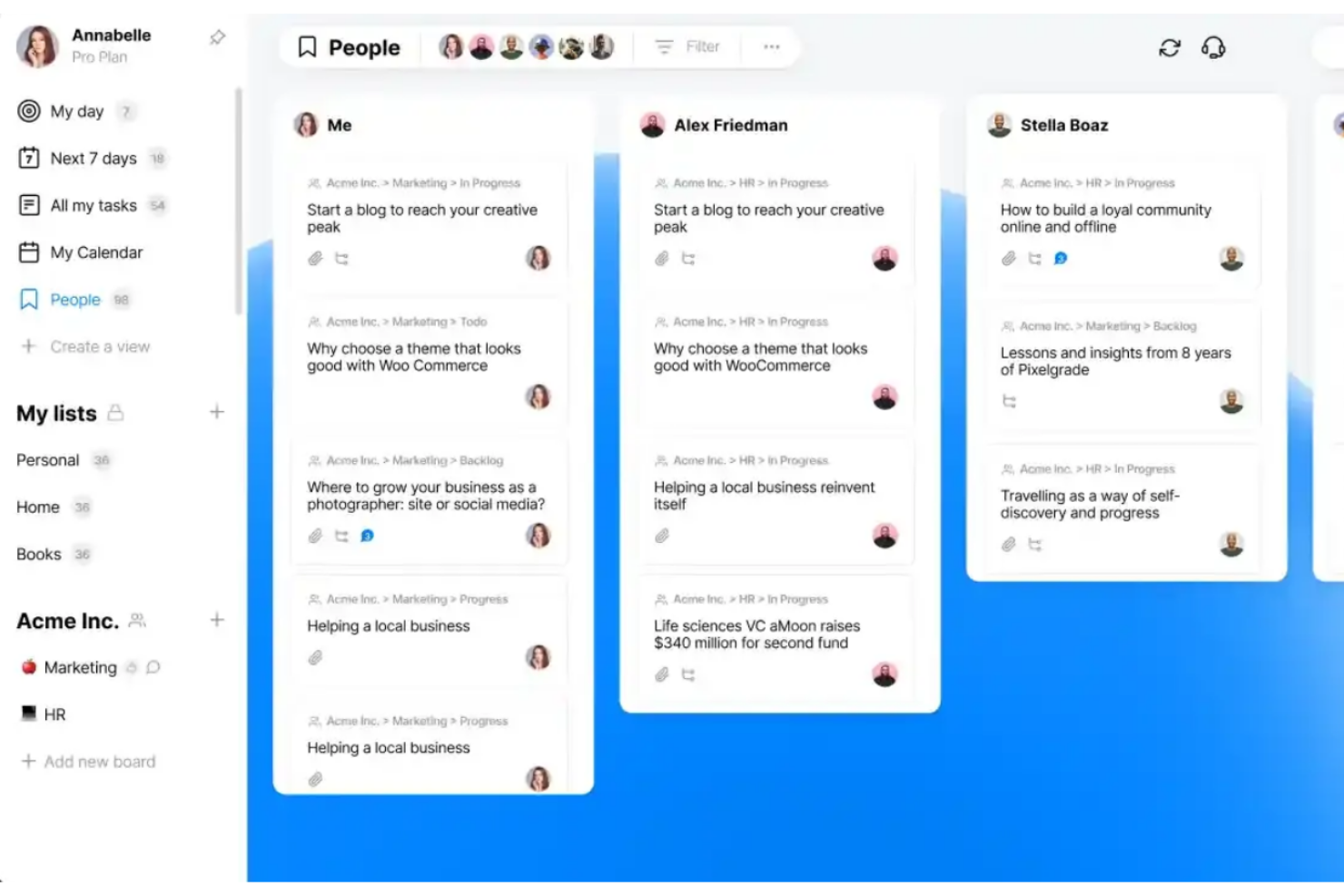
Any.do è un'app di gestione delle attività progettata per aiutarti a organizzare i compiti quotidiani. Si distingue come la migliore per la gestione semplice delle attività grazie alla sua interfaccia intuitiva e alla funzionalità diretta.
Perché ho scelto Any.do:
Ho scelto Any.do per questa lista per la sua semplicità ed efficacia nella gestione delle attività giornaliere. Ciò che la rende diversa dalle altre app di gestione delle attività è il suo focus sulla facilità d'uso e sul design minimalista, che permette un'inserimento e una gestione rapida delle attività senza una curva di apprendimento ripida. Offre tutte le funzionalità essenziali senza sopraffare l'utente, rendendola ideale per chi vuole restare organizzato con il minimo sforzo.
Funzionalità e integrazioni principali:
Funzionalità includono liste di cose da fare, pianificatori giornalieri, calendari, promemoria e la possibilità di condividere liste e assegnare attività.
Integrazioni includono Slack, Microsoft Teams, Zoom, Google Meet, WhatsApp, Gmail, Google Calendar, Zapier, Jira, Trello, monday.com, ClickUp, Asana e Todoist.
Pros and Cons
Pros:
- Interfaccia intuitiva e facile da usare
- Sincronizzazione multipiattaforma
- Ampia varietà di integrazioni con altre app
Cons:
- Le funzionalità premium richiedono un abbonamento annuale
- Potrebbe non essere adatta alla gestione di progetti complessi

Motion
Ideale per l'assistenza alla pianificazione con IA
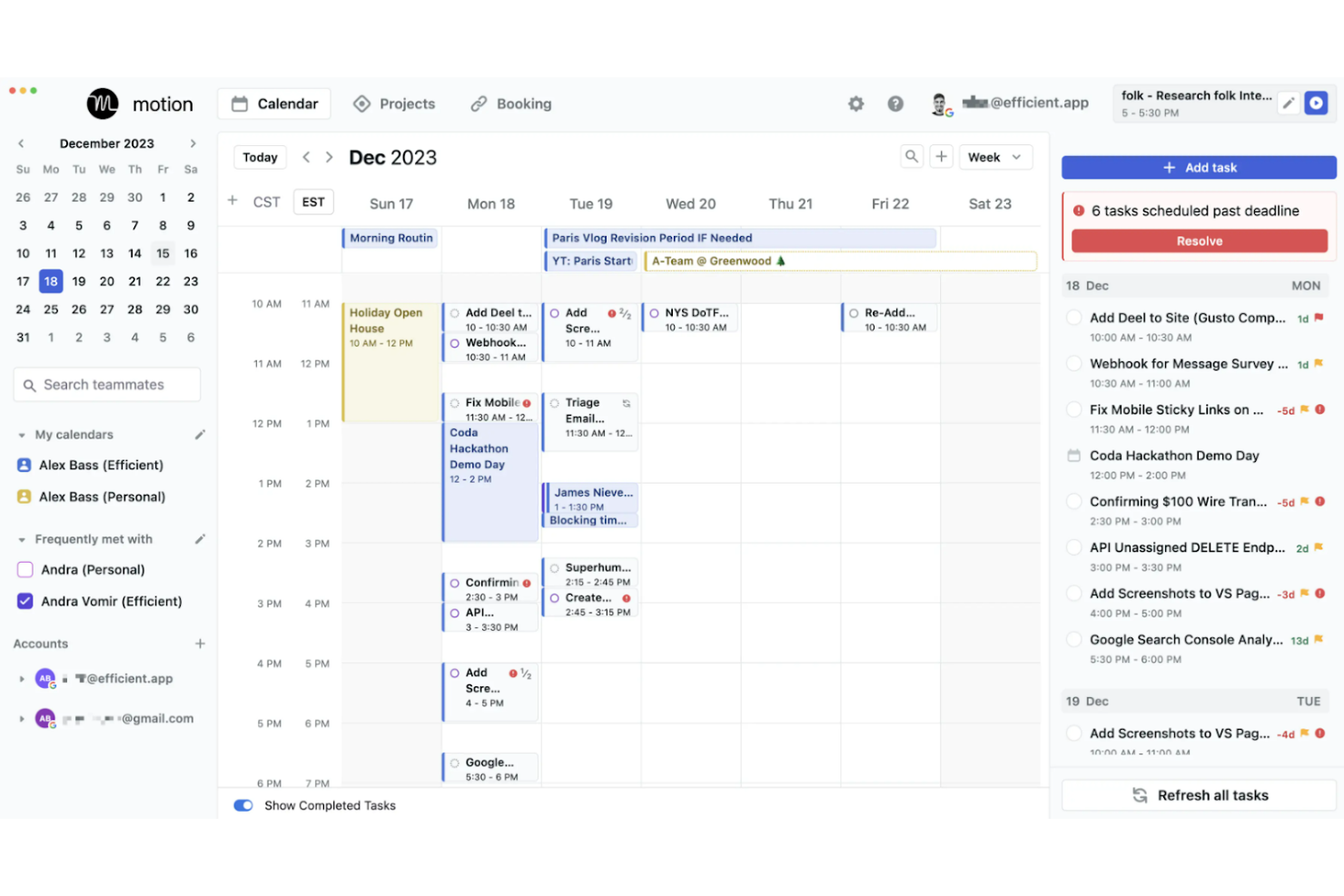
Motion è uno strumento che combina la gestione delle attività con la programmazione intelligente. È il migliore per l'assistenza alla pianificazione con IA perché utilizza l'intelligenza artificiale per ottimizzare gli orari degli utenti, con l'obiettivo di aumentare significativamente la produttività.
Perché ho scelto Motion:
Ho selezionato Motion per la sua integrazione innovativa dell'IA nella gestione della pianificazione e delle attività, che lo distingue dalle altre app di to-do list. La sua caratteristica principale è la capacità dell'IA di automatizzare le decisioni di pianificazione, che può rappresentare una svolta per gli utenti sopraffatti dalla gestione del tempo. È in grado di dare priorità e allocare il tempo per le attività in modo intelligente, il che può essere particolarmente utile per gli utenti con orari complessi.
Funzionalità e integrazioni principali:
Le funzionalità includono la programmazione alimentata dall'IA che dà automaticamente priorità e assegna il tempo alle attività, una piattaforma unificata per gestire attività e progetti, e un pianificatore intelligente delle riunioni progettato per raggruppare gli incontri e ridurre le interruzioni.
Le integrazioni di Motion includono Google Calendar, Microsoft Outlook, Zoom, Slack, Trello, Asana, Jira, Salesforce, Dropbox ed Evernote.
Pros and Cons
Pros:
- Pianificazione e ripianificazione automatica guidata dall'IA
- Integrazione con i principali calendari e strumenti di produttività
- Analisi per monitorare e migliorare la gestione del tempo
Cons:
- Prezzo elevato rispetto agli strumenti di pianificazione di base
- Richiede un impegno annuale
- Potrebbe richiedere tempo per imparare a sfruttare completamente le funzionalità di IA

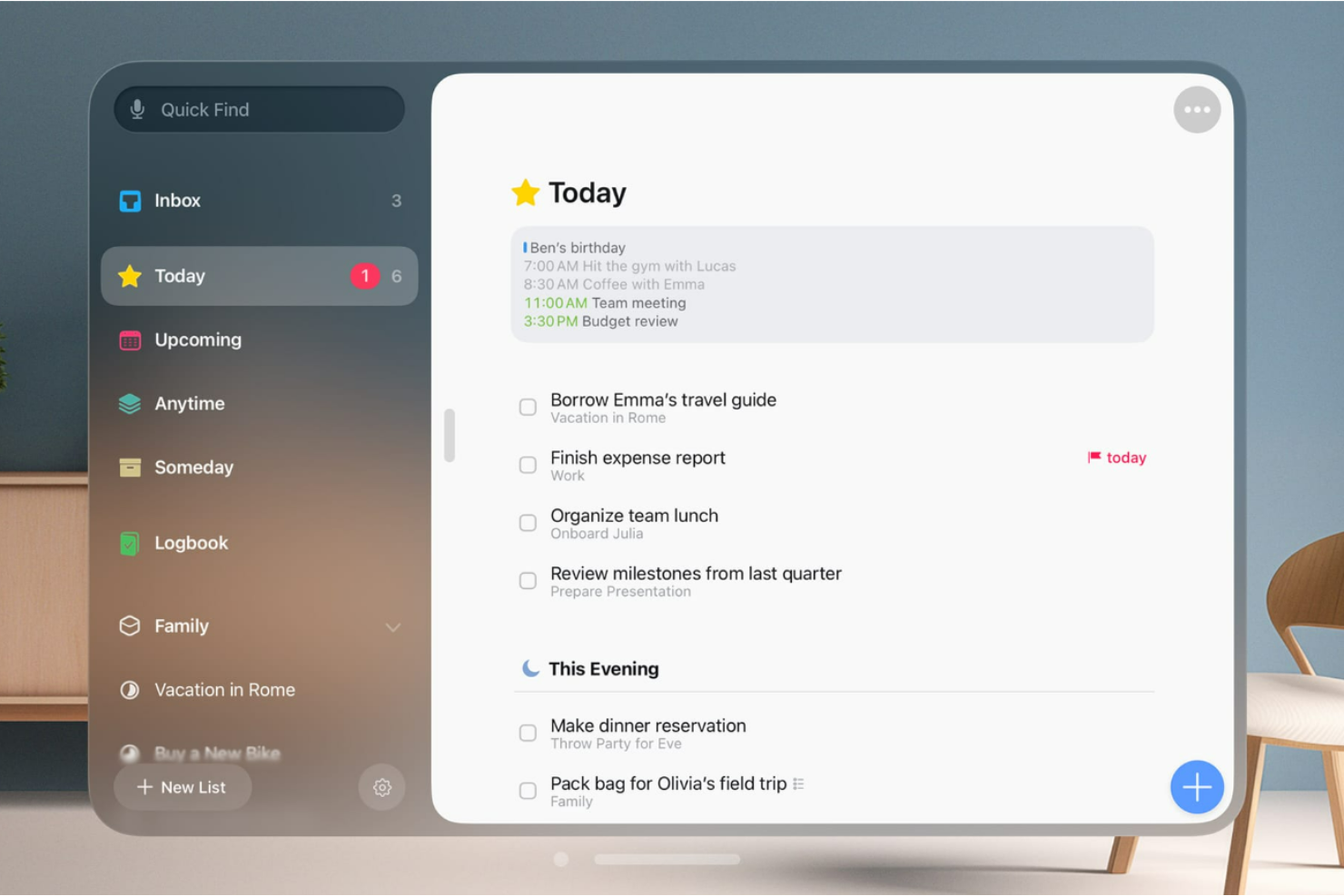
Things è un gestore di attività che combina elegantemente funzionalità e stile. È riconosciuto come il migliore per l'organizzazione elegante delle attività grazie alla sua interfaccia visivamente attraente che migliora l'esperienza dell'utente.
Perché ho scelto Things:
Ho selezionato Things per il suo eccezionale equilibrio tra design e funzionalità, che lo distingue dalle altre app per liste di cose da fare. Il suo appeal estetico è pari alle sue funzionalità complete, rendendo la gestione delle attività non solo pratica ma anche piacevole. Ho determinato che Things è il 'Migliore per l'organizzazione elegante delle attività' perché eccelle nell'offrire un'esperienza utente coinvolgente senza compromettere le potenti capacità di gestione delle attività che gli utenti richiedono.
Funzionalità e integrazioni distintive:
Le funzioni includono la creazione di attività con input in linguaggio naturale, l'organizzazione di progetti con intestazioni e checklist, e l'integrazione del calendario per una panoramica completa della tua agenda. L'app supporta anche Siri per i comandi vocali, consentendo aggiunte rapide di attività e promemoria.
Le integrazioni includono Calendario e Promemoria su macOS e iOS.
Pros and Cons
Pros:
- Interfaccia utente elegante
- Organizzazione efficiente delle attività in progetti
- Integrazione efficace con l'ecosistema Apple
Cons:
- Limitato ai dispositivi Apple
- Nessuna integrazione nativa con piattaforme non Apple
Altre app per liste di cose da fare
Ecco alcune ulteriori opzioni di app per liste di cose da fare che non sono entrate nella mia selezione, ma che vale comunque la pena prendere in considerazione:
- Remember The Milk
Ideale per promemoria di attività intuitivi
- Omni Focus
Ideale per una gestione dettagliata delle attività
- Smart List
La migliore lista di cose da fare semplice per qualsiasi piattaforma


Come Valuto le App di Liste di Attività
Valuto ogni strumento su due livelli: le funzionalità di base—come l'assegnazione delle attività e la sincronizzazione tra dispositivi—che ogni buona opzione deve avere, e i fattori di differenziazione che distinguono i migliori.
Funzionalità Principali (Requisiti Minimi per questa Lista)
Quando seleziono gli strumenti per la mia lista, valuto ciascuno su una scala da 0 (non offre la funzionalità) a 5 (eccelle in quest'area) per ogni funzionalità principale elencata di seguito. Successivamente, calcolo il punteggio totale dello strumento in percentuale. Ogni strumento deve raggiungere un punteggio totale minimo del 65% per essere incluso.
- Creazione e Gestione delle Attività: Esamino con quale rapidità si può passare da un'idea a un'attività organizzata—se lo strumento supporta sotto-attività, allegati, note e attività ricorrenti per cose come checklist di preparazione sprint settimanali.
- Date di Scadenza e Promemoria: Ogni strumento dovrebbe permetterti di impostare scadenze e attivare avvisi puntuali, così una consegna come una presentazione per la revisione del cliente non passa inosservata oltre la data limite.
- Prioritizzazione e Organizzazione: Valuto come puoi ordinare e raggruppare le attività—contrassegni di priorità, tag, cartelle, o raggruppamento per progetto—per separare i blocchi urgenti dagli elementi in backlog.
- Monitoraggio dello Stato delle Attività: La chiarezza sullo stato di avanzamento è importante, quindi controllo se lo strumento va oltre la semplice casella di spunta offrendo stati come "in corso" o "bloccato" in una lista di attività condivisa.
- Collaborazione e Assegnazione: Per i team di progetto, valuto quanto sia facile assegnare un'attività a un collega, lasciare un commento contestuale e mantenere tutti aggiornati su una lista condivisa.
- Sincronizzazione Multi-Piattaforma: La sincronizzazione in tempo reale su web, mobile e desktop è fondamentale—verifico che un'attività aggiunta dal telefono durante il tragitto compaia istantaneamente quando si apre il portatile.
Una volta raccolti gli strumenti che soddisfano i criteri, considero cosa distingue ciascuna piattaforma.
Fattori di Differenziazione (Ciò che Distingue i Fornitori)
Ecco come confronto i diversi fornitori:
Funzionalità Distintive
Opzioni di visualizzazione multiple—lista, bacheca, calendario, cronologia—fanno davvero la differenza quando si gestiscono attività attraverso fasi di progetto. Cerco strumenti che permettano di cambiare vista senza perdere il contesto. Modelli e automazioni meritano una valutazione accurata. Uno strumento che consente di clonare una checklist ricorrente di sprint o di assegnare automaticamente attività di onboarding elimina compiti ripetitivi ad ogni ciclo. Considero anche l'inserimento in linguaggio naturale: se scrivere "finalizzare il rapporto entro venerdì" crea automaticamente un'attività con la scadenza corretta.
Oltre le Funzionalità
La profondità dell'integrazione conta—verifico se uno strumento si connette nativamente con piattaforme come Jira, Slack e Google Calendar affinché le attività restino sincronizzate con il flusso generale del progetto. Prezzi e scalabilità sono altrettanto importanti, soprattutto nel confronto tra il piano gratuito e quelli a pagamento man mano che cresce il gruppo di progetto. Considero anche la facilità di onboarding, poiché uno strumento che il tuo team non adotta è uno strumento inutile. Una configurazione veloce con tutorial guidati aiuta i team distribuiti a diventare produttivi rapidamente senza necessità di un ciclo di formazione dedicato.
Come scegliere le app per liste di cose da fare
È facile perdersi in lunghi elenchi di funzionalità e strutture di prezzo complesse. Per aiutarti a rimanere concentrato mentre affronti il tuo esclusivo processo di selezione del software, ecco una lista di fattori da tenere a mente:
| Fattore | Cosa considerare |
| Facilità d'uso | Cerca un'interfaccia semplice che aiuti il tuo team a iniziare rapidamente ad assegnare e completare le attività senza formazione. |
| Scalabilità | Assicurati che l'app possa gestire un numero maggiore di utenti, progetti e attività man mano che il tuo team o il carico di lavoro crescono. |
| Integrazioni | Scegli uno strumento che si colleghi ai sistemi già in uso, come Slack, Google Workspace o gli strumenti di gestione dei progetti. |
| Personalizzazione | Verifica se puoi modificare le visualizzazioni, i campi o le etichette delle attività dello strumento in base al flusso di lavoro e alle preferenze del tuo team. |
| Budget | Controlla se l'app offre un valore sufficiente rispetto al suo prezzo, soprattutto se avrai bisogno di più licenze o funzionalità. |
| Misure di sicurezza | Verifica che lo strumento utilizzi la crittografia, i controlli di accesso e backup regolari per proteggere i tuoi dati. |
| Strumenti di collaborazione | Cerca funzionalità come commenti sulle attività, menzioni e allegati per mantenere le comunicazioni collegate al lavoro. |
| Accesso da dispositivi mobili | Se tu o il tuo team lavorate in mobilità, assicurati che l'app mobile sia affidabile e facile da usare. |
Tendenze nelle app per liste di cose da fare
Durante la mia ricerca, ho raccolto innumerevoli aggiornamenti dei prodotti, comunicati stampa e registri delle versioni di diversi fornitori di app per liste di cose da fare. Ecco alcune delle tendenze emergenti che sto tenendo d'occhio:
- Suggerimenti di attività basati sull'IA: Alcuni strumenti ora utilizzano l'IA per suggerire scadenze, priorità o assegnazioni in base al comportamento passato degli utenti. Questo contribuisce a ridurre la pianificazione manuale e supporta decisioni quotidiane migliori.
- Modalità di concentrazione e blocco del tempo: I timer di concentrazione integrati, i pianificatori giornalieri e le funzioni di blocco del tempo stanno diventando sempre più comuni. Questi strumenti aiutano gli utenti a svolgere le attività con maggiore struttura e meno distrazioni.
- Mappatura delle relazioni tra le attività: Le app più recenti stanno introducendo modalità per mostrare come le attività sono correlate tra loro utilizzando strutture visive o formati nidificati. Questo facilita la gestione delle dipendenze e la comprensione dei collegamenti tra le attività.
- Flessibilità delle attività ricorrenti: Le impostazioni delle attività ricorrenti stanno diventando più intelligenti. Invece di opzioni di ripetizione rigide, gli utenti possono ora configurare regole di ricorrenza più specifiche e utili, adatte ai flussi di lavoro reali.
- Inserimento in linguaggio naturale: Molti strumenti ora permettono di digitare le attività in linguaggio comune, come “Invia il rapporto venerdì prossimo alle 14:00”, e di convertirle automaticamente in un'attività programmata. Questo velocizza l'inserimento e aiuta gli utenti a rimanere concentrati.
Cosa sono le app per le liste di cose da fare?
Le app per le liste di cose da fare sono strumenti digitali progettati per la gestione delle attività, utilizzati da singoli individui e team per organizzare e stabilire le priorità delle attività e dei progetti quotidiani. Queste applicazioni sono essenziali per chiunque debba tenere traccia di diverse attività, dai professionisti che gestiscono i propri carichi di lavoro agli studenti che programmano le sessioni di studio.
I componenti delle app per le liste di cose da fare includono voci delle attività, scadenze, notifiche e spesso funzioni di categorizzazione per aiutare gli utenti a mantenere l'organizzazione. Possono inoltre integrarsi con altri strumenti software per la produttività per semplificare la gestione delle attività su più piattaforme.
Funzionalità delle app per le liste di cose da fare
Quando scegli le app per le liste di cose da fare, presta attenzione alle seguenti funzionalità principali:
- Creazione e modifica delle attività: Ti consente di aggiungere, aggiornare o eliminare rapidamente le attività man mano che le tue priorità cambiano durante la giornata.
- Scadenze e promemoria: Ti aiutano a rispettare la programmazione inviando avvisi prima della scadenza delle attività.
- Assegnazione delle attività: Ti permette di delegare le attività a membri specifici del team e di monitorarne la responsabilità.
- Organizzazione per progetto o lista: Ti consente di raggruppare le attività per progetto, categoria o lista, migliorandone la visibilità.
- Attività ricorrenti: Automatizza la creazione di attività che si ripetono secondo una pianificazione giornaliera, settimanale o personalizzata.
- Livelli di priorità: Ti permette di contrassegnare le attività in base alla loro importanza, così puoi concentrarti su ciò che conta di più.
- Note o descrizioni: Offre spazio per aggiungere il contesto o i dettagli utili a completare l'attività.
- Allegati e supporto ai file: Ti permette di caricare direttamente nell'attività i file pertinenti, per accedervi facilmente.
- Monitoraggio dei progressi: Fornisce un modo visivo o numerico per controllare quanto manca al completamento delle attività.
- Opzioni di ricerca e filtro: Ti aiutano a trovare rapidamente le attività in base a parole chiave, tag o altri criteri.
Vantaggi delle app per le liste di cose da fare
L'implementazione di app per le liste di cose da fare può offrire diversi vantaggi al tuo team e alla tua azienda. Ecco alcuni dei benefici che puoi aspettarti:
- Maggiore visibilità sulle attività: Tutti possono vedere cosa deve essere fatto, entro quando e da chi.
- Meno scadenze mancate: Scadenze e promemoria aiutano a evitare che le attività vengano trascurate.
- Maggiore responsabilità: Le assegnazioni delle attività chiariscono chi è responsabile di cosa.
- Pianificazione più rapida: L'inserimento e la modifica rapidi delle attività consentono di adeguare i piani senza ricominciare da capo.
- Monitoraggio più semplice dei progressi: Puoi vedere come procede il lavoro grazie a segni di spunta, stati o barre di avanzamento.
- Meno cambi di contesto: Note e allegati mantengono tutto ciò che riguarda l'attività in un unico posto.
- Prioritizzazione più intelligente: Le impostazioni delle priorità aiutano il team a concentrarsi prima sulle attività ad alto impatto.
Costi e prezzi delle app per le liste di cose da fare
La scelta delle app per le liste di cose da fare richiede la comprensione dei vari modelli e piani tariffari disponibili. I costi variano in base alle funzionalità, alle dimensioni del team, ai componenti aggiuntivi e ad altri fattori. La tabella seguente riassume i piani più comuni, i relativi prezzi medi e le funzionalità tipicamente incluse nelle soluzioni per app per le liste di cose da fare:
Tabella comparativa dei piani per le app per le liste di cose da fare
| Tipo di piano | Prezzo medio | Funzionalità comuni |
| App gratuita | $0 | Gestione di base delle attività, integrazioni semplici, funzionalità di collaborazione limitate |
| Base | $1-3 al mese | Gestione avanzata delle attività, integrazioni aggiuntive, alcuni strumenti di collaborazione, assistenza di base |
| Premium | $4-6 al mese | Gestione avanzata delle attività, integrazioni complete, solidi strumenti di collaborazione, assistenza prioritaria |
| Enterprise | $7+ al mese | Soluzioni personalizzate per la gestione delle attività, integrazioni di livello aziendale, assistenza dedicata e formazione |
Domande frequenti sulle app per liste di cose da fare
Ecco alcune delle domande frequenti che ricevo sulle app per liste di cose da fare.
E adesso?
Vuoi entrare in contatto con altri project manager digitali per condividere risorse e buone pratiche? Iscriviti alla nostra community e ottieni l'accesso a oltre 100 modelli, campioni ed esempi e mettiti in contatto su Slack con centinaia di altri project manager digitali.