

10 migliori alternative a Notion nel 2026

10 Elenco delle migliori alternative a Notion


Le migliori alternative a Notion offrono strumenti di gestione dei progetti che semplificano la pianificazione, la collaborazione e l'organizzazione, soprattutto se Notion non è adatto al tuo team o ti sembra troppo complesso. Con la giusta alternativa a Notion, potrai portare a termine i progetti con funzionalità personalizzate in base ai tuoi flussi di lavoro e un'interfaccia adatta alle tue esigenze.
Ho utilizzato la mia esperienza nella gestione di un'agenzia e oltre 3 anni di test di software per esaminare decine di strumenti e selezionare la mia lista delle migliori alternative a Notion. Ogni mia raccomandazione ti aiuterà a gestire e monitorare meglio i tuoi progetti, raggiungere gli obiettivi principali e realizzare un lavoro di grande impatto per i tuoi clienti.
Quali sono le alternative a Notion?
Le alternative a Notion sono strumenti che ti consentono di gestire note, attività, database e progetti in un unico luogo, in modo simile a Notion. Come Notion, offrono uno spazio centrale per pianificare, monitorare e collaborare, ma possono avere un'interfaccia più intuitiva, funzionalità aggiuntive che Basecamp non offre o maggiori possibilità di personalizzazione per adattarsi alle tue esigenze.
Le alternative a Notion sono apprezzate da responsabili di progetto, titolari di aziende e team distribuiti che desiderano modi semplici per organizzare il lavoro secondo le proprie esigenze e mantenere tutto sincronizzato.
Perché fidarsi dei nostri consigli sui software
Il nostro team testa e recensisce software dal 2012. In quanto project manager noi stessi, sappiamo quanto sia difficile — e importante — scegliere il software giusto.
Per questa guida, abbiamo valutato gli strumenti attraverso test pratici e ricerche indipendenti, assegnando un punteggio agli strumenti in base ai nostri criteri di selezione. Ci basiamo inoltre sulle competenze di leader di pensiero del settore e di professionisti attivi nella gestione dei progetti.
Le nostre recensioni riflettono il nostro giudizio editoriale umano, non un discorso di vendita.
Revisori esperti:
Tabella di confronto delle alternative a Notion
Utilizza questa tabella di confronto per confrontare prezzi e specifiche principali delle mie migliori alternative a Notion.
| Tool | Best For | Trial Info | Price | ||
|---|---|---|---|---|---|
| 1 | Ideale per bacheche attività personalizzabili | Piano gratuito disponibile | A partire da $9/utente/mese (fatturazione annuale) | Website | |
| 2 | Ideale per il monitoraggio del tempo di lavoro | Prova gratuita di 15 giorni + piano gratuito + demo gratuita disponibile | Da $4/utente/mese (fatturati annualmente) | Website | |
| 3 | Ideale per suddividere progetti complessi | Prova gratuita di 30 giorni + piano gratuito disponibile | Da $7,65/membro/mese (fatturato annualmente) | Website | |
| 4 | Ideale per creare un sistema di marketing personalizzato | Prova gratuita di 14 giorni disponibile | A partire da $29/mese | Website | |
| 5 | Ideale per automatizzare le attività ripetitive | Prova gratuita di 14 giorni + piano gratuito disponibile | Da $10/utente/mese (fatturato annualmente) | Website | |
| 6 | Ideale per stati personalizzati delle attività | Piano gratuito + demo gratuita disponibile | Da $7/utente/mese (fatturati annualmente) | Website | |
| 7 | Ideale per flussi di lavoro di team remoti basati sull'IA | Piano gratuito disponibile | A partire da $10/utente/mese (con fatturazione annuale) | Website | |
| 8 | Ideale per progetti incentrati sui documenti | Prova gratuita + piano gratuito + demo gratuita disponibili | A partire da $10/creatore di documento/mese (fatturazione annuale) | Website | |
| 9 | Ideale per la collaborazione sui contenuti | Prova gratuita di 7 giorni + piano gratuito disponibile | Da $5.42/utente/mese | Website | |
| 10 | Ideale per la gestione delle issue | Prova gratuita di 7 giorni + piano gratuito disponibile | Da $20/mese | Website |


Recensioni delle migliori alternative a Notion
Ecco la mia analisi dettagliata e la panoramica di ogni alternativa a Notion. Esamino vantaggi e svantaggi, funzionalità principali e migliori casi d’uso.

Ideale per bacheche attività personalizzabili
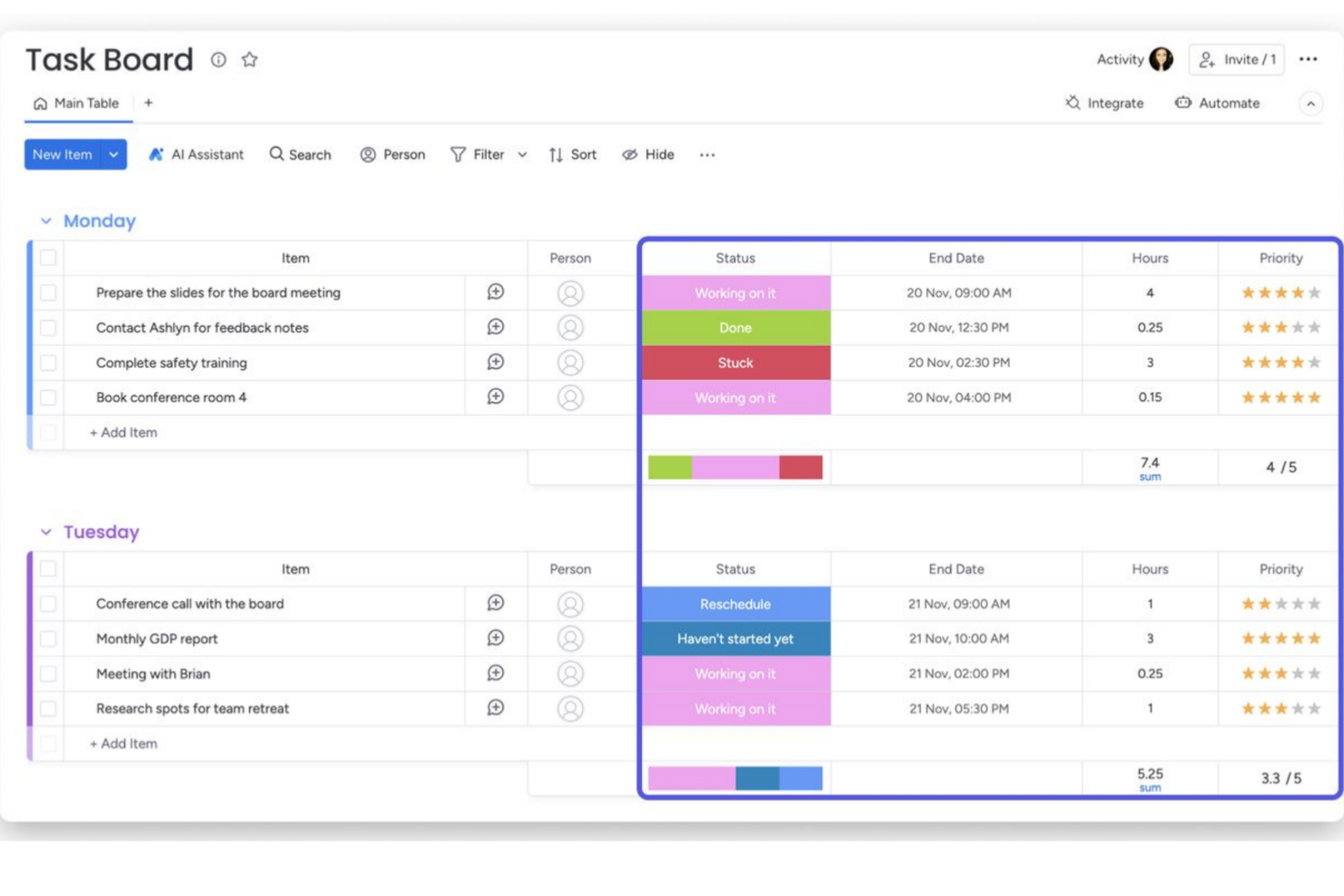
monday.com offre uno spazio di lavoro flessibile e visivo che può rendere più semplice il monitoraggio dei progetti, l'assegnazione dei compiti e l'organizzazione dei flussi di lavoro per i team che desiderano una struttura maggiore rispetto a un'app di note libera. Se gestisci un team marketing, un gruppo di sviluppo o semplicemente ti occupi di più progetti contemporaneamente, monday.com ti offre una bacheca chiara, una timeline o una vista in stile Kanban per vedere chi sta facendo cosa e quando — senza dover lottare con impostazioni complesse.
Perché ho scelto monday.com
Ho scelto monday.com perché offre solide funzionalità di automazione dei flussi di lavoro e tracciamento delle attività che corrispondono a ciò che molti utenti cercano in un'alternativa a Notion. Con le sue bacheche personalizzabili e automazioni integrate, puoi ridurre il lavoro ripetitivo. Ad esempio, puoi cambiare automaticamente lo stato delle attività o notificare i colleghi quando si avvicinano le scadenze. La piattaforma offre inoltre diversi modi (Kanban, timeline, elenco) per visualizzare il lavoro, il che aiuta i team con stili lavorativi diversi a restare allineati.
Funzionalità principali di monday.com
Oltre agli strumenti di gestione visiva dei progetti, monday.com offre numerose altre funzionalità che ne accrescono l'utilità come alternativa a Notion.
- Modelli per diversi flussi di lavoro: Modelli predefiniti per campagne di marketing, roadmap di prodotto, pipeline CRM, calendari dei contenuti e altro ancora — così non devi creare tutto da zero.
- Monitoraggio del tempo e registri di lavoro: Ti permette di tracciare quanto tempo viene speso sulle attività direttamente nelle bacheche — utile se fatturi a ore o vuoi analizzare il carico di lavoro.
- Gestione di file e aggiornamenti sugli elementi: Puoi allegare file, aggiungere commenti o aggiornamenti sulle attività e conservare tutte le informazioni correlate — documenti, note, cronologia degli status — in un unico posto.
- Strumenti di collaborazione: Utilizza chat in-app e commenti per facilitare la comunicazione in tempo reale tra i membri del team.
Integrazioni di monday.com
Le integrazioni includono Slack, Gmail, Microsoft Teams, Zoom, Salesforce, Google Calendar, Trello, Dropbox, Outlook e HubSpot. È disponibile anche una API aperta per integrazioni personalizzate.
Pros and Cons
Pros:
- Grande flessibilità nella strutturazione dei flussi di lavoro tra team
- Le visualizzazioni di progetto (Kanban, timeline, grafici) aiutano a seguire facilmente i progressi
- Facile creare bacheche e organizzare attività col drag-and-drop
Cons:
- Alcune funzionalità avanzate (come tracciamento tempo e automazioni) richiedono piani a pagamento
- L'app mobile offre meno funzionalità (ad esempio collaborazione su documenti limitata) rispetto alla versione desktop
New Product Updates from monday AI Workspace
monday AI Workspace Adds Human Approval Routing
monday AI Workspace adds a human-in-the-loop approval block to AI Workflows, sending approval requests and routing workflow paths based on responses. For more information, visit monday AI Workspace's official site.

Ideale per il monitoraggio del tempo di lavoro

Zoho Projects è un software di gestione progetti che traccia e gestisce il tempo di lavoro e le attività. Offre una suite di strumenti per pianificare, monitorare e collaborare sui progetti. Questo strumento di pianificazione delle risorse è ideale per i team che devono monitorare attentamente le ore lavorative e i progressi.
Perché è una buona alternativa a Notion:
Ho scelto Zoho Projects perché è specializzato in monitoraggio del tempo e programmazione dei progetti. A differenza di strumenti generici come Notion, Zoho Projects offre capacità di monitoraggio più dettagliate e funzioni integrate di registrazione delle ore, risultando superiore per una gestione precisa del tempo di lavoro.
Funzionalità distintive e integrazioni:
Le funzionalità includono capacità di monitoraggio del tempo, che permettono una registrazione e una reportistica dettagliata delle ore di lavoro. La piattaforma include anche diagrammi di Gantt interattivi per una pianificazione visiva dei progetti. Zoho Projects offre inoltre strumenti di allocazione delle risorse, monitoraggio dei progressi e automazione delle attività.
Le integrazioni includono diverse applicazioni Zoho, come Zoho CRM e Zoho Books. Supporta anche integrazioni con Google Workspace e Microsoft Office.
Pros and Cons
Pros:
- Monitoraggio dettagliato del tempo e funzionalità di reportistica
- Interfaccia intuitiva con strumenti di visualizzazione dei progetti
- Integrazioni con la suite Zoho e altri strumenti popolari
Cons:
- Curva di apprendimento più ripida per le funzionalità avanzate
- La quantità di funzionalità può risultare eccessiva per alcuni utenti
New Product Updates from Zoho Projects
Zoho Projects Adds CodeX Scripts for Custom Modules
Zoho Projects now supports CodeX Scripts for custom modules, enabling conditional logic and rules for creating, updating, and deleting records. For more information, visit Zoho Projects' official site.
 .
.
Quire
Ideale per suddividere progetti complessi
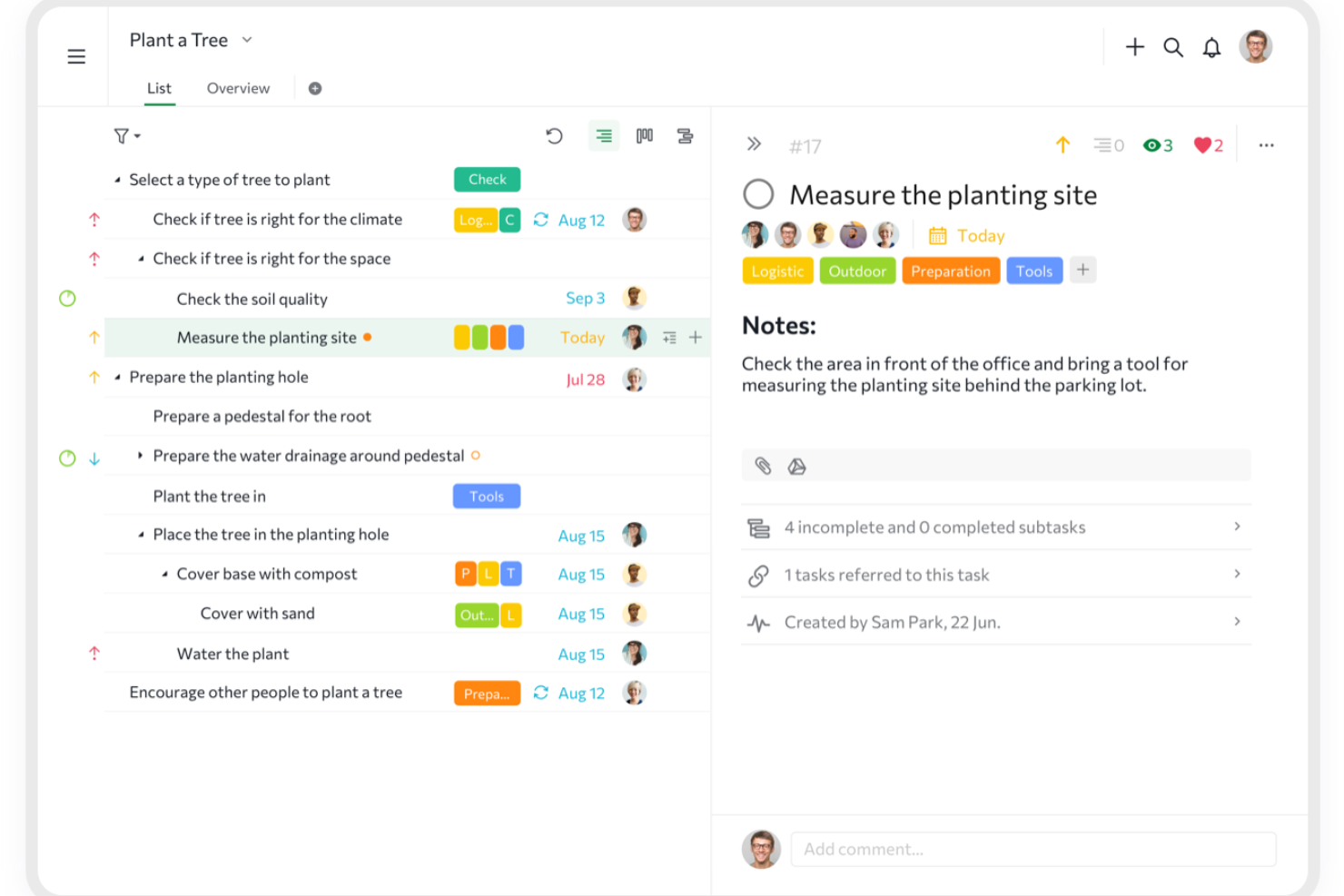
Quire è uno strumento di gestione dei progetti progettato sull'idea di suddividere grandi obiettivi in compiti più piccoli e gestibili. È pensato per i team che necessitano di un modo flessibile per visualizzare, monitorare ed eseguire il lavoro attraverso diverse fasi.
Perché è una valida alternativa a Notion:
Quire si distingue come alternativa a Notion grazie alle sue funzionalità flessibili di organizzazione delle attività. La vista a elenco annidato consente di scomporre progetti complessi, offrendo una chiara gerarchia che mantiene organizzato il tuo flusso di lavoro. Inoltre, la funzione di sotto-elenco permette di creare visualizzazioni personalizzate a partire dalla lista principale dei compiti, aiutandoti a concentrarti su compiti o priorità specifiche senza disordinare il tuo spazio di lavoro. Puoi anche passare da bacheche Kanban, timeline, calendari e viste a tabella per visualizzare il flusso di lavoro nel modo che ti è più congeniale. Questa flessibilità rende più semplice pianificare, monitorare i progressi e adattare le scadenze quando necessario.
Caratteristiche principali e integrazioni:
Le funzionalità includono campi personalizzati che ti permettono di aggiungere specifici dati alle attività, come stime di budget o livelli di priorità, aiutandoti a personalizzare lo strumento in base alle esigenze del progetto. Dispone anche di documenti collaborativi che fungono da spazio centrale per tutte le informazioni, note e aggiornamenti relativi al progetto. Puoi arricchire questi documenti con dettagli sulle attività, formule, riferimenti alle attività e menzioni utenti, mantenendo tutto collegato.
Integrazioni con Google Calendar, Gmail, Slack, Outlook, Zoho Flow, GitHub, Apple Calendar Sync, Box, Dropbox, Google Drive e Microsoft Teams.
Pros and Cons
Pros:
- Possibilità di creare attività annidate e sotto-attività, consentendo una scomposizione dettagliata dei progetti
- Molteplici visualizzazioni di progetto, inclusi elenchi, bacheche e timeline
- Collaborazione semplice con i membri del team
Cons:
- Rischio di sovraccarico di notifiche, soprattutto quando si lavora con team numerosi
- La versione mobile manca di alcune funzioni disponibili su desktop
New Product Updates from Quire
Quire Adds Custom Field Locking and Comment Reaction API Support
Quire adds custom field locking and API support for reading and setting emoji reactions on comments. These updates give teams more control over field data and expand comment interaction options for developers. For more information, visit Quire’s official site.
 .
.
Enji
Ideale per creare un sistema di marketing personalizzato

Enji è una piattaforma di gestione progetti e pianificazione per il marketing che aiuta proprietari di piccole imprese e lavoratori autonomi a gestire campagne di marketing, contenuti, programmazione e monitoraggio delle performance in un unico spazio di lavoro.
Per chi è ideale Enji?
Enji è perfetta per i proprietari di piccole imprese e i solopreneur che desiderano una pianificazione e un’esecuzione strutturata del marketing senza la complessità di uno spazio di lavoro completamente personalizzabile.
Perché ho scelto Enji
Ho inserito Enji tra le mie scelte migliori perché adoro il modo in cui integra la routine di marketing direttamente all’interno del suo calendario. Quando rispondi al questionario di configurazione di Enji, ti chiede in quali giorni desideri lavorare sul marketing, quindi popola il tuo calendario con attività ricorrenti al ritmo giusto. Non devi decidere ogni giorno cosa fare; il piano è già pronto per te. Mi piace anche che attività settimanali come la programmazione dei post sui social possano essere gestite senza dover uscire dalla piattaforma, dato che il copywriter AI e il pianificatore social sono integrati direttamente nelle attività. La piattaforma centralizza anche metriche e report del marketing, rendendo più facile monitorare le performance delle campagne in un unico luogo.
Funzionalità principali di Enji
- Template di campagne: Strutture di campagne preimpostate con attività, tempistiche e obiettivi già definiti, così non parti da zero.
- Gestione del brand: Uno spazio centrale dove conservare la voce del tuo brand, immagini e dettagli chiave dell’attività per garantire contenuti coerenti su tutti i canali.
- KPI suggeriti: Enji consiglia quali metriche monitorare in base ai tuoi obiettivi, così non devi indovinare cosa misurare.
- Dashboard di analisi: Riunisce le analisi dei social media e del sito web in un’unica vista, così puoi individuare le tendenze senza dover cambiare scheda.
Integrazioni di Enji
Enji non elenca pubblicamente alcuna integrazione.
Pros and Cons
Pros:
- Calendario visivo su misura per i flussi di lavoro di marketing
- Approfondimenti personalizzati basati sui dati delle performance delle campagne
- Monitoraggio degli obiettivi collegato direttamente alle routine di pianificazione
Cons:
- Le funzionalità di collaborazione non includono controlli avanzati sui permessi
- Nessuna app mobile nativa per modifiche in mobilità

Wrike
Ideale per automatizzare le attività ripetitive

Wrike è uno strumento di gestione dei progetti progettato per aumentare la collaborazione e l'efficienza del team. Offre un'ampia gamma di funzionalità che aiutano ad automatizzare le attività di routine, consentendo ai team di dedicare più tempo ai progetti critici.
Perché è una buona alternativa a Notion:
Ho scelto Wrike come valida alternativa a Notion per la sua capacità di automatizzare le attività ripetitive, ottimizzando così la gestione dei progetti ad alta priorità. I suoi moduli di richiesta personalizzabili semplificano l'avvio dei progetti generando automaticamente attività e flussi di lavoro. Wrike si distingue anche per l'accesso centralizzato ai dati, che integra informazioni da varie fonti in un unico hub attivo. Questa funzione migliora il processo decisionale e la collaborazione tra i team, facilitando la gestione di progetti complessi. Inoltre, la mobilità offerta da Wrike permette a te e al tuo team di rimanere aggiornati e gestire le attività ovunque vi troviate, sia in ufficio che fuori sede.
Caratteristiche principali e integrazioni:
Le funzionalità includono moduli di richiesta personalizzabili che generano automaticamente attività e flussi di lavoro, facendoti risparmiare tempo all'inizio di un progetto. La funzione di accesso centralizzato ai dati integra informazioni da diverse fonti, offrendo un'unica fonte di dati attuabili per tutti gli utenti. Wrike offre inoltre app mobili per dispositivi Android e Apple, consentendo al tuo team di gestire efficacemente le attività ovunque si trovi.
Le integrazioni includono Klaxoon, Intuit/QuickBooks, Skyvia, Power BI, Google Sheets, Miro, Salesforce, Tableau, Wrike per Microsoft Teams, MediaValet, Zoom e Adobe Creative Cloud.
Pros and Cons
Pros:
- Eccellenti funzionalità di gestione di attività e progetti
- Le integrazioni con Google Drive e Slack facilitano discussioni e condivisione di file
- Le funzionalità e la scalabilità si adattano bene a medie e grandi imprese
Cons:
- Inizialmente può essere complesso da navigare
- Può risultare opprimente a causa dell'elevato numero di funzionalità e opzioni disponibili
New Product Updates from Wrike
Wrike Adds Klaxoon MCP Integration
Wrike’s Klaxoon MCP integration is now generally available, enabling AI agents to navigate between Wrike tasks and attached whiteboards, read task context, and manage whiteboard attachments via API. For more information, visit Wrike's official site.

ClickUp
Ideale per stati personalizzati delle attività

ClickUp è un software di gestione progetti che consente ai team di varie dimensioni di personalizzare i propri flussi di lavoro e aumentare la produttività su attività e progetti. Permette agli utenti di creare e gestire stati delle attività personalizzati che si adattano ai processi specifici e alle dinamiche del team.
Perché è una valida alternativa a Notion:
Ho scelto ClickUp perché offre specificità e adattabilità che Notion non ha. Mentre Notion è eccellente per organizzare e condividere informazioni, ClickUp offre opzioni di personalizzazione per la gestione dei progetti. Questo lo rende ideale per i team che devono adattare il monitoraggio dei progetti a specifiche esigenze. ClickUp offre inoltre molteplici visualizzazioni dei progetti, come liste, bacheche, calendari e opzioni avanzate come diagrammi di Gantt, mappe mentali e visualizzazioni timeline.
Funzionalità principali e integrazioni:
Le funzionalità includono stati delle attività personalizzabili, dashboard per monitorare l’avanzamento dei progetti, gestione dei documenti, reportistica e analisi, strumenti di collaborazione, strumenti per la gestione del tempo, gestione delle risorse e funzionalità di automazione.
Le integrazioni includono Slack, GitHub, GitLab, Webhooks, HubSpot, Everhour, Toggl, Harvest, Google Drive, OneDrive, Dropbox, Outlook, Google Calendar e Figma.
Pros and Cons
Pros:
- Funzionalità efficaci per automazione e gestione del tempo
- Dashboard completi e strumenti di reportistica
- Stati delle attività e flussi di lavoro altamente personalizzabili
Cons:
- Le numerose funzionalità richiedono tempo per essere apprese
- La maggior parte delle funzionalità di sicurezza è disponibile solo nei piani superiori
New Product Updates from ClickUp
ClickUp Adds Meetings Hub, Super Agent Templates, and ZoomInfo Integration
ClickUp adds a searchable Meetings Hub, new ways to clone and template Super Agents, and a ZoomInfo integration through the App Center. These updates improve meeting retrieval, agent reuse, and access to sales intelligence. For more information, visit ClickUp’s official site.

Taskade
Ideale per flussi di lavoro di team remoti basati sull'IA
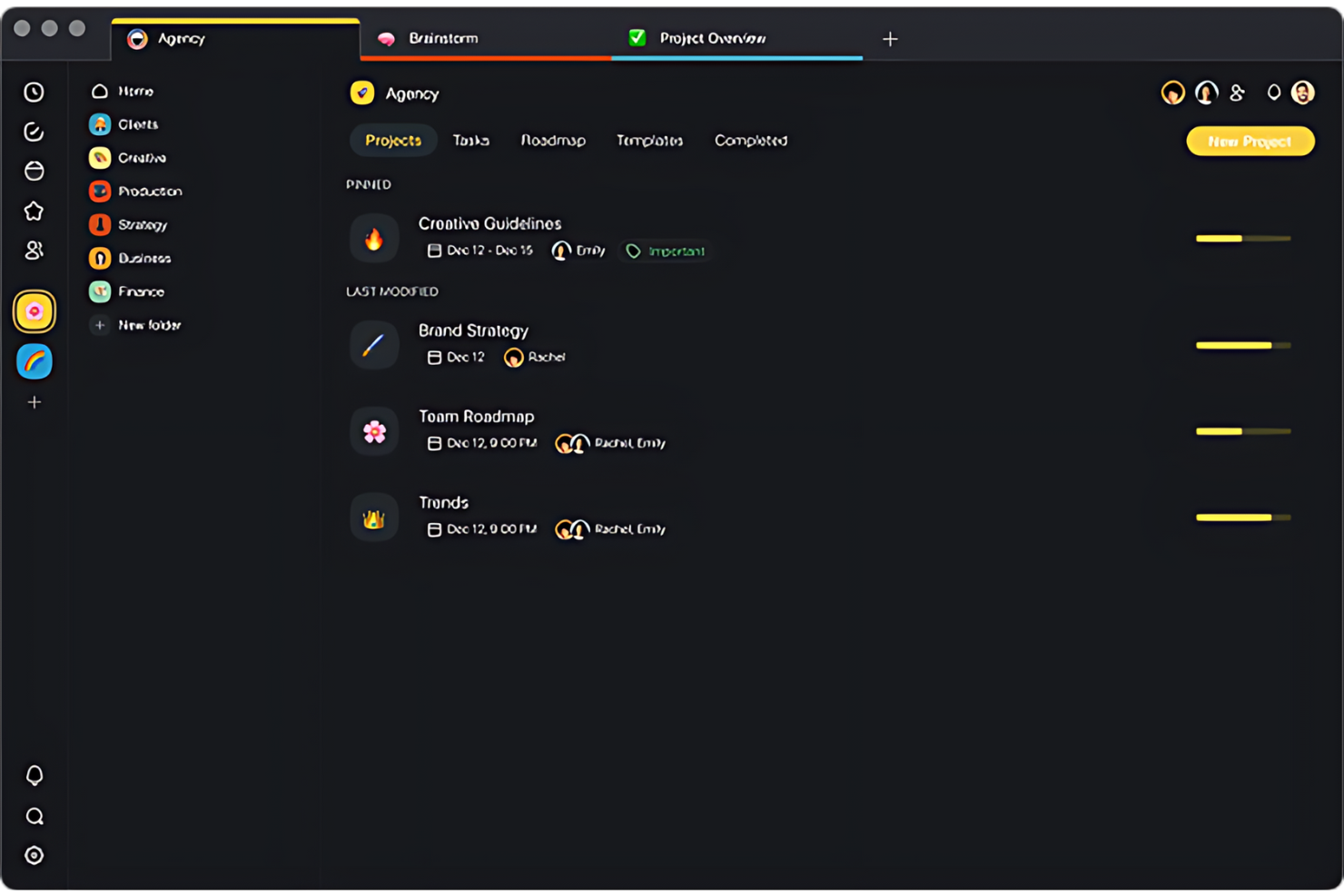
Taskade è uno spazio di lavoro collaborativo che mira a migliorare la produttività e la comunicazione dei team remoti. Combina la gestione delle attività, la collaborazione in tempo reale e le videoconferenze in un'unica piattaforma.
Perché è una buona alternativa a Notion:
Ho scelto Taskade perché si concentra sulle esigenze specifiche dei team remoti, come la sincronizzazione in tempo reale e gli strumenti di comunicazione. Sebbene Notion sia versatile per l'archiviazione delle informazioni e la pianificazione dei progetti, Taskade offre una collaborazione dal vivo e aiuta i membri del team a coordinarsi, indipendentemente dalla loro posizione.
Funzionalità e integrazioni distintive:
Le funzionalità includono videoconferenze integrate, modelli di flusso di lavoro personalizzabili e modifica e commenti in tempo reale.
Le integrazioni includono Google Calendar, Slack e Dropbox.
Pros and Cons
Pros:
- Le videoconferenze integrate migliorano la collaborazione in tempo reale
- I modelli personalizzabili velocizzano la configurazione del flusso di lavoro
- La modifica e gli aggiornamenti in tempo reale facilitano un rapido processo decisionale
Cons:
- Per i nuovi utenti potrebbe essere necessaria una fase di apprendimento
- Le funzionalità avanzate sono disponibili solo nei piani tariffari più costosi
Coda
Ideale per progetti incentrati sui documenti

Coda unisce le funzionalità di documenti, fogli di calcolo e database in un'unica piattaforma, rendendolo ideale per la gestione di progetti incentrati sui documenti, dove il dettaglio e l'organizzazione sono importanti.
Perché è una valida alternativa a Notion:
Ho scelto Coda perché offre un approccio unico per integrare testo, dati e gestione dei flussi di lavoro in un solo documento. A differenza di Notion, che ha un'offerta più ampia ma meno focalizzata sui documenti, Coda si distingue per la capacità di trasformare documenti statici in strumenti interattivi, elemento essenziale per i flussi di lavoro basati sui documenti.
Caratteristiche principali e integrazioni:
Caratteristiche comprendono la creazione di documenti interattivi che funzionano come app, automazioni e modelli personalizzabili.
Integrazioni includono Slack, Google Calendar e Zapier.
Pros and Cons
Pros:
- Documenti altamente personalizzabili e interattivi
- Potenti opzioni di automazione e modelli
- Integrazione senza soluzione di continuità con strumenti di produttività chiave
Cons:
- Può richiedere un tempo di apprendimento per sfruttare appieno le sue funzionalità
- Potrebbe presentare alcuni problemi di scalabilità

Ideale per la collaborazione sui contenuti
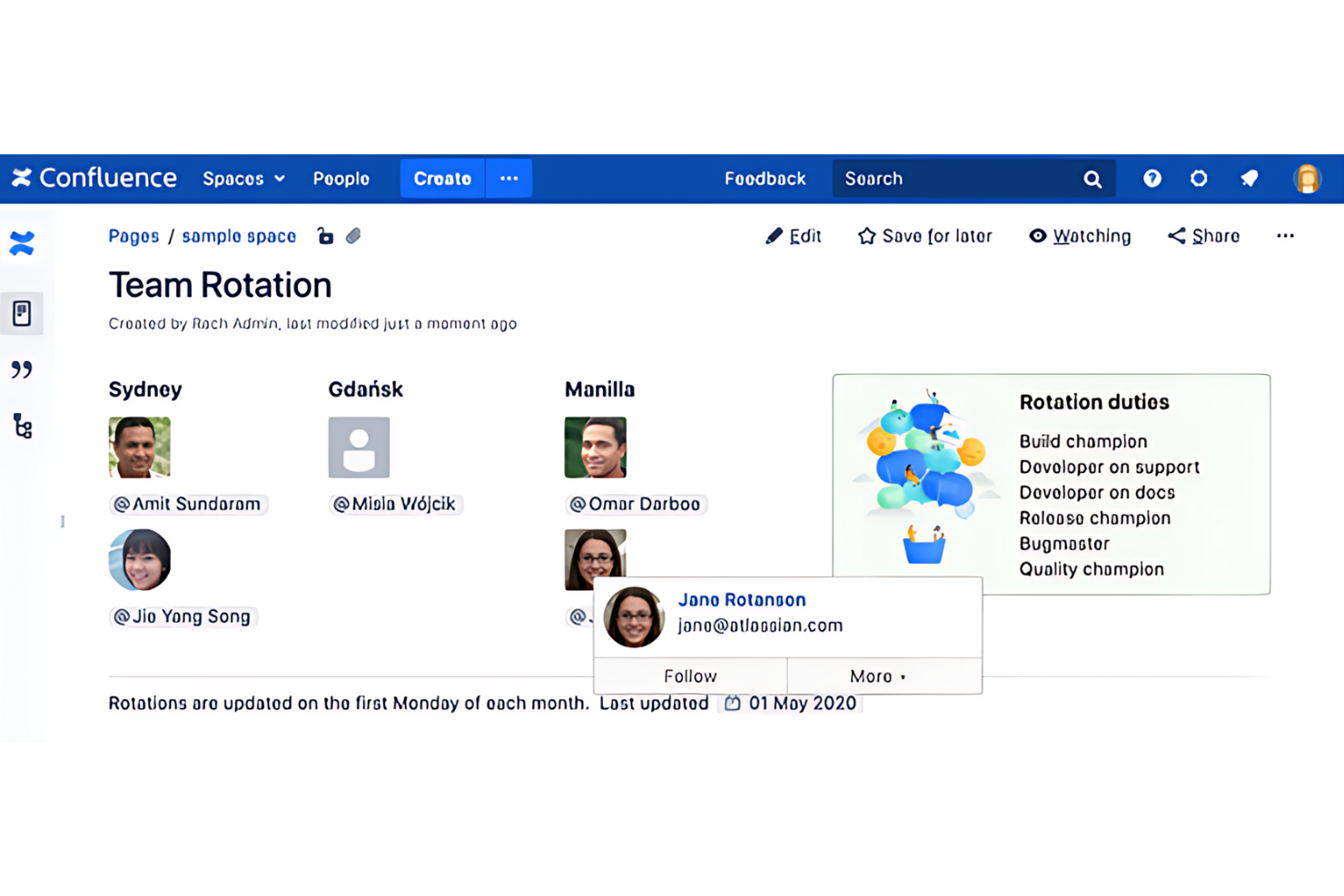
Confluence di Atlassian è uno strumento potente progettato per favorire la collaborazione sui contenuti all'interno dei team e delle organizzazioni. Permette agli utenti di creare, condividere e gestire documenti in uno spazio centralizzato.
Perché è una buona alternativa a Notion:
Ho scelto Confluence per le sue eccellenti funzionalità di creazione e collaborazione sui contenuti, che sono essenziali per l'organizzazione del team. Il suo approccio strutturato alla creazione di spazi e pagine offre un modo più formale di gestire le informazioni rispetto ad altri strumenti. Questo lo rende particolarmente efficace per team o organizzazioni più grandi che richiedono maggiori capacità di documentazione e gestione della conoscenza.
Caratteristiche e integrazioni principali:
Le funzionalità includono il suo editor di pagine, strumenti di collaborazione e un'ampia libreria di modelli.
Le integrazioni includono altri prodotti Atlassian, come Jira e Bitbucket. Questo software di gestione delle risorse si integra anche con Slack, Trello e Microsoft Office.
Pros and Cons
Pros:
- Ampio supporto a vari tipi di contenuti e formattazione del testo avanzata
- Forte integrazione con altri prodotti Atlassian e strumenti di terze parti
- Ampia selezione di modelli e macro per velocizzare la creazione dei contenuti
Cons:
- Barra di ricerca poco efficace
- Integrazione limitata con MS Office
Ideale per la gestione delle issue

Jira è uno strumento di gestione dei progetti sviluppato da Atlassian. È progettato principalmente per i team di sviluppo software per tracciare bug, gestire attività e supervisionare progetti agili. Jira può adattarsi a diversi flussi di lavoro, dalla semplice gestione delle attività a processi di sviluppo software complessi.
Perché è una buona alternativa a Notion:
Ho scelto Jira per il suo focus specializzato sulla gestione di issue e bug. Mentre Notion offre uno spazio di lavoro ampio, Jira garantisce tracciamento dettagliato, prioritizzazione e gestione dei problemi. È la scelta ideale per i team che necessitano di un controllo preciso sul ciclo di sviluppo.
Funzionalità e integrazioni principali:
Funzionalità includono flussi di lavoro personalizzabili che permettono ai team di adattare lo strumento a processi specifici. Include strumenti di previsione e reporting, offrendo approfondimenti sull'andamento dei progetti e sulle performance del team. Permette inoltre di tracciare user story, bug e attività.
Integrazioni includono Confluence per la documentazione, Bitbucket e GitHub per il controllo del codice sorgente, e Slack per la comunicazione del team.
Pros and Cons
Pros:
- Funzionalità avanzate di tracciamento e gestione delle issue
- Altamente personalizzabile per adattarsi alle diverse esigenze di progetto
- Solide integrazioni con altri strumenti di sviluppo e collaborazione
Cons:
- Può risultare complesso e opprimente per i nuovi utenti
- A volte caricamento lento
Altre alternative a Notion
Di seguito trovi un elenco di ulteriori alternative a Notion che non sono entrate nella mia selezione principale, ma che vale la pena considerare se non hai trovato una soluzione adatta qui sopra.
- Fibery
Ideale per collegare il lavoro tra database relazionali
- Anytype
Ideale per la gestione della conoscenza incentrata sulla privacy
- Slite
Ideale per basi di conoscenza del team basate sull'intelligenza artificiale
- Airtable
Ideale per progetti di team basati su database
- Nuclino
Ideale per basi di conoscenza dei team basate sui wiki
- Miro
Ideale per mappare e monitorare visivamente il lavoro
- Guru
Ideale per la ricerca basata sull'intelligenza artificiale, con governance, attraverso le conoscenze aziendali
- AppFlowy
Ideale per spazi di lavoro autogestiti e con funzionamento offline prioritario


Recensioni correlate dei software di gestione dei progetti
Se non hai ancora trovato ciò che cerchi, dai un'occhiata a questi strumenti di gestione dei progetti correlati che abbiamo testato e recensito.
- Software di gestione dei progetti
- Software di gestione delle risorse
- Software di automazione dei flussi di lavoro
- Software di gestione delle attività
- Strumenti di collaborazione
- Creazione di diagrammi di Gantt
- Gestori di attività con IA
Come valuto le alternative a Notion
Esamino ogni alternativa a Notion su due livelli: verifico se soddisfa i requisiti di base per documenti, attività e database e se gli elementi distintivi la rendono adatta al flusso di lavoro specifico del tuo team.
Funzionalità fondamentali (requisiti di base per questo elenco)
Quando seleziono gli strumenti per il mio elenco, assegno a ciascuno un punteggio su una scala da 0 (non offre la funzionalità) a 5 (eccelle in quest'area) per ogni funzionalità fondamentale indicata di seguito. Quindi converto il punteggio totale dello strumento in una percentuale. Ogni strumento deve raggiungere un punteggio totale minimo del 75% per essere preso in considerazione.
- Gestione di attività e progetti: verifico se uno strumento supporta l'assegnazione delle attività, le scadenze, le dipendenze e diverse visualizzazioni, come bacheche, sequenze temporali e calendari, per monitorare il lavoro degli sprint o i lanci di prodotto.
- Documenti collaborativi e wiki: i team hanno bisogno di uno spazio in cui raccogliere PRD, note delle riunioni e procedure operative insieme alle attività, quindi valuto come ogni strumento gestisce le pagine nidificate e le strutture wiki.
- Database e visualizzazioni flessibili: osservo come ogni piattaforma consente di creare e personalizzare dati strutturati, ad esempio un registro dei bug in una visualizzazione tabellare che il team può anche trasformare in una bacheca kanban organizzata per stato.
- Collaborazione in tempo reale: che si tratti di modificare insieme una descrizione del progetto o di taggare un collega in una discussione nei commenti, valuto come ogni strumento gestisce il lavoro simultaneo di più utenti negli spazi condivisi.
- Modelli e personalizzazione dei flussi di lavoro: i modelli predefiniti per attività come le retrospettive degli sprint o le riunioni di avvio dei progetti fanno risparmiare molto tempo nella configurazione, quindi esamino la raccolta di modelli di ogni strumento e le opzioni per personalizzare i flussi di lavoro.
- Integrazioni e accesso alle API: la maggior parte dei team di gestione dei progetti utilizza un insieme di strumenti che include Slack, GitHub o Google Workspace, quindi valuto le integrazioni native di ogni strumento, l'accesso alle API e le funzionalità di automazione.
Una volta ottenuto un elenco di strumenti che soddisfano questi criteri, considero ciò che distingue ogni piattaforma.
Fattori distintivi (ciò che differenzia i fornitori)
Ecco come confronto i diversi fornitori:
Funzionalità distintive
L'automazione senza codice è un importante elemento distintivo. Verifico se uno strumento può assegnare automaticamente le attività quando cambia uno stato o attivare notifiche Slack quando cambiano le scadenze. Anche la gestione del portafoglio e delle risorse è importante, soprattutto per i responsabili PMO che gestiscono più progetti e hanno bisogno di pannelli di controllo trasversali e visualizzazioni del carico di lavoro. Valuto inoltre l'accesso degli ospiti e le autorizzazioni, poiché la maggior parte dei team di gestione dei progetti condivide i risultati finali con clienti o parti interessate esterne e ha bisogno di un controllo granulare su ciò che è visibile.
Oltre le funzionalità
Il supporto alla migrazione è una delle prime cose che verifico. Se un team abbandona Notion, ha bisogno di un modo semplice per trasferire pagine e database senza dover ricostruire tutto da zero. Anche la struttura dei prezzi è importante: valuto se i piani aumentano in modo prevedibile con la crescita dei team, poiché i costi imprevisti per lo spazio di archiviazione o le automazioni possono far saltare rapidamente un budget. Anche le prestazioni sono un fattore fondamentale. Un'area di lavoro che rallenta quando si gestiscono centinaia di attività distribuite su più progetti crea notevoli difficoltà durante la pianificazione degli sprint o le revisioni trimestrali.
Perché cercare un'alternativa a Notion?
Potresti prendere in considerazione un'alternativa a Notion se hai bisogno di quanto segue.
- Funzionalità ampliate: Potresti aver bisogno di funzionalità più avanzate che Notion attualmente non offre.
- Interfaccia utente intuitiva: Preferisci un'interfaccia più facile da usare per te e il tuo team.
- Strumenti di collaborazione superiori: Hai bisogno di più opzioni per la comunicazione e la collaborazione del team.
- Maggiore sicurezza: Hai bisogno di misure più efficaci per proteggere i dati sensibili.
- Convenienza economica: Hai bisogno di una soluzione più conveniente che offra comunque le funzionalità essenziali.
Caratteristiche principali delle alternative a Notion
Ecco alcune caratteristiche chiave di Notion che il tuo software alternativo dovrebbe replicare o migliorare per essere adatto alle tue esigenze.
- Visualizzazione a bacheca delle attività: Visualizza i flussi di lavoro con una bacheca in stile Kanban.
- Visualizzazione Gantt e sequenza temporale: Pianifica e monitora i progressi con una visualizzazione della sequenza temporale.
- Report e statistiche: Analizza i dati con strumenti di reportistica e statistiche.
- Assistente IA: Utilizza un assistente IA per la creazione di contenuti e la produttività.
- Integrazioni: Connettiti ad altri strumenti, come Google Drive e Google Calendar, per semplificare i tuoi flussi di lavoro.
- Collaborazione: Lavora con gli altri membri del team dal vivo, in tempo reale.
- Ampia personalizzazione: Adatta l'area di lavoro alle tue esigenze specifiche, per uso personale o professionale.
- Annotazione: Prendi e organizza i tuoi appunti (ancora meglio se replica l'insieme di funzionalità IA di Notion per prendere appunti in modo efficace)
- Automazione: L'uso della tecnologia per eseguire attività senza intervento umano.
- Base di conoscenza/wiki: Un archivio di informazioni a cui è possibile accedere e che può essere consultato facilmente.
- Modelli: Strutture o formati predefiniti che possono essere utilizzati come punto di partenza per nuovi documenti o progetti.
- Area di lavoro: Un ambiente digitale collaborativo in cui i membri del team possono lavorare a progetti e attività.
- Bacheche Kanban: Strumenti visivi per gestire il lavoro nelle varie fasi del processo utilizzando schede e colonne.
- Gestione della conoscenza: Funzionalità che aiutano a organizzare, gestire e condividere le conoscenze. Trova qui un elenco di software specifici per la gestione della conoscenza.
- Gestione delle attività: Gestione di un'attività durante il suo ciclo di vita, inclusi pianificazione, test, monitoraggio e reportistica.
- Dashboard: Interfacce che mostrano gli indicatori chiave di prestazione e le metriche in una visualizzazione consolidata.
- Plugin: Componenti software aggiuntivi che offrono funzionalità specifiche a un'applicazione software più ampia.
- Elenchi di cose da fare: Elenchi di attività da completare, spesso utilizzati per la gestione personale o dei progetti.
- App mobile: Software progettato per dispositivi mobili come smartphone e tablet.
- Monitoraggio del tempo: Registrazione del tempo impiegato per le attività o i progetti.
- Liste di controllo: Strumenti per creare elenchi di elementi da completare o verificare.
- Database personalizzabili: Crea database con visualizzazioni personalizzabili come tabelle, elenchi, calendari e bacheche Kanban.