10 Best Agile Project Management Software Reviewed For 2026

10 Best Agile Project Management Software Shortlist


The best agile project management software helps you plan, manage, and improve your agile projects. Without the right tool, you'll quickly find your projects going off the rails and lose track of sprint goals, project progress, and what's left in the backlog. This makes it harder to deliver work on time, iterate effectively, and keep clients satisfied.
I've used my 20+ years of experience as an agile project manager to evaluate and handpick the top agile project management tools so you can undertake the selection process in a simple and stress-free way.
In this guide, you’ll find software that supports planning, tracking, and communication throughout your project, no matter which agile methodology you subscribe to. I cover key features and pros and cons so you can choose the software that best aligns with your workflows and management style.
Why Trust Our Software Recommendations
Our team has been testing and reviewing software since 2012. As project managers ourselves, we know how difficult—and important—it is to choose the right software.
For this guide, we evaluated tools using hands-on testing and independent research, scoring tools using our selection criteria. We also draw on insights from industry thought leaders and practicing project management experts.
Our reviews reflect our human editorial judgment, not a sales pitch.
Expert reviewers:
Agile Project Management Software Comparison Table
This comparison table summarizes pricing details for my top agile project management software selections:
| Tool | Best For | Trial Info | Price | ||
|---|---|---|---|---|---|
| 1 | Best for cross-departmental collaboration | Free plan + 14-day free trial + free demo available | From $10/user/month (billed annually) | Website | |
| 2 | Best for integrated client portals | 14-day free trial | From $10/user/month (billed annually) | Website | |
| 3 | Best for agile project collaboration | 15-day free trial | From $1/user/month (12 user minimum) | Website | |
| 4 | Best for no-code enterprise apps | 30-day free trial | Pricing upon request | Website | |
| 5 | Best for breaking down complex projects | Free plan available | From $10.95/user/month | Website | |
| 6 | Best for collaborative whiteboards | Free plan + 14-day free trial available | From $8/user/month (billed annually) | Website | |
| 7 | Best for strategy-to-sprint delivery alignment | 30-day free trial + free demo available | From $9/user/month | Website | |
| 8 | Best for scrum boards | Free plan + 14-day free trial available | From $8.48/user/month | Website | |
| 9 | Best for GitHub-native agile sprint tracking | Free plan + 14-day free trial + free demo available | From $4.99/user/month (billed annually) | Website | |
| 10 | Best for scaling agile across SAFe enterprise teams | Free trial + free demo available | Pricing upon request | Website |


Best Agile Project Management Software Reviews
Here’s a brief description of each of the software on my list, what it does best, and its standout features.

Wrike
Best for cross-departmental collaboration
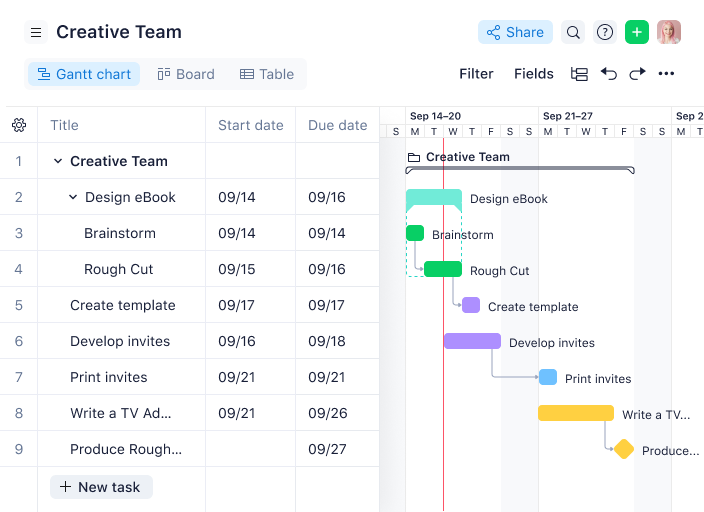
Wrike is a project management software with a collection of agile tools for managing projects, and the tool is suitable for teams of five or more. This highly configurable agile project management software allows users to customize workflows, dashboards, and reports.
Why I picked Wrike: Wrike’s simple interface enables users to switch between Kanban boards, interactive drag-and-drop Gantt charts, and workload views to visualize priorities. Wrike features a number of easy-to-use agile templates, backlog management functionalities, spaces for collaboration and feedback, and agile reporting and analytics. Other features include agile folder organization and automated task management.
Wrike’s features can be configured for each individual team’s needs, and the tool also offers a variety of specific solutions depending on the type of team or organization, including solutions for marketing teams and professional service teams.
Wrike Standout Features & Integrations
Features include resource bookings, workload charts, effort management, a board view, time tracking, budgeting, proofing, cross-tagging, and approval workflows.
Integrations include more than 400 pre-built native integrations, including popular file management software from Microsoft, Google, and Dropbox, along with sales and marketing software from Salesforce and Marketo.
Pros and Cons
Pros:
- Detailed analytics and dashboards
- Good workload management features
- Range of task automation features
Cons:
- Learning curve for new users
- No built-in chat feature
New Product Updates from Wrike

Wrike Adds Quick Search to Table View
Wrike adds Quick Search to Table View with full-table search across titles, descriptions, and fields, plus highlighted matches. This helps users find tasks faster in large tables. For more information, visit Wrike’s official site.

Celoxis
Best for integrated client portals

Celoxis is an enterprise project portfolio management (PPM) platform that covers project planning, resource management, portfolio tracking, time and expense tracking, and BI-level dashboards—all built in, without add-ons or plugins.
Who Is Celoxis Best For?
Celoxis is a strong fit for mid-to-large enterprises managing multiple simultaneous projects across departments, especially in industries like IT, professional services, and engineering.
Why I Picked Celoxis
I've included Celoxis in my top picks because its integrated client portals genuinely set it apart from most agile PPM tools. Clients get their own login, where you can configure exactly what they see: task updates, sprint progress, shared dashboards, and file attachments—without exposing financials or internal data. I also like that client hierarchies let you mirror real org structures, so a parent account like a regional office can roll up visibility across sub-clients automatically.
Celoxis Key Features
- Kanban boards: Visualize work in progress across sprints with configurable columns, WIP limits, and drag-and-drop card management.
- Burndown and burnup charts: Track sprint progress against planned scope in real time to spot delays before they compound.
- Resource workload management: View team capacity across projects simultaneously and reassign tasks directly from the workload grid.
- Custom workflow automation: Build rule-based automations to trigger status changes, notifications, or task assignments based on defined conditions.
Celoxis Integrations
Celoxis offers native integrations with Google Drive, Microsoft Excel, Microsoft Project, Salesforce, Jira, Zendesk, Slack, QuickBooks Online, and more. It also connects with Zapier, and an API is available for custom integrations.
Pros and Cons
Pros:
- Role-based dashboards with custom BI widgets
- Supports hybrid agile and waterfall workflows
- Cross-portfolio resource and budget visibility
Cons:
- Mobile app lacks full desktop functionality
- Only two task views available
Best for agile project collaboration
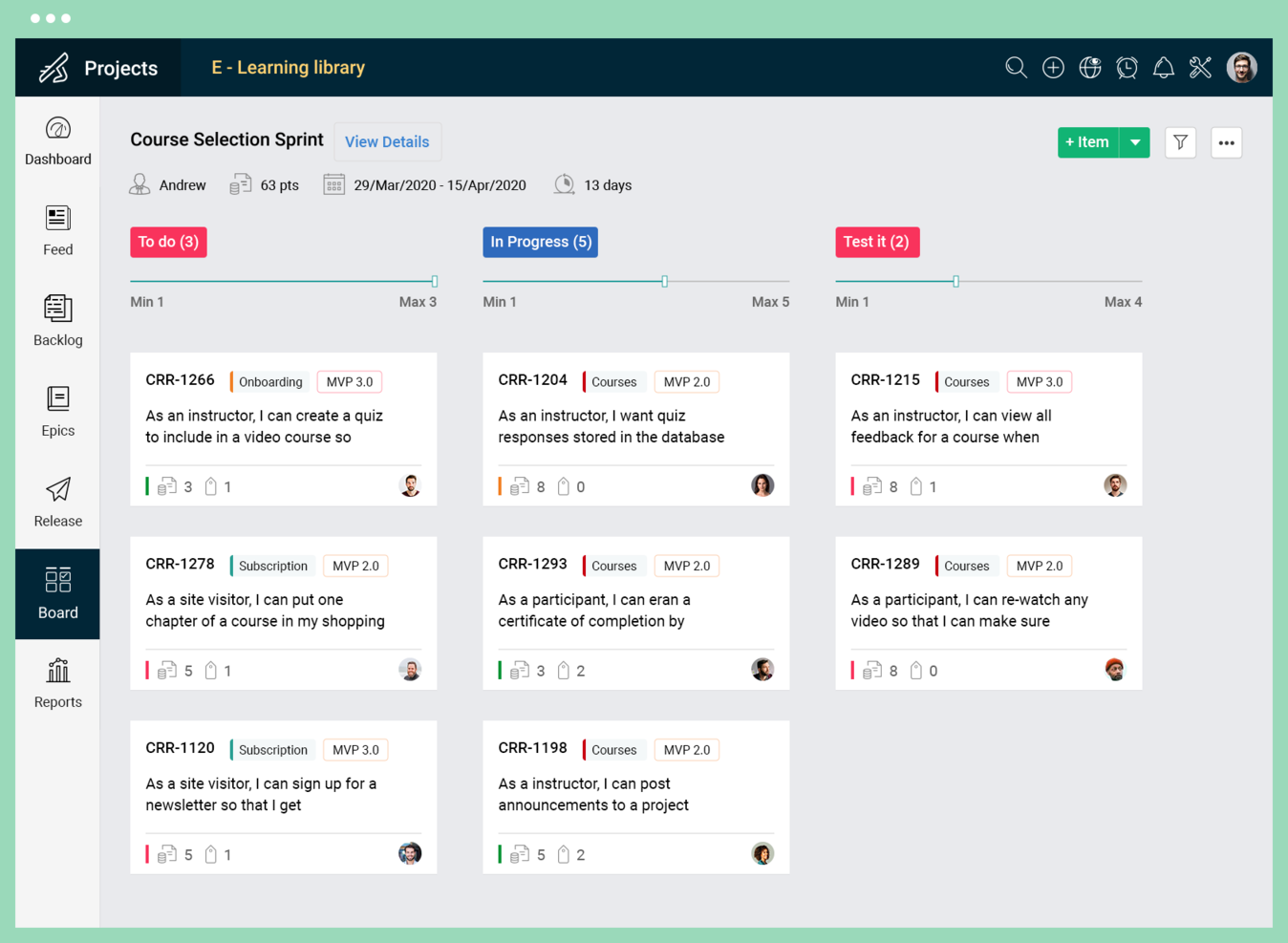
Zoho Sprints is a digital project management tool designed to support agile teams in planning and tracking their work.
Why I picked Zoho Sprints: I chose Zoho Sprints because it provides a robust set of features that cater to dynamic planning and collaboration, which are essential for agile teams. What makes it different is its focus on visualizing workflows and tracking progress, coupled with user-friendly time tracking capabilities. I believe Zoho Sprints is best suited for agile project collaboration due to its comprehensive approach to managing project ideas, tracking progress, launching increments, and automating the CI/CD pipeline, which supports a smoother agile process.
Zoho Sprints Standout Features & Integrations
Features include backlogging capabilities that let you break work down into stories, tasks, and sub-tasks, prioritize them, and add items to the sprint. The tool also includes a fully-customizable Scrum board with the ability to set up workflows and swimlanes, and get the team aligned on the sprint goal.
Integrations include Microsoft Office 365, Microsoft Teams, Google Drive, Zapier, Zendesk, and ServiceNow. Integrations via Zapier and Zoho Flow are also supported. Being part of the Zoho ecosystem allows you to connect to several of Zoho’s own services for bug tracking, CRM, accounting, customer service, and more.
Pros and Cons
Pros:
- Intuitive user interface
- Comprehensive reporting with burndown charts
- Tailored for Scrum methodologies
Cons:
- Many customization features are limited to higher-tier plans
- Limited project views
New Product Updates from Zoho Sprints
Zoho Sprints Adds Dashboard View for Custom Modules
Zoho Sprints adds a Dashboard view for custom modules with charts and tables for visualizing module records. This gives teams a clearer way to review custom data. For more information, visit Zoho Sprints’ official site.
 .
.
Best for no-code enterprise apps

QuickBase is a cloud-based platform that provides a no-code operational agility solution, enabling users to build custom applications for various business needs. The platform is suitable for businesses of all sizes and industries, particularly those looking for a flexible and scalable solution to manage work processes and adapt to business changes, such as those at the enterprise level.
Why I picked QuickBase: With QuickBase, teams can rapidly build, modify, and customize applications without the need for extensive coding knowledge or dependencies on IT departments, empowering users to take control of their projects. The platform's intuitive drag-and-drop interface allows for quick configuration of data fields, workflows, and automations, enabling agile teams to adapt and iterate on their applications in real-time.
Additionally, QuickBase provides robust collaboration features that facilitate agile project management. Teams can leverage its Kanban boards, task tracking, and status updates to visualize project progress, identify bottlenecks, and ensure efficient task allocation. The platform also supports seamless communication and collaboration with features like commenting, notifications, and document sharing, enabling effective teamwork and rapid decision-making.
QuickBase Standout Features & Integrations
Features include an app-builder that lets you tailor the software to your specific needs without needing to be able to code (this is particularly useful if you don't have extensive IT resources). You can select from starter apps that are ready to go, or pull together components to build your own. This is helpful for getting your projects up and running quickly.
Integrations include Salesforce, Slack, Dropbox, Microsoft Teams, Trello, OneDrive, Quickbooks, Google Drive, SurveyMonkey, Tableau, and Lucidchart.
Pros and Cons
Pros:
- Low-code customizable workflows
- Integrates with a range of external tools
- Highly scalable for both small and large teams
Cons:
- Not ideal for those who want a quick-start solution
- Limited ready-made templates

Quire
Best for breaking down complex projects

Quire is a cloud-based project management tool designed to help teams organize and track their work through a task-based system.
Why I picked Quire: Quire's nested task list allows for a more intuitive organization of tasks, breaking down complex tasks into smaller, more manageable sub-tasks. This hierarchical structure is distinct and helps in visualizing project workflows in a more detailed manner.
The platform’s clean, minimalistic interface provides multiple viewing options, including a list view for straightforward task tracking and a Kanban-style board to visualize task progress through various stages. Such flexibility caters well to teams using Agile or Scrum methodologies, enhancing adaptability to different project management methods.
Quire Standout Features & Integrations
Features include a timeline view that provides a visual representation of the project schedule, helping users track progress and deadlines. Additionally, Quire supports tagging for easy organization and filtering of tasks. Its real-time synchronization feature further ensures that team members are always updated.
Integrations include Google Calendar, Gmail, Slack, Outlook, Zoho Flow, GitHub, Apple Calendar Sync, Box, Dropbox, Google Drive, and Microsoft Teams.
Pros and Cons
Pros:
- Ability to create nested tasks and subtasks, allowing for detailed project breakdowns
- Multiple project views, including lists, boards, and timelines
- Easy to collaborate with team members
Cons:
- Potential for notification overload, especially when working with large teams
- The mobile version lacks some features available on the desktop
New Product Updates from Quire

Quire Adds Task and Standalone Reminders
Quire adds task reminders and standalone reminders with shared notifications, recurring schedules, and automatic date tracking. These updates help teams stay ahead of deadlines and manage reminders that do not need a task. For more information, visit Quire’s official site.
 .
.
Miro
Best for collaborative whiteboards
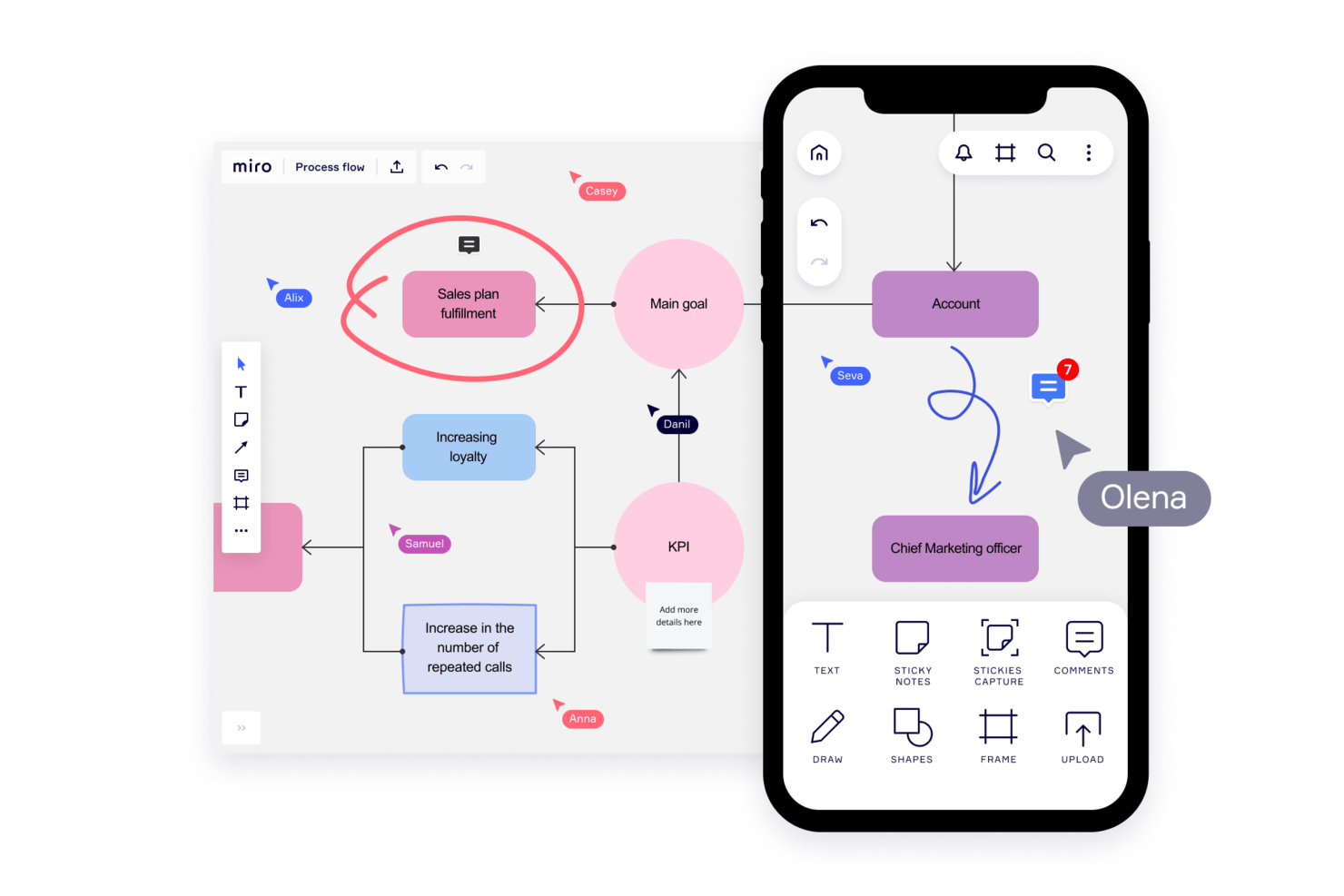
Miro is a collaborative online whiteboard and project management software with over 1,000 templates including mind maps, Kanban boards, Gantt charts, product wireframes, research boards, and flowcharts.
Why I Picked Miro: Miro’s visual platform is built for Agile project management with a wide range of features supporting iterative processes. Its two-way integration with Jira and Azure helps maintain a clear overview of project progress and task dependencies. The planner widget and dependencies app also simplify task organization and visibility, allowing teams to visualize tasks by sprint, status, or team, and how each task is interlinked. Additionally, the platform fosters collaboration and real-time feedback through features like built-in video conferencing, voting, stickies, and comments.
Miro Standout Features & Integrations
Features include AI capabilities for tasks like clustering sticky notes and fleshing out brainstorm ideas. The tool also offers an extensive library of common diagram types and other templates for specific use cases like project planning, kickoffs, and timelines.
Integrations include Confluence, monday.com, Zoom, Figma, Asana, Microsoft Teams, Jira, Slack, Google Drive, Box, Airtable, Notion, Azure, and Webex. Some integrations are limited to paid plans only.
Pros and Cons
Pros:
- Free forever plan available
- Intuitive and easy setup
- Built-in communication features for streamlined collaboration
Cons:
- Visitor/guest accounts locked to paid plans only
- Zooming can be jumpy on larger projects
New Product Updates from Miro
Miro Adds Japan Data Residency for Enterprise Customers
Miro has introduced Japan data residency for enterprise customers, offering in-region storage for production data, backups, and metadata, plus in-region compute infrastructure. For more information, visit Miro's official site.

Aha!
Best for strategy-to-sprint delivery alignment
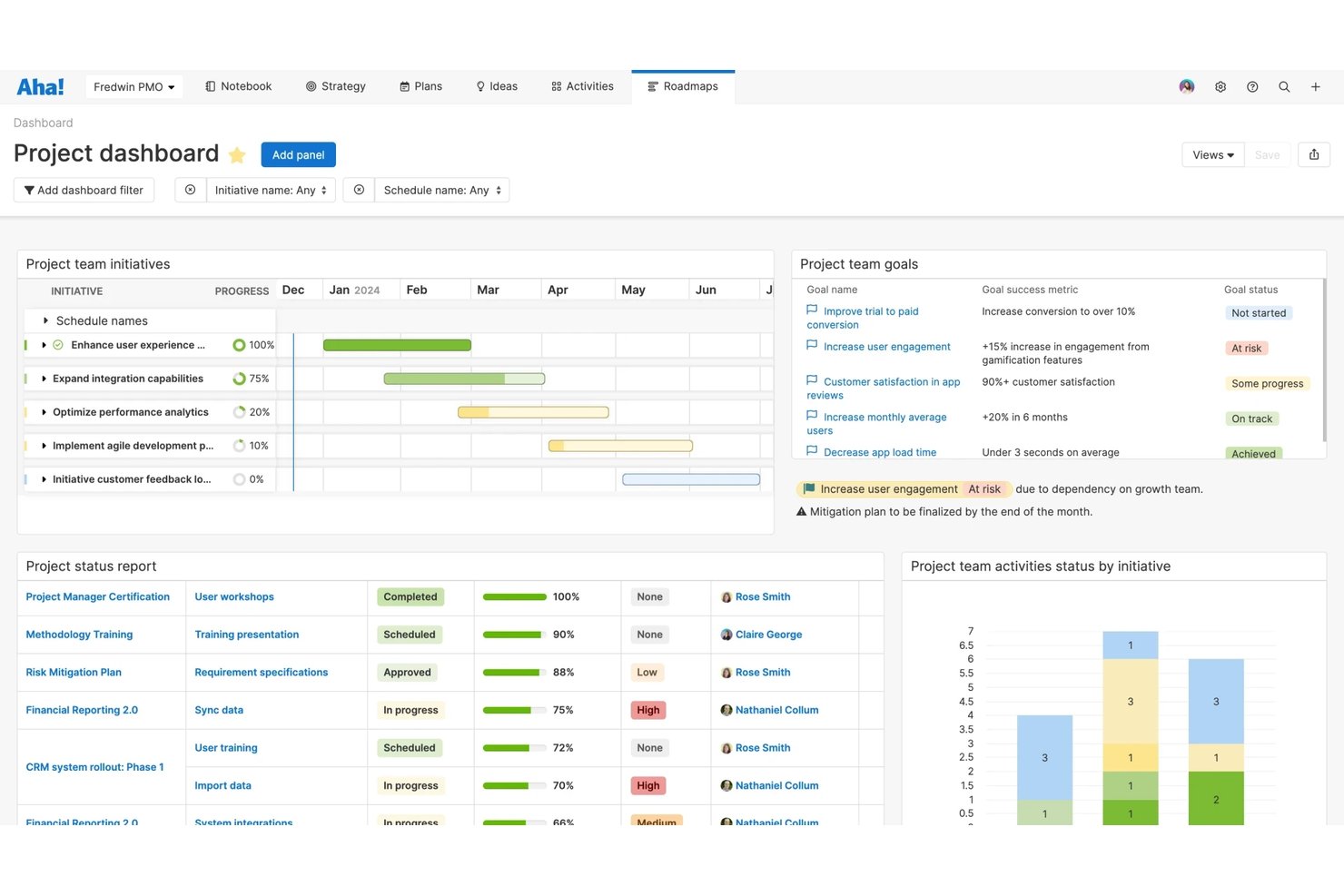
Aha! Develop is an agile project management tool that covers sprint planning, backlog management, Kanban and Scrum boards, dependency tracking, and cross-team coordination across Scrum, Kanban, SAFe, and hybrid frameworks.
Who Is Aha! Best For?
Aha! Develop is a strong fit for product and engineering teams that need sprint execution to stay visibly connected to strategy, roadmaps, and business goals.
Why I Picked Aha!
I picked Aha! as one of the best because it's the only tool on my list where sprint work is visibly tied to the goals and roadmap features that drove it in the first place. Status changes in Aha! Develop sync automatically up to Aha! Roadmaps, so leadership always sees live delivery progress without anyone writing a status report. I also like how program increments generate aligned sprints across every team in a release train, which is a genuine edge for teams running SAFe at scale.
Aha! Key Features
- Customizable Kanban board: Add custom status columns, set WIP limits per column, apply swimlanes by class of service or team member, and save filtered views.
- Developer tool integrations: Link stories to branches and pull requests in GitHub, GitLab, Bitbucket, and Azure DevOps, with automatic status updates when a PR merges.
- Sprint retrospective report: Track retrospective outcomes with follow-up actions assigned by owner and due date directly within the tool.
- AI-assisted estimation: Generate first-pass story estimates based on historical data using the built-in AI assistant, Elle.
Aha! Integrations
Aha! Develop offers 35+ integrations, including GitHub, GitLab, Bitbucket, Azure DevOps, Jira, CircleCI, and GitHub Actions. It also provides a REST API for custom integrations and supports AI coding agents such as GitHub Copilot.
Pros and Cons
Pros:
- Reviewers praise responsive, knowledgeable customer support
- Aligns SAFe teams through shared program increments
- Links sprint work to strategy and roadmaps
Cons:
- Initial setup takes planning across complex workflows
- Advanced agile reports require an upgraded plan
Jira
Best for scrum boards
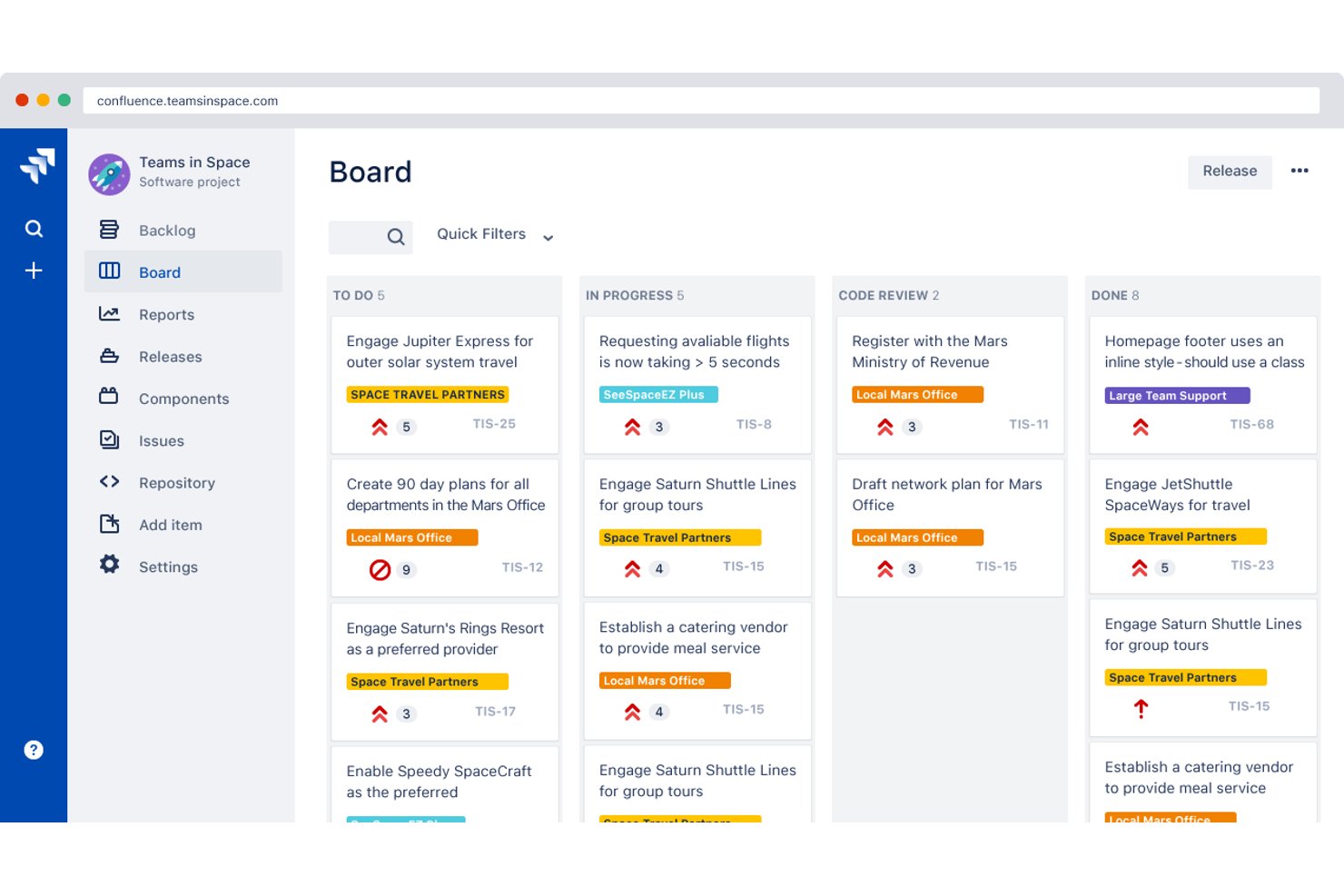
Jira is an agile project management platform that combines scrum boards, kanban boards, sprint planning, backlog management, and agile reporting into a deeply configurable toolset built for software development teams.
Who Is Jira Best For?
Jira is a strong fit for scrum masters and software development teams who need deep sprint planning, backlog management, and agile reporting built into one platform.
Why I Picked Jira
Jira earns its spot on my shortlist because its scrum boards are genuinely the most mature I've used, built around the full sprint lifecycle rather than bolted on as an afterthought. I love how the backlog feeds directly into sprint planning, with velocity data and burndown charts available out of the box, so scrum masters can run planning sessions without exporting anything. The Release Hub is particularly useful in practice: it flags broken builds and open pull requests tied to a release, giving teams a real-time picture of what's actually ready to ship.
Jira Key Features
- Customizable agile boards: Scrum and Kanban boards support configurable columns, swimlanes, and WIP limits to match your team's workflow.
- JQL filtering: Jira Query Language lets you build custom searches that feed boards, dashboards, and cross-project views.
- Automation rules engine: A no-code rule builder with hundreds of templates lets admins trigger actions across single or multiple projects.
- Developer tool integration: Work items surface linked branches, commits, pull requests, and build status directly from connected dev tools like Bitbucket.
Jira Integrations
Jira integrates with Confluence, Bitbucket, Slack, Microsoft Teams, Google Workspace, Zoom, Figma, and GitHub. Its Marketplace offers 3,000+ apps, and rich APIs support custom integrations.
Pros and Cons
Pros:
- Release views surface build and pull-request blockers
- Backlog grooming feeds directly into sprint planning
- Sprint reports connect velocity, burndown, and planning
Cons:
- Retrospective and async standup tools require add-ons
- Dense menus complicate onboarding for new teams

Zenhub
Best for GitHub-native agile sprint tracking
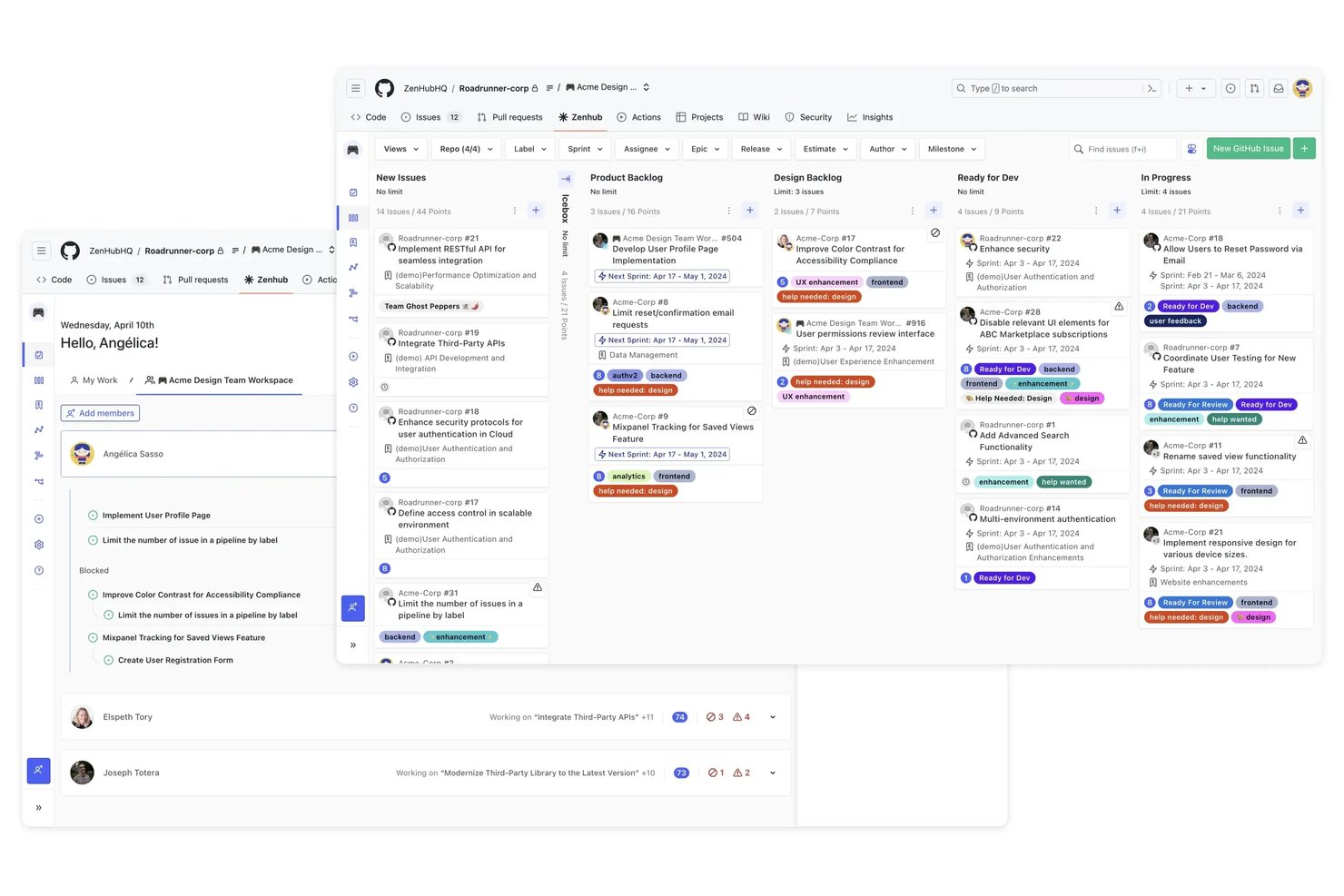
Zenhub is a GitHub-native agile project management tool that combines sprint planning, Kanban boards, backlog management, and agile reporting within a GitHub-integrated environment.
Who Is Zenhub Best For?
Zenhub is a strong fit for software development teams that live in GitHub and want agile sprint tracking without switching tools.
Why I Picked Zenhub
Zenhub earns its spot on my shortlist because it's the only agile tool that lives entirely inside GitHub rather than alongside it. I love how recurring sprints fill themselves from the prioritized backlog using your team's average velocity, so sprint planning becomes a quick review rather than a manual rebuild every two weeks. The multi-repo Kanban board lets engineering leads track issues across several repositories on a single board, with PRs linked directly to the relevant issues, keeping code and project context together without any copy-pasting.
Zenhub Key Features
- Planning Poker: Run anonymous, asynchronous estimation sessions where story point votes are applied automatically once the team reaches consensus.
- Five-level work hierarchy: Organize work across Initiatives, Projects, Epics, Issues, and Sub-tasks, built on native GitHub sub-issues with a rules engine to enforce structure.
- AI sprint review summary: Zenhub auto-generates a written summary of closed sprint issues, ready to use as a demo agenda or sprint record.
- Portfolio roadmap: View and switch between portfolio-level and project-level timelines by month, quarter, or year, with velocity-based deadline risk indicators.
Zenhub Integrations
Zenhub offers native integrations with GitHub and Slack, while Enterprise adds Figma, Loom, and Miro. A public GraphQL API and MCP server support custom integrations with Claude, Cursor, Gemini CLI, and Windsurf.
Pros and Cons
Pros:
- Agile reports cover velocity and cycle time
- Planning poker supports async estimation
- Automated sprints use team velocity
Cons:
- Reports can be unclear for decision-making
- Large boards can lag or glitch

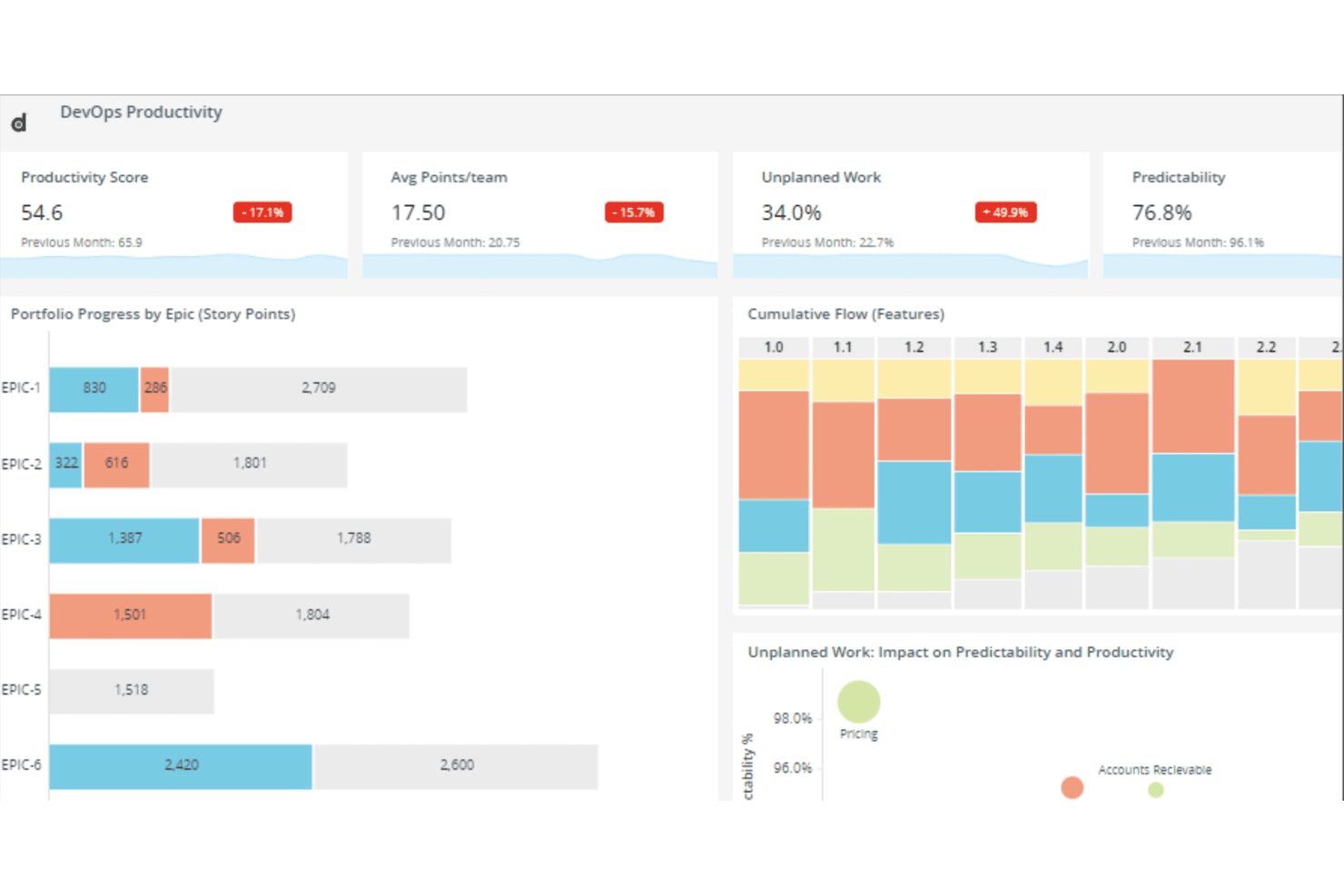
Digital.ai Agility is an enterprise agile planning platform that supports sprint planning, backlog management, dependency tracking, cross-team coordination, and reporting across Scrum, Kanban, SAFe, and other agile frameworks.
Who Is Digital.ai Agility Best For?
Digital.ai Agility is a strong fit for enterprise teams running SAFe at scale, particularly organizations with multiple Agile Release Trains that need portfolio-to-team traceability in one platform.
Why I Picked Digital.ai Agility
I picked Digital.ai Agility as one of the best because it's built from the ground up for SAFe at scale, with native support across all four SAFe levels: Portfolio, Development Value Stream, Program, and Team. I love how the Dependency Board color-codes cross-ART dependencies in real time, so I can spot a broken dependency the moment it turns red during PI planning rather than discovering it mid-sprint. The PlanningRooms make distributed PI planning genuinely workable, supporting live and async participation across multiple Agile Release Trains simultaneously.
Digital.ai Agility Key Features
- Rooms 2 sprint workspace: Combines sprint planning, execution, testing, and retrospectives in a single unified team view.
- Estimably planning poker: A built-in planning poker tool for collaborative story estimation, included in all hosted editions.
- Storyboard WIP limits: Column-level work-in-progress limits with aging indicators that flag violations at configurable thresholds.
- Sage AI story breakdown: AI-assisted tools that automatically break portfolio items and epics down into stories and work items.
Digital.ai Agility Integrations
Digital.ai Agility supports 70+ marketplace integrations, including Jira Software, Azure DevOps, GitHub, GitLab, Zendesk, ServiceNow, Salesforce, and OpenText ALM/QC. Its Sync API and open integration framework support custom connections.
Pros and Cons
Pros:
- Sprint planning and retrospectives share one workspace
- Color-coded dependencies clarify cross-team risks
- Native SAFe support across four levels
Cons:
- Report building and exports feel cumbersome
- Large backlogs can slow performance
Other Agile Project Management Software
Here are a few more that didn’t make my top agile project management tools list, but which are still worth your consideration.
- Jira Align
For linking strategy to team-level delivery
- IBM Targetprocess
For enterprise portfolio-to-team agile visibility
- Smartsheet
For customizability
- MeisterTask
For ideation and task management
- ClickUp
For tracking sprint projects
- GitLab
For dev-to-deploy agile traceability
- FigJam
For project brainstorming
- Linear
For dev-team sprint tracking with Git sync
- Shortcut
For sprint and iteration management
- Azure Boards
For dev-team agile in the Microsoft stack


Related Project Management Software Reviews
If you still haven't found what you're looking for here, check out these other related tools that we've tested and evaluated:
- Project Management Software
- Agile Tracking Tools
- Resource Management Software
- Workflow Automation Software
- Time Tracking Software
- Task Management Software
- Collaboration Tools
- Creative Project Management Software
- Online Project Management Tools
- Project Management Software for Startups
How I Evaluate AI Agile Project Management Tools
I only include tools where the AI goes beyond a chatbot bolted onto a task board—it needs to save real time in how teams plan, run, and improve their sprints. I split my evaluation into core functionality every tool must offer to make the list and differentiating factors that set one vendor apart from another.
Core Functionality (Table Stakes For This List)
When I'm selecting tools for my list, I rank each one on a scale from 0 (does not offer the functionality) to 5 (excels in this area) for each core functionality listed below. Then, I calculate the tool's total score into a percentage. Each tool needs to achieve a minimum total score of 65% to be considered for inclusion.
- AI-Powered Backlog Management: I look for tools that use AI to generate, prioritize, and refine user stories and epics from plain-language inputs rather than forcing manual entry.
- Agile Framework Support: The tool should natively support Scrum and Kanban at minimum, with sprint boards, backlogs, burndown charts, and velocity tracking built in.
- AI Sprint Planning & Estimation: I evaluate how well the AI recommends sprint scope and estimates story points based on team capacity and past velocity data.
- Predictive Analytics & Forecasting: I check whether the tool surfaces AI-driven delivery forecasts, risk flags, and bottleneck alerts across sprints and releases.
- AI Workflow Automation: Routine agile tasks like status updates, standup summaries, and task routing should be automated by AI rather than relying on manual rules.
- Integrations & Collaboration: Tools need to connect with the dev stack teams already use—GitHub, Slack, Jira, CI/CD pipelines—and support real-time collaboration.
Once I have a list of tools that meet this criteria, I consider what sets each platform apart.
Differentiating Factors (What Sets Vendors Apart)
Here's how I compare and contrast different vendors:
Standout Features
Dependency intelligence is a big differentiator—I look for tools that use AI to map cross-team dependencies and flag risks before they derail a sprint. Natural language querying also stands out. Being able to ask "what's blocking the checkout feature?" and get a real answer saves time over digging through boards manually. I also evaluate whether a tool can join standups or planning calls, extract action items, and push updates directly to the backlog.
Beyond Features
AI model transparency matters—I check whether a vendor explains how its AI generates recommendations and whether teams can opt out of model training on their data. Scalability is another key factor, especially for orgs running SAFe or LeSS across multiple squads. I look for portfolio-level roll-ups and cross-team reporting that hold up at scale. Time-to-value also counts: migration tools and prebuilt agile templates help teams moving off legacy platforms get productive fast without a lengthy onboarding cycle.
How To Choose Agile Project Management Software
As you're shortlisting, trialing, and selecting agile project management software, consider the following:
- What problem are you trying to solve? Start by identifying the agile project management software feature gap you're trying to fill to clarify the features and functionality that the software needs to provide.
- Who will need to use it? To evaluate cost and requirements, consider who'll be using the software and how many licenses you'll need. Evaluate whether it will be just your project managers or the whole organization. Consider whether to prioritize ease of use for all, or speed for your power users.
- What other tools it needs to work with? Clarify what tools you're replacing, what tools are staying, and the tools you'll need to integrate with, such as accounting, CRM, or HR software. You'll need to decide if the tools will need to integrate together or whether you can replace multiple tools with one consolidated agile project management tool.
- What outcomes are important? Consider the result that the software needs to deliver to be considered a success, what capability you want to gain, what you want to improve, and how you will measure success. For example, an outcome could be the ability to get greater visibility into performance.
- How it would work within your organization? Consider the software selection alongside your workflows and delivery methodology. Evaluate what's working well and which areas need to be addressed. Every business is different—don’t assume that the popular tool will work in your org.
Trends in Agile Project Management Software
Here are several new trends that I have identified and believe will continue to shape the development of agile planning tools in the future.
- Mobile optimization and accessibility: The push for mobile optimization and improved accessibility features indicates a growing need for agile project management tools to be fully functional on-the-go. This trend is driven by the increasing prevalence of remote and hybrid work arrangements, which requires software that supports anytime, anywhere access to project information, tasks, and collaboration tools.
- Automation and AI-driven features: Tools are offering more automation and AI-driven functionalities, such as automated task assignments and AI-based risk assessment. These features aim to reduce manual effort, improve accuracy in project forecasting, and optimize resource management. This underscores the push towards leveraging technology to streamline project processes.
- No-code/low-code customization: The rise of no-code and low-code platforms within agile planning software development is a significant trend. These platforms let users customize workflows, create apps, or automate processes without extensive programming knowledge. This reflects a shift towards making agile project management tools more adaptable and accessible to a broader range of users.
- Enhanced security and compliance features: As cybersecurity threats become more sophisticated, there's a noticeable trend towards improved security features within software for agile project management. This includes advanced data encryption, access controls, and compliance with international standards and regulations.
What is Agile Project Management Software?
Agile project management software is a tool that helps you plan, track, and manage projects that are using agile methods (i.e. ways of working that focus on flexibility and adapting quickly to change). Teams like software developers, product managers, and designers use this type of software to break work into short cycles called sprints, track tasks, and stay organized.
You’ll find it useful for better teamwork, faster updates, and keeping everyone in the loop when priorities shift. It can also help you keep in contact with stakeholders and customers, which is critical in maintaining a strong feedback loop (a key principle of agile).
Features of Agile Project Management Software
Here are the most critical features to look for when selecting the best agile tools for your needs.
- Real-time collaboration: Lets team members communicate and collaborate on tasks in real time. This feature makes sure all team members are on the same page, which improves teamwork and speeds up decision-making.
- Flexible task management: Offers tools for creating, prioritizing, and updating tasks quickly. The ability to adjust tasks and priorities on the fly allows agile teams to respond to changing project requirements and customer feedback effectively.
- User stories and backlogs: Allows teams to capture product functionalities in the form of user stories and manage them in a backlog. This is important for breaking down the project into manageable units that can be prioritized and tackled iteratively, so the most valuable features are developed first.
- Sprint planning tools: Facilitates the organization of work into sprints, so teams can plan iterations effectively. Sprint planning tools are key to defining what work will be accomplished in a set timeframe, which makes it easier to manage expectations and track progress.
- Burndown charts: Provides visual representations of remaining work versus time. Burndown charts are vital for tracking the progress of sprints and releases, so teams can adjust their pace and priorities to meet deadlines.
- Kanban boards: Offers a visual workflow management system to monitor the progress of tasks through different stages. Kanban boards are instrumental in visualizing work, limiting work-in-progress, and ensuring a smooth flow of tasks, which supports continuous delivery.
- Continuous integration/continuous delivery (CI/CD) tools: Integrates with CI/CD pipelines to automate the testing and deployment processes.
- Feedback loops: Allows for quick collection of feedback from stakeholders and incorporation into the project. Fast and efficient feedback loops are essential for agile teams to adapt to changes and continuously improve the product based on user input.
- Reporting and analytics: Offers comprehensive reporting tools and analytics for monitoring project health and team performance. This feature provides insights into project progress, so teams can make data-driven decisions.
- Access controls and permissions: Allows for the management of access rights and permissions for different users. Proper access controls make sure sensitive information is protected and that team members can access the data they need to work effectively.
Benefits of Agile Project Management Software
Here are five key advantages that agile planning apps offer to users and organizations:
- Increased flexibility: The best tools for agile project management allow teams to adapt to changes quickly and efficiently. This flexibility makes sure that businesses can respond to market changes, customer feedback, and unforeseen challenges without derailing the project.
- Enhanced collaboration: These tools provide platforms for real-time communication and collaboration among team members, regardless of their location. Enhanced collaboration leads to better problem-solving, more innovative ideas, and a stronger sense of unity among team members, all of which contribute to the success of projects.
- Improved project visibility: With features like dashboards, burndown charts, and Kanban boards, stakeholders gain a clear overview of project progress. Improved project visibility helps you make informed decisions, make sure resources are allocated efficiently, and keep everyone aligned with the project goals.
- Faster time to market: By facilitating continuous integration and delivery, the top agile software lets businesses release smaller increments of their product faster. This improves customer satisfaction by delivering value more frequently and allows businesses to stay ahead of the competition by accelerating time to market.
- Higher product quality: Continuous feedback loops and regular iterations mean that issues are identified and addressed early on in the project life cycle. The improves product quality and makes sure the final product closely aligns with customer needs and undergoes thorough testing before release.
Costs & Pricing for Agile Project Management Software
Here is a breakdown of typical pricing plans you may encounter as you search for the right tool for your needs:
| Plan Type | Average Price | Common Features |
|---|---|---|
| Free | $0 | Basic project management, limited users, essential collaboration tools |
| Starter/Basic | $10-20 per user/month | Enhanced project tracking, additional users, basic integrations |
| Standard/Mid-Range | $20-50 per user/month | Advanced reporting, unlimited projects, priority support, more integrations |
| Premium/Advanced | $50-100 per user/month | Portfolio management, custom fields and workflows, advanced analytics, full integration options |
| Enterprise | Custom Pricing | Comprehensive features set, dedicated support, onboarding and training, enterprise-grade security |
Agile Project Management Software Frequently Asked Questions
Find answers to common questions other people ask about this topic.
What is an agile methodology?
Unlike waterfall, the gist of agile project management is that “every project must be aligned to clearly defined business goals and must focus on the early delivery of products that provide real added value to the business organization,” according to Henny Portman in their article on agile methodologies.
Agile development can use one of 50+ agile approaches and frameworks, including the very popular Scrum (for which Scrum teams might use a specific Scrum tool), its cousin Kanban, or other practices like Extreme Programming (XP) and Feature Driven Development (FDD).
Agile frameworks are adapted and hybridized—there’s no one right way to be agile. Whatever version you follow, you’re working with the basic agile principles laid out in the agile manifesto, which focus on communication, collaboration, self-organization, and responding quickly to new information.
How is agile useful for software development teams?
Before agile project management, the development team was often beholden to rigid, hierarchical practices with “permission gates” between phases. It was a slow, lumbering process that featured long development cycles and no way to adapt to big changes in scope, budget, or resources. Agile management is the exact opposite.
The agile development process is all about communication, collaboration, and being able to react at whiplash speed to new information and goals. Agile software development ensures that every action is taken and resource spent contributes to predefined business goals, KPIs, and/or provides some sort of ROI. That way, no money or effort feels wasted as the project team struggles to navigate an uncertain roadmap.
Running agile projects means moving quickly, being flexible, and iterating on work using feedback cycles. By prioritizing communication and collaboration, every agile team member can be sure that they are spending their time on tasks that contribute directly to a set of overarching goals.
Agile PM can be adapted to A) develop a new product from scratch, or B) perform ongoing improvement of already-finished products. Iteration and evolution are key for an agile development cycle, meaning that you can expect multiple iterations and much end-user feedback and product testing. Really, anyone can follow agile development—not just software teams. After all, who doesn’t like being fast and flexible in their work?
Is there free agile PM software?
Yes, there are plenty of free agile project management software, or freemium (an agile project management course free forever plan with limited features or users). For example:
- Scrumblr
- Trello
- iceScrum
- ScrumDo
- Yodiz
- ScrumDesk
- Kanbanchi
- Pipefy
- VivifyScrum
- KanbanTool
Even if you start using agile PM software for free, you should check out its paid plans to make sure you’re on board with them, as you might grow into those paid plans down the road.
How To Choose Agile Project Management Software
As you’re shortlisting, trialing, and selecting agile project management software, consider the following:
-
- What problem are you trying to solve? Start by identifying the agile project management software feature gap you’re trying to fill to clarify the features and functionality that the software needs to provide.
-
- Who will need to use it? To evaluate cost and requirements, consider who’ll be using the software and how many licenses you’ll need. Evaluate whether it will be just your project managers or the whole organization. Consider whether to prioritize ease of use for all, or speed for your power users.
-
- What other tools it needs to work with? Clarify what tools you’re replacing, what tools are staying, and the tools you’ll need to integrate with, such as accounting, CRM, or HR software. You’ll need to decide if the tools will need to integrate together or whether you can replace multiple tools with one consolidated agile project management tool.
-
- What outcomes are important? Consider the result that the software needs to deliver to be considered a success, what capability you want to gain, what you want to improve, and how you will measure success. For example, an outcome could be the ability to get greater visibility into performance.
-
- How it would work within your organization? Consider the software selection alongside your workflows and delivery methodology. Evaluate what’s working well and which areas need to be addressed. Every business is different—don’t assume that the popular tool will work in your org.