

2026’da İncelenen En İyi Yapay Zekâ Proje Yönetimi Araçları

10 En İyi Yapay Zekâ Proje Yönetimi Araçları Kısa Listesi


Sonsuz idari işlerle boğuşmadan projeleri yolunda tutmak zorlu olabilir. Yapay zekâ destekli proje yönetimi araçları; tekrarlayan görevleri otomatikleştirerek, iş akışlarını optimize ederek ve daha hızlı, daha iyi kararlar almanıza yardımcı olan akıllı içgörüler sunarak işleri değiştiriyor. Doğru yapay zekâ aracıyla manuel güncellemelere daha az, projeleri ilerletmeye ise daha fazla zaman ayırabilirsiniz. Ancak bu kadar çok seçenek varken hangisinin gerçekten başarılı olduğunu belirlemek zor olabilir.
Verimliliği, kullanılabilirliği ve genel proje başarısını gerçekten artıranları görmek için çeşitli yapay zekâ destekli proje yönetimi araçlarını test ettim. Bu makalede size en iyi seçenekleri ve daha akıllı çalışmanıza nasıl yardımcı olabileceklerini anlatacağım.
Why Trust Our Software Recommendations
Our team has been testing and reviewing software since 2012. As project managers ourselves, we know how difficult—and important—it is to choose the right software.
For this guide, we evaluated tools using hands-on testing and independent research, scoring tools using our selection criteria. We also draw on insights from industry thought leaders and practicing project management experts.
Our reviews reflect our human editorial judgment, not a sales pitch.
Expert reviewers:
Yapay Zekâ Proje Yönetimi Araçları Karşılaştırma Tablosu
Bu karşılaştırma tablosu, en iyi yapay zekâ proje yönetimi aracı seçimlerimin fiyatlandırma ayrıntılarını özetlemektedir:
Score legend (out of 5)
- Excellent 4.5–5
- Good 4–4.4
- Average 3–3.9
- Below average 2–2.9
- Poor 1–1.9
| Tool | Starting Price | Website | |||||||
|---|---|---|---|---|---|---|---|---|---|
| Best for resource planning & risk assessment | 3.5 out of 5 | 3 | 4 | 4 | 4 | 3 | 3 | $9/user/month Free plan + 14-day trial available | Book Demo |
| Best for AI-assisted project workflows | 3.2 out of 5 | 2 | 3 | 4 | 4 | 4 | 2 | $10/user/month Free plan + 14-day trial + demo available | Book Demo |
| Best for real-time profitability insights | — | — | 3 | — | 4 | 4 | 2 | $10/user/month 14-day free trial | Book Demo |
| Best for skill-based resource matching | — | — | — | 2 | 2 | — | 4 | Pricing upon request Not available | Book Demo |
| Best for project resource forecasting | 3.5 out of 5 | 3 | 3 | 4 | 3 | 4 | 4 | Pricing upon request Not available | Website |
| Best for integrated time tracking | — | 2 | — | 3 | 1 | 2 | 3 | $10/user/month 14-day free trial | Website |
| Best for flexibility and scalability | 1.8 out of 5 | 2 | 2 | 1 | 2 | 3 | 1 | Pricing upon request Free plan + 15-day trial + demo available | Website |
| Best for meeting-to-task AI capture | 2.8 out of 5 | 2 | 4 | 2 | 4 | 4 | 1 | $5/user/month Free plan + 14-day trial + demo available | Website |
| Best for all-in-one work management | 3.5 out of 5 | 3 | 4 | 3 | 4 | 4 | 3 | $12/user/month Free plan + free demo available | Book Demo |
| Best for meeting-to-task AI automation | 3.3 out of 5 | 3 | 4 | 3 | 4 | 4 | 2 | $10.99/user/month Free plan + trial + demo available | Website |
En İyi Yapay Zekâ Proje Yönetimi Araçları İncelemeleri
Bu listede yer alan her yazılım hakkındaki ayrıntılı değerlendirmelerimi; neleri iyi yaptıklarını ve her biri için en iyi kullanım alanlarını burada bulabilirsiniz.

Best for resource planning & risk assessment
monday.com is a flexible AI-powered project management platform for tech teams and digital businesses that need to automate workflows, predict project risks, and optimize resource allocation across complex projects.
Who Is monday.com Best For?
monday.com is a strong fit for mid-size to enterprise tech teams managing multiple concurrent projects with cross-functional dependencies.
Why I Picked monday.com
I picked monday.com as one of the best AI project management tools because of how well its AI handles resource planning and risk detection across live projects. The AI-powered workload management feature gives my team a real-time view of who's over capacity and who has bandwidth, so we can reassign tasks before a bottleneck turns into a missed deadline. What I find especially useful is the Risk Analyzer agent, which actively monitors schedule, dependency, and workload risks across projects and alerts stakeholders when something needs attention—rather than waiting for a status meeting to surface the problem. That combination of proactive risk flagging and AI-driven resource allocation is genuinely hard to find in a single platform.
monday.com Key Features
- monday sidekick: A context-aware AI assistant built into your workspace that summarizes updates, generates project plans with owners and deadlines, and triggers workflows from a simple prompt.
- AI-generated dashboards and reports: Create live, customizable dashboards across individual projects or entire portfolios directly from a natural language request.
- Portfolio management: Connect projects across your organization to monitor dependencies, track progress, and surface risks at the portfolio level in real time.
- Goals and OKRs tracking: Link strategic objectives to active projects and monitor progress toward company goals from within the same workspace.
monday.com Integrations
Integrations include Slack, Gmail, Google Calendar, Outlook, Microsoft Teams, Salesforce, QuickBooks, HubSpot, Zendesk, and GitHub.
Pros and Cons
Pros:
- Quick-access buttons for common actions
- AI Assistant for task updates and progress management
- Visual project board with customizable statuses & task assignments
Cons:
- Limited functionality when offline
- Boards can become visually cluttered
New Product Updates from monday AI Workspace
monday AI Workspace Adds Human Approval Routing
monday AI Workspace adds a human-in-the-loop approval block to AI Workflows, sending approval requests and routing workflow paths based on responses. For more information, visit monday AI Workspace's official site.
 .

Wrike
Best for AI-assisted project workflows
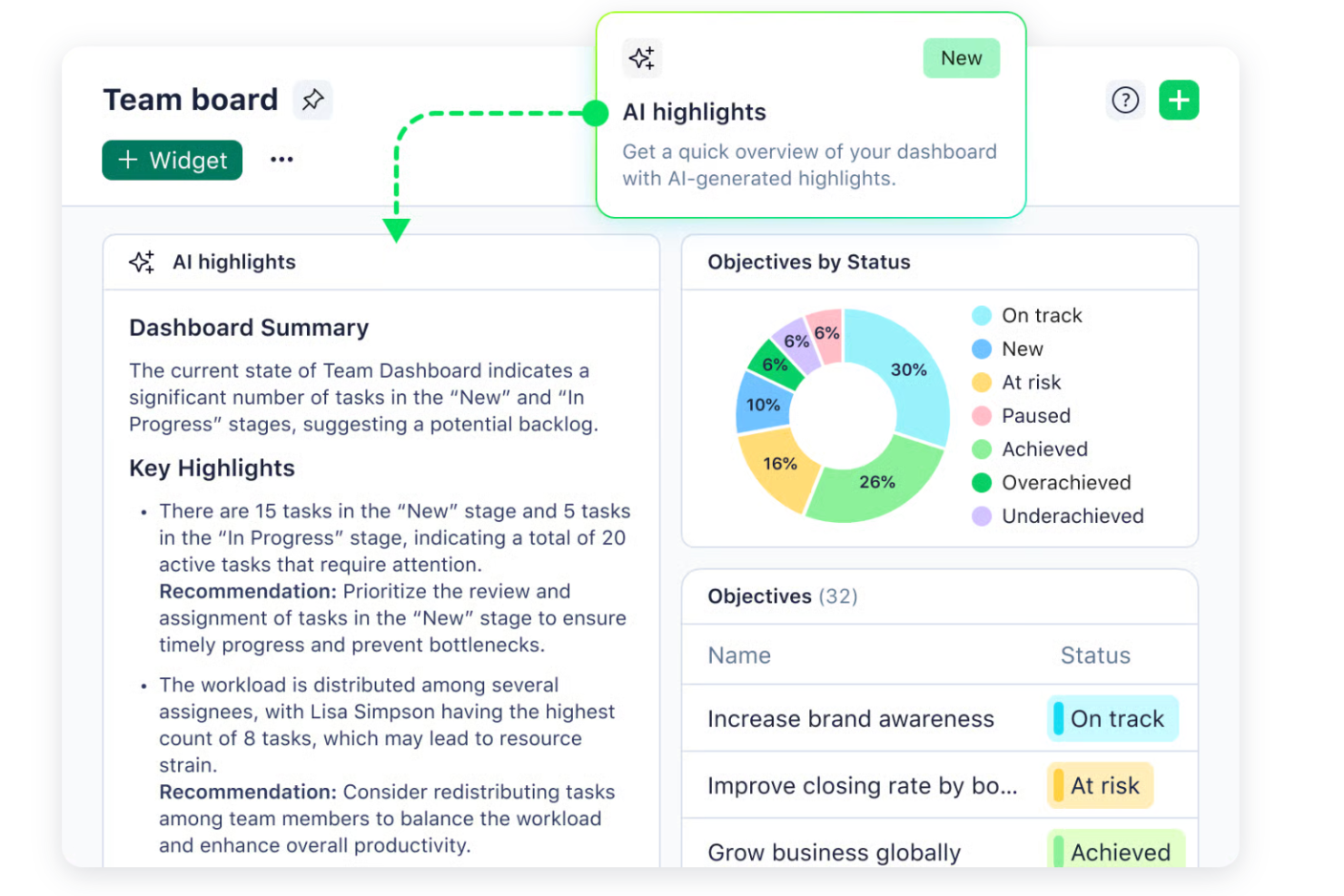
Wrike is a work management platform with AI-powered features spanning an agent builder, Copilot for natural-language project queries, generative AI for content and task creation, predictive risk insights, and no-code automation rules built from plain-language descriptions.
Who Is Wrike Best For?
Wrike is a strong fit for project managers and portfolio teams at mid-to-large organizations who need AI-assisted workflows across complex, cross-functional projects.
Why I Picked Wrike
I've included Wrike in my top picks because its AI-assisted workflows run deeper than most tools I've tested, from a no-code agent builder that routes and populates tasks based on your own criteria, to Wrike Copilot answering plain-language questions about project status without requiring a custom report. I also like that natural-language rule generation lets you describe an automation in plain English and have Wrike build the rule, which cuts out a lot of the configuration overhead that usually slows teams down at setup.
Wrike Key Features
- Wrike Copilot: Ask natural-language questions about project status, surface risks, and generate dashboard widgets without building a report.
- AI agent builder: Create no-code agents that populate task fields from intake submissions, score requests by impact and effort, and route work based on your own criteria.
- Natural-language configuration: Describe an automation rule or request form in plain language and have Wrike generate it for you.
- Wrike MCP Server: Connect Wrike data to external AI assistants for analysis, with access governed by each user's existing Wrike permissions—available on all plans, including Free.
Wrike Integrations
Wrike offers 400+ integrations, including Jira, GitHub, Slack, Microsoft Teams, Google Calendar, Salesforce, Zoom, and Google Sheets. Its REST API, webhooks, OAuth 2.0, and MCP Server connect Wrike data with custom tools and external AI assistants; MCP is available on all plans, including Free.
Pros and Cons
Pros:
- Users praise automation for reducing admin work
- Copilot summarizes updates and links source items
- AI agents automate intake, triage, task routing
Cons:
- Resource balancing lacks AI-driven recommendations
- AI doesn't optimize dependency-aware project schedules
New Product Updates from Wrike

Wrike Redesigns Workspace Search With New Filters
Wrike introduces a redesigned Workspace Search interface with recent search shortcuts, item type and location filters, and parent-task context. These updates help users find relevant work items and navigate search results efficiently. For more information, visit Wrike’s official site.
 .

Best for real-time profitability insights
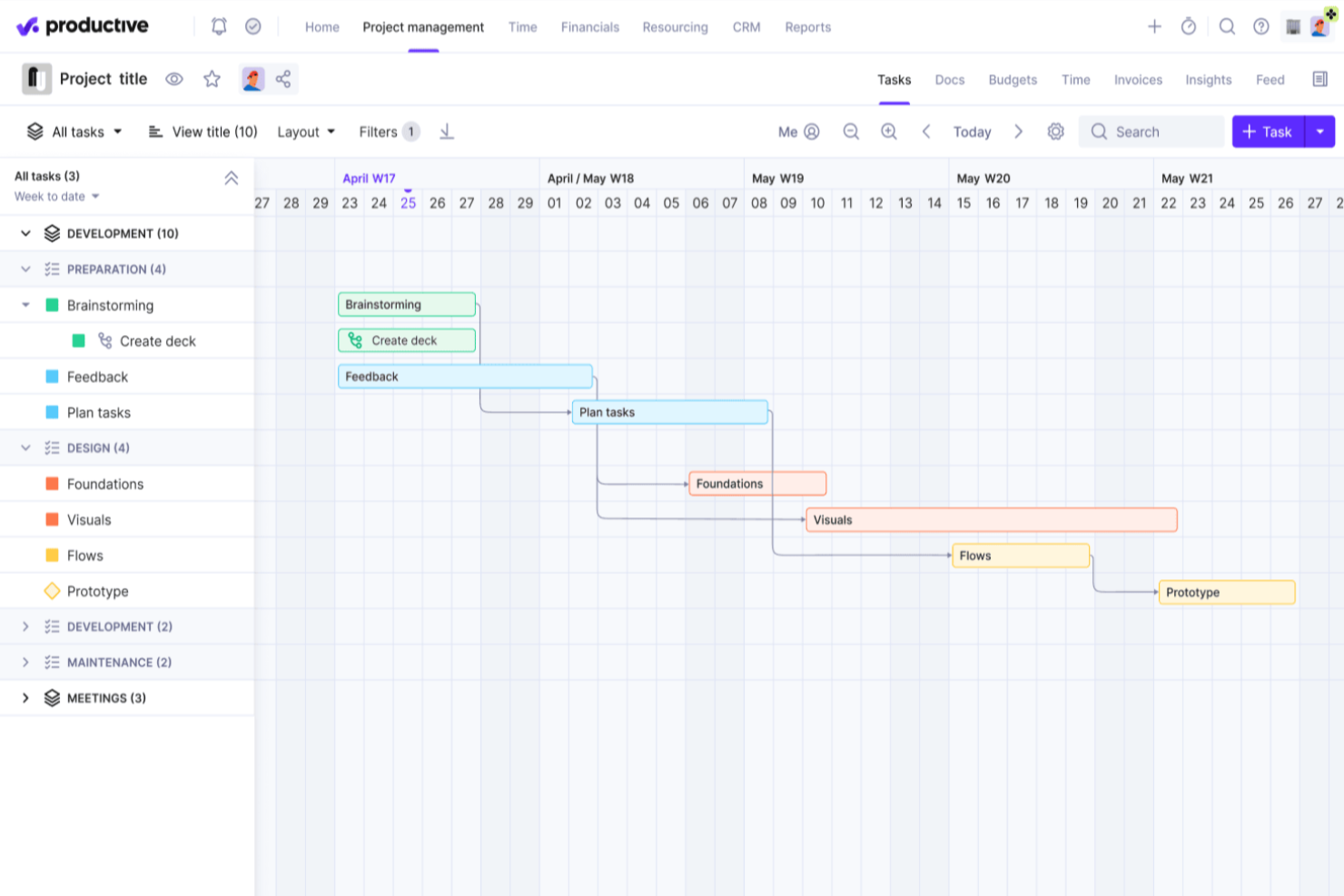
Productive is a professional services automation platform that combines project and task management, resource planning, time tracking, budgeting, invoicing, and AI-assisted reporting in one workspace.
Who Is Productive Best For?
Productive is a strong fit for agencies and consultancies that need project delivery, resource planning, and financial performance tied together in one place.
Why I Picked Productive
I picked Productive as one of the best because it connects time tracking, project budgets, and resource planning in a way that makes profitability visible in real time, not just at project close. I love how the AI Assistant lets you pull budget health, task progress, and blockers from a plain-language prompt, so you're not digging through reports to spot where a project is bleeding margin. The Notetaker also converts meeting action points into draft tasks with assignees and linked budgets already prefilled, keeping financial context intact from conversation to execution.
Productive Key Features
- AI-powered automation rule creation: Describe a workflow trigger, condition, and action in plain language, and the AI Assistant drafts an automation rule for you to review before it goes live.
- Meeting-to-task capture via Notetaker: Notetaker joins Zoom, Google Meet, or Microsoft Teams calls, records a timestamped transcript, and generates action points with suggested assignees and linked projects.
- Natural language report generation: Type a plain-language prompt to build reports across budgets, resources, and projects, then refine fields, filters, and groupings by continuing the conversation.
- AI time tracking suggestions: The platform analyzes your calendar events and past time entries to suggest or automatically fill timesheets, reducing manual logging.
Productive Integrations
Productive offers native integrations with Jira, Google Calendar, Slack, HubSpot, Xero, and Microsoft Outlook. It also provides an HTTP API, webhooks, MCP Server, and Connectors for custom and AI-driven connections, plus Zapier.
Pros and Cons
Pros:
- Resource plans connect workload with profitability
- Natural-language reports summarize project and budget health
- AI turns meeting actions into draft tasks
Cons:
- No predictive alerts for risks or delays
- No AI-generated schedules or timeline adjustments
New Product Updates from Productive
Productive Adds Email and Calendar Integrations for Agents
Productive adds Gmail, Outlook, Google Calendar, and Outlook Calendar connectors for its AI agents. These integrations let agents manage emails and create calendar events directly within Productive. For more information, visit Productive’s official site.
 .

Best for skill-based resource matching
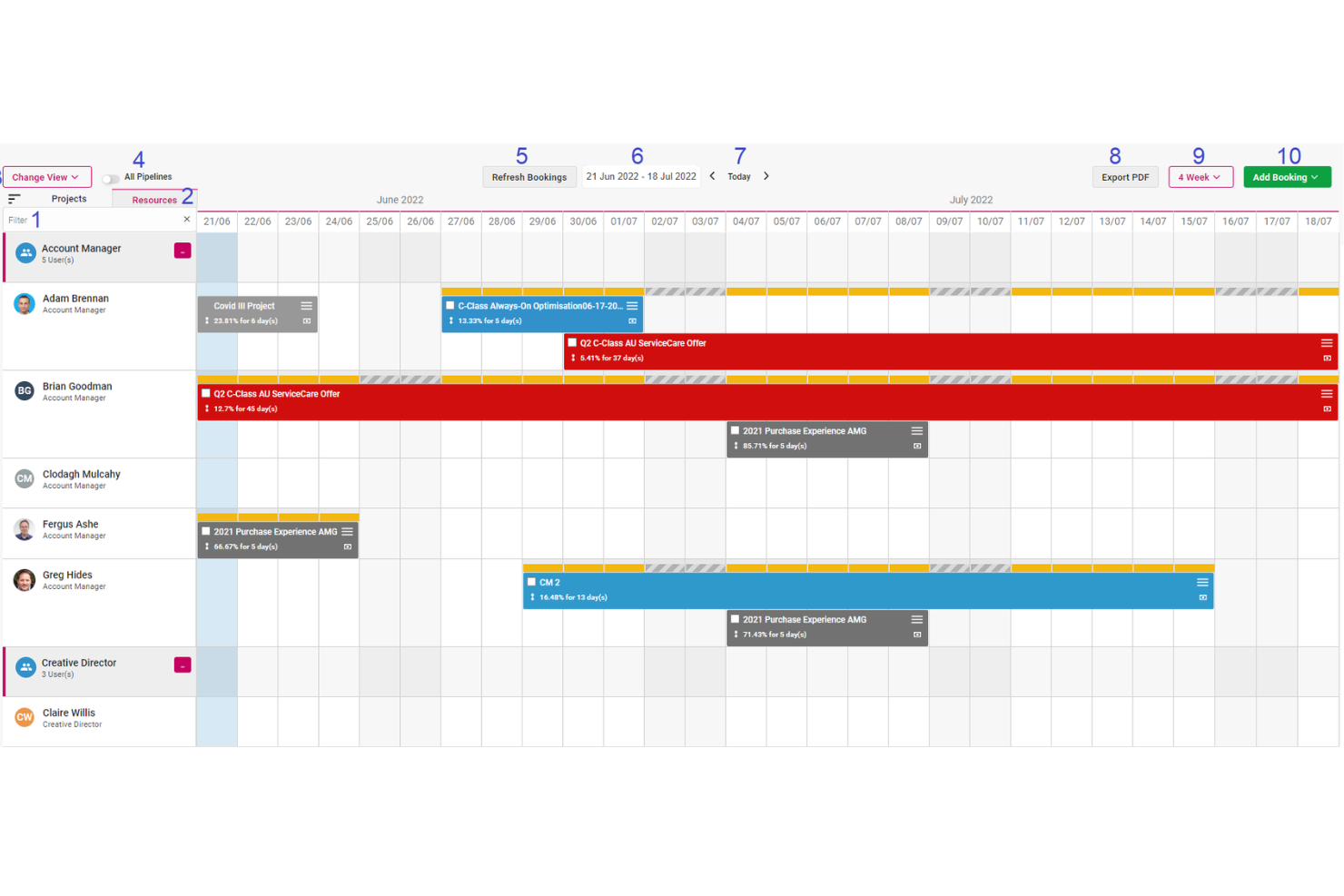
Screendragon is a workflow management platform built for enterprise marketing and creative teams, combining project management, AI-powered resource matching, approval workflows, and no-code AI agent building.
Who Is Screendragon Best For?
Screendragon is a strong fit for enterprise marketing and creative teams that need AI-driven resource matching to assign the right people to the right work.
Why I Picked Screendragon
I picked Screendragon as one of the best because its AI-driven resource matching genuinely sets it apart from other workflow tools. The Resourcing Agent recommends assignments by weighing skills, availability, workload, and project needs, with adjustable factor weighting so you're not stuck with a one-size-fits-all algorithm. Pair that with machine-learning forecasts that project resource demand 3–6 months out using historical data and seasonal patterns, and you have real visibility into capacity before it becomes a bottleneck.
Screendragon Key Features
- No-code AI agent builder: Configure and deploy AI agents inside your workflows without writing any code, using rules, guardrails, and approved knowledge sources.
- Briefing agent: Automatically generates structured project briefs using brand playbooks, past performance data, and configurable guidelines.
- Workflow automation builder: Build and customize approval workflows, conditional routing, and task dependencies using a visual no-code interface.
- Custom reporting dashboards: Create automated reports from your own project data and track milestones, budgets, and KPIs in personalized dashboards.
Screendragon Integrations
Screendragon documents 1,000+ integrations, including native connections with Aprimo, HubSpot, Microsoft Power BI, Slack, Microsoft Teams, Amazon S3, Sitecore, and Smartsheet. Its REST API supports OAuth 2.0, JSON, and webhooks for custom connections.
Pros and Cons
Pros:
- Dashboards centralize project and budget visibility
- Forecasts resource needs months ahead
- AI matches people by skills and workload
Cons:
- Workflow setup can take time
- No AI-generated schedule or timeline adjustments

Kantata
Best for project resource forecasting
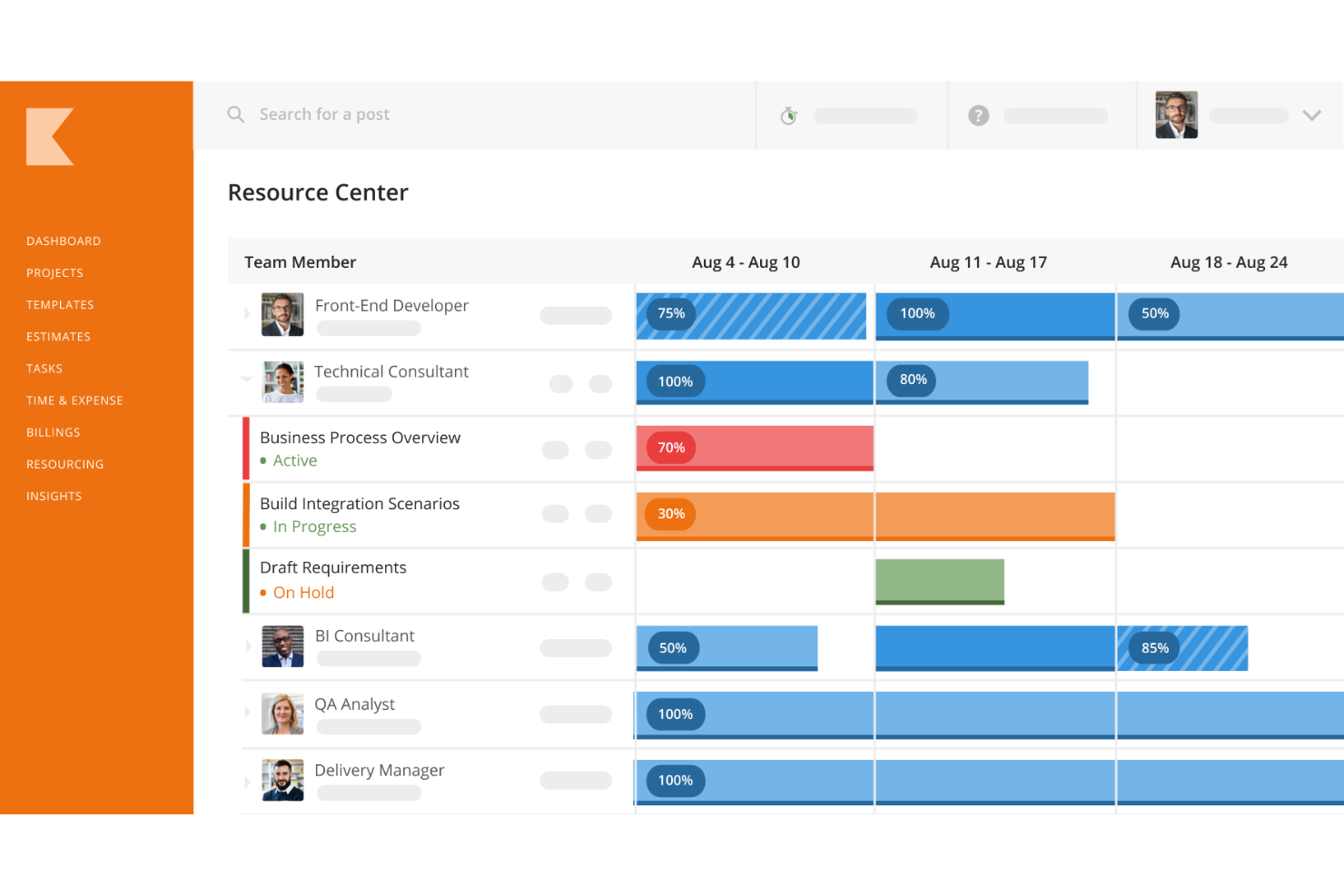
Kantata is a professional services automation platform that brings together AI-driven resource planning, project management, time tracking, financial management, and business intelligence for services-focused teams.
Who Is Kantata Best For?
Kantata is a strong fit for professional services teams—like consulting and agency operations—that need to forecast and manage resource demand across multiple concurrent projects.
Why I Picked Kantata
I picked Kantata as one of the best because resource forecasting is genuinely where it earns its place. Its AI-powered resource matching factors in skills, location, availability, and predicted project success to recommend staffing, while scenario staffing lets you soft-book people across multiple options before committing. The Expertise Agent goes further by flagging overbooked roles and identifying future hiring gaps based on pipeline capacity.
Kantata Key Features
- Project health and risk insights: The Expertise Agent surfaces budget, schedule, and staffing risks across active projects and flags overbooked roles that could affect delivery.
- Natural language querying: Advanced Insights lets you ask questions across Kantata data, dashboards, and KPIs in plain language and returns explanations of sources, filters, and calculations.
- Workflow automation: Pre-built automations handle recurring processes like project setup, user onboarding, resourcing, and billing without manual triggers.
- Sentiment tracking: Captures client and employee feedback at project milestones and combines it with operational data like cost and utilization to surface potential satisfaction issues early.
Kantata Integrations
Kantata advertises over 1,200 prebuilt connectors, including Salesforce, HubSpot, QuickBooks, NetSuite, Sage Intacct, ChatGPT, Claude, Copilot, MuleSoft, and Workato. It also provides APIs and secure MCP connectivity for custom AI integrations.
Pros and Cons
Pros:
- Project, time, and margin data stay connected
- Portfolio views consolidate project status and performance
- Resource matching weighs skills, availability, and impact
Cons:
- Allocation timelines may not match recorded hours
- AI access requires vendor activation and permissions
New Product Updates from Kantata

Kantata Adds Access Group Change History
Kantata adds Access Groups History, letting account administrators track changes to group details, membership, and permissions in Recent History. The update also makes these events available through the Subscribed Events API for broader monitoring. For more information, visit Kantata’s official site.
 .

Celoxis
Best for integrated time tracking
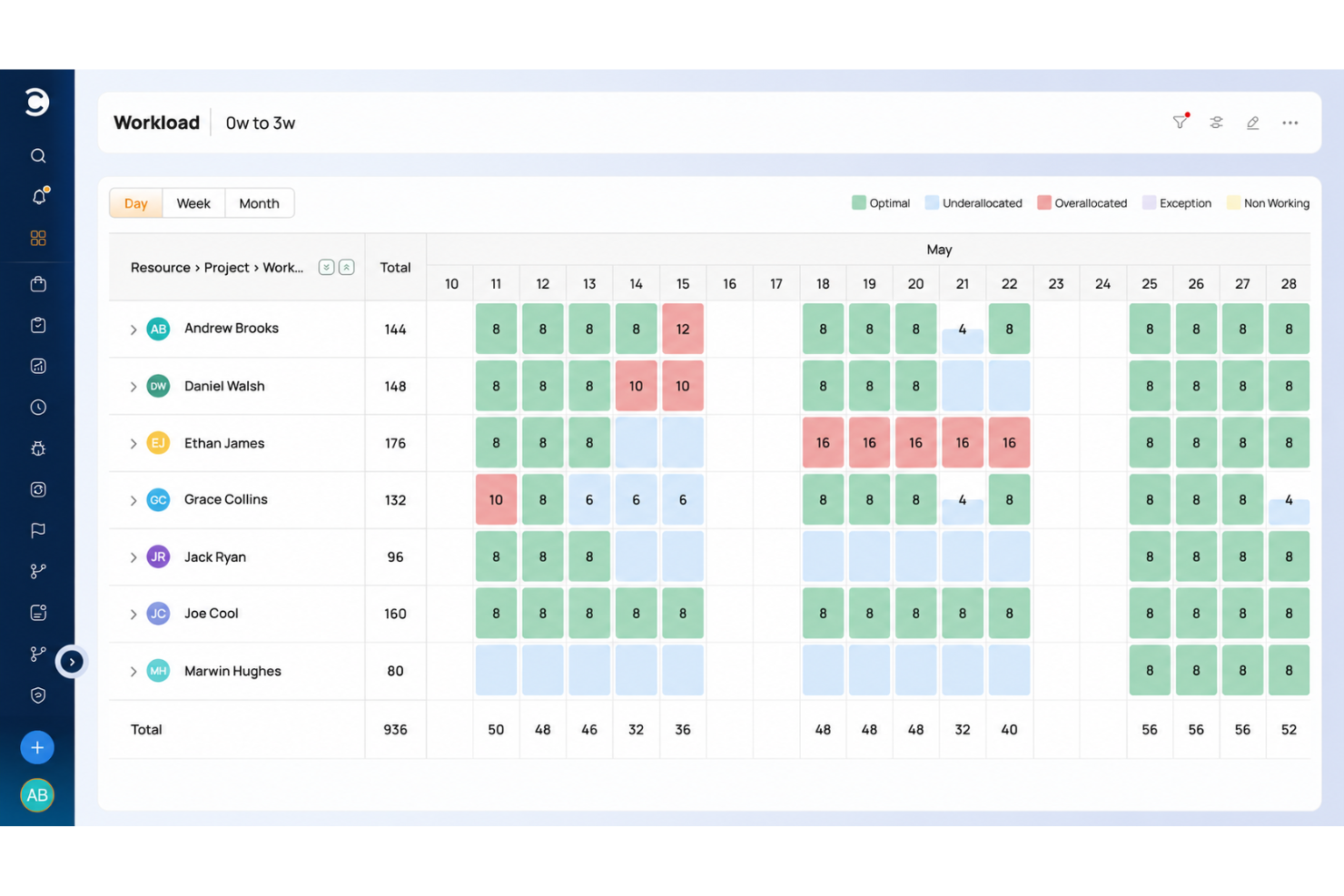
Celoxis is a project and portfolio management platform that combines Gantt scheduling, resource capacity planning, time tracking, financial control, and an AI assistant (Lex) for querying live project data.
Who Is Celoxis Best For?
Celoxis is a strong fit for program and portfolio managers who need to track time, costs, and delivery across multiple projects in one place.
Why I Picked Celoxis
I picked Celoxis as one of the best because its time tracking goes far deeper than a simple timesheet. You get weekly timesheet grids with timers, multi-level approvals, and configurable policies, and approved hours flow directly into project costing and billing without manual exports. I also like that Lex, Celoxis's AI assistant, can surface resourcing gaps and flag potential bottlenecks by querying live utilization data across your portfolio in plain English.
Celoxis Key Features
- Lex natural-language queries: Ask plain-English questions about live project, portfolio, resource, and financial data directly from a chat interface.
- Cross-project Gantt scheduling: Build and link schedules across projects with critical-path analysis, four dependency types, and automatic recalculation when plans change.
- Portfolio dashboards: View aggregated project health, schedule status, and financial data across your entire portfolio in configurable, drillable dashboards.
- Project intake and scoring: Collect, rank, and route project requests against business KPIs, capacity, and portfolio budgets before committing resources.
Celoxis Integrations
Celoxis has 21 integrations configured inside the platform, including Microsoft Project, Microsoft 365, Google Drive, Salesforce, QuickBooks Online, and Azure DevOps. It also supports 400+ connected apps through its REST API and Zapier.
Pros and Cons
Pros:
- Portfolio dashboards unite workload, schedules, and financials
- Dependency-linked Gantt plans recalculate after delays
- Lex surfaces resource gaps through queries
Cons:
- No automatic status or meeting summaries
- Lex doesn't generate or adjust schedules

Best for flexibility and scalability

Zoho Projects is a project management platform that combines Gantt-based scheduling, task automation, workload reporting, and AI-assisted project creation through its built-in Zia assistant.
Who Is Zoho Projects Best For?
Zoho Projects is a strong fit for teams already in the Zoho ecosystem who need a full-featured project management tool they can shape to fit their workflows.
Why I Picked Zoho Projects
Zoho Projects earns its spot on my shortlist because its depth of customization is genuinely hard to find at this price point. I can shape task layouts, custom modules, statuses, and workflow blueprints to match exactly how my team operates, without rebuilding everything from scratch. When a project grows in complexity, features like baseline tracking and Gantt-based dependency management scale with it. That flexibility is what makes it a fit for teams whose workflows don't fit neatly into a fixed template.
Zoho Projects Key Features
- Zia AI task generation: Describe a milestone or project and Zia suggests up to 50 tasks and subtasks for you to review and add.
- Blueprint workflow automation: Define task transitions with assigned owners, required fields, and team alerts that trigger automatically as statuses change.
- Earned value management: Track planned versus actual cost and schedule performance using built-in EVM metrics and budget reports.
- MCP server integration: Connect an external LLM to your Zoho Projects portal to retrieve data and create or update records using natural-language prompts.
Zoho Projects Integrations
Zoho Projects offers 50+ marketplace integrations, including native connections with Zoho Analytics, Google Drive, Microsoft Teams, Slack, GitHub, and Jira. It also provides a REST API and Zapier integration for custom connectivity.
Pros and Cons
Pros:
- AI drafts requirements-based project structures
- Blueprints automate configured task transitions
- Gantt dependencies help surface bottlenecks
Cons:
- AI task suggestions require manual approval
- AI doesn’t predict project risks
New Product Updates from Zoho Projects
Zoho Projects Adds CodeX Scripts for Custom Modules
Zoho Projects now supports CodeX Scripts for custom modules, enabling conditional logic and rules for creating, updating, and deleting records. For more information, visit Zoho Projects' official site.
 .
Hive
Best for meeting-to-task AI capture
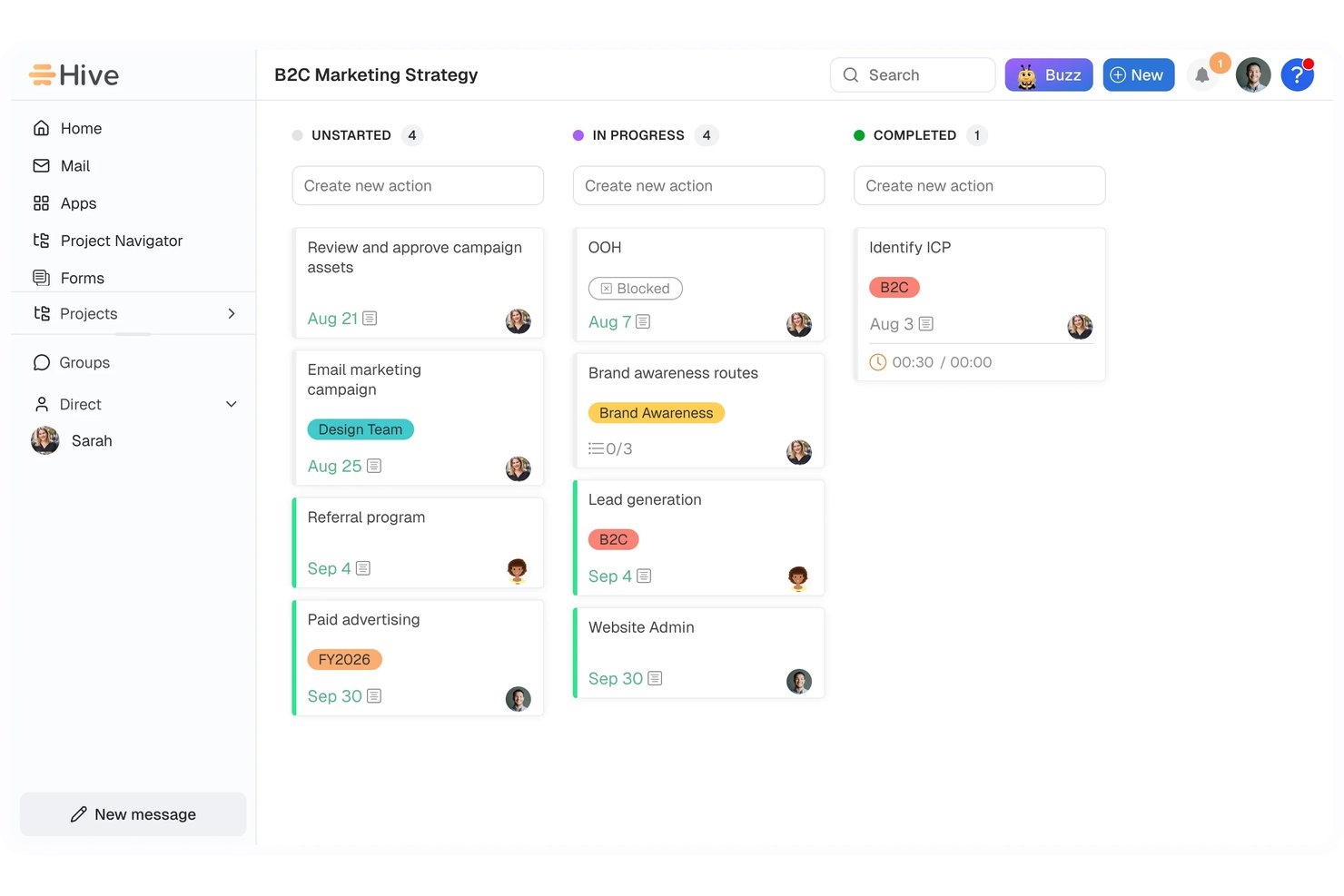
Hive is an AI project management platform that combines task and project tracking, multi-view project planning, workflow automation, and an AI assistant (Buzz) that handles meeting summaries, natural-language task creation, and workspace-wide action management.
Who Is Hive Best For?
Hive suits cross-functional teams that need meeting notes and action items captured and tracked in one place without manual handoffs.
Why I Picked Hive
I picked Hive as one of the best because of how well its Buzz Sidekick handles the gap between meetings and actual work. During a call, Sidekick transcribes in real time, extracts committed next steps with owners, and lets you push those directly into Hive action cards the moment the meeting ends. I also love that Buzz can draft entire projects from a natural-language prompt, complete with tasks, assignees, and due dates, so nothing from a planning session gets lost in translation.
Hive Key Features
- Buzz-built workflows: Describe a process in plain language and Buzz generates a workflow with triggers and operations for your review before it goes live.
- Portfolio view: See all your projects in one place with status, owners, milestones, and custom fields displayed side by side.
- Dependency-based auto-scheduling: Link actions with finish-to-start, finish-to-finish, or other dependency types so that date changes automatically shift connected tasks in Gantt.
- AI dashboards: Ask Buzz to build dashboard widgets and query your project data to surface overdue tasks, blockers, and workload across teams.
Hive Integrations
Hive claims over 1,000 integrations, including native integrations with Google Drive, Google Calendar, Zoom, Microsoft Teams, Jira, Slack, and GitHub. Its API supports custom integrations.
Pros and Cons
Pros:
- Summaries cover meetings, threads, and workspace activity
- Buzz builds workflows from plain-language requests
- Meeting commitments become assigned action drafts
Cons:
- Capacity views require manual staffing decisions
- Risk insights lack documented predictive prioritization
ClickUp
Best for all-in-one work management
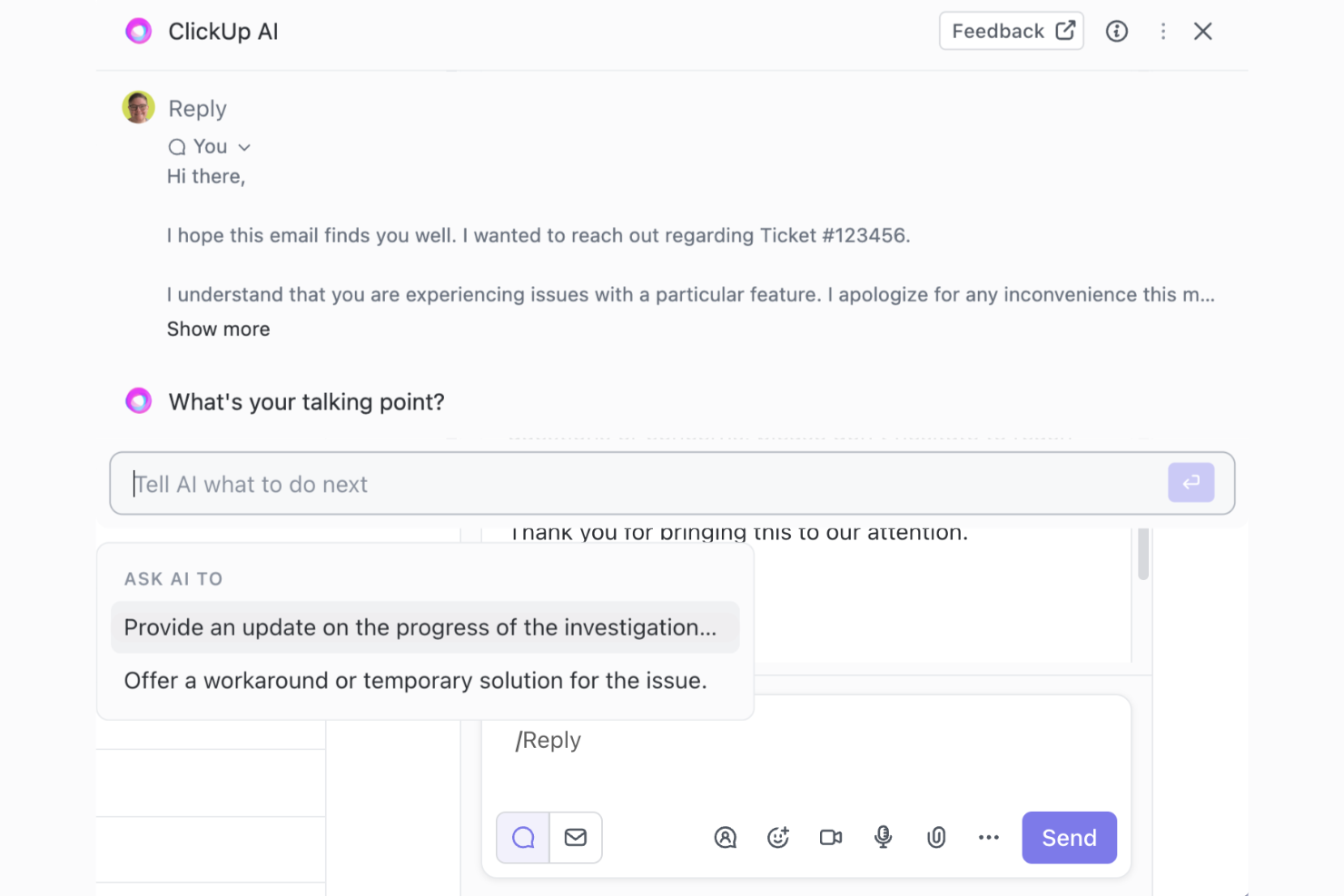
ClickUp is an all-in-one work management platform that brings together task management, project planning, docs, chat, and AI-powered automation—including natural language plan generation, meeting summarization, and configurable AI agents—in a single workspace.
Who Is ClickUp Best For?
ClickUp is a strong fit for cross-functional teams that need tasks, docs, chat, and AI-powered automation in one place rather than stitched across separate tools.
Why I Picked ClickUp
ClickUp is one of my top picks because it genuinely consolidates the tools project managers juggle daily: tasks, docs, chat, and AI, all in one place. I especially like Brain's ability to generate a full project plan from a natural-language prompt, mapping dependencies and milestones you can immediately view as a Gantt chart. The AI Notetaker also stands out to me for capturing meeting output as structured docs with action items, so nothing falls through the cracks after a stakeholder call.
ClickUp Key Features
- Super Agents: Configurable AI agents that act across your workspace using natural-language instructions, saved skills, and scheduled or automation-based triggers.
- Connected Search: Searches across your ClickUp workspace and connected apps—including Slack, Google Drive, Jira, and Notion—from a single query.
- Workload view: Displays each team member's assigned work, capacity, and availability across a selected time period so you can spot over- or under-allocation.
- Custom Automations: Sets up trigger-and-action rules to automatically assign tasks, change statuses, or post comments when defined conditions are met.
ClickUp Integrations
ClickUp offers 1,000+ integrations, including native connections with Slack, GitHub, Google Drive, Jira, Microsoft Teams, Google Calendar, Zoom, and Figma. It also provides a public REST API, webhooks, OAuth, an MCP server, and Zapier.
Pros and Cons
Pros:
- Automations reduce repetitive project work
- Turns meeting notes into action items
- Keeps tasks, docs, chat, and AI together
Cons:
- Workspace setup takes time to configure
- AI-generated tasks can be inconsistent
New Product Updates from ClickUp
ClickUp Adds List Automations, Time Off Scheduling, and Org Charts
ClickUp adds template-based List automations, personal time off scheduling, a unified picker, automatic task date syncing, and Org Charts. These updates help teams automate project setup, manage availability, and organize work. For more information, visit ClickUp’s official site.
 .
Asana
Best for meeting-to-task AI automation
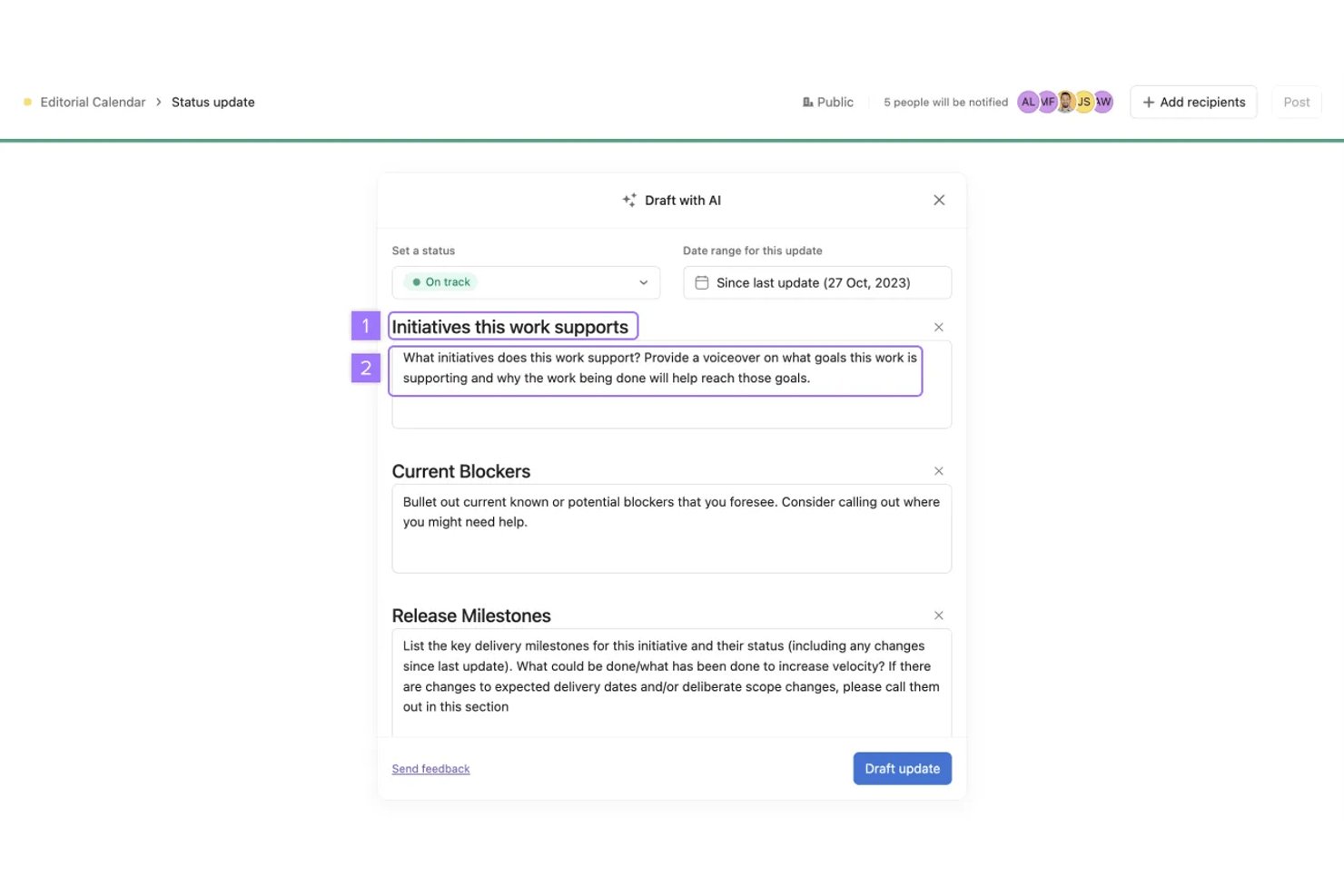
Asana is an AI project management platform that combines agentic work management, task automation, AI Teammates, and cross-functional workflow orchestration built on a shared Work Graph.
Who Is Asana Best For?
Asana suits cross-functional teams that need AI to handle the busywork of turning meetings, requests, and briefs into organized, trackable project work.
Why I Picked Asana
I've included Asana in my top picks because it's the only tool on my list that turns a recorded Zoom meeting directly into an assigned, trackable task, no copy-pasting required. Once a transcript is ready, AI Studio fires automatically, pulls out decisions and action items, creates subtasks with owners, and drops everything into the right project. I also like that AI Teammates can bulk-create dependent tasks from a project brief, keeping the full delivery chain in order from the start.
Asana Key Features
- Smart Chat: Ask plain-language questions across tasks, projects, and goals to find work, identify blockers, or create and update tasks.
- AI Studio: Build and deploy no-code AI workflows using event triggers and actions for intake, classification, routing, and reporting.
- Risk reports: Analyze recent task and milestone changes to surface potential risks, link them to relevant work, and suggest mitigation steps.
- Workload view: Display team capacity by task count or effort across projects, with controls to manually reschedule or reassign work.
Asana Integrations
Asana lists 100+ free integrations, including marketplace integrations with Slack, Google Drive, Microsoft Teams, Jira Cloud, GitHub, Zoom, Salesforce, Google Sheets, and Power BI. Its REST API, webhooks, SDKs, and MCP Server support custom integrations.
Pros and Cons
Pros:
- Automations create tasks with owners and dependencies
- AI drafts status and project summaries
- Meeting transcripts become assigned tasks
Cons:
- Capacity planning lacks AI-driven reassignment
- Risk reports react to recent changes
Diğer Yapay Zekâ Proje Yönetimi Araçları
Aşağıda kısa listeme aldığım ancak en iyi listeye giremeyen ek yapay zekâ proje yönetimi araçlarının bir listesi yer alıyor. Bunlara da göz atmaya değer.
- Motion
For AI-driven task scheduling
- Epicflow
For multi-project portfolio forecasting
- TaskRay
For AI task management on Salesforce
- Smartsheet
For conversational AI across portfolios
- Jira
For Agile teams scaling with AI assist
- Forecast
For AI-driven professional services ops
- Teamwork.com
For AI-driven client work coordination
- Microsoft Project
For Microsoft 365-native status reporting
- Airtable
For no-code AI workflow automation
- Taskade
For AI-driven task and workflow automation


İlgili Proje Yönetimi Yazılımı İncelemeleri
Burada aradığınızı hâlâ bulamadıysanız, sizin için derlediğimiz diğer proje yönetimi aracı incelemelerine göz atın:
- Verimlilik Araçları
- Proje Takip Yazılımı
- Proje Planlama Yazılımı
- Proje Yönetimi Yazılımı
- Kaynak Yönetimi Yazılımı
- İş Akışı Otomasyonu Yazılımı
- Yapay Zekâ Görev Yöneticisi Araçları
- Uzaktan Çalışan Ekipler İçin Proje Yönetimi Araçları
How I Evaluate AI Project Management Tools
To make this list, a tool’s AI must handle project work, like generating schedules and flagging likely delays. From there, I evaluate three things. Core functionality carries the most weight, like sequencing tasks and balancing workloads. Then I look at standout features, like meeting-to-task capture, and beyond-feature factors, like whether project data trains the AI.
Core Functionality (Table Stakes For This List)
When I'm selecting tools for my list, I score each one on a scale from 0 (does not offer the functionality) to 5 (excels in this area) for each core functionality listed below. I then convert the total into a percentage to help assess each tool's overall fit, with extra weight on any functionalities I’ve deemed essential.
- AI-Assisted Scheduling (Essential): I look for schedules that account for dependencies and capacity, then adjust when a design review or engineering handoff slips.
- Predictive Risk Insights (Essential): I assess whether project data surfaces likely delays or resource clashes early, with enough context to prioritize mitigation.
- Automated Summaries: I check whether updates, meeting notes, and comment threads become concise, actionable status digests without losing owners or decisions.
- Resource Optimization: I look for practical assignment or workload recommendations that reflect availability, skills, and competing priorities across teams.
- Task Automation: I assess whether project context or meeting notes can draft, assign, or update relevant tasks rather than just create generic templates.
- Natural Language Queries: I consider whether plain-language requests can retrieve project status, compare workstreams, or update task details beyond help-center answers.
Once I have a list of tools that meet the criteria, I consider what sets each platform apart.
Differentiating Factors (What Sets Vendors Apart)
Here's how I compare and contrast different vendors:
Standout Features
I look for tools that turn meetings into assigned tasks with due dates, since manually logging action items from standups burns time better spent on delivery. Adaptive capacity forecasting matters just as much—I evaluate whether the AI learns from past sprint velocity to sharpen future workload predictions. I also check cross-project portfolio views that aggregate risk and status signals into one dashboard, which helps when you're juggling multiple workstreams with shared resources.
Beyond Features
I evaluate whether vendors gate AI functions like scheduling or summarization behind paid tiers, since many free plans offer little more than basic task lists. Data privacy policies matter just as much—I check if project content trains the vendor's AI model and whether teams can opt out, especially for agencies handling client briefs. I also look at integration depth, because AI recommendations improve when tools like Slack, GitHub, and calendars feed real-time context into the platform.
Yapay Zekâ Proje Yönetimi Araçları Nasıl Seçilir?
Kendinize özgü yazılım seçimi sürecinizde ilerlerken aşağıdaki noktaları göz önünde bulundurun:
- Özel İhtiyaçları Anlama: Mevcut çok sayıda yapay zekâ proje yönetimi aracını incelemeye başlamadan önce kuruluşunuzun özel ihtiyaçlarını anlamak çok önemlidir. Ekibinizin büyüklüğünü, projelerinizin karmaşıklığını ve faaliyet gösterdiğiniz sektörü göz önünde bulundurun. Örneğin, bir yazılım geliştirme şirketi güçlü çevik proje yönetimi özelliklerine sahip araçlara ihtiyaç duyabilirken, bir pazarlama firması etkili iş birliği ve içerik planlama özelliklerine sahip araçları tercih edebilir.
- Entegrasyon Yetenekleri: Yapay zekâ proje yönetimi aracının kullandığınız diğer yazılım sistemleriyle ne kadar iyi entegre olduğunu değerlendirin. Sorunsuz entegrasyon, öğrenme eğrisini önemli ölçüde azaltabilir ve verimliliği artırabilir. Örneğin, CRM yazılımınızla entegrasyon sunan bir araç, satış ve proje yönetimi çalışmalarının daha iyi uyumlu hâle getirilmesine yardımcı olabilir.
- Ölçeklenebilirlik: İşletmenizle birlikte büyüyebilecek bir araç seçin. Şirketiniz büyüdükçe performanstan ödün vermeden artan proje ve kullanıcı sayısını yönetebilecek bir proje yönetimi çözümüne ihtiyaç duyacaksınız. Küçük bir girişim temel bir araçla başlayabilir; ancak işletme daha büyük bir kuruluşa dönüştükçe aracın ölçeklenip ölçeklenemeyeceğini değerlendirmelidir.
- Yapay Zekâ Özellikleri ve Faydaları: Aracın yapay zekâ yeteneklerini ve bunların belirli sorunlu noktaları nasıl ele aldığını değerlendirin. Yapay zekâ, proje zaman çizelgeleri için öngörücü analizler sunabilir, rutin görevleri otomatikleştirebilir ve akıllı, yapay zekâ destekli kaynak yönetimi sağlayabilir. Örneğin, zamanlama konusunda aşırı yük altında olan bir proje yöneticisi, geçmiş proje verilerine dayanarak en uygun kaynak dağılımını öneren bir yapay zekâ aracından faydalanabilir.
- Maliyete Karşı Değer: Son olarak, aracın maliyetini sağladığı değerle karşılaştırarak değerlendirin. Bütçe sınırları içinde kalmak önemli olsa da en ucuz seçenek her zaman en iyi yatırım getirisini sunmayabilir. Örneğin, biraz daha pahalı olan ancak risk tahmini ve risk azaltma stratejileri gibi gelişmiş yapay zekâ özellikleri sunan bir araç, uzun vadede bir şirketi maliyetli proje bütçe aşımlarından kurtarabilir.
Yapay Zekâ Proje Yönetimi Araçlarındaki Eğilimler
Yapay zekâ proje yönetimi araçları teknolojisinde fark ettiğim bazı güncel ve ilginç eğilimler şunlardır.
- Risk Değerlendirmesi için Öngörücü Analiz: Yapay zekâ destekli öngörücü analizler, proje risklerinin tahmin edilmesinde giderek daha önemli hâle geliyor. Bu araçlar, gelecekteki proje zorluklarını tahmin etmek için geçmiş verileri analiz ederek proaktif risk azaltma stratejilerinin uygulanmasını sağlıyor. Bu eğilim, kesintileri en aza indirmek ve proje başarısını güvence altına almak açısından büyük önem taşıyor.
- Makine Öğrenimiyle Geliştirilmiş Kaynak Dağılımı: Makine öğrenimi algoritmaları, proje yönetiminde kaynak dağılımını kökten değiştiriyor. Bu algoritmalar, proje ihtiyaçlarına ve bireysel becerilere göre ekip görevlendirmelerini ve kaynak kullanımını optimize ediyor. Bu eğilim, verimliliği en üst düzeye çıkarmak ve proje maliyetlerini azaltmak açısından önemlidir.
- Yapay Zekâyla Güçlendirilmiş Gerçek Zamanlı İş Birliği: Yapay zekâ, küresel proje ekipleri arasında gerçek zamanlı iş birliğini kolaylaştırıyor. Ekip dinamiklerine ve proje değişikliklerine uyum sağlayarak iletişimi ve görev koordinasyonunu düzene sokuyor. Bu eğilim, ekip çalışmasını ve proje çevikliğini geliştirme potansiyeli bakımından ilgi çekicidir.
- Otomatik Proje Zamanlama Ayarlamaları: Yapay zekâ araçları artık proje gelişmelerine ve ekip üyelerinin uygunluğuna dinamik olarak yanıt vererek proje zamanlamalarında otomatik ayarlamalar sunuyor. Bir yapay zekâ zamanlama asistanı, gerçek zamanlı verilere göre zamanlamayı sürekli olarak optimize ederek zaman çizelgelerinin gerçekçi kalmasına yardımcı olabilir. Bu eğilim, proje ivmesini korumak ve teslim tarihlerine uymak açısından büyük önem taşır.
- Yapay Zekâ Destekli Karar Destek Sistemleri: Yapay zekâ tarafından desteklenen karar destek sistemleri, proje yöneticilerine uygulanabilir içgörüler sunuyor. Bu sistemler, karmaşık sorunlar için en uygun kararları önermek amacıyla büyük miktarda proje verisini analiz ediyor. Bu eğilim, stratejik proje yönetimini geliştirmesi bakımından ilerici bir nitelik taşıyor.
Yapay zekâ, proje yönetimi araçlarının yapısını önemli ölçüde dönüştürerek bu araçları daha uyarlanabilir ve akıllı hâle getiriyor.
Yapay Zekâ Proje Yönetimi Aracı Nedir?
Yapay zekâ proje yönetimi araçları, proje yönetimi süreçlerini geliştirmek amacıyla yapay zekâyı bünyesinde barındıran gelişmiş yazılım sistemleridir. Bu araçlar; proje yöneticileri, ekip liderleri ve kuruluşlar tarafından proje planlama, yürütme ve izleme süreçlerini kolaylaştırmak için kullanılır.
Bu araçlar görevleri otomatikleştirmek, proje risklerini tahmin etmek, kaynak dağılımını optimize etmek ve karar alma süreçlerini iyileştirmek üzere tasarlanmıştır; böylece proje ortamlarında verimliliği ve üretkenliği artırırlar.
Yapay Zekâ Proje Yönetimi Araçlarının Özellikleri
Yapay zekâ proje yönetimi araçlarını seçerken iş akışlarını kolaylaştıracak, karar alma süreçlerini geliştirecek ve genel proje sonuçlarını iyileştirecek özellikleri göz önünde bulundurmak önemlidir. Aranması gereken en fazla 10 temel özellik şunlardır:
- Tahmine Dayalı Analiz: Yapay zekâ proje yönetimi araçları, gelecekteki proje sonuçlarını tahmin etmek için geçmiş verileri kullanır. Bu özellik, olası riskleri öngörmek ve projeyi yolunda tutmak için bilinçli kararlar almak açısından kritik öneme sahiptir.
- Otomatik Zamanlama: Yazılım, proje takvimlerini otomatik olarak oluşturabilir ve ayarlayabilir. Bu, zamandan tasarruf sağlar ve kaynakların verimli bir şekilde tahsis edilmesini güvence altına alır; bu da proje teslim tarihlerine uymak için hayati önem taşır.
- Risk Yönetimi: Yapay zekâ, proje risklerini belirleyebilir ve değerlendirebilir. Bunu yaparak, proaktif risk azaltımına olanak tanır; bu da her projenin başarısı ve sorunsuz yürütülmesi için temel bir unsurdur.
- Kaynak Tahsisi: Araç, ihtiyaçları öngörerek ve görevleri buna göre atayarak kaynakların kullanımını optimize eder. Proje ekibinin gereğinden fazla veya yetersiz kullanılmasını önlemek için etkili kaynak tahsisi önemlidir.
- Görev Önceliklendirme: Yapay zekâ, görevlerin önceliğini belirlemeye yardımcı olur. Bu, öncelikle en önemli görevlere odaklanarak kritik proje kilometre taşlarına ulaşılmasını sağlar.
- Gerçek Zamanlı İş Birliği: Yazılım, ekip üyeleri arasındaki kesintisiz iletişimi kolaylaştırır. Gerçek zamanlı iş birliği, ekip uyumunu korumak ve herkesin proje hedefleriyle aynı doğrultuda olmasını sağlamak için önemlidir.
- Akıllı Raporlama: Yapay zekâ araçları ayrıntılı ve bilgilendirici raporlar sunar. Bu raporlar, ilerlemeyi takip etmek ve proje performansını iyileştirmek amacıyla veriye dayalı kararlar almak için önemlidir.
- Bütçe Yönetimi: Yapay zekâ, proje giderlerini tahmin edebilir ve takip edebilir. Bu, projenin mali sınırlar içinde kalmasını sağlamak ve olası maliyet aşımlarını erken tespit etmek için önemlidir.
- Kalite Kontrolü: Yapay zekâ, işin kalitesini ve standartlara uygunluğunu izleyebilir. Yüksek kaliteli çıktıları korumak, projenin başarısı ve itibarı açısından büyük önem taşır.
- Entegrasyon Yetenekleri: Diğer yazılımlar ve araçlarla entegre olabilme yeteneği önemlidir. Bu, sorunsuz bir iş akışı sağlar ve gerekli tüm verilerin merkezileştirilerek erişilebilir olmasını güvence altına alır.
- Eylem maddeleri: Belirli bir zaman dilimi içinde tamamlanmak üzere kişilere veya ekiplere atanan görevler ya da faaliyetler.
- Bildirimler: Kullanıcıları bir uygulama içindeki güncellemeler, hatırlatıcılar veya diğer ilgili faaliyetler hakkında bilgilendiren uyarılar ya da mesajlar.
- Alt görevler: Daha büyük bir projenin veya görevin parçası olan, karmaşık faaliyetleri gerçekleştirilebilir adımlara ayırmaya yardımcı olan daha küçük ve daha yönetilebilir görevler.
Bu özelliklere sahip doğru yapay zekâ proje yönetimi aracını seçmek, projelerin verimliliğini ve başarısını önemli ölçüde artırabilir. Dijital projeleri yöneten biri olarak, bu araçların önde kalmak için vazgeçilmez olduğunu düşünüyorum.
Yapay Zekâ Proje Yönetimi Araçlarının Faydaları
Yapay zekâ proje yönetimi araçları, işleri planlamak, yürütmek ve izlemek için daha akıllı ve verimli yöntemler sunarak kuruluşların projelerini ele alma biçiminde devrim yaratıyor. Yapay zekâ proje yönetimi araçlarının kullanıcılara ve kuruluşlara sağladığı beş temel fayda şunlardır:
- Artırılmış Verimlilik ve Üretkenlik: Yapay zekâ proje yönetimi araçları rutin görevleri otomatikleştirerek ekip üyelerinin daha karmaşık konulara odaklanması için zaman kazandırır. Bu otomasyon, daha verimli bir iş akışı ve daha yüksek üretkenlik düzeyleri sağlar; ekip üyeleri işletmeye değer katan stratejik çalışmalara yoğunlaşabilir.
- Geliştirilmiş Karar Alma: Yapay zekâ destekli analiz ve veri işleme sayesinde bu araçlar, yöneticilerin bilinçli kararlar almasına yardımcı olan içgörüler sunar. Büyük hacimli verileri hızlı bir şekilde analiz edebilme olanağı, işletmelerin proje ortamındaki değişikliklere daha etkili yanıt vermesini ve gerçek zamanlı bilgilere dayalı kararlar almasını sağlar.
- Risklerin Azaltılması: Yapay zekâ araçları olası riskleri tahmin edebilir ve azaltma stratejileri önerebilir. Yapay zekâ, geçmiş verileri ve mevcut proje ölçümlerini analiz ederek gelecekteki sorunlara işaret edebilecek kalıpları belirleyebilir; böylece ekiplerin sorunları büyümeden önce proaktif olarak ele almasına olanak tanır.
- Kaynakların Optimize Edilmesi: Yapay zekâ proje yönetimi yazılımı, proje ihtiyaçlarını tahmin ederek ve belirli görevler için en uygun ekip üyelerini belirleyerek kaynak tahsisini optimize edebilir. Bu, kaynakların verimli kullanılmasını sağlayarak israfı azaltır ve projenin başarılı olma olasılığını artırır.
- Daha İyi İş Birliği ve İletişim: Bu araçlar genellikle daha iyi ekip çalışmasını kolaylaştıran yerleşik iletişim özellikleriyle birlikte gelir. Yapay zekâ, toplantılar için en uygun zamanları önerebilir, girdiye ihtiyaç duyulduğunda ekip üyelerini uyarabilir ve tüm proje ekibindeki iletişimin düzenli ve etkili olmasını sağlayabilir.
Yapay zekâ proje yönetimi araçları yalnızca projeleri yolunda tutmakla ilgili değildir; proje yönetimi anlayışını dönüştürmekle ilgilidir. Bu araçlar, veriye dayalı kararların ve otomatikleştirilmiş süreçlerin proje yürütmede mükemmellik standardı hâline geldiği çalışma geleceğine yapılan bir yatırımdır.
Yapay Zekâ Proje Yönetimi Araçlarının Maliyetleri ve Fiyatlandırması
Yapay zekâ proje yönetimi araçları, farklı işletme ihtiyaçlarına uygun çeşitli fiyatlandırma ve plan seçenekleri sunar. Bu yazılımı kullanmaya yeni başlayan alıcılar için mevcut çeşitli hizmet seviyelerini ve fiyatlandırma yapılarını anlamak çok önemlidir. Her seviye genellikle farklı proje karmaşıklıklarına hitap eden benzersiz bir özellik ve fiyatlandırma seti sunar.
Yapay zekâ proje yönetimi araçları için yaygın plan türlerinin, ortalama fiyatların ve özelliklerin özeti aşağıdadır:
Yapay Zekâ Proje Yönetimi Araçları için Plan Karşılaştırma Tablosu
| Plan Türü | Ortalama Fiyat | Yaygın Özellikler |
| Ücretsiz Plan | $0 (Sınırlı özellikler) | Temel görev yönetimi, sınırlı entegrasyonlar, bazı yapay zekâ işlevleri |
| Temel/Standart | $5 - $10 kullanıcı/ay başına | Görev otomasyonu, proje takibi, yapay zekâ destekli yazım, standart entegrasyonlar |
| Premium | $10 - $30 kullanıcı/ay başına | Gelişmiş yapay zekâ özellikleri, kapsamlı proje görünümleri, gelişmiş analizler, ek entegrasyonlar |
| Kurumsal | Özel fiyatlandırma | Özel yapay zekâ çözümleri, kurumsal düzeyde güvenlik, özel destek, kapsamlı özelleştirme seçenekleri |
Bir yapay zekâ proje yönetimi aracı seçerken planın maliyeti ile sunduğu özellikler arasındaki dengeyi değerlendirmelisiniz. Yalnızca bütçeye uygun değil, aynı zamanda kuruluşun proje yönetimi ihtiyaçlarını karşılamak için gerekli işlevleri sağlayan bir plan seçmek önemlidir.
Yapay Zekâ Proje Yönetimi Araçları Hakkında Sıkça Sorulan Sorular
Sizin için yanıtlamak istediğim birkaç sıkça sorulan soruyu burada bulabilirsiniz.
Yapay zekâ proje yönetimi araçları proje sonuçlarını nasıl iyileştirir?
Yapay zekâ proje yönetimi araçları, olası sorunları öngörebilen ve düzeltici eylemler önerebilen gelişmiş veri analizi sağlayarak proje sonuçlarını iyileştirir. Sıradan görevleri otomatikleştirerek proje yöneticilerinin daha stratejik faaliyetlere odaklanmasına olanak tanır. Ayrıca yapay zekâ; kaynak tahsisini, risk yönetimini ve paydaş iletişimini geliştirerek projelerin daha başarılı şekilde tamamlanmasını sağlayabilir.
Yapay zekâ proje yönetimi araçları, insan proje yöneticilerinin yerini alabilir mi?
Hayır, yapay zekâ proje yönetimi araçları insan proje yöneticilerinin yerini almak üzere tasarlanmamıştır. Bunun yerine, proje yöneticisinin yeteneklerini destekleyen yardımcılar olarak görev yaparlar. Yapay zekâ, yoğun veri gerektiren görevleri üstlenebilir ve içgörüler sunabilir; ancak proje yönetiminin doğasında bulunan liderlik, stratejik karar alma ve karmaşık kişiler arası dinamikleri yönetme konularında insan uzmanlığı büyük önem taşır.
Yapay zekâ proje yönetimi araçları her büyüklükteki işletme için uygun mudur?
Yapay zekâ proje yönetimi araçları ölçeklenebilirdir ve her büyüklükteki işletme için uygun olabilir. Küçük işletmeler bu araçların sağladığı verimlilik ve otomasyondan yararlanabilirken, büyük kuruluşlar karmaşık projeleri birden fazla ekip ve departman genelinde yönetmek için gelişmiş analiz ve veri işleme özelliklerinden yararlanabilir.
Yapay zekâ proje yönetimi araçları ne tür verileri analiz eder?
Yapay zekâ proje yönetimi araçları; proje zaman çizelgeleri, kaynak tahsisi, bütçe harcamaları, ekip performans ölçümleri ve iletişim kalıpları dâhil olmak üzere geniş bir veri yelpazesini analiz eder. Eğilimleri belirlemek, sonuçları tahmin etmek ve proje verimliliğini ve etkililiğini artırmaya yönelik öneriler sunmak için bu verileri kullanırlar.
Yapay zekâ proje yönetimi araçları ne kadar güvenlidir?
Güvenlik, yapay zekâ proje yönetimi aracı sağlayıcıları için en önemli önceliklerden biridir. En iyi yapay zekâ araçları genellikle veri şifreleme, erişim denetimleri ve düzenli güvenlik denetimleri dâhil olmak üzere güçlü güvenlik özellikleriyle birlikte sunulur. Bununla birlikte, güvenlik düzeyi sağlayıcılar arasında farklılık gösterebilir. Bu nedenle işletmelerin her aracın güvenlik önlemlerini değerlendirmesi ve bunların kendi özel gereksinimlerini karşıladığından emin olması gerekir.
