

2026’da İncelenen En İyi 10 Ekip Görev Yönetimi Yazılımı

10 En İyi Ekip Görev Yönetimi Yazılımları Kısa Listesi


Doğru ekip görev yönetimi yazılımını seçmek göz korkutucu bir iş olabilir. Proje koordinasyonunu kolaylaştırmanız ve ekip çalışmasını geliştirmeniz gerektiğini biliyorsunuz, ancak hangi aracın ihtiyaçlarınıza en uygun olduğunu belirlemek zordur. İşte burada ben devreye giriyorum! Bir yazılım uzmanı olarak kapsamlı deneyimim sayesinde piyasadaki farklı araçların inceliklerini anlıyorum. Ekip görev yönetimi yazılımı; görevleri, son tarihleri ve iletişimi tek bir merkezi platformda yönetmeye yardımcı olur. İşte en iyi ekip görev yönetimi yazılımı seçimlerim.
Why Trust Our Software Recommendations
Our team has been testing and reviewing software since 2012. As project managers ourselves, we know how difficult—and important—it is to choose the right software.
For this guide, we evaluated tools using hands-on testing and independent research, scoring tools using our selection criteria. We also draw on insights from industry thought leaders and practicing project management experts.
Our reviews reflect our human editorial judgment, not a sales pitch.
Expert reviewers:
Karşılaştırma Tablosu: Ekip Görev Yönetimi Yazılımları
Bu karşılaştırma tablosu, en iyi ekip görev yönetimi yazılımı seçimlerimin fiyatlandırma ayrıntılarını özetlemektedir.
| Tool | Best For | Trial Info | Price | ||
|---|---|---|---|---|---|
| 1 | Best for customizable dashboards | Free plan + 14-day trial available | From $9/user/month (billed annually) | Website | |
| 2 | Best for agile project management | Free plan + free demo available | From $12/user/month (billed annually) | Website | |
| 3 | Best for deep Google Workspace integration | 14-day free trial | From $3/user/month (billed annually) | Website | |
| 4 | Best for comprehensive project tracking | Free plan + 15-day trial + demo available | Pricing upon request | Website | |
| 5 | Best for cross-team project visibility | Free plan + 14-day trial + demo available | From $10/user/month (billed annually) | Website | |
| 6 | Best for time-tracked task planning | Free plan available; 30-day free trial; Free demo available | From $9/user/month | Website | |
| 7 | Best for breaking down complex projects | Free plan + 30-day free trial available | From $7.65/user/month (billed annually) | Website | |
| 8 | Best for detailed project schedulers | Not available | From £679.99 one-time purchase | Website | |
| 9 | Best for agile teams | Free plan + 14-day free trial available | From €17.50/user/month | Website | |
| 10 | Best for visual project planning | Free plan + free trial available | From $5/user/month (billed annually) | Website |


En İyi 10 Ekip Görev Yönetimi Yazılımına Genel Bakış
Bu listedeki her yazılım hakkında, en iyi yaptıkları ve zorlandıkları alanlar da dahil olmak üzere ayrıntılı düşüncelerim burada yer alıyor.

Best for customizable dashboards
monday AI Workspace is a work management platform that combines task assignment, multi-view project tracking, cross-team collaboration, and AI-powered workflow automation across boards, dashboards, and integrated workspaces.
Who Is monday AI Workspace Best For?
It's a strong fit for mid-size to enterprise teams managing work across multiple departments who need a single, configurable platform to coordinate tasks, projects, and reporting.
Why I Picked monday AI Workspace
monday AI Workspace earns its spot on my shortlist because the dashboard builder is genuinely one of the most flexible I've used. I can pull in 80+ widgets across workload, timeline, burndown, and status, combining data from multiple boards into one live view. The AI-powered dashboards launched in 2026 also let my team surface blockers automatically, without rebuilding reports every sprint cycle.
monday AI Workspace Key Features
- Task assignment with automation: Assign tasks, owners, and priorities automatically using no-code workflow rules.
- Time tracking: Log hours worked on tasks with built-in timers and timesheets.
- Subtasks and dependencies: Create multi-level tasks and set task relationships for complex projects.
- Native mobile apps: Update, comment, and manage tasks from iOS and Android devices using feature-rich apps.
monday AI Workspace Integrations
monday AI Workspace offers hundreds of native integrations, including Slack, Google Workspace, Microsoft 365, Salesforce, Jira, GitHub, Zoom, Dropbox, HubSpot, and Zendesk. It also supports Zapier and provides an API for custom integrations.
Pros and Cons
Pros:
- Multiple project views including workload and timeline
- AI automatically surfaces task blockers and delays
- Dashboard builder supports 80+ customizable widgets
Cons:
- Time tracking lacks billing rates and invoicing
- Automation features require higher subscription tiers
New Product Updates from monday AI Workspace
monday AI Workspace Adds Human Approval Routing
monday AI Workspace adds a human-in-the-loop approval block to AI Workflows, sending approval requests and routing workflow paths based on responses. For more information, visit monday AI Workspace's official site.
ClickUp
Best for agile project management
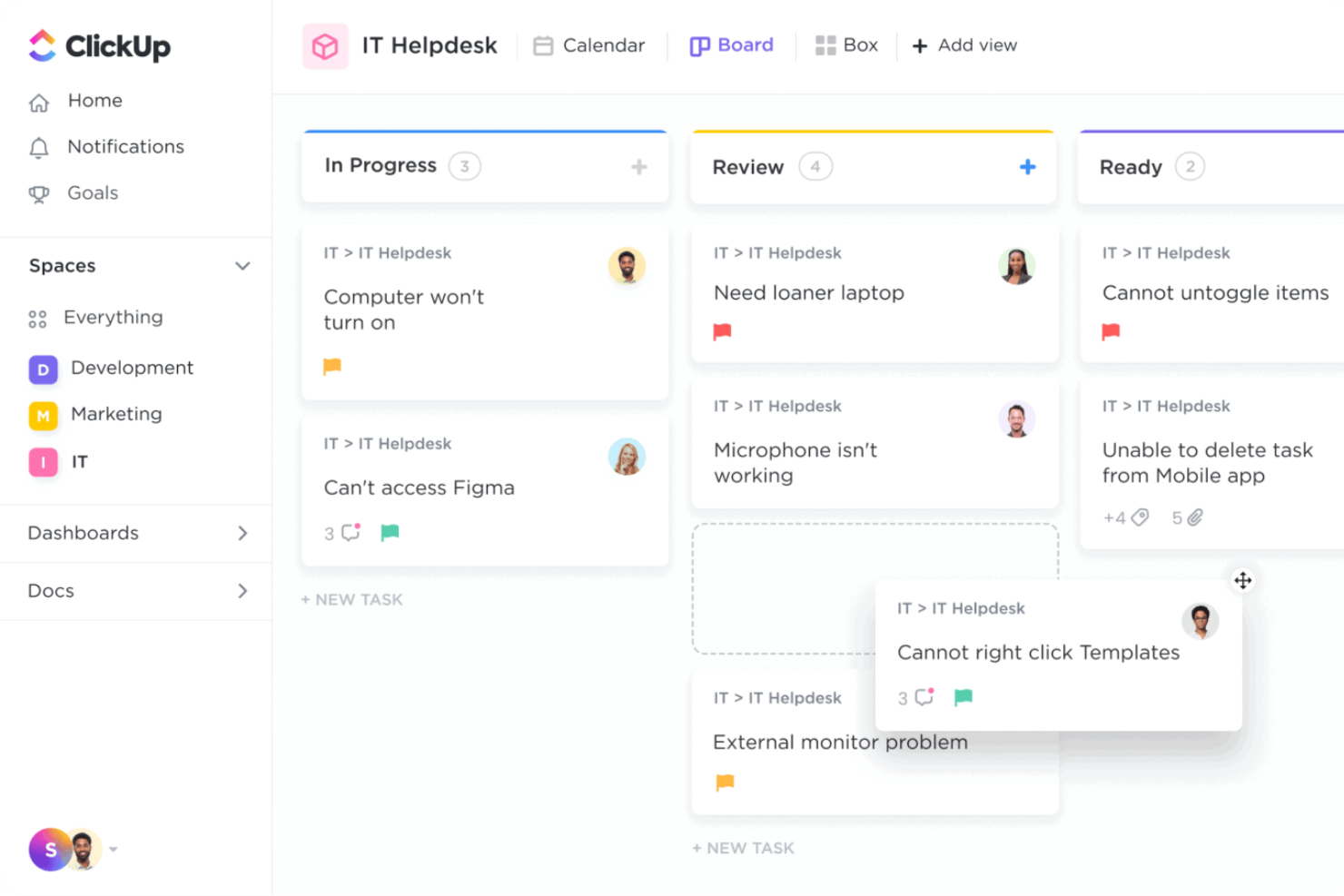
ClickUp is a team task management platform that brings together customizable task boards, timelines, and collaboration tools to help teams organize, track, and deliver work across projects of any size.
Who Is ClickUp Best For?
ClickUp is a good fit for tech and product teams that need a flexible, all-in-one workspace to manage tasks, sprints, and cross-functional projects in one place.
Why I Picked ClickUp
I picked ClickUp as one of the best for agile project management because it handles the full sprint lifecycle without requiring a separate tool. I use ClickUp Sprints to set sprint dates, assign story points, and automatically roll unfinished tasks into the next sprint—so my team isn't manually reshuffling the backlog at the end of every cycle. The burndown and burnup charts give me a real-time read on whether we're pacing against our target, which I find far more useful than a static status update. On top of that, the native GitHub and GitLab integrations mean my team's development work and task tracking stay in sync without any manual updates.
ClickUp Key Features
- Custom task statuses: Create workflow stages that match your team's process, from "In Review" to "Blocked" to whatever fits your pipeline.
- Workload view: See each team member's assigned tasks and capacity across a time period to spot overallocation before it becomes a problem.
- Automations: Set trigger-based rules to automatically update task statuses, reassign work, or send notifications when conditions are met.
- Goals: Set high-level objectives and link them directly to tasks so progress updates automatically as work gets completed.
ClickUp Integrations
ClickUp offers 100+ native integrations, including Slack, GitHub, GitLab, Microsoft Teams, Google Drive, Dropbox, Outlook, Zoom, Figma, HubSpot, Salesforce, and Zendesk, and it's available on Zapier. An API is available for custom integrations.
Pros and Cons
Pros:
- Different ways to visualize project progress
- Team collaboration features
- Highly customizable platform
Cons:
- Initial setup can take time
- Extensive customization may be overwhelming
New Product Updates from ClickUp
ClickUp Adds List Automations, Time Off Scheduling, and Org Charts
ClickUp adds template-based List automations, personal time off scheduling, a unified picker, automatic task date syncing, and Org Charts. These updates help teams automate project setup, manage availability, and organize work. For more information, visit ClickUp’s official site.

GQueues
Best for deep Google Workspace integration
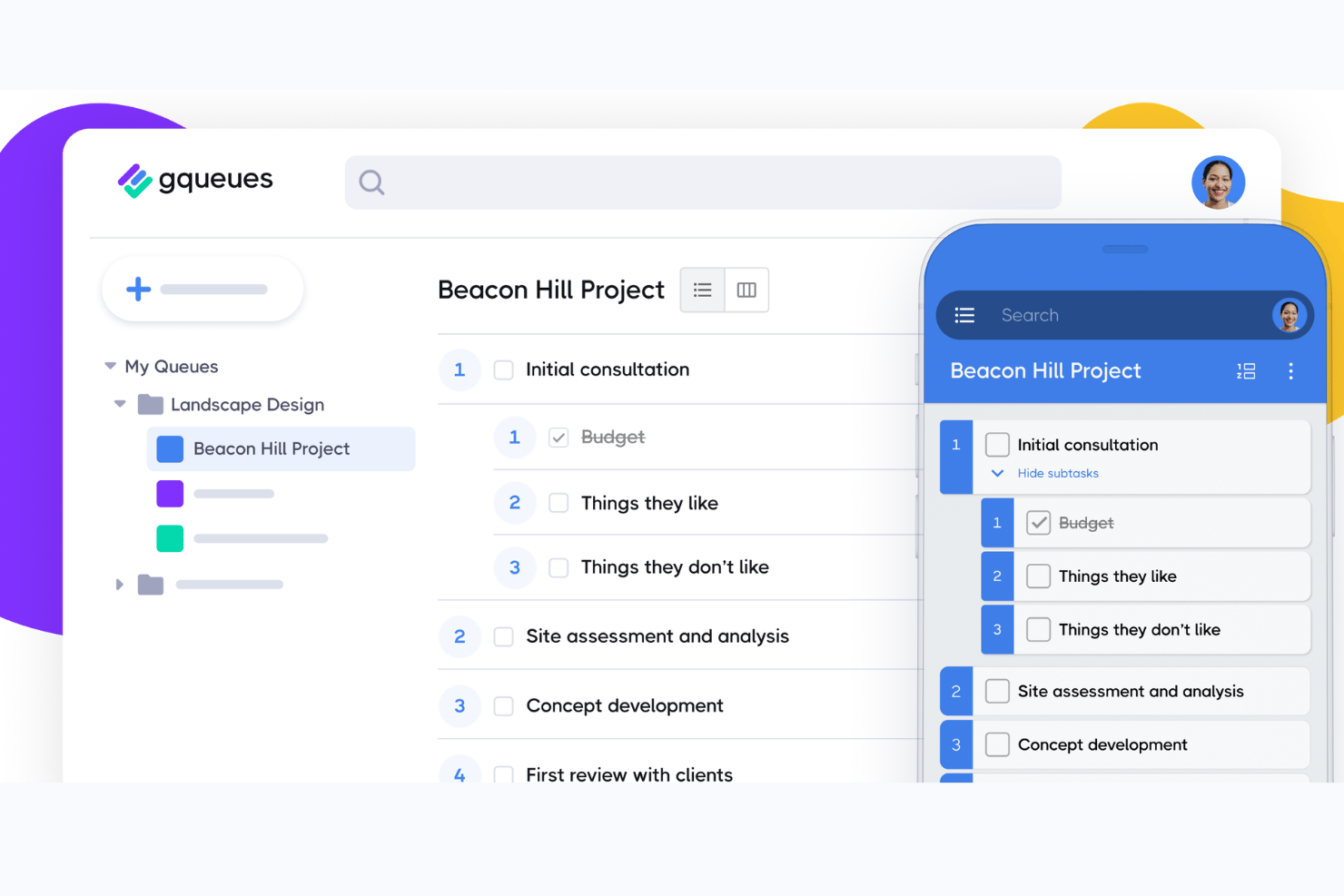
GQueues is a task management tool built exclusively for Google Workspace, offering task assignment, shared queues, Kanban board views, repeating tasks, and 2-way Google Calendar syncing.
Who Is GQueues Best For?
GQueues suits small-to-mid-size teams in education, non-profits, and professional services that run their entire workflow inside Google Workspace.
Why I Picked GQueues
GQueues earns its spot on my shortlist because the Google Workspace integration goes far deeper than a surface-level calendar sync. The Gmail add-on lets me turn emails directly into tasks without leaving my inbox, and the 2-way Google Calendar sync means every task with a due date appears automatically in my calendar in real time. Drive attachments are handled natively too, with file permissions managed automatically so I'm not chasing access issues across the team.
GQueues Key Features
- Shared queues: Create collaborative task lists that multiple team members can access and update in real time.
- Smart Queues: Use standardized filters to automatically organize tasks by priority, due date, assignment, or tags.
- Bulk actions: Apply changes like assigning, moving, or completing multiple tasks at once to streamline team updates.
- Recurring tasks: Set up tasks that repeat automatically on a daily, weekly, or custom schedule with flexible recurrence options.
GQueues Integrations
GQueues offers native integrations with Google Workspace tools, including Google Calendar, Google Drive, Google Contacts, and Gmail.
Pros and Cons
Pros:
- Repeating tasks support flexible recurrence options
- Turns Gmail emails directly into tasks
- Native Google Calendar sync updates both ways
Cons:
- Workload reporting across team members is thin
- No timeline or Gantt chart view

Best for comprehensive project tracking

Zoho Projects is a team task management platform that helps you organize tasks, track progress, manage deadlines, and collaborate with your team using features like task lists, Gantt charts, and built-in communication tools.
Who Is Zoho Projects Best For?
Zoho Projects is a good fit for small to mid-sized teams that need a structured, all-in-one platform to manage tasks, timelines, and team collaboration.
Why I Picked Zoho Projects
I picked Zoho Projects as one of the best because of how much tracking depth it packs into a single platform. The Gantt chart is where I spend a lot of my time—it lets me set four types of task dependencies, compare baselines against actual progress, and flag delayed tasks using the End Variance feature. That level of detail means my team can catch schedule slippage before it compounds. I also like the critical path highlighting, which makes it easy to see exactly which tasks will derail the whole project if they slip.
Zoho Projects Key Features
- Task automation: Set up rules to automatically assign tasks, update statuses, or send notifications when specific conditions are met.
- Timesheets and time tracking: Log hours directly against tasks and generate timesheet reports to monitor how your team spends its time.
- Issue tracking: Create, assign, and track bugs or issues alongside your project tasks without switching to a separate tool.
- Project forums: Post updates, share files, and hold team discussions in threaded forum boards tied directly to each project.
Zoho Projects Integrations
Zoho Projects offers 50+ native integrations, including Slack, Google Drive, Microsoft Teams, GitHub, Bitbucket, Dropbox, Zoho CRM, Zoho Books, and Trello. It's available on Zapier and has an API for custom integrations.
Pros and Cons
Pros:
- Customizable workflows and reports
- Integration with Zoho ecosystem
- Rich project tracking features
Cons:
- Mobile app features limited compared to web version
- Some learning curve for new users
- Can be complex to set up
New Product Updates from Zoho Projects
Zoho Projects Adds CodeX Scripts for Custom Modules
Zoho Projects now supports CodeX Scripts for custom modules, enabling conditional logic and rules for creating, updating, and deleting records. For more information, visit Zoho Projects' official site.
 .

Wrike
Best for cross-team project visibility

Wrike is a team task management platform designed for digital teams who need customizable workflows, real-time collaboration, and advanced visibility across projects and departments.
Who Is Wrike Best For?
Wrike is a strong fit for mid-size to enterprise teams in tech and digital industries managing complex, multi-team projects that require structured workflows and clear cross-functional coordination.
Why I Picked Wrike
Wrike earns its spot on my shortlist because of how well it handles visibility across multiple teams working on the same project. I particularly like the cross-functional dashboards, which let my team pull aggregated data from different workstreams into a single view—without having to chase down status updates from each team lead. In practice, that means I can see which tasks are on track, which are at risk, and where dependencies are stacking up, all from one place. Wrike's cross-tagging feature also lets tasks live in multiple project folders simultaneously, so each team sees only what's relevant to them while I maintain a full picture across the board.
Wrike Key Features
- Custom request forms: Build dynamic intake forms that automatically generate tasks, assign owners, and trigger workflows when submitted.
- Gantt chart view: Map task dependencies and project timelines visually, with drag-and-drop scheduling to adjust dates across the entire plan.
- Automated workflows: Set up no-code automation rules to move tasks between stages, escalate at-risk items, and notify the right people without manual follow-up.
- Resource bookings: Reserve team members or job roles for specific projects and check their availability against estimated effort before assigning work.
Wrike Integrations
Wrike offers 400+ native integrations, including Google Drive, Microsoft Teams, Salesforce, Slack, Jira, GitHub, Box, Dropbox, Adobe Creative Cloud, and Zoom, and it's available on Zapier. An API is available for custom integrations.
Pros and Cons
Pros:
- In-app chat to reduce switch cost for collaboration
- Individuals and teams can track workloads
- Easily visualize workflow performance
Cons:
- Not suitable for small organizations
- Limited to 10 workflows per space
New Product Updates from Wrike

Wrike Redesigns Workspace Search With New Filters
Wrike introduces a redesigned Workspace Search interface with recent search shortcuts, item type and location filters, and parent-task context. These updates help users find relevant work items and navigate search results efficiently. For more information, visit Wrike’s official site.

Toggl
Best for time-tracked task planning
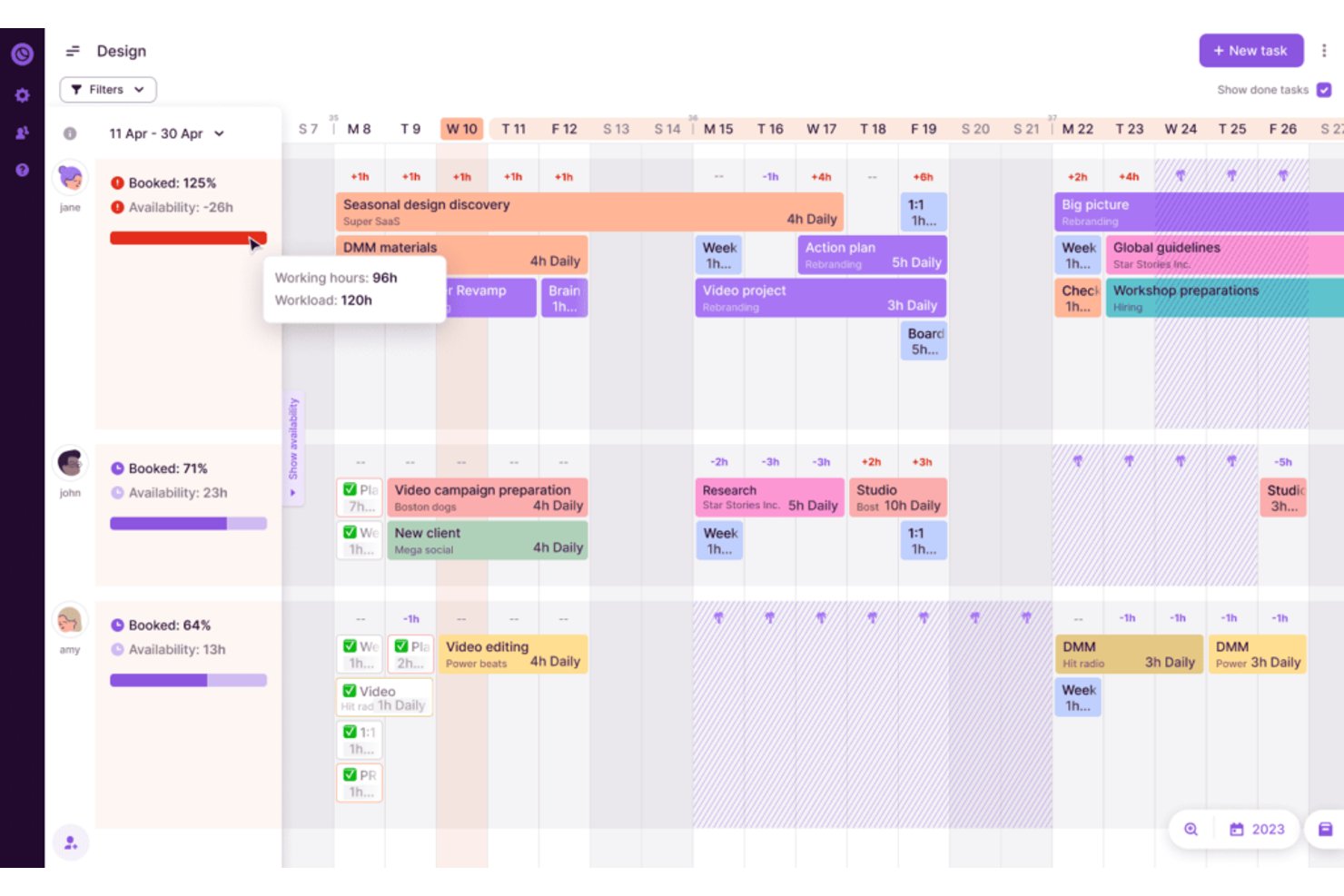
Toggl is a task management and project planning platform that combines time tracking, workload visualization, capacity planning, and estimate-versus-actual reporting.
Who Is Toggl Best For?
Toggl suits project managers and team leads who need time tracking built directly into their task planning workflow.
Why I Picked Toggl
I've included Toggl in my top picks because it's the only tool here that treats time tracking as a first-class part of task planning, not an afterthought. I love how task estimates feed directly into the Timeline's capacity readouts, so when I assign work across the team, I can see who's over-capacity before it becomes a problem. Project dashboards then close the loop by comparing logged hours against those estimates, showing real completion forecasts by task and team member.
Toggl Key Features
- Recurring tasks: Schedule tasks to repeat daily, weekly, monthly, or annually, with options to complete individual occurrences or an entire series.
- Guest access: Invite clients, partners, or freelancers to view specific projects, manage tasks, and leave comments.
- Project and budget alerts: Set estimate or budget thresholds on projects and receive email notifications when a threshold is reached.
- Toggl AI assistant: Ask plain-language questions about your time, project, and budget data to get answers with supporting charts or tables.
Toggl Integrations
Toggl offers native integrations with Jira, Asana, Slack, Google Calendar, and Outlook Email & Calendar. It also provides REST API, webhooks, MCP server, and CLI access for custom integrations.
Pros and Cons
Pros:
- Reviewers praise clear project-time reporting
- Dashboards forecast completion against actuals
- Task estimates inform team capacity
Cons:
- Assignees don’t receive assignment alerts
- Tasks lack dependency scheduling

Quire
Best for breaking down complex projects

Quire is a team task management platform that helps you organize projects with nested task lists, visual boards, and real-time collaboration tools designed to keep teams aligned and productive.
Who Is Quire Best For?
Quire is a good fit for small to mid-sized teams that need a structured way to manage multi-layered projects without the overhead of enterprise-level tools.
Why I Picked Quire
Quire earns its spot on my shortlist because of how well its infinite nested task list handles complex project structures. I use it to break large initiatives into layers of subtasks, drilling down into specific branches without losing sight of the overall hierarchy. The "Zoom In" feature is particularly useful—I can focus on a single parent task and see only its subtasks, which cuts through the noise when my team is heads-down on one phase of a project. The Smart Sublist feature also lets each team member pull a focused view of just their assigned work from the master list, so nobody's wading through tasks that aren't relevant to them.
Quire Key Features
- Kanban board: Drag and drop tasks across customizable columns to manage workflow stages visually.
- Timeline view: Map tasks and milestones across a Gantt-style timeline to track project schedules.
- Real-time collaboration: Comment on tasks, tag teammates, and see updates instantly across your team.
- Recurring tasks: Set tasks to repeat on a schedule so routine work gets logged automatically.
Quire Integrations
Quire offers native integrations with Google Drive, Google Calendar, Slack, and GitHub. Additional connections (including tools like Microsoft Teams) are typically supported via Zapier or other connectors. An API is also available for custom integrations.
Pros and Cons
Pros:
- Ability to create nested tasks and subtasks, allowing for detailed project breakdowns
- Multiple project views, including lists, boards, and timelines
- Easy to collaborate with team members
Cons:
- Potential for notification overload, especially when working with large teams
- The mobile version lacks some features available on the desktop
New Product Updates from Quire
Quire Adds Custom Field Locking and Comment Reaction API Support
Quire adds custom field locking and API support for reading and setting emoji reactions on comments. These updates give teams more control over field data and expand comment interaction options for developers. For more information, visit Quire’s official site.
 .
Best for detailed project schedulers
Microsoft Project is a team task management platform designed for project managers who need advanced scheduling, resource allocation, and detailed tracking tools to coordinate complex projects and keep teams aligned.
Who Is Microsoft Project Best For?
Microsoft Project is a strong fit for mid-size to enterprise teams that run structured, deadline-driven projects and need precise scheduling and resource management.
Why I Picked Microsoft Project
I picked Microsoft Project as one of the best because of its deep scheduling features. The timeline (Gantt) view lets my team map out task dependencies with precision—including advanced lead and lag settings—so we can model exactly how a delay in one workstream ripples through the rest of the plan. I also like the resource request capabilities, which let us flag capacity needs before they become blockers. For teams running multi-phase projects where sequencing matters, the combination of dependency tracking and people management in a single plan is particularly useful.
Microsoft Project Key Features
- Board view: Visualize tasks in a kanban-style board to track work status across team members and project phases.
- Backlogs and sprints: Organize upcoming work into a backlog and plan sprint cycles for teams running agile delivery.
- Project goals: Set measurable goals at the project or team level and link them directly to the tasks driving progress.
- Program management: Manage multiple related projects together to track dependencies and progress across a broader initiative.
Microsoft Project Integrations
Microsoft Project has native integrations across the Microsoft ecosystem, including Microsoft 365 and Azure. You can also connect it to data sources like Microsoft Access, SharePoint, SQL Server, Exchange Server, and Microsoft Entra ID. An API is available for custom integrations.
Pros and Cons
Pros:
- Advanced reporting capabilities
- Deep integration with Microsoft products
- Extensive project planning tools
Cons:
- Slight learning curve
- Primarily suitable for large or complex projects
Best for agile teams
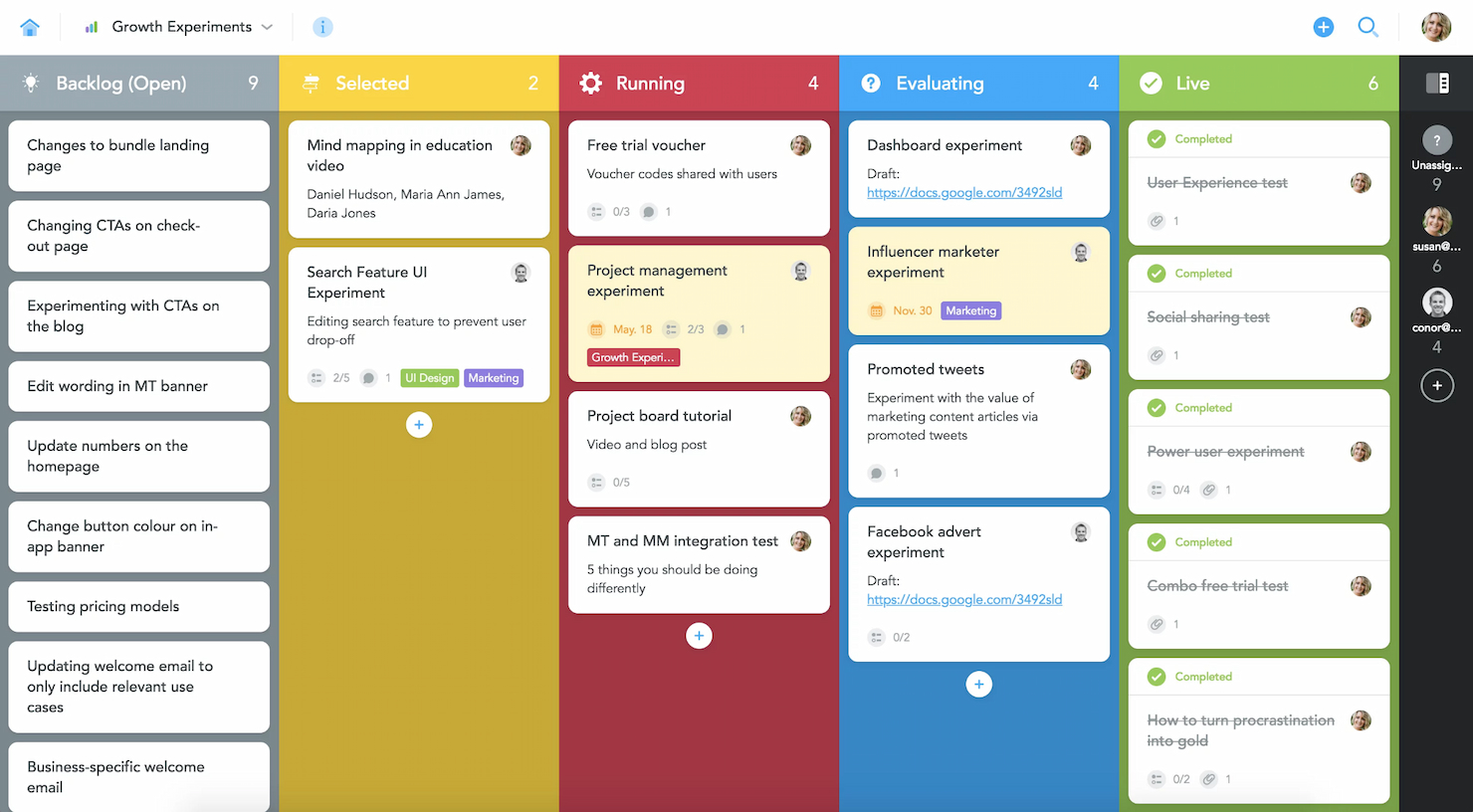
MeisterTask is a team task management platform designed to help teams organize projects, visualize workflows, and automate repetitive tasks with customizable Kanban boards and real-time collaboration features.
Who Is MeisterTask Best For?
MeisterTask suits small to mid-sized teams that need a visual, intuitive way to manage iterative work across product, design, and development.
Why I Picked MeisterTask
MeisterTask earns its spot on my shortlist because of how well its Kanban-style project boards map to agile workflows. Each board is fully customizable, so my team can set up columns that reflect our actual sprint stages rather than forcing work into a generic template. I also like the automation layer — it lets me trigger actions such as auto-assigning a task owner or moving a card to the next stage when a checklist is completed, keeping work moving between iterations without manual nudging. The timeline view lets me map tasks to specific dates, so I can track sprint commitments and flag deadline risks before they become blockers.
MeisterTask Key Features
- Projects overview: A centralized dashboard that shows status, deadlines, and overdue tasks across all active projects.
- Roles and permissions: Assign specific access levels to team members and control what external collaborators can see or edit.
- Reporting: Track project performance data with filters for task owner, status, and due date to monitor team output.
- Home dashboard: A personal view that surfaces each team member's upcoming tasks, notifications, and to-dos in one place.
MeisterTask Integrations
MeisterTask offers native integrations with Slack, Microsoft Teams, Google Workspace, GitHub, Zendesk, Dropbox, Box, Bitbucket, and Outlook, and it's also on Zapier. An API is available for custom integrations.
Pros and Cons
Pros:
- Effective real-time collaboration features
- Strong support for agile methodologies
- Highly intuitive interface
Cons:
- Fewer advanced customization options compared to competitors
- Pricing can be high for larger teams
- Limited reporting capabilities for complex analytics
Trello
Best for visual project planning

Trello is a team task management platform that lets you organize projects using visual boards, customizable workflows, and collaborative tools for tracking progress and managing tasks together.
Who Is Trello Best For?
Trello is a great fit for small to mid-sized teams that prefer a visual, low-overhead approach to managing tasks and projects without a steep learning curve.
Why I Picked Trello
Trello earns its spot on my shortlist because the visual planning experience is genuinely one of the best I've used. The Kanban board is the foundation, but what I really like is how you can switch between views—Timeline, Calendar, Dashboard, and Table—without rebuilding anything. When my team is mid-sprint and priorities shift, I can drag and drop cards directly on the Timeline to adjust start and due dates on the fly. The Dashboard view surfaces metrics like cards per list and overdue tasks, so I can spot bottlenecks before they stall the team rather than after.
Trello Key Features
- Card checklists: Break tasks into subtasks directly within a card, with progress tracked as a visual checklist bar.
- Power-Ups: Extend board functionality with add-ons like voting, custom fields, and third-party app connections.
- Automation (Butler): Set rule-based triggers to move cards, assign members, or update due dates.
- Team workspaces: Organize multiple boards under a shared workspace with centralized member access and permissions.
Trello Integrations
Trello offers 200+ native integrations, including Slack, Jira Cloud, Google Drive, Dropbox, Microsoft Teams, Confluence, Miro, GitHub, and Salesforce. It's available on Zapier and has an API for custom integrations.
Pros and Cons
Pros:
- Wide range of integrations
- Flexible card and board system
- Intuitive visual interface
Cons:
- Can get cluttered with large volumes of tasks
- Limited features for complex project management
Değerlendirilebilecek Diğer Ekip Görev Yönetimi Yazılımları
Aşağıda, kısa listemize aldığımız ancak en iyi listeye giremeyen ek ekip görev yönetimi yazılımlarının bir listesi yer alıyor. Bunlara kesinlikle göz atmaya değer.
- Backlog
For bug tracking
- Workzone
For project lifecycle visibility
- ProofHub
For team communication tools
- ProjectManager
For real-time project dashboards
- nTask
For risk management features
- Pneumatic Workflow
For automated workflows
- Notion
For integrated notes and tasks
- GoodDay
For flexible task and projects
- TaskRay
For team task management in Salesforce
- PathPro
For turning feature requests into tasks


How I Evaluate Team Task Management Software
I split my evaluation into two layers: the baseline functionality a cross-functional team needs to coordinate work across projects and handoffs, and the differentiators that make one tool a better fit than another.
Core Functionality (Table Stakes For This List)
When I'm selecting tools for my list, I rank each one on a scale from 0 (does not offer the functionality) to 5 (excels in this area) for each core functionality listed below. Then, I calculate the tool's total score into a percentage. Each tool needs to achieve a minimum total score of 75% to be considered for inclusion.
- Task Assignment & Ownership: I check whether you can assign tasks to specific people with due dates, priority levels, and custom fields—like tagging a design review as high-priority and routing it to the right teammate.
- Multiple Task Views: Teams work differently, so I look for at least three view options (list, board, calendar, or Gantt) that let you switch perspectives on the same data without rebuilding anything.
- Team Collaboration Tools: I evaluate how well task-level collaboration works—@mentions, threaded comments, and file attachments should keep discussions tied to the task instead of scattered across email threads.
- Progress Tracking & Status: Dashboards and status fields matter here. I look for real-time visibility into what's done, what's blocked, and how work is distributed across team members.
- Subtasks & Dependencies: Complex deliverables need structure. I check for multi-level subtasks and dependency mapping so a delayed wireframe review automatically shifts the dev sprint start date.
- Notifications & Reminders: I evaluate whether the tool sends timely alerts across channels—email, mobile push, and in-app—so assignees actually see deadline reminders before tasks slip.
Once I have a list of tools that meet this criteria, I consider what sets each platform apart.
Differentiating Factors (What Sets Vendors Apart)
Here's how I compare and contrast different vendors:
Standout Features
Workflow automation is a big one—I look for no-code rules that auto-assign tasks or change statuses when conditions are met, like moving a task to "In Review" the moment a subtask is completed. Custom templates also matter because teams that run recurring sprints or onboarding projects shouldn't rebuild task structures from scratch each time. I also evaluate whether a tool can link tasks to goals or OKRs, which helps leadership see how daily work connects to quarterly targets.
Beyond Features
Integrations are a top priority—I check whether a tool connects natively to Slack, Microsoft Teams, GitHub, and file storage platforms your team already uses daily. Pricing structure matters too, especially how a vendor scales from a small squad to a 200-person PMO without forcing a platform migration. I also evaluate onboarding support, because rolling out a task management tool across multiple departments falls apart fast without solid migration paths, templates, and training resources to drive adoption.
Ekip Görev Yönetimi Yazılımı Nasıl Seçilir?
Kendinize özgü yazılım seçim sürecinizi yürütürken aşağıdaki noktaları göz önünde bulundurun:
- Ölçeklenebilirlik: Ekibiniz ve projelerinizle birlikte büyüyebilecek bir yazılım seçin. Proje boyutları ve ekip sayıları arttıkça yazılım, performanstan ödün vermeden daha karmaşık iş akışlarını ve daha fazla görevi işleyebilmelidir. Örneğin, girişiminizin bir yıl içinde iki katına çıkmasını bekliyorsanız aracın bu büyümeyi desteklediğinden emin olun
- Entegrasyon özellikleri: Ekibinizin kullandığı diğer araçlarla sorunsuz biçimde entegre olan yazılımları arayın. E-posta platformları, dosya paylaşım hizmetleri ve diğer proje yönetimi araçlarıyla entegrasyon, iş akışının kesintisiz kalmasını ve tüm bilgilere merkezi olarak erişilebilmesini sağlar. Örneğin, bir pazarlama ekibinin CRM sistemleri ve e-posta pazarlama araçlarıyla iyi entegre olan bir yazılıma ihtiyacı olabilir.
- Kullanıcı deneyimi: Sezgisel bir arayüze sahip yazılımları tercih edin. Kullanım kolaylığı, ekip üyelerinin benimseme oranını doğrudan etkiler. Basit ve temiz bir arayüz, eğitim süresini azaltır ve odağın yazılımda gezinmek yerine görevlere verilmesine yardımcı olur. Yeni ekip üyelerinin kapsamlı bir eğitim almadan aracı kolayca anlayıp anlayamayacağını değerlendirin.
- Özelleştirme: Yazılımın iş akışlarını ve raporları ekibinizin özel ihtiyaçlarına uyacak şekilde özelleştirmenize izin verdiğinden emin olun. Özelleştirilebilir gösterge panelleri ve iş akışlarını değiştirme olanağı, yazılımın ister çevik, ister scrum, ister şelale olsun çeşitli proje yönetimi tarzlarına uyum sağlayabileceği anlamına gelir. Proje türlerinin sık sık değiştiği yaratıcı sektörlerdeki ekipler için bu özellik çok önemlidir.
- Güvenlik özellikleri: Verilerinizi korumak için güçlü güvenlik önlemlerine sahip yazılımlara öncelik verin. Buna veri şifreleme, güvenli veri depolama ve uluslararası veri koruma düzenlemelerine uyumluluk dahildir. Bu özellikler, sağlık hizmetleri veya finansal hizmetler gibi hassas bilgileri işleyen ekipler için hayati önem taşır.
Ekip Görev Yönetimi Yazılımı Trendleri
Ekip görev yönetimi teknolojisinde fark ettiğim bazı güncel ve ilgi çekici trendler şunlardır.
Gelişen Özellikler ve Teknoloji
- Yapay Zekâ ve Makine Öğrenimiyle Entegrasyon: Birçok ekip görev yönetimi platformu, görev önceliklendirmesini, kaynak tahsisini ve risk değerlendirmesini otomatikleştirmek için yapay zekâyı kullanmaya başladı. Bu trend, gerçek zamanlı değişikliklere uyum sağlayabilen dinamik proje yönetimi ihtiyacını karşılayarak karar alma süreçlerini geliştiriyor. Ayrıca, yapay zekâ özelliklerine sahip özel görev yönetimi yazılımı araçları da mevcut.
- Gelişmiş Gerçek Zamanlı İş Birliği Araçları: Uzaktan çalışma devam ederken, ekip görev yönetimi yazılımlarında daha iyi gerçek zamanlı iş birliği araçlarına olan talep arttı. Güncellemeler arasında daha gelişmiş sohbet araçları, entegre görüntülü konferans ve gerçek zamanlı belge iş birliği yer alıyor. Bu gelişmeler, farklı coğrafyalarda kesintisiz iletişimi destekleyen araçlara duyulan süregelen ihtiyacı yansıtıyor.
Yeni ve Alışılmadık İşlevler
- Sanal Gerçeklik (VR) Toplantıları ve Çalışma Alanları: Bazı öncü ekip görev yönetimi araçları, ekip üyelerinin sanal bir alanda etkileşim kurabildiği VR özelliklerini denemeye başlıyor. Bu yeni özellik, uzaktan toplantılarda bulunma hissini güçlendirmek ve uzaktan iş birliği ile yüz yüze iş birliği arasındaki farkı kapatmak amacıyla tasarlanmıştır.
En Önemli ve En Çok Talep Edilen Özellikler
- Kapsamlı Panolar ve Analizler: Proje durumu, ekip performansı ve bütçe durumu hakkında kapsamlı analizler sunan gelişmiş panolara yönelik yüksek bir talep var. Bu özellikler, birden fazla proje değişkenini takip etmesi ve sonuçları etkili biçimde öngörmesi gereken yöneticiler için kritik önem taşıyor.
- Platformlar Arası Erişilebilirlik: Ekip görev yönetimi yazılımının farklı cihazlarda ve platformlarda sorunsuz çalışmasını sağlamak hâlâ en yüksek öncelikler arasında yer alıyor. Bu özellik, günümüzün mobil ve esnek çalışma düzenini desteklemek açısından büyük önem taşıyor.
Gerilemekte Olan Özellikler
- E-posta Tabanlı Bildirimler: Entegre gerçek zamanlı bildirimlerin ve platformlar içindeki daha doğrudan iletişim araçlarının yaygınlaşmasıyla, görev güncellemeleri için e-posta bildirimlerine olan bağımlılık azalıyor. Ekipler, daha anlık ve daha az karmaşık iletişim biçimlerine yöneliyor.
Bu trendler, modern ekiplerin karmaşık ve çeşitli ihtiyaçlarını destekleyebilecek daha bütünleşik, sezgisel ve esnek yönetim araçları oluşturmaya yönelik daha geniş kapsamlı bir eğilimi yansıtıyor. Yazılım geliştiricileri bu alanlara odaklanarak günümüzün proje yöneticilerinin ve ekip liderlerinin karşılaştığı zorlukları doğrudan ele alıyor.
Ekip Görev Yönetimi Yazılımı Nedir?
Ekip görev yönetimi yazılımı, bir ekip içindeki veya birden fazla ekip arasındaki görevlerin düzenlenmesini, izlenmesini ve tamamlanmasını kolaylaştırmak için tasarlanmış dijital bir platformdur. Bu tür yazılımlar, temel olarak işletmeler ve kuruluşlar tarafından ekip iş birliğini geliştirmek, görev görünürlüğünü artırmak ve proje iş akışlarını kolaylaştırmak için kullanılır. Yaygın kullanıcılar arasında günlük görevleri, proje teslim tarihlerini ve ekip atamalarını etkili biçimde yönetmek için merkezi bir sisteme ihtiyaç duyan proje yöneticileri, ekip liderleri ve ekip üyeleri bulunur.
Ekip görev yönetimi yazılımının temel bileşenleri arasında görev oluşturma ve atama özellikleri, ilerleme izleme araçları, iletişim ve iş birliği işlevleri ile raporlama özellikleri bulunur.
Ekip Görev Yönetimi Yazılımının Özellikleri
Bir ekip görev yönetimi uygulaması seçerken etkili görev atamasını destekleyen, iletişimi kolaylaştıran ve proje görünürlüğünü artıran özellikleri belirlemek çok önemlidir. Aşağıda, ekip görev yönetimi ortamlarında bu hedeflere katkıda bulunan başlıca özellikleri ayrıntılı olarak açıklıyorum.
- Görev Önceliklendirme ve Planlama: Ekiplerin görevler ve alt görevler için öncelikler ve son tarihler belirlemesine olanak tanıyarak projelerin yönetilmesine yardımcı olur ve önemli proje kilometre taşlarının zamanında tamamlanmasını sağlar.
- Gerçek Zamanlı İş Birliği Araçları: Konumlarından bağımsız olarak ekip üyeleri ve paydaşlar arasındaki anlık iletişimi ve güncellemeleri kolaylaştırarak iletişimin daha verimli hâle getirilmesi için gereklidir.
- Dosya Paylaşımı ve Belge Yönetimi: Proje belgelerini erişilebilir tek bir konumda merkezileştirerek bilgi paylaşma ve sürüm kontrolünü sürdürme süreçlerini basitleştirir.
- Zaman Takibi: Ekiplerin görevlere harcanan zamanı kaydetmesini sağlar; daha iyi proje yönetimi için üretkenlik ve kaynak tahsisi hakkında içgörüler sunar.
- Özelleştirilebilir Gösterge Panelleri: Projeler ve görevler hakkında kişiselleştirilmiş genel bakışlar sunarak kullanıcıların ilerlemeyi hızlıca değerlendirmesine ve bilinçli kararlar almasına olanak tanır.
- Mobil Erişilebilirlik: Ekip üyelerinin iOS, Android ve diğer popüler cihazları kullanarak hareket hâlindeyken platforma erişebilmesini ve üretken kalabilmesini sağlar.
- Entegrasyon Olanakları: E-posta, takvim, CRM sistemleri ve daha fazlası gibi diğer yazılım araçlarıyla kapsamlı entegrasyona olanak tanıyarak işlevselliği artırır ve birden fazla bağlantısız sisteme duyulan ihtiyacı azaltır.
- Otomatik Bildirimler: Ekip üyelerini güncellemeler ve değişiklikler hakkında bilgilendirerek herkesin yeni görevlerden, son tarihlerden, veya düzenlemelerden haberdar olmasını sağlar.
- Raporlama ve Analiz: Proje performansı ve ekip üretkenliği hakkında değerli veriler sunarak yöneticilerin proje sonuçlarını iyileştirmek için veriye dayalı kararlar almasına yardımcı olur.
- Güvenlik Özellikleri: Hassas proje verilerini güçlü güvenlik önlemleriyle korur; bu, her kuruluşun bilgilerin gizliliğini ve bütünlüğünü koruması için temel bir unsurdur.
- Kullanıcı İzinleri: En hassas verilere yalnızca şirket onayına sahip kişilerin erişebilmesini sağlar.
- Zaman Çizelgesi Görünümü: Görevlerinizi zaman içindeki bir perspektifte düzenleyebilmenizi; böylece son tarihleri belirleyebilmenizi ve hafta, ay ve çeyrek genelindeki öncelik düzeylerini görebilmenizi sağlar.
- Yol Haritası: Bağımlılıklar da dahil olmak üzere bir projenin ve görevlerin zaman içinde nasıl ilerleyeceğini görsel olarak gösterir.
- Renk Kodlu Etiketler/Alanlar: Verileri kimin ne üzerinde çalıştığına, bir görevin hangi projeyle bağlantılı olduğuna veya öncelik işaretlerine göre renklerle kodlamanızı sağlar.
Bu özellikler, etkili ekip görev yönetimi yazılımının temelini oluşturur; ekiplerin verimli çalışabilmesini ve projelerin gecikme yaşanmadan ilerleyebilmesini sağlar. Değişikliklere hızlıca uyum sağlama, etkili iletişim kurma ve kritik verilere her yerden, her zaman erişme olanağı, ekiplerin proje hedeflerine başarıyla ulaşmasını sağlar.
Ekip Görev Yönetimi Yazılımının Faydaları
Ekip görev yönetimi yazılımı; üretkenliği artırmayı, iletişimi geliştirmeyi ve proje yönetimini kolaylaştırmayı amaçlayan işletmeler için dönüştürücü bir araçtır. Doğru ekip görev yönetimi yazılımının operasyonlarınızda nasıl köklü değişiklikler yaratabileceği aşağıda açıklanmıştır:
- Geliştirilmiş İş Birliği: Mesajlaşma, dosya paylaşımı ve gerçek zamanlı güncellemeler için araçlar sunarak iş birliğine dayalı bir ortam oluşturur. Bu, ekip üyelerinin fiziksel konumlarından bağımsız olarak birlikte etkili bir şekilde çalışmasını kolaylaştırır.
- Artan Üretkenlik: Rutin görevleri otomatikleştirir ve iş süreçlerini düzenler; bu da görev atamalarını ve son tarihleri yönetmek için harcanan zamanı azaltmaya yardımcı olur. Ekipler, görevleri planlamak yerine onları gerçekleştirmeye daha fazla odaklanabilir.
- Geliştirilmiş Proje Görünürlüğü: Proje durumları ve kilometre taşları hakkında net bir genel bakış sunan gösterge panelleri ve raporlama araçları sağlar. Bu görünürlük, yöneticilerin ve ekip üyelerinin projenin ilerleyişi ve olası darboğazlar hakkında bilgi sahibi olmasına yardımcı olur.
- Daha İyi Kaynak Tahsisi: Zaman takibi ve ekip üyeleri arasındaki iş yükü dağılımını analiz etme özellikleri içerir. Bu, kaynakların verimli kullanılmasını sağlar ve tükenmişliğin ve aşırı görevlendirmenin önlenmesine yardımcı olur.
- Ölçeklenebilirlik: Performanstan ödün vermeden artan proje ve ekip üyesi sayısına uyum sağlayarak işletmenizin büyümesine ayak uydurur. Ölçeklendirme esnekliği, yazılımın kuruluş içindeki uzun ömürlülüğünü ve güncelliğini korumasını sağlar.
Kuruluşlar görev yönetimini merkezileştirerek, iletişimi geliştirerek ve proje ile ekip dinamikleri hakkında önemli içgörüler sağlayarak daha düzenli ve etkili operasyonlar gerçekleştirebilir.
Ekip Görev Yönetimi Yazılımının Maliyetleri ve Fiyatlandırması
Ekip görev yönetimi yazılımının maliyet yapısını anlamak, bu araçları operasyonlarına etkili bir şekilde entegre etmeyi amaçlayan işletmeler için büyük önem taşır. Her ücretli plan; özelliklere, ölçeklenebilirliğe ve destek seçeneklerine bağlı olarak önemli ölçüde farklılık gösterebilir. Ekip görev yönetimi yazılımı seçerken karşılaşabileceğiniz tipik plan seçeneklerinin açıklaması aşağıda yer almaktadır:
| Plan Türü | Ortalama Fiyat | Yaygın Özellikler |
| Ücretsiz Plan | $0 | Temel görev yönetimi, sınırlı kullanıcı, temel entegrasyonlar |
| Temel | $5 - $10/kullanıcı/ay | Gelişmiş görev yönetimi, ek entegrasyonlar, daha fazla kullanıcı |
| Profesyonel | $10 - $20/kullanıcı/ay | Tam proje planlama, gelişmiş raporlama, öncelikli destek |
| Kurumsal | $20 - $50/kullanıcı/ay | Özel özellikler, sınırsız proje, kişisel hesap yöneticisi |
Hangi planı seçeceğinizi değerlendirirken kuruluşunuzun özel ihtiyaçlarını ve faaliyet gösterdiğiniz ölçeği göz önünde bulundurun. Fiyatlandırma yalnızca mevcut gereksinimlerinizle uyumlu olmamalı, aynı zamanda gelecekteki büyümeyi ve karmaşıklığı da karşılamalıdır.
Ekip Görev Yönetimi Yazılımı Hakkında SSS
Ekip görev yönetimi yazılımı hakkında sıkça sorulan bazı sorular şunlardır:
Ekip görev yönetimi yazılımı ne için kullanılır?
Ekip görev yönetimi yazılımı, bir ekip içindeki veya birden fazla ekip arasındaki görevlerin düzenlenmesine, izlenmesine ve önceliklendirilmesine yardımcı olur. Proje yönetimini kolaylaştırır, iş birliğini geliştirir ve son teslim tarihlerini yönetmek, belgeleri paylaşmak ve etkili bir şekilde iletişim kurmak için araçlar sunarak verimliliği artırır.
Ekip görev yönetimi yazılımı verimliliği nasıl artırır?
Bu yazılım tekrarlanan görevleri otomatikleştirir, bilgileri merkezileştirir ve gerçek zamanlı güncellemeler sağlar. Proje takibini kolaylaştırır ve hata olasılığını azaltır; böylece ekip üyeleri idari görevlere daha az, temel sorumluluklarına ise daha fazla odaklanabilir.
Ekip görev yönetimi yazılımı diğer araçlarla entegre edilebilir mi?
Evet, ekip görev yönetimi platformlarının çoğu e-posta istemcileri, takvim uygulamaları, dosya paylaşım hizmetleri ve CRM sistemleri gibi popüler araçlarla kapsamlı entegrasyon olanakları sunar. Bu entegrasyon, iş akışlarını kolaylaştırmaya ve projeyle ilgili tüm bilgileri erişilebilir tek bir yerde tutmaya yardımcı olur.
Ekip görev yönetimi yazılımı küçük işletmeler için uygun mudur?
Kesinlikle. Birçok çözüm, küçük işletmelerin ihtiyaçlarına ve bütçelerine uyabilecek ölçeklenebilir özellikler ve esnek fiyatlandırma planları sunar. Hatta bazıları, daha küçük ekiplerin proje yönetimi ihtiyaçlarını yeterli şekilde karşılayabilecek ücretsiz sürümler sunar.
Ekip görev yönetimi yazılımı uzaktan çalışan ekipleri destekler mi?
Evet, farklı konumlardaki iletişimi ve iş birliğini kolaylaştıran araçlar sağlayarak uzaktan çalışan ekipleri desteklemek üzere tasarlanmıştır. Bulut tabanlı erişim, gerçek zamanlı güncellemeler ve entegre iletişim araçları gibi özellikler, uzaktan ekip koordinasyonu için özellikle faydalıdır.
Ekip görev yönetimi yazılımı kullanmanın güvenlik riskleri var mı?
Her çevrimiçi platformda olduğu gibi potansiyel güvenlik riskleri vardır; ancak saygın sağlayıcıların çoğu, kullanıcı verilerini korumak için veri şifreleme, güvenli sunucular ve düzenli denetimler dâhil olmak üzere güçlü güvenlik önlemleri uygular. Bir yazılımı kullanmaya başlamadan önce güvenlik yeterliliklerini mutlaka kontrol edin.
