



GQueues Vs. monday.com: Comparison and Expert Reviews for 2026



When projects start competing for attention, keeping ownership and deadlines clear can become a challenge fast. A good task management system should bring structure to the chaos without forcing your team into a workflow that doesn’t fit.
If you’re struggling to corral deadlines, tasks, and projects across your team, you’re not alone. Choosing between GQueues and monday.com can be tricky—both offer unique spins on task management software that promise to organize your workload and boost team accountability. The question is, which one actually works for the way you operate?
In this article, you’ll get an expert comparison of GQueues and monday.com, including where each tool shines (or falls short), pricing, security, key use cases, and how easy they are to use. I’ll help you cut through the noise so you can pick the best fit for your workflow.
GQueues vs. monday AI Workspace: An Overview
GQueues
monday AI Workspace

Why Trust Our Software Recommendations
Our team has been testing and reviewing software since 2012. As project managers ourselves, we know how difficult—and important—it is to choose the right software.
For this guide, we evaluated tools using hands-on testing and independent research, scoring tools using our selection criteria. We also draw on insights from industry thought leaders and practicing project management experts.
Our reviews reflect our human editorial judgment, not a sales pitch.
Expert reviewers:
GQueues vs. monday AI Workspace Pricing Comparison
| GQueues | monday AI Workspace | |
|---|---|---|
| Free Trial | 14-day free trial | Free plan + 14-day trial available |
| Pricing | From $3/user/month (billed annually) | From $9/user/month (billed annually) |
GQueues Vs. monday.com Pricing & Hidden Costs
The two price on different logic. GQueues runs three tiers, with annual billing on the paid ones, moving from a free version to a solo plan and a team plan that carries collaboration and license management, plus volume discounts past a handful of seats. monday.com charges per seat with a minimum purchase on its paid work management plans, and spreads capability across five tiers. The free plan stops at two seats and three boards, the entry tier lifts item limits, the middle tier is where timeline, the tier above widens that allowance and adds time tracking and private boards, and the enterprise tier brings resource management. Seat minimums and the tier where automations finally switch on are where the quiet costs live.
When weighing pricing, look beyond monthly rates and consider factors like user count, growth plans, and which tool’s features you’ll actually use. I recommend mapping out your must-haves versus “nice-to-haves,” checking for hidden costs tied to integrations or advanced functionality, and confirming any usage-based charges before making your decision.
GQueues vs. monday AI Workspace Feature Comparison
| GQueues | monday AI Workspace | |
|---|---|---|
| API | ||
| Batch Permissions & Access | ||
| Budgeting | ||
| Calendar Management | ||
| Collaboration Support | ||
| Contact Management | ||
| Contact Sharing | ||
| Customer Management | ||
| Dashboard | ||
| Dashboards | ||
| Data Export | ||
| Data Import | ||
| Data Visualization | ||
| Dependency Tracking | ||
| Document Sharing | ||
| Expense Tracking | ||
| External Integrations | ||
| File Sharing | ||
| Gantt Charts | ||
| Kanban Boards | ||
| Multi-User | ||
| Notifications | ||
| Project Management | ||
| Resource Management | ||
| Scheduling | ||
| Task Scheduling/Tracking | ||
| Third-Party Plugins/Add-Ons | ||
| Time Management | ||
| Travel Management | ||
| Workflow Management |
GQueues Vs. monday.com Integrations
| Integration | GQueues | monday.com |
|---|---|---|
| Google Workspace | ✅ | ✅ |
| Google Calendar | ✅ | ✅ |
| Gmail | ✅ | ✅ |
| Slack | ❌ | ✅ |
| Microsoft Teams | ❌ | ✅ |
| Dropbox | ❌ | ✅ |
| OneDrive | ❌ | ✅ |
| Zoom | ❌ | ✅ |
| API | ✅ | ✅ |
| Zapier | ❌ | ✅ |
GQueues remains heavily centered on Google Workspace, but it now offers a public API for teams that want to build custom integrations. monday.com still has the broader ecosystem, with hundreds of marketplace apps spanning tools like Slack, Microsoft Teams, and Zoom, plus its own API and developer platform. It is worth noting that monday.com meters integration and automation runs by plan, so heavier usage may require an upgrade.
GQueues Vs. monday.com Security, Compliance & Reliability
| Factor | GQueues | monday.com |
|---|---|---|
| Data Privacy | GDPR compliant, with SOC 2 on the roadmap rather than in hand, and task data held in Google Cloud. | SOC 1, SOC 2 and SOC 3, the ISO 27001 family, plus GDPR, CCPA and a HIPAA business associate agreement. |
| Encryption | Encrypted in transit and at rest, with file attachments left in your own Google Drive. | AES-256 at rest and TLS 1.3 in transit, with TLS 1.2 as the floor. |
| Uptime/Availability | No published uptime commitment, though data is mirrored across US data centers with automatic failover. | Spread across multiple availability zones, with a 99.9% uptime commitment for enterprise customers. |
| Access Controls | Access rides on the Google accounts you already manage, so there is no second directory and no stored password. | Permission controls that deepen with the plan, optional two-factor authentication, and SAML single sign-on at the enterprise tier. |
| Data Location & Recovery | Hosted in US data centers with weekly backups, cross-region replication, and self-serve export at any time. | Hosted on AWS in Northern Virginia with a recovery site in another region, and an EU data center option for enterprise accounts. |
monday.com delivers broader compliance coverage, with certifications already in hand and a HIPAA agreement available, while GQueues offers GDPR compliance and has SOC 2 still on its roadmap. If a security review is part of your buying process, monday.com is the easier one to clear, though Google sign-on waits until its second-highest plan and SAML until the enterprise tier. GQueues answers on a smaller scale by never storing a password and leaving attachments in your own Drive, which suits teams that already treat Google as the security boundary.
GQueues Vs. monday.com Ease of Use
| Factor | GQueues | monday.com |
|---|---|---|
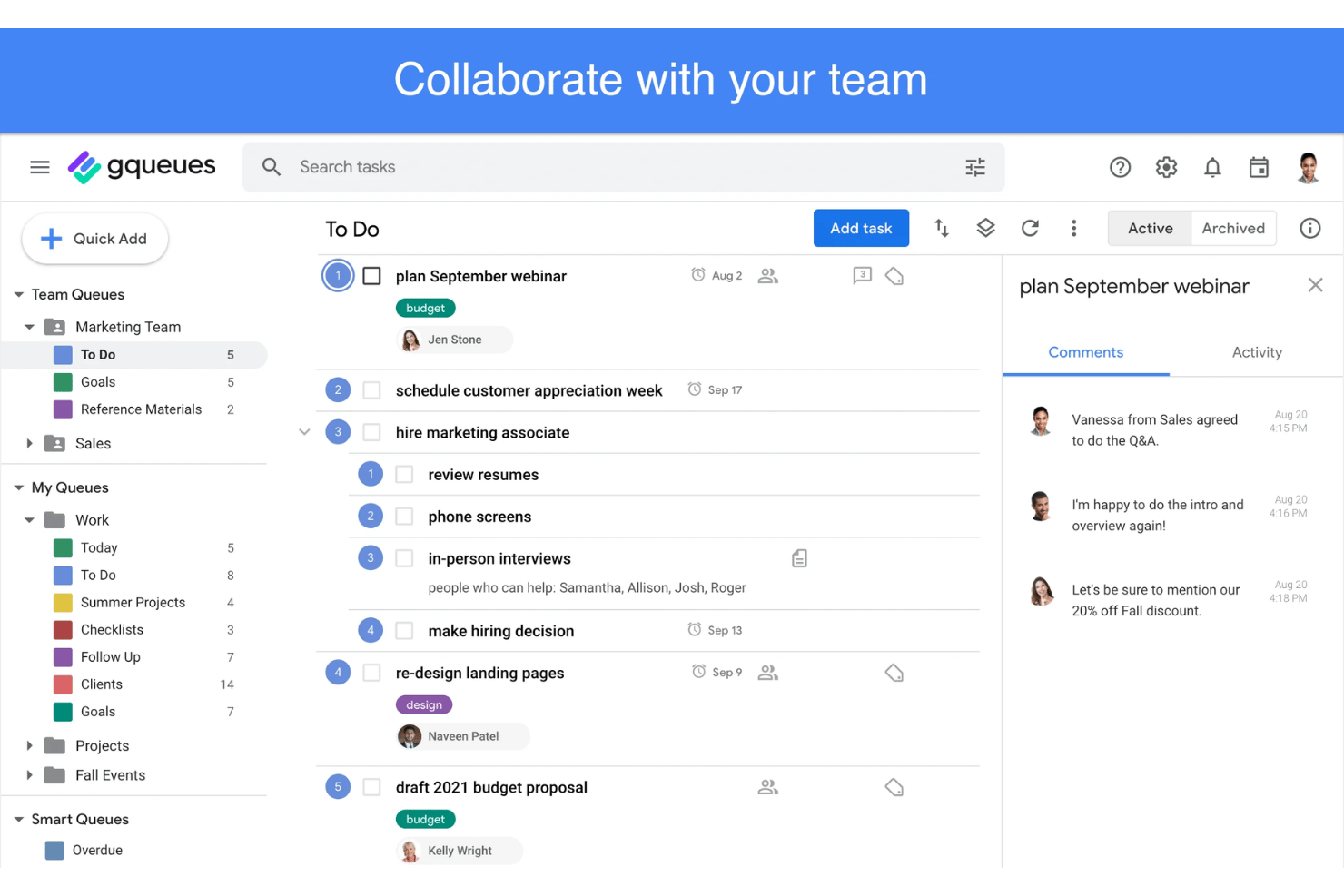
| User Interface | Clean, list-driven UI that feels familiar to Google users. | Color-coded boards with custom columns, built for teams that want to shape the layout. |
| Onboarding | Quick learning curve, minimal setup, one-click Google integrations, and an importable template gallery. | A library of more than 200 templates to start from, though tailoring a board takes deliberate setup. |
| Setup | Fast for small teams; easiest if you already use Google Workspace. | Takes longer to tailor, but scales well for diverse team needs. |
| Support | Chat support backed by a searchable help center and a video library. | Round-the-clock support at the enterprise tier, plus a knowledge base and an active user community. |
| Customization | Modest: list and board views, tags, and Smart Queues for filtering, but no custom fields or workflow rules. | Highly customizable workflows, automation, and custom views. |
GQueues is the obvious pick if you value simplicity and don’t need much setup, while monday.com’s design invites customization but adds complexity. I find GQueues shines where a no-fuss Google-based experience matters, and monday.com works best if you want to fine-tune your workspace for bigger or fast-changing teams.
GQueues vs monday AI Workspace: Pros & Cons
GQueues
- Syncs tasks and due dates directly to Google Calendar
- Lets users assign and collaborate on shared lists
- Offers built-in email task creation from Gmail
- Lacks built-in time tracking or workload management tools
- Doesn’t offer Gantt chart or timeline views
- Loses integration depth for teams outside the Google ecosystem
monday AI Workspace
- The interface is easy to use, with simple drag and drop timeline and charting mechanics.
- You can create forms that live within your project as a view.
- There is a long list of supported integrations
- The Gantt view isn't useful for building a project.
- Recurring tasks are considered automations and limited to higher tier plans.
- There is a steep learning curve for beginners.
Best Use Cases for GQueues and monday AI Workspace
GQueues
- Small Businesses Lightweight interface, easy team sharing, and Google integration make it cost-effective and practical for smaller operations.
- Education Teams Task organization and discounted pricing for schools and universities let educators manage assignments in line with academic calendars.
- Nonprofits Discounted plans and privacy controls help nonprofits manage distributed teams and projects without complex software overhead.
- Google-Centric Departments Marketing, HR, or admin teams using Google Workspace benefit from direct integrations and easy list management.
- Remote-First Startups Simple task tracking, mobile apps, and web access support distributed teams who prioritize usability.
- Freelancers Solopreneurs gain intuitive task management and calendar syncing without excess features they won’t use.
monday AI Workspace
- Creative departments With features like collaborative docs and a proofing screen, creative teams can improve feedback loops and increase delivery speeds.
- Marketing teams Its customizable dashboards and automation features let you track campaigns and workflows efficiently.
- Content creation monday.com's file management and commenting capabilities let teams manage media files and improve collaboration.
- Event planners The platform’s timeline views and easy collaboration features make managing multiple events straightforward.
- Product development You can track progress and updates across teams to maintain alignment and meet deadlines.
- Remote teams With collaborative features and real-time updates, remote teams can maintain productivity and communication effortlessly.
Who Should Use GQueues, And Who Should Use monday.com?
GQueues is great for small teams or solo professionals who already live and operate in Google Workspace and want a no-nonsense, affordable solution for day-to-day task tracking. It lands best with micro to mid-sized organizations, and teams standardized on Microsoft 365 should look elsewhere, because the Google connections carry most of its value. monday.com is the better pick for growing teams, project-driven groups, or organizations with complex workflows that want deep customization and advanced integrations. Fast-moving digital teams, agencies, and companies with strict compliance or reporting needs will get the most out of monday.com’s feature set, provided they can absorb the seat minimums and the setup time.
Differences Between GQueues and monday AI Workspace
| GQueues | monday AI Workspace | |
|---|---|---|
| Automation | Recurring tasks and reminders, but no rules engine and no public API to build one. | Built-in automations, triggers, and workflow templates, metered by plan. |
| Customization | List and board views with tags and Smart Queues, but no custom fields or workflow rules. | Board layouts, custom columns, automations, and dashboards. |
| Google Integration | Built around Google Workspace, with a Gmail add-on and two-way Google Calendar sync. | Connects to Google apps, but they sit alongside the product rather than inside it. |
| Pricing Structure | Three tiers, annual billing on the paid plans, one license per Google account. | Tiered pricing by feature and team size, charged per seat with a minimum purchase. |
| Support Options | Chat support, help documentation, and video tutorials. | Round-the-clock support at the enterprise tier, plus a knowledge base and user community. |
| Read GQueues ReviewOpens new window | Visit monday AI WorkspaceOpens new window |
Similarities Between GQueues and monday AI Workspace
| Collaboration | Each platform lets you group work into shared spaces and hand items to named people, so ownership stays visible. |
|---|---|
| Due Dates And Calendars | Both track due dates. GQueues syncs them two ways with Google Calendar instead of holding a calendar of its own, while monday.com has a calendar view from its middle tier upward. |
| Mobile Access | Both provide iOS and Android apps, keeping teams connected on the go, though GQueues mobile access requires a paid plan. |
| Search Function | Both include search across everything you own; GQueues pairs saved searches with Smart Queues, while monday.com searches items, updates, files, and docs across boards. |
| Task Management | Both let you create, assign, and track tasks to completion, with subtasks and comments on either side; GQueues leans on queues while monday.com leans on boards. |
| Read GQueues ReviewOpens new window Visit monday AI WorkspaceOpens new window | |