


GQueues Vs. Asana: Comparison and Expert Reviews for 2026



As workloads grow, the gap between a simple task tracker and a more robust work management system becomes much more noticeable. The best choice comes down to how much structure, flexibility, and oversight your team actually needs.
If you’re struggling to keep tasks organized or need better visibility as your workload grows, you’re not alone. Choosing between GQueues and Asana means weighing simplicity against advanced features, plus figuring out which tool suits the way you actually get work done. Both promise a smoother path, but the right choice really depends on how your team works and what you need from task management software.
In this article, you’ll get a clear comparison of GQueues and Asana—including the pros and cons, top use cases, pricing, security, and usability—so you can pick the smarter solution for your workflow.
GQueues vs. Asana: An Overview
GQueues
Asana


Why Trust Our Software Recommendations
Our team has been testing and reviewing software since 2012. As project managers ourselves, we know how difficult—and important—it is to choose the right software.
For this guide, we evaluated tools using hands-on testing and independent research, scoring tools using our selection criteria. We also draw on insights from industry thought leaders and practicing project management experts.
Our reviews reflect our human editorial judgment, not a sales pitch.
Expert reviewers:
GQueues vs. Asana Pricing Comparison
| GQueues | Asana | |
|---|---|---|
| Free Trial | 14-day free trial | Free plan + trial + demo available |
| Pricing | From $3/user/month (billed annually) | From $10.99/user/month (billed annually) |
GQueues Vs. Asana Pricing & Hidden Costs
The two tools price on different axes. GQueues keeps it simple with three tiers, annual billing on the paid ones, running from a free version to a solo plan and a team plan that adds collaboration and license management, with volume discounts past a handful of seats and a reduced rate for nonprofits. Asana stacks five tiers instead: a free plan capped at two collaborators, two mid-market plans with published per-seat rates on monthly or annual terms, and two enterprise levels quoted on request. Capability is what you climb for, with timeline views and rules on the first paid plan, portfolios and goals a step above that, and single sign-on only at the enterprise level, plus paid add-ons for timesheets and compliance on top. GQueues charges nothing extra for its Google integrations, so with Asana the real question is how far up the ladder your must-have features sit.
To choose the right pricing model, start by mapping your must-have features to each tier. Look closely at items like team size limits, permission controls, and integration needs since costs can rise as your team or workflow complexity grows. It’s worth checking for add-on fees around support, integrations, or data exports so nothing surprises you as you scale.
GQueues vs. Asana Feature Comparison
| GQueues | Asana | |
|---|---|---|
| API | ||
| Batch Permissions & Access | ||
| Budgeting | ||
| Calendar Management | ||
| Collaboration Support | ||
| Contact Management | ||
| Contact Sharing | ||
| Customer Management | ||
| Dashboard | ||
| Dashboards | ||
| Data Export | ||
| Data Import | ||
| Data Visualization | ||
| Dependency Tracking | ||
| Document Sharing | ||
| Expense Tracking | ||
| External Integrations | ||
| File Sharing | ||
| Gantt Charts | ||
| Kanban Boards | ||
| Multi-User | ||
| Notifications | ||
| Project Management | ||
| Resource Management | ||
| Scheduling | ||
| Task Scheduling/Tracking | ||
| Third-Party Plugins/Add-Ons | ||
| Time Management | ||
| Travel Management | ||
| Workflow Management |
GQueues Vs. Asana Integrations
| Integration | GQueues | Asana |
|---|---|---|
| Google Workspace | ✅ | ✅ |
| Slack | ❌ | ✅ |
| Microsoft Teams | ❌ | ✅ |
| Dropbox | ❌ | ✅ |
| Google Drive | ✅ | ✅ |
| Gmail | ✅ | ✅ |
| Salesforce | ❌ | ✅ |
| API | ✅ | ✅ |
| Zapier | ❌ | ✅ |
Both platforms integrate well with Google Workspace, but Asana offers the broader ecosystem, with more than 200 app integrations, Zapier support, and a developer API. GQueues is more Google-focused, though it now also provides a public API for teams that want to build custom connections beyond its native integrations.
GQueues Vs. Asana Security, Compliance & Reliability
| Factor | GQueues | Asana |
|---|---|---|
| Data Encryption | Encrypted in transit and at rest on Google Cloud, with file attachments left in your own Drive. | Encrypted in transit and at rest, with enterprise key management for organizations that bring their own keys. |
| Regulatory Compliance | GDPR compliant, with SOC 2 still in the works. | SOC 2 Type 2, SOC 3, and the ISO 27001 family, plus GDPR, CCPA, and HIPAA alignment. |
| Access Controls | Access rides on the Google accounts you already manage, so there is no second directory and no stored password. | User and object-level permissions in an admin console, with SAML single sign-on and SCIM provisioning at the top tier. |
| Uptime Guarantee | No published uptime commitment, though it runs on Google App Engine with data mirrored across US data centers and automatic failover. | Publishes a status page and commits to 99.9% uptime for enterprise customers, with daily and regional backups. |
Asana’s compliance and admin controls are far more mature, which makes it the safer bet for any team facing a security review: certifications already in hand, granular permissions, single sign-on, and data residency choices. GQueues answers on a smaller scale by never storing a password and leaving attachments in your own Drive, which suits Workspace teams that already treat Google as the security boundary. If SOC 2 is a procurement requirement today, only Asana can satisfy it.
GQueues Vs. Asana Ease of Use
| Factor | GQueues | Asana |
|---|---|---|
| User Interface | Clean, familiar layout designed to mimic Google’s apps and keep things simple. | Sleek, modern interface with multiple project views and vibrant visual cues. |
| Onboarding | Google sign-in, one-click integrations, and an importable template gallery mean setup takes minutes. | Comprehensive tutorials and templates make onboarding smooth for new and advanced users. |
| Task Setup | Fast task creation with quick add syntax for dates and assignments, drag and drop, unlimited subtasks, and tags. | Task creation allows custom fields, dependencies, and multiple ways to organize work. |
| Support | Chat support backed by a searchable help center and a video library. | Extensive help center and community forums, with priority support at the enterprise tier. |
GQueues is easier to adopt for Google users who want no-fuss, while Asana gives you flexibility and more advanced ways to organize complex work. I think GQueues stands out for its simplicity and Google-style experience, while Asana’s onboarding and support give it the edge for teams managing bigger, more layered projects.
GQueues vs Asana: Pros & Cons
GQueues
- Syncs tasks and due dates directly to Google Calendar
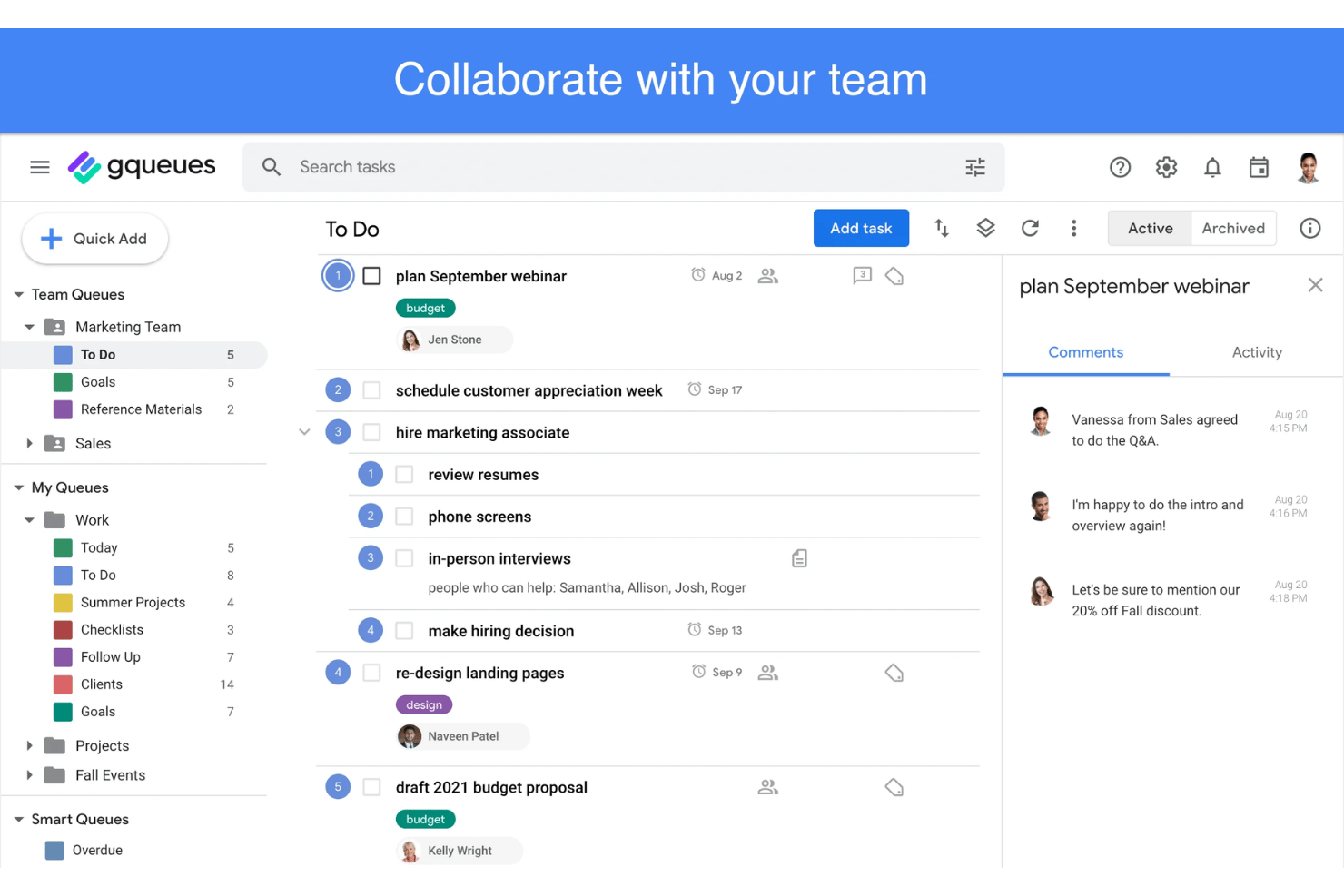
- Lets users assign and collaborate on shared lists
- Offers built-in email task creation from Gmail
- Lacks built-in time tracking or workload management tools
- Doesn’t offer Gantt chart or timeline views
- Loses integration depth for teams outside the Google ecosystem
Asana
- You can easily track tasks and deadlines using Asana's intuitive interface.
- Asana's collaboration tools help your team communicate effectively in real-time.
- There are extensive customization options so you can tailor workflows and views to your specific needs.
- The reporting capabilities are somewhat basic, which may not satisfy teams needing detailed analytics.
- It can feel overwhelming if your team is small or your projects are simple.
- You might find the notification system a bit excessive or distracting.
Best Use Cases for GQueues and Asana
GQueues
- Small Businesses Lightweight interface, easy team sharing, and Google integration make it cost-effective and practical for smaller operations.
- Education Teams Task organization and discounted pricing for schools and universities let educators manage assignments in line with academic calendars.
- Nonprofits Discounted plans and privacy controls help nonprofits manage distributed teams and projects without complex software overhead.
- Google-Centric Departments Marketing, HR, or admin teams using Google Workspace benefit from direct integrations and easy list management.
- Remote-First Startups Simple task tracking, mobile apps, and web access support distributed teams who prioritize usability.
- Freelancers Solopreneurs gain intuitive task management and calendar syncing without excess features they won’t use.
Asana
- Creative agencies You can manage creative workflows and client projects with Asana’s visual boards and timeline features.
- Tech startups You can coordinate product development and team tasks using Asana’s real-time updates and goal-setting tools.
- Marketing teams You can plan campaigns and track progress with Asana’s clear timelines and task comments.
- Nonprofits Asana lets you manage volunteer tasks, events, and fundraising efforts with clear task assignments and timelines.
- Remote teams You can collaborate effectively with Asana’s real-time updates and communication features.
- Event planners You can organize events easily with Asana’s task management and timeline visualization features.
Who Should Use GQueues, And Who Should Use Asana?
GQueues is a great fit for small teams, solo professionals, and perfect for anyone who lives in Google Workspace and values fast setup and simplicity. It lands best with micro to mid-sized organizations, and teams standardized on Microsoft 365 should look elsewhere, because the Google connections carry most of its value. Asana shines in larger organizations or cross-functional teams that need portfolios, dependencies, automation, and integrations beyond Google, and it is the only one of the two that can answer an enterprise security questionnaire. If your workflow is straightforward and Google-based, GQueues keeps things easy. If you want depth, flexibility, and room to scale, Asana is the smarter call.
Differences Between GQueues and Asana
| GQueues | Asana | |
|---|---|---|
| Automation | Recurring tasks and reminders, but no rules engine, but does offer an API to build one. | Rule-based automation, forms, and workflow bundles for repeatable processes |
| Collaboration Tools | Shared queues, task comments, assignments, and an activity trail | Comments, proofing and approvals, free guests, and reporting dashboards |
| Google Integration | Built around Google Workspace, with a Gmail add-on and two-way Google Calendar sync | Connects to Gmail, Drive, and Calendar, though the calendar sync only pushes one way |
| Project Views | List and kanban board views, with due dates surfaced in Google Calendar | Lists, boards, and calendars, plus timeline and Gantt views on paid plans |
| Read GQueues ReviewOpens new window | Read Asana ReviewOpens new window |
Similarities Between GQueues and Asana
| Due Dates | Each tool lets you set deadlines on tasks and trigger reminders to help teams stay on track. |
|---|---|
| Google Drive Access | Both integrate with Google Drive, making it easy to attach and access documents directly from tasks, though only GQueues updates the sharing permissions for you. |
| Mobile Apps | GQueues and Asana both offer Android and iOS apps, so you can manage tasks and collaborate on the go, though GQueues mobile access needs a paid plan. |
| Task Assignment | Both allow you to assign tasks to specific team members, keeping ownership clear and progress visible across projects. |
| Task Comments | Both platforms support comments within tasks, so the back-and-forth on action items sits beside the work instead of in an email thread. |
| Read GQueues ReviewOpens new window Read Asana ReviewOpens new window | |