

2026’da Verimliliği Artırmak İçin En İyi 10 Not Alma Uygulaması

10 En İyi Not Alma Uygulamaları Kısa Listesi


En iyi not alma uygulamaları fikirleri hızlıca yakalamanıza, bilgileri düzenlemenize ve daha sonra ihtiyacınız olanı kolayca bulmanıza olanak tanır. Bu da iş akışınızı basitleştirmenize yardımcı olur ve kararlar ile yapılacak işler konusunda netlik eksikliğinden kaynaklanan gecikmeleri önler. Doğru araç olmadan projelerinizde belirsiz rol ve sorumluluklar, kaçırılan teslim tarihleri ve iletişim kopuklukları gibi sorunlarla karşılaşırsınız.
Proje yönetimi deneyimimi ve 3 yılı aşkın yazılım test etme tecrübemi kullanarak onlarca aracı inceledim ve en iyi not alma uygulamaları listemi oluşturdum. Önerilerimin her biri daha iyi toplantı notları almanıza, projelerinizdeki kararları ve yapılacak işleri takip etmenize, görevleri ilerletmenize ve üretkenliği yüksek tutmanıza yardımcı olacak.
Why Trust Our Software Recommendations
Our team has been testing and reviewing software since 2012. As project managers ourselves, we know how difficult—and important—it is to choose the right software.
For this guide, we evaluated tools using hands-on testing and independent research, scoring tools using our selection criteria. We also draw on insights from industry thought leaders and practicing project management experts.
Our reviews reflect our human editorial judgment, not a sales pitch.
Expert reviewers:
Not Alma Uygulamaları Karşılaştırma Tablosu
En iyi not alma uygulaması seçimlerimin fiyatlandırma ayrıntılarını bu karşılaştırma tablosunda özetledim:
| Tool | Best For | Trial Info | Price | ||
|---|---|---|---|---|---|
| 1 | Best for notes that update work tools | Free plan + free trial available | From $12/user/month (billed annually) | Website | |
| 2 | Best for IT-managed team notes | Free plan + 7-day free trial available | From $10/user/month | Website | |
| 3 | Best for classroom notes and student work | Free plan available | Pricing upon request | Website | |
| 4 | Best for self-managed team documentation | Free plan + 7-day trial available | From $5.78/user/month (billed annually) | Website | |
| 5 | Best for IT-governed documentation | Free plan + trial available | From $10/user/month | Website | |
| 6 | Best for pairing audio with handwritten notes | Free plan available | Pricing upon request | Website | |
| 7 | Best for notes you control outside the app | Free plan available | From $4/user/month (billed annually) | Website | |
| 8 | Best for syncing note tasks to calendars | Free plan + 14-day free trial available | From $5.84/user/month (billed annually) | Website | |
| 9 | Best for sharing team knowledge with clients | Free plan available | From $8/user/month | Website | |
| 10 | Best for choosing where notes are stored | 14-day free trial | From 2.99€/month | Website |
En İyi Not Alma Uygulamalarının İncelemeleri
Her not alma uygulamasının en uygun kullanım alanını, dikkat çeken bazı özelliklerini ve artılarını & eksilerini göstermek için her araç hakkında kısa bir açıklama burada yer alıyor. Kullanıcı arayüzünü genel hatlarıyla göstermek için ekran görüntülerini de ekledim.
Coda
Best for notes that update work tools
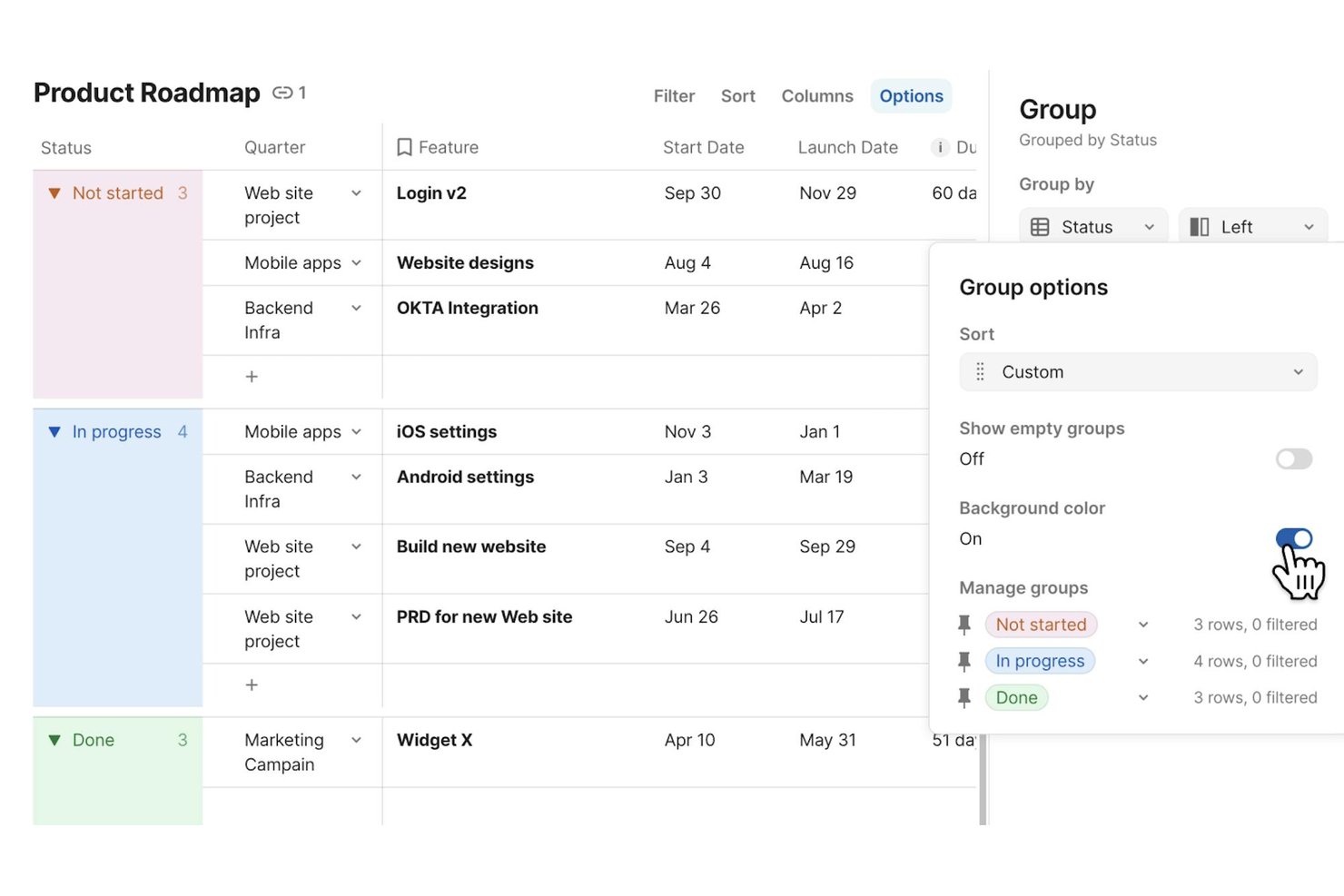
Superhuman Docs (formerly Coda) is a collaborative workspace that combines rich-text documents, tables, databases, and workflow automations into a single environment where teams can write, organize, and connect notes directly to their existing tools.
Who Is Superhuman Docs Best For?
Superhuman Docs is a strong fit for cross-functional teams that need their project notes and documentation to stay in sync with tools like Jira, Asana, and Slack.
Why I Picked Superhuman Docs
Superhuman Docs earns its spot on my shortlist because it treats notes as live, connected objects rather than static text. I love that you can sync Jira issues directly into a doc, edit ticket fields from your notes, and push those changes back to Jira automatically—keeping project context in one place. Docs AI also lets you describe a tracker or dashboard in plain language and build it on top of real table data, so your meeting notes can actually drive work.
Superhuman Docs Key Features
- Real-time collaboration: Multiple teammates can edit the same doc simultaneously, with comments and supported across pages and tables.
- Cross-doc tables: Pull data from other docs into a single view, keeping related information connected without duplicating it.
- Docs MCP server: Connect supported AI tools like Claude or ChatGPT to read, analyze, and write directly into your Docs workspace.
- Version history: Docs automatically track changes over time, with unlimited history available on Business and Enterprise plans.
Coda Integrations
Coda offers 800+ integrations, including Jira, Asana, Slack, Google Calendar, Salesforce, GitHub, Figma, and Zoom. Its Docs MCP server connects ChatGPT, Claude, and Cursor for reading, analyzing, and updating documents.
Pros and Cons
Pros:
- Meeting notes generate summaries and action items
- Teams co-edit shared notes in real time
- Notes connect directly to structured project data
Cons:
- Large, dense docs can feel slow
- Mobile apps omit database and formula editing

Evernote
Best for IT-managed team notes
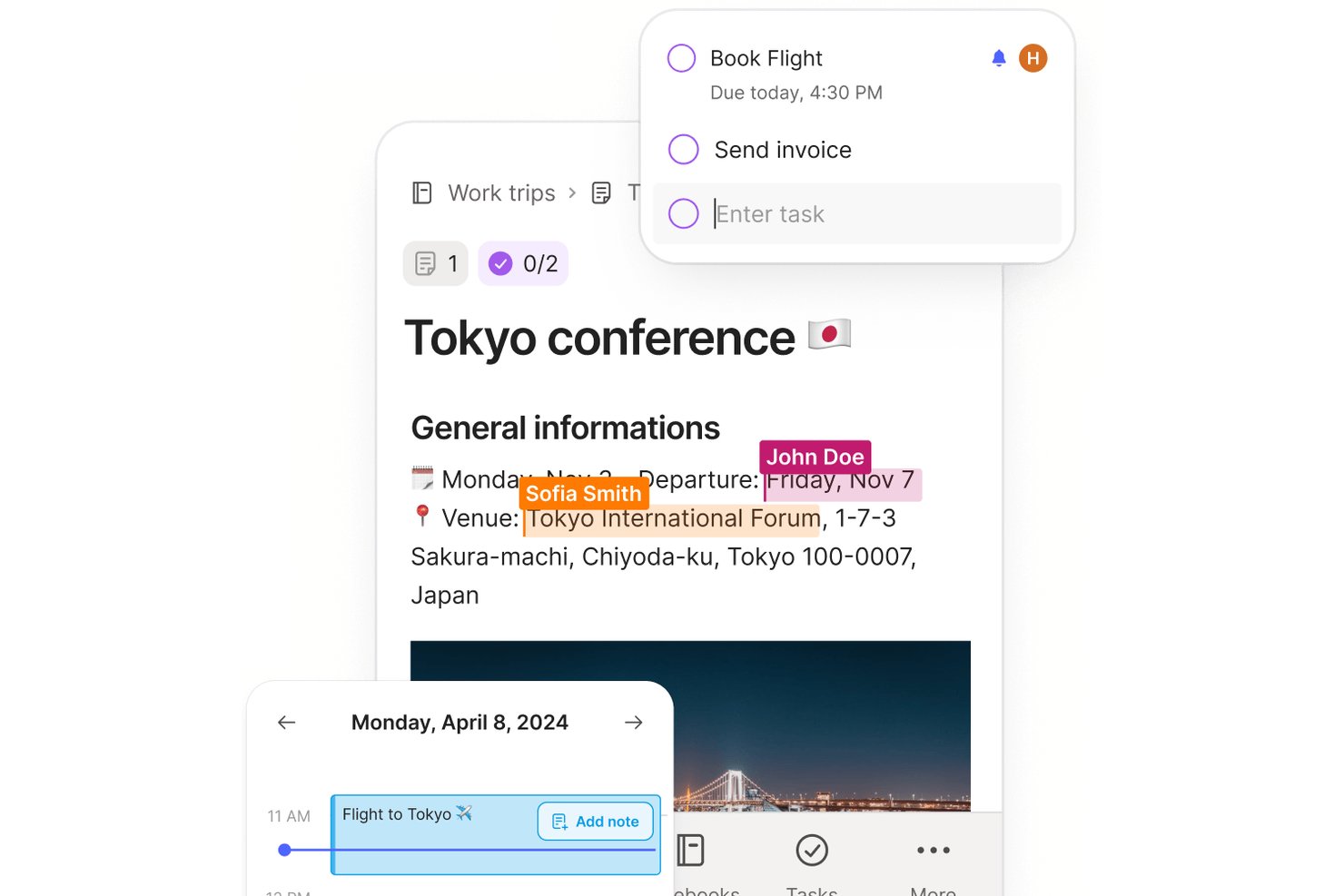
Evernote is a note-taking app that combines note capture, document scanning, web clipping, AI meeting transcription, task management, and team collaboration across a shared workspace.
Who Is Evernote Best For?
Evernote fits teams that need IT-managed shared workspaces, with Enterprise controls like SSO, audit logs, and centralized admin oversight.
Why I Picked Evernote
I've included Evernote in my top picks because it's one of the few note-taking apps built with IT oversight at its core. The Enterprise plan gives admins a centralized console to view and manage every space, notebook, and note, regardless of individual share permissions, and pairs that with SSO, audit logs, and AES-256 encryption. I also like that AI Meeting Notes can record, transcribe in 50+ languages, and summarize sessions, keeping your team's knowledge captured without extra tools.
Evernote Key Features
- Web Clipper: Save full web pages, articles, and PDFs directly to your notes via a browser extension, without ads.
- Document scanning: Capture physical documents and handwritten notes using your device's camera and store them in Evernote.
- Calendar integration: Connect Google Calendar or Microsoft Outlook to link notes directly to upcoming events and meetings.
- Advanced search: Search across note text, PDFs, image text, handwriting, and audio and video transcripts using filters and Boolean operators.
Evernote Integrations
Evernote offers integrations with Google Calendar, Google Drive, Gmail, Slack, Microsoft Outlook Email, Outlook Calendar, and Microsoft Teams. It also provides a Thrift API and MCP server for compatible AI tools.
Pros and Cons
Pros:
- Shared spaces help teams coordinate documentation
- Web clipping keeps source pages with notes
- Search finds text inside scanned attachments
Cons:
- Growing notebooks can make navigation feel crowded
- Sync delays can surface during shared editing
Best for classroom notes and student work
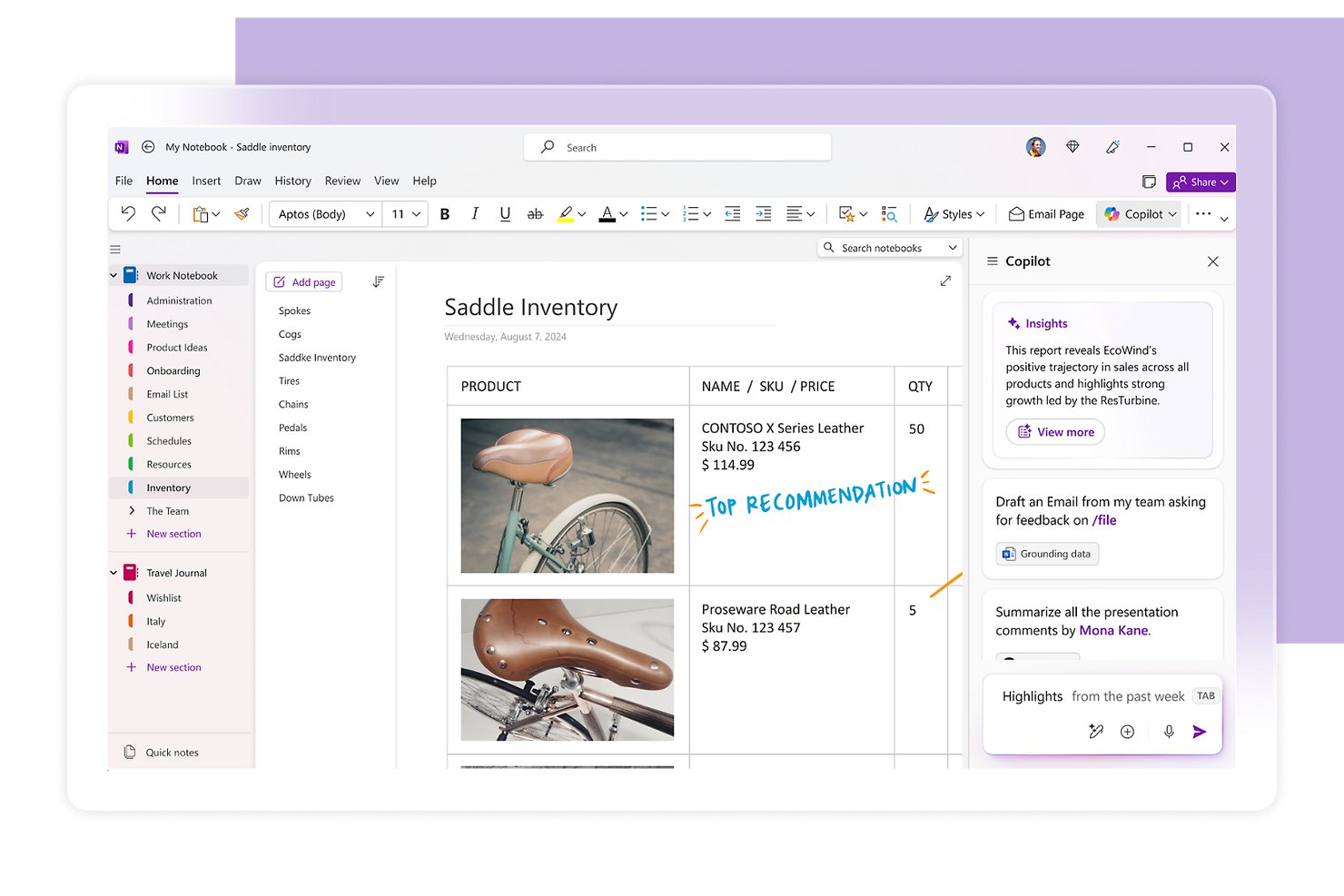
Microsoft OneNote is a digital note-taking app that lets you capture text, handwriting, images, audio, and files on a freeform canvas, organized across notebooks, sections, and pages.
Who Is Microsoft OneNote Best For?
OneNote is a strong fit for students, educators, and individual knowledge workers who are already embedded in the Microsoft 365 ecosystem.
Why I Picked Microsoft OneNote
I picked Microsoft OneNote as one of the best because it's purpose-built for classroom-style note capture, with Class Notebook giving each student their own private workspace alongside a shared content library and collaboration space. I also love how the open canvas lets you drop in handwritten annotations, audio recordings, and webpage snapshots all on one page, which mirrors how notes actually get taken in a lecture or study session. Search even works across handwriting and images, so finding a sketched diagram from weeks ago takes seconds.
Microsoft OneNote Key Features
- Copilot AI assistance: Copilot can summarize sections, generate task lists, rewrite notes, and draft content like meeting agendas directly within your notebook.
- Full-text and handwriting search: Search scans typed notes, handwritten content, and images across all your notebooks to surface older notes quickly.
- File attachments and printouts: Insert files as attachments or embed their contents directly on the page as a printout, with Excel files also offering an inline chart option.
- Microsoft Graph API: A REST-based API lets you build custom integrations that read and write notebooks, sections, and pages programmatically.
Microsoft OneNote Integrations
OneNote supports marketplace integrations with cloudHQ and Feedly, plus Zapier. Its Microsoft Graph OneNote API provides custom access to notebooks, sections, and pages.
Pros and Cons
Pros:
- Classroom notebooks separate student workspaces
- Search finds typed, handwritten, and image text
- Freeform pages combine text, sketches, and media
Cons:
- Large notebooks become harder to navigate
- Sync delays can hide collaborators’ latest changes
Best for self-managed team documentation
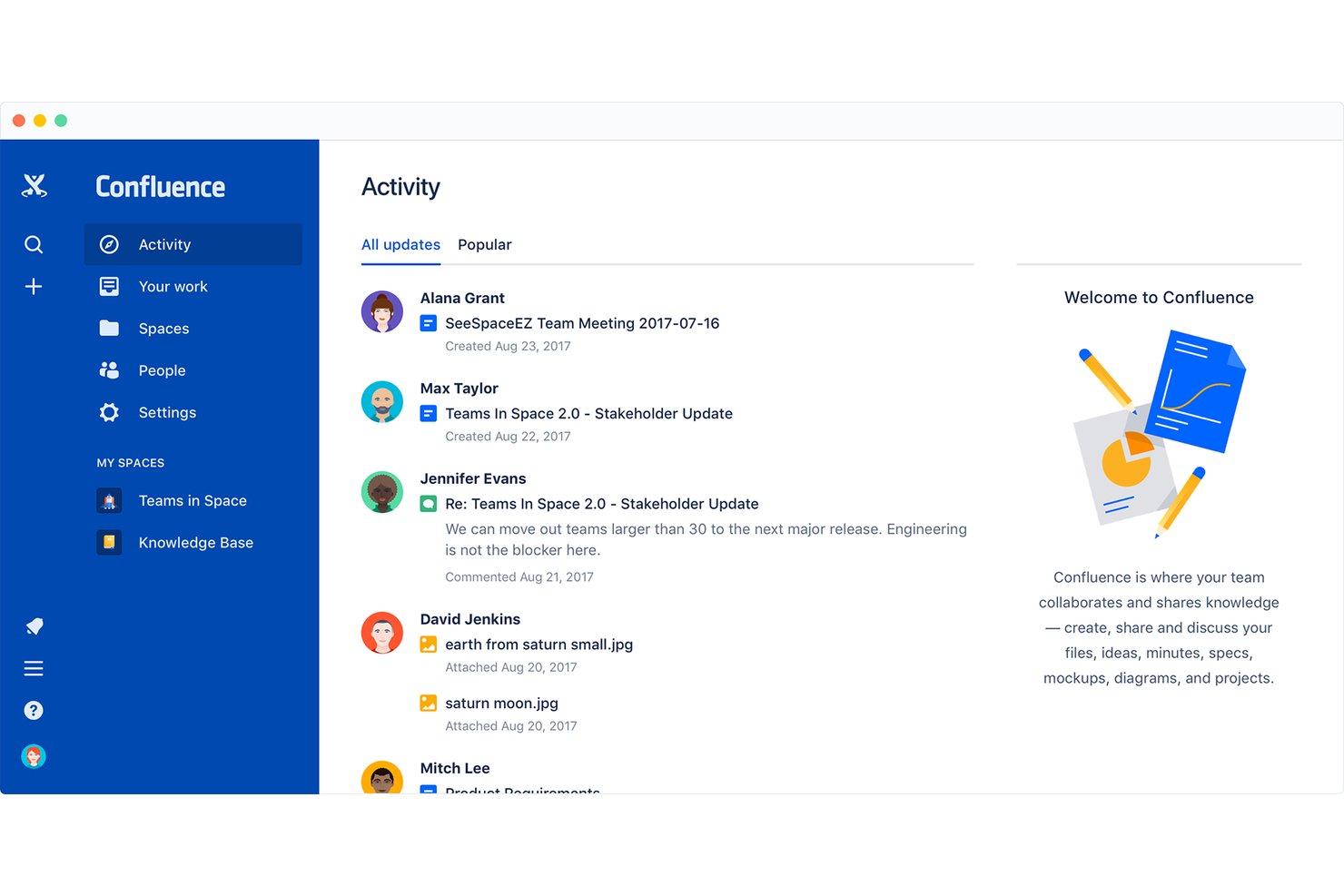
Confluence is a team knowledge management and documentation platform from Atlassian that combines collaborative page editing, structured wikis, whiteboards, databases, and AI-powered search into a shared workspace.
Who Is Confluence Best For?
Confluence is a strong fit for tech and engineering teams that need a shared, structured space to manage documentation alongside their development workflows.
Why I Picked Confluence
I've included Confluence in my top picks because it's built around the idea that your team's knowledge should live in one managed, structured space rather than scattered across docs and threads. I particularly like how spaces and page hierarchies let engineering and product teams maintain self-organized documentation, with real-time co-editing and granular permissions keeping everything controlled without requiring admin intervention at every step. Confluence's whiteboard-to-Jira pipeline is also genuinely useful: teams can brainstorm on a canvas and convert stickies directly into tracked work items.
Confluence Key Features
- Page versioning: Review the full change history of any page, compare earlier versions side by side, and restore a previous version when needed.
- Rovo AI search: Query connected knowledge sources across your workspace to surface contextual answers without manually searching through pages and tools.
- Automation rules: Use pre-built rule templates or a no-code rule builder to automate recurring content tasks and workflow steps.
- Database views: Organize Confluence pages and Jira items into table, card, or board views with filters, sorting, and custom fields to suit different audiences.
Confluence Integrations
Confluence offers native integrations with Jira, Jira Service Management, and Trello. It connects with Figma, Google Docs, and YouTube through whiteboards, supports Slack and Microsoft Excel as slide-content sources, and provides REST API v2, GraphQL, and app properties APIs.
Pros and Cons
Pros:
- Meeting templates capture decisions and owners
- Live co-editing supports team note updates
- Shared pages keep project notes together
Cons:
- Tables and code blocks need formatting cleanup
- Search can surface outdated pages
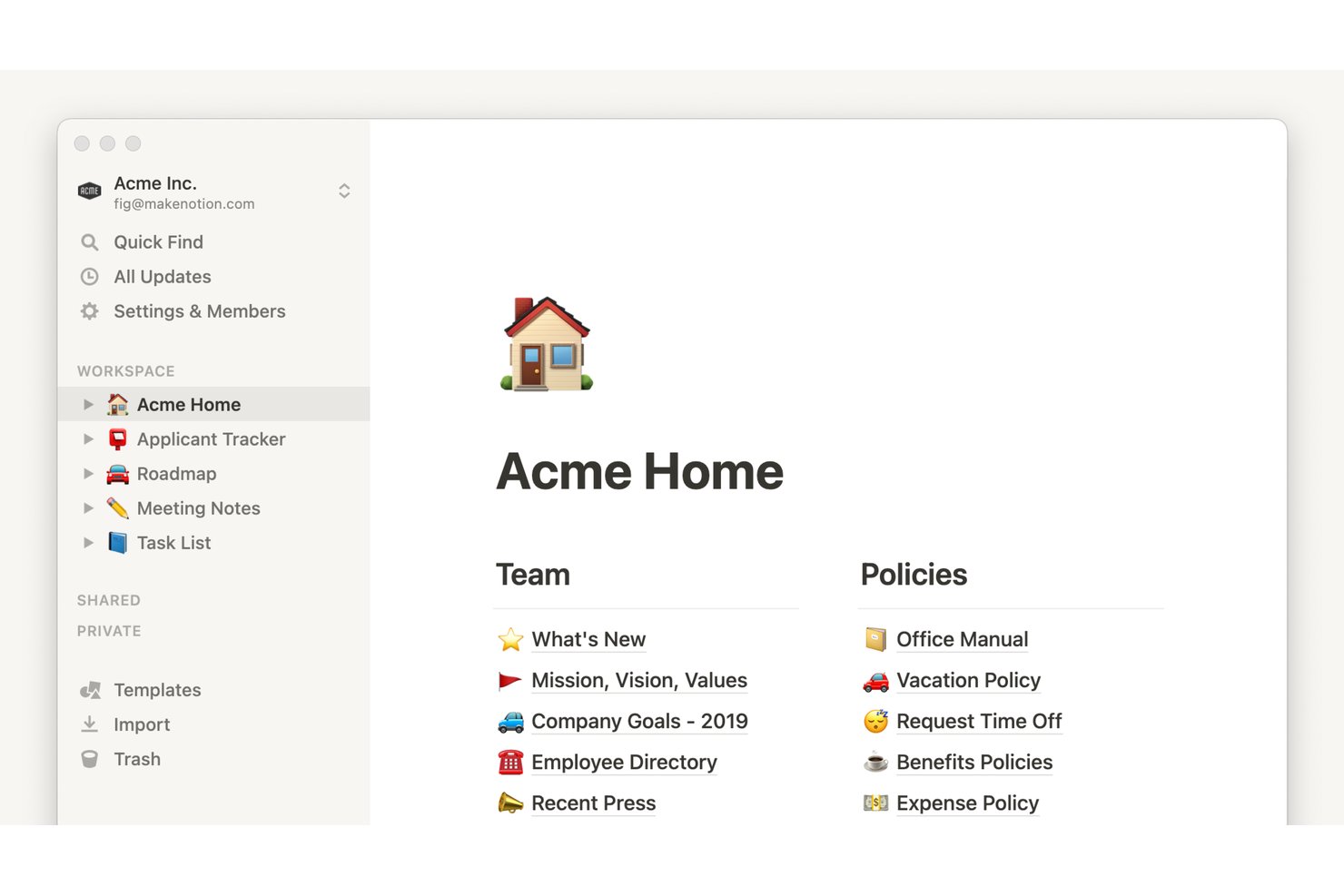
Notion is a block-based workspace that combines note-taking, document creation, and database management with AI-powered meeting transcription, cross-app integrations, and enterprise-grade access controls.
Who Is Notion Best For?
Notion fits teams that need IT-controlled documentation across distributed environments, where access permissions, audit logs, and compliance controls matter as much as the notes themselves.
Why I Picked Notion
Notion earns its spot on my shortlist because it's built for teams where IT actually needs to govern what gets documented and who can access it. I'm talking SAML SSO, SCIM provisioning, audit logs, data residency, and DLP/SIEM connections—all the controls that turn a shared workspace into something an IT team can actually manage. On top of that, Business plan users get granular database permissions and page verification, so teams can mark trusted content and lock down who edits what.
Notion Key Features
- Block-based editor: Build pages using modular content blocks—text, images, code, embeds, and more—arranged and reordered with drag-and-drop.
- Database views: Visualize the same data as a board, calendar, timeline, or chart without duplicating any information.
- AI Meeting Notes: Transcribe and summarize meetings from Zoom, Google Meet, and Microsoft Teams directly in your workspace, including generated action items.
- Backlinks: Automatically create two-way connections between pages whenever you one page from another.
Notion Integrations
Notion has native integrations with Zoom, Google Meet, and Microsoft Teams, plus marketplace integrations for Slack, Google Drive, GitHub, Jira, Asana, and Salesforce. Its public API, webhooks, Workers, SDK, CLI, and MCP support custom integrations.
Pros and Cons
Pros:
- Turn meeting audio into searchable summaries
- Collaborate on shared notes in real time
- Connect notes through backlinks and databases
Cons:
- Offline access remains limited across devices
- Quick scratchpad capture takes extra steps

Best for pairing audio with handwritten notes
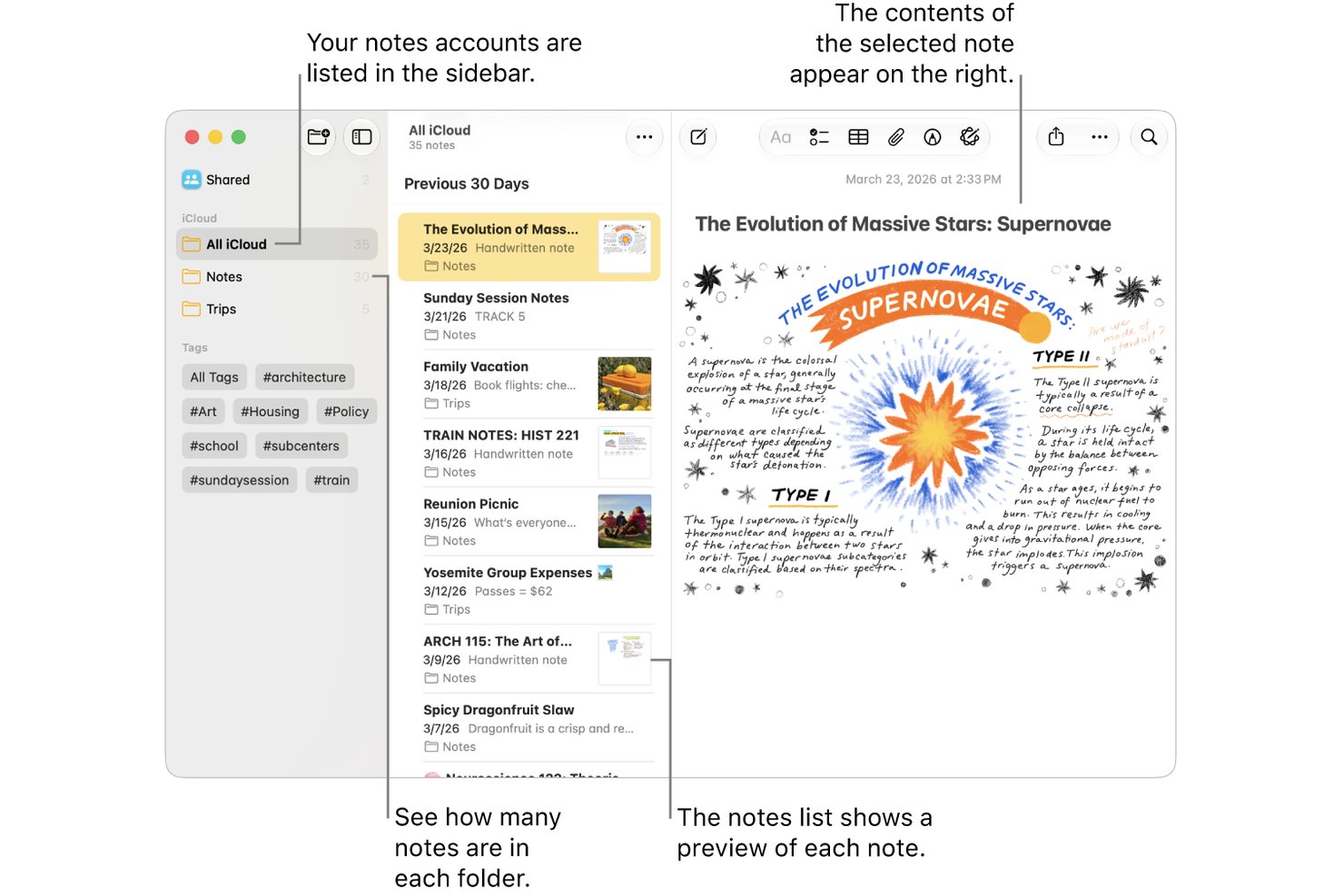
Apple Notes is a free note-taking app built into Apple devices that lets you capture typed notes, handwritten sketches, scanned documents, and audio recordings, with iCloud sync across iPhone, iPad, and Mac.
Who Is Apple Notes Best For?
Apple Notes is a natural fit for individuals and small teams already working within the Apple ecosystem who need a free, always-available tool for quick capture and lightweight collaboration.
Why I Picked Apple Notes
Apple Notes earns its spot on my shortlist because it's the only tool I've used that lets you record audio and pair it directly with handwritten sketches in the same note. I especially like the audio transcription feature: record a meeting, get a searchable transcript, and keep your hand-drawn diagram right alongside it. Apple Intelligence can also summarize that transcript automatically, which saves real time when reviewing a dense session.
Apple Notes Key Features
- Quick Note capture: Start a note instantly from Control Center, Apple Pencil, or a keyboard shortcut without opening the app.
- Smart Folders: Automatically filter and organize notes using criteria like tags, creation date, mentions, and checklists.
- Collaborative sharing: Share notes or entire folders with up to 100 people, set view or edit permissions, and track collaborators' changes in an activity view.
- Multi-modal search: Search across typed text, handwritten notes, scanned documents, and image content from a single search bar.
Apple Notes Integrations
Apple Notes has native integrations with iCloud and Siri for syncing and voice-based note capture. No third-party productivity integrations or public API are documented.
Pros and Cons
Pros:
- Quick Notes captures ideas without opening the app
- Search finds handwriting and scanned text
- Audio recordings sit beside handwritten sketches
Cons:
- Windows users rely on weaker browser access
- Text layout controls remain limited

Obsidian
Best for notes you control outside the app
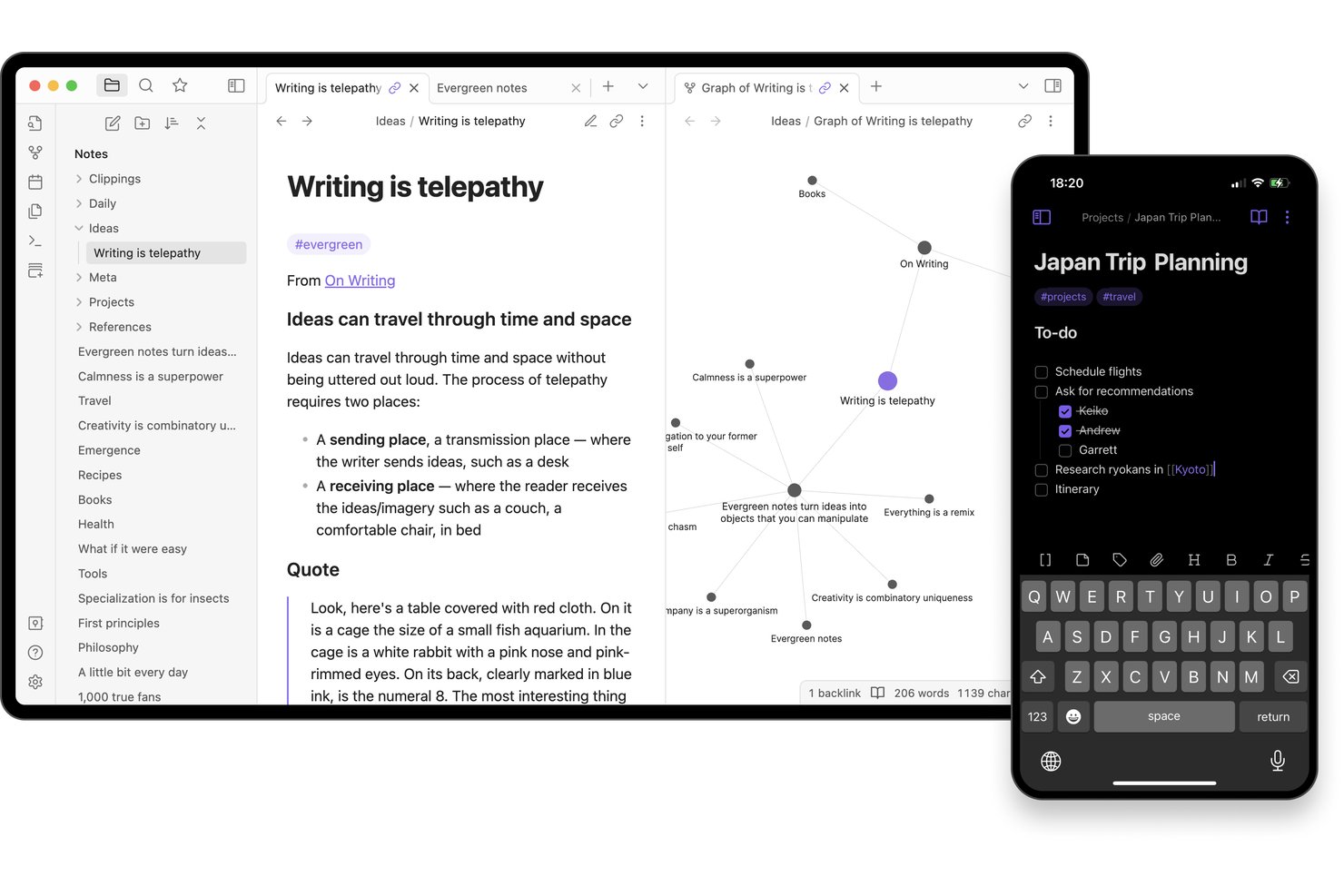
Obsidian is a local-first note-taking app that stores your notes as plain-text Markdown files on your device, with bi-directional linking, a graph view, tags, Canvas, and a community plugin library for building a personal knowledge base.
Who Is Obsidian Best For?
Obsidian is a strong fit for individual knowledge workers, researchers, and students who want to build a personal knowledge base from notes they fully own and control.
Why I Picked Obsidian
Obsidian earns its spot on my shortlist because your notes live as plain-text Markdown files on your device, meaning you can open, search, and edit them in any text editor without ever touching the app. I especially like how bi-directional linking and the graph view let you trace connections between ideas across a vault, which is genuinely useful when you're pulling together research or mapping out a project. The Web Clipper adds to that by letting you highlight and save web content directly into your local files using custom templates.
Obsidian Key Features
- Canvas workspace: Arrange notes, images, PDFs, videos, and audio on an infinite visual canvas for brainstorming, diagramming, or mapping out research.
- Advanced search operators: Query notes by filename, path, tag, property, section, block, or task using Boolean expressions, regular expressions, and negation to find anything across your vault.
- Community plugin library: Browse and install from thousands of community-built plugins—including Kanban boards, Dataview queries, and task trackers—to shape Obsidian around your workflow.
- Web Clipper: Save web pages, metadata, and highlighted content directly into your local vault as Markdown files using customizable templates and browser shortcuts.
Obsidian Integrations
Obsidian supports marketplace integrations with Apple Notes, OneNote, Evernote, Notion, Google Keep, and Google Drive through community plugins. Its open API and TypeScript plugin API support custom integrations.
Pros and Cons
Pros:
- Advanced search finds details across a vault
- Backlinks and graph connect scattered research
- Notes remain portable as plain-text files
Cons:
- Quick capture can demand setup and syntax
- Shared notes lack live co-editing
Best for syncing note tasks to calendars
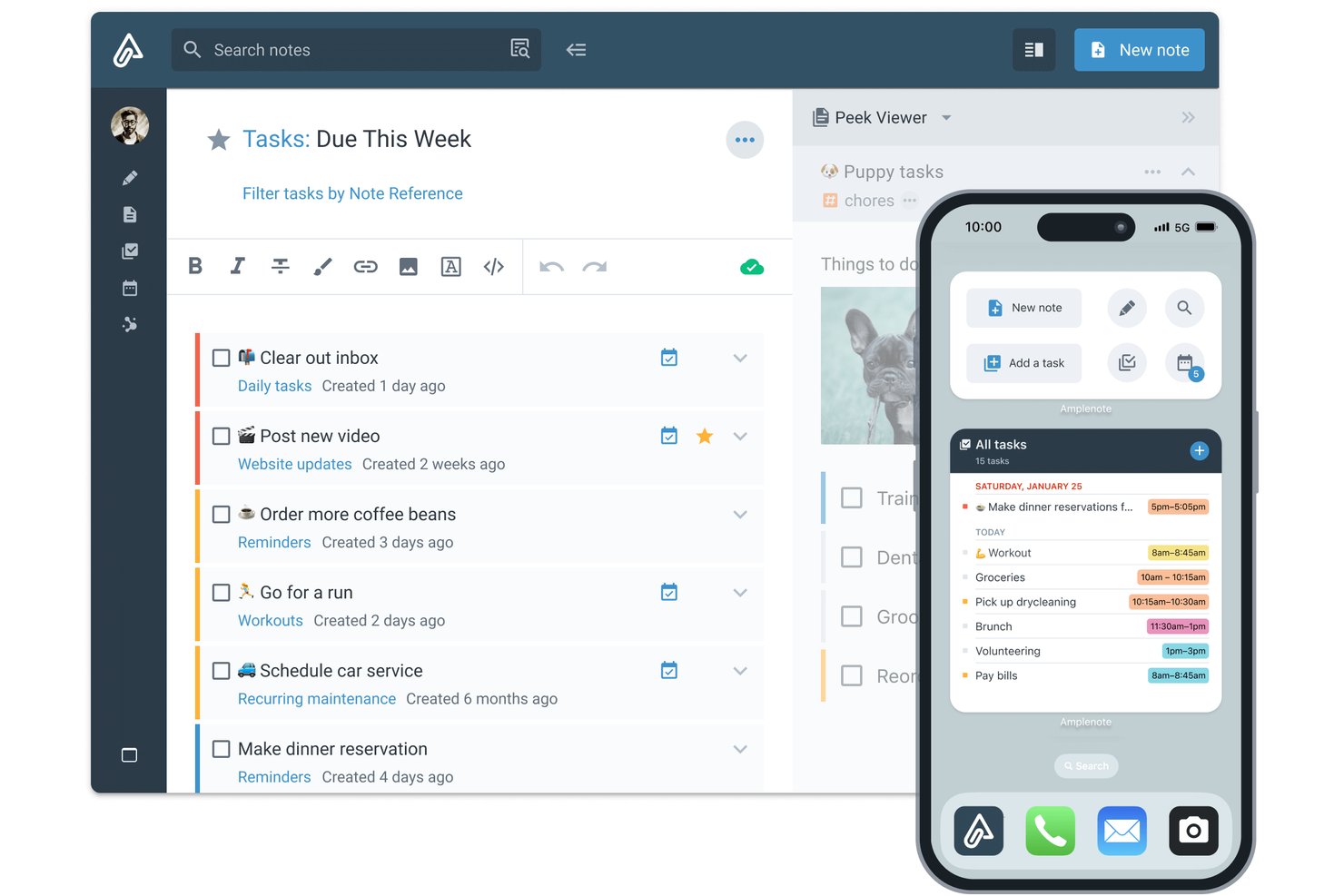
Amplenote is a note-taking app that combines quick idea capture, bidirectional linked notes, task management, and calendar scheduling in one workspace.
Who Is Amplenote Best For?
Amplenote suits individual knowledge workers and researchers who want to capture ideas, manage tasks, and schedule work from a single app.
Why I Picked Amplenote
Amplenote earns its spot on my shortlist because it genuinely closes the gap between capturing ideas and acting on them. I love how tasks created inside notes sync two ways with Google Calendar and Outlook, so a deadline I add to a meeting note shows up on my calendar without any manual copying. Amplenote's task scoring also automatically ranks what to tackle next based on priority and due date, which keeps my day grounded in what actually matters.
Amplenote Key Features
- Bidirectional linking: Connect notes to each other so you can navigate between related ideas and see every note that references the one you're reading.
- Jots quick capture: Use a dedicated Jots mode to drop ideas, tasks, or links instantly before deciding where they belong.
- Full-text and OCR search: Search across all note text, including text recognized from images uploaded to your notes.
- Shared tags: Share entire groups of notes with collaborators by granting read-only or edit access through a shared tag.
Amplenote Integrations
Amplenote offers native integrations with Google Calendar and Microsoft Outlook, plus marketplace integrations for Readwise and Zotero. Its REST API and Plugin API support custom integrations.
Pros and Cons
Pros:
- Search retrieves text from image uploads
- Backlinks connect research across notes
- Jots capture ideas before organizing them
Cons:
- Mobile capture takes extra steps for photos
- Note lists can feel jumbled without folders

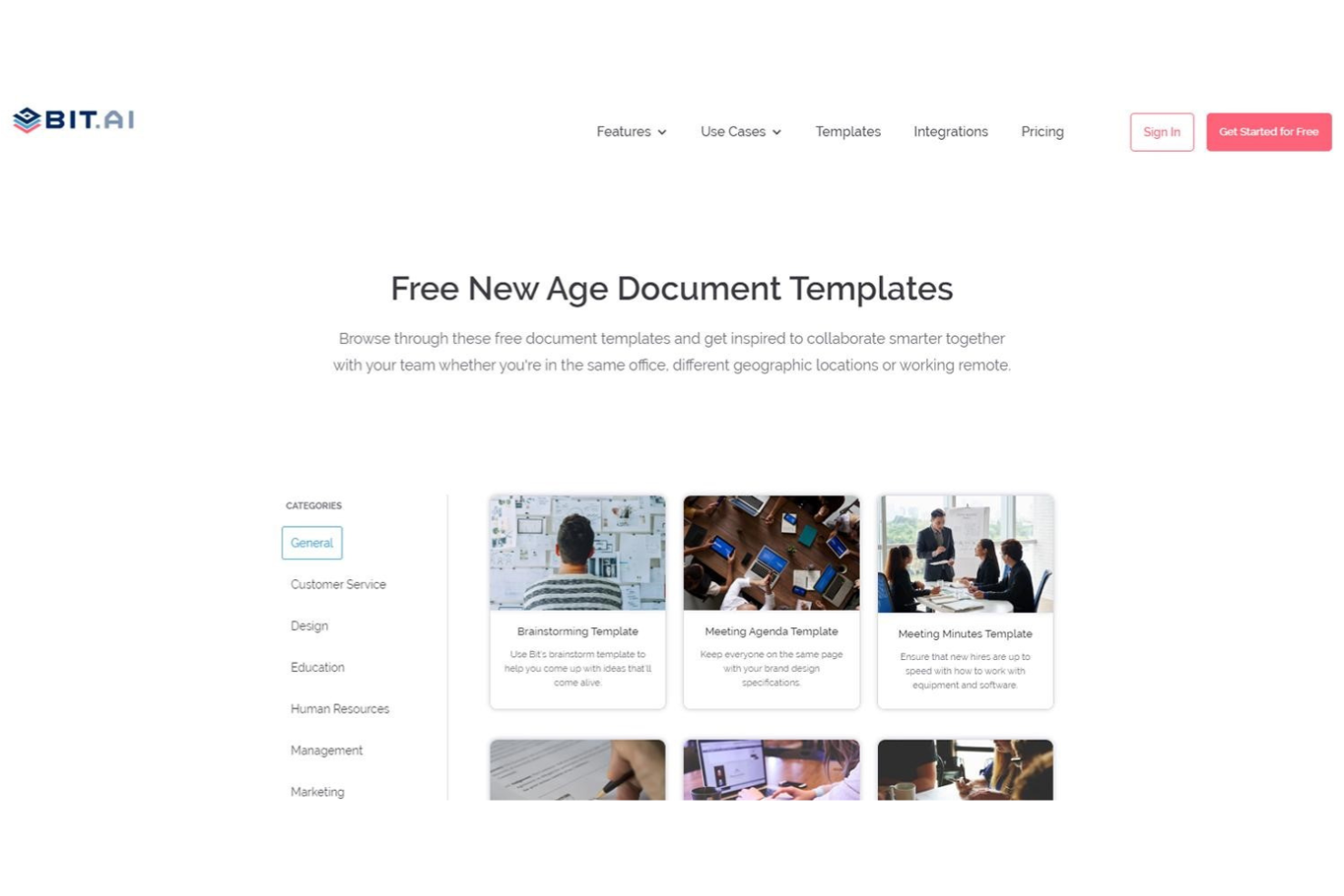
Bit.ai is a cloud-based document and wiki platform that combines rich media embedding, real-time co-editing, structured knowledge management, and client-facing sharing tools.
Who Is Bit.ai Best For?
Bit.ai is a strong fit for teams that regularly share documents, wikis, or project knowledge with clients or external stakeholders.
Why I Picked Bit.ai
I've included Bit.ai in my top picks because it's purpose-built for teams that share documentation with external stakeholders. Client portals let you create invite-only workspaces where guests get permission-controlled access, and trackable links show exactly who viewed a document, how long they spent, and which pages they read. You can even add a lead-capture form to a shared wiki to collect contact details without any back-and-forth.
Bit.ai Key Features
- Real-time co-editing: Multiple collaborators can edit the same document simultaneously, including working in the same section at the same time.
- Smart Search: Search across workspaces, folders, documents, and digital assets, with results that take you directly to the matching location inside a document.
- Wiki builder: Turn documents into navigable wikis by adding and arranging subpages in a structured hierarchy with anchor links between sections.
- Rich media embedding: Embed PDFs, videos, spreadsheets, Figma designs, and content from over 100 integrations directly inside a document.
Bit.ai Integrations
Bit.ai offers 100+ integrations, including Google Docs, Google Sheets, Airtable, Trello, Google Calendar, Miro, Lucidchart, Figma, and Loom, primarily through embedded links and content. API availability for custom integrations isn’t documented.
Pros and Cons
Pros:
- Live co-editing keeps meeting notes current
- Shared wikis organize notes for client handoffs
- Embeds keep research and project notes contextual
Cons:
- Older notes take more effort to retrieve
- Mobile browser editing feels clunky off desktop

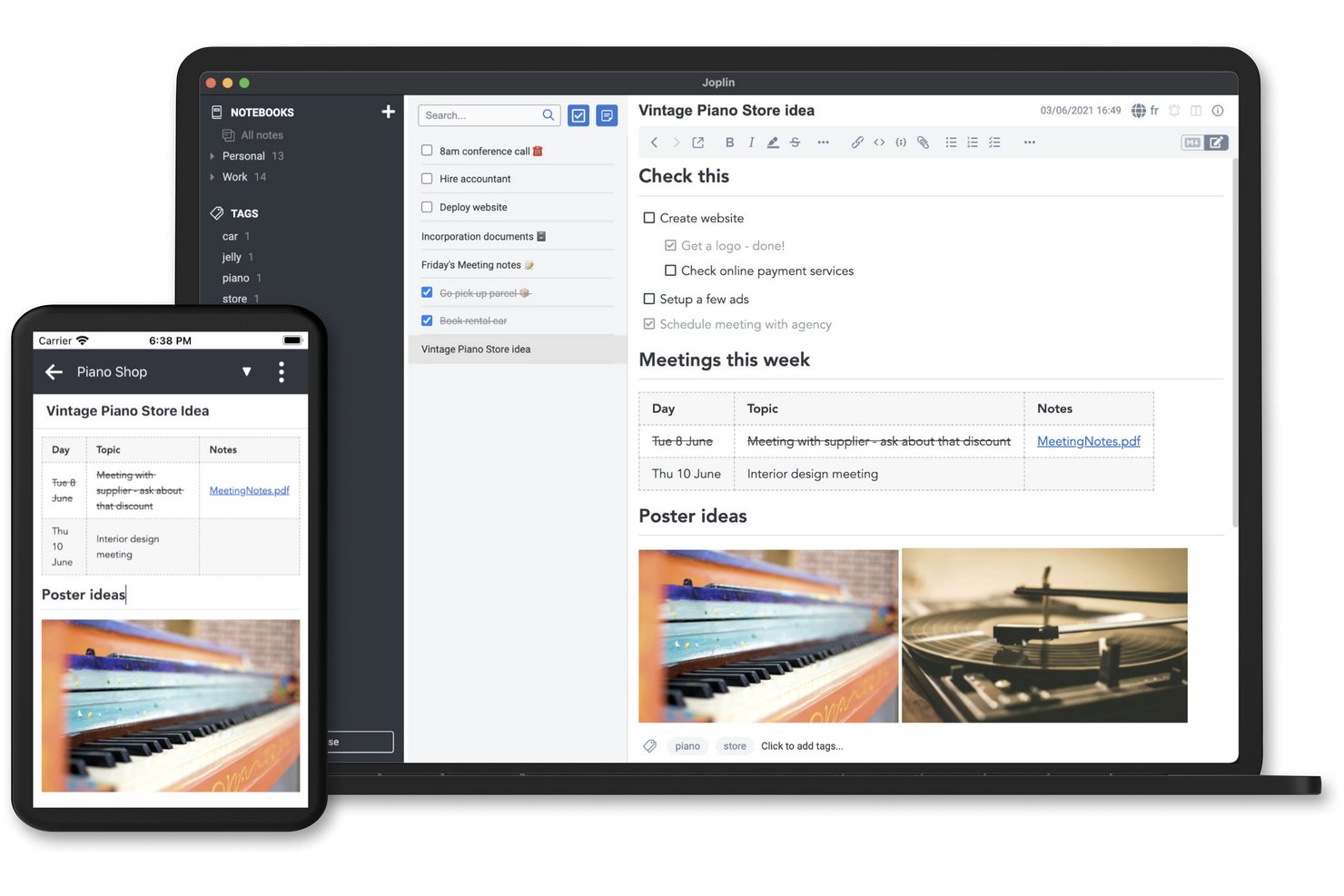
Joplin is an open-source note-taking app that supports Markdown and rich-text editing, notebook organization, cross-device sync, web clipping, and a plugin ecosystem for extending its functionality.
Who Is Joplin Best For?
Joplin is a strong fit for privacy-minded individuals and small teams who want full control over where their notes are stored and synced.
Why I Picked Joplin
I picked Joplin as one of the best because it's the only note-taking app that gives you genuine control over where your data lives. You can sync to Joplin Cloud, Dropbox, OneDrive, Nextcloud, S3, or WebDAV, and the app stores notes locally on your device by default without sending anything to external services without your say-so. End-to-end encryption is built in, and because Joplin is open source, you can self-host the entire backend through Joplin Server Business if that's what your setup requires.
Joplin Key Features
- Web clipper: A browser extension for Chrome and Firefox that saves full web pages, selections, or screenshots directly into your notebooks.
- FTS4-powered search: Full-text search with filters for phrases, tags, notebooks, dates, attachment types, and source URLs to pinpoint notes fast.
- Plugin ecosystem: A built-in plugin repository lets you install integrations with tools like Todoist, Jira, Readwise, and Zotero to extend Joplin's core functionality.
- Whiteboard canvas: An infinite, zoomable surface where you can arrange text cards, images, PDFs, and note references, stored and synced like any other note.
Joplin Integrations
Joplin offers marketplace integrations with Todoist, Readwise, Zotero, Jira, Google Docs, Anki, and n8n. Its REST Data API supports custom integrations with notes, notebooks, tags, searches, and change events.
Pros and Cons
Pros:
- Save web pages directly as notes
- Organize detailed notes in notebooks
- Choose where notes are stored
Cons:
- Scanned PDFs aren’t searchable by default
- Sync reliability varies between users
Diğer Not Alma Uygulaması Seçenekleri
En iyi not alma uygulamaları listeme girmeyen, ancak yine de göz atmaya değer birkaç seçenek daha burada yer alıyor.
- Miro
For turning workshop ideas into shared docs
- Milanote
For creative inspiration and planning
- Zoho Notebook
For keeping notes with Zoho CRM records
- Otter.ai
For asking AI about your meeting history
- Guru
For turning team chats into reviewed docs
- Google Keep
For turning quick notes into Google Docs
- Mem
For using notes with AI assistants
- Clover
For presenting ideas from note canvases
- Goodnotes
For audio-linked handwritten notes
- Notability
For turning lecture notes into study aids


How I Evaluate Note Taking Apps
My evaluation has two layers: baseline criteria a tool must clear—like capturing meeting notes and syncing across devices—and differentiators that distinguish the top picks.
Core Functionality (Table Stakes For This List)
When I'm selecting tools for my list, I rank each one on a scale from 0 (does not offer the functionality) to 5 (excels in this area) for each core functionality listed below. Then, I calculate the tool's total score into a percentage. Each tool needs to achieve a minimum total score of 65% to be considered for inclusion.
- Rich Note Creation: I look for flexible editors that handle formatted text, images, file attachments, and embeds—the kind of depth you need when documenting project requirements or sprint goals.
- Organization & Structure: A flat list of notes falls apart fast. I evaluate whether tools offer folders, tags, nested pages, or cross-linking to keep project documentation logically grouped.
- Search & Retrieval: Finding last quarter's stakeholder feedback shouldn't take five minutes. I check for full-text search with filtering by tags, dates, or notebooks.
- Task & Action Item Support: Meeting notes without follow-through are wasted effort. I look for in-note checklists, assignees, or due dates that connect decisions to deliverables.
- Real-Time Collaboration & Sharing: Project teams need to co-edit documents like meeting agendas and retrospective boards together. I evaluate sharing permissions, live co-editing, and commenting features.
- Cross-Device Sync: I check that notes sync reliably across desktop, mobile, and web so you can capture client feedback on-site and access it from your laptop later without missing a beat.
Once I have a list of tools that meet the criteria, I consider what sets each platform apart.
Differentiating Factors (What Sets Vendors Apart)
Here's how I compare and contrast different vendors:
Standout Features
AI-powered features like automatic summarization and action item extraction can turn a 30-minute standup recording into a structured recap in seconds. I also look for built-in meeting transcription, since pairing it with AI makes post-meeting documentation nearly hands-free. Pre-built templates for sprint retrospectives, status reports, and project briefs matter too—they save time and keep documentation consistent across your team without starting from scratch every time.
Beyond Features
Integration with tools like Jira, Asana, Slack, and Zoom is a big deal—I check whether a note taking app connects to the project management and communication platforms your team already uses daily. Data portability also matters. I look for export options like Markdown, PDF, or HTML so you're not locked in if priorities shift. For teams handling sensitive project data or client information, I evaluate security credentials like SOC 2 compliance, encryption standards, and admin-level permission controls.
Not Alma Uygulamaları Nasıl Seçilir?
Uzun özellik listeleri ve karmaşık fiyatlandırma yapıları arasında kaybolmak kolaydır. Kendinize özgü yazılım seçim sürecinizi yürütürken odaklanmanıza yardımcı olmak için göz önünde bulundurmanız gereken faktörleri içeren bir kontrol listesi hazırladım:
| Faktör | Dikkate Alınması Gerekenler |
|---|---|
| Ölçeklenebilirlik | Araç, zaman içinde büyüyen proje ekiplerini ve farklı departmanlar arası iş birliğini destekleyecek mi? Esnek izinler, sınırsız notlar ve ölçeklenebilir depolama alanı sunan araçları arayın. |
| Entegrasyonlar | Ekibinizin hâlihazırda kullandığı görev yöneticileri, takvimler veya Slack gibi araçlara bağlanıyor mu? Daha az entegrasyon, daha fazla manuel güncelleme ve zaman kaybı anlamına gelir. |
| Özelleştirilebilirlik | Notları ekibinizin çalışma biçimine göre; projeye, göreve veya zaman çizelgesine göre düzenleyebilir misiniz? Sizi tek bir iş akışına zorlayan katı sistemlerden kaçının. |
| Kullanım kolaylığı | Yeni kullanıcılar bir kullanım kılavuzuna ihtiyaç duymadan aracı hızlıca kullanmaya başlayabilir mi? Rahat hissetmeniz 15 dakikadan uzun sürüyorsa benimseme oranı düşebilir. |
| Uygulama ve işe alıştırma | Kurulum ne kadar sürüyor? Ekibinizin hızlı ve sorunsuz bir şekilde başlamasına yardımcı olacak şablonlar, içe aktarma araçları veya rehberli tanıtımlar var mı? |
| Maliyet | Fiyatlandırma kullanıcı veya depolama alanına göre nasıl ölçekleniyor? Hızla biriken kullanıcı başına ücretlere veya ek özellikler için alınan gizli maliyetlere dikkat edin. |
| Güvenlik önlemleri | Şifreleme, erişim kontrolleri ve veri yedeklemelerini destekliyor mu? Notlarınız hassas proje bilgileri içeriyorsa bu konuda taviz vermeyin. |
| Destek erişilebilirliği | Bir şey bozulduğunda yardıma kolayca ulaşabiliyor musunuz? Özellikle kurum içi BT desteğiniz yoksa canlı sohbet veya hızlı e-posta yanıtları sunan araçları tercih edin. |
Not Alma Uygulamaları Nedir?
Not alma uygulamaları, telefonunuzda veya bilgisayarınızda notlarınızı ya da fikirlerinizi yazmanıza, düzenlemenize ve geri almanıza olanak tanıyan dijital araçlardır. Proje yöneticileri, yoğun çalışan profesyoneller ve aynı anda birden fazla işi yürüten ekip üyeleri; listeleri, hatırlatıcıları, yapılacakları, eylem maddelerini ve önemli ayrıntıları tek bir yerde takip etmek için bu uygulamaları kullanır.
Notları etiketleyebilir, arayabilir veya eşitleyebilirsiniz; böylece ister masanızda ister hareket hâlinde olun, hiçbir düşüncenizi kaybetmezsiniz. Not alma uygulamaları, aynı anda birden fazla işi yürütürken ve hareket hâlinde çok sayıda sorumluluğu veya görevi takip ederken yararlı birer hafıza yardımcısıdır.
Özellikler
Her iyi not alma uygulaması yazılımında bulunması gereken temel özellikler şunlardır:
- Zengin metin düzenleme: Daha iyi okunabilirlik ve yapı için notları başlıklar, listeler, bağlantılar ve vurgularla biçimlendirmenizi sağlar.
- Arama işlevi: Uzun listeler arasında kaydırma yapmadan belirli notları, anahtar kelimeleri veya etiketleri hızlıca bulmanızı sağlar.
- Etiketleme ve düzenleme: Klasörleri, etiketleri veya adlandırmaları kullanarak notları gruplamanıza, filtrelemenize ve geri almanıza yardımcı olur.
- Cihazlar arası eşitleme: Notlarınızın masaüstü, mobil cihaz ve web üzerinde her zaman güncel ve erişilebilir olmasını sağlar.
- Çevrim dışı erişim: Seyahat veya kesinti sırasında yararlı olacak şekilde, internet bağlantısı olmadan notları görüntülemenize ve düzenlemenize olanak tanır.
- İş birliği araçları: Notları başkalarıyla gerçek zamanlı veya eş zamansız olarak paylaşmanızı ve birlikte düzenlemenizi sağlar.
- Ses kaydı: Toplantılar veya beyin fırtınası oturumları sırasında sesli notlar kaydetmenize olanak tanır.
- Web içeriği kırpma: Makaleleri, sayfaları veya ekran görüntülerini doğrudan web'den not sisteminize kaydetmenizi sağlar.
- Şablon kitaplığı: Toplantı notlarını, kontrol listelerini ve proje planlarını standartlaştırmanıza yardımcı olacak hazır not biçimleri sunar.
- Veri dışa aktarma seçenekleri: Notlarınızı PDF, DOCX veya düz metin gibi yaygın biçimlerde yedeklemenize ya da taşımanıza olanak tanır.
Avantajlar
Not alma uygulamalarını kullanıma sunmak, ekibiniz ve işletmeniz için çeşitli avantajlar sağlar. Yararlanabileceğiniz avantajlardan bazıları şunlardır:
- Bilgileri daha hızlı kaydetme: Ekipler, e-postaları veya belgeleri araştırmak zorunda kalmadan fikirleri, toplantı notlarını veya proje güncellemelerini hızlıca yazabilir.
- Daha iyi düzen: Etiketler, klasörler ve arama gibi özellikler, ihtiyaç duyduğunuzda her şeyi kolayca bulmanıza yardımcı olur.
- Geliştirilmiş iş birliği: Paylaşılan notlar ve gerçek zamanlı düzenleme, ekip arkadaşlarının ek mesajlara veya toplantılara gerek kalmadan aynı doğrultuda ilerlemesini sağlar.
- Daha tutarlı belgeleme: Şablonlar ve yapılandırılmış not biçimleri, önemli bilgilerin gözden kaçırılmamasına yardımcı olur.
- Her yerden erişim: Bulut eşitleme sayesinde notlar ihtiyaç duyduğunuz her an telefonunuzda, dizüstü bilgisayarınızda veya tabletinizde kullanılabilir.
- Daha az unutulan görev: Notlara yerleştirilen kontrol listeleri ve hatırlatıcılar, eylem maddelerinin kaydedildikleri yerde takip edilmesine yardımcı olur.
- Bilgi aktarımının kolaylaşması: Notları tek bir sistemde tutmak, yeni ekip üyelerinin dağınık bilgilerin peşine düşmeden işe uyum sağlamasına yardımcı olur.
Maliyetler ve Fiyatlandırma
Not alma uygulamalarını seçmek, mevcut çeşitli fiyatlandırma modellerini ve planları anlamayı gerektirir. Maliyetler özelliklere, ekip büyüklüğüne, eklentilere ve daha fazlasına göre değişir. Aşağıdaki tablo, not alma uygulaması çözümlerindeki yaygın planları, ortalama fiyatlarını ve genellikle sunulan özellikleri özetlemektedir:
Not Alma Uygulamaları için Plan Karşılaştırma Tablosu
| Plan Türü | Ortalama Fiyat | Yaygın Özellikler |
|---|---|---|
| Ücretsiz Plan | $0 | Temel metin notları, sınırlı depolama alanı, sınırlı sayıda cihaz ve temel arama. |
| Kişisel Plan | $5–$10/kullanıcı/ay | Sınırsız not, cihazlar arasında eşitleme, temel düzenleme ve çevrim dışı erişim. |
| İşletme Planı | $10–$25/kullanıcı/ay | Paylaşılan çalışma alanları, yönetici denetimleri, araçlarla entegrasyonlar ve iş birliği özellikleri. |
| Kurumsal Plan | $25–$40/kullanıcı/ay | Gelişmiş güvenlik, özel roller, uyumluluk desteği ve özel hesap desteği. |
Sıkça Sorulan Sorular
Sizin için doğru not alma uygulamasını seçmenize yardımcı olmak amacıyla, sıkça sorulan soruların bazı yanıtlarını aşağıda bulabilirsiniz.
Not alma uygulamalarını değerlendirirken aranması gereken temel özellikler nelerdir?
Kullanımı kolay olan ve tüm cihazlarınızdan her yerden erişilebilen bir not alma aracı arayın. İyi bir uygulama ayrıca görüntü veya başka medya türleri eklemenize olanak tanımalı ve notlarınızı paylaşma seçenekleri de sunmalıdır.
Notlarınızı klasörler veya etiketler kullanarak kendi istediğiniz şekilde düzenleme esnekliğine de sahip olmalısınız. En iyi uygulamalar, sesli notlar girmenize veya el yazısı notlar oluşturmak için ekran kalemi kullanmanıza da olanak tanır.
iPad veya iPhone cihazları için en iyi not alma uygulamaları hangileridir?
iPad veya iPhone cihazlarınızda not almak istiyorsanız bir iOS uygulamasına ihtiyacınız olacaktır. Neyse ki uygulama mağazasında seçebileceğiniz birçok seçenek var. En popüler araçlardan bazıları Notability, Evernote, GoodNotes 5 ve Nebo'dur. Bununla birlikte, birçok kişi her Apple cihazıyla ücretsiz olarak sunulan uygulama Apple Notes'un ihtiyaç duyduğu her şeyi karşıladığını düşünüyor.
Android cihazları için en iyi not alma uygulamaları hangileridir?
Android kullanıcıları, not alma uygulaması seçerken birçok seçeneğe sahiptir. Popüler seçenekler arasında OneNote, Standard Notes, Simplenote ve Nimbus Notes bulunur. Alternatif olarak, her Google hesabıyla ücretsiz sunulan not alma uygulaması Google Keep'i kullanarak tasarruf etmeyi seçebilirsiniz.
Not alma uygulamaları üretkenliği artırmaya nasıl yardımcı olur?
Not alma uygulamaları, aklınıza gelen her iyi fikri kaydetmek için harikadır. Düşüncelerinizi not almak üzere telefonunuzu, tabletinizi veya başka bir cihazınızı çıkarıvermek kolaydır.
İyi bir uygulama bilgilerinizi etkili bir şekilde düzenlemenize, anımsatıcılar ayarlamanıza ve kullandığınız diğer uygulamalarla kolayca entegre olmanıza yardımcı olur. Kısacası, harika bir not alma uygulaması daha verimli ve üretken olmanızda büyük katkı sağlayabilir.